
Jenkins is a vastly used continuous integration tool for the IT industry which is built and used around plugins. It’s core is the Jenkins tool and there are 100’s of plugins available to enhance its power and usability.
Let’s take a look at a few of the best plugins to increase the productivity.
- Global Build Stats Plugin–It’s essential to know your current capacity, usage and capability to prepare for capacity planning or system requirements, because the very first question is “what is your current capacity?”
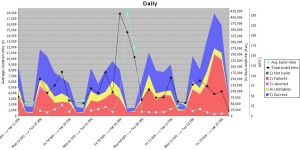

You need to know how many builds are happening on a daily and weekly basis. How much time is taken by various builds, what is the waiting period. This plugin give you enough data to answer the question. This plugin can provide you data as graph which can be further consumed.
- Job GeneratorPlugin–In big or growing organizations, its a bit difficult to maintain the jobs for a project when developers are working on various branches and releases. You want to give access to developers to create their own job and at the same time you don’t want developers to create arbitrary jobs which may not fall under company standards. This plugin gives you flexibility to define templates and developers can create new jobs with the help of job generator template. Configuration access can be disabled via roll-based authorization plugin.
- Disable-failed-job –In rapid development environments failing jobs due to various unnecessary reasons are a pain, It’s difficult to keep track of such jobs and disable/delete them. This plugin can solve the problem by defining the upper number of consecutive failed builds and then disable automatically.
- Embeddable-build-status –This plugin can give you a link which can be pasted anywhere (example github project) to expose the status of the build and users can get the current state of the job while looking at project.
- Exclusion –This plugin enables you to handle conflicts between jobs. You can assign a resource (or lock) in multiple jobs, when build is executed, it will acquire the lock and other builds (if fired) will wait until lock is released.
- GitHub/GitLab Pull Request Builder-This is one of the best plugins I found to provide support to automate code review up to a certain extent in github/gitlab. This plugin does amazing job once defined for the project. For any new pull request this plugin does fox merge and runs the build on the code as well as gathers the necessary static analysis (if configured) or build results and comment back the status to pull request. This helps reviewers get an idea of the health of the code which is going to be merged. You can even define automatic merge if build passes.
- Hudson Extended Read Permission Plugin- During initial days of Jenkins setting configuration access was not available to any developer to make sure they do not change anything but developers used to ask to view configurations to know how job has been setup, they may want to see the build steps. Extended read plugin can provide option to developer to view the configuration without giving them write access.
- Post+build+task –There may be a need for performing some actions on the basis of the results of a build, for example if build passed you may want to upload artifact(ex debian) to some repo (apt) or perform some packaging part or similar. In case of failure you may want to roll back something (like release) . This plugin helps you to define the pass/fail criteria and let’s you decide what to do after that.
- JDK Parameter Plugin–This plugin is useful for an organization where many projects are using different versions of java. This plugin let’s you choose the java version during run time of the build.
- Job Configuration History Plugin-Ah! This is one of my favorite plugins. This plugin lets you keep track of config changes in each build including who did it. You can easily revert back to any previous config if you want.
- Multiple SCMs plugin–Default SCM section provides only one source control tool/URL option, what if you want to check out from more than 2 repos from multiple source control tools (like svn and git). This plugin will come in handy in such scenarios. This plugin will facilitate users to add any number of SCM URLs to checkout the code.
- Parameterized Trigger plugin– Another one of my favorite plugins. This plugin allows you to have user input as a variable and use on run time. This is the most used plugin in dynamic environments where you have lots of options and user-defined values to be used in the build which may keep changing.
- Pre SCM BuildStep Plugin- Just like post build task plugin, you may have requirements to perform some action even before checkout happens for the job, for example you may want to perform merging of the branch before the build and then checkout. This plugin can come in handy in various conditions and gives you flexibility when running the job.
- SCM Sync Configuration Plugin-backup, this is the most important task of any administrator. Without regular backup, the whole system cannot be reliable; this plugin provides you features to backup live Jenkins configs to any source control tool. It will keep committing the config files (including Jenkins and jobs) to SCM repository as soon as there is any change.
- Configuration Slicing Plugin – This plugin comes in very handy when you want to make bulk changes in multiple jobs. This plugins allows you to change values of various fields like email, timer, shell script, configurations etc at one go.
These are my favorites, but like I wrote, there are 100’s of plugins for Jenkins available. What are some of your favorites?

HI Vishal, cuold you please help me out in this?
How Can I Edit Workspace File From Jenkins UI?
Changing random file via jenkins UI is not a good option, It would leave your files, build, jenkins in inconsistent state.
Change in the file can be done in various ways.
1. You can write script and put it in “execute shell script” section and change the content of any file. Be cautious, its pretty dangerous.
2. Run time you can use file parameter to pass the file with modified content.
3. Alternately you can explore https://wiki.jenkins-ci.org/display/JENKINS/Config+File+Provider+Plugin.
-Vishal
Go and find out on stackoverflow..
use the Env Inject plugin
Hi All,
Is it possible to build multiple/different versions of svn files for jenkins build.
For Ex: I have 3 files a, b & c. the version of file are like a-21,22,23, 24, b- 25,26,27, c-28,29,30.
So I have to build with this specific svn version a-22, b-27, c-28. (instead of the latest svn version 30)
How to configure this type of building in Jenkins.
Thank You
Create a tag in SVN with desired version of various files and perform the build on tag.
I don’t understand that sentence: <> :/
Here are my favorites (and a few other tested ones): https://doc.nuxeo.com/display/CORG/Jenkins+plugins
I have something to share with you!! my name is
Caroline Webb. Are you still crying that your lover
has left you and the kids for another woman/man?, you
don’t have to cry anymore because i was in the same
position till i found god baalam while i was going
through an article on how he has helped to bring back
people’s relationship.I contacted him and he helped my
situation within 48 hours, Now me and my lover are
living happily and we have a good family. he also
cured my sister’s breast cancer.he is capable of
solving any of your problems: 1)You want your ex back
2)You want to be promoted in your office. 3)If you
want to be cured of Cancers, herpes and other
diseases. 4)You want to be rich. 5)You want your
husband/wife to be yours forever. 6)Recover you
scammed or lost money back. 7)if you want to divorce
or stop your divorce. 8)Pregnancy spell to conceive
baby 9)if you want to win the troubling court cases
10)if you want to win lottery or betting winning.
Contact godbaalam temple for lasting solution today
Via Email: godbaalamtemple@gmail.com
Hi All,
Is there any possibilities to show your script utilization in UI.
For example, i have shell script for CPU disk utilization so i want to display CPU utilizations in graphical mode.
Is that possible with jenkins ?