Author: Stephen de Vries

  • Threat Modeling as a DevSecOps Practice

    Threat Modeling as a DevSecOps Practice

    Software engineers are always under pressure to build more software, faster.  At the same time, there is increasing regulatory and market pressure for secure software that meets users’ and regulators’ requirements for data privacy.  This dynamic often puts software engineers at odds with application security or product security teams.

    In fact, 81% of developer teams at large enterprises have launched applications that feature insecure code, according to one researcher, with half doing this on a regular basis. The firm argued that developers and security architects need a better relationship, and I couldn’t agree more.

    These technical teams are working towards the same goal, so it’s in everyone’s interests—particularly senior leadership—to create a more cohesive working environment by breaking down barriers between teams. If the security of a system is designed and enforced by an external security team—disconnected from the rest of the engineering team—then this only reinforces security as a separate silo. But companies can ease tensions by embedding the responsibility for security in the engineering teams themselves: This is the thinking behind DevSecOps. Thinking about security starts when engineers think about solving the problem: At design time.

    While the shift left movement was born two decades ago with the goal of ensuring product testing happened early in the development stage, I believe we need to start left to make real change. In adopting this culture, security and privacy will be less of a bolt-on afterthought and a built-in fixture within the development process, ensuring that engineers and security teams alike are aligned and have visibility of each other’s objectives. 

    By reimagining the build, test, fix, build, test, fix cycle through building an architecturally secure design in real-time, technical teams can detect software vulnerabilities sooner rather than later, which means more efficient product deployment. This is where the process of threat modeling as a business tool can be of great benefit.

    Historically, threat modeling was a static, slow and manual process conducted on whiteboards, as part of a workshop led by a third-party security expert who lacked institutional knowledge of the inner workings of the company. However, this has evolved dramatically into an easily implemented, automated security practice that can be baked into the development and security cycle from the outset, empowering organizations to start left.

    Through automated threat modeling, the security workload burden is relieved for both security architects and engineers. Companies are, in turn, better positioned to keep pace with the cadence of ongoing software rollouts, as an automated platform suggests security improvements as an application evolves. The launch phase bottleneck that’s typically created during the testing stage is therefore removed, as security requirements are identified prior to development—which means that risk is managed before a line of code is even written. Based on this, it should quickly become apparent what a time- and cost-saving exercise threat modeling is.

    No developer or security specialist wants a flawed product to hit the market, so it makes good business sense to adopt a new approach that will lead to better outcomes. Enterprises that introduce threat modeling as part of their development and cybersecurity processes will be on course to embed a true DevSecOps system within the company, transforming the relationship between these two departments.

    In my experience, culture and growth are the key factors for enterprises that decide to adjust their cybersecurity diet to include automated threat modeling. Convincing the app dev teams to invest time into the process is, by far, the most significant cultural hurdle to overcome, because they need to witness the benefits—and up until this point they’re disconnected from the AppSec process.

    Once equipped with the tools and knowledge, delivering secure design will be second nature to developers and a new collaborative culture will be created. In essence, the more teams are given oversight of and accountability for software design flaws, the easier it is to recognize how vital these preliminary checks are.

    Likewise, there comes a stage of business growth when the ‘security first’ and ‘start left’ mindsets are essential to keep enterprise project management on track—and this ties into the culture. As the rate of scale within a company begins to increase and the pace of software deployment must quicken in line with customer demand and market competitiveness, discovering flaws at the end of the design process just isn’t an option. 

    With developers and security teams responsible for vast amounts of code, product resilience on delivery is crucial and ensuring a robust DevSecOps culture is the route to success.

  • Automated Security Testing in a Continuous Delivery Pipeline

    Automated Security Testing in a Continuous Delivery Pipeline

    Automated unit, integration and acceptance tests are essential quality controls in running a reliable continuous integration or continuous delivery pipeline. Too often, security tests are left out of this process because of the erroneous belief that security testing is solely the domain of leather-jacket-wearing security experts.

    Security testing does not need special treatment

    We’ve made great strides automating many repetitive quality testing tasks and we can use the same approach to automating security tests. There will always be a need for intelligent human testing both for security and quality, but that doesn’t mean that all security testing must be manually driven. A large proportion of security tests are essentially checks that known weaknesses have not been introduced and these lend themselves superbly to automation. In fact, using a human to perform these types of checks is a terrible waste of resources.

    From an automation point of view, security tests can be categorised as follows:

    1. Functional Security Tests.
      These are essentially the same as automated acceptance tests, but targeted at verifying that security features such as
      authentication and logout, work as expected. They can mostly be automated using existing acceptance testing browser automation tools like Selenium/WebDriver.
    2. Specific non-functional tests against known weaknesses.
      Includes testing known weaknesses and mis-configurations such as lack of the HttpOnly flag on session cookies, or use of known weak SSL suites and ciphers. These are particularly well suited for automation because the weaknesses are known up front (if not by the development team, then by the security team). What’s more is that these tests lend themselves to a TDD approach in that they can serve as the security specification before building the application and environment.
      Some work has already been done in extracting these types of tests into security test automation frameworks, see: BDD-Security (I’m the author), Mittn by F-Secure and Gauntlt.
      Because these test non-functional aspects of the application, they need access to the HTTP layer which browser automation tools do not provide. So testing these requires a hybrid approach: Browser automation together with a proxy server to inspect and inject requests. My preferred combination here is WebDriver with OWASP ZAP.
    3. Security scanning of the application and infrastructure.
      Even manually driven penetration tests usually kick off with an automated scan using vulnerability scanning tools like Nessus, Burp and OWASP ZAP. It’s worthwhile understanding the difference between these tools and how they’re used. Nessus if primarily an infrastructure scanner in that it’ll test an IP address and all exposed ports for known weaknesses. It also includes a “web” scanning component that will test HTTP services for similar known weaknesses, but the scanning at the web tier is extremely superficial. For example, Nessus would not be able to scan any content or functionality behind the login form, nor navigate through a web wizard.
      Burp Intruder (Commercial) and OWASP ZAP (Open Source) are focussed on the web tier and are true application scanners in that they inspect and test at the HTTP layer by injecting attack data into parameters and evaluating the application’s response. They can provide in-depth security scanning if they’re used correctly. But if they’re simply used to spider the application and run an automated test then there’s a good chance that they won’t find or test all the available content.
      To successfully automate application scanning, one should ensure that all of the content to be scanned is navigated and populated in the scanning tool, before starting to spider and scan the application. If you already have acceptance tests that drive a browser, then these can be re-used to populate the Burp or ZAP content before kicking off a scan.
    4. Security testing application logic.
      Automated tools can only go so far in detecting security flaws. Toidentify flaws in the logic of the application requires a human brain (at time of writing). From an automated scanner’s point of view an online auction site and an online bank are the same type of application, i.e. a series of HTTP requests. But from a human attacker’s point of view, they are vastly different beasts offering very different functions. A human security tester might try tests such as:

      • Can I manipulate the HTTP Request to bid on an item that has already ended?
      • Can I manipulate the HTTP Request to bid with a high amount, and then modify that amount to a lower amount just before the auction ends?
      • Can I transfer funds to someone else’s account using a negative number as the value?

      These require ingenuity and experience to find, but once the attack is defined they too can be recorded as automated tests and become a part of the security regression tests.

    Screen-Shot-2015-03-18-at-21.21.253

    Walk before running

    If you’re just embarking on the journey to automate security tests, the above steps may seem daunting. But it’s not necessary to implement all of them to reap the benefits of automated security testing. Points 2 and 3 probably represent the greatest value in terms of time invested vs. security value extracted since they help identify a lot of common security flaws that slip through the cracks in a normal development process.

    Any testing framework can be used to orchestrate and run these tests but in the true spirit of SecDevOps, it would be good to choose one that the development, operational and security teams are comfortable using- and that easily integrates with your CI/CD server. I’m partial to the BDD frameworks because their use of a natural language to define the testing steps means that they’re instantly understandable by a wide audience and makes them very attractive for use as security-tests-as-specifications. But some teams that are well versed in programming language X may find this additional, natural language layer, superfluous.

    Point 3 above requires an additional step if we want to integrate those tests into a CI/CD environment. The other tests all have clearly defined passing and failing criteria, but running an automated scanning tool typically results in a number of false positive results: security issues reported by the tool which aren’t actually risks. Manual security tests that use automated tools include a process of investigating and removing these false positives. Automated tests would have to do the same thing and also specify a success criteria. This can be done by wrapping the scanning operation in a test and specifying the known false positives given a particular scanning tool and target.

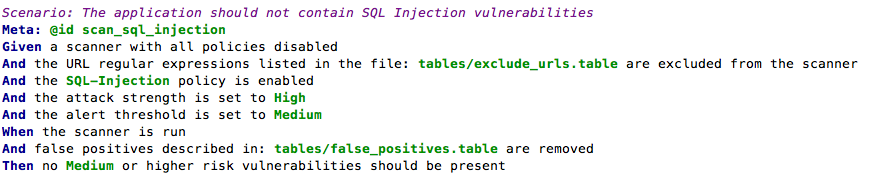
    For example, the BDD-Security framework performs an automated scan for SQL injection vulnerabilities using the following test:

    SQL injection scanning example

    and the additional text file: tables/false_positives.table to define the known false positives to ignore:

    false positives example

    The final step in the test defines the success criteria and would need to be selected based on the security requirements of the application and the scanning tool used.

    When to run the tests

    Since they’re automated, the cost of running the tests is very low, so naturally we’d want to fail fast and run them as early as possible. But security issues are typically found at the component level and are difficult to test at the unit/class level. So testing at the application tier should be done on a running application. In other words, at the same time as automated acceptance tests.

    Testing the security of the infrastructure should be performed on an as-near-to-live as possible environment. This will typically be a pre-production environment. And of course, since running the tests doesn’t cost anything, there’s a good argument for performing the same tests in production as well- continuously.

    Blocking tests or in parallel?

    As a security practitioner, I would love to see security tests as part of the CD process and blocking delivery if tests fail. But in reality this may not be practical for all teams; and it’s ultimately a cultural question of how deeply security is integrated into the dev and ops teams.

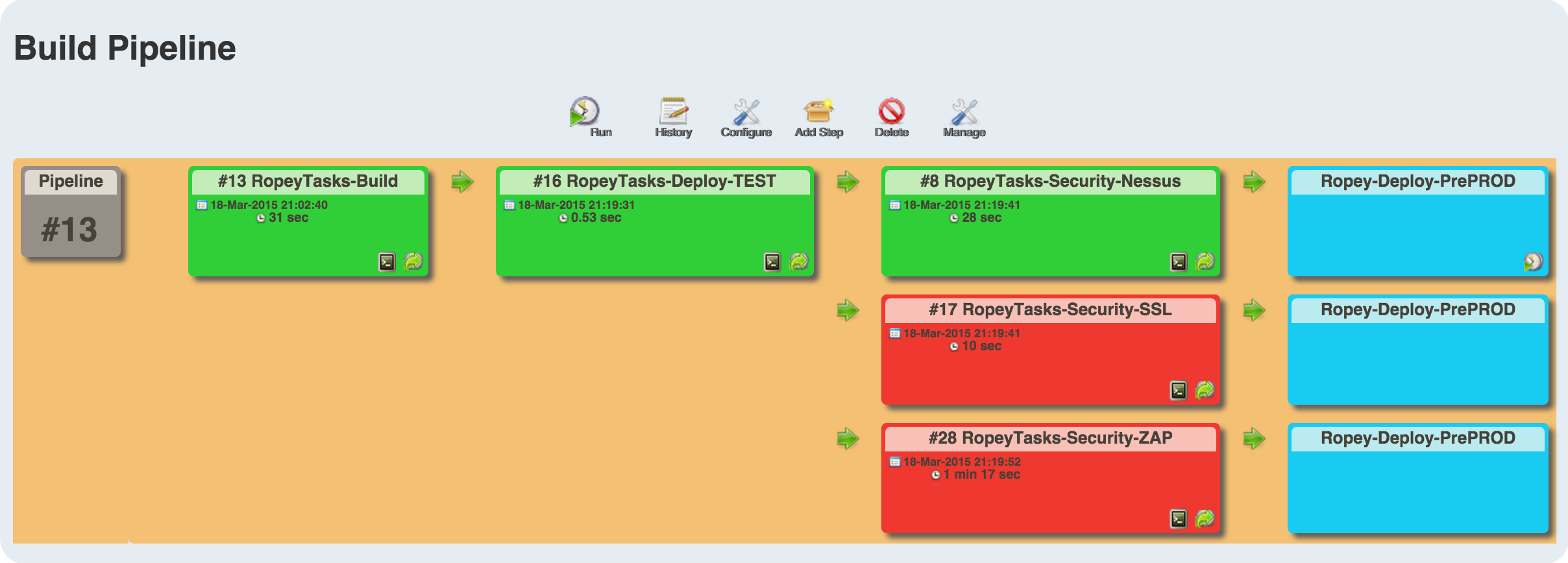
    For those who’ve not achieved SecDevOps Nirvana, the tests can be run in parallel to the build with supervision by the security team. It’s then the security team’s responsibility to manually block delivery if test failures indicate the presence of unacceptable risk.

    CI Server Integration

    How well the security tests integrate with the CI server depends on the testing framework and CI choice. Java, Python and Ruby testing frameworks are likely to be supported by all the major CI servers. Using Jenkins and JBehave, which produces both JUnit and HTML reports, the tests output would be:
    xunit-test-results

    bdd-report-ssl-snippet