Category: Features

  • Five Top Tips for Cloud and DevOps Automation

    Five Top Tips for Cloud and DevOps Automation

    A while back, I overheard someone asking why many of the ‘cloudy people’ have moved on to DevOps.

    One reason is certainly that cloud is at the heart of DevOps. Many of the grounding principles of DevOps – rapid iteration, agile development, automated testing, continuous delivery and continuous integration – are barely even possible without cloud. However, I think it runs even deeper than that. DevOps and Cloud are both fundamentally enabled by the same technology I have been working with my entire career – automation.

    When IT leaders get excited about cloud, it is mainly because of automation. Sure, cloud providers get excited about essential characteristics like broad network access and resource pooling, because that is how they maximize reach and minimize costs. Similarly, CFOs get excited about the measured service, because that means they only pay for what they use.

    However, according to a recent Luth Research study, most IT leaders prioritize the higher-order values enabled by on-demand self-service and rapid elasticity – faster innovation, superior performance, better scalability and higher resiliency. These capabilities are deeply rooted in automation – of provisioning, deployment, configuration, scale-up/scale-out and other processes.

    Similarly, DevOps – beyond a certain point – also builds on a foundation of automation. As Rackspace CTO John Engates noted in his recent column in this journal, “DevOps is more than a set of automation tools.” He is right, of course. You can achieve a great deal through cultural and structural changes – better collaboration, shared goals, team building, process improvements, etc.

    However, tools for release automation, configuration automation, process automation, test automation, service virtualization and provisioning – just to name a few – are adding tremendous value with a rapidly maturing DevOps automation toolchain. Indeed, in recent research from Vanson-Bourne, over half of senior IT decision-makers worldwide rate automation as the most important DevOps component – above such putative stalwarts as agile development, collaborative teaming and process alignment.

    Looking at the history of enterprise automation, and considering my own experience, I believe there are many common principles that you can apply to both cloud and DevOps. Here are just five of my top tips:

    Don’t Automate Bad Processes

    Automating bad process just makes bad things happen faster. This seems obvious, but I often see automation that only encodes (and accelerates) a bad existing practice. To avoid a high-speed train wreck, first identify, catalog, document, review and refine key manual processes to make sure you are automating the right activities, at the right time, in the right way. Solve for simplicity, speed and throughput, even before you apply automation. Remove friction across silo boundaries – departmental, technological and disciplinary. Start simple, be inquisitive, and iterate methodically. Then make sure you automate deeply, thoroughly and efficiently.

    Cross-skill Existing Resources

    Great people are hard to find and salaries for cloud- and devops-relevant skills are amongst the highest in IT. This explains why, according to the same Vanson Bourne research, over 70 percent of DevOps leaders are retraining existing personnel, while only 50 percent are hiring new resources. Look for staff with a history of automation in their resume, through multiple waves of technical change, rather than specialists in one automation technology or product. Find the IT equivalent of a “good athlete” rather than a “position player”.

    Security Cannot Be an Afterthought

    Automation systems and the staff responsible for them have always needed highly privileged (and frequently shared) user IDs, whether automating a mainframe IPL or scripting a production code release. This is an audit red flag, and can result in high-impact incidents, whether accidental or malicious. Identity and access management provides essential audit and control, while giving users (including automation tools and APIs) easy access to the resources they need (locally and in the cloud), when they need them.

    Document, Measure, and Backup

    If you do it right, automation quickly becomes pervasive and mission-critical. Without documentation, you create inscrutable systems, tribal knowledge, the hero and other ‘anti-patterns‘ in your Cloud or DevOps machine. Without measurement, you cannot know if (or when) complex autonomous systems run amok or stop working. Without backups, critical systems are prone to irrecoverable failure. Cloud and DevOps teams must value and prove traditional disciplines like documentation, measurement and backup – painful as they may be.

    Build Awareness into Automation

    As automation becomes mission-critical, it must be resilient to errors, failures, exceptions and other unexpected conditions, and still deliver a correct result. Remember when ‘autonomic computing’ was a thing, when we dreamt of ‘self-aware’ systems? Similarly, concepts like ‘desired state’ and ‘idempotence’ go back at least as far as mainframe and server automation. Similar concepts apply to cloud computing and DevOps too. In both, it is critical that automation routines are aware – of their own state and of the surrounding environment – so that they can test for and accommodate unexpected conditions, and still deliver the expected results.

    Given the depth of history in automation, and the many parallels with modern computing, some may claim that cloud is nothing new, that we have been doing that since the mainframe; while others will say something similar about DevOps. I think they are wrong, but there are definitely parallels, and George Santayana has a point – we should be at least informed by history, if we are going to try to write the future, while avoiding the mistakes of the past.

  • The US Air Force was doing ‘DevOps’ before it was cool

    The US Air Force was doing ‘DevOps’ before it was cool

    One of the pillars of DevOps is the obliteration of traditional silos, and the ability for cross-functional teams to work together to just get things done. While the concept may be new for developers and businesses, the United States Air Force already demonstrated the power of this philosophy during Operation Desert Storm more than 20 years ago.

    “DevOps” – Air Force Style

    The US Air Force is configured primarily in separate units, or silos. Generally, a base or wing is comprised of a single type of aircraft. C-130 transports, KC-135 refueling planes, F-15 fighter jets, A-10 ground engagement aircraft, and F-111 bombers each had their own base of operations, and separate command and control infrastructures. During Desert Storm, though, a new Composite Wing was formed, which included a cross-section of all of these aircraft and Air Force resources tasked to work closely together with one chain of command.

    Air Force Brigadier General Lee Downer wrote about the formation of, and experience with the Composite Wing in an Airpower Journal article in late 1991. In essence, by removing layers of red tape and bureaucracy, and putting all of the required assets and resources under one command, the 7440th Composite Wing was able to operate with unprecedented efficiency and effectiveness.

    Downer concluded with these thoughts: “The 7440th Composite Wing’s achievements are now a part of history. The efforts to get the wing into the war are a special success story that should be told in more detail in the future. As is usually the case, once the decision to go was made, the success of the effort was up to the people who were tasked to make it work. Their accomplishments clearly show that they assumed the challenge with a great deal of enthusiasm and skill. They knew their jobs, did not hesitate to make decisions, and kept improving the operation as they became seasoned and experienced.”

    I can speak personally about the success of the 7440th Composite Wing as well. I was serving in the Air Force at the time, and I was deployed to Incirlik AB as a part of the Composite Wing effort for both Operation Desert Shield and Operation Desert Storm. While my role was traditionally focused on, and restricted to working with F-111 bombers, the exact same technology was also used with other aircraft from other bases.

    During Operation Desert Shield, while working as a part of the 7440th Composite Wing, those barriers were removed and I was given the freedom to do what I did best without regard for the aircraft or what base it originated from. It was a much more logical and effective use of resources—in this case the resource being me.

    Fast Forward 20 Years

    The same concepts and philosophy the US military embraced during Desert Shield form the foundation of the DevOps movement today. The goal is to minimize friction, and empower people to do what they do best with minimal obstacles.

    By removing the barriers between different teams and departments, and allowing people to work together in ways that make sense, organizations are able to get more done, in less time, and get it done more efficiently.

    You don’t have to create a formal merger of assets and resources like the US Air Force did with the Composite Wing. While it did facilitate better integration, and greater effectiveness, defining the resources of the merged team is its own silo in a way, and still puts limitations on what the new team can accomplish.

    You should, however, embrace the essence of the concept—which is to remove obstacles and allow individuals and teams the freedom to share resources, and collaborate together to achieve goals without unnecessary red tape or bureaucracy.

  • Log Data as a Valuable Tool in the DevOps Lifecycle (and Beyond)

    Log Data as a Valuable Tool in the DevOps Lifecycle (and Beyond)

    As many of us embrace DevOps, developers have to think beyond delivering code that is taken by “operations” to be deployed, run and monitored in production environments. DevOps instead focuses on breaking down silos within organizations and sharing the responsibility of development and operations such that developers are now more conscious of how their code will run in a production environment. They also play a critical role in the process of deploying, monitoring and operating the applications they write.

    Thus the responsibilities of developers can now span from development and testing, to deployment and monitoring, to gathering business metrics from production environments – i.e. they now follow a DevOps lifecycle rather than a development lifecycle. The focus of these responsibilities can change slightly depending on which stage an application is at in its maturity model. In this post, we first outline three high-level stages of an application’s maturity and then look at how logs can serve as a valuable tool at each of the different stages and in particular for teams following a DevOps methodology.

    The Stages of Application Maturity:

    1. Stage 1 – Initial system development and prototyping: When organizations embark on new projects, they usually have a small team iteratively develop an initial prototype before throwing the weight of a large development team behind it..This prototype is used to test any hypothesis and initial functionality; it limits risk and allows for an iterative feedback loop from early users. More and more often, prototypes are being quickly developed on cloud infrastructures where the initial development team plays the role of developing the system, selecting and managing the infrastructure, deploying the application, as well as putting in place initial monitoring for the running system. Only after an initial user group has used the system, provided feedback and helped prove a hypothesis will the system will move into a “go-live” state in the real world.
    1. Stage 2 – System going live: When an application moves from being a prototype to “going live,” an organization has made the decision that the project is worth pursuing and there is potential value in extending the system to a wider audience. This can involve investing in a larger development team, a larger infrastructure to handle real-user load, as well as marketing budgets to get the word out on this new offering. At this stage, focus can shift from initial concepts to building out more advanced and robust capabilities – ensuring service uptime, performance and reliability.
    2. Stage 3 – System generating value: If a system moves into a stage of creating value for the business, a number of new stakeholders can arrive on the scene with new requirements. Typically product managers and marketing teams will have requirements on how a new application’s features are being used, how an application’s marketing campaigns are tracking and how cohorts of users are flowing through the sales funnel. These new stakeholders are largely concerned with different business metrics and how they can be obtained from the running system.

    So where and why log data?

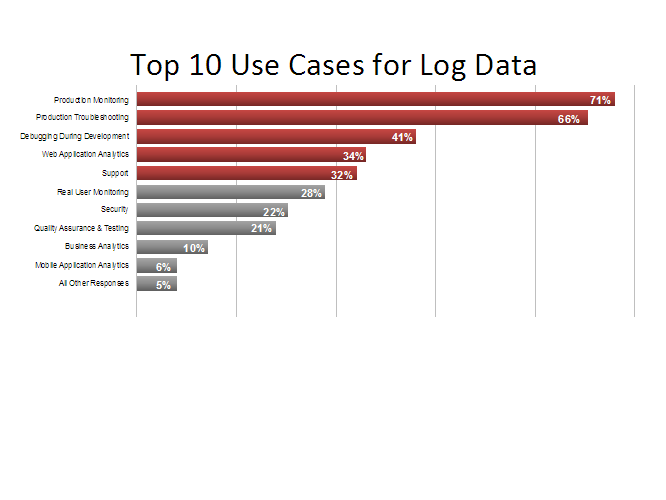
    While log data has traditionally been used by developers for debugging purposes (i.e. investigating exceptions stack traces), more recently log data is being applied for a much wider set of use cases.  A recent survey carried out across a sample of 25,000 log management users shows a breakdown of the following use cases:

    logos

    Results from a recent survey from a sample set across 25k users who were asked: “What are the top use cases for your logs?”

    As applications move across the different stages of maturity above, logs act as a valuable tool to assist with the insights required by the different stages of the DevOps lifecycle – e.g., during development activities, testing, production monitoring, and web and business analytics. In fact, logs provide a single data stream that can act as a common language across these different tasks.

    Because of this shift, it is important to look at how logs can be applied to assist with DevOps-related responsibilities during the different stages of application maturity:

    How logs are applied during application maturity stage 1

    The ability to apply agile development and testing are key during this phase such that early prototypes are iterated upon and hypothesis proved out:

    Logs as a debugging tool: Logs have always been a valuable debugging tool and continue to be so. They can capture events at different severity levels from every layer of the software stack (operating systems, web servers, databases, your software) and from across all devices (mobile devices, servers, routers, firewalls). During development, verbose logging can be enabled to give incredibly detailed information on the system as it executes. Today’s log management technologies are particularly useful as they allow you to utilize the benefits of verbose logging to easily cut through the noise and identify key events when exceptions occur. They also all allow for fast searching of key events in an extremely large volume of log data.

    Logs for system load and performance testing: Before a system goes live, system load and performance testing is often performed to give a level of confidence that real-world loads can be handled by the application. Load testing tools will often measure system response times to make sure that the system is performing well even under heavy loads. However, log data should also be analyzed during such tests to make sure high levels of exceptions are not being thrown and that the system is behaving “under the hood” as expected.

    How logs are applied during application maturity stage 2

    Production monitoring and troubleshooting can be a key focus during this stage of a system’s maturity given that any downtime can be particularly costly from a monetary and reputational perspective once a system goes live.

    Log for production monitoring: Production monitoring is fast becoming a leading use case for log data. Real-time processing capabilities of log management solutions now mean that log events can be parsed in real time, and important metrics can be extracted and visualized in high-level monitoring dashboards. Furthermore, real-time alerting can be applied to give notifications when important system events occur or particular thresholds are breached.

    Logs for production troubleshooting: Logs no longer simply contain exceptions and stack traces but are instead a blend of information from a range of different sources that can be correlated to allow for quick troubleshooting. This is especially important when there are issues in production. For example, logs will regularly now contain: server resource usage information, application performance metrics, feature usage information, exceptions and errors. This blend of information, which was traditionally only available by utilizing a number of other tools, is now available in a single location via a standard log management solution.

    How logs are applied during application maturity stage 3

    When an application begins to create value, product and marketing stakeholders will want to focus on usage and business metrics. While this information may go beyond the typical DevOps lifecycle, it is becoming more and more common for developers following a DevOps methodology to be tasked with gathering such information.

    Logs for web analytics: Analyzing website trends is not something typically associated with someone in a DevOps role and is usually the mainstay of marketing folks. However, developers are often engaged to collect this data for different parts of the organization. Logs provide a lightweight way to understand who is accessing an application, how often and from where. For starters, a lot of this information is already contained in web server logs without any additional instrumentation required. Furthermore, logs can give not only an aggregate view of web trends, but also allow the drill down to a per-user view to analyze behaviors at an individual user or account level.

    Logs for business metrics: Today’s log management technologies allow you to extract field-level values and can aggregate them and roll them up into high-level metrics dashboards. Thus,,logs can be used to not only understand a systems performance and usage trends, but also to aggregate business metrics such as signups per day, number of transactions, the value of those transactions, etc. However, the real benefit of using logs for metrics dashboards, in my opinion, is that they maintain the evidence. In other words, they allow you to easily validate any trends or changes in your system or business’ behavior. This has traditionally been a painful task, as it often involves engineering cycles/checking database tables, etc. Now, logs allow you to immediately drill down from a high-level view to the log-level to quickly view and understand the individual events that may have led to a spike in a key performance indicator.

    After spending many years talking to thousands of log management users, I am continuing to see logs become more and more critical to the different stages of an application’s maturity. The DevOps movement has greatly assisted with this because the same team or individual responsible for initial prototype development may also be responsible for production monitoring or gathering business metrics for that matter.  The value of logs is now being recognized early in the DevOps lifecycle, and the power of log data is quickly expanding across a range of different functions.

    This article is by Trevor Parsons, PhD, Co-founder and Chief Scientist, Logentries

  • The 7 skills Ops pros need to succeed with DevOps

    The 7 skills Ops pros need to succeed with DevOps

    There’s a lot of confusion about what DevOps exactly is, and what it takes for enterprises and individuals alike to succeed. Some argue it’s about successfully using collaboration toolsets. It’s not. DevOps is about collaboration between software developers and IT operations teams. DevOps grew from the need for a more agile organization, and to knock down the barriers between development and operations so that applications and IT resources could be delivered more quickly, and improved through steady iteration.

    What does all of this mean, specifically, to operations professionals – and the skills they need sharp to thrive? The walls coming down are a bit of a culture clash for most large enterprise operations and development teams. And both developers and operations professionals need to ensure that they have the right skills in place to succeed in this new environment. In this post, we’re focusing on those skills ops members need in the years ahead.

    The skills that are important may surprise some. Consider the findings from CA Technologies’ recently commissioned a study, What Smart Businesses Know About DevOps. “The most in-demand skill requirements for success with DevOps were actually soft skills,” says Andi Mann vice president of strategic solutions at CA Technologies. “I expected to see skills like programming or scripting; experience with specific tools for provisioning, configuration management, release automation, or shared monitoring; or even an understanding of Agile or Lean practices. In fact, those skills were much lower,” Mann says.

    More on the results from the CA study below, but first we want to share the results of our informal anecdotal survey of a handful of DevOps experts and practitioners, well known here at staging-devopsy.kinsta.cloud. Here they are:

    First Up: The Soft Skills
    Interestingly, it is these soft skills that are both needed and often derided. “Everyone doing DevOps, whether Dev, Ops, security, QA, project management all need [soft skills],” says David Mortman, chief security architect and distinguished engineer at Dell, Enstratius.

    1. The ability to communicate clearly and concisely
    “Sharing is a key tenet of DevOps and if you can’t share what you know and what you’ve learned, then having that knowledge is effectively useless. You’ve just made yourself a bottleneck,” Mortman says. The other skill Mortman cited along these lines is striving to actually understand the shoes in which your fellow enterprise collaborators stand. “I can’t emphasize enough the value of having empathy for everyone else and what they need to get done. Every role has its challenges and empathy for those challenges goes a long way to a more congenial workplace,” he says.

    2. Collaboration techniques
    New collaboration techniques are essential, explains Donnie Berkholz
    IT industry analyst at RedMonk, and council member and Sr. developer at Gentoo Linux. “Ops will need to learn effective, distributed collaboration techniques such as those used in open-source software development. Leading-edge DevOps organizations make heavy use of online chat and shared tooling to log both communication as well as action. In some pioneers, this even involves so-called “ChatOps” where you can make changes to infrastructure through calls to an automated bot in an online chat. Typically this includes asynchronous communication in preference to phone calls, both long-form (e.g. email) and short-form (e.g. IRC), in an archived and searchable form,” he says.

    This enables, Berkholz says, on-call ops during any crises or fires that arise, as well as eases the ability to identify and brainstorm infrastructure changes, where everyone can easily contribute their ideas.

    3. A flexible mindset
    We’re not necessarily talking about advanced forms of mental Yoga, but certainly the ability to change as knowledge and conditions change, whether those changes are technical or business driven. “The willingness to make changes and to evaluate alternate options is key to DevOps. Things are going to fail, you or a decision you’ve made are going to be the cause of that failure. Or things just won’t work as well as you’d hoped or thought. Be willing to change your mind and look for better options,” says Mortman.

    4. Good enough is never enough
    It’s about consistently seeking continuous improvement. “This mindset is laser focused on continuous improvement daily,” says BEHR. “It is the ability to unlearn and acquire new more relevant knowledge in light of complexity and emergent information – then disconfirm it with the scientific method and move on to application only where relevant,” says Kevin Behr chief science officer at CXO advisory and board advisory practice Assemblage Pointe, Inc.

    Next up: The Technical Skills

    Understanding of modern software engineering
    5. “To move to a world of “infrastructure as code,” where all systems are maintained using configuration-management tools such as Puppet or Chef, including version control, unit and integration testing, agile software development, as well as continuous delivery and deployment models,” says Berkholz. “Traditional sysadmins may still live in a world of login prompts and manual edits of configuration files, so this will be perhaps the largest hurdle in terms of knowledge,” Berkholz estimates.

    “The technical mindset I look for are skills which allow a team to treat servers more like cattle and less like cats,” says Andrew Storms Sr. director DevOps at CloudPassage. “To work effectively at that kind of systems mentality, DevOps engineers need programming and systems architectural skills. Whether that means Ruby or Python or whatever is needed to effectively work with orchestration tools, APIs, and automation. It’s less about needing to know a specific programing language more about understanding programing algorithms and robust systems design,” Storms says.

    6. Modern software architecture
    This includes cloud deployment and administration as well as distributed systems. “As we move to a cloudy world of software, ops will need to deploy, maintain, monitor, and troubleshoot production problems with this infrastructure. And yet in many cases it’s much more complex than the previous equivalent, although it brings with it significant benefits in agility and uptime if done right. Ops will need to familiarize themselves with cloud instances and services, as well as lower-level software infrastructure such as Linux distributions and databases when deployed in a cloud,” says Berkholz.

    That also includes taking a step back from the trees to consistently stay aware of the forest. “Seeing the system and its boundaries rather than just the tasks and their due dates. This understanding of the interactions between the various actors in a system and [understanding] just how those interactions are making value occur is fundamental,” he says. “Without this understanding we will not know when to push harder versus be silent,” he says.

    7. Understanding that security incident response are continuous efforts
    Security and safety in the new DevOps environment needs to embrace new ways of addressing security and QA. “This requires continually emergent solutions rather than using ‘tried and true best practices.’ The effective team will evolve through relentless self evaluation, study, and application of more relevant and effective methods to work in complex infrastructure environments,” says Behr.

    That’s all great advice, and certainly not all inclusive of the ideal skillsets. We also found it interesting that CA Technologies’ survey of 1,300 senior IT decision makers echoed the need for broader business and so-called soft communication skills when it came to DevOps success.

    These included: knowledge of business priorities/strategies/metrics (47%), knowledge of current business processes (42%), communication skills (36%), and project management and people skills both scoring 30%. In fact, experience with specific tools was dead last in the survey at 12%.

  • Citrix puts DevOps front and center

    Citrix puts DevOps front and center

    I had the privilege of attending Citrix Synergy 2014 in Anaheim at the beginning of May. Citrix unveiled a variety of new and updated products, but one announcement in particular surprised me a little. Citrix talked about new capabilities for automation with a very DevOps-ish approach.

    During a keynote presentation at Citrix Synergy 2014, Sudhakar Ramakrishna, senior vice president and general manager for the enterprise and service provider division at Citrix talked about automatic provisioning through Xen Desktop, and creating blueprints for deployment. He didn’t overtly call it DevOps during the keynote, but it all seemed very similar to what other DevOps tools and services accomplish.

    I followed up with Citrix, and had a conversation with Steve Shah. Shah told me that DevOps is absolutely front and center in the thought process for Citrix when it comes to developing products and services for its customers, as well as for mapping out its future strategies.

    Shah was at one point a bit of a DevOps naysayer. In an article in 2011, Shah questioned the credibility of DevOps and wondered whether it would survive as an actual thing, or if it was really just a flash-in-the-pan buzzword. Three years later and still gaining momentum, I think we can safely say that Shah’s doom and gloom assessment was off base.

    Citrix understands the need and the value for automating routine aspects of provisioning and managing virtual systems. According to Shah, though, one of the things Citrix has noted about the broader landscape is that there is no clear platform for doing DevOps. There are a wide variety of tools and services with a few leaders, but no clear “winner”.

    Shah told me that Citrix is only one part of a much larger solution, and it respects that it has to play nice with a wide variety of other products and services, or customers will find other solutions. There are too many unique, custom applications out there for Citrix to individually address them all, so Citrix has instead focused on creating open APIs that enable vendors or customers to develop their own methods of integrating with Citrix.

    Another area where Citrix has embraced DevOps—whether it is openly called that or not—is through the use of Blueprints. Citrix determined that there are certain deployment scenarios that are very common for customers across all industries. Rather than having each one of them struggle to develop their own solutions, Citrix designed Blueprints of common scenarios that customers can use as a foundation for their own environments—similar in many respects to the Recipes and Cookbooks used with Chef, a popular DevOps platform.

    My revelations from the Citrix Synergy keynote, and my subsequent conversation with Citrix made two things clear. First, many organizations may be embracing elements of DevOps without even realizing or calling it that. There are things that just make sense when managing a large, rapidly evolving environment that naturally lead to implementing aspects of DevOps. Flipping that point upside down, those same needs are more or less the origin of the DevOps movement.

    Second, DevOps is gaining momentum and becoming more mainstream as time goes on. While many still struggle to define DevOps, it shows up in day-to-day operations, and in the platforms and tools organizations use whether they understand it or not, and whether they call it DevOps or not.

  • Two Ways DevOps Unlocks the True Potential of Agile

    Two Ways DevOps Unlocks the True Potential of Agile

    In a recent post on InformationWeek, Erik Weber, a professional Scrum trainer and Agile expert, explores four signs that you’re doing Agile development wrong. Upon finishing the article, I was reminded that Agile in theory is often very different from Agile in practice, and when that gap exists within IT, it can have massive consequences on both development operations and the business.

    At the risk of stealing some of Mr. Weber’s thunder, I’m going to spoil the first two signs he discusses – namely, “failure to ‘get done’” and “failure to launch” – because I believe they are common challenges for many IT groups. The good news is, organizations can close their gaps and realize the true value of Agile development by incorporating DevOps processes and tools into their systems development life cycle (SDLC).

    Getting to “Done” Faster

    “If it takes you longer than a few weeks to turn an idea into a production-ready feature, you are not Agile – full stop,” says Weber, and I would agree. The whole point of Agile was to move away from the slow, monolithic development methodologies of the past by breaking the process into smaller chunks and having developers, testers and business development people working concurrently to speed new features to market. Most Agile practitioners would say they’re doing just that, but many are still not “getting to done” as fast as they would like. Why is that?

    According to Weber, the biggest problem is that many IT groups leverage Agile techniques for development, but then do all of the testing at the end. Obviously, this creates numerous problems that can delay project completion. As we all know, the later bugs and glitches appear in the SDLC, the longer it takes to fix them. When that happens, costs go up, delivery pushes out and customers are unhappy.

    The DevOps principle to employ here is getting the operations team involved in testing earlier in the SDLC – essentially shifting their work left – and the tool that can help is service virtualization. By simulating constrained or unavailable systems across the SDLC, service virtualization enables developers, testers and performance teams to work in parallel for faster delivery and higher application quality and reliability. With DevOps, they can realize truly parallel Agile development without constraints – and ultimately get to “done” faster.

    From “Failure to Launch” to Continuous Delivery

    “If you haven’t actually released your software to production – and on to customers – for three or more months, you are missing the big picture,” argues Weber. He believes that many product managers and executives hold back official product releases because they “must have all the features,” and when this happens, they forfeit the ability to both get new features into customers’ hands on a regular basis and react more nimbly to their wants and needs.

    There are numerous reasons why the “all features” mindset persists, but a good way to prove its obsolescence is by incorporating the DevOps principle of continuous delivery into the development process. Continuous delivery means always being in a ready state for pushing applications and services through the SDLC and into customers’ hands – and release automation is the tool that helps organizations reach that state.

    Release automation enables continuous delivery by automating complex, multi-tier release deployments through orchestration and promotion of applications from development through production. As a result, visibility improves across an organization’s deployment chain, giving it the flexibility and agility to continually release new features to market and react quickly to changing market demands. Once an IT organization reaches a state of continuous delivery, it becomes easier for executives and product managers to pull the trigger on a given release – because they know that the next one isn’t far behind.

    Agile is as Agile Does

    Weber offers four signs of ineffective Agile development in his article, but I would argue that there is a unified idea running through them all: It’s not enough to employ Agile practices; you have to follow through until you meet your Agile goals. Ask yourself, “Are we really delivering releases to market faster, at a higher quality and at lower cost to the business?” If the answer is “no,” the right DevOps methodologies and tools might be just what you need to put these failures behind you and finally realize the true value of Agile development.

  • Inject failure to make your systems more reliable

    Inject failure to make your systems more reliable

    Injecting failure into your infrastructure to test your services resilience has been gaining popularity. Most people think of Netflix and their use of “Chaos Monkey”, in fact, they have an entire “Simian Army” of tests and drills they run to make their systems more reliable. At PagerDuty, we couldn’t just copy what has been published about their practices. Instead we needed an approach that would work for us. We have a relatively small infrastructure compared to Netflix and wanted to develop a practice that enables a team of our size. In response to this need, we created Failure Friday.

    The idea behind it is simple: We block off an hour of time and deliberately shut down certain pieces of our infrastructure to see how our service holds up. For example, our first attack will test process failure. We’ll typically run something like “sudo service cassandra stop” command, keeping the service down for about 5 minutes. In this time, our service should be resilient enough to continue processing traffic. If not, immediate action will be required. The main goal of injecting failure into our systems, of course, is to establish what will happen in the event of a node, datacenter or network outage. We can then use this knowledge to make our infrastructure more fault-tolerant.

    Benefits of Breaking Your Systems… On Purpose

    On the surface, injecting failure into your systems seems counter intuitive. Why break your systems, especially on a Friday just before everyone is about to go enjoy their weekend? Since beginning our weekly failure testing in June 2013, our results have uncovered a number of benefits, which we believe give reason for all teams to develop failure testing scenarios of their own.

    • Uncover implementation issues that may reduce resiliency. We have the opportunity to fix this issue before they cause an outage resulting in an alert outside of business hours.
    • Proactively discover deficiencies in our infrastructure. These deficiencies may eventually become the root cause of an outage, allowing us to fix them before they break in the wild.
    • Builds a strong team culture. By coming together as a team once a week, we share knowledge. Our Ops team learns how the development teams debug production issues, while Devs gain a better understanding of how their software is deployed.
    • Helps us onboard new employees. Failure Friday has allows us to walk through actual failure and alerting scenarios with new hires so they can shadow and learn to handle outages at 11 AM instead of 3:00 AM.
    • Adjust alerting and on-call schedules. Team members participating in failure testing should receive all the alerts that they would during an unexpected outage. This is a great opportunity to make adjustments to limit noise and also ensure you are receiving all of your critical alerts. When we get an alert, but no action was required we know we need to make adjustments to your monitoring thresholds. Or if we don’t receive an alert, but we need to take action, we need to adjust our thresholds so we don’t miss that or a similar alert in the next time.
    • Reminds us that failures are inevitable. Failure is not a just a random freak occurrence, it can and will happen. All code that engineering teams write is now tested against how it will survive during a Failure Friday scenario.

    Develop Your Own Failure Friday

    When you consider putting together your own version of Failure Friday you must remember that communication between teams is key. Failure Friday will not likely be successful if performed by individual teams.

    Step 1: Bring your teams together.

    Get key stakeholders for each of your teams together to discuss each other’s testing needs and decide what to test. It will not be possible to test every possible scenario, so putting together a list of priorities that is meaningful for everyone will help you accomplish quite a bit in a short session.

    Step 2: Find a time that works best for your team.

    At PagerDuty, we choose Friday for a one-hour session because there tends to be fewer deploys on Friday. This way we aren’t creating any roadblocks for our business with our testing practices. Since it’s a recurring event everyone in the company can expect Failure Friday to occur and be prepared. Though Friday can seem like a risky time, having run failure testing you may catch potential threats, leading to a quieter weekend.

    Step 3: Set Up a War Room

    Having a common place where all your teams can sit together will allow your teams to seamless work together. They will also benefit by observing and learning from members of other teams in how they resolve incidents. For PagerDuty, we set up camp in the corner of our dining area. You don’t need to do anything fancy.

    Step 4: Prepare for your first attack

    Before injecting failure, we’ll disable any non-critical cron jobs that are scheduled to run during the hour. The team whose service we’re going to attack will be ready with their monitoring dashboards to track changes and be take action, if necessary. (note: cron jobs are disabled because we don’t want them to interfere with the attack. For instance, we wouldn’t want a Cassandra repair run in the middle of taking a service down.)

    Step 5: Set up your communication Channels

    Because communication is imperative during Failure Friday you will want to use Failure Friday as a way to also test your communication channels. Using a chat room is an essential useful way to exchange information non-verbally. Chat rooms also provide timestamps so you are able to log and review actions that are taken in order to correlate any actions to metrics you may capture during your testing scenario.

    It’s All About Reliability

    Failure Friday doesn’t end when we resume normal operations. From our learning we will assign action items to team members in our ticketing system (just as we’d do if a piece of our system went down for real), allowing us to take precautions in order to prevent these scenarios from occurring in the wild. By putting people in one room and throwing problems at them, we make both our team and our product stronger.

  • Security in a DevOps world: Q&A with Gartner’s Ben Tomhave

    Security in a DevOps world: Q&A with Gartner’s Ben Tomhave

    As the infosec community catches up with the spirit of the DevOps movement, many CISOs and IT security leaders still need guidance on how to make the paradigm shift. Not only are these security folk scratching their heads to figure out the additional risks posed by continuous delivery, but they’re also learning how DevOps can actually help them improve their effectiveness and within their IT ecosystem.

    ben tomhaveGartner recently took a deep dive into this topic with a report entitled “Security In a DevOps World”. staging-devopsy.kinsta.cloud caught up with one of the lead authors of the report, Ben Tomhave, research director for Gartner, to discuss some of his findings and to learn more about how he thinks security staff need to adjust philosophies and practices to peacefully co-exist with DevOps.


    staging-devopsy.kinsta.cloud: How do you think security people need to change their philosophy in order to get the most value out of DevOps practices?

    Tomhave: Getting away from that adversarial ‘party-of-no’ attitude is very key. We have to get away from “Come to us, we’ll give you things” and start thinking of partnering, collaborating and mentoring. On the development side, security needs to be pulled in earlier in the process, providing faster feedback after code commits. And then it needs to be working with operations to provide secure foundations, really inherently secure environments that are secure by default so that nothing is changing after the code is written.

    Because that’s been a huge problem, too, right? Where developers go write code in who knows what environment and then it propagates to QA, which looks a little closer  and sends it to production. Then it launches and suddenly there are all these surprises, things are breaking left and right and there was no communication along the way. Everybody was working on different platforms, and ops maybe wasn’t even managing or maintaining the development platforms. We’ve got to get away from that and security is no different—it should be a part of the process. All the monitoring tools, all the hardening tools, all that stuff needs to be applied from dev through QA to production.


    staging-devopsy.kinsta.cloud: What would you say are the biggest security concerns or risks that crop up in DevOps environments? What kinds of things could go wrong if security teams aren’t embedded in the DevOps patterns?

    Tomhave: I think that it ‘s the same old stuff, pushing out code that may be functionally  correct but woefully  insecure  and all of the other gotchas, whether it be bad crypto, bad handling of identity management and insecure management of data. DevOps shops are not immune to these problems, either. One need only look at the Spotify disclosure that they had password resets because of a breach. That’s a big DevOps shop and clearly some error was made.

    The good news is that a DevOps shop that’s doing lots of code pushes should be able to resolve issues  relatively quickly. But that means it is  incredibly imperative that they work closely together so that when there’s a break it is quickly triaged, remediated rapidly and there’s good clear communication between the incident responders–whether they be security incident  responders or operations incident responders—and developers, getting the feedback back to developers in a  timely fashion.


    staging-devopsy.kinsta.cloud: It’s clear from your report that you think monitoring is more important than ever to support the rapidity of the DevOps cycle. Why is that?

    Tomhave: You know, we expanded that DevOps mantra of fail fast, learn fast to add recover fast in there, too. If you want to fail fast, that’s cool. And if you want to learn fast, that’s also cool. But you also need to have rapid recovery as well, because the sooner you  can detect a breach or an incident  of some sort or a security event, the sooner you can start interdicting and  remediating and taking positive actions to clean it up.

    If you do DevOps with lots of operational transparency into process, but you don’t have adequate  transparency into what the project is doing with the data involved and overall security monitoring capabilities, you could have a lot of problems. Suddenly now we’re going to be rapidly  iterating through  features and code pushes that are  expanding capabilities and then we never know whether or not that environment is being attacked or whether or not it is being adequately secured or if it is breaking down. So that transparency meme needs  to expand out to security monitoring as well so that you have security operational transparency as well as process transparency.


    staging-devopsy.kinsta.cloud: I was really interested in your advocacy for a security architect to help facilitate security meshing into DevOps. What does an organization need from this role and what are the challenges of finding the right person to do the job?

    Tomhave:  The challenge here is what you really need is someone who is really competent with development and preferably has some actual experience that allows them to establish credibility with the development team.

    But they also must be really strong security people as well. So they understand static analysis, dynamic analysis, they understand what he tools are doing, what things are looking for. They must also understand design principles from a security perspective, things like here’s why you don’t roll your own crypto, why you integrate with existing federated identity systems, why you do transport encryption and what an appropriate level of protection is for a given system.

    Finding those two sets of qualities in a single person can be really challenging. It is really difficult to find them and, more importantly, once you do find that person, they tend to be very expensive, especially for smaller shops. You think of all these mobile start-ups, for example. Their feet are being held to the fire; they’re being subjected to regulator actions. We’ve seen the FTC go after some of these mobile app companies for violating privacy policies and things like that. So how do you get those security bodies in there when you may not be able to afford to hire someone?

    Alternative staffing models really speak to that. They may need to find consultants through specialty shops or something along those lines to get someone to come in and be engaged either through a staff augmentation type of role or just on a per-project basis.

    I think the big key is being able to do that around the design review up front and catch some of these problems early. Because no matter how much you invest in tools and how many times you scan the code base–either statically, dynamically or whatever–that’s only going to check maybe 40 percent of your code. And a lot of these functional weaknesses, you aren’t going to be able to detect them with tools. You have to have somebody look at the design and say, ‘Oh, you’ve forgotten completely to do encryption,’ or, ‘Oh, I see you’re hashing, but you haven’t salted your hash, so how are your passwords secure?’ or ‘Why are you dealing with credit card data here, this shouldn’t be done this way, you should just be interconnecting into our payment system over there. Quit reinventing the wheel.’

    Those types of things need to be caught by architects early on, rather than trying to catch it using tools in the code.


    staging-devopsy.kinsta.cloud: Speaking of tools, you dedicated time in your report discussing the importance of tool chains and automation. Automation has always been important to security, but what’s changed now with DevOps?

    Tomhave: Well, I think that the big thing is almost all of the testing has to be automated up front. Static code analysis should just be automatically triggered on a nightly repository of check-ins,  as much as possible. Same with dynamic analysis. Dynamic app sec testing should be done automated and feedback should just be fed back directly into the issue management systems. There shouldn’t be much human touch there at all, aside from monitoring for, addressing and resolving false positives in those tools. And possibly adding some customized checks looking for specific libraries or frameworks that should be in place or should be used within the tools.

    The only time where I think we want to have any sort of manual interruptions are the first up-front quick risk analysis. Deciding is this a high risk project that’s dealing with sensitive data or has uniquely high uptime requirements, or is this a lower risk project where we’re not really concerned about losses here? I think that, as well as some of the design review considerations would need some manual hands and eyes involved.

    And then everything should automate until you get to the end where you say, ‘OK, this is a  high risk project, we need to put extra testing into it, so  now we’re going to kick off pen testing, where we need to  have some manual validation in place.’ That validation not only deals with false positives but really does a deeper dive into the application. So you fuzz the interface, it looks like that broke some stuff and you say ‘Yeah, we validated and proved it and here’s the exploit. This is how it broke.’ Then feed that back in a credible fashion to developers to show there’s the spot in the code with the errors or this is the logic error that led to whatever the condition may be.


  • Your End Users Want Everything: Here’s How to Give it to Them

    Your End Users Want Everything: Here’s How to Give it to Them

    In today’s application-centric business environment, the end user is king. Whether we’re talking about being first to market with the next big thing or adding new capabilities and features to an existing application, so much of our current development time, resources and energy is spent on trying to meet the needs of end users.

    It’s not difficult to see how we got here. The proliferation of social media and mobile and other connected devices has empowered end users to make their voices heard – and whether their opinions are positive or negative, we have no choice but to thoughtfully consider them if we want to produce market-leading applications.

    At this point, you might be thinking, “How is this different? End users have always been king.” You’re right, but the difference between then and now is that we used to build roadmaps and select features based on what we thought they wanted. Now, thanks to social forums, user reviews and other avenues for collecting feedback, we know exactly what they want. The trick, of course, is finding ways to deliver on that knowledge quickly and at a high level of quality without breaking the budget.

    Taking Agile to the Next Level

    Agile was one of the first methodologies to incorporate user feedback directly into development. You know the drill: choose a small set of capabilities to develop, release the build to a select group of users, collect and incorporate feedback into another build and continue iterating until the application is ready for production.

    One of the goals of DevOps – which CA defines as best-practice application delivery methods that improve communication, integration and collaboration between development and operations – is to enable Agile-like development practices that incorporate end-user feedback from after an application is on the market.

    We talked a bit earlier about collecting such feedback. Whether you read forums, poll customers or even collect usage data directly from the application, you know that getting the feedback isn’t the hard part – it’s incorporating that data into the development lifecycle in a way that meets your speed, quality and cost requirements.

    Starting with Pace-Layered Approach

    When it comes to being nimble in the software development lifecycle (SDLC) and reacting to the marketplace, one of the challenges many enterprises have is that their IT infrastructure is complex, comprised with legacy and modern technologies that have been assembled over time. According to a major analyst firm, the key to speeding development in such environments is to segment the infrastructure into layers: namely, systems of record, systems of differentiation and systems of innovation.

    For systems of record, think foundational technologies like mainframes that have typically lengthy development periods, versus systems of innovation, such as mobile apps or cloud services, that have a lighter footprint and are more flexible. Once you’ve categorized your components into these layers, you’ll be able to react to customer feedback most quickly with your systems of innovation – and there are two types of tools to help you do just that.

    Application Delivery Tools That Speed Development and Delivery

    With a service virtualization tool, you can simulate constrained or unavailable systems across the SDLC, allowing developers, testers and performance teams to work in parallel for faster delivery and higher application quality and reliability. In other words, service virtualization enables you to decouple your systems of innovation from the slower moving systems of differentiation and record, so you can quickly deliver on customers’ requests, even amidst all the change and complexity in your IT environment.

    To further accelerate the SDLC, a release automation tool can automate complex, multi-tier release deployments through orchestration and promotion of applications from development through production. This tool is your assembly line, driving the application from code development to production, so you can get new innovations into your customers’ hands faster than ever before.

    Addressing end-user feedback is an ever-evolving, constantly moving target. But if you follow Gartner’s pace-layered approach and plug your systems of innovation into the right application delivery tools, it’s a target you’ll always be able to hit.

  • Enterprise DevOps is Real and Here to Stay

    Enterprise DevOps is Real and Here to Stay

    A recent column in the Wall Street Journal’s CIO Journal argued that while DevOps is gaining inroads in small and mid-sized businesses, it’s facing a much less rosy future in large enterprises. The story cited organizational challenges, many of which we covered, such as large siloes, regulatory compliance, and resistance to change as great impediments enterprises embracing DevOps.

    The column also spoke of the buzzword “DevOps,” how it’s a software development methodology, and spoke about “holistic” DevOps tools. Interestingly, that’s not how we view DevOps. Not at all. DevOps is more a movement about organizational collaboration and driving improvement.

    Still, the author wasn’t completely wrong. There are significant hurdles to overcome when moving to a DevOps culture, and those that the author cited are the primary obstacles for both enterprise and SMBs – mainly cultural changes the processes to support it – and they are being overcome. Just, typically, at a slower pace among larger organizations.

    “I think the SMB vs. enterprise is the wrong axis to use,” says Donnie Berkholz, an analyst at Redmonk. “Like any change, it’s going to be a lot easier for greenfield teams and projects, so new startups will have an easier time starting from scratch with a DevOps mindset. And there’s also no guarantee that SMBs are new — in fact many of them have been around for a long time and have similar inertia, relative to their sizes, as large enterprises do,” says Berkholz.

    And, as Berkholz explains, one of the big challenges for companies considering DevOps is whether the benefits of the move exceed the switching costs. “Fortunately we’ve got growing data, such as the Puppet Labs survey, showing that DevOps greatly accelerates time to delivery, although quantifying “first to market” in terms of dollars can be challenging,” he says.

    Bigger ships turn more slowly, but they still turn
    Jeff Sussna, founder of the IT service innovation consultancy Ingineering.IT, concurs and says change always happens more slowly in enterprises than SMB’s, simply because they’re larger and more complex. And just because enterprises are bigger ships that turn more slowly, they’re still turning, though it may be more difficult to perceive immediately. “I think people are confused and [they] think DevOps requires either smashing org charts and mushing everyone into shared teams, or else rolling out some big expensive overarching tool across the entire organization,” he says.

    The reality is DevOps is manifesting when teams collaborate and partner much more closely – no matter their size within the enterprise or if such change is occurring at a sweeping pace, at first. It’s when operations teams seek developers’ input, and when developers reach out proactively to operations. When teams are working to improve continuous QA, they are performing DevOps. “I think the fundamental problem with DevOps at the moment is we think it’s a destination, when really it’s a path,” says Sussna.

    And Berkholz adds that just because it’s a slower and more cautious in the enterprise doesn’t mean it’s not transformational. “Like any other organizational transformation, the path of least resistance tends to be one of incremental change rather than a wholesale shift. Switching one tool at a time to a tool chain that encourages DevOps-style behavior and discourages silos can help catalyze that transformation. Continuous integration and continuous delivery/deployment pipelines are great examples of this,” he says.

    And those are exactly the kinds of transformations underway at the enterprises we speak with every day.

    Big rivers often begin as small streams
    As for the business benefits, many organizations view it as a matter of survival. “I think over the years folks have been amazed how long (not to mention how expensive) it has taken just to bring basic levels of good, let alone best practice in to IT. There have been more than enough failed Bataan Death March style best “implementations” to make any executive wary of the next new thing. In my opinion this is the real opportunity cost of old scientifically disproven mechanical metaphors for human organizations,” says Kevin Behr, chief science officer, at enterprise opsflow consultancy Praxis Flow, and co-author of The Phoenix Project and Visable Ops.

    “I believe if your org can not improve at the individual level it is incapable of getting much from DevOps, or anything else for that matter,” Behr says. That is why I have focused on first evolving some sort of continuous improvement form or kata using the scientific method as its base. This capability starts day one helping to create resilience, which is the ability to handle change. With that you can “improve into DevOps” iteratively and within the guardrails of your organizations overall direction and strategy. We call this approach Opsflow, as you’re flowing Ops in to Dev, then to test, then to infosec, and then on to the rest of the business,” says Behr.

    And the data increasingly show that the move to DevOps is in fact well underway. And happening it already is, at least according to numerous and recent studies. One is the Vanson Bourne study (funded by CA Technologies) of 1,300 senior IT decision-makers, at enterprises with $100 million in revenue, and within financial services, healthcare, manufacturing, public sector and telecommunications industries from 21 countries around the world. In that study, a decisive 99% see a greater need to move foreword with DevOps.
    Additionally, the 2013 State of DevOps Report by Puppet Labs found that the majority of those that have implemented DevOps have found significant benefits including improved quality of software deployments, more frequent software releases, improved visibility into IT processes, cultural change, and IT being more responsive to business needs.