Tag: application design

  • Design for DevOps: Using AI in App Design and Enhanced CI/CD Pipelines

    Design for DevOps: Using AI in App Design and Enhanced CI/CD Pipelines

    In my recent article Revolutionizing the Nine Pillars of DevOps with AI-Engineered Tools, I explained that design-for-DevOps practices, a DevOps pillar, involves designing software in a way that supports the DevOps model and CI/CD pipelines. This can include aspects like microservices architecture, modular design and considering operability and deployability from the earliest stages of design.

    In this article, I explain how AI can be used in the software design phase to enhance the performance of DevOps and CI/CD pipelines.

    AI-Assisted Code Review and Quality Assurance: AI-engineered tools such as DeepCode and Kite can detect bugs and security vulnerabilities in the codebase and suggest improvements.

    Infrastructure-as-Code (IaC): IaC tools such as Terraform, Ansible or Chef enable automation and standardization of the IT infrastructure and enhance the efficiency of DevOps pipelines by supporting rapid, consistent and repeatable deployments and rollbacks.

    Serverless Architectures: Developers can build and run applications without thinking about servers. This means less time spent on managing infrastructure, updating servers and debugging system issues. AWS Lambda, Google Cloud Functions and Azure Functions are all examples of serverless computing platforms.

    Containerization and Orchestration: Tools like Docker provide an easy way to package and distribute applications across various environments using containers. Kubernetes, on the other hand, can help manage these containerized applications at scale. Containerization and orchestration help maintain consistency across environments, simplify scaling and speed up the CI/CD process.

    Microservices Architecture: Small, independently deployable services can significantly improve the speed of development and deployment cycles as well as the reliability of applications.

    A/B Testing and Feature Flagging: Aided by AI-engineered tools, A/B testing and feature flagging can help to test new features in production with a small subset of users, making the release process less risky and more controllable.

    AI-Powered Performance Optimization: Tools like Akamas use machine learning to autonomously optimize the configuration of software applications, dramatically improving the performance and efficiency of CI/CD pipelines.

    AI-Driven Test Automation: AI-engineered tools can help automate the testing process. They can predict which tests are likely to fail and need to be executed first, optimize test suites and automatically generate tests.

    Adopt Observability: Use AI-powered tools for monitoring, logging and tracing to gain a comprehensive overview of the system. This data-driven approach can provide insights that can lead to performance improvements.

    Predictive Analytics: Tools that use AI can predict possible failures in the development process or in the software itself, which saves resources and helps developers anticipate and mitigate problems before they occur.

    Challenges and Solutions

    Challenges faced when implementing each of these strategies, and recommended solutions for overcoming them are described below.

    AI-Assisted Code Review and Quality Assurance: Developers may resist due to fear of relying too heavily on automation and skepticism about the accuracy of the tools. Begin with smaller, non-mission-critical projects and gradually scale up. Continuous training and iterative feedback improve the accuracy of the tools.

    Infrastructure-as-Code (IaC): The learning curve can be steep and managing IaC can require new skills. Invest in training your team or consider hiring experts. Start with simpler projects and scale up.

    Serverless Architectures: Debugging can be difficult and there can be concerns about vendor lock-in. Use application performance monitoring tools specifically designed for serverless environments. To address vendor lock-in concerns, use abstraction and containerization methods.

    Containerization and Orchestration: Containers require a different mindset and skillset compared to traditional virtualization. The initial setup and learning curve of Kubernetes can be steep. Training or hiring specialists is key. Starting with smaller projects can help in getting familiar with this new way of managing applications.

    Microservices Architecture: Implementing microservices can add complexity, especially around inter-service communication, data consistency and managing multiple databases. Use tools and practices designed for microservices such as service meshes and API gateways. Also, ensure each service is as decoupled and cohesive as possible.

    A/B Testing and Feature Flagging: This requires a mature deployment pipeline, and managing feature flags can be complex. Tools that manage feature flags can simplify this process. It is also essential to ensure a strong culture of testing and to have good monitoring and rollback capabilities in place.

    AI-Powered Performance Optimization: The accuracy and effectiveness of these tools depend heavily on the quality and comprehensiveness of the data they receive. Ensuring good data hygiene practices and comprehensive observability measures is crucial.

    AI-Driven Test Automation: AI testing tools can be seen as a black box, and their effectiveness is heavily dependent on the quality of the data they are trained on. As above, good data practices and thorough understanding of how these tools work is necessary.

    Adopt Observability: Implementing observability can require significant changes to application design and development practices. Start small with key applications or services and gradually increase scope. Training or hiring for the necessary skills is also important.

    Predictive Analytics: Building effective predictive models requires high-quality, comprehensive data and skilled data scientists. Invest in data management and data science capabilities. Using pre-built models and tools can help to get started.

    Roadmap to AI-Assisted DevOps Culture

    Implementing these strategies can be complex and vary significantly depending on the specific context and needs of an organization. The following is a generalized roadmap that can serve as a starting point.

    Step One: Assessment and Planning

    Conduct a thorough assessment of your current state, including the technologies in use, the skills of your team and the specific needs and goals of your business. Prioritize the strategies that are most likely to deliver value for your organization, taking into consideration the investment required and the readiness of your team. Create a detailed plan for implementing each strategy, including milestones and metrics for success.

    Step Two: Build Skills and Infrastructure

    Based on your plan, invest in the necessary training for your team. This could involve in-house training, hiring new team members with specific skills or contracting with external consultants or service providers. At the same time, start building the necessary infrastructure. This could involve setting up new servers, purchasing software or services or configuring existing resources.

    Step Three: Pilot Implementation

    Begin by implementing the chosen strategies on a small scale, ideally in a non-critical project or environment. Monitor the progress closely, gathering data on the impact of the changes and any problems that arise.

    Step Four: Review and Iterate

    After the pilot implementation, conduct a thorough review of the outcomes. Based on this review, iterate on your strategies and plan.

    Step Five: Scale Up

    Once you are confident in the effectiveness of your strategies, begin scaling up.

    Step Six: Continuous Improvement

    Regularly review your progress, keep an eye on new developments in the field and be prepared to adjust your strategies as needed.

    Benefits

    Implementing the roadmap as described will bring several benefits to the organization:

    • Improved Efficiency: Automation and streamlined processes, reduces manual effort and leads to increased productivity and more efficient use of resources.
    • Enhanced Quality: By using AI-assisted tools for code review, testing and performance optimization, the quality of the software can be significantly improved.
    • Increased Agility: Strategies like IaC, serverless architectures and microservices make it easier to adapt to changing requirements and market conditions.
    • Greater Reliability: By implementing robust testing, monitoring and rollback capabilities, the reliability of the software is enhanced.
    • Better Decision Making: By adopting data-driven strategies like observability and predictive analytics, the organization gains deeper insights into its processes and outcomes.
    • Risk Reduction: Through A/B testing, feature flagging and predictive analytics, potential issues can be identified and addressed before they cause problems.
    • Skills Development: Investing in an organization’s people has many lasting benefits.
    • Competitive Advantage: Adopting leading-edge practices and technologies will create competitive advantages.

    Summary

    This article provided guidance on crucial strategies for optimizing application design and development processes to enhance DevOps CI/CD pipelines. AI-enhanced strategies included AI-assisted code review, IaC, serverless architectures, containerization, microservices, A/B testing, AI-powered performance optimization, AI-driven test automation, observability and predictive analytics. Each of these strategies, while powerful, poses unique challenges such as resistance to adoption, complex learning curves and data dependency. Solutions to address these challenges focused on the importance of training, initiating less complex projects, maintaining good data hygiene practices and potentially hiring specialists.

    To practically implement these strategies, an example roadmap starts with an initial assessment and planning phase to understand the existing status and prioritize strategies. This is followed by skill development, a pilot implementation phase, a review and iteration phase, finally scaling up successful strategies. A successfully executed roadmap promises benefits such as improved efficiency, enhanced quality, increased agility, greater reliability, better decision-making, risk reduction, skills development and a competitive edge. The implementation of this roadmap necessitates careful planning, continuous learning and iterative improvement but holds the potential for a transformative impact on the organization, truly embodying the principle of ‘Design for DevOps.’


  • Best of 2021 – Nine Pillars of DevOps Best Practices

    Best of 2021 – Nine Pillars of DevOps Best Practices

    As we close out 2021, we at staging-devopsy.kinsta.cloud wanted to highlight the most popular articles of the year. Following is the fourteenth in our series of the Best of 2021.

    In a prior blog I explained my 27-factor DevOps assessment model which includes nine pillars of DevOps and three dimensions of people, process and technology.

    The nine pillars represent categories of practices. In this blog, I include examples of practices for each of the nine pillars. In a future blog I will explain how to use these practices to conduct a gap assessment for your DevOps practices.

    Leadership Practices for DevOps

    • Leaders demonstrate a long-term vision for organizational direction and team direction.
    • Leaders intellectually stimulate the team by encouraging them to ask new questions and question basic assumptions about the work.
    • Leaders provide inspirational communication that inspires pride in being part of the team, says positive things about the team, inspires passion and motivation and encourages people to see that change brings opportunities.
    • Leaders demonstrate support by considering others’ personal feelings before acting, being thoughtful of others’ personal needs and caring about individuals’ interests.
    • Leaders promote personal recognition by commending teams for better-than-average work, acknowledging improvements in the quality of work and personally complimenting individuals’ outstanding work.

    Collaborative Culture Practices for DevOps

    • The culture encourages cross-functional collaboration and shared responsibilities and avoids silos between Dev, Ops and QA.
    • The culture encourages learning from failures and cooperation between departments.
    • Communication flows fluidly across the end-to-end cross-functional team using collaboration tools where appropriate (for example Slack, HipChat, Yammer).
    • The DevOps system is created by an expert team, and reviewed by a coalition of stakeholders including Dev, Ops and QA.
    • Changes to end-to-end DevOps workflows are led by an expert team, and reviewed by a coalition of stakeholders including Dev, Ops and QA.
    • DevOps system changes follow a phased process to ensure the changes do not disturb the current DevOps operation. Examples of implementation phases include: proof of concept (POC) phase in a test environment, limited production and deployment to all live environments.
    • Key performance indicators (KPIs) are set and monitored by the entire team to validate the performance of the end-to-end DevOps pipeline, always. KPIs include the time for a new change to be deployed, the frequency of deliveries and the number of times changes fail to pass the tests for any stage in the DevOps pipeline.

    Design-for-DevOps Practices for DevOps

    • Products are architected to support modular independent packaging, testing and releases. In other words, the product itself is partitioned into modules with minimal dependencies between modules. In this way, the modules can be built, tested and released without requiring the entire product to be built, tested and released all at once.
    • Applications are architected as modular, immutable microservices ready for deployment in cloud infrastructures in accordance with the tenets of 12-factor apps, rather than monolithic, mutable architectures.
    • Software source code changes are pre-checked with static analysis tools, prior to commit to the integration branch. Static analysis tools are used to ensure the modified source code does not introduce critical software faults such as memory leaks, uninitialized variables, and array-boundary problems.
    • Software code changes are pre-checked using peer code reviews prior to commit to the integration/trunk branch.
    • Software code changes are pre-checked with dynamic analysis tests prior to committing to the integration/trunk branch to ensure the software performance has not degraded.
    • Software changes are integrated in a private environment, together with the most recent integration branch version, and tested using functional testing prior to committing the software changes to the integration/trunk branch.
    • Software features are tagged with software switches (i.e., feature tags or toggles) during check-in to enable selective feature-level testing, promotion and reverts.
    • Automated test cases are checked in to the integration branch at the same time code changes are checked in, together with evidence that the tests passed in a pre-flight test environment.
    • Developers commit their code changes regularly, at least once per day.

    Continuous Integration Practices for DevOps

    • A software version management (SVM) system is used to manage all source code changes. (Git, Perforce, Mercurial, etc.)
    • A software version management (SVM) system is used to manage all versions of code images changes used by the build process. (Git, Perforce, Mercurial, etc.)
    • A software version management (SVM) system is used to manage all versions of tools and infrastructure configurations and tests that are used in the build process. (Git, Perforce, Mercurial, etc.)
    • All production software changes are maintained in a single trunk or integration branch of the code.
    • The software version(s) for supporting each customer release are maintained in a separate release branch to support software updated for each release.
    • Every software commit automatically triggers a build process for all components of the module that has code changed by the commit. The system is engineered such that resources are always sufficient to execute a build.
    • Once triggered, the software build process is fully automated and produces build artifacts, provided the build time checks are successful.
    • The automated build process checks include unit tests.
    • Resources for builds are available on-demand and never block a build.
    • CI builds are fast enough to complete incremental builds in less than an hour.
    • The build process and resources for builds scale up and down automatically according to the complexity of the change. If a full build is required, the CI system automatically scales horizontally to ensure the builds are completed as quickly as possible.

    Continuous Testing Practices for DevOps

    • Development changes are pre-flight tested in a clone of the production environment prior to being integrated to the trunk branch. (Note: “production environment” means “variations of customer configurations of a product.”)
    • New unit and functional regression tests that are necessary to test a software change are created together with the code and integrated into the trunk branch at the same time the code is. The new tests are then used to test the code after integration.
    • A test script standard is used to guide test script creation, to ensure the scripts are performing the intended test purpose and are maintainable.
    • Tests are selected automatically according to the specific software changes. CT is orchestrated dynamically, whereby the execution of portions of the CT test suites may be accelerated, or skipped entirely, depending on how complex or risky the software changes are.
    • Test resources are scaled automatically according to the resource requirements of specific tests selected and the available time for testing.
    • Release regression tests are automated. At least 85% of the tests are fully automated and the remaining are auto-assisted if portions must be performed manually.
    • Release performance tests are automated to verify that no unacceptable degradations are released.
    • Blue/green testing methods are used to verify deployments in a staging environment before activating the environment to live. A/B testing methods are used together with feature toggles to try different versions of code with customers in separate live environments. Canary testing methods are used to try new code versions on selected live environments.
    • The entire testing life cycle, which may include pre-flight, integration, regression, performance and release acceptance tests are automatically orchestrated across the DevOps pipeline. The test suites for each phase include a predefined set of tests that may be selected automatically according to predefined criteria.

    Elastic Infrastructure Practices for DevOps

    • The data and executable files needed for building and testing builds are automatically archived frequently and can be reinstated on demand. Archives include all release and integration repositories. If an older version of a build needs to be updated, then the environment for building and testing that version can be retrieved and reinstated on demand and can be accomplished in a short time (for example, minutes to hours.)
    • Build and test processes are flexible enough to automatically handle a wide variety of exceptions gracefully. If the build or test process for a component is unable to complete, then the process for that failed component is reported and automatically scheduled for analysis, but build and test processes for other components continue. The reasons for the component failure are automatically analyzed and rescheduled if the reason for the failure can be corrected by the system; if not, then it is reported and suspended.
    • System configuration management and system inventory is stored and maintained in a configuration management database (CMDB).
    • Infrastructure changes are managed and automated using configuration management tools that assure idempotency.
    • Automated tools are used to support immutable infrastructure deployments.
    • Equal performance for all. The user performance experience of the build and test processes by different teams are consistent for all users, independent of location or other factors. There are SLAs and monitoring tools that ensure the user performance experience is consistent for all users.
    • Fault recovery mechanisms are provided. Build and test system fault monitoring, fault detection, system and data monitoring and recovery mechanisms exist. They are automated and are consistently verified through simulated failure conditions.
    • Infrastructure failure modes are frequently tested.
    • Disaster recovery procedures are automated.

    Continuous Monitoring Practices for DevOps

    • Logging and proactive alert systems make it easy to detect and correct DevOps system failures. Logs and proactive system alerts are in place for most DevOps component failures, and are organized in a manner to quickly identify the highest-priority problems.
    • Snapshot and trend results of each metric from each DevOps pipeline stage (for example, builds, artifacts, tests) are automatically calculated in process and visible to everyone in the Dev, QA and Ops Teams.
    • Key performance indicators (KPIs) for the DevOps infrastructure components are automatically gathered, calculated and made visible to anyone on the team that subscribes to them. Example metrics are availability (uptime) of computing resources for CI, CT and CD processes, time to complete builds, time to complete tests, number of commits that fail and number of changes that need to be reverted due to serious failures.
    • Metrics and thresholds for DevOps infrastructure components are automatically gathered, calculated and made visible to anyone on the team that subscribes to them. Example metrics are availability (uptime) of computing resources for CI, CT and CD processes, time to complete builds, time to complete tests, number of commits that fail and number of changes that need to be reverted due to serious failures.
    • Process analytics are used to monitor and improve the integration, test and release process. Descriptive build and test analytics drive process improvements.
    • Predictive analytics are used to dynamically adjust DevOps pipeline configurations. For analysis of test results, data may indicate a need to concentrate more testing in areas that have a higher failure trend.

    Continuous Security Practices for DevOps

    • Developers are empowered and trained to take personal responsibility for security.
    • Security assurance automation and security monitoring practices are embraced by the organization.
    • All information security platforms that are in use expose full functionality via APIs for automation capability.
    • Proven version control practices and tools are used for all application software, scripts, templates and blueprints that are used in DevOps environments.
    • Immutable infrastructure mindsets are adopted to ensure production systems are locked down.
    • Security controls are automated so as not to impede DevOps agility.
    • Security tools are integrated into the CI/CD pipeline.
    • Source code for key intellectual property on build or test machines are only accessible by trusted users with verified credentials. Build and test scripts do not contain credentials for access to any system that has intellectual property. Intellectual Property is divided such that not all of it exists on the same archive and each archive has different credentials.

    Continuous Delivery Practices for DevOps

    • Delivery and deployment stages are separate. The delivery stage precedes the deployment pipeline.
    • All deliverables that pass the delivery metrics are packaged and prepared for deployment using containers.
    • Deliverable packages include sufficient configuration and test data to validate each deployment. Configuration management tools are used to manage configuration information.
    • Deliverables from the delivery pipeline are automatically pushed to the deployment pipeline, once acceptable delivery measures are achieved.
    • Deployment decisions are determined according to predetermined metrics. The entire deployment process may take hours, but usually less than a day.
    • Deployments to production environments are staged such that failed deployments can be detected early and impact to customers isolated quickly.
    • Deployments are arranged with automated recovery and self-healing capabilities in case a deployment fails.

    What This Means

    DevOps is a powerful tool that enables many benefits for organizations that use it. Achieving performance efficiently with DevOps depends on following best practices. By following the nine pillars of practices enumerated in this blog, organizations can achieve the performance potential that DevOps has to offer.

  • Engineering Applications for DevOps (Part 2)

    Engineering Applications for DevOps (Part 2)

    This blog series explains how to engineer applications for DevOps.

    Topics covered in this blog series:
    • Factors to consider when deciding whether an application is a good candidate for DevOps.
    • Best practices for engineering designs for DevOps.
    • DevOps applied to enterprise apps and software services.
    • DevOps applied to COTS systems.
    • DevOps applied to manufactured (embedded) systems software.
    • Five levels of application maturity.

    This blog is part two, and covers best practices for engineering designs for DevOps. You can read part one here.

    Poor design practices severely limit the potential for improvements provided by DevOps. As stated in my blog post Design for DevOps—Recommended Engineering Practices, “Without good design practices, a DevOps implementation has no hope of delivering on its promise of accelerating innovation with high quality and scale.”

    Following DevOps-recommended engineering practices for application design is important for legacy, greenfield or brownfield products, platform projects, feature enhancements or repairs. It is important for enterprise three-tier applications or multilayer products. And it is true whether the developers are using Agile, waterfall or ITIL development processes. In every application design case, designers face tough challenges and are expected to balance conflicting goals.

    Designers are expected to rapidly drive down the work backlog yet produce quality products that avoid costly rejections and rollbacks. In addition, there is pressure to increase the percentage of effort spent on creative content rather than corrective content and do so with limited time and resources. Balancing these conflicting goals is a tall order. If not supported by recommended engineering practices, the overall design experience is a cauldron of stress and a fast route to burnout.

    Recommended Engineering Practices

    The following recommended engineering practices improve the design experience and the products of that design in a way that is streamlined for the DevOps pipeline:

    • Designers must thoroughly understand customer use cases.
    • Usability, reliability, scaling, availability, testability and supportability are more important than individual features! Quality over quantity is recommended. Designs that anticipate actual customer use are the most successful.
    • The culture needs to support designers.
    • Leaders must support the designers with motivation, mentoring and training.
    • No designer can be expected to know everything. It is OK for designers to make some mistakes if lessons are learned and improvement quickly follows. Continuous monitoring and quick remediation are examples of good DevOps practices that help minimize the impact of any mistakes.

    Design Coding Practices

    Design coding practices are critical in the following ways:

    • Products are architected to support modular independent packaging, testing and releases. In other words, the product itself is partitioned into modules with minimal dependencies between modules. In this way, the modules can be built, tested and released without requiring the entire product to be built, tested and released all at once.
    • Where possible, applications are architected as modular, immutable microservices ready for deployment in cloud infrastructure, in accordance with the tenets of twelve-factor immutable non-monolithic apps, rather than monolithic mutable architectures.
    • Software code changes are pre-checked using peer code reviews prior to commit to the integration/trunk branch.
    • Software changes are integrated in a private environment together with the most recent integration branch version and tested using functional testing prior to committing the software changes to the integration/trunk branch.
    • Developers commit their code changes regularly—at least once per day.

    Good Design Practices Support QA and Ops

    Good DevOps design practices support QA in the following ways:

    • Design practices consider and understand the QA process.
    • Software code changes are pre-checked with unit tests prior to commit to the integration/trunk branch.
    • Software source code changes are pre-checked with static analysis tools prior to commit to the integration branch. Static analysis tools are used to ensure the modified source code does not introduce critical software faults such as memory leaks, uninitialized variables, and array-boundary problems.
    • Software code changes are pre-checked with dynamic analysis and regression tests prior to commit to the integration/trunk branch to ensure software performance has not degraded.

    Good DevOps design practices support Ops in the following ways:

    • Design practices consider and understand delivery and deployment pipeline processes.
    • Software features are tagged with software switches (i.e., feature tags or toggles) during check-in to enable selective feature-level testing, promotion and reverts.
    • Automated test cases are checked in to the integration branch when code changes are checked in. Evidence that the tests passed are included with the check-in.
    • Tests are conducted in a pre-fight test environment that is a close facsimile of the production environment.

    Supporting Tools

    The following supporting tools are needed to realize design for DevOps best practices:

    • Elastic infrastructure that can be easily orchestrated, created and released, as needed, to support designers’ tasks on-demand with minimal delay.
    • Design, code management, monitoring and test tools are readily available and scalable with minimal delay.
    • Monitoring tools that track application process performance and report the results to designers in easily consumable formats without delay.

    Applications for Which DevOps Does Not Apply

    “If you build it, they will come,” made for a great movie idea in Field of Dreams, but the reality is that many DevOps journeys led to nowhere despite the excellence of the people, processes and technology involved. As indicated above, applications that will not benefit from faster lead times, incur insufficient costs to justify investment in DevOps or that are too rigid to accept change are not good candidates for DevOps.

    What This Means

    This blog is part two of a series explaining how to engineer applications to be most suitable for DevOps. This blog series explains how to engineer applications for DevOps, and covers topics including:

    • Factors used to decide whether an application is a good candidate for DevOps.
    • Practices to engineer designs for DevOps.
    • DevOps applied to enterprise apps and software services.
    • DevOps applied to COTS systems.
    • DevOps applied to manufactured (embedded) systems software.
    • Five levels of application maturity.

    This blog covered practices used to engineer designs for DevOps. You can read part one here.

    For more information on how to engineer applications for DevOps, refer to my book Engineering DevOps.

  • How to Build an Accessibility-First Design Culture

    How to Build an Accessibility-First Design Culture

    When it comes to digital experiences, every one of us can recount a frustrating interaction with a website or app. For the 61 million American adults with disabilities, lack of website accessibility can transform a frustrating experience to one that inhibits essential activities such as working, shopping and socializing.

    To improve customer experiences and ensure equal access for all users, more businesses are adopting a human-centered, inclusive approach to design. But building a culture of accessibility can be a daunting task. Consider these steps to help build a culture of accessibility in your organization and engrain it as a practice across your development teams.

    Photo Credit: Microsoft Inclusive Toolkit

    Get Buy-In

    While most businesses agree accessibility is important, getting internal buy-in can be a bumpy process. Accessibility likely wasn’t a part of the curriculum for developers and engineers, and it may not be a common term yet among leadership in your organization. The industry and your brand haven’t been intentionally exclusive; rather, teams haven’t been enlightened yet to think about accessibility and its impact. There’s a misconception that inaccessible products only affect a small portion of end users. However, 1 billion people, or 15% of the world’s population, experience some form of disability, and we must include them when designing products.

    Additionally, the following points can help champion an accessibility program:

    1. Accessible products benefit everyone no matter their physical or cognitive ability because accessible products represent an ideal user experience that is clear and intuitive. For example, many people tend to be power users of keyboard shortcuts. The ability to tab through inputs or use the enter key to submit a form makes all users more productive, not just those who rely on a keyboard instead of a mouse. Similarly, applications with proper focus management and strong color contrast have better navigation, while also empowering those with low vision to perceive changes.
    2. Accessibility is an investment in your employees and customers. Measuring the business value of accessibility can be tricky. One way to frame it is to think about the ripple effects of inaccessible products. Not only are you preventing users with disabilities from using your product, you’re also limiting the people who can work at your company and develop your product. That impact is further extended for B2B companies—you’re limiting who your customers can engage with and sell to, as well. While measuring the success of an accessible product isn’t always easy, it’s clear that inaccessible products can create unanticipated and cascading business and legal problems.

    Bake It In

    Like any program, accessibility requires constant attention to engrain it in an organization’s culture. Consider creating a group of cross-functional Accessibility Champions that own keeping accessibility top of mind, sharing insights and advocating for accessibility on their teams. This group should consist of anyone who touches the UI of the product, such as the entire design team, someone on each engineering team and representation from QA. This approach ensures each team is prioritizing accessibility as they build and test and they have a point person on their team leading the effort. It also redistributes the idea of an accessibility expert, disseminates knowledge throughout your organization and gives everyone the sense that accessibility is a part of their role.

    Creating an accessibility engineering plan will help guide your organization toward making accessibility and inclusive design an integral part of your processes across planning, development and QA. This plan can include incremental changes along with broader, long-term goals:

    • Conduct an accessibility audit.
    • Sync with sales and customer support to determine if customers have experienced friction with the product due to inaccessibility or if anyone has asked when the product will be accessible.
    • Determine the top three components to fix first.
    • Add Accessibility Epic(s) to Jira to track improvements.
    • Add accessibility as acceptance criteria for every project.
    • Include accessibility testing in bug bashes.
    • Weave accessibility into the onboarding process for all engineering new hires.
    • Add an accessibility section to any technical design and product requirement documentation.
    • Add a section to the GitHub PR template that surfaces accessibility checks (testing with keyboard, screen reader and linting).
    • Showcase/demo accessibility fixes on a regular cadence at engineering all-hands meetings and OKR reviews.

    Start With the Components

    So, what to do first? A great place to begin is your component library. Identify which components are used the most often and which underlying components underpin other functions. For example, make sure buttons, inputs and links have accessible focus and hover states. It’s a lucrative, efficient way of scaling accessibility fixes because once you make one fix, you’ll see it propagate throughout the organization wherever that component is used.

    There are a few key factors to be aware of at this stage. First, create a clear plan for who can make changes and how you’re testing components to ensure accessibility features are not unintentionally removed. Second, your work doesn’t end after creating accessible components. In the UI, individual components are put together like puzzle pieces, and just because each piece is accessible doesn’t mean the entire UI will be. Since the UI involves multiple components talking to each other, you’ll need to ensure that the experience is usable and accessible as a whole.

    The goal is to ensure every existing and new component in a library is accessible by default. This way, when developers pull features into their work, they’ll know with certainty it’s designed to be accessible. Get it right once, and you get it right everywhere.

    Building a culture of accessibility doesn’t happen overnight, but you can start with a few small changes that have a greater collective impact and build from there to make it a part of your entire development workflow. Most importantly, making an actionable, conscious commitment to accessibility will contribute to building better products and a more inclusive web.

    For more information and resources about accessibility and inclusive design, visit the W3C Web Accessibility Initiative documentation, which includes tips to help designers and developers get started. Additionally, the A11Y project provides Web Content Accessibility Guidelines (WCAG) checklists to determine how accessible your site is. Plus, services such as Fable and Access Works allow you to meet with people with disabilities and engage them in research and user testing.

  • Building Amazing Apps, Part 3: Optimizing the Network

    Building Amazing Apps, Part 3: Optimizing the Network

    This is part three of a series of three articles on building and delivering amazing apps at the edge. Read part one here, and part two here.

    Introduction

    There are millions of apps available today, and it’s incredibly easy for any user to download and install any of them with just a few taps on a screen or click of a mouse. If you want to build and deliver an app that will amaze users, you need to be able to differentiate from the rest of the pack.

    Over the past 14 years, I’ve been working closely with the top companies delivering the most popular apps, helping them optimize their apps for speed and scale so users get a great experience. In this three-part series, we’ll explore the fundamental steps you must take to build and deliver your own amazing app at scale that will keep users coming back for more.

    We’ll break these steps down into three key areas:

    • Front end: Covers the parts of the app that end users interact with.
    • Back end: Looks at the required origin infrastructure to support the app, including databases, application, web servers and more.
    • Network: The glue that connects the front end and the back end.

    In the final article of this series, we’re going to explore four things you can do on the network to optimize your app and make it more amazing:

    • Distributed DNS
    • Protocol optimization
    • Latency optimization
    • Edge computing

    Distributed DNS

    The Domain Name System (DNS) is a critical part of making sure your clients can access your applications (in fact, it’s a very popular attack vector by hackers today because if your DNS is down, nobody can access your PPP). Distributing your DNS across many servers can help ensure that your DNS (and thus, your app) is fast and highly available, so you should use a DNS vendor that has a large DNS server network in a wide range of locations.

    Validating whether you have a properly distributed DNS infrastructure is rather easy. Just follow these steps:

    • Identify how many name servers your domain uses and their IP addresses. Ideally, you want a number between three and 12—the more the better. You can use command-line tools such as dig and nslookup to identify the name servers of a given domain.
    • Use an IP geolocation system to find out the physical location of the name servers. At this point, you can get a rough idea if those servers are close enough to your end users. Hint: Some CDNs offer diagnostic tools that can be scripted via APIs to automate IP geolocation.
    • If you want to be more thorough, you may want to run connectivity tests between the main locations of the users and the name server IP addresses to make sure the network latency—i.e., how long it takes for information to go back and forth between the client and the server—stays under 100 ms (the lower the better). Some internet providers and CDNs provide looking glass technology, which enables you to run connectivity tests that originate from servers around the world.

    Protocol Optimization

    Once your clients know where to connect, how they connect and the protocol used is something that shouldn’t be neglected. HTTP/2 is the modern, superior network protocol, as it uses a more efficient binary format, header compression, single network connection, stream multiplexing and server-push. Actually, I was very involved in the early years of HTTP/2 (the standard was approved in February 2015) and have since helped some of the largest websites on the internet implement HTTP/2 and still spend a considerable amount of my time testing the new protocol in all sorts of environments. I’ve shared my findings in talks at conferences including Velocity and in the “Learning HTTP/2” O’Reilly book, which I co-authored. In a nutshell, most sites can improve page load performance between 5% and 15% by just switching the protocol from HTTP/1.1 to HTTP/2, which is as simple as flipping a switch if your website uses HTTPS.

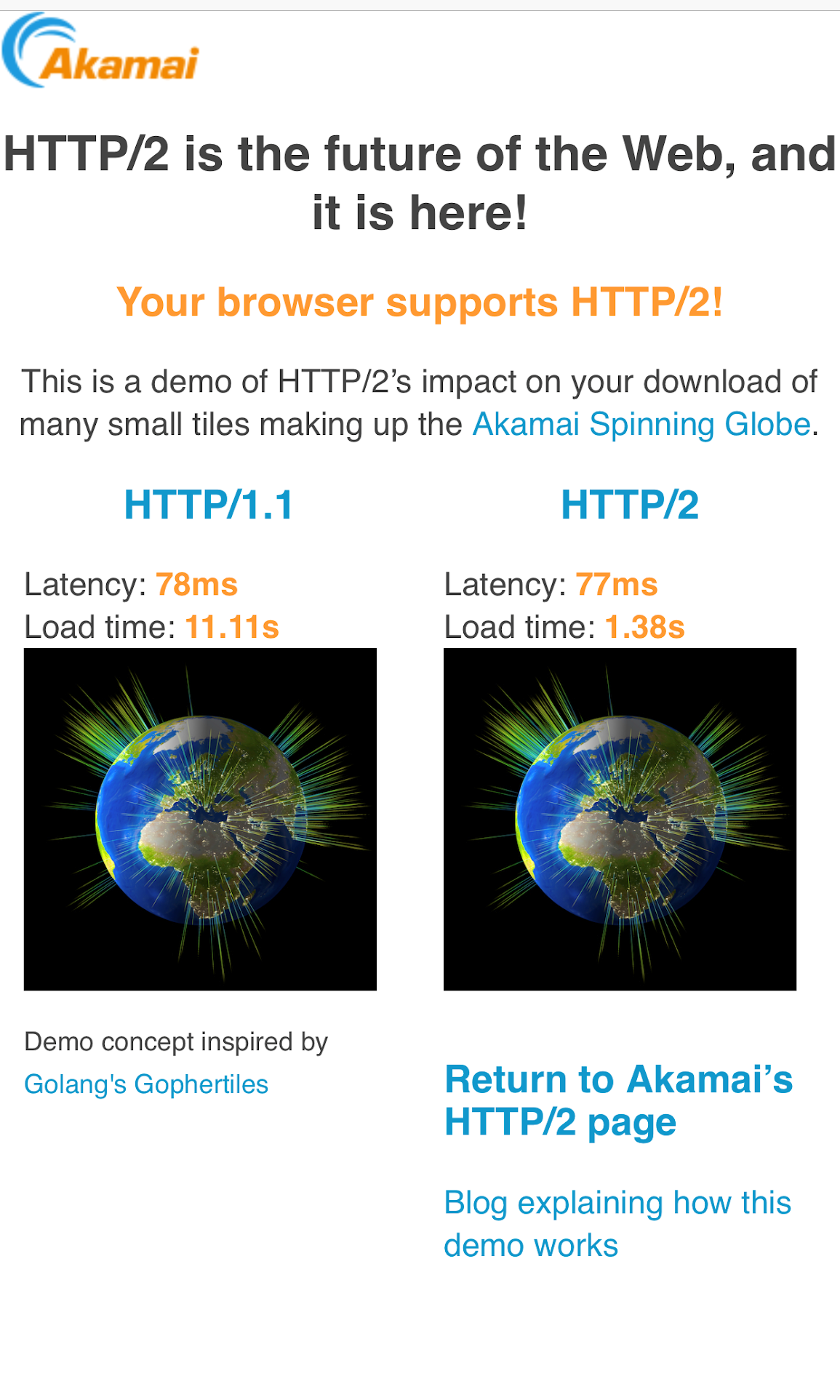
    To illustrate that improvement, I created a demo site that tests the download speed of many small images over HTTP/1.1 and over HTTP/2 and displays the differences.

    Figure A

    As you can see in Figure A, the content loaded eight times faster over HTTP/2 than over HTTP/1.1 on my mobile phone over an LTE connection. That’s a huge improvement considering how simple it is to implement HTTP/2.

    According to the HTTP Archive, as of June 2018, 20% of hosts support HTTP/2, but those hosts are responsible for 40% of all requests—meaning HTTP/2 powers some of the web’s most popular sites.

    However, as explained in the HTTP/2 Performance chapter of the Learning HTTP/2 book by O’Reilly, there are a lot of factors that can impact the benefits of HTTP/2. Some of them you can control, while others—such as network packet loss—are much more difficult to tackle and can impact HTTP/2 performance because HTTP/2 runs over a single TCP connection.

    Note: TCP stands for Transport Control Protocol and some parts of its implementation (e.g., slow to start and cumbersome network congestion algorithm) can impact HTTP/2 performance because all the communication with the server goes through a single TCP connection.

    The future of the web is HTTP/3, which uses HTTP/2 over QUIC (a newer and more efficient transport layer protocol). However, as of April 2019, HTTP/3 is still in draft state and hasn’t been approved as a standard.

    Ideally, your servers should monitor the network connection and use different network protocols depending on the current conditions. Certain content delivery networks (CDNs) offer this functionality. For example, to maximize throughput, a top CDN provider uses custom software on its edge servers to dynamically use different network protocols, TCP settings and congestion control algorithms, depending on the specific conditions of each individual connection the server makes with an end user. In short, using the optimal protocol makes your app faster and more amazing.

    Latency Optimization

    Latency is a physical limitation of nature that impacts the throughput on computer networks. You probably know that whenever you are outdoors and there is a storm with lightning, you can count the number of seconds until you hear the thunder to identify how close the storm is (and if you count less than a second, you better get inside!). In computer terms, latency is measured as the time it takes to send a network packet back and forth between two systems. This concept is known as round-trip time (RTT) and is typically measured in milliseconds. You can use network tools such as ping or mtr to easily measure the RTT between two systems.

    Latency has a huge impact on performance because the further away you are from the server you want to connect, the slower the communication will be. As a rule of thumb, you want to ensure your latency is well under 100 ms. The easiest way to achieve that is by leveraging the local device cache to avoid extra network connections to the server and using a CDN to put your server closer to the end user.

    Here is a graph (see Figure B) showing that latency plays a larger role on page load time than bandwidth. As you can see, doubling the bandwidth from 5Mbps to 10Mbps results in just 5% improvement in page load times, and any bandwidth increase over 10Mbps doesn’t make a big difference. Reducing the latency, however, drastically improves the page load times. That makes your app more amazing for your end users.

    Figure B

    Edge Computing

    If you are a developer or a DevOps engineer (or just love tech) chances are you are within the TOP 1% of world population in terms of mobile computing power. But things you take for granted, such as resizing images on a mobile phone, are going to take much longer for many millions of internet users who have less powerful mobile devices.

    So, what can we do if running logic at the origin causes delays because of the network latency and running logic on the client side may be too slow on less powerful devices? The solution is edge computing, which consists of moving the origin logic to a server close enough to the end users that latency does not impact performance. CDNs are in the best position to offer this proximity because of their natural distributed architecture; a CDN can set cookies, rewrite HTML and resize and deliver optimized images for the screen size of your users so those images don’t take a long time to display on low-end mobile devices with limited CPUs.

    Edge computing is the next step beyond cloud computing. You should try to use a CDN company that offers you the ability of running business logic as close as possible to where your users are, to ensure that your app is fast and can scale without impacting your infrastructure.

    Summary

    In this series of articles, we reviewed some basic things you should consider if you want to build and deliver amazing apps at scale. This is not a comprehensive list of all the things you can do but provides you with some of the most impactful areas for app improvement.

    — Javier Garza

  • Building Amazing Apps, Part 2: Optimizing the Back End

    Building Amazing Apps, Part 2: Optimizing the Back End

    This is part two of a series of three articles on building and delivering amazing apps at the edge. To read part one, click here.

    There are millions of apps available today, and it’s incredibly easy for any user to download and install any of them with just a few taps on a screen or click of a mouse. If you want to build and deliver an app that will amaze users, you need to be able to differentiate from the rest of the pack.

    Over the past 14 years, I’ve been working closely with the top companies delivering the most popular apps, helping them optimize their apps for speed and scale so users get a great experience. In this three-part series, we’ll explore the fundamental steps you must take to build and deliver your own amazing app at scale that will keep users coming back for more.

    We’ll break these steps down into three key areas:

    • Front end: Covers the parts of the app that end users interact with.
    • Back end: Looks at the required origin infrastructure to support the app, including databases, application, web servers and more.
    • Middle-mile: Explores the internet, where all the information needs to traverse back and forth between the front end and back end.

    In this article, we are going to explore five things you can do on the back end.

    Distributed Architecture

    In a nutshell, distributed architecture means having origin (back end) infrastructure that is geographically dispersed to maximize availability and performance.

    There are three main types of back end configurations:

    • On-premises: This is where the hardware and software are owned and managed by your organization. This type of back-end architecture is often more expensive and resource-intensive to maintain but offers a higher degree of security and flexibility because you have full control of the hardware and software.
    • Cloud-hosted: This is where the hardware and software are hosted on a third-party cloud provider. This type of architecture runs on dedicated or multi-tenant servers, and is usually more cost-effective to create and manage because some of the cloud providers include efficient infrastructure configuration/orchestration tools.
    • Hybrid: This is where your architecture is a mix of on-premises and cloud-hosted. This is the most flexible and common solution, since most companies that traditionally have relied upon all on-premises architecture are slowly migrating some of their back end to the cloud. For this type of solution, it’s best to use open source, multi-cloud tool solutions.

    The goal for your configuration should be having a back-end system that is geographically dispersed enough (with most locations close to your users) to ensure low network latency, while at the same time avoiding a single-point-of-failure to ensure the service runs, despite any localized outage.

    Regardless of your configuration, the general idea of distributed architecture remains the same: Using data centers where the load is distributed via a global load balancer, and where critical information is replicated across the data centers via fast, fiber-optic private links.

    Here are some concepts you can research that will help you to choose the most optimal, distributed architecture for your needs: virtual machines, containers, microservices, data replication, stateless apps, serverless, distributed processing, etc. staging-devopsy.kinsta.cloud is an excellent resource to learn more about them.

    Generally speaking, you can simplify your origin infrastructure and maximize end-user performance by putting a content delivery network (CDN) between your end users and your back end. A CDN is a super-distributed network of reverse proxies that allows you to put your content very close to end users, minimizing network latency to achieve rapid app interactions, especially when the CDN caches your content on its edge servers.

    Auto-Scaling

    You can optimize costs and performance by choosing an architecture that auto-scales (up and down) depending on current traffic demands. To implement this effectively, you need to monitor global traffic and set triggers that launch infrastructure on-demand so it is ready when needed. Most of the largest cloud services companies support auto-scaling services, and some of them even allow you to tune your settings to favor either costs or performance. One of the easiest ways to implement effective auto-scaling is with CDNs, which can automatically scale traffic with minimal effort just by configuring a set of rules that define what content should be handled completely by the CDN (either dynamically generated at the edge or cached) and what content should be pulled from your origin infrastructure.

    Continuous Monitoring

    Continuous monitoring helps maintain the quality of service. There are many open source tools for continuous monitoring that fall mostly into the following four categories:

    • Infrastructure monitoring: This allows you to keep track of compute resources, storage, network usage, etc.
    • Cloud providers: Most of the largest cloud providers have integrated tools for monitoring your back end in each respective cloud platform.
    • Application performance monitoring (APM): To monitor your application’s framework.
    • Aggregators: Tools that allow you to aggregate and analyze data across several monitoring tools.

    In addition, it’s a good idea to complement server-side monitoring with real user monitoring (RUM) tools to identify whether a specific code deployment impacts performance.

    Performance

    A faster back end makes for a faster front end, and, as we know from part one of this series, performance is a major contributor to user experience. In addition to focusing on improving metrics including latency, throughput and errors (all of which are directly correlated with back-end performance), it’s critical to have a “culture of performance” in your company. JosĂ© PĂ©rez provides an overview of that concept in his article, “Fostering a Web Performance Culture.” This is a perfect example of how you could implement a culture of performance in your organization, by having performance tools integrated into your IDEs—this can provide instant feedback to developers on how new code performs against a defined performance baseline so that any code that might degrade performance is identified before it is deployed.

    For content that is not personalized, such as a product catalog, news or media assets, you can easily improve performance by putting a CDN in front of your back end (and caching that content on the CDN’s edge servers). Those edge servers are distributed around the world, located much closer to end users than your back-end infrastructure, to minimize network latency and maximize throughput.

    DevOps Automation

    Finally, a big part of setting up monitoring that works (and in responding to failures quickly) is DevOps automation. Building automated DevOps tooling allows you to react to changing conditions automatically, in real time.

    For example, you can use DevOps automation to alert your team via a chat system such as Slack when a deployment impacts the service, with an option to roll back easily the deployment within the chat app. Another great example of DevOps automation is Pinterest’s implementation of a “performance detective” that runs a binary search (similar to git bisect) to determine the offending commit that is degrading app performance after a release. If you combine these two automations, you could detect a performance degradation caused by a release; let the DevOps team know that it has been rolled back and track the offending code in the version control repository. That’s just one specific example among the many ways that DevOps automation can further optimize your back end.

    Coming up next in this three-part series: Everything you need to know about optimizing the middle-mile.

    — Javier Garza

  • Building Amazing Apps, Part 1: Optimizing the Front End

    Building Amazing Apps, Part 1: Optimizing the Front End

    There are millions of apps available today, and it’s incredibly easy for any user to download and install any of them with just a few taps on a screen or click of a mouse. If you want to build and deliver an app that will amaze users, you need to be able to differentiate from the rest of the pack.

    Over the past 14 years, I’ve been working closely with the top companies delivering the most popular apps, helping them optimize their apps for speed and scale so users get a great experience. In this three-part series, we’ll explore the fundamental steps you must take to build and deliver your own amazing app at scale that will keep users coming back for more.

    We’ll break these steps down into three key areas:

    • Front end: Covers the parts of the app that end users interact with.
    • Back end: Looks at the required origin infrastructure to support the app, including databases, application, web servers and more.
    • Middle-mile: Explores the internet, where all the information needs to traverse back and forth between the front end and back end.

    Let’s explore the front end, and the five things you need to take into consideration to build and deliver a world-class front end for an amazing app.

    Beautiful User Interface

    People love beautiful things. That’s why they enjoy looking at the orange colors of a sunset or why they pay exorbitant amounts of money for a work of art. Building an aesthetically pleasing interface must be a top priority during the design phase. The first sign of a good user experience is an attractive design, and users are more likely to spend more time with the app if it is appealing to the eye.

    So where do you start when designing your app? Begin by reviewing the most popular apps on the app stores or the ones you use and enjoy the most and write down what design characteristics you like from each one. You should also follow industry best practices for app design such as:

    • Pay attention to graphic design.
    • Ensure you use curated images that look great.
    • Pick beautiful fonts with curved edges, e.g., Open Sans.
    • Manage white space effectively to display as much information as possible without having crowded text.
    • Ensure your UI is intuitive and simple to reduce the learning curve.
    • Avoid information overload through short and clear wording.
    • Maintain consistency within all the screens in the UI.
    • Select a distraction-free UI that avoids blinking text and excessive use of colors.
    • Follow standards (follow UI designs already in place).

    Accessibility

    At a fundamental level, it is a social responsibility to ensure your application can be used by people with impaired mobility, vision, hearing, cognition or language understanding. In some context, it is also a legal requirement.

    An excellent accessibility reference for developers is the Web Content Accessibility Guidelines (WCAG), which is sponsored by the World Wide Web Consortium (W3C). This reference includes accommodations for blindness and low vision, deafness and hearing loss, limited movement, speech disabilities, photosensitivity and more. For example, you should provide text alternatives for non-text content such as an image or a graph using the alt text HTML tag that accessibility software can use to describe what the image or the graph is. This is as simple as <img src=”smiley.jpg” alt=”Smiley face“>.

    Accessibility is too often forgotten or left to the later stages of app design. However, it is much more difficult to implement accessibility functions later on than if you plan for it upfront.

    Speed and Responsiveness

    User patience is shrinking and first impressions matter, so your app needs to start as quickly as possible. But it’s often easier said than done to get everything ready for user interaction within 1 second flat as certain operations, such as sending data to a server over a slow mobile network, can take a long time.

    So, given the challenges, how can you overcome them to provide a fast experience in your app?

    Start with performance-oriented design in mind, building the app logic in a way your users will perceive it as being fast at all times. You can, for example, implement caching and store the information presented to the user in the local cache. You can then use the cache to restore the last status almost instantaneously during startup while the app opens the network connection to the server and requests the data. Another characteristic of performance-oriented design is performance budget and code optimization. Performance budget means you set a performance baseline for a specific piece of code or functionality and put tools in place to ensure that baseline is not exceeded when releasing new code. Code optimization means trying new approaches to make the code run faster.

    Do this in the following cycle: optimize -> deploy -> measure.

    Repeat this cycle several times until your performance gains start to flatline. After this point, you can apply two concepts from the psychology world to make your app “feel faster” (aka “perceived performance” and “active waiting”).

    Perceived performance refers to how users perceive whether something is slow or fast, while active waiting refers to the fact that users perceive time as passing more quickly when they are engaged while they wait. So, when there is an operation where the user has to wait, you can incorporate some movement on the screen to draw the user’s attention—or, better yet, get them to interact with the app by providing a suggestion for optimizing their usage of the app or a curated quote. The chat app Slack does this pretty well.

    Network Awareness 

    Your app should keep track of network status, monitoring the available bandwidth and identifying when the network is not available at all. With this information, the app should adapt its behavior to improve the overall user experience. For example, let’s say the user is trying to send some data to the server while the network is not available. One solution is to switch the user to an offline mode, and let the user know they are offline and that the operation they are trying to do will be processed as soon as they are back online. At the same time, you could offer a cached version of the information, so the user can partially interact with the app.

    Network monitoring in your app should be planned carefully to avoid consuming too much power, which may impact the device’s battery life. For example, when the network is already active, you could send a few bytes to measure the latency to the server. You should avoid a constant network keep-alive, as actively maintaining the network even when there is no data to send or receive may impact the device’s energy resources.

    There are also intelligent edge solutions you can apply to your app that automatically adapt the compression of images depending on the network conditions. This means that the edge server can deliver a smaller version of the image for devices that have a slow network connection, without having to implement any logic on the app.

    Security

    Security is not an option, but a requirement that you should keep top of mind while building your application. The last thing you want is a security breach that compromises your users’ data or the integrity of your servers.

    For starters, ensure all your network connections are encrypted end to end and use secure protocols such as TLS v1.2 at the minimum or v1.3, which offer better security and a faster connection establishment. Ensure that your certificate offers strong ciphers that implement “perfect forward secrecy” (which makes it more difficult to be caught by man-in-the-middle attacks) and implement login techniques within the app that verify the user through secure techniques such as two-factor-authentication.

    You can also enhance your application security by implementing security measures at the edge such as automated bot protection. In this instance, machine learning technology in your edge servers can use device sensors such as the accelerometer to differentiate a real user from a bot that has stolen credentials and is trying to perform a malicious action.

    Coming up next in this three-part series: Everything you need to know about optimizing the back end.

    — Javier Garza

  • Building Security into Code and Culture

    Building Security into Code and Culture

    Organizations tend to have a very predictable approach to security: reactive. Most don’t really care about security until something bad happens. But with data regulations and requirements becoming more rigid around the globe and cybercrime only continuing to escalate, the notion of security as an “add on” or an afterthought is quickly becoming outdated. Today, an organization without adequate security measures is like a skydiver without a parachute—sure, the parachute doesn’t guarantee a 100 percent safe experience, but wouldn’t you rather have one than go without?

    A big problem, however, is that the modern approach to security remains inadequate. Most companies simply layer piecemeal measures over their existing infrastructure, not realizing that this isn’t an effective way to mitigate risk. Instead of adding on bits and pieces of security such as firewalls and antivirus programs, organizations should strive to incorporate security principles into the very foundation of their IT, in both the code and the culture.

    This is what Microsoft sought to do with its SD3+C principles, e.g. Secure by Design, Secure by Default, Secure in Deployment and Communications. While all of these are designed to impose better security measures throughout the development process, the first two arguably provide the highest security benefits. This is because they prevent the introduction of vulnerabilities in the first place while minimizing the potential exposure of software—so-called “attack surfaces.”

    Security and safety by design has thus far achieved greatest maturity in the automobile industry. Modern-day cars have more than 100 different safety and security features, including redundancies, and are rigorously tested for verified assurance. While crash tests destroy vehicles and take time to conduct, they ultimately teach us invaluable lessons that make them 100 percent worth the investment.

    Baking security measures into design and development is likewise a better approach when it comes to code, but it presents a problem: Developers, by nature, don’t want to take the time to build safety nets. A major criticism of SD3+C is that it slows down innovation by forcing developers to make more considerations than “make something really cool at lightning speed.”

    This reaction isn’t surprising when you consider the culture of coding, including the process by which we teach new developers. Hacker culture has long carried a certain kind of allure, romanticizing the role of the developer as a creative, clever and adventurous rogue. It elevates those resourceful individuals that can overcome software challenges in the fastest, nimblest, slickest way—not necessarily the securest.

    It’s never been the standard to teach the morality, ethics or laws of coding; instead, we teach people how to code and let them take off running. But the modern digital age has required us to put the brakes on and rein in that spirit. It’s like teaching someone to drive a Ferrari at breakneck speeds but not about the rules of the road, and then later expecting them to steer within the lanes, stop at red lights and not exceed speed limits.

    Bring Order to Code Chaos

    Our culture of coding inherently perpetuates chaos, but now we need to implement some degree of order, and this is a tough challenge. We need to drive a risk-based approach to development that introduces order into chaos without hindering innovation.

    How do we begin to accomplish this? The first thing to consider is changing how you approach code in the first place by making it more robust. Typically, code can’t be easily changed once it’s written; a single line may be easy to manipulate, but at several million lines, you risk severing the ecological connections that make the app work, and changing any one piece could break the entire application. With your code in such a susceptible state, it’s far too resource-intensive to maintain.

    The solution is to make it more mature in the first place. Make your code modular enough so that it can be amended in part when necessary, and then you can easily bake in additional security measures and eliminate dependence on firewalls and antivirus as your first (or only) line of defense.

    Second, consider the privacy law and contractual requirements of your organization, and address them directly in your code from the start. Understand that different types of privacy data will need to be handled differently and require different levels of protection across technical, physical and administrative dimensions. Whether you deal with payment card industry (PCI) or protected health information (PHI), you should be intimately familiar with the standards governing the protection of data your organization deals with.

    Now, what about culture? In its simplest essence, we can think of culture as comprised of three basic factors: rules, tools and fears. Where rules exist, you should apply them; where tools exist, you should use them; and as an organization, you should be “afraid” of the same things, because common fears tend to be strong motivators for groups of people or the masses. The only re-transmission of culture is through awareness, training and immersion.

    An important point I invite you to consider is that human beings won’t do anything without a reason, whether real or imagined. Humans are experienced-based learners not knowledge-based learners. For this reason, we learn valuable lessons from mistakes and failures. An important aspect of this is timely communications. When something has gone wrong we need to be able to get the right people on task to work toward planning mitigations, learning lessons and making things better.

    One way to effectively change or reshape your culture is to enforce the rules—for instance, the new General Data Protection Regulation (GDPR) mandates severe fines and consequences for PII data breaches (which is, in fact, similar to penalties enacted by the auto industry years ago).

    Another is to provide better tools and processes that essentially “force” (or, more kindly, compel) your team to use the right approach or method.

    Finally, you can employ fear, uncertainty and doubt, otherwise known as “FUD.” Though it may sound a bit sinister, FUD can be a very effective way to govern—although on its own, it’s a very tenuous and fragile kind of power. This is why you balance it with rules and tools, so that the overarching objective will resonate in both the hearts and minds of your team: Keep your organization happy and healthy.

    Because this is the reality that modern digital organizations must face: It doesn’t matter how innovative or bleeding-edge you are unless your business stays healthy! A tree that is well-rooted and cultivated to grow properly and upright will weather the worst storms, and ultimately live a long and prosperous life. Remember that Ford once had to introduce critical safety measures to the Model T, and nobody was worried about hydraulic brakes, seat belts and padded dashboards slowing us down.

    About the Author / Robert Hawk

    Robert Hawk is Resident Security Expert at xMatters. He has extensive experience in Information Systems Security, Computer Security, Cyber Security, Information Assurance, as well as Governance, Risk, and Compliance (GRC) Management. He specializes in frameworks and standards from: ISO/IEC, NIST, IEEE, IETF, ITU-T, Common Criteria, AMI-SEC, NERC, CIS, DoD, ANSI, PCI, and ISECOM. Robert is a lifelong researcher, innovator and instructor. Connect with him on LinkedIn.