Tag: Build

  • Next Up: Portable CI

    Next Up: Portable CI

    One thing that we’re very good at in IT is breaking new ground, coming up with ideas that work astoundingly well, getting broad adoption, then standardizing them for interoperability. When a new technology (looking at you, cloud) has problems with standardization and interoperability, we find a way around vendors’ reluctance to give you freedom of choice. For cloud, for instance, we found another great technology – containers – that greatly limits our lock-in to a given cloud vendor’s fare. Of course, whether standards or workarounds are the answer we arrive at, there are always wrinkles. Vendors are certainly not motivated by interoperability; they want your regular cash infusions, and interoperability could be more of a drain on them than a feed of new customers. Particularly in today’s environment, where vendors sometimes think that doing “to” customers is an acceptable substitute for doing “for” customers. We have to work around things like “embrace and expand,” which is still very real, and deploying containers to cloud A versus cloud B still has a bit of vendor-specific work, but we have enough to get it done.

    As continuous integration (CI) has become critical to an increasing number of organizations’ IT processes, the time has come to do the same with CI tools. Standardization is a good first goal, but it is more difficult here than in many areas, because the topic is so broad. An app might be built in one tool and tested in another, or it might be built via the use of shell scripts while tested with a UI tool, etc. It is not an easy solution to build, but it is an idea whose time has come – particularly with the cloudification of the space. We now have full-on CI systems that are in the cloud, and which hook you in with custom instructions. We’ve already had one large DevOps vendor essentially tell their entire user base, “We’re moving you to the cloud, unless you pay these inflated fees,” and others that never offered options for traditional architectures at all.

    Yet, we know apps move from in-house to cloud (and though it is uncool to mention, move back), and organizations are motivated by cost containment and mobility more than by what their chosen vendor wants them to do.

    So, it is time for some bright company or OSS team to put together a standard and a tool that implements said standard. It will be a lot of work, to make portability between CI tools that came from widely disparate roots – some from build, some from test, some even from deployment. But we’ll be needing it. A while back, everyone was a Puppet shop. Now, it seems, everyone is an Ansible shop. In simple terms, everyone will inevitably be a [something else] shop, because nothing lasts forever. So, a tool providing CI mobility between tools will definitely have a market – smaller today, but eventually large. We don’t need Yet Another CI Tool, we need that portability.

    I’m sure it’s coming. History does offer glimpses of the potential future, and we’ve seen this cycle before. I’m just saying, the time is now, not five years from now. We can target the OS of our choice and the cloud vendor of our choice, using containers to simplify the differences in host OS/vendor. The ability to use the CI tool of our choice is the logical next step.

    I haven’t heard of a project or company working on this yet; if you have, drop me a link in comments or email (I prefer comments, so others can look at your suggestion too, but whatever works for you), and I’ll take a look. It would be cool to support this kind of effort, when it eventually comes about.

  • All Day DevOps: Capital One Gives Credit Where It’s Due

    All Day DevOps: Capital One Gives Credit Where It’s Due

    Listening to his talk, it seems as though George Parris and his team at Capital One aren’t keeping “banker’s hours.” George is a Master Software Engineer, Retail Bank DevOps at Capital One. At the All Day DevOps conference, George gave a talk, titled “Meta Infrastructure as Code: How Capital One Automates our Automation Tools with an Immutable Jenkins,” describing how the team automated the DevOps pipeline for its online account opening project for Capital One, a major bank in the United States. Of course, there is a lot to learn from their experience.

    George started by pointing out that software development has evolved, coming a long way even in just the last few years. Developers now design, build, test and deploy, and they no longer build out physical infrastructure—they live in the cloud. Waterfall development is rapidly being replaced by Agile, infrastructure as code and DevOps practices.

    Where we see these technologies and methodologies implemented, IT operations teams are acting more like developers, designing how we launch our applications. At the same time, development teams are more responsible for uptime, performance and usability. And, Operations and Development work within the same tribe.

    George used the Capital One Online Account Opening project to discuss how they automate their automation tools, now a standard practices within their implementation methodology.

    For starters, George discussed how Capital One deploys code (hint: they aren’t building new data centers). They are primarily on AWS; they use configuration management systems to install and run their applications; and they “TEST, TEST, TEST, at all levels.” Pervasive throughout the system is immutability; that is, once created, the state of an object cannot change. As an example, if you need new server configurations, you create a new server and test it outside of production first.

    They use the continuous integration/continuous delivery model, so anyone working on code can contribute to the repositories that, in turn, initiate testing. Deployments are moved away from the scheduled release pattern. George noted that, because Capital One is a bank, regulations prevent its developers from initiating a production change. They use APIs with the product owners to automatically create tickets, and then product owners accept tickets, making the change in the production code. While this won’t apply to most environments, he brought it up to demonstrate how you can implement continuous delivery within these rules.

    Within all of this is the importance of automation. George outlined their four basic principles of automation and the key aspects of each:

    Principle #1 – Infrastructure as Code. They use AWS for hosting and everything is in a Cloud Formation Template, which is a way to describe your infrastructure using code. AWS now allows you to use CFTs to pass variable between stacks. Using code, every change can be tested first, and they can easily spin-up environments.

    Principle #2 – Configuration as Code. This is also known as configuration management systems (they use Chef and Ansible). There are no central servers, changes are version-controlled, and they use “innersourcing” for changes. For instance, if someone needs a change to a plugin, they can branch, update and create a pull request.

    Principle #3 – Immutability. Not allowing changes to servers once deployed prevents “special snowflakes” and regressions. Any changes are made in code and traverse a testing pipeline and code review before being deployed. This avoids what we all have experienced: the server that someone, who is no longer around, set up and tweaked differently than anything else and didn’t document what was done.

    Principle #4 – Backup and Restore Strategy. A backup is only as good as your restore strategy. You know the rest.

    George also dives into how they do continuous delivery/continuous integration in his talk, which you can watch online here.

    If you missed any of the other 30-minute long presentations from All Day DevOps, they are easy to find and available free of charge here.  Finally, be sure to register you and the rest of your team for the 2017 All Day DevOps conference here.  This year’s event will offer 96 practitioner-led sessions (no vendor pitches allowed).  It’s all free, online Oct. 24.

    — Derek E. Weeks

  • Breaking the Cycle of Dependency

    Breaking the Cycle of Dependency

    While technology is an important component of DevOps and accelerating delivery, there are other aspects of process and culture that are critical to keeping the cycle moving to realize the goals of reducing lead time to become more responsive to the needs of the business.

    If you go to most agile teams and ask the question of what is stopping them from going faster, they will typically respond that they are waiting for “something.”  Something can include:

    • Waiting for work to enter their backlog
    • Waiting for environments
    • Waiting for another development team to provide some service or capability that is needed

    These obstacles include:

    • Large batch sizes
    • Lack of continuous flow of work into Agile teams’ backlogs
    • Calendar-based gated releases
    • Test environment complexities
    • Environment availability

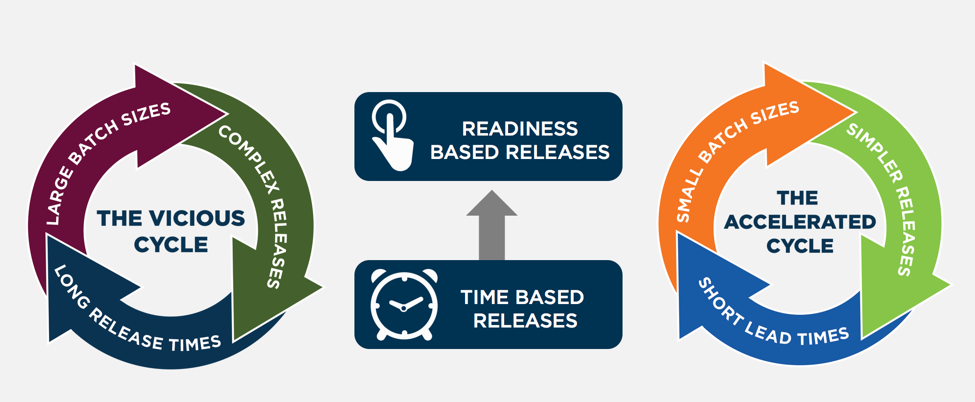
    This manifests itself in the current state as shown below as the vicious cycle. When teams are only delivering system releases a few times a year, then the business believes it needs to pack everything it can think of into that release, since waiting for the next release incurs a delay of months. The leads to large complex releases with many dependencies. This, in turn, slows down the development and testing of these releases and requires a lot of release coordination, resulting in long lead times and the inability to release frequently. And this leads into the cycle repeating.

    So what are the countermeasures needed to break this cycle?  They include:

    • Smaller batch sizes
    • Architectural, design and development decoupling techniques
    • Increased automation
    • Readiness-based release capability

    Smaller batch sizes require applying MVP (minimal viable product) techniques. When IT gains the trust of the business to deliver more frequently, the business will be more open to focus on the minimal product set of highest priority items it believes can deliver business value. Accelerated delivery provides the ability to test business hypotheses and gain feedback from customers more quickly to determine what worked and what needs changed. The enterprises that can turn this crank more quickly gain a huge advantage in the marketplace.

    Modern web architecture techniques (e.g. microservices, APIs), along with design techniques such as feature toggling to enable dark- and canary-launching allow applications to be deployed independently and with direct control of customer impacts. This increases development velocity due to simplifying and reducing the lifespan for managing feature or release branches in the code base.

    Increased automation combined with a move to readiness based releases allows application releases to be deployed when ready rather than waiting for calendar-based change windows. They key here is not sacrificing quality, auditability or security but rather building those capabilities into your applications and delivery pipeline and requiring those certifications are earned before an application can be released.

    About the Author / Carmen DeArdo

    Carmen-DeArdo-sqCarmen DeArdo is the director of Build Technologies at Nationwide Insurance. He is responsible for helping drive accelerated delivery utilizing Lean and DevOps techniques across the end-to-end delivery value stream.  One current focus area is the creation of an integrated delivery pipeline capability.

  • Integrating ARA into traditional RM

    Integrating ARA into traditional RM

    Application Release Automation (ARA) is terminology that includes several DevOps constructs from a singular, application-centric point of view. In essence, ARA implies the automation of a single app from build through deployment (even if that deployment is to production). Of course, embedded or implied in that automation terminology is build automation or construction; deployment automation, which may include provisioning; and governance automation, which includes testing and approvals.

    If your company’s portfolio of applications is small, or if the applications are fully independent from each other, using ARA to describe your DevOps continuum is more or less a complete vernacular. However, if your application portfolio contains interdependencies; you need a coordinated/scheduled release event of multiple applications into production in a particular sequence or timing;or you are required to meet blanket compliance governance requirements that exceed the scope of a single app; you will need to learn how to integrate an ARA-based DevOps strategy with the more traditional discipline of Release Management (RM).

    Clarifying ARA

    One of the nicer implications of ARA thinking is that it places the value—or, accentuates the value—where it should be; that is, on the application. Automating infrastructure is great, but if no application rides on top of it, the infrastructure is essentially nothing more than unexplored capacity. Most CIOs are not fond of having excess computing capacity sitting idle. So the idea of ARA sets the focus of the automation where it should be: moving an “application” from construction to production release.

    ARA is also development methodology-neutral, which means the build, deployment, and releasing automation will look the same regardless of whether the code was prepared using Agile or Waterfall. Mind you, Agile tends to drive the need for speedier delivery systems, but even legacy development teams can find value in consistent delivery system automation once a build is ready to begin. It is, after all, consistency that reduces support costs by reducing errors and creating predictability, thereby improving quality. It also is consistency within the automation that permits scale, whereas variability in the automation deters scale.

    ARA also allows for depth within the stack. If code reigns at the top of the stack, then the operating system of the server reigns at the bottom (perhaps networking in the wine cellar and facilities management in the root cellar). ARA incorporates the notion of automating dependent layers of technology under the code such as database services, middleware or messaging services, perhaps the provisioning of a virtual machine, even down as far as configuring the OS, if needed.

    The practicality of moving down the stack however, is that the scope of change will continue to have a broader impact than a single app. I usually do not install a single instance of Oracle for each application I create; more often, I have several applications relying upon a single instance of my Oracle setup. So the actual changes I automate as I move down the stack tend to be more of a configuration adjustment. It is more likely my particular app needs a config change to accommodate it rather than a completely new install of a supporting technology component underneath my app. It is also worth noting that the frequency of change as you move down the stack slows down considerably compared with app code riding on it, and the cost or impact of change increases greatly, as you begin to impact a wider number of things riding on it.

    Deconstructing ARA

    ARA automation, then, includes all the traditional DevOps disciplines, but limiting them to the viewpoint of a single application as follows:

    Build Automation: This includes version-controlling each particular build. It also includes packaging all the component technologies to create a deployable package used for deployments throughout the software development life cycle (SDLC). The golden rule here is create a “build once, deploy many” philosophy in your build automation. Changes to code, included configuration files or dependent technology components down the stack must occur in the DEV class environment. Once the deployable package is completed to satisfaction in DEV, it will move unaltered through any other layers of testing environments before it gets to production for ultimate release.

    Deployment Automation: Since each deployable package is tightly version-controlled during its construction in build, there is now an ability to roll forward (normal deployment) or roll backward (revert to a prior version) in the event of failed testing in a given SDLC environment. Some of the common environment classes include integration testing, performance testing, user acceptance testing and pre-production quality assurance (QA) testing. Smart DevOps deployment tools utilize the ability to deploy (or overwrite) only the components that are out of sync with the versions listed within the deployable package. This smart deployment capability reduces time and ensures consistency with what “should” be there.

    Provisioning Automation: This is an offshoot of deployment automation. For those using virtual machine or cloud technologies, the deployment automation can include the ability to provision or set up an environment of any class on the fly. When testing is completed, the same environment can be decommissioned to not waste capacity or budgets. Provisioning bare-metal servers is precluded by human interactions, although what should go on them also can be fully automated once engineering is done with the physical work.

    Governance Automation: Even though substantial testing can and should occur in development, a significant amount of it must occur in other testing-class environments later in the SDLC progression. It is, therefore, a good idea to have the ability to isolate testing automation outside of both build and deployment templates or scripts, still making it callable or executable from an overall workflow manager (often included in the release orchestration or release automation tooling within DevOps). This gives the flexibility to run a series of tests without having to rebuild the application or redeploy the application just to kick it off. In addition to testing evaluation, there may be other process regulations driven by a governance team or compliance entity within the organization. All of these flags must be met and passed before final promotion to production.

    Integrating ARA with RM

    Dependency is the hobgoblin of simplicity. Applications that are fully independent of each other can utilize an ARA strategy and deploy into production as often as they want. No one else is impacted by this. But if a given application has dependencies upstream—I get my data from, or transact with, someone else—or downstream—my data is provided to someone else—then my path to production must include testing an application different from my own. Determining where the responsibility for failure lies now requires policy instead of just common sense. Synchronizing in-state changes where two dependent applications are now undergoing change at the same time requires policy to govern as well as more sophisticated SDLC testing environments to manage.

    When a wider view than just a single application is required, the traditional DevOps discipline of RM or its synonym release orchestration (RO) becomes the solution. RM allows for the sequencing of applications going into production to occur as needed. It allows for testing to occur when a dependency spiderweb is kicked off. RM allows for corporate governance to be applied universally to all applications attempting to enter production, instead of having to build it over and over again in each deployment script or template. RM can produce sophisticated logs designed to satisfy outside regulators for compliance history automation. These kinds of tools become invaluable when there must be a wider view of deployments to production beyond a single app at a time or in a small portfolio.

    Given this reality, the key to integrating ARA with RM is to ensure automation is constructed independently by discipline, and can be executed by discipline as needed. ARA encompasses or groups four disciplines together: build, deploy, provision and governance. RM uses the ARA package and extends it with other applications to create a needed sequence, or kicks off selective smaller units such as a testing package when needed to meet certain outside app change conditions based on dependencies. RM can selectively execute the automation ARA creates as it needs to to accommodate larger goals, while ARA continues to focus on keeping its own app as efficient as possible.

    Impacts to the Bottom Line

    There is no one right answer. There is only the perspective you hold within the DevOps continuum. Knowing that both ARA and RM are ultimately dependent on traditional DevOps disciplines offers flexibility on “how” you think about delivering innovation. In my opinion, ARA is simply the next evolution of automating build and deploy. It is a logical next step.

    There are other disciplines within DevOps, however, that might benefit from a wider view of the workflow required to move innovation to production. Take, for example, the integration of monitoring automation in the process, capacity on demand provisioning, security oversight and configuration management database (CMDB) integration—a wider view of how and where these services are integrated with DevOps might reduce the labor required to create them for each app, reinventing the wheel—or worrying the wheel has not been updated properly in a while. At its heart, DevOps attempts to create singular automations to perform tasks, increasing speed, reducing risks and improving quality.

    There is no immediate financial impact of this other than to pursue a strategy of single-app focus in an environment where a wider view would have been more ideal. Calculating the cost of that error is akin to picking six lotto numbers from the sky: It is always hard to know what might have been; at that point all one can do is wish.

    To continue the conversation, feel free to contact me.