Tag: cloud

  • Bridging the Network Automation Skills Gap

    Bridging the Network Automation Skills Gap

    With the introduction of network programmability and APIs for everything from management systems to devices themselves, the modern network landscape has evolved to being managed like software. This shift from hardware-focused networks to software-centric functions has had a profound effect on network management techniques and skillsets required to keep pace with the changing ecosystem.

    A recent EMA survey notes that skills gaps associated with network automation are an issue for 96% of enterprises. Even respondents with significant network automation initiatives in place felt their solutions stretched the abilities of their network teams. Network automation can expose skills gaps where network engineers might lack experience with new tools and software development. At the same time, application development teams, who likely would be included in building an in-house network or automation software solution, will also lack networking skills. Hybrid skills with both development and networking expertise are rare and available only at a premium.

    This journey to network automation can be difficult, especially given the required technical skills that are not in abundance within many organizations. Simplifying network automation and empowering a broader set of participation through capabilities to easily create and manage automation workflows presents a key opportunity for organizations to not only mature efforts around network automation, but to also execute against broader business digital transformation objectives.

    Four Keys to Democratizing Network Automation

    The key to democratizing network automation and bridging the skills gap is to provide NetOps teams with the ability to easily design and build network automation without having to re-tool, build custom code or learn specialized software skills. There are four key elements required to effectively democratize network automation in the enterprise.

    Easy Onramp for Non-Developer

    Automation is typically accomplished through writing code in a particular programming language. For a person without any programming skills (or even minimal skills), they must first learn how to code before they can even attempt their first automation task. This is very difficult in terms of time and interest. Additionally, many network engineers see the amount of work it would take to learn to write code, and become disinterested. There has to be a new set of tools and methodology to empower these people to automate their work without the long road of learning to become programmers. It’s important to invite as many people to the automation table as possible including IT, security, cloud and NetOps teams, to streamline business processes.

    Capture Network Tribal Knowledge

    Within the organization, there is already existing embedded tribal knowledge that is incredibly valuable. By harnessing and transferring that knowledge into an automation workflow without a lot of programming, it provides an accelerated path to network automation. The goal is to leverage traditional network automation and management practices (Scripts, CLI) for re-use across the organization.

    Network engineers with years and years of experience have a valuable set of processes and procedures they’ve built up inside their heads, and this wealth of information is a valuable asset. Unfortunately, this information is rarely documented and is normally passed on by activity and word of mouth. This is the type of tribal knowledge that needs to be captured, preferably through automation workflows that can be used in a task, documented in the workflow and modified over time to improve it or change it as the infrastructure changes.

    Integrate DevOps Principles

    Augment network automation with CI/CD pipelines and API services. These are well known solid principles that are already used in other domains outside of networking and pay big dividends when applied to the automation of complex networks. When we look along the horizon of the network automation journey, these same CI/CD practices will be adopted by future networking teams and allow them the same advantages of reliability and velocity within the network.

    Enable Cloud Architect Participation 

    It is important to have networking people that can understand the networking constructs of the cloud, as well as cloud teams that understand how it integrates and operates within the network. Enabling cloud architect participation in network automation will allow for the real-time feedback and control of cloud-based applications and infrastructure critical to modern networks.

    Cloud networking is increasing in complexity and will soon require the skills and experience of network engineers to help solve the problems of cloud networking. Traditionally, cloud and networking teams have been separated because their technology domains have been siloed and there was very little interaction required between the teams. As technologies like SD-WAN have been adopted, the line of responsibility between cloud and network teams has blurred. Cloud and networking teams will need an automation platform that can be used by both to create workflows and automate between both domains. Business technology decisions are forcing these two groups together, and they must have a way to use their own tools, but also have a platform to collaborate automation between them.

    As applications and services are becoming more complex, distributed and require connectivity and policy enforcement across a diversity of domains (such as cloud, SD-WAN, data center, wireless and network applications), the management of these network concepts requires us to re-think how we have traditionally managed networks. As network automation plays an increasingly larger role in enterprise networks, a byproduct of the complexity is a skills gap that threatens to slow or stymie enterprise initiatives.

    By making the onramp to network automation easier for non-developers through capturing tribal knowledge, integrating DevOps principles and enabling cloud architect participation, enterprises better ensure a successful migration to network automation across multiple domains.

    — Rich Martin

  • How to Secure Online Coding Platforms

    How to Secure Online Coding Platforms

    Threat Modeling for Online Coding Platforms

    The evolution of DevOps teams and a greater reliance on cloud-based computing has completely changed the coding process. Now, with Integrated Development Environments (IDEs), coding can be done entirely online. This is convenient, but are online IDEs secure? To answer this, we will focus on two popular cloud-based IDEs: AWS Cloud9 and Visual Studio Online.

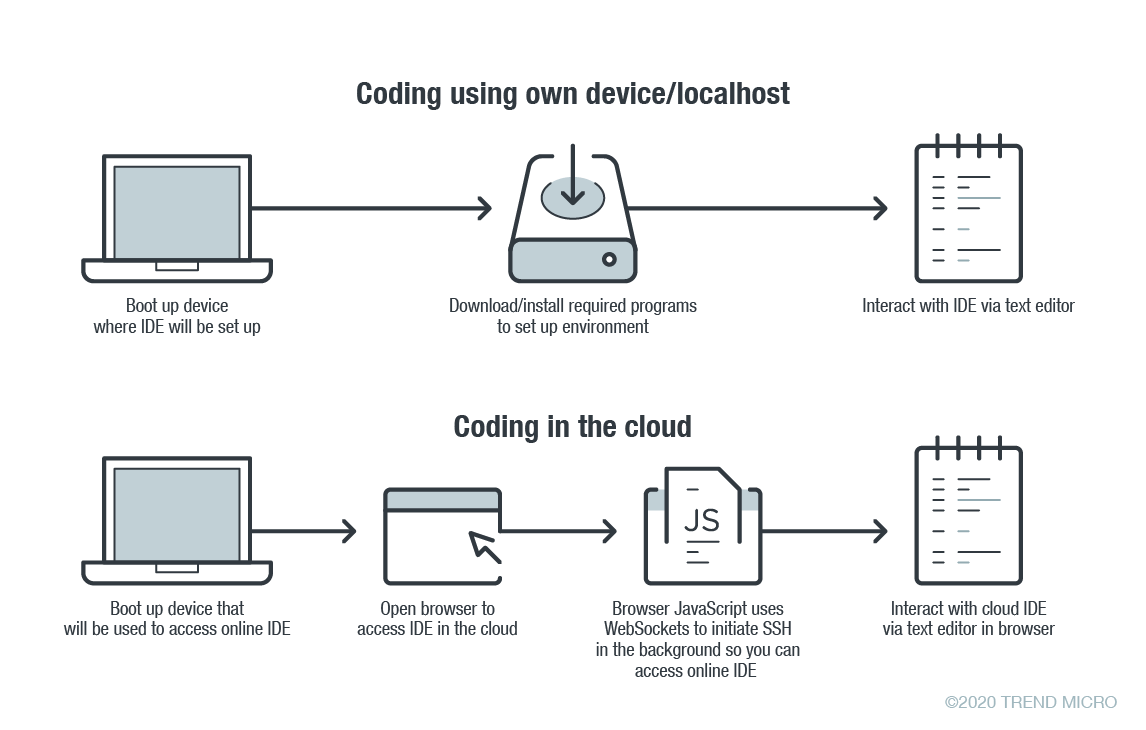
    In online coding, the IDE is rendered inside your browser, the browser JavaScript engine uses WebSockets to initiate an Secure Shell (SSH) connection to your linked device in the background—e.g. virtual private server (VPS)—providing you with the familiar terminal interface to execute commands. The environment—meaning the linked cloud VM/VPS or SSH-accessible device—includes tool configurations (like which tokens are included, or cloud configuration files), a copy of the source code, compilers and other tools that you want to use.

    Figure 1. Local versus cloud-based IDE. Source: Trend Micro.

    The main difference between local and cloud-based coding platforms is where the bulk of the environment resides. In cloud IDEs, the environment is a virtual machine instance inside your cloud provider. In terms of security, this means you are delegating trust to the cloud provider, but you are responsible for preventing any backdoors from opening or introducing misconfiguration issues to the VM. In the case of using your own device with AWS Cloud9, you are responsible for configuring the device securely.

    Linked Devices/VMs Are Not Always Secure

    What is running on the backend often dictates whether linked devices and VMs are secure. As previously described, an SSH-linked device is necessary to use these online coding platforms. In the case of Visual Studio Online (still in preview mode as of this writing), we can find a Visual Studio (VS) Code server running on the machine.

    The code server itself is a Node.js application to which your browser will connect. You can also download the whole ~/.vscode-remote folder and run the server inside your local environment.

    As the owner of the linked device, you have permission to promote yourself to root and install or configure whatever you think you will need. You also have, by default, both Docker and Git pre-installed.

    In the case of AWS-hosted Cloud9, the situation is a little more complicated. The backend necessary for platform communication is located inside the linked device while the frontend remains hosted on a different location. But, like in VS, you can also promote yourself to root.

    This brings us to our first security concern: How secure or private are linked devices/VMs?

    The linked device contains confidential information—access tokens, application configurations, source code, etc., which should be protected against unauthorized access.

    By default, the platform is secured by the provider. However, you should keep in mind that, together with your root access availability, you are also responsible for preventing misconfiguration issues, especially when using third-party plugins. AWS does not provide plugin support for plugins not developed by them.

    There are possible misconfigurations you might make that can lead to security issues. For example, if you set your IDE to be accessible from outside, either intentionally for ease of sharing, or unintentionally, that change can have major consequences.

    In addition, it is not common for access tokens to be stored in encrypted token vaults. A lot of them can be viewed via plaintext configuration files. Without additional security measures, your access tokens can end up exposed to outsiders.

    Once unauthorized access is acquired by cybercriminals, they can compromise your code for their own gain. An example would be the supply chain attack against a software company that modified software updates with malware.

    Browsers Can Introduce Malicious Extensions or Vulnerabilities

    The next security concern is the browser itself. As online coding platforms are accessed from web browsers, you should be very careful when accessing these sites from public, non-domain, shared or unprotected computers.

    Malicious browser extensions are a well-known phenomenon. While an untrusted computer possibly infected with malware presents an obvious risk, it is also possible for an attacker to steal code using a malicious web browser extension.

    Code Extensions and Plugins Can Also Contain Malware

    The main advantage of Visual Studio Online and, generally, the VS Code platform, is the number of extensions available. This in and of itself is yet another possible attack surface.

    Let’s imagine a malicious VS Code extension—a useful-looking extension with an embedded backdoor. The lack of permission checking (such as disk access, network access, process access, etc.) for extensions during installation or use, becomes a security problem. The extent of security checks during extension publishing is limited to having a valid publisher ID and a few image-related restrictions. This means you have to trust the extension developer entirely.

    No Software Application Is Error-Free

    The ever-present possibility of vulnerabilities in any kind of software must be considered as well. In the case of online coding platforms, they can be affected by web-class vulnerabilities since IDEs are web applications. For example, a vulnerability that allows an attacker to execute their own JavaScript code can have control of the IDE or remote linked devices.

    A recent vulnerability affecting the Visual Studio Live Share extension, which is also available for VS Code, shows that we can expect to see another vulnerability affecting online coding platforms in the near future.

    Securing Cloud IDEs Is a Must for DevOps

    Threat modeling allows us to understand the different factors at play that can affect the overall security of a computing environment. Cloud IDEs should be no different from other software, if not more critical to secure.

    Here are some recommendations for each of the security issues we raised:

    • For linked device security — Install trustworthy software. Keep that software updated. Don’t indiscriminately open ports to the internet.
    • For browsers — Work inside trusted and secured environments. Try to avoid using shared computers. Install browser extensions from trusted vendors only.
    • For VS Code extensions — Avoid installing extensions from unknown sources or authors.
    • For vulnerabilities in general — Make sure your environment is updated to the most recent version.

    — David Fiser

  • How to Secure Your Kubernetes Cluster on GKE

    How to Secure Your Kubernetes Cluster on GKE

    Google Kubernetes Engine (GKE) is easy to get going with, but requires additional security controls. The documentation is hard to grasp as there are many features and changes that tie to specific Kubernetes versions that will require using beta feature enablement, as well as some out of date documentation that can catch people out.

    There is also an outstanding bug that we have raised on Kubernetes that is hit by GKE. This is an edge case situation if you end up running pods directly and not deployments, and only happens if you enable pod security policies (which we recommend doing for security reasons).

    If you are looking at production and have sensitive workloads, we advise that you implement everything inside of this article.

    Securing Your Kubernetes Infrastructure

    When you deploy a default GKE cluster with no additional options provided, you’ll get some sensible security defaults:

    1. Basic authentication is disabled.
    2. Encryption at rest for the Operating System (OS) image is enabled.
    3. Client certificate issuance is disabled.
    4. Secure Operating system (Using Container-Optimized Operating System; COS).
    5. VM Integrity monitoring to protect from malware/rootkits.
    6. Restricted Service Account.

    So, why did Google enable these things by default? Essentially it means:

    • You can only authenticate via Google Cloud Platform (GCP) Single Sign On (SSO) to the Kubernetes API. That means, no basic authentication or client certificate can be used.
    • The OS is locked down and container optimized with a limited and read-only root filesystem with integrity checks. Integrity monitoring of the OS is enabled, to protect against rootkits and malware.
    • The service account that the Kubernetes nodes are using is restricted and will only have privileges to access cloud services it needs, such as Stackdriver for logging and monitoring. 

    The things you need to make sure you enable:

    • Enable secure boot to validate the authenticity of the OS and kernel modules. (If you decided not to use the default OS, then it might cause issues).

    Using the virtual trusted platform module (VTPM) to sign kernel images and the OS, means that authenticity can be established. It also guarantees that nothing has been tampered with, and kernel modules have not been replaced with ones containing malware or rootkits inside.

    • Enable intranode visibility so you can see the data flowing between pods and nodes.

    Making sure all traffic is logged and tracked between pods and nodes will help you identify any potential risks that may arise later on. This isn’t necessarily something you need to do for development, but, something you should do for production.

    • Put the Kubernetes API on a private network.

    • Put the node pool on a private network.

    • Provide a list of authorized networks that should be allowed to talk to the API.

    Making your nodes and Kubernetes API private means it isn’t subject to network scans that are happening all the time by bots, hackers and script kiddies.

    Putting it behind an internal network that you can only access through a VPN is also good, however, this is a much more involved process with GKE and isn’t as simple as a feature flag like the others. You can read about what is involved here.

    Securing Your Application Containers

    Again, Google enables some default features to get you started. However, there are still gaps that you will need to fill. 

    What do you get?

    • Managed certificates
    • Role Based Access Controls (RBAC)

    What you will want to enable:

    • Pod Security Policies. This is Beta and requires you to inform Google that you’re wanting to run the cluster creation in beta mode:

    • Network Policies.

    This sounds great, but what does it actually mean? Basically, some of these roles are split into two, one is for application development teams to own and the other is for the cluster administrator.

    Application Developer

    • Set network policies at an application level so you only allow the right level of access, i.e., AppA can talk to AppB but AppC can’t talk to either of them.
    • Have encryption to your service endpoint for your desired domain, i.e., https://www.mydomain.com.

    Kubernetes can be a bit of a learning curve, there are technologies that make it simpler in terms of dependencies such as helm, that will allow you to deploy application dependencies with pre-defined deployments. But there is no real substitute from understanding the main components of Kubernetes;  Network Policies, Ingress, Certificate Management,  Deployment, Configmaps, Secrets and Service resources.

    The main security components are network policies, secrets and certificate management. Network policies will allow you to control the traffic to and from your applications. Secrets are base64 encoded, so there is no real security in terms of how they are stored; therefore making sure the cluster administrator has enabled secret encryption, (as mentioned further down), will add that additional layer.

    Certificate management will make sure the traffic to your service is encrypted, but if you’re communicating between services, then you should also add TLS between your applications. Having the cluster administrator install something like cert manager, will allow an easier way to encrypt between services. There are also services like Istio, but as that product does a lot more than just certificates, it can add more complexity than necessary.

    Cluster Administrator

    • Have the ability to control what users can do and in what namespaces (RBAC), i.e., maybe Bob the developer can do deployments, (create, update, delete), but can’t view secrets in namespace our-teams-app1-dev.
    • Implement a deny all network policy for both egress and ingress (outbound and inbound). This can be controversial, as it can catch teams out, so making sure you’re communicating this is key. It will, however, force teams to define network policies to get their application working.
    • Force an application deployment security stance with Pod Security Policies. This means preventing containers running in the cluster escalating privilege, mounting in devices (including binding to the host network) on the nodes or running more privileged kernel system calls.

    You want to make sure that development teams can’t deploy insecure applications or make attempts to escalate their privilege, mount in devices they shouldn’t or make unnecessary kernel system calls. Pod Security Policies offer a way to restrict how users, teams or service accounts can deploy applications into the cluster, enforcing a good security posture.

    RBACs and Pod Security Policies go hand in hand. Once you define a good Pod Security Policy, you then have to create a role that references it and then bind a user, group and/or service account to it, either cluster wide or at a namespace level.

    Note: GKE uses a webhook for RBAC that will bypass Kubernetes first. This means that if you are an administrator inside of Google Cloud Identity Access Management (IAM), it will always make you a cluster admin, so you could recover from accidental lock-outs. This is abstracted away inside the control plane and is managed by GKE itself.

    We recommend the below to be a good PSP.  This will make sure that users, service accounts or groups can only deploy containers that meet the criteria below.

    If you wanted to create a role to use the defined PSP above, then it would look like something below, this is a cluster role as opposed to a standard role. To then make this enforced on say all authenticated users, you would then create a role binding to apply to the “system:authenticated” group.

    Remember that as this is cluster wide, any applications that may need more privileged permissions will stop working, some of these will be things Google adds into kubernetes; such as kube-proxy, that runs in the kube-system namespace.

    You can read more information on RBAC and PSP’s on kubernetes.io.

    Securing Sensitive Data and Application Cloud Services

    We’ll break this down into two.

    1. Encrypting Your Secrets in Kubernetes

    The recommendation for encrypting secrets using Google Clouds KMS service, is to have segregated roles and responsibilities, and to define a new Google project outside of the Google project that will host Kubernetes and applications. This is to make sure the encryption keys and, more importantly, the key that is signing the other keys (envelope encryption) isn’t residing in the same project that could potentially get compromised.

    For encrypting secrets you need to:

    • Setup a new Google project to implement segregation of duties (if necessary).
    • Create the master key ring and key inside that project.
    • Only allow the GKE service account in the Kubernetes hosted project access to the key in the dedicated key project.
    • Only allow just the right permissions (encrypt and decrypt) of the service account.

    The documentation on how to do this can be found here. But the main things to remember are:

    • The key has to be in the same location (zone) as the cluster (this is to reduce latency or loss of a zone).
    • Access permissions have to be correct for the service account.
    • The binding is a KMS IAM policy binding.

    Once this is setup you can pass the path to the key, to the “gcloud container clusters create” command:

    Note: If any of the above is incorrect, you will get a 500 internal server error when you go to create a cluster. This could be the path is incorrect, the location is wrong or the permissions are not right.

    2. Consuming Cloud Service Inside of Kubernetes

    There are four different ways to allow application containers to consume cloud services. All of these have limitations in some way, i.e., being less user friendly and unautomated for developers (making developers wait for the relevant access to be provisioned), or have less visibility and more complexity in tying together auditability for Kubernetes and cloud administrators.

    1. Workload identity (this is still in Beta and is the more long-term direction Google are going in): Require a constant process of managing google IAM as well as Kubernetes Service Accounts to tie them together. This means managing Google IAM roles, policies and service accounts for specific application service lines as well as Kubernetes Service Accounts. It does, however, improve auditability.
    2. Google Cloud Service Account keys stores as secrets inside Kubernetes namespaces (where the application will be living): Similar to the above, but without the binding. This means provisioning a service account and placing it as a secret inside of the applications namespace for it to consume natively. This has the downside of not having full auditability within Google Cloud and Kubernetes.
    3. Use something like Vault to broker between Cloud and Applications: Using Vault provides an abstraction to cloud and will generate short lived access keys to applications. However, there is still a secret required to be able to speak to the Vault service, hence, the permissions are still the same but just abstracted down one. It also disjoints audibility between Google Cloud and Kubernetes.
    4. Using the default service account node role of GKE: Much simpler and more developer friendly, but more risky. It would mean allowing applications to use the default node service account and modifying the role to cater for all the service policies applications would need, increasing the scope and capability of the node service account to most Google Cloud services.

    Having Good Visibility; Current and Historic

    Note: As of today, there is no access transparency on when Google accesses your Kubernetes cluster (Google Access Transparency). This could be problematic for a lot of organizations who want assurances around the providers data access.

    When the cluster is provisioned, all audit logs and monitoring data is being pushed to Stackdriver. As the control plane is managed by Google, you don’t get to override or modify the audit format, log or extend it to your own webhook.

    It does mean that you can search your audit logs for things that are happening inside of Kubernetes in one place, for example; to query all events against a cluster inside of a specific Google project against your user ID, you can do the below:

    From this point on, you could take it further and add additional security rules such as setting custom metrics to alert when cluster admin changes are made or specific modifications are happening on roles (cluster-admin roles).

    Summary

    Security is something everyone wants but, as you can see, it can be quite an involved process to achieve. It also requires domain knowledge to get enough context to assess the risk and what it might mean to your applications and business.

    Security without automation can slow down productivity. Not enough security can put your business at risk. Enabling security features that require Beta feature enablement may also not be suitable for the business and only General Availability features are acceptable, which compromises on security.

    As a general rule, hardening your clusters and enforcing secure ways of working with Kubernetes, containers, cloud services and your applications will get you the best outcome in the end. There may be frustrating learning curves, but as the industry matures, these will slowly be remediated.

    To learn more about containerized infrastructure and cloud native technologies, consider coming to KubeCon + CloudNativeCon EU, in Amsterdam. The CNCF has made the decision to postpone the event (originally set for March 30 to April 2, 2020) to instead be held in July or August 2020.

    — Lewis Marshall

  • Better Apps and Better Security When You Shift Left

    Better Apps and Better Security When You Shift Left

    Tens of thousands of people and hundreds of cybersecurity vendors descended on San Francisco at the end of April. While the RSA Conference was the primary draw, there are a number of peripheral events that go on throughout the week as well, such as the Cloud Security Alliance Summit, the CIO/CISO Interchange, BSides San Francisco and the Qualys Security Conference.

    I was able to attend some of the Qualys Security Conference and I had the opportunity to see Alex Mandernack, security solution architect for product management at Qualys, presenting on the need to shift left when it comes to cybersecurity.

    Mandernack outlined some of the issues organizations face today when it comes to security. Migrating to the cloud and embracing DevOps culture means more ephemeral, elastic environments and compressed development time frames. He pointed out that these trends make security more challenging, but also described the opportunity they present to change our approach to streamline and improve security.

    The Traditional Pipeline is Broken

    The traditional model of application development is much more linear. Each app team builds their own image—often in a silo or vacuum disconnected from other teams. Penetration testing is conducted on a sporadic or infrequent basis, and eventually the app is deployed. Vulnerability scans are run on the app in production, and issues or deficiencies are reported back to the developers to address or incorporate into the next build.

    The process is slow and cumbersome. It also has the potential to introduce redundancies that waste resources and make the organization less efficient. As companies embrace DevOps and move to the cloud, the traditional development pipeline simply doesn’t work—especially not for security.

    DevOps, and Cloud, and Containers — Oh My!

    The cloud and DevOps fundamentally change the development lifecycle. Development time frames are compressed, and the process is a self-feeding, iterative circle rather than a repeating linear approach. The traditional approach of identifying and resolving security issues after an application is deployed won’t work in a DevOps environment because by the time issues are identified and fixed, the app itself may have already moved on to the next version.

    Cybersecurity and the development pipeline have enough challenges with the cloud and DevOps, but there is also a newer technology trend that exacerbates the problem—containers. Containers are designed to get code quickly and to operate fast. They are also built for scalability—spawning and spinning down hundreds or thousands of containers constantly to keep pace with demand.

    There is a diverse array of tools and platforms associated with cloud, DevOps and containers. Organizations often employ a complex collection comprised of some combination of AWS, Azure, Docker, Kubernetes, OpenShift and others. The result can quickly become a black hole when it comes to security—which is why it’s important to push security left into the CI/CD pipeline.

    Shift Left to Help Security Teams Do Better

    In a DevOps culture, developers and security teams need to think about security sooner. It’s important to get the security tools into the process earlier. Thankfully, with the DevOps lifecycle and the tools commonly used within a DevOps environment, it can be done.

    For starters, companies should build a golden image. Developers shouldn’t have to patch and update the base operating system before they even start developing. The golden image takes a baseline operating system such as Ubuntu or CentOS, and completely patches and configures it so everyone has a standard, consistent image to develop on.

    With the golden image in place, the next step in shifting security left is to implement testing and scanning in the CI/CD pipeline. Put vulnerability information at the fingertips of developers as they’re developing and implement vulnerability gates in the pipeline to ensure that applications that don’t comply with policies and meet minimum requirements are not allowed to be deployed.

    New Role of the Security Team

    Part of shifting security left includes providing tools that make security self-service for the DevOps team. Automating actions with scripting, APIs and CI plugins ensures that security is simplified and streamlined to provide value for developers.

    In this shift left scenario, the security team has to redefine its role in the process. The security team is still vital, but rather than being the police or a roadblock in the development process, the role of security focuses on verifying and auditing the process. The security framework should have dashboards and live data that enable the security team to monitor activity and identify trends that may need further attention.

    Better Security, Faster

    There is often conflict between developers and security teams, but there doesn’t need to be. Mandernack stressed that developers don’t want to create insecure apps either.

    Shifting security to the left into the CI/CD pipeline streamlines the whole process. Ultimately, the result is higher quality, more secure applications that are developed faster.

    — Tony Bradley

  • The Cloud Is Booming — But so Is Cloud Waste

    The Cloud Is Booming — But so Is Cloud Waste

    Fueled by the growth in cloud spend, cloud waste will exceed $17.6 billion in 2020.

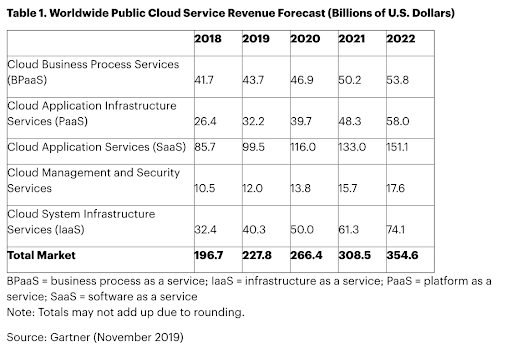
    Over 90% of organizations will use public cloud services this year. In fact, public cloud customers will spend more than $50 billion on Infrastructure as a Service (IaaS) from providers such as AWS, Azure and Google. This boom is, of course, due to the broader adoption of public cloud services. But, it is also caused by the expansion of infrastructure within existing accounts. Not surprisingly, the growth in spending often exceeds the growth in business. That’s because a huge portion of what companies are spending on cloud is wasted.

    Cloud Computing Is Expanding

    Before getting to the waste, let’s look a little closer at the growth in the cloud sector. Gartner recently predicted that cloud services spending will grow 17% in 2020 and will reach $266.4 billion. While Software as a Service (SaaS) makes up the largest market segment at $116 billion, the fastest growing portion of cloud spend will continue to be IaaS. This will increase 24% year-over-year and surpass $50 billion in 2020.

    Typically, I find that about two-thirds of the average enterprise public cloud bill is spent on compute, which means about $33.3 billion this year will be spent on compute resources. Unfortunately, this portion of a cloud bill is particularly vulnerable to wasted spend. 

    Cloud Waste Is Also Expanding

    As cloud computing growth continues and cloud users mature, we might hope that this $50 billion is being put to optimal use. While I personally do find that cloud customers are more aware of the potential for wasted spending than they were just a few years ago, this does not seem to be correlated with cost optimized infrastructure from the beginning. The fact is, it’s simply not a default human behavior. 

    I frequently run reports for companies having issues with cloud waste. Invariably, I find wasted spend in these accounts. For example, one healthcare IT provider was found to be wasting up to $5.24 million annually on their cloud spend—an average of more than $1,000 per resource per year.

    Below is where the total waste is coming from.

    Idle Resources: Idle resources are VMs and instances being paid for by the hour, minute or second, that are not actually being used 24/7. Typically, these are non-production resources being used for development, staging, testing and QA. Based on data collected from our users, about 44% of their compute spend is on non-production resources. Most non-production resources are only used during a 40-hour work week, and do not need to run 24/7. That means that for the other 128 hours of the week (76%), the resources sit idle, but are still paid for.

    So, I find the following wasted spend from idle resources: $33.3 billion in compute spend, times 0.44 non-production, times 0.76 of week idle, equals to $11 billion wasted on idle cloud resources in 2020.

    Overprovisioned Resources: Another source of wasted cloud spend is overprovisioned infrastructure—that is, paying for resources are larger in capacity than needed. That means you’re paying for resource capacity you’re rarely (or never) using. About 40% of instances are sized at least one size larger than needed for their workloads. Just by reducing an instance by one size, the cost is reduced by 50%. Downsizing by two sizes saves 75%.

    The data I see in client infrastructure confirms this—and the problem may well be even larger. Infrastructure I see has an average CPU utilization of 4.9%. Of course, this could be skewed by the fact that resources I deal with are more commonly for non-production resources. However, it still paints a picture of gross underutilization, ripe for rightsizing and optimization.

    To take a conservative estimate of 40% of resources oversized by just one size, we see the following: $33 billion dollars in compute spend, times 0.4 oversized, times 0.5 overspend per oversized resource, equals to $6.6 billion wasted on oversized resources in 2020.

    The Extent of Wasted Cloud Spend

    Between idle and overprovisioned resources alone, that’s $17.6 billion in cloud spend that will be completely wasted this year. In fact, it could well be higher. Other sources of waste include orphaned volumes, inefficient containerization, underutilized databases, instances running on legacy resource types, unused reserved instances and more. Some of these result in significant one-off savings (such as deleting unattached volumes and old snapshots) whereas others can deliver regular monthly savings. 

    That’s a minimum of about $5 million wasted per day, every day this year, that could be reallocated toward other areas of the business. 

    It’s time to end wasted cloud spend. Perhaps acknowledging the extent of this problem is a good first step.

    — Jay Chapel

  • HashiCorp Updates Terraform Tool for Azure Cloud

    HashiCorp Updates Terraform Tool for Azure Cloud

    HashiCorp today announced it has updated the instance of Terraform it created to automate the configuration of virtual machines on the Microsoft Azure cloud to give IT teams more granular control.

    Version 2.0. of Terraform (TF) AzureRM Provider will allow IT teams to separately configure virtual machines by type for instance of both Windows and Linux.

    In addition, version 2.0 of TF AzureRM Provider will allow users to specify custom timeouts for resources. Previously, timeouts were set for one hour by default.

    Finally, TF AzureRM Provider 2.0 removes resources, data sources and fields that have been deprecated. TF AzureRM Provider currently provides access to 374 resources and 119 data sources.

    Amith Nair, vice president of product marketing for HashiCorp, said the goal is to provide IT teams with a set of tools for automating the configuration of virtual machines on Azure that is more accessible than the tools currently provided by Microsoft.

    Nair said HashiCorp is seeing increased adoption of Microsoft Azure, which in turn creates demand for tools that make it easier to deploy virtual machines at scale. In fact, Nair notes that as more workloads move into the public cloud the less resistance there is to IT automation as administrators look for ways to manage IT at what is now unprecedented scale. Of course, many organizations gain their first experience with tools such as Terraform when they first embrace a set of best DevOps practices.

    Less clear is how many virtual machines are being configured on top of instances of Windows versus Linux. There is no doubt Microsoft has emerged as the strongest challenger to the dominance of Amazon Web Services (AWS) in the public cloud. Much of that success, however, comes from the fact that Microsoft supports distributions of Linux alongside Windows Server on the Azure cloud. There are, of course, many organizations, such as Walmart, that prefer to standardize on Azure simply because they view Amazon to be a competitor. At the same time, however, there are many companies that employ both AWS and Azure.

    Nair said most organizations that have adopted more than one cloud tend to manage them in isolation from one another. However, it is expected that one day more organizations will seek to unify the management of multiple clouds within the context of a truly hybrid cloud computing environment as the total cost of cloud computing continues to rise with each additional workload deployed. Naturally, many of those organizations eventually will gravitate toward tools that can be employed across multiple clouds.

    In the meantime, whether it’s IT administrators or developers themselves configuring virtual machines in the cloud, it’s thanks to tools such as Terraform that the amount of time and effort required to set up virtual machines in the cloud is now as negligible as it is. The challenge now is not so much finding tools to automate IT as much as it is navigating all the cultural changes that naturally ensue.

    — Mike Vizard

  • Report Pins Cloud Security Woes on Flawed DevOps Processes

    Report Pins Cloud Security Woes on Flawed DevOps Processes

    By now it’s become apparent that the bulk of security incidents involving cloud platforms revolve around some type of configuration issue. An analysis of those cloud configurations published today by the Unit 42 research arm of Palo Alto Networks suggests that the root cause of the issue is most likely the templates many developers and DevOps teams rely on to configure cloud infrastructure. In fact, according to Unit 42’s analysis, more than 199,000 templates have medium-to-high vulnerabilities in use on public clouds.

    Matt Chiodi, chief security officer for public cloud for Palo Alto Networks, said the issue stems from the rate at which organizations now want to be able to deploy applications on public cloud. Templates greatly accelerate the process but very few of those templates have been vetted by a cybersecurity team.

    According to the report, the most commonly used templates are created using YAML files on instances of Kubernetes (39%), Terraform and CloudFormation (24%). The most vulnerabilities were discovered in templates created using CloudFormation (42%), Terraform (22%) and YAML for Kubernetes (9%).

    Chiodi noted most templates are created through a simple three-step DevOps process: design, code and deploy. Unfortunately, in the rush to deploy most DevOps teams forget to scan for vulnerability issues. As a result, Chiodi said cybercriminals have become very adept at siphoning off cloud resources to mine cryptocurrencies at low-enough consumption rates to go unnoticed by many IT organizations.

    Other significant cloud security issues surfaced in the report include the fact that 43% of cloud databases are not encrypted and that 60% of cloud storage systems have logging disabled, which Chiodi noted makes it impossible to know whether those systems have been compromised. In addition, the report finds 76% of cloud workloads expose SSH (port 22), while 69% of organizations expose RDP (port 3389) and 27% are using outdated versions of Transport Layer Security.

    Overall, the goal now needs to be to make it as simple as possible for DevOps teams to do the right cybersecurity thing going forward, said Chioti.

    Unit 42 researchers employed a publicly available GitHub Searching application programming interface (API) to find AWS CloudFormation files, Kubernetes YAML files and HashiCorp Terraform files. Hundreds of thousands of templates were then downloaded and analyzed by the Prisma Cloud infrastructure-as-code (IaC) Scanner to identify the insecure configurations. Each IaC file was also sent to an IaC resource checker to analyze the cloud resources being used in the template. Researchers also used Palo Alto Network’s proprietary AutoFocus and Wildfire tools to identify and investigate cybercrime groups through their usage of custom toolsets (malware samples). Those samples were dynamically and statically analyzed to ensure indicators of compromise.

    The Unit 42 research makes it clear there’s a lot of room for improvement when it comes to employing best DevSecOps processes in the age of the cloud. The challenge, however, may have little to do with the tools available. Rather, it’s the absence of a structured set of processes through which DevOps teams and cybersecurity professionals can collaborate that appears to be inflicting the most damage.

    — Mike Vizard

  • IBM Doubles Down on Cloud, But Is Krishna an Interim CEO?

    IBM Doubles Down on Cloud, But Is Krishna an Interim CEO?

    Big news from Big Blue yesterday: IBM CEO Ginni Rometty is stepping down after eight years at the helm. In her stead, IBM is doubling down on the cloud by appointing Arvind Krishna as CEO and member of the board. The real move to watch, though, is the appointment of Jim Whitehurst, Red Hat CEO, as president of IBM and a board member. It’s the first time that someone has held the title of president singularly, and it may portend where the real power will be at Big Blue (and Red).

    Krishna was previously head of the cloud and cognitive software division at IBM. He is an IBM veteran, having been with the company since 1990. His appointment sends a strong signal about how important the cloud is to IBM’s future. In some ways, it is similar to Satya Nadella’s appointment at Microsoft. But perhaps it’s not as strong a signal about the importance of the cloud than the $33 billion IBM spent acquiring Red Hat.

    It is that $33 billion investment and the importance of Red Hat to the new IBM that leads me to believe Krishna may, in fact, be a transitional CEO. The eventual appointment of Whitehurst as CEO and the rise of Red Hat leadership within IBM may in some ways be a reverse-merger type of thing, with Red Hat eventually running the show.

    IBM is a huge beast. A company of Red Hat’s size will find it difficult to change the culture and overcome the inertia at IBM. But frankly, IBM has been transitioning for almost all of Ginni’s time there. While the Enterprise Systems group (Z systems mainframe) is still the cash cow, bringing in a large percentage of revenue, IBM has increasingly tried to be a major cloud player.

    The SoftLayer acquisition didn’t quite give the company what it needed, as it was not a public cloud play. It left IBM unable to compete with Google, Microsoft Azure and AWS in true cloud services. After a few fits and starts, IBM decided that Red Hat, with its open source pedigree and cloud strength in both public and private cloud settings, could be the engine that could as it pertains to cloud.

    The street has not been kind to IBM over the last few years as a result of the botched cloud play, either. At a time when its tech competitors and the market in general have soared, IBM has actually fallen, as has its revenue.

    Mitchell Ashley, founder and managing analyst at Accelerated Strategies Group, agrees with this assessment. “We are seeing a sea change in big tech CEO strategy. Like Microsoft’s elevation of cloud exec Satya Nadella to CEO, IBM is rebuilding its executive ranks from the open source cloud software world with the appointment of Red Hat’s Jim Whitehurst as president and board member,” he said. “How soon the Krishna regime including old-line IBM executives gives way to Whitehurst and other Red Hat executives remains to be seen.”

    IBM CEO Change Elevates Open Source from Digital Anarchist on Vimeo.

    Ashley was not the only analyst to weigh in.

    “IBM bet the farm on cloud with the $34 billion Red Hat acquisition,” said Steve Duplessie, founder and senior analyst at Enterprise Strategy Group (ESG). “It was only a matter of time for the succession. Now the two top dogs running IBM are cloud purists. The old IBM died a while ago and they had to change—I like the move! Their stock lost 26% while the S&P rose over 150%. This lets them remake themselves before it’s too late.”

    Changes at the top don’t always portend success. There is a lot of hard work ahead at IBM as the company continues this journey. Competing with AWS, Google, Microsoft and other players in the cloud space is going to be challenging, given the head starts these players have already. But you really can’t count out IBM, ever.

    One other thing I wanted to mention: With IBM’s appointment of Krishna at IBM, there now are CEOs of Indian descent at Alphabet (Google), Microsoft and IBM. This is very positive for all persons of not only Indian heritage but for all people of color and nationalities. Kudos to these companies and these men for their success. Now, how about some women of color in these roles?

    — Alan Shimel

  • Virtual Instruments Changes Name to Virtana to Drive AIOps

    Virtual Instruments Changes Name to Virtana to Drive AIOps

    With the formal launch of a software-as-a-service (SaaS) to monitor cloud platforms and optimize cloud, Virtual Instruments today renamed itself Virtana.

    The company’s CloudWisdom platform is based on technology Virtana gained via the acquisition of Metricly earlier this year. In addition to being integrated with existing on-premises offerings from Virtana, CloudWisdom has been expanded to include a self-service option. Downloadable trial versions are also available.

    Virtana CEO Philippe Vincent said the name change reflects a transformation from being simply a provider of storage I/O performance testing tools to becoming a provider of an IT operations management platform infused with artificial intelligence (AIOps). As part of that effort, the CloudWisdom offering represents the first time Virtana has extended the reach of its offerings beyond on-premises IT environments, he said.

    CloudWisdom will differentiate itself, Vincent said, because it combines cloud monitoring with built-in tools for optimizing cloud costs. Rival offerings require IT organizations to acquire two separate services, he noted. The CloudWisdom platform monitoring capabilities span databases, messaging platforms and containers, as well as cloud infrastructure services from Amazon Web Services (AWS) and Microsoft.

    In general, Vincent said IT organizations are moving away from a reactive approach to managing IT to a more proactive approach that will require increased reliance on automation. As IT environments become more complex, too many IT organizations are trying to compensate by overprovisioning IT infrastructure resources to make sure application performance doesn’t deteriorate or applications crash. That approach not only drives IT costs higher, he said, but it also makes those costs unpredictable.

    To address that issue, Virtana is combining CloudWisdom with an AIOps platform designed to be equally applicable in legacy IT service management (ITSM) and emerging DevOps environments. Organizations that have adopted DevOps will be at the forefront of the transition to AIOps because of the inherent fluidity and velocity of those environments, Vincent noted. Machine learning algorithms coupled with real-time monitoring, big data analytics, workflow engines and automation frameworks will enable IT teams to streamline ITSM and DevOps processes to become more efficient. The opportunity for Virtana is to disrupt a highly fractured monitoring category by leveraging AIOps to unify monitoring at an unprecedented level of scale and scope, he added.

    Virtana is not the only IT management platform provider that has identified the same opportunity; much larger incumbent providers of these platforms and a raft of startups are moving in the same AIOps direction. Vincent said Virtana will differentiate itself by pursuing a more application-centric approach to delivering on the promise of AIOps.

    It’s too early to say to what degree IT operations can be automated using AI. There’s general agreement that AI will play a significant role in automating IT, and the more standardized the IT environment is, the easier it is to accomplish. The challenge is, most IT environments today are still anything but standardized.

    — Mike Vizard

  • Cloud Waste To Hit Over $14 Billion in 2019

    Cloud Waste To Hit Over $14 Billion in 2019

     The good news to start 2019 is that cloud adoption is growing rapidly. Most people realize this, but along with major growth comes some less welcome news. Wasted cloud spend is also up—often dramatically. Chances are, if you’re spending money on cloud, some of that money is being wasted. For some, a lot of that money is being wasted. Here are the numbers.

    Predicted Cloud Spending 2019

    The latest predictions from Gartner estimate that overall IT spending will reach $3.8 trillion this year, a growth of 3.2 percent over IT spending in 2018. Of this spend, public cloud spending is expected to reach $206.2 billion—of which, the fastest growing segment is infrastructure as a service (IaaS), which Gartner says will grow 27.6 percent in 2019 to reach $39.5 billion, up from $31 billion in 2018.

    Now we can subdivide the public cloud spend number further to look just at compute resources—typically two-thirds of cloud spend is on compute, or about $26.3 billion. This segment of spend is especially vulnerable to waste, particularly from idle resources and oversized resources.

    Wasted Cloud Spending from Idle Resources

    Let’s first look at idle resources. This includes resources that are being paid for by the hour or minute, but that are not actually being used. Typically, this kind of waste occurs in non-production environments; that is, those used for development, testing, staging and QA. According to internal data available to my company, ParkMyCloud, about 44 percent of compute spend is on non-production resources.

    Most non-production resources are only used during a 40-hour work week, and do not need to run 24/7. That means that for the other 128 hours of the week (76 percent), the resources sit idle, but are still paid for.

    What does all this add up to?

    $26.3 billion in compute spend x 0.44 non-production x 0.76 of week idle = $8.8 billion wasted on idle cloud resources.

    Wasted Cloud Spending from Oversized Resources

    The other source of wasted cloud spend is oversized infrastructure; that is, paying for resources at a larger capacity than needed.

    RightScale found that 40 percent of instances were sized at least one size larger than needed for their workloads. Just by reducing an instance by one size, the cost is reduced by 50 percent. Downsizing by two sizes saves 75 percent.

    The data we see in our users’ infrastructure confirms this, and in fact we find that it may even be a conservative estimate. Infrastructure managed in our platform has an average CPU utilization of 4.9 percent. Of course, this doesn’t take memory into account, and could be skewed by the fact that resources managed are more commonly used for non-production resources. However, it still paints a picture of gross underutilization, ripe for rightsizing and optimization.

    If we take a conservative estimate of 40 percent of resources oversized by just one size, we find the following:

    $26.3 billion in compute spend x 0.4 oversized x 0.5 overspend per oversized resource = $5.3 billion wasted on oversized resources.

    Total Cloud Spending to be Wasted in 2019

    So, between idle resources and overprovisioning, wasted cloud spend will exceed $14.1 billion in 2019. In fact, this estimation of wasted cloud spend is probably low. This calculation doesn’t even account for waste accumulated through orphaned resources, suboptimal pricing options, misuse of reserved instances and more.

    Fortunately, cloud cost control is becoming top-of-mind as the industry is able to leverage cloud computing growth statistics to calculate the massive scale of this problem. If you are involved in your organization’s cloud  infrastructure, why not make reducing cloud waste one of your 2019 objectives?

    — Jay Chapel