Tag: docker

  • Docker Advances Collaborative Application Development Platform

    Introduces Docker Development Environments, updates Docker Compose and bolsters security with Scoped Personal Access Tokens

    Palo Alto, CA, May 27, 2021 – Docker, Inc.™, today announced updates and enhancements to the Docker Collaborative Application Development Platform that help development teams increase velocity through new capabilities and improved workflows. Announced at DockerCon Live 2021, Docker is introducing three key enhancements including the introduction of Docker Development Environments, a new version of Docker Compose, and Scoped Personal Access Tokens for application pipeline automation. In a separate press release, Docker also announced an expansion of the company’s trusted-content offerings for the more than eight million registered Docker developers.

    “Today’s developers face a variety of languages, frameworks and architectures, as well as discontinuous interfaces between tools for each pipeline stage, resulting in application development that is enormously complex to get from source code to cloud runtime,” said Docker Vice President of Products Donnie Berkholz. “Today’s announcements empower developers to ship faster by bringing their ideas to reality with Docker.”

    Docker is a leading provider of collaborative application development platforms for development teams. Docker provides simplicity, velocity and choice for millions of developers who want to build, share and run great apps from code to cloud. Details on today’s announcement include:

    Docker Development Environments

    Docker Development Environments form the foundation of Docker’s new collaborative team development experience. It empowers teams to work better together to create value for customers by spending less time setting up and debugging environments, bringing the ease of use and reproducibility of containers to an interactive development environment. Developers can now easily share more than just their code, taking the dependencies and wider application context and sharing this with a teammate as simply as doing a docker push.Docker Development Environments will be available next month.

    Docker Compose v2

    Docker continues investing in Docker Compose, a developer favorite tool for running multiple container applications. A recent JetBrains survey, ‘The State of Developer Ecosystem 2020’, shows that 76% of developers use Docker Compose for running containerized applications during development. Version 2 incorporates the docker compose command into the Docker CLI. Recent releases of Compose now offer improved support for deep learning as well as multi-environment configurations. GPU support for Windows and Linux makes it easier for developers and data scientists to run GPU-heavy workloads such as deep learning. Service profiles make it easy to manage and switch between configurations, such as development, testing and production. Docker Compose v2 is currently available in Docker Desktop and will be included in the Docker Linux packages later in the year.

    Scoped Personal Access Tokens

    With access to software supply chains becoming a higher security concern, Docker is updating Personal Access Tokens (PATs) to support fine-grained permissioning. The new Docker token permissions, which are scheduled to release later this summer, include options to define access that is read only, read and write, or read public repos only. This security feature provides developers and their managers with tighter control over which teams, and which automated application delivery pipelines have access to their container images and applications, further expanding the Docker platform position in providing developers with tools for building secure supply chains. In addition to securing access to applications, the tokens also simplify cross-team collaboration, letting development teams decide which teams and systems they want to enable with unrestricted access to their content

    Additional overviews and demonstrations of these announcements will be covered today during the keynote presentations at DockerCon Live 2021 on Thursday, May 27 at 9 am Pacific time.

    DockerCon Live is a free, one-day virtual event that is a unique experience for developers and development teams who are building the next generation of modern applications. If you want to learn about how to go from code to cloud fast and how to solve your development challenges, DockerCon Live 2021 offers engaging live content to help you build, share and run your applications. Register today at https://dockr.ly/2PSJ7vn.

    Resources:

    About Docker

    Docker helps millions of developers efficiently and collaboratively build, share and run applications. The Docker collaborative application development platform provides developers with an unmatched experience for an integrated, reliable and secure workflow that accelerates app delivery from code to the cloud. Through a combination of the world’s largest marketplace of components and integrations with leading tools, Docker allows teams to rapidly create innovative applications. For more information, visit www.docker.com.

  • Docker Advances Collaborative Application Development Platform

    Introduces Docker Development Environments, updates Docker Compose and bolsters security with Scoped Personal Access Tokens

    Palo Alto, CA, May 27, 2021 – Docker, Inc.™, today announced updates and enhancements to the Docker Collaborative Application Development Platform that help development teams increase velocity through new capabilities and improved workflows. Announced at DockerCon Live 2021, Docker is introducing three key enhancements including the introduction of Docker Development Environments, a new version of Docker Compose, and Scoped Personal Access Tokens for application pipeline automation. In a separate press release, Docker also announced an expansion of the company’s trusted-content offerings for the more than eight million registered Docker developers.

    “Today’s developers face a variety of languages, frameworks and architectures, as well as discontinuous interfaces between tools for each pipeline stage, resulting in application development that is enormously complex to get from source code to cloud runtime,” said Docker Vice President of Products Donnie Berkholz. “Today’s announcements empower developers to ship faster by bringing their ideas to reality with Docker.”

    Docker is a leading provider of collaborative application development platforms for development teams. Docker provides simplicity, velocity and choice for millions of developers who want to build, share and run great apps from code to cloud. Details on today’s announcement include:

    Docker Development Environments

    Docker Development Environments form the foundation of Docker’s new collaborative team development experience. It empowers teams to work better together to create value for customers by spending less time setting up and debugging environments, bringing the ease of use and reproducibility of containers to an interactive development environment. Developers can now easily share more than just their code, taking the dependencies and wider application context and sharing this with a teammate as simply as doing a docker push.Docker Development Environments will be available next month.

    Docker Compose v2

    Docker continues investing in Docker Compose, a developer favorite tool for running multiple container applications. A recent JetBrains survey, ‘The State of Developer Ecosystem 2020’, shows that 76% of developers use Docker Compose for running containerized applications during development. Version 2 incorporates the docker compose command into the Docker CLI. Recent releases of Compose now offer improved support for deep learning as well as multi-environment configurations. GPU support for Windows and Linux makes it easier for developers and data scientists to run GPU-heavy workloads such as deep learning. Service profiles make it easy to manage and switch between configurations, such as development, testing and production. Docker Compose v2 is currently available in Docker Desktop and will be included in the Docker Linux packages later in the year.

    Scoped Personal Access Tokens

    With access to software supply chains becoming a higher security concern, Docker is updating Personal Access Tokens (PATs) to support fine-grained permissioning. The new Docker token permissions, which are scheduled to release later this summer, include options to define access that is read only, read and write, or read public repos only. This security feature provides developers and their managers with tighter control over which teams, and which automated application delivery pipelines have access to their container images and applications, further expanding the Docker platform position in providing developers with tools for building secure supply chains. In addition to securing access to applications, the tokens also simplify cross-team collaboration, letting development teams decide which teams and systems they want to enable with unrestricted access to their content

    Additional overviews and demonstrations of these announcements will be covered today during the keynote presentations at DockerCon Live 2021 on Thursday, May 27 at 9 am Pacific time.

    DockerCon Live is a free, one-day virtual event that is a unique experience for developers and development teams who are building the next generation of modern applications. If you want to learn about how to go from code to cloud fast and how to solve your development challenges, DockerCon Live 2021 offers engaging live content to help you build, share and run your applications. Register today at https://dockr.ly/2PSJ7vn.

    Resources:

    About Docker

    Docker helps millions of developers efficiently and collaboratively build, share and run applications. The Docker collaborative application development platform provides developers with an unmatched experience for an integrated, reliable and secure workflow that accelerates app delivery from code to the cloud. Through a combination of the world’s largest marketplace of components and integrations with leading tools, Docker allows teams to rapidly create innovative applications. For more information, visit www.docker.com.
  • Top Six Open Source Tools for Monitoring Kubernetes and Docker

    Top Six Open Source Tools for Monitoring Kubernetes and Docker

    Kubernetes and Docker are two of the most commonly heard buzzwords in modern DevOps conversations. Docker is a tool that enables you to containerize and run your applications, and Kubernetes provides you with a platform to orchestrate or manage these containers—since managing thousands of containers manually using the Docker CLI would be a practical nightmare. 

    However, simply running thousands of containers and managing them through Kubernetes is not enough. You have to observe and analyze them properly to ensure that your services are up and running optimally. This process is called Site Reliability Engineering (SRE), a term initiated and popularized by Google. Observability and analysis are a major element of SRE. It can be subdivided into the following three areas:

    • Monitoring allows you to extract numerical metrics from your applications and resources that can later be visualized and analyzed to present the current state of your resources. Once the metrics are extracted, they can be used to set up alert rules, facilitate profiling and debugging, and make better SRE decisions.
    • Logging enables developers to debug their containers in case of a failure. Containers are short-lived, and so are logs. Kubernetes and Docker do provide a native way of browsing container logs, but it is very limited in its functionality. As a result, a centralized log plane is a must in any container-oriented environment.
    • Tracing allows you to debug services running on a network and follow a request trail until the source of a problem can be determined. In a microservices architecture, when multiple services/containers send requests to each other to perform one business task, a proper tracing solution is necessary. 

    This article will list and describe the most effective open source tools for monitoring and analyzing services running as containers. 

    Prometheus

    Prometheus is the first tool that comes to mind when discussing open source monitoring solutions. It is very popular in the development community, and it is a graduate of the CNCF project, which focuses on the monitoring side of SRE. Originally created and open sourced by SoundCloud, Prometheus simplifies the process of pulling numerical metrics based on a time series from a given metrics endpoint. It was built to monitor highly dynamic container environments.

    Prometheus is subdivided into three elements: Prometheus server, Alertmanager and exporters. Exporters are stand-alone, independent processes/containers that can be run on your target resource to generate and export metrics via a metrics API. The Prometheus server then takes care of service discovery as well as pulling metrics from the exporters to be stored in the Prometheus DB and later used for visualization or alerting. Alertmanager is responsible for setting up alert rules, analyzing the data in the Prometheus DB and sending alert messages to multiple receivers if a certain rule is triggered. There are a huge number of exporters, listed here, which are both officially supported by Prometheus and maintained by the community. 

    Prometheus has become the industry standard for monitoring cloud-native architectures. While it is known for its simplicity with service discovery, its ease of use, its alerting capacity and its integration with Kubernetes, its polling architecture is not ideal. Currently, the metrics endpoint has to be reachable by the Prometheus server. However, there is a pushgateway implemented in Prometheus that enables metric pushing rather than polling. Another downside of Prometheus is that it doesn’t scale well. This problem can be fixed in the Thanos adaptation of Prometheus.

    Related tools and technologies: Grafana, Cortex, Thanos, Prometheus Exporters, Alert Manager, Istio, Prometheus Operator.

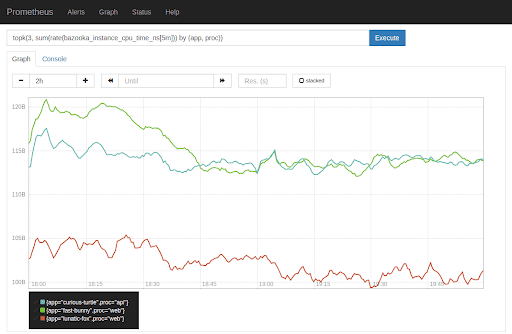
    Figure 1: Prometheus Graphs. Source: SoundCloudDev.

    Grafana

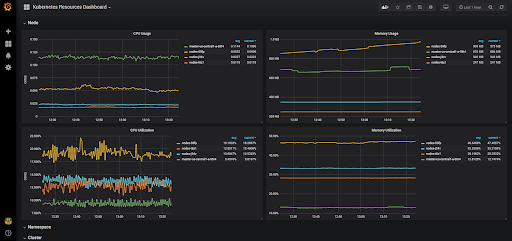
    Grafana is an open source metric analytics and visualization suite. It allows you to create custom dashboards using data taken from multiple sources, such as Prometheus, Elasticsearch, MySQL, Postgres and Redis. Furthermore, Grafana has its own alerting system and a role-based access control (RBAC) system for software. As a data visualization tool, Grafana is famous among Prometheus users for enabling them to effectively visualize the metrics stored in Prometheus. There’s a wide array of official and community-built custom dashboards for various data sources in Grafana, allowing users to easily set up dashboards (found at this link) and get on with monitoring. Grafana offers another associated product called Loki, which aggregates logs in Kubernetes and integrates well with the Grafana UI.

    Related tools and technologies: Loki, Prometheus.

    Figure 2: Kubernetes Resources Dashboard in Grafana. Source: Replex.

    Elastic Stack

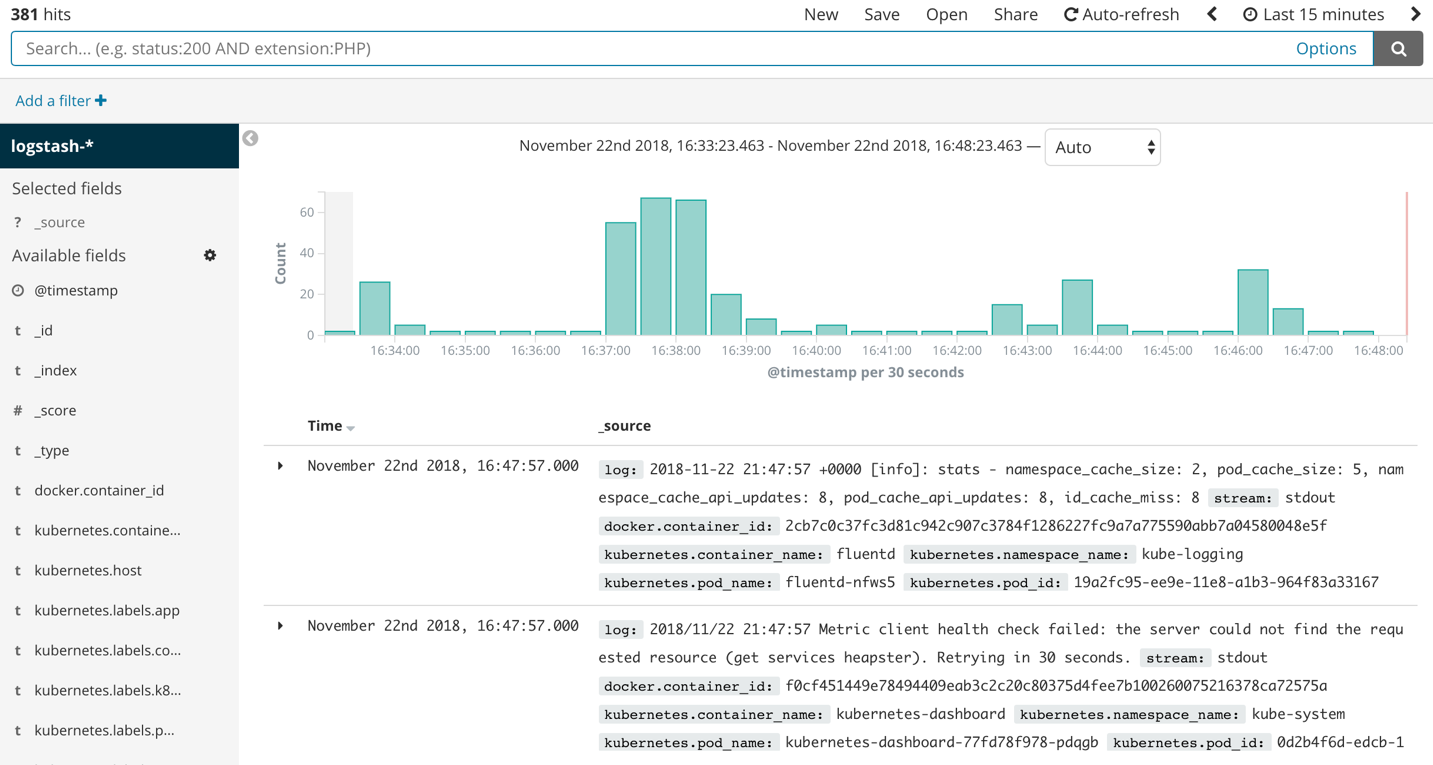
    Elastic Stack is a group of open source products from Elastic designed to help users search, analyze, and visualize data from any type of source, in any format, in real time. This product was previously recognized as the ELK stack, where each letter of the acronym stood for one of the company’s main products: Elasticsearch, Logstash and Kibana. Elastic Stack provides both monitoring and logging solutions with the help of its big data database, Elasticsearch. 

    In order to aggregate logs, people tend to use Elasticsearch for storage, Logstash or Fluentd for log streaming, and Kibana for visualization. Fluentd is not part of the Elastic Stack, but it is widely used with Kubernetes to stream logs in place of Logstash, the tool provided by Elastic Stack. Similarly, Metricbeat is used to scrape metrics and set up visualizations on Kibana. The enterprise version of Elastic Stack ships with X-Pack, a set of additional tools that enables reporting, alerting and role-based access control (RBAC), among other features. By default, the Elastic Stack GUI, Kibana, does not support RBAC. You have to use the previously mentioned enterprise version of Elastic Stack to enable it.

    Related tools and technologies: X-pack, Metricbeat, Logstash, Kibana.

    Figure 3: Discover View in Elasticsearch. Source: XpresServers.

    Sensu Go

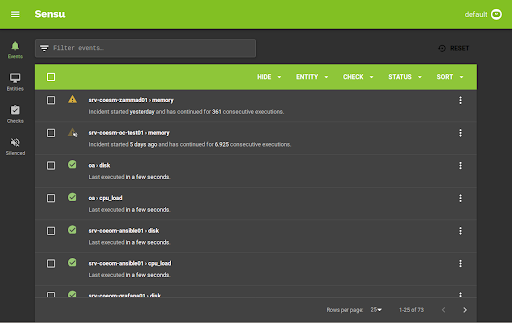
    Sensu Go is a telemetry and service health checking solution for multi-cloud monitoring at scale. It allows you to gain visibility into servers, containers, services, applications, functions and connected devices across any public or private cloud. Sensu can be run side-by-side with Prometheus to get the best out of both solutions, or it can be run natively without Prometheus. Sensu works best alongside Prometheus, since exporting application level metrics to Prometheus requires loading the Prometheus SDK to your application codebase and exposing a metrics endpoint. The endpoint is then scraped and stored in the Prometheus Server. This may sound like a lot of work—and, sometimes, it is. Sensu avoids this complexity by using a sidecar concept. A Sensu agent is deployed alongside your application. The agent constantly collects and exposes metrics to the Prometheus server without your having to change the application codebase.

    Sensu works without Prometheus too. It can operate natively in Kubernetes, where it has its own server to store and visualize metric data exposed by the previously mentioned Sensu agent.

    Related tools and technologies: Prometheus.

    Figure 4: Events in Sensu. Source: becon.

    Sysdig Inspect

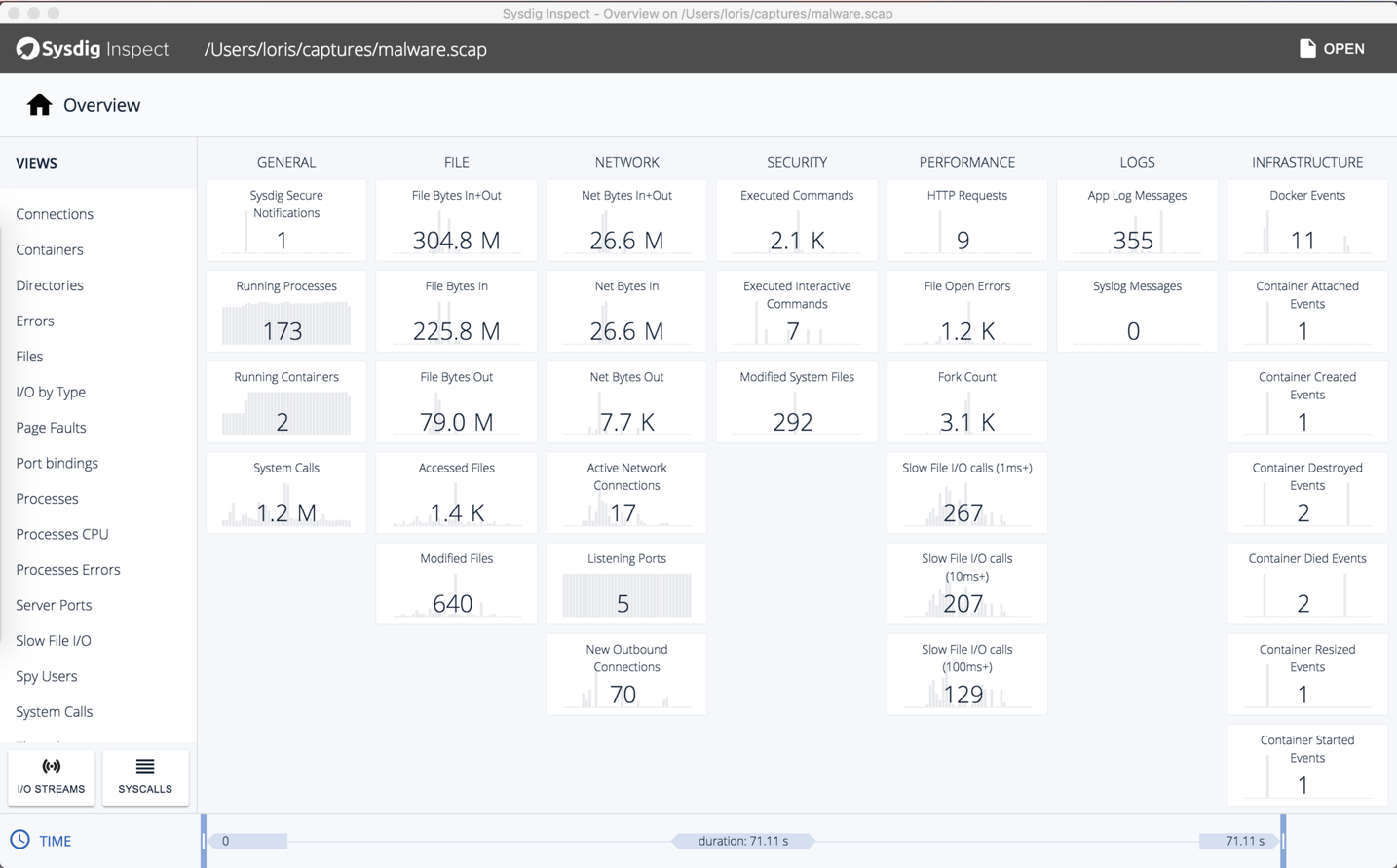
    Sysdig has two open source products: Sysdig Inspect and Falco. Here, we’ll focus on Inspect, which monitors and captures the container processes running in your system and allows you to drill into those processes for post-incident forensics. This enables you to analyze your application performance, troubleshoot errors and monitor any processors that could be misbehaving. Furthermore, if your system is breached, Sysdig allows you to understand how the breach occurred and what data was taken in the process. Sysdig Inspect is a very powerful tool that focuses on the performance tuning and security investigation of your system. 

    Related tools and technologies: Grafana, Sysdig, Sysdig Falco.

    Figure 5: Sysdig Inspect Overview. Source: Sysdig.

    Jaeger

    Jaeger is an end-to-end distributed tracing solution that was open sourced by Uber Engineering. It allows you to monitor and troubleshoot transactions in complex distributed systems. In modern microservice architectures, the majority of operational problems fall under the umbrellas of networking and observability. When a service failure occurs, you have no idea how the requests have gone from service to service over the network to complete a single business transaction. This makes debugging extremely difficult. Currently incubating under CNCF, Jaeger uses tracing to enable root cause analysis, performance and latency optimization, and distributed transaction monitoring. Jaeger works out of the box with Istio, a popular service mesh implementation open sourced by Google. 

    Related tools and technologies: Prometheus, Jaeger, Zipkin, Istio.

    Figure 6: Jaeger Find Traces. Source: Jaeger.

    Conclusion

    These tools are widely used in the tech industry, and they all have their benefits. Most of these solutions, however, require skilled implementation and ongoing manual maintenance that can be a burden for DevOps teams and a distraction from the business. There’s no one solution that can cater to all of your requirements, since each tool focuses on one or two specific aspects of observability and analysis. By mixing these tools together, you can derive a unique solution for your individual business needs. 

    For ease of comparison, the chart below outlines the features offered by each of the tools discussed in this article.

    — Ran Ribenzaft

  • SecOps: The Next Stride for DevOps

    SecOps: The Next Stride for DevOps

    Global IT spending is now touching a figure of $4 trillion. In today’s technology-intensive environment, data is the biggest commodity, more valuable and powerful than ever. And like Peter Parker’s uncle Ben noted, “With great power comes great responsibility.”

    Security has always been a big concern for valuable things and IT is no exception. IT as a whole is trying to push security left in the development cycle—trying to involve it in every step of the development cycle. And just when development and operations teams are getting used to the “esprit de corps” we call DevOps, I think it’s time we add the third musketeer: security.

    What is SecOps?

    SecOps is a collaboration between security and operations teams, just like development and operations teams collaborate on DevOps front. SecOps is a set of practices organizations need to follow, processes they need to execute and tools they need to use to ensure the security of their application environment. SecOps is making sure organizations do not sacrifice security to attain set performance and uptime indexes.

    In a typical development cycle—requirements gathering, design, development, testing, implementation or deployment and maintenance—security normally is introduced in the later stages, somewhere between testing and deployment or even later. But SecOps is all about making sure to introduce aspects around security much earlier or at each stage of the software development life cycle (SDLC).

    I know what you are thinking: This is going to complicate things and increase the time to delivery. This is where operations and development teams need to join forces to uncomplicate the things and make it time efficient practice. Next thing you must be thinking of is, Why so much hassle? Think of it the other way. Wouldn’t it save more time when you address the security concerns at much earlier stages than at the time of delivery or implementation? All it takes is an amalgamation of the security group, development team and operations team; a little bit of planning; and a whole lot of execution.

    SecOps + Containers

    Containerization is slowly but steadily moving from an alternative to full virtualization to a serious platform for running your applications. Containers have some obvious advantages including scalability and flexibility, and this solves most of the problems related to resources in case of application development. Reduced size; reduced time to provision application environment and testing; platforms including Docker, Solaris Zones, BSD Jails; and orchestration platforms including Kubernetes, CoreOS Fleet, Amazon ECS and OpenShift make containers a more preferred option for application development environments.

    This increased traction toward containerization points to the increased need to concentrate on security aspects. Here are some best SecOps practices for container environment you and your organizational teams can follow:

    • Authentic sources and images: Always check for authenticity of container images. There are various tools such as Docker’s security scan. With Docker Cloud and Docker Hub you can scan images to check for potential security vulnerabilities. Most images are built from some base image and not built from scratch, so there is always a threat with the used images.
    • Vulnerability management tool: There are tools available in the market to analyze container image formats and libraries for threats before you actually start using them.
    • Follow benchmarks and hardening guidelines: Always make sure you do the checks and follow hardening guidelines for containers, images, hosts and platforms before you start with production. There are few standards and benchmark checks for containers such as CIS’s Docker security benchmark, PCI compliance checklist, etc.
    • Periodic auditing: Regular auditing of your application environment can help you save yourself from the future troubles. Moreover, automation of auditing process can help in detection of unused images and containers.
    • Use of management frameworks: Use frameworks that can automate behavior profiling and control all the users, authorize the access to the containers, images and hosts.
    • Security built in to container engine systems and third-party security solutions: Third-party vendors have a number of applications for container security in addition to security systems of container management platforms.

    Dev + Sec + Ops

    With the continuously increasing business demands for new applications and software, and new practices and development trends such as DevOps, Agile, cloud, automation, CI/CD and others, traditional security needs to upgraded in the new paradigm. Thankfully, some of these practices facilitate the security. Consider CI/CD as an example: Continuous integration requires continuous integration tools, or what we call build servers. Some popular examples are Jenkins, TeamCity, GitLab CI, Travis CI, Bamboo, Go CD, CircleCI and Codeship. The best SecOps practice is to check and fix vulnerabilities at early stages as a part of CI/CD workflow. Integration between authentication, scanning, management tools and CI/CD pipeline tools could be the best possible solution to your security-related problems. Some easy-to-implement solutions can include automated security testing, static code analysis, authentication checks and login tracking.

    SecOps enable organizations in lifecycle management, analysis of security threats, incident management, optimizing and measuring the effectiveness of security controls, reduced breach response time, reduced security risks and increased business security. The basic principle on which SecOps works is Avoid, Analyze, Respond, Review, Repeat. By analyzing the security events and data, you can build incident response plans to avoid future unwanted events.

    Frameworks and Tools

    Now that you have a clear understanding of why you need your security, development and operations teams to work together, let’s see what tools and frameworks you can use.

    • Docker-native tools: If you are using Docker as a platform then you can use few security tools provided by Docker itself for the security of production environment: Docker Bench and Docker Notary. Docker Bench is a script that checks common best practices around deploying Docker containers in production. Docker Notary enables you to check whether content is from a trusted publisher.
    • Chef: Chef provides different tools including Inspec to automate security testing.
    • Puppet: Puppet provides security compliance and policy defining frameworks.
    • Ansible: Ansible provides system tracking, setting up firewall rules, user lockdown and compliance automation solutions.
    • CoreOS Clair: CoreOS Clair is an open-source project for vulnerability analysis in applications and Docker containers.
    • SaltStack: SaltStack can help in orchestration and automation of security practices solutions for containers.

    This is just a look at some of the most popular ones. If you want, there are a number of others that can look after the security of your application environment.

    The main motive behind implying SecOps practices in any organization is involving security team at all possible stages to remove any ambiguity in any stage of development rather than security team providing analysis reports to the operations team and then sitting back and enjoying the show. When these teams perform in a synergistic manner, the business focus can be shifted to other important things.

    About the Author / Chaitanya Jawale

    Chaitanya Jawale is founder and CEO of Opcito Technologies, a leader in microservice-based product engineering and automation. Chaitanya comes with strong background in product engineering, data center automation, DevOps and multi-cloud orchestration and management.

  • SaaS: Building Tools for the DevOps-Minded

    SaaS: Building Tools for the DevOps-Minded

    DevOps, Continuous Delivery, Continuous Integration and Continuous Testing are no longer just methodologies and development strategies — they’re all a part of a growing economy within the tech industry.

    Great Software-as-a-Service (SaaS) companies such as Chef, Docker and New Relic have done an amazing job of spotting the trends early and building their tools and services around a new wave of development processes. Chef and Docker alone have reportedly raised nearly $250 million, and New Relic went public in 2014.

    In fact, this very website is another example of how impactful these new development practices are — as several specialized news outlets have been born out of these revolutionary development strategies. So, not only has the DevOps methodology helped developers create better products, faster; but the process has opened opportunities for technical experts to share their experiences on sites like this, e-books, webinars, conferences and any other way people communicate.

    On staging-devopsy.kinsta.cloud, you’ll see the best articles on the web discussing how DevOps is defined in different organizations, why Fortune-500 companies are shifting old practices toward CD and the best practices of CI from industry experts.

    In the race to be the most DevOps-friendly solution — no matter the niche — hundreds of startups have been founded and funded, which has only enhanced the toolboxes of thousands of developers. You’d be hard-pressed to find a good SaaS company that doesn’t offer integration with Jenkins CI, TeamCity or Chef, and that’s because not only should a SaaS product solve an important problem, but it should have minimum disruption of your current development process.

    With all that in mind, Continuous Testing is one of the most exciting spaces in technology today. Continuous Testing is a process that aims to synchronize testing and QA with dev and ops, which ultimately yields better products more quickly.

    There are several factors that make Continuous Testing successful in a team’s software development lifecycle — such as open-source collaboration solutions, test automation APIs and tools to track the historic performance of applications .

    With the release of Load Impact Version 3.0, the global performance and load testing SaaS company has announced its latest feature that fits right in with the DevOps mindset: Performance trending.

    Performance trending allows users to plot runs of the same test over time. That gives companies a clear view into data that locates patterns of performance degradation or improvement in order to easily validate code and infrastructure changes.

    In the spirit of Continuous Testing, DevOps, CD and CI — performance trending improves users’ ability to gain both a low-level and high-level view into the performance of their systems. And with the increased number of tests run by DevOps professionals, performance trending yields valuable information for companies concerned with their application performance — which should be everyone.

    Between staging-devopsy.kinsta.cloud and plenty of great conferences and meetups around the world, it’s safe to say this economy of DevOps-minded tools will only continue to grow in the coming years.

  • OCP is a victory for CoreOS and Containers in general

    OCP is a victory for CoreOS and Containers in general

    A broad coalition of major tech companies have joined forces to create the Open Container Project—or OCP. The move to develop and maintain common standards around software containers vindicates the CoreOS split from Docker and reunites the two in a common cause that will make all container platforms and technologies stronger.

    A press release announcing the Open Container Project explains the overall vision for OCP. “Housed under the Linux Foundation, the OCP’s mission is to enable users and companies to continue to innovate and develop container-based solutions, with confidence that their pre-existing development efforts will be protected and without industry fragmentation.”

    Docker and CoreOS are at the heart of OCP but they’re by no means alone. A veritable “Who’s Who” of DevOps and container technologies has enlisted to support OCP, including Amazon Web Services, Cisco, EMC, Google, HP, IBM, Linux Foundation, Microsoft, Red Hat, and VMware.

    At one point Docker had a Standard Container Manifesto that spelled out some basic attributes it felt all containers should have. The Standard Container Manifesto called for containers to operate in a standard fashion, be content agnostic, infrastructure agnostic, and designed for automation among other things. When Docker removed the manifesto and seemed to shift to a more proprietary strategy CoreOS split off and launched its own container technology to continue the vision of a container standard.

    “An open, well-defined specification is required for the overall success and adoption of containers. At CoreOS, when we started the App Container spec (appc) our goal was to have a well-designed software container specification. With the OCP, we have now come together with Docker and many industry giants in an effort to unify this goal.”

    The launch of OCP and the laundry list of companies backing it show that CoreOS was not alone in its pursuit of the vision for a container standard. “We are excited to support this effort to bring the industry together to agree on a core standard for containers, which we feel will benefit all customers no matter what cloud provider they use,” said Jason Zander, CVP, Microsoft Azure. “Through our close work with Docker over the last year we have demonstrated our commitment to openness and welcome this opportunity to help create an open platform for customers.”

    “Customers need an open, interoperable future for software containers and we are happy to see the industry coming together to establish a common standard,” explained Kit Colbert, vice president and CTO, Cloud-Native Applications, VMware. “Our participation in the Open Container Project reinforces our goal to help customers innovate more rapidly and benefit from containers as they adopt the technology in their environments. We look forward to working with the community on container portability and security which are areas of focus for enterprise IT.”

    According to the OCP press release Docker will donate the code for its software container format and runtime—as well as the associated specifications—to the project. The leadership team from the Application Container spec (appc) will also contribute technical leadership and support for OCP.

    Ben Golub, CEO of Docker, summed up by acknowledging the effort and support for OCP. “We’d like to thank the many people in the industry who came together to support this important initiative. Our thanks to the Linux Foundation for the incredible work they have done in helping to pull this broad group together. Given the criticality of the intersection of containers and operating systems, we’d also like to thank Red Hat and Microsoft for their early leadership on this initiative. Our sincere appreciation to IBM and Intel for their ongoing encouragement of open governance. Finally, we’d like to recognize the members of the appc community, including Google and CoreOS, for their willingness to join all of us to constructively address these critical issues.”

    Now that all of the major players are united in a common cause to define and maintain an industry standard for containers it will be much easier for developers and organizations to embrace container technologies without reservation. The confidence that your investment of time, money, and effort won’t be wasted or paint you into a corner is very liberating.

  • ProfitBricks shakes things up with new Docker hosting platform

    ProfitBricks shakes things up with new Docker hosting platform

    Organizations and developers that want to leverage Docker containers have a variety of cloud platforms to choose from. Rackspace, Amazon, Azure and others all support Docker containers. There’s also a relative newcomer in the mix looking to shake things up.

    ProfitBricks is an infrastructure-as-a-service (IaaS) company that believes it has a unique value proposition for companies that want to take advantage of cloud infrastructures and Docker container technology. ProfitBricks was co-founded by its CEO, Achim Weiss, and its CMO, Andreas Gauger. The two previously founded the Web hosting service 1&1 Internet.

    Weiss and Gauger launched ProfitBricks four years ago to solve a perceived problem. They saw the value of cloud infrastructure and cloud services, but felt that the existing platforms suffered in the areas of performance, flexibility, usability and cost. So ProfitBricks was born.

    ProfitBricks claims to have more speed and provide better value compared with rival cloud platforms. It calls its platform Cloud Computing 2.0.

    ProfitBricks Docker Hosting

    Docker has become a household name virtually overnight—quickly establishing itself as the de facto standard for container technology. David Bartletti, a principal analyst for Forrester, recently wrote in a research report, “Docker helps developers package code for quick assembly and hand-off to quality assurance, testing, and production release teams with greater confidence that their app will run consistently as it moves through the release process…The Docker open source community is growing quickly, with strong representation from nearly every major cloud vendor…As Docker containers proliferate, developers and operations teams alike will demand management tools that help organize and orchestrate hundreds or thousands of containers.”

    With so much momentum behind Docker and container technologies, it makes sense for a cloud infrastructure provider to integrate Docker into its ecosystem. Last week ProfitBricks announced its new Docker hosting platform. The platform features dedicated resources, redundant block storage, and 80 Gbps networking. It allows developers to choose images, link containers, and expose ports. The free tier offers customers 2,500 CPU Core hours as part of the Early Access Preview with up to 4 CPU cores, 8 GB of RAM, and 100 GB of storage.

    “When we first embarked on our Docker product architecture, we knew that it would not only need to meet the standards of existing Docker platforms, but also incorporate new, industry-leading features that addressed existing problems encountered with Docker,” said Achim Weiss, co-founder and CEO of ProfitBricks, in a press release. “Docker has been taking the DevOps world by storm since its widespread introduction to the community in 2014, and our platform will combine its impressive features with our flexible and painless cloud computing infrastructure.”

    ProfitBricks says that one thing that sets its Docker hosting apart from the competition is autoscaling. The ProfitBricks cloud infrastructure will ensure that resources are automatically managed to meet the demands of the Docker containers running on it. Developers don’t need to rely on standalone applications or custom scripts to scale resources because those capabilities are integrated seamlessly into ProfitBricks.

    ProfitBricks claims to be the best value in cloud computing. It offers a bold promise for the price / performance ratio on its site. “We guarantee that any workload deployed on ProfitBricks will cost less than the same workload running at the same performance level on the IaaS platforms of Amazon, Google or Microsoft.”

    You can check out the new ProfitBricks Docker Hosting for yourself. Visit this link for an Early Access Invite and find out if ProfitBricks can really deliver.

  • Hyper-V Containers combine virtualization with containerization

    Hyper-V Containers combine virtualization with containerization

    Containers are all the rage these days. You’re just not cool if you’re not using Docker or some other container technology to build and deploy your IT infrastructure. Traditional containers, however, lack sufficient security for some industries and companies, so Microsoft developed Hyper-V Containers.

    Container platforms like Docker and Rocket have significant momentum and have quickly become established as a de facto way of developing and deploying applications. Microsoft already entered into an arrangement to bring native Docker container support to Windows Server, but now it is going a step farther by creating Hyper-V Containers that combine the agility of containers with the security of virtualization.

    Hyper-V Containers ensure that code running in one container object remains completely isolated. The Hyper-V Container object cannot impact other container objects or the host operating system, or vice versa, because it is a separate virtualized container. Mike Neil, general manager of Windows Server for Microsoft, explained in a blog post, “Leveraging our deep virtualization experience, Microsoft will now offer containers with a new level of isolation previously reserved only for fully dedicated physical or virtual machines, while maintaining an agile and efficient experience with full Docker cross-platform integration.”

    IT admins will appreciate the fact that Hyper-V Containers can be created and deployed using the same development and management tools used for traditional Windows Server Containers and that they integrate with Docker for cross-platform deployment. Neil points out that applications developed as Windows Server Containers can easily be deployed as Hyper-V Containers without any modification—enabling organizations to take existing containerized apps and re-deploy them in a more secure manner.

    It seems like security is always an afterthought to any new technology concept, and containers is no exception. It started out as a good idea that caught fire, but it wasn’t until it hit critical mass and achieved mainstream adoption that security became a factor. As larger companies, or organizations in highly-regulated industries look at jumping on the container bandwagon, though, security becomes a mandatory component.

    Virtualization has been used in hosted environments for years as a means of isolating different systems running on the same physical hardware or network. Microsoft’s Hyper-V Containers take those same principles and apply them at the container app level so that security-conscious organizations can have some peace of mind and remain compliant with security mandates as they embrace containerization.

    Microsoft’s strategy of integrating Windows Server Containers and native Docker support in Windows Server and Azure was a big step in the right direction. Adding the security of Hyper-V Containers is brilliant. Microsoft is doing an excellent job of pivoting its business model and not just embracing cloud and DevOps technologies, but raising the bar and taking the lead.

    As a side note Microsoft also announced Nano Server—a new minimal footprint implementation of Windows Server optimized for cloud hosting and container technologies. The Nano Server installation includes the bare minimum components necessary. Microsoft claims the result is smaller server images, faster deployment times, decreased network bandwidth consumption, and reduced administrative overhead. In other words a Nano Server installation of Windows Server will just do what it’s supposed to do with minimal interaction or oversight so IT personnel can focus on more important things like the Hyper-V Container apps running on it.

  • Puppet Labs talks Docker and containerization

    Puppet Labs talks Docker and containerization

    Last week Puppet Labs released a new version of Puppet Enterprise that brought forward a number of new features, including those to Puppet Node manager that helps automate the provisioning of infrastructure from containers to bare metal, as well as a new AWS module that helps automate provisioning, configuration and management of AWS resources using Puppet. As a part of the release, Puppet announced it was officially supporting a Puppet module for Docker that has been kicking around Puppet Forge since the containerization tool went open source.  With 90,000 downloads behind it and many more customers clamoring for advice on how to better automate workflows in Puppet-controlled infrastructure while using Docker, the module had gained critical mass. staging-devopsy.kinsta.cloud took the announcement as an opportunity to catch up with Gareth Rushgrove, senior software engineer with Puppet and author of the Docker module, to discuss containerization and how Puppet is working to help customers take better advantage of container environments.

    What do you consider some of the biggest challenges when deploying containers in the real world? And how is Puppet Labs hoping to help customers get the most out of Docker?

    I think the first thing is really just…


    –THIS STORY HAS BEEN MOVED TO CONTAINER JOURNAL–


  • Linux Containers & Security Implications

    Linux Containers & Security Implications

    Does the word “container” intimate containment, suggesting that containers are inherently secure? If it does, any such assumption of security may be the broadest Docker vulnerability to date.

    aaron cois“One of the biggest threats I see with Docker is its positioning and the implied security in the language. The reality is that these containers don’t contain anything,” says Aaron Cois, Researcher, CERT Division, Software Engineering Institute, Carnegie Mellon University. Yet, that is the implication.

    Just as those who thought Linux or VMs were secure enough on their own were mistaken, so those who believe that containers put a lid on security will be sorely disappointed. Today, Linux environments require network, OS / host security, Internet security, and web application security measures similar to those used with other platforms. Tools like security auditing / PEN testing, firewalls / WAFs, anvi-virus and anti-malware tools, DLP, IDS/IPS, remediation tools, and really the gamut of security measures similar to what Microsoft environments require are increasingly needed to defend data in Linux environments. “Likewise, operations can give developers tools to log into the VSphere console to create and change VMs while limiting their privileges,” says Cois.

    And so, containers also require appropriate security measures. “Developers and non-admin operations staff don’t need to log into the host command line to work, and no one in security wants them to,” says Cois. But today’s Docker workflow not only permits but requires it.

    The Root of the Problem…


    –THIS STORY HAS BEEN MOVED TO CONTAINER JOURNAL–