Tag: github

  • Scaling Collaboration in DevOps

    Scaling Collaboration in DevOps

    Those familiar with DevOps generally agree that it is equally as much about culture as it is about technology. There are certainly tools and practices involved in the effective implementation of DevOps, but the foundation of DevOps success is how well teams and individuals collaborate across the enterprise to get things done more rapidly, efficiently and effectively.

    Most DevOps platforms and tools are designed with scalability in mind. DevOps environments often run in the cloud and tend to be volatile. It’s important for the software that supports DevOps to be able to scale in real time to address spikes and lulls in demand. The same thing is true for the human element as well, but scaling collaboration is a whole different story.

    Collaboration across the enterprise is critical for DevOps success. Great code and development needs to make it over the finish line to production to benefit customers. The challenge organizations face is how to do that seamlessly and with as much speed and automation as possible without sacrificing quality or performance. How can businesses streamline code development and deployment, while maintaining visibility, governance and compliance?

    Emerging Trends

    First, I want to provide some background and share some data gathered by 451 Research on DevOps and DevOps adoption in general. Cloud, agile and DevOps capabilities are important for organizations today—both in perception and reality. 451 sees enterprise adoption of these things, as well as container technologies, growing—including increased usage in production environments.

    There are a number of advantages to embracing these technologies and methodologies, such as increased flexibility and speed, reduction of costs, improvements in resilience and reliability, and fitness for new or emerging applications. According to 451 Research, organizations also face some barriers including a lack of familiarity and required skills internally, the immaturity of these emerging technologies, and cost and security concerns.

    In the “Voice of the Enterprise: SDI Q4 2015 survey,” 451 Research found that more than half of the respondents (51.7 percent) consider themselves to be late adopters, or even the last adopters of new technology. The flip side of that is that almost half (48.3 percent) label themselves as first or early adopters.

    Those general sentiments are reflected in the survey responses to other questions. When asked about implementation of containers, 50.3 percent stated it is not in their plans at all, while the remaining 49.7 percent are in some state of planning, pilot or active use of container technologies. Nearly two-thirds (65.1 percent) indicated that they use agile development methodologies for application development, but only 39.6 percent responded that they’ve embraced DevOps approaches. Nevertheless, while agile software development has been in the industry for years, 451 notes the impressive adoption of containers and DevOps, given they are emergent trends.

    When asked what the top three IT pain points are, the leading responses were cost or budget, insufficient staff and legacy software issues. As organizations move to cloud, DevOps, and containers issues such as these will need to be addressed, along with how to scale both technologies and collaboration effectively.

    The Current State

    The industry—driven in large part by the DevOps revolution—is in the midst of a sea change, where software development is becoming more highly integrated across the entire business. The creation of software is less segregated and is more and more a function of collaboration and socialization.

    Concepts and methodologies that were novel or niche just a few years ago have matured quickly to become the mainstream technologies and frameworks that are driving value today. Businesses rely on concepts such as agile, lean, virtualization, cloud, automation and microservices to streamline development and enable them to work more effectively and efficiently at the same time.

    To adapt and evolve, enterprises need to accomplish a number of key tasks. The challenge companies face today is how to accelerate development while reducing costs. Organizations need to eliminate the barriers that exist between IT and the rest of the business, and work cooperatively toward a strategy that provides more effectiveness in a technology-driven, competitive environment.

    Agile, cloud, DevOps and containers all play a role in that process, but the one thing that binds it all is effective collaboration. Each of these technologies and methodologies provides unique benefits, but the real value comes from the organization as a whole—and the tools and platforms used by the organization—being able to collaborate at scale. Successful DevOps implementations also require participation from other stakeholders beyond development and IT operations teams, including security, database, storage and line-of-business teams.

    Collaboration-as-a-Platform

    There are services and platforms online—such as GitHub—that facilitate and streamline collaboration. The online platform functions as a code repository, but the value extends beyond just providing a place to store code.

    Such a collaboration platform helps developers and teams collaborate more effectively because it provides a community where the code and process can be shared and discussed. Managers can monitor progress and track what code is shipping next. Developers can experiment with new ideas in a safe environment before taking those experiments to a live production environment, and new ideas and experiments can be effectively communicated to the appropriate teams.

    One of the keys to more agile development and DevOps is to allow developers to test things and gather relevant feedback quickly. The goal is to produce quality code and features faster, not to waste time setting up and managing infrastructure or scheduling more meetings to talk about it. The GitHub platform, for example, enables more effective and scalable collaboration because code review can occur when it is most convenient for the participants. There is no need to try and coordinate and schedule code review meetings, so the developers can continue to work uninterrupted, resulting in greater productivity and job satisfaction.

    Steven Anderson of Sendachi noted that GitHub is a collaboration platform, but it’s also a place for your tools to work with you, too. This means it can help not only with collaboration and continuous integration, but also with code quality.

    One of the benefits of a collaboration platform is that large teams of developers can be broken down into smaller teams that can focus more efficiently on specific components. It also allows things such as document sharing alongside code development to blur the lines between technical and non-technical contributions and enable increased collaboration and visibility.

    Collaboration is Key

    The importance of collaboration can’t be stressed enough. It is a key tenet of DevOps culture, and it’s vital to agile development and maintaining a competitive edge in today’s world. Executive or management support and internal evangelism are important. Organizations also need to embrace the culture shift—blending skills across functional areas toward a common goal.

    With that culture established, though, effective collaboration is crucial. A collaboration platform is an essential element of collaborating at scale because it streamlines productivity and reduces redundancy and effort, and yields higher quality results at the same time.


  • IBM InterConnect 2016: Sounding Off

    IBM InterConnect 2016: Sounding Off

    This years IBM InterConnect in Las Vegas was spectacular. Our staging-devopsy.kinsta.cloud team covered as many of the 300+ DevOps tracks and sessions that we could. We have been editing video and getting ready to report on the show since then. Finally, we have enough ready and the time to give our full report.

    The last 6 weeks or so have been a rush here at staging-devopsy.kinsta.cloud. I literally went straight from IBM InterConnect in Las Vegas to RSA Conference in San Francisco. Coming home from 2 weeks on the road I threw myself into putting the final touches on our DevOps Connect: CD Summit/Jenkins Days events this spring (click the link for more details on these upcoming events).

    So much to report from InterConnect that I haven’t had a chance to write up, but the good news is we have the videos to share with you all. The videos will be available on our staging-devopsy.kinsta.cloud YouTube Channel under the playlist InterConnect 2016. We will feature some of the best in the days and weeks to come.

    Before I share the first batch of videos though I wanted to briefly go over what I consider the main news and themes of IBM InterConnect 2016:

    1. IBM and GitHub partner to deliver GitHub Enterprise as a hosted service or dedicated GitHub. While GitHub needs no introduction to most of you reading this, the ability to host your own GitHub enterprise version for your own private cloud or hybrid cloud is a major plus for organizations uncomfortable using a public repository for their code. I had a chance to speak with both IBM and GitHub folks at InterConnect and the videos on those will be available shortly. But if you are a Git user this could be something that really makes your day.
    2. IBM and VMware partner for seamless migration of VM workloads. I think this is really the short term biggest game changer coming out of InterConnect. Now all of of those VMware setups sitting in peoples private datacenter and server closets can be seamlessly moved to the cloud on IBM. While VMware always offered snap backups and such, this really makes it a no brainer to move your on premises VMware set up to the cloud quickly and painlessly.
    3. IBM brings Swift to Servers in the cloud. Swift has quickly become one of most used languages to develop client side application (mostly iPhone). IBM announced they were contributing code to the Swift community that will enable server-side Swift allowing developers who already know the language to work on the server side. Additionally, IBM Cloud via SoftLayer will be server side Swift ready. This was more of a roadmap announcement with more code and functionality to come. Important about this one is it represents some of the first fruit we have seen from the Apple-IBM partnership announced previously.
    4. Cognitive. I know it is a buzzword, but look beyond the buzzword.  Cognitive, AI or whatever you want to call it has the potential to have the biggest long term impact on how we live our life every day. Not only is IBM making great strides in Watson and cognitive capabilities, the real story is they are making it really easy for developers to hook into via API and bring this cognitive capability to developers everywhere. I spoke to one IBM security person who literally overnight used Watson cognitive to help prioritize large enterprise vulnerabilities. I spoke to another entrepreneur (video just needs her OK to release) who used Watson’s cognitive thinking to make what they claim is the smartest dating app in the market today. But frankly this stuff just barely touches the surface. Cognitive is going to touch everything we so including the IoT space, automation, health care, science and more. We may be seeing the birth of the next big thing right before our eyes.
    5. Bluemix Garage and Bluemix Garage Method – You will see several videos around the Bluemix Garage and the Bluemix Garage Method. In fact the Bluemix Garage area on the expo floor was the most visited exhibit at the show (well except for the Elton John concert I guess). In fact our first video today is a tour of the Bluemix Garage setup on the expo floor with Rachel Reinitz and Sarah Plantenberg, two of the key leaders of the team there. Bluemix Garage is key to the “innovate like a startup, scale to the enterprise” theme that was very prevalent at InterConnect. IBM is setting up Bluemix Garages all over the world to allow teams from enterprises to come in and learn how innovate like a startup. It gives them that startup feel, but with IBM’s own experience, as well as that of others who have been through the program to learn from.  In fact IBM has codified this into the Bluemix Garage Method. More than just code, it is also the processes, policies and protocols that IBM has gathered as emerging best practices for how do get things done in a DevOps/Agile manner.

    I have been following the Bluemix Garage stuff since it was announced at Gene Kim’s DevOps Enterprise Summit last October and am happy to see the progress Rachel and team are making.

    So below is our first video in the IBM InterConnect 2016 series. It is a tour of the Bluemix Garage on the expo floor this year. Below it are links to two other videos also on Bluemix Garage and Bluemix Garage Method. You can see more on the playlist we have set up.

    Also checkout these IBM Bluemix Garage & Bluemix Garage Method videos:

    Interview with IBM’s Peter Klenk on IBM’s Bluemix Garage

    Interview with IBM’s Chris Lazzaro on IBM’s Bluemix Garage Method

  • Unifying Applications into One System

    Unifying Applications into One System

    Let’s talk about a real problem that all of us have faced at one point or another: keeping track of a single thread of work across many disparate tools. Regardless of the industry a company operates in, as a company grows it accumulated back-office applications that support of the business.

    Many knowledge-based companies have some sort of communication tool, project tracker and support tracker, all designed to help improve business process. Conversations suffice until they do not, and tools are implemented as the need arises. Every added tool has its purpose, solves a critical need and makes you and/or your team more productive.

    At some point however, this changes. Discovery becomes a major issue, as usage patterns between different tools leaves silos of data. It becomes difficult to correlate the different company pipelines that ultimately drive your business—the pipeline to care and communicate for customers, the pipeline to deliver new features, and the human interfaces involved in each. This is only intensified by team members who work on different projects with different tools and people, team members who work in different time zones, the sheer quantity of work to be done …

    How many ways can you name how not just conversations are lost, but context as well?

    Commonly, teams attempt to solve this in a few ways:

    • Rules! Specific guidelines (sometimes suggestions, sometimes mandatory) on how and where to have conversations and to store data.
    • Integrate! Write data transforms to move data from system X to system Y as necessary.
    • Go all in! Choose a suite of tools that takes care of all of these for you.
    • Make it problem for “Future You” — It’s fine as is, and not really an issue.

    At StackStorm, we ran into this problem. We have two ticketing systems (GitHub issues and Jira), a service desk tool (reamaze), and a chat client (Slack). The solution we use at StackStorm is one that I borrowed from my time at GitHub. One of my colleagues set up a really cool hook into Hubot that listened in our chat rooms for conversations we were having related to a GitHub Issue, a Pull Request or even a code commit. When someone mentions one of these things, Hubot would grab a chat log plank, and cross-link the permalink to the Issue or Pull Request.

    bf7487ce-9ebd-11e5-87cf-657e8d89cc32

    But, that’s just GitHub. Context matters across all tools, and gives team members additional flexibly in learning and gaining knowledge on their own. So, we took our Support Tool, re:Amaze, and did the same thing.

    Imgur

    • In times of speed, breadcrumbs allow you to piece together puzzles from where travelers have once voyaged. It may not be the entire puzzle, but having background greatly helps.
    • In times of documentation, those breadcrumbs allow you to use the same investigative skills to assemble a better history.

    This is one part of a set of behaviors that helps create a dynamic web of information. By seamlessly having a mechanism to associate conversations and issues/pr/tickets/whatever, it becomes much easier for conversations to happen whenever they need to (serendipitous interactions ftw) and still get context to team members when they’re available.

    This matters because: There is only one system.

    Before we get started …

    Full disclosure: I am affiliated with StackStorm, the company building StackStorm the tool. That being said, the ultimate goal here is to illustrate the pattern of how to harness the recent chat culture change using an event-driven framework with the hopes of regaining just a modicum of sanity in your daily life. If you’re interested in learning more about StackStorm and how it ties into the overall automated troubleshooting and autoremeditaion space, take a look at our ChatOps Pitfalls and Tips by Dmitri Zimine. That should give you a good background on why we used StackStorm instead of, say, just a small script.

    Ok, on to business!

    The Sensor

    This workflow begins with a sensor. Inside of the StackStorm-Slack integration is a sensor class that connects to the Slack Real-Time Messaging API. The first place to begin is with Sensors. The official Slack pack contains a sensor that uses the Slack RTM to connect to Slack and listen for messages in rooms it is associated with. Each message is then sent as an “event” to StackStorm, and I can create rules that will trap certain events and kick off.

    Rules

    Now that the sensor is emitting triggers into the system, I need to find a way to take an action when someone mentions an issue or ticket. The mechanism here is via a rule. Rules check triggers emitted into the system via sensors against a series of checks, and then executes an action or workflow if matched. A trigger can match to many rules.

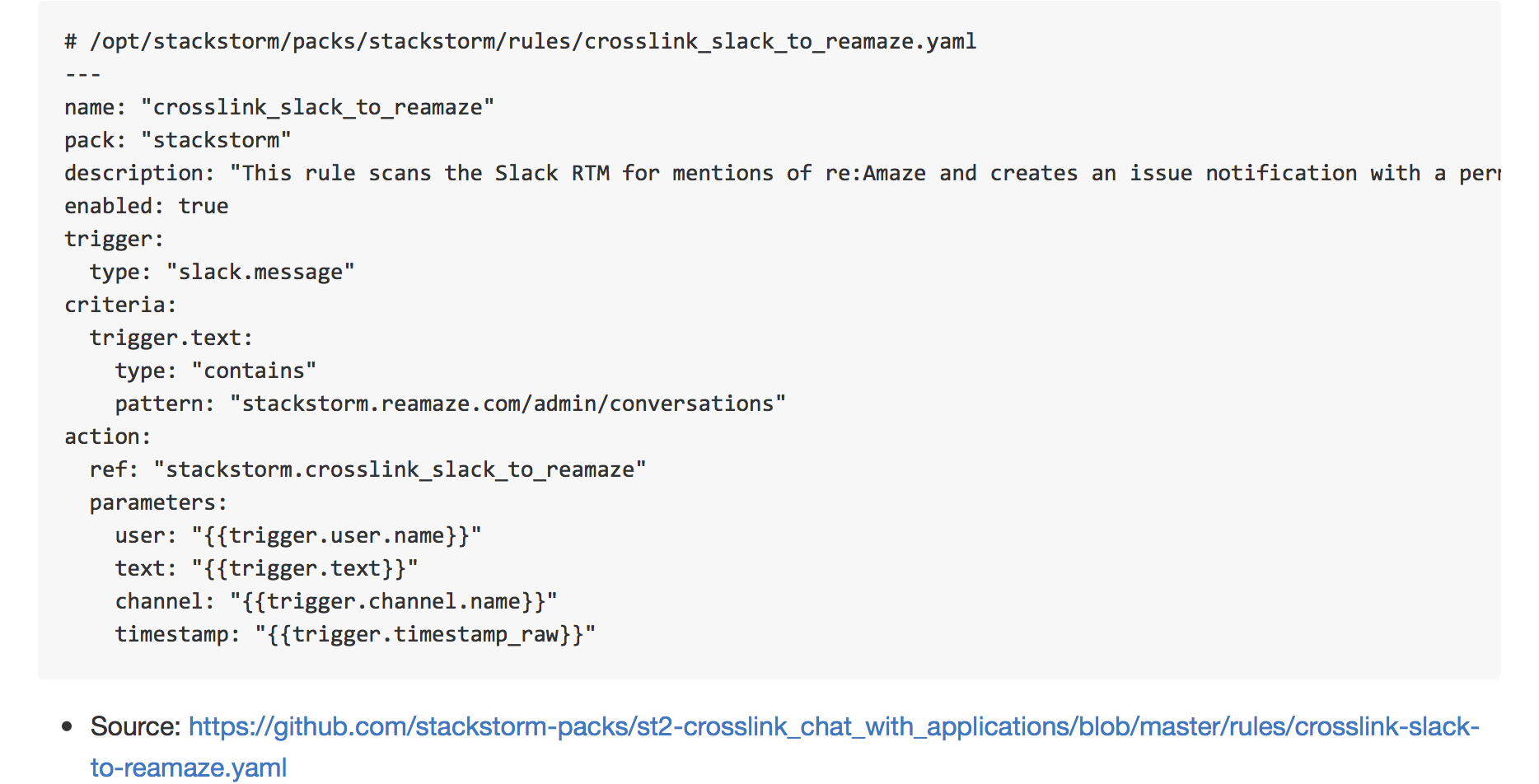
    Let’s create a rule to watch Slack for discussions related to reamaze

    unify-one-system_md
    

    The first element in the criteria block is trigger.text. In the rule, the trigger itself is just referred to as trigger as opposed to slack.message.text. We want to see if the text properly contains a pattern related to our reamaze issue tracker. I chose contains out of the large list of comparison operators, and made sure the pattern matches what I’m looking for.

    Last but not least is the action block. This block is basically the next operation. Here, I can choose a single action or a workflow to kick off, and even grab data from the trigger payload to pass to the action. In this case, I opted to create a new workflow for my purposes here, and made sure to grab a few keywords that I needed to do processing.

    At this point, I have a rule matching and now I need to create the action necessary to process the trigger.

    Actions and Workflows

    Next, we get to creating the actions. The goal is to ensure that anytime a discussion randomly breaks out about a re:Amaze support ticket, that @estee-tew posts the Slack permalink to the support ticket. With the trigger payload extracted in the above rule, the workflow will need to:

    • Take the text of a user comment and extract reamaze issue URL.
    • Calculate the Slack Permalink URL of the matched message from the collected data.
    • Post the Slack Permalink on the matched reamaze issue ticket.

    Inside the reamaze pack, I can see that I have the ability to create_message. This action takes three parameters: slug,message, and visibility. In our rule above, the action that was kicked off when the criteria matched desired slack messages is stackstorm.crosslink_slack_to_reamaze. As of right now, this does not exist, so that is the next step. For brevity’s sake, you can take a look at the action metadata on GitHub.

    ---
    chain:
      -
        name: "get_permalink"
        ref: "stackstorm.get_slack_message_permalink"
        params:
          channel: "{{channel}}"
          timestamp: "{{timestamp}}"
        publish:
          permalink: "{{get_permalink.result}}"
        on-success: "sanitize_message"
      -
        name: "sanitize_message"
        ref: "stackstorm.sanitize_slack_message"
        params:
          text: "{{text}}"
        publish:
          sanitized_text: "{{sanitize_message.result}}"
        on-success: "get_reamaze_slug"
      -
        name: "get_reamaze_slug"
        ref: "stackstorm.get_reamaze_slug"
        params:
          text: "{{sanitized_text}}"
        publish:
          slug: "{{get_reamaze_slug.result.slug}}"
        on-success: "crosslink_slack_to_reamaze"
      -
        name: "crosslink_slack_to_reamaze"
        ref: "reamaze.create_message"
        params:
          slug: "{{slug}}"
          message: "{{permalink}}"
          visibility: "internal"
    

    This is a simple Action Chain, inasmuch as it just does one task after another. The tasks here are designed to be small and portable so they can be reused. Let’s quickly inspect each of the actions and walk through what it is that lies before us now.

    Step 1: Permalink to chat history

    The goal is to create a way to crosslink a Slack permalink, so let’s start there. This starts with the get_permalink action above. While the history permalink is not in the trigger payload (or even in the official API, for that matter), Slack permalinks actually are not too terribly difficult to figure out. The first action takes two parameters (channel and timestamp), and then spits us out our permalink. We know we’re going to publish the permalink variable that now can be globally used in the workflow in the future. In addition, the next step takes us to the sanitize_message task. You can take a look at the python code for this action upstream.

    Step 2: Get support issue data

    The next step actually happens in two tasks: sanitize_message and get_reamaze_slug. The immediate next step,sanitize_message, is necessary to clean up the output from Slack. In the message payload, URL data is sent to us as a special “escape sequence,” which doesn’t do the rest of the actions much good. This action, detailed below, is simple enough to be reused in several other workflows. Again, take a look at the action itself: The run() method in this python-runner task is the entry point from StackStorm, and this cleans up the text and returns it back as a plain URL, which we can then pass to the next action, get_reamaze_slug. This returned information gets us what we need to call our final action, reamaze.create_message. We’re able to publish the permalink slug that was shared and discussed in chat. Now we know what is being discussed.

    Step 3: Post the crosslink

    In this step, a the link is actually created. Here we are! The finish line! Woot! The only thing that is essential to do is to make sure we only set the note as an Internal Only note to avoid sending weird links to our friends. The next step is thecrosslink_slack_to_reamaze action. At this point, we have all the data we need, so it’s just execution.

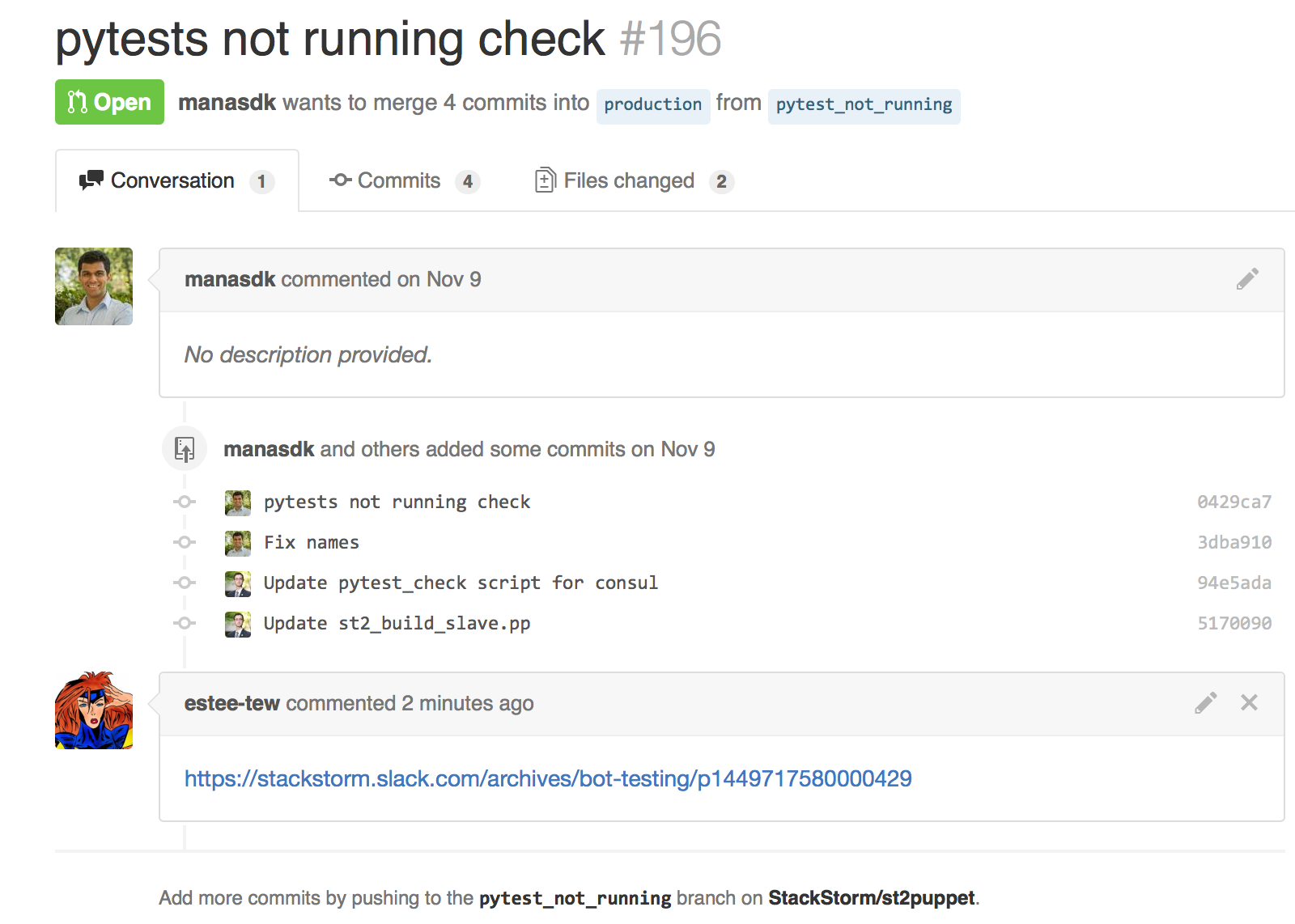
    Permalink from Slack. Crosspost to re:Amaze

    Imgur

    and now, with GitHub…

    The premise is simple enough. Included in the upstream repository also includes examples for how to setup similar context mapping with StackStorm. Take a look at https://github.com/stackstorm-packs/st2-crosslink_chat_with_applications. Same process, code reuse, and the same end effect.

    cross-link

    Unknowns

    • This workflow is not for everyone.
    • We expose internal-only links that are  not accessible by users, and it may be confusing to see random links in issues around GitHub. Why?! What are they?!
    • Aliens!?

    There are many more that will come up, but the key factor to address here is that it’s not difficult to put this together, and it’s not that difficult to change. And that’s ok. We’ll have questions to be answered, but being able to try something out super quickly was indeed satisfying. (In truth, the workflow went up faster than this blog. :P)

    Wrap-up

    For many reasons, it isn’t feasible to capture many fluid conversations in many different tools. The answer is not to move data around, but to leverage humans and provide them a helping hand. This is by no means a solution, but it does provide less friction in the daily work. Over time, add enough of these friction reducers, and then suddenly it’s no longer a panic issue. This also reinforces the idea that there is not a collection of systems, but rather a single system. The single company. The tools you selected are obviously necessary, as we defined at the beginning, but tools should not be dictating the communication structures of your teams, but rather informing them. Removing the ability for silos to form allows data in both bits and ideas to flow and move around. This can even be expanded to do much more.

    Until next time!

    About the Author/James Fryman

    jamesNow a senior DevOps engineer at StackStorm, James most recently worked at GitHub assisting in the development and curation of systems scaling within the Operations group. James is also a frequent speaker on the topic of automation at conferences throughout the world.

    Twitter: @jfryman
    email: james@fryman.io / james@stackstorm.com
  • GitHub, Bug bounties and DevOps

    GitHub, Bug bounties and DevOps

    A year after starting up its bug bounty program GitHub is showing how complementary bug bounties can be to DevOps practices. Essentially crowdsourcing vulnerability hunting by systematically paying independent researchers prizes for flaws they find, bug bounties are in a sense an extension of the DevOps ethos. They offer a means of continuously delivering application security assurance.

    “The advantage of having a community that is just working 24/7 worldwide is it does tend to be a more continuous approach to vulnerability hunting as opposed to the traditional method of hiring out a consultancy or third party to spot check at some point in time,” explains Shawn Davenport, vice president of security for GitHub.

    And according to GitHub’s security leaders, their program has become one of the most effective and cost-conscious tools they have for extending internal appsec resources. With approximately four application security experts on staff, GitHub has a more than respectable team in place for a company of its size, with an employee total of just over 250. But with so many deploys a day, the team needs air support to ensure they’re thoroughly inspecting the code base.

    “We ship software 100 times a day, we update the site constantly and the security team isn’t looking at every one of those changes,” says Ben Toews, application security engineer at GitHub and the mastermind behind its bug bounty program. “The way we fit security into our software development life cycle is that when someone is getting ready to ship a feature, they’ll reach out to the security team and ask for a review if they think it’s necessary and we’ll get a review in that point in time, but then a lot of smaller changes don’t necessarily get our attention. And then there’s a lot of legacy code we’ve never looked at.”

    Toews says the bug bounty fills the holes a number of ways. He estimates that for any given feature on the site, there’s probably been several hundred researchers who have tested them, “so the odds of someone looking at new code pretty quickly after a change is pretty high.” In its first year, GitHub’s bug bounty program fielded nearly 2,000 reports from bug hunters, 869 of which warranted further review.

    As GitHub rounds the corner into its second year of offering bug bounties, it wants to increase those odds of good coverage with some tweaks to its program. In addition to doubling its max bounty prize to $10,000, it is also experimenting with giving bounty hunters preview access to new features before they ship.

    “We think by doing that we can get even better coverage on features before potentially putting the community at risk,” says Toews, who admits it does complicate rapid release schedules. “We’ve been trying recently to be more methodical about how we ship larger features. If we’re developing a new feature, you will have that feature hidden from the general population and you can develop that and ship it many times a day and iterate on it quickly, but then we do have a little bit of a process around making that feature published and exposing it to the rest of the world.”

    Of course, the efficacy of a bug bounty program depends on organizations finding a good way to marry bounty vulnerability remediation with the deployment process. It’s not good enough to find the vulnerability—you also need to be able to fix it quickly. Fortunately, the continuous delivery model makes this easier than in traditional organizations, says Toews, who reports that independent researchers are often “astounded” that his team can sometimes have problems fixed within hours of receiving a report, considering that they’re used to other organizations taking months to remediate problems.

    Toews says the secret to success is rapid triage of vulnerabilities. If it is simple, he and his team of application security engineers will fix it on the spot. If it is more complex, they’ll loop in the development team. This is where it is important to have buy-in from developers and senior leadership about bug bounties and application security in general, he says.

    “Our developers care a lot about security and they know that our leadership cares a lot about security, so if there’s a problem, everyone is going to jump in and try to fix it,” he says.

  • Why Continuous Integration Doesn’t Work

    Why Continuous Integration Doesn’t Work

    Continuous integration is easy. Download Jenkins, install, create a job, click the button, and get a nice email saying that your build is broken (I assume your build is automated). Then, fix broken tests (I assume you have tests), and get a much better looking email saying that your build is clean. Then, tweet about it, claiming that your team is using continuous integration.

    I’ve seen it multiple times in multiple projects. The start is always bright and smooth. Problems start later when the build gets broken again and we simply don’t have time to fix it. We’re simply busy doing something else and a few broken unit tests shouldn’t be a distraction for us. After all, we all know that unit testing is not for a team working with deadlines, right?

    Wrong. Continuous integration can and must work. The latest build should always be clean. Always.

    What is Continuous Integration?

    Nowadays, software development is done in teams. We develop in feature branches and isolate changes while they are in development. Then, we merge branches into master (Git usage is assumed). After every merge, we test the entire product, executing all available unit and integration tests. This is what is called continuous integration, abbreviated as CI.

    Sometimes, some tests fail. When this happens, we say that our “build is broken”. Such a failure is a positive side effect of quality control because it raises a red flag immediately after an error gets into master. It is a well-known practice, when fixing that error becomes a top priority for its author and the entire team. The error should be fixed right after a red flag is raised by the continuous integration server.

    # Why Continuous Integration Doesn’t Work?

    CI is great, but the bigger the team (and the code base), the more often builds get broken. And, the longer it takes to fix them. I’ve seen many examples where a hard working team starts to ignore red flags, raised by Jenkins, after a few weeks or trying to keep up.

    The team simply becomes incapable of fixing all errors in time. Mostly because the business has other priorities. Product owners do not understand the importance of a “clean build” and technical leaders can’t buy time for fixing unit tests. Moreover, the code that broke them was already in master and, in most cases, has been already deployed to production and delivered to end-users. What’s the urgency of fixing some tests if business value was already delivered?

    In the end, most development teams don’t take continuous integration alerts seriously. Jenkins or Travis are just fancy tools for them that play no role in the entire development and delivery pipeline. No matter what continuous integration server says, we still deliver new features to our end-users. We’ll fix our build later. And it’s only logical.

    # What Is a Solution?

    The solution I propose is simple — prohibit anyone from merging anything into master and create scripts that anyone can call. The script will merge, test, and commit. The script will not make any exceptions. If any branch is breaking at even one unit test, the entire branch will be rejected.

    In other words, we should raise that red flag before the code gets into master. We should put the blame for broken tests on the shoulders of its author.

    Say, I’m developing a feature in my own branch. I finished the development and broke a few tests, accidentally. It happens, we all make mistakes. I can’t merge my changes into master. Git simply rejects my push, because I don’t have the appropriate permissions. All I can do is call a magic script, asking it to merge my branch. The script will try to merge, but before pushing into master, it will run all tests. And if any of them break, my branch will be rejected. My changes won’t be merged. Now it’s my responsibility — to fix them and call the script again.

    In the beginning, this approach slows down the development, because everybody has to start writing cleaner code. At the end, though, this method pays off big time.

    In my projects I automate this merging operation using www.rultor.com, a free hosted DevOps service. Its usage is explained in this article: Rultor.com, a Merging Bot. I would be glad to answer your questions, just shoot me an email.

  • How Change Management Serves the Developer

    How Change Management Serves the Developer

    Change management first comes to mind as a means to keep errant, untested, unapproved code from entering production. But did you know that what is good for IT operations is good for developers, too?

    Developers appreciate change management. They enjoy the change management benefits of Linus Torvald’s popular Git version control system http://git-scm.com/, which maintains successive versions of the code in question, and spawned GitHub https://github.com/ where developers share and network with their community. Perforce is another version management tool http://www.perforce.com/.

    But what are the benefits to developers from change management as taken in the former sense? How does the same change management that protects the production environment help the coder?

    Lightening Developer Workload

    Change management saves developers a lot of work. Developers benefit by focusing on the work that stakeholders agreed on when discussing and scoping the project. These are the tasks that come from their lead developer, who receives it through proper channels.

    When developers do this instead of accepting countless requests from managers for adds / changes that fall outside the scope of the project that leadership agreed on, they save themselves from potentially repeating their work to replace those unauthorized changes with the coding implementations that the team leader originally tasked them with. Developers save themselves and the customer many headaches by completing planned, authorized project items rather than the requests that undermine the corporate vision.

    “Change that is not properly managed is destabilizing. Unapproved changes send ripples through every aspect of project task assignments. The ultimate outcomes are unpredictable,” says Steve McConnell, the oft-quoted author of “Code Complete” (Microsoft Press). And by the time upper-management hears of the scope creep and project dilution, the damage is far reaching.

    Yet, even stakeholders who felt they clearly communicated what they needed will come back at a project landmark or at mid-project to say that they require some feature that the development team is not addressing. This creates scope creep and additional person-hours that are out of the development team member’s hands. Clearly, developers see enough challenges such as this without managers visiting the developer’s cubicle once the project is in full swing, seeking adjustments for their users.

    “But this duality is a specific phenomenon that I and the industry have seen. There is the official workload and then there is the unofficial plan and workload consisting of favors garnered from individual developers, which undermines the project manager, creating work that causes work to go on with the PM unaware,” says McConnell. Following change management protocols and project structure is necessary so the right hand (PM) knows what the left hand (developer) is doing.

    Avoiding the Crossfire

    “Developers get caught in the crossfire between unofficial requests and change management. The proper chain of command funnels down blame to the developer when their task X is not done. Yet that only happened because the VP of Sales came directly to the developer, saying he needed another feature,” says McConnell. Because the developer saw the VP as his superior, he felt he couldn’t say no. Suddenly, the developer has several bosses. As a result, development staff don’t get project tasks out on time. “This leads to prioritization of work that does not reflect the priorities of the organization,” says McConnell.

    When a developer remains firm, however, sending the VP to the project manager or development team leader with any new requests, that can limit some of the crossfire.

    The Joy of Completed Work

    Another benefit to the developer in following change management protocols is the satisfaction of finished work, which is possible when they are not constantly changing direction. “Developers have a high desire to complete work successfully,” says McConnell. To not have to frequently change focus and to rather get work done day-to-day and week-to-week is very fulfilling for developers. “The Holy Grail for developers is to receive clear direction throughout the course of the project,” says McConnell. Developers like their work to move in a straight line. It is frustrating to change focus so often.

    Developers are most motivated by the work itself. They are task-oriented people who enjoy the relief that comes with task completion. If the work is constantly redefined, that can be demotivating for them.

    Coming Full Circle

    “There are benefits to the developer from change management including improvements in productivity and morale. But the largest benefits accrue to the business. Change management gets things done by investing more time in moving in the right direction,” says McConnell.