Tag: Load balancing

  • Defining ‘Best’

    Defining ‘Best’

    (Note: For the last few years, I’ve been sparse with naming vendors in blogs. This one will have more than usual as examples.)

    We all have a ton of tools at our disposal. From installed tools to products to open source, we can solve any given problem in fifteen different ways. Several years ago, I wrote a blog about using what you have to get the most out of your purchases. There are several “platforms” that solve a lot more problems than just what you are currently using them for. At the time, my shining example was F5’s BIG-IP. That thing can do everything: Networking in your data center and probably cooking your breakfast, too. At the time, most people used the box to handle load balancing but then were concerned about the cost. Duh? I mean, you have a tool that can solve a fistful of problems … and you’re using it for load balancing. I mean, it’s very good at load balancing, don’t get me wrong. But I feel like quoting Marvin from The Hitchhiker’s Guide to the Galaxy. “Here I am with a brain the size of a planet and they ask me to pick up a piece of paper. Call that job satisfaction? I don’t.” (Interestingly, at the rate that generative AI is advancing, it is only a question of time before a machine throws that quote out there.)

    The thing is, investors and the hype machine told all of your vendors three things. First, that they needed a recurring revenue stream. Second, that you wanted everything as-a-service and third, that they needed to be a platform. That means that those fifteen SaaS products you’re on the hook for now want to solve all of your problems because “they’re a platform.” Some of them do a kick-arse job of it and you might very well have a SaaS license that covers whatever you need to do today.

    This is screamingly obvious for some vendors. If you’re an Akamai customer, for example, the breadth of things you can do through them is stunning. Most customers do not seem to take advantage of that to the extent they should. This is no different than that BIG-IP in your DC; it’s just as-a-service. You’re already paying for both. You should make the most of them.

    Other vendors might surprise you but  they have done the same through M&A or expanding their “platform” from marketware to reality. I have hinted at this in the not-too-distant past but will say it point-blank here. Know what your products are capable of. Tomorrow you might need some of that functionality, and knowing if it’s already in the organization (but not being used) is a big deal. Also, if the “platform” already fits into your organization, then choosing a ‘best’ solution leans toward that product line already–less integration is the best integration.

    And keep those lights on. You may have more tools than you need, but you’re managing them and keeping the organization online. You should be getting kudos for that, so I’ll offer them. Thank you. I replaced my phone this weekend and had to reconnect everything and to all of those orgs I had to log back into, reinstall or reconfigure, let me say: I am grateful for each IT person there. Even my bank, who honestly pisses me off—I’m still grateful for their IT.

     

  • mabl Adds Load Testing Tool to Test Automation Suite

    mabl Adds Load Testing Tool to Test Automation Suite

    mabl today added a load testing capability to its portfolio of application testing tools that it makes available via a software-as-a-service (SaaS) platform.

    That capability promises to make it simpler to streamline testing within a DevOps workflow by making available load testing tools that measure application peformance alongside existing mabl tools accessible via a test automation platform.

    Dan Belcher, mabl CEO, said the goal is to make it simpler for developers to run functional and non-functional tests as early as possible within the software development life cycle.

    It’s not clear how much responsibility for testing is shifting left toward developers, but as it becomes simpler to run these tests it is more likely they will be run, noted Belcher. One of the core issues that plagues application development today is the inadequate level of testing. That issue is largely because it takes too much time to create and run relevant tests, he added.

    mabl streamlines that process using a test automation platform based on a low-code tool that makes it simpler to create and manage the testing process. Those tests can be configured to run independently or be integrated with a DevOps pipeline, noted Belcher.

    Shifting testing further left toward developers doesn’t eliminate the need for a dedicated team of testers, but it should reduce the number of routine errors being made. That reduction should free those development teams to focus more of their time and effort on more complex quality assurance (QA) issues, said Belcher.

    Of course, more testing processes will become automated as artificial intelligence (AI) continues to evolve, so most organizations will soon find themselves revamping those processes. In theory, SaaS platforms that aggregate testing data should be in a better position to apply AI models to testing. That’s critical because the pace at which even more complex applications are being built and deployed shows no sign of slowing down.

    In the meantime, DevOps teams should assume they will soon be held more accountable for security issues that arise after an application is deployed. It may be a while, but the number of legislative initiatives focused specifically on application security has increased; it’s only a matter of time before laws that hold organizations liable for security are going to be passed. At the same time, the level of tolerance application software consumers have for issues that arise because some trivial mistake led to, for example, a SQL injection attack, is dropping. The expectation is that application testing is soon going to be a lot more thorough than it has historically been.

    The issue, of course, is that too many development teams tend to view security requirements as obstacles to be overcome rather than as intrinsic elements of the QA process that is supposed to ensure expectations are consistently met and exceeded.

    At this juncture it’s clear that application testing is going to improve. The only thing left to determine now is how much friction will be experienced on the way to achieving that goal.

  • Load Balancing: Round Robin May Not Be the Right Choice

    Load Balancing: Round Robin May Not Be the Right Choice

    Based on our experience, we believe Round Robin may not be an effective load balancing algorithm, because it doesn’t equally distribute traffic among all nodes. You might wonder, how is this possible?

    How Does Round Robin Algorithm Work?

    Round Robin algorithm sends requests among nodes in the order that requests are received. Here is a simple example.

    Let’s say you have three nodes: node-A, node-B and node-C.

    • First request is sent to node-A.
    • Second request is sent to node-B.
    • Third request is sent to node-C.

    The load balancer continues sending requests to servers based on this order. It makes it sound like traffic would get equally distributed among the nodes. But that isn’t true.

    What is the Problem with Round Robin Algorithm?

    Figure 1: Load Balancer with 2 nodes (Round Robin).

    Let’s pick up a simple example: Let’s say you launched your web application with a load balancer and it has two nodes (node-A, node-B) behind it. The load balancer is configured to run with Round Robin algorithm, and sticky-session load balancing is enabled. Let’s say 200 users are using your application currently. Since the Round Robin algorithm is enabled in load balancer, each node will get 100 users requests.

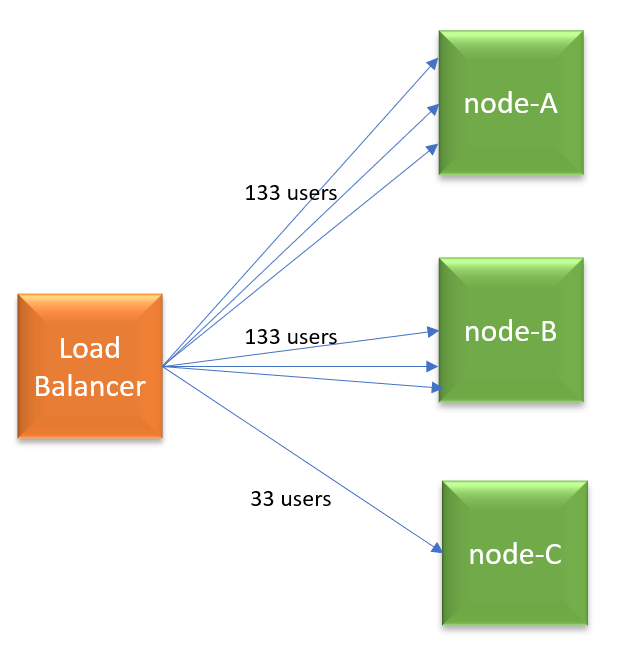
    Figure 2: New node added. Newly added node gets less traffic in Round Robin algorithm.

    A few minutes later, you are adding node-C. Now, an additional 100 users start using the application. Since it’s Round Robin algorithm, load balancer will distribute new users’ requests equally to all 3 nodes (i.e., 33 users request to each node). But remember node-A and node-B is already processing 100 users requests each. So now node-A and node-B will end up processing 133 users requests each (i.e., 100 original users requests, plus 33 new users requests), whereas node-C will process only 33 (new) users requests. Now, do you see why Round Robin isn’t equally distributing the traffic?

    In the Round Robin algorithm, the older nodes in the pool will always end-up processing more requests while newly added nodes will end up processing less amount of traffic. The load is never evenly distributed. For maintenance, patching and installation purposes, you have to continually keep adding and removing nodes from the load balancer pool. If you instrumented auto-scaling in place it gets worse, because in auto-scaling nodes are more dynamic. They get added and removed even more frequently.

    What Algorithm to Use?

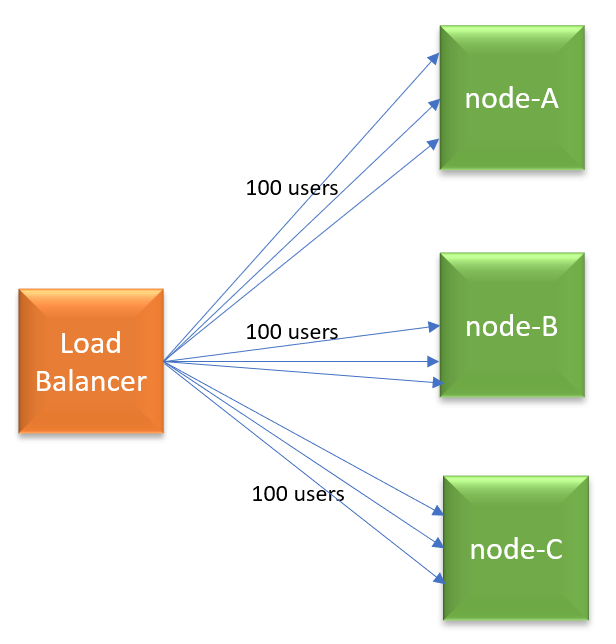
    Figure 3: New node added. Traffic is evenly distributed in Least Connections.

    There are a variety of load balancing algorithms: Weighted Round Robin, Random, Source IP, URL, Least Connections, Least Traffic, Least Latency. Given the shortcoming in Round Robin, you can consider trying other choices. One choice you may consider is: Least Connections algorithm. As per this algorithm, the node which has the least number of connections will get the next request. So, as per our earlier example, when 100 new users start to use the application, all new user requests will be sent to node-C. Thus, load will be equally distributed among all nodes.

    — Surya Baby

  • Boxes vs. Services: The Infrastructure Equation

    Boxes vs. Services: The Infrastructure Equation

    Infrastructure is changing as more services replace the need for hardware-based architectures

    There has been a lot of change in the last few years, and that change shows no sign of slowing down. I’m one of those people who likes to know they could work offline if needed, yet in this day and age if you want me to install a fat client on my laptop, I go looking at your competition.

    Granted, for me the selection of these apps is small—I like having Office on my desktop to be able to use it to write or create presentations at will, regardless of whether I’m connected—but for most people, it is growing at a faster pace. The idea of buying a monolithic system that you have to install and maintain is becoming less and less appealing.

    That same syndrome is occurring in the data center, too, but with a twist. It is largely infrastructure that is feeling this pinch. Just prior to cloud/container mania, the idea was that each non-compute box in your infrastructure was a platform. It offered you a ton of functionality, all designed to simultaneously lock you in and help you get your job done. All in all, it wasn’t a bad trade-off, and we can see the same idea in the large public cloud vendors.

    The difference is, with an infrastructure box, you were making a serious investment upfront that offered you other functionality to sweeten the deal. Once that investment was made, it was natural and realistic to want to take advantage of the bundled platform functionality rather than search for yet another box to drop in your network.

    Containers and what survived of software-defined networking (SDN) have changed all of that. The ability to quickly spin up something in software that fits your needs perfectly and can be automated with your DevOps toolchain makes the idea of a platform box—with its high cost of entry and bells and whistles you will never use but might have to lock down—seem quaint.

    In the agile/DevOps world, boxes for low-level infrastructure are still necessary. Don’t get me wrong on that. If you are a large org, you are using one of a few vendors to do core switching and routing. But top-level (layer 4-7 and 8) networking is not something you would use those static boxes for.

    It used to be that all networking functionality was the same—it needed to be rock-solid and slow to change to guarantee that apps were functional. Over the last few years we have seen a move from “all networking is networking” to “this is low-level stuff that must be rock-solid, that is closer to application layer stuff that we can change rapidly, and thus need not be in the ‘rock solid’ category.” Load balancing is a great example of this (and yeah, I used to work for F5, which is the king of load-balancing): Load balancing was a network function that you went to a hardware vendor for if you were beyond a certain size. The resulting physical box might serve one or 100 apps and required specialized training or experience to manage.

    Today, load balancers are a systems function that you go to a software vendor for and work into your network with as many copies of the software load balancing as you needed. Or you turn on load balancing within your container management system and manage it there. Either way, it fits in with your agile/DevOps environment better, and is easier to get budget for your project.

    I expect to see this change intensifying. There is power in physical boxes for some things, but there is also power in portability and packaged deployment scripts. And a physical box is not portable to a public cloud, nor is it readily dropped into container management tools (though container management integration is getting better in most network security/performance appliances). Portability and ease of use will win over technical edge, in my opinion. Not because people are cheap and lazy, but because portability is key to agility and they are too busy.

    There are still things that just aren’t that portable, and I have yet to see convincing tools to make them that portable. Data is my go-to example because it is easy. If you have 2TB of data, your portability options are limited. For those with 2PB of data, there is no real option; the app is going where ever the data is, and that data is unlikely to move. Oh, if you were motivated, there are ways to move that much data, but then you’ve just shifted the problem to the new platform, because the data is still largely non-portable, and apps will have to go where the data is. Again.

    But for most functionality? Anything that can be made into highly portable software will be. And that software will run wherever it is most needed or most beneficial to the user.

    All in all, this is a good result. Multi-core, multi-network, multi-terabytes of memory PCs can rival many appliances for speed and functionality, and portability plus ease of integration makes software a winner. Just stay aware of where/when a physical box still makes sense, because the world doesn’t change as fast as high-tech marketing wants you to believe. A working appliance that does what is needed quickly should not be ripped out just because a software solution is available.

    But you knew that. Because you all rock. Keep kicking it, and use whatever solution serves the business best—which is a different equation for every business.

    — Don Macvittie

  • DevOps Proves No Coaster Ride for Roller

    DevOps Proves No Coaster Ride for Roller

    Keeping amusement parks running and the fun flowing is Roller‘s main job. The company provides software for the leisure and entertainment industries, notably theme parks, amusement parks and trampoline parks. Its core functions are ticketing, POS and CRM. Clients include Coney Island Luna Park, Aussie World and Twinlakes Park.

    When Roller decided to expand and redevelop its operations in 2015, DevOps was the main attraction. CTO Andrew Brodie led the company’s push, having worked on Roller’s original implementation in his previous role as co-founder and technical director of digital product design studio Bravo!

    Automation of Roller’s processes was a major goal. Even small organizations should adopt good practices, Brodie says, and that includes automating everything that can be automated (within reason) to the point of being able to click one button to deploy a system.

    Before DevOps

    In its early days, Roller used Microsoft tools including Web Deploy to deliver a monolithic application that met the requirements of a minimum viable product. Roller initially ran on Ninefold, a now-defunct Australian IaaS platform.

    When the company attracted additional funding in 2015, it was able to expand its development team with people who had various skills including DevOps. Today, it comprises around 50 people—12 developers and various user experience, quality assurance and project management specialists.

    The newfound expertise enabled the redevelopment of the system as a series of applications and microservices and eliminating most frequently performed manual operations.

    Tools

    Roller’s deployment process had become a bottleneck, so the company invested time in adopting the most appropriate tools. Several came from HashiCorp, including Packer (for creating machine images), Terraform (cross-provider infrastructure management), Consul (service discovery, configuration and orchestration) and Vault (centralized storage and control of distributed secrets such as keys).

    After Ninefold’s demise, Roller became heavily involved with AWS, which “had everything we needed” in the way of APIs and toolsets “to code out our infrastructure,” Brodie says. But even though “we’re really happy with Amazon,” the company has avoided using exclusively AWS tools to retain the ability to move to other platforms such as Azure.

    Implementing load balancing, auto scaling groups and so on as code took about a month’s effort. “It was a great move for us,” he says.

    Other tools used by Roller include the Chocolatey package manager, and Microsoft’s PowerShell and its Desired State Configuration feature. After a machine image is tested, that’s exactly what moves into production, providing confidence that it will work as expected.

    Roller uses blue-green deployment with autoscaling groups to make it easy to roll back if necessary. Deployment or rollback takes less than 10 minutes. When individual problems arise, Roller’s practice is to kill the unhealthy server and bring up a new one.

    The company maintains separate deployment pipelines for each application and service, using Atlassian’s Bitbucket distributed version control system and its Pipelines feature to automate the deployment of checked-in code.

    Roller can deploy code within an hour if necessary, but currently works to a weekly release schedule. The goal is to move to multiple releases in a day.

    Resources

    Major Australian jobsite Seek served as an inspiration for Roller’s DevOps path. “We’ve always looked at the bigger players,” Brodie notes. In addition, Meetups (“there’s something for everyone”) and conferences (he specifically mentioned DDD Melbourne and NDC Sydney) have been invaluable in being able to talk with other companies about their experiences. “We’re keen to stay ahead of the latest practices,” he says, so the company encourages its people to attend such events.

    Other resources he finds useful include Stack Overflow and Plural. Plus, he recommends “The DevOps Handbook” by Gene Kim, Jez Humble, Patrick Debois and John Willis, which he describes as “a fantastic resource,” providing practical advice particularly around issues at the organizational level.

    Tips

    When asked for advice for those starting a new business or major project, Brodie recommends pragmatism:

    • Consider DevOps from the start “but don’t overcook it.” In other words, begin with the basics and evolve from there.
    • Aim for continuous improvement—people will keep generating new ideas, but picking the right time to implement them is important.
    • Look for a mentor, and talk to people about the tools they’re using.
    • Take advantage of outside organizations’ capabilities. For example, Rackspace can help architect an application for AWS.

    — Stephen Withers

  • Database Bottlenecks: The Hidden Cause of App Slow Downs?

    Database Bottlenecks: The Hidden Cause of App Slow Downs?

    Performance problems can cripple mission-critical business apps. If you are lucky enough, your solution could be as easy as adding more WAN bandwidth, a few extra servers or a content delivery network, but the real problem arises when your database becomes your biggest bottleneck. When performance issues adversely impact the applications that keep your business operations running and revenue pumping in, the challenge is more difficult to overcome.

    It can be painstaking, tedious work to examine the architecture for flaws, dive into code for clues on sluggish performance and scour log files looking for correlation events. Among all the areas to examine, the following three problem spots should be high on the list of troubleshooting priorities to remove performance issues:

    1. Connection Pooling Problems
    2. Below Par Query Performance
    3. Insufficient Concurrent Capacity for Handling Heavy Traffic

    When database administrators (DBAs) fail to find and fix bottlenecks in time, businesses lose eyeballs and revenue—sometimes losing customers for life. Every transactional app accesses a relational database, and their biggest problem is the challenge of scaling horizontally. While modern databases support horizontal scale-out, today’s apps aren’t written to leverage this additional capacity.

    An intermediate software layer, database load balancing software, solves this challenge; it makes the apps able to use additional servers without any code changes. It often includes caching as well, which can substantially increase performance—again, with no code changes. Database load balancing not only makes it easy to scale horizontally but also helps you identify other bottlenecks and mitigate them in a matter of minutes.

    Database Load Balancing: The Silver Bullet?

    Database load balancing software comes with analytics tools that precisely pinpoint database issues in real time. It monitors everything from every read and write query to connections, server performance and overall database load. Detailed analytics offer insights into what you need to fix and where to focus your attention to ensure better performance. A load balancer has all the necessary tools needed to resolve performance problems in a timely manner. It efficiently addresses the three major performance problems previously mentioned and significantly improves app performance and availability through:

    1. Connection Pooling and Multiplexing: Database load balancing software can drastically decrease the number of connections to your servers by applying connection pooling and multiplexing. Unlike client-based connection pooling, this approach ensures greater operational efficiency and facilitates easy handling of additional connection spikes.
    1. In-Memory Query Response Caching: The analytics of the software identifies potential queries to cache and lets you cache them with no application changes. For example, you can cache an article in a content management system (CMS) for a day, having the comments section pull from the database to stay fresh. You can cache a zip code table for months. Look for the ability to set time-to-live expiration or automatic cache invalidation so you can ensure atomicity, consistency, isolation, durability (ACID) compliance and transaction safety.
    1. Dynamic Load Balancing: Database load balancing software routes queries from the app to multiple servers in a safe and consistent manner. Its automated read/write split ensures high performance by diverting all the read queries to available read replicas and writes to the master server. This load distribution increases capacity and facilitates an instant scale-out. A load balancer acts like a single point of control that offers deep visibility into performance needs. With real-time insights into the root cause of problems, the entire find and fix process becomes fast, efficient and effective.

    Saddled with the most difficult task of identifying database bottlenecks, DBAs can make their life easy and work efficient by leveraging a feature-rich database load balancer that automates the diagnosis of bottlenecks and gets the data flowing seamlessly.

    About the Author / Tony Branson

    Tony Branson is Database Load Balancing Senior Analyst at ScaleArc. Tony has a passion for dissecting tech topics such as transparent failover, centralized control, ACID compliance, database scalability and downtime effects. On his days off, he can be found watching sci-fi movies, rock climbing or volunteering. Follow him on Twitter.

  • Using Load Balancing in Blue/Green Deployment

    Using Load Balancing in Blue/Green Deployment

    One of the biggest pains of automating the deployment process is that final step, when everyone agrees it is time to take the accumulated changes and expose them to the public. This process is the point at which systems go down and users find themselves suddenly cut off. Scheduling such changes for off periods may be useful, but “off period” is rarely “no users impacted” period. One of the goals of DevOps should be to minimize impact to users, as the point is to make things more repeatable and consistent. Blue/Green deployment is one of the processes introduced to make the final rollout step of continuous delivery (CD) smoother.

    This process, first (to my knowledge)  proposed by Jez Humble and David Farley in the book, “Continuous Delivery,” proposes that you have two environments—one testing and one production—that mirror each other. Then, when it is time to release, the router is changed to send users to the “test” environment, and it becomes, for all intents and purposes, production. The problem with this simplistic description is that everyone on the system at the time of “cutover” is “cut off,” since the new system doesn’t know what they were doing. That’s not the best solution for users; in fact, it’s downright disruptive.

    Like Load Balancing Quiesce

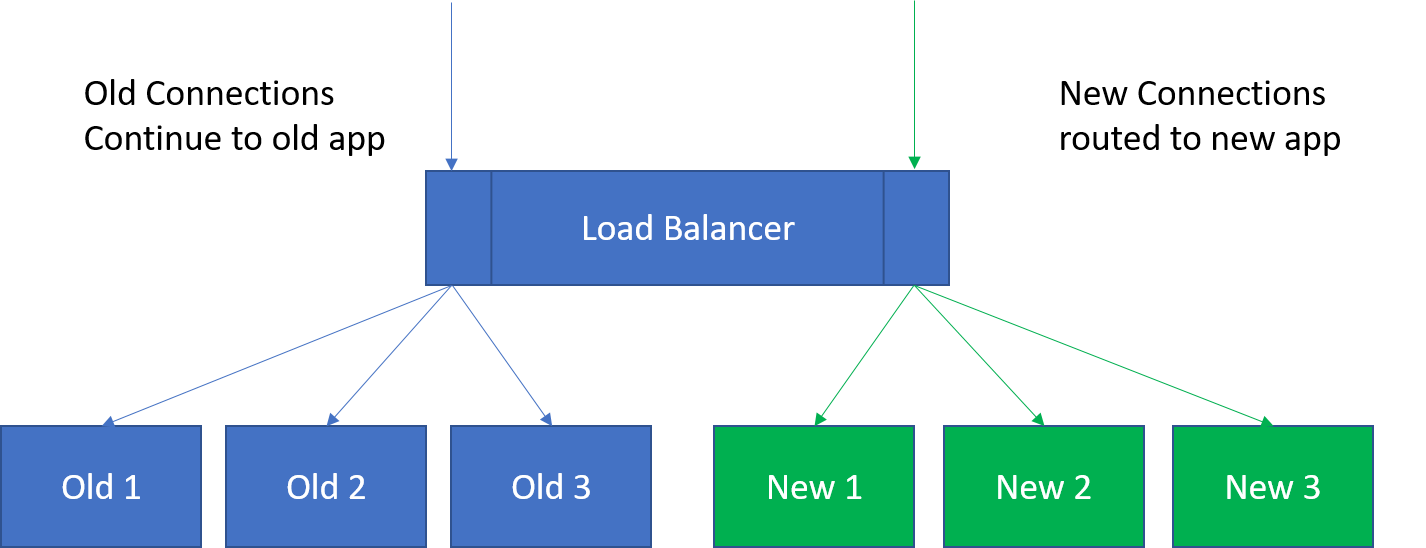
    This is not that far off from the type of thing I’ve talked about using load balancing for, and F5 Networks (where I got the idea) has talked about it for a while. You can tell a good load balancer to stop offering connections to server X in the pool to let it settle and then be taken out of service for maintenance. The same technology could be used to say, “Let existing users finish off on their existing connections, but do not allow new connections to these servers,” directing all new connections/users to the new deployment while not dropping the connections of the existing users that presumably are in the middle of doing something.

    Now in load balancing, you have to consider how long to allow users to stay connected before arbitrarily ending their session, but in the world of REST APIs this is not as important as it is in longer-lived, client-server style connections. In the end, though, there must be a defined point where everyone is forced to the new systems. At that time, merely making the switch on the load balancer and taking the old production systems out of the pool will force users to connect to the new systems.

    It Works for A/B Testing, Too

    A similar process can be used to try out new features on a subset. Once there is a load balancer in place, and you know what you want to measure to determine if a new feature is enjoyed by users, an instance or two behind the load balancer can be spun up and start accepting connections. The load balancer will naturally start putting those servers to use, and soon you’ll have a subset of users seeing the new features, while most blithely continue on with the old. When testing is done, the decision of whether to withdraw the servers/instances with the new code or move all servers in the pool to the new code can be made.

    Overall, offering less deployment disruption will be required as your organization moves into more frequent releases under CD. Look for solutions like blue/green deployment to make those releases as non-disruptive as possible.

    — Don Macvittie