Tag: testing tools

  • Sauce Labs Acquires Screener Visual Testing Tool

    Sauce Labs Acquires Screener Visual Testing Tool

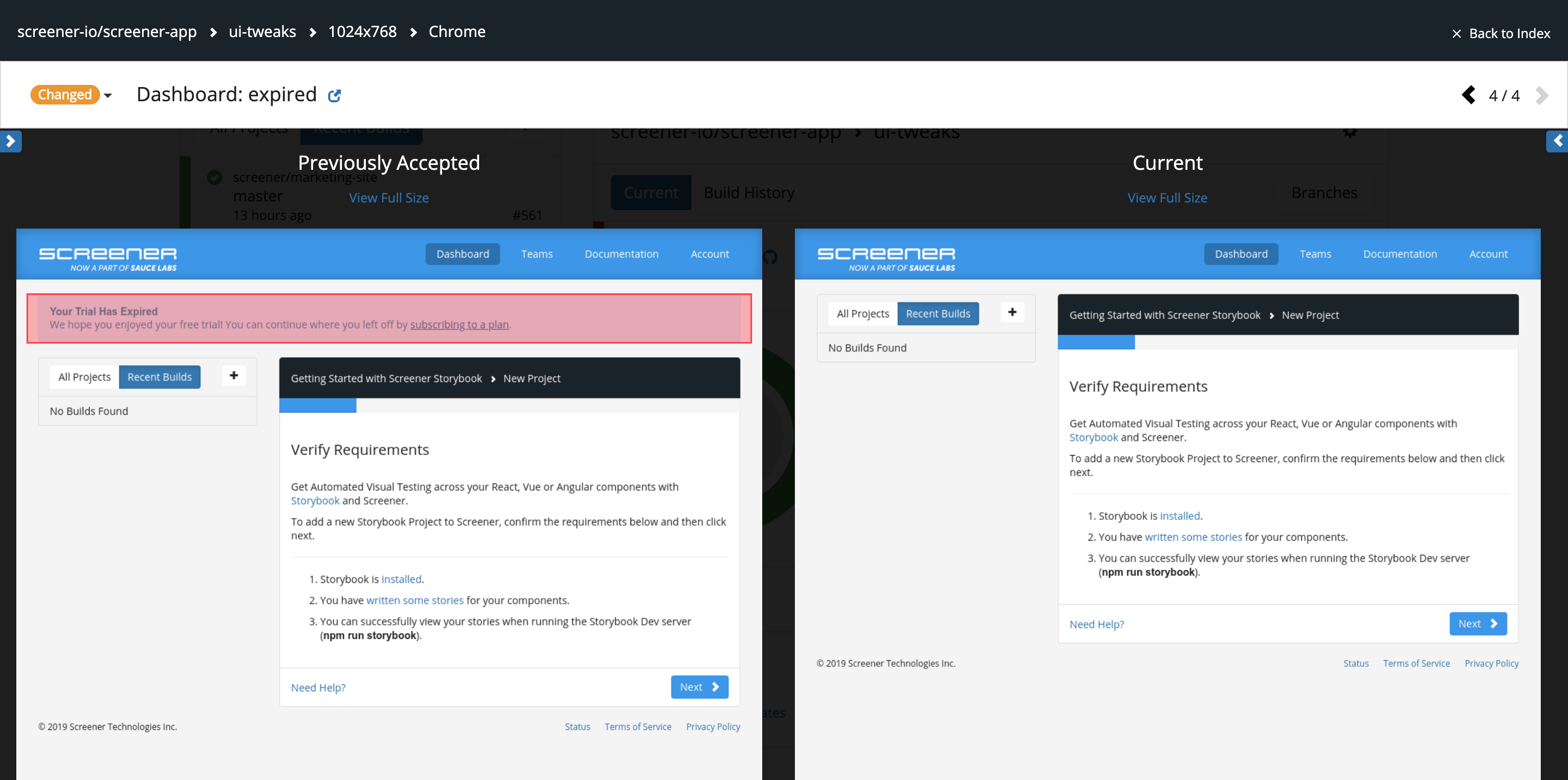
    At the SauceCon 2019 conference, Sauce Labs today revealed it has acquired Screener to add a visual testing tool to its portfolio of automated testing tools.

    Lubos Parobek, vice president of product for Sauce Labs, said the addition of Screener will make it possible for DevOps teams to not only test functions and performance using existing Sauce Labs tools, but also now confirm things such as the colors of a visual element of an application are being rendered correctly, for example.

    In addition to building their own visual tests, DevOps teams can employ Screener to automate the running on those tests and store baselines in the cloud to create a visual testing life cycle.

    At the same time, Sauce Labs announced the general availability of Sauce Headless, which leverages container technologies to make it possible to leverage a cloud service through which developers can now run tests via a Chrome or Firefox browser every time they commit code. Parobek said the goal is to make it easier for organizations to embrace continuous testing as an extension of the pipelines constructed using a continuous integration/continuous deployment (CI/CD) platform.

    The acquisition of Screener, he said, is part of an ongoing Sauce Labs effort to extend the reach of its testing portfolio beyond functional testing. Sauce Labs earlier this month launched Sauce Performance, its first set of application performance testing tools.

    The rise of DevOps is challenging traditional approaches to application testing as organizations move to combine various types of testing into a single continuous process. To meet that requirement, Sauce Labs is expanding its portfolio of automated testing tools at a time when the emergence of microservices-based applications is significantly increasing the level of dependency between all the components that make up an application. That increased level of dependency will require DevOps teams to rely more on automated testing tools. In fact, Parobek said the day is not far off when DevOps teams will include digital assistants that leverage machine learning algorithms to enable DevOps teams to continuously run those tests at the right moment in an extended DevOps pipeline. Those digital assistants will not replace the need for human testers anytime soon, but they will augment their capabilities to make is feasible to implement continuous testing at scale, he noted.

    In the meantime, as application testing continues to shift further left in the DevOps process, more developers will be building and running their own tests during earlier stages of the application development process. At some point, either another developer or dedicated tester still will need to evaluate that code to provide an unbiased opinion. But the number of common mistakes making it into the latter stages of the application development process should be substantially reduced. Ultimately, that shift to the left should result not only in more development projects meeting deadlines, but just as significantly higher levels of overall application quality. The challenge now, of course, is figuring out how to implement a best DevOps practice that pushes application testing as far to the left as possible.

    — Mike Vizard

  • As Business Speeds Up, Testers Must Adapt

    As Business Speeds Up, Testers Must Adapt

    It should be no surprise to anyone working in software today that delivery speed is the name of the game. Irrespective of business sectors or B2B/B2C focus, global competition in application development and delivery has flooded the market. Due to the increased number of options in the marketplace, users expect an excellent experience from your application or site—and if you cannot meet expectations, they’ll find it elsewhere.

    A company’s ability to be highly responsive to (if not proactive about) customer’s needs is also valuable for adoption and branding. Established companies understand that delivering high quality in their products and services is core to brand value.

    This shift isn’t always easy for testers. Moving to a faster pace of work can be unsettling when your job is all about assessing the perceived quality of the software. Testers like to be cautious and check everything twice. The current work environment has made testers more germane than ever in software and IT organizations.

    Testers help build confidence in the quality of an application, and this perception of quality is what typically drives user adoption. If two applications have more or less the same functionality but one is faster, more reliable and has a better UI and design, you can guess which one will be more popular.

    Setting the Foundation

    To thrive in this new world, testers must learn to prioritize and focus on the most important needs of the team’s delivery goals versus testing every last mouse click. Testers will need to quickly incorporate feedback from multiple places, and work well with stakeholders across the development organization and the business. Efficiency is imperative, and that means increasing the use of tools whenever possible.  The following framework to develop a world-class testing organization when your company is moving faster all the time can make the transition a little easier.

    1. Understand business goals. While this may sound obvious, testers haven’t always had to think about the bigger picture. With more competition from everywhere, everyone on the development team should have a solid understanding of customer needs, business goals such as to drive new revenue or grow customer loyalty, and how the competition stacks up for the solution in development.
    2. Define a testing strategy. This exercise begins with understanding the business goals as they relate to the product or project and, at a more granular level, the goals for each sprint. The testing strategy should include a description of the overall project, priorities for testing mapped out into phases, timelines, testing approach, tools and methods to use and how progress will be measured.
    3. Develop a risk management plan. What will happen if those business goals are not achieved? For instance, the business stakeholder might say the project must go live in four months with new functionality. But is this an arbitrary goal or one that is embedded in an actual customer commitment? What will be the financial impact if the deadline slips? Which enhancements are critical and which are nice to have from the user perspective? Once those particulars are documented (or discussed), the testing team can create the appropriate plan, prioritize and determine what resources are needed to execute it.
    4. Resources. Testing teams with mandates to move faster will need support in the form of new tools, training and even new hires. Software that testers (as well as others) use can include DevOps and CI/CD tools, ALM tools, reporting and analytics, UI and API testing tools, systems for recording and logging manual testing, tools for usability feedback and more. This can get overwhelming for startups and other companies that don’t have the budget to purchase new software. Fortunately, there are many credible open source tools that can fit the bill. This reality is also why development teams must understand well enough what customers really want so they can prioritize on which features must be perfect and which areas of the application could meet a lower bar of quality.

    A Word of Caution

    Testers are well-equipped to make all the changes required for the faster pace of modern software development. This shift has been underway for a few years now, and many testers are embracing the change and the elevation of their role on engineering and IT teams. However, as testing relies on more automated tools, there are a few things to consider:

    1. Avoid tools mania. Testers, like many technical people, love to try out the newest toys, but it’s important to justify a tool’s adoption before acquiring it. With too many tools, there’s just too much noise and complexity. That will counteract any speed and efficiency gains that automation supplies.
    2. Automation tools do not replace testing. It’s not necessary nor helpful to automate every testing task. Testers should view automation tools as enablers, not a replacement for the function. Automation is wonderful for reducing effort and giving testers time to work on value-added activities that can boost the overall user experience and usefulness of an application. Be sure to baseline test objectives before recommending an automation solution.
    3. Institute process around automation. Ensure you have defined a proper process in sharing artifacts that are produced by your automation tools. Artifacts such as scripts must be versioned with proper comments and stored in a central repository instead of on individuals’ machines. Defining and enforcing good development practices such as check-in/check-out process, scripting style guides and object organization with automation will ensure a higher return on effort in the long run.

    In a few years, this point may be moot. But there are still many testers coming into new roles from the waterfall mindset who may struggle in the transition.

    Testers once lived simply in the silo of sluggish procedures. They knew exactly when they would be called upon for action and how they would complete a task. Now, though, testers must put on their business assurance hats and work side by side with developers, operations managers and others early in the process. They will have to learn new ways to test, such as with behavior-driven development and test-driven development. They need to get more technical, given the push toward test automation.

    What hasn’t changed though is the tester’s quest for quality in software. Great testers will add the most value when they can be proactive about alerting others to brewing problems before they present themselves to the user.

    — Mush Honda

  • Avoiding Application Integration Fails

    Avoiding Application Integration Fails

    Trying to integrate applications on your own can eat your project alive. A seemingly simple project may look harmless when you start, but in the end do-it-yourself software delivery tool integrations can devour your entire software process.

    The problem may be that building simple integrations appears easy. How hard can an integration be? But let’s look at what typically happens with integrations down the road using the example of one developer’s story.

    A developer needs to send defects from Zendesk to JIRA, so he builds a one-way integration based on a workflow action (just a trigger). Soon enough, he realizes he is now managing two tools, and keeping them updated has become a big issue—a very manual process and a huge time-sink. So he designs something to support two-way updates. But that’s just the beginning; each tool changes every few months and an integration that seemed so simple on the surface becomes very complicated.

    Then our developer tries to modify a simple JIRA workflow. Again, it seems straightforward, but it’s not, because the tools involved are constantly changing. There are complexities with workflows, and organizations undertake endpoint system upgrades. As a result, one change to the tool breaks everything he’s done. On top of this, it’s difficult now for him to know the hierarchy or how one item relates to another.

    He starts to consider some of the challenges he’s facing. He needs to consider how the description is written in each tool. They are all different, so how does he make sure he conveys the information correctly every time? And each “simple” integration seems to create more pain points, creating auditability and traceability problems. Meanwhile, he has to manage other tools that are continually added to the mix.

    He’s taken a look at both API and custom-tool approaches. He’s found that API integrations are brittle or they become too popular and then have to be maintained for an entire organization. But the alternative—custom tools—typically fall apart quickly.

    And what happens when our developer decides to leave the company? There’s no one left who knows how to maintain the integrations he created. Meanwhile, new tool replacements mean someone has to build new integrations—and the puzzle becomes even more complicated.

    This short scenario illustrates the unexpected challenges developers face in creating and maintaining integrations. The cost of building and maintaining tool integrations in an always-evolving landscape is deceptively high. And when an integration fails and the organization suffers critical downtime, costs (and tempers) skyrocket.

    Many of the common pitfalls are readily evident, such as rich text problems, but the following three areas may be the most challenging to developers addressing integration issues and can’t be easily avoided:

    • Endpoint system upgrades and schema changes
    • Workflow rules and differences
    • Relationships

    Endpoint system upgrades and schema changes: Much of the time, a different team from the one that developed an integration will perform the upgrade. Perhaps a new field was added. Regardless, simple changes to APIs can blow up an integration. API responses may change formats or the expected values for a field may change. When the team upgrades the system the URL may change, so avoiding duplicates is tough. So, too, is ensuring that the change is seamless. Changing some of the underlying features could result in unexpected behavior (and it will be hard to detect where the problem actually is). It may be that JIRA made API changes that caused custom select fields and comments to fail when using the “old way”; however, other features may continue to work as expected, making this failure silent.

    Workflow rules and differences: Workflows are the complexities between systems. It is hard enough to reconcile teams, let alone the tools they use. Tools may require you to enter required fields, and this can constantly change. And workflows may not match up at all. How can you handle these differences without bouncing field values and allowing complex mappings to reconcile these? What happens when a system has a special action to change a status and fields are required at the same time, but the other system is open and doesn’t reflect this?

    Because of these issues, it is critical to get the teams being integrated (e.g. testing and development) to discuss workflows and where the two teams align. These teams need to understand where workflows overlap so they can undertake proper integrations.

    Relationships: These are not always apparent. As you grow and want traceability, you need to have synchronized relationships. How does this requirement trace to a test? How will you manage those relationships? The tools don’t match the way they manage relationships. Some allow one value, others multiple. Some allow relationships across projects and types, others are more restrictive. In addition to the rules of the system, how do you know what items to link once you have synchronized the artifacts? What happens if only one side of the link is synchronized or the items are not synchronized in the order that you expected?

    Getting this all right requires intelligent systems that can look at one system and translate properly to another

    Avoiding Integration Pitfalls

    The first obvious step in avoiding pitfalls is to identify what they will be and when they’ll pop up. To do this, focus not just on the current problem, but also on the future. Consider the bigger picture, understanding that systems constantly change and teams work differently so there will be additional layers of complexity in any integration project down the road.

    As such, my best advice is for development organizations to focus on the software their organizations are counting on them to deliver, not creating and managing tools to build that software. Put internal resources to work in IT areas where you can create competitive advantage for your company. And consider using third parties to address issues such as integrations.

    About the Author / Shawn Minto

    Shawn Minto is the senior director of Technical Services and Support at Tasktop and one of the original team members working with CEO and co-founder, Mik Kersten, on Mylyn prior to Tasktop’s founding.  Shawn began his career at Tasktop as a software engineer, working on all aspects of the product and directly with our customers to support their needs. Currently he works with customers to understand their tool environments and offers suggestions on how to best leverage Tasktop through deployments and support. In his free time, he enjoys being outside, cooking, and renovation projects. Connect with him on LinkedIn and Twitter.