Tag: tool integration

  • Without These 3 Things, You Don’t Have DevSecOps

    Without These 3 Things, You Don’t Have DevSecOps

    DevSecOps adds security to the DevOps software development and releasing paradigm. Everyone thinks this is a great idea, except actual Dev and Ops practitioners, for whom security can be a thankless, stressful time sink. Without the right approach and tools, an organization can run a DevSecOps process that actually contributes little to security. Security simply tags along after development and operations, ignored at every turn. The result is rapidly released, insecure code.

    Industry vendors will tell you they have a DevSecOps solution. You, in turn, may believe you have DevSecOps up and running. However, there can be a big difference between acquiring a DevSecOps solution and fielding a viable, effective DevSecOps program.

    What DevSecOps Isn’t

    1. Every task is manual, and done mostly by consultants.
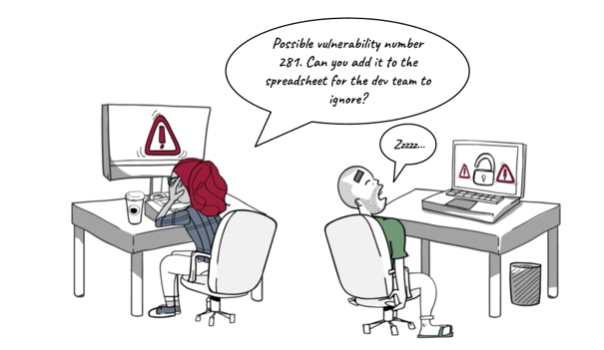
    2. You send out myriad PDFs or spreadsheets and waste time in meetings.
    3. Your solution or program escalates a lot of security alerts, but never delivers a fix.

    DevSecOps, a Brief Overview

    DevOps, the merging of previously separate software development (Dev) and IT operations (Ops) workflows, has been a boon to businesses. When developers work directly with Ops, which releases and manages the code in production, the entire development-to-release cycle speeds up. This is great news, except when it comes to security.

    Rushing new code into continuous integration/continuous deployment (CI/CD) platforms invites risk exposure. DevOps can easily, but inadvertently, put vulnerable code straight into production on a daily basis. To mitigate this risk, the DevSecOps approach inserts a security function into the workflow.

    This is good, in theory. However, if this is all you have, you do not have a DevSecOps program; you have missed the bigger picture. Without automation, tool integration and results validation, simply injecting security processes into the DevOps workflow might actually make everything worse. Your code will be less secure. The security team will not move quickly enough for the DevOps team, which aims to rapidly release code, and will not always address the security issues raised.

    DevSecOps Requires True Automation

    DevSecOps has to include true automation in the security process. The practice of security pros copying code for security testing and then returning with a spreadsheet of remediation requests simply does not work. Good intentions aside, the Dev team does not want to deal with a long list of security problems, many of which are perceived to be low-risk or could generate false positives. Security is perceived as slowing everything down. There can even be organizational issues that keep the two groups in opposition to one another.

    Instead, code vulnerability assessments should be automated within the DevOps workflow. As code gets checked into Github and then compiled via the build pipeline CI tools, it needs to undergo automatic static, dynamic and interactive analysis. It should undergo a full stack assessment, too. The automated assessment must examine code for vulnerabilities at the mobile or web client layer, the API data transport application network layer and the back end cloud building block app services layer. Automated security testing can analyze microservices, serverless architectures, storage and databases. With this approach, the “sec” part of DevSecOps comprises a “build, set and forget” function. There will be security people involved, of course, but the majority of work is automated.

    This automated vulnerability assessment must then generate alerts and establish a priority hierarchy for their handling. Again, automation plays a pivotal role here, and needs to automatically, and in a meaningful way, triage the long list of findings based on issue severity, privacy concerns and app store blockers. If the assessment produces an overly long list of risks to fix, the DevOps teams commonly tune them out as noise that delays release schedules. However, if the automated process identifies the five or ten “must address” problems, developers are more likely to respond to a realistic, practical set of tasks that create an effective process and resolve issues at the roots.

    DevSecOps Must Integrate With Development and Security Tools

    Security processes are most effective if they integrate with the toolsets used by the DevOps team. These include development tools, cloud platforms and monitoring tools such as security incident and event management (SIEM) systems, as well as ticketing and remediation solutions. That way, security connects directly into the DevOps pipeline; it is neither a digression nor a bottleneck.

    For example, if issues get distributed via ticketing systems, they go directly into developer workflows. Developers might be accustomed to working on issues described in JIRA tickets, for example. If the alerts are suitably prioritized, the developers will likely not perceive the ticket as an imposition on their other work. As security issues appear in JIRA tickets, developers can work on them at a familiar, practical cadence. This improves security and DevOps team collaboration by providing details about issues, occurrences, recommendations and remediation. The results can help remediation of security vulnerabilities be more effective.

    DevSecOps Provides Validation of Results

    A viable DevSecOps program will also provide stakeholders with data about how the program is performing. Reporting and data visualization that documents the results of its vulnerability assessments, and the subsequent remediations, are critical to a successful program. While no application is always perfect on any given release, knowing the risks and having a measurable, clear course of action is critical to a solid DevSecOps program. Successful programs will feature reporting on metrics such as critical issues fixed before production, “business blockers” fixed before rejection, legal costs and regulatory fines avoided and security time and costs saved. Without such reporting and validation of results, there can be no actual DevSecOps. It will be DevOps with some ambiguous security activity surrounding it.

    Application security tools are essential to realizing these three tenets of true DevSecOps and an effective appsec program. The preferred tool should be, as these parameters suggest, highly automated and easy to integrate. It also has to have in-depth reporting capabilities. Armed with the right tools, a DevSecOps group can embrace an approach to the work that is fully automated and intuitively part of the DevSecOps workflow.

  • How an Integrated Tool System Helps Implement DevOps

    How an Integrated Tool System Helps Implement DevOps

     DevOps is the marriage of application development teams with system operations teams, their philosophies and actions.

    In an agile environment, development, testing and operations all must work together to meet frequent iterations, releases and delivery goals. This calls for a collaborative development environment that supports data orchestration with other lifecycle tools.

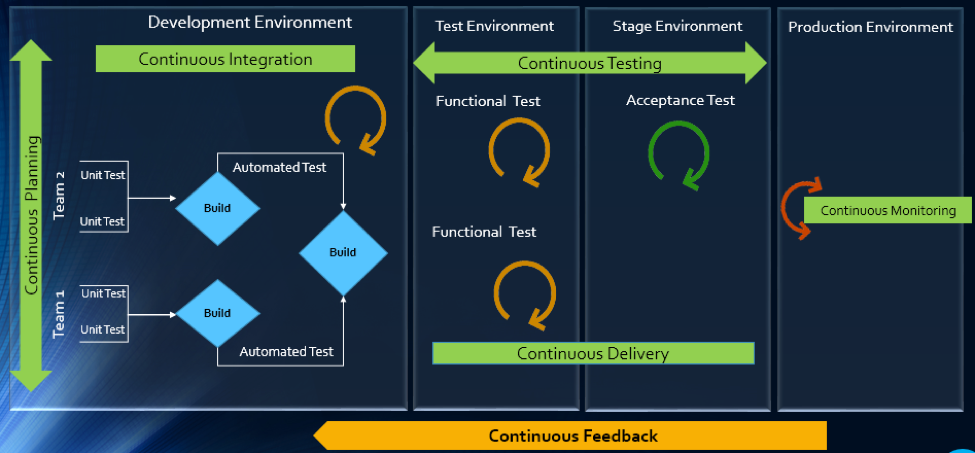
    The article will explain how multitool integration support can help organizations perform the DevOps life cycle, which includes continuous planning, continuous integration, continuous testing, continuous monitoring, continuous delivery and continuous feedback mechanism.

    The Drivers of DevOps

    Today, with the increasing competition and the need for an early market release, the software development industry is undergoing a paradigm shift. Agility has become an inevitable process across all organizations. In addition, shorter ROI cycle spans, frequent releases, increased CRs and different IT systems and tool technologies have made the situation critical.

    The industry demands higher transparency, maximum visibility, minimum turn-around time, lesser human intervention and efficient processes at every stage, from development to delivery.

    However, organizations that use specialized tools to manage builds, deployments and delivery processes continue to face difficulties when it comes to data orchestration and process automation across the tool chain.

    In an agile environment, developers and testers need to ensure not only that code changes work and integrate well, but also  that frequent iterations do not make the product unstable. Hence, seamless cross-tool collaboration is very important here.

    The process chain consisting of Code –> Build –> Provision –> Test –> Defect Fix –> Deploy –> Release needs to run continuously and smoothly without compromising delivery deadlines or the product quality.

    Automation is the Catch Line

    With the rising demand for continuous delivery and sprint-based development, manually setting up a test, build and deployment environment is burdensome and time-consuming.

    Software teams need to automate the entire cycle of build, provisioning and deployment of test environments, including the tools, scripts and test data to ensure rapid delivery. They also need to collaborate around the application architecture and monitor event-action-based mechanism for seamless data flow across the tool chains.

    Reports show the most important DevOps components are IT automation, agile development and collaborative teaming of personnel. Therefore, without centralized orchestration of tools, achieving DevOps is not a realistic situation. Since organizations spend around 73 percent of their DevOps budget in tool acquisition, it is important they know how to get the tools working together to overcome DevOps obstacles.

    In the process of connecting their existing and new toolsets, most organizations search for an integration methodology that is scalable, reliable and easy to maintain. Point-to-point integration between tools help, but to a limited extent. Even a single change in integration rules involves complex coding and high maintenance across development, test and deployment cycles.

    How ESB-based Integration Can Help

    An enterprise service bus (ESB)-architected integration hub connects both the existing and the new tools to support a seamless data flow between them across the DevOps life cycle.

    Once integrated, the data from both the development and the operations tools become readily available for use to every stakeholder. The benefit of using ESB-based integration is that you can add or remove any tool based on your connectivity requirements.

    In a typical scenario, DevOps teams use a series of cross-functional tools starting from project planning to delivery and operations. Neither of these tools comes with built-in integration features, which results in inconsistent flow of information among tool users.

    Project managers use application lifecycle management (ALM) or Agile planning tools to detail the scope of work and tracking progress reports. Upon unit testing, developers use a different tool to check in a code from their integrated development environment (IDE) to the source code management (SCM) repository. They also perform a code quality analysis before committing to the SCM.

    In such a scenario, continuous integration (CI) can be achieved only when developers bring these planning, unit testing, code analysis and SCM tools under one roof. That is, connecting the tools through a common integration hub. It also helps developers to manage everything from within the IDE.

    After successful check-ins, build engineers trigger the SCM tools for automated build and testing. Upon a successful build, testers engage in continuous testing using manual and test automation tools, followed by provisioning for continuous deployment. They also perform load testing, API testing and security testing using separate tools. An integration support helps to keep the real-time data flowing between the build and the testing tools uninterrupted and seamless.

    A DevOps system also includes application performance monitoring (APM) tool for continuous monitoring of memory consumption, CPU usage, database health and release tracking. Operations team use help desk/ IT service management (ITSM) tools for continuous feedback generation and customer support. And delivery managers use continuous delivery tools for defining and tracking release pipeline through graphical interface.

    When all these tools are connected to a central integration hub, product release and help desk operations become faster and efficient. The integration between development and ITSM tools facilitates continuous feedback generation, which helps to improve the product quality.

    Through an integrated tool ecosystem, project managers can create a DevOps workflow based on business logic and automate the data movement across tool systems. Business analysts, developers, testers and delivery managers can also get real-time update on development progress and keep track of actionable items. Supervisors can route cross-tool data to a central repository and generate meaningful reports and analytics before taking business decisions.

    Fig: ESB Integration Bus Facilitating Adoption of DevOps
    An ESB-based integration tool helps organizations to implement and leverage the best DevOps practices by establishing connections across all participating tools. An integrated tool ecosystem helps achieve the following:

    • Real-time collaboration between development, delivery and operations tools
    • Continuous planning from requirements capturing and review to design and code analysis
    • Cross-tool traceability for defining relationships between various data objects
    • Test strategy implementation for continuous testing
    • Continuous integration through automatic triggering of build on successful completion of code check-in
    • Continuous testing through workflow based automatic triggering of both manual and automated test cases
    • Scheduled test automation script execution enabling continuous delivery
    • Continuous monitoring of release quality through reports and dashboards
    • Automated defect identification and resolution for faster help desk response
    • End-to-end traceability providing better release predictability and change impact analysis
    • Meaningful reports, metrics and KPIs for quick decision-making
    • Continuous delivery through tracking release pipeline

    How Inter-tool Connectivity Brings Continuity

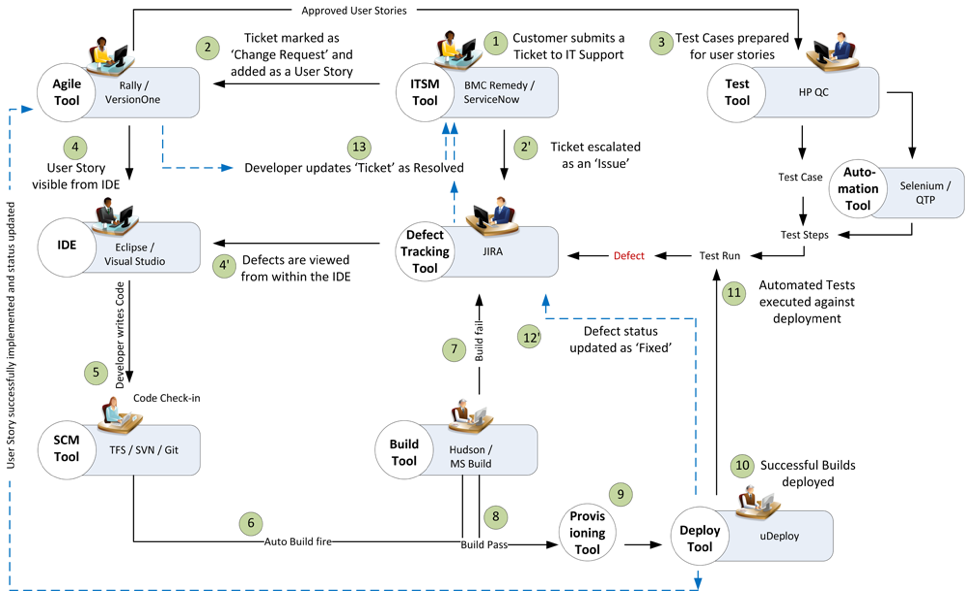
    To understand the stages of engineering practice, let us consider a sample DevOps scenario in an IT service organization.

    The organization uses an ITSM tool to manage support tickets submitted by customers. On submission of a ticket, it is automatically passed on to an ALM tool as user stories or defects for internal development.

    On allotting to a sprint, developers and testers view the user stories or defects from IDE, SCM and test tool. Once the coding is complete and codes get checked in at an SCM tool, an automatic build gets triggered using a build tool. Upon successful completion of the build, tool provisioning is done through a virtual machine.

    The successful build can be automatically deployed using a deployment tool and automated tests can be executed through a test automation tool. The test results are then captured and linked with test cases and the source requirements for traceability.

    The defects that are raised in the defect tracking tool for failed test cases can be automatically routed to developers for fixing.

    Fig: DevOps scenario achieved in a collaborative tool environment

    Once connected to an integrated tool system, users get a complete visibility of the tool records and their relationships from within their own tools. Developers, testers and help desk managers can get complete traceability view between development artifacts and change requests or defects.

    When all the tools participating in DevOps sync with each other, developers can easily view the support tickets reported by the operations team right from their own IDE.

    The help desk team also gets a real-time update whenever a change request gets implemented or a defect is resolved by the development team. It eliminates the latency in communication between the Dev and Ops teams to a great extent.

    In addition, customers get frequent updates from the help desk team, which makes them happy and confident about the product performance.

    Conclusion

    Implementation of DevOps is not a “Do once and forever” type of task. Just deploying the right set of tools to the right users will not serve the purpose. Proper connectivity between and across the DevOps tools chain is necessary if you want to create a collaborative work environment around the Dev and Ops teams.

    An integrated tool system saves considerable amount of time and effort, which would otherwise be wasted on manual execution, monitoring and reporting of data during DevOps implementation.

    About the Author / Sanat Singha

    Sanat Singha is a senior technical and web marketing writer. He takes special interest in ALM process, technologies and tools integration as an industry. Sanat does content marketing, professional blogging, social media promotion and website analytics.

  • Total DevOps is Needed, Plugins are Not Enough

    Total DevOps is Needed, Plugins are Not Enough

    Trace3 was proud to be a Gold Sponsor, exhibitor, trainer of the DevOps Institute leadership certification course and newest partner of CloudBees at the CloudBees Jenkins World 2017 event in San Francisco last month. Jenkins World 2017 attracted 54 sponsors/exhibitors, an 80 percent increase over 2016.

    The growth of interest and sponsors for this event demonstrates that the number of available tool choices for creating the continuous tool chains to realize continuous delivery and DevOps is growing. One of our top takeaways from Jenkins World 2017 is: Plugins are not enough!

    Indeed XebiaLabs’ “Periodic Table of Tools” is a valiant attempt to illustrate categories of DevOps tools and attributes of specific tools. Version 2 of the Periodic Table is now released, and I heard that version 3 is already on the way. While the table shows an impressive 15 categories of tools, I estimate there are actually 29 categories, if you consider tools for cloud management, test management, test creation, code analysis, code collaboration, ALM systems, dashboards, security and others.

    XebiaLabs’ table shows five attributes for each tool: open source, free, freemium, paid and enterprise. In my opinion, there are at least two additional categories: ecosystem and cloud readiness. While the table indicates 120 tools, my own estimate counts 300+ DevOps tools, including CloudBees, Electric Cloud, Perforce, Scalyr, Service Now, Tricentis. SmartBear, SonarQube, Parasoft, Coverity, Fugue, QA Symphony and many others.

    While the exact number of tool categories, tools and attributes is arguable, there are many tools to choose for a continuous delivery toolchain. The state of practice for integrating tools into a seamless toolchain is the plugin or do-it-yourself scripting. Anyone who has implemented a toolchain knows that the existence of tool plugins, while useful, is not enough. The quality and completeness of each plugin varies significantly. Some off-the-shelf plugins are so basic they are little more than marketecture. Even the best plugins are limited to a pairwise matchup between tools of specific version pairs, and not a universal tool or version. For example, a tool with a plugin for Jenkins version X may not function with Jenkins version Y or CloudBees Enterprise of other tools at any version.

    The DevOps Express collaborative initiative announced by 14 participating vendors at Jenkins World 2016 was an attempt to resolve the plugin problem. One year later, the DevOps Express website has shown a growth to 123 tools across 18 categories. However, just like the XebiaLabs Periodic Table of Tools, it is remarkable that the number of tool categories and tools that are not comprehensive (and lacking plugin compatibility) are not guaranteed for any combination of tools that may be needed for a toolchain for a specific enterprise.

    Each enterprise has unique toolchain requirements and preferences. Selecting and an integrating DevOps tools is not like buying a box of “standard” Lego bricks that are guaranteed by the manufacturer to fit together. Each tool and plugin is different.

    The choice of tools, the combination of tools and the integration of the chosen tools all must be carefully chosen to fit the specific customer requirement. More importantly, the integration must be architected to ensure the chosen combination works well together in a seamless toolchain.

    Until there is an absolute standard plugin architecture that all tool plugins are guaranteed to be compliant with, expert consulting services will be essential to make tools choices and make sure the tool chain works.

    With such a rapidly growing list of tools and vendors, only the most capable consulting teams with deep insight and partnerships with the widest array of tool vendors will be able to address enterprise DevOps solutions properly.

    — Marc Hornbeek

  • Secrets to win over DevOps buyers

    Secrets to win over DevOps buyers

    In its recent report, Tech Go-to-Market: How to Win With DevOps Buyers, Gartner Research looks at the buying process of DevOps-centered organizations. And Gartner makes an important point. For technology providers to sell to organizations with a DevOps culture, traditional sales approaches don’t fly. In fact, developers and operations teams—whose synergy we collectively call DevOps—eschew traditional marketing and sales pitches. They are so technically discerning that they sniff out marketing lingo from a real product offering. The real danger is they can shun a product forever when it comes from marketing or sales channels. So what’s the best way to win over DevOps teams?

    Technology providers familiar with selling to traditional I&O (infrastructure and operations) teams find themselves on unfamiliar ground in a DevOps driven culture. A big change Gartner notes is that workloads increasingly migrate from the traditional datacenter to public or multi-cloud infrastructure like AWS, Azure, Google Cloud, vSphere.

    Gartner found that migrating workloads to the public cloud shifts decision-making power away from the traditional IT buyers to DevOps and agile practitioners. These personas include developers, DevOps managers, release managers, build/automation managers, and architects who influence buying decisions bottom-up. Moreover, DevOps philosophies and practices vary so much from one organization to the next that IT providers are at a loss to clearly chart the buying process.

    Three ways to engage with DevOps teams

    What’s the best way to influence DevOps teams? Gartner explains that for marketers and sales teams to build credibility, they must show that the product increases business value. For DevOps teams to embrace a product, Gartner lists three requirements.

    1. Easy product access. Give DevOps teams wide access to your product functionality upfront. They must experience to believe its value, so give them full or close to full functionality in SaaS or on-premises via freemium, open-source, or a free trial.
    2. Robust API capabilities. A robust API addresses these questions: Is it public, easy, RESTful, well-documented? Does it have an active or growing community of users? Are there samples to get started? Are most of the features exposed via API? Finally, are the latest and future API backward-compatible?
    3. Key tool integration. According to Gartner, DevOps teams use a spectrum of tools to automate the full lifecycle of developing, delivering, and maintaining software whether in the cloud or on-premise. The product must, therefore, integrate with a variety of popular and open source DevOps tools like Chef, Puppet, SaltStack, Ansible, Docker, Jenkins. It is in this light that Gartner credits ElasticBox as a strategic partner for DevOps focused organizations.

    Above all, the product must enable the DevOps transformation of the enterprise. Take DeNA, a Japanese gaming company for example. Game development teams across geographies need build environments for new games. Typically, they opened a ticket with the operations team in San Francisco and waited. It’s not that the operations team couldn’t service them quicker, it’s just that they prioritized maintaining a stable, secure production environment and justly so. DeNA today automates its software development lifecycle using the ElasticBox platform. IT operations decentralize build requests and empower developers to self-service environment provisioning through our solution. Development teams pay as they use cloud resources to launch build game environments on-demand for development, test, staging, and production. As one developer put it, we were able to dramatically increase the build efficiency from 2 weeks to 5 or 10 minutes.

    All told, DevOps tools must help organizations increase business value by innovating faster and accelerating software delivery. It is for this reason that organizations practice Agile and DevOps methods in the first place. To appeal to the DevOps teams, Gartner says non-traditional methods help. That means being present and engaging in DevOps communities, with peers, and independent experts to influence buying decisions. To read Gartner’s full report and get insights into the DevOps buyer’s mindset, see Tech Go-to-Market: How to Win With DevOps Buyers.