The AI industry has a terminology problem. Everything is an “agent”. Chatbots, assistants, copilots and automations. The word has been stretched so thin that it means almost nothing.
For DevOps practitioners, this ambiguity is dangerous. We need precision. We need reliability. We need to know exactly what a system can and cannot do before we put it into production.
Here’s a definition that actually holds up: an agent is an AI that can do things, not just talk. If you ask it a question and it answers, that’s a chatbot. If you assign it a task and it goes away, executes work, and returns a deliverable like a document or spreadsheet or working application, that’s an agent.
The technical architecture is simpler than vendors want you to believe:
Agent = LLM + Tools + Guidance
- LLM: The reasoning engine that makes decisions
- Tools: Capabilities to take actions (browse, edit, call APIs)
- Guidance: Constraints on what it should and shouldn’t do
The magic isn’t in any single component. It’s in the combination. And more importantly, in how you configure that combination for reliability.
The Four Knobs of Agent Reliability
Just as we tune infrastructure for performance, security, and resilience, AI agents have their own configuration parameters. I call these the “four knobs” of agent reliability.

4 Knobs of Reliability
Knob 1: Habitat
Where does the agent operate?
Some agents live on the open web, browsing websites and extracting information. Others live inside your workspace, organizing content you already have. Others build software. Others connect applications and move data between them.
DevOps parallel: This is your deployment environment. Just as you wouldn’t deploy a database the same way you deploy a frontend, you shouldn’t expect a web-browsing agent to behave like a code-generation agent.
Recommendation: Pick one habitat to start. Mixing them creates complexity that’s hard to debug.
Knob 2: Hands
What can the agent touch?
This is your permission model.
- Read-only access: Safest. The agent can observe but not modify.
- Write access: More powerful, more risk. Can click buttons, submit forms.
- Financial or irreversible access: Keep this off until you deeply trust the system.
DevOps parallel: This is IAM for AI. Apply least-privilege principles. Start with read-only, expand only when necessary.
Knob 3: Constraints
How much freedom does the agent have?
- Tight leash: Explicit step-by-step instructions every time
- Loose leash: Give it goals, let it figure out the approach
DevOps parallel: This is the difference between imperative and declarative configuration. Beginners should start imperative until they understand the agent’s behavior patterns.
Knob 4: Proof
Can the agent show it did the job correctly?
This is the most overlooked knob. Can the agent demonstrate success through source links, screenshots, logs, or before-and-after comparisons?
DevOps parallel: This is observability for AI. If an agent can’t show its work, you can’t verify its work. If you can’t verify it, you can’t trust it. And if you can’t trust it, you can’t automate it.
Four Agents That Actually Work
Theory is easy to talk about. Let me show you four agents that fit this reliability framework and cover most of what a non-technical person needs to accomplish. I’ve tested a lot of tools. These are the ones you can actually use.
1. Perplexity Deep Research: The Internet Researcher

Perplexity Deep Research is an AI-powered research agent that searches across multiple sources, synthesizes information, and delivers comprehensive reports with citations. It pulls from academic databases, news sources, and the broader web to give you well-sourced answers.
Example prompt: “Compare the top five email marketing tools for small creators in 2025. Include pricing tiers, free plan limitations, key features, and cite your sources for each data point.”
Within minutes, you get a structured report with inline citations linking back to the original sources. You can verify every claim. What would have taken hours of searching and cross-referencing happens automatically.
Why it matters: Unlike basic chatbots that can hallucinate facts, Perplexity shows you exactly where each piece of information came from. For competitive research or market analysis, source attribution is critical for trust.
2. Notion AI: The Workspace Brain

Notion AI works with the content you already have. It lives across your notes, databases, meeting transcripts, and project documentation.
Example prompt: “Read this page. Extract every action item into a checkbox list. Group by person responsible. If no deadline is specified, mark it as TBD. If no owner is clear, mark it as unassigned.”
This sounds boring, but it solves one of the most critical problems in organizations: meeting hygiene. Humans like to talk in meetings and then nothing changes. Notion AI turns conversations into accountability.
Limitation: You need the business or enterprise plan to get the full agentic features.
3. Lovable: The App Builder
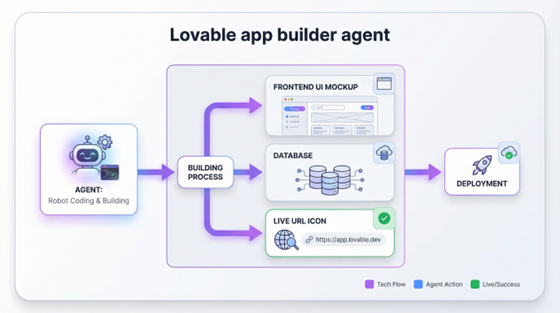
Lovable lets you describe software in plain English and get a working application. It generates frontend, backend, and database. It gives you a live URL and lets you iterate through the conversation.
Example prompt: “Build me a personal CRM app. I need a form to add a person with fields for name, company, the last time I met them, and notes. Display people in a card grid. Add a search bar at the top to filter by company. Use a modern, clean design. I don’t need authentication yet.”
Watch it build. Click the preview. Play around with it. You can even hit publish. The applications use real code (usually React and Tailwind) and you can export to GitHub to continue developing yourself.
Why it matters: What used to require hiring someone or learning to code now requires describing what you want clearly enough.
4. Zapier: The Logistics Manager

Zapier connects applications and automates workflows. When something happens in app A, do something in app B. We’ve had Zapier for a while, but they’ve added AI agents that bring reasoning to these workflows.
Example: Start simple. Create a zap that triggers every day at 9am and sends you a Slack message: “What’s the one thing you must complete today?”
Once that works, add complexity: “Read my last day’s worth of work in Slack. Turn it into a digest. Send it to me at 9am.” Now you’re using the LLM reasoning layer on top of the automation.
Key insight: The most reliable workflows are deterministic. When X happens, do Y. Add AI reasoning only where you actually need it.
Reliability Over Capability
Here’s the insight that separates production-ready deployments from demos: reliability beats capability every single time.
I would rather have an agent that correctly researches 20 companies than one that attempts 100 and hallucinates half the data. I’d rather have automation that handles 80% of cases perfectly than one that tries to handle 100% and fails unpredictably, forcing manual verification on every run.
The goal is not to be impressed by what agents can do. The goal is to trust what they deliver so you can delegate outcomes.
The Hiring Mental Model
Think of every agent as a new hire for a specific job. Not a genius. Not a replacement for human judgment. Just a competent helper with particular skills and limitations.
You wouldn’t give a new hire your company credit card on day one and say “figure it out.” You’d give them a clear assignment, limited permissions, and checkpoints to verify their work before expanding trust.
AI agents work the same way. Most agents charge by the token, which is essentially paying by the hour. You’re hiring this agent to do reliable work, just as you’d hire a contractor. This mental model keeps reliability at the forefront.
Practical Implementation
For DevOps teams looking to implement AI agents reliably:
- Start with one habitat. Don’t mix web research agents with code agents with data pipeline agents. Isolate and understand each.
- Apply least-privilege. Read-only first. Expand only with verification at each step.
- Require proof of work. Any agent that can’t provide logs, sources, or artifacts isn’t production-ready.
- Set explicit constraints. Vague instructions produce vague results. Define exactly what “done” looks like.
- Measure reliability, not capability. Track success rates, not feature lists. An agent that works 95% of the time beats one with 10x the features that fails unpredictably.
Conclusion
The future of automation isn’t learning to code. It’s learning to delegate. And delegation requires trust. Trust requires reliability. Reliability requires treating AI agents with the same rigor we apply to any other production system.
The four knobs give you the configuration surface to tune that reliability. The four agents give you practical starting points. Pick one and run your first mission.