Category: Doin’ DevOps

  • 5 Best Practices for Feature Flagging

    5 Best Practices for Feature Flagging

    Feature flags, also known as the feature toggles, are important concepts in the field of DevOps. They have been around for a long time and have been used continually by developers for their convenience. As software development services providers are striving for higher agility, practices such as feature flagging are becoming increasingly relevant. If you are not familiar with the concept of a feature flag, let’s start with understanding what feature flagging is.

    What is Feature Flagging?

    Feature flags are used for the process of branching your code, which means to turn certain code paths on and off to separate the release of new features from the actual deployment of our code. Why do DevOps developers want to branch their code through feature flags? Well, feature flagging is a great software development practice for two reasons. Firstly, for features that are a work-in-progress, developers can use a feature flag to hold their release until they are ready. This ensures the release of other features that are ready is not delayed just because one feature is not. Secondly, features that are being worked on can be kept off using the feature flag and only once it is ready it can be turned on. This allows developers to work directly on the feature without changing the main code, also known as the trunk or master branch. When all is working and ready to be released, turning on the feature toggle releases the feature, just like a switch.

    To understand feature flags in the simplest term, feature flags are “if/else” statements to develop a conditional branch or pathway into your code. For example, you can use a feature flag to state that “if so and so feature is enabled, run new algorithm; or else, run old algorithm.” This allows developers to control the functionality—if the feature flag is enabled only then the new algorithm is executed; else skipped. This is the most basic form of feature flags, however, they could be more complex.

    Feature flags are a practical way for software teams to maintain the delivery and release of features, and there are many advantages of using them. However, too many feature flags can make your code more complex and difficult to manage.

    Here are the best practices of feature flagging that can save your project from becoming a feature flag hell.

    More Feature Flags Equals Complex Code

    Feature flagging is a good practice that can help you maintain the delivery and release of different features, however, using too many feature flags can quickly turn your code into a feature flag hell. The more feature flags you create, the more code paths are going to be created, this increases the complexity of your code and makes the testing process harder. A higher number of code paths can cause a mess and risk the functionality of your code. Therefore, it is best to only create feature flags when it makes sense and always check if a previously created feature flag can be re-used instead.

    Name Your Feature Flags

    For efficient management of feature flags, it is crucial to have a proper flag naming system. Without it, it is possible to confuse the flags, forget why they were created for, or create flags with the same name—all of which can cause disruptions and confusion. When working with a team of developers, it is important to ensure that everyone follows the same labeling method so they can get the information about the flag just by looking at the name. Otherwise, it is likely that a team member might mistakenly trigger the flags, upsetting your code.

    Log and Clean Up Old Flags

    Over time, it can become difficult to keep track of the changes that are made to a feature flag. Therefore, it is important to track changes through logging, especially when working in teams. Using logging, you can keep a track of who created the feature flag, who made a change and at what time. This can save you from wasting time figuring out who was responsible for what change. A log will set the record straight about every change introduced for every feature flag.

    This is also great to know which flag and code paths are obsolete and redundant now. When you know which flags are unused you can clean them from your code to avoid any conflict or confusion.

    Use a Feature Flag Management Tool

    For better management, control and visibility of your feature flags, you can use available feature flag management tools. Like every other management tool, feature flag management tools are enterprise-scale software to manage feature flags. Some of the most popular tools include LaunchDarkly, Rollout and Bullet Train. Tools like these can make the management of feature flags easier for you and increase your development speed.

    Use Feature Flags to Collect Data

    When it comes to scaling your product, feature flags can be of great help to collect data from users. For instance, if you want to introduce a new feature, you can roll out the change slowly to a few users first. Using feature flags, you can make the new feature or update available to a smaller set of users only and collect data about how well they respond to the release. You can then use their feedback to improve or change your features to deliver an improved user experience. Feature flags are used in this manner by companies such as Facebook and Netflix to test their new features before releasing them for the entire user base.

    — Emily Williamson

  • When Gateways Go Away with Cellular IoT

    When Gateways Go Away with Cellular IoT

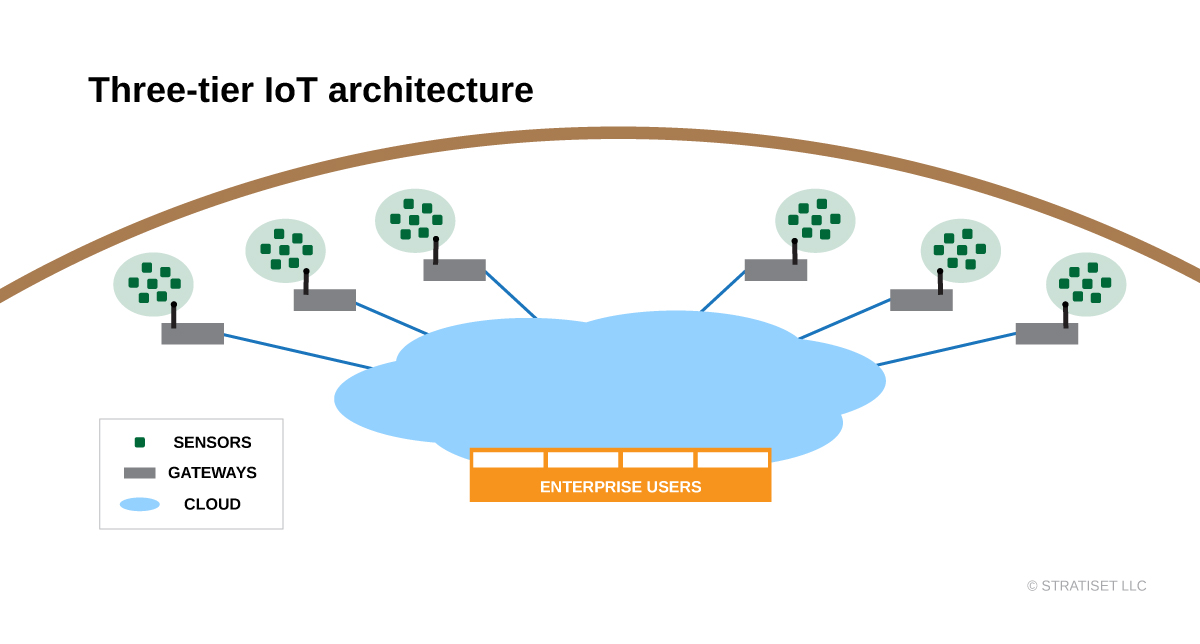
    Gateways have been an essential piece of three-tier IoT architecture for years. Their traditional spot between the edge and the cloud is in flux as cellular IoT technology rolls out. When are gateways still the right approach? How will gateways go away with cellular IoT? Here’s the trade-off between traditional three-tier and cellular IoT architecture for DevOps teams.

    Spanning the Gaps

    IoT edge devices and enterprise networks are often incompatible. Enterprises and clouds run on IP packets and heavier protocols such as HTTPS, TLS and XML. It takes processing power to run these–power often beyond the reach of smaller battery-powered edge devices. Even with improvements, Wi-Fi is enterprise network compatible but too heavy for many edge devices.

    That’s why wireless sensor networks such as Bluetooth, Thread, ZigBee, Z-Wave and others evolved. These compact, efficient stacks run on tiny microcontrollers, sipping power as sensors send data in small bursts. Alongside wired control networks are more wireless technology such as 6LoWPAN, ISA100 and WirelessHART. Real-time protocol conversion in a gateway brings data from these devices into IP-based enterprise networks.

    In some cases, a gateway might be as simple as a smartphone, tablet or a small board. Some gateways have faster processors, AC power, better cooling and packaging for harsh environments. Faster gateways can also pre-process data streams in an edge computing role. This reduces network traffic and speeds up decision-making without relying on cloud analytics.

    Setting up a few gateways inside an industrial facility is easy. Clusters of far-flung sensors call for many gateways spanning the gaps. As IoT applications grow, gateways carry development and deployment costs. Every time another gateway drops, DevOps must secure and update it.

    A Towering Alternative

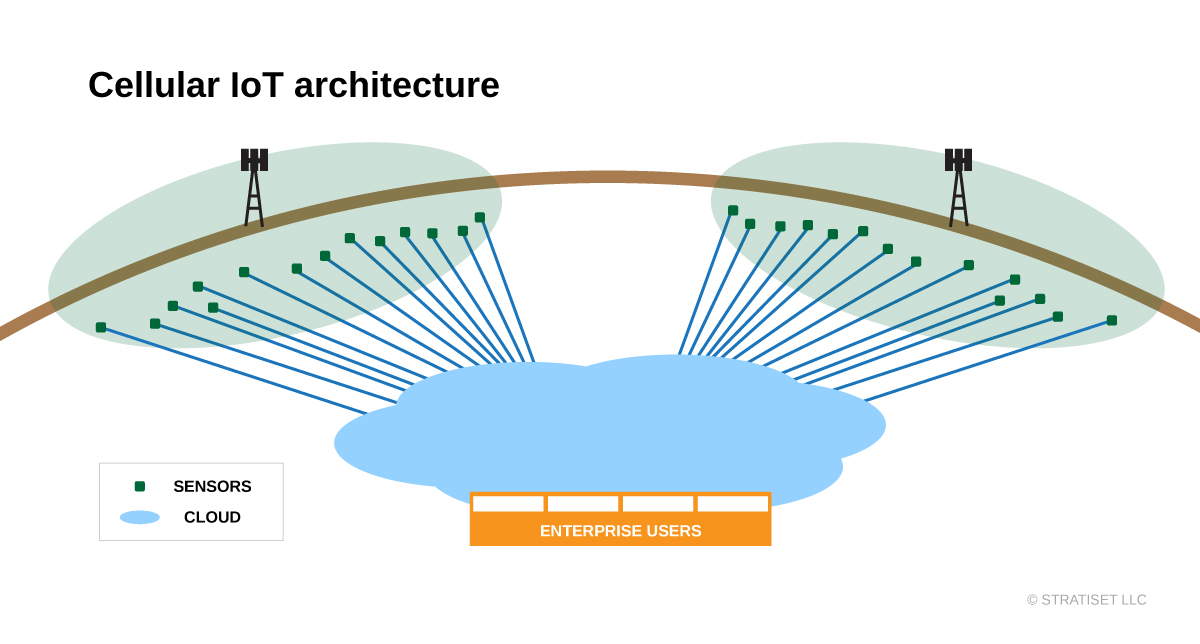
    There was no alternative to three-tier IoT architecture until recently. Wireless sensor networks appropriate for edge devices lack range for many use cases. What if instead of extending device range one could extend network coverage? Low-power, wide-area network (LPWAN) technologies take on that challenge.

    Three main classes of LPWAN technology exist today: Sigfox, LoRaWAN and cellular IoT. Sigfox is a low data rate uplink solution connecting devices and Sigfox towers within 30 to 50km in rural areas. LoRaWAN uses unlicensed spectrum limiting its duty cycle to around 1% and requires a wireless gateway for a five to 7km rural range. Urban ranges are shorter for both technologies, still a few kilometers. Both work for sensors that mostly sleep and transmit small amounts of data.

    Cellular IoT technology got a late start, with good reason. Specifications for faster, yet low-cost, low-power radios with cellular-grade range and security was a massive undertaking. The 3GPP defined two paths: LTE-M and NB-IoT. LTE-M offers a 1Mb/s data rate and lower latency. NB-IoT concentrates on lower data rates without duty cycle limitations. With about 200kb/s data rates up and down it is still much faster compared with Sigfox or LoRaWAN. NB-IoT also penetrates buildings better, avoids interference and targets a 10-year battery life in devices.

    Mobile network operators (MNOs) worldwide are racing to get NB-IoT and LTE-M networks deployed. In the latest GSMA Mobile IoT Rollout Report, NB-IoT is leading in adoption. These rollouts are not tied to expensive 5G infrastructure, so MNOs are investing incrementally.

    After towers are ready, the last piece is support for Remote SIM Provisioning (RSP). Cellular IoT devices typically work with an eSIM like in the latest Apple iPhones, with one major difference. An iPhone user scans a QR code, pulling a profile over RSP.

    Pushing Across Networks

    Cellular IoT devices use a push model for RSP. When an edge device with an eSIM powers up, it uses a bootstrap network profile. It can then communicate with an RSP server to load an operational profile of choice. With this over-the-air profiling one device configuration can go practically anywhere in coverage. It opens powerful use cases such as agriculture or oil and gas, with wide-spread sensors in both indoor and outdoor settings.

    All this happens without a DevOps team planning and investing in infrastructure. MNOs are making the major investment. The variables for IoT application developers are network coverage, operator profile creation and setting up devices for streaming. If one MNO proves costly or unreliable in a specific location, devices can receive another profile over the air.

    Cellular IoT can deploy one sensor, or many, without a gateway. The cellular IoT advantage becomes even stronger with more dispersed locations. A simplified network architecture looks more like the IoT should look–with every device addressable.

    Alternatives exist because they serve some use cases well, with some persisting for years after new technology arrives. For some DevOps teams risk is a strong factor, and they may prefer the control a gateway-based architecture offers. In tight sensor clusters, the life cycle costs for a few gateways may turn out lower. If gateways aren’t cutting it for an application, they may go away quickly with cellular IoT rollouts.

    I see ubiquitous coverage driving cellular IoT momentum. Providing IoT services is a priority for mobile network operators as consumer growth flattens. There are plenty of resources for understanding cellular IoT technology in depth–get in touch with me if I can help point you in the right direction.

    — Don Dingee

  • Aspects of Machine Learning on the Edge

    Aspects of Machine Learning on the Edge

    Machine learning (ML) is hard. Making it work within the confined environment of an embedded device can easily become a quagmire unless we consider, and frequently revisit, the design and deployment aspects crucially affected by ML requirements. A bit of upfront planning makes the difference between project success and failure.

    For this article, our focus is on building commercial-grade applications with significant, or even dominant, ML components. Edge devices, especially ML enabled ones, don’t operate in isolation; they form just one element of a complex automated pipeline.

    You have a device, or better yet, an idea for one which will perform complex analytics, usually in something close to real time and deliver results as network traffic, user data displays, machine control or all three. The earlier you are in the design process, the better positioned you’ll be to adjust your hardware and software stack to match the ML requirements. The available tools (especially at the edge) are neither mature, nor general purpose. The more flexible you are, the better your odds of building a viable product.

    Let’s start by describing a hypothetical device and we’ll work through some ML considerations of the design. As we discuss the design, we’ll visit and revisit DevOps automations that go hand in hand with these other engineering processes.

    A Smart Security Camera

    For our design, let’s look at a networked security camera. As an IoT device, it’s continually connected to the internet. We’ll assume our device will have at least 4GB of SDRAM, a 64-bit ARM CPU and run an embedded Linux that supports an Anaconda Python distribution, OpenCV, DLIB and TensorFlow.

    Our ML related goals are first, recording and labeling interesting frames, and second, alerting security personnel to suspicious activity. We are constrained by various physical, environmental and cost factors. To make the best use of the available data, we’ll need to use ML to examine and classify multiple objects from every image frame. We’ll use a cloud service to handle the second goal, so here, ML on the edge concerns image recognition. How should we proceed?

    Process the Images in the Cloud?

    We’ll need to recognize various objects in the frames, such as people, faces, vehicles, etc. Each object set requires execution (inference) of an ML model, which produces a set of bounded, labeled objects. A typical camera will record about 30 frames per second. Couldn’t our camera just send that data to a cloud provider? Ignoring other considerations, this is about 2.5 million images/day; even at a deep discount this would be billed at about $1000 a day, and that’s for each recognition model applied. Clearly, we’ll need to make other choices.

    Let’s start by examining the raw input stream. Each raw 720p (standard HD 1280x720px) frame uses about 5MB, so if we were to send 30 frames/sec over the network we would need an incredible 1.5Gbps connection (about a terabyte every two hours). For full HD and higher, multiply this by four to 10 times. We will not be sending raw, uncompressed video. Our problem is our ML models will only work against individual image frames. Where should we make our trade-offs?

    Video produces vast amounts of data, but very little information in a given frame is new; this is why various compression techniques work extremely well, and raw data reductions of 100-1000x is typical. These reduced rates of 15 down to 1.5 Mbps is fairly reasonable, so perhaps we can do our ML inference using cloud services, as long as we host our own machine instances rather than paying for ML services. Depending on our workloads, we can expect to process 24×7 video for between $50 and $200 per month.

    Having decided to host our ML models in the cloud, we now need to manage a corresponding set of DevOps considerations. Do we have enough compute power to manage the service? How will we scale the workload as the number of edge machines increases? What are the storage and data retention policies? And of course, since we’re dealing with images of people, how will we manage privacy concerns and the associated legal and political ramifications.

    What should bias us toward more cloud processing?

    • Our initial development budget is more limited.
    • Our ML models have not been proven effective in limited processing/memory environments.
    • We need the flexibility to rapidly change the models we use for processing.
    • We know the network connectivity is robust and offline operation is not required.
    • Our budget for cloud services can significantly exceed the cost of our edge hardware.

    The choice between processing in the cloud, or on the edge is not a binary one. Designs can massively benefit from even limited edge computing; in some cases, simple detections (motion/vehicle/human/face) can be implemented on the edge to reduce cloud workloads by orders of magnitude with no loss in utility.

    Can We Do Most of the Work on the Edge?

    If we’re using Python with C library acceleration on our quad core ARM, simple ML models such as face detection (not recognition) may handle 10 to 20 frames/second, but 30/fps on anything like a full sized image will not be possible. Deeper, more complex models won’t fit into our limited RAM, and if they did fit, we could see inference times exceed a second per frame. We’re now faced with the realities of life on the edge: trade-offs.

    Once we’ve committed to placing our models into the edge device, we’ll need continuous integration (CI) and deployment services to support our product. These will let us train and retrain our models in the cloud, automate the process of validating improvements and produce the embedded code that updates the models in our target devices.

    Since we initially used models well suited to GPU based servers, can we just add a GPU to our device? In a word, yes, but with some very real costs. Adopting an alternate SoM with GPU support will provide a magnitude of improvement in inference performance, but will double or treble the unit cost and power consumption will increase. Such changes may incur significant non-recurring engineering as adjustments, rewrites or retraining of the model will be required to take advantage of the new hardware. Non-recurring engineering is a one shot cost associated with a change to a part, assembly or system.

    In some cases we can plug an Intel Movidius Neural Compute Stick (NCS) into a spare USB port and see 5x to 10x boost in per image rates. These are supported by the Intel OpenVINO toolkit, but there will be some development time to get things running and not every model can be made to work.

    The next tool in the box is Field Programmable Gate Arrays (FPGA) development. It’s a chore to incorporate these into our board design, but performance can be equal or better than GPUs (on some models), and power consumption is lower. The Intel OpenVINO Toolkit supports Arria and Stratix FPGAs for DNNs. Pricing can be prohibitive.

    Finally, if our device will be produced in large quantities, it can be worth a few million dollars of NRE to build an Application Specific Integrated Circuit (ASIC). The sunk cost of ASIC design can be huge, but the lower unit costs will make up for it. We’ll go this route only once our design has been proven, locked down and we are sure the market can take the volume needed to break even on these engineering costs. I should note architectural improvements in dataflow processing of DNNs in ASICs, such as Vivienne Sze’s work, show promise for dramatic improvements in weight, power consumption and cost. If you are planning for a longer term, don’t rule out these developments.

    What would make our edge processing easier?

    • Start with low footprint models such as TinyYOLO, MobileNet or SqueezeNet.
    • Accept lower frame rates for image processing in our design.
    • Evaluate the ML models with the hardware specifics and tool sets in mind, up front.
    • Provide automated DevOps services to update models in your devices.

    Building our ML models to run on edge devices will involve significant development costs. Tool chains do not install seamlessly, and it’s common to spend days to weeks tweaking the environments. Development and testing on these platforms tend to be slower and involve more manual steps than we’re used to in our DevOps environments.

    Running models on the edge will increase our DevOps complexity. Our cloud workload will be lower, but now we’ll include cross compilation, embedded code builds, download management of larger images and various additional test and validation stages. These will be on top of the training, load balancing, data retention, privacy and security issues we need to address for a cloud-only system.

    Conclusions

    What else will affect our choices here? The nature of the inputs can really matter. If our camera visualizes traffic on a busy roadway, or people in an airport terminal, we can expect almost every frame will contain something of interest; if we’re monitoring the bottom floor of a parking garage–not so much.

    To recap:

    • Cloud services for video rate ML are cost prohibitive.
    • Integrate DevOps early to complete your product support system.
    • Understand and characterize your input data by volume, scale and importance.
    • Recognize not every model can execute on edge hardware.
    • You have more choices in edge hardware than you thought.

    Although there are still challenges to building more intelligence into devices, it’s important to realize every year these constraints are fewer, the tools get better and the devices become more powerful. A compelling argument can be made that most data processing should occur as close to its source as possible.

    — John Fogarty

  • 27-Factor Assessments Lead to Success With DevOps

    27-Factor Assessments Lead to Success With DevOps

    October 2019 will mark the 10th anniversary of the first DevOpsDays, where the term “DevOps” began to catch on. In the world of information technology, 10 years is a long time and it is quite evident based on the amount of change that has transpired since then. To name a few, we have seen the maturing of CI/CD automation and many innovations such as application release automation, containers, cloud infrastructure orchestration, DevSecOps, DevOps database, DevOps governance and micro-services.

    These innovations have become part of “mainstream DevOps.” This evolution is continuing with AIOps, machine learning, value stream management and others. Each of these innovations has made DevOps not only more powerful but also more complex.

    As a consultant working on DevOps projects through their life cycle, I have learned that complexity can plague the success of DevOps within an organization. Complexity cannot be avoided, as DevOps is complex and will likely continue to be. However, the key to avoiding failure through your DevOps journey is to engage the complexity by using DevOps tenets to implement DevOps. Do not try to boil the ocean. Instead, at each leg in the journey, take inventory of where you are in terms of current goals, state and best practices. Fine-tune your direction and build your solution using proven continuous delivery methods.

    The 27-Factor Assessment Model

    A comprehensive yet efficient assessment of your current state is key for ensuring complexity has not gotten out of hand and the organization is focused on success criteria that meet the needs of the business.

    I use a 27-factor assessment model. The factors are the cross-product of current best practices for three dimensions (people, process and technology) with nine pillars.

    A Scope of the 9 Pillars

    Leadership: Gain insight and understanding of your leadership practices and how leadership can improve DevOps adoption and performance.

    Culture: Identify opportunities to improve cross-functional collaboration and communication across your organization.

    Application Development (or Design for DevOps): A practical analysis of application development practices identifies improvements for your DevOps performance.

    Continuous Integration: Analysis of branching and software integration workflows and tools identifies bottlenecks and improvements for builds and packaging processes.

    Continuous Testing: Analysis of end-to-end software testing, verification workflows and tools identifies bottlenecks and improvements for accelerating testing while improving the coverage and quality of tests.

    Infrastructure on Demand (or Elastic Infrastructure): Analysis of systems and services for orchestrating and hosting applications and DevOps workloads provides insights to improve performance and utilization of resources.

    Continuous Monitoring: Analysis of end-to-end monitoring workflows and tools for applications, releases metrics and infrastructure provides improved visibility for all business and technical stakeholders.

    Continuous Security: Analysis of security practices and tools identifies opportunities to integrate security practices into the continuous delivery pipeline.

    Continuous Delivery/Deployment: Analysis of delivery and deployment practices identifies improvements for safer, faster and more efficient releases.

    Each combination of pillar and dimension has associated best practices used to score relevance and current state relative a DevOps goal agreed by the organization. Here is an example of the continuous security pillar.

    The 27-factor assessment for an application is an important input to a future state value-stream map workshop. The value-stream map is then transformed into a road map and implementation plan.

    This assessment approach is thorough and yields results that are usually accepted by stakeholders because they are involved in the process at each step. The result is aligned to their priorities and goals and the solution road map is directly traceable to stakeholder inputs. The approach is flexible enough to evolve over time and can be customized to suit the priorities of an organization. For those that argue that 27 factors are too many and too complex, I must say the complexity of DevOps itself requires a comprehensive assessment approach.

    Conclusion

    In this article, I described a comprehensive, efficient and evolvable assessment approach that uses 27 critical success factors for assessing DevOps applications. While DevOps offers immense value for software development, delivery and deployment, a rigorous and thorough assessment with up-to-date best practices are essential to accomplish DevOps goals. Each organization is different and has different DevOps goals and requirements. The changes to the three dimensions vary according to the results of each DevOps assessment.

    — Marc Hornbeek

  • The Terrain of DevOps is Strewn with Pitfalls

    The Terrain of DevOps is Strewn with Pitfalls

    As Gene Kim, one of the leading thinkers in DevOps, once said, “DevOps is not about what you do, but what your outcomes are.” What he’s telling us is that DevOps is about enabling a rapid flow of work that transitions from development to testing to operations, but the bottom line is that it’s about achieving results. Unfortunately, this too often gets lost in modern-day DevOps practices.

    In this article, I will discuss five common pitfalls that occur in DevOps if you don’t pay attention to the endgame and how your organization can avoid falling victim to them.

    DevOps and Automation: Measuring the Wrong Outcomes

    Some people believe that, at its core, DevOps is about trying to automate everything. But ask yourself this: Once you automate, are you really delivering a better outcome?

    The answer is not always yes. While metrics such as deployment frequency or mean time to repair (MTTR) are interesting DevOps indicators, they are no more interesting to determining if your team is delivering actual value than measuring the number of lines of code submitted or counting the number of keystrokes by the development team. You measure outcomes by determining a baseline from where you start and compare that with where you end.

    We need to understand that DevOps is about much more than automation; it’s about the entire pipeline and how your team moves from ideation to delivery to production. Even large companies with world-class DevOps teams don’t always clearly see the problem and can struggle managing the value stream and putting together multiple pipelines. An anonymous but real-life example of this is an organization I know that had been doing DevOps for 18 months, yet hadn’t delivered anything into production in that span. Are they really doing DevOps? DevOps is a process, but if it produces zero value, it’s not delivering on its promise.

    The key is focusing on delivering value and measuring value delivery into production. However, before you can begin measuring value, you have to define what it means to each individual deliverable. Common metrics include the number of story points, actual revenue from product comparison and customer satisfaction. With your clearly defined metrics in place, you can measure value as it gets delivered to the customer.

    DevOps and Fragile Environments

    One Achilles’ heel in the DevOps process is the pre-production environments where code gets deployed and tested. Automating a delivery pipeline relies completely on code being built and deployed to various environments. Fragile environments mean that the developers and testers are wasting time dealing with problems originating from the environment and not the code itself.

    While we wish all environments could be on-demand; the fact is, most are not. Another DevOps expert, Randy Bias, has an analogy about pets versus cattle in describing servers, and the same analogy can be used for environments. If environments are not standardized and repeatable, you have to be willing to move on from it like a farmer moves on from livestock; you can’t hold onto sentimental attachments like we have with our pets. What’s most important is that in no case can an environment be singular in nature.

    One element of the solution is to create code and automate, but the key is building up environments that are complete. Every environment needs proper builds, proper data and proper tests validating the environment. Additionally, the automation must have the stability to perform successfully every time. If you have piece of automation that fails even just 5% of the time, that’s unacceptable.

    The only way automation works in an environment is if you can trust the environment. When the environment is unstable, it’s like playing Russian roulette: No one knows exactly where the danger lies. It could be in the environment, the code, the data, the middleware … a number of places. When a problem arises, developers are often the last line of defense, but dealing with an issue such as this pulls them away from getting real work done.

    Disconnected Teams

    On this point, I’d like to share a warning: Disconnected toolchains lead to disconnected teams. The planning, development and testing teams can lack cohesion, and the release and operations teams often struggle to be on the same page. Each of these groups have their own tools and management, but they need to be able to communicate with each other effectively to make things work smoothly. In an ideal world, planning initiatives would flow into features for the development and testing team, which would flow into release pipelines and operational changes. Every team still can speak its own language, but the tools need to be interconnected and unified across the teams.

    Mismanaging Hybrid

    The term “hybrid” has many different uses in the software development space. Hybrid methodology refers to combining waterfall, agile and DevOps practices. Hybrid environments means your environment is housed in multiple locations such as the cloud, on-premises, virtual or code. There’s also hybrid geography, hybrid architecture, hybrid style—the list goes on.

    The key to transitioning to DevOps is properly managing the different types of hybrid. If you can’t manage hybrid delivery, you can’t manage your entire delivery and you can’t improve your delivery holistically. Organizations must learn to manage in a world of hybrid delivery and be able to handle cloud and on-prem, as well as teams all over the planet.

    Fixing Non-Constraints

    The Theory of Constraints is about pinpointing the bottlenecks in your process and fixing them. Any work that’s not focused on eliminating the constraint will not result in improvement and could be considered a waste of time.

    It’s important to remember that if you haven’t fixed the bottleneck, you haven’t improved anything. At the same time, if you’re automating the non-constraints, you’re wasting efforts by trying to improve what doesn’t need improving.

    As we’ve pointed out, DevOps does not equal automation. If an organization has messy processes and tries to automate them, they’ll be left with an automated mess. Therefore, organizations will see the best results from automating their constraints and just as important, not automating the non-constraints.

    — Jeffrey Keyes

  • How DevOps Can Help Speed Go to Market

    How DevOps Can Help Speed Go to Market

    With continuous evolution of IT systems, speed and flexibility have become of paramount importance for businesses. This requirement has caused a massive shift in the IT delivery system. Now, building and releasing a better product in the market is not enough for businesses to stay ahead of the competition. Organizations need an agile approach to understand and adapt to information, trends and new developments, and to meet the demands of time-to-market features.

    DevOps is one such cultural shift in the IT field that shows how software development and IT operations can work together to reduce time to market. It has attained such a great profile in the market that people have started measuring the outcomes for businesses that adopt it.

    If you’re just beginning with DevOps, here are some tips that will help you understand how you can accelerate time to market for your product and services.

    How Can DevOps Accelerate Time to Market?

    There are many ways in which DevOps helps organizations accelerate time to market for their product. Some of the most effective ways are:

    Faster Delivery of Features and Modifications

    When development teams build software, they connect with IT operations to send the software for testing. If the product is completely new, operations need to create a testing environment. If the software is an updated version of the current product and there is already a testing environment for it, operations still need to configure and add interfaces and side applications. So, a developer can only deploy code to the software when the operations team tests the product, which is a very time-consuming process.

    However, DevOps eliminates such time-consuming tasks from the software development process. For example, with automated testing of web apps developers get quick feedback and automated integration allows them to make changes in the code base more quickly. Therefore, organizations can release small or incremental updates of the software while delivering new features to market faster.

    Enhance Efficiency

    DevOps encourages development teams to give more time to value-creating work. When businesses use automated testing and integration, developers don’t have to waste their time waiting for machine configuration or code integration. Both tasks can be achieved by clicking a button on the self-service portal.

    For example, many European banks have implemented DevOps in their software process, which resulted in 25% efficiency improvements in providing updates for their online banking applications. It also reduces the workload for the IT operations team so that they can work on more challenging tasks to add more value to the company.

    Improved Quality Code and Quick Recovery from Failures

    When software is released to the market, developers often start working on their next project. So, they usually don’t have any motive to predict or prevent future problems related to software; it’s all up to the operations team. But DevOps keeps developers involved during the entire life cycle of a software product for updating any feature or application, which results in improved quality code. Also, it requires only a few fixes as developers can track and eliminate potential problems while writing code.

    As developers work with smaller chunks of code, when a failure occurs in any product, bugs can be tracked easily to their resources. Also, human errors are reduced thanks to the automation that DevOps provides to the software life cycle, while allowing companies to deliver fixes faster.

    Best Practices for Using DevOps

    Just like agile approaches, DevOps doesn’t have any pre-planned implementation model. But, most companies that use DevOps follow these best practices:

    Set a Business Standard

    The improvements in an organization can never be measured without having a business standard. If you want to reduce time to market for your software development process, then have a look at the current development process and find out which areas need improvement. For example, you can review the steps involved in making a project live and identify any defects, inefficiencies and constraints in the project.

    After reviewing these processes, you can set a business standard that shows the current software development process and the improvements that are required to reduce the time to market. With DevOps, you can set a business standard more quickly and improve your software deployment process.

    Optimize and Eliminate Unnecessary Inputs

    While reviewing your software deployment process, you might encounter some inputs that don’t add value to the process and reduce its speed. Eliminating such inputs from the development process is crucial, but make sure there is open communication between you and your team so efforts are not wasted.

    What you can do is set up the right team structure and use tools that provide transparent and fast communication between the teams. For example, you can structure a team that includes marketing managers, right analysts and, most importantly, DevOps resources.

    Allow Continuous Deployment in Software Process

    Continuous deployment is one of the essential key factors of DevOps that helps in reducing time to market. It is the continuous delivery pipeline that doesn’t involve any manual intervention in-between. In continuous deployment, automation stimulates and simplifies communication and validates the software process to ensure timely releases.

    However, not every company implements continuous deployment in its software development process. Usually, the organizations that need to move faster to provide new features, applications or security channels for their product use continuous deployment. For example, media companies and online retailers use continuous deployment in their software development process.

    Improve the Quality of Automated Tests

    One straightway to reduce time to market with DevOps is improving the quality of automated tests. In any organization, testers test the application for its functionality and other factors. But this testing process can be enhanced by engaging with clients and a targeted audience in the development process. Taking input on the overall functionality and user interface will not only improve the testing process, but also help you find bugs and defects earlier.

    It is proven that if bugs are not tracked and eliminated in the early stages, it can greatly impact the time to market for your software product. For example, if you want to test your web application browser compatibility, then consider cross-browser compatibility testing. With end-to-end automated testing, the overall testing process can be improved, which will result in reducing time to market. Some other benefits of automated testing that can improve your DevOps are:

    • Track and eliminate bugs and errors in the early stages to improve the system’s capacity.
    • Improve the security of your software product.
    • Enhance custom engagement and satisfaction with a high QoE score.
    • Less cost of ownership.
    • Meet the industry standards and compliance regulations in a better way.

    An improved automation strategy helps move your product to market faster and allows your resources to do more high-value tasks. Also, the development teams will be more encouraged and confident to add new features to the application, as it will be tested more thoroughly.

    Conclusion

    Today’s businesses heavily rely on applications to collaborate, communicate, complete sales and operate more proficiently. Therefore, they strive to bring these applications to market more quickly so they don’t miss any opportunities and easily adjust to the market standards. To achieve these objectives, organizations must adopt the right DevOps practices in their software development processes to reduce time to market.

    — Junaid Ahmed

  • Embedding Accessibility into the DevOps Process

    Embedding Accessibility into the DevOps Process

    Calls for accessibility and inclusion are a defining characteristic of current times. Persons with disabilities (PwD), including vision, hearing, cognitive and physical impairments and others, are demanding equal access to virtually all public services and forums they interact with, from transportation to banking and self-service terminals in airports—and increasingly, digital (web and mobile) services.

    Ensuring accessibility can help enhance brands and is good business practice. The process can seem daunting but integrating accessibility into DevOps doesn’t have to be overwhelming. There are several simple steps for getting started.

    Understanding Your Organization’s Unique Accessibility Motivators

    Knowing what accessibility elements you need to test for depends on numerous factors, including your industry and where you are located.  For example, U.S. government organizations are subject to Section 508, while telecommunications providers must comply with the Communications and Video Accessibility Act (CVAA). Different scenarios require a nuanced approach to accessibility testing.

    The risks of digital inaccessibility are growing far beyond government websites, with the number of Americans with Disabilities Act (ADA)-based web accessibility lawsuits increasing 181% between 2017 and 2018. Since the beginning of this year alone, several well-known brands including Domino’s Pizza and Beyoncé have been sued for web accessibility breaches, bringing the issue to the forefront.

    E-commerce sites are often more concerned with lost revenue opportunities, as the average blind person is known to abandon several companies per month due to web inaccessibility. For transaction-oriented sites, inaccessibility translates directly to lost business. Whatever the motivators, building empathy can be a great way to give this mission meaning for developers. Organizations can do this by staging and having developers participate in “empathy events” where simulations are offered and developers can experience first-hand what it’s like to interact with a given website using the same assistive technologies that people with disabilities rely on regularly.

    Set Achievable Interim Milestones

    Agile DevOps teams emphasize catching defects as early as possible in the software life cycle to ensure efficient, high-quality rollouts. Unfortunately, accessibility testing is often relegated to the end of the process or performed as user-acceptance or usability testing. This type of testing is often manual and can be resource-intensive and expensive.

    Chart showing the process for building in accessibility into a product

    Organizations only became aware of issues upon hearing from end users encountering problems—or, worse, taking legal action to gain equal access to web-based content and services.

    Getting from a manual process to a fully automated and integrated process takes time. We recommend setting achievable, interim milestones that start small and build on early success. Organizations may not know what to tackle first, but some commonly shared examples of achievable first milestones are accompanying all digital videos with subtitles and/or sign language translation (for the hearing impaired) and ensuring that all new UIs are clear of any issues identified by automated tools. Experts and trainers can offer valuable advice on addressing the basics and then building on the success.

    Implement Tools

    Today’s developers have easier access to more comprehensive accessibility testing tools than ever before. Currently there are tools available for all the major platforms (web, Windows, Android and iOS) and many of these have been open-sourced, making them richer every day. Interactive testing functionality can enable development teams to thoroughly assess the accessibility of products early on in the cycle, while libraries allow these tests to be run regularly as part of the development test automation. A good tool will provide developers with simple remediation guidance and allow them to embark on a learning journey to increase their knowledge and expertise.

    Measure, Improve and Automate

    Ongoing measurement is the key to understanding whether your accessibility transformation is taking hold. Leading metrics will focus on the change in development practices. These changes will give early indication of end user outcomes. An example of a leading metric is “percentage of new UI code that is clean from an automated testing perspective.”

    End user outcomes, while lagging, are important to ensure that the activity is leading to real change. An example of an outcome might be the number and the change in the accessibility-related call center inquiries. A reduction would indicate that fewer accessibility issues are making their way into production. Metrics are strongest when they are presented in a manner that directly correlates to business outcomes (such as customer satisfaction), as these tend to resonate the most with business executives, which helps build the broadest internal support base.

    Once you’ve had some early successes, it’s time to expand, and you can keep tackling issues incrementally. Organizations should also focus on continually shifting accessibility testing “further left” earlier in the development cycle to enhance quality while maintaining velocity. The sooner you detect and fix accessibility issues, the less likely these are to become more deeply baked into the software, making them more difficult and time-consuming to undo.

     chart showing building in accessibility earlier in the product development cycle

    Organizations also should consider replacing interactive and manual accessibility tests with fully automated tests. While manual testing cannot be completely eliminated, automated unit testing and integration testing enable developers to test for accessibility as they code (not after the fact), while automated regression testing ensures live web content and applications stay accessible after changes are made. Automated regression testing is critical for organizations wishing to ship software often while maintaining quality—in some industries such as financial services, a disproportionate number of websites have experienced some level of accessibility regression.

    Conclusion

    DevOps teams are focused extensively on maintaining exceptionally high levels of software quality combined with velocity. We’ve become obsessed with minimizing the number of bugs that make it into production but may be overlooking one of the key attributes of high-quality software—accessibility.

    In most cases, functional testing does not cover accessibility testing. While functional testing determines whether a system is working as expected (i.e., certain inputs generate certain outputs), accessibility focuses on ensuring usability for PwDs as a non-functional attribute. With estimates that the current number of PwDs in the U.S. nearly equals the total populations of California and New York combined, accessibility testing needs to be prioritized in the same way as functional testing. Otherwise, you are shutting these people out.

    In summary, organizations that demonstrate a commitment to accessibility through their digital products and services will have a natural advantage in an increasingly competitive market space. Getting started can be relatively simple, and you should focus on motivating development teams to achieve and overachieve, emphasizing continual improvement rather than perfection from the get-go.

    — Dylan Barrell

  • 5 DevOps Trends Worth Knowing in 2019

    5 DevOps Trends Worth Knowing in 2019

    DevOps today is more than the buzzword it was 10 years ago. Back then, the idea of combining development with production in your IT infrastructure was not common; the logistics were nonexistent and most of the time businesses decided it was far too much effort.

    However, if the last nine years has taught us anything, it’s that DevOps is worth every penny businesses invest. It helps companies streamline production, keep customers happy and provide agile services to attract new audiences.

    But as with anything in the IT field, there is a paradigm of change. This article discusses some of the top DevOps trends happening now and how to implement them in your own system.

    Automation Will Be a Bigger Focus

    Automation has always been the way for businesses. Whether it’s speeding up the pipeline with machines, providing better response times for angry customers with chatbots or better inventory management with tracking and logging system, automation is behind it all.

    DevOps is no exception.

    But as with everything, there can be too much automation. The best thing to do is break down processes and find simple, redundant tasks that can save time if automated and apply the changes.

    The most important aspect of automating DevOps is to understand the six pillars in the DevOps cycle, which are:

    • Continuous business planning
    • Collaborative development
    • Continuous testing
    • Continuous release and deployment
    • Continuous monitoring
    • Collaborative customer feedback and optimization

    DevOps Assembly Lines: The Next Big Thing


    To track the development of your application, we have pipelines. These visually represent the product from its initial stage right through until final development and release.

    However, continuous integration (CI) is no longer the priority focus when it comes to effective monitoring and implementation. Continuous delivery and automation are a major part that businesses have already started delving into in 2019.

    This is where DevOps assembly lines enter the picture.

    Assembly lines are focused on bridging the gap between manual and automated tasks, ensuring there is no redundancy while providing several tools for teams to implement, to ensure apps are hitting the production lines as reasonably quickly as possible.

    Microservices Architecture Adoption Taking Off


    Microservices architecture may as well be that new kid in school trying to fit in. These smaller services compound into agile, implementable tools that DevOps teams can use to scale and test software over the course of weeks—not years.

    As you can imagine, this can help some businesses streamline their development and production lines, setting them way ahead of their original production estimates—which is never a bad thing.

    Implementing microservices into your DevOps team can also help companies focus on the runtime and efficient delivery of new development sources, without the hassle of creating dependency errors when something decides to bug out for no apparent reason.

    Security Needs to Step Up

    Cybercrime is on the rise—we all know that’s old news. But as a business, cybercrime can either make or break your sales and weigh down your DevOps team.

    That’s why more companies are hopping onto enterprise security options. Although there are third-party programmers for almost every situation you need, none of them have the same security levels as the tools from the enterprise version provides. Safeguarding both your company and your clientele.

    Riding the Artificial Intelligence Wave

    Finally, we have artificial intelligence (AI) and machine learning (ML). When you think about it, these two elements are literally the sum of everything we want in the DevOps community—the ability to crunch out hours upon hours of menial labor and saving your teams hours to focus on higher-priority tasks.

    The combination of AI, used to predict algorithmic influencers, and ML’s ability to adapt to new situations will be key for DevOps teams to get to the next level in 2019.

    — Gil Artmoore

  • Adding Accountability with ‘You Build It, You Run It’

    Adding Accountability with ‘You Build It, You Run It’

    Let’s see if this scenario resonates with anyone: Your department, organization, company, etc. is beginning to embrace DevOps practices, which is, of course, an amazing step in the right direction! One of those key practices is the “You Build It, You Run It” (YBI/YRI) mantra that helps facilitate a higher level of quality and accountability. This common practice also solves the mentality of throwing your solution/code over the fence for some other team to fix.

    I’m a huge proponent of YBI/YRI. However, in the case of existing brownfield solutions, there are several things you need to consider when transforming into the YBI/YRI model, including:

    • What if you have an existing solution where the collective “Y(ou)” in ‘You Build It’ does not include any or many of the original team that built it? This would be anyone who was part of the end-to-end creation of the solution and was empowered to make decisions impacting the design, development and delivery of a solution. In this case, it becomes, “Someone else built this mess, now you run it,” [SEBTM/NURI] which not only makes for a horrible acronym but is also a very realistic scenario that requires special consideration we’ll discuss below.
    • What if you are still heavily siloed and have a squad spread across multiple organizations, each with different goals and objectives? If you are still running outside of a true squad model, it can be difficult to ensure everyone’s priorities and goals are aligned to produce quality solutions with the right functions customers want.
    • What if you have varying definitions of “You” within your organization? Often in the YBI/YRI model, the interpretation makes some roles or key decision makers exempt from the glory of pager duty or answering to an angry customer. This can be especially true when you’re still trying to get to a point of having fully cross-functional, empowered squads.

    I think it’s fair to say that most DevOps transformations don’t necessarily happen on greenfield solutions, which means, especially at the enterprise level, the reality can end up being a beast of a monolithic solution(s) built by others who may or may not still be around.

    How do you fix it? My suggestion is that every person who was empowered to make a decision that contributed to the “B” (Build), becomes a “Y”(You). Of course, this doesn’t work if “Y” is no longer with the group or company, in which case I think it becomes a different issue of ensuring the new “Y” is 100 percent empowered with the ability to make decisions that enables that team to successfully run it.

    One more complication that adds to the mix of a YBI/YRI strategy is putting that strategy in place without a solid foundation of agile practices. Ideally when you are adopting DevOps practices, you already have a solid agile foundation with empowered cross-functional squads; however, in practice we often see the agile foundation still being built and/or refined at the same time as incorporating DevOps practices. As a result, there still exists a lot of hand-offs while two transformations are trying to run in parallel. If you have hand-offs combined with team’s with separate business objectives, those blurry lines of accountability will become an issue sooner than later.

    During transformations, if you find yourself in that in-between state of not having fully empowered accountable teams and are working with solutions your team may not have actually built, below are a few suggestions to get through those initial challenges:

    1. Ensure you allow for enough time to address technical debt during your sprint planning. Continuing to add features and functions on a poorly designed and/or broken solution will only cause further issues and likely increase the level of frustration on the team.
    2. Ensure that EVERY person who contributes to key decisions on a solution is included in the pager rotation in some way. Until you are in a state of fully empowered cross-functional squads, it’s important to drive the importance of accountability. As an example, if you have an architect in one organization who is working with a development team in another organization, that architect needs to be included on the pager as well to be aware of any problems resulting from a key architecture decision.
    3. Get in the habit of operational retrospectives. Begin (or continue) the habit of operational retrospectives that bring together the end-to-end squad into a cross-functional review of the operational incidents, root cause assessment and stories/tasks that need to get added to the backlog and prioritized.

    Although the transition into YBI/YRI for brownfield solutions can be muddy, empathizing with the mountains of technical debt and fully empowering solution teams can go a long way in truly helping your team’s succeed through the beginning phases of your DevOps transformation.

    About the Author / Shelbee Smith-Eigenbrode

    Shelbee

    Shelbee Smith-Eigenbrode is a senior software engineer/IT architect at IBM and has been in IT for 19 years.  She has worked across varying roles spanning the software development life cycle. Her experience across functional roles as well as performing that work deeply inside traditional silos has contributed to her passion for embracing the DevOps culture and transforming the way teams are delivering technologies by adopting DevOps practices. She is a member of the IBM Academy of Technology committed to driving innovation and technical advancement.

  • Continuous Testing vs. Test Automation: 3 Key Differences

    Continuous Testing vs. Test Automation: 3 Key Differences

    Testers have been wrestling with test automation for years, yet most teams are not satisfied with their current level of test automation or the overhead required to maintain it. Additionally, the past few years have brought a sea change in the way that applications are architected, developed and consumed—increasing both the complexity of testing and the business impact of software failures.

    How can software testing professionals help the business control risk in light of the increased complexity and pace of modern application delivery? Enter continuous testing.

    What is Continuous Testing?

    Continuous testing is the process of executing automated tests as part of the software delivery pipeline to obtain feedback on the business risks associated with a software release candidate as rapidly as possible.

    Test automation is designed to produce a set of pass/fail data points correlated to user stories or application requirements. Continuous testing, on the other hand, focuses on business risk and provides insight on whether the software can be released. To achieve this shift, we need to stop asking, “Are we done testing?” and instead concentrate on, “Does the release candidate have an acceptable level of business risk?”

    Why Do We Need Continuous Testing?

    Today, changes across the industry are demanding more from testing while making test automation more difficult to achieve (with traditional tools and methods, at least):

    • Application architectures are increasingly more distributed and complex, embracing cloud, APIs, microservices, etc., and creating virtually endless combinations of different protocols and technologies within a single business transaction.
    • Thanks to Agile, DevOps and continuous delivery, many applications are now released anywhere from every two weeks to thousands of time a day. As a result, the time available for test design, maintenance and especially execution decreases dramatically.
    • Now that software is the primary interface to the business, an application failure is a business failure—and even a seemingly minor glitch can have severe repercussions if it impacts the user experience. As a result, application-related risks have become a primary concern for even non-technical business leaders.

    How Is Continuous Testing Different From Test Automation?

    The main differences between continuous testing and test automation can be grouped into three broad categories: risk, breadth and time.

    Risk

    Businesses today have not only exposed many of their internal applications to the end user, they also have developed vast amounts of additional software that extends and complements those applications. For example, airlines have gone far beyond exposing their once-internal booking systems. They now let customers plan and book complete vacations, including hotels, rental cars and activities. Exposing more and more innovative functionality to the user is now a competitive differentiator—but it also increases the number, variety and complexity of potential failure points.

    Large-scale “software fails” have such severe business repercussions that application-related risks are now prominent components of a business’ public financial filing. Given that notable software failures resulted in an average -4.06 percent decline in stock price (which equates to an average of negative $2.55 billion loss of market capitalization), it’s not surprising that business leaders are taking note—and expecting IT leaders to take action.

    If your test cases weren’t built with business risk in mind, your test results won’t provide the insight needed to assess risks. Most tests are designed to provide low-level details on whether user stories are correctly implementing the requirements—not high-level assessments of whether a release candidate is too risky to release. Would you instantly stop a release based on test results? If not, your tests aren’t properly aligned with business risks.

    To be clear: We’re not suggesting that low-granularity tests aren’t valuable; we’re stating that more is needed to stop high-risk candidates from going out into the wild.

    Breadth

    Even if a business manages to steer clear of large-scale software fails that make the headlines, even seemingly minor glitches can still cause trouble these days. If any part of the user’s experience fails to meet his expectations, you not only risk losing that customer to a competitor—you also risk brand damage if that user decides to take his issues to social media.

    Just knowing that a unit test failed or a UI test passed doesn’t tell you whether the overall user experience is impacted by recent application changes. To protect the end user experience, you need tests that are broad enough to detect when an application change inadvertently impacts functionality which users have come to rely on.

    Time

    Now that the speed at which organizations ship software has become a competitive differentiator, the vast majority of organizations are turning to Agile and DevOps to accelerate their delivery processes.

    When automated testing emerged, it focused on testing internal systems that were built and updated according to waterfall development processes. Systems were all under the organization’s control, and everything was completed and ready for testing by the time the testing phase was ready to start.  Now that Agile processes are becoming the norm, testing must begin in parallel with development; otherwise, the user story is unlikely to be tested and deemed “done done” within the extremely compressed iteration time frame (often two weeks).

    If your organization has adopted DevOps and is performing continuous delivery, software may be released hourly—or even more frequently. In this case, feedback at each stage of the process can’t just be “fast”; it must be nearly instantaneous. If quality is not a top concern for your application (e.g., if there are minimal repercussions to doing a rollback when defects are discovered in production), running some quick unit tests and smoke tests on each release might suffice. However, if the business wants to minimize the risk of faulty software reaching an end user, you need some way to achieve the necessary level of risk coverage and testing breadth—fast.

    For testing, there are several significant impacts:

    • Testing must become integral to the development process (rather than a “hygiene” task tacked on when development is complete)
    • Tests must be ready to run almost as soon as the related functionality is implemented
    • The organization must have a way to determine the right tests to execute at different stages of the delivery pipeline (smoke testing upon check-in, API/message layer testing after integration, end-to-end testing at the system level, …)
    • Each set of tests must execute fast enough that it does not create a bottleneck at the associated stage of the software delivery pipeline
    • A way to stabilize the test environment is needed to prevent frequent changes from causing an overwhelming number of false positives

    Continuous Testing> Test Automation

    If you only take one idea away from this article, we hope that it’s this:

    Test automation ≠ continuous testing

    Continuous testing > test automation

    Even the teams that have achieved fair levels of success with traditional test automation tools hit critical roadblocks when their organizations adopt modern architectures and delivery methods:

    • They can’t create and execute realistic tests fast enough or frequently enough
    • The constant application change results in overwhelming amounts of false positives and requires a seemingly never-ending amount of test maintenance
    • They can’t provide instant insight on whether the release candidate is too risky to proceed through the delivery pipeline

    It’s important to recognize that no tool or technology can instantly “give” you continuous testing. Like Agile and DevOps, continuous testing requires changes throughout people, processes and technology. However, trying to initiate the associated change in people and processes when your technology is not up to the task will be an uphill battle from the start … and ultimately a losing one.

    If your organization is starting or scaling your continuous testing automation efforts, we encourage you to review two new pieces of research by Forrester and Gartner. Both reports provide insight into continuous testing and test automation trends as well as how the top continuous testing tools compare.

    About the Author/Wayne Ariola

    Wayne Ariola (1)Wayne Ariola, CMO of Tricentis, is a recognized thought leader on software testing topics such as continuous testing, risk-based testing, service virtualization, and API testing. Wayne has created and marketed products that support the dynamic software development, test, and delivery landscape. He has driven the design of many innovative technologies and received several patents for his inventions. He has been a contributor to the software testing space for fifteen years and in the software industry for more than 20 years. Connect with him on LinkedIn.