Category: Doin’ DevOps

  • Spurring the DevOps Adoption Journey

    Spurring the DevOps Adoption Journey

    Every few years, the IT canvas is splashed with a new initiative that sparks enthusiasm among businesses and technologists alike. DevOps is one such philosophy gaining significant momentum in today’s digital transformation landscape. At the same time, the concept remains misunderstood and adoption is slow.

    DevOps embodies Development plus Operations within software development. Traditionally, these two parts of an organization have operated siloed from one another with marked differences in both ethos and approach. The result: delays in launching products and releases to the market. The fundamental principles of DevOps are to reduce barriers between Development and Operations; increase Development autonomy; and to automate Development and Operations activities to reduce wait time (and waste from a customer’s perspective), thus enabling faster time to market—all while keeping the end customer at the center.

    Planning the Adoption Journey

    Here are four different aspects an organization should consider before starting the DevOps adoption journey:

    Conduct an as-is continuous delivery assessment on product development practices and processes within the organization

    This will best determine an organization’s current maturity level across several different parameters, including:

    • Culture and organization
    • Build management and continuous integration
    • Environments and deployments
    • Release management
    • Testing and verification
    • Data management
    • Design and architecture
    • Information and reporting

    This process also includes identifying current automation levels and opportunities to automate, inclusiveness of tools and environments supporting continuous delivery, and an assessment of existing product design to determine if it lends itself to frequent and fast deployments.

    Map the journey of a piece of code from a developer’s desk all the way to when the consumers use it

    Utilizing a development pipeline assessment to study the life cycle of a piece of code through its journey from a developer’s desk to production will best identify “waste” during the life cycle. This assessment should bring out critical information, including the number of environment hops, test pyramid maturity and level of continuous testing, level of provisioning and deployment autonomy and its automation.

    Establish a culture of inclusiveness, autonomy and a sense of a ‘common goal’ within the organization

    Product management, development and operations teams should have a common mission and goal for the product, sprint or release they are working on. The definition here should be the value delivered to the customer as opposed to the value of code, test results, or individual deployment steps. Including operations roles within a close-working scrum team benefits this cause by:

    • Bringing in common views on what a product, release or sprint is intended to deliver.
    • Creating an opportunity to bring forward and address operations needs during the development cycle.
    • Creating a better understanding of mutual expectations and empathy for delivering outcomes that meet customer expectations.

    Measure and track

    Finally, determine parameters the organization would like to establish to track progress towards a successful adoption. The key here is to have a few, simple metrics that truly reflect “value to the end customer.” Here are a few commonly considered metrics:

    • Production deployment frequency: The number of product releases within a specified time.
    • Average lead time for a production change: The typical amount of time it takes for a piece of code to traverse from a developer’s desk through production.
    • Average production recover time: The time taken to bring back production systems after an incident involving a release, release rollback or system outage.
    • Change failure rate in production: The number of releases that did not stick in the live environment and needed either a rollback or an immediate emergency fix.

    The goal and a true measure of successful adoption would be an improvement of all these parameters over time. Internally, they would require strong engineering rigor and cultural realignment to be able to improve these customer-facing metrics.

    Navigating DevOps adoption successfully is neither easy nor fast for a number of reasons. DevOps encompasses different parts of the organization, which historically may have operated in silos and with different ethos. DevOps also questions the status quo regarding engineering roles and practices, and focuses on automation and reskilling, all of which need both upfront time and effort investment. Finally, DevOps believes in and propagates continuous learning and improvement, whereas many organizations may have more stepwise-based programs in place.

    For a midsized IT organization, it could take anywhere from 18 to 24 months or more to be able to reach a reasonable steady state. That’s why it is important to carefully craft a charter that encompasses the above parameters before embarking on this DevOps adoption journey.

    About the Author / Amit Gupta

    Amit Gupta is leader of Ness Digital Engineering’s DevOps practice. He has several years of software delivery background. He has keen interest and has developed deep expertise in establishing practical software development processes especially for globally distributed teams. Amit currently leads Ness Digital Engineering’s DevOps practice, and engages with several customers on such areas as improving engineering effectiveness, engineering tools and process transformation. Connect with him on LinkedIn.

  • Improving DevOps Success with Well-Defined Metrics

    Improving DevOps Success with Well-Defined Metrics

    Collaboration within diverse project teams is often more difficult to achieve when there is no clearly visible aim, the planning is haphazard and the information shared is inadequate. However, these are crucial hurdles to overcome in any organization—and more so in product companies with globally distributed teams working on different parts of the product pipeline.

    Successful product development requires effective and constant communication between various teams through well-defined metrics, not only to reduce the engineering operations overhead but also to improve on the overall engineering deliverables.  These metrics, including  ROI or profitability, mean time to recover and deployment frequency provide a clearer picture to an engineering or business owner on how the Dev and Ops teams are working, their adherence to processes and guidelines and the technology they’re using.

    Every engineering owner likes to know if the technology investment they make is going to yield a significant ROI. It is no different with DevOps. It is important to identify the exact metrics by which the positive impact of DevOps can be measured.  The most effective way to illustrate these metrics in a way that would make sense to senior management is revenue impact.  Here are a few of them which have had proven success on internet of things (IoT) projects.

    Business metrics such as cycle time impacts incremental sales and customer satisfaction. Whereas other business metrics such as product investment and running costs impact profitability, DevOps implementation effectiveness can be measured by both. Cycle time is, in turn, derived from a number of product features delivered, sprint velocity and release planning metrics. The lower the cycle time, the more features get pushed and impacts the go-to-market. It also results in potential incremental revenue in terms of the value brought by reducing the cycle time.

    Another dimension to measure DevOps impact is engineering metrics. Companies today are worried about the cost of downtime in the operational phase as much as they worry about time it takes to bring the product to market. DevOps metrics are valid throughout the end-to-end implementation of a project.

    Build automation and code quality analysis, for example, can provide significant savings in build cycle time and build rollout time. Automating deployment process improves time to deploy and sprint velocity. Continuous testing improves mean time to resolve, and CloudOps monitoring tools can help reduce mean time to recover and uptime of any application. Further collaboration in automation through ChatOps tools can help improve mean time to respond. Once set in motion, all these matrices start improving the product quality, which leads to less rework. Intelligent automation also incurs direct productivity benefits.

    Organizations now measure these codes to release the metrics at the end of the day to get maximum ROI. A lot of these metrics also depend on the DevOps capability maturity. Organizations at the higher end of the maturity spectrum would tend to measure all of these metrics and try to optimize them. Also, the emphasis of these metrics vary with the domain and stage of the product life cycle being worked on. Home automation companies developing their IoT platform, for example, would emphasize build and deployment metrics, whereas companies in industrial automation with large infrastructure deployment would look at CloudOps monitoring metrics more closely. For telematics companies, test automation metrics become important when there is limited time and bandwidth to capture the data.

    DevOps is a cultural transformation and most of the time businesses measure the effectiveness in a very obvious way. However, a change in the way the organization operates should be looked in such a way that the metrics can generate long-term value. Thus, continuous measurement of the DevOps practice should also become one of the major focus areas of DevOps teams.

    About the Author / Urvashi Babaria

    Urvashi Babaria is a Product manager at eInfochips working in new age areas like IoT, DevOps and CloudOps. She is a techno commercial marketer with nine years of experience in product and project management, business analysis and transformation. She has keen interest in areas of data science including visualization, analytics and modeling. You can start a conversation with her at urvashi.babaria@einfochips.com

  • Advancing DevOps with Diagrams

    Advancing DevOps with Diagrams

    The Application model can be incredibly useful to map out application features, planned changes and current flaws, and even for roadmapping. The model takes organizational time and effort, and can only be created and maintained when a universal language has been developed by a modeling team. The effort is well worth the cost, however, since it can lay the foundation for a better DevOps environment.

    The modeling team will represent various organizational backgrounds and must bridge gaps of understanding that are common between technical and non-technical personnel. The team also will include operations and development professionals so that collaborations produce not just deeper understandings, but also lay framework that meets, corporate, Dev and Ops needs from the beginning.

    Diagrams can be used by the modeling team to foster the understanding and creation of a universal language by adding more context to ideas and processes. Diagrams serve as a drill-down exercise and can be drawn on a whiteboard, sketched on a notepad or formalized with a UML tool.

    Diagrams become more technically correct as they are iterated on, and can be easily retained for future discussions. Further, the base of some diagrams often enable other types of diagrams that can be helpful to the development team (such as Class or ERD) and provide a level of technical documentation. They also provide a base of discussion for the modeling team to relay discussions back to their organizational units for feedback and improvement.

    Last, and perhaps most importantly, diagrams help to remove ambiguity that is inherent to narrative descriptions and discussions. Removing ambiguity is at the heart of the universal language and enables clear communication, a key tenant of DevOps.

    We can show this drill-down in diagramming by focusing on a small and simple operation: describing what happens when a new customer enters a banking system for a business loan.

    UseCase Diagram

    A common place to start is a UseCase Diagram like the one below.

    The diagram shows a few key points of data:

    • There are two types of employees (actors) that are involved: a Loan Officer and an Underwriter
    • The Loan Officer and the Underwriter interact with three business elements: Client Files, Credit Requests, Requested Information

    This diagram might not seem very useful to those outside of the discussion, but it is the first step to creating more in-depth and useful diagrams.

    Activity Diagram

    A logical and easy step from a UseCase Diagram is an Activity Diagram. It takes many of the same concepts and expands them to a step-by-step order of procedures, which are established by discussion of current procedures as well as compliance and regulatory needs.

    By partitioning procedures into vertical “swim lanes” we now have an order to the processes as well as who or what is responsible for it.

    The first partition, labeled Loan Officer, shows three processes (Create a Client File, Create a Credit Request, and Upload Financial Statements) that they are responsible for before the system can do anything. All three pieces must be present before moving beyond this first position.

    Once those items are taken care of, the system then notifies the second Actor, the Underwriter, that there is a credit review for him or her to perform as well as where to locate the needed data.

    The Underwriter then decides whether the loan is approved. Whether this is a semi-automated process or done entirely by humans is beyond the scope of this diagram; all we need to know is that a decision happens next. What we can see is that the Underwriter has two options. He or she can:

    1. Decide on the loan (approve or deny—again, beyond the scope), at which case the system takes over from there.
    2. Request more information from the Loan Officer (perhaps the wrong files were uploaded or more data from the client is needed). The system would then notify the Loan Officer and the process starts over.

    Activity Diagrams are useful for documentation because they start to add structure to the overall business process. They also start to define which processes are:

    • Managed by humans
    • Managed by the application being developed
    • Represent a system that the application will interact with, and operations will need to secure

    Even if not 100 percent technically correct (as our sample isn’t entirely correct), they still represent information in a meaningful way that anyone with little or no guidance can understand.

    Data Flow Diagram

    With Data Flow Diagrams (DFD) the diagrams start to map out the system and procedures that happen and the flow of data. DFDs, which are more involved than the other diagrams so far, become keenly useful in showing how different processes interact. Even though DFDs become more detailed as more layers are added, they are still understandable and explainable to any member of the modeling team no matter the background.

    Operations teams often find them helpful since they map out when sensitive data may be accessed or stored. In our example, things such as corporate tax returns will be stored and accessed; there obviously would need to be some security measures implemented to ensure only those with clearance can see them.

    Discussions are key when creating Data Flow Diagrams because it would be very rare for an individual to have all of the knowledge needed to create one without questions and answers. Based on our current diagrams and a few questions such as:

    • Are Client IDs manually created, or is it part of a system?
    • Do requests go to specific people or are they delivered via queue?
    • Is the credit decision part of the original application or saved as a separate file?

    A DFD can be drawn up:

    The DFD may look complex at first, but when taken piece by piece it is quite simple and understandable with very little (if any) explanation. It also can be helpful to the Dev team because it isolates specific processes at a granular level.

    For example, the Dev team may see the process “Get ID,” know that it’s a system process (non-manual) and realize that they already have a module like that in an existing application that they can use for this application.

    Of course, this would be one of many DFDs created during an Application Model, which is another key advantage of using DFDs. Data Flow Diagrams can be layered, starting with a context diagram and working down granularly to the smallest process needed. This layering also naturally helps to break down the application to discreet parts, helping both in creating different parts of the Application Model as well as having natural starting and stopping points for conversations.

    With the idea that there can be many diagrams used during these discussions, it can be useful to use a modeling tool to easily create, edit, layer and store the diagrams for future use.

    Other Diagrams

    Of course, these are only a few diagrams, but they demonstrate how a process of diagramming can be useful to help a modeling team communicate. While a team could start with a Data Flow Diagram, it would be a much more difficult process. However, by walking through a UseCase and an Activity, it becomes easier since it breaks a system down into digestible parts.

    It also provides the modeling team easy-to-understand diagrams when they go back to their business units. They can explain the Application Model and get quality feedback, as well as suggestions to be added into the Model.

    These diagrams also can be helpful for teams as a starting point for documentation. The DFD is a good starting point for:

    • The Development team to create a detailed class and component diagrams that outlines the application architecture.
    • A deployment diagram for Operations to note which data to isolate behind a firewall with limited access.

    While no process of diagramming can create a universal language by itself, diagrams are supremely helpful to create team clarity. They also serve as a memory of Application Model discussion so that human error and memory can be reduced. Last, by helping to eliminate ambiguity among the modeling team, they help drive better communication that is part of the essence of DevOps.

    Note diagrams were created in Astah Professional and used with permission. To learn more about Astah and modeling please visit the company’s website.

    About the Author / Scott Reece

    ReeceScott Reece is a huge fan of the greater visibility and communication enabled by DevOps. As a Friend of Astah Scott has been successfully closing project communication gaps by using models and team building. With more than 10 years of project management experience, Scott currently serves as a Partner Director at Inedo.

  • The State of DevOps Adoption and Trends in 2017

    The State of DevOps Adoption and Trends in 2017

    DevOps has come a long way, and we see a tremendous increase in adoption in the recent years. To outrank your competition and be ahead in the growth curve, it has become an essential element for software-powered organizations. DevOps has taken a center stage in the software development field with no signs of leaving.

    Below is an infographic of DevOps and some of the trends we see happening this year in DevOps:

    DevOps trends in 2017

    Sources:

    http://www.rightscale.com/blog/cloud-industry-insights/new-devops-trends-2016-state-cloud-survey

    https://www.storybase.com

    slideshare.net

    https://en.wikipedia.org/wiki/DevOps

    Google.com

    7 DevOps Trends

    1. DevOps will be the mainstream and garner a lot of attention; hence, 2017 is going to be the “Year of DevOps.”
    2. Along with DevOps, the three C’s—Continuous Integration, Continuous Deployment, and Continuous Delivery—are going to gain a huge momentum.
    3. A number of new DevOps automation tools will be released that change the way we do software development.
    4. “Containerization” also will be in the limelight.
    5. Many software firms will move to a microservices architecture.
    6. Automation and continuous testing will become more popular—and more important.
    7. Must-have tools and platforms including Docker, AWS, GitHub and JIRA will become even more popular within developer zones.

    The Names to Know

    Below are the names of the top DevOps experts you need to follow:

    Name Twitter Profile Who is He/She Klout Score Website
    patrickdebois https://twitter.com/patrickdebois bridging the gap between creativity and technology with a #devops mindset; eternal researcher and pragmatic implementor; cto @townheroes; started @devopsdays 50 http://www.jedi.be/blog/
    Avi Cavale https://twitter.com/avinci ceo @beshippable, wildlife photographer, scotch lover 50 https://app.shippable.com/
    Kris Buytaert https://twitter.com/krisbuytaert Everything is a Freaky #Devops Needs Sushi Problem, Open Source, Infrastructure as Code, Consultant, Speaker, Author, Organiser of #devopsdays, #cfgmgmtcamp 53 https://about.me/krisbuytaert
    Gene Kim https://twitter.com/realgenekim DevOps enthusiast, The Phoenix Project co-author, Tripwire founder, Visible Ops co-author, IT Ops/Security Researcher, Theory of Constraints Jonah, rabid UX fan 64 http://www.realgenekim.me/
    Jez Humble https://twitter.com/jezhumble Co-author of Continuous Delivery, Lean Enterprise, DevOps Handbook; CTO devops-research.com, lecturer @BerkeleyISchool. PGP: https://keybase.io/jezhumble 63 https://continuousdelivery.com/
    Gareth Rushgrove https://twitter.com/garethr Software developer, occasional sysadmin, general web, programming and technology geek and curator of Devops Weekly. Engineer at @puppetize. @gdsteam alumnus 56 https://www.morethanseven.net/
    Denise Dubie https://twitter.com/ddubie Strategic Content Creator @CAInc, editor/writer/techie focused on App Economy, DevOps, Mobility, ITSec.& Mgmt., Cloud; former Network World/IDG tech journo. 50 https://www.ca.com/us/rewrite.html
    Sanjeev Sharma https://twitter.com/sd_architect #DevOps #Agile #Cloud #TechSales #CTO #Architect #Author – #DevOpsForDummies #Blogger #Inventor #Disruptor #IBM #DistinguishedEngineer. 52 https://sdarchitect.blog/
    Donnie Berkholz https://twitter.com/dberkholz Research director for development, DevOps & IT ops @451Research. PhD biophysicist. Open-source OG. Emerging tech, craft beer, and zeroth-world problems 59 https://451research.com/analyst-team/analyst/Donnie+Berkholz
    Nathen Harvey https://twitter.com/nathenharvey VP, Community Development at Chef 57 http://nathenharvey.com/
    Damon Edwards https://twitter.com/damonedwards DevOps, IT operations, and improving how businesses operate is my thing. Rundeck is where I work. 49 https://www.rundeck.com/

    We hope DevOps will be a rock star in 2017 and continue to rule the software industry.

    — TeamShippable

  • Continuous Integration vs. Continuous Delivery: There’s an Important Difference

    Continuous Integration vs. Continuous Delivery: There’s an Important Difference

    If you read DevOps blogs today, it can be easy to assume that Continuous Integration (CI) and Continuous Delivery (CD) are synonymous terms. People often use them that way. But that’s a mistake.

    As an example of conflation of the terms CI and CD, take this page, which purports to be a “history of CI/CD tools.” The author does provide a truly excellent history of CI platforms.

    But CI tools are the only subject that the page discusses. It’s not a history of CI and CD. It’s just a history of CI platforms. To work the history of CD into the picture would require discussion of how software testing and delivery practices have changed over time, not just an overview of the history of CI software over the past several years.

    I don’t mean to knock the page. It’s a great read, and the mistake the author makes in treating CI and CD as synonymous is hardly rare. He or she is just repeating a common confusion. You see the same lack of distinction between CI and CD on Docker’s discussion of CI/CD, for instance.

    The Difference between CI and CD

    It’s unclear how this conflation of the two terms originated. But it’s easy enough to clear up.

    Simply put, CI is the process of integrating code into a mainline code base. In almost all scenarios today, CI is done using platforms designed specifically for the purpose. Implementing CI is, therefore, as simple as using the right tools.

    CD is more complicated. CD is about the processes that have to happen after code is integrated for app changes to be delivered to users. Those processes involving testing, staging and deploying code. There is no single type of tool that does all these things. These processes take different forms, depending on the culture of the team and the type of app it is creating.

    In actuality, then, CI and CD share little in common. Besides starting with the same word (“continuous”) and being different stages in modern software delivery pipelines, they don’t have much to do with one another.

    Why the Difference Matters

    Why is it important to steer clear of this confusion? The main reason is because, by conflating CI with CD, organizations can end up doing only the former but thinking they have implemented the latter.

    Setting up a CI server such as Jenkins or Bamboo to integrate code changes continuously does not mean you are doing CD. It just means you are using a CI server.

    To get to CD, you also have to organize your software testing, staging and deployment processes in a way that automates them as much as possible and makes them continuous. Doing so requires more than simply turning on a certain type of tool.

    How you actually do CD is fodder for a separate, much longer article (or you could just read the book about it). But recognizing that CI is not CD, and avoiding confusing formulations including CI/CD, is a start.

    — Chris Tozzi

  • The 3 Secrets to Overcoming the Agility-Stability Paradox

    The 3 Secrets to Overcoming the Agility-Stability Paradox

    Regardless of whether an organization subscribes to a bimodal IT approach, one thing is clear: It’s more important, and more difficult, than ever to fight the agility-stability paradox. Today’s businesses must build on a delicate balance of being compliant, plan-driven and keeping the lights on while also seeking ways to become more fluid and agile with high customer touch. The barriers standing between these two key initiatives are numerous and complex; whether it’s mismatched technology or a lack of mutual understanding, the agility-stability paradox remains.

    In a lot of ways, this paradox comes down to a difference between traditional and new forms of IT. Traditional IT can be described as predictable–it’s compliant and plan-driven, with conventional processes and long-term cycles. But as the next generation of IT starts to take hold, today’s businesses must find ways to also fold in a new IT that’s dynamic, fluid, agile and continuous, with short cycles and high customer touchpoints. In this way, traditional IT and new IT are polar opposites, and many companies struggle to find a balance between the two. Competing attitudes, too much change at once and tooling challenges all stand in the way of harmony between the reliability of the traditional approach and the need for agility in the new way of doing things.

    Balance is Possible

    While there is no magic tool or wand that can solve for the incongruities so many organizations face, balance is possible. Enterprises don’t have to choose reliability, customer experience, uptime and performance over agility, release velocity, new markets and competitive response. The real secret to overcoming the agility/stability paradox lies in establishing who, what and how. What this means is that with the right people, processes and tools in place, any company can achieve the balance between agility and stability needed for success.

    Who? People

    People serve as the “who” of finding balance between reliability and agility. This is the chance to integrate your culture into solving the agility/stability paradox. Start by identifying how each member of the team needs to adapt and shift to accommodate changes. The real trick to getting the people aspect of things right is communication. Define a communication path and be really clear about why your organization needs to transform, how it will be transformed and when everyone can start expecting to see some real adjustments take shape. Orchestrate a response mechanism across your teams and enable social operations collaboration to facilitate execution. Be sure to provide ongoing updates and encourage feedback.

    What? Process

    Now that you’ve established who needs to play a role in overcoming the agility/stability paradox, it’s time to talk about what exactly needs to change. Process is absolutely crucial here. There are a few keys to establishing the right process for balancing traditional and new IT models. The first is to identify, and not dictate. Dictating change from the top down is never going to be effective. Instead, work together to determine areas of weakness and highlight them. Use your observations as a guide, not a mandate.

    From a more tactical perspective, be sure to streamline workflows wherever you can. Define instead of inheriting urgencies and alerts. Don’t be afraid to rely on automation wherever possible, either. By automating processes that help out on the people side of things, you can free up your team to spend less time on tedious, manual tasks and focus more on innovation.

    How? Tools

    Tools are your best friend when it comes down to actually making all this change happen. Considering the vast number of tools in the market, choosing a toolset may appear daunting at first. But if you start with strong integration across the operational modes already in place, then you’re already in good shape. In particular, to bring new, agile IT into the fold, you’ll want to incorporate IT service management (ITSM) solutions and establish a DevOps tool chain.

    Don’t Boil the Ocean

    The most important thing to remember is to start small—you don’t have to boil the ocean. Build a culture where traditional and new IT environments are encouraged to work closely together, where you can build and run software that addresses both agility and reliability to respond to the pressures on the business. Start by defining what is is right for your team and organization and acknowledge the existing culture and people. Don’t be afraid to experiment and create isolated learning environments, either. Just make sure to maintain a clear connection to customer value and use this as your North Star. Finally, don’t forget to celebrate. Celebrate your failures and learn quickly from them.

    About the Author / Manish Kalra

    manishManish Kalra is director of Product Marketing at PagerDuty. He is responsible for driving product marketing strategy, product positioning, launches and collateral development for the PagerDuty incident management platform. Prior to PagerDuty, he served as Director of Product Marketing at companies like Sumo Logic and Splunk.
  • How DevOps is Killing QA

    How DevOps is Killing QA

    If you work in software quality assurance (QA), it’s time to find a new job.

    The overall software development process has always consisted of the following core activities:

    • Creating a requirements analysis;
    • Producing a specification of the software artifact;
    • Constructing the software;
    • Investigating the quality of the product or service;
    • Finding and fixing defects; then
    • Deploying to production.

    In most organizations, this process generally has occurred within one or more methodologies such as waterfall or agile. In waterfall, the testing process occurs relatively late. The software is produced, bugs are found by the QA team and then the software is fixed. These last two practices repeat in a cycle until management is comfortable that it can be released to the public.

    In agile, individuals and teams—including QA—work closely together to release and then update software on an ongoing basis rather than deploy an entire platform all together and all at once. DevOps, as we have written in our “What is DevOps?” guide, is the next generation of agile development. Agile is a way of thinking in software development; DevOps goes one step further and is a concrete cultural change that implements the philosophy within an organization.

    And that implementation eliminates the need for QA as a separate entity in the organization and disperses the responsibility for quality across different teams, even though many have argued that the discipline is still needed in one form or another.

    Past Interpretations of QA in DevOps

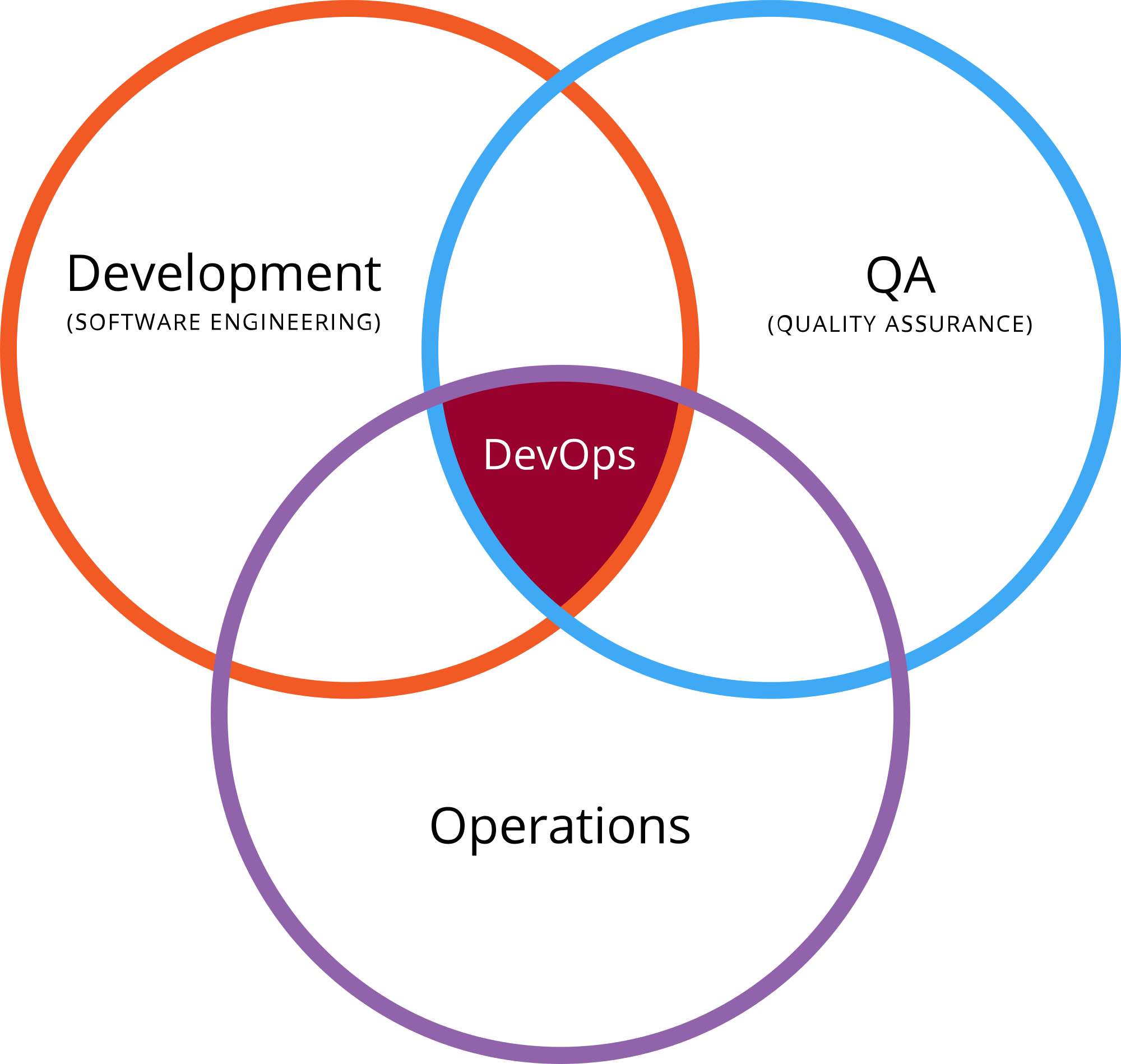
    devops qaOne common argument is that DevOps sits at the center of a Venn diagram of dev, ops, and QA:
    On one side, QA works together with development in trying to push more of their tests into the continuous integration system. Tests must have zero human intervention and generate their own test data.

    On the other side, QA works with operations to collaborate on monitoring tools; perhaps to continuously run smoke tests in production. Chances are that operations is developing scripts for backup and restore of production systems, rollback of deploy, or scripts for disaster recovery.

    Tim Hinds at NeoTYS looks at the issue differently and says that “DevOps QA” is meant to prevent defects rather than find them:

    QA takes a critical role in this organizational structure because they have the visibility and the directive to push code out when it is working, and roll it back when it is not. This is a very different mindset from QA organizations of 10 years ago, whose primary responsibilities involved finding bugs. Today QA groups are charged with preventing defects from reaching the public site.

    With all due respect, both are wrong.

    Why DevOps Does Not Need QA

    DevOps often uses continuous integration (CI) and continuous delivery (CD). In CI, developers use various continuous integration tools to integrate code into a shared repository multiple times each day, and DevOps relies on automation to determine the quality of the version. You cannot have any human interaction if you want to run CD, which ensures that any version of a batch of code in the repository can be released at any given time.

    Essentially, the traditional QA cannot work in a full CI/CD environment. In older structures, the responsibility for software quality was in the hands of QA. Today, it’s part of the DevOps culture and methodology—the developers now own the responsibility rather than a separate entity within the organization.

    Specifically, DevOps entails the use of vendors and tools such as BUGtrack, JIRA and GitHub to aggregate and report software bugs and defects. Test automation tools including Selenium, Cucumber, JUnit, TestNG and JMeter manage, execute and measure functional tests and cycles.

    In the end, if there is a layer of people in the middle between development and operations, then you cannot perform CI and CD seamlessly and, therefore, cannot do DevOps. To run a proper DevOps operation, you cannot have QA at all.

    The Future of QA

    So, what will happen to all of the people who work in QA? One of the happiest jobs in the United States might not be happy for long as more and more organizations move to DevOps and they become more and more redundant.

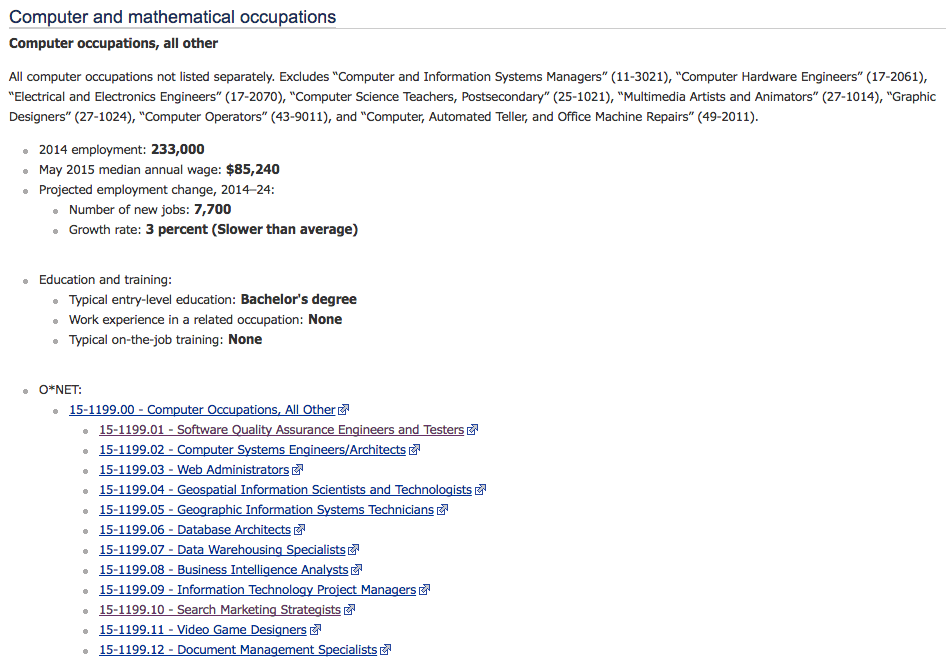
    According to the U.S. Bureau of Labor Statistics (BLS), software quality engineering is one of the high-tech professions whose growth rate is projected to be slower than average:

    qa job outlook

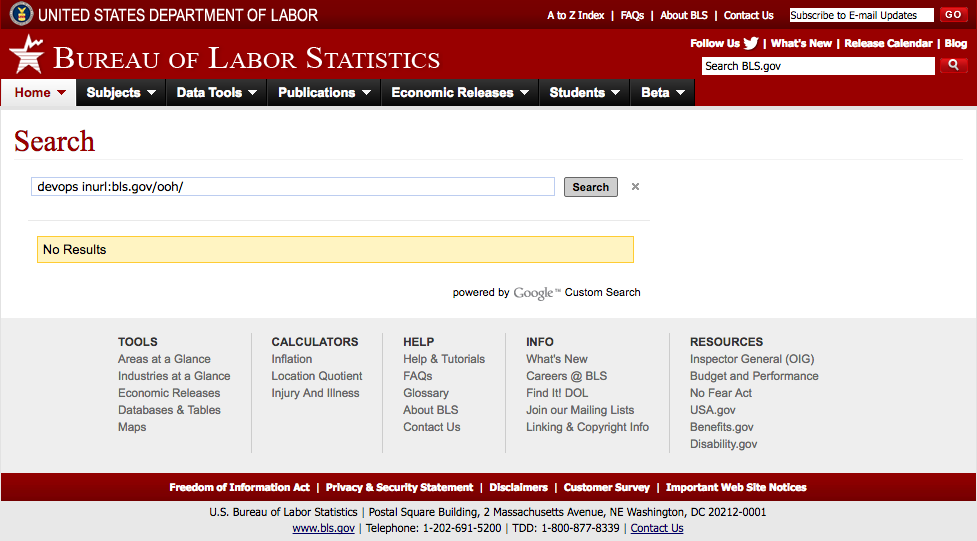
    However, the BLS numbers are likely too generous because the bureau does not yet recognize “DevOps” as a separate profession at all:

    image02

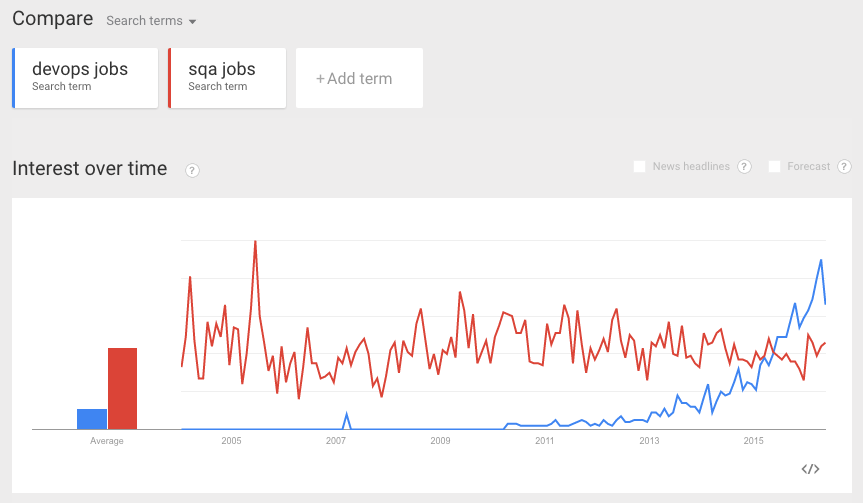
    As evidence, just look at how the relative number of Google searches in Google Trends for “sqa jobs” is slowly declining while the number for “devops jobs” is rapidly increasing:

    qa jobs vs devops jobs

    For QA, the trend definitely does not look good.

  • DevOps: Shift Left to Reduce Failure

    DevOps: Shift Left to Reduce Failure

    DevOps is all about increasing the feedback loop from idea to customer and back again. Tremendous gains have been achieved in automation and tools to drastically reduce the amount of manual labor involved in progressing down the release pipeline. But mission-critical applications in a highly competitive market cannot afford to go down. Complex applications, environments and infrastructure increase risk, which can cause failure.

    The failure rate of production deployments is still too large. Studies show that the average cost of a production outage is roughly $5,000 per minute, while the average cost of a critical application failure per hour is $500,000 to $1 million.

    Why so much failure? All too often we’re still seeing a lack of consistency across the release pipeline. Many times the provisioning and deployment processes are very different at the opposite ends of the pipeline. But by shifting left the operations concerns, you can achieve much more success in production.

    Understanding How to Shift Left

    The term “shift left” refers to a practice in software development in which teams focus on quality, work on problem prevention instead of detection, and begin testing earlier than ever before. The goal is to increase quality, shorten long test cycles and reduce the possibility of unpleasant surprises at the end of the development cycle—or, worse, in production.

    Shifting left requires two key DevOps practices: continuous testing and continuous deployment. Continuous testing involves automating tests and running those tests as early and often as possible, along with service virtualization to mimic unavailable systems. Continuous deployment automates the provisioning and deployment of new builds, enabling continuous testing to happen quickly and efficiently.

    The first and most obvious way to shift left operations is to work side by side with development in creating the deployment and testing processes. Failures observed in production often are not seen earlier in the life cycle. Many times these failures can be attributed directly to differences in deployment procedures. Development may create its own deployment procedures that are very different from those used by operations for production. Sometimes production procedures are much more manual and may even use different tooling. Operations and development need to take ownership in building standard deployment procedures. The deployment process is then practiced potentially hundreds of times in test environments before reaching production. You then have much more confidence that the production deployment will be successful.

    Another way to reduce the failure rate is to make all environments in the pipeline look as much like production as possible. This is almost impossible using traditional provisioning processes. Production environments usually are much heavier and detailed than are needed by development. But by using cloud and pattern capabilities, you can get much closer.

    The ability to use patterns to define consistent environments eliminates the failures that occur simply by configuration inconsistencies. This again requires operations and development to work together in creating the provisioning process so developers create their test environments the same way they are created in production. Using IBM UrbanCode as an example, this can be done by connecting UrbanCode Deploy to an automated self-service provisioning system such as OpenStack HEAT or IBM Cloud Orchestrator connected to OpenStack.

    Picture1

    These standard patterns can be used to create environments for all stages of the pipeline. And by using cloud capabilities you can deprovision these environments as fast as you can create them. This also allows the enterprise to have confidence in their environment patterns. They are tested on a daily basis and, therefore, operations can feel confident that testing is done on production-like environments.

    No one wants to experience production failures—and it is in everyone’s best interest to do all they can to prevent them. At the root of DevOps is the removal of those silos between development and operations. By applying these shift left operations principles you are well on your way to reducing your failure rate.

    The ingredients to make shift left are real and available: automated testing and deployment tools, service virtualization technology, agile practices and cloud environments. The main obstacle that remains is the mindset of delivery organizations. Learn more from the newly updated Application Deployment and Release for Dummies ebook to find out more.

    About the author / Dr. Darrell R. Schrag

    Darrell Schrag

    Dr. Darrell R. Schrag (@devopsdrs) is an experienced software lifecycle consultant specializing in the IBM cloud solution, helping customers establish their cloud strategy across the enterprise. He’s focused on implementing continuous delivery of software applications through the delivery pipeline incorporating cloud and provisioning solutions. He’s experienced in helping clients transition to “born on the cloud” applications utilizing microservices to take advantage of a flexible and nimble cloud platform.

  • ‘DevOps is a Lifestyle, Not a Title’

    ‘DevOps is a Lifestyle, Not a Title’

    “DevOps is a lifestyle, not a title.” This is a quote from Ron Melanson, of Amazon, and I hope he won’t mind me sharing it here. It struck a chord with me, and this blog explains why.

    I have spoken about DevOps on a few occasions. Some audiences are not from a development background, so I explain the “why” of DevOps to them to help set context.

    Chances are you are past the “why” stage and into the “how” stage. Even so, it is always useful to think about the “why” part, or even to revisit it—it is important to make sure you really are getting what you want from the DevOps journey.

    In my DevOps presentations I vary between the transactional aspects of the “why” and the emotive aspects of the “why.” The transactional aspects are what the tooling can help with, and so that matters to a degree. However, since emotions influence us the most, especially from a lifestyle perspective, it is the emotional aspects that I want to focus on here.

    The picture below captures, for me, the essence of why people care about DevOps: they want to be happy at work, and to sleep soundly at night. If you are not where you want to be with respect to those things, then you need to change the way you lead your life.

    The DevOps lifestyle is a virtuous cycle
    The DevOps lifestyle is a virtuous cycle

    I highlight the “change the way you lead your life” aspect to illustrate contrasts among the differing approaches to DevOps that I have witnessed.

    Now that DevOps has grabbed the popular imagination, it is quite common to see job advertisements for people to be part of a DevOps team.

    One ex-colleague of mine, hired to lead a DevOps team, expressed some concern about whether that notion actually made sense. He saw his team off in a corner focused on tooling and processes, i.e. the transactional, while everyone else in the organization seemed to be doing what they always did.

    When his team suggested a change to a process, or tried to explain how a tool could be adopted, they often were at a disadvantage. The people in development and operations, whose working practices would be affected, had not actually bought into the whole idea in practice, and/or simply did not have the bandwidth to think about it.

    Consequently, with little or no time to pay attention to what the DevOps team were doing, there was no engagement from the people for whose supposed benefit the DevOps team was laboring. Thus, there was no driver for changes in behavior. They were all missing the emotive “why” part.

    The challenge my colleague faced is common. Hiring someone to do DevOps does allow you to focus on getting people with the skills and experience for the transactional and technical aspects of DevOps. That is necessary, but it is far from sufficient.

    If the benefits are to accrue to the people working in development and operations—and, indeed, the wider company and business they serve—then it is those people who have to own the idea, top to bottom.

    Owning the idea means rethinking what you are doing, and why—in other words, changing your lifestyle. At least at work, anyway.

  • Booz Allen Helps the GSA Put Your DevOps to Shame

    Booz Allen Helps the GSA Put Your DevOps to Shame

    Production Docker, automated workflows, open source projects and microservices are just some of the ways that Booz Allen is helping the General Services Administration (GSA) modernize its IT operations. And frankly, after talking to Nirmal Mehta, the lead architect on its recent project, I became a little embarrassed for you DevOps-born startups.

    In my circle of friends, the frustration and sarcasm used to describe government processes is a common pastime. And it’s totally fair. Even without being an insider, you can still easily approximate the magnitude of wasted money due to bad business processes and dated IT operations.

    But things are turning around. Beyond the early negative press, the issues with healthcare.gov made very clear that the gap between large enterprise and government IT and the modern development shop is massive. And even more recently, the use of private sector hackers to unlock phones, and the continued efforts to recruit from and partner with Silicon Valley show that the government needs the best and the brightest technical help.

    One government institution, the GSA, took the modernization challenge head-on. It selected Booz Allen Hamilton to lead the charge and build a new development platform—one that will ensure dev projects deliver results faster, at higher quality and are more systematic.

    The GSA is an arm of the government responsible for managing the contracts and processes for vendors that wish to do work with the government. If you have sold to the government in any fashion, you are familiar with it. The administration oversees more than $1 trillion in transactions and more than 300,000 vendors and contractors. To manage the processes across a wide range of categories, it requires many web and mobile applications, with new ones coming on board every year.

    Before working with Booz, GSA’s IT ops were about what you would expect—big, slow and risky. New projects took months to get started, with solutions that could take more than a year to complete, and they were ultimately subject to dreadfully low sub-30 percent success rates. (Watch this video and pay attention from the 8:30 point on).

    The GSA came to a point where it fully recognized the hard cost of this way of operating, and the indirect cost of maintenance, tech support and unhappy customers on both the vendor and government-consumer sides. It knew something had to change.

    Booz’s solution was not 100 percent unique, but its implementation was above and beyond. The firm decided to build a unified platform as a service (PaaS) that served as a portal for all new development projects. In some organizations, this is called “shared services.” But with Booz’s platform, it went beyond just application components.

    The users of the solution would be development teams who were awarded projects. Once awarded, they would access the platform and create a service that consisted of applications and microservices. They would be given immediate access to a private repo via GitHub Enterprise, which would also include Docker Compose files.

    Then, the teams were off and running. As soon as they made their first commit, the system—already wired up and driven by Jenkins—would pull, run tests and deploy containers to dedicated nodes in a continuous integration (CI) environment, run on FedRAMP-compliant AWS regions. Then the instances were automatically given IPs, where the development team could begin testing.

    In addition to a prebaked development and deployment system, the platform provided the development team an entire DevOps stack, giving them “the entire application and lifecycle environment to build their application,” explains Mehta. That included everything from identity management and infrastructure-as-code to business intelligence (BI) and even release automation, so that after the applications were deployed, the teams had what they needed to run updates, measure and learn.

    The idea is that a development team with this platform only needs to think about the logic of the application, not process. And now, at the organizational level, there is oversight, continuity and reliability—something which the GSA had never seen before. After the changes, instead of dealing with long contracts and RFP processes, the CTO could approve bids and get development up and running in days, and create solutions in months, not years.

    Mehta’s team was responsible for architecting the system, putting it all together and vetting the “marketplace” of tools made available to developers. By doing so, people were able to make sure the proper security considerations were—and are—made, and that the tool configurations, Chef scripts and Docker images stay consistent.

    The whole thing was built based on a set of principles. Cloud-first, secure foundation and, to my surprise, open standards and open source. The U.S. government, which fought cloud and open source for so long, is now one of its biggest champions. “I think 2015 was a huge tipping point in gov open source adoption. I think we have hit an inflection point for sure, and I’ve realized that DevOps really implies open source,” Mehta says.

    If this is too hard to believe, just check out Booz Allen’s Jellyfish project (which has become part of the ManageIQ project), and this open source policy document in the GSA’s own public 18F repo, which encourages entities to use open source technologies it has developed.

    This does not mean the GSA won’t spend money—that is not the driver of open source tools. The driver is cross-pollination, giving back and building better code through standards. Where warranted, such as with wanting full Jenkins support via CloudBees, the GSA will invest in technology. Jenkins is the heart of the system, and basically the home of all of the platform’s workflows and automation. Having the backing of CloudBees is important. Plus, CloudBees is a GSA vendor. It also has become one of Docker’s early customers. I can’t imagine the love it gets from those kids.

    Often when I do these case studies, the solutions are too new to validate long-term success. But the platform has been up for six months now, with several development teams and beta applications deployed, which means the system works! The path to prod is still manual and belongs to a separate team, but there are goals to automate that as well.

    A government agency is finally more focused on results than process. (If you have ever been through the RFP process, you know what I mean.) “The government is realizing that it is not sufficient to give the modern user, who expects technology that works [to stay with] legacy applications,” Mehta says. The platform also allows the GSA to have smaller contracts, and in theory, smaller and better development teams who don’t have to worry about development operations overhead.

    When I asked Mehta if his project is the norm or just a fluke, he said “more and more companies are asking us about DevOps, not just cloud migration. We know that if they just do a cloud migration, they are going to create more problems faster.” He believes that even if DevOps is not explicitly stated, federal and local governments do care about modern IT ops—if not because they want to, but because they have to.

    So, can you say you have a fully automated full-stack container-driven platform that spans multiple applications and multiple development teams? Chances are no, but you could, and you should. Mehta and team have proven that even the government can have a Ferrari of a development environment and stay on the cutting edge.

    To learn more about Mehta’s project, watch his session at DockerCon2015 here. And check out this presentation from Navin Vembar.