Is documentation dead in DevOps? Yes and no. It is transformed, it is automatic, and it is actionable.
Category: Doin’ DevOps
-

A Puzzle – Gradle or Maven
Build Tool
Gradle vs Maven (or Both)
The world of build tools evolved from simple compilation (gcc) to make files, then evolution of ant(+ivy) and Maven, now the latest build tool is Gradle.
It’s always a puzzle which build tool to choose – Maven, Gradle or both. Sometime it’s first time project setup or it could be migration from existing tool, but it’s always a debate to choose one or the other.
There have been lot of talks and discussions on Gradle, Maven (and/or Gradle vs maven). There is buzz around that Android/Google adopted Gradle as its standard build tool.
Here, I would like to explore the possibilities of adopting Gradle or Maven (Or both), Intentionally i am keeping ant+ivy out of this talk.
Lets take a look at the details on why Android may have adopted Gradle
Key points for Google to go ahead with Gradle for their android development are:
- Create multiple APKs for your app with different features using the same project.(create several variants of an application)
- Reuse code and resources.
- Customize, configure, and extend the build process.
- Customized integration with their own IDE Android Studio.
- Single build tools to support multiple languages.
They had some special requirements for their diverse eco system, they worked with gradleware development team to include customized feature for the android application. They even have customized IDE for android developers build around Gradle.
What we may be looking from build tools
- How easy is the learning curve?
- How fast are different builds with each tool?
- How complex is it to create and maintain the build script?
- How many plugins exist and how simple is it to customize your own plugins?
- How good is the community and documentation for each tool?
- How well does each tool integrate with developer tools? (IDE, App Server, CI server).
Lets take a look at Maven and Gradle build tools on basis of above points and give them score as per our use case.
Here is the Tabular comparison for each point between Maven and Gradle.
Points Maven Gradle Score How easy is the initial learning curve 1) Maven is XML based tool, XML is very commonly used/known.2) If existing project are using maven then developers are comfortable with the system. 1) Gradle is DSL based system and need to learn explicitly.2) Developers need to learn new system from beginning if they are not familier Maven – 8/10Gradle – 5/10 How fast are different builds with each tool Taken a report from zeroturnaround, they have done detail analysis of the speed of builds with both built tools and found maven and gradle are close enough on build timings. Maven – 8/10Gradle – 9/10 How complex is it to create and maintain the build script? Maven build scripts are xml based, which has predefined structure and only one way to write.So it makes it more standard and less flexible. Gradle has its own DSL which is introduced by Gradleitself and tightly connected to Gradle internals But its flexible and simple and short Maven – 5/10Gradle – 7/10 How many plugins exist and how simple is it to customize your own plugins? Maven is called “plugin execution framework” Hundreds of plugins exist for Maven and you can create your own plugin is simple. Gradle’s architecture is also plugin-based, It’s easy to write plugins But availability of plugin in community may not be ease. Maven – 8/10Gradle – 6/10 How good is the community and documentation for each tool? Maven is in the market for very long time, Documentation is good, Lots of resources and help available in open community and forum. Gradle is very recent. It is open source but still under control of gradleware. They have option for commercial support. Maven – 9/10Gradle – 8/10 How well does each tool integrate with developer tools? (IDE, App Server, CI server). With many years of background Maven has full support to almost each tool and every category (IDE, App Server, CI). Lacking in the App Server and CI ServerCategories, mainly due to newness. Maven – 9/10Gradle – 5/10 (Note – I haven’t given any tool 10/10 because there is always room for improvement).
My scoring is based on following fact.
- One is already using maven for all their projects.
Total Score
Maven – 47/60
Gradle – 40/60
One can decide the score on the basis of their user case and requirement.
Choices
-
Gradle
You may not be using other features which are used by Google for android development as those features may or may not match with your needs, however Gradle is essentially emerging as a popular tool and you may definitely want to have a look at it.
Maven
Maven is widely used and has robust defined workflow around it. Developers are very familiar with the system. However this may not be a viable option as android development needs to use Gradle.
Maven and Gradle (both)
This would be the one option for a company with a wide range of development options. It may give developers flexibility to adopt tools as per their choice with a given workflow.
-

Evolution Not Revolution – DevOps in the Wild
Ever heard these questions:
- What is DevOps?
- How do I hire a DevOps Engineer?
- Should we have a Director of DevOps?
- Am I doing DevOps?
- Why is DevOps failing in my organization?
More and more frequently, I run into engineers, managers and business leaders describing failures in their organization due to “DevOps.”
Oddly, digging a little deeper, I find that most of these cases are simply failure by substitution. The Operations team was failing, so they rebranded it DevOps. Alas, buzzword compliance was unable to change the trajectory of the team and the buzzword was blamed.
DevOps today is–still–an ill-defined set of practices closely associated with automation and operations. If you accept this as fact, then DevOps can neither fail or succeed. If we want to measure the success of the DevOps movement in an organization, then we need a definition that leads to accountability.
A Definition for DevOps
The DevOps movement, unlike Agile, lacks a manifesto. To fill that gap, I assert that DevOps is a philosophy and that its base definition is:
DevOps is the way in which a technology organization embeds itself in a business to the benefit of that business.
The business in question need not be a technology company such at Docker or IBM. Indeed, all companies today are technology companies whether they like it or not. (1)
In this and future articles I will write about philosophy, models and implementation. In short, a philosophy is what I reason from to create models of behavior. Models inform the actions taken in an implementation. Implementation without philosophy leads to failure. Jingoistic adherence to philosophy without accounting for new technology leads to failure. Balance must be acheived.
As an example of this sort of failure, take a lesson from project management. Many shops adopt Jira because it can do anything. Since the tool can do anything, that means their workflow is capable of anything! Problem solved, QED. We all know tools are not process. When we look at our own track records of instituting change. too often the change stemmed from tool choice, not critical thinking about what was to be accomplished.
Tools should reflect the philosophy they are implemented to support. Without that philosophy tools will fail. The more complex the problem or tool, the more spectacular the failure. In this example, Jira did not fail, leadership failed. Specifically the thought leaders entrusted with workflow management.
Are you Doing IT DevOps Style
DevOps is about evolution. If you are doing IT DevOps style, then you are asking questions like:
- What should we change next?
- How do we create a sandbox to measure the impact of the change?
- How do we create demand for the change once vetted?
- Who do we need to be patient zero?
- What cultural paradigms are we shifting and how do we ease this for teams?
While automate-all-the-things is often associated with the term DevOps, automation without cultural shift will result in broader failure, rather than success. Like any technology problem, at its core DevOps models account for their impact on people because businesses are composed primarily of people.
Future Articles
Over the course of the next few months. I will relate my experiences at several companies. Articles will describe:
- What we changed.
- Why we changed what we did.
- What cultural issues we faced.
- What technologies we used and why.
I hope you will join me to learn how the practice of DevOps as a philosophy can lead to millions of dollars on the bottom line, happy bosses, fluffy bunnies and rainbows. If your lucky, you might even become a unicorn, though my own horn has yet to sprout.
The first case study will describe a failing company with three months capital. An amazing team. Some amazing mistakes and, ultimately, some amazing success. Technology decisions driven by the needs of a sales team. Automation driven by a business model. A successful acquisition.
References
(1) The Phoenix Project – Gene Kim, Kevin Behr, George Spafford
(2) Good to Great – Jim CollinsAbout the Author/Boyd E Hemphill
 Boyd E Hemphill is Director of Evangelism at StackEngine (link). , an enterprise grade, Docker operations management software company. DevOps raconteur and organizer of community events in Austin, find him on Twitter or LinkedIn.
-

Metrics for DevOps
Your organization is now committed to DevOps methodology. You’ve integrated development, operations, and QA, and you have moved drastically away from waterfall and into a fire hose of application development. How do you find out how well it works? How do you know if it’s working at all? Many net new DevOps organizations are surprised to find that it was easier to start then they thought, but hard to keep alive. This can be because of menacing habits, or just because the team is too far into the weeds. In a word, you need metrics
-

There is No ‘I’ in Team: Transitioning Engineering Teams into a DevOps Model
As the pace of development and business continues to scale, teams need an agile and collaborative work environment to succeed. Moving to a DevOps model is a critical part of setting your engineering teams up to succeed, but making the transition can be challenging for many companies.
What’s the deal? – Why you need a DevOps model
DevOps is a movement in the software world that focuses on collaboration between developers and operations, customer empathy and infrastructure automation. In traditional models, developers write code and then hand it to operations teams to deploy and and run in a production environment. This often leads to a lack of ownership between the two teams (“It worked on my local box!”) as well as a slower pace of development. In a DevOps model, by contrast, the two teams work closely with each other, and toward common, customer-facing goals – developers take ownership of their code even while it’s in production, and operations teams build tooling and processes that help developers write, test and ship code faster and more easily.
By breaking through traditional developer-operations walls, development happens faster and with more customer empathy, ultimately resulting in a better customer experience and a happier team. Rather than seeing the other team as a gate or obstacle, if done right, developers and operations see each other as teammates working to deliver value to the customer and business.
Unfortunately, introducing DevOps culture and practices to your company isn’t easy. Big changes to long-entrenched silos can generate resistance, and business leaders are often scared of the costs that come with change. To combat these concerns and hesitations, we’ve highlighted a few tips for transitioning to a DevOps model.
Start with Collaboration – what’s working and what’s not?
At the heart of DevOps is improved collaboration between your Operations and Development teams. You’re probably not starting from a vacuum, though – look at and talk about the best examples of how your operations and software development teams are collaborating today. Are there particular dev/ops groups that are already working tightly together, championing great communication or doing joint planning? Focusing on what is already working and how to make it work better, rather than what’s broken, keeps things positive and more likely to succeed.
You could set up a group brainstorming session to discuss, or have one-on-one conversations with individual team members, depending on the format that you think will help people open up more easily. This article highlights opportunities for collaboration across the application delivery lifecycle, and could provide a useful framework for asking questions and identifying opportunities.
In addition to the state of collaboration, you’ll also want to look for process successes and breakdowns in how you deploy and maintain applications, services and infrastructure. Identify the biggest opportunities for improvement – do your builds and test take hours? Are your 20 development teams all competing for the same three staging environments? Being able to quantify the impact of these pain points can help defend the transition to business stakeholders who may not have as much on-the-ground context about your teams’ pain points.
It’s also important to build an understanding of the different perspectives operations and development teams may have. If your organization has traditionally been very siloed, thinking about other teams’ goals when planning and prioritizing may be a new mindset. Sharing each team’s objectives and what success looks like for them can help build this understanding and empathy. Focus on transparency (a framework like OKRs can help) to avoid conflict from mismatched assumptions about priorities.
Create a plan
Once you’ve identified opportunities to improve the collaboration and workflow between developers and operations, it’s time to create a specific plan. Pick key opportunities and identify the first few steps to make a difference. Courtney Nash recommends starting with a group of people who are receptive to the vision and picking a small product or service as a test-bed. When implementing big changes, it helps to start small and scale from there after proving success.
Engineers are not always known for their people skills, but transitioning to DevOps is as much about people as it is about process and tools. Throughout this whole process, you’ll want to be investing key stakeholders in your team and company in the transition. Change management sounds awfully corporate, but at it’s heart, it’s about making sure you build support for your projects and goals by collecting input from key stakeholders: gathering their feedback and goals, sharing and re-shaping your plan based on their input, and communicating your progress with them. It’s always easier to work in silos with people that already agree with you, but for lasting change, you’ll need to invest in building support across teams and throughout your organization.
Finally, pick realistic timelines and objectives. It’s important to note that some effects of the change may take longer to realize as people ramp up on new tools and ways of working. Don’t discount or neglect the amount of time required for training, and try not to be fazed if the first project you pick doesn’t turn out to be a good one. As Courtney Nash mentions, Nordstrom.com realized their first project was not ultimately the right one to start with. Importantly, they didn’t give up, instead choosing a different, better-suited application.
Measure and reflect
While it’s rare for timelines in complex systems to happen exactly as planned, it’s important to timebox your work so that you can measure and reflect on how it went.
After the specific milestone you’ve chosen, bring stakeholders together and run a retrospective. There are a lot of great resources out there to help with good retrospectives, but regardless of approach, make sure you make an intentional space to look critically at your results, celebrate success, and think about how you’d like to change or iterate the process for the future.
When reflecting on progress, it’s important to be candid and honest while assuming the best intentions of your teammates. You are guaranteed to make mistakes – that’s inevitable with any new process – but remember (and help others remember) that you’re all working toward the same purpose and share a common set of values and goals.
Don’t give up
Adopting DevOps is a big change for an organization, and there will be bumps along the road. At the end of the day, though, the rewards of tighter collaboration among teams and a more empathy-driven engineering culture can be really powerful, and will show in product quality, velocity and team morale.
-

15 must have Jenkins plugins to increase productivity
Jenkins is a vastly used continuous integration tool for the IT industry which is built and used around plugins. It’s core is the Jenkins tool and there are 100’s of plugins available to enhance its power and usability.
Let’s take a look at a few of the best plugins to increase the productivity.
- Global Build Stats Plugin–It’s essential to know your current capacity, usage and capability to prepare for capacity planning or system requirements, because the very first question is “what is your current capacity?”

You need to know how many builds are happening on a daily and weekly basis. How much time is taken by various builds, what is the waiting period. This plugin give you enough data to answer the question. This plugin can provide you data as graph which can be further consumed.
- Job GeneratorPlugin–In big or growing organizations, its a bit difficult to maintain the jobs for a project when developers are working on various branches and releases. You want to give access to developers to create their own job and at the same time you don’t want developers to create arbitrary jobs which may not fall under company standards. This plugin gives you flexibility to define templates and developers can create new jobs with the help of job generator template. Configuration access can be disabled via roll-based authorization plugin.
- Disable-failed-job –In rapid development environments failing jobs due to various unnecessary reasons are a pain, It’s difficult to keep track of such jobs and disable/delete them. This plugin can solve the problem by defining the upper number of consecutive failed builds and then disable automatically.
- Embeddable-build-status –This plugin can give you a link which can be pasted anywhere (example github project) to expose the status of the build and users can get the current state of the job while looking at project.
- Exclusion –This plugin enables you to handle conflicts between jobs. You can assign a resource (or lock) in multiple jobs, when build is executed, it will acquire the lock and other builds (if fired) will wait until lock is released.
- GitHub/GitLab Pull Request Builder-This is one of the best plugins I found to provide support to automate code review up to a certain extent in github/gitlab. This plugin does amazing job once defined for the project. For any new pull request this plugin does fox merge and runs the build on the code as well as gathers the necessary static analysis (if configured) or build results and comment back the status to pull request. This helps reviewers get an idea of the health of the code which is going to be merged. You can even define automatic merge if build passes.
- Hudson Extended Read Permission Plugin- During initial days of Jenkins setting configuration access was not available to any developer to make sure they do not change anything but developers used to ask to view configurations to know how job has been setup, they may want to see the build steps. Extended read plugin can provide option to developer to view the configuration without giving them write access.
- Post+build+task –There may be a need for performing some actions on the basis of the results of a build, for example if build passed you may want to upload artifact(ex debian) to some repo (apt) or perform some packaging part or similar. In case of failure you may want to roll back something (like release) . This plugin helps you to define the pass/fail criteria and let’s you decide what to do after that.
- JDK Parameter Plugin–This plugin is useful for an organization where many projects are using different versions of java. This plugin let’s you choose the java version during run time of the build.
- Job Configuration History Plugin-Ah! This is one of my favorite plugins. This plugin lets you keep track of config changes in each build including who did it. You can easily revert back to any previous config if you want.
- Multiple SCMs plugin–Default SCM section provides only one source control tool/URL option, what if you want to check out from more than 2 repos from multiple source control tools (like svn and git). This plugin will come in handy in such scenarios. This plugin will facilitate users to add any number of SCM URLs to checkout the code.
- Parameterized Trigger plugin– Another one of my favorite plugins. This plugin allows you to have user input as a variable and use on run time. This is the most used plugin in dynamic environments where you have lots of options and user-defined values to be used in the build which may keep changing.
- Pre SCM BuildStep Plugin- Just like post build task plugin, you may have requirements to perform some action even before checkout happens for the job, for example you may want to perform merging of the branch before the build and then checkout. This plugin can come in handy in various conditions and gives you flexibility when running the job.
- SCM Sync Configuration Plugin-backup, this is the most important task of any administrator. Without regular backup, the whole system cannot be reliable; this plugin provides you features to backup live Jenkins configs to any source control tool. It will keep committing the config files (including Jenkins and jobs) to SCM repository as soon as there is any change.
- Configuration Slicing Plugin – This plugin comes in very handy when you want to make bulk changes in multiple jobs. This plugins allows you to change values of various fields like email, timer, shell script, configurations etc at one go.
These are my favorites, but like I wrote, there are 100’s of plugins for Jenkins available. What are some of your favorites?
- Global Build Stats Plugin–It’s essential to know your current capacity, usage and capability to prepare for capacity planning or system requirements, because the very first question is “what is your current capacity?”
-

10 Top Tips for DevOps Cultural Change
DevOps is commonly recognised to be primarily about creating a culture of effective and seamless collaboration but this is often the hardest piece to enact when it involves changing an existing culture (as opposed to creating a culture from scratch in a startup type environment and having the luxury of hiring individuals with certain mindsets and defining working practices from day one). So how can you change culture? Here are our top ten tips:
1. Learn to Trust
It sounds a little cheesy I know, but at the core of what DevOps is trying to fix is the conflict that has come about from years, decades even, of development and operations teams being segregated from one another and not being enabled to communicate, let alone collaborate, effectively. This situation has been exarcebated by the pressures to innovate and push rapid change battling with the need to stabilise fragile systems – and created what James Turnbull described as a ‘toxic’ working environment.
So the very first thing that needs to happen is a unified agreement and understanding that we are all on the same team.
DevOpstastic Tip ~=>
Take some time to review your individual and team goals and ensure none are in conflict. Then create a single goal that brings everyone together. Get everyone to agree it. Fire anyone that can’t. Kind of joking – but kind of not.A change in culture will demand changes in the way that you do your daily work – habits will need to be broken.
DevOpstastic Tip ~=>
Shift left – arrange your teams around projects not linear tasks and involve operations staff who will be responsible for your application in production much earlier in the process. Being involved sooner will help them plan for when the code is ready and feel they also have some skin in the game.2. Understand Motivations
Conflict often occurs when people don’t understand each other – I’m sure we’ve heard the phrase: “They have a personality clash” countless times over the years. Humans and our brains, personalities, backgrounds and characters come in a whole heap of flavours and this is a good thing since, as my mother always says: “It would be boring if we were all the same.” However, sometimes at work, under pressure, it’s difficult to take the time to understand why someone is reacting or thinking differently to you and the immediate response is to fight or denounce it; not just unpleasant but downright unhealthy.
So if we accept we are all on the same team, how can we all get to know each other better and grease the wheels of collaboration? I know I’ve been subjected to countless team-bonding exercises that I’ve found quite excruciating over the years so I am applauding the new wave of neuroscience that allows us to be a little more exact about what’s going on in our heads than just try and decide whether I am a green or red personality type.
Our particular favourite at the moment is SCARF from The Brain at Work – the premise is that the same reward circuit in our brains that we use for survival and defence is also used for our motivations at work. So if I am motivated by Autonomy (the ‘A’ in SCARF) and someone at work attacks my sense of autonomy in the workplace (by, for example, micro-managing me) I will have the same neuro-response as if they made a direct attack on my life – including the release of the related neurochemicals, in this case, cortisol, the stress hormone. Similarly, if something happens to reinforce my sense of autonomy (for instance, an event I created has an excellent turn out and feedback) I feel great and get a nice rush of dopamine.
DevOpstastic Tip ~=>
Have a SCARF workshop with your team(s) and ask everyone to complete this self-assessment first, share the results and discuss. We don’t always agree with the results of this assessment tool but finds that only adds fuel to the fire of debate.My key takeaway here is that we should try to understand ourselves first, and then those around us (a bit more ‘fluffy’, but this is about mindfulness). Having this level of insight into ourselves and our colleagues means that when conflict occurs we have a better chance of taking a breath and understanding what’s really going on, remembering we share that common goal and working closer together, collaborating to reach it.
We’ve more recently also starting working with unconscious bias – we’d love to hear from you if you have any experiences in this area.
DevOpstastic Tip ~=>
If you want to know if you have unconscious bias you can test yourself using Harvard’s online Project Implicit testing tool.
3. Eliminate Blame
Let’s start by watching one of my favourite DevOps videos – here you are:
[youtube http://www.youtube.com/watch?v=2PjVuTzA2lk?wmode=transparent]
If we’ve taken on board tips one and two and are now in a ‘circle of trust’ we should be able to avoid this kind of finger-pointing blame game. There is no place for blame in a DevOps culture – it is a pointless waste of emotion. We need to understand what went wrong in a retrospective but the most important thing is how to make sure it doesn’t happen again.
DevOpstastic Tip ~=>
Try running a blame free post mortem/retrospective next time you have an outage. Here are some retrospective plans you might want to road-test.4. Embrace Smart Failure
In order for businesses to thrive, survive, even, in today’s uber-competitive markets, innovating at speed is an imperative. When we are assessing organisations’ DevOps cultural maturity, one of the features we measure is the organisations’ capability to ‘dance around the edge of failure’. Innovating at hitherto unseen velocity introduces a whole host of risk that must be mitigated. Systems need to be created that can warn and pre-empt failure and capabilities need to be implemented to do things like instantly redeploy a last known good state or working version of an application in the event of a failure. In no way are we suggesting that failure should be celebrated.
In addition to creating an safe environment, where failures are quickly and easily fixed, you can also prepare for failure by spending some time prioritising features and architecting applications in a composable manner – for example, your business transactions are probably more important than your social feeds. At a recent workshop we were told a story of how the French railways online ticketing application was down for three days due to a problem with its analytics – if the components weren’t so tightly coupled, the users wouldn’t have suffered as the reservations system could have been operating standalone.
DevOpstastic Tip ~=>
Study Netflix’s Chaos Monkey approach and identify a way to test failures safely in your infrastructure.5. Focus on Bottlenecks and Flow
If you’ve read The Phoenix Project you’ll know all about The Theory of Constraints – our favourite summary of the concept is that “Any improvement not made at the constraint is an illusion”. Work hard as a team to identify the real constraints – and watch out for that common pitfall as described via the Brent character in the book that those people who often look like heroes are, in fact, your bottleneck. Try to understand the real value to your business of each improvement and prioritise them accordingly.
DevOpstastic Tip ~=>
Try playing ‘Featureban’ – exercise #7 in our DevOps LiftOff Workshop
Don’t be afraid to rethink your process or find a new pair of eyes to see the things you can’t because you are too close. Check out this video to see the improvements motor racing have made to their process over the last fifty odd years – check out the resource utilization, perfect process and automation in 2013:[youtube http://www.youtube.com/watch?v=RRy_73ivcms?wmode=transparent]
6. Eliminate Unplanned Work
Another major topic from The Phoenix Project and a universal complaint we hear from organisations when we start working with them: “How do I find the time to save time?”. People know their processes can be improved and there’s a good chance automation could exploit advantages even further but if the culture is to keep doing things that are breaking and broken it’s tough to put aside the hours outside of the firefighting to make DevOps happen.
It’s nigh on impossible to tell a business they can have innovation or support but not both but it’s sensible to get a handle on the projects running and the resources available and the volume of unplanned work coming through the pipe. Some lower priority projects may need to go on hold while the DevOps project has higher priority – this will probably need to be mandated from management and have a solid case behind it that all subsequent projects will be accelerated as a result once the foundation has been laid.
DevOpstastic Tip ~=>
Read The Phoenix Project – what on earth are you waiting for?!
7. Be Continuous
There a lot of these out there – we’ve seen continuously:
- integrate code
- test
- integrate
- deploy
- deliver
- fund
The idea is to always have software in a shippable state and have a DevOps toolchain capable of deploying on demand – have your software development lifecycle like a manufacturing pipeline.
Our favourite here though is ‘continuously fund’ – as Forrester say:
“Organizations that deliver at rapid release cycles create a stable basis for funding a continuous stream of innovation. They use customer feedback and business priorities to continuously prioritize the capabilities that will result in the greatest business value.”
DevOpstastic Tip ~=>
Try setting a pre-approved innovation budget and short, iterative approval cycles rather than annual, large project driven budgets.
8. Form Dedicated, Cross-Functional Teams
Lots of people ask us about creating DevOps teams, something we think it mostly counterproductive as it has a tendency to create another silo. However, there are challenges here as it’s impossible to make everyone a master of everything, particularly in the case of more complex technologies. Simpler technologies can have the advantage of bringing people closer to business.
We recently held a workshop with Jonny Wooldridge, the CTO at The Cambridge Satchel Company where we discussed the DevOps team he built and managed during his time at Marks and Spencer. Jonny’s team acted more like a ‘tiger’ team, where key resources could be drafted into project teams as needed to evangelise the DevOps way and help cross-skill through the project lifecycle.
DevOpstastic Tip ~=>
When you are considering bringing on a new technology, consider the time to mastery – the shorter this is, the better chance your team has for cross skilling for it.The key is to get everyone thinking in a DevOps manner and cross-skilling and obtaining mastery as time and resources allow – but arrange your resources around projects, rather than their core skillset.
9. Love Transparency
The adage says that knowledge is power – but this isn’t always the case. Sometimes you are better off sharing your knowledge – not only may you gain respect and credibility, you may find that the team around you are able to then work faster to achieve your shared goal – and encourage others to share their knowledge with you too. We can’t possibly all know everything but if we keep things to ourselves, we are often stymying the performance of our team and therefore ultimately ourselves.
DevOpstastic Tip ~=>
Write a blog post about an area of your work you are passionate and enthusiastic about. Share it with your team. Share it with the world. Repeat.Knowledge hoggers can often be bottlenecks – for instance, we often see cases where an individual has had responsibility for a deployment process, become bored of repeating it manually and written scripts to speed it up – and more scripts and more until they have a ‘script-monster’. Now they are the only person that can possibly understand this part of the process and when anything goes wrong they’re the only one that can fix it – what a hero! If a person is motivated by Certainty (back to SCARF) they’ll certainly enjoy the sense of security and indispensability it will give them – but it’s not so helpful for the rest of the organisation as now they are a serious bottleneck.
Transparency and visibility are features of DevOps cultures and, going back to tip 2, Understanding Motivations, those of us motivated by fairness will feel happier in a culture of openess and equality. Secrets can be very counterproductive and alienating.
10. Build Autonomy, Mastery and Purpose
Changing your culture will probably mean you need to revisit the way you target and reward the people in your business and review the goals you have set, ensuring they are not in conflict and there is a clear, single goal everyone can focus on. The psychology of rewards may surprise you – have a look at this Ted Talk from Dan Pink.
You need to be able to create a working environment where people feel they have autonomy, mastery and purpose – these are the ultimate rewards. Take a look at this blog for an exploration of DevOps goal setting and rewards in more detail.
DevOpstastic Tip ~=>Have you heard of The Illusion of Control? If not, spend a little time researching it and imagining how it could affect your outputs at work.
What’s your top tip for making DevOps cultural change happen?
-

AWS Best Practices – Enterprise Perspective
Amazon AWS has changed the IaaS game for startups and growth companies. There are several practices we must acknowledge the importance of during the adoption and implementation of AWS services. Readers are more than welcome to comment, suggest modifications and even add their own little practices they follow during roll outs and implementations. As clients start piloting cloud initiatives it is best to avoid common pitfalls. The below best practices are a good first step in that effort. Below we have compiled a top ten list to be expanded in the future of best practices we have learned during our aws deployments. We look forward to expanding this list in the future.
1. Choose your VPC infrastructure carefully
a. As you move into the AWS environment often the first thing firms want to do is create a VPC, the question is what type of architecture is appropriate for you? The answer to this question is driven by the intended use case. Often internet based organizations will opt to go with a VPC containing Public and Private Subnets. Opting for this type of VPC ensures the services that don’t require direct access to the internet are in a segregated subnet while locating public services access to the public subnet.
b. Existing enterprise firms intending to burst into the cloud often don’t intend to utilize public facing services and may opt instead for private only subnet and create a secure tunnel between their enterprise and the public cloud.
c. The architecture with the greatest flexibility tends to be a public/private subnet ensuring the public subnet is available if necessary and can remain unpopulated if not needed.
2. CIDR Block Selection is driven by two realities: VPC address space is fixed and can’t be changed after it is created.
a.Ensure your VPC address space doesn’t overlap with your corporate space, for internet based firms this is less of an issue, however for enterprise firms this can prevent the need to rebuild the environment after a significant investment in time and resources
b. While AWS allows CIDR blocks to be as large as /16 don’t waste space, having several very large subnets reduces one flexibility as needs arise to support multi-AZ services, or other eventual requirements. On the other hand don’t overly constrain your environment.
3. Environment Isolation is an important consideration, the same isolation that’s present in the physical environment should be present in the cloud environment. The cloud give firms more flexibility in implementation of this isolation, in an effort to control cost, development, integration/test and production environments can be registered under separate accounts ensuring accurate billing and cost controls.
4. Security: Use security groups to isolate services and management rules
a. Separate public traffic from private using subnets
b. Create a SSH gateway as an entry point for SSH communication
c. Create a VPN tunnel for management access
5. VPC/Enterprise Integration
When integrating AWS into an existing enterprise environment planning will ensure minimal rework. Often the key consideration is assigning IP ranges to AWS that do not overlap with the corporate space. In this way routing between the corporate LAN and AWS will be seamless.
6. IAM: The primary AWS account should be treated like the traditional root user in Linux systems.
a. Create a separate account specifically for administration, with the minimum permissions necessary to perform the task at hand.
b. Create separate accounts for each user, or service to ensure audit traceablity
c. Permissions should be assigned to groups and users to the group, this will minimize duplication of effort
d. All users should utilize strong passwords, in this case refer to your corporate password policy. Cloud passwords should be as secure as the corporate infrastructure.
e. Don’t share credentials this will wreck audit traceability, and corporate policy, use roles to assign permissions.
f. Rotate credentials on a regular basis, the same way corporate credentials are rotated.
7. Disaster Recovery :Remember Disaster Recovery is designed to get backup after a failure. Traditional enterprise environments are often limited by the question do we need to building a duplicate system for recovery or can we through vendor SLAs perform a data recovery. In terms of the cloud enterprise customers are able to (at a lower cost) duplicate their environments across availability zones, regions and vendors to create an exceptionally resilient service offering.
a. Do create multiple availability zones.
b. Do use an automated CM tool to maintain your configurations
c. Do create snapshot of your volumes.
d. Do run drills to ensure everything operates as it was architected.
e. Do run drill more than once.
f. Do ensure everyone relevant is aware of the procedure
g. Do architect you environment with sufficient redundancy, to minimize the need recovery efforts.
8. Security Groups: Security Groups like traditional firewalls should be set with the least permission necessary to accomplish the mission.
a. Decide on a security group methodology; by creating groups to manage access to services ie allow access to ports 80 and 443 for nodes that will be a web server.
b. Create a ssh gateway/ Bastion node and group:
i. Only allow external SSH access to the SSH Gateway
ii.Only allow local SSH access from within a security group, or from the gateway node, this minimized an attackers ability to traverse the networks between zones.
c. Define an enterprise naming convention and stick to it.
d.Utilize the ability to assign multiple security groups to a single asset (up to 5 groups per asset).
9. Naming Conventions: AWS assets should be named in such a way they can be readily identified, a suggested standardization around the purpose of the Instance, its environment, its region, and its sequence number. An example of this might be haddop_dn_prod_usw1_001, this represents a production Hadoop data node, in the US-West 1 region.
a. When naming an AMI its a good practice to include the creation date as part of its name, and a complete description. This will minimize confusion when selecting ami for new instances.
b. When naming security groups and key pairs, continue to use the convention purpose, environment, region, function. For example db_prod_usw1_key or ws_prod_usw1_sg
10. Elastic Load Balancing: Use multiple availability zones to balance traffic in the event of an environment failure (this can still happen within the cloud)
a. Use Route53 to balance traffic between regions, this is not supported by ELB
b. Use ELBs for more than just web traffic, most any protocol can be supported by the ELB, ensure your service can support it
c. ELB timeout after 40 seconds, ensure your application touches the socket before then to prevent the session from timing out.
These are my top 10. Let me know what you think I missed.
-

Waterfall to Agile to DevOps: The State of Stagnant Evolution
DevOps is all the rage. The hot IT buzzword intended to heal the expanding divide between development and IT operations is being used to sell a range of services and solutions to struggling development shops and enterprises, even though DevOps can’t be sold – it’s a cultural shift that nurtures under a strong leadership.
Prior to DevOps, Agile methodology generated a similar hype that forced businesses to spend millions of dollars in revamping organizational hierarchy, deploying new solutions and hiring self-proclaimed expert consultants. The original values and principles of Agile development to deliver working solutions in small and iterative chunks were quickly forgotten. The methodology was only implemented during development phase and created backlogs for operation teams that failed to push product releases fast enough.
-

The DevOps Scorecard
Mid-last year our team switched from doing Agile to doing DevOps. As we forayed into the journey trying to learn about DevOps and practice it at the same time, a lot of questions arose in the team. How was this different from agile and most importantly How were we going to be successful?
That’s when we wrote down what would be the success criteria for our team: “Ship code frequently without causing a customer outage“.
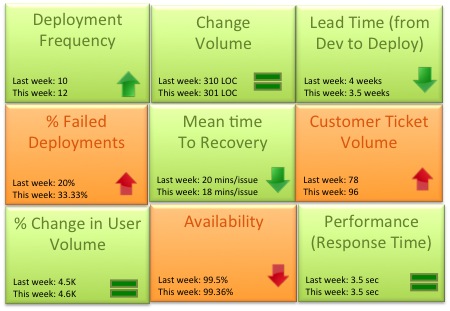
As the team matured we started evaluating a more granular way to track success. Could the team mantra be broken down into quantifiable success metrics that could be represented in a scorecard? Based on our experience the DevOps scorecard should contain these 9 metrics to track DevOps team success:

- Deployment frequency: How often were we deploying code and getting new code in the hands of our customers? This metric should trend up or remain stable from week to week. Example: Twice a week, 50 times a day
- Change volume: For each deployment how many user stories and new lines of code were we shipping? Example: 3 new features per day, Average 500 lines of new code per week. Another parameter to consider in addition to volume is complexity of change.
- Lead Time (from Dev to Deploy): How long does it take on an average to get the code from development complete through a cycle of A/B testing to 100% deploy and upgrade on production? Lead time should reduce as the team gets a better hold of the lifecycle.
- Percentage of failed deployments: What percentage of deployments failed causing an outage or a negative user reaction? This metric should decrease over time. Example: 9% deployments failed this month as opposed to 15% last month. This metric should be reviewed in combination with the change volume. If the change volume is low or remained the same but the percent of failed deployments increased, then there maybe a disfunction somewhere.
- Mean time to recovery: When we did fail, how long did it take us to recover? This is a true indicator of how good we are getting with handling change and this should ideally reduce over time. You can expect some spikes in this number due to complex issues not encountered before. Example: On an average it took the team 15 minutes to resolve each last week, 14 minutes this week.
- Customer Ticket Volume: Number of alerts generated by customers to indicate issues in the service. This is a basic indicator of customer satisfaction. Example: 54 tickets were generated this week as opposed to 38 while the user volume remained steady is not a good thing
- % Change in User Volume: Number of new users signing up, interacting with my service and generating traffic. As new users sign up is my infrastructure able to handle the demand? Example: This week the number of customers spiked by 30% due to an external event causing volume of requests to go up
- Availability: What is the overall uptime for my service and did I violate any SLAs? Example: 99.9% uptime consistently for the last 3 months even with change in user volume
- Performance (Response Time): Is my service performing within my predetermined thresholds? This metric should remain stable irrespective of % change in user volume or any new deployment. Example: Sub 5 second response time from all geographies and devices
Would love to hear thoughts on what other critical metrics DevOps teams are using