Category: DevOps Toolbox

  • The Future of Jenkins in 2024

    The Future of Jenkins in 2024

    As software development practices evolve, the tools that support them must also adapt to stay relevant. Jenkins, the venerable automation server used by many DevOps teams, is at such a crossroads as it faces the changing landscape of cloud-native applications and Kubernetes adoption. 

    This article examines Jenkins’ current utility, particularly its features that have made it a staple in CI/CD practices, and addresses the question of whether it will maintain its relevance in 2024 and beyond.

    How Jenkins is Used by DevOps Teams

    CI and CD

    Jenkins has become an integral part of many DevOps teams due to its CI/CD capabilities. Continuous integration (CI) is a software development practice where developers regularly merge their code changes into a central repository. Continuous delivery (CD) is the practice of delivering the software in short cycles to ensure that it can be reliably released at any time.

    Jenkins supports the CI/CD approach in a number of ways. First, it allows developers to automate code integration. This means that whenever code changes are pushed to the repository, Jenkins can automatically build and test the project. Second, Jenkins allows for the continuous delivery of software by automating simple deployment processes (although it lacks full deployment orchestration capabilities).

    Build Pipeline Visualization

    Another key feature of Jenkins is its build pipeline visualization. This feature allows DevOps teams to visually represent the process of software delivery from code integration to deployment. The pipeline visualization provides a clear and intuitive representation of the software delivery process, making it easier for teams to understand and manage the process.

    Build pipeline visualization in Jenkins is customizable, allowing teams to tailor it to their specific needs. For example, it can be customized to show the status of each stage of the delivery process, from code integration to testing to deployment. This allows teams to quickly identify any issues or bottlenecks in the process and address them.

    Automated Testing

    Automated testing is another area where Jenkins shines. With Jenkins, DevOps teams can automate the process of testing their code by running scripts and integrating with automated testing tools as part of the build process.

    Jenkins supports a wide range of testing frameworks and tools, allowing teams to choose the ones that best fit their needs. Moreover, Jenkins can be configured to automatically run tests whenever changes are made to the code. This ensures that any issues or defects in the code are detected early and can be addressed promptly.

    Workflow Scripting

    Workflow scripting is another key feature of Jenkins in DevOps teams. With Jenkins, teams can script their workflows, automating the process of software delivery. This allows teams to standardize their workflows, ensuring that each delivery process is consistent and predictable.

    Jenkins supports the Groovy scripting language for workflow scripting. This means that teams can use the power and flexibility of Groovy to script their workflows. Moreover, Jenkins provides a user-friendly interface for scripting workflows, making the process easy even for those who are not familiar with Groovy.

    Current Usage and Adoption Statistics

    As of 2023, Jenkins remains a leader in the CI/CD space. With its extensive plugin architecture and large user base, it is used by thousands of organizations worldwide. According to the 2022 DevOps Survey by the Cloud Native Computing Foundation (CNCF), Jenkins was used by over 50% of respondents for automation and CI/CD, maintaining a significant presence in the market.

    According to the Jenkins website, there are over 1 million active Jenkins users and more than 200,000 active installations worldwide, with the platform handling 1 million+ jobs per day. It had about 44% of the global market share for CI/CD in 2023.

    The growth trajectory of Jenkins, however, has shown signs of plateauing when compared to newer, more cloud-native-focused CI/CD tools. This observation is backed by Google Trends data, reflecting a steady but not sharply increasing interest in Jenkins over recent years.

    Despite facing competition from emerging tools designed for cloud-native development, such as GitHub Actions, GitLab CI and CircleCI, Jenkins has responded by evolving its ecosystem. The creation of Jenkins X is a strategic move to cater to Kubernetes users and address some of the criticisms related to cloud-native development. However, as we’ll discuss, Jenkins X has not been readily adopted by the industry as of yet.

    Limitations of Jenkins in Cloud-Native Environments

    While Jenkins is a powerful tool for DevOps teams, it has serious limitations in cloud-native environments. These limitations stem from the fact that Jenkins was originally designed for traditional, monolithic applications, not for the dynamic and distributed nature of cloud-native applications.

    Statefulness

    One of the critical limitations of Jenkins in cloud-native environments is its inherent statefulness. Cloud-native architectures typically favor stateless applications, which are easier to scale and manage in dynamic environments like Kubernetes. 

    Jenkins, however, relies on maintaining state—it stores configuration, build history and user data, making it challenging to scale and manage efficiently in a cloud-native setup. This statefulness requires persistent storage, which complicates deployments in distributed systems where resiliency and horizontal scaling are key. Moreover, the risk of data loss or inconsistency increases in cloud-native environments, particularly during scaling operations or when recovering from failures.

    Configuration Complexity

    Jenkins is often criticized for its complex configuration requirements. Setting up Jenkins in a cloud environment involves intricate configurations that are not only time-consuming but also prone to errors. This complexity is exacerbated when integrating with modern cloud-native tools and services, requiring extensive customization and maintenance of plugins. 

    In addition, Jenkins’ traditional master-slave architecture was not designed for dynamic cloud environments, where resources need to be provisioned and deprovisioned rapidly. This leads to a significant operational overhead for DevOps teams.

    Immutable Infrastructure

    Adopting an immutable infrastructure approach is a cornerstone of cloud-native environments, promoting the idea of replacing or rebuilding servers rather than modifying them. 

    However, Jenkins’ traditional model does not align well with this principle. It typically requires modifications to its runtime environment for updates or changes, contrasting with the cloud-native approach of immutable deployments. This can make it challenging to maintain consistency and reliability in cloud-native systems where automation and minimal manual intervention are paramount.

    Microservices Limitations

    Jenkins was originally designed for monolithic architectures and doesn’t naturally fit into microservice-based applications, which are prevalent in cloud-native environments. In microservices architectures, applications are broken down into smaller, independently deployable services. 

    Jenkins, however, tends to treat applications as monolithic units, making it less efficient for handling multiple, independent microservices. This limitation affects its ability to provide fine-grained control over individual services’ build, test and deployment processes. Consequently, Jenkins may struggle with the high degree of automation, flexibility and scalability required in microservices environments.

    What is Jenkins X?

    Jenkins X is an open source project that provides pipeline automation, built-in GitOps, and preview environments to help teams collaborate and accelerate their software delivery at any scale. It is an improved version of the original project, designed specifically for Kubernetes, a popular container orchestration platform.

    Jenkins X streamlines the technical aspects of building, testing, and deploying software. It automates the installation of popular tools like Helm and Draft, making it easier for developers to get started. It also provides pre-configured pipelines so teams can start delivering software right out of the box.

    Jenkins X also introduces a new Jenkinsfile format, Jenkinsfile.yaml, which provides a more straightforward and human-readable way to describe pipelines. This new format, combined with the automation provided by Jenkins X, helps reduce the complexity of pipeline configuration and management in Kubernetes.

    Limitations and Criticisms

    Jenkins X has not been widely adopted by the software industry and has not achieved the respect and prominence of its predecessor, Jenkins. Let’s review the main limitations and criticisms of the tool.

    Lack of Maturity

    Jenkins X’s relatively recent entry into the market means it has not had the time to mature like its predecessor. This lack of maturity can manifest in several ways, including fewer features compared to established tools, fewer community-tested plugins, and potentially more bugs or unresolved issues. Due to the fast-paced evolution of cloud-native technologies, tools need time to adapt and stabilize; Jenkins X is still in this phase of its lifecycle.

    Moreover, a mature tool typically has extensive documentation and a large community of users who can offer support and share best practices. While Jenkins X has seen growth in its user base, it still lags behind more mature CI/CD solutions in these areas. This can lead to challenges when teams are looking to solve complex problems or when they require advanced support.

    Limited to Git Projects

    Another criticism of Jenkins X is that it’s limited to Git projects. While Git is the most popular version control system, it’s not the only one. Some teams may use other systems like Mercurial or SVN, and these teams would be unable to use Jenkins X.

    Even within the world of Git, Jenkins X has limitations. For example, it doesn’t support all Git hosting platforms. While it works with popular platforms like GitHub and Bitbucket, it doesn’t support others like GitLab. This can be a significant limitation for teams that use unsupported platforms.

    Community Support

    Finally, there are concerns about community support for Jenkins X. While the project is open source and theoretically has the potential for wide community involvement, some critics argue that it’s primary source of support is CloudBees, the company behind Jenkins.

    These critics worry that if CloudBees were to withdraw its support, the project could falter. They also argue that the project’s focus on certain tools and platforms (like Kubernetes and Git) reflects CloudBees’ business interests more than the needs of the broader DevOps community.

    Conclusion

    In conclusion, Jenkins’ role in the CI/CD landscape has been pivotal, and its continued evolution with projects like Jenkins X demonstrates an effort to adapt to the needs of modern, cloud-native environments. While Jenkins X has yet to reach the widespread adoption and maturity of its predecessor, its specialized focus on Kubernetes and GitOps reflects the shifting priorities in software development.

    Jenkins, despite showing signs of plateauing in growth, still possesses a strong user base and an established presence in the market, supported by a vast plugin ecosystem and a robust community. Its limitations in cloud-native contexts—such as managing statefulness, configuration complexity, and supporting immutable infrastructure—pose challenges that Jenkins X seeks to address.

    As we approach 2024, the relevance of Jenkins will likely hinge on its ability to integrate more seamlessly with cloud-native technologies and the willingness of the community to evolve its ecosystem. The breadth of its adoption and the depth of its integration in existing development pipelines mean Jenkins will continue to be a significant player in the DevOps toolchain. However, its long-term relevance will depend on the project’s ability to innovate and remain adaptable in a landscape that is rapidly embracing cloud-native solutions.

  • Copado Expands Beta of Generative AI Tools for Salesforce DevOps Platform

    Copado Expands Beta of Generative AI Tools for Salesforce DevOps Platform

    Copado today announced it has expanded a beta program through which it provides application development teams building applications for the Salesforce software-as-a-service (SaaS) platform access to generative artificial intelligence (AI) capabilities enabled by ChatGPT.

    David Brooks, SVP of Evangelism for Copado, said the company, via the usage of vector databases, has exposed instances of ChatGPT to everything in its knowledge base that has been collected over the last 10 years. That approach enables Copado to extend the large language model (LLM) used to train ChatGPT without exposing any data that might be used to one day train the next version of the generative AI platform.

    The goal is to enable DevOps teams to generate code and tests faster while simultaneously reducing the time required to handle support calls, said Brooks.

    In addition, Copado is using ChatGPT to enable impact analysis and conflict detection to reduce the level of friction encountered when deploying applications in a production environment. That latter capability is critical because, in many instances today, DevOps teams don’t have a firm understanding of how code needs to be deployed, resulting in unnecessary rollbacks of application deployments, noted Brooks.

    Generative AI will also automate the creation of documentation, such as release notes for every application deployed, to reduce the overall level of toil DevOps teams experience, noted Brooks.

    Copado also plans to provide governance tools that will enable DevOps teams to ensure the code written by an LLM is not based on a hallucination that results when trying to reconcile conflicting data, added Brooks. There will, of course, always be a need for a human to review code before it is deployed in a production environment, he added.

    In the longer term, Copado will make it possible for organizations to invoke multiple LLMs to address various functions as they best see fit, said Brooks. In fact, DevOps teams should expect to soon be employing multiple copilots trained to address specific tasks such as writing code, deploying applications, assessing cybersecurity and addressing compliance mandates, he added.
    Ultimately, application development and deployment efforts that today require weeks to complete will soon be accomplished within the same day, said Brooks.

    At the same time, organizations will also be able to better manage application environments that today operate at levels of scale few IT teams can manually track. Generative AI capabilities, in effect, will make it simpler for DevOps teams to effectively manage application environments at much higher levels of scale, said Brooks.

    Each organization will naturally need to determine to what degree they are prepared to absorb that level of innovation, but it’s clear the pace at which applications are built and deployed is about to exponentially increase. The issue organizations will increasingly encounter is that business processes will not be able to absorb the rate at which software can be built and updated.

    It’s not clear just yet to what extent generative AI will transform DevOps, but as advances continue to be made, many of the manual tasks and bottlenecks that today conspire to slow down application development and deployment are about to be eliminated in ways that few would have thought possible a little more than a year ago.

  • KubeCon 2023: CTO.ai’s Developer Control Plane

    KubeCon 2023: CTO.ai’s Developer Control Plane

    Speaker 1: This is Techstrong TV.

    Alan Shimel: Hey, everyone, we’re back. We’re here in Chicago at KubeKon. We’re wrapping up our day two coverage, our last guest for day two. We’ll be back tomorrow, though. But let me introduce you to Kyle Campbell, right?

    Kyle Campbell: That’s right.

    Alan Shimel: Kyle is the founder of cto.ai and we’re going to find out about cto.ai and a little bit about what they’re doing here at KubeKon. But before we do that, Kyle, first of all, welcome.

    Kyle Campbell: Thank you.

    Alan Shimel: Second of all, let’s hear a little bit about Kyle.

    Kyle Campbell: Yeah, thanks.

    Alan Shimel: Tell us your kind of journey.

    Kyle Campbell: Yeah, well, first of all, great to meet you in person. I’ve talked in the past. Yeah, so my journey, I’ve told this story before, a little unconventional. I grew up in Nova Scotia in Canada, a small town. Been on the internet since the age of eight and just had no interest in the formal past. So I’ve been building software from the early days of the .com boom. I may not look at it, but I got some of the scar tissue. But I was self-taught software engineer, so open source was the key to my success and good developer tools.

    Alan Shimel: Sure.

    Kyle Campbell: And I came up through the cloud and open source era and then started founding developer platforms in 2014. The first company I built was a developer platform, the real estate space. Zillow acquired it in about eight months, which was interesting.

    Alan Shimel: Very.

    Kyle Campbell: And then I bootstrapped a DevOps agency quite successfully and started to find that there was a lot of opportunity for next generation developer platforms, which led me to cto.ai.

    Alan Shimel: Excellent, man. What a great story too. You still up in Nova Scotia?

    Kyle Campbell: I’m not. I moved to the other side of the country. I live in British Columbia now.

    Alan Shimel: Good for you.

    Kyle Campbell: Love the outdoors. Spend a lot of time with my son camping, fishing, and trying to get outdoors and just enjoy the beautiful-

    Alan Shimel: Loving it. Yeah, no, it’s beautiful. I mean, not that Nova Scotia’s not beautiful. It’s brutal in the winter, but it’s a beautiful country, part of the country.

    Let’s talk cto.ai now. So look, I’ve founded multiple companies myself. Every founder I’ve ever interviewed or spoken with in 30 years, they don’t just say wake up and say, “Oh, I feel like founding a company today.” There’s kind of like Richard Dreyfuss in Close Encounters of the Third Kind, right? There’s something driving you like, “I got to do this. This needs to get done.” What was driving you that needed to get done here with cto.ai?

    Kyle Campbell: Yeah. I mean, as I described my past, a lot of my journey was self-taught and stand on the shoulders of giants. And really important thing for me was developer experience and ease of use and tooling early on in my career because that enabled me to really drive my competencies as a developer and keep up with these people that had computer science degrees and master’s and all these things, right?

    Alan Shimel: Certainly.

    Kyle Campbell: So when I thought about that and I also thought about where the future’s going and my passion for platform engineering, it became pretty obvious to me that what was missing in the market was a set of tools that were designed to embrace the future of developer experience and how AI can impact that from code to cloud.

    So in 2016 or so, I started experimenting with the idea, and through 2020, I decided to formally launch cto.ai as a developer control plane is what we call it. The way to think about it is it’s a modern CI/CD platform where teams can compose their workflow across build, deployment, test, and preview. And as they work with these tools, they can interact with them in the CLI Slack, GitHub, talk to these workflows through sort of a prompt based model. And we collect telemetry data that allows them to then measure that against DORA metrics, which is-

    Alan Shimel: It’s standard.

    Kyle Campbell: … yeah, it’s a standard and I think, frankly, an empirical way to measure the developer experience. We don’t try to measure developer productivity. We think that’s the wrong question to ask. The question is how do I measure the experience the developer has in the same way that I would measure the experience my users have with my product? And if what we’re doing is building platforms to enable developer experience, we need a natively integrated way to measure that. And we also think that that measurement is a way to pave a future between how the developers experience those tools and how AI can support the developer experience and enhance developers with, frankly, superpowers over time.

    Alan Shimel: So I was recently at a couple of user conferences, big DevOps companies, and it was interesting. Three conferences all use the same metric, which is that developers only spend about 30% of their time developing.

    Kyle Campbell: State of DevOps Report 2018, I think?

    Alan Shimel: But it was in there and it’s been kind of verified in several others. What do you think about that? Is it good thing, bad thing, something to be proud of, something we should be working on? What’s the deal?

    Kyle Campbell: Yeah. Well, I think a pretty practical point of view in that as a software engineer, my goal is to release features that customers love and drive business value. And if I can do that at a higher velocity while maintaining quality, I mean, I think that that is a way that I, as an individual, can contribute to the success of the business and the team.

    But I think what often happens is we get really obsessed about the individual developer. And I think any developer who looks at the idea that they only spend 30% of their time adding value isn’t going to like that very much. And I think we need to reframe the conversation away from developer productivity towards developer enablement and look at the tooling and the process that the developer experience promotes and how developers go from code to cloud and ask ourselves as a business leader, as a CTO who we work with a lot, is the tooling and the workflow that we’re supporting our team with and that developer experience, what they’re experiencing, is that driving results?

    And I think DORA metrics is an empirical way to measure that, obviously, through anecdotes and surveys, but what we’ve really innovated on is creating a vertical integration with the tool chain that allows you to measure that in real time and then iterate on the tools quickly. And some of the teams can really own that themselves. And what the businesses should be doing is zooming out and asking themselves, “Yeah, how do we maximize the amount of time developers spend without individualizing that consideration?” There’s an innerloop and there’s an outerloop. And what DORA is really good for is measuring the outerloop of how we work in aggregate of teams. We need next generation platforms that make this data and this context more accessible to business leaders.

    Alan Shimel: I don’t disagree with anything you said there, so we’re there with that. What about have you guys released any news or anything? What do you got going on around the show?

    Kyle Campbell: Yeah, so for the last while, we’ve been focused on really building a rock solid workflow and tooling to basically set the premise of that next generation composable CI/CD vision. We’ve fed that data into DORA Metrics. You can now report on DORA metrics in real time, save those reports, share them with whoever one-on-ones, retros, so kind of up to you. And we’re starting to experiment with some data science, but something that’s really exciting that we just kind of put into production last week. We haven’t really officially announced, so I guess this is a first is we’ve released our first kind of AI-

    Alan Shimel: Heard it here first.

    Kyle Campbell: … yeah, heard it here first. Our first AI feature set, which is AI code review. And what we’re doing is we’re letting teams start with these sort of base models for how they can leverage AI in the code review process to get developers’ feedback earlier. But then, we want them to be able to do is enhance that model to really customize it to their preferences on their own kind of hardware, to customize those models to take into consideration their own specialized requirements and obviously protect proprietary information that’s so core to their beliefs. So we launched that into production, announcing it here first.

    Alan Shimel: Really?

    Kyle Campbell: And we’re looking for early adopters who can kind of test it out and help us stress test it and figure out how do we further enhance the context of that model with some of the information that is derived in these DORA metrics as well.

    Alan Shimel: So here, we’re talking to this camera. Developers out there. You’re looking for them to kick this around a little bit. Kick the tires.

    Kyle Campbell: That’s right. Yeah.

    Alan Shimel: How do they do it?

    Kyle Campbell: You’re a developer and you’re interested in how AI can support your CICD workflow, specifically code review, come over to cto.ai, sign up, send a message. I’d love to talk to you personally, software development yourself, and love to hear what you think, what you think are the limitations and hesitations, and more importantly, how do you think we can enhance this with other use cases? Because I think there’s a whole exciting set of use cases for AI and software delivery that is going to help software developers.

    Alan Shimel: Absolutely.

    Kyle Campbell: We embrace-

    Alan Shimel: I had this conversation in an earlier interview today. Look, for people who aren’t tech, you show them an AI interface and some of the kind of parlor tricks it could do and they think it’s magical.

    Kyle Campbell: Yes. Arthur C. Clark.

    Alan Shimel: Right.

    Kyle Campbell: Yeah.

    Alan Shimel: Now, we know it’s not magic. It’s just putting one word in front of the other or one… but there are some uses that AI really shine certain. So it’s not meant to replace Google Search nor is it meant to replace software developers.

    Kyle Campbell: No.

    Alan Shimel: But it can empower software developers to be 10x more effective. And one of the ways it could teach you to code, right? You could put code in there and say, “Explain it to me.” It could review code, right? So either it’s writing code or it’s reviewing code. You shouldn’t have it doing both probably, but…

    Kyle Campbell: It’s true.

    Alan Shimel: Right. But if it’s using it for review, what a great use of the technology.

    Kyle Campbell: Yeah. We’ve seen that the number one thing that slows down time to market in feature sets for developers is waiting for code review. And while I’m not sure that it’ll be the same thing as you and I pair programming and getting into the nitty-gritty details, if we can make sure that every developer can get a code review instantly just by adding a label and then that we can tailor the quality of that code review with more context that is supported by how the team thinks about quality. I think this is an important example of how we can accelerate the needs of developers and the developer experience with AI that still leaves all the control in the hands of the developer to decide, “Is this rational? Is this a hallucination? Is this the appropriate time?” But the feedback loop that we can get from this is, I think, a really great beachhead and why we chose to start there.

    Alan Shimel: Absolutely. And we’ll see. I don’t think we scratched the surface yet on how we’re going to use AI, but this is certainly a real definitive first step that I see us going with, right?

    Kyle Campbell: I think so. And I think the call to action for other software vendors out there is to think about reinstrumenting what they’re offering to prepare for this because I think there’s a necessary hesitance around AI. I think rightly so. But if we can think about how we can take control of it, how softwares can take control of it. Software engineers are perfectly suited to be some of the first stewards of these problems. Just like we see AI and code generation, I think the next natural step is to support it within code review. And then we’ll start looking at how smarter deployments, smarter rollbacks, and obviously, operations can be enhanced with AI. And this place is a perfect example of people trying to solve that problem.

    Alan Shimel: Absolutely. Absolutely. And here’s the other thing. I’ve been in technology a long time. You don’t put these genies back in their bottles.

    Kyle Campbell: Right.

    Alan Shimel: Once they’re out, they’re out. And so like it or not, they’re here. And I think you could… if you can’t beat them, join them.

    Kyle Campbell: You can’t stop Moore’s Law. I mean, this the pathway that the world is on.

    Alan Shimel: No, you’re not. You’re just not going to stop it. That’s the way it is. It’s great stuff, man. I love the attitude. I love having you on here. Cto.ai. Again, if you’re looking to help Kyle out, kick the tires on this AI code review product they got coming on, it’s fantastic. So let’s check it out.

    Kyle Campbell: All right. Thank you so much.

    Alan Shimel: All right. Hey, Kyle, enjoy the rest of your KubeKon. cto.ai wrapping up day two in Chicago at KubeKon. We’re going to be here tomorrow morning. I think we’re on at 10. We’re only here till two tomorrow because it wraps early tomorrow. But we’ll be back with a full load. We hope you’ve enjoyed today. On Demand is available at Techstrong TV. And so if you missed anything, do check it out. This is Alan Shimel. We’re out.

  • Atlassian Delivers on Generative AI Promise for DevOps and ITSM

    Atlassian Delivers on Generative AI Promise for DevOps and ITSM

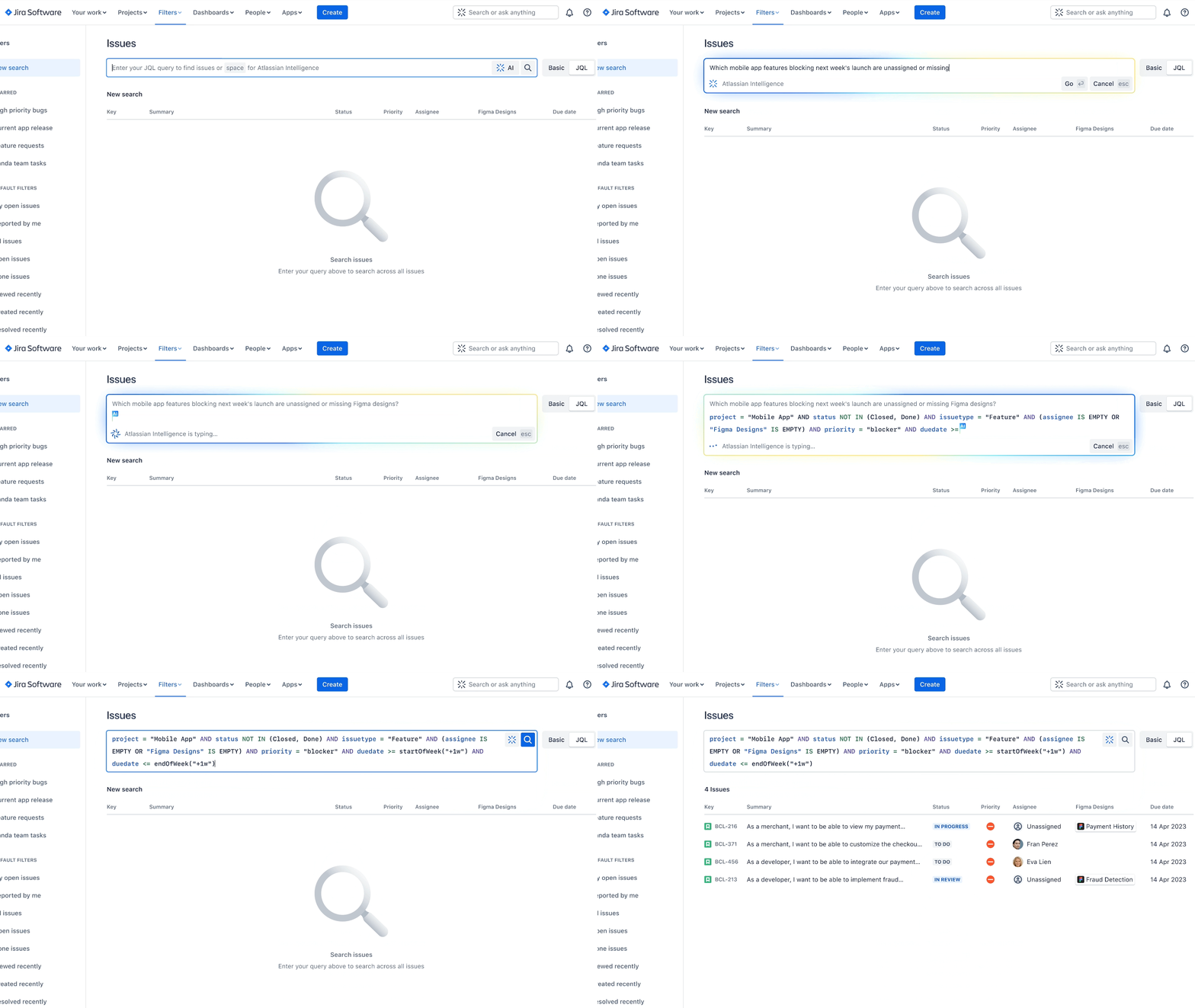
    During a virtual Unleash event, Atlassian today announced its generative artificial intelligence (AI) capabilities are now generally available across its Jira and Confluence suite of tools for managing IT and DevOps workflows.

    In addition, Atlassian also committed to adding generative AI capabilities to its Bitbucket continuous integration/continuous deployment (CI/CD) platform to enable DevOps teams to review pull requests and leave comments automatically with suggested changes around syntax and code conventions via a natural language interface. Developers will also be able to autogenerate pull request descriptions from commit messages.

    Matt Schvimmer, head of products for the Agile and DevOps division of Atlassian, said the capabilities provided by Atlassian Intelligence will reduce the level of toil and stress DevOps teams experience at a time when the velocity at which applications are being developed and deployed only continues to increase.

    Atlassian reported nearly 10% of its more than 265,000 customers have already leveraged Atlassian Intelligence since the launch of the beta program. Organizations, for example, can instantly create user stories within Jira Software tickets, change the tone of a customer response within Jira Service Management, create summaries, launch workflow requests via prompts and generate a starting point for a test plan in Confluence.

    Natural language capabilities, currently available for Confluence, will shortly be generally made available for Jira. An ability that promises to help demystify company-specific concepts, jargon or acronyms is also available now in beta, with support for Jira Software and Jira Service Management to shortly follow.

    There is little doubt at this juncture that AI will be pervasively applied across both ITSM and DevOps workflows. As those advances are made, it should also become feasible to reduce the level of toil these teams regularly encounter. At the same time, the level of scale at which ITSM and DevOps workflows can be effectively managed should also increase substantially.

    Each organization will need to decide how quickly to incorporate AI into those workflows, but hopefully, the level of burnout experienced by IT personnel will be sharply reduced as more tasks are automated. Less clear is the impact AI will have on the size of IT teams required to provide those services, but for the foreseeable future, there will always be a need for some level of human supervision.

    In the longer term, the war for IT and DevOps talent that has been waged now for multiple decades should diminish as managing these workflows becomes more accessible, noted Schvimmer. Organizations will not need to rely so much on the expertise of a handful of specialists, he added.

    Organizations, however, would be well-advised to make sure AI is embraced from both the bottom up and the top down to ensure optimal adoption, said Schvimmer.

    In the meantime, IT teams should take an inventory of the processes that are likely to be automated by AI today with an eye toward restructuring teams as more tasks are automated. Ultimately, the goal should be to let machines handle the tasks they do best to enable the IT staff to provide services that deliver more value to the business.

  • Sauce Labs Adds Visual Testing Tool to Platform

    Sauce Labs Adds Visual Testing Tool to Platform

    Sauce Labs has added native visual regression testing capabilities to its testing platform to enable DevOps teams to streamline workflows.

    Marcus Merrell, vice president of technology strategy for Sauce Labs, said Sauce Visual provides the ability to test user interfaces without requiring DevOps teams to acquire, maintain and integrate a separate tool.

    The overall goal is to make it possible to test functions and user interfaces in parallel by adding a single line of code to a DevOps workflow, he added. Updates to the visual presentation of a page are automatically highlighted, with any visual inconsistencies automatically surfaced. In comparison, a standalone visual testing tool increases the time it takes to execute a test suite, noted Merrell.

    Sauce Visual natively uses the same tools as the rest of the Sauce test automation platform, and can be integrated into any continuous integration/continuous delivery (CI/CD) workflow. At launch, Sauce Visual is compatible with Java/JUnit, Java/TestNG, WebDriverIO, Selenium, Appium (web) and Cypress testing tools with support for Playwright, Puppeteer, TestCafe, Espresso, and XCUITest forthcoming.

    The Sauce Labs approach also serves to reduce the total cost of application testing at a time when the number of applications organizations are building and deploying only continues to increase exponentially, said Merrell.

    In general, organizations are attempting to strike a balance between shifting responsibility for testing too far left toward developers that typically lack testing expertise and the need to verify application experiences are delivered as expected. Many organizations have shifted more responsibility for testing toward developers in the hope of improving code quality and reducing the number of vulnerabilities that might find their way into a production environment. The challenge is those efforts have also increased the level of cognitive load developers need to carry at the expense of having more time to write application code.

    Of course, in time, artificial intelligence (AI) tools will make it easier to generate test scripts, but there is still going to be a need for testers who were not involved in the writing of code to validate it, noted Merrell. The difference is those testers will not necessarily need to be rocket scientists as the process of creating tests becomes more automated, he added.

    Testing user interfaces is especially problematic for developers because many of them don’t have a lot of expertise in the business functions that the application they are building enables. In addition, there are often minute changes to user interfaces that developers are not always going to discern.

    As always, one of the first things that tends to be reduced whenever a developer falls behind schedule is testing. In a recent Sauce Labs survey found more than two-thirds (67%) admitted they pushed code into a production environment without testing, with more than a quarter (28%) acknowledging they do so on a regular basis.

    The assumption is that if any issues do arise, they can be addressed via the next update to the application. End users, however, are less tolerant of that approach when, in the age of digital services, an alternative application is readily available.

  • 2024: The Year of Testing

    2024: The Year of Testing

    Caveat: I currently cover DevOps – including test – and security – including the *AST. This does give me a viewpoint that others may not have, and also potentially gives me blinders that others may not have. I am not generally a predictor but a reader of direction. Proclamations like this are rare for me and are shorter-term/more tactical than the grab bag of predictions usually seen this time of year.

    I was thinking about this one this morning; the direction of travel of traditional and security testing is very similar at the moment. We are seeing the vast complexity of the overall space and the rapid growth of automation come together to once again make all testing a topic worthy of consideration.

    I loved test-driven development (TDD). I can’t speak for others, but RPC/API is just a cool way to implement centralized functionality, and TDD is almost mandatory to develop APIs and the clients that call them. There is no UI to distract or have separate requirements in API development; there is a stated function and correct or incorrect behavior. To a computer scientist, this is predictable beauty. TDD made it more than predictable—it made it a trail through the woods. “We know it needs to do X, Y and Z, with the only side effects being A,” can be detailed with tests to prove that is what it does, and then look to prove the “It doesn’t have other side effects” part. And you can do it all while developing—no need for dev/test iterations. Like any IT solution, it isn’t a great fit for everything, but even if it isn’t called TDD, it is nearly impossible to develop API-based solutions without some level of TDD.

    The thing is, TDD is absolutely a developer’s tool. Developers and DevOps pretty much must use it to turn out usable APIs. The test team only has a use for a subset of those tests. Because if the dev team did it right, they passed all the TDD tests, and the test team’s role in that scenario is to look closely at what the developers might have missed. Integration is often beyond the control of an individual dev and/or API, for example, because many different clients may be integrating with it. Test teams, in a true TDD shop, fill the gaps with meaningful tests that evaluate the overall application quality.

    Security testing—at least static application security testing (SAST) and increasingly dynamic application security testing (DAST)—are also becoming a core part of the development process. This is as it always should have been. It is far easier to fix a security flaw (or any flaw) at the design/early code stage than in a testing process after deployment. The quality of security testing inputs is also increasing, making it far more viable. And finally, the tools are being effectively integrated. Being a developer who did a lot of security work because we often needed it and had no one to do it, I will say I get a little rush about being told right in my IDE about the security risks in my code. I write, I see, I revise where necessary, and I turn out better code. All without having to pause for security or bang heads over policy.

    To date, all this testing is separate, but I suspect, having vaguely the same location in the process of development, that testing will all occur together and the markets may even start to merge a bit—though merger of security testing and functional/performance testing tools is a bit of a stretch, it is more possible than in the past. In most orgs, even though developers have an increasing stake in both sets of testing, the target purchasers are still two different groups—security versus test—with different priorities. That’s why I think they aren’t likely to merge any time soon.

    While AI in most technology spaces is currently experiencing the same level of FUD as XML, Java, JavaScript or low-code was in the past, all super-hyped tools in tech do have a sweet spot. Security and testing are in that sweet spot for AI. Both in test generation and in results evaluation, it does it better, faster and with more coverage while giving staff a concrete set of results to pore over and improve security posture and/or code quality. I cannot say loudly enough that in terms of enabling the steps in the SDLC that have suffered from a lack of resources and timeline to write, execute and evaluate tests, AI is a game-changer.

    So, all of these things together mean that 2024 is a good time to take a hard look at your testing environment(s) and architecture, both traditional testing and security testing. Now that AI has made advanced automation a fact, it is time to consider implementing the level of testing we always knew we should have but never had the resources. Build it right into the build process and make it part of the organizational DNA—just like Agile is.

    If you could hire a specialist who would paw through your code and give you a list of the 25 things you need to fix first, you would do it. That is, essentially, what modern testing tools are. They can do more tests, evaluate more issues and side effects and filter down to the “No—this is really important!” list without costing the team a ton of time.

    And keep rocking it. We’re all sitting on bugs and vulnerabilities. I do hope we are way past denying that fact. Apps are big old complex monsters; these days, sometimes built from generations of technologies cobbled together. Of course they have issues. Even yours. So let’s take steps to clean it up, just a little bit. And keep clipping along.

  • Five Great DevOps Job Opportunities

    Five Great DevOps Job Opportunities

    staging-devopsy.kinsta.cloud is now providing a weekly DevOps jobs report through which opportunities for DevOps professionals will be highlighted to better serve our audience.

    Our goal in these challenging economic times is to make it easier for DevOps professionals to advance their careers.

    Of course, the pool of available DevOps talent is still relatively constrained, so when one DevOps professional takes on a new role it tends to create an opportunity for others.

    The five job postings shared this week are selected based on the company looking to hire, the vertical industry segment and, naturally, the pay scale being offered.

    We’re also committed to providing additional insights into the state of the DevOps job market. In the meantime, for your consideration:

    SimplyHired.com

    Selby Jennings
    Chicago, Illinois
    AWS DevOps Architect
    $191,000 to $242,000

    Indeed.com

    Verizon
    Alpharetta, Georgia
    DevOps Architect
    $159,000 to $201,000

    LinkedIn

    JetBlue
    New York, New York
    Senior Principal DevOps Engineer
    $134,600 to $210,100

    Dice

    Northrop Grumman
    Dulles, Virginia
    Senior Principal DevOps Engineer
    $120,900 to $181,300

    CareerBuilder.com

    Octo
    Washington, D.C.
    Platform DevOps Cloud Engineer
    $110,000 to $170,000

  • Google Taps Nobl9 to Improve Services Reliability

    Google Taps Nobl9 to Improve Services Reliability

    Google announced this week it has added a capability for tracking reliability based on how service level objectives (SLOs) are being met that is based on a platform developed by Nobl9.

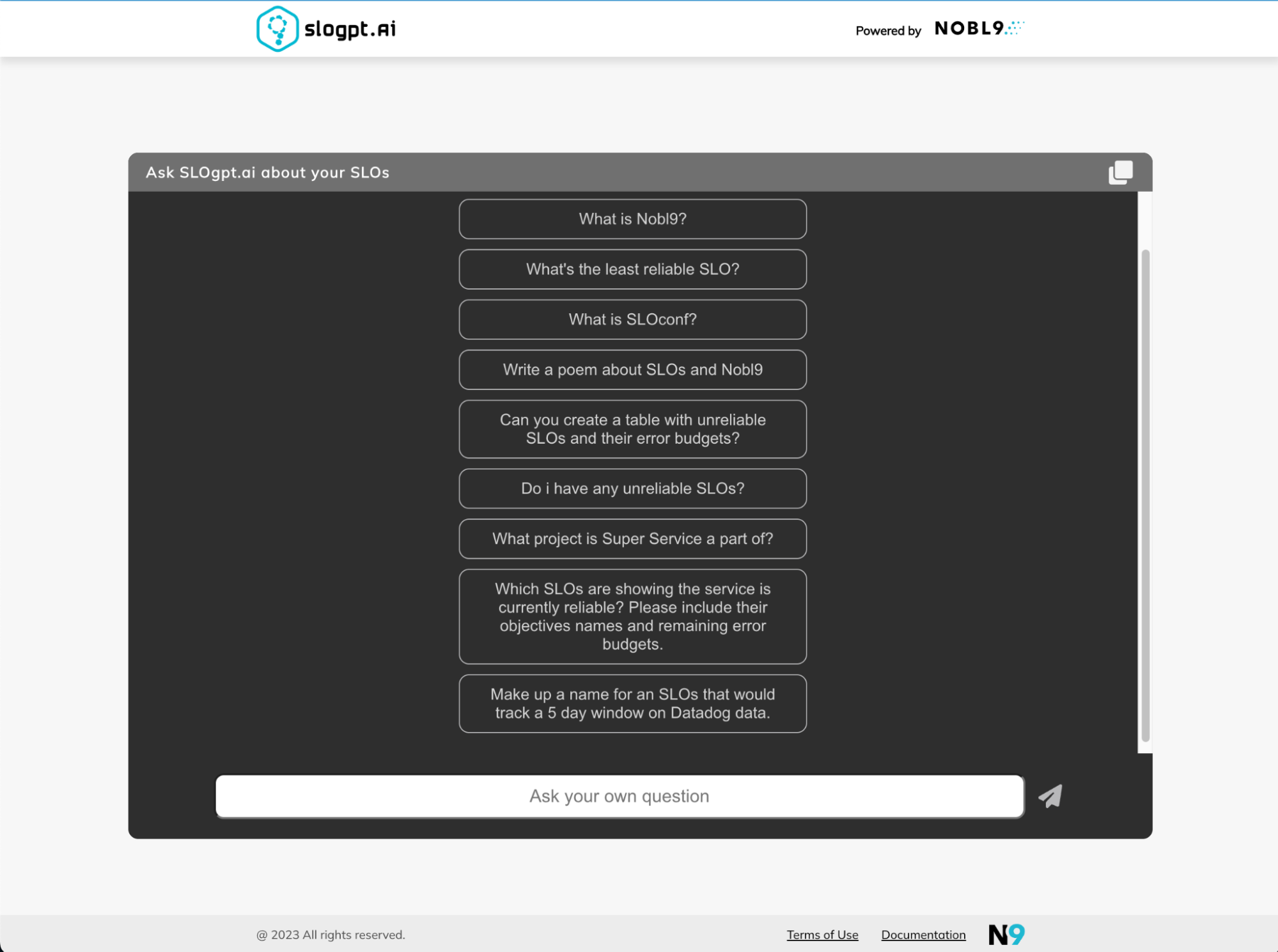
    Nobl9 launched a Nobl9 Reliability Center earlier this year that provides a single source of truth about the state of reliability in an application environment. Included in that platform is SLOgpt.ai, a generative artificial intelligence (AI) tool for programmatically creating SLOs and launching natural language queries to determine how well they are being adhered to across a distributed computing environment. The generative AI tool developed by Nobl9 is based on Vertex, a foundational large language model (LLM) provided by Google.

    Kit Merker, chief growth officer for Nobl9, said the generative AI tool also makes managing SLOs more accessible to a wider range of stakeholders.

    The expansion of the alliance with Google is the latest in a series that will make it simpler to manage SLOs across multiple ecosystems, including, most recently, partnerships that have been established with Microsoft and Cisco, noted Merker.

    The Nobl9 Reliability Center is already integrated with more than 50 DevOps, observability and incident management tools. It collects metrics, events, logs, traces and alerts to track incidents, releases, rollbacks, runbooks and other documentation. Those integrations will make it simpler for IT teams to create SLOs using historical data that would otherwise be challenging to define from scratch.

    In time, there is no doubt tools for managing SLOs will become more widely available, but given the dependencies that exist between applications and systems, DevOps teams will need an approach that can be employed across hybrid IT environments, said Merker.

    In general, as more microservices-based distributed applications are built and deployed, it’s becoming more challenging to maintain SLOs across them since they have many more dependencies than legacy monolithic applications. Each feature and application programming interface (API) added over time can adversely impact performance and reliability. The challenge is that it’s not so much that any given service will outright fail as much as it is determining where degradations are occurring that result in SLOs not being met.

    Each IT team needs to provide some sort of objective benchmark that assesses their overall effectiveness at delivering application services by making it simpler to track whether SLOs are achieved and maintained. Not every service needs to necessarily meet a stringent requirement, but IT teams do need to have confidence in the fact that, on average, certain levels of service are being consistently maintained.

    When it comes to SLOs, the challenge is first determining which dependencies might impact the level of reliability that can be maintained in the event of an outage and then, second, making sure whenever necessary workarounds—such as rerouting application programming interface (API) calls to other services—can be easily invoked.

    SLOs, of course, as a concept, have been around for decades, but with the rise of digital services that span multiple organizations, the level of reliability DevOps teams are expected to provide is now being written into business contracts. As a result, the overall level of stress related to managing SLOs is only going to increase in an era where businesses have never been more dependent on software.