Category: DevOps Toolbox

  • Libbpf Vs. BCC for BPF Development

    Libbpf Vs. BCC for BPF Development

    If you’re into Linux development, you’ve probably heard BPF mentioned over the last few years. BPF stands for Berkeley Packet Filter, and the technology has a large number of use cases. BPF apps can get deep access into an operating system and enable you to perform tasks such as high-performance load balancing, DDoS mitigation and more simply and easily.

    Libbpf and BCC-Tools are both sets of tools to help with BPF development. However, both of these have their own strengths and weaknesses. In this guide, you will learn in detail about the two tool collections and understand when to use them.

    What is BCC?

    BCC stands for BPF Compiler Collection and is one of the oldest ways to develop BPF applications. It helps you embed your BPF code into your user-space program in the form of a plain string. When the user-space program is executed by the kernel, BCC invokes its embedded Clang/LLVM, pulls in system-wide kernel headers and compiles the program on the spot. 

    Since BCC compiles BPF programs on the host machine, it ensures that the memory layout your BPF program expects is precisely the same as that of the target host.

    BPF programs are designed to be injected directly into a kernel, so BCC tools seem to be the perfect solution for developing BPF applications. However, they have proven to be bulky in the modern context due to their heavy reliance on the Clang/LLVM combination, which is resource-intensive. This has led to the need for a better, more modern solution to developing BPF apps.

    What is Libbpf?

    Libbpf is one of the hottest new BPF tools on the market. It is usually coupled with BPF CO-RE (which stands for compile once, run everywhere). BPF CO-RE enables you to generate binaries that run on multiple kernel versions.

    The idea behind Libbpf is to make BPF development as similar to other forms of development as possible. With BPF CO-RE, Libbpf does this by compiling BPF programs into small binaries that can be deployed to multiple deployment hosts. Libbpf does the setup work like loading and verifying programs, creating maps, attaching to hooks, etc., which enables developers to focus on more critical tasks at hand, such as program performance and correctness.

    Libbpf aims to eliminate the overheads associated with BPF app development and deployment by reducing the dependency on system-wide kernel headers as well as Clang/LLVM libraries for compilation on runtime.

    Libbpf Vs. BCC: Key Takeaways

    Now that you understand how each of these tools works, let’s compare some key benchmarks to learn when to use them.

    Dependency Management

    BCC relies on kernel header packages that need to be installed on the target host machines. While it is not a problem in most cases, it can get difficult to set up and maintain if you are working on multiple machines. 

    Libbpf, on the other hand, eliminates this issue by relying on a vmheader file. This file includes multiple kernel types which helps you to remove dependency from system-wide kernel headers.

    Compilation Style

    For programs written with BCC, compilation occurs at runtime. To facilitate this, such programs require Clang/LLVM be present on the host machine. This adds to the code footprint of your programs.

    Furthermore, the Clang/LLVM libraries are resource-intensive. Complete libraries need to be available and run at compile time, even for small programs. This can upset a perfectly balanced BPF workload on the host machine.

    On the other hand, Libbpf enables you to generate binaries that are compiled once and can be run anywhere. You do not need any system-wide dependencies to be present on the target machine for running such apps. Hence, it reduces the overall application size as well as resource consumption on runtime.

    Error Detection

    For apps developed with BCC tools, errors are detected only at runtime since that is when the programs are compiled. This leads to a rather sluggish development experience compared to apps developed using Libbpf. Since Libbpf enables compilation while developing, finding and fixing bugs is easier.

    Final Thoughts

    In this guide, we walked you through what Libbpf and BCC tools are and compared them based on some important aspects of application development and delivery. 

    All in all, Libbpf appears to best BCC tools in most aspects. BCC tools offer fast prototyping and experimentation possibilities, but when it comes to production deployments, BCC tools turn out to be a rather expensive choice compared to Libbpf. 

    You can learn more about why BCC became the popular alternative and how it was eventually replaced by Libbpf here. Even if you currently use BCC tools for your apps, you can easily migrate to Libbpf by following a few simple steps. And, in most cases, it is better to opt for Libbpf than BCC tools for a better development experience and application performance.


  • Self-Service Helps Devs Solve Cloud Security and Compliance

    Self-Service Helps Devs Solve Cloud Security and Compliance

    Organizations that need compliance must follow a growing number of security standards—PCI, HIPAA, SOC 2 and GDPR just to name a few. Every new standard gives rise to an exhaustive list of hard-to-implement security controls.

    Cloud providers like AWS have tried to help, but there is still a lot left for developers to do to secure their infrastructure. Cloud providers give you the raw materials necessary to remain compliant, but you’ll have to learn how to use them.

    It may be easier to envision the scale of the compliance challenge by working through an example. PCI DSS is a typical security standard. When moving to the cloud, you’ll have to figure out how to take your compliant infrastructure and implement it using cloud technologies.

    PCI has several requirements regarding network architecture and firewall barriers. For example, specification 1.1.4 calls for a “firewall at each internet connection and between any demilitarized zone (DMZ) and the internal network zone.”

    Segmentation is the goal. Your network can’t allow traffic to move freely to wherever it wants. You need to set up rules and carefully guard sensitive areas of the system.

    In AWS, we’d suggest implementing this requirement using a mixture of services. Testing, staging and production regions of your application should each be in their own VPC. You’ll also need intelligent use of Security Groups, identity and access management (IAM) and instance profiles. Lock everything down and only open the necessary ports. A web application firewall (WAF) should protect the perimeter.

    IaaS services like RDS and Elasticsearch should be isolated via security group. Platform services like Dynamo, S3, SQS and Secrets Manager should be isolated via IAM. Lambda has one leg in the security group and another in IAM.

    PCI control 6.1 states that you must have a mechanism in place to identify security vulnerabilities within your compliant systems. How can you accomplish this in AWS?

    Automation is your best friend in application security. As the speed of development increases, security must keep up. And while there will always be a place for humans to dig into applications through penetration testing to find tricky vulnerabilities, automation will help you find the low-hanging fruit.

    AWS Inspector is an API-based service that will proactively scan and assess your application for vulnerabilities and warn you about them. This is an automatic process once it is set up, but it requires an administrator to choose what to test.

    Other tools exist to automate application security, such as Wazuh. As with AWS Inspector, there is effort involved in setting it up, initially. But once you complete the configuration, you’ll have a constant security scan running to find vulnerabilities before they reach production. And should some slip in, the scans will continue to search and find vulnerabilities before attackers exploit them.

    PCI Requirement 7 states that you must “restrict access to cardholder data by business need to know.” You’ll need to know who has access to what within your application and when they can access it.

    Restricting access in a cloud environment can be challenging because you require administrators to configure the services that your application needs to work. How can you limit access while allowing the admins to do their jobs?

    Orchestrating access control will require careful use of AWS Security Groups, IAM and federated tokens. Give your admins a token for access that expires quickly. Whitelist trusted IPs for access only to the areas of your environment that are necessary for the user’s role.

    The whitelist of IPs and the security groups will need to be kept up-to-date to make sure no holes open when personnel changes. Keep a tight grip on access control in your cloud environment.

    PCI Requirement 10 outlines the need to track and monitor all access to network resources and cardholder data. As your cloud environment grows, you’ll need more help to keep tabs on changes and user activity.

    AWS CloudTrail can be used to track user activity and API usage. But you’ll have to make sure that CloudTrail can’t be disabled without your knowledge to hide someone’s illicit activity. AWS IAM and Config services can be used to make sure CloudTrail can’t be disabled and to alert you if it is.

    CloudTrail can cover user activity, but what about infrastructure changes? You may need to bring in another tool, such as ELK, to track changes to your infrastructure. You can then marry the data from CloudTrail and ELK into a single SIEM for dashboarding.

    From this example and just these few requirements, you can see that the cloud is not a “push-button” solution.

    And this is only one example. Remaining compliant with SOC 2, HIPAA, GDPR, NIST and a host of other standards will require the same careful planning and execution.

    Planning for Compliance

    First, your team must stitch together many different software tools that help with compliance. Second, you must run periodic scans on your infrastructure and security controls after you provision your resources which essentially place Band-Aids on top of the holes you’ve created. Instead, applying controls during the provisioning process places a secure foundation under your developers’ code.

    DevOps teams try to maintain control over infrastructure and application deployment processes to avoid any mistakes from developers. Suddenly, developing software in the cloud begins to look the same as developing on-premises—delays, disappointment and frustration.

    Three things lead to successful cloud compliance:

    1. Careful planning and execution
    2. Automation to provision the necessary controls while you build your infrastructure
    3. Ongoing maintenance to adapt to changing regulations and standards

    You can help developers unlock the power and agility of cloud development while remaining compliant. But you must enable self-service for them as much as possible while maintaining security and compliance. The only way is to give them control of doing things they want while hiding low-level details that can get them in trouble.

  • mabl Makes Move to Automate Accessibility Testing

    mabl Makes Move to Automate Accessibility Testing

    mabl today made available in beta an automated accessibility testing capability that it added to its software-as-a-service (SaaS) platform for testing applications.

    Dan Belcher, mabl co-founder, said given the increased accessibility requirements included in various compliance mandates, there is a greater need to address these issues as early as possible in the application development life cycle. Otherwise, organizations could find they are liable for failing to comply with accessibility requirements outlined in, for example, versions 2.0 and 2.1 of the Web Content Accessibility Guidelines (WCAG).

    At the same time, providers of applications that don’t address accessibility are also likely to find themselves called out on public social media forums, noted Belcher. The damage to brand reputation can be considerable, he added.

    The SaaS platform mabl created makes it possible to create reusable tests using a low-code engine dubbed axe-core. Those tests can then be inserted, as appropriate, into a DevOps workflow. That approach allows a dedicated testing team to create tests in a way that doesn’t need to occur on a DevOps platform, said Belcher.

    Regardless of regulatory requirements, Belcher said there is a clear need to include end users with disabilities within a digital universe that continues to rapidly expand. Unfortunately, as a whole, the software industry is only just starting to make accessibility a first-class concern, he added.

    The goal should be to enable fast feedback via accessibility regression tests that address, for example, contrast check, said Belcher. However, it’s not likely those tests are going to eliminate the need for periodic audits by accessibility subject matter experts as an application continues to evolve, he noted. Those reviews would address everything from the user interface to the overall performance impact, noted Belcher. It may possible, however, to one day address 50% of the accessibility issues identified in the WCAG guidelines via automation, he noted. Scanning code as it is being developed will prevent a backlog and a buildup of accessibility debt that would be much more costly to address after an application is deployed, added Belcher.

    In general, Belcher said, it’s not likely automation is ever going to entirely eliminate the need for dedicated testing teams. Testing platforms such as mabl are designed to enable a finite testing resource to keep pace with an accelerated rate of application development, he added.

    Accessibility is, for all intents and purposes, a subset of any comprehensive software quality review. The sooner development teams realize that fact the less likely they will find themselves apologizing in the future for not coming to that realization earlier.

  • What Should Elon Musk Do? | Passwordless Future: Tense | WebKit iOS Monopoly Ends?

    What Should Elon Musk Do? | Passwordless Future: Tense | WebKit iOS Monopoly Ends?

    Welcome to The Long View—where we peruse the news of the week and strip it to the essentials. Let’s work out what really matters.

    This week: Everyone has Twitter advice for Elon, passwordless vision is vacuous, and Apple prevented from forcing Safari. (more…)

  • Russian Dev Exodus | Puppet IPO FAIL | Intel 18A Ahead of Sched.

    Russian Dev Exodus | Puppet IPO FAIL | Intel 18A Ahead of Sched.

    Welcome to The Long View—where we peruse the news of the week and strip it to the essentials. Let’s work out what really matters.

    This week: More than 100,000 tech workers leave Russia, Perforce buys Puppet, and Intel moves faster than planned. (more…)

  • Why MTTR is a Vital Metric for DevOps Teams

    Why MTTR is a Vital Metric for DevOps Teams

    In DevOps, every second counts. System failures mean your engineers lose valuable time improving software and developing new features. So how do you effectively detect and manage these issues? Mean-time-to-resolve (MTTR) can provide insight into how effectively your DevOps team responds to incidents and how reliable your software is. It’s difficult to know how your team can improve or determine a performance baseline if you don’t have data to analyze your incident management workflows. In this article, you will learn about this valuable metric, interpret it and leverage this information to minimize downtime.

    Why MTTR Matters

    Whether you’re a legacy organization striving to modernize, a startup looking to gain an edge or somewhere in between, MTTR is a vital metric for your organization. It can indicate whether your processes are standardized and can highlight crucial areas for optimization. Most importantly, mean-time-to-resolve provides insight into how stable your software is and how responsive your team is over time.

    Mean-Time-to-Resolve and How to Interpret it

    MTTR can stand for many different things: Mean-time-to-repair, mean-time-to-recovery, mean-time-to-restore or mean-time-to-resolution are just a few interpretations of this versatile acronym. Each of these metrics examines a different aspect of addressing an incident. For example, mean-time-to-repair is the average time it takes engineers to fix a problem, calculated from the moment they begin to the moment a change is pushed to production. But this metric does not account for the amount of time between when an alert comes in and when work begins.

    Mean-time-to-resolution is the most high-level of these metrics—it considers the average time from when an alert comes in until the incident has been resolved, including postmortems and implementing process changes to avoid the same issue in the future. While the standards for this metric can vary by industry, the highest-performing DevOps teams see an MTTR of less than one day.

    Because it is such a comprehensive metric, a high mean-time-to-resolve measurement might indicate problems with alerting or that your engineers are spending a lot of time on repairs. Therefore, it’s essential to look at MTTR over time and analyze each component of your incident management workflow: Time to alert engineers, diagnose the issue, test fixes, ship to production, conduct reviews and learn from the incident.

    It may also be helpful to examine mean-time-to-resolve in conjunction with other metrics. To determine if your DevOps team is facing production challenges, evaluate your change failure rate (CFR) to see how many releases result in a downgraded service. Other DORA metrics, like deployment frequency and lead-time-to-changes, are perfect companions for mean-time-to-resolve.

    To establish the reliability of your software, you can look at mean-time-to-resolve beside mean-time-between-failures (MTBF), which calculates the average amount of time between incidents. If you’re updating your software often, compare mean-time-to-resolve with mean-time-to-failure (MTTF), which measures its duration before a program needs to be redesigned for functionality. To gain insight into your alerting processes, examine mean-time-to-detect (MTTD), which evaluates the time it takes your team to recognize that an issue exists.

    How to Improve Mean-Time-to-Resolve

    Alerting is the first stage of responding to an incident and should be one of the first areas to target when working to reduce mean-time-to-resolve. Ensure alerts are actionable and that DevOps team members have the tools they need to respond immediately. A straightforward escalation process is essential: Define responsibilities for each member and train the team in one another’s roles so that the process never grinds to a halt if someone is unavailable.

    Preemptive monitoring can help you get ahead of problems before they arise—by proactively checking for potential incidents, you can avoid unexpected downtime.

    The best way to improve MTTR is to standardize your operating procedures with runbooks. Without runbooks, DevOps teams have to respond without a clear direction and spend time messaging one another for information—they can’t act immediately. With runbooks, however, your organization’s knowledge base is centralized and accessible to all team members, enabling them to respond as soon as an issue comes up.

    If you’re already using runbooks, consider automating responses. Automation not only improves your mean-time-to-resolve but will give your DevOps team more time to devote to implementing long-term changes that improve the stability of your service.

    When implemented correctly, mean-time-to-resolve is a proven metric that can indicate how effective your DevOps team responds to challenges and how reliable your software is. But be careful not to incentivize the wrong behavior in a quest to minimize this metric. You could, for example, quickly reduce MTTR by eliminating all alerting protocols, but that would also mean poor service for your end users and likely result in poor team morale. Examine this metric over time and aim for slow and steady growth rather than a quick fix.

  • Survey Shows Shift to SRE Principles to Automate IT Management

    Survey Shows Shift to SRE Principles to Automate IT Management

    A global survey of 1,500 IT decision-makers conducted by F5 found that, on average, organizations are managing more than 200 applications deployed across an extended enterprise as well as more than 20 different security and delivery technologies.

    Lori MacVittie, principal technical evangelist in the Office of the CTO for F5, said that level of complexity makes it apparent that IT teams will need to embrace higher levels of automation to manage the IT environments that are now at the core of a wide range of digital business transformation initiatives. The survey revealed that more than three-quarters of respondents (77%) were embracing site reliability engineering (SRE) principles to automate the management of IT.

    A full 95% of respondents also planned to mine operational data for insights they could use to improve the customer experience and drive business growth. However, 98% of respondents also said they are currently unable to extract those needed insights from their existing systems. A total of 90% said they planned to implement some form of artificial intelligence (AI) to achieve that goal. More than two-thirds of respondents said their organizations realized that creating superior digital interactions for customers will require modernizing business processes and back-office functions.

    As part of those efforts, the survey suggested that application workloads are being shifted across highly distributed computing environments. In addition to the 84% of respondents that are planning to move workloads to the edge, the survey found two-thirds of organizations (67%) are currently or planning to repatriate applications from the cloud to a data center environment in the next 12 months. A total of 93% of respondents reported using some type of as-a-service offering delivered via the cloud today.

    Naturally, securing that many platforms also represents a major challenge. However, despite inherent risks, more than three-quarters (76%) of respondents said, given the choice, they’d turn off security measures to improve performance. That lack of willingness to sacrifice performance suggests that attitudes to security may not have changed much despite all the breaches that now regularly occur, said MacVittie.

    It’s not clear to what degree managing enterprise IT environments has become untenable; however, it’s clear that legacy manual processes will need to become automated. Organizations can’t afford to keep hiring IT staff to manage IT platforms that span everything from the network edge to public clouds. In fact, the survey makes clear that DevOps practices—in the form of the SRE principles first defined by Google—are gaining traction. That doesn’t necessarily mean everyone managing IT is becoming an SRE or an engineer, but it does suggest that automation frameworks are being more widely used.

    It may be a while before those automation frameworks are ubiquitous. However, one way or another, many of the tasks that have historically conspired to make working in IT tedious are going to disappear. The issue, of course, is to not wind up with islands of disconnected automation that introduce more complexity.

  • Atlassian Expands DevOps Tools Portfolio to Improve Collaboration

    Atlassian Expands DevOps Tools Portfolio to Improve Collaboration

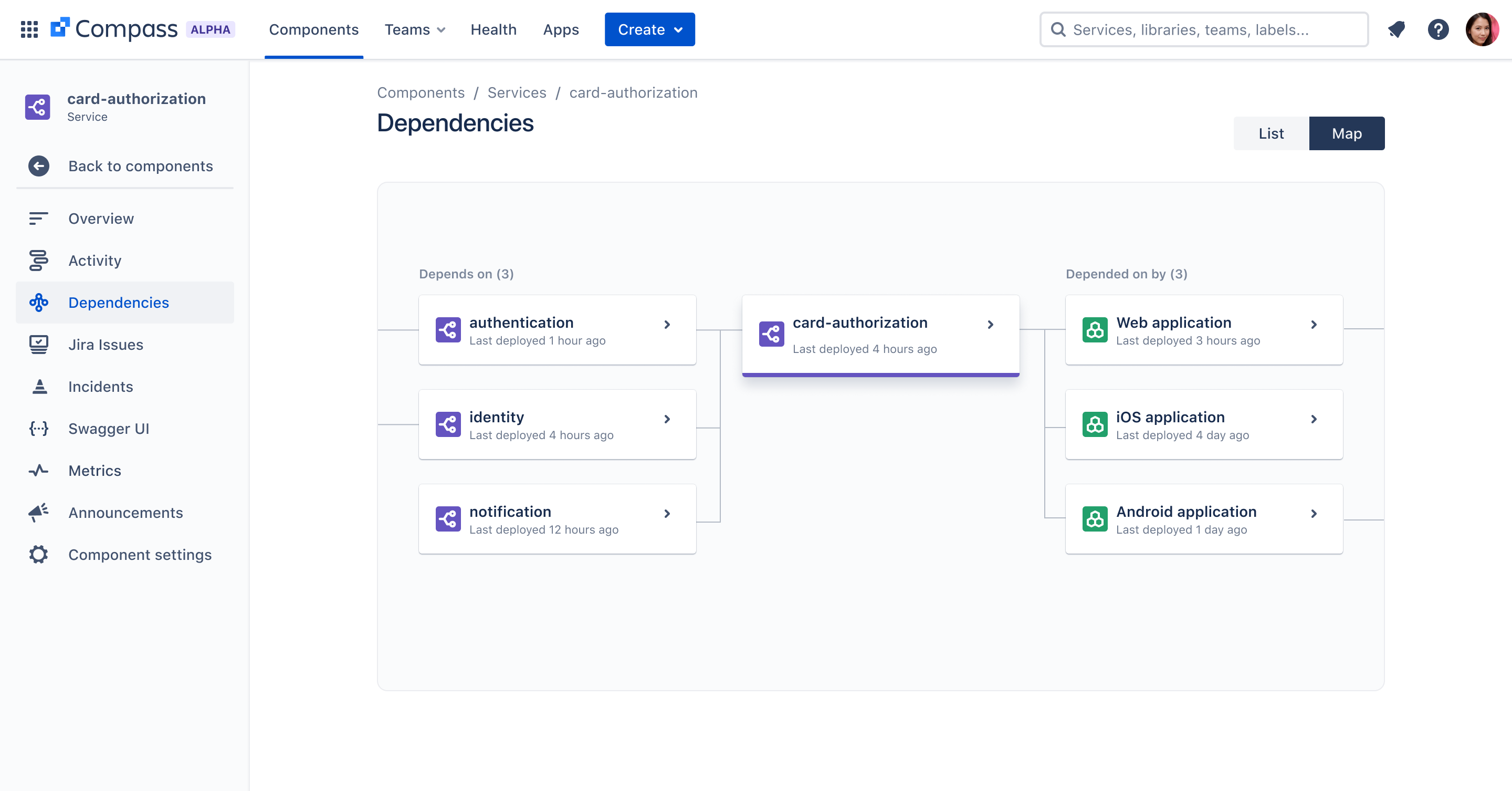
    Atlassian has added an extensible catalog for tracking software components, dubbed Compass, to its portfolio of DevOps tools along with an Atlassian Data Lake and Atlassian Analytics cloud service that makes it simpler to aggregate and query data collected from the company’s portfolio of tools.

    In addition, Atlassian is making its Atlas collaboration framework—formerly known as Team Central—formally available in beta. That framework, in effect, provides an overlay through which different collaboration tools adopted by various DevOps teams can be more easily integrated.

    Compass provides DevOps teams with the ability to map all the components they use to assemble their software as well as the teams that own them. DevOps teams can access shared components and documentation along with scorecards to allow them to measure and evaluate their architecture based on the baselines, security or compliance requirements they might be required to meet. It can be extended to other applications via an integrated Apps engine using Forge, the existing Atlassian cloud development environment.

    Tiffany To, head of product for Agile and DevOps at Atlassian, said Compass is designed for DevOps teams that are typically trying to manage 50 or more microservices. It is designed to be deployed alongside the Jira project management software that is widely used by software development teams to manage multiple projects.

    Atlassian Analytics, meanwhile, is based on a visualization and analytics platform the company gained last year with the acquisition of Chartio. Initially, the Atlassian Data Lake will include data from Jira Software and Jira Service Management tools with support for additional Atlassian platforms planned.

    Collectively, these tools are part of an ongoing Atlassian effort to make it simpler to integrate multiple DevOps teams, said To. Many of those teams prefer to maintain autonomy over the tools they select. The challenge that creates is organizations need some type of overlay through which they can collaborate and share best practices, she said.

    A survey of 2,000 developers conducted by Atlassian found half of the respondents exercise strong autonomy over the tools they use, with more control over tool selection gained as developers become more experienced. The same survey also found that 65% of developers felt they should be responsible for more of the software product life cycle than they currently are.

    It’s apparent that most organizations building software are trying to strike a balance between developer autonomy and centralized control. Developers are expensive to hire and retain, so there is a natural tendency to make available the tools they prefer. That, however, can lead to a level of tool sprawl that makes it difficult to determine the overall state of application development and deployment within an organization.

    Regardless of the approach, the need to remove as much friction as possible from DevOps workflows is clear, especially as the number of simultaneous application development projects continues to multiply. The challenge and the opportunity, of course, is achieving that goal while keeping developers happy.

  • New Relic Adds SLO Tools to Observability Platform

    New Relic Adds SLO Tools to Observability Platform

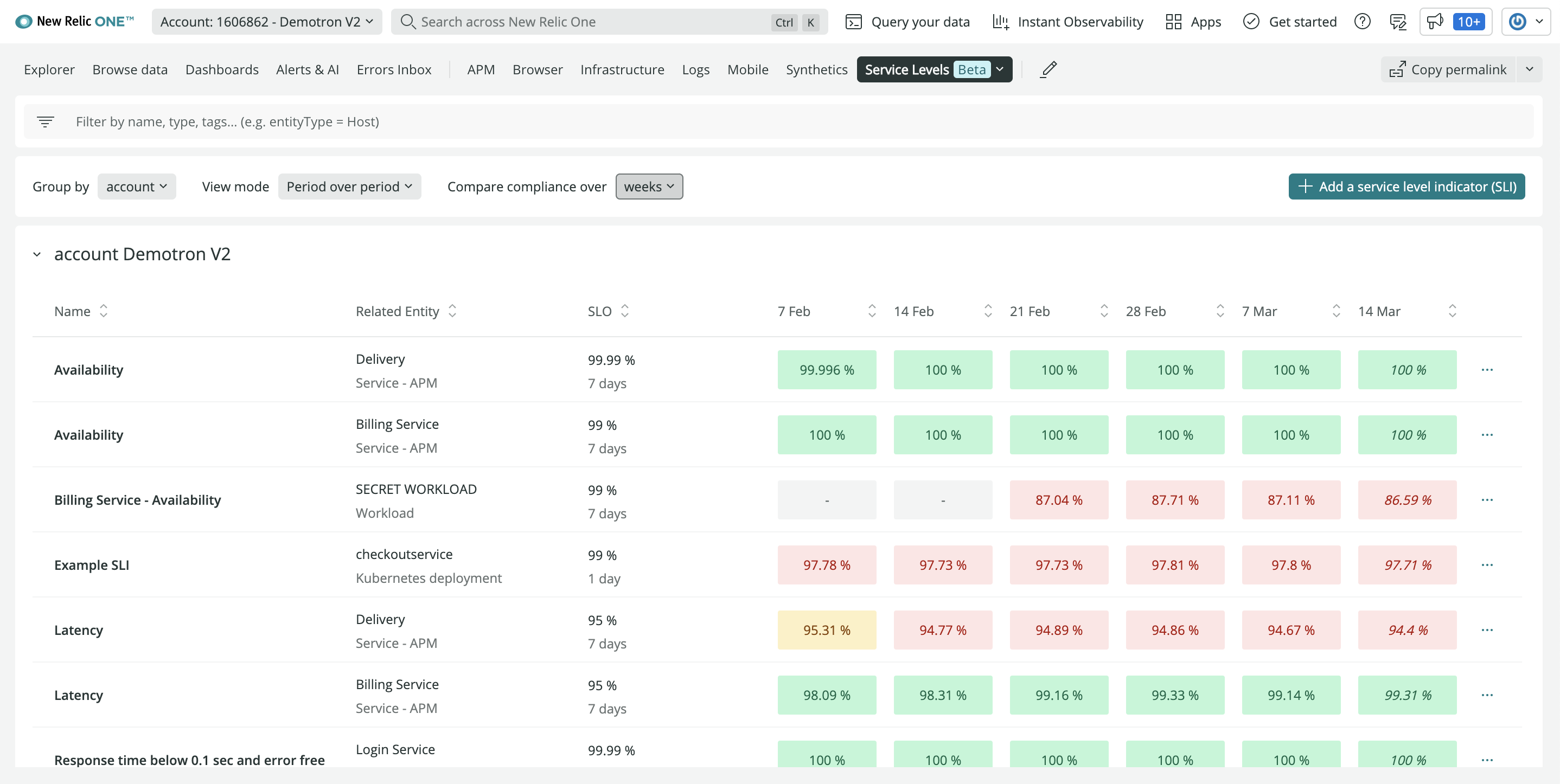
    New Relic this week made a service level indicator (SLI) and service level objective (SLO) capability generally available within the New Relic One observability platform. The new capability makes it possible for DevOps teams to customize metrics, unified health reports and alerts.

    Alex Kroman, general manager and senior vice president for product engineering for New Relic, said the goal is to enable DevOps teams to more easily optimize services that span multiple applications and software components at a time when more organizations are relying on software to drive digital business transformation initiatives.

    IT teams have, of course, been tracking SLOs for decades. However, as application environments have become more distributed—thanks, in part, to the rise of microservices—achieving and maintaining SLOs has become more challenging. DevOps teams often lack an understanding of which metrics are most relevant to the business and even when they do, they have historically relied on manual processes and ad hoc tooling, noted Kroman.

    In contrast, New Relic is providing those capabilities in a way that makes it simpler to manage service levels at no additional cost, he added. DevOps teams can, for example, create SLIs in one click to automatically establish a baseline of desired performance and reliability. The platform also provides recommendations based on historical data to both establish benchmarks and customize and configure SLIs and SLOs.

    Those capabilities make it simpler to set service boundaries and track reliability across teams based on benchmarks, tags and reports that include bespoke views for both service owners and business leaders. In effect, via an application programming interface (API) exposed by New Relic, it becomes possible to employ dashboards to gain visibility across an entire business process, said Korman.

    It’s still early days as far as the modernization of SLOs is concerned, but it’s clear that, over time, they will be managed as code along with everything else in a DevOps workflow. The more organizations become dependent on applications to drive digital business initiatives, the more critical it will become for DevOps teams to track SLOs. The decision that must be made is the degree to which it makes sense to manually implement some form of SLO-as-code versus relying on an observability platform that can be accessed as a cloud service.

    Observability, of course, has always been a core tenet of DevOps. Few organizations are able to really achieve it, however, because most IT teams have been monitoring little more than a pre-defined set of metrics. Modern observability platforms make it easier for site reliability engineers (SREs) to launch queries against aggregated instances of metrics, logs and distributed traces to ascertain the root cause of an issue. The issue then becomes how to correlate the results of those queries against the service levels that businesses expect from a set of applications that might be driving, for example, an order-to-cash process. After all, knowing what occurred within an IT environment doesn’t always easily translate into a report that the average business executive can easily comprehend.

  • Facebook Bans Innocent Users | Azure and ARM/Ampere | ‘Great Resignation’—No End in Sight

    Facebook Bans Innocent Users | Azure and ARM/Ampere | ‘Great Resignation’—No End in Sight

    Welcome to The Long View—where we peruse the news of the week and strip it to the essentials. Let’s work out what really matters.

    This week: No remedy for banned Facebook users, new ARM-based VMs on Microsoft Azure, and The Great Resignation will still be a Thing for the foreseeable. (more…)