A Chef Infrastructure Management offering now combines Chef Infra and Chef Automate into a single offering, while Chef App Delivery combines Chef Habitat, Chef Infra and Chef Automate into a single offering that creates an artifact that can run anywhere.
Sundar Subramanian, senior vice president and general manager for core products at Progress, said the goal is to organize the Chef portfolio around a set of distinct offerings for automating the management of infrastructure and continuous delivery (CD). Instead of simply offering a set of tools for power uses, Subramanian said Progress is moving toward creating a set of platforms.
At the same time, Progress announced a dedicated content delivery service that provides access to a library of curated Chef Premium Content for compliance scanning and remediation that complies with the best practices defined by the Center for Internet Security (CIS).
Finally, Chef has added a Learn Chef Skills Validation Program based on the online Learn Chef platform and the OpenBadges Standard, a specification designed to promote certifications that teach skills in a way that are both verifiable and portable.
CD and infrastructure management are typically handled by different members of the same DevOps team. By segmenting its offering around federated responsibilities, the Chef software portfolio will become easier for DevOps teams to consume based on specific tasks, Subramanian said.
Progress expects its offerings in the months ahead to have greater appeal among midmarket IT organizations that are accelerating multiple digital business transformation initiatives in the wake of the COVID-19 pandemic, he noted. The company has been focused on providing application development tools to these organizations for decades, and as their IT operations mature, many are beginning to embrace best DevOps practices as they seek to reduce the total cost of IT operations.
The challenge those organizations face today is they depend heavily on ITIL-based frameworks for managing IT. Beyond acquiring DevOps tools and platforms, most of those organizations are at the beginning a what has been shown to be a transformation to DevOps processes that requires major changes to the culture of an IT organization. The cultural transition often involves years of effort as organizations try to balance different approaches to managing IT based on ITIL and DevOps processes.
It’s too early to say what path to automation of IT those organizations will take. The Chef tools still require a level of programming expertise to employ that is often lacking among traditional IT operations staff. Not to mention the fact that Progress is not the only DevOps platform provider looking to expand its reach into the midmarket.
Regardless of the path chosen, the number of organizations that embrace DevOps principles is about to expand significantly.
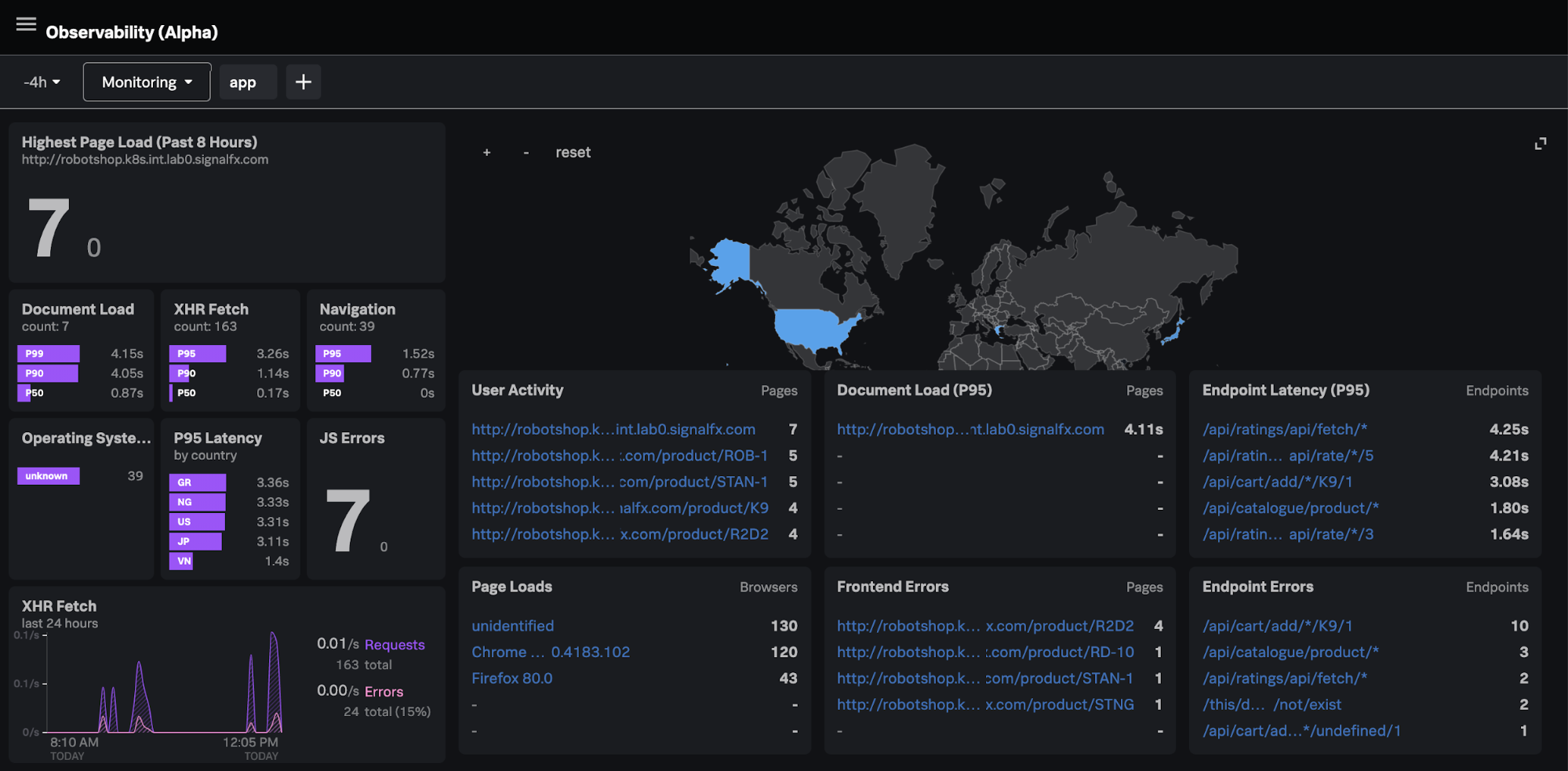
Splunk, during its online .conf20 conference today, launched the Splunk Observability Suite, which combines tools for infrastructure monitoring, application performance monitoring, digital experience monitoring, log investigation and incident response in a single offering.
Kia Behnia, vice president of ITOps for Splunk, said IT teams can correlate metrics, traces and log data in real-time to go beyond simply monitoring IT platforms to also include the end user experience. As part of the Splunk Observability Suite, Splunk is making available in beta Splunk Log Observer, a cloud-based service for visually inspecting logs and sending messages to DevOps platforms based on events being observed by Splunk platforms, and Splunk Real User Monitoring, which extends the reach of Splunk Application Performance Management(APM) platform to add a module that tracks specific end user application experiences.
That critical because without end user monitoring capabilities an observability platform will lack crucial context, said Behnia, noting observability needs to start with IT infrastructure and then extend out to encompass the actual end user experience.
Splunk this week also announced enhancements to Splunk Cloud and Splunk Enterprise, which are now based on a version 8.1 of the core Splunk platform that is now generally available. The company is also making available in beta a Splunk Machine Learning Environment (SMLE) to makes it easier to build and operationalize machine learning models and algorithms.
The Splunk Data Stream Processor (DSP) platform is also being updated later this year to add support for cloud services such as Google Cloud Platform (GCP) and Azure Event Hub along with support for lookups and machine learning algorithms.
Splunk is also making available a beta release of a Splunk Operator for Kubernetes to simplify deployments along with making Splunk Cloud available on GCP.
The company is also updating Splunk Connected Experiences to include a Splunk Augmented Reality capability that adds a remote collaboration feature that allows users in two different places to interact and visually compare data.
Splunk TV, a mobile application for analyzing IT operations trends, is now also available on Google Android as well as Apple. Users can now also centrally control multiple TVs without having to be connected to the same network.
Other additions to the Splunk IT Operations portfolio include Splunk Service Intelligence for SAP, which applies artificial intelligence (AI) to these environments; an update to Splunk IT Service Intelligence (ITSI) that adds predictive analytics tools; a Splunk Infrastructure Monitoring Add-On to integrate Splunk Infrastructure Monitoring gained via the acquisition of SignalFX; and the beta of Splunk IT Essentials to provide a more curated implementation of Splunk Cloud.
Finally, Splunk has updated Splunk Enterprise Security and launched both Splunk Mission Control and the Splunk Mission Control Plug-In Framework. The framework makes it possible to combine third-party security tools with updates to Splunk security information event management (SIEM) and Splunk Phantom security orchestration automation and response (SOAR) platforms. Initial partners include Accenture Security, C3M, Crowdstrike, Netskope, Recorded Future, RiskIQ and Tenable.
Put it all together, and it’s clear Splunk is now pushing to extend observability in every IT direction possible.
What cloud providers do you work with? Google Cloud Platform (GCP)? Amazon AWS? Microsoft Azure? Which services? Are you using a managed Kubernetes such as GKE, AKS, Openshift or EKS? How do you manage your cloud resources? How do you manage the release cycle of the infrastructure and applications that you deploy?
If the above questions are the basic introduction to describe your work, then you are probably also familiar with the console, API or both of a major cloud provider. You probably know how to use a configuration management tool such as Ansible or Chef, Terraform or CloudFormation, or some other similar tool. Additionally, you are familiar with the languages of one of these tools. You probably have opinions on those languages, which inform your attraction to the tools you choose.
Kubernetes and Ansible use YAML. CloudFormation and Azure ARM can be JSON or YAML. Chef and Terraform have their own languages. (To be precise, Terraform can also be expressed in JSON.)
A comparison of cloud orchestration languages
Whenever you start learning a new tool, it is helpful to already know the tool’s language. The strength of using a standard language is that new users will feel more at home learning to use a language if they already understand the basics of its syntax. In the same way that many English speakers will relate to cognates in French, German or Latin than in Greek or Sanskrit without using transliteration, developers that know YAML will find it easier to learn Ansible than a tool that relies on XML. However, just because you know the language doesn’t mean you know the DSL. A DSL might use a language in a novel or even strange way that contradicts what you believe is proper.
A number of variables may come into play when a user develops an opinion of a tool. The most important is, “How simple is it for me to create something that does what I want and minimizes frustration later on?” The next often are, “Which I venture is dependent on the first, are apparent scientific and analytical reflections? Does it lend itself to convoluted data structures? Do efforts to remain readable flounder because of inefficient use of space or punctuation?”
Some projects, such as HashiCorp’s (Terraform), abandon a standard language to avoid such issues and instead create their own languages. The main drawback here is that it is more difficult to integrate the tool with existing projects and software libraries (although, providing for input and output in standard languages such as JSON can alleviate such problems).
Cloudify has a DSL, which is based on YAML. Cloudify uses YAML, because it is easier to read than JSON, but powerful enough to define new types when necessary.
Whether using a general language such as YAML or a proprietary one, certain designations are necessary: the type of resource, the name of the resource and often even whether the line refers to a resource, a parameter or a dependency.
To illustrate the differences between the languages, and associated products that have been mentioned, let’s take a look at a few examples. Let’s use a relatively simple example, an AWS VPC, named “myVPC.” This is a simple resource to define in any language because it has relatively few parameters and no dependencies aside from an AWS account.
Terraform:
resource “aws_vpc” “myVPC” {
cidr_block = “10.0.0.0/16”
instance_tenancy = “dedicated”
tags = {
foo = “bar”
}
}
Terraform, or HCL, is notable for two reasons. First, the HCL “block” syntax recalls method definition syntax in a number of familiar programming languages. This is a nod to how Terraform, among all of these tools, relates to packaging infrastructure definition as code. Second, Terraform is the most concise. It only takes seven lines.
Also, Terraform syntax infers significance from string position through the use of identifiers, such as “resource,” “aws_vpc” and “main.” HCL knows that block type comes first, followed by type and then name. For readability, this may be an ideal and certainly elegant method for defining components. Inside of the block definition is the API payload accepted by AWS EC2 Service for the creation of a VPC.
One drawback of HCL is the punctuation requirements. Braces are required to enclose blocks as well as dictionaries. Arrays require square brackets.
Let’s compare HCL/Terraform to CloudFormation:
myVPC:
Type: AWS::EC2::VPC
Properties:
CidrBlock: 10.0.0.0/16
InstanceTenancy: dedicated
Tags:
– Key: foo
Value: bar
CloudFormation utilitizes YAML as well as JSON. These are data serialization languages. So, we are looking at our resource definition, less as code and more as information. This results in greater verbosity and decreased readability. Less concise, CloudFormation is eight lines.
Whereas HCL uses “blocks” for resources. CloudFormation templates just call them “resources.” Instead of positional arguments, we have keys and values. “Type” defines the type. Properties introduce the resource API payload accepted by AWS EC2 service. However, YAML reduces the need for punctuation. Dictionaries are introduced by indentation and lists with hyphens. This can result in improved readability, and if someone really likes to use braces and brackets, no one is forcing them not to. However, it increases the number of lines and characters needed, because even abstract sections of the DSL require keys for introduction. This is because YAML accepts JSON.
Ansible also has a module for creating a VPC in AWS.
– name: create VPC.
ec2_vpc_net:
name: myVPC
cidr_block: 10.10.0.0/16
region: us-east-1
tags:
foo: bar
tenancy: dedicated
Ansible also uses YAML; however, there is no separation between API payload and other parameters. For example, authentication parameters are on the same level as payload parameters. Ansible uses modules for infrastructure management the way it uses modules for managing applications, which, while novel, is implemented in a clunky and relatively useless way. For example, you need a playbook for creation and a playbook for deletion.
Cloudify:
myVPC:
type: cloudify.nodes.aws.ec2.Vpc
properties:
resource_config:
CidrBlock: 10.10.0.0/16
InstanceTenancy: dedicated
Tags:
– Key: foo
– Value: bar
Cloudify also uses YAML. It also works with key-value pairs. Cloudify is even more verbose than CloudFormation.
A node template can be a resource or a group of resources. In Cloudify, there are three types of properties. The resource_config, which contains the API Payload; the client_config, which contains the API Authentication; and orchestration properties,which are additional properties that enable you to describe how Cloudify will interact with the resource. For example, all resources have the use_external_resource, which means that Cloudify can use resources that Cloudify did not create.
Whereas Terraform/HCL uses “resource blocks” and CloudFormation uses “resources,” Cloudify uses “node templates.” Node templates can be a VPC or other cloud resource, or even a CloudFormation Template or a Terraform template.
Azure also sports an orchestrator, Azure ARM, and has its own DSL to describe Azure resources. This is how a virtual network is defined in Azure ARM:
type: Microsoft.Network/virtualNetworks
apiVersion: ‘2019-11-01’
name: myVPC
location: “[parameters(‘location’)]”
properties:
addressSpace:
addressPrefixes:
– 10.0.0.0/24
subnets:
– name: “[parameters(‘subnet_name’)]”
properties:
addressPrefix: 10.0.0.0/24
One notable difference in Azure ARM is that the resource entry in the YAML does not have a key name with the definition being the value of the name key; instead, the entire dictionary is a list item. This is perhaps more concise, but it may forfeit a modest amount of readability. Also, Azure is similar to Cloudify in that the resource definition “properties” is not on the same level as other more general details, such as “apiVersion” or “location.”
The syntax for accessing a parameter is also a tad obtuse. Accessing a key in a dictionary via square brackets and parentheses is probably one of the most unreadable methods in the DSLs we are looking at.
Like Cloud Formation, ARM can be written in JSON or YAML.
Terraform can define the same Azure resource using fewer lines.
Azure and Amazon expose ARM and CloudFormation as API objects respectively. This enables orchestrators to manage those resource stacks as single resources.
You can define an ARM deployment in Terraform like this:
Cloudify can also orchestrate ARM deployments. Here is a simple infrastructure stack in ARM using Cloudify:
deployment:
type: cloudify.azure.Deployment
properties:
location: { get_input: location }
name: { get_input: resource_group_name }
template_file: ‘resources/arm/environment.json’
Cloudify can also accept a file or inline JSON (or YAML).
Having defined the source code for our infrastructure components, we can now connect other resources and processes to this infrastructure dependency. We can use the Terraform template to a CICD workflow or a networking application.
Using the same approach, Cloudify can also call Terraform stacks:
infrastructure:
type: cloudify.nodes.terraform.Module
properties:
resource_config:
source: resources/terraform/template.zip
variables:
access_key: { get_secret: aws_access_key_id }
secret_key: { get_secret: aws_secret_access_key }
aws_region: { get_input: aws_region_name }
aws_zone: { get_input: aws_zone_name }
admin_user: { get_input: agent_user }
admin_key_public: { get_input: public_key }
Cloudify also utilizes other Cloudify deployment stacks as service components:
infrastructure:
type: cloudify.nodes.Component
properties:
resource_config:
blueprint:
id: my_deployment
blueprint_archive: { get_input: infra_archive }
main_file_name: infra.yaml
deployment:
id: my_deployment
To summarize, there are many DSLs for orchestrating cloud resources. Each has its own focus: Terraform on simplicity and repeatability, CloudFormation on Amazon, ARM on Azure, Ansible on setting up applications and Cloudify on enabling users to automate any task, including automating Cloudify. We call this “orchestrating the orchestrator.”
Integrating the analytics capabilities into your application can be easier than you think
Today, the ability to create and explore dashboards and reports, embedded directly into the apps your customers use every day, is no longer a luxury but a necessity to keep your product competitive and deliver value to users.
Embedded analytics brings many benefits for different groups. For end users, it’s a valuable tool to explore their data and discover new insights. For analysts, it’s an integral capability for advanced performance analysis. For product managers, it’s the best way to enrich and cultivate a data-driven experience for your customers with the latest analytical capabilities, built-in.
Moving away from decisions based on instinct toward decisions based on analytics and metrics delivered by centralized systems is one of the most impactful changes you can drive today. But for product managers in the business of delivering software or utilizing an application to drive customer interaction, the choices available for embedding analytics is a looming challenge.
This article covers the key challenges, scenarios and checklist considerations product managers need to tick off before implementing any type of embedded analytics solution.
Embedded Analytics: A Business Case for Buy vs. Build
Typically, the decision around embedded analytics boils down to build or buy.
Even with a need for fast technical integration and time-to-market pressures, many product teams first lean toward getting in-house developers to build embedded analytics into their app.
It’s an understandable first thought, given many have a specific vision for their app that a third-party might not ‘get’ immediately. But opting to build-in analytics more often than not leads to long-term challenges that aren’t always initially obvious.
The fact is creating an analytics platform from scratch is a complex task that takes years of work to create and refine. Aside from the advanced data expertise and technical integration required, having your developers focus on embedding analytics means they now have to:
Face a very high investment cost to recruit the necessary skills for implementation.
Provide all support, maintenance and upgrades for your homegrown BI functionality.
Replicate the look and feel of your core application to ensure UX consistency.
Match the analytical features of specialist BI solutions—a near impossible task.
With the time and skills needed to build your own analytics into your app from the ground up, you could face higher costs, increased risk and delayed time-to-market for your product—not to mention less time innovating and improving the core product experience for your users.
Your users ultimately expect to have data accessible to them for their day-to-day work. When they use your product, they will demand a certain level of reporting and analysis comparable to the BI tools they may already use in their own businesses at the moment—and yes, it will go beyond just having basic dashboards. If you don’t have confident answers for the most common questions required before building an embedded solution in-house—do you have the expertise, the manpower, time and knowledge—it’s not advised to pursue the build path.
So, what about buying an embedded analytics solution for your application?
What to Look for in an Embedded Analytics BI Solution
Buying an established embedded analytics solution often does away with many of the problems of building it.
You can shift away from home-grown reporting to a proven platform that can seamlessly integrate custom analytics into your app, amplify the reach of your product by engaging new and existing users with the latest analytical features, and even automate data discovery and analysis so you gain competitive advantage—though the last capability depends on the particular vendor.
However, buying comes with its own very important considerations that your product team and business as a whole need to evaluate and answer before making a decision. Below, we list the most important things to look for in both the embedded solution and the partner behind it.
Does it include everything I need to meet end-to-end operational reporting needs?
Your users will have a range of functional needs from the embedded analytics solution you buy, so the first thing you must answer is whether it can cater to their day-to-day work and provide access to advanced analytics. For instance, your customers want to know what to do next: Some might only need tabular reports (traditional), while others will demand richly visualized and interactive dashboards that drive action (modern). Eventually, some may look to use automation and AI in their analysis (augmented). The best options are those vendors that let you embed it all—dashboards, authoring, charts, collaboration, data preparation and modelling, admin and security. How each element is embedded (iFrames, JavaScript libraries with REST API calls) and where embedded code can run (cloud, desktop, mobile, web) is just as important to factor in, too. It’s not just about having dashboards in your app, but ensuring you have future-proof capability that continuously scales with your users as their data needs grow.
Can the solution be embedded seamlessly?
It’s not just all about having the best and latest features. A cohesive, seamless user experience between the analytics portion of your product and the core software itself is a big part of delivering an exceptional product, so when choosing to embed analytics, ensure the solution allows your team to have exceptional control to make it look like a part of your app rather than like one different app hosting another. Many modern embedded solutions allow you to white-label; this is recommended to allow for consistent design across your platform, as you will eliminate your users’ potential concerns around security, performance or support with using another product.
Can it help me ensure faster time to market?
A common problem with creating an embedded analytics solution in-house is the investment in time and money it takes to get your product to market with the new capabilities. It’s also difficult to ensure the integration process can be done as quickly and efficiently as desired. The embedded tool you buy should accelerate that process and significantly reduce the development cycle, so your team is able to begin using your new analytics within days instead of weeks and your devs stay focused on improving your product’s core value instead of configuring reports.
Next Steps
Selecting an embedded analytics product can be a difficult task, but so long as you keep your product and analytics objectives aligned and follow best practices checklists, integrating the latest analysis capabilities into your application is not as far-off a future as you may think.
DevOps practices, processes and solutions help businesses accelerate their digital transformation by improving the speed and quality of software development. DevOps tools enable teams to do their job more efficiently by embracing automation, increasing agility and building speed, versatility and security into the framework.
At theIBM DevOps Virtual Summit, attendees will learn how to keep their applications running smoothly with automation and data-driven solutions that can reduce mean time to resolution and explore IBM solutions to help innovate hybrid environments, disrupt cloud native development and transform existing mainframe infrastructures. The free virtual event will take place on Oct. 29 from 10 a.m. to 2 p.m. ET.
IBM leaders will discuss the benefits of DevSecOps, how to increase business value, SRE best practices and how IBM Cloud software and services can help organizations succeed on their DevOps journey.
The virtual event will feature four educational sessions from leading DevOps technologists:
“Application Modernization Enabling Hybrid Cloud with IBM Z,” by Rosalind Radcliffe, distinguished engineer and chief architect for DevOps at IBM.
“The Modern DevOps Manifesto,” by Andrea Crawford, distinguished engineer at IBM.
“DevSecOps in a Hybrid Multicloud World,” by Sunil Joshi, executive architect at IBM.
“Common Tooling Approaches from Kubernetes to the Mainframe,” by Eric Minick, program director at IBM.
Feature flags can help reduce the stress associated with DevOps during WFH
The world has drastically changed. As a result, we have had to adapt the way we shop, socialize, educate and work. Businesses have had to adapt to keep operations going, and the biggest change they’ve had to make has been the move to remote working. For most, this has meant bringing a laptop home from the office and setting up at a home desk or dining table. For teams used to collaborating in-person, it may feel like the world has turned upside down.
DevOps teams have been thrust into a decentralized environment at the very time they are facing record traffic and the pressure to return to or even exceed their prior cadence. The current climate has accelerated demand for fast and efficiently running online services, such as e-commerce, streaming services and video conference platforms. Digital platforms not only are facing greater demand, but they are also seen as more mission-critical than ever.
The stress of all this can be daunting, but it’s useful to remember that the very idea of DevOps emerged as a way to move faster with greater resilience. We need to trust the patterns and tools that were emerging as the “new normal” even before the current crisis emerged.
One of those patterns, which is sometimes referred to as progressive delivery, is the idea of decoupling deployment from release. The tool many have chosen to accomplish progressive delivery, especially to meet the needs of decoupled and decentralized teams, is feature flags.
Feature flags allow teams to deploy new features in production while restricting access to only a subset of users. The ability to control exposure without requiring further deployments or infrastructure changes in turn makes testing in production (exposing the feature to internal dev and test users only) and canary testing (exposing the feature to a small number of real users before ramping up to 100%) straightforward and repeatable processes.
This “fewer moving parts” way of promoting features eliminates the need for the large-scale coordination that an all-or-nothing “big bang” release requires. That’s why feature flags are particularly well-suited for teams to work remotely, in decentralized environments.
Feature flags allow for time to make sure everything is working properly before the switch is flipped. It is the equivalent of changing the plane while you’re flying, without the passengers falling. For this reason, DevOps teams that were using feature flags prior to global shelter-in-place orders were much better positioned to continue development efforts without interruption while working remotely. Feature flags allow for DevOps teams to operate in gradual stages with the ease of experimentation and rollbacks, significantly reducing the stresses of remote work.
Over the last half-year, the use of Atlassian’s tools is evolving and expanding
COVID-19 has rapidly accelerated the digital transformation of businesses by several years. However, as companies shift to digital-only workflows, DevOps teams and the increasing number of departments they interact with face numerous challenges. Effective digital communication and collaboration are often vital to overcoming these challenges, and executives now pay a lot more attention to the tools enabling both.
Millions of users globally rely on the Atlassian ecosystem every day. In particular, Atlassian tools such as Jira being used to improve software development, project management, team collaboration and code quality. As the world has shifted to more collaborative digital work over the last half-year, the use of Atlassian’s tools is evolving and expanding.
We recently conducted research to understand more about how users globally are using their Atlassian tools. The “2020 State of the Atlassian Ecosystem Report” surveyed 700 professionals using these tools for their organization to find out how, where, when and with what other technology they are deploying Atlassian solutions. Many interesting findings emerged from the research, and here are three major takeaways.
Atlassian Tool Usage Seeps Into the Enterprise
A large proportion of Atlassian users are adopting its tools to achieve business goals from improving productivity and efficiency to change management as part of their digital transformation. This is driving the introduction of Atlassian tools beyond DevOps and into the hands of non-technical teams.
For example, 80% of users said at least one business team in their organization uses Atlassian tools. These teams include customer support, design, sales and marketing and operations. Furthering this trend, Atlassian and Slack announced last month that they would be conducting joint app and integration development, allowing users to connect platform services. Our research found 46% of Atlassian users utilize both Atlassian and Slack solutions. These kinds of announcements will only increase the collaborative use of these tools between DevOps and the teams they collaborate with.
Adopting Agile Development Methodologies & DevOps Strategies
A key part of a company’s digital transformation is adopting agile methodologies and clear DevOps strategies. According to our research, 77% of Atlassian users believe their organization has implemented agile principles in some way. And 48% have a DevOps strategy in place, with an additional 29% planning to implement a clear DevOps strategy in the next three years. As workers are forced remote and developers are distributed virtually, iterative development between these teams is increasingly important. This can only happen when a clear DevOps strategy has been put in place and digital feedback can be gathered and implemented in a well-defined way.
Taking a Hybrid Approach to Deployment
There are several different deployment options available depending on the business needs of users of Atlassian tools. How companies choose to use, deploy and configure the tools that they use. In addition, parts of the same organization often have different business drivers for using Atlassian tools. For example, one function may need a public-facing help desk with access from anywhere in the world, while another may need a highly secure and internal-only solution.
There isn’t a one-size-fits-all approach to address personalized organization needs. For instance, 9% of users are leveraging a hybrid model of Atlassian Cloud (SaaS) and a self-hosted solution (Server/data center), which means combining the advantages of cloud and self-hosting through multiple deployment models.
These findings demonstrate how the Atlassian ecosystem is evolving and expanding in our new normal. As digital transformation takes hold across different organizations of every size, industry and level of technical sophistication, the need for flexibility is only going to increase to accommodate more digital-only workflows.
The company also announced the general availability of a free Software Development Optimization (SDO) service, a business intelligence application that integrates and analyzes data collected from multiple DevOps tools to provide insights into software development pipelines in real-time. Based on metrics defined by DevOps Research and Assessment (DORA), a research arm of Google, SDO comes integrated with Jira, GitHub, Jenkins, Bitbucket, PagerDuty and OpsGenie and can be extended to other DevOps tools.
Sumo Logic also updated its Application Observability service to be able to consume data generated by open source Prometheus monitoring tools as well as both Telegraf and Open Telemetry agent software for collecting and correlating traces with relevant logs and metrics. Dashboards and topology and entity models also have been added to create more intuitive workflows and cross-linking among troubleshooting playbooks.
The company also announced the Sumo Logic Multi-cloud Observability service, which provides monitoring and troubleshooting capabilities across Amazon Web Services (AWS), Microsoft Azure, Google Cloud Platform (GCP) and hybrid cloud environments. In addition, it announced the general availability of Sumo Logic AWS Observability, a service that automatically ingests, collects, unifies and analyzes telemetry data from AWS services such as Application Load Balancer, Amazon Elastic Compute Cloud (EC2), Amazon Relational Database (RDS), AWS Lambda, Amazon DynamoDB and Amazon API Gateway. It is designed to detect anomalous events, including the timeline and scale of those anomalies, and then employs machine learning algorithms to surface the root cause of the issue.
Sumo Logic is also making generally available a Kubernetes Observability service that automatically instruments and discovers topology and entities of microservices-based applications and automatically collects logs, metrics, traces and metadata to populate preconfigured dashboards and alerts. The company also launched a Sumo Logic Web and Edge Observability service to monitor and troubleshoot content delivery network (CDN) services from Akamai, CloudFlare and Fastly, as well as similar services provided by AWS, Microsoft Azure and GCP.
Finally, Sumo Logic has enhanced its SIEM service to add support for chain, threshold and aggregation rule types and the ability to schedule searches of specific types of security events. The reporting and data ingest capabilities of the platform have been enhanced as well.
Bruno Kurtic, vice president of product management and strategy for Sumo Logic, said observability takes traditional monitoring to the next level because as applications are instrumented, observability becomes a property of the application. That approach provides IT teams with the context required to resolve issues faster. Existing monitoring tools are isolated silos that generate data which IT teams then must correlate on their own to find the root cause of an issue. That approach results in time wasted that could otherwise be applied to more value-added tasks, such as developing applications faster, said Kurtic.
Fresh off raising capital by becoming a public company, Sumo Logic is differentiating itself via a more unified approach to observability that provides deeper analytics, is more secure, and affordable through the usage of credits that IT teams and purchase and apply to any service as they see fit, Kurtic said.
Of course, Sumo Logic is not the only IT vendor aiming to take IT monitoring to the next level. DevOps teams have no shortage of observability options. The challenge now is determining how best to act on that intelligence once it’s presented.
If your organization has more than 20 tools for IT operations management and DevOps, you’re not alone. According to one source, nearly 40% of IT teams are using more than 10 monitoring tools. There comes a time when you simply must clean house. This can be a painful chore, akin to cleaning out the garage or basement after a few years of neglect. It requires deep analysis, an in-depth understanding of business requirements and political finesse.
Operations Management Tools: Cleaning House
Avoiding this exercise can be fraught with danger. Your organization is likely wasting money and time maintaining and integrating legacy and/or disconnected tools that aren’t worth the effort. As well, operations management tools overload contributes needlessly to data noise rather than focusing on the data sets that are most critical to maintaining healthy service levels for the business. In this article, I’ll discuss the major battles and offer some ideas to simplify and accelerate a tools rationalization and consolidation exercise.
Battle 1: Politics
I’ve worked in enterprise architecture and IT operations for more than 15 years, as an internal team member and directly with clients. I can say with confidence that in most cases, 75% of the tools deployed in an IT organization have redundant capabilities or are considered to be nearing the end-of-life road map by the vendor. I understand the reluctance that team members have in letting go of tools they are comfortable using, as well as the time and effort it takes to learn completely new technology and the feeling of a loss of control when the business owner of a tool changes hands. Yet, a regular tools assessment and consolidation exercise is best for the organization over time.
Typically, the unstated issue of teams not wanting to change tools relates to control. The teams that have the most data or the most important data tend to get more budget. It can be tough to relay the message that simplifying the tools ecosystem and centralizing access to larger data sets for everyone in the know can bring long-lasting benefits to both the organization and to individual careers.
This is why it’s imperative for the senior IT or engineering leader to lead the charge in operations management by communicating the goal of the tools consolidation initiative and benefits to individuals, teams and the business at large. Here are a few of those benefits:
Eliminate unnecessary tools to reduce maintenance spend/time and complexity.
Develop a framework for evaluating future tool acquisitions.
Bring more control and visibility into bugs, issues and infrastructure/code status with the right set of tools.
Battle 2: Inventory
Maybe you already have your tools categorized and qualified in an asset management system such as a CMDB—but maybe you don’t or the information is outdated and incomplete. Doing an inventory is not just about categorizing tools by functionality and teams but also providing even more detail that can help make a data-driven assessment. With better data, IT organizations will be able to rationalize tools without heavy politics. Here’s what to include:
Primary and secondary functionality.
Product road map.
EOL dates.
Core user groups.
Relationship to business service/applications.
Customer support contracts.
Required skills/internal staff for support and maintenance.
Existing issues.
Vendor relationship.
TCO/ROI metrics.
In enterprise architecture circles we call this application portfolio management/rationalization and it can be quite a task if you’ve never embarked on it before. It’s fine to start the process using Excel but whatever tool you use, be sure to share the inventory document with all of your stakeholders for enrichment and feedback. Arriving at the TCO or ROI analysis may not be easy for legacy applications, but do your best to collect as much data as possible for your calculations; information around previous support and maintenance contracts, hours to support issues, patch and maintain; and the hardware and software costs required to support will help provide an understanding of the TCO.
From there, determining the “R” in your ROI will be based upon many factors, both tangible and intangible. For example: Does the tool save significant manual time to do the same process and eliminate toil? Does the tool increase accuracy, thereby minimizing rework? Does the tool improve the work-life balance or morale of employees?
Battle 3: Review Board
A technical or architectural review board helps evaluate and approve requests for new tools and technologies. Typically, these boards have cross-functional employees from operations, application development, application management, EA and even security. The job of the board is to understand the business requirement for the request and mitigating factors such as cost, time to implement and security considerations. The board also ensures that a similar tool already in place in the organization couldn’t satisfy the request. While boards with the right individuals can defuse politics and ensure a balanced approach to evaluation, boards can also encourage politics if special favors are granted. Senior IT leaders should discourage that behavior (obviously).
Battle 4: Shadow IT
It is true that employees can easily find workarounds these days to processes that you put in place, no matter how objective and sensible they are. Technical folks love to experiment with new tools, and it’s difficult to break the habit. One idea is to apply control by prohibiting the use of personal credit cards to make purchases and requiring review board assessments and security reviews prior to acquisition. Employees who choose to violate those requirements will face certain consequences. You may also want to reward those who follow the rules with bonuses or other perks.
Battle 5: Predicting the Future
At the rate of change and unpredictability in business today, it can be difficult to plan too far ahead. But some part of planning is necessary because business and overall IT requirements drive the tools strategy. Understanding the 12-month technology road map is reasonable, but if you can extend your vision further to 24 months or longer, it can provide important decision-making factors. For instance, if your organization is planning to embark on a cloud migration effort in the future but need to upgrade a legacy system now, delaying the expense of a pricey upgrade and expediting the cloud migration initiative would be an easy way to reduce IT risk and deliver more sustainable capabilities for the future.
Modernizing Operations Management Tools
In summary, everything revolves around the data. If you leverage concepts of enterprise architecture and application portfolio management, you’ll quickly be on your way to helping your organization make better IT decisions. Through EA and APM disciplines, you’ll learn how to establish governance processes to reduce IT risks and vulnerabilities, cut operational spend through rationalization and make the IT organization more agile for future go-to-market strategies by reducing support and maintenance complexity.
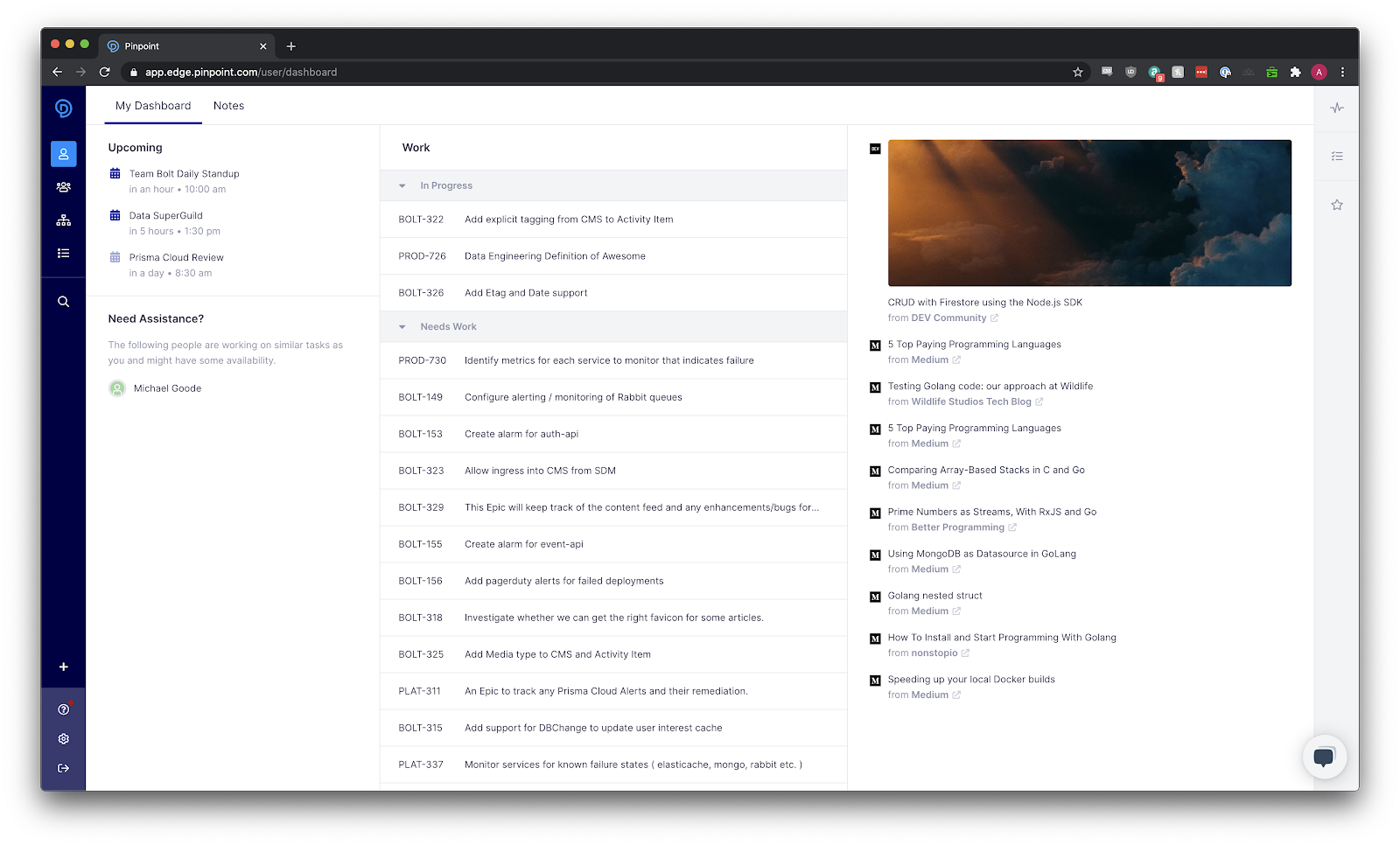
Company CEO Jeff Haynie said the User Dashboard provides developers with a personalized view of their work priorities and schedule for the day. It also provides a means to employ their Pinpoint Profile to highlight personal achievements and engage other engineers on the Pinpoint Platform.
This latest update extends the use of machine learning algorithms via a Recommended Content feed that curates content from blogs, podcasts and other media based on the observed interests of developers. Much like a built-in RSS feed, Recommended Content is an experiment to see whether the platform can save developer time by eliminating the need to scroll through less-relevant news, said Haynie.
In the wake of the COVID-19 pandemic, he said, many organizations are struggling even more to manage distributed or remote developers. It’s also now much easier for developers to become isolated from the rest of their team. The User Dashboard provides a way to engage developers through the same platform managers employ to track projects.
While there is no shortage of collaboration tools, Haynie noted they all tend to be tied to a specific DevOps platform. Pinpoint is designed to automate the process of collecting data from multiple tools, which the platform then analyzes to surface potential bottlenecks in the software development process. As software development projects become more complex, there is a need for a tool to visualize how hidden dependencies might upend delivery schedules, he said.
The User Dashboard now extends that framework out to individual developers, who can view how to prioritize their specific tasks in keeping with a larger set of goals, Haynie added.
Developers don’t typically have a lot of visibility into how their efforts ultimately impact the organization. In the absence of that information, it can become difficult to stay motivated, especially when working from home. Project leaders are now always going to be able to personally engage each developer every day, especially if members of the development team are located in different time zones.
The User Dashboard isn’t a substitute for personal interactions, but it does provide a means for developers to quickly learn at a glance what needs to be done next in a way that serves to minimize miscommunications. It’s not all that uncommon for developers to lose valuable time by being told to do one thing when they should have been focused on a different task.
Less clear is to what degree Pinpoint might be able to flatten management hierarchies within development teams. As a general rule, the fewer managers required the more an organization can allocate funds to hiring developers who, with the aid of the right platform, might one day manage themselves.