Category: Enterprise DevOps

  • How DevOps Training and Certification Benefits the Team

    How DevOps Training and Certification Benefits the Team

    Cisco Systems recently announced sweeping changes to its training and certification programs to increase the real-world value of both. Cisco’s move demonstrates a trend by organizations that provide training and certification to place more value on the practical aspects of educating technology professionals—which, in turn, should have a major impact on those looking to build DevOps teams.

    “Advances in network technologies have enabled new applications and business models—converged IP networks enabled voice over IP, 3G networks enabled mobile applications and 4G networks enabled mobile video,” said Susie Wee, senior vice president and CTO of DevNet at Cisco Systems. “DevOps has become a key factor for bringing those new networked applications to life. Training and certifications for network professionals and software developers have become a must. The goal here is to bring enhanced software skills to networking, enabling application developers to write applications that leverage the full capabilities of the network.”

    Cisco’s realization that real-world knowledge brings demonstrable value to businesses has culminated in new DevNet Certifications, which are designed to demonstrate an individual’s ability to bring software skills to evolving network technologies. “The only way to fully leverage the capabilities of the network is to build DevOps teams with both networking and software skills that can address the intricacies of both software-defined networking and physical networking solutions,” Wee added.

    Cisco is not the only company pursuing a change in training and certification processes. Industry group CompTIA recently revamped its certification programs. For example, the latest version of the CompTIA Linux+ exam has been redesigned to validate the competencies and skills required of early career IT professionals supporting Linux systems.

    “For certifications to have real value today, people must immerse themselves in the technology,” noted James Stanger, CompTIA chief technology evangelist. “The new Linux + certification uses performance-based testing that presents candidates with real-world scenarios, meaning that achieving certification demonstrates the ability to function in the real world.”

    CompTIA may very well be one of the leaders in the movement to bring real-world relevance to the certification process. The company has been using performance-based testing and has been embracing certification pathways to build teams. “For DevOps teams, critical skills, including project management, both agile and waterfall, are important. Developers will need to know the operating systems they are developing in, so they’ll need to understand Windows and Linux,” Stanger said. “The idea is that for DevOps, you need to get deep into the guts of operating systems and understand them well. You can specialize in one area, but you’ll also need to understand databases, relational databases and object-oriented databases.”

    Cisco also understands the importance of educating DevOps professionals. “Our new Cisco Certifications, with new DevNet Certifications, are designed for training and certifying network professionals and software developers, so they can bring software skills to networking,” Wee noted. “This new education process teaches application developers how to write applications that leverage the full capabilities of the network, and it helps build IT teams with network skills and expertise and software skills and expertise so they can leverage the full capabilities of the network, helping to support the DevOps process.”

    Cisco is also investing in the idea of building a community in the form of the company’s DevNet offering. DevNet was created some five years ago to help network engineers and application developers take full advantage of the revolutionary changes shaping the industry. The company is now focusing its efforts on what it sees as its customers’ biggest problem—network automation—and has created the DevNet Automation Exchange, a community-based developer center where networkers and developers can learn to “walk, run and fly” with network automation using Cisco’s products and the full capabilities of the new network.

    According to Wee, those three processes can be broken down into:

    • Walk: Get visibility and insights into their networks in a read-only way. This enables use cases such as gathering telemetry and insights from running networks and performing audits to ensure the ongoing security of the network.
    • Run: Activate policy and intent across different network domains. This enables use cases such as providing self-service network operations that comply with security policies and operational guidelines.
    • Fly: Proactively manage applications, users and devices with DevOps workflows. This enables use cases such as deploying applications in continuous integration and continuous delivery (CI/CD) pipelines while configuring the network in accordance with new application policies.

    Wee noted Automation Exchange has been seeded with more than 50 code repositories, many contributed by Cisco’s engineering teams and SEs. Now, she said, the company is inviting DevNet community members to submit code that solves their use cases.

    Updated certification and training resources from the likes of Cisco and CompTIA will go a long way to helping build DevOps teams that can hit the ground running.

    — Frank Ohlhorst

  • AI for IT Operations: All It’s Cracked Up To Be?

    AI for IT Operations: All It’s Cracked Up To Be?

    Artificial intelligence for IT operations (AIOps) is becoming a critical tool for organizations attempting to bring automation quickly to network management and IT problem resolution. However, many organizations are still unsure how to deploy AIOps for the most value and to net the full, promised results. Perhaps the challenges come from not looking beyond data silos, or perhaps the problems can be attributed to a lack of understanding AIOps’s full potential in the enterprise.

    Enzo Signore, chief marketing officer at FixStream, lends credence to the problem of siloed information. “Despite continued investments in system resources, IT cannot holistically see what’s in their physical and virtual infrastructure,” he said. “And without a clear view of the entire IT environment and the ability to make sense of the mountain of data being served up by various system tools, Ops teams can’t figure out what’s wrong or how to fix it.”

    In essence, for AIOps to be successful, IT must be able to access that siloed data and then be able to process that data to derive actionable insights, exactly what AIOps is meant to do. Yet, complexity still seems to be one of the major challenges of bringing a holistic approach to managing networks and resolving problems. 

    “IT teams are bogged down by the sheer complexity of today’s hybrid, dynamic IT environments,” Signore noted. “Along with steep learning curves and lightning-fast changes to new technology, IT departments must cope with soaring consumer expectations, supporting legacy systems, lack of skilled talent, disparate tool sets and opaque physical and virtual IT infrastructures. These factors complicate IT staff’s ability to oversee operations and optimize system performance.”

    Naturally, companies such as FixStream have a major stake in the AIOps game; the company offers numerous AI solutions that promise to modernize IT operations and bring AI into the realm of IT operations. However, understanding what AIOps is all about is one of the first hurdles to overcome when contemplating the technology. Gartner defines AIOps as platforms that enhance IT operations through greater insights by combining big data, machine learning and visualization. “IT leaders should initiate AIOps deployment to refine performance analysis today, and as an augment to IT service management and automation within the next two to five years,” advised Pankaj Prasad, senior principal analyst at Gartner.

    Gartner defined some best practices that businesses should adopt, which include: 

    • Deploy AIOps by adopting an incremental approach that starts with historical data and progress to the use of streaming data, aligned with a continuously improving IT operations maturity.
    • Select platforms that enable comprehensive insight into past and present states of IT systems by identifying AIOps platforms that are capable of ingesting and providing access to text and metric data.
    • Deepen the IT operations team’s analytical skills by selecting tools that support the ability to incrementally deploy the four phases of IT operations-oriented machine learning—descriptive, diagnostic, proactive capabilities and root cause analysis, to help avoid high-severity outages.

    Best practices aside, FixStream’s Signore opined that there are some other challenges that must be addressed. “Without the foundational capabilities of accurate discovery, contextualization and full-stack correlation, AIOps can become severely limited,” he said. “The lack of those features have become the big elephant in the room that everyone is not addressing, and it’s holding back the advancement of AIOps and machine learning for many companies.”

    Simply put, when AIOps is not fully deployed, important insights may go unnoticed and leads to data remaining in silos. “Companies are getting all this data, but it’s not being properly processed and correlated, and it’s going to waste,” he said.

    It is those types of deployment issues that are lending credence to AIOps not being as effective as promised. “AIOps is a multi-layered platform whose capabilities should include efficient data collection at big data scale, correlation across the collected data, machine learning, analytics and visualization,” said Bishnu Nayak, FixStream CTO.

    Businesses discouraged by the initial ROI of AIOps should take a long, hard look at their implementation strategy and take into consideration what their data sources are and how they are applying analytics, Nayak said. “Done right, an AIOps implementation can lead to a decreased mean time to remediation and better proactive problem-solving. By increasing system availability and responsiveness, AIOps can enhance your digital business operations and improve profitability.”

    — Frank Ohlhorst

  • 6 Traits That Define DevSecOps

    6 Traits That Define DevSecOps

    How do we define DevSecOps? A combination of DevOps and security is readily apparent, but the philosophy goes much deeper. In a recent eBook, The State of DevSecOps, we asked industry experts to define what DevSecOps meant to them. Below, we’ve condensed their answers into five core attributes.

    Following these principles, CIOs or CTOs now have a DevSecOps doctrine applicable to nearly any software development and release environment.

    Security Automation

    DevSecOps emphasizes security objectives within the automation processes. Ben Newton, director of product marketing and evangelism at Sumo Logic, defines DevSecOps as first making security requirements and objectives a clear part of the continuous integration (CI) and continuous deployment (CD) cycle.

    Culture of Security

    DevSecOps establishes a team culture that embraces security concerns. As stated by Ben, a security team must provide “clear guardrails for developers as to what is fair game and what is not appropriate from a security perspective.” Building security expertise to integrate security into the entire DevOps lifecycle is critical.

    De-Siloing IT

    DevSecOps is about eroding boundaries. Just as DevOps has eroded the traditional separation between software engineering and IT operations teams, “DevSecOps further erases the walls between the DevOps team and IT Security,” said Tim Jarrett, senior director of product management at Veracode. “DevSecOps is about building a bridge between the security and DevOps teams,” echoed Dan Hubbard, chief product officer at Lacework.

    Security Shifts Left

    DevSecOps places security earlier on in the development process. IT security is traditionally viewed from a risk avoidance and compliance standpoint. Rather than viewing security as a gate, Tim noted that within DevSecOps, “security is better positioned to integrate earlier in the development cycle where they can actually make a difference.”

    Security Enables, Not Stalls

    DevSecOps supports, not stalls, agile development. DevSecOps doesn’t have to be sluggish. As Dan described, DevSecOps must “support the need for DevOps to move fast, but in a way where security is not ignored.” By embracing a security-as-code mindset and involving practices such as automated threat detection, agility is not sacrificed.

    — Bill Doerrfeld

  • 27-Factor Assessments Lead to Success With DevOps

    27-Factor Assessments Lead to Success With DevOps

    October 2019 will mark the 10th anniversary of the first DevOpsDays, where the term “DevOps” began to catch on. In the world of information technology, 10 years is a long time and it is quite evident based on the amount of change that has transpired since then. To name a few, we have seen the maturing of CI/CD automation and many innovations such as application release automation, containers, cloud infrastructure orchestration, DevSecOps, DevOps database, DevOps governance and micro-services.

    These innovations have become part of “mainstream DevOps.” This evolution is continuing with AIOps, machine learning, value stream management and others. Each of these innovations has made DevOps not only more powerful but also more complex.

    As a consultant working on DevOps projects through their life cycle, I have learned that complexity can plague the success of DevOps within an organization. Complexity cannot be avoided, as DevOps is complex and will likely continue to be. However, the key to avoiding failure through your DevOps journey is to engage the complexity by using DevOps tenets to implement DevOps. Do not try to boil the ocean. Instead, at each leg in the journey, take inventory of where you are in terms of current goals, state and best practices. Fine-tune your direction and build your solution using proven continuous delivery methods.

    The 27-Factor Assessment Model

    A comprehensive yet efficient assessment of your current state is key for ensuring complexity has not gotten out of hand and the organization is focused on success criteria that meet the needs of the business.

    I use a 27-factor assessment model. The factors are the cross-product of current best practices for three dimensions (people, process and technology) with nine pillars.

    A Scope of the 9 Pillars

    Leadership: Gain insight and understanding of your leadership practices and how leadership can improve DevOps adoption and performance.

    Culture: Identify opportunities to improve cross-functional collaboration and communication across your organization.

    Application Development (or Design for DevOps): A practical analysis of application development practices identifies improvements for your DevOps performance.

    Continuous Integration: Analysis of branching and software integration workflows and tools identifies bottlenecks and improvements for builds and packaging processes.

    Continuous Testing: Analysis of end-to-end software testing, verification workflows and tools identifies bottlenecks and improvements for accelerating testing while improving the coverage and quality of tests.

    Infrastructure on Demand (or Elastic Infrastructure): Analysis of systems and services for orchestrating and hosting applications and DevOps workloads provides insights to improve performance and utilization of resources.

    Continuous Monitoring: Analysis of end-to-end monitoring workflows and tools for applications, releases metrics and infrastructure provides improved visibility for all business and technical stakeholders.

    Continuous Security: Analysis of security practices and tools identifies opportunities to integrate security practices into the continuous delivery pipeline.

    Continuous Delivery/Deployment: Analysis of delivery and deployment practices identifies improvements for safer, faster and more efficient releases.

    Each combination of pillar and dimension has associated best practices used to score relevance and current state relative a DevOps goal agreed by the organization. Here is an example of the continuous security pillar.

    The 27-factor assessment for an application is an important input to a future state value-stream map workshop. The value-stream map is then transformed into a road map and implementation plan.

    This assessment approach is thorough and yields results that are usually accepted by stakeholders because they are involved in the process at each step. The result is aligned to their priorities and goals and the solution road map is directly traceable to stakeholder inputs. The approach is flexible enough to evolve over time and can be customized to suit the priorities of an organization. For those that argue that 27 factors are too many and too complex, I must say the complexity of DevOps itself requires a comprehensive assessment approach.

    Conclusion

    In this article, I described a comprehensive, efficient and evolvable assessment approach that uses 27 critical success factors for assessing DevOps applications. While DevOps offers immense value for software development, delivery and deployment, a rigorous and thorough assessment with up-to-date best practices are essential to accomplish DevOps goals. Each organization is different and has different DevOps goals and requirements. The changes to the three dimensions vary according to the results of each DevOps assessment.

    — Marc Hornbeek

  • The Value of Visual Data in Decision-Making

    The Value of Visual Data in Decision-Making

    Gone are the days when a gut-feeling was a major decision-making driver in business. Instinct has ruled business leaders’ mind for a very long time, but as companies expand their business globally, instinct should give way to data as the best measure to remain competitive.

    We live in a data-driven world. Today, number-crunching algorithms decide who we should hire, where we should invest and even who we should date. In fact, data-driven organizations that harness insights to create a competitive advantage are growing rapidly—at an average of 30% annually. What’s more, data-driven organizations are on a track to earn $1.8 trillion by 2021.

    Data in Businesses

    Technology is tucked inside every nook and corner of modern business. Smart leaders use data generated to understand what’s happening in the organization, and this analysis helps them bring agility to their business.

    Top companies around the world use data to add value to their business. They gain a strategic advantage over their competitors putting data—not instincts—to good use.

    Being data-driven offers multiple advantages:

    • Data is the new gold. A long-term relationship with data helps organizations set trends.
    • Data-driven decisions offer a better customer experience. Data reveals customer patterns and their journey with products.
    • Data-driven organizations respond better to market demands with innovative solutions.
    • Data-driven decisions hone key business areas such as finance and operations.

    Data offers insights and executives turn those insights into key decisions. But you cannot ignore that fact that data is complex, let alone its analysis. We’re all familiar with excel sheets full of thousands of rows and hundreds of columns of numbers. So, how can this turn into insights? That’s where data visualizations come into action.

    Data Visualizations Make Hidden Insights Obvious

    Interpreting a voluminous dataset for actionable insights is tough. Data visualizations make voluminous data accessible and comprehensive. How?

    Data viz, as it is often called, is the transformation of any unstructured data into visuals. Visuals add a component to human understanding.

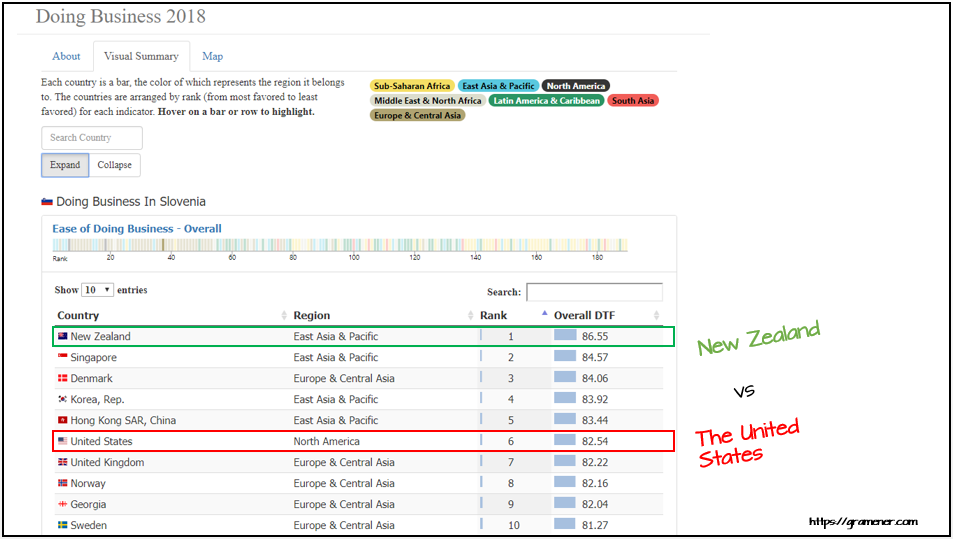
    For example, the World Bank releases its doing business project data every year, providing insights about countries with conditions for establishing businesses. It was launched in 2002 to measure the regulations applied to various small and medium-size organizations.

    A total of 190 economies were surveyed on 12 topics including employing workers, tax benefits and resolving insolvency. A visual summary of data on doing business in 2018 was produced to make these crucial insights digestible for businesses, which then could put them to use.

    The data science company that created the visualization took the data and plotted it on a world map. It added shades from red to green to indicate the least and the most favored economies for doing business. The data is made easy, appealing and comprehensive. Any business manager or executive can easily identify emerging economies for investment.

    Using visual data, insights such as the best and worst country for doing business and economy rankings are now obvious. Furthermore, companies can turn these insights into key decisions regarding expanding business across boundaries.

    Take a look at the example above: The United States is an economically powerful country; however, data tells that New Zealand tops the list of economies with ease of doing business in 2018 with 86.55 DTF*. Many countries, including Singapore, Demark, Korean Republic and Hong Kong, also rank favorably in the index.

    Three major reasons that data visualization can be crucial for any data-driven organizations are:

    1. Data visualizations amplify a story with pictures and visuals. Its impact on the audience is more powerful than bland numbers and text. Moreover, human minds are hardwired to remember visuals. Data visualizations tap into pictorial strengths to drive executive decision-making.
    2. Data visualizations make difficult data comprehensible. Business executives and key decision-makers are not masters in every field. They need comparative measures to drive their decisions. Data visualizations provide just that.
    3. Data visualizations help in decision analysis. It offers a platform to interact with the facts. Jeff Bezos said that not all the decisions are made by factual analysis. But whichever decisions can be made on facts, should be.

    Conclusion

    Data should be an influence to any major business decision. And so, data visualization is a powerful tool to bring dramatic changes to organizations. It can provide answers to many key questions, and make the data visually appealing, easy to play with and interesting to explore. CEOs and managers should emphasize the importance of the democratization of their data to add value to their processes.

    *DTF: Distance to Frontier. It is a score between zero to one hundred, which illustrates the worst and best performance of an economy observed on each doing business parameter.

    — Naveen Gattu

  • Get Testing Bottlenecks Out of Your Pipelines

    Get Testing Bottlenecks Out of Your Pipelines

    I first learned the term “deployment pipeline” when I read “Continuous Delivery: Reliable Software Releases through Build, Test and Deployment Automation,” by Jez Humble and David Farley back in 2009. End-to-end automation of the build, deploy, test and release processes kick in each time a team member commits a change to the source code repository.

    Chapter 5 of the book notes that the forms of testing common to all projects include manual test stages which “… assert that the system is usable and fulfills its requirements, detect any defects not caught by automated tests, and verify that it provides value to its users. These stages might typically include exploratory testing environments, integration environments, and UAT (user acceptance testing).”

    Humble and Farley include these manual stages in the deployment pipeline, also known as a continuous integration (CI) pipeline, build pipeline or delivery pipeline. However, from what I observe, I think a lot of times people forget about these important manual stages.

    Though we can do more and more with test automation, thanks to improving technology, manual testing activities are here to stay in most business domains. My own previous team realized this as we started to move toward continuous delivery (CD) a couple of years back, with twice-weekly deploys to production. Smaller changes and more frequent deploys means lower risk of regression failures. Yet, we still struggled with how to fit in important manual testing activities.

    Whenever my cross-functional delivery team has a problem, I look for a way to make it visible, to help us talk about it and brainstorm ideas to solve it. My “aha” moment around manual stages came when I learned techniques to visualize our pipeline from Abby Bangser and Ashley Hunsberger. My team knew we had these manual testing activities and that we wouldn’t feel confident about releasing changes without them, but we weren’t really thinking about them as stages in the pipeline.

    Visualizing Your Pipeline – Including the Manual Stages

    Continuous Delivery Pipeline
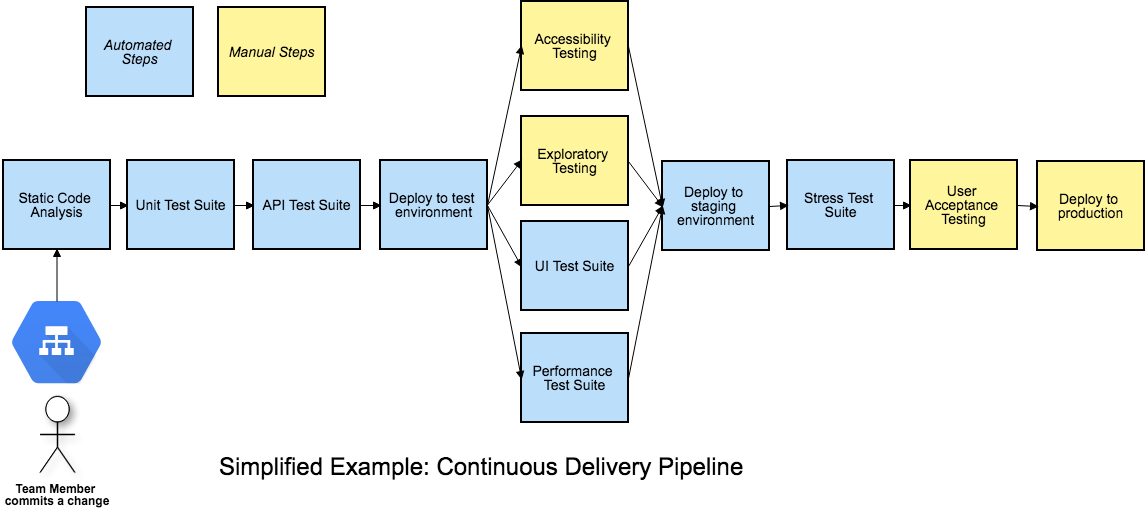
    Figure 1: A Continuous Delivery Pipeline (my diagrams are inspired by Katrina Clokie’s pipeline diagrams in “A Practical Guide to Testing in DevOps”)

    Getting your team together to visualize your pipeline is a great method to find ways to improve it. Gather around a table with cards or sticky notes, or draw on a whiteboard—what are all the steps in your pipeline, including the manual ones? In Figure 1, the manual stages in a team’s CD pipeline are shown in yellow. All the automated and manual things need to happen before the business decides to push the button and deploy to production. It’s easy to see that these manual stages can become a bottleneck. Manual exploratory testing is likely to take longer than the automated test suites. If user acceptance testing needs to be done by certain business stakeholders and they aren’t available at the right time, that holds up the release. If the team is looking to move to continuous deployment, where every change to the product goes out to production as soon as all stages complete successfully, these manual stages will be in the way.

    When you get your whole team including developers, database experts, operations specialists and product owners involved in solving these problems, you may discover innovative ways to approach them. In my team’s case, we decided everyone on the team needed to help with exploratory testing so we could do it in a timely manner. Testers helped the developers learn exploratory testing skills with hands-on workshops and by pairing with them. Then, each developer pair working on a story was tasked with doing the exploratory testing at the story level before declaring the story finished. We wrote exploratory testing charters at the epic or feature level as stories in our backlog. When enough stories were complete, anyone on the team, including testers and product owners, could pick up those charters.

    If we couldn’t complete all the necessary exploratory testing before the next production deploy, we used feature flags to hide the changes from customers until we could complete the testing. We could go ahead and deploy the changes and wait to release them once we felt confident they would not cause any customer pain.

    Asynchronous Testing Stages

    Using feature flags or toggles is a good way to allow the team to approach some manual testing activities asynchronously, so they don’t hold up the deployment pipeline. If some required manual accessibility, testing takes an extra day to complete or the UAT has to be postponed for a week, the deploy still happens. A change could be toggled on for a small percentage of users and observed in production to see if any unexpected behavior occurs. Whatever activities are needed to safely release a particular change don’t have to hold up other changes that are ready for customer use.

    Asynchronous stages in a deployment pipeline
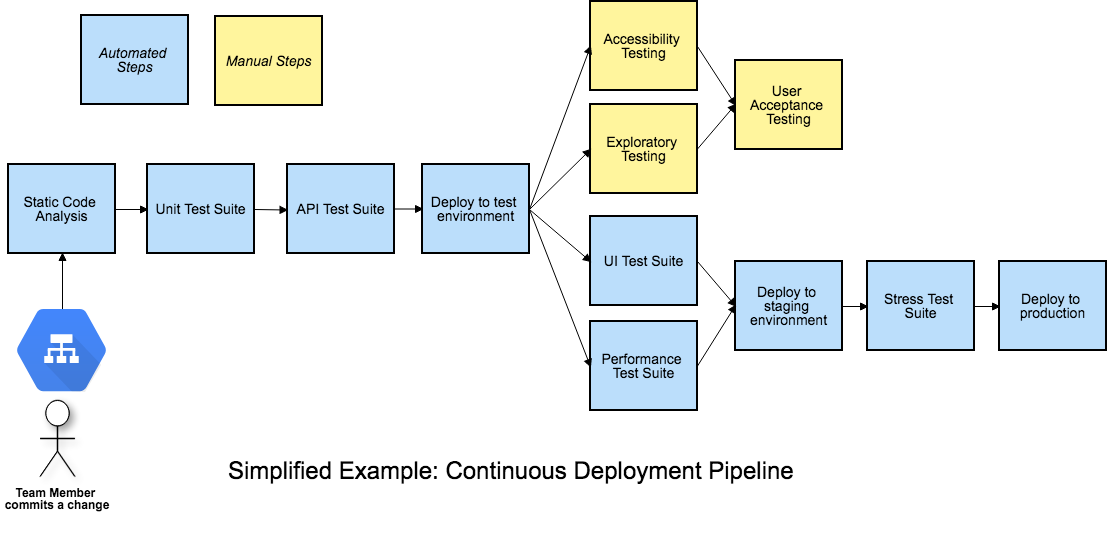
    Figure 2: Asynchronous stages in a deployment pipeline

    Figure 2 is an example of a continuous deployment pipeline, but this asynchronous approach to the manual stages works for continuous delivery as well. Each time a team member commits a change, if all the automated stages in the pipeline pass, the release candidate build will be deployed to production. The manual testing activities are not inline with the other steps and don’t hold back the deployment.

    If we’re ready to deploy a feature but need to finish those manual testing stages before we release it, developers can put in a feature flag set to “off” to prevent it from being exposed to customers. When the asynchronous manual stages are all complete and successful, the feature flag can be flipped on in production. This is the actual release, customers can now use the feature. The feature flag should be removed as soon as possible, as too many feature flags at once has serious risks.

    Using feature flags or toggles to permit deploying changes to production before all testing stages are finished is one way to avoid bottlenecks and succeed with continuous delivery or deployment. Continuous delivery and deployment success depend on doing frequent small changes, not big-bang releases. A lean approach to feature flags, keeping the inventory low, is advisable.

    Visualize It With Your Team

    We’ve looked at one way to keep manual pipeline stages from holding up deploys, but there may be other solutions for your team. And there are lots of other key success factors for CD, such as keeping changes small and frequent. There’s lots to discuss and brainstorm about as your team, or a representational cross-section of it, gets together and experiments with a visual model of your pipeline. Talk about what you need to learn from each pipeline stage, who needs to know it and whether the pipeline is providing actionable feedback.

    As a tester, I’ve sometimes questioned aspects of the pipeline that nobody else had thought about. Having team members with development, operations, database and other skills present means more potential for creative solutions. Our pipeline provides a major feedback loop and we want that feedback as fast as we can get it. Writing each stage on a card and arranging them on a table or wall often triggers ideas for parallelizing more stages or realizing a particular stage isn’t necessary or can be done locally by developers.

    Automate all the things where it’s feasible. Use the time you save to optimize the way you accomplish manual testing activities and possibly automate more of them. Master techniques such as feature flagging so that you can take the time needed to feel confident about every new feature you release.

    References

    “Continuous Delivery: Reliable Software Releases through Build, Test and Deployment Automation,” Jez Humble and David Farley, https://continuousdelivery.com

    “A Practical Guide to Testing in DevOps,” Katrina Clokie, https://leanpub.com/testingindevops

    “Feature Toggles, AKA Feature Flags,” Pete Hodsgon, https://martinfowler.com/articles/feature-toggles.html

    — Lisa Crispin

  • The Role of Bots in DevOps

    The Role of Bots in DevOps

    DevOps has evolved from its infancy into a mainstream focus area for a majority of CIOs. DevOps has become a main focus and has been shaping the world of software and infrastructure engineering and operations for the last few years.

    Some of the key DevOps trends include:

    • DevOps assembly lines automation.
    • Smart, actionable alerts from monitoring tools.
    • Monitor and orchestration infrastructure.

    Improved Collaboration

    With the increase of DevOps adoption, organizations today face many challenges in the end-to-end service delivery life cycle.

    • For applications with complex environment configurations, creating, setting up and deploying a new environment is costly, time-consuming and prone to errors.
    • Due to manual interventions, moving/promoting code across environments involves risks and may give rise to outages.
    • Development teams are looking to maximize change by writing new code or enhancing existing code, while operations teams are looking to minimize change to keep up with key performance indicators (KPIs) and service level agreements (SLAs). These goals are opposing in nature and create a culture of blame between dev and ops teams.
    • Organizations are unable to keep dev, test and production in synchronization due to process and tool gaps. A manual process cannot bridge this gap in consistency; thus, outages in production are common.

    Various collaboration mechanisms let teams work and learn together to produce better results. The figure below depicts the end-to-end life cycle of DevOps. Collaboration across the phases is essential to the success of your enterprise DevOps transformation.

    DevOps Lifecycle

    What are ChatOps and Bots?

    ChatOps is a term coined by GitHub to describe “putting tools in the middle of a conversation.” In a typical CI/CD pipeline, there are multiple tools that you interact with that have varied functionalities, such as source code management (SCM), defect management, continuous integration, continuous deployment and others. These are all discrete tools, but there is nothing that bridges them together. This is where ChatOps comes into play.

    A bot is a bridge between the collaboration tool and the DevOps tools. The bot receives a request from the user in the form of a chat command through a collaboration tool, analyzes the request and executes a set of commands on the target DevOps tool.

    The main components of ChatOps and bots are:

    Chat app/collaboration tool: This is the front-end chat system that connects the various stakeholders and enables them to interact between themselves and the systems around them.

    The bot: This is the core of ChatOps. A bot is the glue between your collaboration tool and your systems. It facilitates a two-way communication channel where you can fetch relevant information from the systems and act on the information received. A bot fits in between your collaboration tool and the DevOps tools, e.g. Hubot, Lita, ErrBot or AWS Lex.

    Target platform/infrastructure: Integration with the target platforms/DevOps tools is a key ingredient to a successful implementation of bots. These are the target tools and platforms on which the bot will execute the required commands. The tools integration allows your bot to communicate with tools and execute actions such as build, deploy, test, provision and scale infrastructure directly from the chat window.

    Where Bots Fit in the DevOps Pipeline

    Bots can prove to be an accelerator in various stages of the CI/CD pipeline. Below are the details of the integration with various DevOps tools in each phase of the life cycle:

    • Proactive planning – JIRA
    • Requirements management – JIRA
    • Continuous integration – Jenkins
    • Continuous deployment – Ansible, Chef
    • Continuous monitoring – Nagios, Grafana, Splunk
    • Continuous feedback – JIRA

    A chatbot plays a major role in bringing the different teams together into a single, persistent chat room to triage and resolve the issue at hand. In addition to just troubleshooting and triaging issues, bots can be used for various other business-as-usual jobs including:

    • Cleaning up servers.
    • Kicking off build and deployment jobs.
    • Rotating server logs.
    • On-boarding application on the monitoring tools.
    • Collecting metrics from tools such as Nagios or AppDynamics.

    Bot Technical Blueprint

    To achieve the aforesaid targets, we need to have a supportive bot platform in place. How closely the tools integrate with the bot ensures the quality of the implementation and opens new opportunities of automation.
    Bot Blueprint
    As the diagram depicts, the chatbot is hosted on a chat tool such as Slack. This can be on the cloud platform or an existing chat/communicator application. The bot is integrated with a key-value pair reference database, which is fed with the responses depending upon the activities or capabilities that have been fed to it. The key could be the name of the application to retrieve data from or any unique ID that would reduce the number of reads. A lookup of the defined key corresponding to the secondary key is performed on the response database and a response is sent back to the chatbot. Depending upon the number of outputs, the queries can be defined and stored in the response database.

    DevOps Bots: Use Cases

    Below are some examples of use cases for bots. This includes the complete life cycle of DevOps:

    Proactive Planning
    Create new user stories in sprint planning tools and assign sprints to teams. Update sprints and product backlogs.

    Build and Continuous Integration
    Execute build jobs and report back statistics of the build job. Perform daily/nightly builds and report on the status of the build to the relevant teams.

    Continuous Deployment
    Run deployment jobs and perform deployments across environments. Roll back deployments in case of failures, status checks, perform post-deployment actions such as JVM restarts.

    Infrastructure Provisioning and Configuration Management
    Kick off Chef jobs to provision infrastructure or provision application environments. Enable monitoring and restarting services and servers.

    Continuous Monitoring
    Provide application statistics or performing daily data lookups and grabbing metrics.

    Continuous Feedback
    Monitor application health and perform analytics.

    Key Measurement Metrics

    To achieve optimization and enhance performance of the continuous delivery process, metric measurement is the key. These indicators will help in taking certain corrective and preventive actions based on the results. Below are some of the key metrics indicators that can be measured.

    Effort Reduction
    Indicates the reduction of human/manual efforts for tasks such as triggering a build or deployment or collecting metrics from monitoring tools.

    Human Error Reduction Rate
    Reduction in the effort required due to rework caused by human errors.

    Reduce Issue Triaging time
    Indicates the time taken to resolve issues where multiple parties are involved and triaging of problems is required.

    Conclusion

    DevOps bots can significantly improve team efficiency, as well as a team’s ability to respond to emergencies. They save time and money, are fun to build and use and can have a positive impact on team morale, as well as increases the overall productivity of teams. This applies to both the engineering and operations teams. Enterprises embracing digitization are looking for partners with an engineering mindset who know how to bring in collaborative agile teams with the very latest knowledge of open source platforms and DevOps toolchains.


    Contact the Authors

    For more details please contact the authors on LinkedIn @
    Shriniwas Sathe
    Saswati Mohanty

    — Shriniwas Sathe

  • The State of Low-Code Development

    The State of Low-Code Development

    As enterprises continue to play catch-up when it comes to meeting their internal demand for new software services and applications, more enterprises—but still, only a minority—are turning to low-code development platforms to try to fill the gap.

    Low-code development platform provider OutSystems released its sixth annual “State of Application Development Report.” The report is based on surveys conducted in March of 3,300 IT professionals.

    The report found that a sizable minority (41%) of respondents are already using low-code platforms, while another 10% stated they were about to start using a low-code development platform. For comparison, in the 2018 report, 34% of respondents said they were using low-code development platforms and 9% said they were about to start using these platforms. Clearly, interest in these platforms is rising, if not modestly.

    Low-code development platforms strive to make software development more accessible. They do so by removing traditional coding interfaces with graphical user interfaces. And they typically target development toward a specific functionality, whether that be web applications, business process automation, IoT and, quite often, databases. The low-code development platform market is expected to grow to $27.2 billion by 2022 from $4.3 billion in 2017, an annual growth rate of 44%.

    The demand for software has never been higher. According to the OutSystems report, 64% of IT professionals said they have an application development backlog. For 19% of respondents, that backlog is deeper than 10 apps. While 50% said their backlogs have remained the same, 39% report that their app backlogs have improved over the past year.

    The time to deliver web apps and mobile apps is mixed. The 2018 OutSystems report found that 54% of respondents took four months or less to deliver a web application. This year, 61% said it takes them four months or less to deliver a web application. Mobile app development has changed a little: 55% on average said they deliver apps in four months or less.

    According to OutSystems, enterprises using low-code development platforms are 12% more likely to report that their backlogs have improved year over year.

    Those findings echo similar surveys. For instance, a survey released earlier this month from low-code provider Appian found that nearly 80% of its respondents believe that using low-code can free developer time to work on higher-level projects. That survey also found 86% of IT developers agree that emerging technology is increasing the pressure on the IT organization.

    One thing is certain, the demand for software isn’t going to let up anytime soon. According to the OutSystems report, the number of applications respondents plan to deliver this year is 60% higher than last year. For those with more than 500 employees, 65% said they had plans to deliver 10 or more apps, 38% plan to build 25 or more apps and 15% said they plan to develop 100 or more apps this year.

    Despite the high demand for enterprise software, only 36% of organizations have larger development teams than they did a year ago. However, that’s likely not due for lack of trying to hire and retain development talent. The OutSystems survey found only 15% of respondents described developer recruitment as easy. “For many organizations, retention of developer talent appears to be an equally grave challenge,” according to the report.

    With conditions like that, it’s only reasonable to expect low-code development platform popularity to continue to rise.

    — George V. Hulme

  • The Terrain of DevOps is Strewn with Pitfalls

    The Terrain of DevOps is Strewn with Pitfalls

    As Gene Kim, one of the leading thinkers in DevOps, once said, “DevOps is not about what you do, but what your outcomes are.” What he’s telling us is that DevOps is about enabling a rapid flow of work that transitions from development to testing to operations, but the bottom line is that it’s about achieving results. Unfortunately, this too often gets lost in modern-day DevOps practices.

    In this article, I will discuss five common pitfalls that occur in DevOps if you don’t pay attention to the endgame and how your organization can avoid falling victim to them.

    DevOps and Automation: Measuring the Wrong Outcomes

    Some people believe that, at its core, DevOps is about trying to automate everything. But ask yourself this: Once you automate, are you really delivering a better outcome?

    The answer is not always yes. While metrics such as deployment frequency or mean time to repair (MTTR) are interesting DevOps indicators, they are no more interesting to determining if your team is delivering actual value than measuring the number of lines of code submitted or counting the number of keystrokes by the development team. You measure outcomes by determining a baseline from where you start and compare that with where you end.

    We need to understand that DevOps is about much more than automation; it’s about the entire pipeline and how your team moves from ideation to delivery to production. Even large companies with world-class DevOps teams don’t always clearly see the problem and can struggle managing the value stream and putting together multiple pipelines. An anonymous but real-life example of this is an organization I know that had been doing DevOps for 18 months, yet hadn’t delivered anything into production in that span. Are they really doing DevOps? DevOps is a process, but if it produces zero value, it’s not delivering on its promise.

    The key is focusing on delivering value and measuring value delivery into production. However, before you can begin measuring value, you have to define what it means to each individual deliverable. Common metrics include the number of story points, actual revenue from product comparison and customer satisfaction. With your clearly defined metrics in place, you can measure value as it gets delivered to the customer.

    DevOps and Fragile Environments

    One Achilles’ heel in the DevOps process is the pre-production environments where code gets deployed and tested. Automating a delivery pipeline relies completely on code being built and deployed to various environments. Fragile environments mean that the developers and testers are wasting time dealing with problems originating from the environment and not the code itself.

    While we wish all environments could be on-demand; the fact is, most are not. Another DevOps expert, Randy Bias, has an analogy about pets versus cattle in describing servers, and the same analogy can be used for environments. If environments are not standardized and repeatable, you have to be willing to move on from it like a farmer moves on from livestock; you can’t hold onto sentimental attachments like we have with our pets. What’s most important is that in no case can an environment be singular in nature.

    One element of the solution is to create code and automate, but the key is building up environments that are complete. Every environment needs proper builds, proper data and proper tests validating the environment. Additionally, the automation must have the stability to perform successfully every time. If you have piece of automation that fails even just 5% of the time, that’s unacceptable.

    The only way automation works in an environment is if you can trust the environment. When the environment is unstable, it’s like playing Russian roulette: No one knows exactly where the danger lies. It could be in the environment, the code, the data, the middleware … a number of places. When a problem arises, developers are often the last line of defense, but dealing with an issue such as this pulls them away from getting real work done.

    Disconnected Teams

    On this point, I’d like to share a warning: Disconnected toolchains lead to disconnected teams. The planning, development and testing teams can lack cohesion, and the release and operations teams often struggle to be on the same page. Each of these groups have their own tools and management, but they need to be able to communicate with each other effectively to make things work smoothly. In an ideal world, planning initiatives would flow into features for the development and testing team, which would flow into release pipelines and operational changes. Every team still can speak its own language, but the tools need to be interconnected and unified across the teams.

    Mismanaging Hybrid

    The term “hybrid” has many different uses in the software development space. Hybrid methodology refers to combining waterfall, agile and DevOps practices. Hybrid environments means your environment is housed in multiple locations such as the cloud, on-premises, virtual or code. There’s also hybrid geography, hybrid architecture, hybrid style—the list goes on.

    The key to transitioning to DevOps is properly managing the different types of hybrid. If you can’t manage hybrid delivery, you can’t manage your entire delivery and you can’t improve your delivery holistically. Organizations must learn to manage in a world of hybrid delivery and be able to handle cloud and on-prem, as well as teams all over the planet.

    Fixing Non-Constraints

    The Theory of Constraints is about pinpointing the bottlenecks in your process and fixing them. Any work that’s not focused on eliminating the constraint will not result in improvement and could be considered a waste of time.

    It’s important to remember that if you haven’t fixed the bottleneck, you haven’t improved anything. At the same time, if you’re automating the non-constraints, you’re wasting efforts by trying to improve what doesn’t need improving.

    As we’ve pointed out, DevOps does not equal automation. If an organization has messy processes and tries to automate them, they’ll be left with an automated mess. Therefore, organizations will see the best results from automating their constraints and just as important, not automating the non-constraints.

    — Jeffrey Keyes

  • Mainframes: The Cloud Before the Cloud

    Mainframes: The Cloud Before the Cloud

    Here’s something to think about: Despite the fact that IBM stopped manufacturing personal computers in 2005, deciding instead to focus on higher margin business services, the company continues to produce mainframes and by all estimates will continue manufacturing them well into the future. The question is, why? The answer: because there is still significant demand for this type of hardware.

    The fact is that a mainframe is a monster when it comes to computation and processing transactions. One mainframe can process 2.5 billion transactions daily. That’s the equivalent of 100 Cyber Mondays in a single day. To give you a clearer idea of the immensity of scale, keep in mind that Cyber Monday sales in 2018 were $7.9 billion. This translates into a mainframe being able to handle a bit more than three-quarters of a trillion dollars in transactions each day, which is almost twice the yearly GDP of Austria!

    As I said, the mainframe is a workhorse. Yet, its power and potential are hidden from most people who work in the modern cloud. This is surprising because there’s a good argument to be made that, given its power and scalability, coupled with its support for a large number of concurrent users, the mainframe was the cloud before there ever was a cloud. However, the technology is practically unknown among younger developers, mostly due to cultural reasons and a lack of historical awareness. That more people are not taking advantage of the tremendous opportunities at hand is a misfortune. When it comes to mainframe computing, there’s a lot of interesting tech to be learned and a good amount of money to be made. It’s just a matter of increasing awareness to do this. A good place to start is to redefine the narrative.

    Allow me to elaborate.

    A Special Club

    When mainframes appeared on the commercial landscape, few people interacted with computers and even fewer worked with them directly as programmers or system administrators. Just as in a modern data center, the machines were isolated in climate-controlled rooms to which few had access. Access to the actual physical machine was restricted to a special few. But unlike today, when restricted access is due more to security concerns because there are a lot more people around who are potential black hats, back then access was also restricted due to the exclusivity of the profession.

    In the 1950s, 1960s and well into the 1970s, not just anybody could program or be a systems administrator. You could go to a technical school to learn to become a computer operator, which meant you could work at a terminal as a bank teller or travel agent. Or you could learn to become a data processing clerk and work in a back office at a brokerage firm. But to learn to program, you had to go to college. Then after college, you had to go to work for a company or organization that actually used computers in day-to-day operations. These were banks, insurance companies, major manufacturers such as General Motors and General Electric, airlines, very large retailers and government. Computing was a club and you had to be well-educated to get in and be well-liked by the organization to keep your membership. Yes, there were the outliers—Gates, Allen, Joy, Wozniak and Jobs—but for most people, the career path to being a programmer was college and then into big business or government.

    As a result, computing had an air of mystery and magic to it. Remember, until the mid-1980s, most people had never touched a computer. It was the stuff of moon landings and election night predictions on network TV. Then the PC came along and changed everything. Within 10 years computers became commonplace. Even elementary schools had them—at least, those that had the budget and foresight. The power that business applications such as the spreadsheet program Lotus 1-2-3 brought to small business motivated even the dry cleaner on Main Street to plunk down the thousands of dollars it cost to buy a PC. The productivity boost was worth it. Also, since the dry cleaner actually owned the machine, the dry cleaner’s kid could learn to program on the box unencumbered, when it wasn’t being used during business hours. Remember, the Microsoft DOS operating system that shipped on every IBM-compatible PC came bundled with the programming language BASIC. You didn’t need to go to college to learn to program; all you needed was a book.

    So, PC programming took off. Instead of having to go through the effort required to get into the special club the mainframe programmers belonged to, PC programmers started their own clubs and anybody could get in. All you had to do was show up. PC programming became a meritocracy. Also, it became extremely lucrative work. There were a lot of PCs being shipped and the appetite for applications to run on them was enormous. The unlikeliest of people, such as Lotus Software founder Mitch Kapor and his sidekick, Grateful Dead lyricist John Perry Barlow, became wealthy, thanks to the PC.

    The PC became cool and programming for it became cooler. But there was a fact that got obscured as the popularity of the personal computer grew: Compared to the mainframe, the PC was a toy—a productive toy, a liberating toy, but a toy nonetheless, very much in the same way that a go-kart is a toy compared to a Formula One race car.

    Feature for feature, the mainframe ate the personal computer’s lunch. The IBM System/370 Extended Architecture Mainframe released in 1983 was a 31-bit machine that could support up to 8MB of memory with a processor running at 38 MHz. By comparison, the IBM PC-XT, also released in 1983, was an 8-bit machine that shipped with 128KB of RAM and an 8088 processor that ran at a speed of 4.77 MHz.

    But, as the saying goes, “You should never underestimate the value of cool,” and the PC was very cool. It got a lot of attention while the mainframe stayed hidden away in climate-controlled rooms in the basements of banks and insurance companies. Yet, the mainframe was more powerful, and whereas the PC was meant to meet the needs of a single user, a mainframe can service thousands.

    Built to Scale Built from Inception

    Mainframe computers from the start were designed to support hundreds (if not thousands) of users. However, more importantly, mainframes were and are designed to support millions of concurrent transactions. When you think about it, while it’s possible for a high number of user requests to exhaust CPU utilization in a typical commodity machine—which is the reasoning for being able to scale up CPU count by increasing VM allocation in the cloud-based computing cluster—the real burden on the CPU is not so much the request count but the computing burden that each request incurs. For example, one request getting a .JPG of a cat will incur nowhere as much burden as a request that needs to convert an audio file in .WAV format to MP3.

    The need to alleviate request burden has been around since bank tellers working in the various branches of a big bank had to make deposits and withdrawals at the same time. Mainframe engineers addressed the problem decades ago. Technologies such as batch processing and message queues, which make computational activity asynchronous and are optimized to fully utilize CPU capacity efficiently, were and are commonplace in the mainframe landscape.

    IBM’s 360 mainframes supported batch processing in its OS/360 system starting in 1964. Batch processing allows thousands of instructions to be performed on terabytes of data at pre-scheduled times (usually “off-hours”), all without human intervention.

    Message queuing allows processes to take data in the form of a message stored in a message queue and perform computational activity according to the data in the message. Processing is performed independent of a request in an asynchronous manner. When processing is complete, a new message is created and sent on to another queue, where another process will do more processing or create a notification indicating that work is complete. IBM MQSeries was an early message-queuing technology first used in 1993 at State Street Bank well before the internet became commonplace.

    The reason that support for user and transactional concurrency was possible in mainframes is due to a technology that is commonplace in today’s cloud environment but was unheard of among PC users back in the days when most data was exchanged between standalone PCs using floppy disks. That technology is virtualization.

    Virtualization Takes Mainframe Computing to the Next Level

    Today we take virtualization—the capability to have software simulate hardware—for granted. Without it, we couldn’t have native cloud providers such as Amazon Web Services, Google Cloud and Microsoft Azure. These services rely on virtualization to provide the segmentation and computational isolation required to meet the needs of the modern computing. Yet, as essential as virtualization is in the world of commodity cloud computing, putting a layer of virtual machines on a commodity PC is a fairly recent event in the history of computing. VMWare, VirtualBox and KVM became mainstream in the mid-2000s. On the other hand, virtualization has been part of mainframe technologies since the mid-1960s. Virtual memory appeared in the mainframe in 1965. Machine virtualization was introduced on the IBM 370 mainframe in 1972 and is still an important part of the mainframe computing experience today.

    Every single person who logs onto the mainframe when working in a native mainframe operating system gets an identical address space. You can think of each address space as a standalone virtual mainframe system. These address spaces are created instantly and are protected from interfering with each other. Also, many companies create logical partitions of their hardware called LPARs (logical partitions). The logical partitions are controlled by a native firmware hypervisor called PR/SM (pronounced Prism).

    The value that LPARS provide is a further separation between environments. This means not only can you separate users, but you can also create distinct computing environments such as those created when virtualizing X86 machines. For example, you can have a shared development environment as well as environments for testing, staging and production. You can allocate resources and security access to a particular environment based on need, just like you would in a data center full of commodity machines. This means you can configure production systems to be more secure and have higher execution priority and more resources such as memory. In fact, according to the U.S. government, from a security perspective, virtual machines created on the mainframe are considered distinctly separate machines.

    LPARs running on the same hardware or different hardware under the native mainframe z/OS operating system can be linked together as a Sysplex for redundancy and to easily provide additional capacity. Dynamic Virtual IP Addressing (DVIPA) is used to dynamically route IP traffic across multiple LPARs in a Sysplex. This is analogous to being able to tie together a variety of web servers behind a load balancer or organize them within a Kubernetes cluster. Being able to tie computers together is an important feature for making systems scalable. Also, linking computers across geographic regions increases performance. It’s always faster to work with a machine that’s closer to you than one that’s further away. As mentioned earlier, being able to scale systems up and down is a key feature of cloud-based computing. Dynamic connection, which is part of mainframe architecture, is critical for scaling to work.

    The important thing to understand is that the stuff we consider to be modern in terms of the machine virtualization that we rely upon to make the cloud work has been in play for years on the mainframe. Also, virtualization on the mainframe makes it possible for programmers and system administration staff to work in a variety of operating systems and programming languages as we’ve come to expect in commodity cloud instances. Machine virtualization allows mainframes to support Linux. Whether the computing environment is virtualized Linux or native mainframe, developers can code in Java, C/C++, Python, Perl and a variety of other languages, including something as new as Swift. But, then again, the mainframe was always intended to support many programming languages.

    Even back in the ’60s and ’70s, programmers could write in COBOL, PL/I, job control language (JCL) and Customer Information Control System (CICS). Also, writing low-level code in Assembler has always been possible. Clearly, the versatility that modern developers enjoy programming in a variety of languages in a cloud environment has been part of mainframe computing for a while. Yet, the benefit has never been at the forefront of developer awareness. Maybe it’s time to change the narrative.

    Changing the Narrative About Mainframe Computing in the Cloud

    As I stated at the beginning of this article, IBM continues to make mainframes because there’s a growing demand for the technology—particularly as smartphones and IoT devices proliferate worldwide. Netflix might be spinning up containers on a commodity machine in a data center to let you view past episodes of “Orange is The New Black.” But when it comes time to pay for your Lyft ride using your iPhone, that credit card transaction will most likely be processed on a mainframe that’s providing service via some sort of API gateway.

    There is little benefit to arguing that mainframes should or can be used interchangeably with commodity servers. That’s like saying a fleet of automobiles can be used interchangeably with a city bus. You can do it, but it doesn’t make much sense. Each technology has benefits that when used together, make the overall transportation system more efficient. The trick is to understand where and how the technologies fit together in the big picture. In this case, the big picture is the cloud.

    The old narrative around mainframe technology is based on perceptions that are no longer applicable. The modern mainframe is no more centralized than the single building that houses a regional data center. In terms of programming languages, mainframes moved beyond FORTRAN and COBOL decades ago. Current mainframe virtualization technology makes it possible to run programs written in just about any programming language. And, mainframe emulators, such as ZD&T, make it possible to get the hands-on experience necessary to get familiar working in a mainframe environment.

    The Perceptions of the Past are No Longer Applicable

    The modern mainframe is a powerful resource that provides extraordinary benefits for cloud computing. The new narrative is that the mainframe is modern, adaptable and well-suited to accommodate a very high volume of transactions at lightning-fast speeds. And, it’s a good way to make good money.

    As the current workforce (which is admittedly aging) approaches retirement, a new breed of mainframe developer will be needed to continue the work of making the mainframe a mission-critical resource in the modern cloud. In addition to understanding the essentials of mainframe computing, these developers will need to be well-versed with the modern tools and techniques that drive cloud computing. It’s an investment that I’ve urged many up-and-coming developers to make.

    Putting It All Together

    Let me share a piece of personal history: A while back I needed to do some programming. So, I went to my desk, logged into my system, wrote some code and ran it. It worked like a charm! I saved my work, finishing up just in time for dinner. A while later, it was again time to program. I went back to my desk, logged into the system and coded away. Just another day of slinging the code, right? Well, not really.

    My first coding session was in 1975. “A while later” is today. Forty-four years have passed. Back then, I was working on a mainframe that was 50 miles away. Today, I logged into an online programming environment that was also miles away, maybe even halfway around the world. That’s how it is with cloud computing: The resources are any way at any time.

    Interestingly, despite the passage of a significant amount of time, my current developer experience is not that different than the one I had decades ago. It’s still just me and a terminal. Back then, the terminal was a screen full of green characters. Today, my terminal is able to accommodate a variety of media and input devices. But, at the other end of the wire, who knows what’s going on? For all I know, I might still be connecting to the same mainframe I used back in 1975. Which is my point.

    Much of what we consider new and wonderful about cloud computing today has actually been around for a while in mainframe technology. In many ways, the mainframe was the cloud before the cloud. And, it’s still a powerful resource for what we have come to know as modern cloud computing. Given its power, versatility, scalability and support for modern DevOps tooling, the mainframe is a perfect resource for today’s and tomorrow’s cloud computing infrastructure. It’s a computing resource that we’ll do well to take advantage of as we move forward in our development efforts on an increasingly connected planet.

    — Bob Reselman