Category: Enterprise DevOps

  • Nagios is not a monitoring strategy

    Nagios is not a monitoring strategy

    When I visit clients to talk about DevOps, I usually ask them what their monitoring strategy is. Too often, the answer I hear is “We use Nagios”. I think Nagios is a great tool, but it sure is not a strategy. Nagios does a good job of monitoring infrastructure. It will alert you when you are running out of disk, CPU, or memory. I call this reactive monitoring. In other words, Nagios is telling you that your resources are getting maxed out and you are about to have issues. Proactive monitoring focuses more on the behavior of the applications and attempts to detect when metrics are starting to stray away from their normal baseline numbers. Proactive monitoring alerts you that the system is starting to experience symptoms that can lead to a degradation of performance or capacity issues which is more preferable than Nagios telling you are about to be screwed. With reactive monitoring, it is not uncommon that customers start complaining about the same time that the Nagios alerts start going off. The goal of proactive monitoring is to head off issues so that customers don’t even notice.

    The next question I ask is “What things are you monitoring?”  A typical answer usually revolves around various infrastructure assets and databases. That’s a good start but there is much more to consider. But first, let’s talk about why proactive monitoring is so critical. In the pre-cloud days we used to ship software to our customers where they would install the software, perform capacity planning tasks, manage the infrastructure, and operate the day-to-day activities. Once we shipped the code we were done. In today’s world, we are no longer shipping product. Instead we are delivering services that are always on. The customer no longer owns and operates the infrastructure and the software. Instead they pay for a service and expect that service to run reliably all the time. To meet those expectations, we need a more robust monitoring strategy. We need to monitor more than just the infrastructure.

    A good monitoring strategy starts by identifying all of the actors who needs access to data and all of the categories of data that needs to be tracked. Some metrics are monitored in real-time while others are mined from log data. Every good monitoring strategy is accompanied with a sound logging solution. In order to perform analytics to predict trends within the data, one must collect various data points ranging from customer usage activity, security controls, deployment activities, and much more. The following presentation goes into much more detail about the different areas that should be monitored and why different actors need these data points to perform their jobs.

    [slideshare id=33320431&doc=monitoringstrategies-0408014v1-140409081614-phpapp01]


    The bottom line is, before building in the cloud, it pays to invest some time into a sound monitoring strategy. I have seen too often where teams don’t think through how to support these highly distributed, always on SaaS solutions and end up delivering software that does not meet the reliability and quality expectations of  customers. Monitoring provides feedback to developers, product owners, operators, and even customers so that systems can continuously be improved. Nagios is great, but there is no single monitoring solution that can implemented to effectively operate today’s always on services.

  • Not all collaboration types are equal

    Not all collaboration types are equal

    Talking about collaboration in general terms is easy. I’ve done it and so has everyone else. It’s time now to dig deeper into the specifics of collaboration, meaning the different types – asynchronous vs. synchronous, vertical vs. horizontal – and how different companies fit into the magic collaboration quadrant. And yes, the quadrant is indeed magical.

    Let’s start with the two types of collaboration that are time-relevant, asynchronous and synchronous. Asynchronous collaboration takes place outside of real-time. The best example of a ubiquitous asynchronous collaboration tool is email. You send an email and the receiver has time to digest the information. The drawback to asynchronous communication is that it’s inadequate as a means of communicating a sense of urgency. You have to wait for someone to respond to an email and that lack of immediacy can cause damage in troubleshooting or problem solving situations. Email replies tend to include the original message for context because you can’t rely on the timing of the message to keep the context.

    On the other side of that collaboration coin, you have synchronous collaboration. Synchronous communication takes place like a conversation and more closely resembles a face-to-face interaction. A chat session is the ideal illustration of this concept. The obvious benefit to synchronous collaboration is the ability to send and receive information right away. This adds to the feeling of immediacy and tends to provide a more effective means of working together to solve issues in real-time.

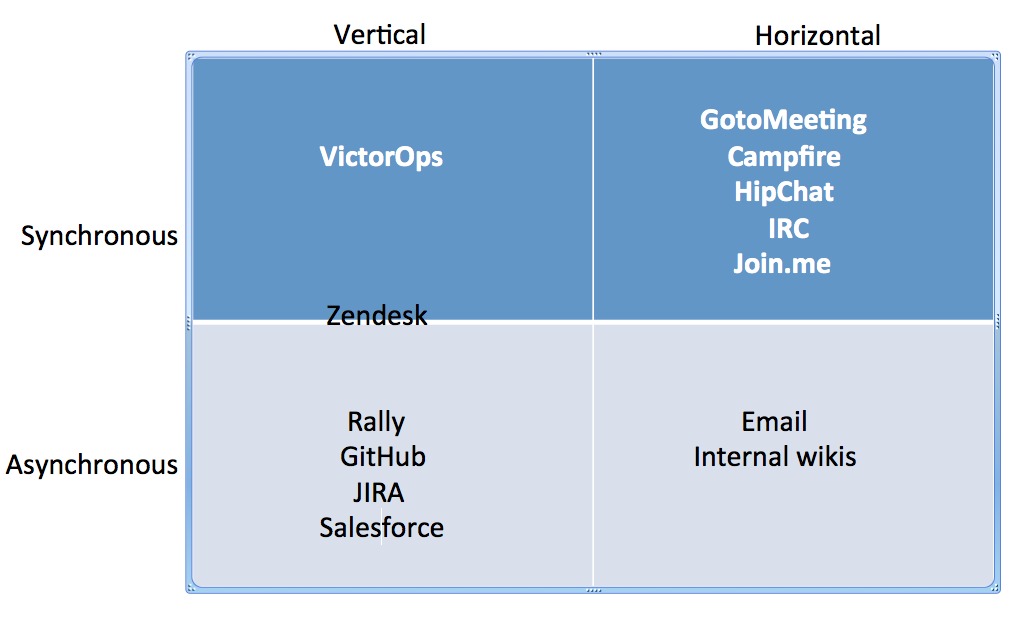
    Now that we have that covered, it’s time to move to the other defining aspect of collaboration: whether it’s vertical or horizontal. Vertical collaboration consists of problem solving tools that are domain-specific. An example of a vertical collaboration tool is one built for certain parts of the business like Salesforce for the Sales & Marketing teams or Rally for the development team. Horizontal collaboration consists of non-domain specific tools, meaning that they have potential use across all teams of an organization. Project management tools like Campfire or remote meeting solutions like Join.me or WebEx are examples of horizontal collaboration tools which tend to be widely adopted but lack the ability to really go very deep in helping in a domain-specific way.

    Check out the quadrant I created to better show where different companies currently fit into the ever-growing collaboration landscape, based on the definitions provided above.

    collaboration_quadrant2

    When looking at the state of collaboration tools, it’s interesting to note where most companies land within the quadrant. Why so few vertical synchronous ones? I’ll answer that next time.

  • Automation versus Orchestration

    Automation versus Orchestration

    Yes, Virginia, there is a difference.

    One of the things devops practitioners are tasked with is the provisioning and configuration of all sorts of infrastructure.  Application servers, web servers, load balancers, proxies and database servers are among the lengthy (and no doubt growing) list of “boxes” devops needs to get up and running to support just about any given application today. One of the key value propositions of a devops approach to operations is that it can reduce the time it takes to get applications to market by getting them up and running in production faster. That’s increasingly important as we move into the Era of Things, driven by extreme connectivity of everything, because all those “things” need are going to need to be talking to applications on the back side.

    So speed is of the essence, but not at the cost of accuracy. We’re encouraged, then, to automate tasks and orchestrate processes to achieve that speed. The side effect of codification of tasks is higher accuracy (aka fewer mistakes).

    So far so good.

    But you may notice that I have (and will continue to) clearly delineate between “automate” and “orchestrate”, between “task” and “process”.

    The reason for that is that, simply, they are not the same thing. We should strive not to confuse these two because while the two share some benefits, there are other benefits that are achievable only by one or the other – or the combination thereof.

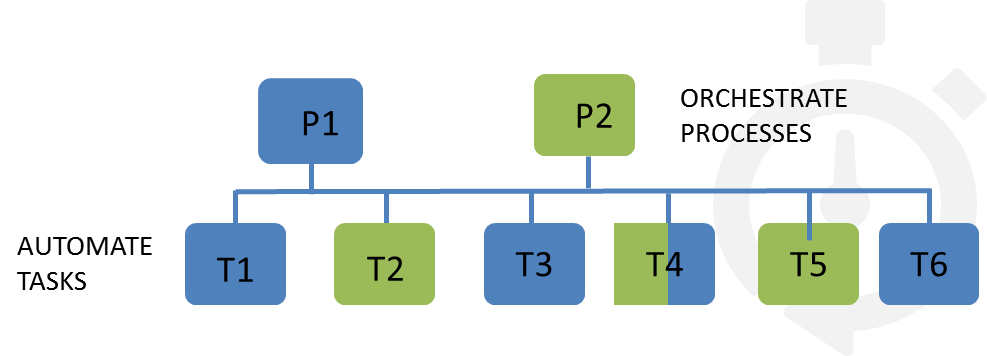
    Process optimization, for example, can’t be achieved by simple automation. Automation is concerned with a single task – launching a web server, configuring a web server, stopping a service. Orchestration, however, is concerned with automating, if you will, the execution of a workflow – of a process. A provisioning process may be comprised of multiple tasks and involve multiple systems. An “application” is not just a single server, after all, it’s likely several servers – web, app and database in a traditional three-tier architecture.

    The goal of orchestration is not just to automatically execute a service, which brings speed to the deployment process and gets applications into production faster. It also affords an opportunity to streamline – to optimize – those processes for even greater gains in deployment velocity.

    One of the simplest ways to optimize a process is to eliminate repetitive steps. This entry on Vagrant explains it fairly well :

    “We could just SSH in and install a webserver and be on our way, but then every person who used Vagrant would have to do the same thing. Instead, Vagrant has built-in support for automated provisioning. Using this feature, Vagrant will automatically install software when you vagrant up so that the guest machine can be repeatably created and ready-to-use.” [emphasis mine]

    — Vagrant Docs “Getting Started | Provisioning”

    Now certainly the step of installing a web server on a new box with vagrant is hardly all that time consuming, it’s just a single line of text. But every line of text must be manually typed, and that introduces the possibility of fat fingering the command, which either consumes time in fixing it or introduces an error into the system. Neither are desirable results.

    automate-orchestrate

    Ensuring that the process is repeatable and orchestrated by automating all the tasks that comprise that process an optimize it by eliminating redundancy. That results in greater deployment velocity.

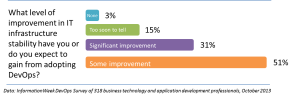
    Recognizing that processes should be comprised of composable tasks offers a higher degree of reuse across operations. The task of provisioning and configuration a web server with the appropriate base software means consistency, aka standardization, across all applications. Processes that take advantage of standardization result in greater infrastructure stability, another benefit often cited by organizations that have adopted a devops approach to operations.

    iweek-devops-stability

    The key here is to recognize the difference between automation and orchestration and how they relate to one another. Automation is about codifying tasks and orchestration is about codifying processes. Orchestration takes advantage of automation by reusing these basic building blocks.

    There is a difference, and done right, the two play off one another to result in streamlined, more accurate execution of operational processes that speed up successful application deployments.

  • A Winning DevOps Approach for Established Enterprises: Pace-layered

    A Winning DevOps Approach for Established Enterprises: Pace-layered

    Does your bank offer the ability to deposit a check by taking its picture with your smartphone? When that feature debuted a few years back, I remember thinking it was interesting and convenient enough that if my bank didn’t offer it soon, I’d be willing to switch to one that did.

    I bring this example up for two reasons: one, it’s a microcosm of the larger race to innovation that is happening in every company and industry as we speak; and two, it involves banks, which are good touch-points for a discussion about the unique challenges established enterprises face as they attempt to implement DevOps practices in their IT organizations.

    We know that DevOps means incorporating best-practice application delivery methods that improve communication, integration and collaboration between development and operations, but what is its ultimate goal? Quite simply, getting high-quality services to market faster than competitors – at a cost that aligns with both IT budgets and business goals. And as my check-depositing story illustrates, if you’re not first in the market, you at least need to be nimble enough to catch up, or you risk losing customers.

    For long-time enterprises, this can be easier said than done. In my previous blog about DevOps culture, I used Etsy as an example of an organization that has had great success with its DevOps transformation, but the e-commerce company has been around for less than a decade. Its young IT architecture is apples to the oranges of established enterprises, whose complex environments often comprise a mix of legacy and modern technologies that have been cobbled together over time.

    As a result, the DevOps journey is typically longer and more difficult for such organizations – but that doesn’t mean they can afford not to pursue it.

    Improving Deployment Practices at Every Infrastructure Layer

    When you look at the IT infrastructure of an established enterprise, you normally find three layers of technology. Let’s call the first “systems of record.” These are the legacy transactional systems (often mainframes) that have been with a company since the beginning. They do their jobs well, but their size and inflexibility make them resistant to the type of Agile development that DevOps typically embraces.

    The next layer is “systems of differentiation,” or the various hardware, software and middleware components an organization accumulates as it grows, merges with/acquires companies and enters new markets. While these systems are often more Agile-ready than the systems of record, their decoupled/distributed nature can complicate and slow down development and deployment processes.

    Finally, there is the “systems of innovation” layer, which is made up of mobile and Web applications and leverages the latest technologies. Because of its light footprint and flexibility, this layer is the most adaptable to DevOps practices. In fact, as you move up the layers from systems of record to systems of innovation, the holy grail of high-quality, fast and low-cost deployment becomes more and more attainable.

    What does this mean from a macro perspective? Basically that established enterprises need to take a pace-layered approach, where application delivery occurs at different paces within the different areas of their architectures. The point, though, is to improve in each layer.

    So if an organization pushes out a mainframe update once per year, perhaps it can move to a bi-annual schedule (with support from the right people, processes and technology, of course). On the other hand, a Web team that publishes updates once or twice a week could leverage DevOps tactics and technologies to adopt a daily update cadence. Bottom line: Different deployment paces are fine across layers, as long as improvements are occurring across the board.

    Kick-starting the Journey with Service Virtualization

    Now that we know why the DevOps journey can be difficult for established enterprises, let’s look at how one such organization, namely Union Bank, overcame these challenges and achieved success.

    According to an article on Bank Systems & Technology, Union Bank was looking for ways to compete with top-tier banks, so it began “acquiring other institutions, updating legacy systems and launching new front-end applications.” In order to support these efforts, the bank implemented a service virtualization solution, which simulates constrained or unavailable systems across the software development lifecycle (SDLC). This allowed its developers, testers and performance teams to work in parallel for faster delivery and higher application quality and reliability.

    Here are some of the results Union Bank has achieved since:

    • Cut testing environment setup time from 42 days to 3 days
    • Slashed three and a half months from mobile and Web application development time
    • Reduced the cost of testing cycles by 65 to 85 percent

    Obviously, a service virtualization solution is only one piece of the DevOps puzzle, but Union Bank stands as a powerful example of how a long-standing enterprise can leverage such a tool to be more innovative and nimble in the marketplace.