Category: Blogs

  • What is Security Policy Orchestration and Why Should DevOps Teams Care?

    What is Security Policy Orchestration and Why Should DevOps Teams Care?

    After attending the DevOps day I wrote about in my last post, I wanted to take a minute to explain exactly what Security Policy Orchestration actually is so we can begin to understand how the two concepts overlap.

    Simply put, Security Policy Orchestration is intelligent network change automation. It goes beyond simple task automation by truly understanding the network through simulation and analytics. It also gives security people an extra level of governance and control, which is so critical to assure security and business continuity.

    Security Policy Orchestration reflects the growing relevance that managed security policies are having on IT systems.   In network security lingo, security policies are firewall policies, but can also apply to Access Control Lists (ACLs), router and load balancer configurations.  Managing security policies is an arduous task that requires automation, and Security Policy Orchestration has emerged in response to numerous factors happening in tandem – mainly, that:

    • Business agility is gaining importance as a key competitive factor. This is creating an increased demand for automation across IT and, specifically at the network layer.
    • IT organizations are pressured to match the speed, convenience and self-service provisioning the cloud environment offers for internal application deployment.
    • Enterprise networks are growing larger and more complex with numerous traffic routing and shaping technologies to service multiple data centers.
    • The widespread use of stateful and next-gen firewalls for external and internal network segmentation has significantly increased the size of the enterprise firewall estate, forcing security policies to morph into complex rule sets that map how business is conducted over the network.

    The collective impact of these developments on network and security operations tasks is having a profound impact on people, processes and technology, including DevOps groups, who like their Security Operations (SecOps) brethren, are under pressure to roll out services faster.

    Security Policy Orchestration helps to alleviate that pressure, enabling SecOps teams to keep up with the demands of the business while ensuring security and preventing an outage or a breach.  Being able to automatically generate, provision and synchronize Security Policy changes across a growing set of systems – with security, compliance and governance concerns accounted for – means that security will not become a bottleneck that slows down DevOps teams.

    While Security Policy Orchestration evolved out of network security operations, its benefits transcend security.  Even though it will remain a SecOps function, its impact on DevOps is only going to increase, especially as Network and Security Operations continue to converge.  However, the fundamental enabler of Security Policy Orchestration is automation.

    As a result, there is significant common ground between DevOps and SecOps when it comes to automating application connectivity. This may not have been an issue for you yet, but my introduction to DevOps came from my experiences helping Tufin customers automate application connectivity.  It’s a subject that is extremely germane to DevOps teams, and a topic that I plan to explore in depth in this blog because those of us leading the Orchestration charge within SecOps are kindred spirits with DevOps evangelists.  

    Contrary to popular belief, Security Policy Orchestration wasn’t created to restrict a company but to free it and help DevOps teams to accomplish its vision at the lowest IT risk level possible.  After all, there is no such thing as bulletproof security where the Internet is concerned.

    Instead, security folks focus on reducing risk, which puts us in a much better position to add value to the business.  Plus,  since so many of today’s biggest threats (i.e. APTs, for example) are network-based, introducing the tenets of Security Policy Orchestration  – which literally automates best security practices into change processes – is in the mutual best interest of both SecOps and DevOps teams. 

    In my next post, I plan to dig into more detail on the stakes Security, Dev and Ops all share to make IT work faster, better and safer, and propose a few ways in which SecOps and DevOps teams can collaborate to gain some quick wins.

  • DEVOPS AND CONTINUIOUS DELIVERY; THE NEED FOR SPEED

    DEVOPS AND CONTINUIOUS DELIVERY; THE NEED FOR SPEED

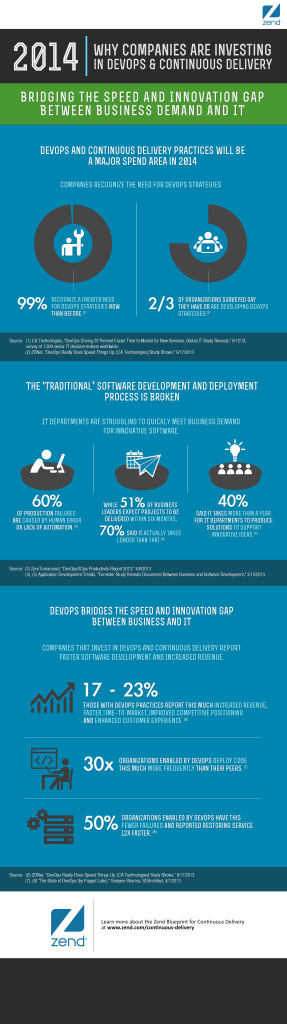
    Continuous-Delivery-Infographic-ImageSome good stuff around the DevOps scene this week on DevOps and Continuous Delivery, which the pundits are saying will be a major spend area in 2014.

    First up is the Devopsguys who with a little commentary reposted this infographic from Zend Technologies. It demonstrates the real value in DevOps and continuous delivery. One thing that jumped out at me was that according to the data, ninety- nine percent of the Companies surveyed are now recognizing a greater need for DevOps strategies than before. Zend built the graphic utilizing data from various credible industry sources.

    Of course you can’t talk about Continuous Delivery without at least mentioning Jez Humble, after all he literally wrote the book on it. He recently posted on his blog four visualizations by Nhan Ngo, a QA Engineer at Spotify. The four visualizations were created while reading Jez’ book, Continuous Delivery. Some pretty intense stuff. Nhan Ngo made it look almost simple, almost like like a comic strip, but there is nothing funny about it.

    If you really want to get into the trenches, here is an interesting video that I found called Continuous Delivery and Zero Downtime from the site Night Hacking. The scenario is your “Continuous Integration system is well oiled and kicks in after every commit. Your code is compiled. Your tests are green. You feel ready to take your project to the next level and move to Continuous Delivery.”

    We aren’t done with our look at DevOps and Continuous Delivery just yet, DevOps Reactions probably illustrates best how Continuous Delivery works.  It works in the model, but in the real world it requires real skill.

    If you would like something mentioned here or have something you think I should Shout Out; email parker@devops.com and don’t forget to comment here.


  • DevOps and Security Are Compatible

    DevOps and Security Are Compatible

    When I speak with information security organizations faced with the prospect of moving to DevOps, one of the most common fears I hear is that this transition will degrade security of infrastructure and applications.  If you’re one of these folks, I understand this fear but you can rest assured:  when you do things correctly security will actually improve.

    One big reason security benefits in this model is due to improved alignment and tighter feedback loops.  You see, DevOps is about creating a unified, engaged team and doesn’t make it easy to fall into the “silo thinking” that traditionally leads to security as an afterthought.

    DevOps embraces automation and consistency, which benefits security by allowing you to add automated checks during coding to look for obvious security issues and flag things for human review (such as the linking of new libraries or the introduction of new third-party components that could add risk).  This means you will be able to identify “areas of concern” earlier in the development process where they will be much cheaper and more timely to address.  Twitter is a well-known advocate of this kind of automation, in which security checks are executed each time code is checked in and obvious security issues are presented to the developer immediately, giving them a chance to correct the problem right away and reducing the likelihood they will repeat the errors.  That is a much more effective process than the delayed feedback typically associated with manual code reviews.

    Security isn’t just better in the “Dev” portion of DevOps – you can also add automated configuration validation and scope checking into the environment build process to minimize the chance that a fat-fingered error or an out-of-policy change will introduce problems into production.

    This sort of automated approach also improves as you learn from retrospectives and post-incident reviews.  As you encounter preventable issues, you can often improve your automated checks to increase the odds of catching these issues before they impact production.

    Remember that security is an important stakeholder in the DevOps process, and the onus is on you to become a part of the conversation and find ways to add value to the goal of the organization.  Also, don’t forget to tap into the community of DevOps practitioners – others have walked this path before you and can help you in your journey.

    Finally, if there are specific security challenges related to DevOps that are vexing you (myths you would like to see busted) I’d love to hear from you.  Leave a comment below and become part of the conversation.

  • Survey Says: Positives and Negatives of DevOps are Two Sides of the Same Coin

    Survey Says: Positives and Negatives of DevOps are Two Sides of the Same Coin

    Isn’t that the way it always works? A person’s strength can also be their weakness. A company’s killer product becomes their Achilles heel as the market shifts. As more and more companies make the shift to DevOps, it’s interesting to learn what’s working, what the opportunities are, and what the impediments are. As many of you know, my company, JumpCloud, along with SoftLayer hosted the 2013 DevOps Conference in Boulder, CO. We had over 200 amazing people in the room – developers, ops folks, managers, execs, CEOs, and founders. Really, the whole gamut was represented in some way. It was an intense day full of presentations and panels, but with lots of time for discussion – with the audience even participating numerous times during talks!

    As part of the conference, we surveyed the audience on a number of topics related to DevOps. The results of the survey are here and the press release announcing the results with some analysis is here as well. As I sat back to take in the data, the most significant learning for me was that the movement to DevOps is constrained by time, first and foremost, and one of the opportunities of DevOps is automation. Let me say that again a different way: the very thing that companies are trying to solve – moving faster, is the thing that is preventing them from getting there.

    Lack of time is nothing new for IT people. We have been hearing that for decades. For some reason, the IT organization has always been crushed with the amount of work that they have and the resources available. Perhaps it is that they are involved in just about everything going on in an organization, or as is the case today in many businesses, the IT organization is the business. As a result, it is even harder for organizations to find the time to do the very things that will make them more efficient. Unfortunately, the cycle becomes a self-fulfilling prophecy and as organizations get more busy, they find less and less time to ‘fix’ their business.

    The survey data from the DevOps conference showed that there are any number of opportunities to automate tasks. The group gravitated to a few – deployment, patching, user management, and log analysis – but there were many more. Each organization has their list of tasks that need to be automated that they never get to. The lost productivity from those missed opportunities is likely staggering. Automation is hard and painful. Especially when you are trying to run the day-to-day business. As one of my marketing friends liked to say, we are rebuilding the car while it’s going 60 MPH.

    It’s easy to say that the solution to this is just to spend some time automating. Allocate more hours to it and put it into each sprint. Yes, that is easy to say. Unfortunately, that rarely works. The pressures of the business take over and move automation back down the list very quickly. After all, features need to be built, bugs need to be fixed, and performance issues need to be resolved. All higher priority items than automation when you are in the crucible.

    The focus on automation has to come culturally to work long-term. There needs to be recognition from all levels of the organization that automation will take precedence over other tasks. Without that perspective, automation will almost always be pushed down the priority stack. Automation is a long-term play, not a short-term gain. Band aid fixes are quick and get you back to your task list. Automation takes deliberate time, effort, and focus to happen, and then the benefits are only seen afterward. Of course, the benefits are subsumed by other tasks until they too are automated, so it’s hard to see them for long, but they are there. And, in fact, as more and more becomes automated, a company starts to see their velocity increase dramatically. They’re not focused on manual tasks, they’re focused on driving new innovative features.

    The DevOps survey really said it all – organizations that can figure out how to get off the hamster wheel of manual tasks, will automate and build high-velocity organizations. Unfortunately, that is easier said than done.

  • The DevOps Journey

    The DevOps Journey

    Maintaining a constant thirst for learning is essential for anyone dedicating their career to the IT, computer and networking industries. It’s more than just learning about the latest technologies, rather, it’s imperative we embrace new methodologies and paradigms for doing work, thinking about problems and creating solutions. Enter DevOps, which is a healthy mix of all the above.

    You might find things a bit confusing if you’re new to DevOps. There are many perspectives on what it means. For myself, there were two significant milestones on my journey to understand and embrace DevOps;  1) rethinking how we design large, dynamic applications and manage the underlying infrastructure in cloud environments such as Amazon AWS, and 2) reading the book The Phoenix Project by Gene Kim, Kevin Behr, and George Spafford.

    At first blush, I thought DevOps suffered the “definition bloat” of so many other industry buzzwords (for example, “cloud” comes to mind.) Depending on who you talked to or what you read, DevOps definitions frequently encompassed one or more of the following:

    1. embedding development resources within business units for better alignment and reduced cycle time,
    2. high frequency software releases into production (multiple per day, hour, etc.)
    3. automating infrastructure and system administration tasks vs manual provisioning and sysadmin
    4. embedding operations functions within development organizations
    5. operations performed by developer, even doing away with traditional operations in some cases

    If these seem like a somewhat confusing, loosely assembled list is ideas, don’t fret — they struck me the same way at first too. These ideas actually fit very well together around a few core ideas essential to DevOps.

    Quicker Time To Value – Being Fast and Agile

    DevOps is about changing traditional paradigms, enabling us to more rapidly deliver production updates, new capabilities and improved operations. Outcomes include reducing software releases from months to multiple, micro releases per day, and even hours. To do this requires much more than can be achieved through traditional operational efficiencies. It requires tight alignment, coordination and execution by product, development and operations functions. Embedding multiple disciplines together helps gain this alignment, shorten communication paths, setting priorities quicker, enabling lightning fast coordination. DevOps promotes new practices like embedding development and operations functions within other parts of the business, breaking down long standing barriers between IT / Ops and development / business groups.

    Automated Provisioning, Operations and SysAdmin

    From app development to infrastructure operations, DevOps is about automation. DevOps is about faster software testing and integration, quality improvement, and working in much more dynamic and rapidly changing operating environments. For example, rather than building system images by hand (stick built), automation is used to rapidly generate and spin up new virtual environments on a small or large scale. Systems wake up, check in to learn their personality, install, configure or update code (OS, database, web server, application code revs, etc) and join the network dynamically. This can occur with a single instance or with hundreds simultaneously. Initial upgrades and feature updates can occur on smaller or isolated sections of the network, then are rapidly rolled out across the network, and rolled back quickly if necessary. Sysadmins, be they developers or ops people, use scripts, code and automation tools to manage much larger environments than would ever be possible using manual methods. Automation is an essential differentiator in any DevOps environment.

    Culture of Open Collaboration, Communication and Failing Fast

    DevOps breaks down silos and places a premium on collaboration and communications amongst all players involved. It’s no longer us vs. them or this department vs. that other department. The blame game is gone and the focus is on making work happen, and fast. Communication lines are drastically shortened and conflicts in chains of command are collapsed. It’s about how “we” get things done, no longer about what “they” didn’t do. Failures are viewed much differently. Failures happen and from them we learn and develop newer, better, more innovative solutions to solving problems and prevention problems in the future. Because of the speed DevOps can bring, recovery from failure is much quicker. If a new release into production is causing issues, we quickly flip back to a previous known-good version running on other virtual instances. Updates can also be rolled out much more quickly.

    I hope these and coming views on DevOps are valuable to you as a reader. I know our conversation will help me and the teams I work with, as we learn and grow our expertise in DevOps. Please share your ideas, disagreements and learnings as we move along this journey together into the fast moving and quickly changing world of DevOps.

  • Don’t Be Afraid of the “R” Word

    It seems that many people are afraid of the word refactor.  I think in many cases, if someone admits they need to refactor, it means they either didn’t do their job right.  They either missed requirements, wrote inefficient or buggy code, etc.  Alternatively, there is something fundamentally wrong with the product or system.  The fact of the matter is that sometimes there are big problems and a major refactor/rewrite is required.  I think that is rarely the case, but if embraced by all and done judicially, the outcome can be significantly better and the major refactor avoided.

    It doesn’t matter if it is a feature, deployment script or architectural decision, at some point, everyone must admit they are not clairvoyant and cannot predict every way end-users or systems will behave.  Therefore, there will be missed/new requirements and unforeseen problems.  As such, I very much embrace the philosophy of build for what you know now and adapt as you go.  Typically, that means the output is simpler, it got done faster and enhancements and bugs are easier to address.  That philosophy also means you are constantly in a state of refactoring, or said differently, incorporating new learnings, making individual methods more efficient, improving the readability of the code, filling in missing tests, etc.

    Now, just because we have embraced refactoring and we have noble intentions of, in general, leaving the code better than we find it, that doesn’t give us the license to go crazy and start rewriting everything we see. I think there are right and wrong times to refactor.

    First and foremost, don’t let those yucky bits of code distract you from your real purpose which is to deliver business value by building those new systems, features and fixing bugs.  So instead of just jumping right into refactoring, quickly note the yuck as a TODO in the code, story or in your notepad so you don’t forget about it, but also stay on task.  That said, bad code that is directly in your way is fair game and I even think that bad code near the edges of your task are also fair game.

    Secondly, follow good engineering practices.  Make changes in small, bite size chunks, test and deploy your changes often and communicate them with the team.  In the end, you will end up with a better product, happier end-users and engineers which should all translate into a more successful business.

    If you are one of those clairvoyants, then email me and let’s talk over a beer because I have lots of questions.  Otherwise, if you are a mere mortal like myself, then embrace the “R” word and seek out companies and teams that also embrace it.  At the end of the day or after a few releases, it is pretty impressive to reflect back on how adaptable the team and code can be while solving real problems very quickly.

  • MongoDB Needs and Loves DevOps

    MongoDB Needs and Loves DevOps

    DevOps is about more than just running infrastructure smarter, with more automation. It’s a means to engineering agile, robust, and modern software by blending the traditionally siloed areas of administration and development. This means infrastructure as code, and developer concern for operations. It means more than calling sysadmins “DevOps Engineers”; it means operators and developers working together seamlessly. NoSQL in general is a solution that by it’s nature loves DevOps, and it thrives under teams that take a DevOps approach, but it can really hurt you if you do not. MongoDB is no exception to this rule. It has gained enormous traction in the developer community by blending flexibility, features, and performance. Some teams have been seduced by the ease with which they set up MongoDB for development, and neglect to think about capacity planning, tuning, monitoring, and maintenance. Do not let this happen to you! Or you will pay the price at 3am when you are scrambling to figure out why your swell app has ground to a halt. Instead, take the time to learn MongoDB’s needs and capabilities, because it doesn’t just make development easy, it can truly sweeten operations with things like hassle-free replication and full access to administrative tasks via the same API used to perform data access. Let’s have a look at MongoDB from a DevOps perspective.

    DevOps Wants:

    Clueful administrators.

    There isn’t much room in the DevOps movement for system administrators who don’t speak at least one high-level language. I personally find Ruby most appealing to to me for systems programming, but Python is also a fine choice. MongoDB admins should be practiced at performing administrative tasks in both the javascript shell and the programming language of their choice, setting the stage for a rich infrastructure monitoring and automating codebase. Administration best practices are extensively, if not exhaustively, documented in the administration docs, so start there. Pay particular attention to the Operational Strategies section of the manual, which provides a checklist of concerns you should address as you plan your system’s design and deployment.

    Developers who know the ramifications of their infrastructure.

    The age of throwing applications over the wall to operations is mercifully drawing to a close. Developers must understand the nature of their infrastructure, how to best utilize it, and how it handles failures. MongoDB affords developers the ability to code to infrastructure details without coupling to particular instances, or even hostnames. In this, tags, write concerns, and read preferences are your friends. Code that runs reports (which should be kept away from your production instances) can specify that it will read only from instances tagged as “reporting”. Admins can add instances tagged as ‘reporting’, or swap which instances have that tag, with a few lines of code. Refer to the end of this article for example code.

    Infrastructure state to alert cleanly, and for trends to be visualized.

    The MongoDB Monitoring manual section provides an overview of the ways to monitor your instances, including 3rd party solutions, both self-hosted and SaaS. MongoDB Management Service is MongoDB, Inc.’s free monitoring, trending, and alerting service, which you should set up from day one to monitor every single instance you rely on.

    Infrastructure to be programmable.

    Ok, you are monitoring your instances, why not work on automating your infrastructure to respond to faults and load requirements? While MMS is a no-brainer, it’s not going to plug into your infrastructure code. You can roll your own integration using MongoDB’s handy exposure of its internals via database commands, and for replication, the local database. For example, you can check on replica set lag in Python like so:

    import pymongo
    # three mongods running on my laptop
    c = pymongo.MongoReplicaSetClient(
        'Kusanagi.local:29017,Kusanagi.local:29018,Kusanagi.local:29019',
        replicaSet='test'
    )
    
    rs_status = c.admin.command('replSetGetStatus')
    
    lag_threshold = 120 # up to two minutes of replica lag is ok for this example
    primary_optime = [ member['optime'].as_datetime()
        for member in rs_status['members'] if member['state'] == 1 ][0]
    secondary_optimes = [ member['optime'].as_datetime()
        for member in rs_status['members'] if member['state'] == 2 ]
    for secondary_optime in secondary_optimes:
        if ( (primary_optime - secondary_optime).total_seconds > lag_threshold):
            # do stuff

    Provisioning MongoDB instances programmatically on Amazon EC2 is easy with the official AMIs, but automating MongoDB infrastructure goes beyond that. Learn to use the database commands to configure replica sets, because you can script joining new instances to a set. If you use sharding, you can update tag ranges for sharded clusters to migrate chunks to shards specifically provisioned to warehouse data.

    Disaster recovery to be robust and automated.

    There are numerous ways to back up MongoDB, and the one you pick should be appropriate for your deploy. So read through your options in the backups section of the MongoDB Manual. You should probably read that section twice.

    To aid in release management.

    By being schema-free, MongoDB frees enterprises from the hassles of schema alterations and their attendant maintenance windows. Instead of altering a user table to include a new column for “birthplace”, a new release of your application will just begin to write the user document with that attribute included. Naturally, your user profile rendering will not assume this value is set and throw an exception, it will just not display “birthplace”. This does not excuse you from change management! In a DevOps shop, everything about monitoring that applies to production applies to your integration environment, which I sincerely hope is continuous. Configure all the monitors you’d have in production, and alert developers when metrics go out of range.

    Closing Thoughts

    In a DevOps culture, admins read code, developers plan infrastructure, and they both attend the same planning meetings. Engineers who work with MongoDB, both in operations and development, should read the WHOLE manual. If your developers read the development section and your admins read the administration section, you’re really only doing Dev and Ops.

    Example Code – Tags

    Tagging an instance of a replica set looks like this in the MongoDB shell:

    test:PRIMARY> config = rs.config()
    {
        "_id" : "test",
        "version" : 2,
        "members" : [
            {
                "_id" : 0,
                "host" : "Kusanagi.local:29017"
            },
            {
                "_id" : 1,
                "host" : "Kusanagi.local:29018"
            },
            {
                "_id" : 2,
                "host" : "Kusanagi.local:29019"
            }
        ]
    }
    test:PRIMARY> config.members[0].tags = { "use": "production" }
    { "use" : "production" }
    test:PRIMARY> config.members[1].tags = { "use": "reporting" }
    { "use" : "reporting" }
    test:PRIMARY> config.members[2].tags = { "use": "production" }
    { "use" : "production" }
    test:PRIMARY> rs.reconfig(config)
    Fri Mar  7 18:35:25.040 DBClientCursor::init call() failed
    Fri Mar  7 18:35:25.042 trying reconnect to 127.0.0.1:29017
    Fri Mar  7 18:35:25.042 reconnect 127.0.0.1:29017 ok
    reconnected to server after rs command (which is normal)

    Here’s Ruby code, assuming the same config:

    require 'mongo'
    
    # I'm running 3 mongods on my laptop
    rset = Mongo::MongoReplicaSetClient.new(["Kusanagi.local:29017",
                                            "Kusanagi.local:29018",
                                            "Kusanagi.local:29019"])
    
    # using the local db to get current config
    config = rset['local']['system.replset'].find_one() 
    admin_db = rset['admin']
    config['members'][0]['tags'] = { "use" => "production" }
    config['version'] += 1  # mongod avoids reconfig conflicts by insisting on an increasing version value
    verify_version = config['version']
    begin
        admin_db.command({ 'replSetReconfig' => config })
    rescue Mongo::ConnectionFailure # expect your connection to close during this operation
        actual_version = rset['local']['system.replset'].find_one()['version']
        raise unless actual_version == verify_version
    end

    Specifying tag sets only applies to reads from secondaries (since there is only one primary to choose from). In Ruby, it looks like this:

    rset = Mongo::MongoReplicaSetClient.new(["Kusanagi.local:29017",
                    "Kusanagi.local:29018", "Kusanagi.local:29019"])
    analytics = rset['analytics']  # say we have an 'analytics' DB
    cursor = analytics['page_views'].find({'page' => 'home'},
                                            :read => :secondary,
                                            :tag_sets => {:use => 'reporting'})

    This query specifies, with the :read option, that only secondaries should answer, and with the :tag_sets option, that only secondaries tagged with 'use': 'production' can be used. If I were to shut down members[0] (Kusanagi.local:29017) while it was primary, and members[1] (Kusanagi.local:29018) became primary, the above query would fail, because as primary it’s no longer eligible to answer queries directed at secondaries, even though member 1 is tagged as use: 'production'. This is exactly what you want, to keep your reporting queries from hosing your production instance. After taking stock of the situation, you might decide to assign 'use': 'reporting' to member 3, and the above query would then again work. Note that the MongoReplicaSetClients created by the Ruby driver do not by default refresh replica set state (as of v1.9.2), they use the config that was present when the connection was established (this is not the case for all drivers, make sure you determine your driver’s behavior). This means that if you reassign tag values, existing connections will not notice the change. If I were to change the tags for member 1 to 'use': 'not reporting', the above query would not fail, it would route the query right to member 1. So if you are using tagging, and Ruby, instantiate your client with the refresh_mode option:

    rset = Mongo::MongoReplicaSetClient.new(["Kusanagi.local:29017",
                "Kusanagi.local:29018", "Kusanagi.local:29019"],
                :refresh_mode => :sync)

    See the MongoReplicaSetClient documentation for details. The Python driver handles this by launching a background process to monitor Replica Set health and config changes, but the API does not document any means to configure its polling interval.

  • It’s the Outbound Stupid!

    It’s the Outbound Stupid!

    As nice as the word “Egress” may sound, I like “Outbound” better. Outbound is hardcore firewalling for the traffic that was initiated on the “trusted” side of the firewall, and is destined OUT to the unknown. However, over the last 20 years network administrators have put much more emphasis on what can come IN to their networks, rather than to worry about what comes OUT of them. There are many reasons for that, but the key one is that if nothing can come in, then we need not worry about what comes out. Right? Yea, right…
    Fast Forward 2014 we have firewalls everywhere. On our smartphones, laptops and home broadband wifi routers. In the cloud, any typical IaaS setup has a firewall for every group of instances, usually called Security Group and every instance has its own, internal firewall that is controlled by the instance OS. We are starting to see more and more people that use them as a core building block, in a  network security architecture, and as a fundamental element of it. But as most of you (us) actually spend time, energy and concern about inbound firewall rules, only 15% of you (us) even bother with the Outbound. That’s true, and its about time we change that.

    Plan. Plan for Success.

    A well planned inbound firewall policy can give the bad guys a true challenge, but what happens when they do get in and there’s no outbound policy in place? Its an all-you-can-eat buffet. With a well planned Outbound policy, theres a strong chance they will go away, or be easily discovered – and that’s a great ROI for your time!
    It all starts with a written (English, not Erlang or Java) security policy that outlines the way groups of servers interact with each other and with the outside world. First for the inbound/ingress which should be pretty easy to formulate. Then comes the outbound/egress tricky part – lets take a closer look at an application server.
    Usually application servers sits in one of the middle tier, trusting traffic coming from the web-tier and initiating requests to the database tier before sending the replies back to the web servers.
    Inbound: Allow traffic from Web Servers, usually only for HTTP or HTTPS depending on the Web<>APP settings.
    Outbound: Allow DB traffic to the Databases on the specific DB port, for example, TCP3306 for MySQL.

    Don’t forget the monitoring

    Any monitoring solution you may be using, affects your security policy. An agent-based monitoring solution installed on the machine will have to be allowed to connect out, where an external monitoring service, that probes your servers from the outside, will have to be allowed in to do its job.
    Agent Based Monitoring: Allow Outbound on specific protocol to a specific IP or a list of IPs
    External Monitoring: Allow Inbound for specific protocol and from a specific IP or list of IPs

    What else on the Outbound? The Killer (No) Rules

    Our app server runs Ubuntu so it may needs access to the ubuntu update services and also needs DNS to live happily. Now the common theme would be to allow access to update services for outbound on https (TCP443) and to allow outbound DNS (UDP53). Right? WRONG. Why not limit only to the specific repository services that our OS needs? The hardline DevOps will kill updates altogether, stating that any part of your application should not update itself. You can always bake/launch a fresh updated one instead of messing with a working instance.
    Result: No Outbound HTTPS TCP443
    Now for DNS. If you are a security concerned it is recommended to stop using DNS altogether and use /etc/hosts instead. A less drastic approach would be to allow DNS access only to a DNS server that you trust (E.g. Google’s 8.8.8.8), this is done to make sure that data leaked using DNS queries could only reach Google, and they already know everything.
    Result: No Outbound DNS  UDP53 or Allow DNS (UDP53) to 8.8.8.8 if you must.

    Your Feedback Loop: The Network Logs

    After setting this strict Outbound policy, we can finally identify the services that were left hanging, as we just severed their lifeline. It could be a non-critical agent that we should uninstall, or, god forbid, a rogue piece of code some bad guy wrote and now can’t connect to its C&C server – more on that next time.

    Happy Firewalling,
    Zohar

  • Always-on: The New Normal

    Always-on: The New Normal

    One of the many challenges of DevOps is finding great team members that can handle the always-on nature of the job. Nearly everyone at VictorOps has been “that person” and has done the weeklong stint of carrying the virtual pager.

    What we noticed in our years of doing that job is that team member behavior tends to be polarized. If it’s your week to be on-call, then you are “all in”. You don’t venture far from home, you can’t attend special events and you have to apologize to your significant other a lot. When you are not on-call, you tend to unplug from the company. These are normal behaviors and completely understandable given the difficulty of the job.

    The problem is that this on-call way of life is not conducive to actually fixing problems faster. In a perfect, company-centric world, everyone would get paged for every problem with the logic being that one of the team members actually has the information needed to solve the problem. But that’s not going to happen. And unfortunately, the truth of the situation is that you’re not sure who that one person with the correct knowledge to solve the problem will be.

    The question then arises…how can team members have more knowledge about what is going on with the complex systems in their architectures while also maintaining their quality of life?

    Consider Twitter and Facebook user behavior. I have a cousin that lives in Chicago. I have seen her in-person once in the last 30 years, yet I know she remodeled her living room, I know about her work and I know where she took her last vacation. I know these things because the Twitter and Facebook experiences leverage something called Continuous Partial Attention, a term coined by Linda Stone in 1998. Basically, I pull my phone out of my pocket, swipe once, and gain a disproportionate amount of information for the effort (or conscience thought) I put into it.

    If you’re in DevOps, then the idea of Continuous Partial Attention is something you’re already living daily. Now imagine putting CPA to work for your team. Everyone can have an eye on the infrastructure, but not “feel like it”. The on-call team member is still responsible but if everyone has an idea of what is happening, the likelihood of someone knowing the answer is revealed sooner. Now everyone wins because the problem is solved faster, getting the team back to their lives and the company back to revenue generation.

  • Hello World

    Hello World

    The DevOps Cup o’ Joe  blog appears  a few times a week with a look around the DevOps blog world, highlighting the  authors choices for top blog posts of the period. 

    Hello World! It’s been many years since I thought it was pretty cool to have a computer print that during my own days of coding back when punch cards were all the rage.  Though the technology has changed a lot since then, the business of technology has not changed as much. The quickest way to figure out whether a practice or process in IT has become accepted and here to stay is to find out how many are writing about it…and what they are saying.

    kravitzThat’s what I am going to write about…. I am going to be the nosey neighbor in the DevOps blogs neighborhood, sort of like a Gladys Kravitz. Some of you are probably saying; who is Gladys Kravitz? If you don’t know I will tell you later.

    As I look across DevOps blogs landscape I find many simply use their blog as a support tool……not very insightful but still better than those that have no blog at all. Others use their blog as a shill for the marketing department. I will be searching the world of devops blogs for thought leaders. Though I must admit I will also shout out some blogs simply because they grab my attention. The best bloggers transcend the web pages of their blogs and give you a glimpse into their souls and the souls of the companies they work for. They are truly storytellers. Many of these bloggers are already blogging for staging-devopsy.kinsta.cloud, but I am going to highlight others.

    Enough with the posturing and let’s get started. My favorite blog yesterday was from the PagerDuty blog. You really need to read this heartfelt story written by the bride of a PagerDuty customer, “I Married an On-Call Engineer”. The post tells a story many on this site can relate to.  This is a test to see if devops can survive marriage, or is it marriage survive devops. I will let you decide.

    Puppetlabs is seeking talking proposals for PuppetConf 2014 by March 18; http://puppetlabs.com/blog/deadline-nigh-submit-your-puppetconf-puppetcamp-talks . Puppet Labs conference in San Francisco is one of the big devops events and time is short to submit. That is my community service for this edition.

    Speaking of devops events, JumpCloud organized a DevOps State of the Union in Boston with some major analysts and writers in early March. The event is covered in a series of blog recaps and worth the read. Pay particular attention to the Three DevOps Insights.

    It’s early and there is enough great content here on staging-devopsy.kinsta.cloud, so that is all I am going to give you today. Stay tuned as I will be recapping the best of DevOps blogs a couple of times a week here on DevOps Cup o’ Joe.

    BTW, to answer the earlier question Gladys Kravitz is the nosey neighbor of Darren and Samantha Stevens. If your next question is who are they, then you are too young to be reading this without a note from Ops.

    If you would like something mentioned here or have something you think I should Shout Out; email parker@devops.com and don’t forget to comment here.