
[pdf-embedder url=”https://staging-devopsy.kinsta.cloud/wp-content/uploads/2022/02/hcl-low-code-tide.pdf”]
Tag: devops
-

DevOps for Salesforce: CI/CD Challenges
DevOps encompasses a wide variety of technical and social practices for improving the development, delivery and operation of IT systems. Salesforce has become more than a CRM system; it evolved into a full-featured ecosystem and a low-code platform that made development far simpler and more approachable than traditional code-based platforms. Cross-functional teams build on Salesforce to create custom apps and integrations with other enterprises systems without requiring the rigorous approaches that are common with traditional technologies like Java.
Now, DevOps for Salesforce has emerged to enable teams to build applications faster. And as teams have built more and more customizations onto the Salesforce platform, the level of complexity has exploded. DevOps has emerged as a critical capability for teams to bring this complexity under control.
The Primary Challenge of Deployments
The primary challenge that most Salesforce teams face is deployments. Deployments on Salesforce are not just a matter of moving files, they require sophisticated management of thousands of XML files and careful management of dependencies. A number of commercial companies have appeared to help manage the Salesforce development life cycle, and the Salesforce development experience (DX) initiative has unlocked vastly more possibilities for teams to automate existing processes and adopt new workflows.
The need for more structured and rigorous approaches to Salesforce development has increased the need for teams to learn from traditional software development and DevOps teams and understand how traditional techniques like modularization and continuous integration can be adapted to the Salesforce platform. Technology and knowledge transfer from the broader DevOps community to the Salesforce community remains an active area of exploration.
Working in Parallel
It was the adoption of continuous integration by the extreme programming (XP) community in the 1990s that drove intense interest in the need for automated testing, especially unit testing. This allows teams to create exact copies of each other’s work and develop in parallel. Working in parallel allows for far faster innovation since work doesn’t have to be precisely sequenced.
But there’s a cost to working in parallel; these workstreams eventually need to be integrated into a cohesive whole. Software projects following a “waterfall” methodology may delay integration until near the end of the project. But these parallel work streams diverge naturally over time, meaning that integration can take months and require enormous amounts of rework.
Continuous Delivery: A Distinct Practice
Continuous integration (CI) avoids this issue by merging work early and often (at least daily). “If it hurts, do it more frequently,” is a mantra in the CI world, where the challenge is to resolve conflicts in small batches rather than letting them accumulate.
CI creates a constant risk of failure for software, since teams working on one part of the system may be making changes to shared components that can cause other teams’ code to fail. Automated testing provides a layer of protection by allowing functionality to be checked and rechecked thousands of times with minimal human intervention. Creating automated tests requires more effort than executing a manual test, but the cost of re-running each test becomes negligible. Thus, automated testing is a perfect solution for high-velocity teams who need fast and ongoing ways to ensure they are not regressing as they build new capabilities.
Continuous delivery (CD) is a distinct practice that’s often mentioned in the same breath as CI. Continuous delivery was popularized by the 2010 book of the same name by Jez Humble and Dave Farley. The practice of CD extends the idea of CI by aiming to deploy code to production in small batches on a regular basis; ideally at least daily. Whereas CI addresses the risks of developing in parallel, CD addresses the risks of delaying feedback from end users.
Software is built to solve specific problems. But each attempt at a solution by developers is a hypothesis that needs to be tested and confirmed. Only the people who actually experience that problem can tell developers whether these solutions are sufficient. So developers must get fast feedback from end users to have confidence in what they’ve built. Teams that neglect this practice are operating on assumptions and optimism; the longer they delay delivery the more the risks of those assumptions compound. Poor adoption and user experience is to be expected when teams don’t practice continuous delivery.
Increasing Pressure
CI creates added pressure to test quickly, CD increases that pressure significantly. Delivering small batches of changes reduces the risk of each change and makes them faster and easier to roll back. But by definition, we are changing production systems that may be used by thousands or millions of people each day. A failure caused by CI may waste a few hours of a developer’s time and delay delivery of a change. But a failure caused by CD can prevent thousands of people from doing their jobs, corrupt production data, expose security vulnerabilities and worse.
When developers integrate their work in CI, the goal is to run a fast set of tests that confirms nothing major has broken. But work being delivered to production needs to go through a battery of comprehensive tests to ensure it meets all functional and structural requirements. In a waterfall-style project, pre-release testing may involve scores of testers working for months. In continuous delivery, teams must be able to execute tests at every level of the system and have robust confidence that no failures have occurred.
Comprehensive testing requires testing the user interface, testing processes that span multiple systems, loading and confirming data using APIs, security testing and more. Continuous delivery has driven the need for automated testing to new levels and led to entirely new approaches like canary deployments. Canary deployments are a form of shift-right testing where a feature is initially delivered to a small subset of end users to check for issues before rolling it out to everyone.
The Essence of Lean
It’s often said that the main driver of success in DevOps is culture. The acronym CALMS is used to summarize the five aspects of DevOps: Culture, automation, lean, measurement and sharing.
Culture refers primarily to creating a culture of continuous learning and experimentation. The practices described above are not formulaic and require a growth mindset and a culture that prioritizes psychological safety and information flow.
Automation is the aspect of DevOps most commonly emphasized (including in what’s been written here). Automation enables dramatic efficiencies and is the central miracle of technology, but automation is not a panacea without addressing these other aspects of DevOps.
Lean refers to the manufacturing practices pioneered in the 1930s at Toyota and further developed and built upon in the late 1980s and 1990s. The essence of lean is to do more with less by understanding and optimizing the value stream by which work is actually performed.
Measurement refers to the importance of taking a data-driven approach to optimizations. Measurement provides teams with a way to gauge whether process improvements are effective or not.
Finally, sharing refers to the importance of sharing information, practices and resources between individuals, teams and organizations.
-

Securing Software with Intelligent Pipelines
One of the biggest cybersecurity risks involves vulnerabilities in the application layer. After all, the best firewall is useless if the web application itself is vulnerable. Many companies have worked to mitigate these risks by investing in their AppSec programs. According to a recent whitepaper written by ESG (commissioned by Synopsys), 71% of companies surveyed now use AppSec tools for more than half of their software projects. Notably, over two-thirds of companies already use 11 or more automated application security testing (AST) tools, such as SAST, DAST, IAST, fuzz testing and container scanning solutions.
This is due, at least in part, to the fact that tool manufacturers have now made their products “DevOps-ready” and support suitable integrations with CI/CD pipelines. This makes it tempting to simply let AppSec scanners run in the pipelines, but that can introduce other problems.
Problems with AppSec in CI/CD Pipelines
Too many results: Developers can be inundated with findings, yet only a small percentage are likely to pose such a high risk that they need to be fixed immediately. But the prioritization guidelines are often formulated in separate documents and are ambiguous.
Development pipelines are slowed down: Build pipelines often run at frequent intervals; every second to every minute. Scans with AppSec tools may take several minutes or even hours.
Manual AppSec activities are left out: Not all AppSec activities can be automated, such as architecture risk analyses, threat models and penetration tests. Nevertheless, these are an essential part of the AppSec strategy.
Intelligent pipelines (i.e., intelligent, purpose-optimized automation and orchestration of the various AppSec tools and activities) are ideal for overcoming this challenge. Combined with the consolidation of scan results, a new category of solutions has emerged here, which Gartner dubbed application security orchestration and correlation, or ASOC for short, in 2019.
How Pipelines Become Intelligent
The “intelligence” lies in deciding which tools need to run at what time and what to do based on the results. So instead of scanning the entire codebase with AppSec tools at every commit, it dynamically decides which scanner needs to run and to what extent. This decision can take into account various parameters such as the scope of the actual code change, the risk profile of the application or the development stage of the software.
The risk profile of the application should also be considered. Web applications that are accessible from the internet and process sensitive data pose a greater security risk than an internal tool for generating documentation. Such risk profiles usually emerge from prior architectural risk analyses and threat models.
Furthermore, the scope of AppSec testing should be appropriate to the development stage of the application. Individual commits of a feature branch should be checked mainly by static code analysis for passwords and API tokens contained in the code and compliance with coding guidelines, such as SEI CERT, to support rapid development. Later on, during the merge request into the main branch, more extensive scans should be added, including deeper data flow analyses, which then detect cross-site scripting or SQL injection attacks. A longer runtime can be accepted here since such merge requests usually have to be approved according to the dual control principle.
Code Security Policies
The core of intelligent pipelines lies in individual guidelines or policies. These define when specific AppSec activities are executed. Additionally, these policies describe how to proceed with the combined results (e.g., whether the code may be integrated into the master branch or the web application may go live).
The policies are described in a configuration file; this is policy–as-code. Just as with other as-code methods, this enables or improves uniqueness, reproducibility and automation. Simple policies can be created according to the “If this, then that” principle. For example, a software composition analysis (SCA) scan can be triggered when either the project file changes (package.json, go.mod, pom.xml, etc.) or new files or directories are added, but not when only existing source code files are changed.
Conclusion
Whether with or without orchestration tools, anyone who wants to make their software more secure must inevitably consider which AppSec activities make sense at what time. In other words: The right scan at the right time. Furthermore, it should be determined how to proceed with the results before ordering or even automating a scan. To do this, you need to understand what the greatest risks are and how to protect the software from those risks.
Intelligent pipelines help to implement and, above all, automate an AppSec strategy. A corresponding strategy is a prerequisite. But even (or especially) without a clear strategy, it makes sense to look at the architecture of an intelligent pipeline, as this both encourages collaboration between development, AppSec and DevOps teams and raises the right questions that lead to a successful AppSec strategy.
-

How Test Automation Can Help Drive DevOps Success
Testing can be one of the more time-consuming aspects of the DevOps process. It can be exhaustive, frustrating, requires a lot of hands-on labor hours and people seldom enjoy it. But testing is vital, and no developer should simply skip it.
Recently, a strong trend has emerged wherein DevOps experts encouraged developers to automate their testing procedures. Test automation can bring your DevOps projects to the next level, save time and maximize pipeline capacity for continuous testing.
Test Automation: Definition and Benefits
Test automation minimizes the amount of human labor required in testing. In test automation, tools and frameworks write testing “scripts” that work to ensure the high quality of your application.
DevOps can use test automation in a variety of different ways–it can even take advantage of test cases and detect bugs in your code. This automatic testing procedure speeds up the process, getting your product to the market much more rapidly. The automatic quality checks can also practically eliminate the risk of human error in the process of continuous testing.
Test automation can also ease the burden of the repetitive nature of some DevOps testing, simplifying and speeding up the process significantly. Finally, automation promotes a high degree of reliability throughout your testing process. Test automation can also optimize your process.
Test Automation in the Context of DevOps
DevOps is all about continuous development—the product is created, deployed, tested, and sent out to be consumed by the end users.
Since it came on the scene, quality assurance (QA) has gained importance. The traditional approach to QA (wait until the product deployed to go through regression and functional testing) was much improved with the advent of DevOps. DevOps integrates the QA team into the whole of the development process, merging all players into a unified team. This integration requires a great deal of coordination across the different stakeholders.
This also allows for a high degree of agility and speed in the process, speed which the DevOps methodology then magnifies through a high amount of automation in continuous testing (which can then be configured to run automatically).
Deciding on the Best Tools for You
To build up an effective test automation process, you must find the right software workflow tools for you and your DevOps team. These tools should support and manage your test assets from a central location, passing your product through the testing process much more quickly and maximizing efficiency. That said, as helpful as having an automated testing process can be to enhance the efficiency and effectiveness of your software, using tools that don’t fit with your team and goals will present potentially significant problems for your organization. There is a staggering array of test automation tools available on the market, and they all have their strengths and drawbacks. No single tool will satisfy every need related to automated testing, so your goal needs to be to find the ones that will work the best with your unique needs and desires.
What to Keep in Mind When Choosing a New Tool
Cost (for both licensing and support): Budget is an eternal tyrant, and your team needs to go into this procurement work with a solid understanding of your financial limits. If you have stringent limits there, there are some types of open source software like Selenium that could be useful. These tend to require a substantial degree of technical skill, so they may not be as helpful for you—if that’s a weakness of your team.
Type: There are several different types of DevOps testing tools. Language is one of the more important factors when deciding on one–make sure the tool operates in either the same language as your application or at least one in which your team can efficiently operate. The intended platform for the tool is also notable, as is the intended audience (i.e. whether the product aims more towards developers or testers).
DevOps integration support: It’s always important to double-check that your tool supports both DevOps tool integration and continuous integration. If you don’t effectively coordinate your tools, it will undoubtedly slow down your process.
Training: Depending on the level of expertise within your DevOps team, you’ll need to ensure that there is an appropriate degree of training on how to use the team—for the people who will be using it.
Quality test reports: Test reports with both depth and breadth are crucial to success in continuous testing. These help notice defects and their root causes, then allow you to test the effectiveness of your analysis.
Excellent customer support: You will want to use a tool that will serve your needs well. That means a tool that understands your specific situation and can help you work through complications.
The Necessity of Automation Skills
All of this aside, you cannot just rely on the strength of your test automation tools to get you through the testing process. If you decide to implement test automation without having people on your team with the skills to manage it, you may end up in a challenging position riddled with inefficiency.
Here’s what you need from a test automation software engineer: They must have a broad base of knowledge that encompasses test automation tools. Beyond that, they need to understand how to dive deep into software testing functionality and the technical complexities that undergird the project. They should also know how to write scripts alongside development, collaborating with both operations and development teams. That collaboration between test automation, development and operations will have a deeply important role in writing test scripts and maximizing the coverage of your tests.
A test automation software engineer’s skills offer invaluable stability. Indeed, tools are often built on a foundation of skills. If you have a resourceful and capable software engineer on hand, you’ll be much more prepared for the fluctuations of the market than if you’re relying on a single tool. If you decide to focus on only one tool, your team risks limiting itself and potentially falling behind the times and needs of your customers.
The Dangers of Automation
Automation is one of the foundations of DevOps’ success. But even so, you must strike a delicate balance. If you automate too much, you may end up hurting your product.
When you start connecting too many different tools to your project, you begin to risk unwanted outcomes that practically cancel out the investment you made in DevOps in the first place. If you try to automatically test things that automation can’t effectively measure (general user experience, for example), you’ll end up with worthless data. Your various automation tools can start to create more work than they’re resolving if you need to spend a great deal of effort in managing them.
That said, if you under-automate, you’ll be losing out on workflow efficiencies that your competitors are using, making your team less competitive. Thus, it’s necessary to try and balance the two. The first step to striking this balance is having a thorough understanding of your requirements vis-a-vis testing, development and deployment. If you have that under your belt, you can find the automation tools that work best for your goals. Once you have the right combination of automation tools, you’re golden.
Also, test automation doesn’t negate the need for manual testing—and it isn’t designed to. Of course, certain kinds of manual testing can be eliminated by automation (especially the repetitive kinds).
But you still need manual testers behind the wheel examining your product more thoughtfully and at a deeper level than an automated program. That deep-level variety of manual testing can often discover issues that automatic testing failed to see. It can also provide a more thorough level of insight into the user experience that automatic testing will seldom be able to provide.
Benefits of Test Automation
We’ve covered a lot of deep ideas in this piece. But at the end of the day, test automation is beneficial for a few simple reasons: it reduces human error, simplifies your tests, allows you to deliver products much more quickly and leads to a much more reliable quality assurance structure.
That said, test automation won’t be a panacea for all your team’s ills. It will work, but only if you’ve chosen the right tools and you have people on your team with the skills to use them effectively. Once again, don’t rely on continuous automated testing as the be-all and end-all of your quality assurance practice. Several QA questions show that a human presence is much better at resolving certain types of problems and over-automating can cause significant inefficiencies.
Test automation can be a wildly useful tool if you use it well. These tips will help you take your organization to the next level of efficiency and excellence.
-

Connecting Your Cloud & DevOps Tools to Enable CI/CD
An effective continuous integration/continuous delivery (CI/CD) pipeline must integrate cloud and DevOps tools seamlessly to ensure the build, compile, test and release of applications is accomplished efficiently and without friction.
Application architectures, internal processes and personal preferences mean organizations and teams set up the CI/CD pipeline differently, resulting in a diversity of infrastructure and tooling throughout software delivery pipelines. While innovation demands the freedom to use whatever is needed to deliver applications, the resulting diversity can be a significant integration challenge. What’s needed is a platform built for DevOps that seamlessly connects a DevOps ecosystem and CI/CD pipeline tools.
There are two ways to do this.
One is to use REST APIs. REST is a popular choice due to its simplicity and the fact that it builds upon existing systems and features of HTTP. It avoids the need to create new standards, frameworks and technologies. Another benefit of using an integrated approach based on REST is that many developers are familiar with key elements of the REST architecture, such as Secure Sockets Layer (SSL) encryption and Transport Layer Security (TLS). Additionally, REST is language-independent. As such, developers can employ any language that uses HTTP when creating REST APIs so developers can choose technologies they are familiar with and that best suit their needs.
Another approach is to look for a platform that supports out-of-the-box integration with commonly used cloud and DevOps tools. Naturally, each company and DevOps team uses a specific set of tools. But it is safe to assume there are widely used tools that should be included in any list. Some useful plug-in integrations to look for include ones for Amazon S3, Azure DevOps, Bamboo, CircleCI, Github, Jenkins, TeamCity, Terraform and more.
Integration benefits and how to amplify them
Integrating cloud and DevOps tools into a CI/CD pipeline offers several benefits.
Built-in integration will help developers get the most value out of the pipeline. For example, out-of-the-box integration can be leveraged to help provide more automated testing and a quicker time to release. Why? If tools are not integrated, developers need to go through a slow, manual process to deploy, configure and optimize tools for their development environment. That is a time-consuming process. Those involved in the process lose time on their real work. Lacking integration, multiple teams throughout an organization may waste time doing the same processes to get the tools to work. And perhaps most troubling, manually integrating tools can introduce errors and potential security vulnerabilities.
Highly-integrated tools help encourage collaboration. In many companies, it is easy for different projects and different development teams to fall into siloed patterns of work. Different groups will use different tools. Having cloud and DevOps tools integrated into the CI/CD pipeline allows a de facto standardization of processes. And from that, best practices typically emerge from the familiarity of using the same tools. Smart companies will take advantage of the lessons learned and be sure to share that institutional knowledge amongst teams. Once a basic level of sharing is achieved, different groups are likely to work directly querying each other and working together to get the most out of the tools.
What’s needed?
To realize the benefits of integrating cloud and DevOps tools in a CI/CD pipeline requires a suitable platform. The right platform should effortlessly deliver the infrastructure and application resources to the development teams.
A solution that provides self-serve access to infrastructure needs more than simply provisioning automation. A solution must help a company monitor resources utilization and costs. And specifically provide a way to tie costs back to business units, projects and individual developers.
With such an offering, a company gets the full benefits that arise when cloud and DevOps tools are integrated into a CI/CD pipeline.
-

Best of 2021 – Nine Pillars of DevOps Best Practices
As we close out 2021, we at staging-devopsy.kinsta.cloud wanted to highlight the most popular articles of the year. Following is the fourteenth in our series of the Best of 2021.
In a prior blog I explained my 27-factor DevOps assessment model which includes nine pillars of DevOps and three dimensions of people, process and technology.
The nine pillars represent categories of practices. In this blog, I include examples of practices for each of the nine pillars. In a future blog I will explain how to use these practices to conduct a gap assessment for your DevOps practices.
Leadership Practices for DevOps
• Leaders demonstrate a long-term vision for organizational direction and team direction.
• Leaders intellectually stimulate the team by encouraging them to ask new questions and question basic assumptions about the work.
• Leaders provide inspirational communication that inspires pride in being part of the team, says positive things about the team, inspires passion and motivation and encourages people to see that change brings opportunities.
• Leaders demonstrate support by considering others’ personal feelings before acting, being thoughtful of others’ personal needs and caring about individuals’ interests.
• Leaders promote personal recognition by commending teams for better-than-average work, acknowledging improvements in the quality of work and personally complimenting individuals’ outstanding work.Collaborative Culture Practices for DevOps
• The culture encourages cross-functional collaboration and shared responsibilities and avoids silos between Dev, Ops and QA.
• The culture encourages learning from failures and cooperation between departments.
• Communication flows fluidly across the end-to-end cross-functional team using collaboration tools where appropriate (for example Slack, HipChat, Yammer).
• The DevOps system is created by an expert team, and reviewed by a coalition of stakeholders including Dev, Ops and QA.
• Changes to end-to-end DevOps workflows are led by an expert team, and reviewed by a coalition of stakeholders including Dev, Ops and QA.
• DevOps system changes follow a phased process to ensure the changes do not disturb the current DevOps operation. Examples of implementation phases include: proof of concept (POC) phase in a test environment, limited production and deployment to all live environments.
• Key performance indicators (KPIs) are set and monitored by the entire team to validate the performance of the end-to-end DevOps pipeline, always. KPIs include the time for a new change to be deployed, the frequency of deliveries and the number of times changes fail to pass the tests for any stage in the DevOps pipeline.Design-for-DevOps Practices for DevOps
• Products are architected to support modular independent packaging, testing and releases. In other words, the product itself is partitioned into modules with minimal dependencies between modules. In this way, the modules can be built, tested and released without requiring the entire product to be built, tested and released all at once.
• Applications are architected as modular, immutable microservices ready for deployment in cloud infrastructures in accordance with the tenets of 12-factor apps, rather than monolithic, mutable architectures.
• Software source code changes are pre-checked with static analysis tools, prior to commit to the integration branch. Static analysis tools are used to ensure the modified source code does not introduce critical software faults such as memory leaks, uninitialized variables, and array-boundary problems.
• Software code changes are pre-checked using peer code reviews prior to commit to the integration/trunk branch.
• Software code changes are pre-checked with dynamic analysis tests prior to committing to the integration/trunk branch to ensure the software performance has not degraded.
• Software changes are integrated in a private environment, together with the most recent integration branch version, and tested using functional testing prior to committing the software changes to the integration/trunk branch.
• Software features are tagged with software switches (i.e., feature tags or toggles) during check-in to enable selective feature-level testing, promotion and reverts.
• Automated test cases are checked in to the integration branch at the same time code changes are checked in, together with evidence that the tests passed in a pre-flight test environment.
• Developers commit their code changes regularly, at least once per day.Continuous Integration Practices for DevOps
• A software version management (SVM) system is used to manage all source code changes. (Git, Perforce, Mercurial, etc.)
• A software version management (SVM) system is used to manage all versions of code images changes used by the build process. (Git, Perforce, Mercurial, etc.)
• A software version management (SVM) system is used to manage all versions of tools and infrastructure configurations and tests that are used in the build process. (Git, Perforce, Mercurial, etc.)
• All production software changes are maintained in a single trunk or integration branch of the code.
• The software version(s) for supporting each customer release are maintained in a separate release branch to support software updated for each release.
• Every software commit automatically triggers a build process for all components of the module that has code changed by the commit. The system is engineered such that resources are always sufficient to execute a build.
• Once triggered, the software build process is fully automated and produces build artifacts, provided the build time checks are successful.
• The automated build process checks include unit tests.
• Resources for builds are available on-demand and never block a build.
• CI builds are fast enough to complete incremental builds in less than an hour.
• The build process and resources for builds scale up and down automatically according to the complexity of the change. If a full build is required, the CI system automatically scales horizontally to ensure the builds are completed as quickly as possible.Continuous Testing Practices for DevOps
• Development changes are pre-flight tested in a clone of the production environment prior to being integrated to the trunk branch. (Note: “production environment” means “variations of customer configurations of a product.”)
• New unit and functional regression tests that are necessary to test a software change are created together with the code and integrated into the trunk branch at the same time the code is. The new tests are then used to test the code after integration.
• A test script standard is used to guide test script creation, to ensure the scripts are performing the intended test purpose and are maintainable.
• Tests are selected automatically according to the specific software changes. CT is orchestrated dynamically, whereby the execution of portions of the CT test suites may be accelerated, or skipped entirely, depending on how complex or risky the software changes are.
• Test resources are scaled automatically according to the resource requirements of specific tests selected and the available time for testing.
• Release regression tests are automated. At least 85% of the tests are fully automated and the remaining are auto-assisted if portions must be performed manually.
• Release performance tests are automated to verify that no unacceptable degradations are released.
• Blue/green testing methods are used to verify deployments in a staging environment before activating the environment to live. A/B testing methods are used together with feature toggles to try different versions of code with customers in separate live environments. Canary testing methods are used to try new code versions on selected live environments.
• The entire testing life cycle, which may include pre-flight, integration, regression, performance and release acceptance tests are automatically orchestrated across the DevOps pipeline. The test suites for each phase include a predefined set of tests that may be selected automatically according to predefined criteria.Elastic Infrastructure Practices for DevOps
• The data and executable files needed for building and testing builds are automatically archived frequently and can be reinstated on demand. Archives include all release and integration repositories. If an older version of a build needs to be updated, then the environment for building and testing that version can be retrieved and reinstated on demand and can be accomplished in a short time (for example, minutes to hours.)
• Build and test processes are flexible enough to automatically handle a wide variety of exceptions gracefully. If the build or test process for a component is unable to complete, then the process for that failed component is reported and automatically scheduled for analysis, but build and test processes for other components continue. The reasons for the component failure are automatically analyzed and rescheduled if the reason for the failure can be corrected by the system; if not, then it is reported and suspended.
• System configuration management and system inventory is stored and maintained in a configuration management database (CMDB).
• Infrastructure changes are managed and automated using configuration management tools that assure idempotency.
• Automated tools are used to support immutable infrastructure deployments.
• Equal performance for all. The user performance experience of the build and test processes by different teams are consistent for all users, independent of location or other factors. There are SLAs and monitoring tools that ensure the user performance experience is consistent for all users.
• Fault recovery mechanisms are provided. Build and test system fault monitoring, fault detection, system and data monitoring and recovery mechanisms exist. They are automated and are consistently verified through simulated failure conditions.
• Infrastructure failure modes are frequently tested.
• Disaster recovery procedures are automated.Continuous Monitoring Practices for DevOps
• Logging and proactive alert systems make it easy to detect and correct DevOps system failures. Logs and proactive system alerts are in place for most DevOps component failures, and are organized in a manner to quickly identify the highest-priority problems.
• Snapshot and trend results of each metric from each DevOps pipeline stage (for example, builds, artifacts, tests) are automatically calculated in process and visible to everyone in the Dev, QA and Ops Teams.
• Key performance indicators (KPIs) for the DevOps infrastructure components are automatically gathered, calculated and made visible to anyone on the team that subscribes to them. Example metrics are availability (uptime) of computing resources for CI, CT and CD processes, time to complete builds, time to complete tests, number of commits that fail and number of changes that need to be reverted due to serious failures.
• Metrics and thresholds for DevOps infrastructure components are automatically gathered, calculated and made visible to anyone on the team that subscribes to them. Example metrics are availability (uptime) of computing resources for CI, CT and CD processes, time to complete builds, time to complete tests, number of commits that fail and number of changes that need to be reverted due to serious failures.
• Process analytics are used to monitor and improve the integration, test and release process. Descriptive build and test analytics drive process improvements.
• Predictive analytics are used to dynamically adjust DevOps pipeline configurations. For analysis of test results, data may indicate a need to concentrate more testing in areas that have a higher failure trend.Continuous Security Practices for DevOps
• Developers are empowered and trained to take personal responsibility for security.
• Security assurance automation and security monitoring practices are embraced by the organization.
• All information security platforms that are in use expose full functionality via APIs for automation capability.
• Proven version control practices and tools are used for all application software, scripts, templates and blueprints that are used in DevOps environments.
• Immutable infrastructure mindsets are adopted to ensure production systems are locked down.
• Security controls are automated so as not to impede DevOps agility.
• Security tools are integrated into the CI/CD pipeline.
• Source code for key intellectual property on build or test machines are only accessible by trusted users with verified credentials. Build and test scripts do not contain credentials for access to any system that has intellectual property. Intellectual Property is divided such that not all of it exists on the same archive and each archive has different credentials.Continuous Delivery Practices for DevOps
• Delivery and deployment stages are separate. The delivery stage precedes the deployment pipeline.
• All deliverables that pass the delivery metrics are packaged and prepared for deployment using containers.
• Deliverable packages include sufficient configuration and test data to validate each deployment. Configuration management tools are used to manage configuration information.
• Deliverables from the delivery pipeline are automatically pushed to the deployment pipeline, once acceptable delivery measures are achieved.
• Deployment decisions are determined according to predetermined metrics. The entire deployment process may take hours, but usually less than a day.
• Deployments to production environments are staged such that failed deployments can be detected early and impact to customers isolated quickly.
• Deployments are arranged with automated recovery and self-healing capabilities in case a deployment fails.What This Means
DevOps is a powerful tool that enables many benefits for organizations that use it. Achieving performance efficiently with DevOps depends on following best practices. By following the nine pillars of practices enumerated in this blog, organizations can achieve the performance potential that DevOps has to offer.
-

Best of 2021 – Why DevOps Will Cease to Exist
As we close out 2021, we at staging-devopsy.kinsta.cloud wanted to highlight the most popular articles of the year. Following is the twelfth in our series of the Best of 2021.
Nowadays I feel like there is no need to explain why DevOps as a methodology exists, as it is widely understood and accepted.
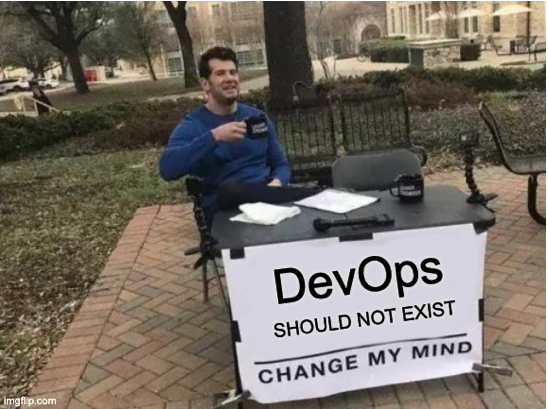
But the reason DevOps engineers exist is not to ensure the success of its namesake methodology, nor, if we’re being honest, is the practice evolving into a role that’s viable for future progress. Rather, it’s on the verge of becoming obsolete.
Surprisingly, in many cases having a DevOps engineer can actually get you further from the DevOps methodology objectives, rather than closer.
How Does One Become a DevOps Engineer?
I only recently stumbled upon DevOps courses in high-tech academies.
Before it was an actual field of study, I’m pretty sure no one’s first step into the software development world was in a DevOps role.
I personally started as a NOC engineer and later became a Linux administrator – developing a passion for the cloud and automation. Only years later did I dive into my first DevOps position. Others have made even lengthier journeys, starting from helpdesk support roles managing organizations’ PCs, printers and networks.
The thing is, the starting point for people who choose a software development career starts exactly there: developing software.
Typically, they either go to college or university or learn development online or via a bootcamp, where Linux, networking, virtualization, high availability and scaling are barely taught. And, of course, some extraordinary senior developers become infrastructure experts, but personally, I would call those folks architects and not DevOps engineers. This is probably the reason why almost every organization is in need of someone who’ll take on those responsibilities as a DevOps engineer.
Signs of the End
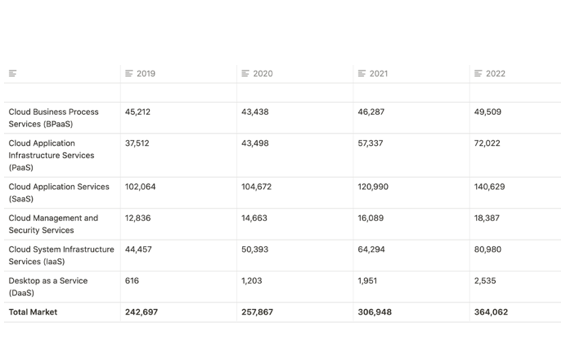
The number of cloud solutions is steadily growing every year, with cloud services becoming the dominant method of consuming business services. Gartner estimated a 40% increase in cloud services business revenue from 2020 to 2022.
“Software as a service (SaaS) remains the largest market segment and is forecast to grow to $104.7 billion in 2020 (see table, below). The continued shift from on-premises license software to subscription-based SaaS models,” according to the firm.
Worldwide Public Cloud Service Revenue Forecast (Millions of U.S. Dollars)
New PaaS, SaaS and IaaS products are launched every year to make the development and maintenance of other applications easy and effortless.
Hell, some SaaS products go as far as making it unnecessary, with platforms like WIX, Shopify, and Auth0, resulting in fewer developers being required to develop those kinds of applications. On top of that, there are already products that run almost entirely on Serverless services. Recently the term Storageless was coined and started to pop up here and there.
At the same time, the number of developers is increasing every year. According to Statista between the years 2018 and 2019 the number of developers grew by almost a million. So, while the number of developers is growing, a big part of their responsibilities are being automated.
This gradually frees up more time for developers to deal with DevOps challenges, which are also being automated by services like Coralogix, Datadog, JFrog, CircleCI, Gitlab and many more.
Some companies, like Monday.com, have already acknowledged that it is not optimal to have a separate team or a single person in charge of all of the operations and maintenance of applications and that it is better to have developers responsible for their application stack from end to end.
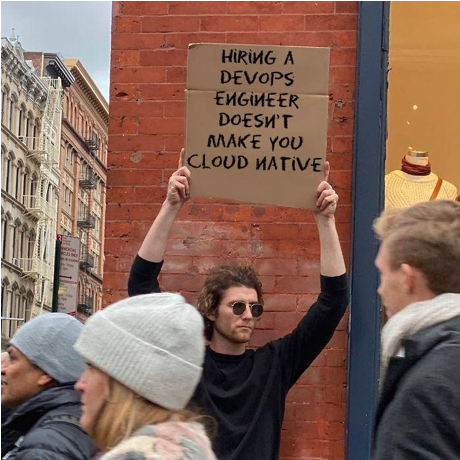
Although I opened by saying there is no need to explain why DevOps as a methodology exists, sometimes what gets forgotten is that DevOps evolved as a way to break down the silos between development and operations. But many organizations don’t recognize the irony of then having a separate team in charge of all operations and maintenance – that just defeats the purpose.
Hopefully, as this trend grows, universities and coding courses will acknowledge these issues as core challenges in software development and include these subjects and principles in their curriculum.
The Future As I See It
This could be wishful thinking on my part, but I believe sometime in the future we will reach a point where all developers will be required to understand and practice DevOps. A developer who understands the cost of running their application, how Kubernetes assures it is always available and resilient and how to build more scalable and more secure application stacks will simply be better at their job and more valuable to their company. The opposite is also true; a DevOps engineer will be able to build better CI/CD pipelines, better monitoring solutions and cloud architectures if they are taking an active role in development and actually knows the application stack and his team’s pains and needs.
Even if I’m wrong – and I do hope I am – I would argue that if you are a DevOps engineer or a tech lead of any sort, promoting the idea that DevOps is a part of every developer’s job is in your best interest.
The developers who understand how to support their own environments, run internal services on private networks and understand the solutions that are available to them will simply be better at their job, enabling companies to let automated processes do their thing and focusing talent where it’s needed most to make the best use of our skill sets. Thankfully, this standard of excellence is becoming easier to reach every day; and (Do I dare say it?) perhaps, in the near future, DevOps will become less of a role and more of a service waiting for its eventual, unpreventable automation.
Reading this, you might think that I am a self-loathing DevOps engineer who wishes to become a developer. Nothing could be further from the truth. Development Operations is my field, and I believe it’s full of talented individuals who I’m proud to call colleagues and friends. However, at the end of the day, we need to be realistic. Now that the “Operations” part of the work is mostly automated, we must focus our skills on the “Development” part.
-

Best of 2021 – The Next Evolutions of DevOps
As we close out 2021, we at staging-devopsy.kinsta.cloud wanted to highlight the most popular articles of the year. Following is the seventh in our series of the Best of 2021.
As society continues to recover from the global COVID-19 pandemic and some semblance of normal starts to return, technology continues to move forward. The pandemic certainly changed what normal means and people, processes and technologies all have adapted and evolved to meet those challenges. The narrative that the pandemic caused of your organization’s digital transformation is true for many practitioners. With 2022 just around the corner, DevOps is on the cusp of maturation of previously bleeding-edge paradigms and a focus on engineering efficiency. Here are five DevOps evolutions you should keep an eye on going forward.
Engineering Efficiency is Front and Center
Engineering efficiency is a particularly broad umbrella term. At the foundational level, engineering efficiency focuses on making someone (for example, an engineer) more productive. There are a multitude of disciplines that intersect, from organizational design to engineering/developer experience. Engineering efficiency is increasingly critical for organizations today. The pandemic had two major impacts on the technology sector in terms of resources and staffing. The first, at the start of the pandemic, was the unprecedented and unpredictable availability of resources; physical locations were being shut down because of the medical severity of the pandemic and the “getting hit by a bus” factor was playing out in real life. Second, during the recovery period, the Great Resignation began, and with it, a fight for resources that has become increasingly intense. Both have meant that the availability of resources, especially ramped resources, is scarce.
The Spotify model of tribes/guilds of engineering resources is a promising evolution; folks can frequently move around, reducing the toil that engineering resources face and allowing for engineering resources to not only ramp up more quickly but also increasing engagement and retention. The industry continues to march toward standardization in areas that were typically bespoke, such as the release process, and I think we’ll see that continue to evolve, as well.
Git is Ubiquitous
Leveraging a source code management (SCM) solution used to be reserved for software engineers. But as the proliferation of “something-as-code” has touched multiple levels of the technology stack from networking, storage and, ultimately, a development pipeline, the march of operations-focused engineers adopting many of the traits of software engineers continues. Having iteration in your infrastructure stack with more ephemeral/disposable infrastructure is becoming the norm. Saving and packaging the multitude of configurations for the “something-as-code” source control is a natural area of evolution.
Building off of source control are the package managers—your Docker registries, Helm chart repositories, etc.—for more deployable artifacts; that said, getting those artifacts to production is a process. Because Git is becoming ubiquitous across the technology landscape, this leads to the continued adoption of GitOps. Since the seminal piece was written by Weaveworks in 2017 defining the GitOps paradigm, leveraging GitOps is seen as a viable paradigm for many organizations five years later, especially when starting with greenfield initiatives.
Kubernetes is No Longer Bleeding Edge
In 2022, Kubernetes will celebrate the eighth birthday of its first commits on GitHub. Taking a jog down technology memory lane, eight years before Kubernetes (in 2006), VMware was still a private company and it would be a few years before vSphere was even released (remember how it felt to run a workload on a virtual machine in 2014?). The Kubernetes ecosystem still moves quickly, but placing workloads on Kubernetes is not a novel concept anymore. As application infrastructure and architecture have adopted the Kubernetes way (in other words, being idempotent and ephemeral), there is maturity around running a suitable workload on Kubernetes.
Kubernetes by design is highly pluggable. If you do not like the opinion or implementation of something inside Kubernetes, you can replace that opinion. Don’t like how Kubernetes handles ingress traffic? Then choose from one of the many ingress controllers available today. That is just one example of dozens of pluggable areas. Because of this, Kubernetes is viewed as a dynamic, non-static resource. Using Kubernetes takes trial and error and getting your cluster to be robust, performant and reliable is an ongoing journey that requires ongoing iteration.
Authors Can Be the Enforcers
There is no question that in a modern software stack, we are inundated with data. The metrics soup and the continued science of and exploration of observability (metrics, traces, logs) provide us with a lot to work with. Making decisions, even automated ones, based on that data continues to be critical. With the rise of site reliability engineering (SRE) practices, reacting or anticipating spikes in usage, failures and even security-related items are par for the course for modern teams.
These decisions can be authored into policies that specific platforms understand, such as autoscaling rules for a cloud vendor or something like Open Policy Agent in the Kubernetes ecosystem. With so many items shifting left toward the development team, finding the right resource, skillset or institutional knowledge to author these rules can involve the input of several teams. Because of the rise of “something-as-code,” regardless of whether the author of these rules is a software engineer, DevOps engineer, platform engineer or anyone in between, that author has the ability to enforce.
Shifting Left … But Complexity Shifts Left, Too
The old adage is that complexity is like an abacus: You can shift complexity around, but it never really goes away. With the movement to shift responsibility left to development teams, this also means that associated complexity is shifting to the development teams. Modern platform engineering teams provide the infrastructure (compliant Kubernetes clusters) to teams and any workload that is run on those clusters is up to the development team that owns it. Typically, development teams then focus on features and functionality. Managing lots of non-functional requirements—and even core infrastructure requirements such as networking—can be a burden; think about how your organization would handle a service mesh.
If you are a DevOps or platform engineer, making your internal customers—your development teams—successful is a great goal to work toward. Crucial to this is disseminating expertise. This can be in the form of automation and education. A common practice with the DevSecOps movement is to have some sort of scanning step as part of the build or deployment process, disseminating the internals as far as how the scan is performed, what happens if something is found, etc. Gaining internal adoption is a journey and having a good developer experience built around clarity and stability are important.
Evolution in 2022
Even with all of the challenges, bumps and learnings that the last year has given us, technology continues to evolve and advance and even lower the barriers of entry to continually become more inclusive. Focusing on improving engineering efficiency and reducing toil will allow for more participation and lower the barriers to entry.
-

Best of 2021 – Seven Reasons You Shouldn’t Hire a DevOps Engineer
As we close out 2021, we at staging-devopsy.kinsta.cloud wanted to highlight the most popular articles of the year. Following is the fifth in our series of the Best of 2021.
DevOps is a culture, not a title. Therefore, companies should follow DevOps principles, rather than hiring one savant to fix an entire organization’s delivery model.
I recently spoke with Uri Zaidenwerg, DevOps lead at Replix, to understand the current state of DevOps. As more robust DevOps tools emerge and practices proliferate across organizations, developers are now better equipped to own their applications end to end, including deployment, security and even cloud costs.
Extracting DevOps from the development cycle could defeat the purpose of de-siloing development and operations. Below, we’ll outline some reasons why you should focus on building a holistic culture instead of filling a DevOps engineer role.
1. DevOps Is a Culture, Not a Role
The first reason is also the most encompassing — DevOps is not a title; it is a culture. DevOps functions best as a mindset adopted across IT. Instead of hiring a dedicated role, all “developers should be doing operations,” said Zaidenwerg.
This means giving developers better visibility into DevOps KPIs, such as deployment frequency, deployment time, change failure rate, time to detection and availability, which we’ll explain in detail below.
2. Developers Know Their Application Code Best
Developers know their code better than anyone else. Diagnosing errors in an unfamiliar environment is tricky, and only programmers truly comprehend the ins and outs of their own code. If armed with DevOps skills, they could address problems much more efficiently than external eyes.
Zaidenwerg worked as a DevOps systems administrator, and described “what it’s like to have to monitor availability of an application that you did not code or build.” It’s difficult; simultaneously diagnosing multiple applications that you don’t know intimately is also quite challenging, he explained.
If you are unable to link errors to application processes quickly, it could hurt availability and SLAs. Instead, encouraging developers to diagnose issues could reduce time to remediation because they have more context, noted Zaidenwerg.
3. Developers See the Surrounding Environment
In addition to understanding how individual applications function, developers also have unique perspective into the surrounding environment — they realize the intricate network of dependencies and interconnections that make up a microservices system.
To see what’s going on, you really need to know how to code. “DevOps engineers need to be software developers,” said Zaidenwerg. Handing off DevOps tasks to an administrator who doesn’t have coding knowledge can severely limit their ability. They will not be able to dig into the code to address real issues or make pull requests confidently.
4. Separating Roles Keeps Ops in a Silo
Relegating DevOps responsibilities to a centralized team goes against a fundamental principle: de-siloing departments. “DevOps was invented to make that gap smaller,” said Zaidenwerg. Having a separate role would thus appear to contradict one of the fundamental tenets of the methodology.
“The point of a DevOps practice is that developer teams are empowered to control their own operations, not that you have specialists who know how to script operations,” said Tom Marsh, principal developer at Novartis, on Quora.
5. One DevOps Engineer Can’t Fight a Flood
As it stands, there are aren’t enough DevOps engineers to go around. According to answers on Quora, the ratio of DevOps engineers to developers tends to stand between 1:10 to 1:12. Zaidenwerg said he’s seen worse — from 5:50 to 6:120. Instead, he said, “Zero to zero is the optimal number.”
One DevOps engineer against a tidal wave of requests and application deployment pipelines is just not sustainable. “Can you imagine the amount of features and code that has been written?” asked Zaidenwerg. “The amount of fires they need to put out is huge.” And what happens when that single DevOps engineer goes on vacation? To avoid delays, he encourages developers to own their CI/CD process from end to end.
6. What Happens When DevOps Engineers Automate Their Job Away?
Another creed of DevOps and SRE practices is to introduce automation – with the ultimate goal being to automate their job away. But, if this were actually to occur, what happens to the DevOps engineer? Do they sit back and rake in the dividends of some upfront work for years afterward? It would make more sense to have programmers introduce automation into their workflows.
7. K8s + Other DevOps Tooling Empowers Developers
Powerful DevOps tools like Kubernetes, ELK stack and cloud infrastructure solutions now make it far more realistic to delegate more responsibility to the programmer themself. Democratizing “as-a-service” solutions for monitoring, load balancing or storage enables everyone to “share the burden of the DevOps work,” said Zaidenwerg.
Many organizations have begun to treat Kubernetes as a source of truth. Zaidenwerg wholeheartedly encourages this practice. “Everything should be managed on K8s, from K8s,” he said. “Try and think of K8s as your lowest layer.” Standardizing microservices around K8s helps retain platform-agnosticism for multi-cloud, he added.
How to Get There? Track DevOps KPIs
So, if we aren’t delegating DevOps tasks to a DevOps engineer, how can we encourage developers to embrace DevOps principles? To Zaidenwerg, the answer boils down to how we define success. Instead of gauging success using traditional development output metrics such as productivity, scrum or number of tasks completed, we need a culture that measures developer work using DevOps key performance indicators (KPIs).
There are many DevOps KPIs to consider. Some could be:
- Deployment frequency: How often do you commit?
- Deployment time: How long does it take from committing to the live environment?
- Automation: How automated is the build process?
- Availability: Is the program globally available and highly performant? What is the latency and uptime?
- Monitoring: Are you proactively monitoring and fixing issues in live environments?
- Optimizations: Is the application cost-effective? Can it be more efficient? Are there idle resources running?
- Policy as code: Are security policies automated as code? “Security needs to be written in code … if it’s done manually, you’re f**ked,” Zaidenberg said, bluntly.
- DRP: Is the application resilient? What is the disaster recovery plan (DRP)?
Of the above KPIs, optimization stands out, as rising cloud costs are an ever-present hurdle these days. Zaidenwerg encouraged developers to track cloud environment expenses. When you have a daily graph of spending, you can use this visibility to “create supporting systems to automatically take idle resources down,” he said. Others have described this as BizDevSecOps.
Encouraging DevOps Culture
Our cheeky headline is not meant to devalue those with DevOps in their title — on the contrary — hiring someone with this rare experience could greatly assist organizations in introducing DevOps principles. They could act as a model to help cultivate this culture.
In addition to tracking KPIs, Zaidenwerg recommended a top-down approach to spread DevOps principles. The methodology must be sanctioned and led by the CTO, architect or tech lead, depending on the company’s size. A DevOps culture is especially paramount for SaaS or IaaS companies, whose architecture must be more than error-proof — “It must succeed every single time,” Zaidenwerg stated.
Disseminating modern cloud best practices is also critical for building a DevOps culture. When you transition from hardware to the cloud, you often encounter similar tech (load balancers, firewalls, availability zones, etc.), yet with different names and implementation processes for each function, complicated by nuances between cloud service providers (CSPs). All this will require “translating on-premises best practices to cloud best practices,” described Zaidenwerg.
Another significant issue arises from the fact that DevOps isn’t really taught in college-level computer science courses. Looking to the future, Zaidenwerg (and myself) hope to see more emphasis within the education system. Instilling a DevOps mindset early on would better prepare developers for more real-world settings encompassing deployment, availability and security-as-code.
Whose House Is It?
Zaidenwerg likens a software application to someone’s house. The homeowner knows every detail — where the utensils are, how to work the shower nozzle, what day trash is picked up, etc. Invite a stranger into a new house, and they will be at a loss.
Similarly, inviting external Ops to manage a foreign infrastructure will put them at a loss. “If you let someone else deal with infrastructure, then you have two parties and no one is fully aware,” Zaidenwerg said.
To summarize — DevOps is a culture, not a role. Treating DevOps as a role, instead of as a practice, could defeat the purpose and cause siloed, slower-moving teams. Instead, tracking KPIs and empowering developers with DevOps tools could help them keep their house in order.
Of course, this is an evolving practice, and each organization will have its own understanding of what it means to implement DevOps. Now, do you still think it warrants the title? Please let us know in the comments below!
-

Reflections: A DevOps Christmas Carol
“Marley was dead, to begin with.” So begins my DevOps Christmas Carol. In this reflection, I am visited by the ghosts of DevOps past, present and future. I hope that, after hearing my story, you will have a better understanding of where DevOps is going based upon where it came from and where it is now.
The Ghost of DevOps Past
The ghost of DevOps past took me back to Las Vegas, 2012. I shared a bottle (or two) of wine with Gene Kim, Gene was talking about a manuscript for a book he was working on based on The Goal by Eliyahu Goldratt. It was a digital story of resource constraints and the way forward based on something called DevOps. I was fascinated by this new way of thinking about development and operations while musing about what a great thing that could be for security, which was my thing then. A whole new world opened up to me as I met and learned about the work of people like Patrick Dubois, John Willis, Jez Humble, Damon Edwards and more.
I was taken to Boulder, Colorado where Foundry Group and Techstars were putting on a symposium to make sure their portfolio companies were smart about DevOps. The CTO of Rally software did a presentation on Agile and DevOps and, again, it was like looking at the IT world from a whole new vantage point. It was after speaking to some of my friends, Rajat Bhargava and Brad Feld, that the idea for what became staging-devopsy.kinsta.cloud was born.
What a golden time that was. DevOps was an elusive thing. No manifesto, no official definition. Some people said it was mythical and not real. Others said it was just for startups born in the cloud. Still others said it was just for large enterprises. DevOps, it seemed, could be everywhere and nowhere, all at once.
Looking back, it was an exhilarating time, with philosophical arguments vigorously debated. And over the weeks, months and years that followed, the idea of DevOps became a real thing, the benefits it provided revealed themselves and a set of best practices emerged. My partners at the DevOps Institute and I tried to capture these emerging best practices and build courseware and certifications around them. Oh, my—what a sh*tstorm that created. The idea of being certified in DevOps was scoffed at, derided, spit on and ridiculed. But that, too, eventually passed. Looking back at this part of my trip, I realized that while it all seemed idealistic and exciting and despite the ups and downs and bumpy road, we were always moving forward.
The Ghost of DevOps Present
Next, the ghost of DevOps present visited me. In this dream, DevOps had begun to blend into the woodwork. For the most part, it was an accepted way of developing and operating software. Many principles such as CI/CD, continuous testing, SRE and DevSecOps were mainstream. While not 100% fully adopted, the majority of organizations used some DevOps patterns in their business.
It had become so mundane, in fact, that people began to ask, “Has DevOps hit the wall?” “Has DevOps passed its peak?” and “What’s next for DevOps?” While this may sound ominous, it is actually par for the course in the adoption cycles of new technologies. As certain as the Gartner hype cycle, technology that has settled into the stack seems to be the way of things. So as much as the ghost of DevOps present tried to frighten me, I was unafraid. Adoption was proceeding just as expected. It was firmly entrenched as part of digital transformation initiatives. Cloud-native and DevSecOps also were becoming more and more accepted.
The Ghost of DevOps Future
Next, I was visited by the ghost of DevOps future. She showed me a glimpse of what the future held. In this future version, SREs worked side-by-side with DevOps teams. There was a smooth handoff at the time of deployment ensuring that apps behaved the way they were intended. Automated feedback loops allowed developers to incorporate lessons learned into future versions.
Low-code/no-code solutions designed for developers allowed for even faster, automated deployments. AI-enabled applications let testing keep pace with development, more automation enabled even faster deployments.
AI also made observability more than just a spectator sport. Actionable intelligence that was wisely acted upon was the norm in this future. Of course, security was still an issue. There were even more regulations and compliance requirements. The bad guys were as notorious as ever. It seems even a DevOps future where security was everyone’s responsibility could not fully solve our security issues. But, overall, progress had been made.
DevOps teams were deploying directly from Git onto cloud-native stacks that started with Kubernetes but didn’t end there. There were service meshes and APIs connecting everything. Serverless platforms were offered by most vendors. Overall, no one wanted to be locked into one cloud provider and picked the right cloud for each project. Indeed, DevOps in the future seemed on the verge of recognizing and achieving many of its aspirations.
I awoke and felt good about everything that was happening with DevOps. In the words of Tiny Tim from that other Christmas carol, “God bless us, every one!”