Tag: feature flags

  • How SREs Benefit From Feature Flags

    How SREs Benefit From Feature Flags

    When you think of who uses feature flags, your mind most likely goes to software developers. In general, feature flags are closely associated with software engineering.

    But site reliability engineers (SREs), too, can benefit. SREs may not be the ones to create feature flags, but they should work closely with developers to ensure that the applications their teams support include feature flags.

    Here’s why feature flags benefit SREs, and what SREs can do to make sure their organizations take full advantage of them.

    What Is a Feature Flag?

    A feature flag—also sometimes called a feature toggle—is a technique in software engineering that allows developers to turn specific features on or off at application runtime. In other words, they let you control which features are available within your application when it’s deployed to production.

    Feature flags can be configured in such a way that they enable features to be toggled on or off for specific sets of users, rather than an entire set of end-users. This is useful if, for example, you want to turn on an experimental new feature for users who have agreed to test it without exposing that feature to your general user base.

    Usually, developers and SREs use feature flags to turn features on and off manually. But you could automate the process by, for example, writing a script that automatically shuts off a feature if your observability tools determine that the feature is causing a problem for users.

    Why Developers Love Them

    The main reason why feature flags are popular among developers is that they make it easy to implement and experiment with new features while keeping the development pipeline simple.

    Without them, developers would have to create a new application release every time they wanted to implement new features. If any of the features in that release turned out to cause a problem, they’d have to remove the features from the code or fix the buggy features, then deploy a new release. This approach is tedious and it leaves teams prone to delayed releases and application rollbacks.

    But with feature flags, developers can continuously add new features to an application without worrying that bugs within those features will lead to a rollback or a delayed release. If one feature has a problem, developers can simply turn it off using a feature flag, without having to do a new release.

    How SREs Can Benefit

    It’s not just developers whose lives are made easier—SREs, too, can leverage feature flags as a way of supporting the core SRE goal: Maximizing reliability.

    That’s because feature flags minimize the risk associated with fast-moving software development pipelines. They allow teams to experiment with new application functionality—which is important if they want to keep pushing out application enhancements to delight users—while at the same time providing a safeguard against buggy feature implementations.

    Imagine, for example, that you’re an SRE and you discover that the latest release of an application you support has a severe latency problem due to an issue with a new networking feature in the app. If that feature is controlled via a feature flag, you can remediate the issue very quickly by simply switching it off. You don’t have to wait for developers to fix the underlying code issue before you can solve the problem for your users.

    Limitations

    This doesn’t mean, of course, that feature flags are a cure-all against reliability problems.

    They won’t help you if the root cause of your reliability issue lies within your infrastructure rather than your software. If an app crashes because you misconfigured your Kubernetes clusters or you ran out of server capacity, for instance, you can’t simply turn the problem off with a feature flag.

    Note, too, that feature flags can only be applied to specific features. In other words, they can only control application functionality if developers deliberately created one to control that functionality before releasing the app. If you discover a bug that’s not managed by a feature flag, the only way to remediate the issue is to redeploy the application (or microservice, if the problem is limited to just one microservice).

    How SREs Can Encourage Feature Flag Use

    As an SRE, you most likely don’t have direct control over the software development process. You’ll therefore need to collaborate with developers to ensure that they build feature flags into their applications.

    Doing this is simple enough. Start by educating developers and making sure they understand the benefits. Be sure, too, to identify which features are most likely to create reliability issues, so that developers can prioritize creating feature flags for them. And consider factoring them into your incident response playbooks, which will ensure that incident response teams remember to take advantage of them when possible to remediate issues quickly.

  • The Life and Times of Feature Flags

    The Life and Times of Feature Flags

    A while back, I had the opportunity to look closely at DevSecOps tools (as the market currently defines them). There was a lot to like, and they are moving forward to a “Find all of the vulnerabilities, all of the time” future … Except there will be new vulnerabilities that aren’t as easy to catch once we get there, and our journey will continue.

    More recently, I’ve had the pleasure of diving into application and API protection, which I can’t (actually, I’m not certain if I can or can’t, so won’t) say too much about at this time, but which are also moving forward in a similar direction, if not in a similar manner.

    And as a developer, feature flags have intrigued me since they first appeared.

    Sing the Sesame Street song with me: “One of these things is not like the others.” Feature flags are … a feature.

    When they first hit the scene, it was literally developers writing #if and #ifdef statements in their code to turn bits on and off at compile time. That reminds me of nothing so much as the Seinfeld episode where they’re explaining to network execs what the show is about. “A developer does his job … that’s a product!”

    The market has come a long way since then. But, honestly, I just don’t see these as stand-alone products. Take a look at the breadth of things most products are doing these days—CI/CD tools, either of the two markets I just mentioned or just about any other market in a similar space. Feature flags are still just about “turn this functionality off, turn it back on”. Newer iterations allow this without rebuilding the entire app. But it’s just not up there with the potpourri that current tools markets offer.

    My take is that these tools will end up as part of a larger toolset. Microsoft, Atlassian and Cloudbees (to name the ones I’ve seen without looking too hard) already implement feature flags, shrinking the available market. And they implement them because it’s a perfect fit with several markets. DevOps tools—which is where each of these vendors implements them—are one of the best market fits.

    Which market will end up with them? I have no idea, and that’s part of the fun as an analyst. The best on-the-surface fit would be DevOps toolchain systems like Atlassian offers, where no matter your toolchain, you can use them to speed acceptance testing or save a release without re-releasing. But I can make valid arguments for other locations too, so I guess you all will decide as options come available—decide with your dollars, that is.

    Watch for it. I’m not at all saying “Avoid feature flag companies because it’s not a real product!” I’m just saying that your feature flag vendor is likely to become part of a larger solution at some point, so make sure you have a plan to move off of it in case the larger solution is something your organization just doesn’t want to deal with.

    I am saying, “If you don’t have a feature flag solution—even a homegrown one—in place, it’s time to put one in place. The ability to say “Oh, yeah, that feature is mucking things up, let’s turn it off, quick!” is huge. For larger sub-projects that take multiple sprints, the ability to have the code right in the stream with regular check-ins, but feature-flagged out of the build, is also huge. No merging or other craziness, just “BuildNewFunction=FALSE” in the source or config file. The more advanced the feature flag system in place the better—the newest ones can turn things on and off with an environment variable from a dashboard. This makes feature flag code inclusion far easier and more intuitive than, “Did we account for that database update not happening?” of hand-rolled solutions. Still not perfect—because this is a journey—but store-bought is now better than anything you’re likely to hand-roll.

    And keep rocking it. Feature flags or not, you’re making systems that power the world—or at least your corner of it—and not getting the recognition you deserve. So once again, thank you. For all those people who don’t even know that they should thank you.

  • 5 Ways to Reduce DevOps Toil

    5 Ways to Reduce DevOps Toil

    Over the last several years, DevOps has become a bit of a buzzword. It has become simultaneously a practice, a culture, a team, a job title and a vendor product. You can hire some DevOps, buy some DevOps, adopt DevOps and sprinkle a little bit of DevOps on top for good measure.

    But, at its core, DevOps is about service ownership: having a single team with end-to-end ownership of software running in production. You should not have one team building software and another team deploying and operating it. That’s slow. DevOps is literally combining development and operations into a single consolidated team. DevOps means embracing the mantra of “you build it, you own it.”

    The primary benefit of DevOps is increased speed and agility of engineering teams. With DevOps, exactly one team is responsible for a given piece of production software. There are no handoffs or knowledge silos. Practices like continuous delivery can emerge. Features can be put in front of your customers’ eyes with a shorter turnaround time. A secondary benefit is increased reliability and security. With “you build it, you own it,” it is no longer someone else’s job to ensure that software is correct or performant or reliable or secure. These responsibilities are “shifted left” onto exactly one team.

    So, where do things go off the rails?

    Service ownership and DevOps mean giving teams the agency to make whatever changes are necessary to their software. That can and will come at the expense of product functionality at times. So, the first place things go off the rails is when there is not a healthy balance between product needs and engineering needs. If teams are constantly working on new features but do not have the capacity to fix operational issues that are affecting them, product quality will eventually suffer. Ultimately, product-engineering imbalance generally comes from misaligned incentives or poorly defined goals from management.

    The second place where things go off the rails is insufficient training. Especially with organizations early in their journey to adopting DevOps, which may have separate development and operations teams, there is a lot of training on new technologies and processes. Developers need to learn about observability, responding to incidents and debugging production applications. Operators and sysadmins need to learn about coding and the principles of software design. These are new skills for both camps and investment in training and mentorship is required.

    What are some best practices for keeping DevOps on track?

    There are lots of these best practices. It really depends on your starting point as an engineering organization, but here are five important ones:

    1. Track Service Ownership

    If DevOps is about “you build it, you own it,” you need an authoritative list of a) what’s running in production and b) which team owns it. If a piece of software goes down, you do not want to find out that the last person to work on it was the intern who left three years ago. Many folks start tracking this kind of information in spreadsheets or wikis, but keeping the data up-to-date becomes challenging. SaaS service catalogs have emerged as the easiest way to automatically keep this data accurate, complete and consistent.

    2. Adopt Continuous Integration, Continuous Delivery and Feature Flags

    Committing small changes multiple times per day is superior to release trains where one large change is committed on an infrequent basis. CI/CD allows for new features and improvements to be tested faster and put in front of customers more quickly. Feature flag tools let you easily test new functionality and product hypotheses for different segments of customers.

    3. Embrace Incident Management

    Software breaks sometimes. Having a robust process for how to triage and respond to both alerts and incidents is important. Within the context of DevOps, the team that owns a piece of software should be responsible for being on-call to respond to associated incidents. If the software breaks or behaves in some unexpected way, the team is expected to fix it. The team is also responsible for identifying what happened and investing in ways to ensure the same error does not occur again.

    4. Treat Everything as Code, Then Automate all the Things

    Applications and microservices? That’s code. Infrastructure? That’s code, too. Security policies? Also code. Deployments? You guessed it–code.

    Treating everything as code allows for processes like “code review” to emerge beyond just your applications. You can have multiple eyes on every change, which catches bugs sooner and spreads knowledge to others. As well, version control systems (like Git) are a natural audit log, allowing anyone to see what was changed, when, and by whom.

    With everything defined as code, the next step is to invest in automation. How many steps does it take for a developer to deploy new code to production? Or to spin up new infrastructure? Or to hook up monitoring or error tracking tools?

    Your goal should be “one step:” run a command. It can be a shell script, a Slack bot or a button with a nice web UI. But it should always be one step. If there are more, you’re now in “manual steps” territory, and that’s brittle. You have no guarantees that successive individuals will run whatever sequence of steps in the same order, which can lead to divergence in how various parts of production are set up.

    Another example is maintaining a list of a) what’s running in production and b) who owns it. Manually keeping that list up-to-date is impossible as the size of your production infrastructure or engineering team scales. You’re better off investing in service catalog tooling that can automatically integrate and capture this information.

    5. Invest in Reducing Toil

    Service ownership and DevOps are two-way streets between management and their engineering teams. On one hand, consolidated ownership will lead to faster delivery and more reliable software. That’s good for management. But, on the other hand, teams require actual empowerment and agency to make decisions about their software. Part of that is having capacity on their roadmaps to make improvements to issues that are causing toil.

    For example, if a particular service is paging a lot or experiencing load issues, service ownership means giving the owning team the time to make any necessary changes. That will come at the short-term expense of new production functionality.

    There’s no free lunch on this last point. Engineering management can’t just combine dev and ops responsibilities and magically expect results. Service ownership is a two-way street. Otherwise, toil will kill your teams in the long term.

  • Maintaining Progressive Delivery Quality With Feature Flags

    Maintaining Progressive Delivery Quality With Feature Flags

    How does Netflix know exactly what you want to watch? How do social networks ensure major software updates are smoothly deployed across millions of users? The answer, in part, lies in progressive delivery. Progressive delivery, the incremental introduction of new features, has become key to rolling out new features. By testing unproven features on a small subset of users, platforms can advance quickly while keeping rapport with the main userbase. But, where does QA fit into the progressive delivery cycle?

    As software development teams face the need to iterate rapidly, the role of QA engineers is evolving as well. QA teams are increasingly assigned to support new customer experience initiatives and meet developer consumer needs. They must do so while understanding which customer metrics to monitor as developers introduce new features.

    I recently chatted with Jeff Sing, lead software QA engineer at Optimizely, recently acquired by Episerver, to explore how feature flags could be used to maintain quality and respond to user feedback throughout a progressive delivery life cycle.

    Defining Progressive Delivery and Feature Flags

    Progressive delivery is is a software release style that emphasizes very early code pushes and rapid feedback. By testing features among small subsets of a greater user base, developers can quickly gauge what works and what doesn’t.

    Feature flags are a necessary component to make progressive delivery work. Also called feature toggles, feature flags are switches that enable developers to turn a feature off or on, helping engineering teams test unfinished features or alpha features while avoiding maintaining multiple branches. “Feature Flags are a powerful technique, allowing teams to modify system behavior without changing code,” wrote Pete Hodgson in a post on MartinFowler.com.

    Feature Flags Enable Experimentation

    Adopting feature flags for progressive delivery allows for a lot of experimentation, said Sing. For example, companies could test a new user interface adjustment on a small subset of users. If it works well, the team could further and optimize it for specific user tastes.

    “Why would you want to build something that no one wants to use? How do you know you’re building the right thing?” asked Sing.

    Iterative release strategies are nothing new—and they go by other names: canary release, A/B testing, targeted rollouts and feature gating. However, what seems unique about feature flags is the ability to optimize granularly.

    For example, if you compare a friend’s Amazon home page with your own, you will likely find the dashboard, product recommendations and overall UI vastly different. These companies are continually “running active experiments on a per-user basis,” said Sing. This enables them to personalize experiences to niche user tastes, in real-time.

    Many other companies are utilizing progressive delivery tactics. Blue Apron, for example, adopts experimentation to find and refine business value. Experimentation is core to how HelloFresh distills its customer experiences. Compass also uses progressive delivery tooling to enable feature flagging within a suite of apps serving various platforms.

    For QA teams, this means shifting right—from business testing to nano-testing at the pace of constant delivery. Thus, QA teams must have an active role—“continually test customer feedback and continually reiterate on that feature,” said Sing.

    Implementing Feature Flags: QA Shifts Right

    By adding customer feedback into the continuous delivery loop, feature flags aid incremental deployment strategies and become essential for DevOps. So how do we implement feature flags in our application development processes?

    If we’re testing a single function within a small product, an obvious idea would be to comment out or uncomment code. But, that doesn’t scale well. Developers could, instead, program a conditional variable. However, there is still more dynamic feature-toggling options. More advanced solutions may involve a toggle router and/or a UI-driven alternative.

    Sing described a system using switches written as YAML files and adopting a visual dashboard to toggle on/off features. This setup can enable a process whereby the developer checks in code and passes it to site reliability engineers (SREs) or QA managers. They can then initiate testing in production, view data from beta users in real-time and respond accordingly.

    Integrating with a CI/CD pipeline would be the next logical step. Each build could carry many potential features within each build. If a flag in the code is on, the system would execute all code and components can easily be turned off or on remotely. This way, engineers “can control how things are represented in real-time without a code deploy,” said Sing.

    Melding feature flags and progressive delivery returns extremely valuable data, Sing said. If teams can see metrics such as system behavior, bounce rate, customer NPS score and business conversions, they can better increase the quality of future deployments. “You can’t argue with hard data,” he noted.

    Benefits of Feature Flags

    Utilizing feature flags within continuous development appears to afford many benefits. In the process, QA plays a more present role in how engineering teams roll out (or roll back) new features. “QA must understand the business impact and customer story,” said Sing. “It’s not just about uptime; it’s the experience, too.”

    As you can see from the use cases above, progressive delivery with feature flags brings many benefits:

    • Quick validation: Bring new product features and proof of concepts faster to market faster by improving testing.
    • Experiment and iterate: Release incremental software versions. Experiment with new or unfinished features that consider fringe cases.
    • Development: Avoid constant merging of branches.
    • Reflect customer journey: Gather more heuristics on the customer journey to test and measure customer data.
    • Optimize per-user: Test and optimize for user tastes. “Why would you want to build something that no one wants to use?” For Sing, targeted rollouts can answer that user imperative immediately.
    • Limit blast radius: If new features introduce outages, easy togglable capabilities mean they can quickly be turned off and put back into development, thus increasing service reliability.

    Drawbacks of Feature Flags

    Feature flags introduce many efficient methods for testing new features, but they don’t come without side effects in other areas. One potential drawback of feature flags is supporting a vast number of intricately defined user scenarios.

    With each segmentation comes new optimization requirements and support must adapt to a quickly growing archive of various feature sets. Companies need advanced tooling to support the easy addition or removal of features. “You need the power to understand what’s going out and how you manage it,” Sing noted.

    A fractured ecosystem with thousands of microservices can become difficult to support continuously. Engineering teams must draw the line somewhere between endless optimization and retaining a cohesive product. Ideally, developers can reuse base components but represent them in different ways.

    Another negative side effect is public opinion. With the release of Social Dilemma and related tech industry critique, many user-facing tech networks are under harsh criticism due to the unethical use of user data to develop hyper-targeted ad campaigns. Optimization tactics that disrespect users should be frowned upon.

    This is not to mention regulations around user data and privacy. If users do not grant consent to share user data to “improve the user experience,” engineering teams won’t have the necessary metrics and tracking data required to decide which features to implement.

    While feature flags appear to help optimize business value, there are many potential “gotchas” to carefully consider before implementation, from technical logistics to service fragmentation, user ethics and legal ramifications.

    Final Thoughts

    “As with any new technology, if you don’t use it correctly, it’s almost better if you don’t use it,” said Sing. If progressive delivery isn’t managed correctly, with a QA mindset, it could come back to bite them.

    As we continually build new tech to ship faster and smarter, it’s also important to consider customer needs. “Automation is great, but a computer can’t understand what a customer really wants,” Sing noted. To avoid the technical hurdles and social dangers of hyper-personalization, QA should be customer champions that consider customer happiness.

  • The Use of Feature Flags in Code: Too Many Flags?

    The Use of Feature Flags in Code: Too Many Flags?

    It is interesting to watch the growth of an idea over time. The idea of using flags in code to do different things is as old as programming itself. Old-school configuration files used them, and they worked, so they were adapted.

    Thing is, given an idea that works, humanity inevitably takes it too far, and flags to control software behavior seem to have reached that point. If you are using one set of flags for A/B testing, another to segregate code in development at runtime, another to turn functionality on for some users but not others and yet another set of flags to hide data based upon user…You’re buried in unnecessary code branches. If your organization isn’t great about cleaning up after flags are no longer needed, you are building spaghetti code that future developers will not thank you for.

    The best answer to this growing burden is focus. What is the best use of feature flags/toggles in your environment? They certainly speed the delivery process by having the code there, in nightly builds, just not executed until the flag is flipped. This helps in rollout also by allowing operators to turn a feature on when it is ready by changing config rather than redeploying the application.

    For A/B testing, in many cases it makes more sense to handle switching at a load balancer, where again it is a config, but separate instances serve the UI in question. This, like all decisions regarding flags, should be based upon the volume of change. Changing the contents of a list is likely easier to test with flags, but large volume of change is probably better run separately and switched off of a load balancer.

    The same is true with the volume of change in source. A rollout might be the best option for handling large volumes of change, and feature flags may simply create more complexity.

    As with everything, approach the problem with a plan that works best, in this instance, in your environment. There is no denying that the ability to turn on a new feature and then turn it off if something goes wrong is appealing, just use the idea judiciously. And clean up after yourself. No shop that uses flagging extensively will say “yeah, we don’t clean it up,” because the mess of nested checks for flags would slow the code and make it passingly difficult to even read, let alone maintain, over time. So approach it from the beginning with “It is a tool, and when it no longer serves its intended purpose (the feature is fully live or abandoned), we remove it.”

    And keep rocking it. You are the engine of business, and this is what you do. Make it great and keep it running.

    — Don Macvittie

  • 5 Best Practices for Feature Flagging

    5 Best Practices for Feature Flagging

    Feature flags, also known as the feature toggles, are important concepts in the field of DevOps. They have been around for a long time and have been used continually by developers for their convenience. As software development services providers are striving for higher agility, practices such as feature flagging are becoming increasingly relevant. If you are not familiar with the concept of a feature flag, let’s start with understanding what feature flagging is.

    What is Feature Flagging?

    Feature flags are used for the process of branching your code, which means to turn certain code paths on and off to separate the release of new features from the actual deployment of our code. Why do DevOps developers want to branch their code through feature flags? Well, feature flagging is a great software development practice for two reasons. Firstly, for features that are a work-in-progress, developers can use a feature flag to hold their release until they are ready. This ensures the release of other features that are ready is not delayed just because one feature is not. Secondly, features that are being worked on can be kept off using the feature flag and only once it is ready it can be turned on. This allows developers to work directly on the feature without changing the main code, also known as the trunk or master branch. When all is working and ready to be released, turning on the feature toggle releases the feature, just like a switch.

    To understand feature flags in the simplest term, feature flags are “if/else” statements to develop a conditional branch or pathway into your code. For example, you can use a feature flag to state that “if so and so feature is enabled, run new algorithm; or else, run old algorithm.” This allows developers to control the functionality—if the feature flag is enabled only then the new algorithm is executed; else skipped. This is the most basic form of feature flags, however, they could be more complex.

    Feature flags are a practical way for software teams to maintain the delivery and release of features, and there are many advantages of using them. However, too many feature flags can make your code more complex and difficult to manage.

    Here are the best practices of feature flagging that can save your project from becoming a feature flag hell.

    More Feature Flags Equals Complex Code

    Feature flagging is a good practice that can help you maintain the delivery and release of different features, however, using too many feature flags can quickly turn your code into a feature flag hell. The more feature flags you create, the more code paths are going to be created, this increases the complexity of your code and makes the testing process harder. A higher number of code paths can cause a mess and risk the functionality of your code. Therefore, it is best to only create feature flags when it makes sense and always check if a previously created feature flag can be re-used instead.

    Name Your Feature Flags

    For efficient management of feature flags, it is crucial to have a proper flag naming system. Without it, it is possible to confuse the flags, forget why they were created for, or create flags with the same name—all of which can cause disruptions and confusion. When working with a team of developers, it is important to ensure that everyone follows the same labeling method so they can get the information about the flag just by looking at the name. Otherwise, it is likely that a team member might mistakenly trigger the flags, upsetting your code.

    Log and Clean Up Old Flags

    Over time, it can become difficult to keep track of the changes that are made to a feature flag. Therefore, it is important to track changes through logging, especially when working in teams. Using logging, you can keep a track of who created the feature flag, who made a change and at what time. This can save you from wasting time figuring out who was responsible for what change. A log will set the record straight about every change introduced for every feature flag.

    This is also great to know which flag and code paths are obsolete and redundant now. When you know which flags are unused you can clean them from your code to avoid any conflict or confusion.

    Use a Feature Flag Management Tool

    For better management, control and visibility of your feature flags, you can use available feature flag management tools. Like every other management tool, feature flag management tools are enterprise-scale software to manage feature flags. Some of the most popular tools include LaunchDarkly, Rollout and Bullet Train. Tools like these can make the management of feature flags easier for you and increase your development speed.

    Use Feature Flags to Collect Data

    When it comes to scaling your product, feature flags can be of great help to collect data from users. For instance, if you want to introduce a new feature, you can roll out the change slowly to a few users first. Using feature flags, you can make the new feature or update available to a smaller set of users only and collect data about how well they respond to the release. You can then use their feedback to improve or change your features to deliver an improved user experience. Feature flags are used in this manner by companies such as Facebook and Netflix to test their new features before releasing them for the entire user base.

    — Emily Williamson

  • Feature Flagging Poised for Wider Adoption

    Feature Flagging Poised for Wider Adoption

    Feature flags, also known as feature toggles, provide a means for DevOps teams to test and add new capabilities to their applications without having to take the entire application offline. The downside is they generally result in more branches of applications that need to be carefully managed within the context of a DevOps process.

    A recent survey of 550 software developers and decision-makers conducted by the market research firm Vanson Bourne on behalf of Atlassian and Rollout.io, a provider of a platform for managing feature flags, suggests that IT organizations are getting more comfortable with managing feature flags.

    The survey finds 95 percent of survey respondents said their organizations have implemented, have begun implementing or plan to implement features flags. Those that have implemented feature flags said they add 30 new features on average to each application per year, compared to those that have only begun implementing (21) or plan to implement (18) them. A full 81 percent said use of feature flags will increase over the next 12 months, and 88 percent said modern software development should assume to include feature flagging.

    The primary driver for implementing feature flags are a need to reduce risk (46 percent), increase speed of development (46 percent) and increase speed of deployment (45 percent). Eighty-seven percent of respondents said enabling an on/off or “kill” switch for features also reduces the risk of application downtime for customers.

    A total of 97 percent of respondents said they are under pressure implement new application features faster, and yet 65 percent said it is difficult to accomplish that goal safely. More than 61 percent of respondents said their organization releases new versions or updates for applications once a week or more. However, 72 percent admitted they have lost customers or users due to application development errors.

    Rollout COO Ronit Belson said building out the functions required to manage feature flags doesn’t make much sense when platforms such as Rollout.io are now emerging. The survey finds nearly 90 percent of respondents who have implemented feature flags in-house would consider moving to a third-party supplier for feature flagging management software. A total of 37 percent of respondents said the cost of in-house development is higher and 32 percent said they encountered more complexity than anticipated.

    Belson added most organizations not only fail to appreciate the cost of implementing feature flagging on their own, but also the impact feature flagging has on the culture of the IT department.

    Thanks to the rise of microservices, feature flagging should become more prevalent as monolithic applications give way to a more granular approach to application development that makes it easier to isolate functionality. In fact, the ability to apply feature flagging might be considered one of the primary benefits of the agility inherent to any microservices architecture, especially it if relies on containers that can be easily ripped and replaced. The challenge organizations will face is implementing the DevOps processes required to embrace feature flagging at scale.

    — Mike Vizard

  • Feature Branching vs. Feature Flags: What’s the Right Tool for the Job?

    Feature Branching vs. Feature Flags: What’s the Right Tool for the Job?

    A dev team’s branch management strategy can have a significant impact on the rate at which it can release high-quality software. In this article we’ll explore the pros and cons of several different approaches for enabling multiple concurrent streams of dev work in the same codebase. We’ll see that two major factors—the cost of merge conflicts and the ability to release streams of work independently—are often in tension, but that Feature Flags provide a way to resolve that tension.

    Merge Conflicts

    New products start off as a small codebase, usually only being worked on by a handful of developers. This situation doesn’t call for much formal process. However, even when a team consists of just two devs, it’s still preferable to avoid working on the same files at the same time to avoid merge conflicts.

    Unfortunately, even when we’re trying to avoid stepping on each other’s toes, it’s still pretty common for work streams that seem unrelated to end up touching the same files. Sometimes it’s these unexpected merge conflicts that can cause the most pain—any iOS developer who’s been around the block a few times probably has acquired some scar tissue from an epic three-way XIB merge in their past. In this article we’ll explore some different ways to deal with the challenge of merge conflicts when multiple developers are working on the same codebase.

    Some people might argue that merge conflicts aren’t that big a deal these days and mostly are solved if you just use modern tools such as Git. This is unfortunately not true. Git certainly makes creating branches trivial, but it does not always make merging parallel changes within those branches trivial. It has some powerful features to automatically merge changes when possible. These automatic merge heuristics can feel almost magical at times, but they are not actually magical. If you make parallel changes that affect a large XML file—for example, a XIB or an IDE project file—Git likely will not be able to merge those without human assistance.

    Most importantly, Git cannot automatically resolve semantic conflicts. For example, imagine that in one branch Alice renames a method and in another branch Bob adds a new usage of that method. When those two branches are merged, Git will do nothing to help resolve the fact that Bob’s branch is calling a method using the old name. Bob’s code is calling a method that no longer exists. In fact, Git will not give Alice or Bob any clue that there is a conflict, since these semantic conflicts aren’t detectable by our current set of tools.

    We’ll only find semantic conflicts when we try to compile our merged codebase, and even then only a subset of them. If the codebase is in a dynamically typed language such as javascript, we might not find out until our users start reporting app crashes in production.

    Beyond the productivity hit of having to manually resolve these inevitable merge conflicts, the spectre of introducing a conflict can have a more pernicious, long-term effect on a codebase. A developer who sees an opportunity to incrementally improve the quality of the codebase is slightly disincentivized to do so if they sense that it could lead to a merge conflict.

    The calculus for whether the effort of making a small improvement is worth the investment gets shifted as the cost of that change becomes higher. This introduces a subtle drag working against the internal quality of a codebase over time. What’s more, the type of small but broad refactorings that can gradually improve a codebase—or stop it gradually degrading—are exactly the type of changes that often lead to a merge conflict. In my opinion, this is the true hidden cost of branch-based development—it disincentivizes the sort of “boy scout rule” improvements that can prevent areas of a codebase from gradually degrading into no-go zones.

    So, having established that merge conflicts are a Bad Thing, let’s look at how we might avoid them.

    Working Directly on Master

    A small team starting out on a new app might initially try to mitigate the risk of a big unexpected merge conflict by having all devs push frequently to a shared master branch—one of the central tenets of continuous integration. When everyone is frequently synchronizing their changes in a shared master branch, an unexpected merge conflict is revealed earlier and is easier to deal with.
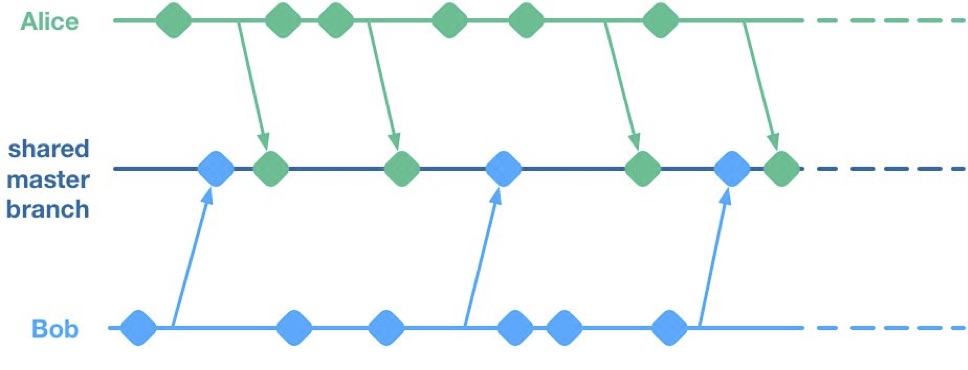
    Unfortunately, having multiple streams of work landing on a shared master branch comes with a big drawback: If any of the streams of work are not ready for release, then nothing on the shared branch can be released. Let’s see why using a hypothetical example.

    Alice and Bob are a two-dev team working on a mobile app. They have two streams of work in progress. Bob is working on a big overhaul of how user preferences work, while Alice is finishing off a critical new feature for the app which the big bosses have decreed must be pushed to the app store by the end of the week. This team is trying to avoid big merge conflicts by frequently pushing their code changes to a shared master branch as they go.

    On Thursday, Alice is wrapping up her changes and doing some testing. While giving the app a general run-through she notices that the user preferences section is crashing. She asks Bob if he knows why. Bob explains that he’s in the middle of overhauling that area of the code. It’s taken a little longer than he expected and it might be buggy for a while. Alice gives Bob a look. She explains to him that her feature has to get to the app store this week. Bob gulps. Over the course of two long days Bob and Alice are able to roll back Bob’s changes, some of which had gotten tangled up with changes that Alice had been making as part of her new feature. They manage to ship to the app store by Saturday, and a crisis is averted.

    We see here that because Alice and Bob were both committing to a shared branch, their independent streams of work became entangled. Alice could not release her changes without Bob’s and vice versa. This is the huge drawback of working on a shared branch—although we will discover later on that there are ways to mitigate this.

    Feature Branches

    To avoid this issue of coupled work streams, dev teams very often will move away from pushing in-progress code onto a shared branch. Some teams will opt to continue working on master on their local machines but only push to the team’s shared repo once the work is complete. Other teams will opt to use Feature Branches, maintaining separate streams of work on isolated branches and only merging them into master once they’re complete.

    As an aside, it’s interesting to note that when using a distributed source control system like Git, these two approaches are essentially equivalent; the only difference is whether the unmerged in-progress changes are visible in a remote feature branch or hidden on a dev’s local master. As such, I’ll talk about both variants as Feature Branching.
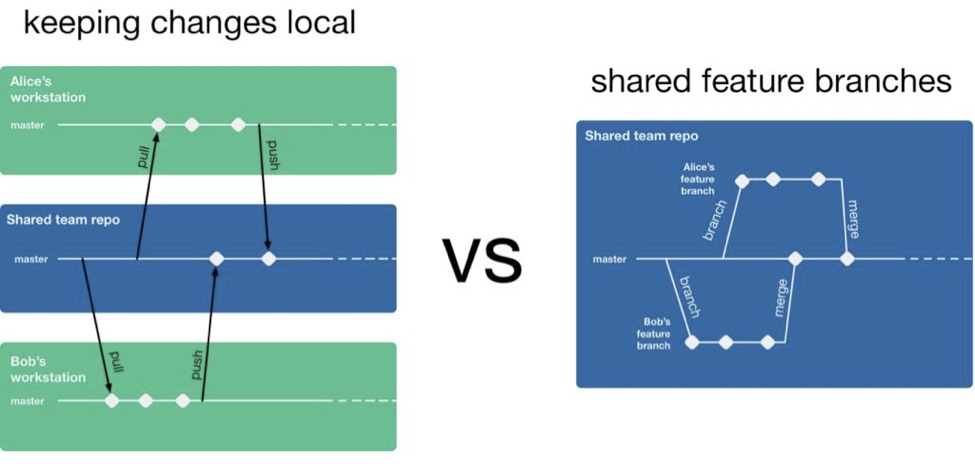
    So, if a team is using feature branching, then all their problems are solved, right? Unfortunately not. We’ve now re-introduced the risk of painful merges. Work that is being done on a feature branch is not integrated with other changes until it is merged to a shared master branch. Whenever two streams of work both touch the same files, either inadvertently or intentionally, there is a latent merge conflict which continues to grow in size until one of those stream’s branch lands on master. Some teams will try to mitigate this issue by frequently merging changes from master back into in-flight feature branches.
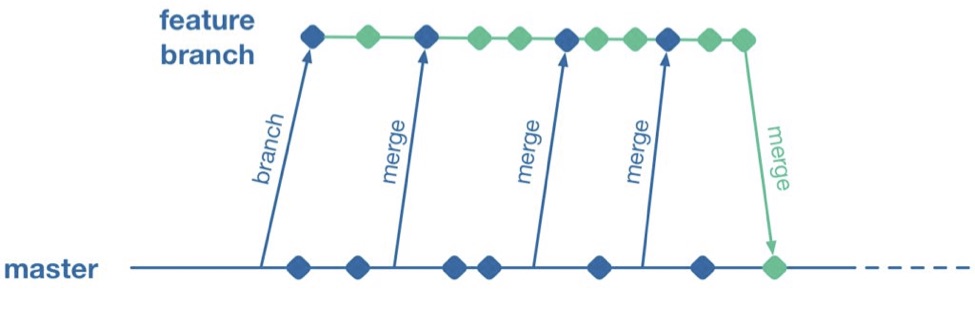
    However, this does not help when parallel changes are occurring on isolated branches. Alice’s branch will only see Bob’s changes when his feature branch lands on master. The latent merge conflict between these parallel changes is now waiting for Alice the next time she merges from master.
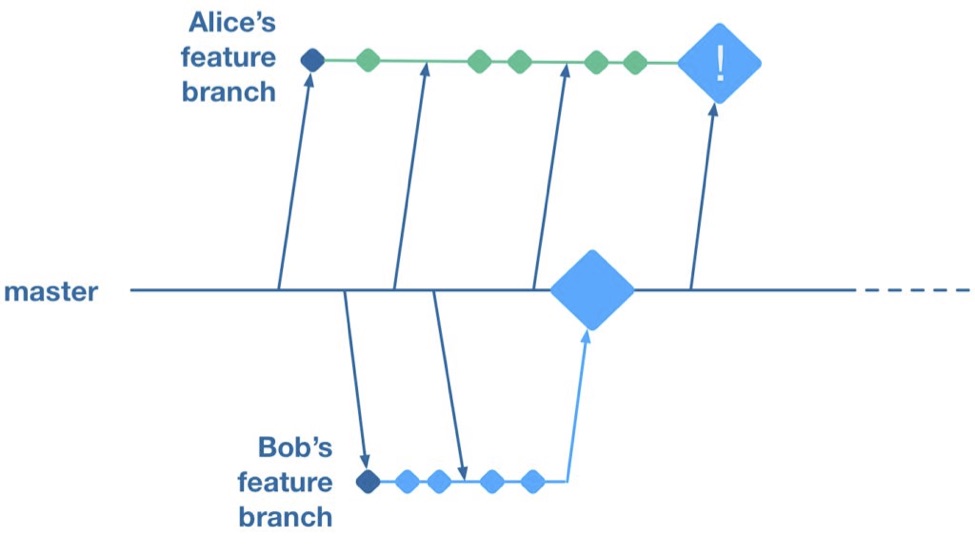
    (Thanks to Martin Fowler’s feature branch writeup for inspiring the above illustration)

    Some teams attempt to solve this problem by “cross-merging”—pulling work on one feature branch across into another feature branch to break down the size of latent merge conflicts between those branches.
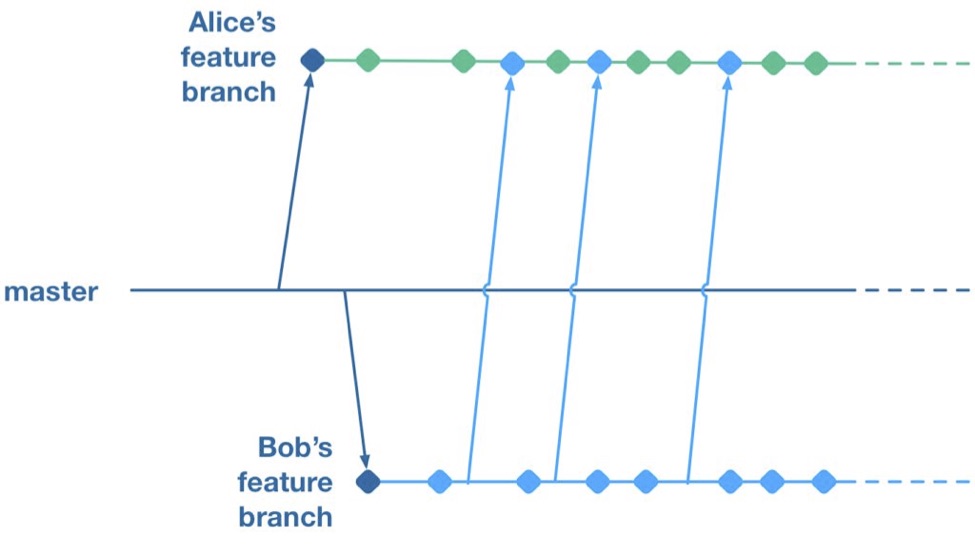
    However, as soon as you merge two feature branches together you’ve essentially created a shared branch of in-progress work, and are back to the same problem as teams who are pushing in-progress changes to a shared master: Code changes from both work streams are now intermingled. Your features are now coupled together and cannot be released independently.

    To summarize, feature branches allow teams to decouple streams of work such that they can be released independently. However, they introduce a risk of large merge conflicts when parallel feature branches contain large sets of changes. Remerging from master into feature branches only helps once parallel work has already landed, and cross-merging between branches couples features together in the same way as working on a shared master.

    Feature Flags

    What alternative does a team have if they want to avoid the merge conflict risks Feature Branches introduce? They could go back to frequently integrating changes on trunk, but we established that this has the major drawback that formerly independent streams of work are now coupled together and cannot be released independently. This is where a technique called feature flags (aka feature toggle, bits or flippers) can help.

    A feature flag is a way to isolate work-in-progress code by placing it behind a “flag” or “toggle.” The work-in-progress code will only be exercised if the flag is flipped on. Otherwise, it will sit within the codebase as “latent code.” Here’s a sketch of how a basic feature flag might be used:

    if( featureFlags.isOn(“my-new-feature”) ){
    showNewFeatureInUI();
    }

    Unless the my-new-feature flag has been configured as “on,” the new feature will not be exposed within the app’s UI. This means the app can be released even if the code implementing new feature is totally bug-ridden, as long as that feature’s flag is flipped off.

    By using feature flags, in-progress changes can be pushed into a shared branch without blocking release from that branch. If Bob is halfway through his feature and Alice wants to push a release of her feature, the team can do that by creating a release where Alice’s completed feature is flipped on while Bob’s half-finished feature is flipped off. We get the benefit of continuous integration of developer work streams (reduced risk from merge conflicts) while still keeping release of those work streams decoupled.

    This technique is not particularly new. It is part of a family of techniques sometimes referred to as trunk-based development (you can tell the technique is not new because the name uses trunk rather than the mastermoniker, which is more common today due to git’s predominance). Flickr, Etsy, Github and Facebook are some better-known proponents of the technique. Facebook’s use of feature flags is one of the key enablers for its famous ability to deploy facebook.com from a shared branch twice daily.

    Drawbacks of Feature Flags

    As with the other approaches discussed so far, feature flags have their share of drawbacks. They introduce a fair amount of noise into a codebase as we now need to explicitly implement some sort of branching logic for any incomplete feature. This noise can lead to some messy code over time unless care is taken to retire old feature flags once they are no longer necessary. Testers can take a while to get comfortable with feature-flagged apps—the idea of shipping unfinished, untested code to the app store takes a while to get used to. If the flags can be controlled remotely at run time, then teams need to understand that the new configuration of flags must be tested before being applied to apps deployed to end users.

    Finally, certain types of changes are particularly hard to protect via feature flags—broad but shallow changes that touch a lot of files can be a challenge. Happily, feature flagging is not an all-or-nothing approach; feature branches can still be used for a change that would be particularly fiddly to implement behind a flag.

    Succeeding with Feature Flags

    When a team starts to adopt feature flagging they will usually run afoul of some of the challenges discussed above, and eventually figure out ways to mitigate them. Here are some of those techniques for working successfully in a feature-flagged codebase.

    Expire Your Flags

    A lot of teams get a bit flag-happy when they first start using the approach. They tend to introduce a lot of flags, but not take the time to retire the flags once they not longer need to control whether a feature is on or off. Make sure to take the time to retire old flags—they introduce design drag in your codebase and confusion when managing flags. Some teams take quite aggressive approaches ensure old flags are expired, such as setting “timebombs” when they create a flag, or having it throw an exception if it’s still in use after a certain period of time. Other techniques include adding a flag removal task to the team’s backlog at the time the flag is created as a reminder.

    Flags Aren’t a Silver Bullet

    It doesn’t always make sense to use a feature flag for a new stream of work. Flags lend themselves best to a new feature or alternative feature where access to the feature can be controlled from a single point in the code—often by showing or hiding a button or changing what happens when you tap some part of the UI. Other types of work, such as internal refactoring, is hard to protect behind a flag. For that type of work, consider using a feature branch, ideally breaking the work down into smaller chunks that can be implemented incrementally in a series of branches rather than one long-lived branch. This will reduce the risk of a large merge conflict growing over time.

    Summary

    Feature flagging and feature branches are both ways to decouple parallel code changes and allow teams to release changes with less coordination overhead. Feature branches are easy to get started with, but can lead to painful merge conflicts. This risk of merge conflicts tends to disincentivize making incremental improvements to a codebase, and can lead to areas of the codebase becoming “no go” zones. Feature flags allow teams to practice true continuous integration and totally decouple code changes from feature release, at the cost of some complexity in implementing each flag.

    Feature flags are not a silver bullet and aren’t always the right choice, but it’s easy for a team to experiment with the approach. You can get started simply with a single hard-coded if/else statement, see how it goes and take it from there.

    About the Author / Pete Hodgson

    Pete Hodgson is a consultant to Rollout.io, a software engineer and an architect. His clients range from early-stage San Francisco startups to Fortune 50 enterprises, focused on enabling continuous delivery of software at a sustainable pace via practices like test automation, feature flags, trunk-based development and DevOps. Pete is a frequent podcast panelist, regular conference speaker in the US and Europe, and a contributing author.