Tag: testing

  • How TestOps Enhances DevOps and Software Development

    How TestOps Enhances DevOps and Software Development

    Businesses increasingly use DevOps and TestOps practices to develop and deliver high-quality software products. In this article, I will explore the concept of TestOps, its integration with DevOps and the benefits of implementing automated testing to enhance product quality, accelerate release cycles and increase the transparency of CI/CD processes.

    Why DevOps and TestOps Should be Integrated

    TestOps, a combination of testing and operations, is a software development methodology emphasizing the importance of integrating testing throughout the development life cycle. On the other hand, DevOps focuses on bridging the gap between development and operations to achieve faster delivery and higher-quality products.

    The key benefits of seamlessly integrating TestOps and DevOps include the following:

    • Enhanced product quality and accelerated release cycles
    • Increased transparency and efficiency in CI/CD processes
    • Faster bug detection (shifting left)
    • Improved user experience and reduced amount of bugs in the final product

    By properly setting up TestOps, companies can make their DevOps processes more efficient, transparent and bug-free. Well-integrated testing in the CI/CD process allows for faster bug detection, ultimately saving companies resources, money and time.

    Detailed Benefits of Integrating TestOps With DevOps

    Organizations can reap several benefits by seamlessly integrating testing into the deployment pipeline. In this section, I will outline the key goals of integrating TestOps with DevOps and how they contribute to the success of software development projects.

    Integration of DevOps and TestOps for Seamless Shift Left

    Integrating DevOps and TestOps aims to facilitate shift-left testing, enabling organizations to identify and address issues early in development. By incorporating testing from the outset, organizations can achieve the following goals:

    • Early bug detection and prevention through continuous testing: By conducting continuous testing throughout the development cycle, potential bugs and issues can be detected and addressed early on, reducing the likelihood of significant problems arising later.
    • Ensuring clean and efficient code deployment: Integration of TestOps with DevOps enables organizations to establish streamlined processes for code deployment, ensuring that the code is clean, efficient and free from defects, thereby improving the overall quality of the product. By such integration, tests will suit each phase in the deployment process, meaning that the only relevant parts will run when needed and take only required resources.

    Empowering Bug-Free Software Development With TestOps

    TestOps, when integrated with DevOps, empowers organizations to develop bug-free software and enhance product quality by offering distinct bug detection, cost savings and resource optimization advantages. The following benefits can be realized through this integration:

    • Rapid bug identification and resolution: TestOps practices enable organizations to quickly detect and address bugs during the testing phase, minimizing the impact on the development timeline and preventing defects from reaching the end user.
    • Significant cost savings and improved customer experience: Proactively identifying and resolving defects during the testing phase with TestOps reduces post-production defects, leading to cost savings associated with bug fixes and an enhanced overall customer experience.
    • Empowering testers and optimizing resource utilization: The integration of TestOps with DevOps ensures efficient testing activities and resource allocation, contributing to the delivery of higher-quality end products that meet or exceed customer expectations.

    How to Get Started With Test Automation

    While the process of integrating TestOps with DevOps can vary depending on the maturity of the company and the project, certain key steps can be taken to ensure success:

    1. Analyzing critical paths: Identify the essential processes and areas that require testing and prioritize them accordingly.
    2. Starting with small chunks: Begin by changing one area at a time and gradually expand the scope of your testing as you gain confidence in the process.
    3. Reviewing existing tests: Review logs and artifacts of existing tests to identify areas that require improvement or additional testing.
    4. Finding the right specialists: Ensure you have the right specialists on your team to help you with the integration process.

    Also, it is essential to consider the following factors when defining a test automation strategy:

    1. Release frequency and the requirement for diverse test types: Determine the frequency of releases and the types of tests required to ensure that your automated testing strategy is tailored to your needs.
    2. Availability and usability of tools: Choose testing tools that are reliable and easy to use and that can be integrated seamlessly with your existing DevOps tools.
    3. Product maturity: Decide whether to incorporate automated testing from the outset or during the transition to CI/CD, depending on the maturity of your product.
    4. CI/CD environments and testing data: Establish the necessary testing infrastructure and provisioning test environments early to ensure your automated testing process runs smoothly.

  • Tabnine Unveils Beta of Generative AI Automated Testing Tool

    Tabnine Unveils Beta of Generative AI Automated Testing Tool

    Tabnine this week made available in beta a tool that enables developers to use natural language to interact with the artificial intelligence (AI) models embedded within its test automation platform.

    Brandon Jung, vice president of ecosystems for Tabnine, said Tabnine Chat extends generative AI capabilities the company developed to make it simpler for developers to invoke its test automation platform from within their integrated development environment (IDE).

    In addition to making it possible to search a codebase more efficiently, that capability can also be used to explain how a piece of code functions, said Jung.

    Developers can also generate new code via a natural language interface using Tabnine Chat in the same way other generative AI tools do, he added.

    In addition to developing its own LLMs, Tabnine previously announced it will be integrating LLMs provided by Google as part of a strategy to mix and match LLMs regardless of where they are hosted.

    Unlike general-purpose LLMs, the ones used by Tabnine were trained using a narrower base of testing code that the company curated using tests made freely available on the internet. No customer data was used to create any of those tests, so developers do not need to worry their code may inadvertently be accessed by anyone else, noted Jung.

    In general, as AI makes test creation simpler, tests will be run more frequently, said Jung. Over time, those AI capabilities and more frequent tests should significantly improve the overall quality of applications running in production environments, he added.

    It’s now only a matter of time before generative AI is applied across the entire software development life cycle (SDLC). Testing, however, may be one area where it will have the earliest impact.

    In the meantime, the debate over the impact generative AI will have on DevOps continues. Some proponents contend most of the software engineering process is about to become automated, while others suggest there will always be a need for a human to be in the loop of any process automated using AI models. Much of the current level of toil associated with DevOps today will be reduced, but the need for software engineers to manage the overall process will remain, they contend.

    The one thing that is certain is that the pace at which applications are built and deployed is about to be greatly accelerated. Prior to rise of generative AI, testing processes were barely keeping pace, so as more code is created with the help of AI, the need for similar advances in testing will become acute.

    There is as much irrational exuberance about AI as there is fear and loathing, but DevOps teams that committed early on to ruthless automation will naturally be at the forefront of adoption. The immediate challenge is assessing what functions will be automated and the impact those changes will have on the way DevOps teams are currently structured. Ultimately, the goal is to eliminate as many of the bottlenecks that conspire to slow application development and deployment while simultaneously improving the quality of the application experience.

  • The API Life Cycle Mixer’s Manual: What Goes Into a Single Source of Truth?

    The API Life Cycle Mixer’s Manual: What Goes Into a Single Source of Truth?

    In bartending, the mixer’s manual is a trusted source of information. These books can contain hundreds of recipes for classic cocktails, some of which might be 100 years old, while others might be for drinks that only recently arrived on the scene. Mixer’s manuals also can be great sources of inspiration for new, yet-to-be-tested recipes for exciting additions to a bar’s or restaurant’s offerings. This balancing act of preserving the old while encouraging exploration into the new can provide a valuable lesson for API development in the software world. An API’s “single source of truth” is, in many ways, the software organization’s own mixer’s manual. This is especially true when the right approach is taken to ensure that software remains functional and performant and serves up experiences that delight customers and keep them coming back for more.

    The Rise of APIs and Mixology

    While we might think of mixology and the mixologists who practice this craft as relatively new terms, the first recorded use of the word “mixologist” dates back to 1852 and “mixology” followed shortly after.

    Just how similar are the work, mindsets and passions of mixologists and API developers and designers? Check out this definition of a mixologist and count the similarities for yourself:

    “The term ‘mixologist’ refers to someone who studies the history of mixed drinks, has a rich appreciation of the ingredients and techniques used and regularly creates new and innovative mixed drinks … their job title implies that they do a significant portion of their job behind the scenes, creating new craft cocktails and putting their signature twist on existing favorites.”

    The best API developers, designers and architects of the world should recognize a lot of the above in their own work. They have deep respect for their craft and are always honing it further. They seek to understand the tastes and palates of their consumers. They factor in other stakeholders’ inputs, they test, iterate and test their creations again before “serving” those APIs to production.

    Like mixologists and bartenders (if you see them as two different roles), every professional along the API life cycle should understand the needs of consumers, customers and the business–and then design and develop their APIs accordingly. An essential part of this process is continuous validation and adaptation to market requirements.

    Maintaining Confidence in Ever-Changing Recipes

    Changes to APIs, even minor ones, can have significant downstream effects. And the same can be said for tweaks made to an age-old cocktail recipe, where adding or removing a single dash of this or that can completely change the flavor of a drink … as well as people’s interest in it.

    While there’s no “standard” rate of change to APIs to plan for, you can expect changes to be needed with each new software release. This could mean changes are being made (and need to be tested against and validated) every few weeks, every month or even every day, depending on your release cadence. There also can be as-needed, ad-hoc changes.

    What’s crucial for teams to ensure is that these changes do not disrupt an API’s functionality or performance. To make this possible, teams are increasingly leveraging API contract testing to provide a safety net of sorts. This comes in the form of testing that validates changes against a “contract” that details an API’s original, agreed upon and, therefore, required functionality.

    The ability to foresee the impacts of changes to APIs can depend on the maturity of an engineering team and its ability to collaborate across departments, time zones and varying levels of technical expertise. Tools and guidelines that promote standardization and collaboration can prevent mishaps from overlooking or being blind to negative downstream effects.

    Documentation is Key

    Whether we’re talking about being able to trust a single source of truth for the most up-to-date version of a published API or the latest edition of a mixer’s manual for tried-and-true drink recipes, clear and concise documentation is key. But it’s also not enough for this documentation to simply exist.

    It seems like common sense—although you’ve probably worked somewhere where it wasn’t—that your API documentation also needs to be easily accessible, understandable and usable. Ensuring all of these things leads to smoother onboarding and a positive developer experience and, ultimately, to wider adoption of a functional, performant API that meets or even exceeds expectations.

    API documentation is often the first point of contact a developer has with an API. It serves as a guide, walking developers through the API’s features, endpoints, request/response models and error messages. It also provides insight into the underlying business logic and unique characteristics of an API.

    Good API documentation follows the principle of a single source of truth, meaning that it should be comprehensive, up-to-date, and consistent. It should always mirror the actual behavior of the API, reducing the guesswork for developers and minimizing the potential for misunderstandings and errors.

    Just as a mixologist relies on a detailed and accurate cocktail recipe to deliver a pleasing experience to a patron, API developers depend on good documentation to create and deliver useful, value-add APIs and powerful applications.

    Continuous Improvement = Continuous Education

    Like a mixologist who meticulously adjusts the ingredients of a cocktail or who creates new cocktails to meet the evolving tastes of customers, developers must constantly adapt their APIs to meet changing market demands, business needs and industry standards.

    This is achieved through a potent blend of market research, collaboration, adherence to standards and governance and meticulous testing. However, as software development, testing and deployment technologies and processes continue to evolve, the tech industry must continue educating itself and refining its practices.

    With a mindset focused on constant learning and continuous improvement and a dependable single source of truth as their guide, development teams can confidently serve up exceptional API experiences in every release. In the end, the aim is to create APIs that are reliable and easy to consume and that meet the unique needs of the moment–much like a mixologist’s perfect beverage.

  • SapientAI Emerges From Stealth to Apply AI to App Testing

    SapientAI Emerges From Stealth to Apply AI to App Testing

    SapientAI emerged from stealth today to automate the writing of test code using a combination of generative artificial intelligence (AI), machine learning algorithms and data science.

    Fresh from raising $5 million in seed funding, SapientAI CEO Rishi Singh said the goal is to leverage AI to push application testing further left using an AI Test Coder the company built.

    The concept of AI Test Coder is similar to the co-pilot capabilities that GitHub and Google are providing to help developers write better code faster, but also goes beyond generative AI to add deeper analysis and contextual understanding to the tests it automatically generates, noted Singh.

    In the longer term, the ability to use AI to create tests will result in the deployment of more secure, higher-quality applications because there will be no need to short-shrift application testing processes in the interest of meeting deadlines, added Singh.

    Prior to the rise of AI, building application tests has historically been prone to error. AI Test Coder is designed to be a plug-in for an integrated development environment that will leverage the large language models (LLMs) created by OpenAI and cloud service providers to employ natural language to create tests based on an analysis of the application environment created using a combination of machine learning algorithms and data science techniques, said Singh.

    As part of the effort, AI Test Coder instantly inspects all software code to understand the software testing environment, including any incorrect assumptions that stem from errors and bugs, before generating any test code. It then leverages code intelligence to understand existing code and automatically identify and detect patterns to anticipate any new software issue that may arise. AI Test Coder also locates where code changes will have an effect before any test code is created. This eliminates time that would otherwise be wasted on manually debugging code.

    Once those steps are completed, Test Coder then generates more accurate tests without relying on the current trial-and-error approach to testing that can slow application development, said Singh.

    In effect, AI Test Coder provides each developer with their own assistant dedicated to managing testing tasks that ultimately improve quality assurance, including removing many of the vulnerabilities that create application security issues that have become the bane of software supply chains.

    It’s too early to determine precisely what impact AI will have on application development and deployment, but many of the manual tasks that create a sense of drudgery are about to be eliminated. That means the overall pace at which applications can be built and deployed is about to be greatly accelerated. DevOps teams are likely to find themselves pushing more code simultaneously through pipelines than ever.

    Naturally, AI will soon be applied to not just writing code and tests faster, but also DevOps workflows. The issue now is determining which of the tasks that today require manual intervention will be eliminated in a way that enables DevOps teams to focus more of their time and effort on more complex challenges.

  • Why Monitoring-as-Code Will be a Must for DevOps Teams

    Why Monitoring-as-Code Will be a Must for DevOps Teams

    Over the last decade, we’ve seen an increasing number of operations teams and development teams using an infrastructure-as-code (IaC) process for provisioning cloud-based infrastructure. In that model, IaC tools like CDK, Pulumi or Terraform are employed to allow developers to code, deploy and manage cloud-based infrastructure. The advent of cloud services and IaC tools has freed engineering teams from error-prone (and slow) manual infrastructure provisioning processes. The ability to codify your infrastructure next to your version-controlled application code has been a game-changer for many organizations.

    An Introduction to Monitoring-as-Code

    With IaC becoming an increasingly valuable tool for managing infrastructure, it’s only natural that other parts of the ecosystem follow that shift left philosophy, including how testing and monitoring are done.

    Similar to IaC, the monitoring-as-code (MaC) concept allows us to describe a monitoring infrastructure as code. Today, many DevOps teams are employing MaC by using some of the aforementioned IaC tools like Terraform or Pulumi—in conjunction with monitoring platforms like Checkly—to create, run and manage their browser and API monitoring regimens. In these examples, monitoring checks can be defined in JavaScript, TypeScript or HCL, and then those can be committed together with application code. Modern MaC matures fast; it does not even require traditional IaC tools but enables MaC without extra tools. Modern platforms enable this by shipping CLIs to achieve this. Making monitoring an integral and companion part of your codebase comes with many benefits and advantages.

    Just as IaC has become an integral part of the new paradigm for managing cloud-based infrastructure, here are a few reasons why I believe MaC will also become a must for modern DevOps teams.

    The Benefits That Make MaC a Must for DevOps Teams

    Flexibility and Programmability
    By adopting MaC, your automated testing infrastructure is defined as code and lives next to your application code in your code repository, giving you all the benefits that entails. Testing and monitoring are no longer treated as separate from your application code.

    Update Monitoring With Your Code Changes
    As mentioned in the previous bullet, MaC places your testing and monitoring next to your application code. So when your application code is updated, your testing and monitoring ships right alongside it, streamlining the process. That makes your testing and monitoring solutions deployable, with MaC giving you the ability to schedule tests on a continuous, around-the-clock basis from distributed locations across the globe.

    Monitor and Test on Staging
    In the past, synthetic monitoring was primarily meant to run on production: Once your apps were deployed, monitoring kicked in and alerted you when things failed. With MaC, that monitoring can now run locally alongside your application code in a CI/CD flow, allowing that app code to be tested and even monitored continuously on staging before getting deployed on production.

    Speed and Automation Efficiency
    With monitoring now embracing the “as code” paradigm, new checks can be spun up quickly and in far less time than a non-MaC monitoring approach. All of that increased speed and efficiency will have a real-world impact on dev, ops and QA teams, saving engineers hours now automating once-siloed manual and inflexible work.

    Scale as Needed
    Finally, given that your tests live right next to your application code, it’s much easier to observe, manage and understand what is being monitored. That insight and visibility also make it much easier to scale your testing and monitoring efforts across teams, organizations and even across the globe. All of that enhanced efficiency frees dev and QA teams to focus on other tasks while simultaneously providing better testing and monitoring support across the organization.

    MaC Benefits in Action
    As an example, all of the aforementioned benefits are being employed by a large health care provider that recently adopted a MaC workflow. That organization relies on a MaC testing and monitoring workflow—based on tests written in Playwright—to automate its synthetic monitoring efforts. In particular, a MaC approach has enabled the QA and dev teams there to quickly build, validate and deploy an entire suite of checks from their local development environment.

    The Future of Testing and Monitoring

    With MaC now moving in the same leftward direction as IaC, I believe that the future of monitoring will become increasingly accessible, flexible and frictionless for any modern developer. MaC will also be increasingly based on open source testing and automation frameworks like Playwright, Puppeteer and others, which have been used and adopted for automation and testing for years.

  • Bug Bounty Vs. Crowdtesting Programs

    Bug Bounty Vs. Crowdtesting Programs

    Digital quality and excellent user experiences are more important today than ever. When a digital experience doesn’t work as expected or is rife with friction points or glitches, customers are quick to give up and move on to a better, easier solution. Bugs and defects often come with high stakes and can result in loss of revenue, dissatisfied customers and potential damage to a brand’s reputation.

    With this in mind, software testing is tasked with the important role of catching and fixing bugs and defects before they hit production. There are several approaches to finding bugs in software, two of which are bug bounty programs and crowdtesting. In this article, we’ll examine the values of each.

    Bug Bounty Programs

    A bug bounty program typically involves people outside an organization with software testing experience, leveraging their expertise to hunt down product defects in exchange for money. Bug bounty programs can be a cost-effective way to find defects that otherwise go unnoticed. They provide an outside perspective and a sanity check for digital products to find vulnerabilities and defects.

    From a security perspective, bug bounty programs are also valuable. Today’s security teams have trouble managing the sheer volume of software vulnerabilities found in software. That’s part of the reason behind the growing number of cyberattacks and breaches that continue to be a topic of discussion. Bug bounty programs leverage white-hat hackers to find and report vulnerabilities in an effort to improve overall security posture and support the organization’s own cybersecurity team.

    Bug Bounty Benefits

    Bug bounty programs offer a variety of benefits to organizations, including:

    ● Helping with blind spots: It doesn’t matter how well your software is designed and coded. Defects and bugs, whether minor or major, will find their way into applications. The developers themselves and internal testing teams may only test certain paths based on organizational norms. Bug bounty testers offer a fresh perspective that can help reduce overall blind spots in application testing.
    ● Resource flexibility: Most organizations don’t have the flexibility to scale internal resources on short notice. Bug bounty programs offer outsourced help and are flexible. They can be scaled up if needed to help with finding defects before a major launch. Or, if a business needs to save money, it can be scaled down by either reducing payouts or limiting testers to high-value defects.
    ● Continuous evaluation: Whether an application is in use by customers or is just a prototype, a bug bounty program can go to work finding and revealing bugs and vulnerabilities. Bug bounty programs can continuously search for bugs that help improve the quality of an application.

    Bug Bounty Challenges

    While there are some great benefits to using bug bounty programs, there are challenges, as well, including:

    ● Money focus: As the name suggests, this is a bounty program. High-severity defects come with a higher payout. If a large percentage of bug bounty hunters are focused on high-severity bugs and vulnerabilities because of the higher earning potential, they may miss the smaller defects. This can add up and result in a less-than-ideal user experience, with smaller issues going unfixed.
    ● The perspective of the tester: No matter how experienced and skilled a tester is, everyone is limited by their own blind spots and perspective. A diverse group of testers can help offset this, but there is still no guarantee that they will test the product in the same way that customers will use them. This challenge is multiplied when we add in different devices, operating systems, languages, and locations. Bug bounty hunters may be more focused on finding high-value issues to earn more, while an internal tester may be more invested in a specific product or feature and making sure it works as it should.
    ● Communication: Many have gotten used to working from home or from anywhere and collaborating remotely. Bug hunters work like this too, but they are outsourced assistance from an organization, which requires a bit of extra thought for communication, project scope and qualifications to make sure misunderstandings or lags in progress are kept to a minimum.

    Crowdtesting

    A crowdtesting model leverages skilled testers and testing teams that can be sourced from a globally dispersed community of independent digital experts. Depending on the size and diversity of the community, testers can apply a nearly limitless variety of demographic characteristics, locations, skill levels, spoken languages, abilities, devices, browsers and operating systems into a testing scenario. This breadth of feedback provides valuable insights into how real users will interact with an app, device or digital experience—which may not necessarily be the “typical” way it is intended to be used. This real-world interaction can unearth bugs, friction points and localization issues that may otherwise go unnoticed before the experience is released to actual customers.

    The remote and on-demand nature of crowdtesting provides scalability and timely results in comparison to more traditional testing methods, like offshoring or lab-based testing, which are typically more limited in scope and flexibility. Plus, the crowdtesting model inherently provides the ability to scale testing services up or down as needed to meet the project-based requirements of a company’s internal teams.

    Crowdtesting Vs. Bug Bounty Programs

    Both bug bounty and crowdtesting programs involve digital experts looking for app defects and vulnerabilities with the goal of improving digital quality. These programs can be aligned in this goal and even work in tandem, but there are some notable differences between them worth mentioning.

    ● Scope: Bug bounty program scopes will always be somewhat limited. Defects can be found outside of the payment scope and go unflagged. Crowdtesting allows for either a broader or more specific scope, depending on needs. Organizations can give specific instructions, like making sure UX considerations are taken into account.
    ● Volume: Both crowdtesting and bug bounties rely on skilled professionals who know how to root out bugs and defects. Crowdtesting, however, allows for as many or as few testers as needed. Instead of gathering a moderate amount of defects from a more technical audience, crowdtesting enables testing for any amount of defects from a diverse and vast pool of testers. As a result, crowdtesting finds a larger variety of defects, and across more devices, locations, and OS versions. This can also be a challenge, as internal staff can become overwhelmed by so many bug reports to look through and address. Therefore, prioritization is key.
    ● Flexibility: Digital quality is a multi-faceted process. It’s not just about functional and security bugs but also accessibility assessment, making sure to test using specific devices and use cases, and more. Bug bounties fall short here, while crowdtesting delivers the flexibility to test and address situations your potential customers may face when an application is live.
    ● Specificity: Most bug bounty programs are not tailored. They can be application- or region-specific, but that doesn’t always reflect a target customer use case. Crowdtesting enables an organization to focus on specific demographics in terms of user experience. An organization can specify testers in certain locations with a certain device or devices and who speak specific languages. Crowdtesting isn’t always just about technical ability; it’s about finding the correct group of people needed for the task at hand.

    Both bug bounty and crowdtesting programs provide unique benefits that help organizations improve overall digital quality. Bug bounty programs offer help with organizational blind spots while leveraging testing professionals in a flexible way. Crowdtesting enables businesses to harness the power of real people using actual devices out in the world to test for use cases. It delivers the power to augment internal testing initiatives, helping to improve overall quality, usability, accessibility and more. When improving digital quality and user experience are the goal and end result, bug bounty and crowdtesting programs can each be impactful and helpful for today’s businesses and for improving the user experience.

  • Tabnine Extends Generative AI Platform Reach to Testing

    Tabnine Extends Generative AI Platform Reach to Testing

    Tabnine today announced it extended its generative artificial intelligence (AI) platform that enables developers to write code faster to now include the ability to automatically generate tests for that code.

    Available in beta, this capability promises to make it easier for developers to test code at the time it is being developed. That approach should make it simpler for developers to address issues without losing any context.

    Brandon Jung, vice president of ecosystems and business development at Tabnine, said this latest addition to the Tabnine platform is part of a larger effort to extend the reach of the Tabnine generative AI platform across the entire software development life cycle. The testing capability is expected to be generally available in the third quarter, and Tabnine expects to also employ generative AI to automate a much wider range of tasks across the software development life cycle within the next 12 months.

    The Tabnine platform supports multiple programming languages including Python, Java and JavaScript and is designed to be integrated with integrated development environments (IDEs) such as Visual Studio Code and Jetbrains. The company has also previously integrated its code completion tool with the GitLab continuous integration/continuous delivery (CI/CD) platform. The overall goal is to make it easier for developers to automatically write code based on custom models using approved source code hosted in a secure private repository, said Jung.

    Generative AI creates a large language model that assesses the probability of what the next line of code will be based on what has preceded it. Tabnine is now extending the model it created to also generate tests for the code its platform helped a developer write. It’s not clear what impact this ability to automate test creation will have on the need for dedicated testing teams, but it is about to become considerably easier to shift more responsibility for testing further left toward developers.

    It’s not likely DevOps teams will be replaced as generative AI is extended across workflows, but the overall size of those teams might shrink, noted Jung. DevOps teams will soon be able to do far more with fewer people, he noted. At the same time, the barrier to DevOps adoption will also fall as AI platforms make it simpler for more organizations to embrace DevOps best practices, added Jung.

    The challenge will be making sure the data collected to train AI models is of a high enough quality to ensure the desired outcome, noted Jung.

    One way or another, it’s now only a matter of time before generative AI capabilities are applied more broadly. Platforms such as ChatGPT developed by OpenAI are only the tip of the iceberg that impacts almost every manual process, including software development and deployment. The issue will be determining at what rate those innovations will become practical to employ. In the meantime, it is already apparent generative AI platforms are having a significant impact on the rate at which code can be developed. Inevitably, that means the amount of code moving through DevOps pipelines at any one time is about to increase significantly.

  • 5 Unique Challenges of Mobile App Testing

    5 Unique Challenges of Mobile App Testing

    At first glance, testing a mobile app may not seem to be very different from testing a conventional desktop app. Mobile and desktop apps are often written in the same languages and hosted on the same servers. They must also meet the same basic user expectations in areas like loading speed and accessibility.

    But when you dive into the details, you realize that mobile apps are fundamentally different beasts from desktop apps–and that, by extension, mobile testing requires a unique approach. You can’t simply take a software testing strategy that works for desktop apps and graft it onto your mobile apps.

    This article breaks down five of the main reasons why mobile testing necessitates a different strategy from desktop application testing and which unique needs QA engineers should consider when testing apps.

    1. Mobile Configuration Variability

    Perhaps the biggest difference between mobile and desktop testing is that with mobile apps, engineers have a much wider set of possible configurations to contend with.

    In the desktop world, there are just two main operating systems – Windows and macOS – and a relatively small number of OS versions for each family. And although there are many types of PCs and laptops, they all conform to the same basic hardware standards.

    In contrast, there are over 24,000 distinct types of Android mobile devices out there – to say nothing of iOS devices, which add to the diversity of hardware. There is also a wider selection of mobile operating systems and versions.

    What this means for QA teams is that there are many more variables to test for with mobile devices. It also means testing must be more efficient so that engineers can test for as many potential configurations as possible without delaying software release cycles.

    2. Lack of Mobile Testing Standards

    With a traditional, web-based desktop app, there is a consistent set of standards that the app is supposed to comply with when rendering content – specifically, the standards set by the W3C, a consortium that advocates for a standards-based, interoperable World Wide Web.

    In the mobile realm, however, there is nothing equivalent to the W3C standards. Apps can render content in widely varying ways, many of which are device-specific.

    Here again, this increases the need for specific testing teams to account for more variations and edge cases. With desktop apps, ensuring that the app complies with the W3C standards is often sufficient, but mobile testing is not so simple.

    3. Unique Mobile Accessibility Requirements

    Accessibility testing, which ensures that accessibility features like the ability to increase text size function properly, is important for delivering a great experience to all users, whether they access apps using desktops or mobile devices.

    But with mobile devices, accessibility testing is harder, because there is more room for error when implementing accessibility features. For instance, the smaller screen sizes of devices – and the greater variation in average screen size – could mean that an increase in text size will cause the app to render some text off the screen. Or, a “nighttime mode” feature on a screen could result in lower-than-expected contrast between text and backgrounds, causing accessibility challenges for some users.

    A mobile testing strategy needs to be able to accommodate risks like these, which aren’t as pronounced for desktop apps.

    4. Mobile Environment Differences

    By definition, mobile devices may be used in a wide range of physical settings. Depending on the location from which a user accesses a mobile app, application performance could be impacted by a variety of environmental factors that don’t typically apply for desktop apps.

    For instance, limited network connectivity might undercut application performance when users who travel too far from cell towers. Or, energy-saving features on mobile devices that are running on low battery could decrease the speed at which apps render content.

    Once again, these factors create additional risks that QA teams need to address when planning testing routines.

    5. Higher Stakes for Mobile Testing

    It’s a best practice to strive to deliver the best possible experience to all users, whether they are on desktop or not. But the reality is that poor user experience in mobile apps tends to have a more negative impact on a company’s brand.

    The reason why is that it’s easy for users to highlight poor app performance by giving apps low ratings or leaving negative comments in marketplaces. They can’t do these things for most desktop apps, because, unlike mobile apps, most desktop apps are not downloaded through centralized marketplaces with user-rating features.

    This difference doesn’t make mobile testing more technically challenging, and to be clear, I’m not saying you can skimp on desktop testing because users will abandon your desktop apps if they don’t work as they should, but it does increase the stakes of perfecting a testing strategy. Businesses simply have more to lose, reputationally speaking, from delivering buggy apps than they do from low-quality desktop apps.

    Conclusion: The Need for Purpose-Built Testing Solutions

    All of the above is why we need more testing strategies and solutions that are designed specifically for mobile.

    Historically, QA teams have frequently tried to extend desktop testing strategies to address mobile as they’ve added apps to their catalogs, but that approach simply doesn’t work. Mobile apps and devices are too different in fundamental respects to be shoehorned into a desktop-centric testing routine. The sooner QA engineers realize this, the sooner they’ll optimize their user experiences.

  • Shift Left Testing in Microservices Environments

    Shift Left Testing in Microservices Environments

    By now, it’s common knowledge that the later a bug is detected in the software development life cycle (SDLC), the longer it takes and the more expensive it is to fix that bug.

    In 2017, the Ponemon Institute found that it cost around $80 on average to fix a defect detected early in the SDLC and around $7,600 to fix the same defect if it was detected in the production stage.

    Relative Cost of Fixing a Defect Based on Development Stage

    Design

    Implementation

    Testing

    Maintenance

    Cost of Fixing Defects

    1x

    6.5x

    15x

    100x

    While these numbers can be debated, it’s clear that early detection of defects can save organizations significant time and money while enabling those organizations to deliver higher quality software more rapidly. For these reasons, many organizations are implementing shift left testing practices, including in microservices environments.

    Shift left is a set of practices intended to find and prevent defects early in the software delivery process instead of during the testing and maintenance stages. The idea behind shift left testing is to improve software quality by making actionable test signals and feedback available as early in the SDLC as possible.

    Here, we’ll highlight how shift left testing, in combination with test automation, can better enable both innovation and fast delivery of high-quality software. We’ll also address some of the challenges involved in implementing shift left testing in microservices environments, as well as introduce a valuable strategy for successful microservices implementation.

    Shift Left Testing Benefits

    The waterfall model of development involved the explicit passing of responsibilities between highly specialized design, development, QA, and release teams. It also involved lengthy feedback loops.

    Scrum and agile methodologies made the entire SDLC more flexible and nimble by introducing sprints and allowing more frequent iterative development and delivery. Further, DevOps and DevSecOps focus on removing the silos between development, operations, and security through tooling and automation. As a result, the time to market and quality have improved dramatically. Adding shift left testing into the mix better positions teams to handle the broad range of responsibilities from the design stage through the maintenance stage as effectively as possible.

    Shift left testing focuses on prevention rather than detection. Shift left benefits include the following:

    • Increase efficiency by eliminating bugs earlier in the SDLC.
    • Reduce human errors and associated costs.
    • Increase delivery speed and reduce the time between releases.
    • Improve the quality of software.
    • Gain a competitive advantage.

    It may be helpful to think of shift left testing like this: Test early and in parallel with development, instead of the traditional waterfall model of development followed by QA testing. 

    Shift Left Testing Challenges in a Microservices Environment

    By structuring an application as a collection of loosely coupled, independently deployable services, a microservices architecture enables frequent delivery of large, complex applications.

    While shift left testing practices bring many benefits, shift left testing also comes with three challenges that organizations must address when implementing it across a decentralized, microservices-based stack:

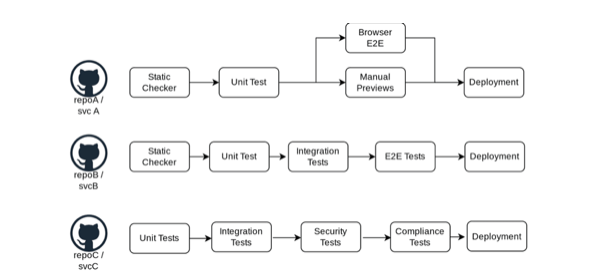
    1. Building and managing each microservice separately reduces development time. However, implementing shift left testing at the microservices level means shift left practices must be applied to each individual microservice.
    2. Microservices developers can choose the programming language and service dependencies best suited to their development needs. However, as a result, shift left testing practices need to be implemented and managed across different programming languages and dependencies.
    3. To ensure that microservices function as expected, teams usually run integration tests, end-to-end tests, and performance tests that assess functionality in the context of the larger stack. Shift left testing is especially challenging in the microservices context because of the complexity of testing against the stack.

    Microservices, each with their own SDLC pipeline

    Pipeline Scaling Considerations

    Several classes of automated shift left tests can be integrated into the DevOps pipeline, including unit tests, integration tests, performance tests, and security tests. Different microservices will have different testing needs.

    The key is to apply shift left testing practices to each microservice while maintaining the flexibility and decentralization of those microservices. The ideal workflow system and DevOps pipeline implementation must simplify pipeline creation while enabling development teams to manage the pipeline and requiring minimal input from DevOps and platform teams. In other words, shift left practices must be tailored to the specific needs of the microservice in question to make the testing process scalable and easy for development teams to manage on a continuous basis.

    As just one example, GitHub Actions and similar CI/CD pipeline tools enable development teams to use GitOps-based practices to configure, manage, and administer the entire pipeline for their microservice while leaving infrastructure testing and testing that relies on or affects other parts of the system to DevOps teams.

    Test Environment Considerations

    Test environments are environments where unit tests, integration tests, performance tests and security tests can be run on an isolated collection of microservices and configurations. The nature and quality of these test environments directly correlate with the effectiveness of shift left testing.

    A cloned production or staging environment can be used for testing when the number of microservices is low and overall complexity is relatively low. However, once an organization reaches a threshold number of microservices or a threshold level of complexity, runaway infrastructure costs and operational burdens make such environments untenable.

    In response, some organizations rely upon smoke testing (minimal viable stability testing) and mock-based integration testing early in the SDLC. While such tests can prove useful in the near term, deferring essential testing to a later stage in the SDLC often introduces test signal and validity problems in the staging environment and can lead to delivery delays and serious issues with software quality.

    So how can shift left testing be used successfully in a microservices environment? The solution involves the use of scalable, ephemeral test environments.

    Ephemeral Shift Left Testing Environments

    The availability of high-quality test environments is a common bottleneck for organizations looking to scale shift left testing practices. Using a few high-fidelity staging environments for signal testing can slow the release process. More to the point, it tends to slow down the entire SDLC and increase stack instability over time.

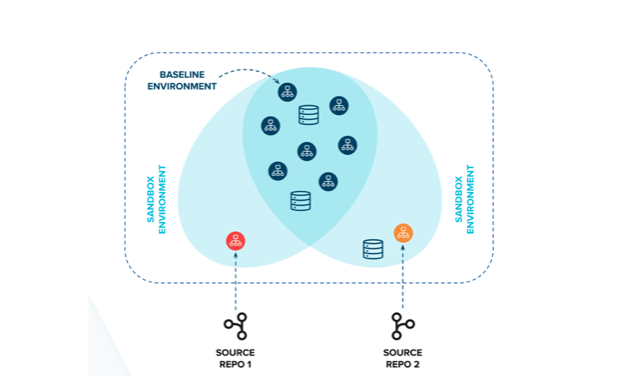
    Ephemeral test environments offer a fundamentally different approach. These sandbox environments use isolated environments that enable users to test independently without impacting other users. In particular, they enable isolation while sharing resources (e.g., external cloud dependencies and hosted databases) using application-level multitenancy instead of the resource duplication approach in traditional environments.

    The idea is that microservice test environments can be used to test changes against a much larger stack of services. Because multiple tests can be conducted at the same time, test coverage and resource efficiency vastly increase.

    High-quality sandbox environments can spin up in seconds and scale to tens of thousands of microservices. In fact, each pull request, branch, or commit can have its own test environment without significantly increasing infrastructure and operational costs. Any change, no matter how small, can be tested in isolation to ensure performance and stability against the entire stack.

    Shift Left Testing Solutions for Microservices

    A microservices-based organization looking to scale shift left testing across the organization must first address several challenges. Considerations include the need to apply testing practices to separate microservices, the need to accommodate different programming languages and service dependencies and the need to test against the stack.

    The right tooling and automation are needed before shift left testing practices are scaled across the organization. In addition, a cultural shift may be required in order to help developers understand the ways in which shift left testing can expedite and improve the core functionality that they are developing.

    To apply valuable shift left testing practices in a microservices environment, organizations should consider using ephemeral sandbox environments. Using the right set of tools in a sandbox environment can enable development teams to test microservices throughout the SDLC. In doing so, organizations can ensure those services follow security best practices and perform exactly as intended, both independently and against the stack–all while reducing costs, speeding time to market and improving software quality and user satisfaction.

  • Faster and Better Testing?

    Faster and Better Testing?

    The whole concept of Agile and DevOps was to iterate development faster and deliver results in a more timely manner. As we learned more about both methodologies, processes and policies were put into place that improved the quality of what was created. Early ideas of quality like, “We can just do another iteration,” still exist, but are largely not used. Rollbacks are a thing in most orgs, and though the environment is more complex, rollbacks are easier to manage in the smaller development changes that iterations generally represent.

    And once we got past the whole, “Anything that slows the process down is bad!” mentality that permeated early implementations of both DevOps and Agile development, we started seeing amazing things. But including things like security and functional testing were not viable in the fast-iteration world that Agile and DevOps created. And they really weren’t viable at most orgs in the slow-iteration world of waterfall, either. Staffing and time constraints made them fall far short of optimal in the vast majority of organizations. But putting them into the DevOps process challenged vendors to find a way to do things faster and challenged organizations to look at quality and security a little differently.

    And now, we have tools that can test—be it functional, integration or security—at the speed of DevOps. Tools that enable Agile development with an eye toward security. A far larger number of developers now acknowledge their part in application security and are creating more secure code.

    Keep an eye on how AI/ML is being used in testing—all forms of testing—and how it evolves in the next year or two. The same with full-on automation. I’ve made no secret that I view AI/ML in the testing space as advanced automation because of what it enables, so maybe “Watch what AI/ML-enabled automation is available,” is more accurate. The ability to create, run, process results and even modify code to resolve issues are all out there today, and getting better. Faster, more accurate, more automated.

    Much like back when intrusion detection became intrusion prevention, I would not just turn it on and walk away, but think about the ability to upskill developers; “Here is a list of things the automated system found, and a list of fixes it proposes.” They are literally being shown how to do their craft better.

    I’ve been a developer, so I’m not being offensive, here. If you get something that tells you, “This is an issue; here is why it happened and here is what to do to fix it,”take the opportunity to get better at coding. Look closely at the what, the why and how to fix it and incorporate that into your work.

    And keep rocking it. We’ll be making more stable and secure code, but you’ve kept systems running without that feedback and fixed the errors along the way. This just makes it easier to find the errors early—before they crash production and make a fire drill.