Category: DevOps Toolbox

  • DevOps and ITaaS: Two Sides of the Same Coin

    DevOps and ITaaS: Two Sides of the Same Coin

    It seems IT practitioners haven’t realized yet the scale of digital disruption. Mired in the old IT thinking, they firmly believe that sophisticated tools are all businesses need to survive the ongoing digital disruption waves. Most of them warn, “Digital transformation is changing the way we do business, the way we deliver IT services must change, businesses need to adapt the way they work.” The problem is, there’s nothing new in what they offer to help businesses work the “right” way.

    Indeed, the same old IT thinking’s practices are still applied with the illusion that deployment automation and configuration management tools on their own will make businesses agile, responsive to market opportunities, and therefore in line with the digital economy’s competitive challenges. That belief misses the point for two reasons: First, it’s an incorrect understanding of what business agility is, and second, it’s a misunderstanding of the global competitive environment’s transformation.

    Turning your IT organization lean and agile is the competitive differentiator your business lines desperately have been calling for. Authentic DevOps implementation is the way to go. That’s the price to pay to keep up with the pace imposed by new leading-edge companies such as Google, Apple, Uber and the like.

    The changing competitive environment forces businesses to focus on innovation, market responsiveness and timely revenue

    A digital economy threatens the existence of all businesses. Yes, you read it right, their existence is at stake. And that fact is underestimated by IT vendors and consulting firms.

    As illustrated, we’re shifting from business environments where established businesses (incumbents) control a large percentage of market segments to competitive contexts where, attracted by the amazing digital opportunities and the adoption of cloud which significantly reduces infrastructure expenses, a growing number of startups disrupt entire industries:

    The changing competitive environment (Credit: Philippe Abdoulaye ITaaS Now LLC)
    The changing competitive environment (Credit: Philippe Abdoulaye ITaaS Now LLC)

    The proliferation of startups created by highly qualified unemployed seniors and creative entrepreneurs, coupled with the propagation of highly innovative digital services (e.g., Internet of Things [IoT] applications) substituting traditional services, have been disrupting the vast majority of industries.

    Several examples substantiate that fact: the taxi industry shaken by the emergence of technology-driven companies such as Uber, the banking industry facing new breed of competitors including PayPal, Google and Apple; and the healthcare industry increasingly disrupted by companies such as GlowCap.

    To grow and prosper in the digital era, your scale, brand equity or market capitalization aren’t enough anymore. To succeed, your business lines must be on top of the digital economy’s competitive standards: competitive innovation (the ability to continuously improve customer experience), market responsiveness (the ability to deliver added-value services to the right market segments at the right moment) and timely revenue (the ability to continuously increase customer value).

    The digital economy has taken IT to an inflection point—deploying sophisticated tools isn’t enough; being lean and agile is the way to go

    The obligation for business lines to focus on innovation, market responsiveness and timely revenue is unprecedented for techies; it forces them to think beyond tools and address issues as unusual as organizational and operational effectiveness.
    Indeed, innovation, market responsiveness and timely revenue assume greater cross-functional collaboration, IT focus on business priorities, organizational flexibility and accelerated time to market. Make no mistake, you’ll never achieve them by only deploying tools, but by also making your IT operating model flexible through proactively eliminating the organizational and operational dysfunctions that prevent cross-functional collaboration, fast problem-solving and decision-making.

    That’s what is meant by making the business agile.

    The new IT thinking is summarized in that simple  arithmetic: Digital Competitiveness = Lean and Agile Operating Model + Effective and Efficient Tools. Without the lean and agile operating model, innovation and timely revenue are wishful thinking. Without effective and efficient tools, innovation and market responsiveness are wishful thinking as well.

    The organizational and technological dimensions are complementary. Adam Jacob, Chef’s CTO, confirms that fact in a very informative article, “The Secret of DevOps: It’s Always Been About People, Not Technology.” This is where DevOps can help businesses succeed.

    DevOps is the IT asset businesses need to succeed in the digital economy

    Contrary to a now (unfortunately) established belief, DevOps isn’t a technology; Chef, Puppet, Jenkins, OpsWorks, alike aren’t DevOps, they’re only pieces of it. It’s important to be clear about it.

    As I’ve been implementing it, DevOps is a system of principles, practices, roles and responsibilities, governance structure and tools purposely arranged to establish cross-functional collaboration, enable accelerated applications delivery and, in turn, make the business responsive to market opportunities:

    DevOps Model (Credit: Philippe Abdoulaye ITaaS Now LLC)
    DevOps Model (Credit: Philippe Abdoulaye ITaaS Now LLC)

    As illustrated, DevOps as a business capability is made up of three components: the Rules of the Game, the IT Operating Model and the Continuous Delivery Pipeline (CDP). Let’s explore them.

    DevOps Rules of the Game create the conditions for lean and agile IT environments

    Rules of the Game are a fundamental dimension of DevOps: They enable the establishment of lean and agile environments. I refer to them as the DevOps non-technological piece.

    In practical terms, they’re a set of principles, practices, roles and responsibilities and tools institutionalized to ensure accelerated applications delivery.

    They serve as catalysts to specific organizational and operational effective practices. Let’s take the principle, “Facilitate with system thinking (involvement of all relevant stakeholders)”—it forces application development stakeholders to adopt a collaborative mindset, which in turn breaks down organizational silos to eliminate the impediments to operational flexibility and institutionalize cross-functional collaboration.

    They’re the poor cousin of today’s DevOps practices, which ignore them in favor of more technical and technology issues. That’s a terrible mistake that reduces DevOps influence vs. the digital economy’s challenges.

    The agile IT Operating Model establishes the lean and agile work environment

    The IT Operating Model reflects the interactions that take place across your application development value stream. In practical terms it represents the work environment derived from the application of DevOps’ rules of the game.

    I always remind my clients that DevOps’ rules of the game aren’t theories, they’re the foundations of a tangible strategic capability: the lean and agile IT  environment. They demand a thorough transformation of your application development work space to put together business, application development, and operations:

    The lean and agile IT work space illustrated (Credit: O.C. Tanner)
    The lean and agile IT work space for the digital era illustrated (Credit: O.C. Tanner)

    The picture illustrates what’s meant by lean and agile IT environment, it substantiates Adam Jacob’s point that “Fundamentally DevOps is about taking the behaviors and beliefs that draw us together as people, combining them with a deep understanding of our customers’ needs, and using that knowledge to ship better products to our customers.”

    The IT operating model is the poor cousin of today’s DevOps practices which ignore it in favor of more technical and technology issues. Once again, it’s a terrible mistake that reduces DevOps influence vs. the digital economy’s challenges.

    Make no mistake, technology matters, the CDP helps to meet digital technologies challenges

    The importance of the rules of the game and the resulting IT operating model don’t suggest at all that technology doesn’t matter. Make no mistake about it, the CDP is essential; I refer to it as the DevOps technological piece. Through deployment automation and configuration management tools, it significantly accelerates application development, testing, resources provisioning and deployment.

    However, one thing to be aware of is, digital economy raises technological challenges that transcend speedy delivery issues. They include:

    • The importance of IoT
    • The pivotal role of predictive analytics
    • The increasing importance of APIs

    As a matter of fact, IoT devices generate massive data and making use of it to generate revenue requires big data technologies to integrate, automate and analyze them.

    On the other hand, this ocean of IoT data has generated an API business; the idea is, to monetize their data and generate revenue, businesses must provide their customers and partners with APIs that easily give access to their systems.

    Implementing the CDP as part of PaaS cloud services can help to prosper in the digital economy; it allows businesses to benefit the cheap and on-demand computing, storage and network resources provided by the cloud.

    Takeaway

    In hindsight, with a business-oriented perspective, the ITaaS delivery model and DevOps follow the same goal: Provide business lines with the lean and agile IT environments they need to be flexible enough and responsive to meet the competitive challenges of digital economy:
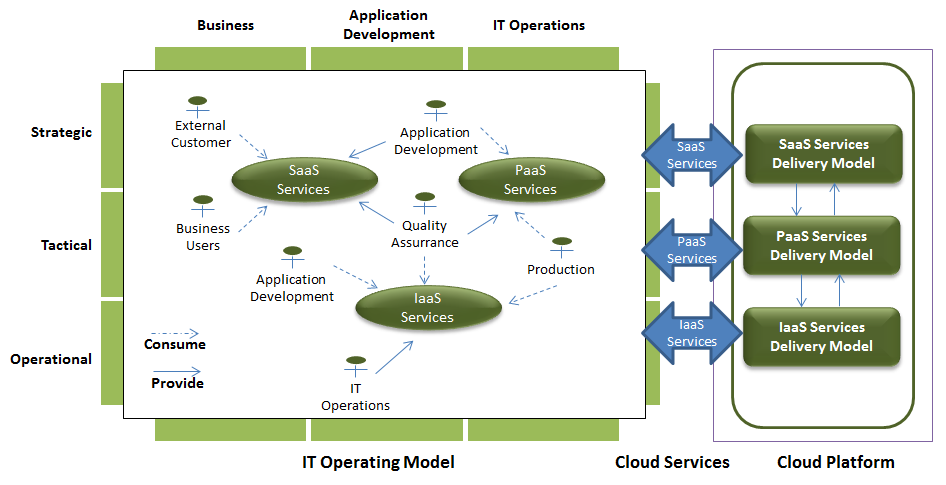
    The ITaaS Delivery Model (Credit: Philippe Abdoulaye ITaaS Now LLC)
    The ITaaS Delivery Model (Credit: Philippe Abdoulaye ITaaS Now LLC)

    Like DevOps, the ITaaS delivery model (…) takes advantage of an agile IT operating model to help businesses succeed in the digital era. It implements consumer-provider relationships across the IT value stream to ensure organizational flexibility and operational agility.

    CIOs must realize that what matters to the business is to continuously generate revenue through improving customer experience and increasing customer value. Deploying applications at the speed of light for the sake of speed doesn’t make sense from a business perspective; as long as expected business benefits aren’t achieved, speed is a useless gadget.

    Implement DevOps as what it is: a three-dimension IT capability including rules of the game, IT operating model and, of course, continuous delivery pipeline.


  • Integrated Testing Without Integrated Migraines

    Integrated Testing Without Integrated Migraines

    I am always amazed at how many practitioners (or, rather, managers of) tout the benefits of test-driven development (TDD). This inherently changes the role of the traditional developer to one of developer and tester. But it would appear that as long as I am able to construct a test for the innovation I wish to create, all is well in the universe, and I can proclaim the full success of automated test integration with my DevOps processes, sleeping quite well at night from then on.

    But in the world before yesterday, testers tend to think differently than developers do. They evolved differently, bearing the scars of applications that tested just fine on the developer’s laptop but somehow died under the myriad circumstances that occurred in the world beyond that original safe harbor. In point of fact, human testers with a variety of automated tools tended to very often “prove” to developers that their sanctified code was not in fact so pious, but actually more “holy” (that is, containing holes) than they thought. Thus, remained the cycle of code/test/code again until the gauntlet to production is navigated successfully.

    There is also a certain reality about testing that developers cannot easily overcome. The only category of testing than can easily accompany a new feature or function is primarily functional testing. “Did the function work?” would appear to be the kind of testing a developer could construct to accompany his/her code. Notwithstanding the fox-in-the-hen-house analogy, there are quite a few other kinds of tests that are equally valid in that code moving forward to production. Most of these tests are not easily constructed by the original developers.

    One might consider performance testing a bit important. In this instance, I am not only concerned with the validity of my new feature, I am also concerned with its performance (timing) relative to how a user would experience it, and inclusive of the conditions of my production environment. For this to be rightly measured, I may need to ensure all integration testing also has has been completed successfully. And assuming all of this completes as expected, I may still want users to test my app—you know, to see if it is actually what they wanted in reality (after decrypting the requirements from the ancient Egyptian notes of the stories they submitted). Beyond this, some functions appear largely in a batch context, or perhaps only when proximity is achieved in a mobile app, so context is equally important to testing.

    The Nuances of Integrated Testing

    But getting back to our original question, let us assume I can test something, and let us assume I have tested it. Where do we go from here? Once the validity of my new feature has been tested, should I decouple the test execution from the build automation and move it to a list of regression tests I only execute periodically? That would seem logical, as this test might need to be run again during post-integration testing (particularly if it manipulates data with upstream dependencies). What is the “value” of my test past that first successful occurrence? If it has value, then I must begin to look at all of my testing in the same way I look at code: It needs to be version-controlled.

    Pairing functional tests to the versions of the code they validate will allow me to roll test automation forward or backwards to match the version of code in the target testing environment. So, for example, if coding build version 1.5 is in my integration environment and it fails, I can roll it back to version 1.4 and concurrently roll back the tests that were valid for the older version as well. That’s better than using tests designed for version 1.5 of my code, as testing new feature validity against old code is sure to generate errors.

    But treating test scripts (or entities) the same way you treat code with version controls is something most organizations have yet to get their heads around. Deploying testing as a part of the post-build deployment automation is equally daunting.

    And, of course, none of this addresses the more fundamental question: Does my test have value at all? Because I can test a feature or function, should I test it? Is this feature or function critical to the user experience? Am I testing it in such a way that the user experience will be evaluated? Testing whether a date field allows only valid data to be entered into it seems important the first time we do it. But once the characteristics of a date field have been so ubiquitously defined by software libraries, advanced programming languages or database structures, perhaps continuing to validate that input is excessive and provides diminishing value. Testing the right thing matters as much as testing at all.

    Then let us assume we have found the Rosetta stone of items to test and we have created an ability to test this feature with scripts passed down from Olympus. If the continued validity or performance characteristics of this feature remain important to the user experience, perhaps we have not found only something to test but also something to monitor. Here is where we begin to think two years into the future. If part of my DevOps continuum is an ability to integrate version-controlled testing as a capability, why not integrate version-controlled monitoring, as well? (Here’s where the Ops guys of DevOps finally get interested.)

    Instead of examining testing from only the perspective of the developer chained to the dictate of TDD, why not examine the life cycle of “evaluation” from a more holistic perspective of coding, integration, performance, users and, ultimately, a monitoring point of view. If my monitoring tools are capable of configuration adjustment, parameter adjustment and ceiling- and basement-level adjustment, then through reading external files or by exploiting API’s shouldn’t we be looking to pair our monitoring profiles with the version of applications we deploy into production discreetly by version? Perhaps a less useful test simply gets retired and a more useful test evolves into a program characteristic that we monitor until the feature itself gets retired.

    Integrating the Ops team into discussions about automated monitoring is sure to pique their attention. If nothing else, the ability to turn off monitoring tools during deployments and turn them on again afterward will cut down on “noise,” and help to focus resources only where they are truly needed when alerts emerge. Understanding the difference between how production is monitored vs. the unique needs of the test environments—with the ability to incorporate both into the automation of DevOps—is equally appealing.

    In any case, the evaluation of an application includes not only the original tests to ensure validity, but also the monitoring that occurs to ensure continued performance as expected. Thinking about where tests begin and where monitoring is more effective or needed can help to keep both disciplines modest and focused only on what is critical, rather than both attempting to take on the weight of the world. The goal of DevOps is not to increase the frequency and duration of headaches, it is to eliminate them.

    To continue the conversation, feel free to contact me.


  • The Two-Month Hello World

    The Two-Month Hello World

    How Project Onboarding Can Undermine DevOps Efforts at Large Organizations

    A “hello world” application is the most basic program a developer, typically a beginner, will write to learn a new language. It’s a sort of “everything works”—a stack-checker app to kick off a project quickly and see its results.

    The resulting hello world program is typically a message printed to your screen: “Hello world.” That’s it. No microservices, REST API or class factories, but very satisfying, nonetheless. The stack works; you built it and ran it from scratch.

    The average time for a programmer to write a hello world application code is probably a few minutes, or even seconds. The average time to set up the developer’s computer or workstation and servers to be able to compile/build and run a hello world app may take a while longer, maybe a few hours to set up. And I’m thinking cloud server or container. Publishing a hello world app to Google Play, including setup, build and deployment, takes around a few hours for the first-timer. That’s not too bad. But here’s the deal: It’s a few minutes for your first program to run vs. a few hours for your first deployment.

    That’s a 60:1 ratio.

    Let’s raise the bar a little: Take a large corporation with an IT department of 1,200-plus employees, for example. In that environment the average time to publish a brand new hello world application increases by at least an order of magnitude—even more if the developer is not just onboarding an application but also herself or her team into the organization.

    Cutting through IT red tape is a great distraction as epics, user stories and customer requirements pile up. These tasks can be simple to complex, such as setting up your code repository and development stack; identity, security, disk, network and other stack provisions; boilerplate artifacts and following testing and release policies. That’s a considerable chain of requests and wait periods—enough to make that hello world program loop around for months before it reaches production.

    DevOps for the Hello World

    The ability of a business to respond to market changes start by a quick new-project ramp-up. And in a microservices world that’s often the case. But that’s mostly at the architecture level. How easy is it to provision and manage the external environments beyond microservices? Or, how easy is it to provision and manage the full Dev to Ops stack at your organization, period?

    A good way to tackle this is to offer a menu of automated tasks through a help desk-like setup, a configuration catalog if you may. A configuration catalog holds tasks à la carte for every need in the DevOps cycle. Call it the IT user interface for teams requesting or delivering changes to the organization.

    This is nothing new. ITIL talks about it everywhere. It’s called a service desk. In a DevOps culture, however, traditional service catalogs do not cope well with continuous deployment and infrastructure-as-code approaches. And vice versa. The reason is that there are plenty of needs that tend to fall outside the common service desk and configuration management automation realms, so they end up in an issue tracker, service ticket or, worst case, plain emails, chat and phone call requests.

    From Zero-to-Deploy

    A catalog of configuration services can be application or project-oriented and should keep state, knowing what has been requested and delivered in the past to enable future interactions. Every task offered by the catalog has one or more rules associated with it. These rules, or recipes, do the dirty work and automate provisioning, emails, boilerplate setup and other tasks that antecede or surround most of the core DevOps delivery automation.

    Think of it as your classic service desk catalog and configuration management tool set combined.

    Building a configuration management front end can greatly mitigate and simplify the effort of onboarding applications. Here are some of the features and strategies to consider:

    • Baseline Templates: Offer teams a set of baseline configurations, tasks and services that can be provisioned around project typologies, such as “Mobile App,” “Python-Django-Postgres” or “Java-Spring-AngularJS-Oracle DB.” That means that on Day 1 the developer only has to select the preapproved application type to get started. Push-button onboarding should include straightforward guidelines that guarantee that the project starts on the right foot, including committing boilerplate source code to the repository and directory verification.
    • Incremental Services: Make the catalog offering incremental, providing development teams only the options they should have at a given time for each project at its given stage. A good configuration system will keep track of what every application has installed at a given point in each environment, so progressive options will be offered.
    • Broaden Your Scope: Automate all provisioning tasks in sight. Just because your application is containerized or configuration management is automated it doesn’t mean it’s a push button from start to finish. Reasonably sized applications have many dependencies, approvals and setup steps that are don’t have a place in typical scripted recipes.
    • Manual Tasks: Make the work flow by bringing every manual process into the onboarding pipeline and avoid the need for emails. Make sure to cater to non-standard requests also, as that will help keep everything in one place.
    • Draft and Versioned Provisioning: Allow provisioning plans to be built along with the code, be it infrastructure-as-code or catalog requests. As new requirements come into play, revise provision drafts accordingly.
    • Scale to Environment: For every new environment in the onboarding chain just reapply the previous requests and configurations, but adjust them to that particular stage. For example, a preproduction environment template will probably need to scale CPU, network and memory to closely mimic production.
    • Just-in-time: Make sure provisioning happens before code is delivered. If before means just-in-time, great. Maybe it’s just a matter of putting provisioning before deployment in the automation pipeline. Or maybe it’s a non-standard request that needs human intervention and holds up a release for a short time. The closer provisioning looks like continuous deployment, the better.

    The next generation of configuration management tools must tackle many different aspects of onboarding applications and services to become an effective DevOps front end. This is not just giving developers a “Request Cloud VM” button but the full how, why and where chain that assists teams with writing boilerplate application and infrastructure code, passing the first build or scaling environments correctly. And moving forward, ChatOps and machine learning are replacing the classic request workflow, adding needed insight and foresight to manage project deliveries from zero-to-deploy.

    DevOps practices should start early on in the cycle and offer a great user experience all the way through. A good delivery chain needs to tackle the newcomer workflow, just like the application interfaces of today tend to target first-time users. A friendly and capable DevOps front end is what separates mature organizations from the rest, helping them smoke the from-hello-world-to-deploy test suite gracefully.

    About the Author/Rodrigo González

    roddyRodrigo Gonzalez is the CEO and co-founder of Clarive. Besides running the day-to-day operations, Rodrigo oversees the overall strategy for the company. Rodrigo, originally from Brazil, holds a B.S. in Computer Science from Texas Tech University and has nearly 20 years experience working at tech companies in the United States, Brazil and across Europe, including Lucent Technologies and CA Inc.
  • Herding Kittens: Developer Tools Trends From Our Survey

    Herding Kittens: Developer Tools Trends From Our Survey

    Back in late February we launched our latest survey in partnership with Automic. The survey sought to understand how developer tools are selected and used within organizations. We wanted to have some insight into how prevalent Shadow IT was. Well thanks to the hundreds of you who responded, we have been busy working with Automic analyzing the results. Frankly in some areas the responses bore out our original hypothesis, but in other ones the results were pretty surprising.

    Not to be a tease, I should tell you we are not releasing the full report and results until our webinar on this on May 4th. You can register for that one here. But let me give you some insight into some of the results:

    1. A big difference between DevOps empowered organizations versus traditional IT shops. We actually ran the survey to both our staging-devopsy.kinsta.cloud audience and then to a general IT control group and had a look at the differences. DevOps empowered groups had far greater insight into what tools were being used, generally used more tools, more open source tools and generally had greater diversity (that they knew about anyway).
    2. The large majority of respondents reported that their organization use tools besides those on the “approved list”. This is a form of Shadow IT and shows how new software tools are sneaked in under the radar of the official IT.
    3. Many times these tools that snuck in the back door were eventually adopted as official tools, showing that this is a viable method of introducing new tools into the organization.
    4. Another insight was whether entire dev teams were using the same toolset. This answer as you might imagine was different when you compared organization sizes. However, overall the message is that developers like to use their chosen tools.

    These are just some of the insights we will be discussing at the webinar. Also all attendees will receive a full copy of the report with analysis. So mark your calendars now and register for the webinar where we will discuss these results and more.

    BTW, the webinar will feature myself and Kerry Lebel, senior director of community for Automic.


    Scott_Willson_Headshot_Round

    Scott Willson


    Scott Willson is Product Marketing Director, Release Automation at Automic Software. He has over 20 years of technology experience that spans software development, pre-sales, post sales, and marketing. Scott is passionate about technology and helping business achieve value through technology and was leading DevOps at organizations before it was coined DevOps.

  • 3 Skills Developers Should Master in 2016

    3 Skills Developers Should Master in 2016

    The era of mobile and web is upon us, which has caused nearly every business decision-maker to ask the question, Is now the time to hire a developer to build our app or website? In 2016, businesses are going to be looking for the best developers to join their team and help scale their business. We’ve already started to see this trend, as a recent Harvey Nash Technology Survey 2016 found that developers are the most sought-after of all technology personnel.

    To stand out from the pack, developers must master the critical skills businesses are looking for. The most valuable developers will be those who can adapt to the changing technology landscape and further hone their craft to help companies scale and solve specific business challenges.

    To stay competitive in today’s market, developers need to invest in these three skills to be relevant in 2016 and beyond.

    Master the Skills to Scale a Product or Service

    Startups increasingly are evolving from early stage concepts to building a growth model to take their business to the next level. To be an asset today, developers need to master and specialize in scaling technologies that are key for businesses looking to expand their customer base and focus on technological innovation.

    There is a demand for developers that have not only a breadth of experience in bringing an organization up to scale but also depth in their technical skill set. Having the ability to work on major systems, support large amounts of traffic and customers and maintain the system for several years are critical competencies that companies will be looking for.

    Also, having a data model or database experience is very important—NoSQL solutions such as Cassandra, CouchDB or Riak, as well as traditional data sources such as MySQL, are in high demand. Middleware languages such as Java and Golang also are an important part of a developer skill set when building services and APIs.

    Understand the Customer Perspective

    When building a technology solution, an engineer must be able to look at the product from a customer’s perspective to understand what problem the product is fixing. While technical skills in developing a product and user experience (UX) are very important, the ability for a developer to understand and create a product that solves a customer challenge far outweighs the focus on building the most elegant software.

    Engineers who are able to demonstrate project management skills and have experience around scaling infrastructure and ensuring the platform is robust will be in high demand. Businesses increasingly are seeing a need to support growing customer bases and traffic with utmost end-user reliability.

    Become a Subject Matter Expert

    There is a gradual shift in the developer community, in which engineers are focusing on specializations and becoming subject matter experts. There is an opportunity for developers to create career highlights by merging their talent and passion with opportunities.

    Developers are encouraged to identify an area they are passionate about and focus on refining those skills. By being able to find these opportunities that build on their passion, these developers can demonstrate they are able to solve a challenging problem for a large number of users—a competitive skill in high demand across the industry.

    The overarching strategy of a successful developer career is to invest in learning how to scale a product or service, understanding the customer perspective and becoming a subject matter expert. Investing in your skills as a developer in 2016 can lead to a longer, more fulfilling career.

    About the Author/Sha Ma

    Sha Ma_SendGridSha Ma is the senior director, Software Engineering at SendGrid. She led development teams at both startups and Fortune 500 companies prior to joining SendGrid. In her current role, she drives strategic planning, development and management of large scale projects. Ma is a graduate of MIT where she earned both her bachelor’s and master’s degrees.


  • Case Study: Pearson Weaves ThreadFix into AppSec, Part 2

    Case Study: Pearson Weaves ThreadFix into AppSec, Part 2

    In part one, we discussed how education content publisher Pearson applied ThreadFix to its AppSec request workflow needs. Here’s the rest of the story.

    The ThreadFix Implementation

    Senior software security engineer Matt Tesauro added ThreadFix to Pearson’s workflow in the following steps:

    1. Using FPM, Tesauro created a Debian Linux package internally to deploy the ThreadFix Tomcat Package (ThreadFix also offers its own Debian package for this).
    2. Tesauro hooked ThreadFix into each of Pearson’s toolsets using the tool scanner file formats ThreadFix understands.
    3. Using the importers built into ThreadFix, Tesauro connected it to the Checkmarx, Veracode, BurpSuite, ZAP, WhiteHat, AppScan and Qualys testing tools Pearson uses.
    4. To make that happen, Tesauro pointed ThreadFix to an API.
    5. Tesauro then set up an API key.
    6. The system was then set to fetch the test results.
    7. If necessary, Tesauro wrote glue code to upload the results to ThreadFix.

    Pearson used ThreadFix to normalize and de-dupe what had proceeded from manual assessments, dynamic scans on applications and static code analyses of source code, directing those outputs into ThreadFix. “So if a static tool and a dynamic tool both found the same cross-site scripting issue, we fed those into ThreadFix, which de-duped those and gave us just one issue to report so that we didn’t bury two teams with fixing the same single coding error,” says Tesauro.

    “ThreadFix became the one source of knowledge for all of the output of our team, which for us is the security vulnerabilities we find in the applications that we either created, bought or had a third party create,” says Tesauro. That enabled Pearson’s AppSec team to feed tickets into JIRA of backlogs from development teams, which made it easier to produce metrics and do reporting. ThreadFix made it easier to feed data into governance, risk, and compliance tools such as RSA Archer. “That enables visibility into work in progress and workflow and into areas of the business that affect AppSec’s work,” Tesauro notes.

    Additional Capabilities with ThreadFix

    Tesauro eventually expanded ThreadFix to other departments beyond AppSec to benefit from its capabilities and the metrics it could produce regarding app progress.

    Tesauro notes a point between the “Bag of Holding” and ThreadFix in the AppSec pipeline that required some work. He used a StackStorm orchestration and layered ChatOps on top to enable new developer capabilities at that point in the process.

    “Now you can go into our private channel and use HipChat to ask the system, for example, to set up Checkmarx for a particular application in a particular business unit. You give it the URL pointer to that unit’s Git repository and off the system goes, setting up the application profile in the Bag of Holding and in ThreadFix and then talking to Checkmarx to set up weekly scans of the code that sits on the master branch. It set that all up in a minute,” says Tesauro.

    HigherEd was the first additional group inside Pearson to benefit from ThreadFix metrics. One such metric was a 44 percent decrease in time-to-fix after adding a JIRA integration into the mix, according to Tesauro. “Once we started producing those numbers, we had a lot of other business units ask, ‘Hey, why does HigherEd get these great time-to-fix numbers? We want them too for our apps.’ It was a great way to get buy-in,” says Tesauro.

    Further Results

    AppSec saw a 5x increase in throughput for the request workflow and went from 44 application assessments in 2014 to fewer than 200 in 2015, Tesauro notes.

    “In 2015, we lost two and a half people and still sped up the process,” he says.

  • Case Study: Pearson Weaves ThreadFix into AppSec, Part 1

    Case Study: Pearson Weaves ThreadFix into AppSec, Part 1

    Pearson is a publisher of education industry content to meet the needs of teachers and students from kindergarten/early learning through higher education and continuing education (for professionals). The company uses a mix of software, from legacy third-party software and “classic ASP apps that are on life support to auto-scaling systems on Amazon,” says Matt Tesauro, senior software security engineer at Pearson. “It’s a very diverse development environment.” Which meant it was no easy task keeping it secure.

    Pearson Before DevOps

    Prior to adopting DevOps, Pearson was bogged down by manual processes, especially in application security. “People sent requests buried in email or, if you were lucky, in a Google spreadsheet. There were very few clear lines and hand-offs between the different activities that were the responsibility of the AppSec group,” explains Tesauro. It was a very manual, custom approach in terms of request handling: someone would respond to a request with an activity, which would require a report that was then emailed.

    At the time, Pearson had no single, well-established methodology or workflow for these activities. There was no particular look and feel or design for creating dynamic, manual or static assessments. There was no list of inputs into the process or outputs to expect at the end of the process. “At best, everything flowed in an ad hoc fashion,” says Tesauro.

    Then, about two years ago, Tesauro and a senior-level peer at Pearson attempted to prioritize those apps the company most needed to assess for security and related issues. They had hoped and planned it would be about 10 apps, to keep the number and the workload manageable. For political reasons, they were able to settle on no fewer than 64 apps that needed appraisal. “We ended up being able to assess only 44 out of the 64 top apps. There are 2,000 and some-odd apps at Pearson, in rough numbers. Just the scale told us we were going to fail in the long run,” says Tesauro.

    Ramping Up to Change

    To resolve this app assessment challenge, Tesauro looked to institute DevOps and Build Pipeline approaches to lay the groundwork for eventually integrating security into the various development teams at Pearson. “I made equivalents of DevOps and Build Pipeline approaches for how we did work in the AppSec program at Pearson,” says Tesauro. These included standard methods of input and intake of service requests similar to how the business produces software development targets for a DevOps shop to hit. That’s when Pearson began to work on instituting and leveraging ThreadFix.

    “ThreadFix was one of the first two parts of that pipeline,” he says. The other part of the AppSec pipeline solution was what Tesauro calls the “Bag of Holding,” a mechanism and repository for tracking all the team-to-team interactions and work assignments. That feeds into ThreadFix.

    During that time, and for about the first half of 2015, Tesauro and a teammate automated a number of manual steps by creating code to perform the “mindless work” so developers could concentrate on their core business instead. “Now when the static code analysis tool Checkmarx finishes its analysis, it generates a report, washes the directory and pushes the report into ThreadFix,” says Tesauro. He also automated a number of other test applications and tools.

    Stay tuned for part two of this case study, coming soon.

  • Performance Testing: The Unexpected Missing Link in DevOps

    Performance Testing: The Unexpected Missing Link in DevOps

    It is no secret that DevOps and continuous delivery goes hand in hand in the enterprise, but how do processes such as performance testing fit in to the equation?

    Many enterprises still harbor the traditional way of thinking—that the QA and performance testing group is completely separate from the development group. A widely held myth is that each has different roles, responsibilities, backgrounds and areas of expertise. However, with DevOps gaining popularity in the enterprise, the distinct separation between testing, development and operations is no longer. In fact, to successfully implement performance testing, the once-siloed departments must work together.

    Creating a Culture for DevOps

    The most common purpose of DevOps is to have an automated pipeline of software and application deployment updates. An enterprise cannot implement DevOps unless all are on board, from the top down. To do this, there must be buy-in from not only the software engineers and technology buyers, but also the C-suite. This ensures DevOps processes and strategies are being implemented appropriately.

    However, it’s not just about getting the tools needed for DevOps; there must be a culture shift toward collaboration for it to be effective. That is when an enterprise gets the most from the shift to DevOps and becomes the most agile.

    Once DevOps is embraced, experts and power users can help facilitate how it is being used to drive maximum benefit and help the organization get more from it. The key way to determine and evaluate this maximum benefit is through continuously testing throughout the development process. While the first thought may be for “functional” testing (to ensure code operates without errors and to provide fast feedback to developers when things go wrong), no organization can afford to release applications that deliver slow user experiences, and so “performance” testing with fast feedback is equally critical. Continuous testing is only scalable and sustainable if it is automated.

    DevOps Makes Load Testing Easier

    A key benefit of DevOps is that automation makes everything—from implementation to functional and performance testing—faster and more predictable. Tool chains ensure that the “right things” are done with every code push. A concern commonly cited by those who have not yet implemented performance testing is that it is “too time consuming” and they will be unable to facilitate different tests at the rate they need to be done to be effective. But surprise! Organizations that already practice DevOps are in a better position to add performance testing to the mix, in a fully automated fashion. A solution like BlazeMeter takes just minutes to get API tests up and running, by just adding the HTTP transaction for specific pages or endpoints to test. Once set up, these tests will continuously run automatically and will notify the team when there are any problems or potential problem areas. When there are known surges in website traffic, more Uniform Resource Identifiers (URIs) can be added to the test, but this will not impact the autonomy of it.

    Another key function of DevOps is scalability through the enterprise, and scalability of user traffic is extremely important. While performance testing would still scale without DevOps, operating on the same principles makes each concept more relevant to the folks who are analyzing the outcome of both. The key is to integrate performance testing directly with an already existing continuous delivery or integration pipeline, such as Jenkins or CircleCI. Here, fast, small-scoped performance tests are able to run in parallel to ensure performance is as expected before promoting a build to the next stage. Tests run in staging or QA environments, such as IBM BlueMix or Chef, can also be automated and integrated.

    Performance testing is also important not just because of its easy integration into DevOps practices and how it fits into the CD pipeline, but the overall customer experience as well. A properly functioning webpage or mobile application is the connection between your brand and your target customer, and if it doesn’t load properly or in a timely manner, you may lose a customer to a competitor. Performance testing ensures the user doesn’t experience slowdowns or the dreaded downtime, which is often the result of a poorly functioning back-end system. Incorporating performance testing into workflows creates a centralized environment where all team members have what they need to design, run or analyze tests, while communicating quickly and clearly with each other and everybody in the enterprise.

    Performance testing and DevOps are not opposing forces; and performance tests run automatically within the tool chain save time, rather than consuming more. The reality is that during this age of rapid software delivery, testing is the glue that keeps the development process on track and high quality. Performance testing should be part of every software delivery workflow, and DevOps is allowing that to happen.

    About the Author/Michael Sage, Chief Evangelist

    unnamedMichael Sage brings a 15-year career of enterprise software pedigree and customer success to BlazeMeter. Prior to BlazeMeter, Michael (better known as “Sage”) was a solutions architect and consultant in software delivery and performance management. He has worked with industry-leading companies including Mercury Interactive, Hewlett-Packard and New Relic, helping teams implement integrated solutions that enhanced the performance and experience of their customers. A self-taught hacker and open source evangelist, Sage always has the pulse on the cultural zeitgeist inflected with a heathy dose of humor.

  • At the Intersection of Git and DevOps

    At the Intersection of Git and DevOps

    Everyone knows Git. It’s a favorite developer tool and for good reason. Developers love its flexibility, speed and ability to branch locally and in place. It also appeals to the attraction to community development.

    But as developers adopt Git within enterprises, IT managers face the challenge of reconciling the needs of developers with the needs of the larger organization, especially when it comes to DevOps. In this article, we will examine some of these challenges and suggest best practices that can alleviate them.

    Performance

    IT organizations often rely on performance and low latency as key indicators of the adoptability of any solution. Speed tests run against Git’s network operations generate impressive results, since the Git protocol for transferring data is highly optimized. Over time, however, an internal implementation reveals limitations that can impact the speed and efficiency of the delivery pipeline.

    First, Git works very well for small projects. Yet, when projects grow larger, many teams will feel the pinch of its all-or-nothing architecture. A developer who needs to work on a project must retrieve (or “clone”) every file associated with it. For enterprise software, this necessity is not always feasible or desirable. Large projects can require a lot of disk space and time to clone, even though much of the repository content may not be relevant to that developer. The all-or-nothing approach of a Git clone also compromises security—users will have the same access to the whole repository, whether they should have it or not.

    Second, Git is optimized for fairly small assets, such as code and configuration files. But many organizations need to version large binary files such as images, videos and CAD designs. Large binary files are also often the product of the build system. Such content can quickly bloat the size of a repository and, by extension, the file systems of contributing developers. A less obvious issue with large files is the fact that some Git functions require the calculation of hash values over the contents of the repository. As a result, large binary assets can inexplicably reduce some operations to a crawl while others execute almost instantly. To address these issues, you should employ an external store for your large binary assets. There are no formal standards for external asset stores, but there are options available, including git-annex and Git LFS.

    The solution that Git offers is to separate components into dedicated repositories or to use Git submodules. Both approaches lead to what is known as Git sprawl, a condition that increases complexity and risk. Git sprawl can be avoided using the narrow cloning approach. Narrow cloning enables developers to retrieve just the subset they need from the contents of a code repository. Although the developer community has long requested this feature, Git currently provides no support for narrow cloning. For these reasons, you should standardize on a Git management system that offers narrow cloning, while using shallow cloning as much as possible to limit file revisions.

    As long as repositories are logically divided along component lines, developers might not experience any immediate problems with Git sprawl. Build and test teams, by contrast, are likely to feel the pain immediately. Trying to find all the correct and related revisions of files from many different repositories is an expensive and risky process. Builds will frequently fail if the input files are not correct. The ideal agile workflow supports build and test on every check-in, especially on the mainline. If builds frequently fail, the build and test system will not be able to keep up with the development pace and will slow down the entire DevOps pipeline.

    Another bad practice that can result from Git sprawl is having inconsistent or conflicting branching models for different teams or repositories. Dealing with the idiosyncrasies of individual developers or teams is needlessly frustrating and inefficient for the build and test teams. But Git provides no support for defining or enforcing branching strategies across multiple development teams. For this reason, it is critical to define an overall branching strategy, socialize it throughout the organization and review practices on an ongoing basis.

    Hosting

    Hosting options for cloud deployments of Git are plentiful. Organizations embracing Git need to evaluate these options carefully because the choice will impact not only information security but also DevOps. Developers generally seek options that make it easy to create new projects, clone or fork and push their work, preferably with great review tools and a simple method to deliver units of work to the master branch.

    The developer’s desire for ease of use is often at odds with DevOps’ need for scalability. Available Git management systems vary significantly in their capacity to support enterprise IT, with capabilities ranging from single-server topology all the way up to clustering and, in some cases, high availability. Note that none of the solutions supports disaster recovery. Therefore, organizations need to identify tools for backup and recovery, while also defining internal processes to ensure the system can be restored after a catastrophic event.

    Security

    Developers’ need for speed and customizability also often run counter to the enterprise’s need to protect the intellectual property locked away in Git. The key issue is that Git lacks a robust and manageable mechanism for fine-grained access control. Git is limited to providing security in the form of authentication; users must present credentials (username/password or SSH key) to access private repositories. Once the user has accessed the repository, Git has no way of controlling what that user does. While this works well for democratized, community-based open source development, it creates security holes and compliance problems for enterprises.

    For these reasons, it is critical to think through the necessary roles and permissions that will enable developers and DevOps to do their jobs, while minimizing the risk incurred by hosted Git solutions. Personnel should always be provided with “least privilege” access to assets—that is, they should be given only the permissions necessary to complete their tasks. For compliance purposes, it is often necessary to provide logs showing who did what when. This requirement is especially true for enterprises in regulated industries such as health care and finance. Git, however, gives users the ability to destroy virtually every form of historical evidence. Again, this is useful for developers, but detrimental to information security and governability.

    In summary, DevOps is penetrating enterprise IT departments at the same time that Git management solutions are proliferating. The differences among competing Git management solutions become most apparent in the context of DevOps. Remember, DevOps has to manage everything across the application lifecycle. Evaluating Git solely from the perspective of development teams, without considering the requirements of DevOps, can be a recipe for the failure of your DevOps initiative.

    About the Author/Mark Warren

    MarkWarren_BW2Mark Warren is Product Marketing Director at Perforce, based in the United Kingdom. Mark has more than 25 years of experience working with development and product management teams in software development tools and configuration management.

  • How do you measure DevOps? What does that even mean?

    What are some of the metrics you should be monitoring to track your DevOps efforts, and which metrics should you abandon?

    (more…)