Category: DevOps Toolbox

  • Data Needs and Challenges with CData

    Data Needs and Challenges with CData

    The data businesses and applications need are everywhere and access through a multitude of technical interfaces, including APIs, database queries, data layers like ODBC, cloud services and SaaS applications (to name a few).

    In this episode of TechStrong TV, Jerod Johnson, technical evangelist at CData, joins Mitch Ashley to discuss the challenges of meeting the data needs applications require to support digital and transformation initiatives.

    The video is immediately below, followed by the transcript of the conversation. Enjoy!

    Transcript

    Mitch Ashley: I’m joined today by Jerod Johnson. Jerrod is technology evangelist with CData. Jerod, good to be talking to you today.

    Jerod Johnson: Yeah, no, it’s my pleasure to be here.

    Ashley: Well, as an old ex-DBA, data is always kind of a passion of mine, interest of mine, so I’m anxious to hear more about CData. Would you introduce yourself and tell us a little bit about what CData does?

    Johnson: Yeah, sure. So, like you introduced me, my name is Jerod Johnson, I’m a Technology Evangelist for CData Software. I’ll start with CData. So, we call ourselves a leading provider of data connectivity solutions. In short, what that means is, we make it easier for every user in an organization to connect to their data, which lets them focus on the job of finding value from that data or building applications on top of that data instead of having to focus on the integration, instead of tasking IT teams to build connectors or pipes or flows, whatever the case is, in order to work with the data that they need to drive business.

    Ashley: Mm-hmm. You are number two on my list of what are the reasons people come to IT when they’re building apps.

    Johnson: Yeah.

    Ashley: And that is, security, data, and other apps.

    Johnson: Yeah. [Laughter] 

    Ashley: So, always need data. Well, tell us a little bit about yourself. I’m curious—how did you become a technology evangelist? How did you—

    Johnson: Yeah, so, I actually spent six years teaching before I got into software. So, my education background was in teaching and computer science, and spent six years in a classroom teaching math and computer science, and just decided that we needed a change, for myself and my family.

    So, I started at CData, I was actually a member of the support team, which meant I was answering e-mails and helping solve customer problems. And then I moved into engineering, and spent some time there, but it really became obvious that there was a need in the company for somebody with a skill set that I had, being able to speak to people, being able to present information, even write technical documents. 

    And so, I was pulled into the marketing team, and I’ve been doing that since 2016 for the company. So, writing technical documents, giving talks at trade shows when those used to happen, through webinars.

    Ashley: When we were [Cross talk], right? Hopefully soon, hopefully soon.

    Johnson: Yeah.

    Ashley: Interesting. You’re not the first person I’ve talked to who’s come out of an education background and moved into technology and, in your case, moving into an evangelist role. That whole skill of being able to explain sometimes very complex concepts, sometimes not so complex, but you may not necessarily have the context or the background for a certain thing that you need to learn or understand—

    Johnson: Sure.

    Ashley: Or even explain to non-technical folks, right? So, a great thing to have, especially in the DevRel world that we all live in now of really focusing on how we work with service and kinda think like a developer.

    Johnson: Sure.

    Ashley: Because that’s the people who are using it, whether they’re business developers or people inside IT. Let’s talk about sort of the data challenges, and I’m curious, maybe you’ve seen some things over the last kinda year plus, too, with the acceleration of digital transformation projects.

    Johnson: Yeah.

    Ashley: It seems that one of the challenges always is data sprawl—it’s everywhere, and every application is creating data, consuming data, sometimes creating data exhaust that’s unused or somebody else might be able to use it. It’s no small feat just to find where it is, more or less find out how you can get to it and use it.

    Johnson: Yeah, no, absolutely. I think there have been studies done, I think programmable web is probably the best place to look if you’re looking for a list of APIs. And I think that they have 22,000 public APIs listed at this point.

    Ashley: Wow.

    Johnson: So, I mean, and each of those APIs, you know, there’s data behind it. So, you have that kind of explosion, the API explosion. On top of that, you’ve got private APIs and then databases, data warehouses, these traditional stores. So, data is everywhere.

    One of the things that we’ve found is that, as data explodes, as businesses transform digitally, you get the opportunity to pick the best service for your needs. So, you know, you’ve picked your CRM application because it meets your needs the best. You’ve picked your ERP solution because it meets your needs the best.

    The consequence of that is that your data is now spread everywhere. So, your CRM data is somewhere, your ERP data is somewhere, your warehousing data is somewhere else. And so, there’s this, as you said, this data sprawl where data is everywhere.

    And what we do is, we make it all look the same. So, we like to say that CData lets you see the world as a database. So, we’ve created technologies that allow users to connect to their data, no matter where it is, as if they were connecting to a database. And so, I’ll drop some buzz words, some acronyms here—so, JDBC, ODBC, ADO.NET, these are all database connectivity standards that we’ve produced that now can connect to things that are not databases.

    And so, you know, what that does is, it really democratizes data access. Now, anybody can get to data, from any of the tools or applications that they’re using. So, whether you’re looking at an IT team or a DBA or something like a citizen analyst or a data scientist, it doesn’t matter. As soon as your data looks like a database, anybody can work with it.

    Ashley: Mm-hmm. That’s interesting you say that citizen data scientist—it’s not just developers. Of course, developers are very familiar with ODBC and other connectivity layers for data access, which are fantastic for developers, but you have to have some pretty specific development skills to be able to [Cross talk] this thing.

    Johnson: Sure.

    Ashley:  A lot of this data is sitting on a Dropbox file server in some cloud application, you know, we signed up for a CRM system—well, guess what, I need to connect that with my workflow for when an order comes in. And, you know, as good as Zapier and things like that are for doing kinda nice integrations for automation, that’s not even gonna cut close to solving these kinda problems.

    And you mentioned, too, making it look like a database. I’m curious, from my experience, it’s how you get to it and making that understandable.

    Johnson: Sure.

    Ashley: But it’s also understanding the data and what it means and how it’s represented, because a customer is not necessarily defining the attributes similar in a CRM that they might be in an order system, there may be some variations in just the format of how we capture that data.

    Johnson: Yeah. Yeah, so, you know, what we do is, everything that we make sits on top of the API. So, your API is gonna have endpoints, and those endpoints are gonna expose fields for entities.

    So, let’s take a customer, for example. When you hit a customer using one of our drivers—hit the customer, well, now, it’s a table, it was an API endpoint. What we’ve done is, we’ve kinda tabularized that data model. So, now, every customer is a row in a database table and then each of the fields for that customer becomes a column.

    And then, you know, what we do from there is basically free you to map the data from one system to another as you need, in the tool that you’re using. So, we don’t force a model on you, we’re not trying to create one universal picture of a customer across your organization. We’re gonna let your business specialists do that part. We just make it easier to see, and because it looks like a database, the schema, the metadata, however you define it is really self-describing. 

    Ashley:  Mm-hmm.

    Johnson: You know, if you can talk to a database, you can point your tool. So, let’s say you’re looking at something like Tableau. When you point it to a database, it’s gonna show you all of the tables that are available and then all of the columns that are available for each of those tables.

    Well, we do the same thing, but for something that isn’t a database. So, it could be a NoSQL store like MongoDB or Couchbase or even Amazon S3. It could be a SaaS application like NetSuite, or even Dynamic CRM. So, whatever it is, you get that full tabular model where you can see exactly what’s there and then you can decide how best to work with that data.

    Ashley:  I mean, think about the advantage of, if you don’t have, necessarily, all the programming skills you might want, to go get that data, just not having to use an ABI, but use the driver instead.

    Johnson: Right.

    Ashley: And so, just get that to me in a table form that I can—now, I can compare how one customer is _____ and one, I’m just making that example, to another customer set of attributes and other applications.

    Johnson: Yeah.

    Ashley: Sometimes it’s hard enough just defining who is—what a customer is. [Laughter] 

    Johnson: Sure.

    Ashley: I remember that modeling. But now, you can see what the data is without writing a whole bunch of software and translation and trying APIs and learning specifics about this particular service or this cloud application or whatever it might be.

    Johnson: Right. Yeah, yeah. And that’s one of the things that we really offer is, we free you from that integration problem. We free your developers, we free up IT resources. So, APIs are constantly changing. I don’t know if you’re familiar with the Facebook API, but I think they give a new version, like, every three minutes. I think it’s realistically like every three weeks, but it feels like three minutes when you’re a developer.

    Ashley:  I try not to be familiar with the Facebook API. [Laughter] 

    Johnson: Yeah, which—that’s fair. [Laughter] But with our drivers, our engineers are the ones that are keeping up with those changes. So, every quarter, we release a new product, and that includes all of the API changes that have happened on the back end. So, the only thing you have to do is literally install a new driver into your system. There are no changes—no breaking changes to the API, we merge everything as much as we can. And it really, as I said in the beginning, it lets your business experts focus on your business, whatever that is.

    Ashley: Mm-hmm. I’m curious, too, is it primarily developers that are using CData and the drivers that you have? How many folks may be from a non-super technical environment, maybe some maybe a little technical skills and might use CData?

    Johnson: Yeah, so, that’s a good question. I think it’s a pretty solid blend. So, you know, one customer story might be a mom and pop shop, they wanna be able to look at their QuickBooks data in Excel, they wanna be able to work with it, print it out, edit it, even, and update it that way. They don’t like the QuickBooks UI, they’re familiar with Excel, and so they simply install our Excel add-in, and now they’re connecting directly to QuickBooks from Excel, with full read and write capabilities.

    We can get more complicated than that with customer stories. We have one customer who was dealing with that data sprawl, the data silos where their data is everywhere, and they needed a solution that allowed them to replicate all of their data into the data warehouse that they were already using for BI and analytics. And so, we have a tool, CData Sync, that allows them to do that. So, connectivity—solving the connectivity problem and solving the replication problem, so they get automated, incremental replication of all of their business data into one place for BI and analytics.

    And then, you know, I touched on this before, but we solved that BI and analytics problem in other ways. So, you know, you have data scientists that are familiar with, that really love their reporting tools, whether that’s Tableau or Power BI or any other tool on the market. They don’t wanna have to change tools just to be able to connect to the data. And with our connectors, that’s exactly what they get to do. They get to stay in the tool that they’re already using.

    Ashley: Mm-hmm.

    Johnson: But when it comes to developers, this is where we kind of get into our most complex customers. Ultimately, the customer is an organization that’s building a data-centric tool or a platform, and their developers, you know, they’re the ones responsible for maintaining the connections to data from those tools and platforms. So, you know, you’re building the best BI tool on the planet but if it only connects to SQL server, is it really the best? So, we’ve had companies come to us and use our drivers to build products. And what it really frees up there is one-off API integration.

    So, if you’re building a tool and you’re connecting directly to the API from your tool, integrating against Salesforce looks one way, integrating against NetSuite looks another way. Integrating against Google BigQuery looks a completely different way. But as soon as you use our drivers, it all looks the same. If you can develop a tool that can talk to a database, you can develop a tool that can talk to anything.

    Ashley: And one of the situations I’ve run across several times is through M&A, when you start bringing companies together through acquisitions and of course—

    Johnson: Right.

    Ashley: – you know, you need information, you need data to operate. I mean, just imagine combining a sales organization across two or multiple companies together and ones in Salesforce and one’s in HubSpot and one’s in homegrown whatever.

    Johnson: Sure.

    Ashley: And, you know, getting that data quickly, you don’t wanna have to go through a whole conversion and, “Okay, now everybody’s in Salesforce” or whatever your tool of choice.

    Johnson: Right.

    Ashley:  Maybe that’s where you go, but you may live six months, two years, where you need data out of multiple systems to see your pipeline, see the sales bundle, see, you know, how we’re closing the deal and what’s the conversion rate and all those kinda things for. And tools like CData are extremely valuable in getting to data very quickly to get value out of that [Cross talk].

    Johnson: Right, yeah. I mean, that’s, legitimately, our own personal story. So, when we first started as a business, we had a homegrown CRM, and then we started incorporating HubSpot. And now, you know, as we grow, as we get bigger, those systems don’t work for us anymore, and so now, we’re using Salesforce. And we’re in a place right now where we are concurrently using all three, and actually using our own technology internally to build reports, to do analytics, and then, as part of that process, to migrate data from one system to another—so, moving our data from our internal CRM into HubSpot and then into Salesforce.

    So, because the drivers are standard based, because they make things look like a database, it’s incredibly empowering for IT teams and DBAs to work with the data and to either consolidate it or migrate it, or leave it where it is, but build up connections to it in a way that lets the other data experts, the C suite, whoever needs to see the data, see it quickly and easily.

    Ashley: That’s a good point. We don’t always wanna take on the work of combining things, migrating things. If you can leave data in place, that makes sense to do.

    Johnson: Yeah.

    Ashley:  Boy, what an asset, because now you can get to it, but—okay, just manage it the way you were. And it’s great that you could relate to that example that I brought up where we didn’t coordinate that, at all.

    Johnson: Yeah.

    Ashley: I’m curious, how about the security? What comes with data, security is always super important to access control, things like that. Where in the stack does that fall, and how does CData play in those roles?

    Johnson: Yeah, so, we will leverage whatever security is available from the API. So, you know, as one example, Salesforce users have different permissions, whether that’s permissions to access different entities, permissions to only read entities, to write entities, whatever the case is. 

    So, when you connect to Salesforce using any of our connectors, you choose the user that you wanna connect through and then everything that they can do, you can now do through our connector. Anything that they couldn’t do before, you can’t do. And then we support the full gamut of authentication protocols. So, if an API supports OWASP, we’ll support it. If an API supports other authentication schemes, even—so, like, your Microsoft based products, on premise, we do NTLM. If you’re looking at Kerberos authentication, we can manage single sign-on—just whatever is available there, we allow.

    And then the protocols that the API uses for security—so, SSL, the encryption, all of that is supported as well, so.

    Ashley: I think an advantage you have, since you’re not pulling the data out of those systems and storing it somewhere else, it’s still data that’s living there—

    Johnson: Right.

    Ashley: – all the security systems, the access controls permissions, policies, et cetera, are still within those applications, however they’re managed, either standalone or collectively across those. So, you’re not having to devise some new data permission scheme from that, right?

    Johnson: Right, right.

    Ashley: That’s gotta be a huge plus.

    Johnson: Yeah.

    Ashley: Cool. What do you see as—while we have some time left, here—I’m interested in what you see as sort of emerging applications. You know, we’ve seen a lot of acceleration with digital transformation.

    Johnson: Yeah.

    Ashley: Digital engagement with customers, automation—there’s many more things happening, and of course, those both need data and create data.

    Johnson: Yeah. So, you know, I think one of the things that we’ve seen of late is just this migration to the cloud, where everything is in the cloud, your data’s in the cloud, you’re doing BI in the cloud. So, through products like Tableau Online or the Power BI service, instead of Power BI Desktop, Google Data Studio, AWS QuickSight, whatever the case is, you know, you’re working with data from a cloud platform now instead of something on premise.

    So, what we’ve created is, we have a cloud platform that creates a cloud to cloud connection. A lot of the tools that exist today, you know, even if you wanna go from a cloud platform to a cloud data store, you’re still required to put a gateway on premise somewhere. You know, this is the case with a lot of the Power BI connectivity. And, you know, if that doesn’t—why would you go down from the cloud, to on prem, back up to the cloud in order to work with your cloud data? And so, that’s—the CData Connect Cloud Platform is what it’s called, but it allows live, real time cloud to cloud connectivity. 

    And so, you know, that’s one of the, kinda the emerging trends that we’ve seen is people wanting to just do everything in the cloud. And it makes sense, especially—you know, I think about this past year, right? Everybody’s working remote, you know, you don’t have an on premise server sitting somewhere that can run your platform, you have to move it to the cloud so that everybody that’s working from home can access it, and that’s just one example of this cloud migration that we’ve seen.

    Ashley: Nothing like a pandemic—I say that knowing the human tragedy side of it, all due respect, but—

    Johnson: Yes.

    Ashley:  – to really force some very aggressive changes in our business and how we operate and some really interesting things. Is there a particular area of, you mentioned cloud and more usage of cloud services—what’s sort of the next frontier, if you will, that CData is tackling of how to make this data problem easier?

    Johnson: Yeah, so, I think—you know, we’re thinking about that cloud integration problem and trying to look for ways to help that. But you know, an area that we’ve started pushing into recently is kinda low code developers. So, I had mentioned you have your IT teams and your full stack developers that are used to working with data, that are used to writing code. But something else that we’ve seen crop up is this low code application development—whether that’s in a cloud platform or an on premise platform. And it’s great. You can build a workflow or an app using a drag and drop menu. These platforms tend to be intuitive. And now, your citizen analysts can build a workflow to combine data to get what they need into their BI tool.

    The problem that we’ve seen there is connectivity to data from these platforms, and so, that’s kind of an area that we’ve been pushing in an integration kind of marketing side is reaching out and trying to connect with low code and shoring up our integration with these platforms.

    Ashley: Yeah, and by the way, that happens to be an area of research that we’re working on with CData, and we’ll talk a little bit more about that here coming up in a few weeks—some really good, interesting findings from that research.

    And that was really interesting to Accelerated Strategies, the analyst firm that I run, because there is so much interesting in low code/no code right now.

    Johnson: Yeah.

    Ashley: And of course, it’s so broad of what that means. It could mean a spreadsheet to somebody, you know, as well as low code or platform, you know, there’s a number of platforms for creating applications and accessing data through a CData kinda combined platform. So, it’s really interesting, to me, of kinda who is using low code technologies to create applications.

    And I think the world used to view it, or maybe currently views it as, those are the business users, non-technical. That’s certainly a population, but it’s more and more coming into IT is what I’m seeing.

    Johnson: Yeah, that’s cool. I mean, as somebody who was a developer, was a support engineer, it’s fascinating for me to get my hands on a low code platform and figure out, you know—well, what exactly can I do with this?

    Ashley: Mm-hmm. Yeah, it’s interesting technology. Another way to solve problems, another technology, right, to build the applications.

    Johnson: Right.

    Ashley: How about the mobile side of this? With so many more mobile apps, we’re almost in an era, maybe we’re in the era of, “I’d like fries with that, I’d like a mobile app with that.”

    Johnson: Sure.

    Ashley: Or maybe it is mobile first. Does that change the dynamics of some of the data needs or challenges?

    Johnson: So, I think once you start looking at mobile applications, you’re looking for lightweight applications, right? You can’t—I mean, phones are impressive now, right? Like, I think about the amount of data that I can store on my phone versus the first smartphone that I got, you know, the amount of space that I have for apps. But at the same time, you know, embedding a software library or a driver or whatever the case is into your app, it doesn’t always make sense. Especially if you’re building an app that supposed to be able to connect to hundreds of different data sources.

    Ashley: Mm-hmm.

    Johnson: You know, are you gonna install 100 different 7 megabyte drivers with your app? Like, is that really the best way to go? And that’s another place where our cloud platform makes sense. So, you can be on your mobile app, you can connect—you can build an application that connects to a cloud platform that then allows users to connect to data from anywhere.

    Ashley: Mm-hmm.

    Johnson: So, you know, using the same technology that we have, it’s just consolidated into one single platform. So, you hit that platform and now, you know, you can pull in Salesforce data, you can write back to HubSpot, you can dump a report as CSV into AWS S3, all through one platform.

    Ashley: And you know, so many of those apps aren’t necessarily greenfield apps, right? All that data, maybe even the transactions processing, much of it is happening in other apps, other cloud locations.

    Johnson: Right.

    Ashley: So, when you’re building a mobile app, you know, you’re not inventing everything from the bottom up, right?

    Johnson: Right.

    Ashley: You’re merging a lot of existing resources—functionality as well as data. So, it seems like no better—what better of a kind of application where making it easier to get the data? Because, you know, mobile developers don’t like writing database access code, right? They like building interfaces and doing cool interactions and useful interactions with customers.

    Johnson: Right, right.

    Ashley: So, when you can let them focus on that and really create great experiences with that data, that’s a win/win for everybody, it seems like.

    Johnson: Yeah, no, I agree.

    Ashley: Well, cool. I really enjoyed talking with you, and where can folks find out about CData? What kinds of abilities do they have to check you out, from free accounts or sandboxing or things like that?

    Johnson: Yeah. So, CData.com is our website, and you’ll find all the information that you need there. For any of our installable products, we offer 30-day free trials, and they’re fully functional trials. You know, we’re not rate limiting, we’re not doing anything like that. And then with our trials, you get access to our support team, which we’ve been called world class, we have testimonials on our website if you really wanna dig into those.

    Ashley: Comes from a man who was on the support team, so.

    Johnson: That’s right. [Laughter] 

    Ashley:[Laughter] No, I’m sure it’s really great.

    Johnson: And then, you know, for the Cloud Platform, I think we offer a two-week trial, and so, you can kinda kick the tires on that as well. So, CData.com/drivers is where you wanna go if you’re interested in an installable driver. CData.com/connect is where you can go if you’re interested in that Connect platform, that Cloud Platform for connectivity. And then, you know, you can find us on LinkedIn, you can find us on Twitter, we’re @CDataSoftware. You can find us on Facebook. A lot of our posting there is upcoming events or recent articles or other news announcements, so.

    Ashley: Yeah, and I have checked out your drivers, and you know, an analogy like a Swiss Army knife falls apart very quickly, because you have so many technologies, so many platforms that you interface with—it’s about 50 Swiss Army knives. [Laughter] 

    Johnson: Yeah. So, I’m just gonna plug this—so, I think we’re 250 plus different data sources across 11 technologies. So, somebody out there is doing the math right now in their head to figure out how many SKUs we’re sitting on right now.

    Ashley:  The number of permutations—well, good. It’s really been good talking with you, and I look forward to having you all on again and talking some more, I think, about the low code/no code space and some things that are happening there, so we’ll look forward to that.

    Johnson: Yeah. Alright, yeah. Thanks, Mitch, it’s been my pleasure.

    Ashley: Great. Jerod Johnson, who’s Technology Evangelist with CData.

  • ServiceNow Shifts to Single Unified Agent

    ServiceNow Shifts to Single Unified Agent

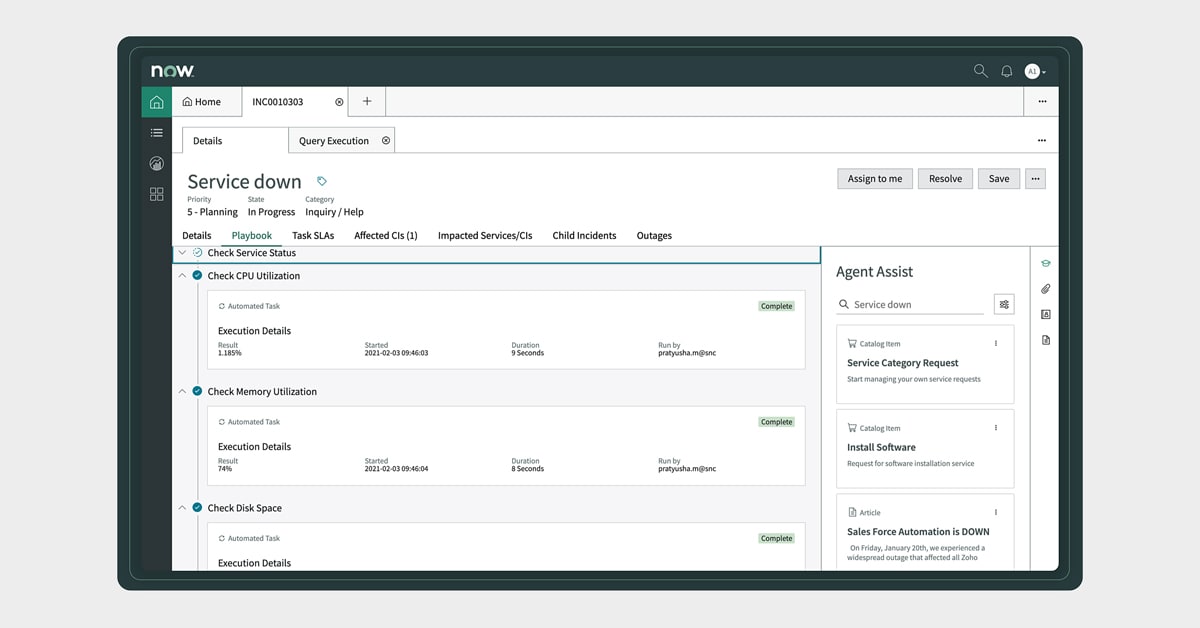
    ServiceNow today unveiled an Agent Client Collector (ACC) that makes it possible for IT teams to capture data from software, hardware and cloud infrastructure.

    Jeff Hausman, vice president and general manager for IT operations management at ServiceNow, said this unified agent will enable IT teams to reduce the number of agents they would otherwise have to deploy to collect the data required to monitor IT environments.

    IT teams will also be able to employ incident management tools that can view that data in a way that eliminates the need to install any remote desktop software, Hausman noted. At a time when many employees will be splitting their time between working from home and the office, that approach reduces the level of IT service management (ITSM) friction that many IT teams today regularly encounter, added Hausman.

    ACC surfaces both configuration and performance data in real-time to provide IT teams with greater visibility. That data can then be used to drive a variety of workflows and playbooks that trigger automated incident responses.

    ServiceNow will employ ACC both within its ITSM platforms and IT operations management (ITOM), hardware asset management (HAM), software asset management (SAM), and security operations (SecOps) tools.

    Hausman said ServiceNow will employ ACC alongside agentless tools for managing IT environments as part of an effort to strike a balance between the amount of software that needs to be deployed and the capabilities that agent software enables. Ultimately, ServiceNow will also open up ACC to third-party tools that offer complementary capabilities, he added.

    More than a few IT organizations are suffering today from a phenomenon known as agent fatigue. Each new tool added to the IT arsenal often requires agent software to be installed within a device, application, server or cloud service. The need to reduce the amount of agent software has given rise to agentless approaches to managing IT resources, but the tradeoff is that, in the absence of an agent, the types of data and capabilities that can be enabled tend to be more limited.

    The market research firm International Data Corp. (IDC) is predicting that 75% of Global 2000 IT organizations will adopt automated operations practices by 2023. A major driver of that increased reliance on automation has been, of course, the COVID-19 pandemic. Not only are organizations making greater use of cloud infrastructure, but application users are not often conveniently located behind a firewall in a corporate office. For the last year, IT teams have been tasked with supporting a largely remote workforce. As more of those employees are vaccinated in the weeks ahead, a lot more of them will be returning to the office. However, it’s unlikely most employees will be working in an office full-time even after the COVID-19 pandemic subsides.

    Regardless of how IT is managed, the overall IT environment will continue to become more complex. As such, it’s now more a question of when rather than if organizations will need to revisit how IT gets managed across what has become a highly distributed environment.

  • Fast Object Storage Key to Backup and DR Strategy

    Fast Object Storage Key to Backup and DR Strategy

    The massive shift to remote work necessitated by the COVID-19 pandemic kickstarted many companies’ digital transformation. While this transition had already begun for most organizations, the pandemic sped up the timeline. These events also had an impact on how storage and backup is done. Let’s look at why the right storage solution is key to your backup and disaster recovery strategy, especially when it comes to today’s work-from-home and hybrid scenarios.

    Hybrid Cloud and Storage

    While most companies have moved to the cloud in some form or another, many are relying on a hybrid approach. Enterprises may want to maintain their primary data storage on-premises for performance, security and compliance reasons. The public cloud, though, offers compelling services that can enhance this on-premises data.

    Using both the public cloud and on-premises storage allows for hybrid cloud use cases that are changing the way enterprise IT leaders think about data management and data protection. Enterprises are implementing hybrid cloud architectures to take advantage of cloud archive services, to maintain full copies of their on-premises data for disaster recovery, to protect against ransomware attacks, to take advantage of cloud service bursting and more.

    Businesses retain greater control over their private data by using hybrid cloud services. An organization can store sensitive data on a private cloud or local data center and, at the same time, make use of the robust computational resources of a managed public cloud. A hybrid cloud relies on a single plane of management, unlike a multi-cloud strategy that forces administrators to manage each cloud environment separately.

    Remote Work has Changed the Backup and Recovery Game

    Companies risk losing their most valuable assets – their data – if they lack strong backup and recovery infrastructure. Data loss affects businesses directly, when assets can no longer be leveraged, or indirectly, via loss of customer confidence and regulatory fines and penalties.

    The shift to remote work means that the way storage and backup is done has also changed. If the majority of a workforce is remote now, how do you back up laptops? How do you back up phones? Previously, employees would go to an office and their laptop and other devices would get backed up there – but now, that’s not the case. And with remote work in place for the long haul for many companies, backup methods have to change and adapt.

    Remote work opens up greater risks of information being stolen or lost. If an employee is at home, for instance, and they lose a file on their computer – and they’re used to having their computer backed up by the company – how do they restart that backup? If they have to go through IT, that seemingly simple act can take weeks.

    Self-Service Backup and Recovery

    Organizations need to have more flexibility – a way for individuals to perform backups in a self-service way without having to deal with centralized IT. In this way, people can protect their data themselves.

    With the right storage solution, authentication is built in; storage and backup are designed with security and data protection in mind. Unlike other storage solutions, object storage gives you your own keys and your own passwords, and you only see what you should. It’s very well protected. It’s also very siloed, so that employees can only do what the company wants them to be able to do, and they only have the minimum access they need. So, object storage can help organizations adopt a more fine-grained authentication and security posture; more so than with a typical file storage solution.

    In addition, having this kind of solution in place opens opportunities to provide your employees with the kind of self-service backup and recovery they need in a remote world where speed is of the essence and efficiency is front-and-center.

    Success in a Hybrid World

    The shift to the cloud is in full swing for many organizations, brought on by a variety of business factors and accelerated, in many instances, by the pandemic. It makes sense that the hybrid storage approach would become popular, as organizations naturally want to keep certain kinds of data close to the vest for security and/or compliance reasons. Performance is another consideration when it comes to where data should be stored.

    This gives organizations a lot to think and strategize about – including how to handle backup and recovery in a WFH world. Remote work increases security threats, so organizations need the option to empower employees to protect their own data. Object storage makes this possible with both speed and efficiency. There are many options available today for both cloud and storage configurations, so consider the above points when making decisions that will affect the security, compliance and performance needs of your organization.

  • Applause Delivers Testing Integration Tool

    Applause Delivers Testing Integration Tool

    Applause today made a bi-directional integration capability that simplifies requesting application code tests of, dubbed Applause In-Sprint Testing, generally available.

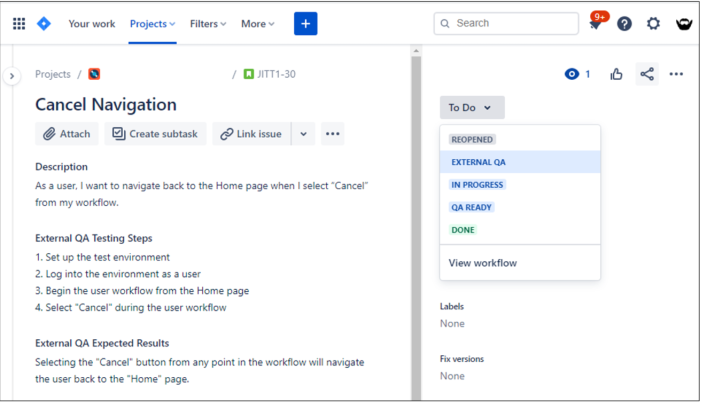
    Kristin Simonini, vice president of product for Applause, said application owners will be able to, for example, use a Jira project management application to create a ticket that requests a specific piece of code be tested either by a member of dedicated testing team or by a developer that has assumed greater responsibility for application testing within the context of a DevOps workflow.
    Alternatively, that request could be sent to a tester that is a member of uTest, an online community of professional testers that Applause oversees.

    The company also published the results of a global survey of 1,800 quality assurance (QA), product, engineering and DevOps professionals that found 44% of development teams that have shifted application testing left are spending a full workday every week on application testing. More than half the respondents (52%) noted that amount of time spent on testing is impacting developer productivity.

    On the plus side, a full 88% of respondents that release code multiple times per month said their organizations now test features as they are developed versus waiting until the end of application development process, the survey also found.

    The major benefits of shifting testing left cited by respondents are reducing the number of bugs released into production environments (57%), reducing the cost of late-stage bug fixes (48%), and reducing the need for hot-fixes (39%).

    The top two barriers to shifting responsibility for testing left toward developers is they are too busy coding (45%) and that development and quality assurance (QA) efforts remain siloed (37%). Nearly half of developers (44%) said they have issues with context switching as they shift between coding and testing tasks.

    Simonini said Applause In-Sprint Testing will make it easier for application owners to decide when they want to make use of a professional tester versus having a developer run a test. The Applause Product Excellence Platform then enables IT organizations to leverage a software-as-a-service (SaaS) platform to record a series of test case scenarios that can be automatically converted into an automation script without anyone having to write code.

    The overall goal is to simplify testing at a time when the number of applications being built has accelerated in part because of the increased focus on digital business transformation that occurred in the wake of the economic downturn brought on by the COVID-19 pandemic. As organizations realize how dependent they have become on those applications to differentiate themselves, the focus on quality assurance naturally intensifies, noted Simonini.

    There’s no doubt more organizations are testing with greater frequency. The efforts of developers that previously tended to address large numbers of bugs as part of a series of application updates after deployment in production are now being frowned upon. Organizations realize their applications only get one chance to make a first impression with end customers. As a result, the level of attention to detail being applied to application testing has, for better or worse, never been greater.

  • DevOps Trends to Watch in 2021

    DevOps Trends to Watch in 2021

    Engineers at fast-paced startups often wear both Dev and DevOps hats. Early in my career, as a developer at a sentiment-analysis startup, I was tasked with writing scripts to spin up servers, configure them, install necessary software and deploy the code we wrote. My custom shell scripts, Python scripts and cron jobs did all the heavy lifting so that we could reliably deploy software and scale resources on AWS. Fast forward to today, and that problem of confidently building and securely deploying software has become an even more enormous challenge at scale.

    The Cloud-Native Application Stack

    A simple looking e-commerce app today can easily be a big set of coordinating microservices that are powered by containers, orchestrated using Kubernetes and hosted on multi-cloud/hybrid cloud. This combination enables faster delivery of code, cheaper hosting bills and more efficient use of server resources.

    While the application components certainly became smaller over time, organizations today are tasked with managing tens of thousands of containers in a production environment. In a 2020 Cloud Native Computing Foundation (CNCF) survey, 92% of respondents said they use containers in production, a 300% increase from just 23% in the first survey from March 2016. Such coordination complexity at scale is being managed by software delivery pipelines. Just as Ford revolutionized the automobile industry with its assembly line, these integrated DevOps products are massively impacting verticals like finance and insurance.

    DevOps Trends

    Trend: Developers are now Decision Makers and Influencers

    We are excited to see the increasing impact and influence of developers when it comes to the selection of tools. The top-down sales motion largely doesn’t work in the cloud-native world, and needs to be supplemented by bottom-up community adoption. The best developers pick peer-recommended tools to solve these tech challenges. Developers today leverage large communities, self-organize and pick the best open source tools to kickstart small projects that have potential to impact the growth curve of any organization. For vendors, developer evangelism becomes an important strategy for customer acquisition.

    Trend: Integrated Software Delivery Pipelines

    CIOs typically pick category-leading products for each category of the DevOps toolchain, like CI, CD, SAST and SCA. Historically speaking, integrating these tools to maintain an effective CI/CD pipeline has been painful and requires stitching together tools using custom scripts. We hear the frustration when we speak with maintainers of such scripts. To address this challenge, we think end-to-end integrated DevOps platforms will become the norm. Such platforms will offer a few best-in-class components with built-in automation, and will enable organizations to integrate other DevOps tools in a plug-and-play manner.

    Trend: Shifting Left with Code

    The shift left phenomena, which enables fixing of bugs/security issues early in the software development life cycle when it is cheapest to do so, is accelerating. By implementing a shared security responsibility model and enabling developers to take more ownership related to infrastructure, security and other critical production issues with code, organizations are shipping code faster and cheaper with less bugs.

    Trend: Low-Code DevOps Automation

    Many workflows are pretty standard in the DevOps world. Go look at an alert in production; prioritize it, look at the knowledge base for a fix, create incident, apply fix, resolve ticket and then repeat. This example is an oversimplification, but there are many repeat use cases that can be automatically managed. These workflows can and should be automated, which can make DevOps teams more effective. We think that customizable low-code automation interfaces will evolve to act as secret weapons for effective DevOps engineers.

    Trend: Security at the Speed of Dev

    Software release cycles a decade ago used to be four to six months long — if not longer — but today, the software delivery life cycle and release cadence is accelerating. The 2019 State of DevOps report suggests that the top performers deploy software 1,460 times per year, which is effectively four deployments per day. Security, compliance, vulnerability management, authentication and authorization all have to move at this speed, otherwise delivery of secure code is just not possible. We see the most innovative CISOs adopt a shared ownership model of security that enables application component owners to detect and fix vulnerabilities. In this shared model, a good balance between agility (so that development is not blocked) and security (so that risk can be managed) needs to be struck.

    Are You Building the Next Big Thing?

    Cloud infrastructure is an enormous opportunity that Gartner expects to grow to $412 billion by 2024 and many enterprises are just getting started. If you haven’t been paying attention, Satya Nadella now runs Microsoft and Andy Jassy will soon run Amazon. Both these leaders are pioneers in cloud, having led Azure at Microsoft and AWS at Amazon, respectively. This shows how much the largest companies, as measured by global market cap, believe in the opportunity related to the cloud. We couldn’t agree more.

  • Redis Labs Extends Reach of In-Memory Database

    Redis Labs Extends Reach of In-Memory Database

    At its online RedisConf 2021 event, Redis Labs today detailed how the company’s in-memory database will be employed to drive real-time applications that are at the core of most digital business transformation initiatives.

    Yiftach Shoolman, Redis Labs CTO and co-founder, said there are four initiatives at the core of the Redis Labs effort to replace legacy databases that organizations have historically employed to drive batch-oriented application processes.

    RedisRaft, which will become available with release 7.0 of the Redis database in the third quarter, provides a module based on the Raft consensus algorithm that enable multiple Redis servers to be consumed by an application as if they were one single, fault-tolerant, logical cluster. That capability will provide IT teams with the ability to distribute Redis servers closer to the point where data is being consumed by a distributed application without incurring any conflicts between databases, said Shoolman.

    At the same time, Redis is extending its Active-Active technology to enable integrated data models to be deployed in a way that allows distributed applications to run as close as possible to the point where data is being created and consumed.

    Finally, RediSearch is being updated to include support for indexing capabilities in JSON applications using a nested document model, while a RedisAI capability will add an inference engine for artificial intelligence (AI) applications that can be employed as a feature store through which the deployment of AI models within applications can be managed. That approach also promises to significantly increase the overall performance of AI applications, noted Shoolman.

    Historically, the Redis in-memory database has been best known for the caching capabilities it provides developers. However, Shoolman noted 66% of organizations that employ the Redis database are using it for additional use cases. As microservices that are often configured with their own database become more prevalent, the adoption of an in-memory database platform should only increase, added Shoolman.

    Many of those microservices are being employed within the context of a digital business transformation project. The issue that organizations are coming to terms with is most of those processes need to run in near real-time. That requirement will eventually push more organizations toward deploying a database based on a distributed database running in-memory that appears as one logical entity to an application, said Shoolman.

    At its core, Redis a data store that supports structures such as strings, hashes, lists, sets, sorted sets with range queries, bitmaps, hyperloglogs, geospatial indexes, and streams. Among other capabilities, it includes support for built-in replication, Lua scripting, transactions and varying levels of persistence. The company claims the core Redis datastore has been downloaded 1.5 million times in the last nine years.

    On top of that installed base, Redis Labs then makes available tools for deploying and managing Redis within large-scale application environments. Most recently, Redis Labs raised an additional $100 million round of financing to bring its valuation to above $2 billion. The company now claims to have more than 8,000 paying customers, with a 54% compound annual growth rate in sales for the past three years.

    It’s hard to say to what degree Redis data stores might supplant legacy database platforms. However, the one thing that is certain is there are lot more databases running in memory that, in many cases, obviate the need for a traditional relational database.

  • DevSecOps Practices Gap Assessment

    DevSecOps Practices Gap Assessment

    DevSecOps practices are essential to deliver software safely and securely withinDevOps value streams.

    To get the maximum security protection from DevSecOps, it is important to use recommended best practices, inclusive of people, processes and technologies. A gap assessment is a great way to efficiently evaluate an organization’s practices for DevSecOps and determine a strategy for improvement. Gap analysis provides valuable inputs for formulating a strategy and roadmap to improve a topic including DevSecOps.

    My SlideShare Gap Survey, Assessment and Analysis For DevSecOps explains how my 9 Pillars Gap Assessment Tool greatly speeds up the gap survey, gap assessment and gap analysis process for DevSecOps.

    It is important to clarify a few definitions for these purposes, because I have found that different people and organizations use these terms differently. In this blog, and in my consulting work, I use the following definitions:

    • Gap survey is discovery tool used to collect information about the current state of practices for a topic.
    • Gap assessment is a process to determine differences (gaps) between current practices and recommended practices for a topic. Gap assessment is also used to refer to the entire collection of activities in this list.
    • Gap assessment workshop is a meeting in which the gap assessment is validated prior to gap analysis.
    • Gap analysis is the process of determining priorities for reducing the gaps found during a gap assessment.
    • Gap assessment tool is software that helps perform gap surveys, gap assessments and gap analysis.

    For those that want to dig deeper on this topic, additional definitions and contextual information related to the way I do gap assessments are clarified in my book Engineering DevOps.

    I define a seven step process for gap assessments. The steps are as follows:

    1. Pick a topic to analyze. The same processes and tools can be applied equally well to almost any topic.
    2. Determine recommended practices for the topic. Something that is worth doing a gap assessment for, such as DevSecOps, will normally be fairly complex with tens, if not hundreds, of practices. Categorize the practices into groupings (I call the groups “pillars”) to make the list of practices more understandable and meaningful. Doing this will require some research and work. For example, I have a database of practices and pillars for DevOps, continuous testing, DevSecOps and SRE and some other topics such as containers.
    3. Enter the chosen practices into a gap assessment tool. The tool can be a simple survey tool you create, a commercial survey tool or something custom-made.
    4. Determine who needs to be included in the gap survey.
    5. Collect data using the gap survey.
    6. Perform a gap assessment.
    7. Perform a gap analysis.

    Let’s take a look at the above seven steps for DevSecOps.

    Step 1: Pick a Topic to Analyze

    For our purposes here, the topic is DevSecOps.

    Step 2: Determine Recommended Practices for DevSecOps

    For an example DevSecOps assessment, I used the practices under nine practices categories described in a blog that I co-authored called 9 Pillars of Continuous Security Best Practices. The nine practice category pillars are:

    • Leadership
    • Collaborative culture
    • Design for DevOps
    • Continuous integration
    • Continuous testing
    • Continuous monitoring
    • Elastic infrastructure
    • Continuous delivery
    • Continuous security

    Step 3: Enter the Selected Practices into a Gap Assessment Tool

    You can find and download a free gap assessment tool, pre-loaded with a sample of DevSecOps practices in a file called DevSecOps Assessment, from one of the resource pages found on my website, EngineeringDevOps. You can edit the practices categories and add/delete practices from each category if you prefer to make changes.

    Step 4: Determine Who to Include in the Gap Survey

    For the gap analysis to be comprehensive, people in roles that are affected by container practices need to be surveyed, or at least represented, to ensure their perspectives are included. Some example roles that are typically included:

    • Business leaders – because leaders influence culture and budgets for DevSecOps.
    • Developers – because developers need to design in accordance with DevSecOps practices.
    • Project owners – because they influence product work priorities.
    • QA testers – because they need to test in accordance with DevSecOps practices.
    • Ops – because DevSecOps practices affect operations.
    • Security – because DevSecOps practices affect security practices.

    The survey can be conducted for an individual application, a group of applications or all the applications in the enterprise. However, it is important that the gap assessment and gap analysis be performed on the organizational segment that is being targeted for improvement.

    Step 5: Collect Data Using the Gap Survey

    A gap survey should allow each surveyed person to enter an “Importance Level” score, a “Practice Level” score and comments for each practice. All this information is essential for the gap assessment and gap analysis. In the gap survey included in in my gap assessment tool, survey respondents are asked to score the importance of each practice as one of 0=not relevant, 1=not important, 2=nice to have, 3=important, 4=very important or 5=critical. Practice-level choices are 0=not sure, 1=rarely, if ever, 2= sometimes, 3=most of the time, 4=always or 5=we are good at this. Comments that are relevant to qualify or explain the scores entered for each practice should also be entered, especially if there is any doubt or ambiguity.

    Step 6: Perform a Gap Assessment

    The gap assessment process requires all the practices scores collected from the surveys to be collected and assembled to calculate an aggregate set of scores. Gap scores are calculated using a formula that weights each practice level score with the corresponding importance level score. A visual representation helps to identify practices areas and individual practices that have the highest, most important gaps.

    No matter how professionally written the practices and score definitions are, it is not unusual for some people to misunderstand and to enter scores that they would not have otherwise. For this reason, it is important to ensure that the data collected is validated before conducting the gap analysis. The preferred approach is to conduct a gap assessment workshop with key representatives from each role that participated in the survey. During the workshop, the scores for each practice that have a high deviation between survey responses are discussed and, if necessary, adjusted.

    Step 7: Perform a Gap Analysis

    The gap analysis process involves extracting the high gap practices and tagging and ranking each of them against solution categories that are determined by a consultant or topic expert.

    The result of the gap analysis indicates where solution strategies and implementation roadmaps need to be focused to reduce the most important gaps.

    What This Means

    While is it clear that DevOps offers immense value for software deployment, the adherence to best practices for DevSecOps is essential to reduce risk and assure security. Each organization is different, and has different security postures. The specific practices, security tools and metrics that are appropriate may vary according to a risk assessment for each organization. This blog explained a gap assessment approach, which uses my nine pillars of best practices for DevSecOps. My free DevSecOps assessment tool facilitates a gap analysis for DevSecOps and priorities to improve DevSecOps practices for an organization.

  • Unified Enterprise DevOps Platforms Eliminate Bottlenecks

    Unified Enterprise DevOps Platforms Eliminate Bottlenecks

    Nearly all enterprise digital transformation projects include moving software to DevOps processes and platforms. The effort, cost and time it takes to be successful with these transformations depend on a lot of factors, but one thing stands out: as indicated in my white paper Unified Enterprise DevOps Platform Why? How? And What?, “An enterprise with many variations of DevOps platforms and tools is at best chaotic, and at worst, is a gross impediment to overall organization agility – undermining the very purpose that DevOps is meant to serve.”

    In my recent blog Why a Unified Enterprise DevOps Platform is Necessary, I indicated that “The aggregate set of platforms and tools is like a Frankenstein’s monster, with many incompatible parts resulting in an awkward looking product that is hard to control, replicate and evolve.”

    Success with DevOps requires frictionless interplay between the people, processes and technologies that need to cooperate for continuous deliveries to happen effectively. The existence of different DevOps solutions creates organizational barriers to unification, because different groups become dependent on their local variations.

    A Unified Enterprise DevOps Platform Accelerates Time-to-Value

    Culture barriers, process problems and DevOps platform “wars” all are factors impacting the progress of digital transformations. A unified enterprise DevOps platform would accelerate time-to-value, and realize efficient, safe operation for digitally transforming enterprises and organizations.

    The following are general requirements for a unified enterprise DevOps platform.

    ● A new, unified approach that supports end-to-end capabilities for continuous delivery of software, as a managed service, for multiple streams of pipelines.
    ● Unified metrics that show business value, costs of the value stream and timing for end-to-end continuous delivery flow across multiple pipelines.
    ● Unified capabilities including visibility, orchestration, integration, security, governance, traceability and management of flow for application value streams across multiple pipelines.
    ● Capabilities to unify continuous testing/QA, troubleshooting and debugging.
    ● A new, unified approach to simplify and accelerate toolchains that support new cloud-native and cloud-adapted applications, infrastructures, machine learning, commercial off-the-shelf and open source software.

    A DevOps Platform Blueprint

    In my SlideShare DevOps-as-a-Service Values, I described a four-layer blueprint for a unified enterprise DevOps platform that satisfies these general requirements. The main elements in the blueprint are:

    ● Stakeholders – There are three types of stakeholders: business, appdev users and DevOps admin teams.
    ● Service access layer – Consists of portals and APIs for business, appdev and DevOps administration users and access security.
    ● Service layer – consists of user services and DevOps admin services.

      • User Services include things that appdev users need to perform their application development and testing work. This includes capabilities for no-code automation and orchestration, repos for code, artifacts and data, multi-CI/CD pipelines and sandboxes, test data, configuration, continuous testing/QA, service level objectives (SLOs) for business and appdev users and troubleshooting and debugging.
      • DevOps admin services include things that a DevOps team needs to administer and manage the platform. This includes capabilities for platform administration, the ability to import pipelines into the unified platform, integration with enterprise service catalogs, integration with enterprise issues and change request systems, SLOs for DevOps administrators and capabilities to implement governance policies-as-code.

    ● Resources layer – includes resources that the services need to run including application stacks, infrastructure resources, tools, infrastructure code and topology data.

    One of the most important benefits of a unified platform is the ability to unify SLOs for each class of stakeholders. The SLOs need to be chosen to best fit the requirements of each application.

    Business value can be demonstrated by the following SLOs:

    ● Productivity metrics.
    ● ROI data tracking.
    ● Agility of services – Lead time for changes and frequency of releases.
    ● Reliability of services – Change failure rate; time to restore services.
    ● Governance compliance and security.

    Appdev user value can be demonstrated by the following SLOs:

    ● Platform availability.
    ● Service response time.
    ● User experience scores.
    ● Change request response time.

    DaaS team value can be demonstrated by the following SLOs:

    ● Scope of applications – number of apps supported, number of users per month.
    ● Number of requests served per month.

    Without a unified enterprise DevOps platform, all these SLOs would have to be implemented multiple times, once for each type of DevOps platform.

    To realize DevOps-as-a-Service for enterprises with multiple related pipelines, each pipeline needs to be configured to work within a unified model where common tools process each application and microservice continuous delivery task in parallel. Unified control and monitor points are needed – and should be exposed by the unified platform – to realize SLOs in a unified way. Without a unified platform, all of these SLOs will need to be implemented separately, for each platform, and then another system will be needed to aggregate them into a common view.

    The SLOs will indicate where the biggest bottlenecks are for a particular pipeline. In many enterprise pipelines, the biggest bottleneck is testing, troubleshooting test failures and debugging to resolve the failures. It is a myth that continuous testing is just the execution of automated tests. The whole range of “testing things” includes test planning, test resource scheduling, test design, test implementation, test environment management, test execution, test results reporting, test result analysis, troubleshooting, debugging, fix retest and test management, and all can be sources of bottlenecks. These “testing things” are all sources of bottlenecks for every stage of a DevOps pipeline, for all Three Ways of DevOps. Without a Unified enterprise DevOps platform, all these testing things must be addressed separately, in accordance with the different pipeline platforms.

    Testing, troubleshooting and debugging tasks are a major source of bottlenecks for most DevOps value streams. A unified platform improves continuous testing/QA, troubleshooting and debugging as follows:

    ● Continuous testing/QA – Orchestration of test environments, execution of tests and reporting test verdicts is unified.
    ● Troubleshooting – Failures are displayed in a consistent format, including trends correlated to pipeline and application log data, to simplify analysis of test failures.
    ● Debugging – Causes of failure can be isolated with intelligent analysis of troubleshooting results, and the platform can quickly install the fixes and orchestrate the test environment to verify the fix is working.

    These testing, troubleshooting and debugging advantages have a major impact on the ability to accelerate digital transformations.

    What This Means

    Digital transformation of many enterprises and organizations are being seriously impeded by having too many DevOps platforms and tools. A unified enterprise DevOps platform resolves the technical problems of broken, leaky, “Frankenstein” toolchains and processes. Enlightened leaders that understand the importance and the broad impacts of unified enterprise DevOps platform are wise to recognize the sense of urgency surrounding a migration to a unified platform, and take action to stop the proliferation of too many platforms.

    To realize a unified enterprise DevOps platform in an enterprise takes more than simply buying and installing a new platform and telling everyone to start using it in place of what they are used to. With multiple entrenched DevOps platforms in place, there are practical and political considerations that must be overcome. Introducing any changes across a large group of applications in an enterprise can be chaotic, and will often be more costly and take too much time if the changes are not well-coordinated in accordance with a carefully crafted strategy and implementation roadmap that leaders and team members are aligned with.

  • DevOps Skills Increasing Among Salesforce Developers

    DevOps Skills Increasing Among Salesforce Developers

    A survey of 521 attendees at a recent online Future of Salesforce DevOps Summit event hosted by Gearset, a provider of a continuous integration/continuous delivery (CI/CD) platform for Salesforce developers, found just under half (47%) of respondents now release software at least multiple times a week, with another 29% releasing software weekly or biweekly.

    More than half of respondents (52%) also noted they now can deploy software in less than an hour.

    Gearset CEO Kevin Boyle said the survey suggested the level of DevOps maturity among developers building applications on top of the Salesforce software-as-a-service (SaaS) platform is increasing rapidly. In the wake of the COVID-19 pandemic, many organizations embraced SaaS platforms to accelerate their digital business transformation initiatives rather than building entire applications from scratch.

    However, the biggest benefit cited by survey respondents was not the ability to release applications faster, but rather the improvements to application quality (77%), followed by increased productivity (69%) and enhanced collaboration (46%). Other benefits cited included reduced complexity thanks to automation; increased agility; more reliable releases and time and cost savings.

    Overall, the survey identifies source code control, CI/CD, unit testing, change monitoring and backups of metadata and data as being the most widely implemented DevOps capabilities that have been adopted. Over the next 12 months, capabilities that will see the most increased adoption among survey respondents include CI/CD, static code analysis and sandbox seeding with data.

    Survey respondents said their top obstacles to adoption of DevOps are ramp-up time, followed by difficulties adopting source control and a perceived steep learning curve. For many organizations that have adopted Salesforce, the intimidation factor when it comes to adopting DevOps best practices is still fairly high, Boyle noted.

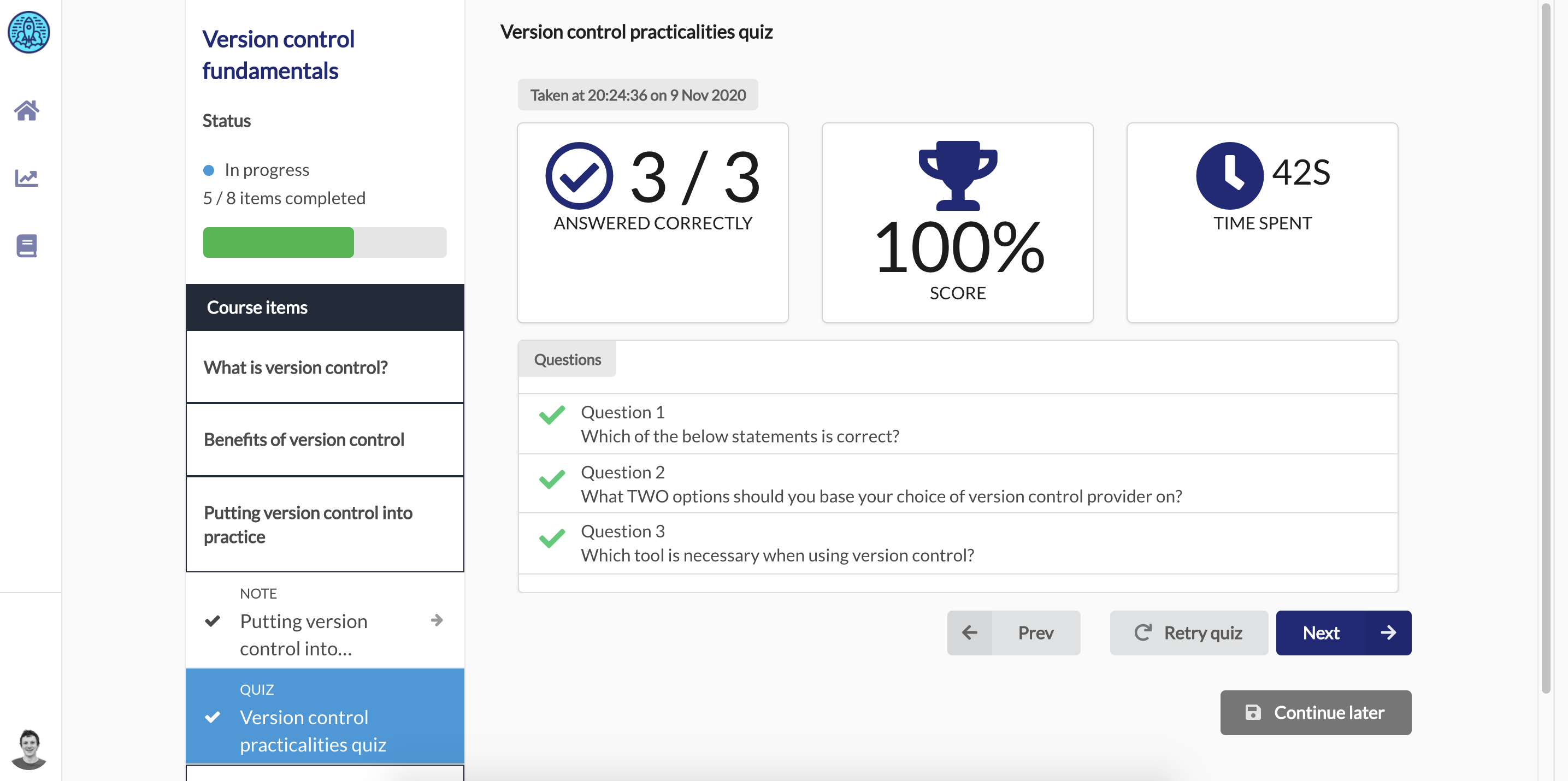
    Most recently, Gearset added a free training platform, dubbed DevOps Launchpad, that employs gamification techniques to make DevOps more accessible to developers. Topics covered include version control fundamentals, Git branching strategies and Salesforce backups.

    Gearset counts McKesson, Zillow, Traction on Demand, Intercom, Accenture, IBM and Johnson & Johnson among its customers. It’s not clear to what degree appreciation for DevOps has risen among smaller companies. However, as the number of custom applications deployed as extensions to the Salesforce platform increases, it is apparent that manual processes for building and deploying applications will not scale. The Salesforce platform itself is uniquely constructed using a set of objects and tables that generally lead organizations to adopt a DevOps platform built for that environment. However, it is possible to build and deploy applications using a DevOps platform designed for building and deploying applications that might need to span multiple platforms. Those applications would be integrated with the Salesforce platform at an application programming interface (API) level.

    Regardless of how custom applications are built and deployed, it’s clear Salesforce platforms are becoming more widely used in enterprise IT environments. Each DevOps team will need to determine how best to integrate those platforms within the context of their overall DevOps strategy.

  • BMC Tightens Integration Across DevOps Tools for Mainframes

    BMC Tightens Integration Across DevOps Tools for Mainframes

    BMC has extended its BMC Automated Mainframe Intelligence (AMI) and BMC Compuware portfolios as part of an ongoing effort to make mainframes just another platform for DevOps teams to build and deploy applications on.

    John McKenny, senior vice president and general manager for Intelligent Z optimization and transformation at BMC, said the DevOps technologies that the company gained last year with the acquisition of Compuware have now been fully integrated with the rest of the BMC mainframe portfolio.

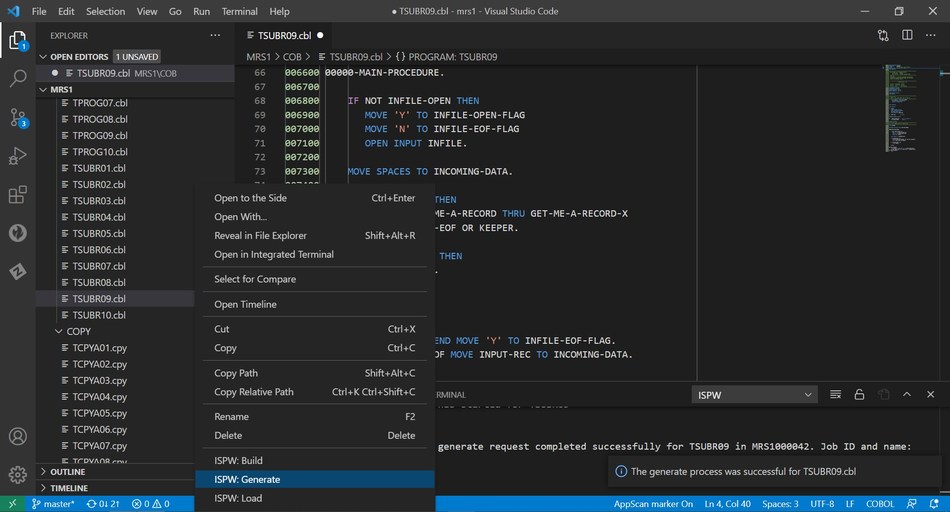
    The BMC Compuware continuous integration/continuous delivery (CI/CD) platform has been integrated with Visual Studio Code, a free tool from Microsoft that is employed widely by developers, he added.

    The BMC Compuware ISPW solution integrates with Visual Studio Code to enable developers to compile changed code on the mainframe with a right-click.

    In addition, the BMC Compuware Topaz platform for applying DevOps practices to the development of mainframe applications has a new command-line interface (CLI) along with support for multiple application programming interfaces.

    A BMC Compuware File-AID 21 tool now makes it possible to reduce the time required to search billions of transactions and log files on a mainframe, while the BMC AMI Security tool has been integrated with the BMC Helix IT service management (ITSM) platform.

    Finally, the BMC AMI Ops Insight tool has been updated to provide diagnostic capabilities to more easily identify the probable cause of an issue, while the BMC AMI SQL Performance for DB2 tool now includes a plug-in for the open source Jenkins continuous integration/continuous delivery (CI/CD) platform.

    McKenny said the goal is to integrate mainframes with any DevOps workflow as part of an effort to either deploy new applications or modernize legacy applications already running on the platform. Modernization of mainframe applications is being driven by the need to add application programming interfaces (APIs) to mainframe applications that need to be integrated with a much broader array of distributed applications, he noted.

    Much of the demand for those APIs is being driven by digital business transformation initiatives that require applications to be able to access backend transaction processing and analytics applications running on mainframes, added McKenny.

    It’s not clear at what rate IT teams that build and deploy applications on mainframes are moving away from waterfall-based processes to embrace best DevOps practices. However, McKenny noted, the rate of changes being made to mainframe applications has accelerated significantly over the last few years.

    While large numbers of applications have been migrated off mainframes over the last decade, the number of enterprise IT organizations that continue to rely on the venerable platform to process transactions remains considerable. Many organizations aren’t convinced that it’s worth rewriting the applications they have relied on for decades when it’s easier to make them more accessible to other applications by adding an API. In effect, McKenny noted, mainframe applications are becoming just another microservice that can be invoked by a developer.

    Regardless of the motivation, it’s clear mainframe applications will continue to run well into the next decade. The challenge IT teams now face is finding a way to make those mainframes just another platform on which to deploy applications at the end of a DevOps toolchain.