Category: DevOps Toolbox

  • The Right Toolchain Is the One You Build

    The Right Toolchain Is the One You Build

    One of several iterations that IT likes to go through is corporate standards for technology versus best tool for the job. We like to have standardization because it allows staffing portability between projects, but we like right tool for the job because from the moment you choose a standard, competitive factors and changes in needs make the standard less of a big win.

    DevOps is still struggling through this process, particularly in enterprises where standardization bears a bit more weight on important projects.

    The fact is that DevOps is well suited to the idea of iterating standards–somewhere between a wild west of everyone using their “right tool” and an organization dictating the tool of choice.

    Most of us use Jenkins, because it does what we need it to do. What needs doing is different from organization to organization–some use it for continuous testing, while others go all the way through application release automation. But the fact is we could iterate and replace some, or all, of the functionality we’ve decided to use Jenkins for tomorrow. Kind of like a “We have a standard that is evaluated regularly” approach.

    For those new to DevOps, the array of choices is downright bewildering. Xebia Labs has a toolchain diagram page to help those already doing DevOps, and several sources have spreadsheets/PowerPoint templates to help you work through your existing environment. While all of the options these tools try to organize for you are great for the industry to find better solutions, it makes for a confusing mess. Your toolchain could be all AWS with some scripting, all Jenkins with plug-ins or 15 different apps working independently. A surprising number of organizations are even using Git for the bulk of their toolchain.

    What matters is that you know what you have, and know what your options are. Build the best toolchain for your environment today, and keep half an eye on it to be aware when something more suited to your environment comes along. We still maintain python scripts that do a fair amount of our automation, but several toolsets in place also.

    There are objectively better tools out there, but for our purposes they are almost universally overkill. So we go with what’s best for our environment. As time has gone on, we’ve integrated more and scripted less, but it will be a while before out toolchain is actually just tools–if ever.

    If your toolset is doing the build/test/deliver/deploy cycle well enough, you’re covered. If it’s not, you need to look for alternate solutions. Even if it is, make sure you’re aware of what’s on the market and not just what’s “hot” right now. Be aware of those companies that are up and coming, maybe in spaces that are already flooded. What differentiates them, and in our environment would that differentiation matter? That’s all you need to know–there is no need for a super deep technical evaluation, unless you’re actually considering them. Just enough to know if their differences add value.

    Keep cranking out the apps that make business run. Perhaps with an updated toolchain, perhaps not. In the end, what works for your environment is all that matters.

    — Don Macvittie

  • Automation Hacks for DevOps Teams

    Automation Hacks for DevOps Teams

    DevOps teams are expected to do more work in less time. They need to plan, test, build, secure and release applications at a fast-paced rate. Of course, the DevOps team needs to achieve all of this while maintaining high software quality. This is why automation is a crucial part of the DevOps workflow. The goal is to delegate repetitive tasks to the machine, and free up dev time for more complex jobs. 

    Below are some helpful automation hacks you can apply to boost the effectiveness of your DevOps practices.

    Automating Regulatory Compliance

    Properly managing regulatory compliance is vital for many organizations to avoid fines and operate legally. Although compliance standards vary by industry, most focus on ensuring privacy and confidentiality. To meet these standards, companies must secure data and prove they are taking the appropriate measures. This proof is commonly accomplished with the maintenance of a clear digital trail.

    You can use DevOps automation to log and store digital access trails for your protected data. You can also use automated testing and deployment to ensure that only code that passes compliance tests is deployed. This prevents compliance issues from being pushed to production and helps keep your data secure.

    Automating Development Environments

    DevOps workflows require frequent creation and elimination of environments, for testing, deployment and development. These environments can be created manually but it is more efficient to create environments automatically. This can be done using a golden image with your required configurations.

    Using standardized base images ensures that you are working with consistent environments and standardizes configurations and privileges. These images can be used for local or remote machines and can be initialized automatically.

    There are a variety of tools you can use to create and automate environment creation. Chef and Vagrant are two of the most popular. Both of these tools offer an accessible API and enable you to script automation using common languages and syntax.

    Automating Code Review

    Code review is an essential part of DevOps processes but it is also one of the lengthier and more tedious processes. Automation can help you perform this process more efficiently. Automatic code review works similarly to manual review except it is done using tools that integrate with development environments. These tools can check for styling, security, duplication, complexity and code coverage, and can auto-suggest corrections. Some popular tools for this automation include Codebeat, Code climate and Codacy.

    Automating File Synchronization and File Uploads

    Many DevOps and development teams use the public cloud for quickly spinning up development and test environments. However, what happens when the production environment, or other critical resources used in the dev/test process, are deployed on-premises? Having a fast, automated and reliable way to synchronize files between the on-premise data center and the cloud can save time and headaches.

    There are a few approaches to synchronize files:

    • Scripting file uploads and downloads. The most basic method is to use shell scripts and FTP or SFTP to upload and download files between local and cloud environments. However, this can be fragile, unreliable and difficult to scale.
    • Using APIs of cloud storage services. You can move data to and from the cloud using cloud storage APIs, such as the Amazon S3 API, the Box API or specialized hosting services such as Cloudinary.
    • Hybrid cloud. The ultimate solution is to create a hybrid cloud architecture where applications, developers and users view the local environment and the public cloud as one unit, and data is synchronized transparently in the background.

    Collaboration Tools for DevOps Teams

    There are a number of collaborative tools that teams can use to further boost gains from automation. These tools can help bridge gaps in automation and processes and ensure smooth workflows.

    Slack: a chat tool that DevOps teams can integrate with automation tooling. It includes features for segregating discussions by topic, team or purpose; uploading shared files and documents; and initiating or receiving alerts from automated processes via integrations.

    Jira: a tool that enables you to create and assign tasks. It includes features for scrum and kanban methodologies, unified reporting and backlog tracking. You can integrate it with many common DevOps tools, such as Jenkins.

    Trello: a cloud-based Kanban board tool. It enables you to create project boards that can be shared across teams to track project progress. Through integrations, you can automate the updating of cards or initiate processes when cards are manually moved.

    Asana: another cloud-based Kanban tool. Like Trello, it enables you to track and collaborate on projects across a team. Typically, when teams use tools such as Asana, they create multiple boards for different project aspects. These boards can then be viewed individually or from a central dashboard.

    Conclusion

    Hopefully, this article helped you figure out how to leverage automation for improved efficiency. There are many automation options for DevOps, including automated regulatory compliance, automated infrastructure, automated code review and automated file synchronization.

    For DevOps project management, you can use collaboration tools such as Slack, Jira, Trello and Asana. Remember to make sure that any tool you introduce can be simply and easily integrated into your current environment. The tools of your choice also need to fit the skillset of all collaborators. For ease of use, keep your tooling ecosystem simple and minimalistic.

    — Gilad David Maayan

  • The Fallacy of Move Fast and Break Things

    The Fallacy of Move Fast and Break Things

    Ever since Mark Zuckerburg uttered the phrase “move fast and break things,” it has become the motto of many development teams. Companies wanting to be the next unicorn decided this must be the way to operate. The race was on to release more, ship faster, never stop. If moving slowly and methodically wasn’t working, doing more had to be the key to success.

    These companies would cherry-pick statistics from reports such as the Accelerate: State of DevOps Report. The 2019 report showed elite companies have 46 times more frequent code deployments than low-performing teams and a 2,555 times faster lead time to move from code commit to deploy to support their initiatives to move faster.

    The problem is moving fast doesn’t work across industries or for all teams. To effectively move fast, you need processes in place to support the velocity. The consequences of moving too fast and not being able to fix things when they break are high. 

    How We Got Here

    What has gotten us to the point where we are moving too fast? In short, we have. How do you feel when it takes months or a week for a PR to be resolved compared to hours or days?  As consumers and end-users of software, our expectations are continually rising. We have to ship quickly because that is what we as consumers expect. As customers, we are pushing companies, which in turn push their employees to meet the increasing expectations.

    What are the consequences when you try to move fast and not just break things, but fail? 

    • It takes longer to resolve incidents.
    • You lose customer confidence and sales.
    • Employees burnout and you have a high turnover rate.

    Let’s go back to the stats from the Accelerate: State of DevOps Report. Yes, elite teams ship faster. But, their changes are 1/7 as likely to fail and they recover from incidents 2,604 times faster than low-performing teams. It’s not just about moving fast and breaking things; it is about having the right systems and processes in place to support this way of working.

    Setting Yourself Up for Success

    You need two things to effectively move fast: a culture of psychological safety and smart investments in tooling. Employees need to feel empowered to speak up if things are moving too fast, if they are concerned about why a feature is being built and to identify gaps in the processes. They need to feel they won’t be blamed when something breaks. Building this requires empathy, open communication and teamwork.  This psychological safety is the foundation of being able to move quickly and quickly recover when things break. 

    Next up is selecting the right tooling and processes. Invest in tools that make things easier. Tools should be useful, usable and change the underlying problems, not create more. 

    Think about the tools in place to quickly resolve incidents when something fails:

    • Observability and monitoring tools to identify and notify when things go wrong.
    • Incident management tools to route, track and escalate issues.
    • Feature management tools to enable circuit breakers and load shedding to turn off features quickly. 

    The culture and tools are part of the equation; the final piece is having the right processes in place to effectively use the tools and support the people. 

    What are some processes you can implement to enable safety at speed?

    You should attempt to move fast, you should try to break things—but only when you have the right protections and processes in place. Using a combination of the right tools and processes, you can deliver more value faster without sacrificing quality or your employees’ health.

    — Dawn Parzych

  • Enterprise Service Management with Jira Service Desk and Confluence

    Enterprise Service Management with Jira Service Desk and Confluence

    Companies are looking to reduce cost, create efficiency and improve productivity of all internal and external customer services. In many organizations, different departments are using individual tools to provide their customers with the services they need. They can work in silos, can provide inadequate quality of service and not to mention that the portfolio of different tools can be quite costly.

    Enterprise Services Management (ESM) is a popular approach to implementing services within the organization. Departments such as human resources (HR), operations and marketing are seeing the value of Information Technology Service Management (ITSM) processes, and companies are looking to repeat that same value across the business. ESM allows all departments in the organization the opportunity to standardize tools and processes across all of their services departments. This standardization of tools and processes can create transparency, can improve the customer experience and in the end can reduce overall cost.

    There are quite few tools that can be used to support the implementation of ESM. Two components of an effective ESM implementation include a shared service desk and a knowledge base. 

    The shared service desk encourages the standardization of tools, and even paves the way for the alignment of processes. Departments should find tools that can be scaled up from just ITSM to support requirements across different service departments. There are quite a few applications available to companies for a shared service desk.

    In order to promote adoption, organizations must consider the ease of usability for both customers and customer service providers. Atlassian has two applications, Jira Service Desk (JSD) and Confluence, that together provide companies their shared service desk and knowledge base components of their ESM solution.

    JSD can be used as the foundation of an organization’s ESM implementation. Having JSD as the standardized service desk provides customers with a single customizable portal for all requests across the business. Unlike Jira Software and Jira Core, JSD licensed users are called agents. Companies only pay for agent licenses and do not pay for their customers.

    Below are just some of the features that are available with JSD:

    • A portal that can organize request types for customers. This provides them one place to submit all of their requests across the business.
    • Customizable workflows that include features such as custom statuses, conditions and post-functions.
    • Queues that provide the ability for agents to monitor and manage requests.
    • Service Level Agreements (SLAs) that help set time frames for agents to complete a certain step such as responding to the customer and even resolving the request.
    • The ability to automate certain workflow steps.
    • A plethora of built-in reports, to include one that shows overall customer feedback satisfaction.

    The next component is a knowledge-base. Why is a knowledge base valuable to both customers and agents? Confluence is a wiki that helps teams organize and share information. A well configured knowledge base can empower the customer to answer the questions they have without submitting a request. This can reduce the time agents spend on common requests. 

    Confluence has the ability to create a knowledge base, and seamlessly integrate it with JSD. Confluence is organized by pages, which are structured in a series of parent-child relationships—in the end form it’s called a page tree. To add/edit articles in the knowledge base, the person will require a Confluence user license. However, any customer can read the articles in a knowledge base without a license.

    Below are just a few of the available features with a Confluence knowledge base:

    • Built-in templates for how-to and troubleshooting articles.
    • Page labels that help serve as keywords for customers and service desk agents when searching for knowledge base articles.

    Below is a process flow for customers submitting a request in a typical ESM implementation using JSD and Confluence:

    1. User launches portal in web browser.
    2. In the portal, if a knowledge base is configured, the user can start typing keywords to search for articles that answer their question.
    3. If the user does not find the answer to their question in the knowledge base, they can navigate within the portal to the request type they wish to submit. The request types can be grouped by department.
    4. User completes the request form. Fields can be custom or out of the box. They can also be required or optional.
    5. Form is submitted and it creates an issue in JSD. 
    6. The issue is added to one or more agent queues. Agents can also receive notifications in email, and third party applications such as Slack, Opsgenie or PagerDuty.
    7. Agent communicates with the customer via comments in the Jira issue, and the customer communicates with agents via the customer request interface.
    8. Agent works on request in until its resolution.

    In summary, ESM is continuing to improve value in organizations for many reasons. One part of a successful implementation of ESM is which tools are selected for customers and customer service providers.

    — Evan Golden

  • What Is DevSecOps and How to Enable It on Your SDLC?

    What Is DevSecOps and How to Enable It on Your SDLC?

    For the past three to four years, all the companies around the IT world have adopted agile and different application development methodologies that leverage the work for different departments or areas and helps them to develop new products and release new features to improve their processes and infrastructure.

    In this new Agile and DevOps world where everybody on a team is involved in the rapid-changing and evolution of their application, we are promoting accountability for everybody in terms of security—this is when DevSecOps joins the party.

    What is DevSecOps?

    DevSecOps is a new model that provides accountability for the security implementation in the application; from the planning, design, development, QA/testing, to release and when operating on a production environment.

    When implementing DevSecOps on the Software Development Lifecycle (SDLC), an organization will experience the continuous integration and will notice that the costs for compliance are reduced, code is constantly being analyzed, tested, delivered and released properly.

    DevSecOps enables the process of implementing security to everybody and makes them accountable.

    Why Is It important?

    As I stated previously on this blog, on this rapid-changing era, everything is evolving at a very accelerated pace. We continue to discover vulnerabilities and breaches across platforms and operating systems, patches are released constantly but we—as part of the operating team of a company—cannot afford the risk of having a vulnerability on any side of our IT system/application.

    Main Benefits

    • Reduces vulnerabilities present on your code.
    • Reduces vulnerabilities present on your IaC technologies.
    • Reduces the number of ways to exploit your application
    • Reduces downtime.
    • Improves your application stability, availability and security.

    How Can I Enable DevSecOps on My Current DevOps Pipeline or SDLC?

    DevSecOps is a must-have methodology that needs to be integrated into your DevOps process/pipeline to help you improve your security on your SDLC.

    There are five important phases that need to be followed in order to enable DevSecOps on a current DevOps pipeline or in the SDLC. Here are the crucial phases to enable it:

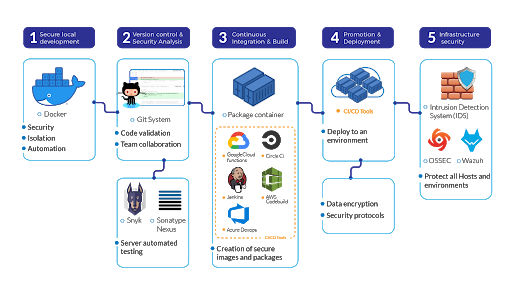
    Phase 1: Secure Local Development. Start by implementing secure working-environments. When you are developing an application, in most cases you will use open source technologies. Docker is a great helper at this phase since it automates the infrastructure and services deployments on local machines. So when you are using this ready-to-go docker environment, make sure that you are using the most recent/updated versions of the Docker Images and scan them for vulnerabilities. Even the images from official providers have vulnerabilities that need to be patched.

    Phase 2: Version Control and Security Analysis. Enable Vulnerability while uploading your source code.  Having multiple hands or people working at a piece of code can lead to vulnerabilities, especially when they are remote. Git systems have been a great improvement for collaboration between team members and code. When a team member uploads a piece of code, I strongly suggest that you enable automated testing for security on your code dependencies and core. Some good alternatives to do it are Snyk or Sonatype’s Nexus.

    Phase 3: Continuous Integration and Build. When creating the development image/package, you’ll need to make sure that your build tool or system has the proper security in place. It uses https:// protocol, it’s properly hardened and secure, it’s available and protected for attack mitigation or even not accessible via the internet. The tools that you can use here are Jenkins, Circle CI, AWS CodeBuild, Google Cloud Functions, Azure DevOps.

    Phase 4: Promotion and Deployment. When deploying to an environment, insert the environment variables through your CI/CD tool and try to manage them as secrets. Proper encryption and management of these are recommended in order to enhance your security protocols.

    Phase 5: Infrastructure Security. When your app is deployed, make sure that you have an IDS (Intrusion Detection System). Tools such as OSSEC or Wazuh will help on this matter to protect all your hosts.

    Once your code gets to the production, it doesn’t mean that it will be 100% secure. New vulnerabilities are disclosed every day but this cycle will help you and your team to test your code against all the repository of known vulnerabilities, at the time of monitor, configure, reconfigure, adapt and deploy solutions to the environment.

    Tools and Processes

    These are the tools you will need to enable in your DevSecOps process:

    • CI/CD Tool.
    • Secrets Manager.
    • Version Control System.
    • Docker Orchestration tools.
    • Security Analysis tools.

    And these are the processes:

    • Automated regression testing.
    • Dynamic testing.
    • Automated Vulnerability Assessment.
    • Automated Integration.
    • Promotion.
    • Automated Deployment.

    What Is the Ideal Workflow for DevSecOps?

    1. A developer creates a new code and integrates it into the VCS.
    2. Members from the QA team retrieves the code to perform the static code analysis to identify security flaws or functional tasks.
    3. A test environment is created automatically using IaC such as Terraform, CloudFormation, Chef or Puppet and the security configurations are added to the system.
    4. The test automation suite is performed to the application with a tool usually Selenium or any other tool that performs backend, UI, integration, security and API tests.
    5. After the test suite is performed and successful the new changes are sent to the production environment.
    6. The new version of the code is now going to be monitored in the production environment using an APM or Cloud-native monitoring tool.

    Following these points you are ensuring that your application is following TDD practices improving the code quality, compliance, increasing the number of releases of code to production and reducing the time to market which is essential for any organization.

    What Are the Challenges When Enabling DevSecOps?

    • Enabling too Many Tools: Enabling too many tools can become a problem on your SDLC, especially when your team is not used to work and relate with DevOps/security tasks. The main recommendation here is to start slow. Start by enabling only the necessary tools to get your team familiar with the process and add more when you feel your team is prepared for it.
    • Getting Used to the Methodology: It will take some time for all the team to get used to the DevSecOps methodology/culture and also to keep following it in order to be compliant with the normative that your business demands. Try to always stay up-to-date and coaching your team for the newest technologies.
    • Chasing Perfection on the Process: Keep in mind that all the DevSecOps process won’t be perfect, but it will get mature over time. Teams always try to chase perfection and this only leads to more problems with even more integrations or dependencies.

    Conclusion

    In the end, I think every organization must make the effort to shift to a DevSecOps methodology or process and come up with a multidisciplinary team with a focus on security. That’s how an organization will transition from doing DevOps to DevSecOps. Allowing all their collaborators to have accountability on the part they are actively developing.

    — Guillermo Vélez

  • New Relic Adds Support for W3C Trace Context Spec

    New Relic Adds Support for W3C Trace Context Spec

    New Relic has begun adding support for the W3C Trace Context standard within the agent software it uses to collect metrics for its application performance management (APM) platform.

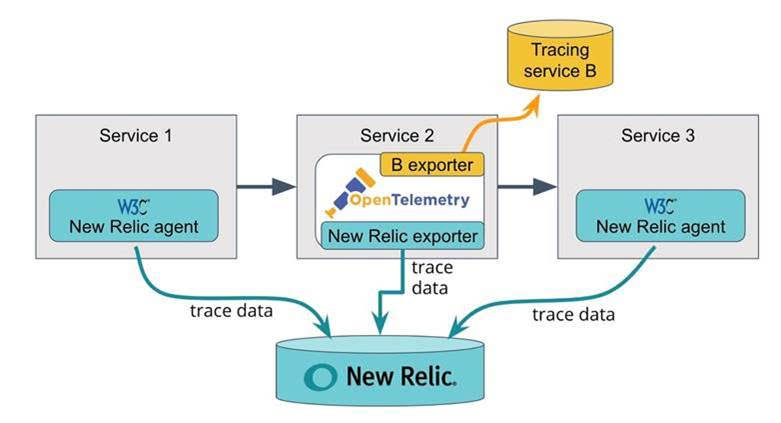
    W3C Trace Context is a specification that defines the format for propagating distributed tracing context between services. Distributed tracing makes it simpler for DevOps teams to track events across multiple services. Each step of a trace is correlated through an ID that is passed between services, with the specification defining a standard for the context propagation headers.

    The W3C Distributed Tracing working group moved the Trace Context specification to the point where it could be consumed by platform vendors late last year. TraceContext has since been adopted by the OpenTelemetry project, an open source observability framework being developed under the auspices of the Cloud Native Computing Foundation (CNCF), along with providers of APM platforms such as New Relic, LightStep and Dynatrace. Vic Soares, director of product management for New Relic, said many of the individuals working on the TraceContext and OpenTelemetry projects come from the same organizations.

    The first phase of the Trace Context project has focused on HTTP. The members of the project are also working toward defining trace context propagation for other formats, starting with AMQP and MQTT for IoT. The project team is also working on providing context propagation from clients and web browsers.

    That approach solves an issue that arises when using proprietary formats: As trace context headers move across boundaries such as proxies, service meshes and messaging systems, proprietary headers tend to be dropped, which often winds up breaking traces, said Soares.

    Soares said DevOps teams will need to upgrade the agent software they have in place to take advantage of Trace Context to provide more context across distributed services. Distributed tracing, however, will not replace sampling. Rather, distributed tracing provides a mechanism for identifying the root cause of issues that may first be uncovered using sampling techniques.

    New Relic APM agents for Java 5.1.0 and higher, Python 5.5 and higher, Go 3.1.0 and higher and the New Relic open source Elixir agent now support the standard. Support for Trace Context support in other New Relic agents, as well as the New Relic Browser agent, are expected to be available shortly. New Relic APM agents that support W3C Trace Context can accept and emit both the W3C Trace Context header format and the New Relic header format. The new agents are also backward-compatible to enable trace context and will be propagated between services with older and newer releases of New Relic agents. IT organizations can also opt to disable the New Relic proprietary trace format once they’ve upgraded all agents to a W3C-compliant version.

    Given the complexity of microservices-based applications, many organizations that deploy these applications will be among the first DevOps teams to take advantage of distributed tracing to not just troubleshoot applications but also proactively manage their application environments. Going forward, a lot more of the DevOps focus needs to be on identifying potential issues long before they can become a bigger problem.

    — Mike Vizard

  • How to Achieve a Converged Toolchain

    How to Achieve a Converged Toolchain

    In recent years, there’s been an explosion of tools for developing and delivering software. In a single pipeline, a company will have separate tools to ideate, plan, code, verify, configure, release and monitor new software, and every pipeline can have different tools for each individual stage (i.e. ideation). That’s a lot of tools, and providing visibility into the process of application development and delivery is difficult and can create many challenges.

    The key to eliminating these challenges is to develop a converged toolchain.

    What Is a Toolchain?

    A toolchain–in the context of software delivery–is a collection of tools managing the planning, execution, quality and delivery of the software being developed, starting from idea generation all the way to production. Each phase of development can have numerous tools, and it’s not uncommon for an organization to use multiple test tools, multiple tools for backlog/user story planning or multiple defect tracker tools.

    By default, each tool operates in a silo–not really interacting with other tools and not visible to other groups. Without a converged toolchain, companies are left with fragmented visibility along the application development and delivery pipeline. This means the development team has no idea what the planning team is doing, the operations team can’t see what’s happening with the development team, and so on. Of course, someone from the development team could walk over to the planning team and ask, “what’s going on?” But that halts momentum and slows down the entire process.

    The Kanban framework is a great example of a siloed tool commonly used in planning. It presents a list of all the features that need to be built, but it can’t track features in production unless someone manually changes a status. Thus, it’s only as reliable as each person making the updates, and it results in the status of many projects being out of date and stale.

    The service desk is another good example. Here you’ll find which projects are in or about to be in production, but it leaves you with very limited visibility into what’s coming down the pipeline. It also doesn’t provide you with context. For example, the operations team may know what app they’ll be working on, but they don’t have an idea of the risk profile of what’s coming.

    Benefits of a Converged Toolchain

    With a converged toolchain, disparate and siloed tools can work in one connected ecosystem. Help desk tickets can match a bug to the specific developer who worked on the feature, and initiatives can be matched to applications, environments and/or production change requests. The convergence of tooling data enables visibility between groups–allowing each group to use their own tools but at the same time work with data that is augmented from the rest of the toolchain–and this visibility enables collaboration between the groups. Connected toolchains also enable each team to continue to work on their part of the process using their own tools, and teams can evaluate the entire process of software delivery and monitor for hand-offs, waste and inefficiencies. This holistic visibility enables efficiencies not previously possible. 

    Without a converged toolchain, teams are likely to run into problems around timing and planning. For example, when the testing team is ready to tackle their part of a project, their first questions are typically, “what environment is it on?” and “what features does it include?” Unfortunately, these can be some of the hardest questions to answer. But a converged toolchain allows the testing team to easily see where exactly the unverified feature is, ­­and quickly move it along the pipeline.

    Achieving Convergence

    By converging the toolchain, you’re integrating and interconnecting the tools in the toolchain. To achieve this, you’ll need to complete three steps. First, you need to correlate and integrate data from the tools into a common data model. This will help create a standard way of looking at features, tests, environments, release processes and phases of delivery. All of these tools need to feed into their part of application delivery so you can correlate all the data together.

    Once you have that, the second step is to synchronize data between the tools and bring all the data into your common data model. This will give you the visibility your teams need so you can connect particular features to the environments they are on or know what features still need to be built.

    The third step is to create workflows. This allows you to not only bring data in but also take action on the data and react to things based upon events. For example, when the operations team is transitioning a new feature to production, they can mark it as ready for production, and it will be labeled that way across all tools and all teams. This ensures every team is on the same page and no piece of work can become stale.

    This workflow can also help when it comes to issues that are reported to an organization’s help desk or technical support of internal applications. Without a converged toolchain, that help desk worker has to create a ticket, call up to the developer team and try to track down the person who can fix the issue. However, with a converged toolchain, that help desk worker can automatically create an alert for the developer of that system. Then the developer is able to quickly see the bug, begin working on a hot fix and send a note back to the end user with an estimated time of completion. All of this is completed within the workflow of the converged toolchain and without anyone having to physically chase down another person for answers.

    By restricting themselves to only living in silos, most organizations have created a problem when it comes to communication and workflow across teams. Instead of working on items that deliver value to their customers, teams are spending a considerable amount of time on hand-offs. While it is important to know where a project stands, teams should be focused on delivering value to the customer, not gathering status updates.

    The days of living with this kind of fragmented visibility into the application development and delivery process is not acceptable anymore. Every organization’s toolchain should be focused on removing execution barriers and automating the development and continuous delivery process. In order to achieve this kind of success, teams need to be able to work with full transparency in their tool of choice while also being able to see the broader context of how their work fits in to the rest of the toolchain. With a well-designed, integrated and automated DevOps toolchain, development and operations team members are able to work together with common objectives and metrics to ensure quality, on-time application delivery to the customer.

    — Jeffrey Keyes

  • Latest Chef Habitat Release Embraces On-Premises IT

    Latest Chef Habitat Release Embraces On-Premises IT

    Chef today announced that the Chef Habitat automation framework for building and deploying applications can now be used in on-premises IT environments.

    Mike Krasnow, a senior product manager for Chef, said version 1.5 of Habitat makes it possible to now store applications packages and their dependencies locally in addition to the cloud. In addition, pre-built application packages and dependencies from the Builder service can be deployed across multiple on-premises instances.

    An Applications tab in Chef Automate now shows the service groups and instances that are deployed to make it easier to understand what’s deployed where and the health of each service. Both the Habitat Builder installer and the application dashboard are integrated with Chef Automate, which uses the same installer as Chef Habitat.

    Finally, the Habitat Supervisor module is now more stable, easier to configure and manage, and provides improved support for Windows applications.

    Krasnow said Chef has seen a 300% increase in the use of the software-as-a-service (SaaS) instance of Chef Habitat in the last year. Organizations that have embraced Chef Habitat include Alaska Airlines, Rakuten, and Walmart. That rate of adoption should increase now that an on-premises edition is available, he said, including among IT organizations in highly regulated industries that are not allowed to employ cloud services. In fact, at least 70% of all application workloads are still deployed in on-premises IT environments.

    Chef Habitat appeals most to organizations that have embraced best DevOps practices to programmatically deploy applications, said Krasnow. There are rival automation platforms that make use of declarative approaches to automation that appeal more to IT generalists. However, he noted, organizations that want to empower DevOps teams tend to prefer a more programmatic approach.

    For more than a decade now Chef has been driving adoption of IT automation. However, it’s only relatively recently that organizations have been employing IT automation at scale as part of their efforts to embrace best DevOps practices. As interest in IT automation frameworks has risen, so too has the number of options. Some organizations are even employing multiple IT automation frameworks within different business units. They may one day standardize on a single IT automation framework, but many DevOps teams will simply opt to employ the IT automation framework the members of their team already know. If the members of that team in charge of IT operations don’t have a lot of programming expertise, chances are high they will opt for a more declarative approach. DevOps teams that have developers who deploy applications on their own are likely to prefer a more programmatic approach.

    Regardless of the platform chosen, it’s clear the days of manually deploying applications using custom scripts are coming to an end. IT organizations now require an industrial approach to managing IT as a factory. The biggest challenge achieving that goal is no longer the technology but rather the culture of the IT organization.

    — Mike Vizard

  • F5 Networks Launches Next-Gen ADC Based on NGINX

    F5 Networks Launches Next-Gen ADC Based on NGINX

    F5 Networks this week launched version 3.0 of its NGINX application delivery controller (ADC) that adds application programming interface (API) management tools, analytics and monitoring tools, a service mesh, a certificate manager, a developer portal and integrations with multiple continuous integration/continuous deployment (CI/CD) platforms.

    Ken Bocchino, director of product management for NGINX at F5 Networks, said as the first major update to the NGINX Controller since F5 Networks acquired NGINX last year, the 3.0 release represents a concerted effort to reduce the total cost of DevOps by bundling many capabilities that previously would have needed to be acquired separately.

    In addition, NGINX Controller 3.0 reduces the complexity associated with building DevOps workflows because all the components that make up NGINX Controller have been pre-integrated, said Bocchino.

    Based on the open source NGINX proxy server, NGINX Controller is the mechanism through which commercial capabilities are provided and supported as part of the NGINX Plus subscription service offered to enterprise IT customers. Previous iterations of ADCs were much more infrastructure-centric than application-centric, noted Bocchino.

    While F5 Networks naturally would prefer IT organizations to consume all those services, Bocchino said the ADC has been designed in a modular fashion to enable organizations to consume services exposed as REST APIs as they see fit. A future version of the NGNIX proxy server will be able to support multiple types of service meshes, including the lighter-weight offering created by the NGINX team that will become available later this year as part of NGINX Controller 3.0, he said.

    Bocchino noted F5 Networks envisions the NGINX Controller playing a major role in driving further convergence across network operations, security and DevOps teams. NGINX Controller 3.0 facilitates that goal by providing a self-service portal along with role-based access controls and modular workflows that eliminate the need for tickets to be issued to achieve every IT task.

    It’s not clear at what rate that convergence is occurring. However, F5 Networks last year published a survey of DevOps and NetOps teams that suggests there is still a wide gap between NetOps and DevOps teams. The survey found only a little more than a third (38%) of DevOps teams cited the “integration of toolsets across vendors/devices” as a challenge to network automation. In contrast, almost half of NetOps respondents (47%) noted a lack of integration as a problem, second only to a lack of automation expertise (49%).

    F5 Networks by acquiring NGINX is betting than most organizations that have already embraced NGINX proxy server software would rather extend those existing capabilities versus replacing their ADC with a new stack of software based on, for example, the rival open source Envoy proxy server being developed under the auspices of the Cloud Native Computing Foundation (CNCF).

    How the proxy server war and associated ASC platform wars will play out is still anybody’s guess. What is clear is that DevOps teams will need to access a wide range of programmable networking and security services easily to take DevOps to the next level.

    — Mike Vizard

  • The Battle for End-to-End DevOps Champion Is On

    The Battle for End-to-End DevOps Champion Is On

    This past week’s CollabNet/Xebia Labs merger brings another challenger to the “end-to-end” DevOps market. There is a huge prize waiting for the winner. But which of the challengers has the right stuff to win this battle? Will any of the current pack even be around at the end of the day? Who will be the winners and losers? What will it take to win?

    The eventual dominant player in the end-t0-end DevOps provider market will be rewarded with what should be a great pot of gold. It is this promise of hegemony over DevOps and the rewards it commands that have so many chasing the prize.  CloudBees, JFrog and GitLab are some of the DevOps darlings in this market. Chef has a similar game plan, and now the new entity stemming from the CollabNet/Xebia Labs deal will also be a player. I believe GitHub/Microsoft will make a play in this market, too.

    At this point in time, who knows which company will be triumphant and which will be regulated to the trash heap of also-rans? One thing I learned from my friend Brad Feld is that if you are not in the top three in your category, get out. In the end-to-end DevOps or complete DevOps market, there will be some winners and there will be some losers.

    Sanjeev Sharma, principal analyst for ASG, had this to say about the market:
    As engineers strive to streamline their application delivery pipelines to be able to achieve true continuous delivery, a massive stumbling block becomes an end-to-end delivery pipeline with tools that are seamlessly integrated. At one end of this spectrum we have organizations that acquire best-of-breed tools and glue them together themselves, owning the resulting plumbing. At the other end there are organizations that want tools from a single vendor that ‘just work,’ integrated out of the box. The pendulum today has swung toward the single vendor, integrated out-of-the-box side. The growth of platform vendors like GitLab and the consolidation of CI/CD tool vendors with larger ones is the result of this swing.

    Right now, while several contenders have a great vision, none of them really have a bonafide end-to-end platform or suite with functionality all the way across. There are also other contenders that I have not mentioned, but here is my take on what is out there that I see:

                1. GitLab – The company recently won our DevOps Dozen DevOps solution provider of the year and it was well-deserved. Sid Sijbrandij and team have done a great job laying out a bold, ambitious vision of GitLab’s eventual full functionality. On top of this, they add almost 200 new features a month, every month. The company is growing by leaps and bounds, with almost 1,200 employees, and has raised hundreds of millions of dollars with a valuation of $2.75 billion. GitLab has the resources to go deep in this market and has built some tremendous momentum. On the other hand, the fact is today GitLab customers primarily use the Git repo functionality and the CI module. The other modules are still being built out to be market-competitive, including some good work in security. I suspect it may take a few acquisitions to give the company market-competitive solutions in some of the other areas it is building out. At the end of the day, you have to make GitLab a clear favorite to be one of the survivors/winners, especially with such a high valuation.
                2. CloudBees – The Jenkins train has pulled CloudBees to the top of the mountain, but to succeed in this race, the company is going to need more than that to stay there. Jenkins is a bit long in the tooth and Kubernetes has been a game-changer. Jenkins itself has been turned over to the Continuous Delivery Foundation (Linux Foundation) as has JenkinsX, which works very well in K8s environments. But CloudBees has shown it is more than Jenkins and made some key acquisitions including Electric Cloud, which have given the company great enterprise customers and added to its talent pool. Other, smaller acquisitions have given CloudBees some fresh new functionality such as feature flags, for instance, which are upgrading and refreshing the mix. At the end of the day, though, CloudBees’ potential in this market is based on its ability to execute on its vision of a dual-product lineup that features both software delivery management (SDM), which they have already announced, and upgrading their existing software, which helps people with their CI/CD pipelines. Having both working together could give CloudBees an unbeatable place in the market. This vision may not be as ambitious or broad as GitLab’s but could be more attainable, more quickly.
                3. JFrog – Shlomi Ben Haim and his “Frogs” have built a DevOps powerhouse by understanding developers’ needs and wants and using open source as a market-penetration weapon as well as or better than anyone else. The company’s community/customers are fanatical in their support and the “change the world with liquid software” culture it has built is contagious.
                  When you consider JFrog started with a repository for artifacts and what it built on top of it is pretty amazing. The company continues to add new repositories for many of the popular languages in use as well. The downside for JFrog is that it just added its JFrog pipelines via acquisition and is still working to make it a best-in-class solution. XRay is JFrog’s security product for testing artifacts and code prior to deployment, and I think it will probably make another acquisition to bolster its security chops. The Frogs have the energy and will to win this thing, but they have a lot of work ahead of them to compete with an end-to-end or complete DevOps vision. Rumor is a new version of the platform is on the way; we will have to see what this brings. The company may wind up being bought for billions by a larger player (GCP, Microsoft), which could make JFrog a winner in any event.
                4. GitHub – GitHub is just a repository, you say? Nonsense. Make no mistake about it, GitHub is going to be a player in this race. With the deep pockets and ambition to continue being a developer powerhouse at Microsoft, the company is determined to make sure GitHub is a complete DevOps solution. GitHub is adding functionality every day and has an amazing array of tools that plug into and extend GitHub. As the de facto standard—with something like 30 million developer accounts already and Microsoft’s Azure and war chest—don’t bet against GitHub being the last man or company standing here.
                5. CollabNet VersionOne/Xebia Labs entity. So, this is the new kid on the block—so new that we don’t even know its name yet. This merger was orchestrated by the private equity group TPG, which bought CollabNet last year and pledged $500 million to use to acquire and grow the CollabNet business into a complete DevOps platform. That $500 million probably represented a lot more than the firm paid for CollabNet, which was a 15 years-or-so-old company that had some good tools in the agile market. Since its merger with VersionOne, it has released a value stream management solution (it may not have been called that, but that’s what it is) and tried to market the whole thing as a suite. Obviously there was not a smooth path between the companies and some parts were missing; the street had the TPG transaction at less than $100 million. Some of its holes are getting filled with the Xebia Labs merger/acquisition. Rumor on the street was that TPG paid something like $226 million for Xebia—not a petty amount, but remember, Xebia raised about $100 million a while back. Again, the rumor is that a good chunk of that money was used to “buy” Xebia out of its ownership by the Dutch Xebia group. After paying that off, the current Xebia ownership used the remaining funds to try and keep Xebia competitive. You can do the math from there. In recent times we haven’t heard a lot from Xebia. It was assumed the company would either raise more money or look for a merger to gain enough girth to compete in this newly energized complete DevOps market. This deal seems to fit the bill.A real plus for this new entity is the addition of Ashok Reddy as CEO. Reddy is a seasoned player with large public company executive experience in the DevOps space, as well as GM of enterprise divisions. However, it is going to take more money and more functionality to create a market competitive entity in this space. There has to be a security module, for instance. The issue is with the inflated prices that companies in this space are garnering—what can be bought with the dollars left or what can be built holistically? Will TPG perhaps put more money on the table?  It’s too early to count this new player out, but as the new kid on the block, it has to play catchup against some of the other players.

    These are just five of the players. As I mentioned, Chef, one of the original DevOps darlings, also wants to play in the complete DevOps space. There are others lined up behind Chef, but we have to end this article somewhere. It is going to be an interesting few months as we see the winners in this space emerge.

    In the meantime, if you like this kind of analysis—no-holds-barred, tell it like it is, open and free—check out Accelerated Strategies Group at https://accelst.com. ASG is the new analyst firm MediaOps is working with, and it is doing to analysis what open source is doing to software. Knowledge wants to be free.

    — Alan Shimel