The data deluge is becoming a daily issue, as companies collect ever more data from ever more devices and endpoints. But collecting data is one thing; deriving value from it is another.
In this video, InfluxData VP of Products Tim Hall discusses some of the considerations in dealing with large amounts of data and how a time series database can help.
“The vast majority of data systems that exist today are not really set up to ingest and analyze that data at speed,” he said, which can pose a real issue for organizations looking for actionable insights from their data in real-time. Time series databases enable ingestion and analysis instantly, with an ingest pipeline that allows users to gather and shape data to be useful upstream.
To learn more, watch the video and download the “Benefits of a Purpose-Built Platform” infographic here. Also, check out the first video in the series here, the second video here and the third video here.
How continuous backup can help DevOps teams keep working with the right data
The world of software engineering has changed; in fact it’s constantly changing. We’re moving on from the days of waterfall when big-budget releases with multiple features per version were the norm. Now, to compete, organizations have to implement agile development, with shorter release cycles and fewer improved or new features at a time. Modern software development has evolved to a practice of continuous development to the point that each new release feels like a simple patch rather than a dramatic overhaul.
This has completely upended the testing process. Release cycles are a fraction of the time they used to be and the previous QA methods don’t stand a chance to keep pace. The latest model combines developers, operations, testing and security into close-knit teams. Development cycles are shortened and testing and deployment are automated from the source. All of this blending of teams and processes has been dubbed DevOps.
This new paradigm for operations and development has been made possible by the flexibility ushered in by virtualization and the snapshots that can be made for a point-in-time failback. Yet, limitations remain that can keep technology from supporting the advanced needs of DevOps teams. More is still needed to keep environments up to date because once a snapshot is deleted, the data that it represented is gone.
New tools have emerged including Docker, Kubernetes and Puppet to help on the operations side, but development teams can still be expensive if they aren’t used efficiently and effectively. Any amount of downtime or idle waiting for a database to be refreshed from production or for any sort of regression testing environments to be instantiated is burning money. DevOps processes can do this, but they aren’t effective if they don’t have a continuous stream of recovery points.
The Quality of Code
Development can only be as good as the copies of production data that a developer has to work with. The challenge is to get a current copy of production data in a reasonable amount of time. If it uses simulated test data designed to mimic production, results can be shoddy and defects can occur more frequently.
A continuous backup solution with search and recovery across data, files or VMs from any point in time can make development and testing easy. Spinning up a clone of production environments is simple if you have multiple copies of data in different locations in a one-to-many configuration. Production data can then be replicated to DR facilities for protection, but also to development, test and QA environments to assure that developers and testers are working on the same, latest version of production data.
Production replicas along with the simultaneous use of a proper API can allow the orchestration of test builds and deployments without manual intervention. This is essential because being able to perform tests on good, reliable data can significantly reduce the amount of code defects deployed into production.
Confidence in Changes
Because you can spin up real-time replicas of production workloads with ease, developers don’t have to guess what might happen when they push a new code update into production. Instead, the can reproduce an exact replica of production that has the latest data to an isolated area where it can’t affect production users. In this environment, they can observe the results without any risk.
When it comes to storing metrics and events, a time series database provides a number of benefits that general purposes databases don’t, including high velocity, range scans over large chunks of data, efficient data eviction and compression. But time series isn’t just about the database; it’s also about the ecosystem of tools built around it.
In this video, InfluxData founder Paul Dix discusses how his company has created an ecosystem comprised of tools that developers can use to solve problems without having to do much coding or configuration to derive insight or value from the data. He also outlines the benefits of using a time series database over a relational database or a Postgres database, including lower cost and fewer tools targeted to real-time monitoring and alerting.
In addition, Dix talks about Flux, the company’s latest scripting and query language, which was designed to be even more developer-friendly in every way. “It’s basically been years in the making, so it’s pretty exciting to finally get it out there,” he said.
To learn more, watch the video and download the “Benefits of a Purpose-Built Platform” infographic here. Also, check out the first video in the series here and the second video here.
InfluxData firmly believes an awesome experience is fundamental in developing and curating its developer community. After all, the company’s platform is designed for developers, said CMO Mark Herring, and so delivering a great experience is in the company’s DNA. “We want them to have an awesome experience from the first download to the first interaction with the company to the first install, to first getting started, to first production database.”
Part of that great experience includes an open source platform that takes only about five minutes to get up and running. “It comes down to one piece—the whole platform is there—and you can ingest the data, you can visualize you can query the data in literally about five minutes,” Herring said.
In this video—the second in a series of four—Herring talks about the importance of “time to awesome” in every consideration InfluxData makes regarding its platform, its overwhelming acceptance by the developer community and how the company will continue to strive for an even better “time to awesome.”
To learn more, watch the video and download the “Time to Awesome” infographic here. Also, check out the first video in the series here.
“… so, we tokenize the utterances, lemmatize the tokens, vectorize with StarSpace embedding, and run the featurized input through the neural net. The softmax activation layer tells us what the user intent was.”
“Sorry, you what the what and then what?”
“Or, you can say the user types commands, the bot interprets those and takes the appropriate action.”
“Oh, now I get it; it’s like a CLI on steroids!”
Calling a chatbot “a CLI” is like referring to a mobile phone as “a portable wireless teletype”: not even close to a complete representation, yet not entirely wrong. Like a smartphone, a well-trained bot will do as much or as little as the user requires of it.
Historical Perspective
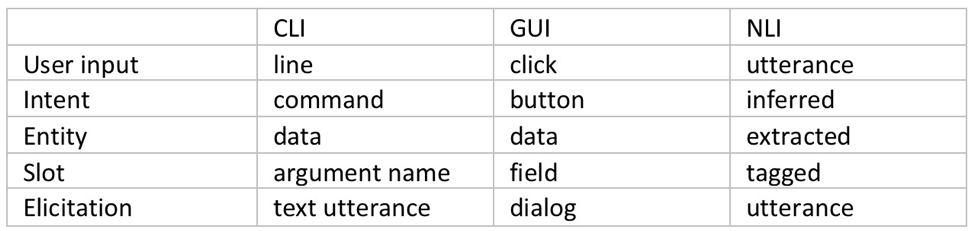
The command-line interface (CLI) dominated human-computer interaction for a few decades, until the growing number of options software offered made GUI the new favorite way of talking to computers. Both of these interaction models are based on human to human communication: the operator communicates “an intent” complete with some input “entities,” each inserted in its “slot.” This is exactly how bots operate, so how is a bot not just another UI?
Fig. 1: User Interface Elements
Bots as UI
While a user interface is merely a human-readable catalog of machine’s capabilities and a set of input slots tightly coupled to a specific application, an NLI-enabled bot acts as our agent: it infers the intent (even multiple intents) from a natural language utterance, identifies any entities in that utterance, such as food: pizza, toppings: (olives, pepperoni) and fulfills that intent, be it by talking to Pizza Hut’s API or by calling the local pizza shop on the phone. Or even by making the pizza itself.
NLI bots have already made quite an impact on the sales and support side, but how suitable are bot agents for more technical work? How would a chatbot perform in the DevOps world, replete with esoteric terms and complicated interfaces?
Although there is a lot less training material available (after all, more people eat pizza than reconfigure Kubernetes clusters), there are also a lot fewer ways to express a technical intent, so in the end the technical bots are easier to train and make fewer mistakes than their sales brethren. But is a bot’s ability to classify an intent to deploy a new EC2 instance of specific flavor enough to make hardcore DevOps techies give up their favorite CLI?
Beyond Interface: Advantages of Bot-assisted System Interaction
Context memory: Whether a bot remembers your favorite pizza toppings, or you have to say “pepperoni and mushrooms” a couple of times a week is of little consequence. However, if your input looks like this:
I’m sure you’d rather not have to type that ever again. The machine learning models of the leading bot platforms not only remember your slot values, they also remember the context in which those values were entered, so a well-trained bot is always able to suggest an appropriate value when looking to fill a slot.
Natural language understanding: Just like a human would not be fooled by variations in the word order or use of synonyms, neither would a well-designed bot. Not having to remember the exact syntax or even spelling translates into higher efficiency.
Fig. 2: Intent classification and slot tagging
Continuous training and improvement: The more time a bot spends with a team, the better it gets at its task of helping members of that team, not only due to filling its context memory with details about team members and tasks, but also because of reinforcement learning. In addition to the initial training corpus of data, most contemporary bot platforms feature interactive training mode, wherein a human user can provide a real-time feedback on the bot’s performance.
Seamless automation: Since it’s an agent rather than a mere translation layer, the bot remembers successfully fulfilled intents and chaining those into a sequence, with or without slot elicitation, with or without branching and decision making is significantly simpler and easier than even the simplest of scripts.
Collaboration platform integration: Teams typically meet in a collaboration platform such as Slack, WebEx or MS Teams, decide what needs to be done, then go and do it. With a bot on their team, they can get right to the “doing” part without leaving the collab platform; avoiding context-switching improves productivity.
Built-in analytics: A bot’s main job is to classify intents, fill slots and invoke fulfillment. However, in its spare time it could listen in and take notes. At the end of an event (release, incident, outage, etc.) it could use its NLP savviness to provide a linguistic breakdown of the event: How many questions were asked? How many answers? How many statements? Or, even, What was the level of profanity use as compared to the average? This kind of summary provides benefits for parts of the company beyond bot’s original team.
Conclusion
Bots can and do increase productivity in a software development or operations environment. Automation is important, but when done through traditional means such as scripting, its high cost often causes it to be prioritized behind other tasks. The use of an NLI-enabled bot as an agent for interfacing with various back-end systems not only ensures the very best in user interface (“CLI on steroids”), but also minimizes the need to switch contexts and significantly lowers the cost of automation.
More importantly, the emerging agent-facilitated process control prepares us for the next phase in the human-machine interaction: the post-app world.
Bots will help us navigate the new world of commoditized services that will replace the familiar apps. They will track our experience and base future selections on our satisfaction with their past choices. What more can we ask for? Aren’t most of humanity’s dreams centered on intent (wish) fulfillment? What are the wish-fulfilling creatures from the fairy tales if not expressions of human desire for the perfect bot?
Time series data can bring value to organizations in many ways, beyond simply metrics to help them understand how their infrastructure is performing. It also can help illuminate other issues that can have an impact on performance, such as customer usage.
In this video—the first in a series of four—Chris Churilo, director of Product Marketing at InfluxData, recounts how time series data was used to solve the issue of battery depletion with one of its customers, a solar energy panel provider with end user customers in Africa.
“It’s a great way of being able to look at metrics that are actually going to give them insight into how people are using it, and they could expand their service to their customers and ultimately making their customers a lot happier with their service,” she said.
To learn more, watch the video and download the “More Than Just Metrics” infographic here.
VMware has updated its Wavefront monitoring service to include support for distributed tracing along with anomaly detection capabilities enabled by machine learning algorithms.
Stela Udovicic, senior director for product marketing for Wavefront by VMware, said the addition of the distributed tracing support, now available as part of a public beta, means that a single monitoring service now can provide metrics, histograms and the tracing function required to provide a holistic view of the IT environment. Those capabilities eliminate the need to employ multiple services to achieve the same goal, she noted.
In contrast, Wavefront makes it easier to search for traces containing a specific service or application programming interface (API) to determine which ones have errors or long response time. Additionally, DevOps teams can filter the trace search to show traces containing spans from a given cluster or shard.
At the same time, VMware is adding an AI Genie capability that promises to make it easier to troubleshoot existing needs and identify future application and IT infrastructure requirements, said Udovicic. That data is collected in real time and presented in a way that allows even the most novice users to visualize using analytics tools built into the Wavefront services, added Udovicic.
Wavefront is based on an agentless architecture that in part makes it possible for the service to process millions of metrics, histograms and traces per second. That capability is especially critical in IT environments that have embraced microservices based on containers that tend to expand across an enterprise IT environment, said Udovicic. Wavefront already supports Kubernetes clusters.
In general, Udovicic noted that developers tend to embrace a variety of open source approaches to monitoring applications as they build their applications. But a SaaS application such as Wavefront makes it easier for enterprise IT organizations to apply monitoring across a broad range of applications. To facilitate that transition, Wavefront provides an OpenTracing/OpenCensus compliant solution that includes a drop-in replacement for the Zipkin and Jaeger distributed tracing software, which is at the core of many open source monitoring tools.
VMware is clearly betting that increased reliance on AI will push organizations toward relying more on cloud services. Machine learning algorithms require access to massive amounts of data before they can construct AI models capable of accurately predicting events. The cost of collecting and storing all that data, plus the expertise required to train the AI models, are beyond the capabilities of most DevOps teams.
Most enterprise IT organizations have applied monitoring tools to only their most critical applications, mainly because of cost concerns. But as applications based on microservices proliferate across the enterprise, it’s becoming apparent that all the dependencies that will exist between various application services will need to be continuously monitored. The only issue now is determining how best to achieve that goal as part of an integrated set of DevOps processes.
With the beta release of the next version of Red Hat Enterprise Linux (RHEL), Red Hat is setting the stage for making it easier for DevOps teams to consume emerging operating system services without having to upgrade their entire operating system.
The beta release of RHEL 8 adds an Application Streams capability designed to make it possible to leverage userspace more flexibly, as modules running in userspace now can be updated more quickly than the core operating system.
Matt Micene, the technical product marketing manager for RHEL 8, said it’s also now possible for multiple versions of the same package—for example, an interpreted language or a database—to be made available via an application stream. That means different DevOps teams will be able to more easily work with different versions of various classes of technologies without having to wait for the next upgrade of the operating system, he said.
As part of that focus on flexibility, Red Hat is also moving to make it easier for organizations that have embraced microservices based on containers to build applications. Open source tools such as Buildah for container building, Podman for running containers and Skopeo for sharing and finding containers are now fully supported in the operating system. Red Hat is also extending support for container networking using IPVLAN, which enables containers nested in virtual machines (VMs) to access networking hosts. There’s also a new TCP/IP stack with Bottleneck Bandwidth and Round-trip propagation time (BBR) congestion control. As organizations increasingly adopt containers, many of them are starting to make operating systems decisions based on which platform has the most containerized optimized services built in.
Other capabilities being added include support for OpenSSL 1.1.1 and TLS 1.3 along with Systemwide Cryptographic Policies; a Stratis file management system for dealing with lots of volumes; a Composer tool for building custom images that can deployed on hybrid clouds; support for the Yum 4 packager; and a new web console for managing the RHEL environment that presents administrators the same user interface experience regardless of their experience.
Micene said Red Hat is trying to strike a balance between stability and IT agility. There are plenty of organizations that still prefer to upgrade their operating systems at very well-defined intervals. But there are also an increasing number of organizations that want to be able to take advantage of the latest IT innovations without having to wait for an operating system upgrade. Many of those organizations increasingly view IT as being core to their ability to compete, he said.
Over time most organizations will develop a more schizophrenic approach to IT. There will be some application workloads where stability trumps all other requirements. At the other end of the scale, innovation will be the most prized attribute. To one degree or another, every workload is going to fall along a spectrum between those two extremes. The challenge is defining the right mix of DevOps processes to serve the needs of every and any workloads regardless of its attributes.
I’ve received thousands of emails, ads and sales pitches for tools for every stage of the app life cycle, from automating infrastructure buildout to release planning to building and testing, to delivering applications. If you’re building or rearchitecting an application, you have a surfeit of choice of DevOps tools.
Ironically, when an organization invests in various DevOps tools, it can lead to disconnected teams that are siloed by tooling. Gartner calls this “disconnected islands of automation.” In addition to a culture problem, it can lead to major incidents and downtime.
You can’t tool yourself into DevOps. But here’s how to make sure you’re not hurting your team with the wrong tools.
Step 1: Process Before Tools
Find out what problems you need to solve, then find tools to fit that need. It sounds simple, but many companies do the opposite: they’ve already picked the tool, and then use it to attack every problem.
“If all you have is a hammer, everything looks like a nail.” If all you have is one or two main tools, every problem gets fixed by those tools. Our team has been guilty of this, too. When you get really good at one tool, such as Puppet or Chef, the answer to every question is inevitably Puppet or Chef.
For our team, the fix has been to create process and architecture diagrams without tool names. Instead, we describe what needs to happen at each stage. If I know I’m building a long-running virtual machine, I know I need a configuration management component. Once we agree on the process, then we discuss tools.
Engineers are practical people who are trained to be constrained by the tools we use. To break out of this mindset, write out your desired code pipeline without tool names, even if you “know” the DevOps tools you’re going to use.
Step 2: Give Equal Priority to Infrastructure and Application Tools
A software company recently told me an unhappy story: The company spent years perfecting its continuous delivery pipeline and everything worked together like clockwork. Developers could test and run code in minutes.
The development team knew how to push code, but nothing was reachable in their region. Some of its delivery tooling was running in the same cloud region, so even though other regions were up, the tools the team wanted to use to perform failover weren’t available. When the team went to fail to DR, the configuration for its DR infrastructure had not been kept up to date with production, so instance sizes were not sufficient to run the application.
The moral of the story here is that your infrastructure and application need the same level of automation and agility. Even if you have a very mature CI/CD pipeline with gating, approvals, linting, etc., if you don’t have that same discipline and tooling around your infrastructure stack, then you’re equally down. You should have the ability to move your application from one region to another (and if you’re really ambitious, from one cloud to another). Also, if you’re not incorporating application development into infrastructure development, over time your infrastructure will grow out of date.
You should be asking questions such as:
What steps can we take to automate infrastructure provisioning?
How can we continually test failure?
What steps can we take to survive a platform failure?
Step 3. Integrate Infrastructure and Application Tools
The best way to survive a platform failure is to continually “practice” building out entirely new infrastructure and application stacks—as one continuous process, not as two different activities.
Here’s one extreme example. The team at Logicworks recently worked with a large enterprise software company that was launching an internal product with a custom deployment pipeline. The pipeline included dozens of parallel automated and manual tests, each in a separate development environment. When a new deployment to the development environment occurs, a new set of 45+ dev instances must be created that has the new version of code; when the test is finished, the instances must be terminated. This means that instances in their environment rarely last for longer than 24 hours, and over the course of a single week, hundreds of instances are terminated and rebuilt.
As you can imagine, this company has never experienced an infrastructure outage it couldn’t recover from, since it already recover from “failure” hundreds of times a week. This is the true meaning of immutable infrastructure: virtual instances are disposable and once you instantiate the infrastructure and code, you never change the instance. This way the infrastructure never strays from its initial, known-good state, operations are simplified and the system is so good at replacing itself that failure is a non-event.
Ideally, infrastructure automation and application automation are not different stacks with different teams, but the same stack with the same level of destructive testing, so that an advance in your application needs to be tested against the current state of your infrastructure.
Summary
The constant release of new DevOps tools and features can be overwhelming. But the biggest challenges for your DevOps team probably have nothing to do with CI/CD tools. I have found that it’s easy to overemphasize tools and deprioritize crucial (albeit less glamorous) automation components such as infrastructure templates and testing.
Your developers are constantly looking for new libraries and experimenting with new languages and tools for your applications. You need the same level of attention and testing in your full infrastructure and application stack. This will make you choose better application-level tools and prepare you for failure.
Infrastructure is changing as more services replace the need for hardware-based architectures
There has been a lot of change in the last few years, and that change shows no sign of slowing down. I’m one of those people who likes to know they could work offline if needed, yet in this day and age if you want me to install a fat client on my laptop, I go looking at your competition.
Granted, for me the selection of these apps is small—I like having Office on my desktop to be able to use it to write or create presentations at will, regardless of whether I’m connected—but for most people, it is growing at a faster pace. The idea of buying a monolithic system that you have to install and maintain is becoming less and less appealing.
That same syndrome is occurring in the data center, too, but with a twist. It is largely infrastructure that is feeling this pinch. Just prior to cloud/container mania, the idea was that each non-compute box in your infrastructure was a platform. It offered you a ton of functionality, all designed to simultaneously lock you in and help you get your job done. All in all, it wasn’t a bad trade-off, and we can see the same idea in the large public cloud vendors.
The difference is, with an infrastructure box, you were making a serious investment upfront that offered you other functionality to sweeten the deal. Once that investment was made, it was natural and realistic to want to take advantage of the bundled platform functionality rather than search for yet another box to drop in your network.
Containers and what survived of software-defined networking (SDN) have changed all of that. The ability to quickly spin up something in software that fits your needs perfectly and can be automated with your DevOps toolchain makes the idea of a platform box—with its high cost of entry and bells and whistles you will never use but might have to lock down—seem quaint.
In the agile/DevOps world, boxes for low-level infrastructure are still necessary. Don’t get me wrong on that. If you are a large org, you are using one of a few vendors to do core switching and routing. But top-level (layer 4-7 and 8) networking is not something you would use those static boxes for.
It used to be that all networking functionality was the same—it needed to be rock-solid and slow to change to guarantee that apps were functional. Over the last few years we have seen a move from “all networking is networking” to “this is low-level stuff that must be rock-solid, that is closer to application layer stuff that we can change rapidly, and thus need not be in the ‘rock solid’ category.” Load balancing is a great example of this (and yeah, I used to work for F5, which is the king of load-balancing): Load balancing was a network function that you went to a hardware vendor for if you were beyond a certain size. The resulting physical box might serve one or 100 apps and required specialized training or experience to manage.
Today, load balancers are a systems function that you go to a software vendor for and work into your network with as many copies of the software load balancing as you needed. Or you turn on load balancing within your container management system and manage it there. Either way, it fits in with your agile/DevOps environment better, and is easier to get budget for your project.
I expect to see this change intensifying. There is power in physical boxes for some things, but there is also power in portability and packaged deployment scripts. And a physical box is not portable to a public cloud, nor is it readily dropped into container management tools (though container management integration is getting better in most network security/performance appliances). Portability and ease of use will win over technical edge, in my opinion. Not because people are cheap and lazy, but because portability is key to agility and they are too busy.
There are still things that just aren’t that portable, and I have yet to see convincing tools to make them that portable. Data is my go-to example because it is easy. If you have 2TB of data, your portability options are limited. For those with 2PB of data, there is no real option; the app is going where ever the data is, and that data is unlikely to move. Oh, if you were motivated, there are ways to move that much data, but then you’ve just shifted the problem to the new platform, because the data is still largely non-portable, and apps will have to go where the data is. Again.
But for most functionality? Anything that can be made into highly portable software will be. And that software will run wherever it is most needed or most beneficial to the user.
All in all, this is a good result. Multi-core, multi-network, multi-terabytes of memory PCs can rival many appliances for speed and functionality, and portability plus ease of integration makes software a winner. Just stay aware of where/when a physical box still makes sense, because the world doesn’t change as fast as high-tech marketing wants you to believe. A working appliance that does what is needed quickly should not be ripped out just because a software solution is available.
But you knew that. Because you all rock. Keep kicking it, and use whatever solution serves the business best—which is a different equation for every business.