Category: DevOps Toolbox

  • DevOps Challenges and Version Control: What the Survey Results Tell Us

    DevOps Challenges and Version Control: What the Survey Results Tell Us

    Putting DevOps into practice is an ongoing experiment for many organizations. Developers often struggle with continuous integration (CI) or continuous delivery (CD) performance, testing delays and other bottlenecks. While not the answer to everything, version control—that long-established foundation of software development toolchains—has become a central part of DevOps, particularly DevOps at scale.

    This is underlined by the results of “DevOps Challenges and Version Control,” a recent survey conducted by staging-devopsy.kinsta.cloud on behalf of Perforce Software, which provides some interesting insight into their experiences. This includes the role of version control systems within DevOps in practice, plus the top challenges the companies surveyed face.

    A total of 467 people from organizations across the globe responded, with roles ranging from DevOps engineer to QA analyst and CTO. Before we look at the challenges and issues they face—not just with their version control system but DevOps in general—first let’s look at the good news: Most version control systems are a good fit for their current DevOps initiatives.

    For instance, more than half of all respondents said the most important features of their current version control system are:

    • Improved collaboration.
    • Improved CI.
    • Better support for distributed teams.
    • Quality.
    • Faster commits.

    These were followed by compliance/security, at 48 percent. These jibe well with the main DevOps challenges they also cited:

    • CI/CD issues (a third cite CI/CD workflow streamlining as their top priority).
    • Prioritizing backlog and development projects.
    • Managing build artifacts and containers
    • Developer complaints about slow commits and merges
    • Working with open source software.

    These are all things that VCS can help fix.  For instance, these days, most version control systems transactions are automation for CI, rather than user requests.

    CI Challenges

    So far so good, but users want more from their version control system. Almost a third would like better integration with the software development toolchain. Other improvements on the wish list include security with fine-grained permissions, handling large files or repos and file access for teams in multiple locations or working remotely and improved CI performance.

    CI is critical to good DevOps and giving developers real-time feedback theoretically improves quality, but if the version control system’s speed and performance does not match demand, then bottlenecks are created. The last thing anyone wants is developers sitting around waiting for builds to happen. The survey’s respondents said testing (28 percent) and waiting for code reviews (23 percent) were the two points in CI that slow everything down the most.

    People Want More from their Version Control Systems

    So, what’s the answer? Version control that combines speed and performance, of course, but also built-in automated code review to alleviate the frustration of time spent waiting for tests and other tasks. Given that 64 percent are based in multinational locations, 7 percent work remotely and a mere 29 percent work in the same office, clearly the version control system needs to support dispersed working environments, too. In many situations where the version control system is being used for multiple artifact types and not just code, this needs to be covered, too.

    Likewise, most respondents have Git somewhere in the organization and understandably so: it is open source, users can get started with Git quickly and it is suited to small teams. However, Git struggles to scale, and, given some of the challenges that respondents quoted, this is clearly something many are experiencing. Enterprise strategies are emerging that give developers the Git interface they’re familiar with, but also the scalability, global replication and high performance for moving files and performing builds.

    With so many perceived challenges cited, it is no surprise that almost half of all those surveyed said they plan to replace their existing version control system. The top reasons cited were scalability issues, poor cross-platform integration and lack of DevOps support, plus the perennial pain point of license costs.

    Understandably, switching version control systems can seem daunting, but equally, based on the survey’s responses, many organizations are clearly living with systems that are expensive to maintain and have productivity issues that are getting in the way of, rather than supporting, DevOps. Conversely, choosing version control system strategies and tools can tangibly and positively impact on achieving DevOps success.


    — Tim Russell

  • AIOps: How to Solve Performance Issues in Complex Data Pipelines

    AIOps: How to Solve Performance Issues in Complex Data Pipelines

    AIOps takes center stage to topple barriers as modern data application growth accelerates

    There seems to be a chasm between DevOps and big data teams in the enterprise, and the bridge over that chasm is long and treacherous.

    In fact, data analysts who are charged with managing and making sense of the growing volumes of data in most organizations traditionally have been excluded from the strategy-making and operations functions of DevOps personnel. Yet, data analysts are critical to the success of software development and at every stage of the software delivery pipeline.

    DevOps Under Siege as Modern Data Applications Proliferate

    Let’s take a deeper look. We know that DevOps personnel are on the front lines in ensuring that all systems, both new and existing, perform as expected in a production environment. But, even today, DevOps teams struggle in dealing with technical challenges when faced with complex data pipelines and the underlying big data stack that supports them, including:

    • Root cause analysis — determining if an application issue is due to application code, config errors or resource contention.
    • Correcting inefficiency in code.
    • Improperly configured auto-scale clusters.
    • Lack of actionable insight into how clusters were tuned at both a cluster and job level.
    • Difficult access to support engineers and promotion of DevOps collaboration.

    And these are just the tip of the iceberg.

    The pressure is on. On average, companies with data-driven environments garner up to 50 percent higher market value than their competitors, according to IDC, and big data is a contributing factor. Thus, big data implementations have become a top priority for businesses of all sizes, and on multiple fronts: revenue acceleration, creation of new products and contributing to better, quicker decision-making. But the unfortunate truth is that, as big data projects move from pilot to production, they invariably encounter serious performance problems that frustrate both data analysts and IT operations.

    What’s more, DevOps and big data personnel face a mutual problem: lack of centralized, top-down visibility into their end to end data pipelines and applications. And, as a result, they face challenges in pinpointing the source of problems—namely, that problems can become visible anywhere in the stack, but their root cause could be elsewhere in in the stack. And, these problems result from root causes as diverse as bad code, inefficient data partitioning, mismatched system configuration settings, best-guess resource allocation and infrastructure issues. Furthermore, a big data stack running multiple applications faces resource contention and prioritization issues that can reduce both individual application performance and overall system performance.  And streaming applications create their own challenges;: for example, if a streaming application starts to lag in processing data in real-time, diagnosing the root cause takes considerable time and effort.

    The industry is faced with a reality where the problems are outrunning the solutions. In the case at hand, organizations have relied on brute force and expensive custom solutions for making analytics-based recommendations more user-friendly to improve individual application and full-stack performance.

    AIOps Takes Aim

    AIOps, or artificial intelligence for IT operations, is gaining steam in the enterprise, with many new use cases appearing as data volumes grow and systems become more complicated. Gartner expects AI to pervade every aspect of managing IT, including application performance management (APM), IT infrastructure monitoring, cloud platform monitoring, performance management, capacity management, the delivery tool chain (CI/CD) and IT service management.

    In fact, AIOps is on a tear: Just three years ago, it was only a concept. Today, Gartner predicts that by 2019, 25 percent of global enterprises will have implemented an AIOps platform to support two or more major IT operations.

    But even as it continues to evolve, AIOps today can deliver automated recommendations to solve expensive, challenging and time-consuming problems with big data deployments and across entire complex stacks. Without AIOps, there would be simply too many variables to correlate manually.

    AIOps makes APM for modern data application possible. It does so by helping to eliminate painstaking, trial-and-error configuration, troubleshooting and remediation workflows that have long plagued big data operations teams. And, for the first time ever, dataOps and DevOps teams can troubleshoot, support SLAs, remediate issues and manage large-scale deployments in an agile and dependable manner.

    It’s a new environment for the modern data center. As part of an APM solution, AIOps is hard at work helping automate and guarantee the performance of big data applications and addressing the primary challenges that DevOps faces with the unrestrained growth of big data.

    It could still be a bumpy ride—organizations of all kinds face unprecedented increases in data volumes. But now, working together, DevOps and AIOps are better-equipped to contend with the challenges.

    — Bala Venkatrao

  • How AIOps Makes DevOps Less Noisy

    How AIOps Makes DevOps Less Noisy

    For DevOps engineers, “noise” is the enemy of productivity. In this context, the noise we’re talking about is unnecessary or low-priority alerts and notifications that distract engineers from identifying serious issues—and ultimately can cause alert fatigue syndrome, in which alerting systems are ignored altogether.

    Without the application of a well-constructed noise reduction plan, alert noise will end up taking away from the focus of solving the actual problem that may be causing a more critical issue.

    So, how can you fight alert noise? You might be tempted to assume that the answer lies in reducing the number of alerting tools you use, but that’s probably unrealistic. Teams today are dealing with complex application stacks and multiple tools and data sources, all of which can produce their own alerts for issues that may be interdependent or isolated. You simply can’t take tools out of your stack.

    What you can do, however, is analyze and manage alerts more effectively. Dealing with alert noise ultimately boils down to developing an effective problem analysis strategy. Let’s explore how, with a specific focus on how AIOps factors into keeping alerts manageable.

    Reduce the Time in Analyzing Alerts

    While reducing noise is important, DevOps teams risk losing valuable time solving critical problems if they also have to create and/or add systems to properly analyze alerts and their sources and priority level. Maintaining this system also would be a source of unnecessary labor that may reduce the alert noise, but also reduces the amount of time that DevOps staff can work on the solution to the root cause— which brings up another consideration. When coming up with a plan, the amount of complexity involved in adding the monitoring tools necessary to cover an entire application and/or service can be equally laborious compared to not having a solution at all. At this point, we may be merely shifting the labor emphasis.

    This is Where AIOps Comes In

    Now, let us envision a way that a team can gain full insight into a root cause without exposure to alert noise. The team doesn’t need to analyze every single alert, which would include:

    • Duplicate alerts.
    • Alerts from multiple sources (tools, microservices).
    • Informational alerts (warnings).

    Instead, the team can let AIOps analyze and classify the stream of alerts and identify critical issues. DevOps no longer would need to spend valuable collaboration time analyzing every link in the toolchain. When a team has to analyze every tool, the team could produce false positives, redirect resources toward the wrong solution, spend too much time trying to identify the root cause and create excessive alert noise. Let us envision a way in which the team does not need to spend excessive time in analysis and can experience more effective collaboration in service of solving the actual problem.

    AI and machine learning can relieve this manual process through AIOps. Automated collection of data across the application stack, alert correlation, identifying root cause and decision-making can be leveraged by a team to get to the problem immediately without all of the messy work of manual analysis, sorting and identifying root cause. This level of automation allows for needed human interaction through collaboration across teams, which can result in faster resolution, decreased downtime and effective communication of key events to company staff and end users.

    Analyzing to Predict Future Problems

    Another benefit of AIOps and the power of automated data collection, analysis, issue identification and decision-making is the ability to predict future events. A DevOps team can leverage these insights into effective preventative measures. The ability of AIOps to produce these insights will help a team find ways to automate and/or improve operations. Reducing alert noise no longer needs to be a goal because it is happening through a smooth interaction between the human team and the AI.

    There is a growing need for DevOps teams to utilize the power of AIOps. While human teams are not replaceable, redundant and time-consuming tasks are. The ability of AIOps to effectively traverse a complex toolchain with isolated issues to analyze alert importance, correlate alerts, collect and analyze relevant data, identify root cause and produce holistic actionable insights eliminates inefficiencies in problem-solving and reduces alert noise.

    Making DevOps less noisy is a goal with its roots in effective use of information. Alerts serve to inform, but thanks to the increasing complexity of applications, alerts become noise. Leveraging the power of AIOps serves to do a lot of the dirty work for a team so that noise can be reduced—but more importantly, it can make operations run smooth and keep customers happy.

    — Phillip Lorenzo

  • How AIOps Helps You Get More Out of DevOps

    How AIOps Helps You Get More Out of DevOps

    DevOps may seem like an overused term. It involves taking an application’s source code and running it in an environment. It can cover the processes, the technology or even the people that maintain the technology that is running those very processes.

    At its heart, though, DevOps is about helping developers to be self-sufficient when it comes to the basic operations around getting their application to a real environment. Once things are running in a test or production environment, there are other IT functions that are required to keep it running and performing well. While there are teams that specialize in these functions, such as site reliability engineers (SREs) and system administration, they are usually overwhelmed by the sheer amount of data their areas of responsibility generate without considering the data that applications going through their DevOps processes are also creating.

    This is what makes AIOps the perfect complement to the DevOps space.

    What AIOps Does

    What AIOps does best is break down silos within IT. Having data from all the functional areas processed and handled by modern machine learning (ML) in a single place allows correlation, which leads to faster problem identification and resolution.

    Before machine learning was introduced, for humans to process data, more or less they operated in three ways:

    • They knew exactly what data to look for, such as when a specific business function isn’t working. There is a typical message in the monolithic application that handles all the core business.
    • They routinely sifted through data only from their area of expertise.
    • When they went outside their area, any logs and other data they had access to often was summarized data, which has time gaps and can miss a lot of detail that proper correlation needs.

    Now with ML, the AIOps data platform can perform trend analysis, look for patterns and exceptions across all the data that is being generated in the environment and highlight what it considers important through web interfaces or using an event management solution for after-hours support.

    Over time, as the AIOps platform continues to learn the environment, it can be given the ability to automatically resolve certain error conditions, as it will be able to identify them faster than human operators and often resolve them before they become service-impacting.

    How This Helps DevOps

    Machine learning aids DevOps processes in three ways when working with logs and data:

    • Knowing exactly what data to look for: In a true polyglot DevOps environment that is leveraging microservices, it is next to impossible for any one person to know the most common error messages that might occur. In this model where a new business function can be conceived, written in one of many languages, and deployed into production without Operations even being notified, ML allows the AIOps platform to quickly identify what “normal” looks like for a new microservice and start looking for anomalies.
    • Only routinely sifting through data from their area of expertise: When working in DevOps, developers need to be able to quickly find data from multiple areas in IT that is related to whatever they are trying to diagnose. Using AIOps, they will be able to quickly pull data from systems directly related to their incident. Whether it is as simple as using timecodes or a correlation GUID (globally unique identifier) that is put in the logs purposefully to aide tracking, AIOps will guide the developer through the other systems’ data.On the flip side, if there is an infrastructure problem, the same AIOps platform can help correlate what downstream services may have been impacted, from failed builds to Kubernetes pods that were restarted.
    • Summarized and incomplete data: The true value of machine learning is that it has the ability to process a higher volume and variety of data at a much higher speed and accuracy than a human, and sort and index it for later use. Not having to summarize the data to one data point every five minutes could result in a problem being discovered that has occurred often but not consistently, as it may have been dropped in the summarization.

    Conclusion

    AIOps is very young in the technology industry, but has great promise as it builds on previous generations of IT operational analytics products, combined with the latest in machine learning capabilities. DevOps is a key field in IT that has more logs than it knows what to do with. Combining the technologies and expertise in these two growth areas will have a huge positive impact on productivity across enterprises with improved service management.

    — Vince Power

  • Red Hat Adds Support for Nested Workflows to Ansible Automation Framework

    Red Hat Adds Support for Nested Workflows to Ansible Automation Framework

    Red Hat today announced it is adding support for nested playbooks created using the open source Ansible automation framework within one another, which, in turn, will make it easier to automate complex IT processes.

    Bill Nottingham, product manager for Ansible, said the goal is to enable DevOps teams to reuse existing Ansible playbooks to kick off a series of nested IT jobs and workflows using version 3.4 of Ansible Tower, the console Red Hat provides for creating and managing Ansible playbooks.

    Version 3.4 of Ansible Tower also now makes it possible to slice an IT job into a series of smaller jobs that can be distributed across a cluster to accelerate execution. That capability makes it possible to scale out the processing of an Ansible playbook, he said.

    Finally, Red Hat also announced that Ansible Tower. 3.4 is now able to run on Red Hat Enterprise Linux in Federal Information Processing Standard (FIPS) compliant mode.

    Nottingham said Red Hat expects the ability to reuse Ansible playbooks within a set of nested processes will encourage IT organizations to create more playbooks now that it’s easier to reuse them as a set of modular components. IT organizations can even make launching jobs dependent on the completion of other jobs using a scheduling mechanism within Ansible Tower, he added.

    Although adoption of IT automation frameworks has been uneven, the last few years has seen IT organizations rely more on them to manage tasks as IT environments become more complex. That level of complexity will only increase as IT organizations deploy more applications that are based on microservices created using containers that need to be updated frequently. IT automation frameworks also go a long way toward making up for what has become a chronic shortage of skilled IT administrators. That capability is especially critical as both the number of applications and the rate at which they are being updated continue to accelerate.

    Most IT administrators have limited programming skills, which is why a declarative approach to IT automation in the form of an Ansible open source project has been gaining significant traction. In fact, thanks to automation, traditional IT metrics such as the number of servers being managed per administrator increasingly are becoming obsolete.

    It may take a little while longer before IT automation frameworks are the rule than the exception. But as the IT community now approaches the end of the second decade of the 21st century, reliance on manual processes that were developed at the end of the last century is no longer viable in this era of distributed workloads. In fact, regardless of where applications are deployed, the expectation in the DevOps era is that existing IT operations teams will be able to manage them without having to hire additional IT administrators.

    — Mike Vizard

  • Don’t Let Your DevOps Transformation Be a Parade of Tools

    Don’t Let Your DevOps Transformation Be a Parade of Tools

    Choosing the right DevOps tools should be a careful, thoughtful process.

    On May 12, 1848, a store owner named Sam Brannan held a “one-man parade” to announce the start of the San Francisco Gold Rush. “Gold! Gold from the American River!” Brannan shouted up and down the market street in San Francisco. He held his hat in one hand and waved a bottle of gold dust in the other. San Franciscans had received false news of gold before. But by all accounts, Brannan’s performance sent residents running in search of riches. 

    Brannan had a good reason for spreading the news rather than panning for gold himself. The canny entrepreneur owned a general store that served the workers, and in the week between learning about the discovery and yelling about it in San Francisco, he’d bought all the picks and shovels in the city. Brannan’s announcement helped spur a seminal event in California’s history. As Brannan raked in money selling mining supplies, his actions also, years later, led to the coining of a famous maxim. (source)

    During a Gold Rush, Sell Shovels

    In the current age of DevOps and Agile rush of enterprises, there is a lesson to be learned from the gold rush: Don’t let your DevOps transformation become a parade of tools. While automation is critical for the success of modern ways of technology delivery and operations, the wide range of tooling choices can often lead to wrong decisions—especially well-intentioned, top down purchase of tools, duplication in toolsets and, most importantly, ignoring the voice of the teams on the ground.

    With such variety of tools available in the market today, we all have opinions regarding the tools that we would like to use. Our preferences are based on either our history of using certain tools, because we have invested time and effort to learn a tool, or partnerships your service vendors might have with tooling vendors.

    This leads to two general attitudes toward tooling adoption, with each having their own advantages and disadvantages:

    Autonomy for teams: Let teams decide the tools they feel are suitable for their context.

    The advantage is that teams can experiment and pick a tool that suits their context better. The disadvantages can, potentially, include security risks due to lack of patching and maintenance, and limited cross-team collaboration and sharing of tooling skills and know-how.

    Standardized tool suite: A centralized way of dictating tooling choices.

    The advantage is that it allows for capacity planning, integration between tools, larger pool of community for collaboration and create platforms-based solutions.The disadvantage is that this method at times prevents teams from using tools that best suit their unique needs and creation of avoidable dependencies on centralized tooling teams in the organization.

    These contrasting views lead to debates at every level for the choice of tools and, in some cases, slowing down decision-making—or even leading to the purchase of tooling licenses without input from technical teams on the ground. The decision-making process must be improved, and the need for autonomy must be balanced with standardization and optimization. Also, the two approaches of “autonomy for teams” and “standardized tool suite” do not always have to be binary and will change depending on the context of the team needs and area.

    By considering desirability, viability and feasibility of the DevOps tools, we can help achieve the balance between autonomy and alignment.

    Here are some tips to help ask the right questions:

    Desirability

    • Do teams want this? or is this a solution chasing a problem?
    • Do you anticipate that teams will need this in the near future?
    • Does this help improve team productivity and effectiveness?

     Viability

    • Does this make commercial sense?
    • Have we considered maintenance costs and total cost of ownership?
    • Do we have existing license arrangements with the tooling vendors?
    • Do we have comparable tools already in use and that can do the job?
    • Do we need to purchase licenses throughout the enterprise?
    • Are there any open source alternatives?

    Feasibility

    • Can we implement this in the enterprise IT landscape?
    • Have we considered the ease of setup and configuration of the tool?
    • Does it scale across the enterprise? Does it have to scale across the enterprise?

    — Aditya Vadaganadam

  • Best of 2018: 11 Popular Open Source DevOps Tools Worth Knowing

    Best of 2018: 11 Popular Open Source DevOps Tools Worth Knowing

    As we close out 2018, we at staging-devopsy.kinsta.cloud wanted to highlight the five most popular articles of the year. Following is the fourth in our weeklong series of the Best of 2018.


    Companies implementing the best practices of DevOps have demonstrated that they are more effective and flexible in implementing as well as designing IT tools and practices, resulting in higher revenue generation at a lower cost. For traditional organizations looking to embrace new inventions such as bitcoin wallet, the adoption of DevOps tools provides consistency, quality and efficiency.

    Open source DevOps tools are used as a way to streamline the process of development and deployment. The benefit of using open source software is that it is built with enhanced collaboration which can drive innovation and enhance flexibility in handling transforming markets and needs. Visibility into the code helps enhance overall quality and security, and also helps companies prevent vendor lock-in from proprietary vendors.

    Open Source DevOps Tools to Know

    If you are looking to accelerate an already existing program or just getting started with DevOps, below are 11 open source DevOps tools worth considering.

    Behat

    Behat is a php framework for auto testing the expectations laid by your business. It is a behavior-driven, open source development framework for php. This tool supports you in providing software that matters via test automation, deliberate discovery, and continuous communication.

    Watir

    Watir is a web application cross-platform open source testing tool. It is the most flexible and reliable tool of Ruby libraries for automating the web browsers. Just like a human being, this tool communicates with the browser so it validates text, fills out forms and clicks links.

    Supergiant

    Built on top of Kubernetes, Supergiant is an open source platform for container management. It is utilized for Kubernetes deployment on multiple clouds in a matter of minutes. The Supergiant API is used for streamlining production deployment. With the help of the packing algorithm of Supergiant, hardware costs can be lowered and the hardware you require with computed efficiency can only be utilized.

    Ansible

    Ansible automates various common tasks related to IT operations such as application deployment, configuration management and cloud provisioning. It is owned by Red Hat. It integrates with numerous other famous tools for DevOps, including Jenkins, JIRA, Git and many others. The free open source version of Ansible is available on GitHub. Red Hat offers three paid versions—premium, standard and self-support—with prices that differ depending on the required level of support and number of nodes in production.

    Nagios

    Infrastructure monitoring is an area that has numerous solutions, from Zabbix to Nagios to various other open source tools. In spite of the fact that there are much newer tools in the market today, Nagios is a well-established monitoring solution that is highly efficient due to the large contributor community creating plugins for it. Nagios has the capability to deliver results in different visual reports and representations.

    SaltStack

    SaltStack is the paid enterprise version of Salt. Salt is a highly flexible, powerful and intelligent open source software for event-driven orchestration, cloud control, configuration automation and remote execution. It helps DevOps companies by orchestrating the effective movement of code into production and keeping the complex infrastructures tuned for optimal application delivery and business service. Saltstack orchestrates the value chain of DevOps and helps to deploy as well as configure dynamic applications.

    Chef

    Chef makes it possible to manage both traditional and cloud environments with one single tool. While maintaining high availability, Chef promises to accelerate cloud adoption. The chef development kit provides you with the tools you need to develop as well as test your infrastructure automation code from your workstation locally prior to deploying changes into production. On the Chef site, many technical resources and a lot of documentation is available including various resources designed to help organizations transition to DevOps and scale their implementations of DevOps.

    Docker

    You can expect portability with Docker, which is transforming IT environments. The portability is made possible via its special containerization technology, quite often found in self-contained units. It packages everything than an application is required to run: libraries, system tools, runtime, etc. Due to this, the applications can function the same way irrespective of their deployment location. A part of Docker known as Docker Engine is a tool responsible for creation and running of Docker containers. Another part of Docker known as the Docker Hub is a service application based on cloud encompassing the concept of application-sharing and workflow automation.

    Git

    Git has become incredibly popular in the recent years for managing the source code. It has become famous, especially as a site, for hosting open source projects. Because of the ease with which it handles merging and branching, it stands out from other version control management. Many DevOps teams utilize it for managing the source code of their applications. It has great pull request and forking features. It also consists of plugins that can link with Jenkins to facilitate deployment and integration.

    Hudson

    Hudson is a tool for managing and monitoring continuous testing and integration. The key features of Hudson include support for various systems for management of source code, application servers, code analysis tools, testing frameworks, build tools, real-time notifications of test failures, change set support and easy process for installation and configuration. A huge library of plugins is present that further extend its capabilities.

    Puppet

    No matter where it runs, Puppet promises a standard way of operating and delivering software. Puppet automates deployment to boost auditability, reliability and agility. The products of Puppet provide continuous automation and delivery across the complete software delivery life cycle. The latest version of Puppet features Node Manager and Puppet Apps, which help handle large number of dynamic, variable systems.

    Conclusion

    The world of DevOps is full of unique and outstanding open source tools. The above mentioned popular DevOps tools can help effectively bridge the gap between development and production environments when compared previously. You can opt for the tool that suits your business needs and can instantly observe the difference in your business operations. And not only do these different DevOps tools function well individually, they also play well together.

    If you’re looking to build out your toolset, consider open source DevOps tools in addition to proprietary software.

    — savaramravindra

  • The Time for Time Series Data

    The Time for Time Series Data

    More than four years ago, we launched InfluxDB, an open source time series platform. In the years since, time series technology has become increasingly popular; according to DB-Engines, over the last 24 months time series has been the fastest growing database category. This popularity is fueled by the “sensorification” of the physical world (i.e., IoT) and the rapidly increasing instrumentation requirements of the next generation of software. InfluxDB has millions of downloads, an expanding list of enterprise customers and a growing community that is always finding new ways to deploy and build on our platform and we believe we are just scratching the surface.

    Amazon Web Services (AWS) recently entered the market with Timestream, a hosted time series database. We have been evangelizing the importance of high compression, super fast engines and a purpose-built stack for time series data and Amazon seems to have followed this model pretty closely. We are excited to have more competition in the market, as it affirms the broader market opportunity and further validates the need for robust, purpose-built solutions such as InfluxData. Amazon makes smart and strategic moves and we know that when it enters a new space, it’s not done so haphazardly—there is a lot of thought and research that goes into identifying the commercial potential, so its play in the time series database space is further evidence of what we already knew: that building a time series platform on existing multipurpose SQL or NoSQL databases is a nonstarter for a modern enterprise. AWS is a bedrock of the modern cloud-based internet and we are excited to see how Timestream evolves.

    Public details about Timestream’s technical capabilities are limited, but based on the AWS model, there are likely several significant differences between our offerings—enough to appeal to distinct developers and use cases. Among them:

    • Open source — We are first and foremost an open source company. We are committed to sharing ideas and information openly, collaborating on solutions and providing full transparency to drive innovation. InfluxData’s products are continuously improved by an energized group of developers that help to make them more reliable, secure and awesome. The power of the open source community to drive innovation is unsurpassed by any proprietary software solutions.

    • Hybrid cloud and on-premises support — Distributing assets on any or across multiple cloud-hosting environments is often the best choice for companies. Key among the advantages is avoiding vendor lock-in, which can limit the ability to customize systems and negotiate better rates, ultimately making it very difficult—and expensive—to change cloud providers to meet ever-evolving business and technical needs. Every business has specific functionalities and a hybrid cloud system offers the flexibility to choose services that best fit their needs, whether it’s to support GDPR regulatory requirements or teams that are spread across multiple providers. And from an operations perspective, a multi-cloud system increases efficiencies and provides another layer of security to ensure there is no downtime.

    Inevitably, as recognition of the power of time series data becomes more prominent, we’ll see even more competitors enter the space. And this is great from our perspective: Not only does competition fuel innovation, it grows the market as a whole. More importantly, it keeps us vigilant and focused on delivering value for the developers and those in the DevOps space who solve real-world problems with our platform.

    Our priorities remain the same and we will proceed on the track we’re laying for the future. We will continue to push the edge with this technology—leveraging the advantages of a purpose-built system, developing new languages, supporting new platforms and new workloads and pursuing exciting opportunities as they come. We are committed to having a project with velocity, investing in the platform to make it successful and in the community of creative and talented developers who are discovering new ways to deploy our time series platform every day.

    InfluxDB is available now and we encourage developers, both existing users and those who are just learning about the power of time series databases, to download and get up and running in minutes.

    — Evan Kaplan

  • Anaxi Delivers Project Management App for DevOps

    Anaxi Delivers Project Management App for DevOps

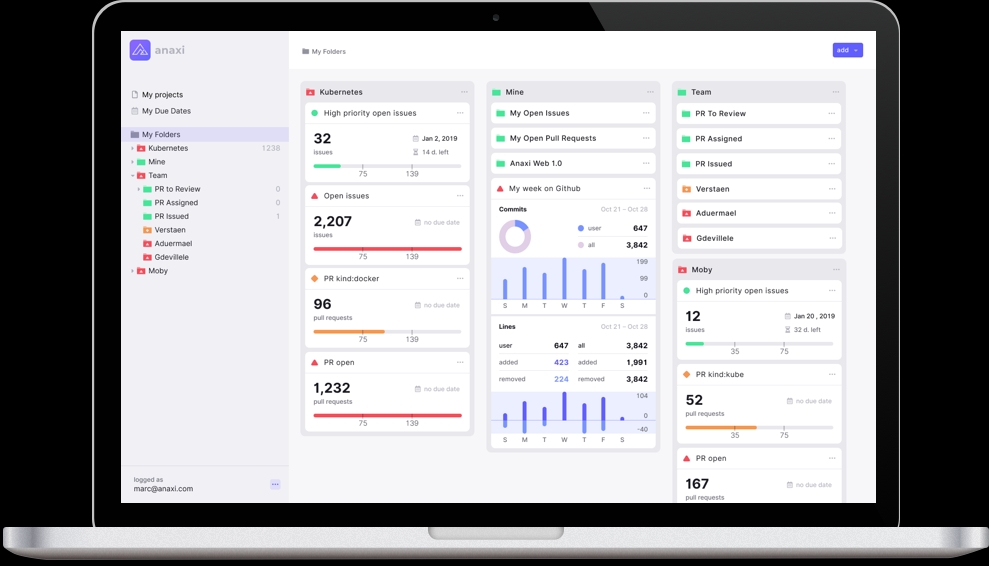
    Anaxi, a provider of project management software designed specifically for DevOps teams, has made its web application generally available. The web application complements an existing iPhone application, while an Android version of the company’s project management application is still under development.

    Company CEO says Marc Verstaen said that as DevOps has evolved around multiple repositories, IT organizations are finding it challenging to keep track of code from projects they are using within what applications. Anaxi is designed to not only make it simpler to navigate repositories, but also apply analytics to track individual developer productivity and team performance. Project managers now can, for example, analyze efforts in terms of code added and removed, refactoring and code churn on a weekly basis.

    Armed with that intelligence, IT operations teams will be better able to prioritize development plans based on the dependencies that exist between the various components that make up an application, said Verstaen. The number of those dependencies is only expected to increase as organizations increasingly shift away from building monolithic applications in favor of more complex microservices architectures that promise to make the overall business more agile.

    The fundamental project management issue with repositories such as GitHub is that there is no way to categorize all the project labels that get entered as text. That makes it difficult to monitor and track all the tasks associated with a specific label or even simply browse from one task to the next, Verstaen said. Via Anaxi, project managers can edit their issues and pull requests, which are then synchronized back to their GitHub and Jira projects.

    It’s not clear to what degree the lack of sophisticated project management tools has hindered adoption of DevOps in the enterprise. Legacy approaches to application development provide project managers with a rich portfolio of applications that may serve to bias them toward one style of application development over another. But given the pressure organizations are now under to become more agile, project managers need to evolve alongside the rest of IT organization.

    Before too long many organizations may also find themselves trying to manage projects spanning multiple repositories. It’s not uncommon for development teams to favor one repository over another. Standardizing on one repository would be preferred, but not every project manager has the political capital inside their organization required to force such a decision. Many projects also now span multiple companies, each with their own repositories, that project managers may find themselves forced to navigate.

    At the same time, business leaders are making it clear they want more visibility into the pace at which applications are being developed whenever those applications are expected to generate revenue or improve the overall customer experience. In fact, project managers who can ensure projects are delivered consistently on time and within scope are invariably considered among the most valued of employees.

    — Mike Vizard

  • Atlassian Brings Postmortem Analysis to DevOps

    Atlassian Brings Postmortem Analysis to DevOps

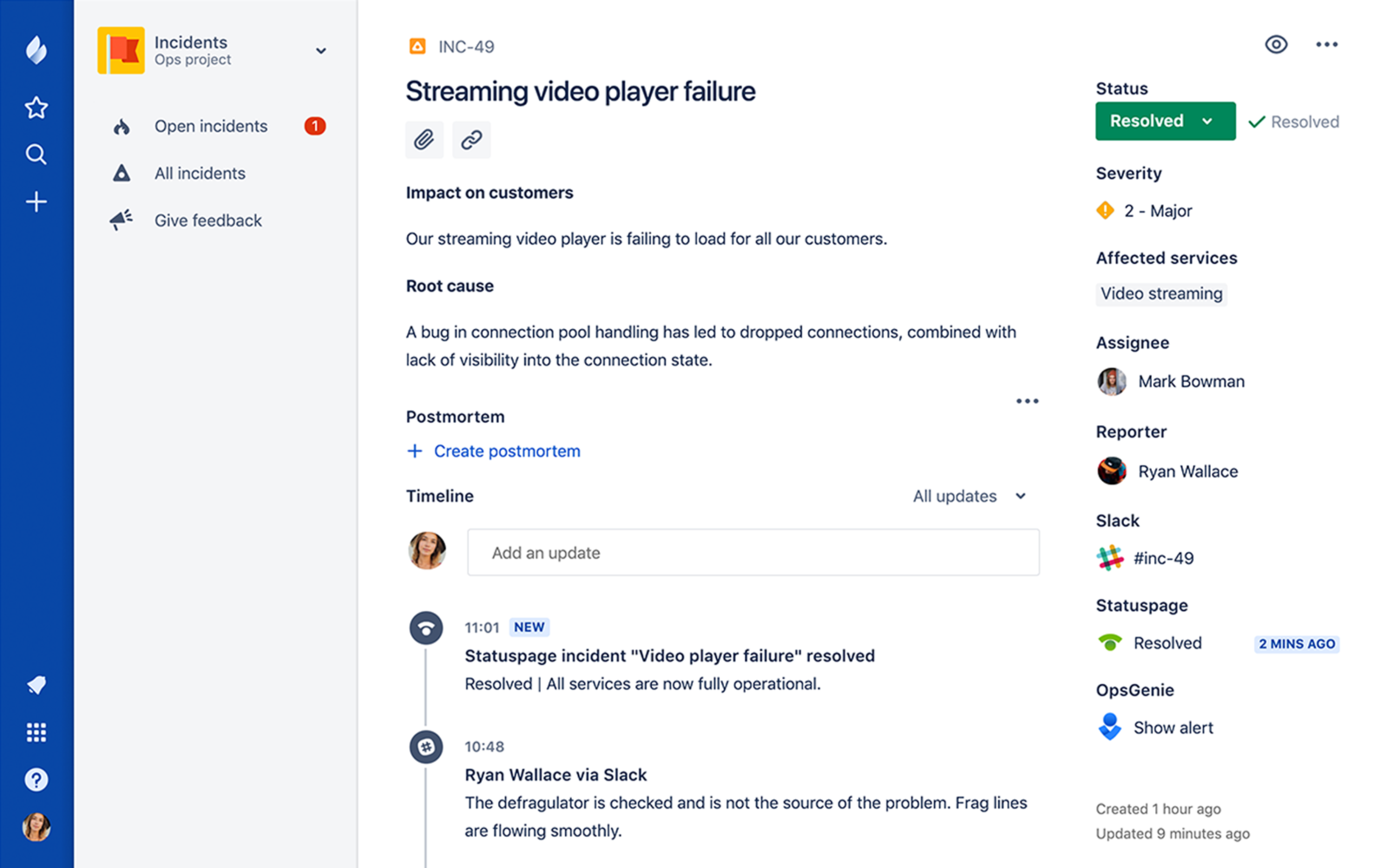
    Atlassian has added a postmortem capability to JiraOps, which gathers a list of all the key events from any IT incident in chronological order to make it easier to analyze what happened, identify root causes and raise issues directly within the JiraOps platform to ensure subsequent actions are taken.

    At the same time, Atlassian is extending the Automation Actions, a set of automated scripts and playbooks made available in Opsgenie to include support for Amazon Web Services (AWS) Systems Manager and Generic REST Endpoint. Those capabilities extend the ability of DevOps teams to launch automated tasks from within an Opsgenie console or mobile applications. Opsgenie is a notification application that Atlassian gained via an acquisition announced the same day the company launched JiraOps.

    Atlassian is also sharing incident management data it has collected throughout the year. Collectively, its customers have recorded more than 190,000 incidents and scheduled maintenance events. Updates to those events were made more than 564,000 times, which in turn fueled the delivery of more than 130 million email and text messages to end users.

    Unfortunately, the Atlassian report also finds only 3 percent of incident reports include any kind of postmortem analysis—an issue the company is trying to address via the latest update to JiraOps.

    Danny Olinsky, head of product marketing for incident management at Atlassian, said that as organizations make the shift from primarily deploying application on-premises to the cloud, many of them are starting to more fully embrace best DevOps practices. One of the central tenets of DevOps is ruthlessly automating as many processes as possible, including incident management. By integrating incident management and DevOps processes, the amount of downtime experienced by any application over the course of its life cycle can be reduced substantially, he said.

    The biggest challenge many IT organizations now face is melding DevOps practices and incident management process, which frequently evolve in isolation from one another. Those processes, however, are being unified as more organizations digitally transform business processes that need to always available. Any incident that might lead to application downtime now has potential revenue implications that go well beyond adversely impacting employee productivity. In fact, clear, precise communications involving any IT incident is now an expectation in the DevOps era, said Olinsky.

    The degree to which organizations will be automating incident management naturally will differ. But at a time when mean time to resolution is being more aggressively measured than ever, many IT professionals have an incentive to automate as many processes as possible. Murphy’s Law also dictates that incidents will manifest themselves at the most inconvenient time, so being able to automate a process from a mobile device can eliminate the need to make a trip to the office in the dead of night.

    It may be a while before IT organizations are able to fully automate every response to an IT incident. But as process that can be automated are identified, the lower the probability a truly catastrophic event capable of paralyzing the entire organization becomes.

    — Mike Vizard