Category: DevOps Toolbox

  • Why Unikernels Are Great for DevOps

    Why Unikernels Are Great for DevOps

    DevOps tooling seems to be in a never-ending state of self-transformation. The continuing evolution of infrastructure and the tools that go with it are forever creating new ecosystems. On the infrastructure side, we saw VMWare, Citrix and other companies bring to market massive virtualization in the late ’90s and early ’00s. This, of course, prompted a little bookstore in Seattle to unleash something known as “the cloud,” forever changing the way developers push code to production.

    The cloud, of course, is just an API around virtualization. A lot of the infrastructure changes prompted configuration management software, including Chef and Puppet, to emerge. Puppet is now 15 years old and Chef is around 10; even Ansible is now 7 years old.

    In the past years, we’ve seen tools such as Terraform emerge and other higher-layer infrastructure, such as Docker, which led into Kubernetes. There’s a lot of tooling out there to make applications run on servers. Just as the containers/Kubernetes ecosystems have tried to implement change on top of virtualization infrastructure, we are starting to see developers dig back down into the operating system layer to improve infrastructure there. This leads us to our topic today: unikernels.

    Unikernels are single-purpose virtual machines (VM). They only run one application—which is interesting when you think about it, because that’s precisely how a lot of DevOps practitioners provision their applications today. There is way too much software to provision nowadays—pools of app servers, clusters of databases, etc. Unikernels are fast to boot, fast to run, small in size, way more secure than Linux or containers and, if you have access to your own bare metal—either in your data center or through a provider—you can run thousands of them per box.

    Some stats? Some can boot in less than five milliseconds—that’s slightly slower than calling fork (three milliseconds) but orders of magnitude faster than Linux. Some can run databases including Cassandra and MySQL, 20 percent faster. Some people (yours truly included) have provisioned thousands of them on a single box with no performance degradation. Some are reporting them running as a VM faster than a comparable bare-metal Linux installation of that application. Clearly, this is worth investigating.

    There are many different methods that a given organization can take to provision software, but it’s pretty clear that popping into a server over SSH and sudo apt-get install something is very much of a downtrend. Phrases such as “immutable infrastructure” and “continuous deployment” fly right in the face of this sort of practice. You are either rebuilding your containers, rebuilding your instance or both. Unikernels really embrace this model as there is no apt-get-like functionality in them and you can’t log in to them remotely. They don’t even have the concept of users, mainly because at the end of the day, why do you even need them?

    At scale, it’s getting more difficult by the day to make the argument for this construct. If the app is misbehaving, shoot it in the head and take it down. Debug the reason locally. It’s extremely rare for an end user to reason that there is something wrong with the host operating system.

    In a unikernel, the only reason you’ll see a reference to a user is that most apps will demand to be run as a particular user or do things such as check for root privileges. In our case, if you look at underlying calls such as getuid, they are just stubs because we don’t need or use them. Keep in mind that this isn’t the mid-’90s anymore. We don’t have boxes laying around, where there are half-dozen users all running their code on the same box anymore. That model has long been gone. Unikernels don’t have shells and don’t have the notion of running other programs besides the one that is running.

    If it’s easier to think about, consider that unikernels are much more like processes than they are like operating systems, although they share characteristics of both. While many link, the application in others will load. Unikernels are a concept that are largely misunderstood because everyone assumes it’s somehow like Linux. Just as unikernels are not just “containers 2.0,” unikernels are very different from Linux as well. Linux is a general-purpose operating system, while unikernels only run one application. Linux was made to run on bare metal, while unikernels are made to run as VMs. Keep in mind Linux predates VMWare by a solid eight or nine years and the cloud by many more. Operating system researchers wanted to go this route in the ’90s, but we just weren’t ready yet.

    Another way to think about them is that they implement a sandbox for server-side applications. Much in the same way that the Chrome browser isolates each tab from each other to prevent one evil site from messing with another browser tab, unikernels prevent one application from messing with another application. Although under the hood, the technical implementation is quite different. More importantly, the unikernel single-process model eliminates the capability of running other ad-hoc programs inside the same VM. This is a huge blow to attackers who wish to run other programs on the same machine. It doesn’t prevent things such as remote file inclusion (RFI) attacks for various scripting languages, but for compiled and VM runtimes, it’s a striking blow because it deals with the fundamental problem of attackers using exploits only as a key to enter the server. Once they are on the server, they want to run their programs such as mysqldump or a cryptominer. They could care less about your software. Those organizations practicing shift-left security, or zero-trust infrastructure, should be keeping the development of unikernels on their radar.

    However, unikernels are not without their problems. These are computers we are talking about here. One of the larger problems for unikernel adoption was that to build them, you had to be a lower-level systems engineer doing things such as twiddling CFLAGS in makefiles or patching foreign codebases you’d never patch yourself. This was problematic and something we wanted to fix with a new open source tool. So, we opened up OPS—which can take any existing Linux application and run it as a unikernel, making their use a lot easier.

    If you’ve made it this far, I’m going to reward you: Let’s build and run a unikernel right now. Then, at least, the next time someone asks you if you’ve used them before, you can say yes.

    First thing is, you’ll want to grab OPS. You can paste this into a Linux or Mac shell, and it will download and install itself:


    curl https://ops.city/get.sh -sSfL | sh

    If you’d like to examine the source and build it yourself go to https://github.com/nanovms/ops.

    Next, let’s create a project directory:


    mkdir nodejs && cd nodejs

    Put this into a hi.js file:


    var http = require('http'); http.createServer(function (req, res) { res.writeHead(200, {'Content-Type': 'text/plain'}); res.end('Hello Worldn'); }).listen(8083, "0.0.0.0"); console.log('Server running at http://127.0.0.1:8083/');

    This is simply a small little web server that listens on port 8083.

    At this point you might be asking yourself, Do I need to install node on my system? The answer is no—not unless you plan on using external packages.

    Now we can run it:
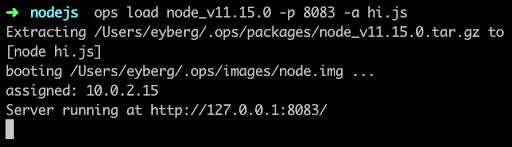
    If it’s the first time you run ops, it will first download a node “package,” which is the interpreter and anything else it needs to run. For some languages, such as Python and Ruby, this can be substantial.

    Then it builds a small disk-bootable disk image that contains your application code and, as you can see, boot straight into it. There is no init manager like Linux and there aren’t 30 different services that get fired off. Keep in mind this is a single process running.

    Now you should be able to hit it up with curl and see it run:
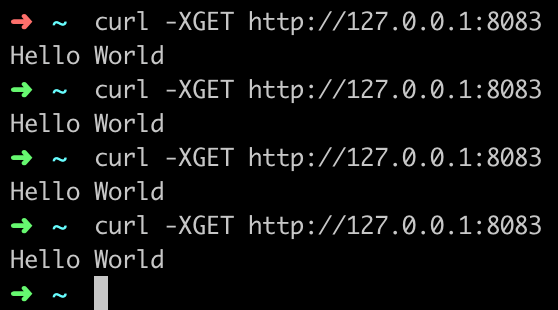
    You’ve just built and run your first unikernel. How cool is that?

    As certain trends such as “serverless,” “functions as a service,” and “no ops” gain steam, these concepts go hand in hand with unikernels. DevOps practitioners at organizations that use microservices and containers will also want to take notice as the amount of work to deploy artifacts such as these decrease considerably. Why is that? One of the many problems that containers had to struggle with was that all the existing underlying infrastructure layers that live at the virtualization layer, such as file systems and networking, had to be shifted up a few layers. Not only did this introduce performance and security challenges, but it also threw out the 20 years of virtualization software and ecosystem development that already existed. What’s interesting about unikernels is that they are always deployed as VMs, so they get to re-use a lot of the underlying ecosystem that has been existent, with very little or no change required.

    From an adoption standpoint, unikernels are flying at ultra-sonic speeds under the radar. A lot of people are not aware of how many projects or organizations are working on unikernels today. Unikernels are starting to attract major attention from many various groups and institutions. Even famous, old stalwart Linux contributors such as Ulrich Drepper, the maintainer of libc, are working on unikernel projects today. Now there are even foundations and consortiums for unikernels. One recently announced was the UNICORE project. IBM even listed its No. 1 cloud patent recently as a hypervisor built for unikernels.

    If you’re are a self-described DevOps person, it’d behoove you to learn more about unikernels and start playing around with them to understand them better. They aren’t going to kill Linux and they’re not going to kill containers, but do expect to see massive adoption in the coming years—not just because of their security and performance benefits, but because of the new forms of compute they unlock.


    — Ian Eyberg

  • VMware Advances Hybrid Cloud Ambitions

    VMware Advances Hybrid Cloud Ambitions

    VMware today advanced its hybrid cloud strategy by making a series of updates to existing offerings, including the CloudHealth by VMware software-as-a-service (SaaS) application for managing and optimizing cloud applications, which VMware acquired last summer.

    In addition, VMware Cloud on AWS is now available in data centers operated by Amazon Web Services in Canada, Paris and Singapore, the company noted. VMware also announced that the latest version of VMware Cloud Foundation—which provides and automatically updates all the VMware compute, storage and networking software required to build a cloud—has been optimized to deploy VMware Horizon virtual desktop infrastructure (VDI) software, and will available on Dell EMC VxRail hyperconverged infrastructure in April.

    New capabilities being added to CloudHealth by VMware include enhanced multi-cloud reporting, multidimensional reporting and workspaces reporting.

    The CloudHealth platform also is now integrated with the Wavefront by VMware cloud analytics and monitoring platform, enabling users of CloudHealth to employ Wavefront metrics to rightsize and optimize applications running on multiple cloud applications as part of their DevOps practices.

    A future update to the CloudHealth platform will add enhanced amortization as well as support for convertible Reserved Instance (RI) exchanger automation, container cluster visibility and cross-family rightsizing for Amazon EC2, according to the company.

    Finally, VMware announced it is making available version 9.7 of VMware vCloud Director to cloud service providers. This offering provides a single pane of glass through which multiple VMware environments can be managed regardless of whether they are deployed on-premises or in the cloud. The latest version of VMware vCloud Director adds support for version 3.0 of VMware Cloud Availability, which unifies onboarding, migration and disaster recovery services between multi-tenant clouds. VMware vCloud Director is only available to cloud service providers, but Ajay Patel, senior vice president and general manager for the cloud provider software business unit for VMware, said VMware and its cloud service provider partners plan to make available a software-defined data center (SDDC)-as-a-service offering through which they will manage deployments of VMware from the edge to the cloud on behalf of IT organizations.

    VMware also revealed there are now more than 60 partners building or delivering managed service offerings for VMware Cloud on AWS, and more than 280 partners have achieved the VMware Cloud on AWS Solution Competency. VMware also now has 35 VMware Cloud Provider Program partners that have achieved Cloud Verified status, which is required to be eligible to deliver the forthcoming SDDC-as-a-service offering. Patel also revealed the number of organizations running instances of VMware on public clouds now exceeds 1,000, in the wake of the launch of VMware Cloud on AWS last year.

    Patel said the shift to hybrid clouds is more about transforming IT operational models than it is about deploying workloads at new physical locations. The challenge many IT organizations will need to come to terms with going forward is deciding what portions of that IT operational model they want to run themselves versus opting to rely on VMware and its partners.

    — Mike Vizard

  • 5 Steps for Successful Continuous Testing Implementation

    Continuous integration (CI) calls for code to be always working. Continuous delivery (CD) and continuous deployment mean that we must be able to roll out a working configuration to production at any time. As DevOps becomes the norm, bugs in production are now a developer’s personal problem. Developers (and their managers) want to know immediately if code changes they are working on can break something.

    What is Continuous Testing?

    The only guaranteed way to prove code and configurations are working is to test them. That’s why we need continuous testing. In organizations making this transition, performance engineers and test automation experts shift from minding a backlog of test-building work, to facilitating a democratization of testing. Everybody builds their code and everybody tests their code, continuously.

    Continuous testing is becoming the “new normal.” In this modern and agile testing approach, developers are equipped with low-friction testing capabilities and tools and are expected to unit test any new or updated code. With testing shifted all the way left to developers in pre-production, and all the way right to post production monitoring, organizations are just seconds away from proving code is ready and working to acceptable service levels.

    Although continuous testing is becoming a more standard practice, it certainly presents unique challenges for execution.

    Here are five steps to help any company successfully implement a continuous testing policy:

    Define Tests Early

    Lack of clear requirements can result in wasted time and delays. Behavior-driven development (BDD), acceptance test-driven development (ATDD) and model-based testing using tools should be used so that all requirements are clearly documented and communicated.

    Test cases need to be clearly defined and test scripts created ahead of time, to enable continuous testing of code at all stages of production.

    Optimize Testing Processes and Test Coverage

    Save time, money and resources by testing only what you need to test. Visual models allow various paths to be explored and optimized so that only your tests provide maximum coverage, without unnecessary testing.

    It is also recommended to import test cases, remove duplicates and distribute and allocate optimized test cases in existing tools.

    Shift-Left Your Testing (and Shift It Right as Well)

    What do we mean by shift-left testing? Tests should be run earlier in the development cycle. Developers test as they go, with test automation including functional testing, performance testing, monitoring and security testing. This requires developer-friendly tools for easy adoption and use.

    By shift-right testing, we continue to test through production and post-production, including continuous monitoring. Gartner recently released a report on the shift-right testing, calling it a “must” for adopting DevOps practices.

    Provide Complete Test Environments

    The ability to provide virtualized test environments is critical to achieving continuous testing. Eliminate blocks and reduce wait times by providing complete test environments on demand, with dev-friendly tools (as code, CI/CD integrations, supported open source).  These environments should include test data on demand to ensure that teams can perform comprehensive tests with production-like data. These environments should be ephemeral; ready on demand, decommissioned after use.

    Get the Right Test Data

    The inability to get robust test data causes significant delays in many application release cycles. To accurately test new functionality, test data should be as close as possible to what the application will encounter in production. If the test data lacks certain real-world characteristics (i.e. actual fields, data specifications, negative scenarios, etc.), the tests are unlikely to find many potential issues or break the application where there are weak points. Understanding data models in order to extract the right data is a special skill in and of itself.

    Production data is clearly the best data to use for testing, but data privacy regulations and team silos often restrict its availability. The answer to this dilemma is a robust test data management tool that lets you copy production data and mask it to protect sensitive information, while maintaining the characteristics that make production data desirable for testing.

    Remember, continuous delivery and continuous testing are processes that can take time to implement successfully, but teamwork, continuous feedback based on data and the right tool set will help you on your journey. You can read more about implementing a continuous testing policy here.

    — Sushil Kumar

  • Chef Achieves Multiple Compliance Mandates

    Chef Achieves Multiple Compliance Mandates

    Chef today announced it will make it easier for organizations that adopt its IT automation framework to stay compliant with mandates such as the Federal Information Processing Standards (FIPS), Secure Technical Implementation Guidelines (STIG) and the Center for Internet Security (CIS) certification.

    John Snow, senior software development engineer and federal content lead for solutions engineering at Chef, said it’s incumbent on the provider of an IT platform or application to make sure their offerings comply with widely required mandates. FIPS compliance, for example, not only applies to federal agencies, but also any organizations that interacts with those agencies.

    Specifically, Chef said it has achieved FIPS compliance along with providing an implementation of STIG profiles for RHEL 7 and Windows Server 2016 in Chef InSpec and achieving a (CIS) certification for Amazon Web Services (AWS) Foundations Benchmarks Level 1 and 2 in Chef Automate. Chef claimed it is the first vendor to achieve CIS certification across AWS, Microsoft Azure and Google Cloud Platform.

    Snow said Chef was able to achieve that goal in part because of the time and effort it put into developing a parser that enabled the company to approach compliance as a programmable extension of its development process. That translation process is required because most compliance mandates are written for auditors by auditors, not by IT operations teams. Chef will also leverage that capability to ensure its platforms remain current with any future updates to the compliance mandates its supports, said Snow.

    Chef has been making a case for treating compliance as code for several years now. Any given compliance mandate typically consists of a set of controls that need to first be put in place and then tested and validated. Rather than trying to achieve that goal relying on manual processes that don’t scale, Chef contends achieving compliance should become a natural extension of best-in-class DevOps processes.

    It’s not clear yet to what degree compliance may become integrated within DevOps. But recent advances in DevSecOps suggest it’s only a matter of time before responsibility for implementing compliance controls “shifts left” along with security control. Compliance teams may define what controls will need to be put in place. But responsibility for implementing those controls as part of any quality assurance process is moving toward DevOps teams. Developers, however, will take on that responsibility only when a means to programmatically implement those controls is readily available.

    The long-term economic implications of that shift may prove to be profound. Organizations of all sizes incur massive costs both implementing compliance controls and having them audited by a third party. As the compliance process becomes more automated, not only does it become easier to implement controls at scale, but the documentation required to pass an audit is generated automatically. Given that most auditors charge per hour for their services, the savings derived from limiting the time and effort associated with preparing for and then passing an audit could be substantial. The challenge and opportunity is educating the DevOps team on not just how much money might be saved for the company, but also how much of that money might be reinvested in advancing DevOps adoption.

    — Mike Vizard

  • LightStep Unfurls Dynamic Tracing Service

    LightStep Unfurls Dynamic Tracing Service

    LightStep announced a stand-alone dynamic tracing tools capability that visualizes patterns in code based on 100 percent of the data available.

    Company CEO, Ben Sigelman, said LightStep Tracing differs from other approaches to tracing because it does not rely on a small sample of data that usually doesn’t wind up providing much actionable insight. Instead, LightStep Tracing makes it possible to search and visualize distributed traces across 100 percent of the data made available with a software-as-a-service (SaaS) application.

    Unveiled at the QCon London 2019 conference, LightStep Tracing is based on functionality originally developed in the application performance management (APM) platform, dubbed LightStep [x]PM, that is optimized for microservices-based applications. LightStep Tracing, however, does not require DevOps teams to implement LightStep [x]PM to take advantage of distributed tracing.

    Distributed tracing is becoming more widely employed because that capability makes it much simpler to visualize patterns indicative of a potential performance issues. Sigelman built one of the first instances of distributed tracing during his tenure at Google. Known as Dapper, the project now analyzes more than two billion transactions per second. Sigelman subsequently co-created the OpenTracing Application Programming Interface (API) standard that is now made available under the auspices of the Cloud Native Computing Foundation (CNCF).

    According to Sigelman, one of the most common mistakes many DevOps teams make today is overvaluing a distributed trace as a data source. While access to distributed traces are required, the real value comes from being able to dynamically inspect 100 percent of all the traces available in a way that visually surfaces patterns, added Sigelman. DevOps teams should be careful what conclusions they draw from analysis based on samples of data because outliers that could have a significant impact on application performance can be easily missed, cautioned Sigelman.

    LightStep Tracing provides DevOps teams with access to dynamic system diagrams that visually summarize the bottlenecks, as well as real-time performance histograms enable organizations to understand what defines normal application behavior in their environment. Sigelman said that DevOps teams, for the first time, can also capture shareable snapshots of system behavior that explain performance anomalies based on statistical summaries of thousands of relevant traces. Within minutes, Sigelman said LightStep Tracing can be employed to instrument and visualize service-to-service interactions across web, mobile, microservices, serverless and monolithic applications.

    One of the more frustrating aspects of DevOps is that most teams will spend far more time looking for the source of the problem, versus fixing it. But until the source of a problem can be identified, the reputation of the IT organization in the eyes of the application owner continues to suffer. There’s also an unfortunate tendency for DevOps teams to spend an inordinate amount of time in “war rooms” trying to proof that whatever element of the IT environment they manage is not part of the root cause of the problem. Rather than wasting all that time at the expense of the reputation of the IT organization, perhaps the time has come to discover and visualize issues hopefully long before any application owner even becomes aware they exist.

    — Mike Vizard

  • In Service Management, AI Is Still Aspirational

    In Service Management, AI Is Still Aspirational

    Artificial intelligence (AI) has become a matured concept, the excitement of which is bearing results for a number of sectors and it holds a good deal of promise for a bright future. AI is the act of making possible for machines to learn from “experience” while adjusting to new input and stimuli so they can perform human-like tasks, ultimately leading for more complete automation in many traditionally man-powered processes. Computers can be “trained” to accomplish specific tasks, process data and recognize patterns in the data.

    While the use of service management solutions escalates, so do the potential uses for AI approaches in the sector. Because of this, there are advantages to discuss as well as examples of how AI can help to improve the service management operations of your organizations. But AI is a broad and far-reaching concept that’s often misunderstood and difficult for those that don’t work with the technology to understand its full capabilities.

    Is AI All Hype or Is It Actually Helpful?

    Based on the 2018 Interop ITX AI: Hype or Substance report, in a survey of 182 technology professionals, almost two-thirds of these respondents’ organizations are currently working on AI products or evaluating the technology. However, only 12 percent are using AI in production today. For those who responded during 2018, 6 percent of those using the technology said their budgets for it were set to decrease. The outcome, per the report, is that AI interest is high, but the ability to execute is low.

    Are AI Expectations Too High?

    The return on investment of AI is not clear and nearly one-third of organizations say they lack the budget they need to move forward, Information Week reports. Additionally, despite the desire for AI initiatives to reduce manual processes, these tasks must still be carried out by talent in the organization. A lack of expertise is often cited as a barrier to AI initiatives because there is not enough expertise to push the efforts forward. Alternatively, of those surveyed, more than a quarter said they haven’t defined a business case yet and close to half said they “have no idea” what effect AI may have on their businesses.

    Part of the problem with AI is the broad nature of its concept. Much of what we thought we knew AI was is now standard practice. For example, early AI efforts like IBM’s chess computer, Deep Blue, is part of our computing world now. Currently, demand or desire for AI capabilities is still aspirational, but usually is conflated with “machine learning”—where a computer or programming provides examples for how a machine can “learn” how to complete said task. Machine learning has huge potential to help societies automate previously manual systems. Through this, new economies will be developed and work (and workers) will evolve. Certain jobs, eventually, will become minimized and even discontinued in favor of new process and “ways of doing things.”

    We have seen these cycles before. In the United States, from a macro level, there’s been a major shift from a farming/agricultural society to one of more urban-based manufacturing/industry; into the post-industrial; then global-focused; and web-connected economies. These can be drilled down further but the point is made—major variations in our economies and jobs have taken place in a relatively short period of time. Based on these changes, we’ve had to change; jobs and workers have had to change. Machine learning is another disruptor for the new global economy that will force change.

    Hyped Up

    The hype of machine learning—a technology with huge potential—may not actually be overhyped. That said, how will this technology actually impact our everyday lives, and will machine learning change the work we do in service management? Perhaps we’re now starting to get a better idea of what those realities may look like.

    As far back as 2017, Gartner said that machine learning hype peaked, but expectations remain high. For service managers, there’s going to be more than intelligent chatbots to worry about but for now, much of the anticipation likely will continue. Machine learning can be a beneficial tool for identifying trends and changes in trends. In service management, machine learning means quick responses can help recognize when there is an above average number of calls logged, for example, or an unusual number of calls within one category, which can be acted upon.

    For most pressing trends—a specific cloud service that may no longer be available, for example—meaning machine learning-driven technology can recognize this breakdown by sending a signal to a specialized member of the service team, who can then react to this issue. Long-term problems also can be addressed through machine learning technology, spotting urgent disruptions. This may be particularly important during problem management. A labor-intensive process, machine learning has the capability of being able to recognize patterns in these calls, making the discovery of structural problems much easier.

    Misconceptions About Machine Learning

    Misconception surrounding AI and machine learning is rampant from replacing most of our jobs and replacing massive amounts of humans in the workforce to their surpassing our pre-programmed uses for the technology, in which the machines rise up and enslave us all. The more realistic version of things is a bit more benign. The most common current misconception is that chatbots and virtual assistants will make service desk employees redundant in short order. But this won’t likely be the case for the better part of a half decade or more because the technology isn’t sophisticated enough. Most chatbots are pretty expensive and don’t always work well.

    For now, machine learning will likely only help “answer” direct questions more quickly. More complex issues must still be handled by people. The realized benefit here is that because machine learning technology can help solve the easiest questions service desks face, there’s more time for service desk team members to solve the more complex calls.

    Someday Soon …

    Soon, machine learning technology will become better at finding the right information and offering solutions that actually benefit humans. Then, service desk employees will be able to focus more on the overall customer experience in ways that machine learning likely never could.

    While AI is maturing, excitement surrounding this experiment may need to be tempered for a bit. The technology is in the act of making possible for machines to learn from “experience” while adjusting to new input and stimuli so they can perform human-like tasks, but more complete automation in many traditionally man-powered processes is still needed.

    — Nancy Van Elsacker Louisnord

  • ‘DevOoops’ Moves: SCM Conflicts

    ‘DevOoops’ Moves: SCM Conflicts

    DevOps’ ultimate aim is to create efficiencies in the software delivery process. But it doesn’t always work out that way. Sometimes DevOps initiatives lead to mistakes—something we lovingly call a “DevOoops.” CloudBees recently polled some colleagues and came up with five examples of a DevOoops in action. Following is a discussion submitted by solution architect Will Refvem about siloed departments.

    Scenario:

    One of the biggest challenges in DevOps is SCM. Early in my career, being given access to Git repositories was a bit like handing a belt-fed machine gun to a drunken toddler. My biggest DevOoops moment came when I was trying to master the basics of Git in a project that used Git submodules—don’t, just don’t—and had a series of bash scripts that implemented a primitive CI/CD workflow by running in the environments we were deploying to (seriously). I can’t tell you how many merge conflicts and detached HEADs I encountered, or how I got out of them. Fortunately, we were using the fork-PR model, so I did no real damage.

    Software configuration management (SCM) is key not only for versioning, but also for providing a shared view of code and other assets, from development through to production. Giving proper consideration to your SCM structure, branching and merging model, access controls, etc., will support collaboration, reliability and traceability—all key for DevOps success.

    In the 2019 DevOps and Jenkins Community Report, 66 percent of organizations respondents reported the use of modern solutions SCMs, specifically GIT-based solutions GitHub or BitBucket. But the older SCM solutions aren’t going away completely—45 percent of all organizations still use pre-GIT, pre-DVCS (distributed version control systems) such as Perforce, Subversion and CVS. While it’s possible to apply DevOps practices using these legacy solutions, it is important (and more challenging) to design a branching/merging model and surrounding workflow, which supports the key aspects of DevOps such as peer review, collaboration and short-lived branches.

    Modern SCMs such as GitHub have features that inherently support collaboration, including the game-changing Pull Request, making it much easier to implement processes that best support CD and DevOps.

    Poorly designed CD workflows or inadequate CD systems create friction multiple ways. If the interactions are too cumbersome, users will not commit code to the pipeline frequently enough. If it’s difficult to access the pipeline and create visibility into the process, it can lead to unresolved conflicts.

    You need to pick the right tool. If you don’t have the option to get the modern tool, you need to take the time to design a legacy tool.

    It’s also important to consider two other issues in relation to this DevOoops example: branching and acquiring the appropriate level of DevOps skills.

    • Branching: A proper branching and merging model is required to ensure you are feeding the appropriate inputs into your DevOps pipeline, such that you are able to continuously integrate, test and ultimately deploy changes. A simple guide here is encapsulated in the KISS (keep it simple, stupid) principle. If you need a full-wall whiteboard or a spreadsheet fit for an accountant to list your active branches, you need to rethink things. Get as close to the ideal of mainline trunk development as possible, with short-lived feature branches, minimal application versions, etc.
    • Skills: As organizations seek to implement DevOps, most likely new tools and practices will be implemented simultaneously. It’s important to understand and accommodate the fact that there will be bumps and bruises as you learn to use these new tools and practices. For instance, shifting from centralized version control such as Apache Subversion (SVN) to distributed version control such as Git is a paradigm shift that can be difficult to fully grasp and result in destructive mistakes, such as deletion of nodes from the change history, overwriting changes or misconfiguration access control. Consider hiring for these new skills and/or account for time and training.

    Takeaways

    • A proper branching and merging model are required to ensure that you are feeding the appropriate inputs into your DevOps pipeline to let you continuously integrate, test and ultimately deploy changes.
    • If you are using a pre-Git legacy SCM solution, develop a branching and merging strategy within the legacy solution to achieve appropriate velocity in your DevOps model.
    • Consider that you will need to develop new skills to adopt new SCM tools and practice and account for this in your plan.

    — Brian Dawson

  • Akamai Extends Scope of DevOps Reach

    Akamai Extends Scope of DevOps Reach

    Akamai today moved to further extend the number of capabilities it exposes via its content delivery network (CDN) that are designed to appeal to DevOps teams.

    Those enhancements include HTTP/2 performance optimizations and the ability to automatically load font libraries, as well as providing access to “middle-mile” logs that will enable DevOps teams to more precisely investigate performance issues and test logic in a local development environment before moving those changes into production.

    Akamai has also re-engineered Control Center to provide more detailed reporting across security, acceleration and delivery functions, and made TLS 1.3 the standard mechanism for establishing connections.
    Finally, Akamai is also looking to advance DevSecOps processes. Its CDN now can optimize or block access to content within a fully integrated virtual private network and domain name system proxy detection service. Akamai’s Token Authentication capabilities have been extended to include coverage for browsers and devices that do not support cookies.

    Ari Weil, vice president of product marketing for Akamai, said these latest extensions are part of an ongoing effort to make the company’s CDN a natural extension of any DevOps process. Developers today often wind up wasting a lot of time and effort writing code to load fonts that now can be automated using via the Akamai CDN, for example. The enhancements should free them to write code that adds more value to the business, he said.

    Akamai is also promising DevOps teams they will see much faster activation times across Akamai CDN, as well as have deeper visibility into application performance issues beyond what most application performance management (APM) tools offer, added Weil. Akamai is especially focused on any application development project where service level agreements need to be both achieved and maintained, he said.

    Thus far, Weil said Akamai is finding a higher level of appreciation for the role CDNs can play in DevOps. CTOs and enterprise architects who are typically held responsible for achieving application delivery goals in particular are now taking notice of CDNs’ capabilities, as most individual developers aren’t usually focused enough on finding ways to automate the routine aspects of building a modern web application, he said.

    Akamai will continue to focus on making its CDN a natural extension of the continuous integration/continuous deployment (CI/CD) platforms on which DevOps processes are implemented, with an eye toward making its CDN a preferred deployment platform for web and mobile applications. It may take while longer before DevOps teams view CDNs as a deployment platform for their applications. Much of the decision regarding what CDN to employ historically has been been left to application owners. But Akamai is clearly betting that if more applications take advantage of CDN functionality as they are being built, there’s a much greater likelihood those applications will be distributed on the Akamai technology.

    — Mike Vizard

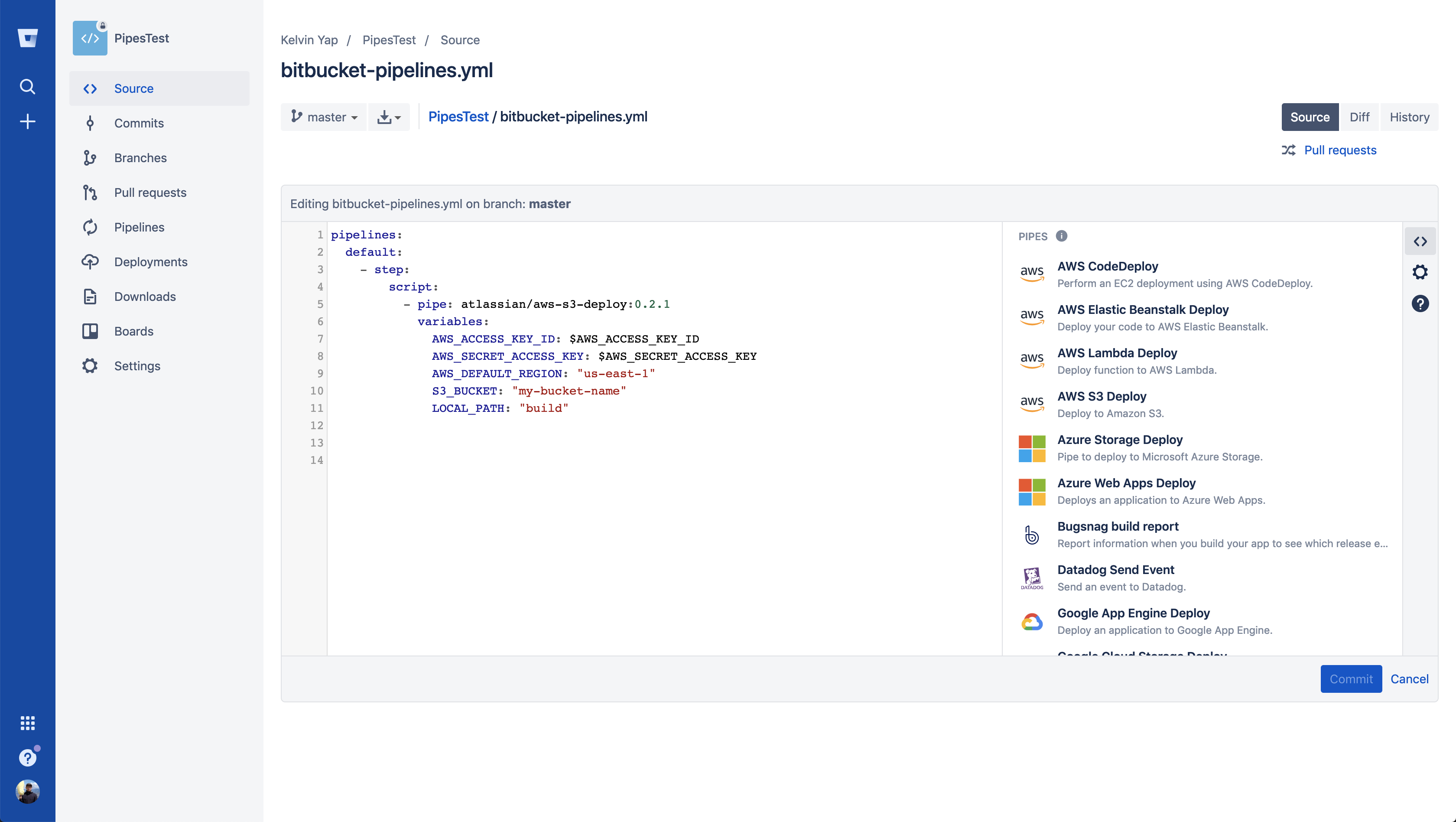
  • Atlassian Adds Pre-Configured Pipelines to Bitbucket CI/CD

    Atlassian Adds Pre-Configured Pipelines to Bitbucket CI/CD

    One of the primary reasons DevOps processes have not been widely adopted across the enterprise is that building pipelines across all the tools required is a painstaking effort. As a result, most pipelines today are constructed using manual pipelines. However, Atlassian has announced it is now making available pre-configured Bitbucket Pipelines that DevOps teams can access via a simple drag-and-drop interface.

    Harpreet Singh, head of product for Bitbucket Cloud at Atlassian, said DevOps teams that rely on the Atlassian Bitbucket continuous integration/continuous deployment (CI/CD) platform will be able to employ a series of pre-configured Bitbucket Pipelines built by Atlassian or one of its third-party partners, rather than having to manually build every pipeline.

    The goal is to make it much easier for DevOps teams to incorporate, for example, a new cloud platform into an existing set of DevOps processes without waiting for someone on the DevOps team to write, test and validate a script, said Singh. IT vendors that have worked with Atlassian to create Bitbucket Pipelines include Google Cloud, Microsoft, Slack and Amazon Web Services (AWS).

    One of the ironies of DevOps is that while CI/CD platforms make it easier to build and deploy applications, constructing the CI/CD platform can be exceedingly complex. A recent survey conducted by Atlassian found DevOps teams rely on 4.3 tools to move code from development into production environments. A full 62 percent of respondents reported they resort to performing manual testing due to insufficient automated test coverage, additional manual processes or a lack of build/deployment pipeline automation.

    While some organizations might have the engineering resources required to build pipelines, he noted, the average IT organization can’t afford to hire operations specialists that have the requisite programming skills required to build pipelines manually.

    Best of all, noted Singh, the pre-configured Bitbucket Pipelines that Atlassian makes available will be maintained and updated by their original authors.

    It’s too early to say to what impact pre-configured pipelines is likely to have on DevOps adoption in the enterprise. But most enterprise IT organizations won’t significantly alter their process until it becomes relatively easy to make that transition. Enterprise IT organizations have relied on administrators to manage IT for decades, and most of those administrators wouldn’t know where to begin if asked to manually construct a pipeline. The few enterprise developers who might be able to build those pipelines are simply to busy writing application code. The result is a paralysis that prevents organizations from modernizing their application development and deployment processes.

    Of course, any meaningful change in the enterprise also involves a chicken-and-egg debate. Lacking skills and tools, enterprise IT organizations are unable to overcome internal inertia, which in turn results in conservative IT organizations preferring to rely on known processes no matter how inefficient they might be. The real challenge facing IT leaders trying to advance DevOps adoption is to remove as many excuses for resisting change whenever and wherever possible, starting with how pipelines are constructed and maintained.

    — Mike Vizard

  • VMware Brings NSX Network Virtualization into DevOps Realm

    VMware Brings NSX Network Virtualization into DevOps Realm

    At the Mobile World Congress (MWC) 2019 conference, VMware moved to bring network virtualization into the realm of DevOps by adding support for a declarative programming model and JSON data formats to version 2.4 of NSX-T.

    In addition, VMware is making it possible to use the open source Ansible automation framework to deploy NSX-T.

    Finally, VMware is adding support for IPv6 as well as the ability to now extend microsegmentation all the way to Layer 7 of the application stack.

    Jonathan Morin, product marketing manager for NSX at VMware, said this release of NSX-T not only will become the dominant version of NSX for VMware in the enterprise, it also represents a concerted effort to make network virtualization directly accessible to both developers and IT operations teams alike. JSON support is critical from that perspective because it makes it easier to programmatically replicate the networking requirements and security controls attached to any class of applications.

    Longer-term, JSON support will also make it easier for a wide variety of management tools to consume metrics generated by NSX-T.

    IT organizations must determine to what degree they want to fold network operations into DevOps. Some organizations will simply prefer to provide developers with access to self-service virtual networks, while others will move to expose the declarative application programming interfaces (APIs) in NSX-T 2.4 directly to developers, said Morin.

    VMware expects that, going forward, a hybrid method for deploying and managing NSX will emerge. Developers will want to programmatically invoke network resources as they build and deploy applications. But network administrators will need to be able to access tools to manage those virtual networks over time. To facilitate that process, the latest version of NSX-T has been updated to add support for an HTML5-based user interface. The goal is to not just distribute NSX-T, but also make it accessible to everyone, said Morin.

    Rather than requiring organizations to upgrade switches and routers to enable programmability, VMware has been making a case for employing network virtualization to create a programmable overlay. That approach serves to make the underlying physical network agile enough to be employed with a DevOps framework without requiring organizations to upgrade the entire physical network.

    In many ways, networking represents the last major frontier to which DevOps processes need to expand. It’s possible for developers to spin up a virtual machine in the cloud or in an on-premises environment in seconds. But it can still take weeks to manually provision the networking resources in an on-premises environment that a virtual machine requires. VMware has been advocating for the deployment of instances of NSX in both on-premises IT environments and in public clouds to provide a consistent network overlay that can be programmatically invoked and automated.

    It remains to be seen to what degree network operations will be pulled into DevOps processes going forward. But the one thing that is clear is that IT organizations have the option to decide to what level they might want to achieve that goal.

    — Mike Vizard