Category: DevOps Toolbox

  • Monitoring the DevOps Toolchain

    Monitoring the DevOps Toolchain

    DevOps has grown in popularity among many companies seeking greater agility and higher-quality code. When using different tools for automation, these organizations need monitoring and tracking of these tools and metrics from different portals on a common dashboard. Toolchain monitoring helps to bring all reports into a common portal.

    Enabling monitoring tools from a centralized platform can save a lot of effort and time. These tools have many in-build capabilities that bring value to the business, such as predictive alarming, graphical representation of data and integration with other tools including email, ticketing system and auto remediation. These added features become game-changers in today’s competitive SLA-driven and standard environments.

    Monitoring can be categorized in three ways:

    • Infrastructure monitoring: Monitoring the environment, machine and resources used to create a platform for an application.
    • Application monitoring: Monitoring the application’s performance, resource consumption, processing time and responsiveness.
    • DevOps monitoring: Monitoring the pipeline and toolchain from continuous exploration through release management. DevOps monitoring tools have the capability to monitor job health, job status, performance and quality.

    Why DevOps Monitoring is Essential

    In DevOps, we use many tools to create a toolchain and pipelines. In some big teams with a long release train, monitoring a project’s status from requirements-gathering to deployment can be difficult, as you have to track a number of different tools. And even then, you might not get the status in a desired format. DevOps monitoring tools bring everything to one single dashboard, where you can see the status and other metrics, including useful information about the project quality and progress.

    DevOps Monitoring: Not the Same as Tools Monitoring

    Tools monitoring is specific to the health and performance of tools; DevOps monitoring focuses on things such as the status of sprint, code quality, code branch status, test results and deployment status. All of which are required by project management for continuous improvement in productivity and quality.

    What to Monitor?

    There are a number of things we want to monitor in DevOps orchestration, and all these metrics provide a perspective of the current status of the project or product development and productivity:

    • Performance: Performance of the application.
    • Development (sprint or Kanban progress) and defects status from the application lifecycle management (ALM) tool.
    • Code repository monitoring for a project specific branch.
    • Build job or pipeline monitoring from the continuous integration (CI) tool.
    • Code analysis and security test results and reports.
    • Deployment and upgrade status in different environments.
    • DevOps maturity using the tools’ usage and quality data.
    • Artifacts (versioned artifacts).

    These are the basic and mandatory areas any project would monitor on a single dashboard.

    Monitoring Use Case

    In agile projects, CI/CD tools are implemented following the best practices of DevOps. An ALM tool is implemented to manage the backlog and development sprints. On this project a CI tool is used to build code and all the code is getting committed in a code repo, using a code review and analysis tool. A binary repository has been implemented to store all the binary of every version.  An automated deployment tool is being used to deploy the application in QA, staging and production environment.

    Now the struggle comes when monitoring each tool, the status of the build and the progress on different portals (CI tool, code repo, analysis tool, deployment tool, etc.).

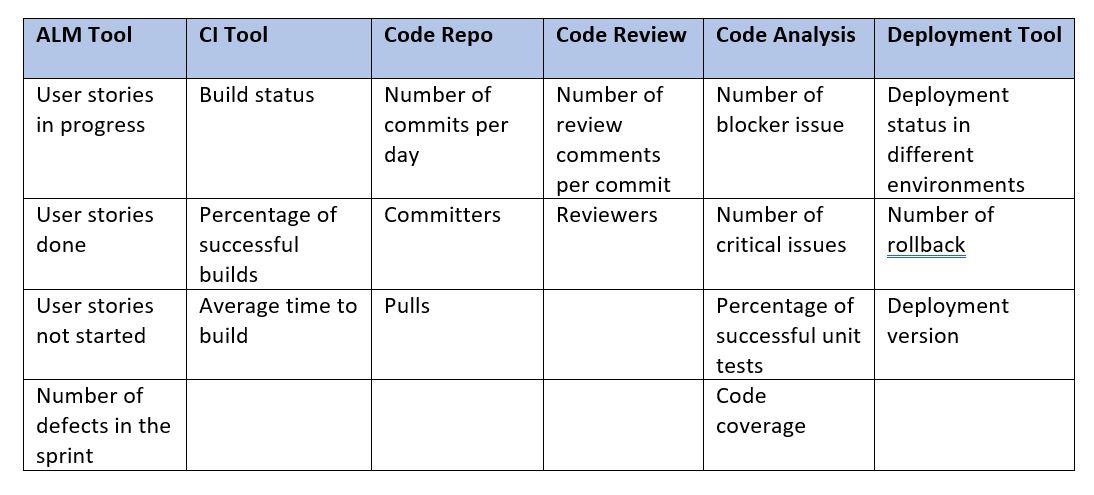
    Using centralized monitoring tools can help project management to monitor the metrics mentioned below. These metrics give the overall picture of build, quality and deployment status on one dashboard.
    Available Tools for DevOps Monitoring

    Below are few available products that provide similar solutions:

    • Hygieia: Freeware tool that supports all DevOps tools, but metrics are very limited.
    • KlipFolio: Has lots of tool support, but it’s not free.
    • DevOps Insights: An IBM tool that supports IBM cloud platform only.
    • DataDog: Has a wide range of tool support, but it’s not free.
    • Prometheus: Freeware tool that monitors lots of tool-using exporters.

    Build vs. Buy

    Deciding which tool to use is always a tough task—you need to compare all the available tools and their offerings from different perspectives. Below are a few factors that play an important role when deciding on available options or to build your own solution:

    • Range of supported tools (plugins or data collectors).
    • Freeware or paid.
    • Support to customize data collection.
    • Rich UI for data representation and customization of fields and views.
    • Range of metrics supported.
    • Ease of installation and configuration.
    • Licensing and distribution policy.

    Solution Approach for Building Your DevOps Monitoring

    If you have decided to build or extend any existing tool, below are some considerations:

    • Identify the tools you have to monitor: List the DevOps tools you have to monitor; the list should cover all the areas of DevOps (build, repo, code quality, deployment, monitoring, etc.) to get the complete picture.
    • Identify the metrics: Once you have the list of tools, identify the important metrics from each tool. Your metrics should be capable of providing KPIs of DevOps areas.
    • Identify API or command-line interface to fetch the metric data: You need a good understanding of tools and their implementation to identify the best way to fetch the data. It could be predefined APIs, REST APIs or any command line interface. Make sure you are getting all the desired data.
    • Correlate the metrics with the business value or define the DevOps KPI: Your metrics should represent the KPIs and business value of all the tools involved in achieving DevOps. The dashboard should cover all the aspects and represent the current status and gaps.
    • Determine how to store and process those metrics: You need to define the schema to store the data in defined database; your schema should be generic enough to cater any data from different tools. To process the data, you need a middleware component between database and UI to process in a presentable format.
    • Build a scoreboard based on metrics: Use a rich GUI to display the scoreboard in different formats such as table, graphs and charts.
    • Support high availability: The tool should be designed to support high availability to avoid downtime and loss of data points.

    How Monitoring Tools Collect Data

    Most of the tools we use for implementing DevOps and CI/CD are web-based tools such as Jenkins, Sonar, Git, SVN, UDeploy, Gerrit, Jira, Confluence or others. These tools provide REST APIs, from which we get the data in a described format—either in json or xml. Some tools support predefined APIs or CLIs to connect and fetch the data. Once you identify the communication mechanism with the end system, the next step will be writing robust code that can fetch the desired metrics data and handle all the cases to parse the data and put it in a relational or non-relational database.

    Once you have the data in the database, you need a GUI to display those in tabular and graphical formats and a middleware component that can fetch the data from the database and provide it to GUI in the desired format.

    Getting the data from the system you want to monitor is the real challenge in this whole exercise, as everything else depends on it. Below are a few challenges you might face while developing a toolchain monitoring system:

    • Identify the API or any other mechanism to fetch the data.
    • Identify the metrics to monitor.
    • Identify how you want the data to be presented on the GUI—whether a trend chart, pie chart or just tabular presentation.
    • Determine the authentication mechanism for the monitoring system, as each supports a different kind. Sometimes it needs a predefined token while other times a token needs to be generated at runtime.

    Simple Architecture of DevOps Pipeline Monitoring

    Below is the simple generic architecture, on which most of the monitoring tools work. In the picture below, the different DevOps tools are on the left side; these tools are the end system from where we want to bring the data. Only a few tools have been shown as an example.
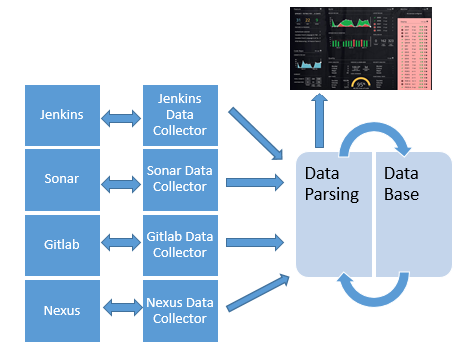
    A data collector brings the data from each end system and communicates with the end system using a REST API or any API exposed by that tool or a CLI, depending on the case. Using the defined communication mechanism, it will bring the data and pass it to the parser to fetch the required data and put it in the database in the desired format.

    While developing data collection, you need to have good a understanding of the tool you are going to monitor as well as available APIs including REST, CLI, SMIs or any pre-defined API built within the tool.

    The data parsing layer will fetch the desired metric value from the raw data collected by the data collector. Raw data could be in any format, including key value pair, json, xml or csv. The parsing methodology will differ in each case depending on the type of data. You can use any generic API for the parsing available.

    You must identify a good API to parse the data available in a different format and complexity.

    The database will hold the metrics data of each interval for each tool and user credentials.

    The GUI will request the data from the parsing component. It will represent it in tabular or graphical user-friendly format.

    Other features: Once we have data, we can have the trend chart to make some critical decisions, we can generate alarm on breaching any defined thresholds and integrate it with email or SMS to take immediate action.

    Monitoring Tool High Availability

    If we are relying on our monitoring tool to get reports of all the tools used in DevOps, we cannot afford downtime. We may lose data points and trends if the monitoring tool goes down, and management may not get the actual status of an entire project without having to gather the data manually.

    To avoid such situation, high availability (HA) should be implemented on the monitoring tool. In case of a HA setup, we will keep gathering the data in case the monitoring node goes down.

    To implement the HA, there are two aspects we need to consider: the HA of GUI and middleware (business logic component) and the HA of database.

    HA in the GUI and middleware could be achieved using an Apache or Nginix cluster. In the case of containerized environments, we can use any orchestration platform’s default feature to achieve high availability, such as Kubernetes. Similarly, in the database we can implement a clustered database feature provided by the most of available databases.

    Conclusion

    DevOps toolchain monitoring is very useful. It provides a good snapshot of the health of a project to management and is able to identify any blocker issues that might impact the release so they can be corrected. Monitoring can help identify pain points to focus on in defining the road map. Organizations following DevOps practices and using DevOps tools should have a tool to monitor the DevOps pipeline.


    — Prateek Kumar Asthana

  • SmartBear Integrates Test Tools with Atlassian DevOps Platforms

    SmartBear Integrates Test Tools with Atlassian DevOps Platforms

    At the Atlassian Summit 2019 conference this week, SmartBear announced it has integrated the Zephyr test automation tools it acquired last year with the Jira portfolio of tools from Atlassian.

    In addition, SmartBear announced it has integrated Zephyr with the rest of the company’s SoapUI Pro, TestComplete, CrossBrowserTesting and LoadNinja testing tools.

    SmartBear committed to integrating its entire portfolio of tools with other Atlassian offerings as well, including the Bitbucket continuous integration/continuous development platform and Confluence content management software.

    In general, SmartBear views efforts to modernize applications using DevOps practices as a primary driver of increased demand for tools to test application programming interfaces (APIs). A recent global survey of 3,000 API developers, architects, testers and product leaders conducted by SmartBear finds nearly three-quarters of respondents believe that adoption of microservice architectures will drive the biggest growth in API adoption in the next two years.

    The biggest challenge faced by well over half the respondents (58%) is finding a way to standardize API development. In pursuit of that goal, the survey finds 69% of survey respondents are now developing APIs that comply with the OpenAPI Specification (OAS). That specification defines a language-agnostic interface to RESTful APIs that enables both humans and computers to discover and understand the capabilities of the service without access to source code or documentation, or having to inspect network traffic.

    The SmartBear survey also finds 76% of respondents say they already have a formal API monitoring process in place and that 76% of organizations are developing both internal and public-facing APIs.

    Daniel Giordano, associate director of product marketing for SmartBear, said these days there’s a lot more focus on trying to make it easier to discover APIs whenever possible by setting up API catalogs. Those catalogs are also now making it easier for organizations to reuse APIs rather than develop new ones for each microservice that gets developed, he added.

    In fact, Giordano noted that many organizations now define the APIs they are going to depend on to integrate their applications long before they begin to write application code. Those APIs are then reviewed by an architecture team to make sure they meet performance requirements while still being flexible enough to evolve consistently with the other APIs the organization needs to maintain, he said.

    Today, organizations make use of many more private APIs than they do public ones. APIs first came into their own as a means to expose applications to enable external applications to consume data from another application as part of the so-called API Economy. Since then, the number of private APIs that organizations rely on to integrate internal applications has exploded. In fact, building and deploying those APIs has become an integral part of any DevOps process.

    Naturally, the relationship between API management and DevOps processes is still evolving. But as DevOps processes within IT organizations continue to mature it’s only a matter of time before they are applied equally to both the applications being developed and the APIs relied on to integrate them.

    — Mike Vizard

  • 5 DevOps Trends Worth Knowing in 2019

    5 DevOps Trends Worth Knowing in 2019

    DevOps today is more than the buzzword it was 10 years ago. Back then, the idea of combining development with production in your IT infrastructure was not common; the logistics were nonexistent and most of the time businesses decided it was far too much effort.

    However, if the last nine years has taught us anything, it’s that DevOps is worth every penny businesses invest. It helps companies streamline production, keep customers happy and provide agile services to attract new audiences.

    But as with anything in the IT field, there is a paradigm of change. This article discusses some of the top DevOps trends happening now and how to implement them in your own system.

    Automation Will Be a Bigger Focus

    Automation has always been the way for businesses. Whether it’s speeding up the pipeline with machines, providing better response times for angry customers with chatbots or better inventory management with tracking and logging system, automation is behind it all.

    DevOps is no exception.

    But as with everything, there can be too much automation. The best thing to do is break down processes and find simple, redundant tasks that can save time if automated and apply the changes.

    The most important aspect of automating DevOps is to understand the six pillars in the DevOps cycle, which are:

    • Continuous business planning
    • Collaborative development
    • Continuous testing
    • Continuous release and deployment
    • Continuous monitoring
    • Collaborative customer feedback and optimization

    DevOps Assembly Lines: The Next Big Thing


    To track the development of your application, we have pipelines. These visually represent the product from its initial stage right through until final development and release.

    However, continuous integration (CI) is no longer the priority focus when it comes to effective monitoring and implementation. Continuous delivery and automation are a major part that businesses have already started delving into in 2019.

    This is where DevOps assembly lines enter the picture.

    Assembly lines are focused on bridging the gap between manual and automated tasks, ensuring there is no redundancy while providing several tools for teams to implement, to ensure apps are hitting the production lines as reasonably quickly as possible.

    Microservices Architecture Adoption Taking Off


    Microservices architecture may as well be that new kid in school trying to fit in. These smaller services compound into agile, implementable tools that DevOps teams can use to scale and test software over the course of weeks—not years.

    As you can imagine, this can help some businesses streamline their development and production lines, setting them way ahead of their original production estimates—which is never a bad thing.

    Implementing microservices into your DevOps team can also help companies focus on the runtime and efficient delivery of new development sources, without the hassle of creating dependency errors when something decides to bug out for no apparent reason.

    Security Needs to Step Up

    Cybercrime is on the rise—we all know that’s old news. But as a business, cybercrime can either make or break your sales and weigh down your DevOps team.

    That’s why more companies are hopping onto enterprise security options. Although there are third-party programmers for almost every situation you need, none of them have the same security levels as the tools from the enterprise version provides. Safeguarding both your company and your clientele.

    Riding the Artificial Intelligence Wave

    Finally, we have artificial intelligence (AI) and machine learning (ML). When you think about it, these two elements are literally the sum of everything we want in the DevOps community—the ability to crunch out hours upon hours of menial labor and saving your teams hours to focus on higher-priority tasks.

    The combination of AI, used to predict algorithmic influencers, and ML’s ability to adapt to new situations will be key for DevOps teams to get to the next level in 2019.

    — Gil Artmoore

  • Atlassian Integrates DevOps Portfolio

    Atlassian Integrates DevOps Portfolio

    At its Atlassian Summit 2019 conference, Atlassian announced updates to all the DevOps tools that make up Atlassian Data Center as well as upgrades to its Opsgenie incident management software to provide deeper integration with the rest of the company’s portfolio.

    At the same time, Atlassian revealed it has rebranded the AgileCraft business planning application it acquired earlier this year to Jira Agile.

    New capabilities added to Atlassian Data Center include the ability to set up smart mirror farms for Bitbucket Data Center; content delivery network (CDN) support for Jira Software, Confluence, Bitbucket and Jira Service Desk Data Center; rate limiting for Bitbucket, Jira Software and Jira Service Desk Data Center; issue archiving for Jira Software and Jira Service Desk Data Center; templates for deploying on Microsoft Azure and Amazon Web Services public cloud; and a mobile application for Jira Server and Data Center.

    Atlassian Data Center now incorporates Jira Software 8.0, Confluence 7.0, Bitbucket 6.0, Jira Service Desk 4.0 and Portfolio 3.0. The latest version of Jira Software 8.0 now executes advanced searches using Jira Query Language (JQL) 31% faster on average, while agile boards load two times faster and re-indexing times are now 71% faster. The latest version of Confluence adds support for multimedia files and additional analytics tools to the content management platform.

    The Atlassian Cloud service has also been expanded to increase the user limit to 5,000, with an early access program signaling an intention to bring that up to 10,000 users soon.

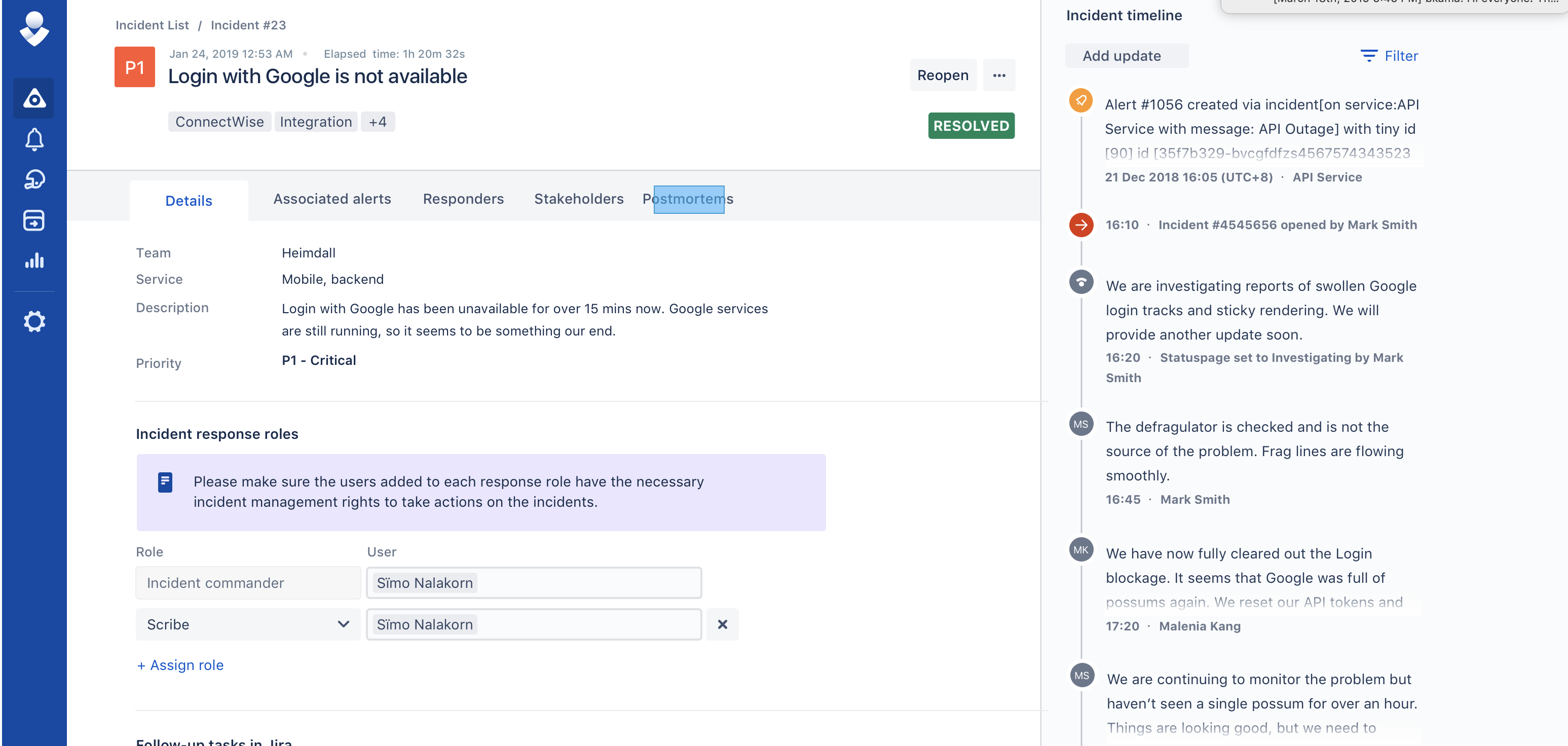
    Meanwhile, specific capabilities being added to OpsGenie include support for incident timelines to track response activities and key events; postmortems to help discover root causes and track remediation activities, a user interface that aligns with the rest of the Atlassian portfolio that fosters bi-directional workflow, the ability to automatically trigger events, integration with Slack collaboration software, the ability to encrypt data and Statuspage services integration to make it possible to share alerts with third-party services. Atlassian has also rebranded its Automation Actions to Opsgenie Actions; the company acquired Opsgenie last fall.

    Berkay Mollamustafaoglu, co-founder and head of product for Opsgenie, said now that Opsgenie is part of the larger Atlassian product family there’s clearly more focus on helping organizations integrate best DevOps practices with more structured processes based on the ITIL format. The latest version of the ITIL format provides makes those processes more flexible, but there’s still plenty of room for Atlassian to improve the tenor of the conversation across what has become a bi-modal IT operations environment. As the level of synchronization across those processes increases, the amount of fatigue IT operations teams experience lessens as the number of alerts that need to be correlated across multiple platforms decreases, Mollamustafaoglu noted. In fact, rather than convening in a physical “war room” to resolve a issue, most incidents will increasingly be resolved via online chats, he said.

    It may take a while before a period of détente emerges between advocates of DevOps and ITIL processes inevitably emerges. In the meantime, the more IT services management (ITSM) platforms become integrated with one another, the easier it becomes to achieve that goal. In fact, the major obstacle that needs to be overcome are much more likely to cultural rather than the level of integration that can be achieved using any specific ITSM platform.

    — Mike Vizard

  • Using Jira Software Search to Accelerate DevOps Workflows

    Using Jira Software Search to Accelerate DevOps Workflows

    Imagine driving down the highway and seeming to get a traffic jam at a distance. You realize your car is equipped with GPS to have clear visibility into what’s next and can show exact directions for alternative routes and estimated travel time. It is very easy to pick the fastest and most favorable route to reach your destination by looking ahead proactively and having the set of right tools for collecting information.

    The combination of Dev and Ops teams that are working together to build a faster and more reliable released pipeline is defined as DevOps. Similar to GPS, Jira Software acts as a singular source of truth for information development across your DevOps workflow.

    Complete traceability and visibility of work across different teams can get you surface information and data from an integrated toolchain to the right people anytime. No matter if you’re a team lead, release manager or a tester, the workflow visibility can ensure everyone by letting them know what’s in development and what’s being supported.

    In the latest release of Jira Software version 7.9, there is support added for the dev cycle to show development data from Bamboo, Bitbucket and GitHub in Jira Software search from your DevOps practice. It makes it a lot easier to identify development issues by making informed decisions and faster shipping with software development services.

    Get Answers to Development Questions via Basic Searches

    A new column called Development is added to the default view of Jira’s Issue Navigator in the latest release of Jira Software Server (v7.9). It allows viewing specified information pulled out from Bitbucket Server without clicking into the individual issue. Instead of limiting yourself to the single-issue information, you can see a high-level snapshot of issues coupled together by filtration, to help surface larger trends or problems.

    If this gets stopped at their source, does it really need to move the needle for improving your dev process within DevOps? For instance, if you wish to know how many issues under development, are they in the review?

    If you ever find that one or two developers are getting loaded down with the bulk of pull requests, you can immediately access if redistribution of work is required or not.

    Filter Out Your Development Information Using JQL

    What happens if you need to answer too many complex or open-ended questions? This can become monotonous after a time. You can use Jira Query Language (JQL) to create search queries that are based on development information to uncover key information for avoiding all pending problems.

    The latest version of Jira Software Server comes updated with the syntax to align the JQL query formatting. The users of Jira Software power use JQL for a long time to look at a subset of issues for driving reports and focus on Scrum and Kanban boards. With the help of cross-reference data from developer tools, Jira Query Language seems to be more powerful now.

    Examples of Jira Query Language in Action

    The teams who practice DevOps need critical internal and customer feedback, which helps them to inform features by making them higher quality and more valuable to the end user. Hence, focusing on feedback often creates tension when you decide if the first version is ready to deploy.

    You may ask: What number of issues are done but have not been deployed?

    From this question, you can determine whether the feature is ready to be released and starts collecting feedback or is blocking any issues that need to get resolved prior to release.

    Often, the team’s test builds locally before jumping off to deployment. If the same is the case for your team, then it is a good practice to regularly check the status of the builds.

    You may ask: What number of issues are failing builds?

    If you figure out a lot of failing builds, it may be a signal that the developer environments do not match the deployment. Generally, this is a problem you want to catch and fix right away, so conversely, the set of issues can be the areas where the testers can check acceptance criteria and begin exploratory testing.

    Boost Up Your Search

    You need to surface the information when and where it is needed as most of the teams get the most out of DevOps by bringing development, QA, high-quality releases, more-informed decisions and happy customers. Keep learning!

    — Kibo Hutchinson

  • xMatters Looks to Meld DevOps and ITIL

    xMatters Looks to Meld DevOps and ITIL

    With the launch today of a flow design tool from xMatters, the divide between DevOps and ITIL-based approaches to managing IT is narrowing.

    xMatters Flow Designer is a drag-and-drop graphical tool that either developers or IT operation teams can employ to create incident management workflows on top of xMatters incident management software. Doug Peete, chief product officer of xMatters, said those workflows feed data into a variety of third-party IT management tools to enable IT operations and DevOps teams to consume the same data in different tools—for example, in an instance of ServiceNow for IT operations and as a message in Jira or Slack for DevOps teams.

    Peete said the goal is to enable organizations to develop a more consistent approach to incident management. A recent survey of more than 1,000 IT professionals conducted by xMatters and Atlassian found that while 81 percent of developers and operation teams share information and tools, only 17 percent provide open access to information without time restrictions. The survey also found that 50 percent of respondents said the tools, processes and steps they employ vary from incident to incident.

    Most of those organizations have very little in the way tools that enable them to effectively conduct a post-mortem analysis of those incidents, added Peete.

    The arrival of the xMatters Flow Designer tool comes at a time when organizations are trying to find ways to meld the highly structured ITIL processes that most IT organizations rely on today and the inherently more agile approaches based on best DevOps practices. The most recent iteration of the ITIL framework incorporates some DevOps principles, but it’s apparent the two approaches to managing IT will be employed side by side in many organizations for many years to come. Developers these days tend to prefer DevOps methodologies, while IT administrators tend to appreciate the consistency of an ITIL framework that was designed to address IT governance concerns. By providing a set of workflow tools that span both those approaches, Peete said IT organizations can more easily meld those two approaches on their own terms.

    At the same time, an extensible approach to incident management makes it possible for IT organizations to incorporate new tools into those workflows as their IT environment evolves. That capability also should make it easier to integrate incident management workflows across multiple organizations as well as incorporate a new IT environment as a result of acquiring another company.

    Regardless of the path chosen, it’s clear that as organizations increasingly realize how dependent their business processes are on software in the age of digital business transformation, the more likely it is they will embrace DevOps practices. However, that doesn’t mean organizations need to abandon ITIL; there are plenty of IT processes that benefit from a highly structured approach. In fact, arguably the most important thing is to not let a philosophical debate over the merits of DevOps versus ITIL wind up becoming a major distraction that creates two isolated cultures who refuse to collaborate with one another.

    — Mike Vizard

  • TypeFox Ties Cloud-Based IDE to GitHub

    TypeFox Ties Cloud-Based IDE to GitHub

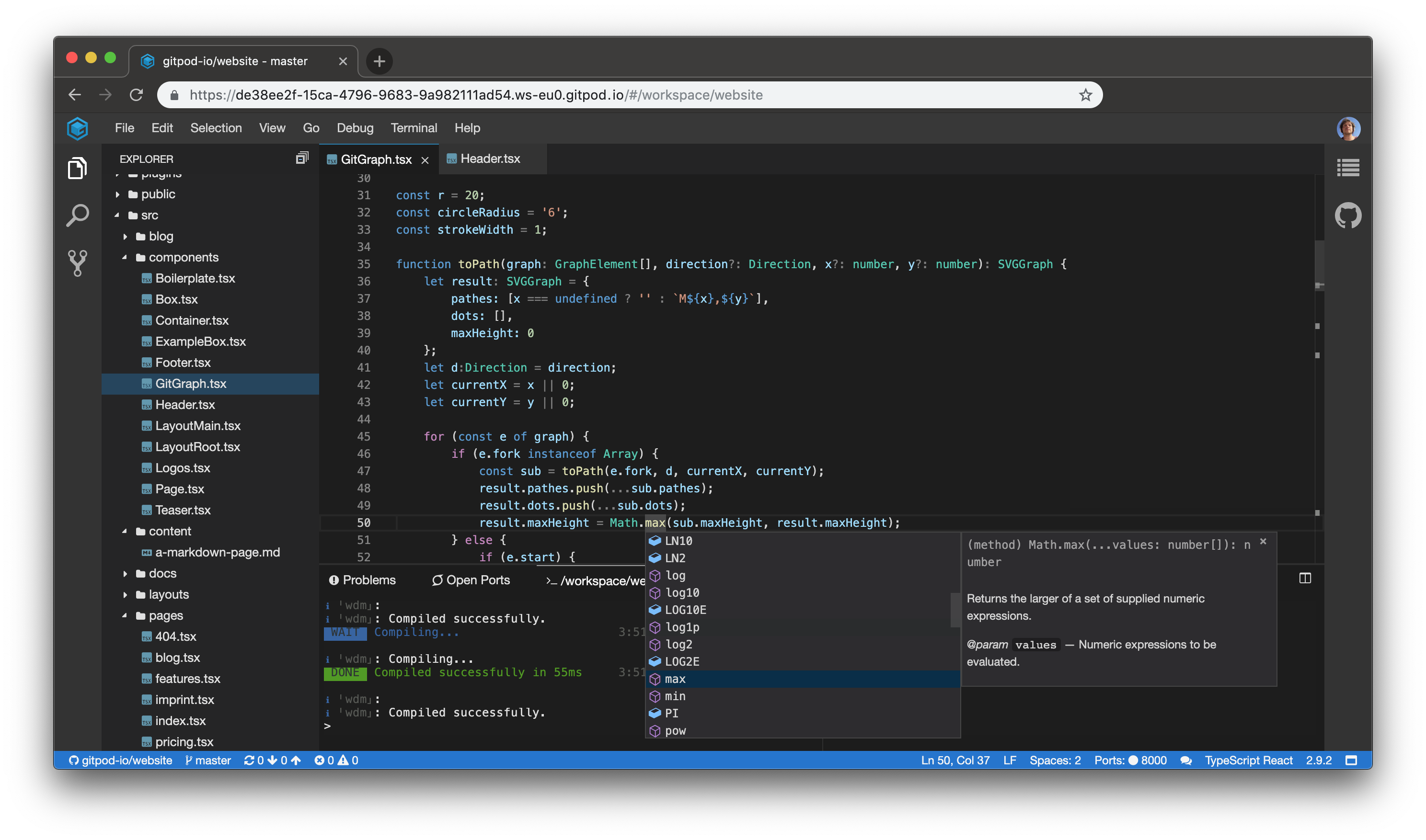
    TypeFox has launched a GitPod.io service that melds the integrated development environment (IDE) based in the cloud from TypeFox with the open source GitHub repository.

    Sven Efftinge, co-founder of TypeFox, said this level of integration will make it easier for developers to navigate multiple projects from which they pull code from GitHub into an Eclipse-based IDE.

    In addition, when developers open a Gitpod.io workspace, they will find that any build involving an update to an artifact housed in GitHub will have been automatically completed, said Efftinge. That will reduce substantially the amount of time developers spend waiting for build to finish, he noted.

    TypeFox collaborated with Google, Ericsson, Arm and Red Hat to develop the open source Eclipse Theia project, which provides a foundation for building IDEs in the cloud using TypeScript, CSS and HTML for a desktop-like user experience. At the highest level, Theia consists of a front end running in a browser or in the local desktop application and a back end running on any host or locally within the desktop application. Both the front end and back end communicate through JSON RPC over WebSockets. TypeFox then leveraged that project to build its own cloud-based IDE.

    Gitpod.io further advances the collaboration capabilities that are inherent of cloud-based IDE by adding the ability to capture and share snapshots of the development environment.

    Efftinge said following initial support for GitLab, the next effort will be focused on integrating Gitpod.io with the GitLab repository, which is used widely in traditional enterprise IT organizations.

    Regardless of the repository employed, more attention needs to be paid to reducing the daily friction developers encounter when developing applications. While best DevOps practices go a long way to accelerating application development and deployment, there a lot of wasted steps during the development process that, if eliminated, would increase developer productivity substantially. Of course, the more productive developers become, the more applications there are moving through the continuous integration/continuous development (CI/CD) pipeline.

    It’s still a bit unclear to what degree application development will move to the cloud. It’s certainly easier to streamline development process in the cloud. But many developers remain attached to individual workstations because they may not always be in a location that has reliable access to the internet. However, as application development—especially in the age of microservices—becomes more of a team sport, it’s clear that more application development is being pushed into the cloud. Pushing application development into the cloud also provides the benefit of reducing the number of high-end PCs and workstations an organization may need to acquire for its developers.

    Whatever the path chosen, it’s clear repositories such as GitHub and GitLab are now at the center of application development. Very few developers these days are writing raw code. Most of them are combining artifacts stored in repository to build their applications. The challenge organizations now face is bringing some consistency to what otherwise could easily become a chaotic process.

    — Mike Vizard

  • Gremlin Brings Chaos Monkey Testing to Spinnaker CD Platform

    Gremlin Brings Chaos Monkey Testing to Spinnaker CD Platform

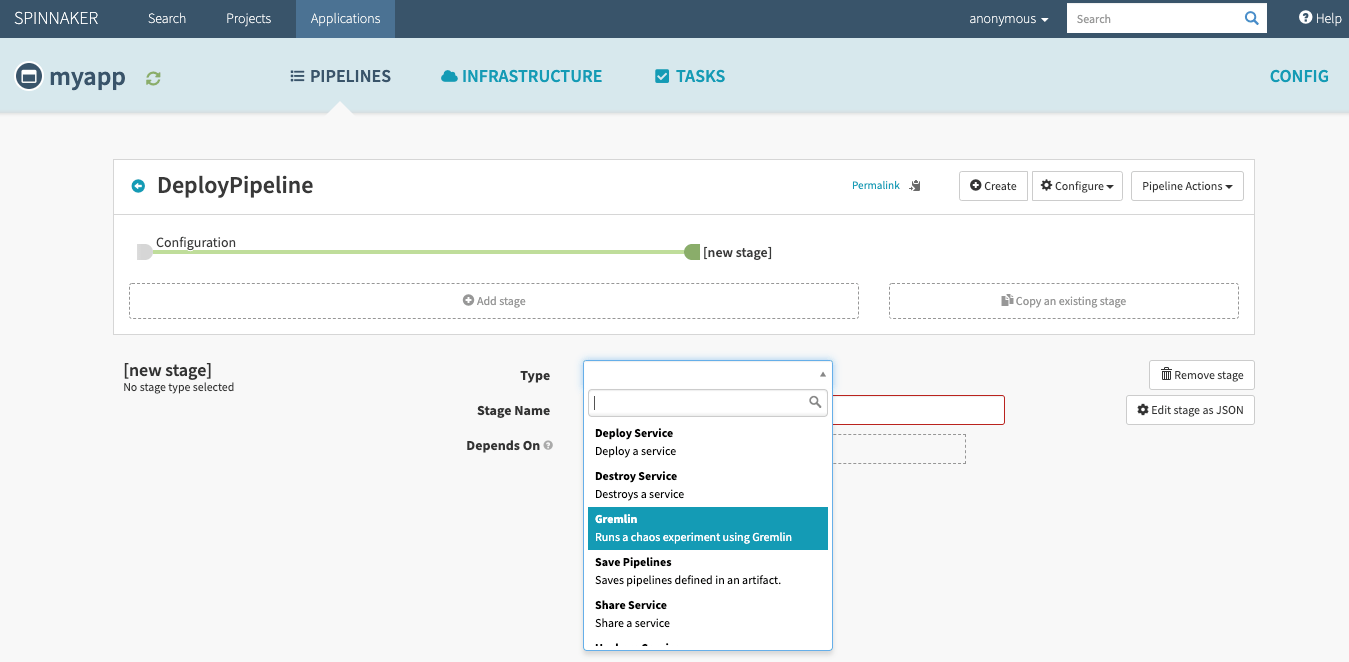
    Gremlin this week announced it will integrate its hosted chaos engineering service with continuous delivery platforms starting with the open source Spinnaker project developed by Netflix.

    Chaos engineering traces its roots to a resiliency testing philosophy that posits applications should be able to keep functioning regardless of any service or infrastructure failure. Most IT organizations, however, don’t have the expertise required to build the tools required to testing resiliency based on those “chaos monkey” principles that randomly turn services off to see if an application fails.

    Matt Jacobs, principal software engineer for Gremlin, said the decision to integrate with Spinnaker is being driven by the need to infuse chaos monkey resiliency testing directly into the application development and deployment pipeline at a more granular level. That capability is now a bigger requirement than ever because as organizations embrace microservices to build the next generation of cloud-native applications, it’s simply not possible for DevOps teams to manually track every dependency, he said, adding resiliency testing based on chaos monkey principles is just another type of testing that should be automated as part of a larger continuous integration/continuous delivery (CI/CD) platform to ensure an application doesn’t fail completely.

    Integrating with a Spinnaker project that has drawn support from Google, Microsoft and Oracle provides the easiest path to achieving that goal. Spinnaker is also now a core element of a Continuous Delivery Foundation led by Alibaba, Anchore, Armory, Autodesk, Capital One, CircleCI, CloudBees, DeployHub, GitLab, Google, Huawei, JFrog, Netflix, Puppet, Red Hat, SAP and Snyk.

    The Gremlin service is accessed via a user interface and comes in two forms: a free edition and an enterprise edition, which comes with support from Gremlin. While the concept of chaos monkey testing has been around for some time among the most advanced DevOps practitioners, enterprise IT organizations, which tend to be more conservative when it comes to introducing anything that might deliberately break their applications, will need a considerable amount of hand-holding. Gremlin is designed to learn the application environment in a way that introduces chaos in a controlled fashion before an application is deployed in a production environment.

    On the positive side, resiliency testing based on chaos monkey principles tend to accelerate the rate at which IT staff learn how an application has been architected, said Jacobs. That can prove especially invaluable when training new members of a DevOps team, he noted.

    Ultimately, the decision to embrace resiliency testing comes down to how proactive an organization wants to be when it comes to preventing downtime. When mission-critical applications are offline, there is a direct impact on the amount of revenue an organization generates. There are plenty of functional and performance testing tools, but the real difference between having an issue and a catastrophic event that requires DevOps teams to get out of bed in the middle of the night often comes down to how truly resilient any given mission-critical application really is.

    — Mike Vizard

  • Sauce Labs Combines Functional and Performance Testing

    Sauce Labs Combines Functional and Performance Testing

    Sauce Labs announced it is now moving beyond functional testing, adding a front-end testing tool it has dubbed Sauce Performance to make it easier to accelerate testing within the context of a DevOps process.

    Lubos Parobek, vice president of products for Sauce Labs, said the goal is to enable developers or testers to begin testing both how well application functions work and perform much earlier in the DevOps process using the same testing tool.

    Parobek said that as organizations embrace modern application development architectures based on microservices, it’s become crucial to test the capabilities of any module within an application because the number of interdependencies between modules continues to increase. That approach accelerates the rate at which applications can be developed. However, any flaw that impacts how the application works or performs can have a debilitating impact on any number of microservices that make up the application, he noted.

    Sauce Performance makes use of debugging and performance trace logs to identify the root cause of an issue in addition to capturing metrics such as Time to First Meaningful Paint, Time to First Interactive, Page Weight and Speed Index. Sauce Performance also employs algorithms to automatically establish a baseline that can be used for regression testing.

    Parobek said Sauce Performance serves to streamline testing processes as well. Most existing front-end performance testing solutions require integration with a load/stress testing tool or a separate application performance monitoring (APM) tool. However, Sauce Performance allows developers to use their existing Selenium test scripts to capture both functional and performance test data.

    In addition, Sauce Performance has been designed to integrate with multiple continuous integration/continuous deployment (CI/CD) platforms to make it possible to feed test results directly back to developers, which can then decide to prioritize issues that need to be addressed.

    Sauce Performance is available as part of the Sauce Labs Continuous Testing Cloud.

    Parobek said organizations want to be able to make it easier for developers to test their own code as part of their DevOps best practices. That doesn’t eliminate the need for dedicated testers for evaluating functions, but potential performance issues today are being addressed often long before applications are deployed in a production environment.

    One of the reasons applications are not as thoroughly tested as they might be is that many organizations require developers to learn how to use tools that have different user interfaces and then switch between testing tools. The result is a complex testing process that makes it more tempting to short-shrift elements of the testing process as application delivery deadlines loom.

    More challenging still, many organizations still don’t continuously test applications after they are deployed to ensure new functionality does not adversely impact the user experience.

    For as long as applications have been built, tension has existed between the developers who create applications and the people who test them. That debate may never be resolved, but everyone agrees in this age of DevOps that it’s better to test early and often.

    — Mike Vizard

  • VMware Doubles Down on IT Automation

    VMware Doubles Down on IT Automation

    VMware this week moved to inject application and operating system monitoring capabilities into the VMware vRealize cloud management platform to make it easier to employ dashboards to map the relationships between applications and the underlying IT infrastructure they run on.

    In addition, VMware enhanced its capacity optimization tools to enable IT teams to run “what if” scenarios based on the amount of IT infrastructure available both on-premises and in the cloud. The company also embedded integrated compliance and automated drift remediation capabilities into VMware vSphere.

    Finally, VMware added support for VMware NSX Data Center network virtualization software to the VMware vRealize Automation platform, and instances of Kubernetes clusters can now be seen by VMware vRealize Network Insight tools.

    Taruna Gandhi, director of product marketing for the VMware Cloud Management business unit, said these efforts are part of a continuing initiative to drive intent-based computing that leverages automation across a software-defined data center (SDDC).

    VMware views application and operating system monitoring capabilities as being critical tools for making informed decisions about those intents, said Gandhi. However, these tools are not intended to replace the need for classes of management technologies such as application performance management (APM) platforms, she said. Instead, VMware envisions using dashboards to more efficiently troubleshoot issues based on metrics gathered by Telegraf agents embedded in VMware vRealize. In effect, IT teams will be able to identify anomalies faster versus wasting time in “war rooms” trying to prove the innocence of any element of an IT stack.

    VMware is pursuing a dual strategy where DevOps and automation are concerned. The VMware vRealize framework can be invoked either through application programming interfaces (APIs) or a graphical user interface (GUI), which tends to appeal more to traditional VMware administrators who don’t have extensive programming skills but still need to respond to rapidly changing IT operation environments.

    Thanks to automation, operational costs are falling considerably, according to VMware. A report from Forrester Consulting commissioned by VMware found organizations that have adopted vRealize have seen a 30% productivity improvement and a 93% reduction in unplanned work. That same report also noted that, thanks to capacity optimization, VMware customers have also seen a 20% reduction in hardware cost savings, a 10% reduction in storage costs, and a 50% reduction in database software licensing costs.

    In most cases, VMware is employing machine learning algorithms to automate IT operations whenever possible within its cloud management suite. But Gandhi said VMware is hesitant to embrace the term “AIOps” until it becomes clearer how employing machine learning algorithms represents a new class of IT management tools rather than an ongoing set of enhancements to existing management frameworks.

    Whatever the outcome, it’s apparent that algorithms are here to stay. How much they will be employed to advance adoption of best DevOps practices across the enterprise, however, remains to be seen.

    — Mike Vizard