Category: DevOps Toolbox

  • With YAML Support, Puppet Dives Deeper Into DevOps

    With YAML Support, Puppet Dives Deeper Into DevOps

    Puppet this week announced an update to Puppet Enterprise that adds additional DevOps capabilities, including integration with Bolt, an open source agentless task runner that Puppet employs to make IT automation more accessible to IT administrators.

    Matt Waxman, vice president of products at Puppet, said adding integration with Bolt will make it easier to integrate DevOps processes that rely on YAML to deploy applications.

    Available this month via a Puppet Enterprise 2019.1 update, Bolt provides an agentless approach to automation that enables IT teams to execute existing commands and scripts written in any language within the context of an IT automation framework that is designed to be accessible to the average IT administrator, Waxman said.
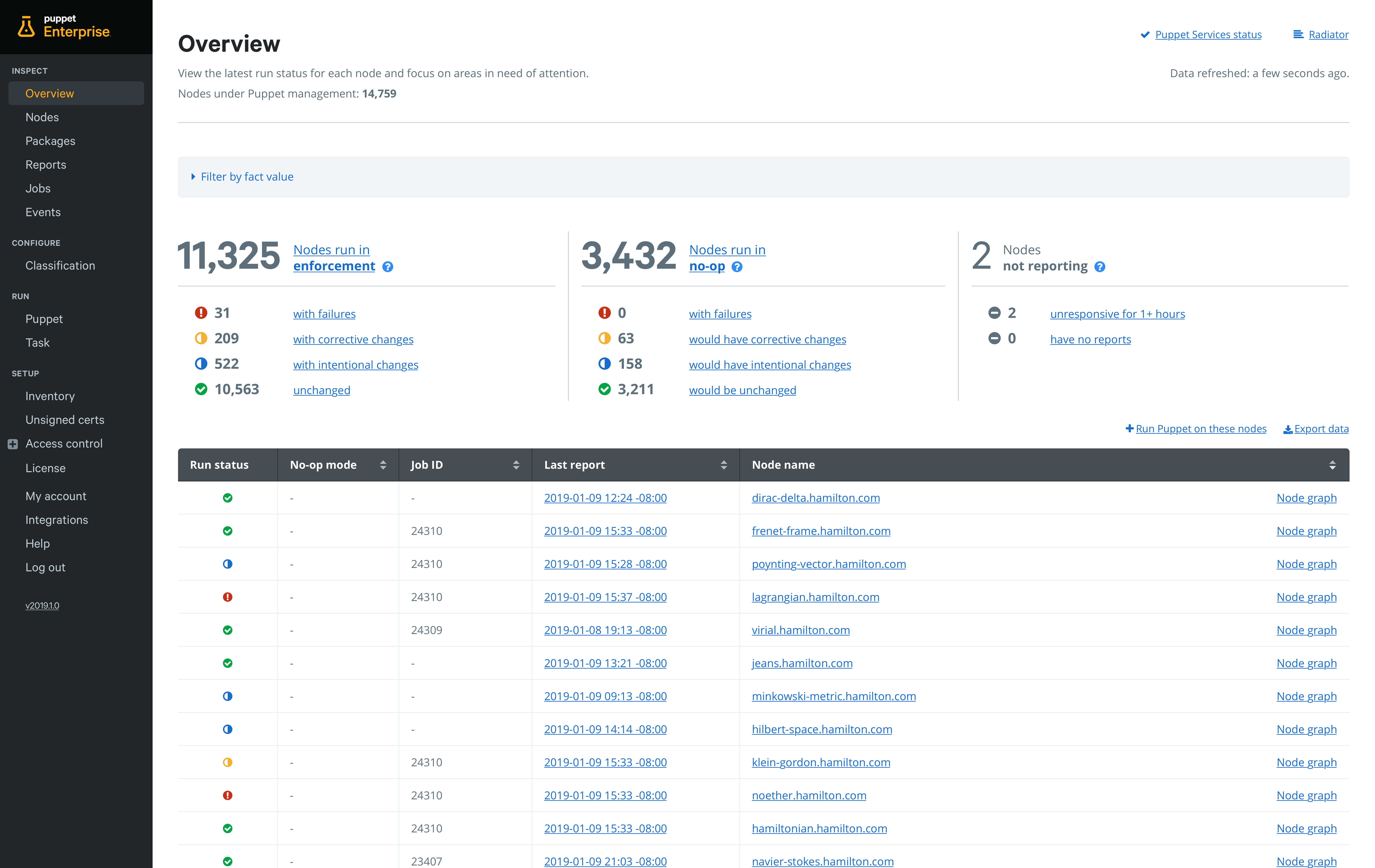
    At the same time, Puppet is providing the ability to set up pipelines for deploying automation code directly from within Puppet Enterprise. Rather than having to set up a separate continuous integration/continuous deployment (CI/CD) platform, Puppet is embedding the capability it acquired from its purchase of Distelli in 2017. In doing so, Puppet is making it possible to accelerate deployment of automation software in a way that doesn’t  require every change to be approved by a master Puppet administrator. Default pipelines guide organizations new to continuous delivery practices through setting up their first pipeline in less than 30 minutes.

    Puppet is also including an Impact Analysis capability that enables teams to assess the impact of a proposed Puppet code change before it is deployed.

    One of the issues that has held back adoption of DevOps practices has been the simple fact that most IT administrators have limited programming skills. By making available an IT automation framework that provides the ability to manipulate YAML files at a higher level of abstraction, it should become easier of organizations to incorporate IT administrators into any set of DevOps process they care to define, Waxman said.

    Puppet via this upgrade is also extending the reach of the agentless Bolt framework to include support for network devices running Cisco NX-OS and Cisco IOS, as well as firewalls from Palo Alto Networks. As network operations continues to be more integrated with DevOps processes, IT organizations increasingly need to be able to apply workflows across compute, storage and networking platforms, Waxman said.

    The challenge many IT organizations now face in terms of achieving that goal is each provider of a platform creates their own automation framework, which winds up creating islands of automation across the enterprise. Longer term, Waxman said that, in addition to invoking the application programming interfaces (APIs) that many platforms already expose, Puppet will be working toward integrating domain-specific automation frameworks with its cross-platform framework.

    Overall, Waxman said Puppet remains committed to providing a mix of agentless and agent-based approaches to IT automation based on the nature of the IT tasks that need to be automated. It will be up to each IT organization to determine when to employ one of those options. But regardless of the path chosen, Puppet is clearly trying to make its core automation platform a lot more accessible to everyone in IT.

    — Mike Vizard

  • Application Monitoring Using Stagemonitor

    Application Monitoring Using Stagemonitor

    This article covers important steps to monitor a typical Java application using Stagemonitor tool, Kibana as a dashboard viewing tool and Elasticsearch as a data processing engine.

    Stagemonitor is an open source Java application performance monitoring (APM) tool that provides everything you need in development, quality assurance and production to monitor the performance of your Java web application.

    Using this tool, we can have different dashboards such as JVM dashboards, application server, request metrics, host, request analysis, web analytics, etc.

    Architecture of the Stagemonitor

    Figure 1

    The Stagemonitor agent sits inside the application and sends metrics and details about requests (request traces) to Elasticsearch. Metrics can optionally be sent to Graphite, Influx DB and Prometheus.

    Prerequisites

    • Minimum of 2GB RAM and 200GB hard disk
    • Java version of 1.8 or more
    • Install latest versions of Kibana and Elasticsearch

    Steps to Monitor Java App with Stagemonitor

    Dev Time Monitoring With Browser Widget

    This step illustrates how to enable a widget in dev time monitoring, adding the Stagemonitor plugin inside the Java app. We can do this in two ways: We can directly edit the pom.xml/build.gradle file by adding the required stage monitor plugins, or we can add dependencies in the application’s LIB directory.

    Some of the important plugins we must have in pom.xml/build.grade to get monitoring dashboards are Stagemonitor configuration, Stagemonitor tracing Elasticsearch, Stagemonitor tracing, Stagemonitor-jdbc, Stagemonitor-jvm, Stagemonitor-os, Stagemonitor-web-servlet and Stagemonitor alerting.

    We’ll get the Stagemonitor plugins from the following location: https://mvnrepository.com/search?q=stagemonitor

    After installing the agent, will have to create one Stagemonitor configuration file as stagemonitor.properties file under src/main/resources in case of maven application. Otherwise, the file must be located at the root of class path. At the end, it has to be under the WEB-INF/classes section.

    The following is what the stagemonitor.properties file looks like:

    stagemonitor.applicationName=My Application

    stagemonitor.instanceName=dev

    stagemonitor.instrument.include=org.example.app

    Request Dashboard

    In this section, we focus on setting up the time series database to collect the data and visualization tool to view the metrics in detail. Here we’ll use Elasticsearch as the time series database engine and Kibana as the visualization tool.

    To get the data from Elasticsearch database, we will include properties in the stagemonitor.properties file:

    stagemonitor.reporting.elasticsearch.url=value,

    stagemonitor.reporting.elasticsearch.username=value

    stagemonitor.reporting.elasticsearch.password=value

    stagemonitor.reporting.interval.elasticsearch=60

    After adding all the required values and restarting the server, we will be able to open the (automatically added) request analysis dashboard in Kibana. Along with that, we will be able to see different dashboards automatically.

    To use Influx DB as a time series database, we’ll have to configure the values in stagemonitor.properties file:

    #following the details contains influxDB

    stagemonitor.reporting.influxdb.url=http://localhost:8086

    stagemonitor.reporting.interval.influxdb=60

    stagemonitor.reporting.influxdb.username= value

    stagemonitor.reporting.influxdb.password=value

    Logs Monitoring using Kibana/Stagemonitor

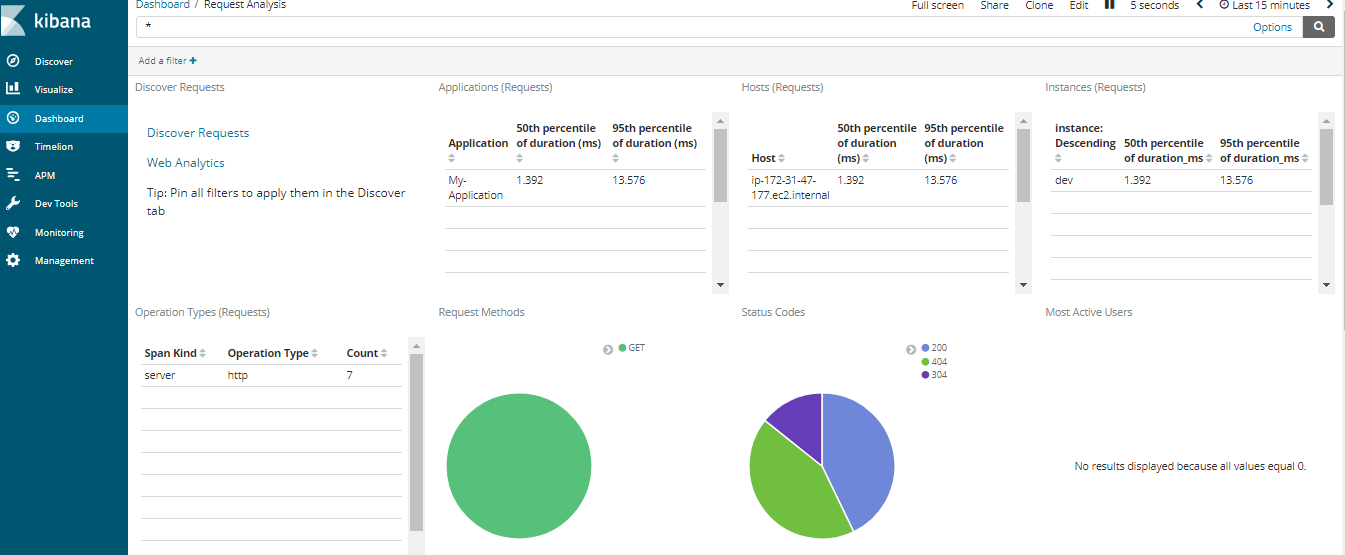
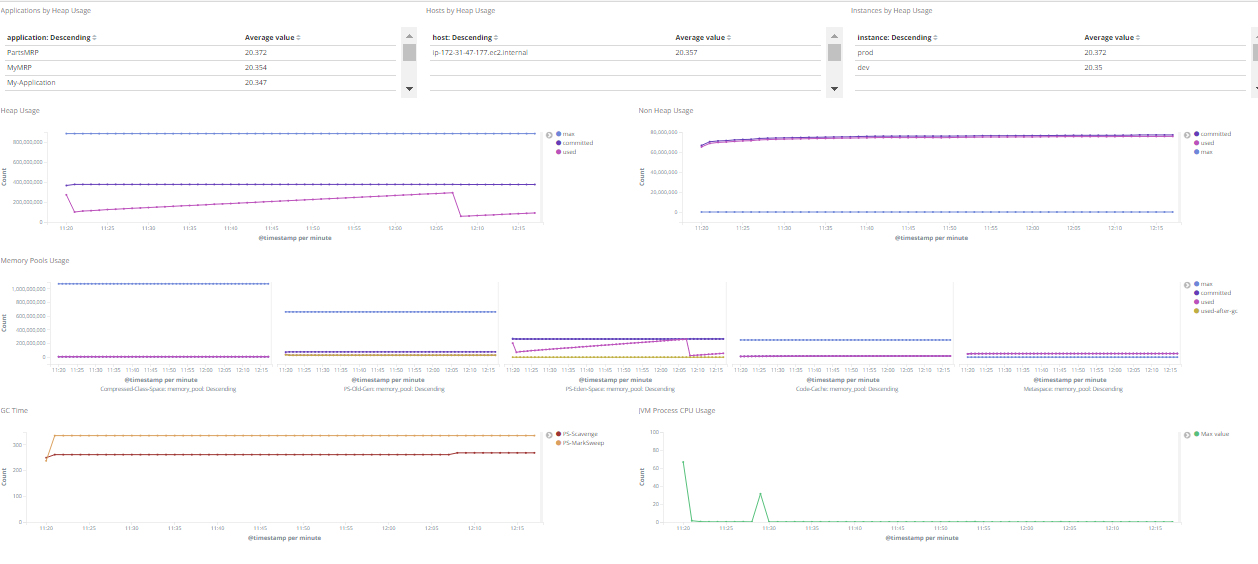
    We can track logs using Kibana/Stagemonitor. In the metrics dashboard, we can see matrices such as what URL address we’ve hit and the time to complete the request (Figure 2). We can track the host details such as how many servers our applications are running, the status of the server, memory stats, CPU stats, network stats, disk usage stats, networks processed, network packets errors, network packets dropped and how many cores of the CPU the host is using.

    Stagemonitor provides all the required dashboards under the request analysis dashboard. To open the request analysis dashboard, click on: Dashboard – Load Saved Dashboard and select “Request Analysis.”

    Figure 2

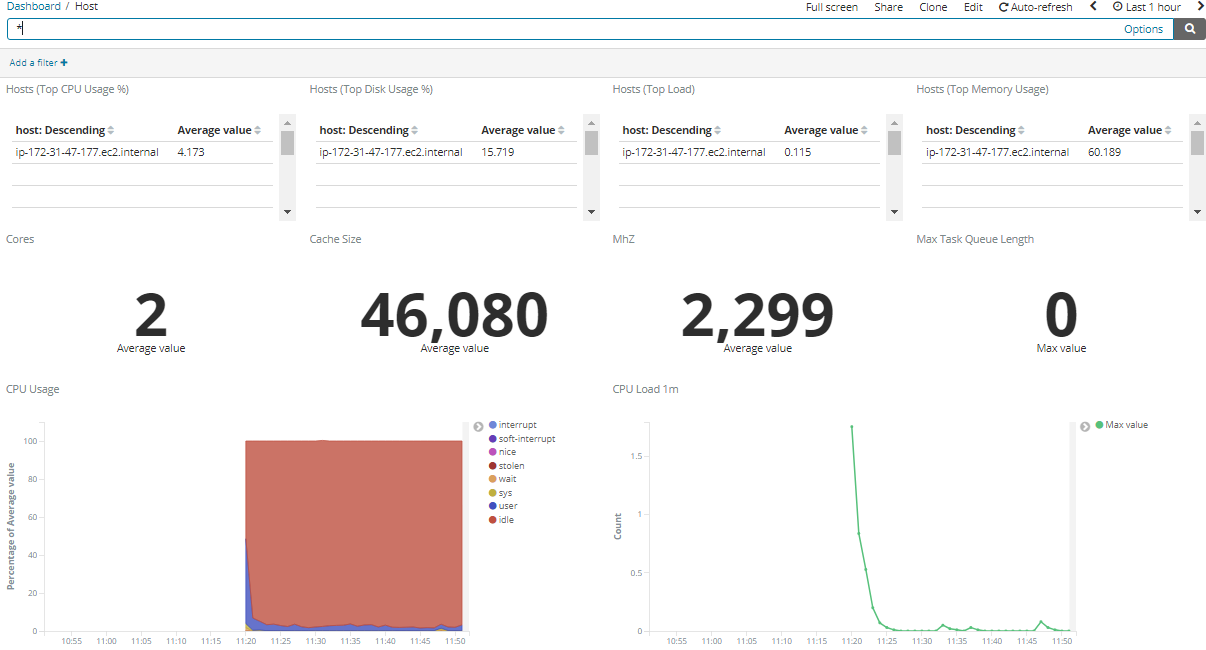
    Figure 3 shows the details of the CPU, such as CPU usage and CPU load.

    Figure 3

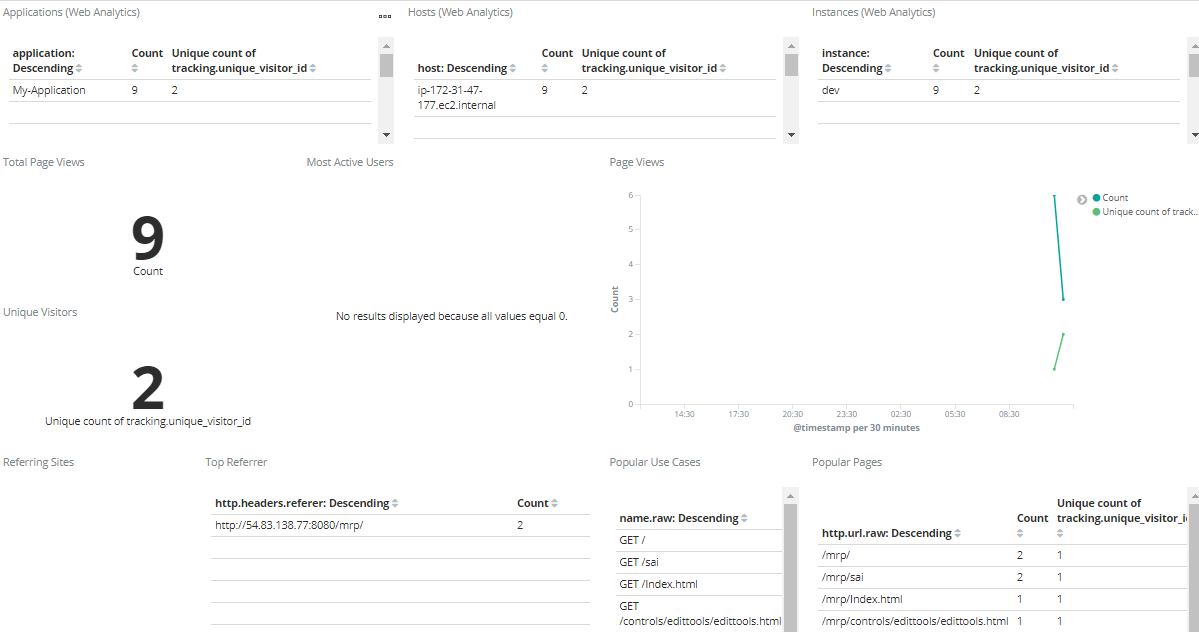
    Below, Figure 4 shows total page views, unique number of visitors to the site and call tree, and how much time it takes to complete.

    Figure 4

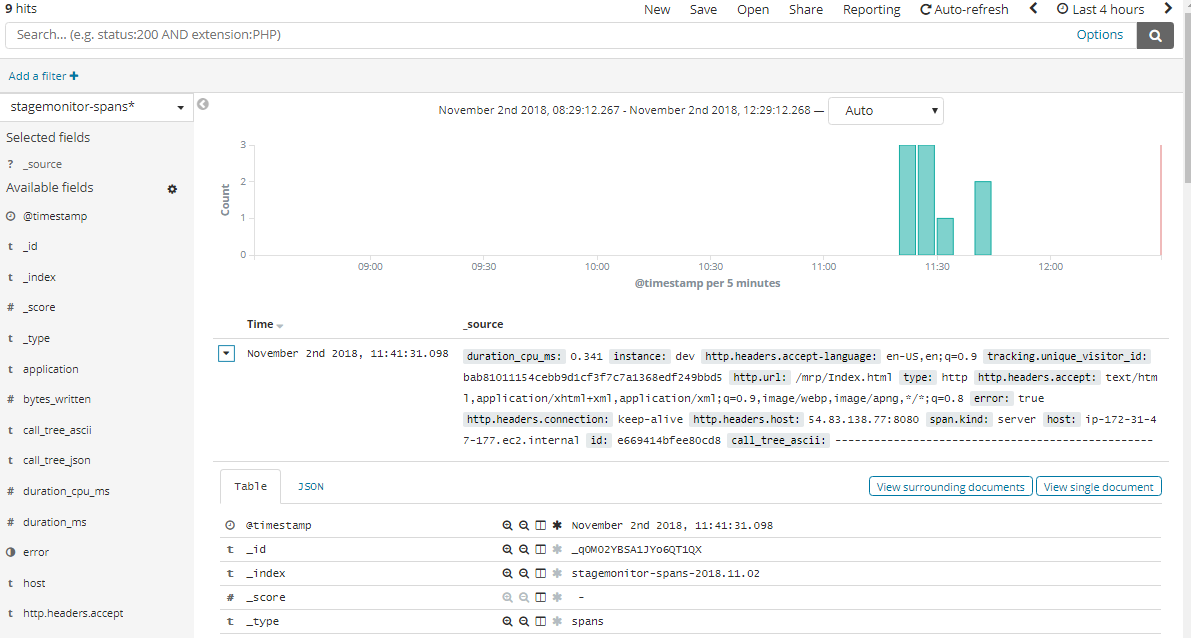
    Figure 5 shows the transaction history and individual transaction details.

    Figure 5

    Figure 6 shows the JVM details and all the other memory matrices.

    Figure 6

    As mentioned above, we can monitor various application metrics and infrastructure metrics.

    — Sai Babu Tanguturi

  • Wavefront Provides Map for Microservices

    Wavefront Provides Map for Microservices

    VMware announced it is adding a service mapping capability to the Wavefront 3D Observability platform it provides with the Wavefront by VMware monitoring tools.

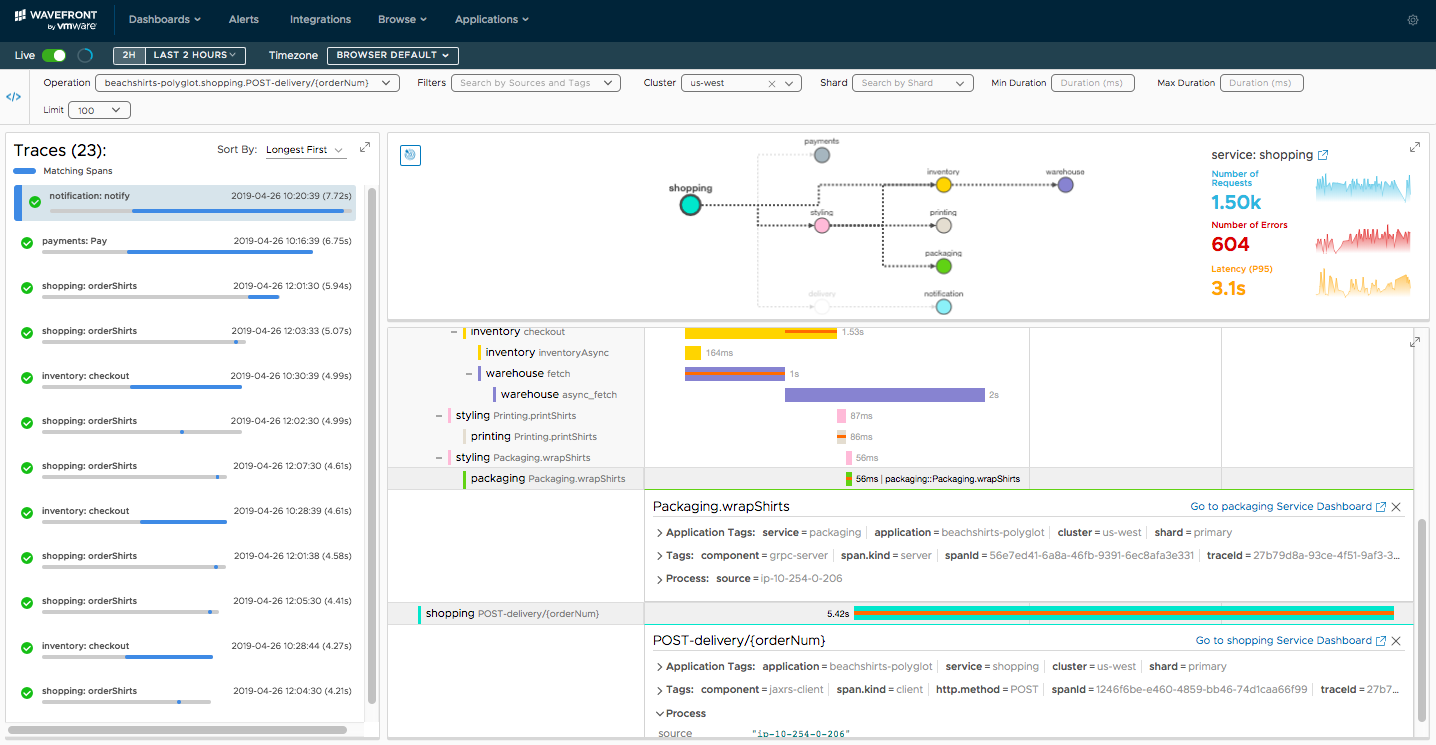
    Stela Udovicic, senior director of product marketing for Wavefront, said Wavefront Service Maps will make it easier for IT organizations to visualize what will soon be thousands of microservices running highly distributed computing environments, including those based on containers running on Docker Engine, connected via service meshes such as Istio or spanning proxy servers such as Envoy.

    Capabilities provided by Wavefront Service Maps include packaged visualization of request flows with a map of service dependencies, built-in tracking of health metrics and view into individual traces to pinpoint performance bottlenecks.

    Accessed as a set of software-as-a-service (Saas) applications, Wavefront by VMware relies on an agentless approach to monitoring that supports all the major public clouds along with providing integrations with platforms such as Kubernetes, GitHub, Slack, PagerDuty, Kafka and Pivotal Application Service.

    Udovicic said by making it easier to visually identify and troubleshoot microservices, IT organizations should be able to accelerate their transition to modern cloud-native applications. Building and deploying a single application based on microservices is complicated enough. Trying to support hundreds of those applications is simply too daunting without the ability to visualize all the interdependencies between those services. Troubleshooting any issue then becomes easier because Wavefront Service Maps is designed to enable DevOps teams to drill down to the traces being employed to monitor the application, she said.

    Earlier this year, Wavefront added support for distributed tracing and machine learning algorithms that also make it easier to identify anomalies within a microservices-based application.

    In terms of adoption of cloud-native applications, Udovicic said there are basically two classes. The first are early adopters who are already highly committed to developing cloud-native applications. The bulk of the enterprise IT community, however, is still in the early stages of building and deploying these types of applications, said Udovicic.

    There’s naturally a high correlation between organizations that have adopted cloud-native application development using microservices aggressively and those that have implemented best DevOps practices. In fact, one of the benefits of a visualization tool is that it makes it easier to bring new members on to those teams. Rather than having to piece together what is occurring in the environment, a new member of a DevOps team can visually inspect each microservice they might be responsible for managing.

    It may be a while before DevOps processes become the dominant default method for managing IT. But as DevOps tools become easier to use, the number of DevOps practitioners should increase steadily. Arguably, one of the reasons DevOps adoption is not as far along as it might be is that the learning curve is still too steep. But as visualization capabilities gets added to the analytics frameworks baked into those tools, it’s now only a matter of time before the number of IT professionals that might be intimidated by DevOps processes starts to decline steadily.

    — Mike Vizard

  • Dell Technologies Drives Automation Deeper into Platforms

    Dell Technologies Drives Automation Deeper into Platforms

    Dell Technologies this week launched a series of initiatives intended to provide IT organizations with multiple deployment options for Dell EMC appliances and servers, including forthcoming managed service offering through which Dell will manage private cloud platforms based on VMware software on behalf of customers.

    Announced at the Dell Technologies World 2019 conference, Dell EMC also unveiled a new appliance series and revealed an alliance with Microsoft under which its VMware arm will make available cloud software on the Microsoft Azure cloud, in addition to existing support for Amazon Web Services (AWS), IBM Cloud and servers deployed on-premises.

    Jon Siegal, vice president for product marketing for converged platforms and solutions at Dell EMC, said Dell EMC plans to make it easier for IT organizations to consume IT infrastructure in an on-premises IT environment as a service or continue to use their capital budgets to acquire servers and appliances.

    To advance that latter approach, Dell EMC is launching VxFlex, a set of appliances that include an operating system that enable compute, storage and networking separately. In contrast, the existing VxRail series of appliances are optimized for VMware and assume compute, storage and networking will be scaled in tandem, said Siegal. Dell EMC is also now unifying a set of hyperconverged appliances and converged infrastructure servers under a common VxFlex brand, and Siegal said in the future those offerings will be extended to add support for Kubernetes alongside platforms from vendors other than VMware.

    At the same time, Dell EMC is previewing a VxRail Analytical Consulting Engine (ACE) that will be embedded in VxRail HCI system software that Dell EMC provides in its appliances optimized for VMware. That analytics engine employs machine learning algorithms to maximize application performance, while also providing self-optimization recommendations and capacity forecasts.

    The Dell Technologies Data Center-as-a-Service offering, meanwhile, is scheduled to be generally available in the second half. It marks the first time Dell has launched a managed service under its own brand. VMware, however, has been providing managed services for the past year. The Dell Technologies Data Center-as-a-Service offering extends that concept to include Dell EMC VxRail appliances.

    Automation is clearly at the heart of the evolving Dell Technologies strategy. The challenge organizations that have embraced DevOps will face is aligning their processes with the automation frameworks Dell Technologies is embedding in both VMware and the underlying infrastructure on which VMware gets deployed. To address that issue, Dell Technologies over time will bundle frameworks such as the open source distribution of the Pivotal platform-as-a-service (PaaS) environment from Pivotal Software, an arm of Dell Technologies, on its platforms, Siegal said.

    These moves signal Dell Technologies is trying to fulfill a promise to make it as easy to manage IT infrastructure deployed in an on-premises IT environment as it is to manage on a public cloud. There’s obviously still a gap. But as Dell Technologies starts to make IT infrastructure available as a service, it may one day become challenging for DevOps teams to tell where any one cloud happens to be running at any given moment.

    — Mike Vizard

  • Sauce Labs Acquires Screener Visual Testing Tool

    Sauce Labs Acquires Screener Visual Testing Tool

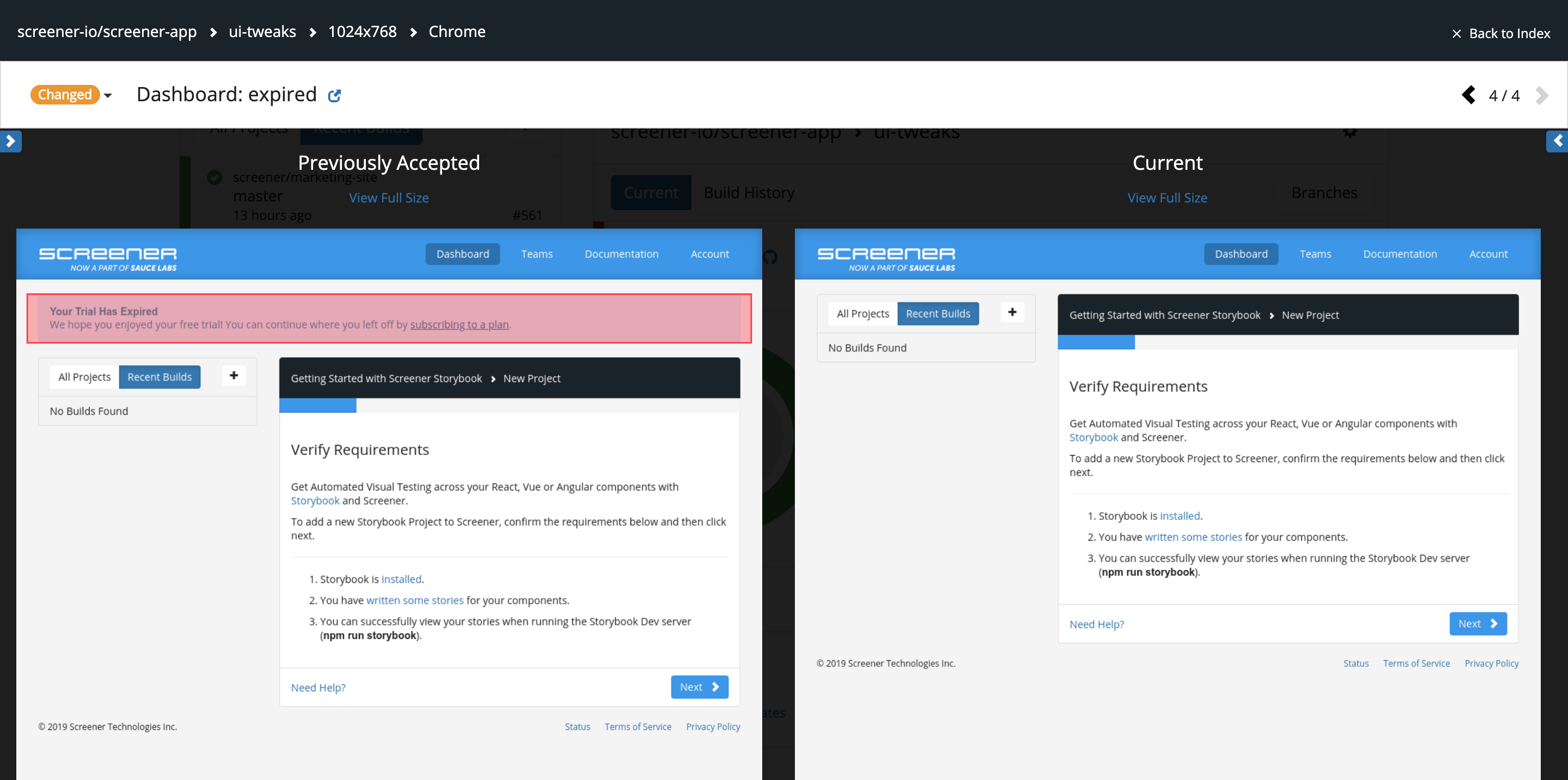
    At the SauceCon 2019 conference, Sauce Labs today revealed it has acquired Screener to add a visual testing tool to its portfolio of automated testing tools.

    Lubos Parobek, vice president of product for Sauce Labs, said the addition of Screener will make it possible for DevOps teams to not only test functions and performance using existing Sauce Labs tools, but also now confirm things such as the colors of a visual element of an application are being rendered correctly, for example.

    In addition to building their own visual tests, DevOps teams can employ Screener to automate the running on those tests and store baselines in the cloud to create a visual testing life cycle.

    At the same time, Sauce Labs announced the general availability of Sauce Headless, which leverages container technologies to make it possible to leverage a cloud service through which developers can now run tests via a Chrome or Firefox browser every time they commit code. Parobek said the goal is to make it easier for organizations to embrace continuous testing as an extension of the pipelines constructed using a continuous integration/continuous deployment (CI/CD) platform.

    The acquisition of Screener, he said, is part of an ongoing Sauce Labs effort to extend the reach of its testing portfolio beyond functional testing. Sauce Labs earlier this month launched Sauce Performance, its first set of application performance testing tools.

    The rise of DevOps is challenging traditional approaches to application testing as organizations move to combine various types of testing into a single continuous process. To meet that requirement, Sauce Labs is expanding its portfolio of automated testing tools at a time when the emergence of microservices-based applications is significantly increasing the level of dependency between all the components that make up an application. That increased level of dependency will require DevOps teams to rely more on automated testing tools. In fact, Parobek said the day is not far off when DevOps teams will include digital assistants that leverage machine learning algorithms to enable DevOps teams to continuously run those tests at the right moment in an extended DevOps pipeline. Those digital assistants will not replace the need for human testers anytime soon, but they will augment their capabilities to make is feasible to implement continuous testing at scale, he noted.

    In the meantime, as application testing continues to shift further left in the DevOps process, more developers will be building and running their own tests during earlier stages of the application development process. At some point, either another developer or dedicated tester still will need to evaluate that code to provide an unbiased opinion. But the number of common mistakes making it into the latter stages of the application development process should be substantially reduced. Ultimately, that shift to the left should result not only in more development projects meeting deadlines, but just as significantly higher levels of overall application quality. The challenge now, of course, is figuring out how to implement a best DevOps practice that pushes application testing as far to the left as possible.

    — Mike Vizard

  • The Right DevOps Tool for the Job

    The Right DevOps Tool for the Job

    Innovation and environment are only two factors in determining which DevOps tools are best for your organization

    Any time there is a movement in IT that involves a new space and new toolsets, there is sudden growth, then inevitably consolidation and, finally, a selection of tools that suit the needs of most customers. Then the cycle starts over. Usually by this point, users have developed a defense mechanism about their choices regarding which solutions to implement and discussions can get heated.

    I’m happy to say that the last bit—heated discussions—has not occurred with DevOps the way it has with other technologies (think the browser wars, OS dominance or even cloud service provider preferences). There is the occasional “You’re doing it wrong,” but not the wild-eyed flame-wars so far.

    But the other two? Yes, yes indeed. DevOps has been through a couple of cycles, and the end is nowhere in sight. I don’t necessarily see that as a bad thing; in fact, as long as innovation is occurring, you have the opportunity to look at changes and decide what can best help your DevOps efforts.

    My mantra since the language wars was that C, C++, VB, etc., were the “right tools for the job.” I have kept that mantra for all of IT. It is easy to adapt the tools you are familiar with—to do more than they were designed to—and most shops have fallen into this trap at some point. But a serious look at what is available and where the market seems to be evolving usually stops this kind of adaptation.

    Some shops use Jenkins for far more than it was designed for. It’s a great tool, but at some point, the benefits of using tools aimed at a given piece of the DevOps toolchain outweighs the fact that Jenkins could handle that bit.

    The popularity of Puppet is starting to cause the same issues, if anecdotal evidence is to be believed. In words I use to my children, “Just because you can, doesn’t mean you should.”

    The environment always plays a role in the “right tool for the job,” but it should not be the major factor. Having a DevOps tool that you already know that could do the job is one answer—but quite often not the best answer.

    So, use resources like us here at staging-devopsy.kinsta.cloud, and your favorite site for IT ratings and reviews. Do some feature research, think about what it would take to make your existing tools do the same job, and consider bringing in new tools to achieve a given goal. We see so much change these days that sticking with what you know on this one tiny bit of the toolchain, may seem reasonable, but make sure you are not missing out on additional functionality or suitability to task over the long term.

    — Don Macvittie

  • DevOps Market Consolidation Gets Real: CloudBees Acquires Electric Cloud

    DevOps Market Consolidation Gets Real: CloudBees Acquires Electric Cloud

    You may have already seen the news today: CloudBees has acquired Electric Cloud in a move that marks a true market consolidation in the DevOps space. I had a chance to speak with CloudBees CEO Sacha Labourey to discuss the acquisition. We discuss the motivation for the deal, what the combined entity may look like going forward and more. The video of our conversation is at the bottom of this article.

    In my mind, this acquisition represents true consolidation of the DevOps tool vendors market. My reasons for this are as follows:

    1. Until now, many of the acquisitions in the DevOps space have been by large, established public companies such as CA, HP or IBM. Typically, these kinds of deals are not as much consolidation as they are large companies using M&A activity in place of R&D. CloudBees is not a large vendor—this isn’t R&D dressed in an acquisition.
    2. Electric Cloud is not your typical venture-backed startup that is looking for exit opportunities. The company has been around for many years. It has a large base of enterprise customers and an enterprise-tested product.
    3. With the recent changes in the DevOps vendor market involving CA (now Broadcom), HP(E) now Micro Focus and IBM preoccupied with Red Hat, there is a vacuum for enterprise leadership. The combination of these two vendors of scale is really a consolidation move.

    Best of luck going forward and congratulations to our friends at CloudBees and Electric Cloud. It will be interesting to see what repercussions this deal brings to the rest of the DevOps market.

    For more details on the acquisition, check out Mike Vizard’s article in staging-devopsy.kinsta.cloud today. In the meantime, enjoy the video and conversation with Sacha. Also, let us know what you think about the acquisition—and other M&A activity in the DevOps space—in the comments section below.

    — Alan Shimel

  • XebiaLabs Injects Predictive Analytics Into DevOps Platform

    XebiaLabs Injects Predictive Analytics Into DevOps Platform

    XebiaLabs is moving to take the guesswork out of DevOps following the launch of a set of tools that leverage machine learning algorithms to predict when and how the release of an application is most likely to go awry.

    The Risk Prediction Module being added to the XebiaLabs DevOps platform comes on the heels of XebiaLabs’ move to make its XL JetPack software for automating application deployments available on the Amazon Web Services (AWS) Marketplace. XL JetPack is an automation framework based on YAML files and a declarative programming framework that enable DevOps teams to push applications into production on a cloud platform in as little as 15 minutes.

    XebiaLabs CEO Derek Langone said that while DevOps advancements have been made in terms of achieving continuous integration, the goal of achieving continuous delivery has proven to be more elusive. As automation frameworks such as XL JetPack become more accessible, however, IT operations teams will be better able to keep pace with the rate at which organizations want to be to deploy and update applications, he said.

    It’s becoming increasingly apparent that a combination of automation frameworks and machine learning algorithms will enable DevOps teams to make a significant leap forward in terms of application release lifecycle management. Because of all the nuances of the different platforms that IT organizations are trying to leverage, it’s become a major challenge to roll out an application manually. As the number of applications that need to be released at roughly the same time increases, managing the release cycle process is moving beyond the capabilities of an IT team made up of mere mortals.

    The Risk Prediction Model from XebiaLabs promises to increase the odds of success by applying predictive analytics infused with machine learning and other proprietary XebiaLabs algorithms to identify DevOps bottlenecks before they are encountered. Capabilities provided by that module include alerts that warn the team when a release is likely to be delayed or to fail before the release pipeline starts running; a Risk Forecast view that summarizes predicted delays and failures for every task in the release process; an overview of statistics for similar releases to provide historical context; and forensics tools that uncover flaky automated tests, problematic build setups, long-running deployments and time-consuming manual tasks. That Risk Prediction Module is meant to complement the risk scoring capability that XebiaLabs already includes in its platform.
    Arguably, the biggest barrier to DevOps adoption today continues to be the level of expertise required to succeed. But as the combination of predictive analytics infused with machine learning algorithms and algorithms that can discern instantly how changes to the IT environment will impact applications become more common, the level of expertise required to master DevOps processes should decline. As that transition occurs, the number of organizations embracing DevOps more broadly should increase.

    In the meantime, DevOps teams would be well-advised to consider to what degree they might next want to rely on predictive analytics to prescriptively automate processes with eye toward eliminating the need for as much human intervention as possible.

    — Mike Vizard

  • Alerting Consolidation: What’s the DevOps Impact?

    Alerting Consolidation: What’s the DevOps Impact?

    Over the last 12 to 18 months, the monitoring and alerting piece of the DevOps toolchain has been going through some serious consolidation. Companies are bracing to compete with the world or getting picked up by larger DevOps players, making their product more appealing through integrations.

    In general, if such changes don’t impact your toolchain, I say ignore them. The exception is when it appears the entire submarket might need to get aligned to survive, because that means at some point your toolchain likely will be affected.

    So, to recap the source of this blog, in the last short while OpsGenie has become a part of Atlassian, VictorOps has become a part of Splunk and PagerDuty has filed for an IPO. It is likely the rest of the market will have to match these three or admit to eroding market shares. In a competitive market where customers are using a fraction of the available functionality of a given product, deeper integrations (like come from ownership) or bold road maps (like come from IPOs) can have an impact on what customers choose to use.

    Alerting—and monitoring in general—is still relatively new to its current incarnation, and unlike some markets there are still very real differentiators in it. Most alerting engines have a core of functionality built in, while a lot more functionality can be had through integrations with other products. Some focus on the network to garner the bulk of their alert conditions, while others focus on application performance and still more watch the infrastructure closely. While all do a bit of each of these things, they still definitely have a focus. That will change over time as the market either settles down or fragments. I’m hoping it will settle down; we have enough sub-markets in DevOps already.

    All I’m suggesting is that you stay in contact with your vendor of choice and watch the overall market. Some of the changes might create a situation in which an alternative is appealing, and that is worth looking into, but other changes might negatively impact your chosen solution, which is absolutely worth noting.

    If your product of choice is clipping along in a way that is acceptable/useful to you, by all means stay with it. There’s no sense changing a product simply because of possibilities. But being aware can help you navigate the market changes that are well underway and very well might hit you right in the stack.

    — Don Macvittie

  • DevOps and Security: Be Ready to Shield Your Application

    DevOps and Security: Be Ready to Shield Your Application

    All of us have heard of continuous improvement/continuous delivery (CI/CD). There are many benefits to implementing CI/CD, as it helps seamless integration from end to end for development and deployment processes. CI/CD helps in rapid improvement, shorter release cycles and more, but it also helps with the challenge of handling security effectively at DevOps speed.

    Tools for Securing DevOps

    There are thousands of DevOps security tools available in the market that help us at HCL Technologies secure our software development at various stages of the CI/CD pipeline. There are new vulnerabilities rolling out daily, and so we must be alert and keep our applications safe and future-ready.

    These are the DevOps security tools we use (most tools are open source with an option of enterprise edition):

    1. OWASP SonarQube
    2. OWASP ZAP
    3. OWASP Dependency-Check
    4. OWASP Glue
    5. Anchore
    6. Clair-CoreOS
    7. FOSSA
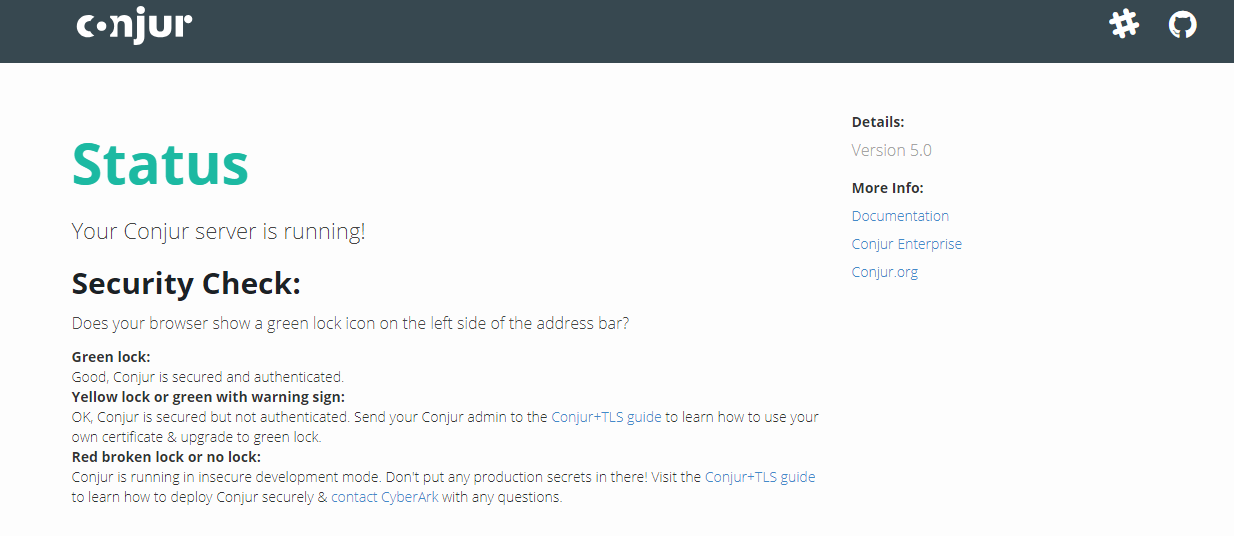
    8. Cyberark Conjur

    Our DevOps Toolchain Diagram

    Securing CI/CD

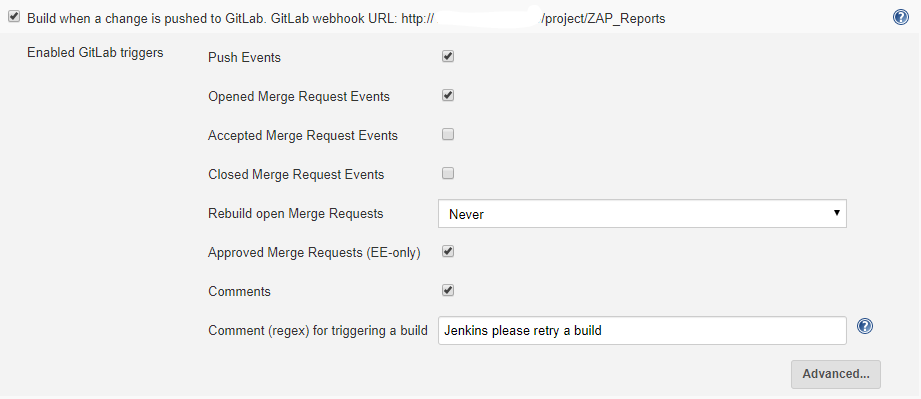
    Let’s consider a job in which we check out the code from GitLab/GitHub with auto-commit (a Jenkins job will be triggered as soon as the developer makes any changes in the code). You can refer to this link for  more information about Jenkins GitLab automation.

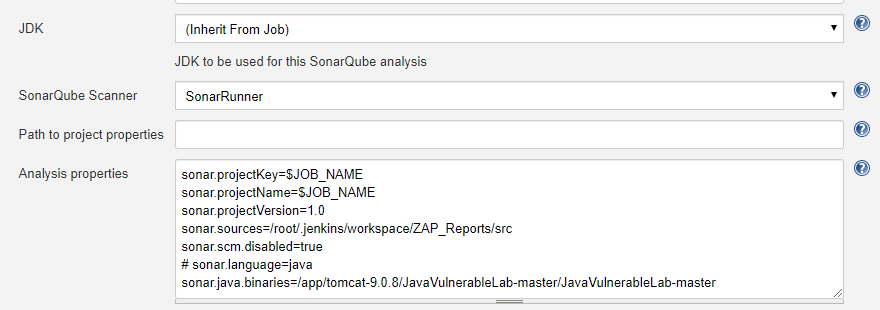
    Now, in Jenkins, we can run a security test and present it in the form of reports and dashboard to meet our needs. To get started, we can use OWASP SonarQube for static analysis. OWASP SonarQube includes found bugs, PMD and several security plugins bundled out of the box. Next, for dynamic analysis and penetration testing, we can use OWASP ZAP, which presents reports in XML/HTML format that can be used to create Jira issues.

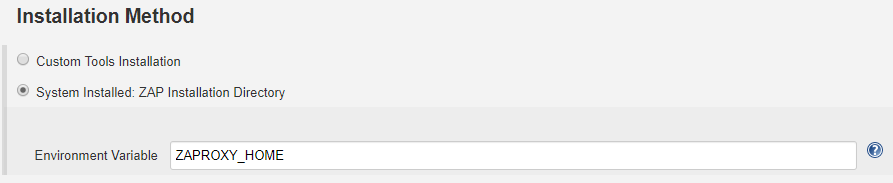
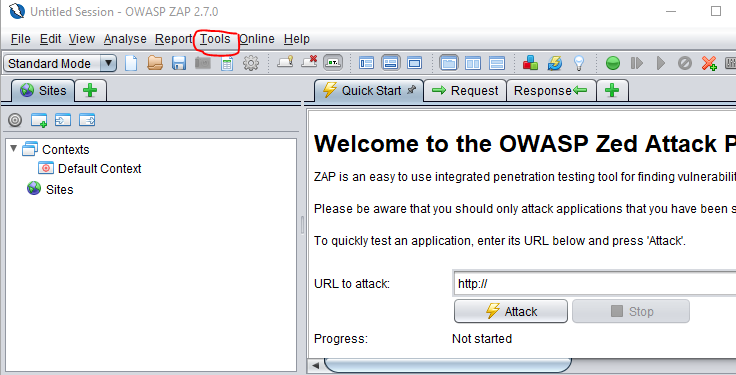
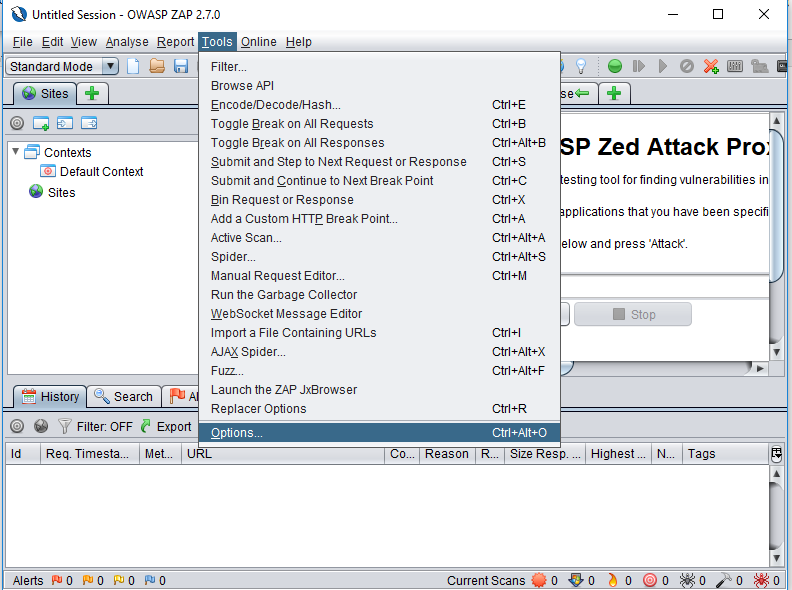
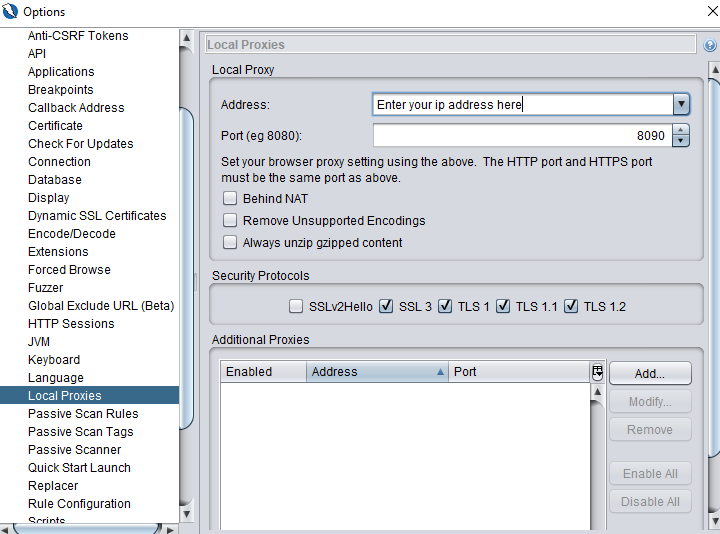
    In the above scenario, we can also use ZAP through custom tools integration. In our case, we have installed ZAP on our local machine. We can also use OWASP ZAP installed in a remote machine.

    Steps for Remote OWASP ZAP Connection

    Windows Command: C:Program FilesOWASPZed Attack Proxy>zap.bat -config api.disablekey=true -config api.addrs.addr.name=.* -config api.addrs.addr.regex=true

    Linux Command: Zed Attack Proxy>zap.sh -config api.disablekey=true -config api.addrs.addr.name=.* -config api.addrs.addr.regex=true

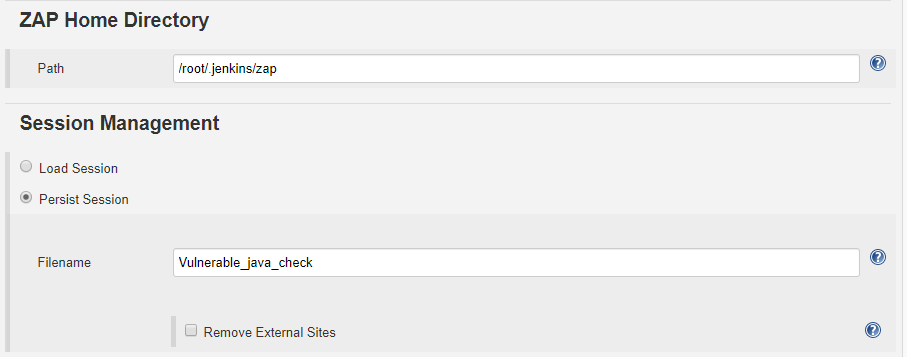
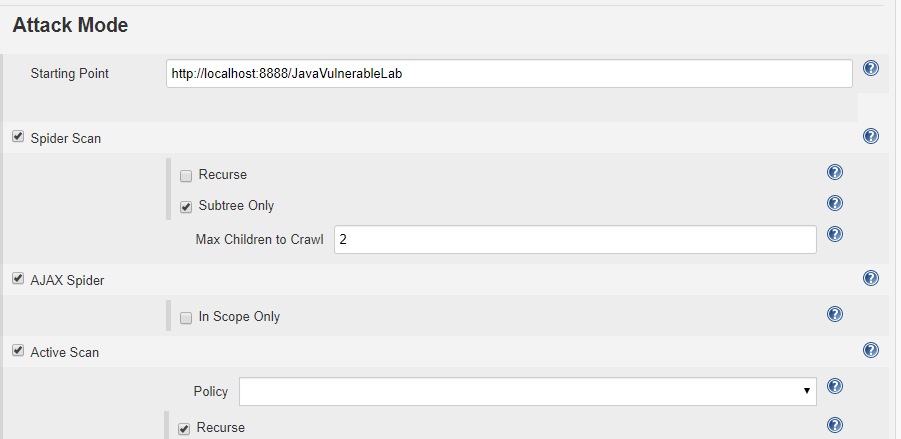
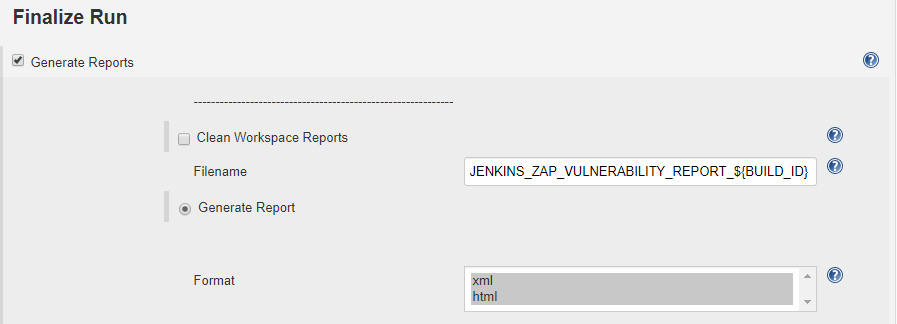
    OWASP Configuration in Jenkins

    The reports will be generated in .xml and .html format. Now, with the reports generated by ZAP, we developed a Java program to create Jira issues for every vulnerability detected and assign it to the concerned person.

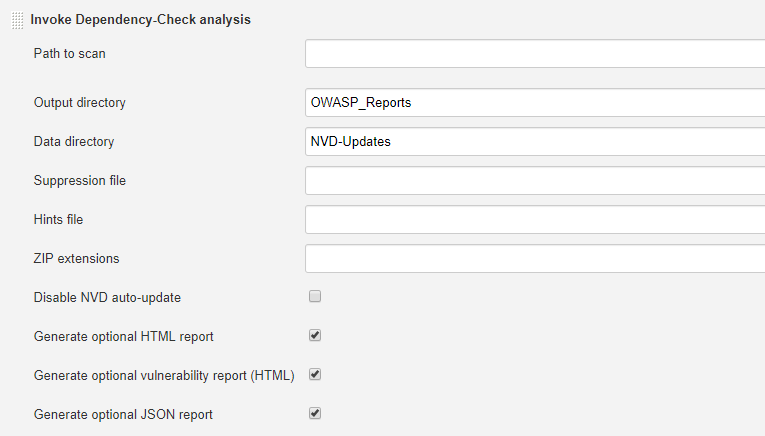
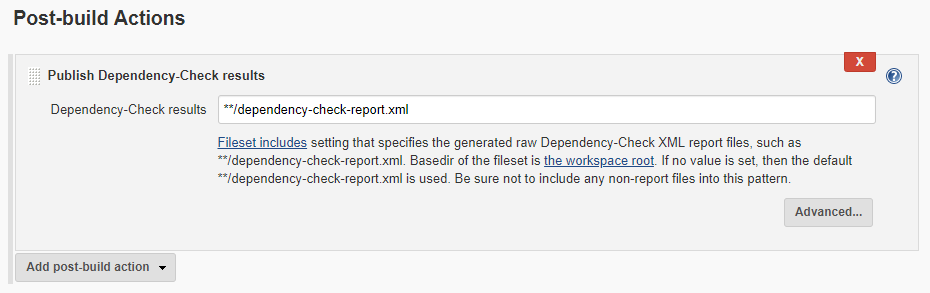
    Next, we have OWASP Dependency-Check analysis on our project. To configure for Jenkins, follow these steps:

    First, we need the OWASP dependency-check plug-in (which I have already installed). This process may take several minutes, as it downloads from NVD server.

    Here are the next steps:

    Alternatively, we can use the OWASP Glue plug-in, which runs OWASP ZAP, OWASP Dependency-Check and other security automated tests.

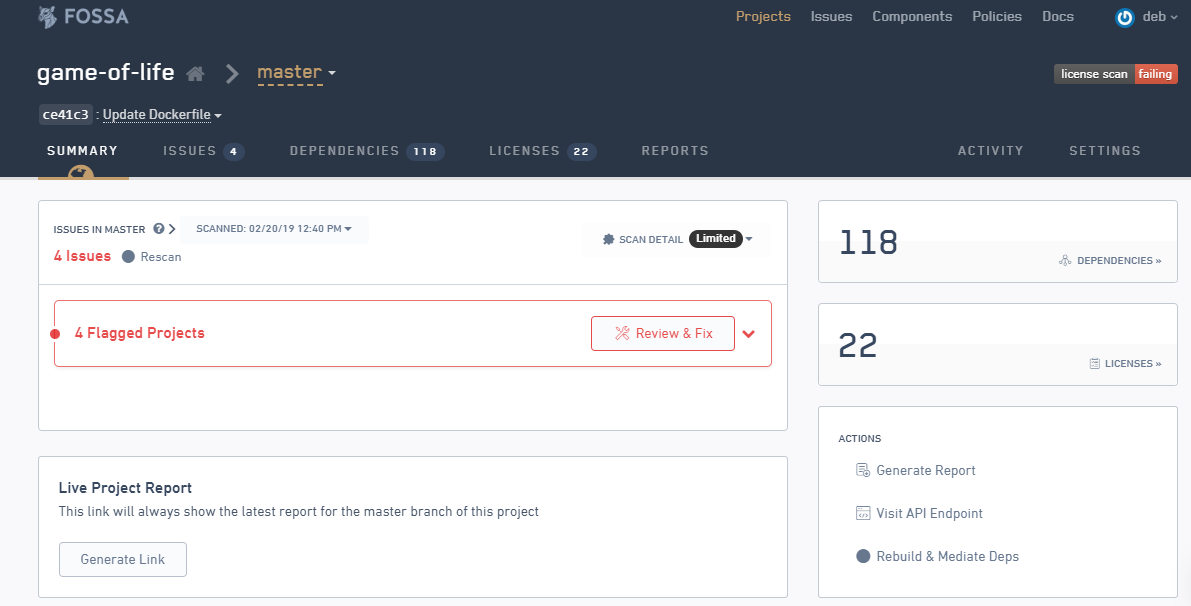
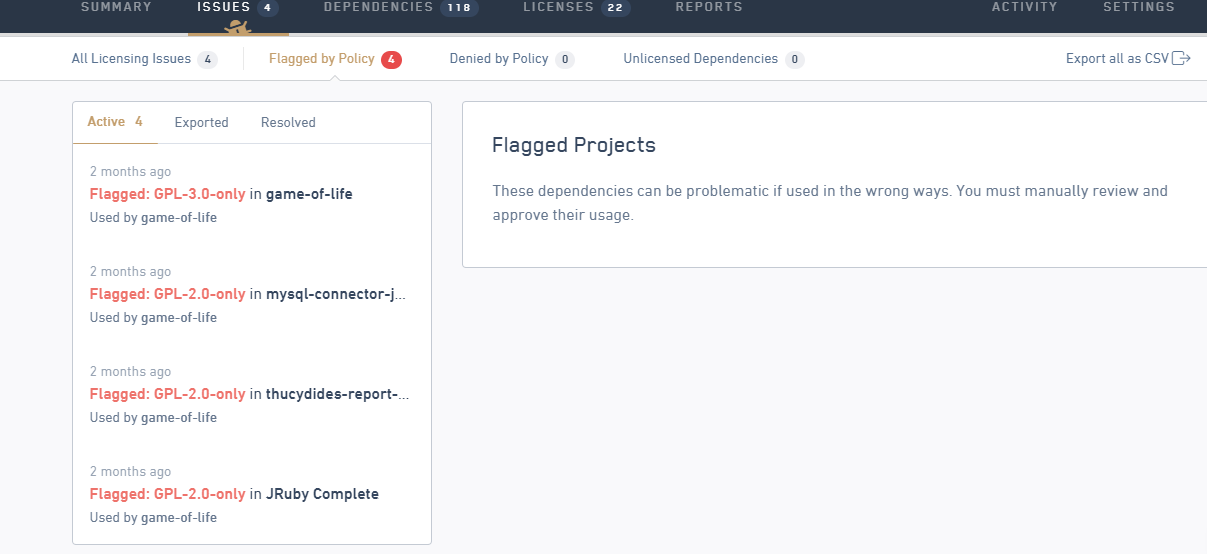
    We have also used FOSSA in our projects for license audits and vulnerability management for OS dependencies. We can use FOSSA as on-premises, but it is available only for use on Ubuntu machines.

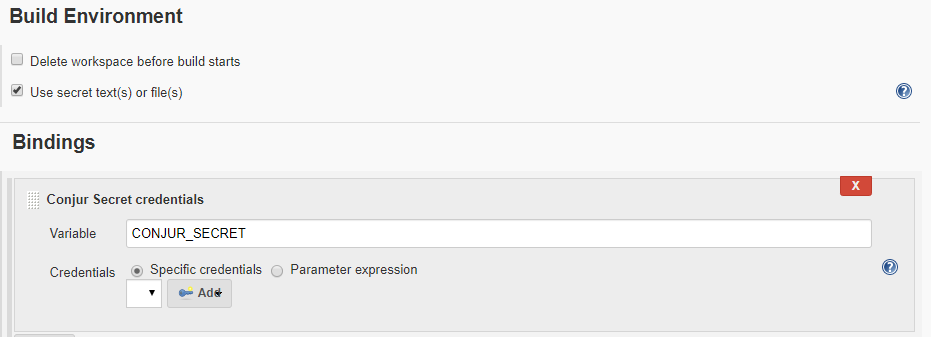
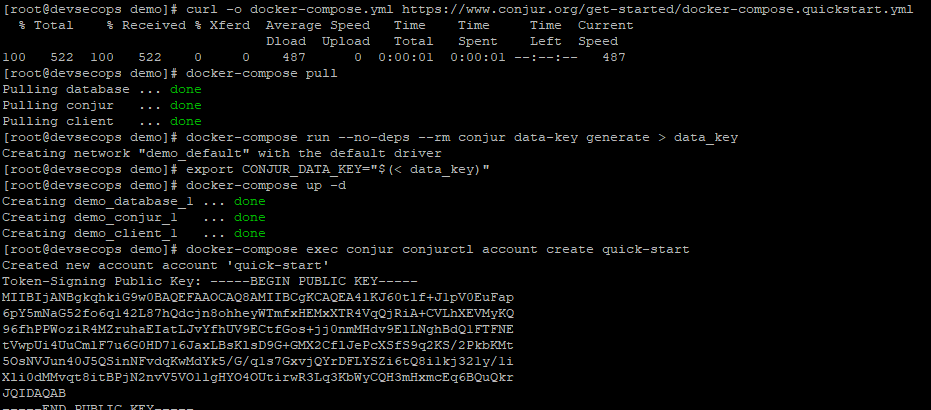
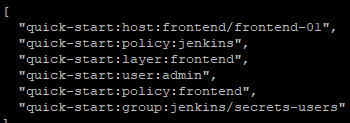
    At HCL, we are currently working on container security with Anchore and Clair-CoreOS. We have also integrated identity access management (IAM) to our CI/CD jobs. As for IAM, we are working on CyberArk Conjur and HashiCorp Vault.

    CyberArk Conjur

    The Conjur Jenkins credentials plug-in:

    HashiCorp Vault

    Conclusion

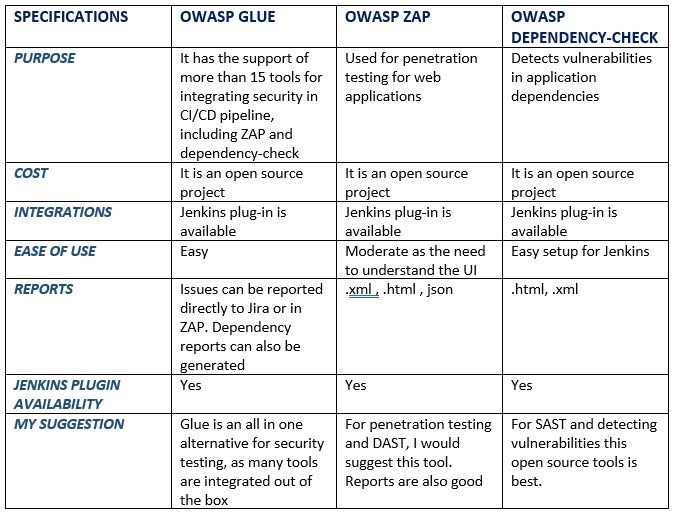
    I have worked on various tools for security with DevOps. Below is a quick comparison of the tools that can be used for application security.

    Now that you have an idea of which tools to use, embrace security instead of worrying about it. DevSecOps can help improve and increase the outcome and effectiveness of any organization.

    — Debarghya Pandit