Category: DevOps Toolbox

  • VMware Adds Cloud Automation for DevOps

    VMware Adds Cloud Automation for DevOps

    Those who follow my blog will recall that I covered (and did some work for) CloudCoreo, a cloud security and compliance start-up. What the company was working on was intriguing to me because it pulled many things into the realm of DevOps through automation at a time when cloud security was a big issue.

    It’s still a big issue, and the former CloudCoreo product has been enhanced and integrated into VMware’s growing DevOps infrastructure as VMware Secure State. I hopped on a call with Jason Needham, senior director of product management, multicloud security at VMware, to get an idea of what was new and how the product was integrated with VMware’s other offerings.

    We’ll get the thing that will interest every risk manager out of the way first. Secure State can tell you about buckets and their current security settings. It can tell you how to fix them. Considering the number of high-profile leaks caused by insecure buckets, I figured I’d mention that even before I talked about how Secure State fits with other VMware offerings. You’re welcome.
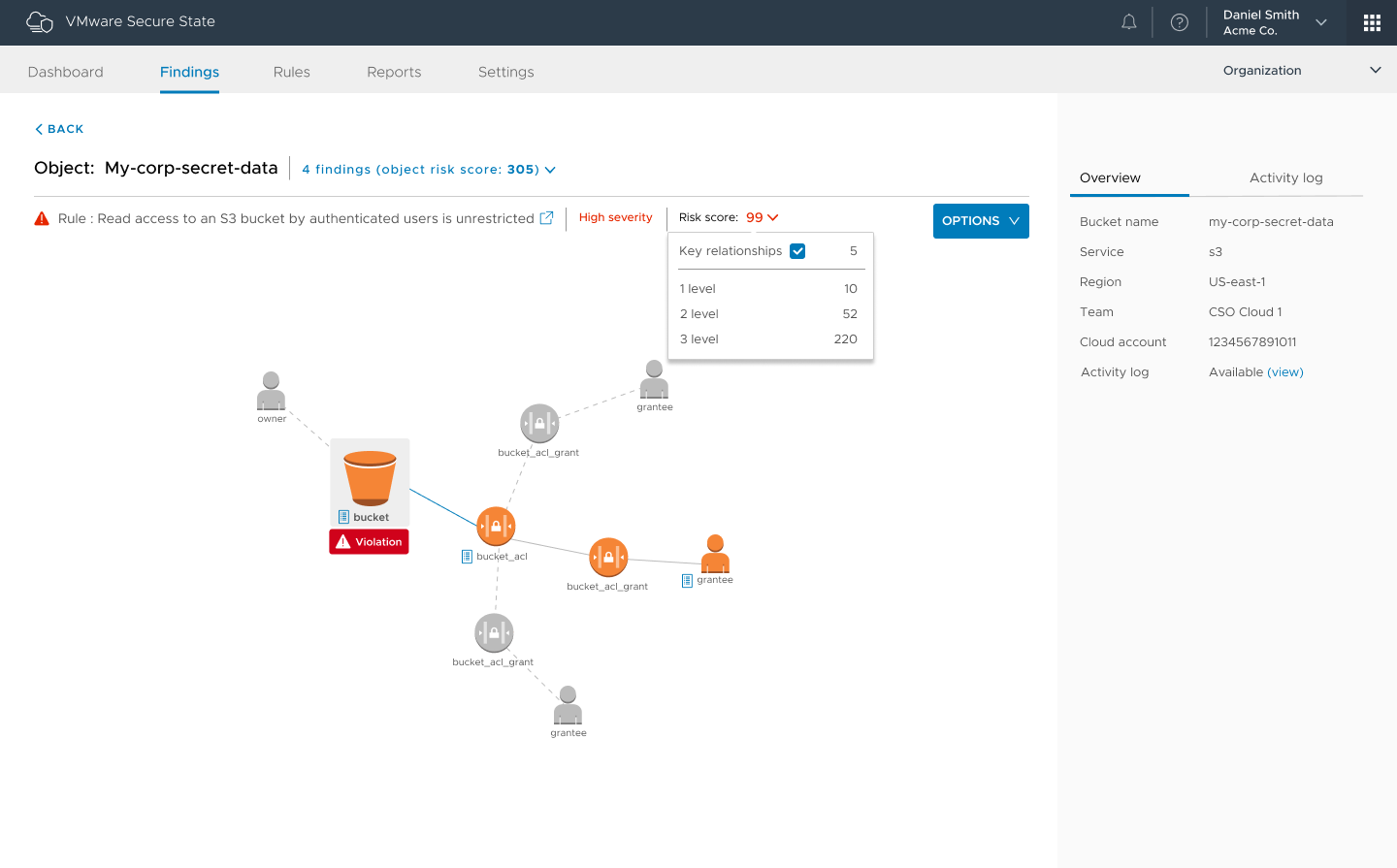
    Figure 1: Of the many violation chains available in the product, “authenticated user” buckets are one of the coolest, IMO.

    Secure State is part of VMware’s Cloud offering (grouped with CloudHealth and WaveFront), bringing security and compliance to multicloud. The cool bit is the level of automation, which allows teams to include cloud infrastructure security and compliance with DevOps efforts. That is where the world is headed, and VMware Cloud sees a greater level of DevOps automation than most alternatives just because it was conceived with APIs aimed at automation in the first place. Adding checks for rights and security settings, even compliance, into the DevOps cycle is breaking down one last wall (now we’re basically waiting for someone to do something astounding for cloud storage).

    Part of Secure State is near real-time reporting on status/state. This is big in environments that have real-time reporting for everything else, adding in the one missing piece. It is far better to be told, “There is a problem right now with instance X,” than to be fighting attackers. One of the examples Needham offered was of a project that was used via a small subset of tools: One day a report came in that it was being accessed via JVM instead of the normal methods. In this case, it turned out to be a new developer trying to get work done, but you can imagine such a warning being a heads up that you had an attack going on.

    The other interesting bit is risk scoring, officially known as Smart Risk Scoring. The ability to get a prioritized risk list allows DevOps teams to focus on what is most important. When there is so much for security to get done, this is a huge benefit.

    Disclaimer: I haven’t used this version of the product. That means I can’t say “This rocks!” but if Secure State delivers, it certainly will.

    Anything that adds automation and visibility is a welcome addition to the DevOps stack, making life easier and helping you to rock it.

    — Don Macvittie

  • Clubhouse Aims to Simplify Software Project Management

    Clubhouse Aims to Simplify Software Project Management

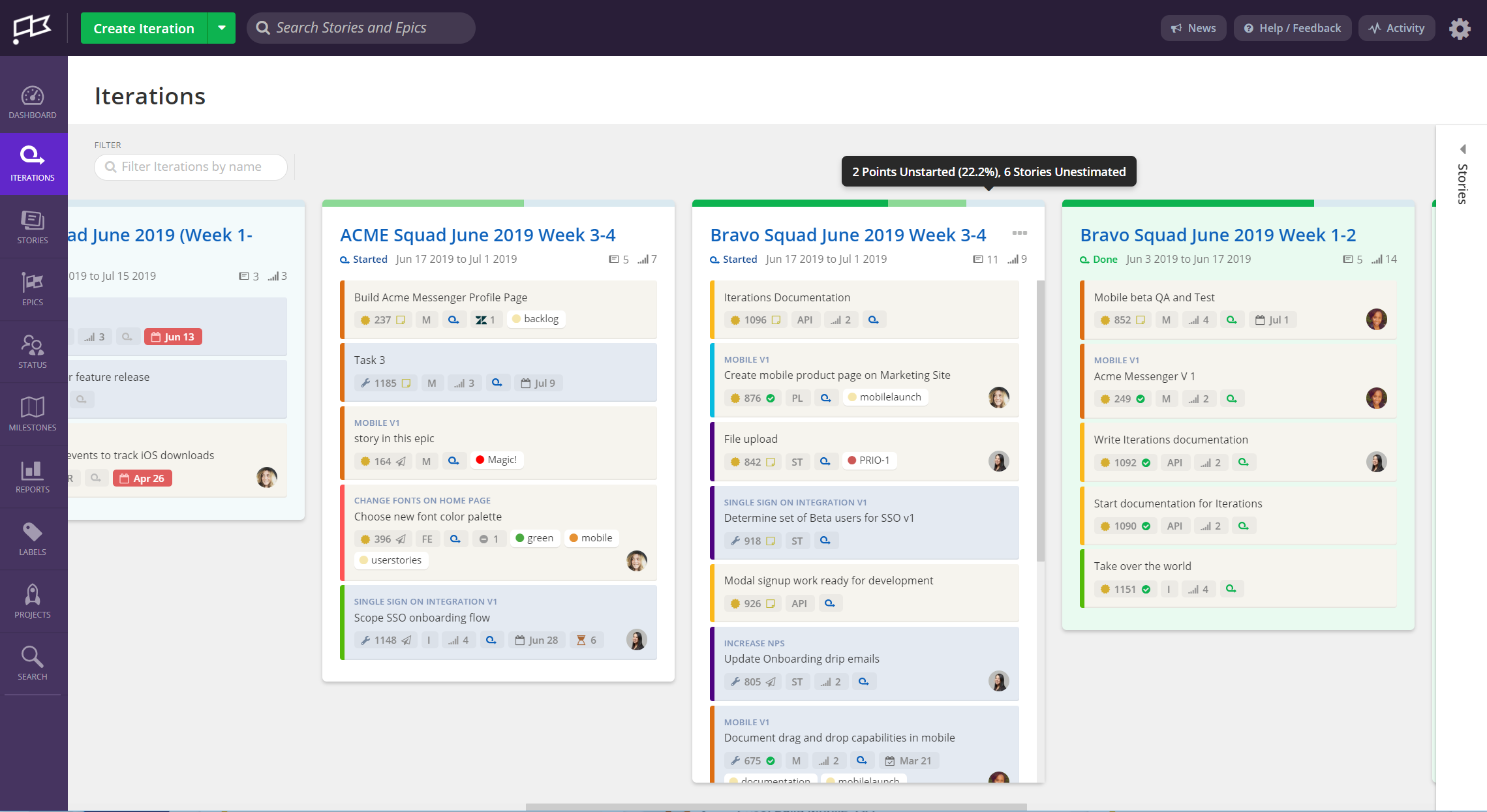
    Clubhouse Software today announced it is adding a Clubhouse Iterations module to its project management application to make it easier to plan sprints involving product and software engineering teams.

    Mitch Wainer, chief marketing officer for Clubhouse Software, said Iterations will be included as part of its project management application service, which aims to bridge the divide that often exists between software development teams and the lines of business for which they are building applications.

    Wainer said the company’s namesake project management software makes it easier for non-technical professionals to participate in the same project management workflow as a development team, rather than requiring them to become conversant in a project management application designed for software engineers, such as Jira. Clubhouse’s approach eliminates silos that get created when two teams within the same organization rely on different project management applications, he said.

    Clubhouse Iterations goes a step further by surfacing what teams need to focus on as priorities and timetables change within a specific project, added Wainer.

    Clubhouse Iterations allows users to define sprints using start and end dates, and the tool then sends reminders so the team can reserve time to focus on specific projects, he added.

    Organizations that have successfully embraced DevOps almost invariably seek to extend those processes beyond the software development team. In theory, at least, the entire business should aspire to become more agile. However, the project management software many DevOps teams employ today is too complex and intimidating for the average business executive. Rather than forcing business users to learn how to master these applications, a case can be made for a more intuitive set of project management tools for both software development teams and the product managers they ultimately serve. Wainer said Clubhouse is already being used within 2,000 organizations to address that issue.

    Wainer also noted the Clubhouse Software also has no bias as far as continuous integration/continuous delivery (CI/CD) platforms are concerned. Clubhouse is designed to integrate with multiple CI/CD platforms via application programming interfaces (APIs) to enable the development of custom workflows that include, for example, integration with real-time conversations occurring via the Slack service.

    Next up, Wainer said Clubhouse intends to improve the search capabilities it provides on the platform and offer more sophisticated reporting tools.

    In the meantime, the rise of DevOps would not be possible without the capabilities enabled by project management applications. But the agile nature of DevOps processes is forcing providers of project management software to make their applications both more dynamic and accessible. Those advances, in turn, make it easier to bring new members on board to the DevOps team.

    Project management software may not always be viewed as the linchpin around which most software development processes are constructed. Without some form of project management application, however, most DevOps processes would have devolved into utter chaos a long time ago.

    — Mike Vizard

  • Agile Stacks Extends Reach of DevOps Automation Platform

    Agile Stacks Extends Reach of DevOps Automation Platform

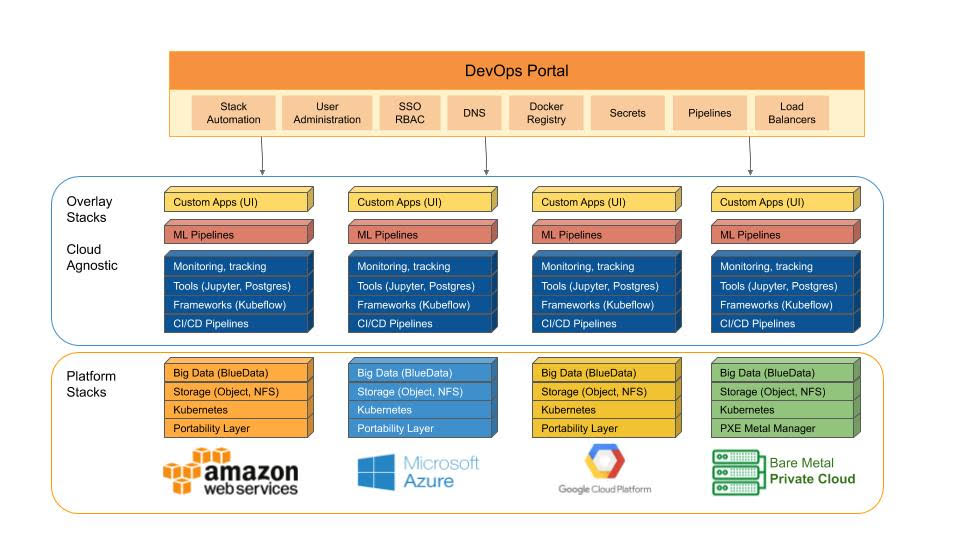
    Agile Stacks this week announced it is extending the reach of its namesake DevOps automation platform to Kubernetes and additional cloud services.

    Company CEO John Mathon said that by extending the reach of the company’s platform to include Google Cloud Platform (GCP), Microsoft Azure and Red Hat’s OpenShift distribution of Kubernetes alongside existing support for Amazon Web Services (AWS), Agile Stacks will make it easier for organizations to implement best DevOps practices across hybrid cloud computing environments.

    Agile Stacks made the announcement at the HPE Discover 2019 conference. The company counts Hewlett-Packard Enterprise (HPE) among its investors, and at the conference this week, HPE this week outlined how Kubernetes is core to the company’s evolving hybrid cloud computing strategy.

    Mathon said the Agile Stacks platform provides a framework for automating the creation of DevOps pipelines across multiple tools and continuous integration/continuous deployment (CI/CD) platforms. In all, there are more than 80 DevOps tools and platforms available in the Agile Stacks Service Catalog, including Kubeflow, Jenkins, GitLab, Spinnaker, Harbor, Minio, Ceph and Portworx.

    At the core of the Agile Stacks platform is a SuperHub automation hub, which accelerates software delivery based using a set of custom composable stacks that can be configured by the DevOps team. Each component of a stack is auto-configured to deploy, upgrade, rollback, promote, clone, backup, generate test scripts, perform merges, conduct performance testing, scan for vulnerabilities and execute functional testing.

    In effect, Mathon said Agile Stacks is essentially automating the DevOps automation. Organizations that have embraced best DevOps practices tend to rely on multiple tools from different vendors, which inevitably leads to silos of automation that often work at cross purposes. Agile Stacks provides an extensible GitOps framework for integrating all those tools that enable organization to evolve more easily as their DevOps processes mature, added Mathon.

    In addition, he said Agile Stacks expects to play a role in making DevOps more generally accessible by reducing the complexity organizations initially encounter when trying to embrace DevOps practices.

    As hybrid cloud computing starts to become more commonplace, thanks in part to the rise of Kubernetes, Mathon said DevOps complexity is only likely to increase. Organizations have made it clear they want to leverage multiple clouds alongside their existing on-premises IT environment. Right now, however, the DevOps processes associated with each of those platforms is, at best, fragmented. In addition to making it easier to unify DevOps processes across multiple platforms, Mathon noted Agile Stacks can also enable organizations to keep better track of cloud spending by applying automated cloud tagging via Superhub.

    Of course, most organizations are challenged automating the development and delivery of software on a single platform. However, regardless of how far down the path any organization is toward DevOps, the business is moving forward. In many cases, the rise of hybrid cloud computing will finally force many organizations to implement a set of best DevOps process enterprisewide. As part of that process, organizations will look to standardize on a specific set of DevOps tools whenever possible, or at least until developers discover the latest DevOps tool to supplant all others.

    — Mike Vizard

  • GitLab Expands Scope of DevOps Ambitions

    GitLab Expands Scope of DevOps Ambitions

    GitLab, with the release of its 12.0 update, is extending the reach of its namesake continuous integration/continuous delivery (CI/CD) platform to include both cybersecurity professionals and traditional IT operations staff.

    John Jeremiah, senior product marketing manager at GitLab, said the goal is to provide organizations with a single CI/CD platform that unifies the management of everything from source code to best DevSecOps processes.

    To address that latter requirement, GitLab 12.0 adds a dashboard designed specifically for security personnel along with the ability for cybersecurity teams to approve merge requests and automatically apply patches for vulnerabilities detected. Those capabilities complement existing support for scanning and secrets detection.

    New capabilities embedded in the platform for IT Operations professionals include an operations dashboard and an embedded incident management capability that makes it easier to create a coordinated response to a specific event.

    GitLab 12.0 also adds support for feature flags to better manage the application delivery process, along with a platform-as-a-service (PaaS) environment to provision and maintain the infrastructure needed for developing and launching an application.

    Jeremiah said the new and existing capabilities in GitLab will make it possible for organizations to unify their DevOps tool chains in a way that also enables IT operations teams and cybersecurity professionals to be included in the process.
    At the same time, GitLab is making DevOps more accessible by eliminating many of the silos between various tools that have emerged over the years, including, for example, built-in support for feature flagging versus requiring organizations to acquire and maintain a separate tool, he noted.

    Because those capabilities are embedded in the platform, organizations will be able to make the cultural shift required to adopt DevOps more easily, he added. IT teams don’t always know what other tools they will need as their DevOps skills mature. With all the tools embedded in GitLab readily available, it becomes easier for organizations to expand their DevOps processes as the organization starts to implement more sophisticated processes, Jeremiah said.

    That approach is starting to resonate with the 100,000-plus developers actively using the GitLab platform and more than 2,000 contributors actively contributing code to the underlying open source platform, he added. GitLab in March saw its millionth merge request.

    It’s too early to tell how broadly any CI/CD platform might be able to consolidate the DevOps toolchain. Developers are notorious for adopting new tools as they see fit. Internal IT teams, of course, are not always excited to be asked to support yet another tool. The right level of balance between ultimate flexibility and the need for a standard set of processes that can be implemented across multiple application development teams must be determined by each organization.

    In the meantime, DevOps processes are starting to expand beyond traditional development team to now include IT operations staff and cybersecurity personnel. The challenge now that they’ve been invited to the proverbial DevOps party is making them feel welcome and appreciated.

    — Mike Vizard

  • HPE Extends Hybrid Cloud Computing Strategy

    HPE Extends Hybrid Cloud Computing Strategy

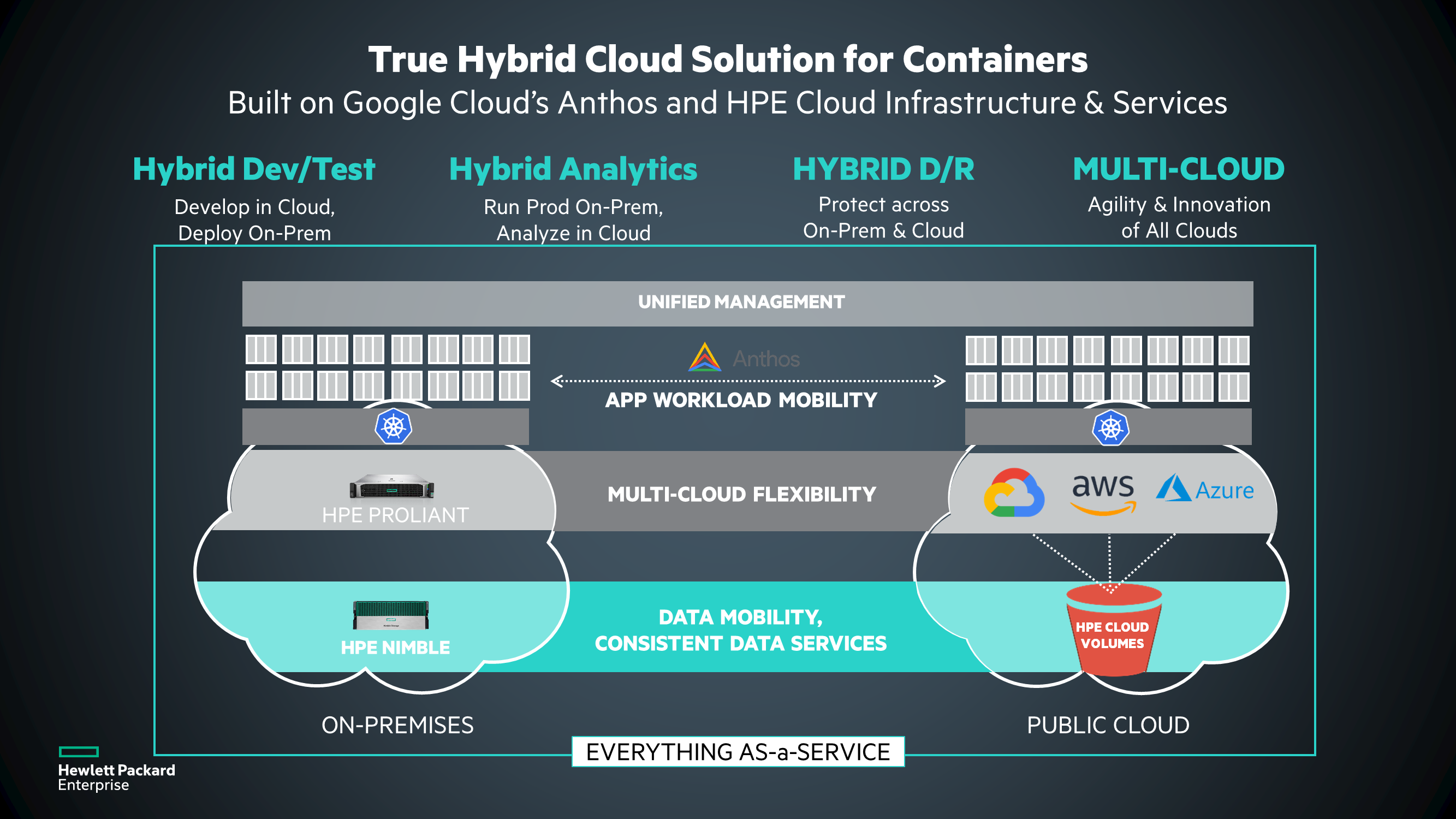
    Hewlett-Packard Enterprise (HPE) today advanced its hybrid cloud computing strategy by announcing at its HPE Discover 2019 conference an alliance with Google to embrace Kubernetes in hybrid cloud computing environments and then extending the reach of its software-defined infrastructure for building private clouds to legacy ProLiant servers.

    Lauren Whitehouse, director of marketing for the software-defined and cloud group at HPE, said the HPE Composable Cloud now extends beyond new ProLiant servers to include everything from legacy hardware to cloud computing platforms running virtual machines or as bare metal servers optimized for Kubernetes.

    To achieve that latter goal, HPE will make it possible to deploy Google Anthos, a previously announced framework for delivering cloud-native computing services across public clouds and on-premises IT environments, on HPE-managed platforms.

    HPE is giving customers the option of deploying configuring local servers with virtual machines with either a VMware vSAN storage software or the HPE SimpliVity hyperconverged infrastructure platform. Additionally, customers can choose to deploy Kubernetes on those platforms or run Kubernetes on a bare-metal server. On top of those stacks, HPE also embeds the HPE OneView IT infrastructure management and HPE Composable Fabric networking solution to create what the company calls a composable rack environment.

    Finally, HPE announced it will extend the reach of the HPE InfoSight artificial intelligence engine, which it gained for storage environments when it acquired Nimble Storage, to the rest of its data center portfolio.

    Whitehouse said that, by extending the reach of its composable computing strategy to include legacy servers, HPE seeks to make it easier to modernize on-premises IT environments within the context of a larger hybrid cloud computing strategy.

    One of the primary reasons so many workloads are being deployed in the cloud is because of the inherent flexibility of the IT environment. HPE is investing in higher levels of infrastructure abstractions to enable an equivalent amount of agility to be injected into on-premises IT environments. Those efforts will then make it easier for organizations to extend best DevOps practices across a hybrid cloud computing environment, said Whitehouse. The company is now removing the objection by organizations to have to implement a forklift upgrade across their entire on-premises IT environment to achieve that goal, she added.

    It’s not immediately clear who will manage what in this brave new world of hybrid cloud computing. Application developers have been exercising a lot more influence over platforms, while advances in automation appear to be heralding a consolidation of management functions within the local data center. As site reliability engineers, or so-called “super administrators” capable of managing compute, storage and networking infrastructure continue to emerge, the silos around job functions in the enterprise were built are breaking down. In fact, the more organizations embrace DevOps best practices, the faster consolidation of job functions is occurring.

    In the meantime, whoever provides the infrastructure that remains in an on-premises IT environment had better be able to enable local IT teams to be just as flexible as any cloud service provider an application developer is likely to encounter.

    — Mike Vizard

  • Pulumi Advances DevOps on AWS

    Pulumi Advances DevOps on AWS

    Pulumi announced the availability of Pulumi Crosswalk for Amazon Web Services (AWS), an open source framework for deploying applications on Amazon Web Services (AWS).

    Company CEO Joe Duffy said Pulumi Crosswalk for AWS provides a software-as-a-service (SaaS) application through which DevOps teams can automate the deployment of applications on AWS infrastructure using software development kits (SDKs) from Pulumi. The SDKs are based on programming tools such as JavaScript, Python, TypeScript and Go, which most developers already know how to use. That approach eliminates the need for DevOps teams to learn how to employ YAML files or to acquire tools such as CloudFormation or Terraform to deploy applications on AWS, he said.

    Pulumi Crosswalk for AWS also embeds the best DevOps processes recommended by AWS directly within its SaaS tools, including patterns for containers and serverless computing frameworks, Duffy noted.

    Pulumi Crosswalk for AWS is available on GitHub. It is designed to be integrated with existing Team and Enterprise Editions of Crosswalk that come with support and training provided by Pulumi.

    In addition to AWS, Pulumi Crosswalk supports other cloud platforms, including Microsoft Azure and Google Cloud Platform (GCP). The company also plans to provide support for private clouds and leverage Kubernetes clusters to automate deployments across hybrid cloud computing environments.

    Duffy noted that despite all the enthusiasm for DevOps, many IT operations teams have been left behind. While much time and effort has been put into unifying backend cloud services, the operational experience in the cloud still revolves around low-level application programming interfaces (APIs) or specialized tools that are challenging for IT operations teams to employ. That situation often creates a backlog of applications for IT operations to deploy. Crosswalk enables IT operations teams to leverage the skills developers have to deploy applications they approve on AWS, he said.

    As cloud computing evolves in the age of DevOps, the relationship between developers and the IT operations team is becoming more nuanced. IT operations teams still need to put guardrails in place, but they can’t afford to be perceived as a bottleneck slowing down the rate at which applications can be deployed in the cloud. The challenge IT operations teams must overcome is finding a way to enable developers to self-service their application deployment requirements as much as possible within a set of policy guidelines defined by the internal IT team. That approach will enable developers and IT operations teams to get out of each other’s way.

    It may be a while before IT operations and developers find the right DevOps balance that best suits their organizations. Individual teams within enterprises tend to define their own best practices based on the expertise available within the team. Ideally, those best practices are then shared and implemented as appropriate across the rest of the enterprise.

    In the meantime, it will be interesting to see how aggressively cloud service providers embrace tools such as those from Pulumi. Cloud service providers have a vested interest in getting as many workloads deployed in their clouds as quickly as possible. They tend to be a little less enthusiastic about anything that makes it easier to move those workloads anytime a DevOps team sees fit.

    — Mike Vizard

  • Acquisitions to Fuel Programmable Analytics

    Acquisitions to Fuel Programmable Analytics

    Now that Tableau Software has agreed to be acquired by Salesforce and Looker is set to become a part of Google, the rate at which analytics will be embedded within almost every application is about to accelerate.

    Tableau today is relied on by more than 86,000 organizations to surface business intelligence via data visualizations created by professional analysts and line of business executives. That user base accounts for why Salesforce is willing to spend $15.7 billion to acquire Tableau.

    Competition within the analytics software space, however, has always been fierce. The rise of the cloud has resulted in several analytics startups challenging incumbents for a piece of one of the fastest growing sectors of the enterprise software market. One of those startups is Looker, which created a cloud-based analytics platform that Google is now set to acquire for $2.6 billion.

    Google has already signaled its intent to make Looker a part of its expanding Google Cloud Platform (GCP). As such, Google Cloud CEO Thomas Kurian last week noted one of the primary reasons for the Looker acquisition is to add a software-as-a-service (SaaS) offering that will enable developers to embed analytics within their applications by invoking a set of application programming interfaces (APIs) exposed via a cloud service. Today that analytics service runs on GCP alongside the Google BiqQuery data warehouse. Google, however, has also signaled its intent to make Looker available on multiple clouds alongside the rest of its software portfolio.

    Tableau, which will continue to operate as an independent arm of Salesforce, is playing catch up in the cloud. Tableau is deployed widely in both on-premises and public cloud computing platforms, including as a managed service provided by Tableau through which the company manages a dedicated instance of its software on behalf of customers. The merger with Salesforce will create an opportunity for Tableau to add a full software-as-a-service (SaaS) application instance to its portfolio that leverages the same infrastructure that Salesforce employs to deliver customer relationship management (CRM), marketing and customer service applications. Salesforce CEO Mark Benioff this week said going forward, Salesforce fully expects analytics generated by Tableau to drive a raft of digital business transformation initiatives.

    Most of the analytics that will be embedded within applications will manifest themselves in three forms. The first is embedded software that will be updated continuously as new data is entered in an application. The second is embedded predictive analytics modules that will invoke big data repositories and machine learning algorithms to surface recommendations on how to optimize a business process or customer experience. The third—and more ambitious—goal is an embedded prescriptive analytics capability that automatically optimizes business processes and customer experiences in real time based on events occurring, for example, within an internet of things (IoT) application.

    Every provider of analytics capabilities, from traditional Tableau rivals such as Qlik Software and Microsoft to TIBCO Software, IBM, MicroStrategy, SAP, Oracle and host of others, is pursuing all these emerging use cases for programmatic analytics. Most recently, Information Builders revealed it has embraced Docker containers and Kafka messaging platform as a means for achieving that analytics goal.

    The arrival of programmable analytics platforms will, of course, make implementing best DevOps practices all the more challenging. It’s hard to think of a business process that will not benefit to some degree from embedded analytics. The challenge DevOps teams will face is embedding and then continuously updating all the analytics modules embedded within the applications they deploy. The good news is that as organizations move to embed analytics everywhere increases, so too does the need to embrace DevOps to manage it all.

    — Mike Vizard

  • CloudBees Acquires Rollout for Feature Flagging

    CloudBees Acquires Rollout for Feature Flagging

    CloudBees today announced it would extend the reach of the Jenkins continuous integration/continuous development (CI/CD) platform by acquiring Rollout, a provider of feature flag tool that gets employed to simplify testing of new modules within an application.

    Company CEO Sacha Labourey said the acquisition of Rollout would result in a feature flag capability that is more seamlessly integrated with the gates that make up a CI/CD pipeline process. The goal is to make it easier for DevOps teams to apply A/B testing of new application features against a subset of users before deciding to update an entire application environment, he said.

    Feature flagging, also known as feature toggling, enables DevOps teams to hide features from certain users at runtime. In effect, this creates multiple branches from the same source code that DevOps teams need to manage. Rather than having to employ a separate tool based on an entirely different user interface, CloudBees is moving to make feature flagging a core capability of its extended toolchain.

    In theory, feature flagging should be more widely employed than it is today. Many organizations, however, have found it challenging to incorporate separate feature flagging tools within their DevOps processes. CloudBees is now using some of the money it has raised of late to address that issue.

    Feature flagging today is largely confined to testing. However, there may come a day when more organizations will employ feature flagging to make different classes of user experience available to different end users. That approach, in theory, would make it possible to charge different fees for disparate application experiences using the same core application.

    In the meantime, the goal is to garner more feedback concerning new capabilities that might be added to an application before the features are made generally available. Developers often spend months developing new features only to discover end users are not employing those capabilities because of some trivial glitch that could have been discovered easily using A/B testing.

    There currently is no shortage of options when it comes to tools for implementing feature flagging. Labourey said CloudBees elected to acquire Rollout because the team behind it was deemed to have the best cultural fit with CloudBees. It’s too early to say whether other providers of feature flagging tools will be rolled up into other CI/CD platforms—providers of those platforms can either develop their own feature flagging toolsets or move to absorb a third-party provider either by acquiring them or forming a technology alliance. The depth of the toolchain being provided these days often has as much to do with what CI/CD platform ultimately gets adopted as the core integration and delivery capabilities.

    Regardless of the path chosen, it’s apparent that thanks to feature flagging, continuous testing processes will become more sophisticated. That may require some adjustments to existing best DevOps practices, but the days when development teams blindly experiment on end users in the hopes they are building the next killer feature mercifully are coming to an end.

    — Mike Vizard

  • Pre-Commit Job Workflow in Azure DevOps

    Pre-Commit Job Workflow in Azure DevOps

    Many organizations use a combination of open so Many organizations use a combination of open source and commercial tools and Azure DevOps (formerly called VSTS) and an application lifecycle management (ALM) tool that includes features such as Azure pipelines. This article talks about how to achieve an end-to-end DevOps setup in Azure

    Pre-requisites:

    1. Subscription
    2. Project created with version control selected
    3. Process template selected (Agile/Scrum)
    4. Code repo–one on VSTS and one on GitHub/cloud GitLab
    5. Build server–Use credits from MSDN subscription
    6. Deploy–Azure subscription from MSDN
    7. Other tools–tools supported by VSTS/Azure DevOps
    • The objective of a pre-commit job is to reduce the risk of complexities, duplications and potential bugs in the code to get deployed directly into production.
    • In usual workflows, the build will be generated on regular intervals and released for testing. However, there is a chance of several code quality issues and building deployment issues.
    • With the help of pre-commit job, we can configure triggers to generate builds for every pull request made by developers. Also, this enables the development team to create pull request releases that deploy your pull request code or pull request builds, which help to detect deployment/release issues before the code changes are merged.
    • Pre-commit deployments also help catch deployment/release issues early in the cycle, maintain better code quality and release with higher confidence.

    Configuring Agile Board in Azure DevOps for Project Management, and Tracking Steps to Do It

    Steps:

    With Azure Boards we can plan, track and discuss work across different teams. With Azure Boards, we can swiftly and simply start tracking tasks, features and bugs of our project.


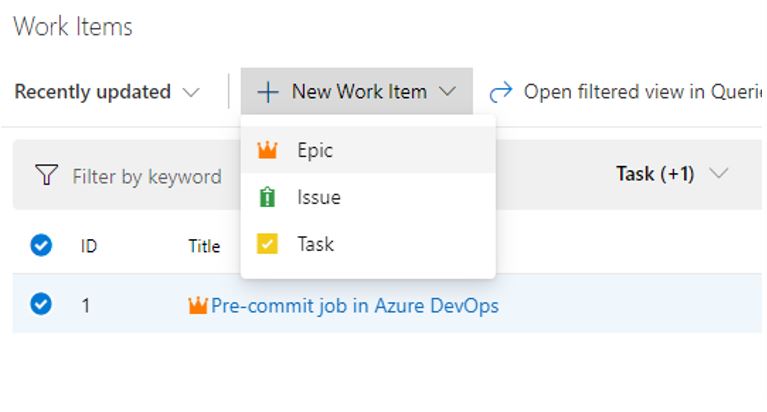
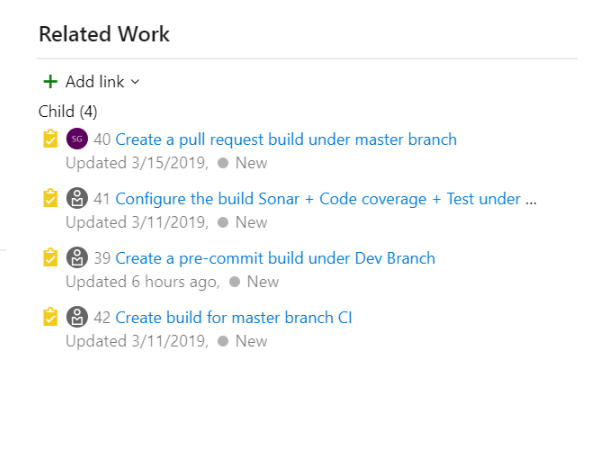
    For every project we have to create on sprint, go to Boards and select Work Items to create a new user story and provide the acceptance criteria. Select Boards and create New Work Items, then under Epic select User Story and click on Task and provide the task description.

    Setting Up Branches, Version Control and Branch Policies

     Steps:

    • Import the code from VCS.
    • Under Repos, create branches such as dev or test.
    • Set up the branches policies to improve code quality.

    Improve Code Quality With Branch Policies

    Branch policies help teams protect their important branches of development. Branch policies enforce a team’s change management standards and code quality.

    Setting up Branch Policies for Review Code

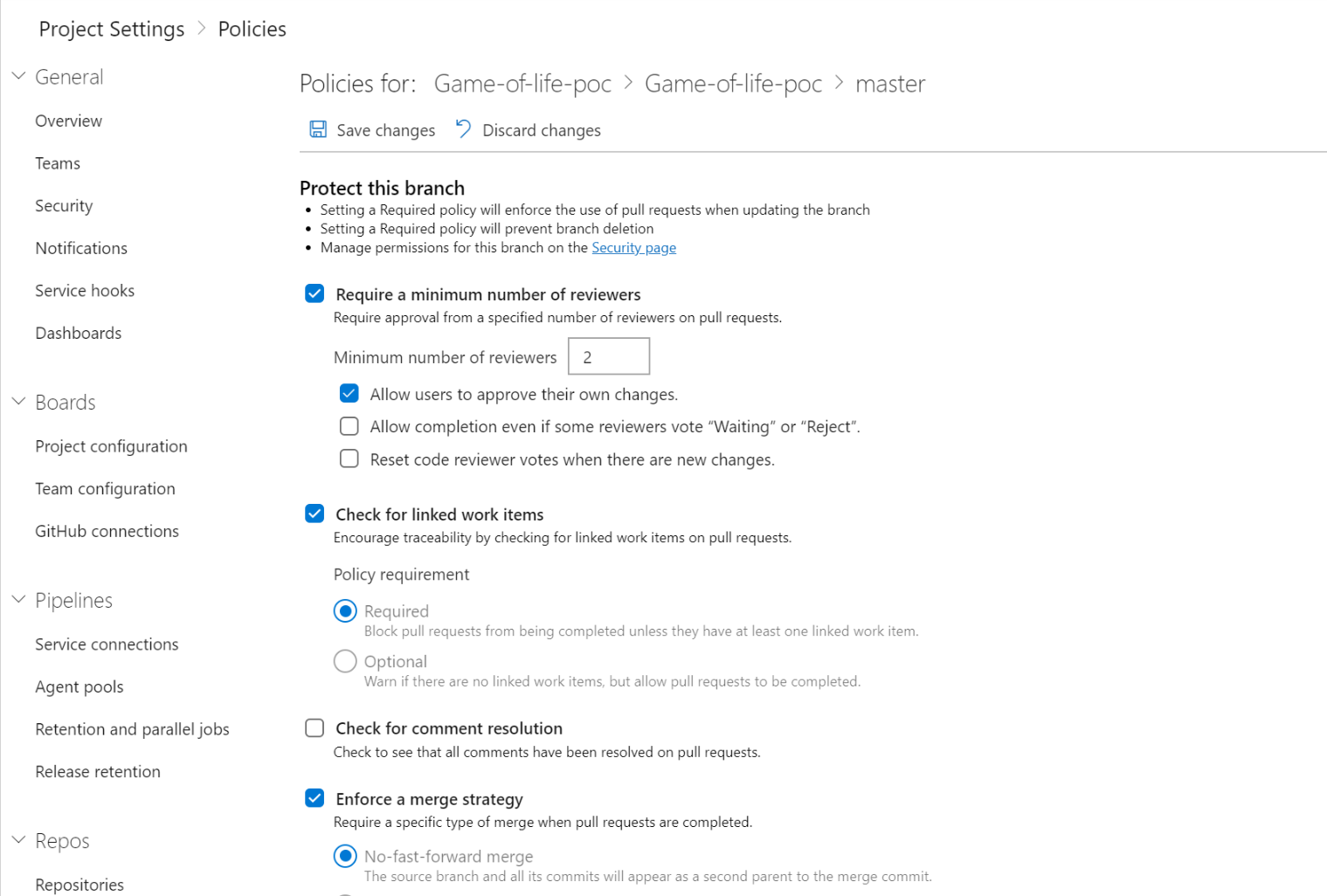
    Code reviews are good practice for the most successful software development projects. We have to configure the minimum number of reviewers to review the code and complete the pull request.

    • The code review done in a pull request is simply to find obvious bugs.
    • Code reviews help protect the team from bad commits or merges and broken builds that hinder team’s productivity.

    The review will help to catch these kind of problems before the merge, protecting our important branches, such as the release branch, from undesirable changes.

    Pre-Commit, Enabling Pull Request

    Steps:

    Workflow to complete the pull request:

    • Create a pull request
    • Complete a pull request

    Benefits of pull request:

    • Peer review
    • Enough testing and better stability
    • Reducing conflicts
    • Continuous delivery
    • Clearer responsibility

    Create a pull request:

    • Pull requests combine the review and merge the code into a single collaborative process.
    • For every bug fix or new feature in a branch, we have to create a new pull request.
    • Add the members of the team to the pull request once the development branch build is completed without issues. Then members can review and vote on your changes.

    Link work items to your pull request:

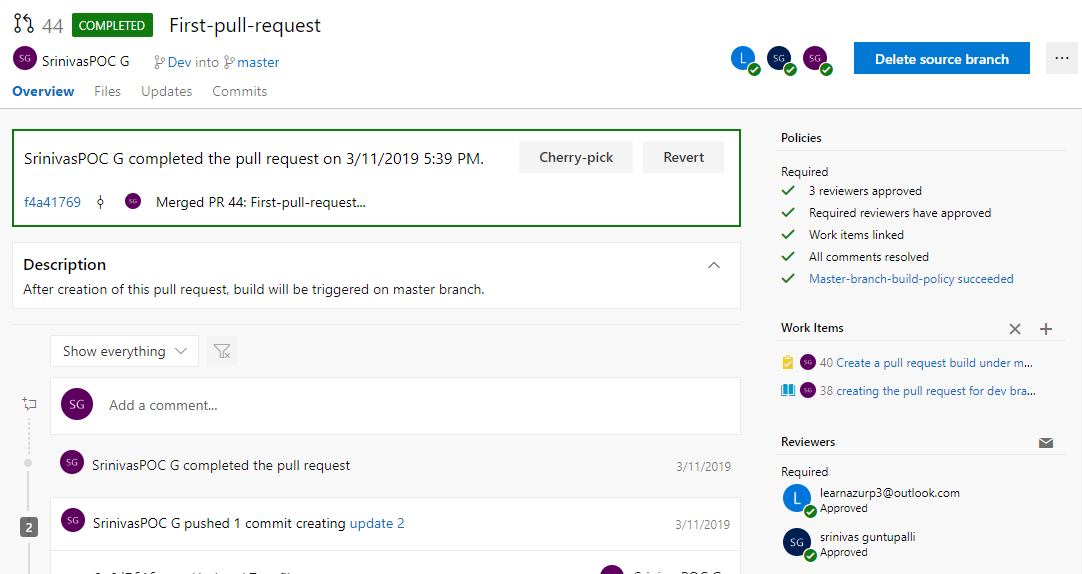
    Select the Overview tab in Azure DevOps. Select the add link button “+” in the Work Items to relate your current pull request.


    Complete Pull Request:

    • The basic policy requires that some reviewers approve the code with no rejections.
    • If Allow users to approve their own changes is not selected, the creator of the pull request can still vote Approve on their pull request, but their vote won’t count toward the Require, least reviewers policy.
    • If any reviewer rejects the changes, the pull request cannot be completed unless the allow users selection is completed, even if some reviewers select Waiting or Reject.
    • To reset code reviewer votes when new changes are pushed to the source branch, check Reset code reviewer votes when there are new changes.

    Nightly CI Build

    Steps:

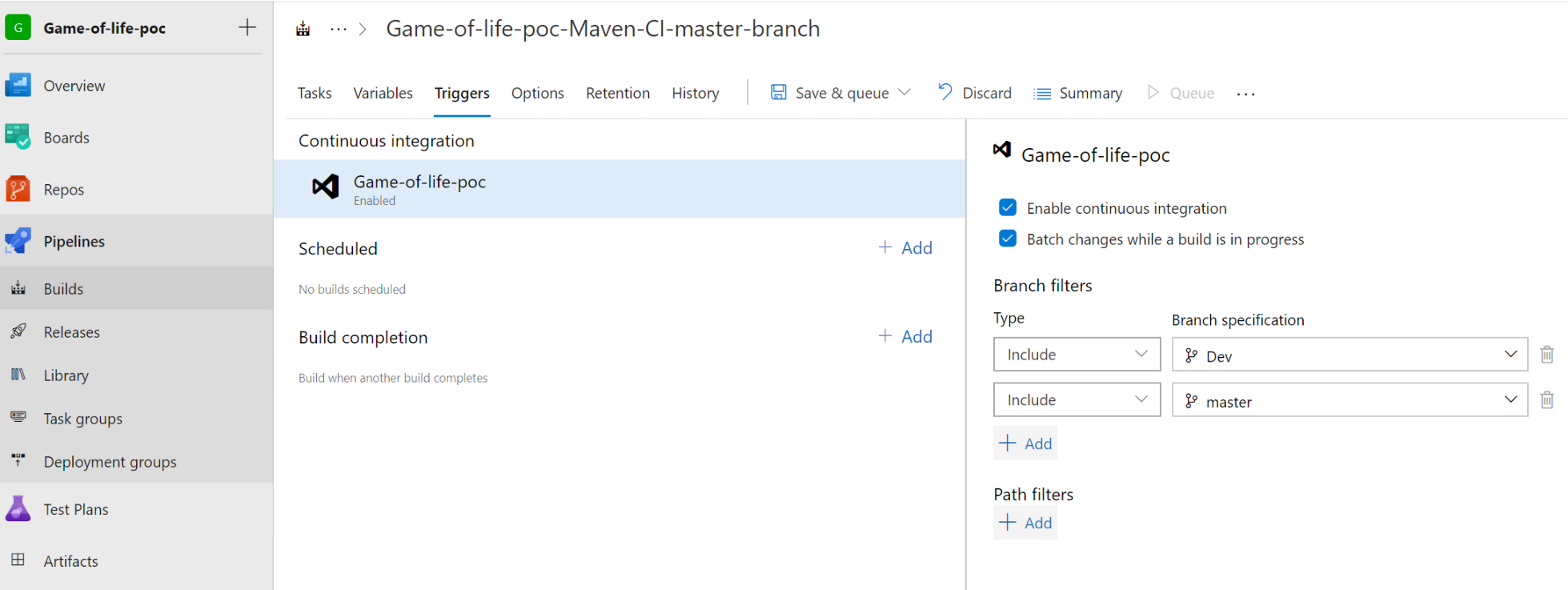
    Build Triggers:

    • We can configure the build triggers to generate war package for every code commit made to the branch.
    • Under Build select Triggers to enable CI and include master branch.
    • One can enable the build trigger for every commit made to the branch.

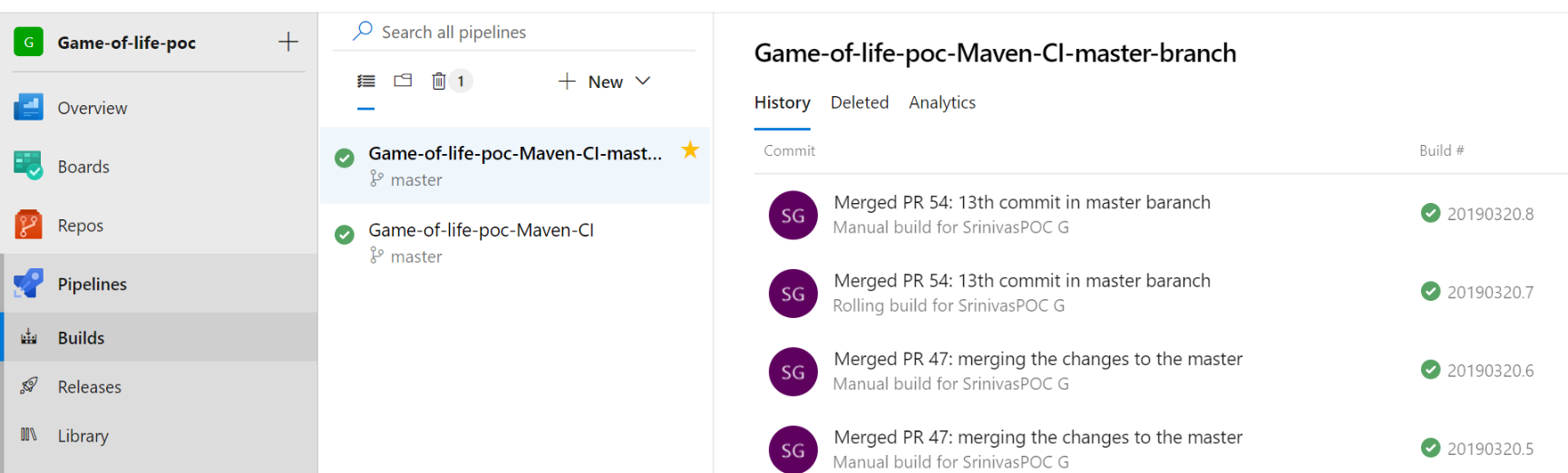
    • Configure two builds—one for dev branch and one for master branch.
    • If the developer executes the code, the dev branch build is triggered automatically with help of dev branch polices.
    • Once the dev branch build is completed, reviewers approve the pull request and the master branch build is triggered. Once the build is completed, it moves to the release part.
    • The code quality analysis and unit test/Junit test is configured in the dev branch. The code quality gateways such as code review and find bug have been enabled.

    Continuous Deployment (Release) through Azure Kubernetes Services (AKS)

    Pre-requisites:

    • Any source code management tool such as Git/SVN or Azure Repo
    • Microsoft MSDN account
    • Azure account creation and VSTS/Azure DevOps account creation
    • Dockerfile to be created and placed along with source code in Git
    • YAML file to be created and placed along with source code in Git
    • Kubernetes cluster to be created in Azure portal
    • Docker hub account or Azure Container Registry
    • Build definition–Docker build image

    Docker File Creation for Application to Deploy

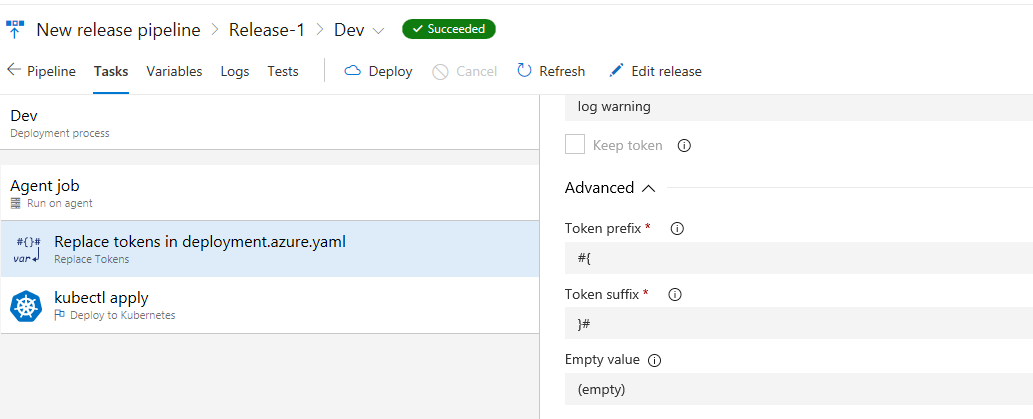
    Create the Service Principle to provide the access to the application/Docker image to deploy on Azure Kubernetes services. Select the Deploy to Kubernetes task and make the following configurations:

    • Create new Kubernetes service connection
    • Select the command option for deployment
    • Provide the configuration file location i.e, Deployment.yaml
    • Select the container registry type
    • Select the subscription
    • Select the Replace Tokens task to append the tag number for an image automatically while pushing it to container registry
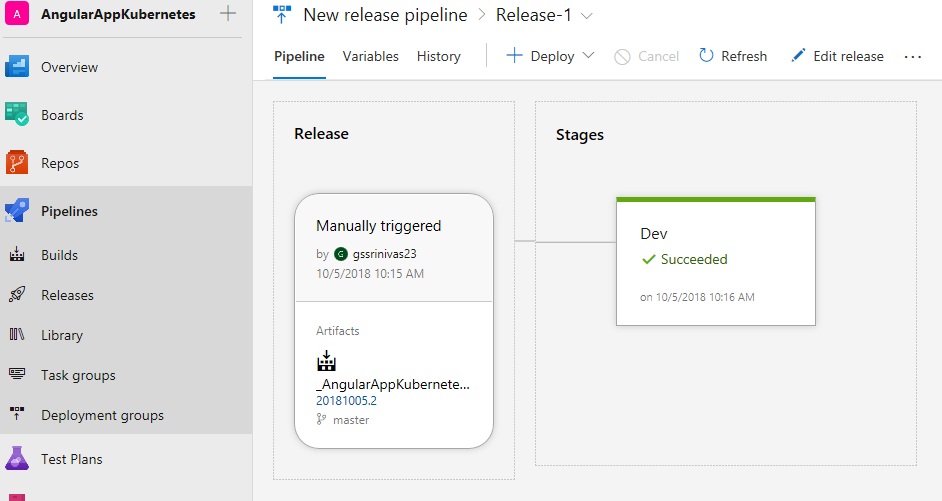
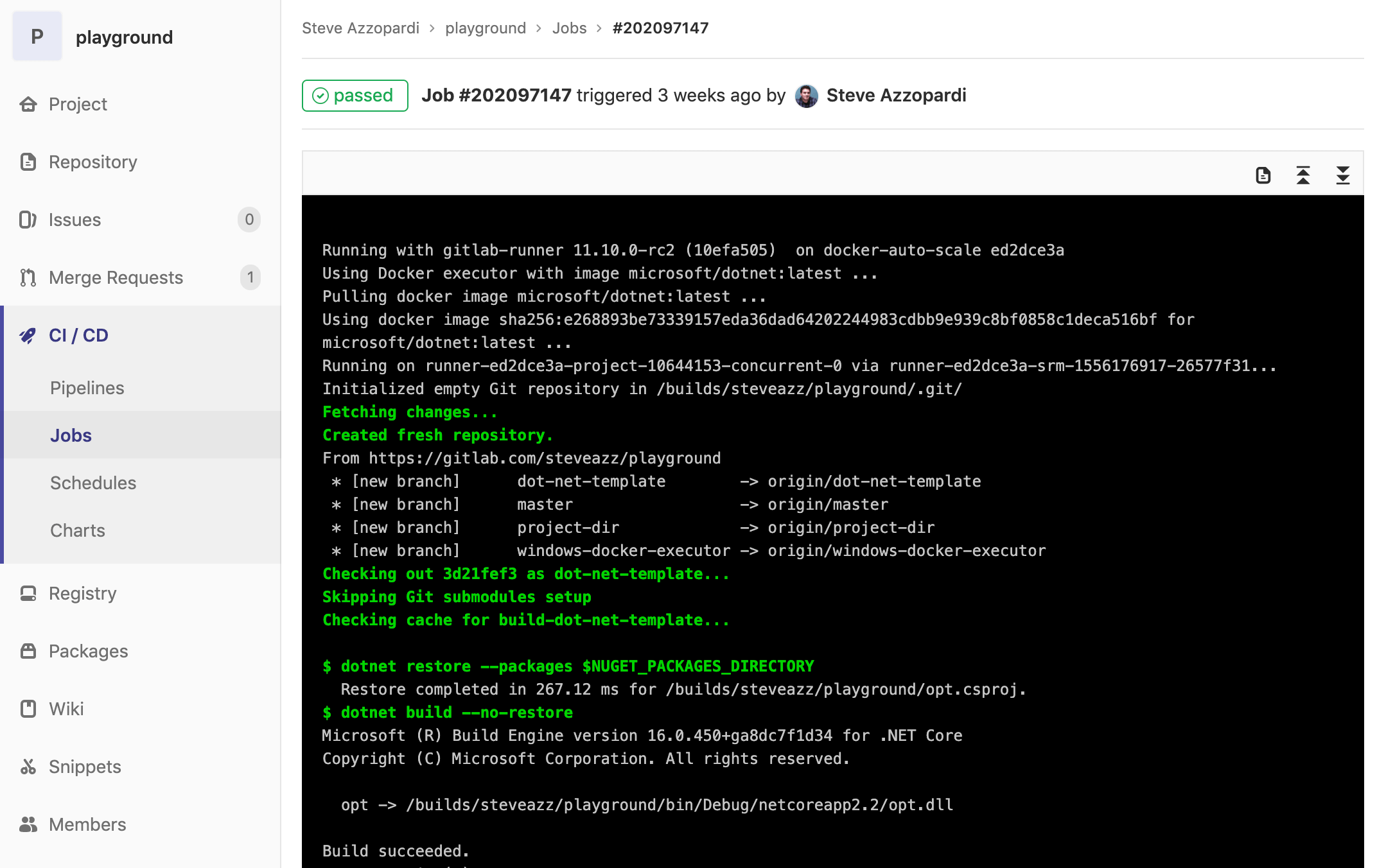
    • Perform the deployment and view the logs


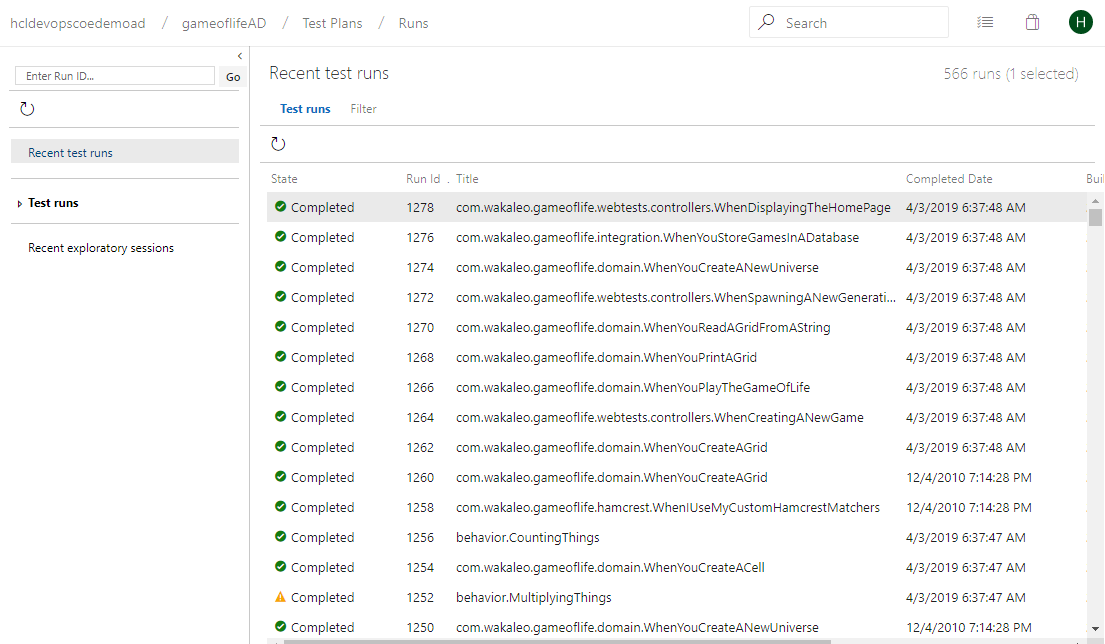
    Test plans:

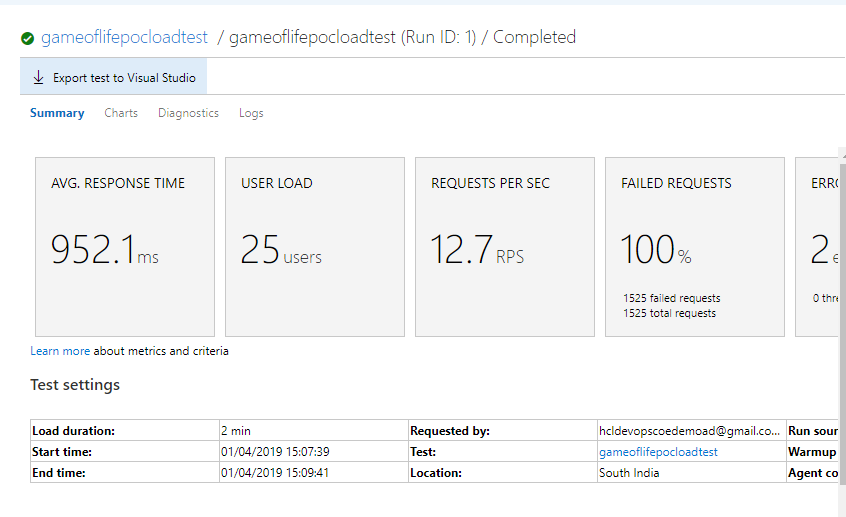
    Load testing:

    Pipeline History

    Azure Pipelines is used to automatically build and test your code project and make it available to other users. Azure Pipelines integrates CI and CD to continuously test and build your project and ship it to any target server. It provides the full-stack end-to-end flow of CI and CD through various tools integrated as tasks in Azure DevOps.

    Conclusion

    With Azure DevOps, you can set up end-to-end DevOps with tracebility, pre-commit, CI and deployment to Kubernetes.


    This article was co-authored by Srinivasa Rao Guntupalli, lead engineer at HCL Technologies Ltd. He works on various DevOps technologies such as Git, maven, Jenkins and cloud technologies including AWS, Azure, Azure DevOps/VSTS.


    — Naveen Manchem

  • GitLab Updates Advance Its CI/CD Platform

    GitLab Updates Advance Its CI/CD Platform

    GitLab has expanded the capabilities of its continuous integration/continuous development (CI/CD) platform to include tighter integration with collaboration platforms from Slack and Mattermost along with the ability to support Docker containers running on Windows.

    Version 11.11 of GitLab adds a caching dependency proxy for Docker images to the Premium edition of GitLab along with the ability to provision an instance-level Kubernetes cluster using instances of GitLab that are managed by an internal DevOps team. Those capabilities are arriving on the heels of GitLab last month announcing its initial support for Kubernetes as a platform on which its CI/CD environment now can be deployed.

    The latest edition of GitLab also adds support for multiple assignees for a merge request capability, which allows multiple members of a DevOps team to manage merge requests within a DevOps pipeline.

    Finally, GitLab 11.11 also provides guest access to releases, extends the add-on CI runner minutes to the GitLab Free edition, supports the OpenID Connect authentication protocol, includes serialized commit graphs and simplifies reviews by auto-resolving a discussion whenever a suggestion is applied.

    Priyanka Sharma, technical evangelist for GitLab, said GitLab is starting to see increased interest in using Docker containers to build applications on Windows. A Windows Container Executor for GitLab Runners capability makes it easier to orchestrate pipelines that include Docker containers destined to be deployed on Windows. Previously, DevOps teams needed to rely on a shell executor to orchestrate Docker commands. This update makes it possible to employ Docker containers on Windows in the same way they are deployed on Linux platforms. GitLab also has improved support for PowerShell, in addition to making available helper images for various versions of Windows containers.

    Sharma said GitLab is starting to see IT organizations that have embraced Windows starting to catch up in terms of enthusiasm for Docker containers. Also, DevOps teams that have embraced both Linux and Windows platforms are looking to apply best DevOps practices to both platforms.

    Microsoft has signaled its intention to continue investing in making Docker containers a core element of its overall strategy. As the work progresses in collaboration with Docker Inc., the need for a CI/CD platform that can support Windows environments will become more acute.

    In the meantime, GitLab continues to focus on making it easier to implement best DevOps practices at scale, Sharma said. As enterprise IT organizations continue to embrace DevOps, many of them soon discover the need for a CI/CD platform designed from the ground up to support pipelines that are being accessed by many concurrent users.

    The decision many of those enterprise IT organizations will have to make is how much they will want to rely on an open source versus closed source platform. The enterprise edition of GitLab is a closed source platform, but the company does make available an open source community edition. While the open source Jenkins platform currently dominates among CI/CD platforms, enterprise IT organizations that have adopted DevOps have shown a willingness to embrace proprietary DevOps platforms that address challenges ranging from the scale of deployments to security and compliance.

    It’s too early to say how the next major CI/CD battle involving the shift to microservices will play out. However, if history is any guide, there should be plenty of room for both open source and proprietary CI/CD platforms.

    — Mike Vizard