Category: DevOps Toolbox

  • Atomist Takes on Application Drift Management

    Atomist Takes on Application Drift Management

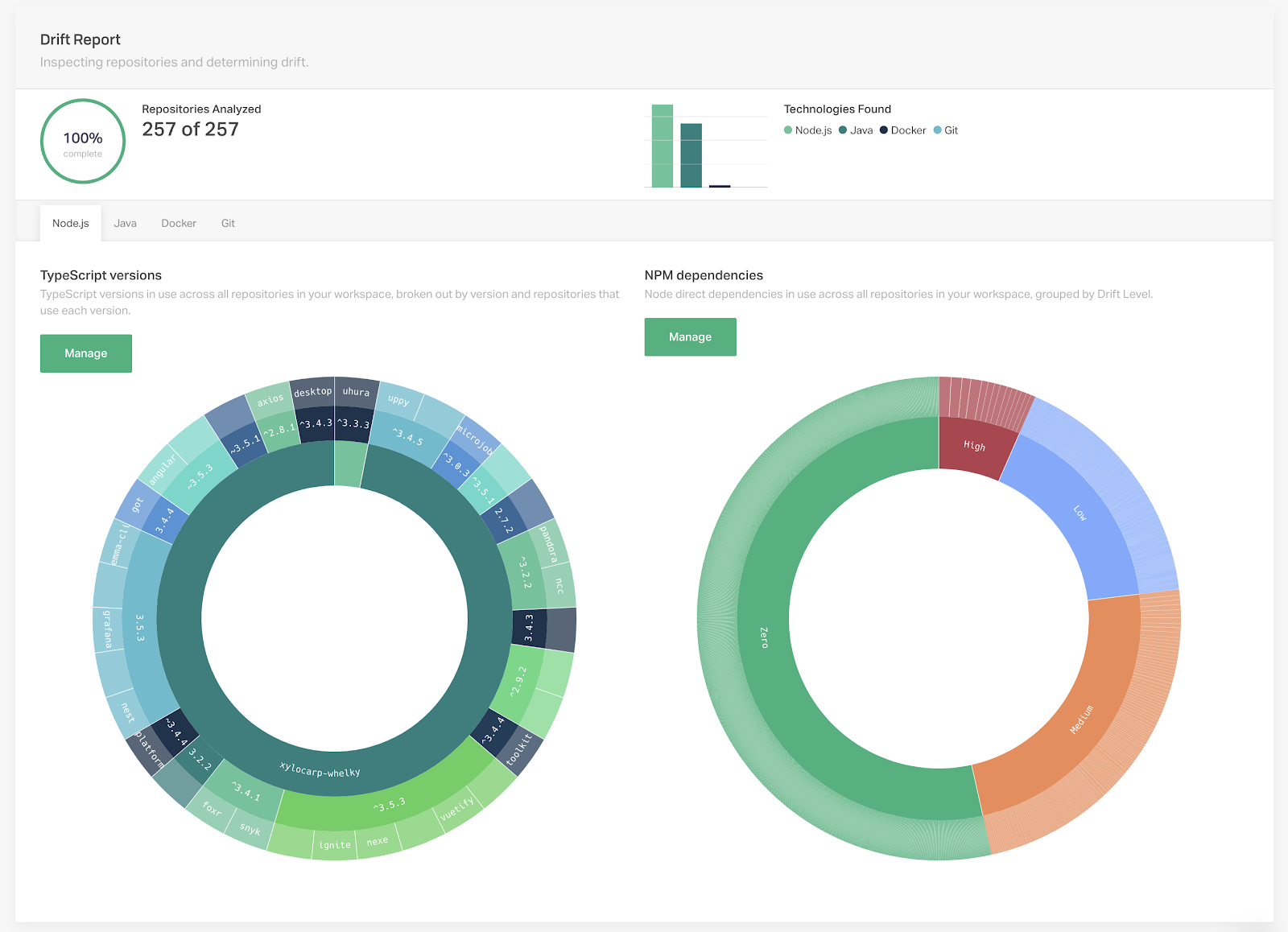
    Atomist today announced it is extending the capabilities of its software delivery automation platform to include drift management tools that make it easier to identify changes to code.

    Now in beta, that capability is based on an open source project dubbed Org Visualizer, which makes it possible to clone an entire project hosted in a GitHub repository via a single click and then visually inspect it.

    DevOps teams also can leverage a built-in Policy Manager to capture and track changes in code, define custom policies that automatically apply updates and automated actions and generate progress reports showing how close they are to achieving a target policy goal.

    Atomist CEO Rod Johnson said the reporting tools provide a visual representation of what’s occurring within an organization’s codebase to make it easier to identify both overly complex dependencies and vulnerabilities.

    The drift management tools are built on the software delivery machine (SDM) concept that lies at the heart of the company’s core platform, Johnson said. The Atomist platform is based on a domain model for software delivery constructed around an application programming interface (API) server and GraphQL, an open source data query and manipulation language. That approach eliminates the need to master, for example, complex YAML files to deliver software. The addition of the visualization tools not only make it easier to see what’s going on in the development environments, but they also make it easier to identify areas where technical debt in the form of bugs and vulnerabilities is building within an application development project, he noted.

    The sooner those issues are addressed, the more probable it becomes that DevOps teams will deploy reliable, secure code, rather than needing to update it or roll back the entire application, Johnson added.

    Although the Atomist platform is capable of working in any application environment, there’s a high correlation between organizations that have embraced microservices-based on containers and organizations looking to automate software delivery using the Atomist platform, Johnson said. Organizations that embrace microservices based on containers typically have a frequent need to update codebases in production environments, he noted, adding many organizations don’t know the impact that microservices updates have on the rest of the production environment.

    In general, there’s been a lot of DevOps progress when it comes to automating continuous integration within the context of application development project. However, automating the delivery of software has proven to be a more elusive goal. As the rate and amount of code being developed continues to accelerate, it’s now only a matter of time before software delivery automation becomes a more pressing issue. Manual deployment processes prone to errors only serve to aggravate application development and deployment backlog at a time when business leaders are demanding IT teams become more agile.

    At the very least, tools that enable DevOps teams to visualize the scope of the challenge ahead should help frame a realistic conversation about what’s truly achievable, given the current state of the codebase.

    — Mike Vizard

  • Aspects of Machine Learning on the Edge

    Aspects of Machine Learning on the Edge

    Machine learning (ML) is hard. Making it work within the confined environment of an embedded device can easily become a quagmire unless we consider, and frequently revisit, the design and deployment aspects crucially affected by ML requirements. A bit of upfront planning makes the difference between project success and failure.

    For this article, our focus is on building commercial-grade applications with significant, or even dominant, ML components. Edge devices, especially ML enabled ones, don’t operate in isolation; they form just one element of a complex automated pipeline.

    You have a device, or better yet, an idea for one which will perform complex analytics, usually in something close to real time and deliver results as network traffic, user data displays, machine control or all three. The earlier you are in the design process, the better positioned you’ll be to adjust your hardware and software stack to match the ML requirements. The available tools (especially at the edge) are neither mature, nor general purpose. The more flexible you are, the better your odds of building a viable product.

    Let’s start by describing a hypothetical device and we’ll work through some ML considerations of the design. As we discuss the design, we’ll visit and revisit DevOps automations that go hand in hand with these other engineering processes.

    A Smart Security Camera

    For our design, let’s look at a networked security camera. As an IoT device, it’s continually connected to the internet. We’ll assume our device will have at least 4GB of SDRAM, a 64-bit ARM CPU and run an embedded Linux that supports an Anaconda Python distribution, OpenCV, DLIB and TensorFlow.

    Our ML related goals are first, recording and labeling interesting frames, and second, alerting security personnel to suspicious activity. We are constrained by various physical, environmental and cost factors. To make the best use of the available data, we’ll need to use ML to examine and classify multiple objects from every image frame. We’ll use a cloud service to handle the second goal, so here, ML on the edge concerns image recognition. How should we proceed?

    Process the Images in the Cloud?

    We’ll need to recognize various objects in the frames, such as people, faces, vehicles, etc. Each object set requires execution (inference) of an ML model, which produces a set of bounded, labeled objects. A typical camera will record about 30 frames per second. Couldn’t our camera just send that data to a cloud provider? Ignoring other considerations, this is about 2.5 million images/day; even at a deep discount this would be billed at about $1000 a day, and that’s for each recognition model applied. Clearly, we’ll need to make other choices.

    Let’s start by examining the raw input stream. Each raw 720p (standard HD 1280x720px) frame uses about 5MB, so if we were to send 30 frames/sec over the network we would need an incredible 1.5Gbps connection (about a terabyte every two hours). For full HD and higher, multiply this by four to 10 times. We will not be sending raw, uncompressed video. Our problem is our ML models will only work against individual image frames. Where should we make our trade-offs?

    Video produces vast amounts of data, but very little information in a given frame is new; this is why various compression techniques work extremely well, and raw data reductions of 100-1000x is typical. These reduced rates of 15 down to 1.5 Mbps is fairly reasonable, so perhaps we can do our ML inference using cloud services, as long as we host our own machine instances rather than paying for ML services. Depending on our workloads, we can expect to process 24×7 video for between $50 and $200 per month.

    Having decided to host our ML models in the cloud, we now need to manage a corresponding set of DevOps considerations. Do we have enough compute power to manage the service? How will we scale the workload as the number of edge machines increases? What are the storage and data retention policies? And of course, since we’re dealing with images of people, how will we manage privacy concerns and the associated legal and political ramifications.

    What should bias us toward more cloud processing?

    • Our initial development budget is more limited.
    • Our ML models have not been proven effective in limited processing/memory environments.
    • We need the flexibility to rapidly change the models we use for processing.
    • We know the network connectivity is robust and offline operation is not required.
    • Our budget for cloud services can significantly exceed the cost of our edge hardware.

    The choice between processing in the cloud, or on the edge is not a binary one. Designs can massively benefit from even limited edge computing; in some cases, simple detections (motion/vehicle/human/face) can be implemented on the edge to reduce cloud workloads by orders of magnitude with no loss in utility.

    Can We Do Most of the Work on the Edge?

    If we’re using Python with C library acceleration on our quad core ARM, simple ML models such as face detection (not recognition) may handle 10 to 20 frames/second, but 30/fps on anything like a full sized image will not be possible. Deeper, more complex models won’t fit into our limited RAM, and if they did fit, we could see inference times exceed a second per frame. We’re now faced with the realities of life on the edge: trade-offs.

    Once we’ve committed to placing our models into the edge device, we’ll need continuous integration (CI) and deployment services to support our product. These will let us train and retrain our models in the cloud, automate the process of validating improvements and produce the embedded code that updates the models in our target devices.

    Since we initially used models well suited to GPU based servers, can we just add a GPU to our device? In a word, yes, but with some very real costs. Adopting an alternate SoM with GPU support will provide a magnitude of improvement in inference performance, but will double or treble the unit cost and power consumption will increase. Such changes may incur significant non-recurring engineering as adjustments, rewrites or retraining of the model will be required to take advantage of the new hardware. Non-recurring engineering is a one shot cost associated with a change to a part, assembly or system.

    In some cases we can plug an Intel Movidius Neural Compute Stick (NCS) into a spare USB port and see 5x to 10x boost in per image rates. These are supported by the Intel OpenVINO toolkit, but there will be some development time to get things running and not every model can be made to work.

    The next tool in the box is Field Programmable Gate Arrays (FPGA) development. It’s a chore to incorporate these into our board design, but performance can be equal or better than GPUs (on some models), and power consumption is lower. The Intel OpenVINO Toolkit supports Arria and Stratix FPGAs for DNNs. Pricing can be prohibitive.

    Finally, if our device will be produced in large quantities, it can be worth a few million dollars of NRE to build an Application Specific Integrated Circuit (ASIC). The sunk cost of ASIC design can be huge, but the lower unit costs will make up for it. We’ll go this route only once our design has been proven, locked down and we are sure the market can take the volume needed to break even on these engineering costs. I should note architectural improvements in dataflow processing of DNNs in ASICs, such as Vivienne Sze’s work, show promise for dramatic improvements in weight, power consumption and cost. If you are planning for a longer term, don’t rule out these developments.

    What would make our edge processing easier?

    • Start with low footprint models such as TinyYOLO, MobileNet or SqueezeNet.
    • Accept lower frame rates for image processing in our design.
    • Evaluate the ML models with the hardware specifics and tool sets in mind, up front.
    • Provide automated DevOps services to update models in your devices.

    Building our ML models to run on edge devices will involve significant development costs. Tool chains do not install seamlessly, and it’s common to spend days to weeks tweaking the environments. Development and testing on these platforms tend to be slower and involve more manual steps than we’re used to in our DevOps environments.

    Running models on the edge will increase our DevOps complexity. Our cloud workload will be lower, but now we’ll include cross compilation, embedded code builds, download management of larger images and various additional test and validation stages. These will be on top of the training, load balancing, data retention, privacy and security issues we need to address for a cloud-only system.

    Conclusions

    What else will affect our choices here? The nature of the inputs can really matter. If our camera visualizes traffic on a busy roadway, or people in an airport terminal, we can expect almost every frame will contain something of interest; if we’re monitoring the bottom floor of a parking garage–not so much.

    To recap:

    • Cloud services for video rate ML are cost prohibitive.
    • Integrate DevOps early to complete your product support system.
    • Understand and characterize your input data by volume, scale and importance.
    • Recognize not every model can execute on edge hardware.
    • You have more choices in edge hardware than you thought.

    Although there are still challenges to building more intelligence into devices, it’s important to realize every year these constraints are fewer, the tools get better and the devices become more powerful. A compelling argument can be made that most data processing should occur as close to its source as possible.

    — John Fogarty

  • Got a DevOps Tool? Take Part in Our Annual DevOps Tools Survey

    Got a DevOps Tool? Take Part in Our Annual DevOps Tools Survey

    The DevOps tools market is growing at a fast clip, with market values ranging from $8 billion to $12 billion worldwide by 2022, depending on which analyst you trust most. That growth is due in large part to the number of vendors entering the DevOps space, offering a bevy of tools designed specifically for addressing the need for organizations to bring applications to market faster while improving quality and securely.

    The market is growing so fast, in fact, that it’s getting difficult for us (and, I’m sure, you) to keep up with all the new players out there. That’s why we’ve put together a tools survey that we hope tools vendors will take part in. Our goal is to create a comprehensive directory that developers, IT operations and executives can use to discover the right tool for their DevOps toolchain.

    The survey is also going to be used to help us recognize the top vendors in each category through our annual DevOps Tools Awards. And that, my friends, is a big deal.

    The DevOps Tools Survey breaks tools into categories based on their utility as they relate to building applications. The categories are: creating, assuring, assembling, securing, delivering, running and analyzing. Organizations can submit up to three tools to be included in the directory.

    Want to be a part of the action and get your tool listed? Simply click on this link to get started.  The process takes only about 10 minutes max, and will give us the information we need to get your tool included. It costs nothing to be included in the directory, and enhanced listings are available as well.

    So don’t wait! The deadline for submissions is Sept. 15.

    — Charlene O’Hanlon

  • Computer Vision is Building the Future

    Computer Vision is Building the Future

    Developing an accurate, regulated and purpose-driven facial recognition software is the challenge of computer vision engineering. It is also the future of how people do their everyday tasks: from unlocking a phone to signing into a bank app or logging the time they get to the office. Facial recognition amazes more and more with its new applications. Today, people can go to a concert without the tickets they bought online, they just have to bring…their face and show it at the gate.

    Computer vision science has been working on facial and object recognition software for some decades now. From the beginning, the main goal of this engineering, framed in the AI field, has been to give computers a visual understanding of the world.

    The goal gets fulfilled through a three-step process: image acquisition, image processing and image understanding. Each step can be done thanks to different kinds of technology. For example, image acquisition can be done using a web camera, an embedded phone camera or a 3D camera, among other types of lenses.

    With the help of algorithms computer vision is currently capable of recognizing and tracking objects. But it can go much further than that. Now, neural networks are at such a high level that they are capable of restoring and even creating new images. All of these features that seemed to be available only in futuristic or science fiction movies are now in the market thanks to AI algorithms, such as Generative Adversarial Networks (GAN).

    Today, big cloud providers have released their own AI and vision models including facial recognition APIs. Nevertheless, these models are conceived with rather general purpose algorithms that might be sensitive to specific environmental details, but don’t offer the possibility to retrain models with data gathered in a productive environment.

    The good news is some companies can offer AI models retraining in customers’ environment to accommodate any need or requirement, including usage of depth cameras or ToF sensors. But of course, these developments bring along some challenges. The way to succeed is to be ready and thoughtful in every step. This way, any surprises along the process will be controlled and won’t destabilize the project offered to a client.

    Last year at intive, we built a cognitive department with our internal AI experts as well as the best people we could find in the market. Eleven people shaped the core team that developed advanced facial recognition software in only one year of work. Our objective was to create an AI model fast suited to specific environmental conditions of small, medium-sized and big companies. We created AI models capable of using RGB, depth cameras and ToF sensors.

    Depth cameras enable the API to distinguish a real human face from flat images such as screens, tablets and paper. The new intive’s API can estimate age, detect sex and recognize a fraudulent face. It identifies eyes, nose and the ratio of length and distance of individual facial elements. It can even discern the differences between identical twins. The only face characteristics not taken into account are hair, mustache and beard; this is to make sure shaving or changing the hair style won’t impact the recognition capabilities.

    Here are the three major challenges for computer vision development.

    Legal and Compliance

    First, at any computer vision development, it is crucial to have the General Data Protection Regulation (GDPR) in mind. You must ensure you are allowed to manage or process certain biometric data. Imagine the city government installs cameras over the city parks, these are useful not only for recording but they are also capable of tracking people, thus enhancing the streets security. In this case, people’s identity has to be somehow recognized, and the way of doing this is by processing biometric data. If the person tracked does not know this is being done, a GDPR violation happens.

    Anytime a system needs to process people’s biometric data that can identify them, they need to give consent to process this data. To solve this, intive installed a button on our API that releases the biometric calculations and the person’s identification. By pressing this button, the person automatically gives consent to start the process. Additionally, while enrolling to the system, employees need to sign the consent.

    Same Environment, Always

    In every computer vision case, environment is an aspect you will always have to deal with. This refers to the technology used for acquiring images during the development, testing and productive stages of the project: the type of camera and its calibration, the drivers, libraries, settings and the light conditions.

    To ensure the API’s best accuracy, all stages must be developed with the same environmental conditions. Otherwise, the system loses its best accuracy and could come-up with worse results in the productive environment and in the development one. When environments change, the error rate rises.

    To ensure success, it is crucial to collect all possible data from the final environment and retrain the developed model with this data. For our computer vision project, we created several different production environments and we gathered all the data that came up. There will always be differences, for example, the lighting conditions are hard to control in every stage. But the more data you have, the fewer errors will appear.

    Set Acceptance Criteria and Meet It with the Data You Have

    From the beginning of the project, it is very important to set the accuracy you are aiming for. This means you need to decide how often the system recognizes an enrolled user correctly. To understand this better, if you have 10 users, and you set a classification accuracy of 90%, this means nine people are going to be recognized accurately.

    False positive rate (FPR) is linked to this and it needs to be decided too. This value represents how often the system recognizes a person that enters the system with different characteristics than the enrolled one. For example, if you are using the system to control employees’ entrance to an office, how often will a person who is not an employee (and not enrolled in the system) gain access to the building?

    Both values, accuracy and FPR, are strictly bound. Better accuracy is directly related to an increase in FPR. You need to decide if you want better accuracy and higher FPR or lower accuracy and lower FPR. This can be controlled smoothly along the course of the development if you set it according to the available data.

    Accuracy and FPR will change based on the quality of data–the photos used. The more pictures (data) per enrolled person, the more accurate the system is. Pictures from different angles allow the system to have a better chance of being effective. In our case, we took a minimum of five pictures for every enrolled person.

    Working on a computer vision project with facial recognition software can seem intimidating. But it is just a matter of being well organized. Take into account the three challenges highlighted above and you will be on the right track to success.

    — Grzegorz Tymiński

  • Progressive Web Apps are Taking Over the Mobile Web

    Progressive Web Apps are Taking Over the Mobile Web

    Consumers now spend most of their time on their mobiles, that’s no secret. And with 4G networks now the norm in both developed and developing markets, people have every reason to expect their mobile experiences will be as good as PC-based ones.

    But they aren’t for the most part. Mobile web is 49% of all online traffic, but mobile conversions remain painfully low at only 1.7%. This is a sobering statistic, particularly for companies who are under growing pressure to stay relevant as customer behavior continues to evolve.

    Part of the issue comes down to limitations in the user experience on mobile (i.e. smaller screens), but the bigger factor is speed. According to Google, 53% of users will bounce off a web page that takes more than three seconds to load. And yet, the average homepage still takes 15 seconds to load on a mobile phone.

    Unless a customer feels an extreme sense of urgency to make their purchase, it’s unlikely they will endure the pain of waiting for page after page to load as they try to get through a purchase selection and checkout process on their phone. Neither are they likely to immediately put down their phone and dig out their laptop to complete the transaction.

    Welcome to the Progressive Web

    Enter progressive web apps (PWAs), the future of mobile web experiences.

    While responsive web design (RWD) made most websites usable on a phone sized screen, the actual experience of interaction has proven too slow and clunky when compared to the same website on a PC. In response, many brands have developed their own mobile apps, hoping to win customers over with a smoother and more convenient service. However, aside from niche businesses with a high-touch, loyal customer-base, such as Starbucks and Facebook, most brands have spent a great deal of time making apps that are moderately successful at best, not to mention the hundreds of thousands, or even millions of dollars in development costs.

    PWAs represent a significant leap forward because they allow companies to deliver the user-friendliness and page load speeds of a native app, but directly from the company’s mobile website. PWAs also make it possible for developers to create online experiences that don’t just adjust to different screen sizes but can interact with device features (such as Camera, GPS and push-notifications) creating streamlined experiences that are optimized based on which device a customer is using. The result is a more consistent experience across devices, with no features lost.

    Most importantly, at a time when the war for attention has never been more intense, with PWAs, web pages load in a fraction of the time, keeping customers engaged rather than testing their patience and driving them to competitor sites.

    Take the Financial Times, a company proving PWAs can have a major impact on conversion. The FT recently went the PWA route to keep pace with surging web traffic.

    “One of our key metrics was speed. We determined if we made the site just one second faster, it increases engagement by 5%, and would ultimately add millions of dollars to our bottom line due to increased ad views,” said Cait O’Riordan, chief product and information officer at the FT.

    Analyst houses Forrester and Gartner are also bullish on PWAs. Forrester went as far as to say there is no longer a point in arguing over which kind of mobile app is best–native or hybrid–because with PWAs taking off, nobody will bother using apps soon. Even among airlines, whose apps are some of the most useful and commonly downloaded, progressive web is seen as the future.

    “Apps are a temporary necessity in the development of better mobile experiences,” admitted Scott Wilson, vice president of eCommerce merchandising at United.

    Democratizing Mobile Access

    In addition to supporting faster and more responsive mobile experiences, PWAs also make access to these experiences more democratic. This is particularly relevant in emerging markets such as India and Indonesia, where consumers have limited data allowances on their phones due to high costs.

    Until now, this has stopped customers from downloading multiple apps. It has also limited people’s ability to engage with brands because, for many, mobile is their only portal to the internet. This is all set to change with PWAs.

    PWAs demand a fraction of the data compared with traditional apps while offering nearly the same quality of experience, eliminating the access barrier and delivering a win-win for merchants and customers alike.

    Why Now?

    It’s no surprise the world’s leading brands, from BMW to Starbucks, have already deployed PWAs or are on the verge of doing so. Starbucks’s mobile app has long been viewed as a gold standard for customer experience and loyalty programs, but even the world’s biggest coffee chain understands PWAs are the way forward.

    The wider move toward progressive web will begin in earnest over the next year. More organizations have come to appreciate the revenue risk of getting left behind and have begun to prepare for a PWAs push between now and 2025. Five years from now, mobile will easily account for 60-70% of web traffic, and customers will not hesitate to funnel towards mobile sites that work quickly and reliably. As the disruption of the past decade has shown us, heritage is no guarantee of loyalty when it comes to digital experiences.

    Of course, the transition to PWAs can’t be accomplished overnight. It is a major strategic transformation that requires brands to take on a front-end rebuild of their websites. It’s also worth noting PWAs development costs can be on-par with those for a mobile app. However, unlike apps that need multiple versions for iOS and Android and require frequent updates on their respective app stores, PWAs are simply an evolution of existing open web technologies that make the web a better place both on mobile and desktop. The opportunity cost of becoming a laggard on the web is much higher than the investment cost of building a PWA.

    PWAs will soon be the foundation of all digital commerce globally, and the rollouts planned over the next few years will see leading brands set a new minimum standard for customer experience. Google already added a mobile speed score to its search result rankings algorithm in 2018, and there is widespread consensus that page load times and PWA compliance will only carry more weight in Google’s rankings as more people abandon their PCs for mobile devices.

    Customers around the world are also ready for better mobile experiences. With PWAs, brands will gain access to technology that will help them satisfy their customers’ appetite for speedy web experiences–and the race to capitalize has begun.

    — Peter Sheldon

  • OverOps Integrates AI Code Analyzer With CI/CD Platforms

    OverOps Integrates AI Code Analyzer With CI/CD Platforms

    At the DevOps World | Jenkins World 2019 conference, OverOps announced it has integrated its namesake tools for analyzing Java and Microsoft .NET code at runtime with a variety of continuous integration/continuous deployment (CI/CD) platforms, including Jenkins, JetBrains TeamCity, Atlassian Bamboo and Pivotal Concourse.

    Eric Mizell, vice president of solution engineering for OverOps, noted that the more errors that are discovered by DevOps teams early in the development cycle, the less technical debt organizations must address after an application is deployed in a production environment. By pushing testing to further to the left of the application development process, the less troubleshooting will be required later on, he said.

    OverOps employs predictive analytics and machine learning algorithms to identify new, increasing, resurfaced and critical errors in a release. It then generates a code quality report that ranks all severe issues likely to impact end users and application functions. By integrating OverOps within the CI/CD pipeline, DevOps teams can use those reports to determine whether code is safe to promote or automatically block unstable releases from moving forward.

    In addition, because the machine learning algorithms surface the true root cause of an issue, DevOps teams can more efficiently remediate issues by routing code back to the development team responsible for all the issues that are being created downstream.

    Making testing an integral part of the CI/CD process not only tightens the relationship between developers and testers, but also in many cases enables developers to test their own code before submitting it for review.

    Mizell said the need to shift testing to the left has become more critical as customer tolerance for application errors is low, especially in use cases involving mobile applications—consumers are especially unlikely to give a mobile application a second chance after they’ve encountered an issue.

    In an ideal world, of course, testing tools that make use of machine learning algorithms would be employed to coach developers in a way that enables them to develop reliable code more consistently and faster. However, some organizations will use tools that leverage machine learning algorithms to identify developers who are not meeting expectations. That weeding out process is likely to begin much earlier in the application development life cycle as more advanced testing tools are embedded within CI/CD environments. Those tools won’t eliminate the need for developers and testers, but they do promise to increase dramatically the rate at which quality applications can be built and deployed at an industrial scale. Technical debt may never be completely eliminated, but at the very least the rate at which that technical debt is being accumulated should substantially decline.

    It may be a while longer before machine learning algorithms and other forms of artificial intelligence (AI) are employed pervasively across DevOps processes. In most cases, those algorithms will help developers write better code faster. However, it’s also apparent there will be other algorithms at work that one way or another ensure developers will have fewer opportunities to make mistakes in the first place.

    — Mike Vizard

  • GitHub Actions Advances Automation Strategy

    GitHub Actions Advances Automation Strategy

    GitHub Actions, a set of application programming interfaces (APIs) through which DevOps tools can automate workflows, is now available in beta.

    Previewed last year at the GitHub Universe event, GitHub Actions is intended to provide not only a way to automate responses to events occurring within a GitHub Repository but also share those workflows across multiple DevOps teams, said Max Schoening, senior director of product design for GitHub.

    Actions are based on YAML files, which makes it possible to write them in JavaScript or other programming languages or package them up as a set of containers. In either instance, they are designed to interact with the full GitHub API and any other public API.

    In addition, higher levels of automation enabled by GitHub Actions should make it more feasible for DevOps teams to test multiple versions of a project in parallel as workflows written in code replace manual processes, said Schoening.

    As more manual processes become automated, the number of IT teams who are intimidated by DevOps processes today should begin to decline. Organizations also should be able to apply best DevOps practices more consistently across multiple teams. Too often today the DevOps practices within the same organization tend to vary widely. Schoening also noted that given the open source history of GitHub, organizations will be able to see how workflows have been created for popular open source projects and then copy them.

    In addition, Schoening said the arm of Microsoft will continue to invest in analytics that will surface workflow recommendations that can be applied to any project regardless of the language employed or the platform on which it’s destined to be deployed.

    On one level, DevOps is all about a ruthless commitment to automation. But when automation goes wrong at scale, it can be extremely problematic. Rather than relying on “black box” approaches to automating processes, a truly open source approach to automation makes it possible for DevOps teams to see how a process is being automated and then extend it if they so choose, said Schoening. To help address the concern, GitHub Actions also provides access to live logs to provide real-time feedback as builds run, which Schoening said makes it easier for DevOps teams to debug automations created using GitHub Actions.

    It’s too early to say just how automated DevOps processes will get. There’s an emerging school of thought that contends the goal is to make it feasible for developers to spend 100% of their time writing business logic. It’s not clear whether that goal is achievable anytime soon, but progress is made with each update to continuous integration/continuous development (CD/CD) platforms. As complementary advances in machine learning algorithms and other forms of artificial intelligence (AI)—otherwise known as AIOps—occur, it’s apparent many manual DevOps processes will fall by the wayside.

    In the meantime, the workflows that make up any DevOps process should become increasingly sophisticated as advances in automation span everything from hybrid cloud computing environment to internet of things (IoT) deployments. The issue soon may not be how cumbersome any DevOps workflow is, but rather the potential limits of the imagination applied to automating them.

    — Mike Vizard

  • CollabNet VersionOne Advances End-to-End DevOps Strategy

    CollabNet VersionOne Advances End-to-End DevOps Strategy

    At its Agile 2019 conference, CollabNet VersionOne announced it plans to extend the capabilities of its software delivery and management platforms later this month as part of an effort to provide organizations with more visibility into how changing software development project schedules impact the business.

    Company CEO Flint Brenton said updates to the VersionOne value stream enterprise management platform will include a revamped user interface that provides more visibility into events occurring within the Continuum continuous integration (CI) platform.

    Brenton also said those updates will further advance adoption of agile frameworks such as the Scaled Agile Framework (SAFe), a prescriptive approach to combining best agile development and DevOps practices.

    While organizations may opt to employ VersionOne in combination with other CI/CD platforms, Brenton said CollabNet VersionOne provides a more comprehensive understanding of the impact changes to software development schedules will have on the business.

    As part of that effort, CollabNet VersionOne also announced VS Exchange, a marketplace for custom and preconfigured Continuum and VersionOne extensions and workflows, and enhancement to the Continuum TestDrive component within the company’s implementation of Continuum that streamline provisioning.

    With more organizations than ever starting to appreciate how dependent they are on software, Brenton said business leaders are now looking to exercise more control over software development projects. It’s no longer enough to generate more code, he noted; rather, DevOps teams are now being asked to generate more reliable code that has the greatest impact on the business faster. CollabNet VersionOne enables organizations to achieve that goal by providing a management platform in the form of VersionOne that is layered on top of Continuum.

    CollabNet VersionOne is now taking part in a race to infuse more business analytics into a software development lifecycle (SDLC) platform. While SDLC platforms have typically been employed to gather technical metrics, organizations now want to correlate that data against business metrics.

    Less clear right now is whether having access to business metrics will influence the selection of one CI/CD platform over another. Over time, the expectation is that various forms of business intelligence capabilities will be a standard capability of the platform, especially as IT leaders continue to assume larger business responsibilities in the age of digital business processes.

    It may be a while yet before business and IT roles start to converge. In the meantime, CollabNet VersionOne is clearly betting there will be a lot more collaboration between these two camps going forward. In many ways, the DevOps best practices that organizations have adopted to become more agile are about to be extended to the business processes enabled by software. Savvy business leaders will realize their ability to meet financial goals for any given quarter is tied to the timely manner in which new digital customer experiences are enabled. In fact, there may come a day when IT organizations are able to deliver software updates faster than most businesses will be able to consume it.

    — Mike Vizard

  • Twilio Adds DevOps Tool to Invoke Communications Services

    Twilio Adds DevOps Tool to Invoke Communications Services

    At its annual SIGNAL conference, Twilio today launched an initiative intended to make it easier to embed a variety of communication services within an application in the context of a DevOps process.

    Quinton Wall, senior director of developer marketing at Twilio, said the open source Twilio Command Line Interface (CLI) tool, now available in beta, will make it possible to incorporate Twilio cloud services within a larger DevOps toolchain.

    Twilio provides developers will access to a range of SMS, audio and video services that can all be incorporated into applications via application programming interface (API) calls. The pipelines created using those APIs now can be stored and shared via GitHub.

    The CLI tool also makes it possible to extend those services via Plugins, said Wall. In addition, DevOps teams can invoke an existing serverless computing capability from Twilio to invoke the company’s services using functions, added Wall.

    It’s not clear to what degree cloud services such as Twilio will be invoked using serverless computing frameworks going forward. Many of the capabilities that developers once were required to embed in their applications are set to become external services that applications call when needed by launching a function. While that approach makes the application more efficient, it puts additional pressure on IT teams to manage all the calls to various serverless computing frameworks within the context of already complicated DevOps pipeline.

    While serverless computing frameworks are still an emerging IT platform, the rate at which serverless computing frameworks are being adopted suggests the day when they are commonly included with a DevOps toolchain is not very far off.

    In the meantime, Twilio is clearly hoping that by making its communications services easier to invoke within the context of a DevOps toolchain will increase consumption. Twilio has long exposed REST APIs, but the CLI tool will make it easier for organizations to standardize on Twilio communication services across a range of applications. By exposing those services via APIs and a CLI tool, Twilio is betting that the days when end users opened a separate application to communicate are numbered. Instead, most users will invoke communications services within the context of, for example, a business intelligence application that is already open. That approach also eliminates the need to invest in dedicated network hardware to run unified communications applications that, from an API perspective, are often more difficult to invoke programmatically.

    As DevOps processes become more widespread, it will be interesting to see how many other providers of cloud services start to routinely make available CLI tools. Arguably, any provider of a cloud service that doesn’t make a CLI tool available will find themselves on the outside of a DevOps process looking in. Service providers that provide a CLI tool will be preferred among organizations that embrace best DevOps practices. In fact, the challenge DevOps teams soon may face is not whether there is a CLI tool available, but rather determining which of the many available best fits within the DevOps processes they have adopted.

    — Mike Vizard

  • Game On: Gamification for the Win

    Game On: Gamification for the Win

    Staying competitive in today’s fast-moving digital economy is easier said than done. Operating in a digital environment requires a significant shift in company culture and an agile software environment that accelerates time to value. Creating a DevOps environment helps companies keep pace, but it requires a workforce that is empowered, excited and motivated.

    Gamification offers a unique opportunity to continuously engage your workforce by applying game-design elements and game principles into a corporate setting, making work more fun. Companies can develop a team-oriented Pod model that incorporates gamification to improve employee engagement and productivity, enable team members to work more efficiently, accelerate the learning curve and deliver more sophisticated products to market faster.

    When I joined Cognizant Softvision as CEO, I wanted to empower our teams and promote a continuous delivery mindset by developing a delivery model that was customer-centric, differentiated and unique to each client without being prescriptive. Thus, Game of Pods was born.

    The global, Game of Pods gamification program is designed to provide timely and superior customer service. At a high level, Game of Pods inspires and measures team performance and delivery while encouraging and monitoring individual performance. During competition, the Pod and its members are recognized and rewarded for their collective and individual contributions with badges and trophies.

    We typically focus on the output of each pod, rewarding collective behaviors and achievements that help the pod reach higher efficiency and quality targets. Collective badges are awarded to the pod while personal and peer-to-peer badges are awarded to the pod members. Pod badges are earned as a team and are focused on the health of the project, performance of the pod, quality of delivery and alignment with client objectives. A leader board displays the badges each pod earns, their experience points and their trophies. Pod and individual recognitions are celebrated over email and across Facebook Workplace, and shared with all employees.

    While perhaps not as intense as “Game of Thrones,” Game of Pods is the epitome of gamification in action and enables organizations to reach a higher level of efficiency and professionalism while challenging employees to achieve personal goals in a fun, team-oriented process. In addition, Game of Pods offers other benefits such as:

    • A flexible model that can work in any client environment.
    • Team empowerment that incentivizes teams and individuals to achieve more.
    • An approach that encourages diverse thinking that recognizes and rewards teams and individuals for improvement.

    Game of Pods is most effective in organizations that embrace an agile mindset and understand the need for flexibility in today’s fast-moving environment. While gamification has come a long way, successfully incorporating it into the workplace can be challenging. However, integrating gaming into your organization can empower and excite employees, motivating them to overcome obstacles that might otherwise stand in the way of success and sustainable innovation.

    — Andres Angelani