Category: DevOps Toolbox

  • Compuware Extends DevOps Push for Mainframes

    Compuware Extends DevOps Push for Mainframes

    Compuware has advanced its campaign to erase the DevOps divide between mainframes and distributed systems via an update to Topaz for Enterprise Data that makes it easier to generate data from mainframe applications for testing purposes without compromising the security of some of the most sensitive data in the enterprise.

    Company CEO Chris O’Malley said Topaz for Enterprise Data now includes a data masking capability that preserves essential data relationships and characteristics without letting developers see the data being copied.

    Designed to be compatible with Eclipse integrated development environments (IDEs), Topaz for Enterprise Data also automates the extract, transform and load (ETL) process by enabling developers to convert file types.
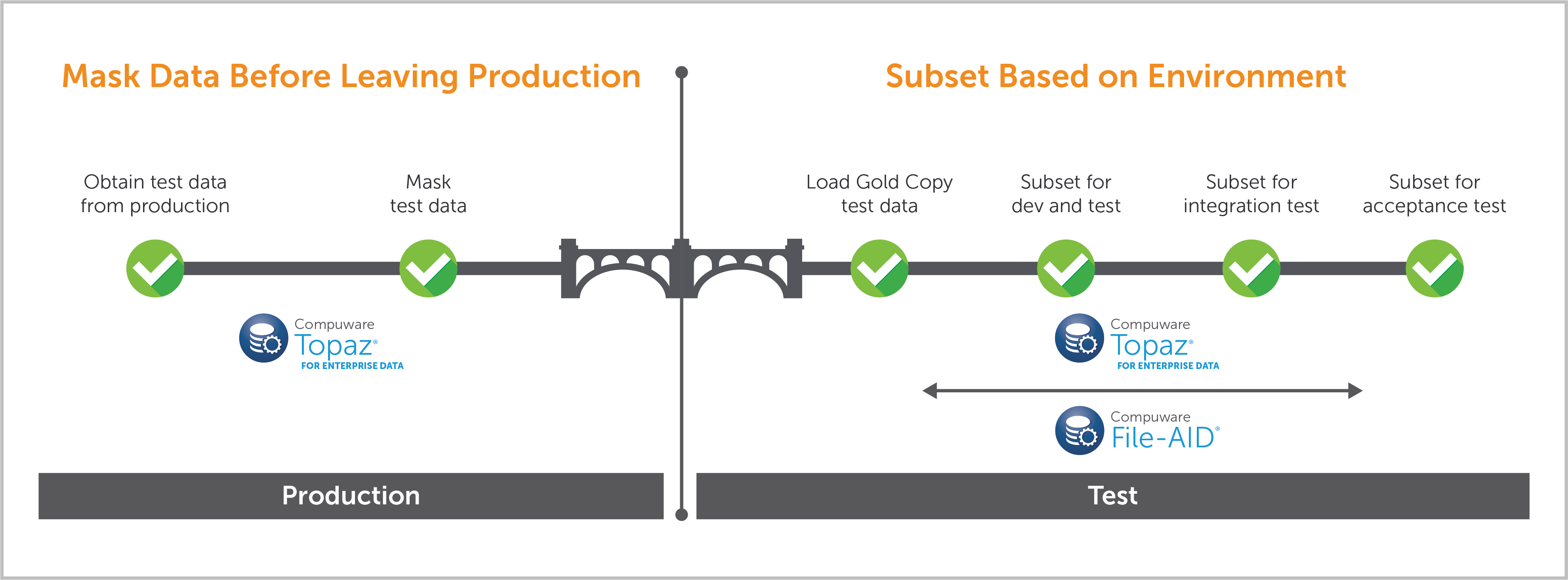
    O’Malley noted that, at a time when compliance regulations such as the European Union’s General Data Protection Rule (GDPR) are becoming more stringent, it has become more important for organizations to be able to demonstrate that personally identifiable information (PII) has not been exposed during any point in the application development cycle. That’s especially important when it comes to mainframe data, which typically is used to drive transaction processing applications.

    In general, O’Malley said the historic divide between mainframes and distributed systems is narrowing as organizations embrace DevOps processes. Instead of proponents of these platforms battling within organizations for control over specific classes of workloads, there’s more awareness of the need to leverage both platforms to drive a new generation of digital business applications, O’Malley said.

    The challenge is that most mainframe applications are built and updated using waterfall methodologies. Compuware has been developing a series of DevOps tools for mainframe environments that are intended to modernize those processes. As the IT organizations that have mainframes adopt those tools, it becomes easier to federate application development and deployment across mainframes and distributed systems, O’Malley said.

    Of course, this all assumes various teams within the IT organization can lay aside historic animosities. The shift to DevOps has always required as much process and cultural change as it does new technologies. But in the case of IT organizations that have mainframe teams, that shift may take years. The good news is a that a new generation of IT professionals doesn’t have much history with infighting within internal IT organizations. The simple fact is there are classes of workloads that run better on mainframes, O’Malley noted, but that doesn’t mean every workload running on mainframe is ideally suited for that platform—or conversely, that every workload running on a distributed system is ideally suited for that platform.

    Arguably, the rise of DevOps processes might create an opportunity to revisit many platform decisions that were made in the heat of a larger argument. In the meantime, it’s clear that applications integration spanning multiple platforms is the new order of the day. The question now is how best to go about achieving that goal in a way that erases the divide existing between all the platforms that now make up the extended enterprise.

    — Mike Vizard

  • Leveraging Automation for Your Business

    Leveraging Automation for Your Business

    Artificial intelligence (AI) has the capability to change the way we work, the way we manage, and the way we conduct research. As automation processes improve, businesses increasingly are looking for ways to leverage the new technology to help with their own goals.

    There are certain risks posed by the advancement of artificial intelligence, and the automated applications AI creates are in contrast to the many benefits using automation may bring about. The rewards of automation, when managed properly, are the relief of burdensome activities such as mundane tasks and other minutiae, improved productivity and increased participation.

    Consequences of adopting automation for your purposes must be thoroughly thought out to leverage it to the best of your ability.

    Automation, once used for only a few specialized tasks, now can be used for data mining, marketing, medical research and building financial models. These are just a few of the applications the technology can be used for, and it’s far from a comprehensive list. The details of automation are specific to the industry that employs it, the organization that manages it and the managers who oversee its implementation.

    Why should you consider using automation to help achieve your business goals? Quite simply because utilizing it properly could result in a more efficient, more effective workforce and could even create job opportunities. By freeing up mental resources and enhancing the capabilities of your workforce, your organization will be able to operate at its peak efficiency and efficacy.

    “Machines can attend to vastly more information and more complex processes than human beings, and try out more drugs or vaccines than we can in the lab,” Pedro Domingos, a professor of computer science at the University of Washington told National Geographic. “Machine learning is used to discover drugs by simulating the process on a computer, which takes a fraction of the time and cost.”

    After you begin analyzing where your organization needs help, you can start the process of using automation that makes sense for you. Your business may need help with routine marketing tasks, creating models for the data metrics you bring in. Or, perhaps you need help organizing large amounts of information related to research and development of a product you’re about to roll out. Whatever the application, there are automated applications made to benefit your business.

    “Faced with a constant onslaught of data, we needed a new type of system that learns and adapts, and we now have that with AI,” Arvind Krishna, head of research at IBM, said in a recent blog post. “What was deemed impossible a few years ago is not only becoming possible, it’s very quickly becoming necessary and expected.”

    With automation, you can achieve things you may not have thought possible before. As Krishna makes clear in the quote above, the capabilities of leveraging automation are untested and virtually limitless.

    To truly leverage automation, you’ll need to manage the results of its implementation and have your team perform synthesize and arrive at conclusions through critical thinking and social cooperation—skills yet unmastered by even the most powerful artificial intelligence. Pairing automation with skilled social thinking will result in a highly productive and effective organization. This can result in some ancillary benefits such as increased cooperativeness between team members.

    For companies interested in rapid growth, automation can help propel your processes. From manufacturing to marketing, automation can help boost your efforts in research, analysis and production. Automating repetitive tasks can help free up workers allowing them to work on more complex and pressing problems within the company. In addition, workers learn new skills through the adoption of automation and managers can more effectively understand how to manage complexity within your organization.

    However you decide to use automation, it’s important to do a thorough and objective analysis of your organization. Where can you improve? Where do you need help? How can we empower workers to better perform? How do we measure performance? These are key questions that can help guide your analysis of your organization and well as your adoption of domain-specific automation applications.

    — Anthony Coggine

  • GitLab Moves to Automate DevOps

    GitLab Moves to Automate DevOps

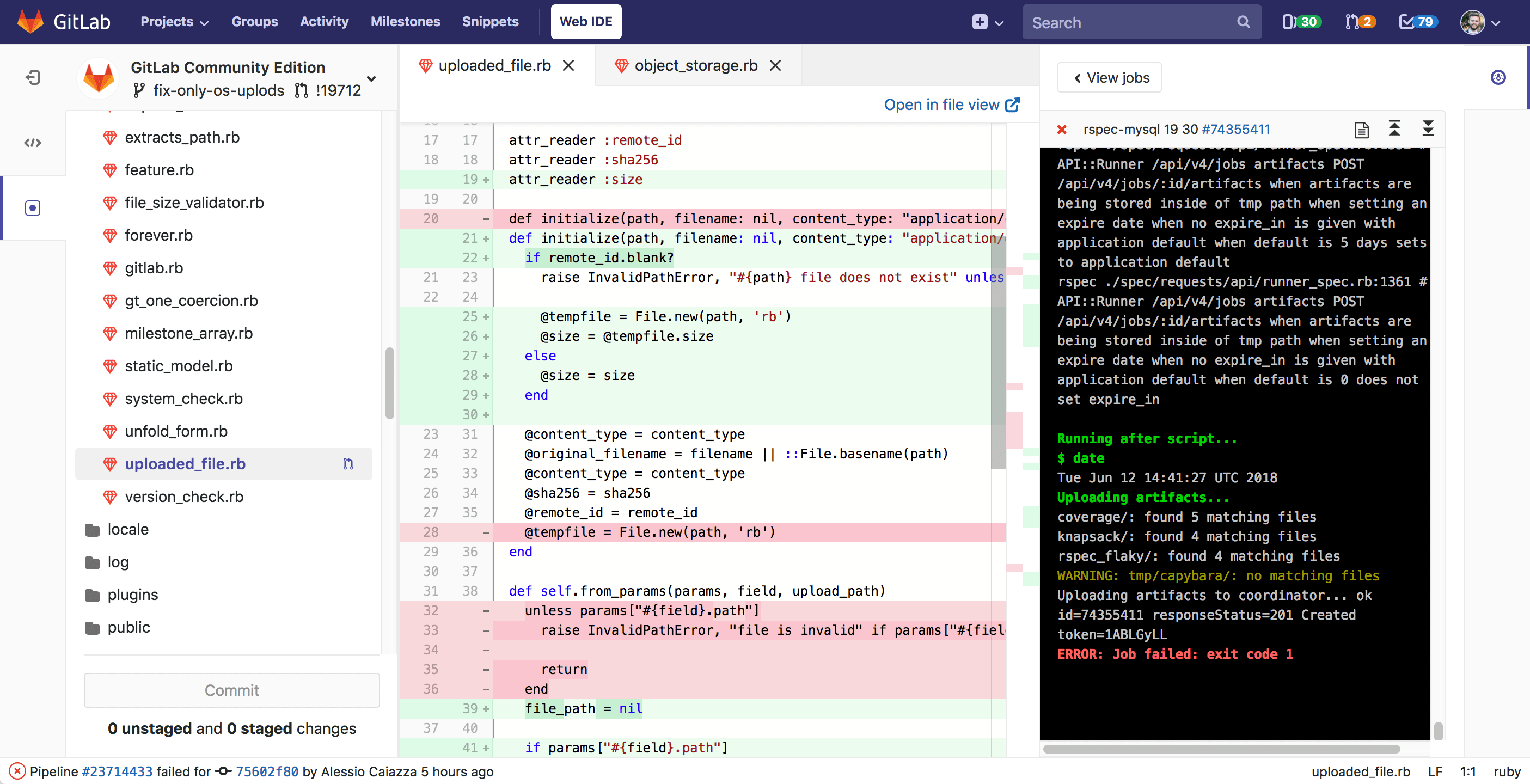
    GitLab is looking to eliminate the pain of setting up and maintaining DevOps processes by making available an option that automates DevOps processes end to end using a prescriptive approach defined by GitLab.

    The latest version of GitLab includes an Auto DevOps option that organizations can employ to automate the building, testing, code-quality scanning, security scanning, license scanning, packaging, performance testing, deploying and monitoring their applications.

    GitLab CEO Sid Sijbrandij said the company is now able to make this service available because GitLab 11.0 can now be deployed as a set of more integrated applications running on top of a cluster based on Kubernetes container orchestration software. That support for Kubernetes also makes it easier to deploy GitLab 11.0 in a public cloud or on-premises environment as needed. To facilitate that process, GitLab now includes templates that simplify the spinning up of Kubernetes clusters as needed, Sijbrandij said.

    To further its support for Kubernetes, GitLab also decided to start deploying the software it makes available as a cloud service on Google Cloud Platform. Previously, GitLab had been committed to Microsoft Azure. Microsoft recently announced plans to acquire GitHub.

    GitLab is all in favor of automating DevOps processes, but doesn’t think organizations should be forced to move everything into a public cloud to achieve that goal, explained Sijbrandij. Organizations can still elect to construct their own DevOps processes using GitLab as they best see fit.

    But as interest in DevOps continues to rise, more organizations now would prefer to rely on a set of best practices that are defined to make them much easier to consume, he said.

    GitLab 11.0 also adds security scanning capabilities for application built using .Net and Scala programming language in addition to existing support for C, C++, Java, Python, Ruby on Rails, Go and PHP.

    In general, Sijbrandij noted that organizations that embrace DevOps usually find themselves trying to manage various islands of automation with mixed success. Auto DevOps is intended to provide a more comprehensive approach that eliminates the friction that often exists between those various islands of automation. Sijbrandij acknowledged that a prescriptive approach may not appeal to every IT organization, but as traditional enterprise IT organizations start to embrace DevOps, many of them prefer a more platform-centric approach that’s easier to both set up and maintain, simply because they lack internal DevOps expertise.

    Sijbrandij also noted that as DevOps gains more traction in the enterprise, many of the decisions about what platforms to employ will be driven from the top down. Today, most acquisitions of DevOps tools and practices are driven from the bottom up, which accounts for why there are already so many silos of automation, he said.

    Over time many organizations will conclude that the opinionated approach enabled by Auto DevOps will free developers to spend more time on writing code instead of on managing the infrastructure employed to create it, Sijbrandij said. Most traditional enterprise IT organizations today are at least aware they should be employing DevOps practices, they just know exactly what such an effort fully entails.

    Thanks to advances in automation, many IT leaders may never know or care what specific DevOps processes are in place. After all, what most of them are primarily interested in how fast the next set of application code is going to be delivered.

    — Mike Vizard

  • Splunk Pushes Into the Realm of DevOps

    Splunk Pushes Into the Realm of DevOps

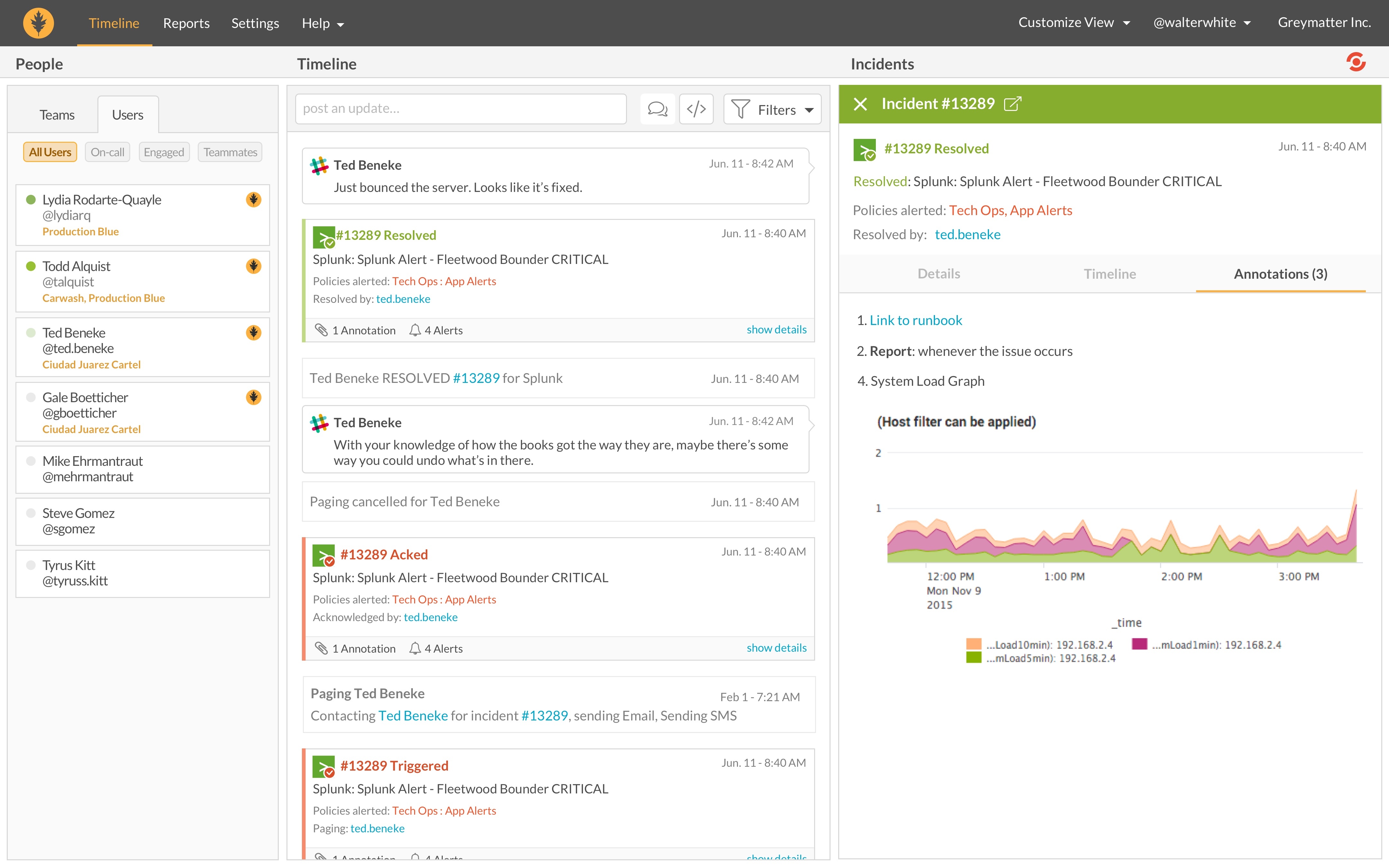
    On the heels of its recent acquisition of VictorOps, provider of incident management software, for $120 million, Splunk is gearing up to expand its foothold in DevOps significantly.

    Rick Fitz, senior vice president of IT Markets for Splunk, said the provider of widely used operational analytics software in the enterprise sees a significant opportunity to expand its presence across a range of DevOps processes.

    Incident management is a natural extension of operational analytics, said Fitz, noting Splunk chose to acquire VictorOps because the investments the company has made in applying machine learning algorithms to monitoring IT events. That approach significantly reduces the number of irrelevant alerts being generated and provides actionable intelligence into potential events that could adversely impact IT operations.

    Most IT operations teams suffer from alert fatigue, Fitz noted, and most alerts are ignored because of a lack of context. The combination of Splunk and VictorOps will result in alerts that more precisely identify the root cause of any IT issue, he said, and a better overall “systems of engagement” for IT operations teams in keeping with DevOps principles.

    Splunk has been steadily expanding its focus on DevOps. Earlier this year the company announced Splunk Insights for Infrastructure, which IT organizations can host on an Amazon Web Services (AWS) public cloud to monitor IT infrastructure deployed anywhere. The latest versions of Splunk Cloud and Splunk Enterprise also make use of machine learning algorithms on top of a revamped metrics engine that enables IT administrators to monitor everything from CPU speeds and available hard disk space to temperature readings in internet of things (IoT) devices and sensors. Splunk recently also added connectors for Docker and Kubernetes, as well as the Apache Kafka messaging platform for streaming data in real time.

    IT operations and cybersecurity teams already rely on Splunk operational analytics software extensively to identify anomalies. By investing in machine learning algorithms and acquiring incident management software, Splunk is moving to turn all the data it analyzes into actionable intelligence, which then could be shared in real time with developers to ensure application availability and optimize application performance.

    While adoption of DevOps processes in traditional enterprise IT organizations remains spotty, IT vendors that focus on IT operations such as Splunk have clearly seen the writing on the wall. Fitz noted that investments made in machine learning algorithms, for example, will enable IT operations teams to more respond to changing application requirements with greater agility at a time when the IT environment has become exceedingly complex. That agility is critical for any organization engaged in digital business transformation, Fitz said, because invariably those efforts lead to more applications being deployed.

    It’s not clear the degree to which incumbent providers of IT operations software will be able to remain relevant in the age of DevOps. But most of them certainly have the financial resources to at the very least acquire a portfolio of DevOps tools that will enable them to exert a lot more influence than many of them have to date.

    — Mike Vizard

  • Picking a Git for the Enterprise

    Picking a Git for the Enterprise

    Some of my Agile and DevOps transformation work, not surprisingly, involves helping clients with tooling adoption—to set up, scale and operate across the organization. This blog piece is about a recent experience of setting up Git across a client organization.

    Git, as most of you are aware, is a fundamental building block for many of the modern engineering practices associated with Agile and DevOps. Software configuration management tools such as Git, in simple words, allow you to track and manage your software code and configuration changes in the most-effective, efficient and distributed way. Git, as the choice of source control, has remained steadfast over the years, while other tools across various categories of DevOps tools have seen their fortunes go up and down with the ever-changing technology landscape of DevOps tools. In fact, one new buzzword is GitOps—some even calling it the next stage of evolution for DevOps.

    Origins of Git

    More than a decade ago , the Linux community faced a challenge  because none of the existing revision control tools met their need for a distributed version control tool. And from that need Git was born. In the words of the creator of Git, Linus Torvalds, “The main issues with SCMs is the politics around who can make changes.” Ever since its creation, Git has radically changed the notion of software configuration management (SCM), by enabling engineers to work remotely and autonomously. (If you are new to Git and interested in exploring more about Git and its features, Atlassian has a tutorial and GitHub has a list of resources.)

    Git and More

    While Git as the core product is fundamentally the same whichever flavor your prefer—GitHub, GitLab or Bitbucket—the wrapper around it determines the important non-functional characteristics such as operatability, security, usability and maintainability. Our quest for an enterprise-scale Git focused on the wrapper and not the core product itself, as much has been written, debated and documented on the core product of Git itself already. The value and relevance to enterprises is in the wrapper that these productsplatforms provide.

    We looked at the core product and related offerings; as you can imagine, the three tooling vendors have different positioning and taking different directions with the future road map for their respective tools. Bitbucket’s strength lies in the fact that Atlassian is bundling the product with the omnipresent Jira Software and Confluence. GitLab’s road map seems to be taking the product beyond Git and into the idea of a single product for your entire pipeline automation, from concept to cash. GitHub, which is being acquired by Microsoft, is increasingly relying on the strength of integrations with other tools and the workflow capability the company is bundling with it.

    (I avoid an overemphasis on the commercial aspect in this blog; however, I’m not ignoring it completely. Part of the reason is due to the fact that enterprise pricing is not entirely transparent and may vary wildly depending on organization’s negotiating capability, the scale of usage, future potential and marketable track records as perceived by the tooling vendors. This blog is also not meant to be a feature by feature comparison, as this is something you can Google and find out yourself very easily.)


    The Verdict

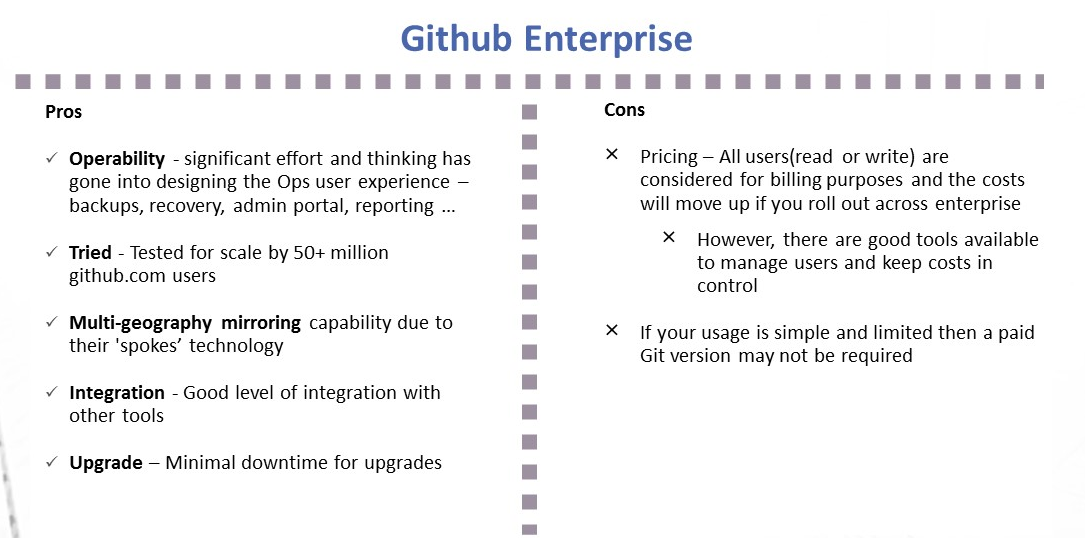
    Github Enterprise pros and cons
    Image1; Github Enterprise – Pros and Cons
    Gitlab Ultimate and features
    Image 2:  Gitlab Ultimate – Pros and Cons

    My Recommendation: It Depends

    1. I liked the vision of GitLab as a single-stop tooling platform for continuous integration/continuous delivery (CI/CD), which goes beyond source control. I think the tool is simple and intuitive to use and great for small to midsized setups or even large enterprises that are focused on having smaller and autonomous teams.
    2. GitHub seems to be well-suited for large and complex enterprises with significant outsourced and offshore-based technology teams.

    I would love to hear your views on what has been your thinking with regards to choosing a Git-based product for your enterprise or teams. Meanwhile, here are some links you might find useful in your decision-making:

    1. Why and how GitLab abandoned Microsoft Azure for Google Cloud – https://venturebeat.com/2018/04/06/why-and-how-gitlab-abandoned-microsoft-azure-for-google-cloud/
    2. Tooling integrations of GitLab – https://docs.gitlab.com/ee/integration/README.html#doc-nav%20for%20list%20of%20integrations
    3. GitHub add-ons are listed at Addons are listed at https://github.com/marketplace
    4. Security and scalability info of GitHub is at https://github.com/jonico/github_security_and_scalability_overview
    5. Products that integrate with GitHub platform – https://github.com/works-with
    6. Pricing of GitLab – https://about.gitlab.com/pricing/

    — Aditya Vadaganadam

  • Splunk Acquires VictorOps: The End of the Road for Standalone IT Alert Management Tools?

    Splunk Acquires VictorOps: The End of the Road for Standalone IT Alert Management Tools?

    This week, Splunk, the leader in machine data intelligence, announced the acquisition of IT alerting solution VictorOps for $120 million. My congratulations to the VictorOps team for building a solid product for alert management and collaboration, demonstrating a wicked sense of humor and creating some cool T-shirts.

    While the acquisition makes sense on many levels, it does raise broader questions about the need for standalone IT alerting tools. Let me explain why IT alert management as a category faces strong headwinds and how these tools will need to evolve if they are going to remain relevant in a world driven by digital transformation.

    What Do IT Alert Management Tools Actually Do?

    When an IT outage or service disruption occurs in an enterprise, the first order of business is to restore operations back to normal. IT outages can cost you a lot (an hour of downtime can cost you upwards of $100,000 per hour), disrupt your customer experiences and derail employee productivity. To quickly troubleshoot an IT incident, you’ll need to notify the right subject matter experts who can collaborate together to pinpoint root cause for an outage.

    Every day, enterprise network operations center (NOC) teams receive hundreds of alerts from different IT management tools for monitoring, service desk, event correlation and configuration management. A certain percentage of these alerts demand urgent attention from NOC teams who are on-call and readily available for incident support.

    Enter IT alert management tools, whose job it is to manage the notification of messages to personnel based on predefined rules regarding who to notify for a given categorization of event or incident. Tools from PagerDuty, VictorOps, xMatters, OpsGenie and Everbridge alert the right team members using on-call schedules and notify them using a variety of channels including email, text, voicemail and chat. IT alerting tools help you manage the entire incident life cycle, using on-call schedules, alert routing rules and collaborative war rooms.

    Embedded Alert Context: The Missing Piece of the Alert Puzzle

    The fundamental challenge with scaling enterprise alert management is about establishing the right context for a flood of alerts that you’ve just received. Instead of forwarding every single alert that you receive, can you share actionable alerts that your NOC teams can immediately act upon?

    Your IT alerting tool needs the ability to correlate a bunch of alerts into a single event for faster acknowledgment and troubleshooting. Alert consolidation and correlation call for intelligence that can extract signal from the noise and compress alert volumes with the right inferences. Artificial intelligence for IT operations (AIOps) helps you do just that, by applying big data and machine learning techniques to event management data. With AIOps tools, you can handle events and minimize alert noise by delivering timely and actionable insights for incident support. This agility and insight, coupled with intelligent correlation to stay on top of major outages, helps NOC teams by focusing their attention on the incidents that truly matter.

    AIOps + Alert Management = Smarter Incident Management

    Without the ability to apply machine learning algorithms to alert floods, alert management tools act as “dumb forwarders” of IT alerts, inducing alert fatigue and adding to the overall noise. It’s time for alert management to get smarter and contextual with machine learning insights.

    Splunk’s acquisition of VictorOps is a clear sign that alert management tools as a standalone category can’t truly scale without a solid AIOps foundation. With artificial intelligence, IT teams can stop wasting valuable time figuring out incident triage and root cause analysis and ensure faster recovery from crippling outages with the right event analytics.

    — Deepak Jannu

  • Oracle Advances AI Effort to Automate DevOps

    Oracle Advances AI Effort to Automate DevOps

    Oracle today announced the general availability of an expanded Oracle Cloud Platform service that promises to automate most back-end DevOps processes by relying on a combination of machine learning algorithms and other forms of artificial intelligence (AI).

    The Oracle platform-as-a-service (PaaS) environment has also been expanded to include Oracle Mobile Cloud Enterprise, Oracle Data Integration Platform Cloud and Oracle API Platform Cloud alongside existing continuous integration and continuous deployment (CI/CD) cloud service. Oracle also revealed today that later this year it will also add blockchain, security and management and support for additional database workloads, including OLTP and NoSQL, that expand on existing Oracle Database, Oracle Autonomous Data Warehouse Cloud, Oracle Analytics Cloud, Oracle Integration Cloud and Oracle Visual Builder services.

    Siddhartha Agarwal, vice president of product management and strategy at Oracle, said via the cloud service, Oracle plans to automate DevOps processes to the point where organizations will be able to allocate most of their time and effort to building applications. Today, developers are spending as much as 50 percent to 60 percent of their time on DevOps processes rather than writing application code, he said, and the Oracle Cloud platform automates a broad range of operational functions including tuning, patching, backups and upgrades.

    Oracle Cloud Platform is designed to be an infinitely elastic autonomous cloud service that can both anticipate application requirements and dynamically adjust to changing workload conditions. Over time, the platform also will be able to increasingly provide recommendations based on the characteristics of the application workloads being built and deployed, Agarwal said.

    The Oracle API Platform Cloud service, for example, already continuously learns about usage patterns to recommend allocation limits, configurations and policies using predictive algorithms, he said.

    Meanwhile, the Oracle Cloud Mobile Enterprise service provides access to machine learning algorithms that make it much easier to incorporate chatbots into mobile applications, Agarwal said. Machine learning algorithms are now also relied on to create Big Data lakes and the data pipelines needed to make that data available to application developers.

    Those services are all extensions of an Oracle Developer Cloud service for building applications that supports build frameworks such as Maven, Ant, Gradle, npm, Grunt, Gulp and Bower, as well as command line interfaces for Docker, Kubernetes and Terraform. Frameworks such as JUnit and Selenium for both logic and UI testing are also included.

    Agarwal said one of the primary reasons DevOps process have not been as widely adopted across the enterprise is that it’s simply too complicated for most IT organizations to set up and then continuously manage all the underlying infrastructure required. By moving more of the responsibility for the operations side of the DevOps equation on to an autonomous cloud service managed by Oracle, he said, it becomes simpler for enterprise IT organizations to focus their energy on application development processes.

    It may take some time for enterprise IT organizations to get comfortable with ceding that level of control to a cloud service provider. But whatever DevOps path they choose, it’s apparent that machine learning algorithms coupled with other AI advances are about to automate broad swaths of the DevOps universe.

    — Mike Vizard

  • Riverbed Throws Down APM Gauntlet

    Riverbed Throws Down APM Gauntlet

    Riverbed Technology has expanded its approach to unifying application performance management (APM) and user monitoring based on a new architecture for its SteelCentral platform, now capable of supporting tens of thousands of agents monitoring billions of transactions per day.

    Nik Koutsoukos, vice president of product marketing and product management for Riverbed, said auto-tuning and data compression mechanisms combined with cluster architecture now makes it possible to analyze all the data in the enterprise to determine precisely where bottlenecks are adversely affecting user experience.

    In contrast, rival APM offerings only sample transactions and sacrifice metadata as well as depth in terms of being able to delve into a complete stack of software and associated IT infrastructure, he said.

    Koutsoukos noted the way APM is being applied will fundamentally change as organizations embrace digital processes. Most organizations today apply APM sparingly across a limited number of mission-critical applications. But as business processes become digitized, customer satisfaction increasingly will be determined by the quality of the application experience. That can’t be accurately determined without being able to leverage a set of software-as-a-service (SaaS) applications capable of monitoring the entire IT environment, he said.

    Riverbed, with this release of SteelCentral, is also adding analytics infused with artificial intelligence capabilities, as well as machine learning and predictive analytics to keep track of transaction trends over time. This release introduces a “Prism” report that analyzes longitudinally at the conversion funnel for a business transaction flow to visualize trends over time, spot issues and then resolve associated problems.

    In addition, Riverbed is adding support for Riverbed Xirrus Wi-Fi access points, which the company acquired last year, to the SteelCentral platform.

    Industry research suggest that only 5 percent of enterprise applications are actively monitored, Koutsoukos noted, but Riverbed is expecting that to change in a digital age where IT essentially has become the business. More senior business executives are soon going to be equating application performance with customer engagement and, by extension, opportunities to generate revenue.

    Riverbed expects that monitoring all those distributed applications and associated IT infrastructure will be possible only by using a set of software-as-a-service applications, which Koutsoukos said in many cases will pay for itself by eliminating the need for various application and infrastructure monitoring tools in silos across the enterprise.

    Given the relative light adoption of APM tools, the rise of digital business may provide an unexpected benefit for DevOps teams. As line-of-business managers demand more insight into the IT environment, the amount of metrics that should become available to DevOps teams should correspondingly increase. The challenge may lie in educating business managers why those metrics are relevant to them and then getting them to fund their acquisition.

    In the meantime, DevOps teams should be prepared for a lot more questions relating to application performance coming from business managers. Not every one of those questions might be all that informed. But over time, an educated business executive always makes for the best DevOps customer.

    — Mike Vizard

  • Wavefront by VMware Extends Monitoring Reach

    Wavefront by VMware Extends Monitoring Reach

    The gap that exists between the DevOps tools typically made available to traditional enterprise IT sites that have standardized on VMware and what’s typically employed by web-scale companies continues to close.

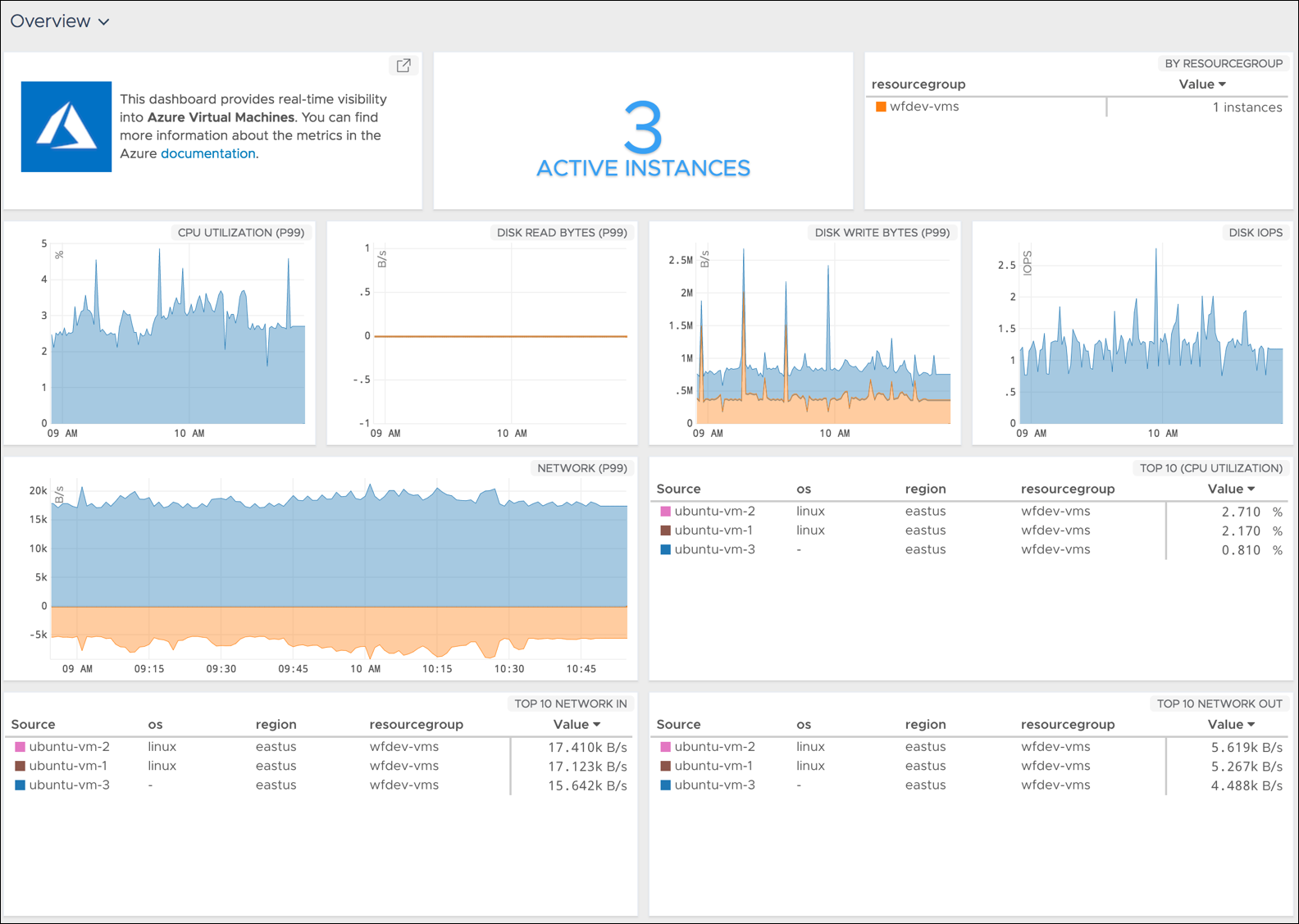
    The latest edition of the Wavefront analytics and monitoring tools from VMware now comes with pre-packaged support for a range of services running on the Microsoft Azure public cloud in addition to a significant expansion of support for a range of services provided by Amazon Web Services (AWS) and Google.

    Rob Markovich, senior director of marketing for the VMware business unit, said Wavefront has added 35 “out of the box” integrations for third-party applications and services to the software-as-a-service (SaaS) application.

    Wavefront has also added pre-packaged dashboards for Kong, Micrometer, Github and Bitbucket, VMware vRealize Operations, Hadoop MapReduce, Yarn, HDFS, Ceph, FluentD, Couchbase, Lighttpd, CoreOS, PHP-FRM, Papertrail, Rollbar, Suse Linux, Fedora Linux, FreeBSD, NetBSD, OpenBSD and Oracle Linux. Any Wavefront dashboard can be customized using more than 100 analytics functions, including correlation and predictive functions on any metric data source, he said.

    Those additions come on the heels of a wave of investments VMware has made over the last few months spanning everything from cloud extensions to VMware vSphere to embedding analytics within the VMware vRealize IT automation framework.

    Markovich said Wavefront is adding integrations at the rate of 10 to 20 a month—the total number he said should increase to more than 200 by the end of 2018. As organizations embrace various types and classes of cloud-native applications such as microservices, there is a much greater need for monitoring and analytics, especially as organizations begin to better understand the level of dependencies that exist between thousands of microservices, he said.

    In addition, Markovich noted the number of companies encountering that challenge is also starting to increase as almost every company begins to realize it is a software company that happens to sell something else. That doesn’t necessarily mean every organization will be updating applications at the same rate as a web-scale company, but it does means existing IT processes will need to be modernized, he said—for example, more enterprise IT organizations are starting to create site reliability engineering (SRE) teams.

    That shift may not result in every enterprise application being monitored, but it will most definitely increase the number of application workloads within those enterprise IT environments that are continuously monitored.

    There is, of course, no single definition of what officially constitutes DevOps. Every organization will tailor DevOps best practices to fit within the confines of their existing IT culture. In some organizations that shift will be driven from the bottom up, while others will be transformed by an initiative led from the top. At this point, the single biggest inhibitor to DevOps adoption has more to do with IT culture than any given set of technologies. But regardless of an organization’s level of DevOps maturity, VMware is betting there will soon be many more traditional enterprise IT organizations employing monitoring and analytics a lot more broadly than ever.

    — Mike Vizard

  • Can EV Certificates Improve Brand Value and Increase Trust?

    Can EV Certificates Improve Brand Value and Increase Trust?

    Most people know the difference between a website that is completely insecure and unencrypted and one that offers an encrypted session for security. You simply look for whether the URL starts with HTTP and the address bar displays an open padlock, or the URL starts with HTTPS and shows a locked padlock. Within the realm of secure websites, though, not all certificates are created equally. An extended validation certificate — EV certificate, for short — provides a more in-depth validation process than other certificates and may foster more trust from customers as well.

    The difference between an EV certificate and other certificates lies in the verification required to obtain one. Traditional certificates can be acquired by providing organizational information or verifying admin rights of the target domain. On many occasions, though, attackers have found ways to circumvent or subvert the verification process and obtain fraudulent certificates using those methods. The verification process for an EV certificate requires proof that the requesting entity is, in fact, the legal identity that owns and manages the target domain.

    According to Wikipedia, the vetting process for an EV certificate involves a number of additional validation steps: “These include manual checks of all the domain names requested by the applicant, checks against official government sources, checks against independent information sources, and phone calls to the company to confirm the position of the applicant. If the certificate is accepted, the government-registered serial number of the business as well as the physical address are stored in the EV certificate.”

    As attackers have grown more savvy and adapted to the expectation that a website run over HTTPS and have the padlock indicating that it’s secure, they’ve found ways to game the system and create fraudulent or phishing websites that appear to be secure.

    Websites with EV certificates show up differently in browsers with EV support, which includes Microsoft Edge, Microsoft Internet Explorer, Mozilla Firefox, Google Chrome and Apple Safari. In most implementations, websites with EV certificates include more advanced details about the website and the entity behind it, such as the name of the company that owns the certificate and a bar or text that is distinct—usually green—for easy visual verification of a valid EV certificate.

    We’d like to know more about how important secure websites are to you, and whether you know—or would notice—the difference between a website using a traditional certificate and a website using the more secure EV certificate. Please invest five minutes of your time to take a quick survey and help us learn more about the value of EV certificates when it comes to your level of trust online.

    Click here to begin the survey.

    — Tony Bradley