Tag: devops

  • Why DevOps Implementation is Often Unsuccessful – and How to Fix It

    Why DevOps Implementation is Often Unsuccessful – and How to Fix It

    Much like “blockchain” and “big data,” the term “DevOps” is another buzzword currently being thrown around the IT departments of large organizations.

    Many have identified the need for faster software development life cycles; a more precise process closely aligned with business objectives, allowing for clearer workflow and collaboration between the development and operations teams. DevOps is essentially agile, all grown up and ready to take on the constantly innovating and rapidly deploying needs of the modern business.

    For security professionals, it’s a fantastic initiative: We can inject security into the process far earlier, reducing the cost of fixing bugs and avoiding potential catastrophe down the track.

    The problem is, few companies are truly successful in their DevOps implementation. Without the right support, nurturing and understanding across the business, it can quickly become a white elephant, you know, one of those “don’t mention the war” projects.

    So, what’s the problem? There are a few ways to approach DevOps that I believe will make for much smoother sailing. An effective program goes beyond a few fancy new tools, titles and team meetings. It’s not always going to be easy but taking the time to fix a broken strategy (or implement it the right way from start) is going to be far less painful in the long run. Ultimately, it’s going to result in higher quality and more secure software.

    Let’s break it down.

    Let Go of the Agile Apron Strings

    There is somewhat of a misconception that an organization must choose between agile or DevOps, setting down one path or the other, never to look back.

    The thing is, the development process works best when both are being considered and implemented as one. DevOps is not a reinvention of agile development; rather, it is an extension of it. The wheels tend to fall off when there is an expectation the process will be exactly agile, or completely different from agile.

    Agile supports the principle of cross-functional teams, bringing designers, testers and developers together from the beginning and committing to open communication lines throughout a project. Its aim is to stop siloed delivery and reduce double-handling, both of which are benefits of the DevOps process as well. However, DevOps goes a step further, introducing systems, security and operations into the mix to offer a robust, end-to-end skillset that had the ultimate goal of full, functional software delivery to the customer.

    During the inevitable pain-points of moving to a more DevOps-centric process, the risk of siloed development can crop up again. You can often have the original agile team working together, with the security and operations additions still finding their way in the machine. No one is quite sure how to include them, what they should be doing and their overall objectives.

    DevOps does not work without clearly defined objectives, cross-functional onboarding and direct communication with all parties. There will be an adjustment period requiring careful change management but getting everyone on the same page with the enhancements DevOps functionality will bring is half the battle.

    Increasingly, DevOps is placing emphasis on security best practice as part of the process as well, demystifying that step and bridging the gap between the security team and everyone else. As I have said before, we still have a long way to go in empowering developers to code securely from the start, but the successful implementation of DevOps methodologies is an excellent foundation on which security skills can be built within the development team.

    Automation Isn’t Everything (and It’s Not the Most Secure)

    Another feature of DevOps methodology is, to a certain extent, the automation of the software development process. Continuous integration and continuous delivery (CI/CD) principles are the cornerstones of this concept, and as you can likely guess, very reliant on tools.

    Tools are awesome. They can bring unprecedented speed to the software delivery process, managing the code repository, testing, maintenance and storage elements with relatively seamless ease.

    However, while robots might take all our jobs and imprison us someday, they are definitely not there yet. Heavy reliance on tools and automation leaves a window wide open for errors. Scans and tests may not pick up everything, code may go unchecked and that presents enormous quality—not to mention security—issues down the track. An attacker only needs one back door to exploit to steal data, and forgoing the human element in quality and security control can have disastrous consequences.

    The happy medium is to ensure you have a balance of people and tools. Tools should serve as the assistants to a team you trust to deliver on project goals. You should:

    • Allocate enough time for people to become familiar with the chosen DevOps toolchain.
    • Focus on effective collaboration (and how the tools can support that).
    • Address any gaps in the process, whether they are skill/knowledge or tool-based.

    In short, don’t just tool up and hope for the best.

    DevOps Isn’t a Buzzword, It’s a Culture – Are you Growing Yours?

    Change management is tough at the best of times. Fear of the unknown can stop even the most brilliant team members from growing their skills and expanding their horizons.

    You see, merely saying “let’s do DevOps” and making the operations team move desks isn’t going to magically implement a successful process. Many will be confused, and long-serving members of the team will be left feeling disgruntled. Communication of expectations is crucial, as is walking the walk. DevOps represents a cultural movement just as much as a development methodology, and a team should live and breathe a cross-functional, collaborative mindset.

    What does a great DevOps culture look like?

    • Individuals are empowered to lend their expertise to a process, not just leaders.
    • Open, honest and respectful communication between teams.
    • Each person takes responsibility for the overall objective of building quality and security into the development process.
    • Everyone is on the same page with the definition of DevOps in the business, the roadmap and how/what/why of each person’s role.

    For years I have emphasized the importance of building positive security cultures in development teams, and DevOps is no different.

    The right tools, knowledge and support are imperative to achieving security best practice, seeing a downturn in discovered vulnerabilities and opening the team’s eyes to the importance of protecting our data. With DevOps, you must lay the cultural groundwork for positive change: Ensure everyone understands their role, value and expectations, the overall project goals and steps in the process.

    Have you mastered that? Great. Now, let’s shift the needle, dial up the security aspect and make DevSecOps the ultimate plan for software excellence.

    — Pieter Danhieux

  • Mendix Injects More AI to Accelerate Low-Code Development

    Mendix Injects More AI to Accelerate Low-Code Development

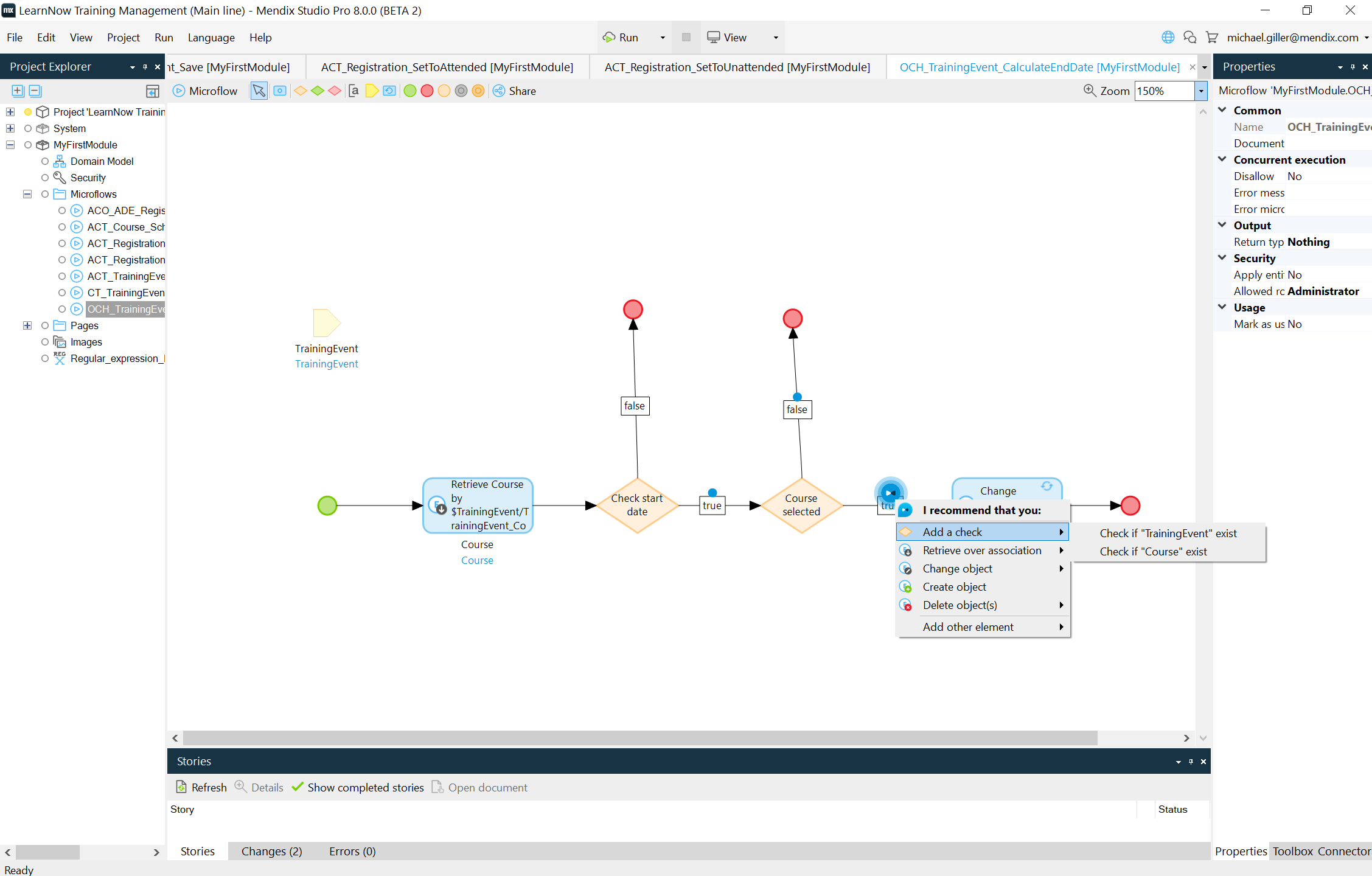
    The rate at which low-code applications are built and deployed will accelerate as developers begin to rely more on artificial intelligence (AI) to write code. The summer 2019 release of the Mendix low-code platform includes a revamped instance of Mendix Assist, which employs machine learning algorithms to make coding recommendations. Those algorithms have been trained using data drawn from 5 million application models employed across 15 industries over the last 10 years, and Mendix claims this version of Mendix Assist improves the accuracy rate of the recommendations being made to 95%.

    Sheryl Koenigsberg, director of product and solutions marketing for Mendix, said Mendix Assist will enable new developers to write better code faster, while experienced developers will be able to employ Mendix Assist to address routine issues that often get overlooked faster. Mendix Assist not only advises developers on what to do next but also generates recommended actions in previous logical steps based on whatever new code is introduced in the application.

    Mendix

    To make these capabilities more accessible, the summer release of Mendix adds Mendix Studio and Studio Pro, a set of integrated development environments designed to be accessible to both citizen and professional developers, to the low-code platform.

    In addition, Mendix is adding support for native mobile application development by adding support for React, a set of JavaScript libraries for building user interfaces for mobile applications, and including a native JavaScript editor. Those capabilities eliminate the need to rely on emulation software when building mobile computing applications, said Koenigsberg. Because the Mendix IDEs integrate low-code abstraction across iOS, Android, Java and Objective-C programming models, it also becomes easier for mobile developers to build reusable components. Mendix has also included more than 50 pre-built connectors to mobile device capabilities, such as camera, geolocation, biometric authentication and Bluetooth enablement, along with support for conversational chatbots and voice interfaces such as Alexa and Siri.

    Longer-term, Koenigsberg observed that it’s conceivable the AI capabilities being included in application development tools eventually will share insights with AI models being incorporated into continuous integration/continuous deployment (CI/CD) platforms. Proposed changes to an application could, for example, might be assessed from a performance perspective before any lines of code are written.

    In the meantime, the rate at which low-code applications will be moving through CI/CD platforms is about to increase substantially as developers augment their own skills by relying more on recommendations surfaced by AI engines. The quality of those applications should also improve as AI engines check, for example, to make sure all the appropriate compliance and cybersecurity controls are in place.

    It’s not likely AI engines will replace the need for developers anytime soon. However, it is apparent all the little things that routinely conspire to slow application development and delivery processes increasingly will be automated. That should make it easier for a larger number of organizations to embrace best DevOps processes. After all, the primary issue with DevOps adoption these days is not necessarily appreciating the value of the concept, but rather managing pipelines that still tend to get clogged every time an application fails to pass a gate because a developer forgot to do one thing or another.

    — Mike Vizard

  • Why Did DevOps Become So Popular? 3 Theories

    Why Did DevOps Become So Popular? 3 Theories

    DevOps has now been a thing for a solid decade. As we look back at the history of DevOps, it’s worth asking: Where did DevOps come from, and why did it take off when it did?

    In honor of the 10-year anniversary of DevOps, I’d like to explore these questions.

    A Brief History of DevOps

    The very basic history of DevOps goes like this: First, there was agile, an idea exemplified in the Agile Manifesto that gained prominence among software developers in the early 2000s.

    Then, in 2008, Patrick Debois, a developer from Belgium, conceived of DevOps as a way to improve upon the agile concept by encouraging developers to work more closely with ITOps teams. His ideas began spreading in 2009. By the early 2010s, they had gained a sizable following and the rest is history.

    That, again, is a really basic history of DevOps. For more detail, I recommend this DevOps history post by Steve Mezak.

    Why DevOps? Why Now?

    The narrative of how DevOps originated is one thing. Explaining why DevOps became so popular in a relatively short span of time is another.

    As I see it, there are three possible theories to explain the rise of DevOps over the past decade. The first is to argue that Debois simply happened to have some very good ideas, and he promoted them well. You could think of this as the great man theory of DevOps’ origins. This seems to me, however, to be an unlikely explanation. It’s very rare for highly influential ideas to be born from just a single mind, or to spread through the singular efforts of one person.

    The second possible explanation for why DevOps became popular is it is simply an evolved form of agile. This is like arguing that World War II was simply a continuation of sorts of World War I, and therefore the origins of World War II are ultimately the same as those of World War I. From this viewpoint, the history of DevOps is really the history of agile, and so DevOps itself doesn’t have a unique history at all. I’d find this argument compelling if I believed DevOps is really just agile by another name, but I don’t. DevOps is broader, and has a much stronger implementational and practical element.

    The third theory—and the one I find most persuasive—is DevOps was born out of a particular moment in the history of computing and IT. That moment, which started in the mid-2000s, was marked by several key features that helped give rise to DevOps, including:

    • The widespread adoption, starting circa 2007, of cloud computing.
    • The success of the open source software movement around 2010 in making open source the go-to licensing strategy for many popular software projects and in making collaboration around code easier.
    • The rise beginning around 2010 of microservices and containers, which made applications much more complex to design, deploy and manage.
    • The explosive popularity of mobile computing starting with the launch of the iPhone in 2007. The mobile revolution meant organizations increasingly had to deliver software for multiple target environments (PCs, Android phones and iOS, for example) at the same time, necessitating branched delivery pipelines.
    • The demand for ever-increasing speed in software delivery as a way to gain an edge in software markets which, by the late 2000s, had grown more competitive than ever.

    When you put these changes together, you end up with a need to manage much more complex, fast-moving software delivery pipelines. Powered by cloud infrastructure and microservices architectures, the software market starting around 2010 required more responsive, better coordinated management by IT teams. DevOps provided an answer by increasing efficiency, decreasing response times and making software delivery faster.

    I don’t think DevOps would have taken off if the idea had emerged in the 1990s, when there was much less demand for fast software delivery, most applications ran locally and codebases were relatively simple.

    Nor am I sure DevOps would prove as popular if it were first introduced today. At present, we have a litany of management tools (such as Ansible and Kubernetes, to name a couple of examples) that didn’t exist 10 years ago. Those tools make it easier to handle all of the complexity of modern software environments even if you don’t have a management strategy rooted in DevOps culture.

    To put it simply, DevOps resulted from the combination of several specific developments in the world of IT between the mid- and late-2000s. Debois may certainly deserve credit for helping to spread the idea, but it would not have spread so quickly if it had not emerged at that particular time.

    — Chris Tozzi

  • Chef Brings DevOps to Windows Platform Migrations

    Chef Brings DevOps to Windows Platform Migrations

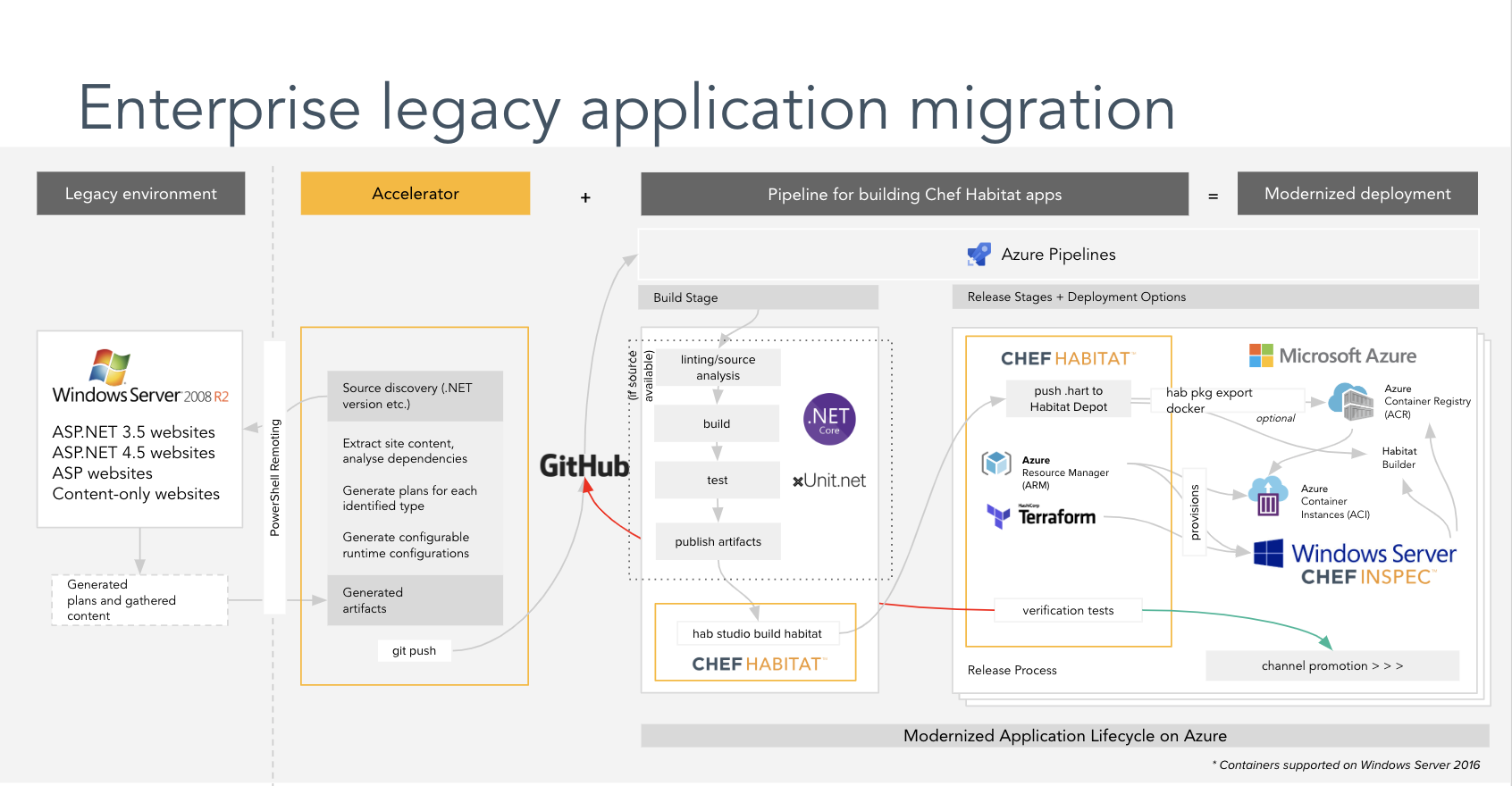
    Chef and Microsoft revealed today that they are working together to apply DevOps processes to accelerate the migration of Windows Server 2008 and SQL Server 2008 to more current versions.

    Announced at the Microsoft Inspire conference, the goal is to enable organizations to leverage Chef Enterprise Automation Stack (EAS), which includes an EAS Migration Accelerator for Windows that will scan existing .NET applications running on legacy Microsoft platforms to discover configuration and dependency details, then encapsulate that information as code in a way that enables the application to run on the latest version of a Microsoft virtual machine or as a container.

    Ewan Dalton, partner development manager for Microsoft, said there are roughly a half-million .NET applications running on platforms that are scheduled for end-of-life support beginning in January. In an ideal world, most of those applications would be modernized to be deployed on the Microsoft Azure cloud, said Dalton.

    Vikram Ghosh, vice president of business development at Chef, said rather than merely lifting and shifting legacy applications onto a new platform, Chef EAS will make it possible to employ DevOps processes to modernize how those applications are updated and maintained. Chef EAS makes it possible to, for example, scan, extract and package legacy applications and their dependencies, using source control repositories such as GitHub, and convert them into cloud platforms using pipelines such as Azure DevOps. Customers can deploy these application packages in Azure and run continuous security and compliance scans, added Ghosh.

    Chef EAS

    The biggest challenge many organizations face when trying to migrate applications is the developers who created the application haves long since left the company. As such, most organizations only have documentation, which is usually sparse. They then must determine whether it is worth modernizing the application or whether they should simply replace it. In cases where it is deemed that the business logic contained within that legacy application is still critical enough to continue running, they need to find a way to automate that process as much as possible.

    Longer-term, of course, most organizations will work to modernize legacy monolithic applications even further by slicing them up into a series of more manageable microservices. But many organizations are already running out of time when it comes to existing .NET applications. Once Microsoft ends support for the platforms they are running on, patches to address cybersecurity issues no longer will be provided as part of the standard licensing agreement. In effect, that means there is enough time between now and January to re-engineer an application. Chef EAS essentially throws organizations a lifeline to determine what they want to do next in terms of replacing a legacy application, said Ghosh.

    Of course, there will always be some subset of the IT community that will continue to run .NET applications on outdated Microsoft platforms. It’s also unlikely that any of those organizations will be embracing DevOps processes to maintain those platforms anytime soon.

    — Mike Vizard

  • How DevOps Training and Certification Benefits the Team

    How DevOps Training and Certification Benefits the Team

    Cisco Systems recently announced sweeping changes to its training and certification programs to increase the real-world value of both. Cisco’s move demonstrates a trend by organizations that provide training and certification to place more value on the practical aspects of educating technology professionals—which, in turn, should have a major impact on those looking to build DevOps teams.

    “Advances in network technologies have enabled new applications and business models—converged IP networks enabled voice over IP, 3G networks enabled mobile applications and 4G networks enabled mobile video,” said Susie Wee, senior vice president and CTO of DevNet at Cisco Systems. “DevOps has become a key factor for bringing those new networked applications to life. Training and certifications for network professionals and software developers have become a must. The goal here is to bring enhanced software skills to networking, enabling application developers to write applications that leverage the full capabilities of the network.”

    Cisco’s realization that real-world knowledge brings demonstrable value to businesses has culminated in new DevNet Certifications, which are designed to demonstrate an individual’s ability to bring software skills to evolving network technologies. “The only way to fully leverage the capabilities of the network is to build DevOps teams with both networking and software skills that can address the intricacies of both software-defined networking and physical networking solutions,” Wee added.

    Cisco is not the only company pursuing a change in training and certification processes. Industry group CompTIA recently revamped its certification programs. For example, the latest version of the CompTIA Linux+ exam has been redesigned to validate the competencies and skills required of early career IT professionals supporting Linux systems.

    “For certifications to have real value today, people must immerse themselves in the technology,” noted James Stanger, CompTIA chief technology evangelist. “The new Linux + certification uses performance-based testing that presents candidates with real-world scenarios, meaning that achieving certification demonstrates the ability to function in the real world.”

    CompTIA may very well be one of the leaders in the movement to bring real-world relevance to the certification process. The company has been using performance-based testing and has been embracing certification pathways to build teams. “For DevOps teams, critical skills, including project management, both agile and waterfall, are important. Developers will need to know the operating systems they are developing in, so they’ll need to understand Windows and Linux,” Stanger said. “The idea is that for DevOps, you need to get deep into the guts of operating systems and understand them well. You can specialize in one area, but you’ll also need to understand databases, relational databases and object-oriented databases.”

    Cisco also understands the importance of educating DevOps professionals. “Our new Cisco Certifications, with new DevNet Certifications, are designed for training and certifying network professionals and software developers, so they can bring software skills to networking,” Wee noted. “This new education process teaches application developers how to write applications that leverage the full capabilities of the network, and it helps build IT teams with network skills and expertise and software skills and expertise so they can leverage the full capabilities of the network, helping to support the DevOps process.”

    Cisco is also investing in the idea of building a community in the form of the company’s DevNet offering. DevNet was created some five years ago to help network engineers and application developers take full advantage of the revolutionary changes shaping the industry. The company is now focusing its efforts on what it sees as its customers’ biggest problem—network automation—and has created the DevNet Automation Exchange, a community-based developer center where networkers and developers can learn to “walk, run and fly” with network automation using Cisco’s products and the full capabilities of the new network.

    According to Wee, those three processes can be broken down into:

    • Walk: Get visibility and insights into their networks in a read-only way. This enables use cases such as gathering telemetry and insights from running networks and performing audits to ensure the ongoing security of the network.
    • Run: Activate policy and intent across different network domains. This enables use cases such as providing self-service network operations that comply with security policies and operational guidelines.
    • Fly: Proactively manage applications, users and devices with DevOps workflows. This enables use cases such as deploying applications in continuous integration and continuous delivery (CI/CD) pipelines while configuring the network in accordance with new application policies.

    Wee noted Automation Exchange has been seeded with more than 50 code repositories, many contributed by Cisco’s engineering teams and SEs. Now, she said, the company is inviting DevNet community members to submit code that solves their use cases.

    Updated certification and training resources from the likes of Cisco and CompTIA will go a long way to helping build DevOps teams that can hit the ground running.

    — Frank Ohlhorst

  • AI for IT Operations: All It’s Cracked Up To Be?

    AI for IT Operations: All It’s Cracked Up To Be?

    Artificial intelligence for IT operations (AIOps) is becoming a critical tool for organizations attempting to bring automation quickly to network management and IT problem resolution. However, many organizations are still unsure how to deploy AIOps for the most value and to net the full, promised results. Perhaps the challenges come from not looking beyond data silos, or perhaps the problems can be attributed to a lack of understanding AIOps’s full potential in the enterprise.

    Enzo Signore, chief marketing officer at FixStream, lends credence to the problem of siloed information. “Despite continued investments in system resources, IT cannot holistically see what’s in their physical and virtual infrastructure,” he said. “And without a clear view of the entire IT environment and the ability to make sense of the mountain of data being served up by various system tools, Ops teams can’t figure out what’s wrong or how to fix it.”

    In essence, for AIOps to be successful, IT must be able to access that siloed data and then be able to process that data to derive actionable insights, exactly what AIOps is meant to do. Yet, complexity still seems to be one of the major challenges of bringing a holistic approach to managing networks and resolving problems. 

    “IT teams are bogged down by the sheer complexity of today’s hybrid, dynamic IT environments,” Signore noted. “Along with steep learning curves and lightning-fast changes to new technology, IT departments must cope with soaring consumer expectations, supporting legacy systems, lack of skilled talent, disparate tool sets and opaque physical and virtual IT infrastructures. These factors complicate IT staff’s ability to oversee operations and optimize system performance.”

    Naturally, companies such as FixStream have a major stake in the AIOps game; the company offers numerous AI solutions that promise to modernize IT operations and bring AI into the realm of IT operations. However, understanding what AIOps is all about is one of the first hurdles to overcome when contemplating the technology. Gartner defines AIOps as platforms that enhance IT operations through greater insights by combining big data, machine learning and visualization. “IT leaders should initiate AIOps deployment to refine performance analysis today, and as an augment to IT service management and automation within the next two to five years,” advised Pankaj Prasad, senior principal analyst at Gartner.

    Gartner defined some best practices that businesses should adopt, which include: 

    • Deploy AIOps by adopting an incremental approach that starts with historical data and progress to the use of streaming data, aligned with a continuously improving IT operations maturity.
    • Select platforms that enable comprehensive insight into past and present states of IT systems by identifying AIOps platforms that are capable of ingesting and providing access to text and metric data.
    • Deepen the IT operations team’s analytical skills by selecting tools that support the ability to incrementally deploy the four phases of IT operations-oriented machine learning—descriptive, diagnostic, proactive capabilities and root cause analysis, to help avoid high-severity outages.

    Best practices aside, FixStream’s Signore opined that there are some other challenges that must be addressed. “Without the foundational capabilities of accurate discovery, contextualization and full-stack correlation, AIOps can become severely limited,” he said. “The lack of those features have become the big elephant in the room that everyone is not addressing, and it’s holding back the advancement of AIOps and machine learning for many companies.”

    Simply put, when AIOps is not fully deployed, important insights may go unnoticed and leads to data remaining in silos. “Companies are getting all this data, but it’s not being properly processed and correlated, and it’s going to waste,” he said.

    It is those types of deployment issues that are lending credence to AIOps not being as effective as promised. “AIOps is a multi-layered platform whose capabilities should include efficient data collection at big data scale, correlation across the collected data, machine learning, analytics and visualization,” said Bishnu Nayak, FixStream CTO.

    Businesses discouraged by the initial ROI of AIOps should take a long, hard look at their implementation strategy and take into consideration what their data sources are and how they are applying analytics, Nayak said. “Done right, an AIOps implementation can lead to a decreased mean time to remediation and better proactive problem-solving. By increasing system availability and responsiveness, AIOps can enhance your digital business operations and improve profitability.”

    — Frank Ohlhorst

  • 27-Factor Assessments Lead to Success With DevOps

    27-Factor Assessments Lead to Success With DevOps

    October 2019 will mark the 10th anniversary of the first DevOpsDays, where the term “DevOps” began to catch on. In the world of information technology, 10 years is a long time and it is quite evident based on the amount of change that has transpired since then. To name a few, we have seen the maturing of CI/CD automation and many innovations such as application release automation, containers, cloud infrastructure orchestration, DevSecOps, DevOps database, DevOps governance and micro-services.

    These innovations have become part of “mainstream DevOps.” This evolution is continuing with AIOps, machine learning, value stream management and others. Each of these innovations has made DevOps not only more powerful but also more complex.

    As a consultant working on DevOps projects through their life cycle, I have learned that complexity can plague the success of DevOps within an organization. Complexity cannot be avoided, as DevOps is complex and will likely continue to be. However, the key to avoiding failure through your DevOps journey is to engage the complexity by using DevOps tenets to implement DevOps. Do not try to boil the ocean. Instead, at each leg in the journey, take inventory of where you are in terms of current goals, state and best practices. Fine-tune your direction and build your solution using proven continuous delivery methods.

    The 27-Factor Assessment Model

    A comprehensive yet efficient assessment of your current state is key for ensuring complexity has not gotten out of hand and the organization is focused on success criteria that meet the needs of the business.

    I use a 27-factor assessment model. The factors are the cross-product of current best practices for three dimensions (people, process and technology) with nine pillars.

    A Scope of the 9 Pillars

    Leadership: Gain insight and understanding of your leadership practices and how leadership can improve DevOps adoption and performance.

    Culture: Identify opportunities to improve cross-functional collaboration and communication across your organization.

    Application Development (or Design for DevOps): A practical analysis of application development practices identifies improvements for your DevOps performance.

    Continuous Integration: Analysis of branching and software integration workflows and tools identifies bottlenecks and improvements for builds and packaging processes.

    Continuous Testing: Analysis of end-to-end software testing, verification workflows and tools identifies bottlenecks and improvements for accelerating testing while improving the coverage and quality of tests.

    Infrastructure on Demand (or Elastic Infrastructure): Analysis of systems and services for orchestrating and hosting applications and DevOps workloads provides insights to improve performance and utilization of resources.

    Continuous Monitoring: Analysis of end-to-end monitoring workflows and tools for applications, releases metrics and infrastructure provides improved visibility for all business and technical stakeholders.

    Continuous Security: Analysis of security practices and tools identifies opportunities to integrate security practices into the continuous delivery pipeline.

    Continuous Delivery/Deployment: Analysis of delivery and deployment practices identifies improvements for safer, faster and more efficient releases.

    Each combination of pillar and dimension has associated best practices used to score relevance and current state relative a DevOps goal agreed by the organization. Here is an example of the continuous security pillar.

    The 27-factor assessment for an application is an important input to a future state value-stream map workshop. The value-stream map is then transformed into a road map and implementation plan.

    This assessment approach is thorough and yields results that are usually accepted by stakeholders because they are involved in the process at each step. The result is aligned to their priorities and goals and the solution road map is directly traceable to stakeholder inputs. The approach is flexible enough to evolve over time and can be customized to suit the priorities of an organization. For those that argue that 27 factors are too many and too complex, I must say the complexity of DevOps itself requires a comprehensive assessment approach.

    Conclusion

    In this article, I described a comprehensive, efficient and evolvable assessment approach that uses 27 critical success factors for assessing DevOps applications. While DevOps offers immense value for software development, delivery and deployment, a rigorous and thorough assessment with up-to-date best practices are essential to accomplish DevOps goals. Each organization is different and has different DevOps goals and requirements. The changes to the three dimensions vary according to the results of each DevOps assessment.

    — Marc Hornbeek

  • Pulumi Advances DevOps on AWS

    Pulumi Advances DevOps on AWS

    Pulumi announced the availability of Pulumi Crosswalk for Amazon Web Services (AWS), an open source framework for deploying applications on Amazon Web Services (AWS).

    Company CEO Joe Duffy said Pulumi Crosswalk for AWS provides a software-as-a-service (SaaS) application through which DevOps teams can automate the deployment of applications on AWS infrastructure using software development kits (SDKs) from Pulumi. The SDKs are based on programming tools such as JavaScript, Python, TypeScript and Go, which most developers already know how to use. That approach eliminates the need for DevOps teams to learn how to employ YAML files or to acquire tools such as CloudFormation or Terraform to deploy applications on AWS, he said.

    Pulumi Crosswalk for AWS also embeds the best DevOps processes recommended by AWS directly within its SaaS tools, including patterns for containers and serverless computing frameworks, Duffy noted.

    Pulumi Crosswalk for AWS is available on GitHub. It is designed to be integrated with existing Team and Enterprise Editions of Crosswalk that come with support and training provided by Pulumi.

    In addition to AWS, Pulumi Crosswalk supports other cloud platforms, including Microsoft Azure and Google Cloud Platform (GCP). The company also plans to provide support for private clouds and leverage Kubernetes clusters to automate deployments across hybrid cloud computing environments.

    Duffy noted that despite all the enthusiasm for DevOps, many IT operations teams have been left behind. While much time and effort has been put into unifying backend cloud services, the operational experience in the cloud still revolves around low-level application programming interfaces (APIs) or specialized tools that are challenging for IT operations teams to employ. That situation often creates a backlog of applications for IT operations to deploy. Crosswalk enables IT operations teams to leverage the skills developers have to deploy applications they approve on AWS, he said.

    As cloud computing evolves in the age of DevOps, the relationship between developers and the IT operations team is becoming more nuanced. IT operations teams still need to put guardrails in place, but they can’t afford to be perceived as a bottleneck slowing down the rate at which applications can be deployed in the cloud. The challenge IT operations teams must overcome is finding a way to enable developers to self-service their application deployment requirements as much as possible within a set of policy guidelines defined by the internal IT team. That approach will enable developers and IT operations teams to get out of each other’s way.

    It may be a while before IT operations and developers find the right DevOps balance that best suits their organizations. Individual teams within enterprises tend to define their own best practices based on the expertise available within the team. Ideally, those best practices are then shared and implemented as appropriate across the rest of the enterprise.

    In the meantime, it will be interesting to see how aggressively cloud service providers embrace tools such as those from Pulumi. Cloud service providers have a vested interest in getting as many workloads deployed in their clouds as quickly as possible. They tend to be a little less enthusiastic about anything that makes it easier to move those workloads anytime a DevOps team sees fit.

    — Mike Vizard

  • Shift Left Without Fear: The Role of Security in Enabling DevOps

    Shift Left Without Fear: The Role of Security in Enabling DevOps

    It’s the age of DevOps, and we all want to shift left, which refers to the idea of performing processes earlier in the CI/CD cycle. That includes security checks and audits. By starting security operations earlier in the delivery pipeline, it becomes easier to find problems, and teams have more time to address them before pushing code into production.

    The challenge, of course, is building a shift-left security operation that allows you to perform security operations early without slowing down delivery speed. Let’s take a look at how to square that circle.

    Defining Shift-Left Security

    A popular term in DevOps culture is “shift left.” But what does shift left mean? Shifting left refers to the effort by a DevOps team to implement measures to ensure application quality at an early point in the software development life cycle. In the case of application security, this means implementing measures to ensure security concerns are taken into consideration while the application is being developed, rather than at the end of the process.

    The overall goal of shift-left security is to identify and resolve potential vulnerabilities earlier in the development life cycle, when these issues are less expensive to fix. Doing so will help to mitigate the risk potential security concerns pose to both the delivery schedule and your end -users.

    DevSecOps: Integrating Security Into the Development Process

    Let’s be honest: Faster and more frequent development cycles aren’t going away. Slowing delivery speed to analyze and bulletproof the application at the end of the development process is no longer a viable format for implementing security. DevOps and CI/CD need to be embraced and enabled by the security staff.

    For security teams to enable the DevOps process, collaboration is key. Through this collaboration, the process of DevOps transforms into something known as DevSecOps. In DevSecOps, security personnel work closely with the rest of the DevOps organization to help those who create and deliver the application to gain a better understanding of what is needed to address security concerns as early in the development life cycle as possible.

    The following tips serve as a jumping-off point for implementing this collaboration:

    • Make security the responsibility of the entire DevOps team: Impress upon the development and operations staff that security is now the responsibility of the entire organization. Simply addressing potential vulnerabilities post-development will eat up too much time and increase the risk that something will be missed. Buying into this process is an essential part of implementing successful collaboration between the security team and the rest of the organization. An example of this would be impressing upon developers to code with security in mind.
    • Facilitate regular discussions about application security throughout the development process: It is the responsibility of the security folks to keep security considerations at the forefront of a developer’s mind while they develop new features. Use the agile process to your advantage. Backlog meetings can involve security folks to ensure the creation of user stories includes consideration for security concerns. Your daily standup meetings are another place to include security personnel. This will provide security staff with an opportunity to speak up when the work described by the developer requires—or might require—considerations related to security that have yet to be addressed. Doing so will help to ensure the ball is not dropped, allowing for potential issues to be rectified before they even exist.
    • Use test automation and continuous integration to your advantage: When it comes to addressing security concerns throughout the development process, continuous testing is your best friend. And, in cases where it makes sense, the DevOps team should integrate automated test scripts for the detection of security and into their continuous integration process. Such tests can include developer-written scripts to test for vulnerabilities in the code base and tools for static code analysis. Another part of your continuous testing strategy could involve the use of tools for infrastructure monitoring.

    The data produced by these strategies can then be analyzed by security folks. And from this analysis, recommendations can be made to the DevOps team regarding the path forward to close potential gaps in security before they ever reach production and can be exploited.

    Understanding the Role of Security Personnel in the Development Process

    Security folks are often not coders, and development personnel are often not security experts. And while it may be frustrating at times, the solution to managing this disconnect is in the collaboration described above. Situations will arise where developers need to develop with various technologies to build a quality product. It’s possible that these technologies will lend themselves to security concerns that require security expertise. The job of security personnel shouldn’t always be to fight back against the use of these technologies. The security team should act as facilitators—take what development and operations staff intend to do and foresee the potential impacts that innovation will have on security—then take these potential impacts and provide insight into what needs to be done to reduce the risks.

    Conclusion

    In the past, security often was considered as an afterthought in the development of an application and its infrastructure. The movement toward faster development cycles and more frequent application releases has forced development organizations to think about security differently. Nowadays, so much can change in an application in a short time. This has forced DevOps organizations to integrate security into the development pipeline to make security a continuous consideration in the development life cycle. With this integration, the responsibilities of security personnel have shifted. Security teams now need to be enablers of the DevOps culture, empowering DevOps processes with security in mind.

    To see how Symantec CWA can help you shift left without fear, sign up for a free trial to see how it can help secure your cloud.

    — Scott Fitzpatrick

  • Get Testing Bottlenecks Out of Your Pipelines

    Get Testing Bottlenecks Out of Your Pipelines

    I first learned the term “deployment pipeline” when I read “Continuous Delivery: Reliable Software Releases through Build, Test and Deployment Automation,” by Jez Humble and David Farley back in 2009. End-to-end automation of the build, deploy, test and release processes kick in each time a team member commits a change to the source code repository.

    Chapter 5 of the book notes that the forms of testing common to all projects include manual test stages which “… assert that the system is usable and fulfills its requirements, detect any defects not caught by automated tests, and verify that it provides value to its users. These stages might typically include exploratory testing environments, integration environments, and UAT (user acceptance testing).”

    Humble and Farley include these manual stages in the deployment pipeline, also known as a continuous integration (CI) pipeline, build pipeline or delivery pipeline. However, from what I observe, I think a lot of times people forget about these important manual stages.

    Though we can do more and more with test automation, thanks to improving technology, manual testing activities are here to stay in most business domains. My own previous team realized this as we started to move toward continuous delivery (CD) a couple of years back, with twice-weekly deploys to production. Smaller changes and more frequent deploys means lower risk of regression failures. Yet, we still struggled with how to fit in important manual testing activities.

    Whenever my cross-functional delivery team has a problem, I look for a way to make it visible, to help us talk about it and brainstorm ideas to solve it. My “aha” moment around manual stages came when I learned techniques to visualize our pipeline from Abby Bangser and Ashley Hunsberger. My team knew we had these manual testing activities and that we wouldn’t feel confident about releasing changes without them, but we weren’t really thinking about them as stages in the pipeline.

    Visualizing Your Pipeline – Including the Manual Stages

    Continuous Delivery Pipeline
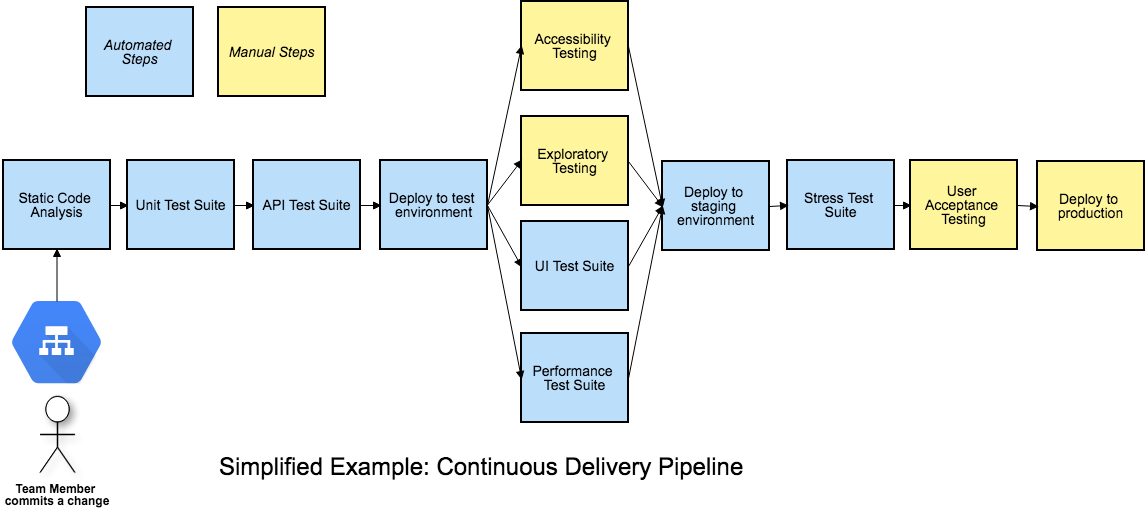
    Figure 1: A Continuous Delivery Pipeline (my diagrams are inspired by Katrina Clokie’s pipeline diagrams in “A Practical Guide to Testing in DevOps”)

    Getting your team together to visualize your pipeline is a great method to find ways to improve it. Gather around a table with cards or sticky notes, or draw on a whiteboard—what are all the steps in your pipeline, including the manual ones? In Figure 1, the manual stages in a team’s CD pipeline are shown in yellow. All the automated and manual things need to happen before the business decides to push the button and deploy to production. It’s easy to see that these manual stages can become a bottleneck. Manual exploratory testing is likely to take longer than the automated test suites. If user acceptance testing needs to be done by certain business stakeholders and they aren’t available at the right time, that holds up the release. If the team is looking to move to continuous deployment, where every change to the product goes out to production as soon as all stages complete successfully, these manual stages will be in the way.

    When you get your whole team including developers, database experts, operations specialists and product owners involved in solving these problems, you may discover innovative ways to approach them. In my team’s case, we decided everyone on the team needed to help with exploratory testing so we could do it in a timely manner. Testers helped the developers learn exploratory testing skills with hands-on workshops and by pairing with them. Then, each developer pair working on a story was tasked with doing the exploratory testing at the story level before declaring the story finished. We wrote exploratory testing charters at the epic or feature level as stories in our backlog. When enough stories were complete, anyone on the team, including testers and product owners, could pick up those charters.

    If we couldn’t complete all the necessary exploratory testing before the next production deploy, we used feature flags to hide the changes from customers until we could complete the testing. We could go ahead and deploy the changes and wait to release them once we felt confident they would not cause any customer pain.

    Asynchronous Testing Stages

    Using feature flags or toggles is a good way to allow the team to approach some manual testing activities asynchronously, so they don’t hold up the deployment pipeline. If some required manual accessibility, testing takes an extra day to complete or the UAT has to be postponed for a week, the deploy still happens. A change could be toggled on for a small percentage of users and observed in production to see if any unexpected behavior occurs. Whatever activities are needed to safely release a particular change don’t have to hold up other changes that are ready for customer use.

    Asynchronous stages in a deployment pipeline
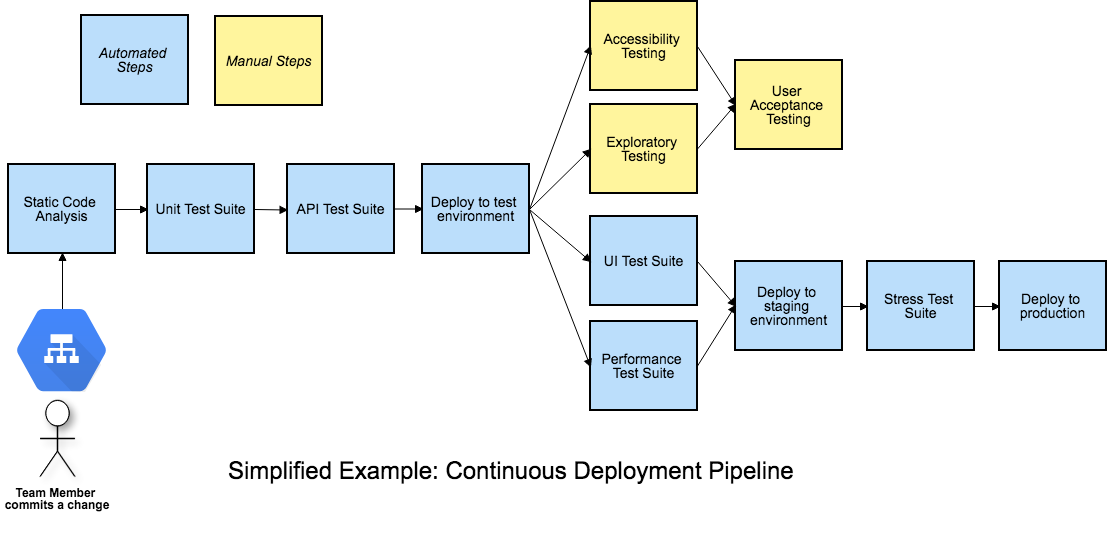
    Figure 2: Asynchronous stages in a deployment pipeline

    Figure 2 is an example of a continuous deployment pipeline, but this asynchronous approach to the manual stages works for continuous delivery as well. Each time a team member commits a change, if all the automated stages in the pipeline pass, the release candidate build will be deployed to production. The manual testing activities are not inline with the other steps and don’t hold back the deployment.

    If we’re ready to deploy a feature but need to finish those manual testing stages before we release it, developers can put in a feature flag set to “off” to prevent it from being exposed to customers. When the asynchronous manual stages are all complete and successful, the feature flag can be flipped on in production. This is the actual release, customers can now use the feature. The feature flag should be removed as soon as possible, as too many feature flags at once has serious risks.

    Using feature flags or toggles to permit deploying changes to production before all testing stages are finished is one way to avoid bottlenecks and succeed with continuous delivery or deployment. Continuous delivery and deployment success depend on doing frequent small changes, not big-bang releases. A lean approach to feature flags, keeping the inventory low, is advisable.

    Visualize It With Your Team

    We’ve looked at one way to keep manual pipeline stages from holding up deploys, but there may be other solutions for your team. And there are lots of other key success factors for CD, such as keeping changes small and frequent. There’s lots to discuss and brainstorm about as your team, or a representational cross-section of it, gets together and experiments with a visual model of your pipeline. Talk about what you need to learn from each pipeline stage, who needs to know it and whether the pipeline is providing actionable feedback.

    As a tester, I’ve sometimes questioned aspects of the pipeline that nobody else had thought about. Having team members with development, operations, database and other skills present means more potential for creative solutions. Our pipeline provides a major feedback loop and we want that feedback as fast as we can get it. Writing each stage on a card and arranging them on a table or wall often triggers ideas for parallelizing more stages or realizing a particular stage isn’t necessary or can be done locally by developers.

    Automate all the things where it’s feasible. Use the time you save to optimize the way you accomplish manual testing activities and possibly automate more of them. Master techniques such as feature flagging so that you can take the time needed to feel confident about every new feature you release.

    References

    “Continuous Delivery: Reliable Software Releases through Build, Test and Deployment Automation,” Jez Humble and David Farley, https://continuousdelivery.com

    “A Practical Guide to Testing in DevOps,” Katrina Clokie, https://leanpub.com/testingindevops

    “Feature Toggles, AKA Feature Flags,” Pete Hodsgon, https://martinfowler.com/articles/feature-toggles.html

    — Lisa Crispin