Tag: devops

  • SaaS: Building Tools for the DevOps-Minded

    SaaS: Building Tools for the DevOps-Minded

    DevOps, Continuous Delivery, Continuous Integration and Continuous Testing are no longer just methodologies and development strategies — they’re all a part of a growing economy within the tech industry.

    Great Software-as-a-Service (SaaS) companies such as Chef, Docker and New Relic have done an amazing job of spotting the trends early and building their tools and services around a new wave of development processes. Chef and Docker alone have reportedly raised nearly $250 million, and New Relic went public in 2014.

    In fact, this very website is another example of how impactful these new development practices are — as several specialized news outlets have been born out of these revolutionary development strategies. So, not only has the DevOps methodology helped developers create better products, faster; but the process has opened opportunities for technical experts to share their experiences on sites like this, e-books, webinars, conferences and any other way people communicate.

    On staging-devopsy.kinsta.cloud, you’ll see the best articles on the web discussing how DevOps is defined in different organizations, why Fortune-500 companies are shifting old practices toward CD and the best practices of CI from industry experts.

    In the race to be the most DevOps-friendly solution — no matter the niche — hundreds of startups have been founded and funded, which has only enhanced the toolboxes of thousands of developers. You’d be hard-pressed to find a good SaaS company that doesn’t offer integration with Jenkins CI, TeamCity or Chef, and that’s because not only should a SaaS product solve an important problem, but it should have minimum disruption of your current development process.

    With all that in mind, Continuous Testing is one of the most exciting spaces in technology today. Continuous Testing is a process that aims to synchronize testing and QA with dev and ops, which ultimately yields better products more quickly.

    There are several factors that make Continuous Testing successful in a team’s software development lifecycle — such as open-source collaboration solutions, test automation APIs and tools to track the historic performance of applications .

    With the release of Load Impact Version 3.0, the global performance and load testing SaaS company has announced its latest feature that fits right in with the DevOps mindset: Performance trending.

    Performance trending allows users to plot runs of the same test over time. That gives companies a clear view into data that locates patterns of performance degradation or improvement in order to easily validate code and infrastructure changes.

    In the spirit of Continuous Testing, DevOps, CD and CI — performance trending improves users’ ability to gain both a low-level and high-level view into the performance of their systems. And with the increased number of tests run by DevOps professionals, performance trending yields valuable information for companies concerned with their application performance — which should be everyone.

    Between staging-devopsy.kinsta.cloud and plenty of great conferences and meetups around the world, it’s safe to say this economy of DevOps-minded tools will only continue to grow in the coming years.

  • 7,600 Open Source Projects Per Company (and how it impacts DevOps)

    7,600 Open Source Projects Per Company (and how it impacts DevOps)

    That Supplier is Better For You

    Since releasing the 2015 State of the Software Supply Chain Report, there has been a lot of great discussion across the industry on best practices for managing the complexity introduced by the volume and velocity of the components used across your software supply chain.

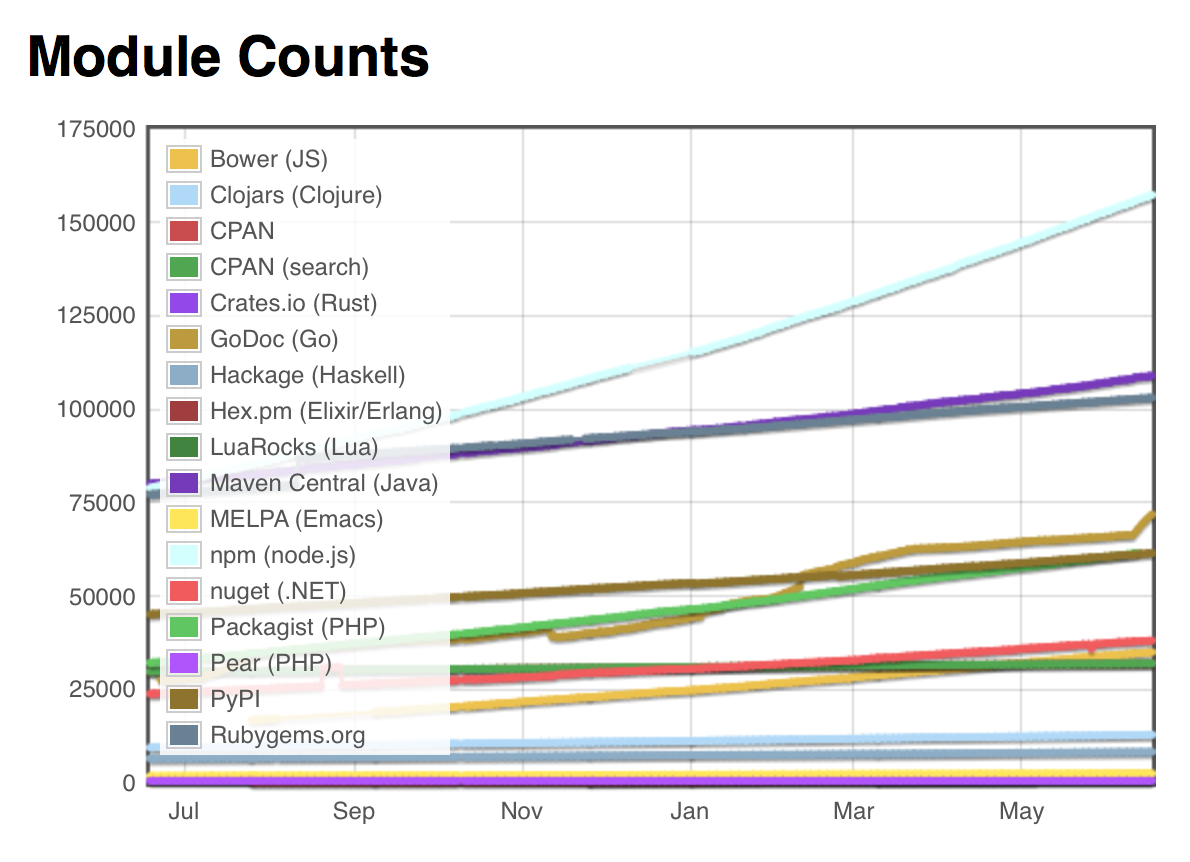
    Today I want to focus on the huge ecosystem of open source projects (“suppliers”) that feed a steady stream of innovative components into our software supply chains.  In the Java ecosystem alone, there are now over 108,000 suppliers of open source components.  Across all component types available to developers (e.g., RubyGems, NuGet, npm, Bower, PyPI, etc.), estimates now reach over 650,000 suppliers of open source projects.

    Screen Shot 2015-06-17 at 3.24.39 PM
    Source: ModuleCounts.com

    However, like in traditional manufacturing, not all suppliers deliver parts of comparable quality and integrity. My latest research, the 2015 State of the Software Supply Chain Report, shows that some open source projects use restrictive licenses and vulnerable sub-components, while other projects are far more diligent at updating the overall quality of their components. Choosing the best and fewest suppliers can improve the quality and integrity of the applications we deliver  to our customers.

    While I am hosting a webinar next week to share many of the detailed report findings, I wanted to share a few of the more meaningful stats here.

    Your 7,600 Suppliers

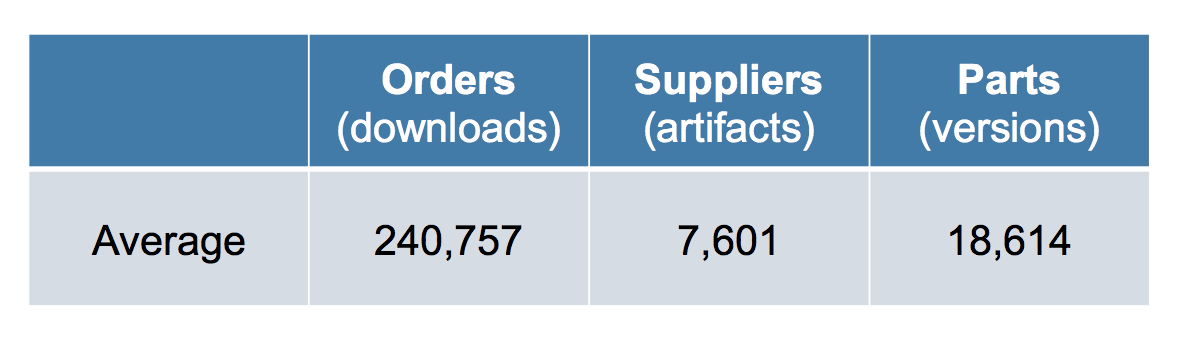
    My research for the report revealed many new perspectives on “suppliers” across the software supply chains.  First of all, I saw that the average large development organization consumed over 240,000 open source components last year — sourced from over 7,600 open source projects.

    Screen Shot 2015-06-17 at 10.29.08 AM
    Average number of open source component downloads per organization in calendar 2014

    On the surface, the huge reliance on open source projects is a great thing.  Development teams have chosen to not write those pieces themselves, but have sourced the needed components from outside suppliers.  This practice speeds development, enables more innovation, and ensures time-to-release goals are  achieved.  The use of open source is so prolific today, few of us could ever imagine reducing the use of those  components and their suppliers in the future.

    At the same time that we benefit from open source, our high paced, high volume consumption practices don’t allow us the time needed to do the due diligence on the suppliers or open source projects where we source our component parts from.

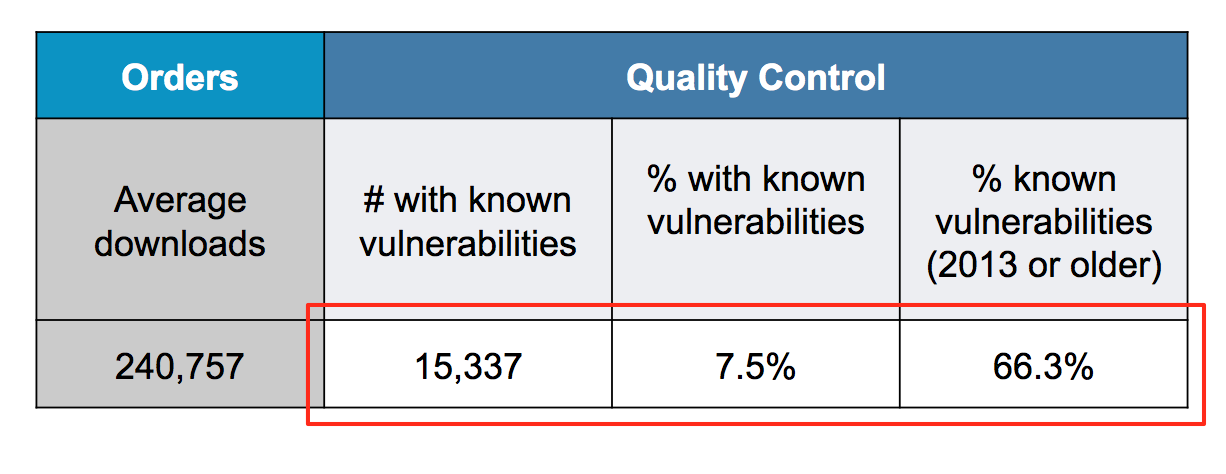
    Screen Shot 2015-06-17 at 10.29.31 AM
    Average number of known vulnerabilities downloaded by organization in calendar 2014.

    For example, of the 240,000 average component downloads in 2014, the same businesses sourced an average of 15,000 components that included known security vulnerabilities.  In many cases, developers were downloading vulnerable component versions, when safer versions of those same components were available from the open source projects. While no one intends to download components with known vulnerabilities, the problem is exacerbated due to the lack the visibility into a better recommended version.

    Fewer Suppliers, Less Context Switching

    Choosing an open source project supplier should be considered an important strategic decision in organizations because changing a supplier (“open source project”) used  is far more effort than swapping out a specific component. Like traditional suppliers, open source projects have good and bad practices impacting the overall quality of their component parts.

    Traditional manufacturing supply chains intentionally select specific parts from approved suppliers.  They also rely on formalized sourcing and procurement practices.  This practice also focuses the organization on using the best and fewest suppliers — an effort that improves quality, reduces context switching, and also accelerates mean time to repair when defects are discovered.  One industry example from the report describes how Toyota manages 125 suppliers for their Prius to help sustain competitive advantages over GM who manages over 800 suppliers for the Chevy Volt.

    By contrast, development teams working with software supply chains often rely on an unchecked variety of supply, where each developer or development team can make their own sourcing and procurement decisions.  The effort of managing over 7,600 suppliers introduces a drag on development and is contrary to their need to develop faster as part of agile, continuous delivery and devops practices.

    Coming to Terms

    When you come to terms with the volume of consumption and the massive ecosystem of suppliers you can source your components from, you quickly realize it is impossible to address this issue with a manual review process.  Any organizations clutching to these outdated manual practices are will continue to be outgunned by the velocity by their software supply chains.

    Just as traditional manufacturing supply chains have turned to automation, software development teams need to take the same approach by further automating their software supply chains.  Information about suppliers and the quality of their projects needs to be made available to developers at the time they are selecting components.  Information about the latest versions, features, licenses, known vulnerabilities, popularity of versions being used, and the cadence of new releases should be  made available to developers in an automated way.  Automating the availability of this information about suppliers can lead to better and fewer suppliers being used.

    Be sure to read the full 2015 State of the Software Supply Chain Report for more information about open source suppliers and organizations sourcing practices.  The report also highlights current and best practices being used in organizations that are managing their use of suppliers that feed their software supply chains.

    To hear more about the overall report findings and industry best practices, please join me on Wednesday, June 24th (1pm ET) for our webinar.


  • 5 Ways Continuous Integration Reduces Risk in Development

    5 Ways Continuous Integration Reduces Risk in Development

    ***This post is based on themes and ideas from the great e-book, “Continuous Testing,” by our friends at Parasoft.

    There’s a lot of talk about DevOps and Continuous Integration in the tech space right now, but sometimes the implementation of those methods can be tricky.

    An effective Continuous Integration strategy requires DevOps teams to manage risks in software development with a range of practices.

    Here are five processes you can use to make Continuous Integration work for you.

    Automated and Self-Testable Builds

    DevOps professionals can use separate machines for software integration to eliminate the tight coupling between the build process and Integrated Development Environment (IDE) that leads to last-minute integration concerns.

    Everything needed to build the software should be contained in a separate version control repository.

    Dedicated Continuous Integration servers and open source build automation tools can run these builds through continuous testing processes and deploy the product in the required environments.

    Automated deployment further eliminates the bottleneck of waiting for other team members to deploy testable versions of the latest software.

    Synchronize Version Control Repository

    Continuous integration is only possible as long as Dev, Ops, QA and the wider IT team is tightly integrated, collaborative and supportive of each other’s efforts.

    From a tooling perspective, effective collaboration requires a separate-but-unified master database updating changes in real-time.

    All database artifacts — including scripts, procedures and other assets should be placed in this version control repository.

    DevOps teams can enable Continuous Database Integration by using automated database integration, local database sandbox and version control repository to share database assets, as well as empowering developers with capabilities to modify the database and making DBAs a part of the Dev team.

    Build a Stronger Foundation and Expand Test Coverage

    Limiting test cases to individual assets executed at every check-in to the version control repository ensures the continuously integrated builds are defect-free in combined form.

    Tests should be repeatable and performed continuously in virtualized systems replicating unavailable testing environments.

    Continuous Integration methodologies allow you to determine how much of the code was actually tested without much manual intervention.

    Although some code coverage tools can assess the percentage of test coverage by package or class, Continuous Integration systems ensure this coverage is updated in real-time.

    For instance, DevOps teams can run these tools as part of the Continuous Integration server build script every time the version control repository is updated with a code change.

    With this information, untested code would never get through to the next stage and the latest test will be conducted across all areas as required.

    Enhance Project Visibility

    With automated build testing and deployment using a centralized code repository, build feedback mechanisms update Devs and Ops with the latest test results and the necessary progress information.

    In cases when the same level of automation for complex builds seems impractical, DevOps teams using manual procedures must establish a feedback loop to bring everyone on the same page with real-time communication and notification of accurate performance and results.

    These capabilities ensure the same high standard of reporting is maintained for manual testing practices as available for automated build testing systems.

    Follow Consistent Dev Standards

    Quality code forms from the ground up, with adherence to common code and architectural standards established for an organization’s specific requirements.

    Automated inspection tools enable Devs working on short and quick builds to maintain their focus on quality from the very foundation of the software itself.

    DevOps teams should assess every integration build for potential defects that surface after integrating several iterative builds but should be taken care of far earlier during the development stages.

    In Conclusion

    The right toolset is key to Continuous Integration, as is the cultural change that facilitates this DevOps practice.

    Continuous Testing presents several areas of improvement for DevOps teams to develop iterative builds in individual, isolated branches and then merge the latest builds in a unified, single and well-synchronized Master branch.

    The idea is to ensure all risks are mitigated beforehand so DevOps professionals are not bogged down with endless needs to rework the product — and that gives them time to focus on true Continuous Integration.

  • Top 3 DevOps Practices for Operational Stability

    Top 3 DevOps Practices for Operational Stability

    Operational Stability is one of the main concerns in organizations. Especially some larger organization struggle to get a more stable IT landscape. Too often it’s political discussions that are preventing them from doing something about it. Organizations that have DevOps teams in place can just smile because they are enabled to be in control of their entire delivery chain from development to production. Read about what DevOps teams do in order to be real DevOps and why they’re smiling all day long.

    (more…)

  • Continuous Testing: What exactly is it?

    Continuous Testing: What exactly is it?

    ***This post is based on themes and ideas from the great e-book, “Continuous Testing,” by our friends at Parasoft.

    The aptly named DevOps practice of Continuous Testing synchronizes Testing/QA with Dev and Ops processes optimized to achieve business and development goals.

    A few years ago when Agile was all the rage, lightning-fast Dev sprints left the Ops and QA personnel playing catch-up due to inadequate and sluggish testing practices with minimal coverage across frequent builds.

    The widespread culture of Agile development has accelerated development while software testing still lags behind, forcing organizations to cut corners in QA or slow down Dev processes entirely.

    Instead of speeding up the conveyor belt beyond control or slowing down development to kill efficiencies, Continuous Testing in DevOps encourages a systematic approach toward process improvement.

    Continuous Testing goes beyond automation and encompasses all practices — including tooling and cultural change — that help mitigate risks before progressing to subsequent Software Development Lifecycle stages.

    Continuous testing and Automation

    The approach to Continuous Testing can vary and follow diverse pathways to ensure the best user experience is delivered, free of defects.

    It’s barely viable to repeat all tests every time a new feature is added, so the Continuous Testing strategy fosters a company-wide cultural change to achieve four capabilities: Test early, test faster, test often and automate.

    End-to-end test automation practices are intended to integrate QA into existing fast-paced Dev and Ops processes as a means to create continuity while maintaining faster development cycles.

    It’s important to understand the role of automation in Continuous Testing. Automation alone does not enable continuity in testing, but it helps provide a qualitative assessment of risk and practice actionable tasks to mitigate these risks throughout the SDLC.

    In essence, automated testing constitutes the detection process for software issues and defect prevention, whereas Continuous Testing addresses the wider challenge of improving the effectiveness of these detection sensors.

    What does Continuous Testing Look Like

    This example demonstrates how collaboration, automation and tooling enable end-to-end testing that’s performed faster, more often and better aligned with Agile Dev and Ops practices.

    Continuous Testing starts within development processes as Devs use open source tools such as Selenium to test the functionality of their code.

    Tools such as GitHub or other internal repositories can then be used to store tests and version together with the software code. DevOps teams can use the same tests to integrate frequent builds of the software with the Load Impact API.

    Once the code reaches preproduction, dedicated QA teams can use these tests by modifying dynamic test parameters as appropriate. In the production environment, Ops can reuse these tests for acceptance testing and ongoing post production monitoring.

    Once the application goes live, integration with existing APM tools help keep tabs on server-side app metrics.

    Continuous Testing in this example is broken up into at least four environments: Development environment, Continuous Integration environment, QA Pre-production and Performance testing environment, and the Staging environment. Additional post-live monitoring further enable end-to-end continuous testing.

    Key Elements of Continuous Testing

    Parasoft, a global software solutions company, is one of the great thought leaders in DevOps and Continuous Testing. The company has laid out some key elements of the process in a fantastic e-book, and they’re definitely worth sharing here:

    Risk Assessment: Covers risk mitigation tasks, technical debt, quality assessment and test coverage optimization to ensure the build is ready to progress toward next SDLC stage.

    Policy Analysis: Ensure all processes align with the organization’s evolving business and compliance demands. Primary objectives include:

    • Identifying trends associated with injection of dangerous patterns within the code
    • Augmenting defect prevention practices for high risk areas
    • Isolating risk in target areas

    Requirements Traceability: Ensure true requirements are met and rework is not required. An object assessment to identify which requirements are at risk, working as expected or require further validation.

    Advanced Analysis: Using automation in areas such as static code analysis, change impact analysis and scope assessment/prioritization to prevent defects in the first place and accomplishing more within each iteration.

    Test Optimization: Ensure tests yield accurate outcomes and provide actionable findings. Aspects include Test Data Management, Test Optimization Management and Test Maintenance.

    Service Virtualization: Early, frequent and everywhere testing requires access to real-world testing environments. Service visualization enables access to the virtual form of the required testing stages, cutting the waste time to test environment setup and availability.

    An effective Continuous Testing strategy incorporates all of these elements and forces an organization-wide cultural change to synchronize Dev, Ops and QA/Testing as part of the true DevOps philosophy.

  • George Jetson Automation: Chasing the Dream

    George Jetson Automation: Chasing the Dream

    “His job was one simple thing—press a button. That’s all he had to do; press one button and sit back.” – Joe Barbera

    I wanted to be George Jetson when I grew up. Back in the days when watching Saturday morning cartoons in footed pajamas was the high point of my week, George’s life looked as sweet as a bowl of Super Sugar Crisp cereal. Flying cars, robots, and a two-hour-a-day, three-day work week lightened even further by 100% push-button automation.

    jetson_button1

    Contrariwise, my first tech job out of high school was a classic study in manual labor. From 9pm to 5am, I was solitary “Night Backup Operator” for a small data storage company, lone man responsible for continuously swapping reel-to-reel tapes on and off a literal wall of old magnetic drives.

    reels

    It was repetitive, monotonous and boring, and the tapes were prone to jamming and tearing. A lot.

    tapes

    One night I was thumbing through a tech catalog and came across a listing for a new cassette backup system. I mentioned to my boss the following day that our reel drives could potentially be replaced by a unit the size of a large book. He took it to heart, made a purchase, and one evening shortly afterwards I came to work, popped in a blank cassette, hit a button, and kicked back for the next eight hours as 100% of my work was done for me. It was a George Jetson moment. The future had finally arrived. I was blissfully complete.

    They fired me, of course. It actually took them a few weeks to realize that I’d been automated completely out of a job. To their credit, they were appreciative and regretful in parting, but there was hardly any point in paying me to sit on my can reading pulp SF for eight hours every night.

    Regardless, I’ve been chasing that George Jetson moment ever since.

    The magic behind the button

    In the decades since, with a number of (slightly more professional) IT automation projects behind me, I’ve discovered that the “automate-everything” button is usually a lot tougher to achieve, and near-impossible to buy off the shelf. To even get close, you often end up building a significant amount of infrastructure up from scratch.

    But say you could buy a “George Jetson” button; a self-contained, perfect automation solution off the shelf; what do you look for? Setting aside the nuts and bolts of a specific IT problem or project, what does an “automate-everything” button need to do, in essence?

    1.   “Do No Harm”

    At the first sign of an incident, Mr. Spacely (voiced by Mel Blanc, “Man of a Thousand Voices”) pops up and begins motivating with the bellow “JETSONNNNN!”. (I once worked outage calls with an IT director who had the same management style, I kid you not). We don’t want this to happen. So our “automate-everything” button needs, first and foremost, to mitigate risk.

    Security should be the first consideration in risk management, yet it’s an area where (oddly enough) a number of automation solutions fall flat out of the gate. Managed user accounts (ideally, integration with established account management systems), role-based permissions (for pushing the button in various situations, IT environments, and scheduled times), and sensitive information handling should all be covered.

    The ideal automation solution’s back-end infrastructure should be robust, flexible, and professionally engineered. If any pieces are open-source or community-designed, what they do and don’t do should be well-documented, including an understanding of potential situations likely to result in unintended consequences.

    We also want the automation button, once pushed, to never perform the action again if there’s no need to do so. This is idempotence, a valuable concept that’s been around for a long time but has risen to prominence over the last year. Idempotence is particularly important once you start to consider auto-remediation (why push the button manually if it can run automatically?), and efficiency (why spend effort building an automation action that can only be run once?).

    2.   “CYA”

    “Cover Your Automation.” George isn’t particularly smart for a computer operator. But maybe he doesn’t need to be. Let’s say he’s supported by a lower floor full of smart engineering robots. The robots set up the automation actions and push them into an approval queue with just enough information to make a decision on whether an action is needed or not.

    George evaluates each situation and pushes the button if everything looks good to him. Now, the “automate-everything” button becomes more of an “approval” button in a formal change management system. There might be more approvers besides George, each laying eyes on the proposed automation action and passing it along to the next approver as appropriate.

    Most operators aren’t as dumb as George, but everybody has “dumb moments”. Change management needs to be a core part of any automation system.

    Accountability supported by thorough logging is also a key “CYA” aspect of the ideal automation system. “What” happened, “when” did it happen, “who” did it, and so on… if your automation system doesn’t track all essential information, you might not be able to return to your job after Spacely mistakenly fires you.

    3.    “KISS”

    “Keep It Simple, Stupid.” Dealing with complex automation workflows is tricky if they involve a lot of step-by-step actions, as they traditionally have in the past. When complexity clashes with modern, large-scale IT environments, situations arise that are literally impossible to manage manually. “Scale x Complexity > Effort” is the equation desperately slashed across whiteboards in planning meetings these days. Modern automation systems often attempt to reduce complexity and equalize scale through a form of orchestrated states.

    The idea depends on two parts. A desired state is a recent Microsoft-championed concept where the steps required to reach an end result are black boxed in favor of defining a system’s state itself. The usual example: rather than considering a step-by-step recipe for a birthday cake, you describe “a white cake with pink frosting” as your desired outcome and pop your request into an automated system to make it happen. Recent configuration management solutions have made excellent headway in this area.

    But desired states aren’t enough in and of themselves. They almost always need to be orchestrated to reach the final goal. An orchestrated states effort runs more along the lines of: “I need a white cake with pink frosting at the same time as a bowl of orange punch, before the time of the birthday party, but after the house cleaning. Also, yellow balloons.” Real-life IT infrastructure requires at least this level of complexity and timing.

    For a complete “automate-everything” solution, our ubiquitous button needs to orchestrate the states of all necessary systems and services in a way that’s easy for George, our hapless operator, to process, and considers both transitory states and final states as well as the interactions between them.

    jetson_button2

    When evaluating whether an IT automation solution is right for you, you may not be able to find the ideal “automate-everything” button, but make sure you consider it from these three perspectives. The perfect solution may, in the end, just be a dream to be chased by the laziest as we move from one IT automation project to the next. But it sure is fun seeing how close we can come to that blissful, futuristic George Jetson moment.


  • Continuous Documentation

    Continuous Documentation

    Is documentation dead in DevOps? Yes and no. It is transformed, it is automatic, and it is actionable.

    (more…)

  • The ROI of Enterprise DevOps

    The ROI of Enterprise DevOps

    Ever since the 1996 film Jerry Maguire, I can never think about any technology development without hearing Cuba Gooding Jr as professional footballer Rod Tidwell screaming out, “Show me the money!” So I was not surprised when the CIO of a large enterprise recently asked me the enterprise exec version of that famous line:

    Q. Where is the ROI in Enterprise DevOps?

    Fortunately there is plenty of evidence to show enterprise executives exactly where to look when trying to determine the ROI of DevOps.

    “Show me the money!”

    Here on staging-devopsy.kinsta.cloud, Rajat Bhargava has posted on talking to your CFO about DevOps, outlining four key areas of financial impact: generating cash, reducing expenses, enabling growth, long-term stability. I also had some ideas about financial aspects of getting executive support for DevOps in a great article by Erica Chickowski. And site editor Alan Shimel has posted some excellent insight on vendor-sponsored research from IDC on the cost-benefit of downtime avoidance.

    “Show me the money!”

    Not enough? Well, we also have several years of research on ROI factors associated with DevOps adoption in both small businesses and large enterprises. The company I work for, CA Technologies, has commissioned independent third party research into enterprise DevOps adoption since 2013; Puppetlabs has run similar research [PDF] with good data on all sized organizations, but especially mid-sized businesses.

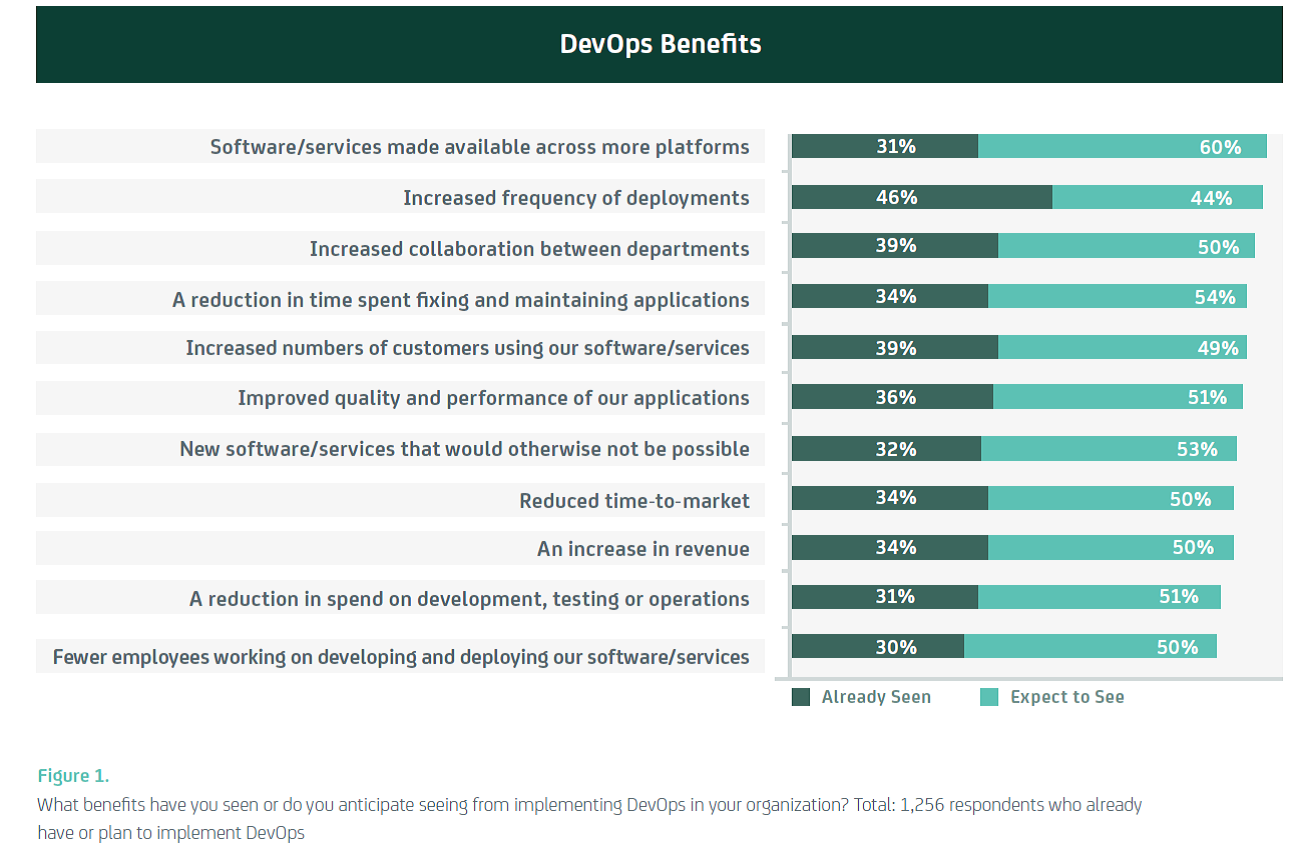
    You can see in the chart below the areas where benefit accrues through the adoption of DevOps (taken from CA Technologies/Vanson Bourne research released in November 2014):

    Image 1

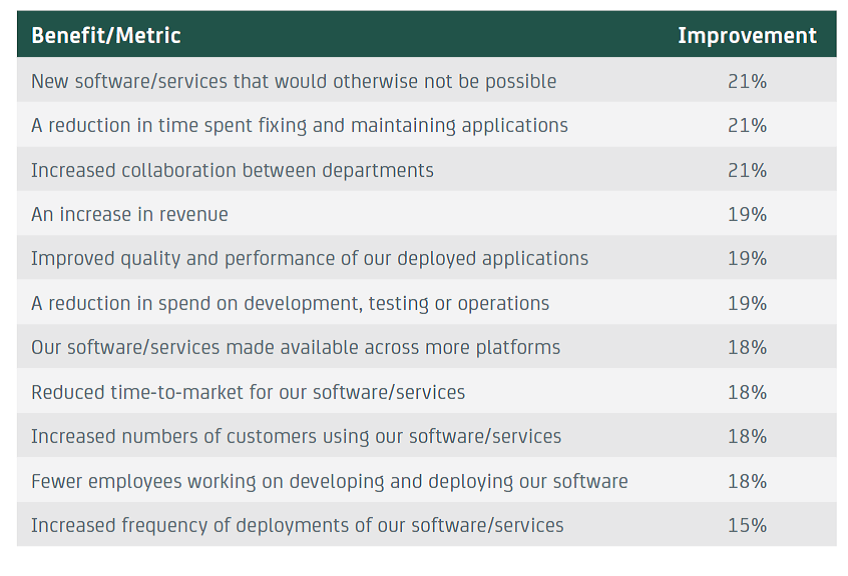
    Still need more? No problem! There is also good data on how much of a return you can expect from DevOps. Again, the following chart is taken from the same CA Technologies/Vanson Bourne research:

    Image 2

    Figure 2 Respondents report seeing double-digit improvements in key technology and business areas. Total varies by benefit. Figure 1 & 2 Source: Vanson Bourne/CA Technologies 2014

     “Show me the money!”

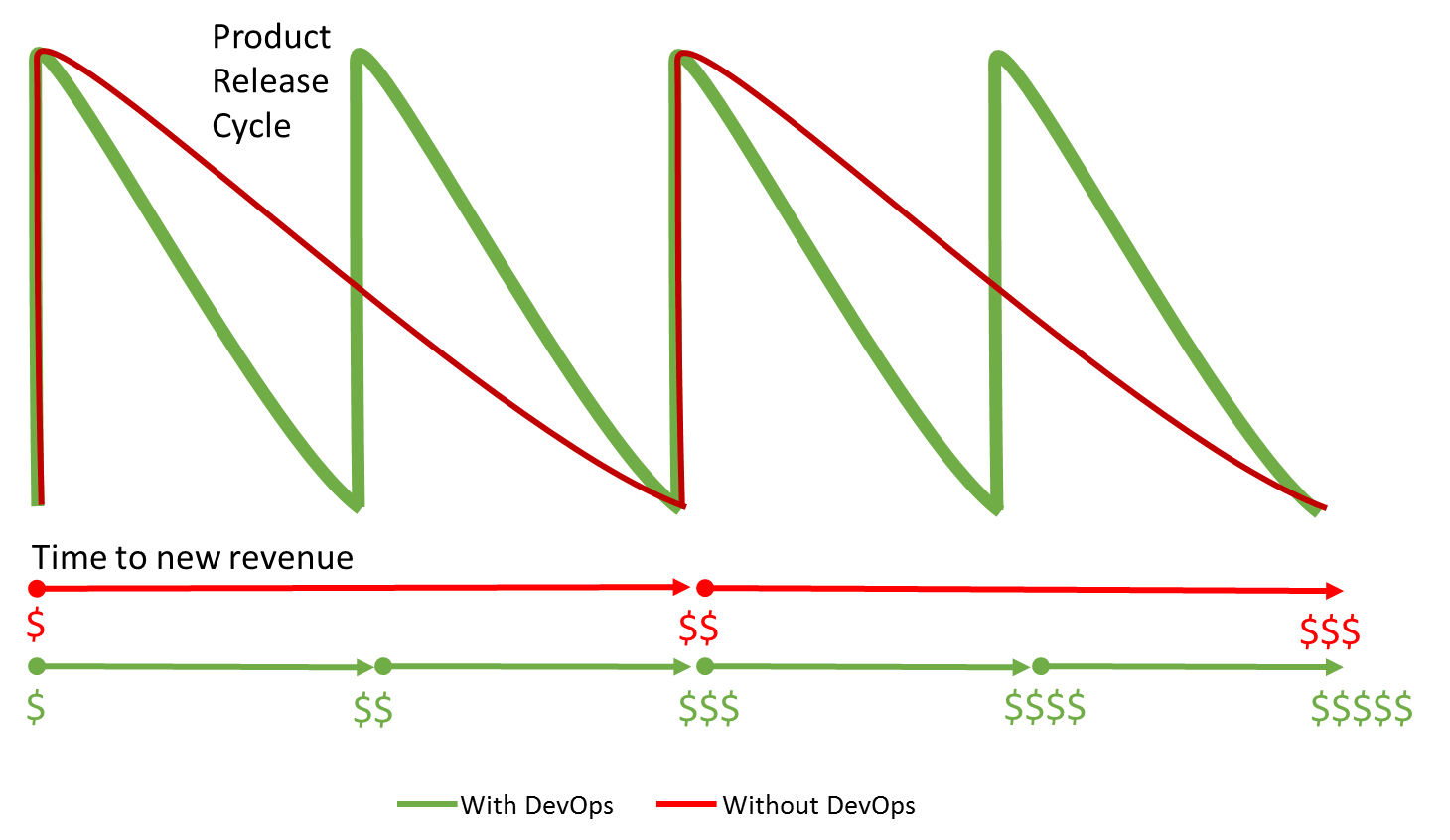
    Okay, I get it – you still want more, and you want a straight answer – a single, simple heuristic to work with. In talking with many enterprise CxOs, faster application delivery is a pressing goal, so just this one factor can act as a key ROI driver. At the Continuous Delivery (CoDe) conference in Copenhagen in October, Jan Bosch (Professor of Software Engineering at Chalmers University of Technology) showed very elegantly how faster delivery acts to reduce (i.e. shorten) the ROI period.

    His theory is based on the premise that for many (most? all?) businesses, time to revenue is dictated substantially by product release cycles. Maximum revenue accrues around product release, then tails off before spiking again for the next new product release. For example, a smartphone manufacturer will get revenue in 6-month peak and trough cycle as they release a new device twice a year; a software vendor will get a revenue peak with a new game release, which tails off until new DLC is released or a new game hits the stores.

    Because DevOps can accelerate business cycles, Jan theorized, business can bring in revenue faster, which in turn makes a DevOps-based business more profitable over the mid- to long-term. This is especially critical in the modern application economy where almost every business is a software business.

    So, for example, if DevOps allows a business to release twice as fast, they can effectively double their annual revenue, as seen below.

    Image 3

    Figure 3 Proportional revenue acceleration from doubling product release frequency with DevOps

    The impact is exaggerated for this illustration, but based on actual data (see above), a 20% increase in annual revenue would be on par with enterprise averages.

     “Show me the … costs!?”

    Of course, any discussion of ROI must realistically reflect costs too. Adopting DevOps in a large enterprise is not free – it requires investment in people, process, and technology. On the people side, even just a small cultural change often requires new activities and other behavioral shaping. Process change requires training and often impacts short-term revenues. Technology investment includes procurement of automation and measurement solutions – key components of a CAMS (Culture, Automation, Measurement, and Sharing) approach to DevOps, especially in a larger enterprise.

    Many of the investment factors can be seen in the following chart, again using CA Technologies/Vanson Bourne research:

    Image 4

    Figure 4 Which of the following is your organization likely to invest in over the next year as part of your implementation of a DevOps methodology? Total = 499 ITDMs who have already or plan to implement DevOps in the next two years. Source: Vanson Bourne/CA Technologies 2014

     “Show me … my own ROI!”

    These ROI factors are of course a combination of averages, research data points, and anecdotes. As with all generalizations, when it comes to a specific enterprise your mileage may vary. However, this is certainly a good starting point when building a business case to prove the expected ROI for your organization.

    You may find other areas for ROI too – upstream in the PMO, DBA, or downstream in NetSec, training, documentation. If you have additional data points on finding the ROI for DevOps, I would love to hear about it. Add your ideas here in the comments, or connect with me and/or staging-devopsy.kinsta.cloud on Twitter – at @AndiMann and @DevOpsDotCom respectively.


  • Why DevOps is like fitness or religion

    Why DevOps is like fitness or religion

    What is DevOps?

    I noted in a blog post last summer that limiting DevOps to a single definition is challenging. The Wikipedia entry for DevOps contains a variety of possible explanations that seem to disagree in some ways:

    • It’s a “software development method that stresses communication, collaboration and integration between software developers and information technology (IT) operations professionals.”
    • The goal of DevOps is “to maximize the predictability, efficiency, security and maintainability of operational processes. This objective is very often supported by automation.”
    • It “targets product delivery, quality testing, feature development and maintenance releases in order to improve reliability and security and faster development and deployment cycles.”
    • It “aids in software application release management for a company by standardizing development environments.”

    All of these are true, and yet none of them is necessarily THE definition of DevOps.

    A recent ZDNet post titled Why there will never be one do-it-all DevOps tool proclaims, “There is really no such thing as a specific DevOps “tool”—and don’t buy into the “DevOps” labeling many vendors are attaching to their solutions. Successful DevOps depends upon a multitude of tools and methodologies that can help organizations better align their software development and release cycles.”

    The question, “What is DevOps?” isn’t like asking, “What’s the temperature today in Phoenix, AZ?” or, “What’s the fastest land animal?” Those questions have precise answers that are based on measurable, irrefutable metrics. The answer is the answer and it isn’t really open to debate.

    “What is DevOps?” is more like asking, “What is the best fitness program?” or, “Which religious belief system should I subscribe to?” There is a vast array of answers and passionate beliefs on all sides. But, there really isn’t so much a “right answer” as a “right answer for you”.

    When it comes to fitness, there seems to be as many diet and exercise programs as there are people trying to get fit. Books, magazines, and infomercials are filled with extraordinary examples that “prove” that a given fitness program or philosophy works…at least for the subject of the story. There are some elements that are universal truths like exercise is better than being sedentary, and making healthy eating choices is better than eating an entire cheesecake for dinner. Almost everything else is subjective. There are too many variables involved that make people, and how they respond to different diet and exercise programs, different.

    DevOps is also like religion. Most people don’t choose their faith. They’re raised from birth to follow in the footsteps of their parents, and their religion is more or less predetermined. Religion is also personal. While some will insist that there is only one true faith and that theirs is the only real religion, most people recognize that religious faith is very subjective and it’s a function of finding the belief system that makes sense to you.

    DevOps is like fitness and religion in that what it means to an organization, and how it is first implemented, is influenced by the existing culture and infrastructure—the IT the company was “raised on”. DevOps is also like fitness and religion because there is no “one-size-fits-all” answer to the question “What is DevOps?”

    It isn’t a defined process—it’s more of a concept or philosophy. It isn’t a product or service that can be packaged and sold—it’s more a collection of the products and services that enable you to embrace the concept or philosophy. To some extent, DevOps is whatever works for your organization to automate routine tasks, reduce redundant effort, streamline operations, and remove unnecessary obstacles so people can get things done as efficiently as possible.

  • Top Skills for Enterprise DevOps

    Top Skills for Enterprise DevOps

    There is one question I hear almost every time I talk with my large enterprise customers about DevOps:

    1. What skills do my people need to be successful with DevOps?

    Talk of DevOps almost immediately focuses on culture – like having empathy for fellow workers, being flexible and adaptable, seeking continuous improvement, building relationships, etc. However, while critically important in DevOps, culture is an outcome, not an input; and such attributes are mostly either innate or acquired slowly. Culture cannot easily be taught.

    At the other end of the spectrum, we often look at technologies – agile development, coding languages, virtualization/cloud platforms, management tools, etc. Again, these can be important, but while learning these skills might make you a better dev or op, they may not make you a DevOps practitioner.

    Like most transformations, DevOps will need new people, process and technology skills, so in this post I take a look at a handful of the most important, pragmatic, and trainable skills in all three areas for practitioners looking to adopt DevOps, especially in large and more complex organizations.

    People Skills

    • Communication skills – while this may not come easily to typically introverted IT staff, both written and verbal communications, within and across the organization, and even with customers, are essential to a strong DevOps approach. This skill is learnable from formal courses, groups like Toastmasters, direct mentoring, social activities, or informal sessions like ‘lunch and learn.’ For extra credit, jump on stage for open mic night at a local comedy club!
    • Business alignment – much of a dev or ops life is spent embedded in the technology of software delivery, rather than the business need. This can cause many issues, and is something DevOps tries to address. Understanding the business strategy, goals and priorities is essential to DevOps, helps drive and easily trainable. A ‘big picture view’ helps everyone collaborate on common objectives to deliver high-value business outcomes – a key tenet of DevOps
    • Workplace history – “an appreciation for history, both technical and organizational”* will help staff understand the critical antecedents of DevOps, so they can internalize its principles not just rote learn its actions. For example, understanding hierarchical and network structures, why we adopted open work environments (and why it hasn’t always worked), and the antecedents of DevOps in things like The Toyota Way will help staff not just to act predictably in known circumstances, but adapt appropriately to new ones. (*Thanks to @garethr for input on this!)

    Process Skills

    • Agile development – it may be possible to take a DevOps approach in a waterfall environment, but it is almost definitely less effective. DevOps arose out of the Agile movement, and they pair so well that it is sometimes referred to as ‘agile for infrastructure.’ Teaching on one or more specific agile approaches (Scrum, Kanban, Kaizen, etc.) will give staff an approach and mindset informed by agile practices to help teams work together to improve flow, delivery and quality
    • Lean approaches – ‘lean’ theories born in the manufacturing world (see ‘history’ above) give a pragmatic foundation for applied DevOps, not just new-age ideals. Concepts like Just-In-Time, Toyota Production System, Design for Manufacture, Theories of Constraint and Waste can be learned from original texts, courseware and many business courses. Some are also revised in modern IT-specific texts like The Phoenix Project or Implementing Lean Software Development
    • Process reengineering – DevOps is as much about refining and improving ‘flow’ in the SDLC as it is about encouraging a sharing culture, so classic learning about how to effect change in business processes is invaluable to early stage DevOps adoption. Understanding how and why to analyze needs, identify problems, and effect change in software processes, organizational structures, teaming etc. is essential to DevOps and a long-established body of knowledge

    Technology Skills

    • Coding/scripting – in its current iteration there is a lot of focus on helping operators to understand coding languages; and teaching developers to use script-driven operations tools. From JavaScript (eek!) to C# or .NET, any coding or scripting skills will help both dev and ops to have empathy for each other’s jobs, and help to develop the elusive ‘T-shaped people’ that are so well-suited to a DevOps approach
    • IT Automation – Enterprise DevOps especially will likely involve (require?) a raft of technologies in an automated tool chain. Because DevOps is concerned with end-to-end flow, such skills need to cover the whole SDLC. Look to provide training in Portfolio Management, Agile Project Management, Source Code Management, Version Control, Test Automation, Test Data Management, Service Virtualization, Continuous Integration, Release Automation, Cloud Provisioning, Configuration Management, Process Automation, Performance Monitoring and Event Management, whether through formal training or informal knowledge transfer
    • Workflow mapping – smaller organizations might get away with pen and paper, or even a whiteboard/flipchart, but to document, share, analyze and rationalize the SDLC for large, complex, enterprise applications, you will need to learn to use workflow mapping tools. This will allow team members across the org (and the world) to take ownership of the end-to-end process, and start to collaborate on continual improvement

    This is of course a (very) short list, but should give you a starting point for developing essential skills for enterprise DevOps practitioners. As always, please feel free to drop a comment and tell me what I missed, what is more important, or even what I got wrong. I am always interested in discussing ideas and learning new things!