Tag: software development

  • Different Organizations, Different DevOps Outcomes

    Different Organizations, Different DevOps Outcomes

    The main motivation behind inventing DevOps platform was to help close collaboration between developers and IT operations. Basically, DevOps emerged as a great platform to bring closer together developers and beneficiaries of the app development process. DevOps initiates a cross-disciplinary practice spanning across development and operations.

    The ultimate benefit of the DevOps approach is removing the barrier between development and deployment of software applications in specific business processes. Regardless, not all businesses reap the benefits of DevOps platform.

    Does DevOps really suit all businesses of different sizes and niches? What are the key considerations for utilizing DevOps platform? These are the questions we will try to answer through this article.

    Do All Businesses Require DevOps?

    The common and widespread consensus is that any software development company geared for innovation must embrace a DevOps environment. Any business that considers innovation and smooth deployment in the software development process—a key factor in their long-term growth strategy—should take advantage of the benefits of a DevOps platform. Whenever any service provider needs to adopt new strategies to keep pace with the evolution in the software space, DevOps will come as an irreplaceable platform choice.

    Despite this consensus and widely accepted perception, there are different opinions in the market. Many industry experts believe that to reap the benefit of the platform you need to have a dedicated DevOps team in place. If you have a DevOps culture and in-house DevOps team in your company, you can gain a competitive advantage.

    The Key Benefits of DevOps

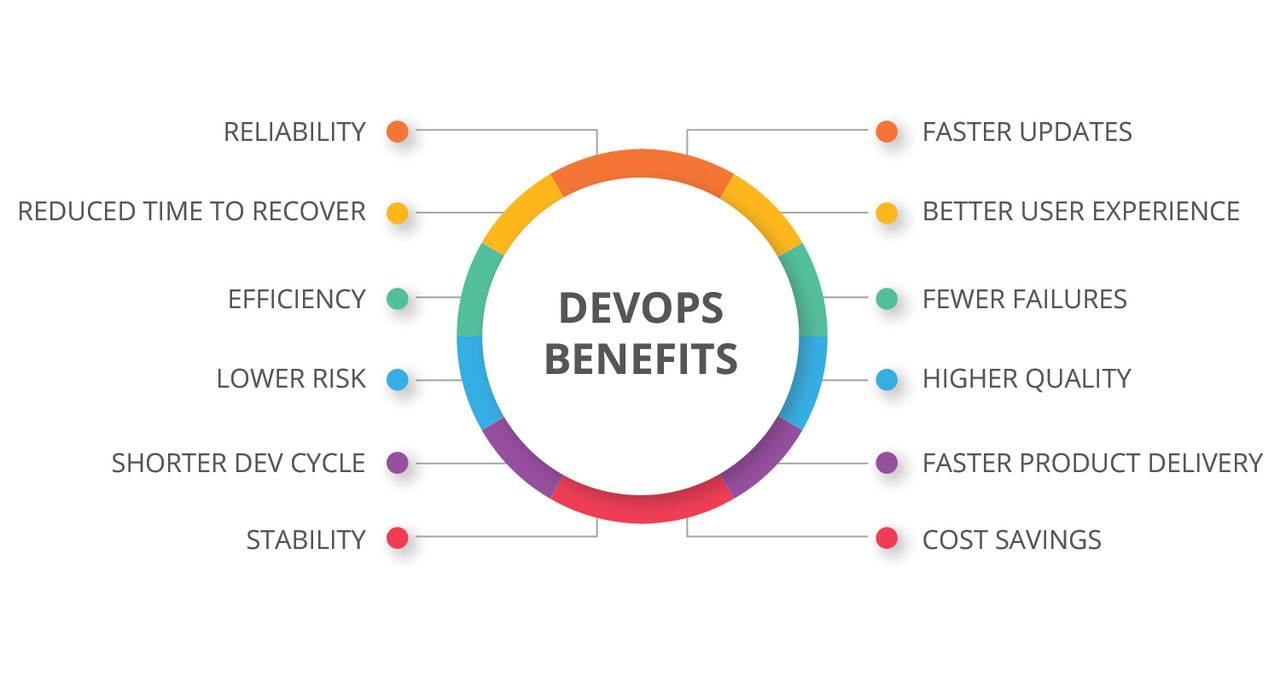
    The main benefit of DevOps is faster delivery of software with much-improved quality. There can be several other benefits depending on the industry.

    While some companies refer to the huge reduction in downtime since they adopted DevOps culture, there are still many others who simply give credit to the platform because of its integrated approach that makes the process more agile and fast-paced.

    For most companies, the domino effect of getting better software at a faster speed ends up delivering sustainable growth and revenue opportunities.

    Here’s a look at the role of DevOps platform across three types of businesses: small companies and startups, midsize companies and large business houses.

    Small Companies and Startups

    In smaller companies and startups where resources and human capital remain under-supplied, the responsibilities ascribed to developers, engineers and deployment professionals often tend to get blurred or overlap. Because of the scarcity of human resource, developers and engineers are often assigned multiple responsibilities. Naturally, in such companies, it is common to see cross-functional teams ready to engage into various development projects with ease. This makes them ideal business organizations to embrace and grow with DevOps culture.

    Midsize Companies

    As the companies tend to grow bigger in size and resources, they have a bigger (and often unbreachable) divide between verticals such as operations and development. In such organizations, staff are less likely to be open to cross-functional responsibilities, as many have been in the same job doing the same tasks and feel settled. This brings in a stagnant organizational process, where strong departmental divide rules the business process outcome.

    This stagnant work culture makes such companies less appropriate candidates to implement DevOps environment. For these companies to reap the benefits of a DevOps platform, mass organizational changes should be brought in the team structure. Building a separate cross-functional DevOps team to handle some focus projects can also be good practice for them.

    Large Companies

    Large companies enjoy the luxury and abundance of resources, and this makes them much better-placed compared to other organizations. Companies such as Amazon, Facebook, Google and Microsoft have the diversity, huge experience and robust abilities to bring together cross-functional specialists from development and operations to work on ambitious projects. These organizations are known for having product-oriented units, comprising specialists from both development and operations.

    Apart from their cross-functional expertise, product-focused approach and abundance of resources to roll on new projects, large companies also can make a big difference to the teamwork and motivation through a highly unified vision and strategic long-term objectives shared by every member of each team. This is why large companies always stand as suitable candidates to embrace DevOps approach and environment for their projects.

    Fixing the Right DevOps Strategy: 3 Things to Consider

    Beyond the organizational differences and core strengths and weakness for embracing a cross-functional DevOps approach, we must look into the key aspects that make a right strategy for any organization to incorporate DevOps into their scheme of things. Question is, despite the shortcomings and lacking, how can you embrace DevOps environment and reap the benefits? Here we provide some clues:

    • Making Change a Habit. Some strategists believe that any organizational change will face a lot of friction, causing substantial harm to the immediate business outcome. But there should be no reluctance to change for this. Rather, by bringing constant changes, people get used to the friction and pain and it becomes normal. This is one way to replace traditional IT mindset with DevOps.
    • Starting Small with a Neat Team. Obviously, finding the appropriate and credible skilled employee for your DevOps projects is not always easy. This is why it is advisable to create small startups or units, in which sharing the common vision and embracing a cross-functional approach becomes the order of the day. On top of that, do your best to bring out the best from your team and hire some experienced ones with knowledge of DevOps.
    • Continuous Development Mindset. We all know how the DevOps platform always focuses on continuous development approach. It is easier for the software developers to embrace such approach, but for operations staff, you have to slowly make them think of infrastructure as evolving and slowly building components. That’s something challenging but not impossible.

    Conclusion

    DevOps has emerged as the most promising development approach for modern software developers. Though for many development companies the friction emanating from strict role divides is becoming an obstacle, the positive push by DevOps for cross-functional approach looks indomitable.

    — Atman Rathod

  • Feature Flagging Poised for Wider Adoption

    Feature Flagging Poised for Wider Adoption

    Feature flags, also known as feature toggles, provide a means for DevOps teams to test and add new capabilities to their applications without having to take the entire application offline. The downside is they generally result in more branches of applications that need to be carefully managed within the context of a DevOps process.

    A recent survey of 550 software developers and decision-makers conducted by the market research firm Vanson Bourne on behalf of Atlassian and Rollout.io, a provider of a platform for managing feature flags, suggests that IT organizations are getting more comfortable with managing feature flags.

    The survey finds 95 percent of survey respondents said their organizations have implemented, have begun implementing or plan to implement features flags. Those that have implemented feature flags said they add 30 new features on average to each application per year, compared to those that have only begun implementing (21) or plan to implement (18) them. A full 81 percent said use of feature flags will increase over the next 12 months, and 88 percent said modern software development should assume to include feature flagging.

    The primary driver for implementing feature flags are a need to reduce risk (46 percent), increase speed of development (46 percent) and increase speed of deployment (45 percent). Eighty-seven percent of respondents said enabling an on/off or “kill” switch for features also reduces the risk of application downtime for customers.

    A total of 97 percent of respondents said they are under pressure implement new application features faster, and yet 65 percent said it is difficult to accomplish that goal safely. More than 61 percent of respondents said their organization releases new versions or updates for applications once a week or more. However, 72 percent admitted they have lost customers or users due to application development errors.

    Rollout COO Ronit Belson said building out the functions required to manage feature flags doesn’t make much sense when platforms such as Rollout.io are now emerging. The survey finds nearly 90 percent of respondents who have implemented feature flags in-house would consider moving to a third-party supplier for feature flagging management software. A total of 37 percent of respondents said the cost of in-house development is higher and 32 percent said they encountered more complexity than anticipated.

    Belson added most organizations not only fail to appreciate the cost of implementing feature flagging on their own, but also the impact feature flagging has on the culture of the IT department.

    Thanks to the rise of microservices, feature flagging should become more prevalent as monolithic applications give way to a more granular approach to application development that makes it easier to isolate functionality. In fact, the ability to apply feature flagging might be considered one of the primary benefits of the agility inherent to any microservices architecture, especially it if relies on containers that can be easily ripped and replaced. The challenge organizations will face is implementing the DevOps processes required to embrace feature flagging at scale.

    — Mike Vizard

  • Software Development: A Better Way to Measure Success

    Software Development: A Better Way to Measure Success

    Here’s a metaphor for software development you probably haven’t heard before: It’s like flying a plane. You have a starting point and a destination in mind, there’s a good chance you’ll change course midflight, and … sometimes you get a little nauseated?

    Okay, it’s not the best analogy. But there is one aspect of piloting a plane that offers valuable insight into how to measure your team’s performance more consistently. It’s called the performance-control technique, and it may be the best method you’ve never heard of for keeping your engineering teams aligned behind a common goal.

    Imagine for a second sitting in the cockpit of a plane, surrounded by clouds. Forget using the ground to orient yourself; you have nothing but your instruments and wits to guide you. It’s a situation I’m plenty familiar with, having taken flying lessons out here in rainy Seattle. In those cases, you use your altitude and power settings to set up a particular control scenario that results in your desired output, whether it’s ascending, descending, straight and level or turning. And then you monitor your performance—in this case via altitude, vertical speed and airspeed indicators—to verify that you’re achieving your desired output.

    Now unless your software development pipeline is irredeemably broken, you are probably not flying completely blind as you work to build and ship new features. But the technique still applies: Choose your control metrics (time to release, for example), and then set up a series of performance metrics to keep it on track.

    Cloudy Skies Ahead

    The greatest strength of the performance-control technique is its acknowledgement that any control can result in unintended consequences. Take reducing the time from check-in to release. It’s a fantastic goal: The quicker you get code into production, the quicker you deliver updates to your customers. The quicker you do that, the quicker you get feedback and respond to their needs. The quicker you do that, the quicker you can iterate on features. And the cycle continues.

    But it’s also a goal that can result in unintended consequences: When you single it out for attention, it’s only natural team members will want to do everything they can—at the expense of almost everything else—to achieve it. That’s not to say they want to do wrong; rather, they’re just trying to be good citizens. (And, okay, they don’t want their name to show up in a report about why the team didn’t meet its quarterly goal.)

    So people make compromises. Maybe they drop full regression passes and replace them with incremental feature and integration testing. It’s not that they don’t care about quality. But in their quest to help the organization meet its single-minded goal of reducing the time from check-in to release, they opt for the easiest change that could get them there, indirectly prioritizing speed over quality in the process. And that happens because there aren’t checks in place to keep it from happening.

    Taking Control

    How do you put this into practice at your own organization? Start by choosing your goals and then selecting the control metrics. For many, it could be as simple as increasing speed; it’s a natural goal to chase, for the reasons already discussed. But it may be something different; only you and your teams can decide by being intentional in how you evaluate your production environment.

    Then it’s time to choose your performance metrics for each of your goals. You can do that yourself, but it may be more illuminating—and, honestly, more fun—to get your software development team involved. That could range from encouraging them to brainstorm the negative consequences of implementing that goal to straight-up asking them how they’d game the system.

    The following chart offers examples of control goals, their resultant unintended consequences, and the performance metrics necessary to keep them in check.

    Desired Output Control Goal Performance Goal Unintended Consequences
    Climb to 4500’ Increase power, nose up Airspeed, Altitude Stalling
    Reduce bounce rate Reduce site latency Revenue, Conversions, Customer Engagement Smaller pages, poor experience, feature attrition
    Generate more conversions Increase availability Releases, Backlog Ticket aging. Lower frequency of releases, cherry picked work items, no risk taking.
    Reduce MTTR Speed up ticket closure Re-open rate, new ticket rates. Premature closure, delay in opening tickets for issues.

    It’s important to note that how closely you monitor each of these performance metrics will vary, and in some cases significantly. Rather than attempt to apply a one-size-fits-all approach, instead think of each in terms of how long it takes to detect that the metric is falling out of its control envelope and how long it would take to recover if it did. If it takes one day to detect that you’re outside of your envelope and three weeks to recover, then by all means, check in daily. But if it takes three months to fall out of the control envelope and just a day to recover, you may only need to check it once every couple of weeks.

    A Soft Landing

    As we’ve supported software development teams in their efforts to modernize their software delivery methods, we’ve heard time and time again, “What’s the best metric for measuring success?” And we struggle to come up with an answer because there is no golden metric that works for everyone. But more important, even the good ones can lead well-meaning engineers and team leaders to optimize for one thing while letting others suffer.

    So rather than search for a magic bullet, the secret is to find goals that work for your needs—and then build in metrics that keep you and your software development team accountable.

    — Rob Duffy

  • How to Make Your Software HIPAA-Compliant

    How to Make Your Software HIPAA-Compliant

    Creating software for the healthcare industry must always follow strict requirements and limits set by both state regulators and medical organizations. In this article, we will focus on becoming compliant with HIPAA (the Health Insurance Portability and Accountability Act of 1996) by building a proper IT solution for corresponding institutions, while also considering the HIPAA compliance software checklist.

    By the end of 2017, the North American healthcare IT market is forecast to value $31.3 billion. According to Healthcare IT News, the annual growth rate is about 7.4 percent, which will allow the market to become almost $10 billion bigger than it was in 2012. Why has the market grown so fast? The main reason is the need to implement more IT systems in medical organizations, thus creating a higher demand. Of course, there are also other factors that drive market growth.

    Other factors that increase the healthcare IT market include:

    • A growing pressure to cut medical costs;
    • A high demand for healthcare system integrations;
    • A higher ROI due to implementing IT systems in health care;
    • Serious governmental financial support;
    • The need for computerized physician order entry (CPOE) adoption; and
    • Aging populations.

    Healthcare IT tools must correspond to all HIPAA requirements to make medical institutions integrate them. Let’s talk about the major aspects of software development in this industry.

    How to Become HIPAA-Compliant

    Here, we will cover the elements that must be implemented in software for medical organizations to ensure HIPAA IT compliance. Based on the following recommendations, developers can adopt the features they need to adhere to all requirements.

    Audits

    According to the Act, healthcare providers must perform regular audits to identify possible risks for data breaches or privacy violation. A HIPAA-compliant software should utilize these audits to analyze the compliance level of a particular medical organization and provide it with detailed information concerning risks and current errors, including recommendations. The audits may include a form of quizzes, which will make them easy to use for medical staff.

    Recovery Plan

    The above-mentioned audits will help forecast risks or detect errors related to HIPAA compliance. On the other hand, a remediation plan will allow healthcare providers to correct mistakes and prevent their reappearance. That is why such plans have to be included in medical software. Furthermore, every medical institution has to develop its own recovery plan, taking into account its specialization and implemented systems. The software should be able to initiate a particular plan for a specific situation.

    Documentation

    The main task of any medical software is to work with documents. Since the software helps facilitate documentation processing, many healthcare providers implement such systems in their organizations.

    Required principles, which software development organization Archer Software uses in its own projects, for medical software in documentation processing include:

    • Comprehensibility;
    • Simplicity;
    • Strict structure; and
    • Secure data storage

    HIPAA violation fees are huge. The price of breaking a rule can reach up to $1 million. Reliable data storage, which protects from hacker attacks, will allow organizations to save money and ensure electronic protected health information (ePHI) security.

    Managing Relationships with Business Associates

    HIPAA-compliant software must also handle the company’s relationships with its business associates, including contractors responsible for managing ePHI. A system must monitor the execution of specific agreements regulated by the Omnibus Rule of HIPAA. This will help healthcare providers ensure the security of PHI while entrusting it to business associates.

    Security

    It is almost impossible to fully exclude the risk of data breaches in any medical organization. Software must be able to detect those breaches, create a corresponding report and apply preliminary measures to avoid further data “sharing.” It also has to prevent data breaches by blocking the use of portable data storage devices.

    HIPAA Compliance Checklist for Software Development

    Below is a list of all the necessary elements for HIPAA-compliant software, based on the safeguards listed in the HIPAA Security Rule. The implementation of these elements will allow your software to ensure both ePHI security and privacy.

    The necessary features for HIPAA-compliant software include:

    • User authorization;
    • Access control;
    • Authorization monitoring;
    • Data backup;
    • Remediation plan;
    • Emergency mode;
    • Automatic log off; and
    • Data encryption and decryption.

    Now that we’ve covered off the requirements for IT solutions designed for medical organizations, let’s proceed to the aspects of hospital management software development.

    Hospital Management System Development

    Besides HIPAA rules, custom hospital management systems (HMSs) have to correspond to other internal requirements that will allow medical staff to get as many advantages as possible from using the medical software without compromising patient privacy or data security.

    The requirements for HMSs are as follows:

    • An HMS has to be comprehensive for any medical employee.
    • The UI must be highly informative and laconic.
    • The system has to have a user access control based on employee responsibilities.
    • An HMS must contain a reliable security system that encrypts stored data.
    • The software has to provide functionality for extending or improving clinic automation.

    Taking into account the tremendous financial penalties for violation of HIPAA principles, healthcare institutions strive to implement IT systems that fully correspond to the requirements of the Act. That is why software developers have to be aware of new state requirements in the healthcare industry to offer medical organizations convenient IT solutions at a reasonable cost. This is especially crucial for startups just entering this market. This knowledge will allow healthcare providers to get HIPAA compliant software and help IT outsourcing companies grow their business.

    About the Author / Adam Edmond

    Adam Edmond is a technology writer, interested in the cloud, app and software developing niche. However, he can’t stand mathematics. Edmond has also lead courses in visual effects, animation and digital marketing for both the Western Australia School of Art and Design and Murdoch University. Connect with him directly.

  • The Cost of Not Building with Security in Mind

    The Cost of Not Building with Security in Mind

    The unfortunate reality for today’s organizations is the fact that a security breach is bound to happen. Major breaches are happening with alarming frequency and fill the news headlines almost daily. And behind many of these major breach stories is a software vulnerability that has been exploited. There is a silver lining, however. Addressing security at the development stage can help organizations “get upstream” of certain issues, which goes a long way toward alleviating potential breaches.

    Now there are always two sides to every coin, and this is where companies need to weigh the costs of not taking a proactive approach to making security a key part of their software development process. Is the upfront time and effort worth it when it comes to developing software and ensuring bugs and vulnerabilities are addressed before it is put into the wild? The simple answer is, yes! We are already seeing this in certain industries such as financial services, which learned the hard way that it is a critical component of software development—mitigating risks and significantly lowering the financial burden associated with a major breach.

    In fact, security should have been more central to software development a long time ago. As software, and more broadly technology, continues to evolve and permeate our lives from more angles, it is crucial that security be a consideration—a “use case” as developers call it—from the earliest conceptual stages of a project. The costs of not doing so are simply too painful to imagine otherwise.

    Shifting to Security-First

    To build more secure software, organizations typically must implement a software security initiative. You can break it down into four steps:

    • Assess your current software assurance posture
    • Define the strategy your organization should take to ensure a viable posture
    • Formulate a road map of how to achieve that posture
    • Implement your strategy

    The above steps are simple and when you think of the alternative to not doing this, adding security as a pivotal part of the software development process seems like a no-brainer. To better understand what I mean, you need only look at the cost the average breach has on an organization. According to the 10th annual “Cost of Data Breach Study” independently conducted by Ponemon Institute, the average consolidated total cost of a data breach in 2015 was $3.8 million, an increase of 23 percent from 2013. The study also reported that the cost incurred for each lost or stolen record containing sensitive and confidential information increased 6 percent, to a consolidated average of $154 from $145. Depending on how much data has been compromised, the financial fallout can be staggering, if not crippling, to an organization.

    Conversely, the cost to repair a single vulnerability in an application during the design phase is less than $500, according to the IEEE Computer Society. The fact that the financial impact of not addressing security during the development process can quickly become cost prohibitive, is a clear indication that secure software development practices can no longer be overlooked. Breaches are now a boardroom issue and require a seat at the development table.

    As we can see from the stats above, the economic fallout for organizations is obvious, but with the Internet of Things coming to a house near you, this issue is suddenly becoming more personal and painful for the average person. Whether an attacker takes over your thermostat from Russia or finds a way to monitor your home via your baby camera, vulnerabilities are making it easier for malicious actors to corrupt corporate, government and now individual networks like never before.

    We are well beyond the “it will never happen to me” phase. Breach stories that used to happen to so called “other” people are more likely to happen to you if software defects continue to be ignored and are not fixed when they should be. No matter how you crunch the numbers, if security isn’t addressed at the software development level, the result will always end in a costly lesson learned.

    About the Author/John Dickson

    John Dickson_HeadshotJohn B. Dickson is an internationally recognized security leader, entrepreneur and Principal at Denim Group, Ltd. He has nearly 20 years hands-on experience in intrusion detection, network security and application security in the commercial, public and military sectors.

    Dickson is a popular speaker on security at industry venues including the RSA Security Conference, the SANS Institute, the Open Web Application Security Project (OWASP) and at other international conferences. He is a sought-after expert and regularly contributes to Dark Reading and other publications. A Distinguished Fellow of the International Systems Security Association, he has been a Certified Information Systems Security Professional (CISSP) since 1998.

    As a Denim Group Principal, he helps executives and Chief Security Officers (CSOs) of Fortune 500 companies and government organizations launch and expand their critical application security initiatives.

    Twitter: http://twitter.com/johnbdickson
    Linkedin: https://www.linkedin.com/in/john-b-dickson-cissp-41a149

  • To Be Continuous: Empathy in Software Development

    To Be Continuous: Empathy in Software Development

    Thanks for listening to To Be Continuous, a show about Continuous Delivery and software development hosted by Paul Biggar, Founder of CircleCI, and Edith Harbaugh, CEO of LaunchDarkly. In this segment of To Be Continuous, Edith Harbaugh and Paul Biggar talk with Sam Stokes about empathy in software development, how mini-services are the new microservices, and constantly updating software in a constantly updating world. Sam is currently a freelance software consultant and previously was the co-founder of Rapportive.

    This podcast is brought to you by Heavybit, a program that helps developer-focused companies take their product to market.

    [soundcloud url=”https://api.soundcloud.com/tracks/237727552?secret_token=s-k6OKe” params=”auto_play=false&hide_related=false&show_comments=true&show_user=true&show_reposts=false&visual=flase” width=”100%” height=’166′ iframe=”true” /]

    Paul: Alright, Sam, so what’s your favorite thing about continuous delivery?

    Sam: I like to think about it terms of shortening feedback loops. A lot of things that startups do can basically be looked at as doing something and then waiting to get some feedback on it, and then deciding whether to do more of that thing or to do a different thing.

    And continuous delivery is, people talk about sort of reducing the batch size and also about shipping stuff faster and clearly having some kind of automation. And continuous delivery is going to help you with both of those things.

    Paul: So is this specifically on the, sort of on the journey of a small startup towards product market fit? Is that kind of the sense you’re thinking of it as?

    Sam: I see it as applying to teams of different sizes. So for sure in a small startup you’ve got you need to iterate fast, you’ve got all these product ideas. But I think even if you’re a small team in a big company as I was recently working on, and still have a lot of the same pressures you have, product managers who want to try new ideas, you have customers who are sending in feedback all the time—some of which you want to listen to, some of which you want to tune out.

    It’s sort of, in some ways, a lot like being in a startup. At least, ideally it would be. And a lot of the problems you can run into are basically about not being able to close those loops quickly enough.

    Edith: Sam you’re someone who knows a lot about loops, so now might be a good time to introduce yourself.

    Sam: Sure, my name is Sam Stokes. Until recently I was working as a staff software engineer at LinkedIn. And right now I am, I guess a freelance software consultant, thereabout.

    Paul: I feel there’s a little bit of history missing there.

    Sam: Alright. Going back in time a little bit. So I was a co-founder of a startup called Rapportive. That was a plugin for Gmail that when somebody emailed you, would show you a social profile of that person in the right-hand side next to their email.

    So that you could get some insight into who you were talking to and put some more humanity into your communications with people—that’s sort of the way we saw it.

    Paul: That’s still the only plugin to Gmail that I use.

    Edith: I use it, too, and it’s for exactly that reason, ’cause I do a lot of customer development, and it helps so much to do, to empathize. To see that this—

    Paul: Right, right, yeah is a real person.

    Edith: You know, to see their face and you feel a connection.

    Paul: It’s interesting just with kind of customer communication. One of the tools that we use is Intercom. And once I started using Intercom it was the same sort of feeling I got the first time I used Rapportive, that like I feel that there’s a human at the other end of this and I feel I know who that human is and it just changes how you communicate with the people.

    Sam: It’s really motivating to hear and to see other examples as well. We really felt like email and sort of a lot of business communication in general can be sort of cold and formulaic.

    Yeah, just bringing that human element, even just seeing a face. I haven’t used Intercom but I’m guessing they have some similar ideas.

    Paul: Similar, when you send out messages or reply to someone it does the person’s face there.

    Sam: Right, we had a sort of plugin API in the, it was a sort of private beta version of our product and one of the things people used it for, so this would let you plug into the sidebar, people would plug it into their customer database and so they could see something like, they’d get an email from a customer it shows them how long they’ve been a customer, how much they’ve spent in their store—

    Paul: Right, right.

    Sam: What version of the app they’re running, that sort of thing.

    Edith: Was your original idea to do that sort of empathy or was that something that just you iterated into?

    Sam: The empathy was where we started. There were lots of ideas about taking all the information from all these different sources, you know public sources like, truly public sources like Google, quasi public sources like a Facebook profile if you’re friends with them on Facebook, and then private sources like stuff in your company database.

    All stuff that you would be able to search for if you could be bothered to go and do the searching but doesn’t necessarily bring itself to you while you’re talking to that person. And yeah, it was very much, what should you know when you’re talking to this person in order to make them feel like they’re interacting with a real person and an empathetic one.

    Paul: So I remember when you launched Rapportive it was like, or it felt to me like it was, an instant hit and maybe that was just the overnight success that comes after years of trying. I had a doco and what was the kind of software delivery process of that?

    Sam: Hmm, that’s a great question. I guess there’s two parts to that really. So how did it get there and what was our process that allowed us to survive it? So I guess how did we get there, it was a certain amount of luck in that process as there probably always is. We built our prototype and it was a pretty minimal prototype.

    You know, it had the functionality that was like this awful demo website up. The only reason there was a website up was we were trying to raise a seed round at the time, we were applying to OIC. Y Combinator requires that you have a demo site that’s public. They don’t like it to be password-protected. And so we had this thing up where you could install it and we had like 20 users. One of our friends decided that he was going to email a friend of his at one of the blogs, I think it was ReadWriteWeb and say, you know, hey you should check this out.

    And his friend checked it out and it turned out that one of the demographics that really liked the product that we built was journalists because they get a lot of emails from people they don’t know and they want to sort of know an extra nugget. I guess that was one of our takeaways was like, if your startup is really useful for journalists, that’s a great way to get some early press.

    Edith: That’s what worked for TripIt because journalists travel a lot. So TripIt just got all this free press basically ’cause journalists used it, loved it, and blogged about it. Unfortunately, journalists do not do continuous delivery so much.

    Sam: So how do we survive that? ‘Cause what happened in that 24-hour segment was that we went from 20 users up to 20,000.

    Paul: Wow.

    Sam: So I guess one part of it was our CEO had made the original platform choice. His name’s Rahul Vohra, he has a computer science degree, he’s an awesome technologist, but his focus is not generally on writing the software. He’d been writing the prototype, and he was like, ‘I need the quickest thing that I can get to get this market, so I’ll put it on Heroku.’

    Which turned out to be a life-saving decision because when the 1,000 X traffic spike arrived we just added some more dynos. So that was how we didn’t burn down. What did we do after that? I guess in terms of software process we were pretty young as a company, so it was pretty much hack away, read all the tweets. But there was a lot of, what you might call customer development more than software development at the time. So we pretty quickly decided that we were going to try and respond to every single tweet and every single email and so on to like try and live this idea of a good customer experience.

    And I think that helped to sort of amplify the viral effect of that press spike because people were sort of retweeting the things we were saying and getting a generally good feeling about us.

    And so a lot of those tweets were like, ‘Oh I wish I did this,’ or ‘I wish I did that,’ or ‘I wish you could see Twitter profiles in there.’ So it was a little bit of sort of customer support-driven development. Which obviously doesn’t scale but it can be a pretty good way to build some goodwill early on.

    And I think a lot of our users were sort of quite passionate about using us, ’cause they felt like they got that personalized attention.

    Paul: So did the, when you scaled the dynos did it just work?

    Sam: It worked perfectly until we hit the rate limit for the API that we were getting all our data from.

    Paul: The LinkedIn API?

    Sam: At the time we were using a service called RapLeaf.

    Paul: Oh yeah, yeah, I remember them.

    Sam: It wasn’t their main product, but they provided an API which … So basically the thing that Rapportive does, which is take an email address and produce social profiles about that email address. At the time that was entirely just UI wrapped around RapLeaf. We ended up building sort of our own version of that.

    And so we’d been using their API on a sort of demo basis. Because again, 20 users. Yeah, we immediately had to learn about things like request queues, so that our app wasn’t just falling over waiting for their API, and then frantically Biz Dev-ing to try and increase our rate limit, while at the same time figuring out the best ways to get around the rate limit without upsetting the Biz Dev deal. Yeah, we didn’t really have much of a sort of continuous delivery process at the time.

    But I guess not as many people were talking about it—this was 2010. I think the first blog post had come out from Iron View and so on, but I think it wasn’t as, you know, there weren’t full startups supporting it. What we did have was the Heroku deployment model, which was basically like within five seconds of writing the code you can deploy it to production.

    Which if you squint at it, kind of is continuous delivery because you’re saying, all of the bits of your deployment that you have are automated. We didn’t really have many tests at the time, so the tests we had were automated ’cause there weren’t any. Our deployment was absolutely, you do it get push, you don’t have to like move any servers around or anything like that.

    Paul: Seems like the testing model around, or the continuous delivery model around a Gmail plugin is probably going to be a fairly difficult process anyway.

    Sam: We never really had a good answer to, you know, what happens when Gmail changes their UI. The surprising part was it didn’t happen that often. We thought it would be breaking every week and we’d need all kinds of canary accounts and end-to-end testing to monitor that kind of thing. In the end, it happened rarely enough and we noticed quickly enough that we could usually just fix it on the spot. So even when we got better at testing and that sort of cycle of things.

    Paul: We had a problem or I guess solution with GitHub. So GitHub used to be super flaky around two, two and a half years ago, when they were still on Rackspace. And whenever something would go wrong with GitHub we would find out immediately. All of our, all the developments would start failing and so before they knew that there was a problem, we knew there was a problem.

    And we would often like, declare on Twitter, oh we think GitHub’s having a bit of an issue and two minutes later their status would tweet us and then we would retweet their tweet.

    Edith: So they were using you for their free testing.

    Paul: Well, our customers at least.

    Edith: No I mean you were acting as their tester and telling them that—

    Paul: Well, I mean it was very, you know, automated on our but we didn’t have necessarily automated fixes at the start. It kind of happened every, you know, two or three months and they would swear this is the last time and—

    Edith: It’s always the last time.

    Paul: And in the end it happened like six or eight times and by that time we had built a thing that allowed, you know, certain fixes, but it wouldn’t be quite, you know, fully automated process that you would expect if it was happening all the time ’cause it always seemed like it was gonna be the last time.

    Sam: And it’s probably always happening for a slightly different reason or in a slightly different way. It’s actually, it’s an interesting question to me in the subject of continuous delivery in general. People always talk about every time you commit you run your tests, every time you commit, you deploy.

    But that’s actually only one of the kinds of events that you’re dealing with in a software life cycle, right, when something’s actually running. I mean, sure you’re changing the code but also the world’s changing around you. And I feel like you always end up needing a little bit of both—you need something that’s gonna trigger when you change it, but you also need sort of an eye on everything you depend on. And, of course, even figuring out what all those things are can be interesting.

    Paul:

    So I wrote a blog post about this on the Heavybit Blog, I think a while back, and it was about third-party APIs you know, how do you test third-party APIs. And the conclusion that I came to was that, so if you run the tests as part of your test suite, then if something breaks, your test suite will be broken, but also some things will just like randomly break in production.

    And then of course you can’t deploy because your test suite is broken. So you’re in kind of the worst of both worlds. And so what I considered is, is that you need something which, you know, is just permanently monitoring. Like whatever API things you do constantly hits your personal accounts or your test accounts for those things, and then stub it out in your test suite.

    And that way you kind of get that best of both worlds, your test suite doesn’t fall over and you get an actual monitoring event when the third-party service goes down in production.

    Sam: I can tie this to an experience from LinkedIn, actually. So LinkedIn has the model where there’s a staging environment and a production environment. And the staging environment is—I don’t know if it’s technically called a staging environment because it’s not exactly production-like, but what they actually call it is early integration. Because it’s the environment in which teams integrate with other teams.

    And so the idea is you deploy your stuff into EI, early integration, as soon as you can so that if any other team depends on you or vice versa, you can find out there before the thing hits prod. But what you’ve effectively got in EI is this constantly changing environment full of dependencies and you have exactly this problem and different teams which using different solutions to, well, let’s write some integration tests which actually hit the dependencies and then we’ll run them in our test suite when we deploy to EI or when in the build step which—

    Paul: I can’t tell as you’re describing this whether this is a good thing or bad thing.

    Edith: Yeah.

    Sam: I think there wasn’t a clear conclusion, but my conclusion is that it doesn’t work for the same reason that you’re saying.

    You need to know that if your test suite fails, it fails because of something you did. And then you need something else that can fail because of something someone else did.

    But if you’re ever unsure which of things it is, then the signal is lost for both systems.

    Be sure to listen to the full episode. While you’re there check out Heavybit’s library, home to great educational talks from other developer company founders and industry leaders.