Category: Application Performance Management/Monitoring

  • How to Rethink Your Website Uptime

    How to Rethink Your Website Uptime

    COVID-19 rapidly accelerated e-commerce, almost shutting down in-person shopping during the lockdown. Ordering from Amazon became second nature. The online giant accounted for approximately 33% growth—50 million new Amazon Prime members.

    While there are concerns that consumer spending will fall short this year, according to Adobe’s 2022 holiday shopping predictions, online discounts are already playing a big part in creating record sales. Customers are concerned about their site’s availability. Are your stakeholders saying your service is running too slowly? Look at the latency metric and you may not see a change noted from the week before. With no real decrease in latency, your team is unaware of what “running too slow” means.

    Revisiting Technology Vendor Contracts

    Page latency is not new. Many retailers have increased their website conversion by improving page load time. The problem with some sites is that no one really knows what was defined as being fast enough and not too slow. And, of course, every stakeholder has different expectations of what the service should deliver. Internet traffic surged during COVID-19 and networks responded at different levels. While not unusual, the rapidity of growth was staggering. Globally, traffic in April 2020 grew 38% with upstream traffic skyrocketing up to 123.18% before leveling off.

    Service level objectives (SLOs) can create a common understanding of service capabilities to help define site requirements from the start. Unlike service level agreements (SLAs) which are engineering-driven, SLOs are a business decision that requires input from multiple stakeholders. SLOs allow retailers to match IT delivery models to business outcomes.

    Uptime is only one of an organization’s business objectives. First, service level indicators (SLIs) must be measured to identify users’ expectations of reliability. When you combine these individual data points into your SLO, then you’re set to meet your team’s business goals.

    SLOs for Existing and New Services

    Once your SLOs have been established, you should review all your existing and new services to make sure that your systems are running according to the objective. Moving from SLAs to SLOs isn’t simply a rebranding exercise.

    SLOs become the target for the availability of the system. Instead of looking at every individual data point, you can now look at the SLIs over a certain period — to establish an event and success criterion — and, for example, report that for 99% of them, the operation has less than five seconds to succeed, if that’s your goal. The SLO will indicate if a large portion of your SLI events were good. At 99%, there’s still a gap, but aiming for 100% reliability is unrealistic.

    No retailer can guarantee that their system will always be up and running 100% of the time. There are too many factors you can’t influence. And aiming for a higher number may not speak to your business case as it will contribute to unnecessary costs. Additionally, if your users have no expectations of the reliability of your service, it’s not prudent to make the investment. Your 1% gap, known as an error budget, is the number of negative events your system can withstand before violating your SLO—when negative events happen but are completely acceptable and fine.

    By using SLOs and error budgets, you will deliver less noise for engineers. Often engineers are paged too much which results in alert fatigue. You’ll have happier engineers who will not receive pages in the middle of the night, get fewer alerts and not have to deal with being alerted about small website spikes.

    Implementing SLOs

    While reliability is the single most important decision when making SLOs, teams are also faced with internal development challenges. Engineers would like to prioritize technical debt to rework existing services versus focusing on the business side demanding new features. When looking at SLOs, they should be based on your user expectations, not an arbitrary value.

    Undercutting the reliability of objectives also means that you’re not meeting user expectations. And not meeting user expectations will generate a direct business impact because unhappy users might move away from your service. Create this direct link between reserving tech debt and having a positive business impact by bringing reliability back up to the value which was defined. This approach will help prioritize between tech debt and new feature development.

    Getting started with SLOs for existing services is a good jumping-off point. Most likely, there will be information expectations as to what’s a service. Document the services and think about what users expect. You won’t have to deliver anything near 100% but be reassured that by making the informal formal, seeing the user perspective, and not trying to aim for perfection are areas to hone in on when delivering value for your SLO. Once defined, how often, what you want to achieve, and measuring the actual reliability of your service are the next logical steps to knowing how good you’re delivering in comparison to the objective defined.

  • Logz.io Integrates ChatGPT With Observability Platform

    Logz.io Integrates ChatGPT With Observability Platform

    Logz.io has integrated the ChatGPT generative artificial intelligence (AI) platform with its Open 360 observability platform to extend its automated recommendation capabilities to reduce mean-time-to-remediation.

    ChatGPT, developed by OpenAI, is based on a large language model that Logz.io uses to enrich crowdsourced data. That approach enables ChatGPT to surface links to related information and best practices for resolving IT issues.

    Logz.io CTO Asaf Yigal said the company has integrated ChatGPT with its existing AI engine, dubbed Cognitive Insights, that applies machine learning algorithms to identify anomalies indicative of potentially critical IT issues. The company expects to be able to add other generative AI capabilities as additional advances are made, he added.

    The Logz.io Open 360 platform is based on open source OpenSearch, Prometheus and Jaeger software that the company has infused with machine learning algorithms. The integration with ChatGPT is enabled via an application programming interface (API) that OpenAI has provided.

    The overall goal is to employ AI to surface the most relevant issues a DevOps team needs to focus on without having to search huge volume of logs, tracing and metrics data, said Yigal. Generative AI platforms solve a fundamental cognitive load problem created today as DevOps teams collect more data, noted Yial. The more data a DevOps team collects, the harder it becomes to determine what’s going on in an IT environment, said Yigal. He added that generative AI platforms make it possible to analyze massive amounts of data at a scale that isn’t otherwise achievable.

    AI tools should make it possible to manage IT at a level of scale that eliminates many of the low-level data engineering and analytics tasks that previously required manual effort from a DevOps engineering team. It’s not clear how many other DevOps tools and platforms will be invoking generative AI capabilities in the months ahead, but DevOps teams should assume that large language models will soon be augmenting DevOps teams in ways that previously would have been thought unlikely.

    For example, discovering vulnerabilities in software running in production environments is about to become trivial as artificial intelligence (AI) platforms such as ChatGPT evolve. A generative AI platform can identify code vulnerabilities in much the same way as a traditional scanning tool. An AI platform, however, could theoretically monitor code repositories and scan them for vulnerabilities as updates and commits are being made in real-time. DevOps teams should be able to use generative AI platforms to discover and remediate these issues before code is deployed in a production environment.

    It’s just as probable bad actors will use the same platform to achieve the same goal, so from that perspective, many DevOps teams will now find themselves in an AI arms race to improve DevSecOps workflows.

    There are still lots of issues to be worked out in terms of the overall accuracy of generative AI platforms, but they will only become more intelligent as processors continue to advance. The issue now will be determining precisely where the man-machine interface for DevOps teams is today and in the future.

  • Understanding the Infrastructure Automation Maturity Model

    Understanding the Infrastructure Automation Maturity Model

    Nearly every company wants to evolve its digital transformation and increase the pace of software delivery and operations. And infrastructure automation is a new means to achieve these ends. It supports the emerging discipline of platform engineering and can increase scalability and reactivity to unforeseen events, enabling software ecosystems to be more anti-fragile. Increased infrastructure automation also helps free up engineers from focusing too much on managing DevOps when they really should be building out new features.

    But introducing more infrastructure abstraction can be met with certain challenges. This is often because departments have a wide range of cultures, processes and tooling already in place. With varying maturity levels across teams, it can be challenging to gauge where a company is before attempting to introduce new automation across the board. And as further evolution may require significant changes, having a baseline is key to planning for the future.

    I recently chatted with David Williams, senior vice president of market strategy at Quali, about an internal technique they’ve been using at Quali to gauge the maturity of their clients’ infrastructure automation. Their infrastructure automation maturity model breaks down the journey into four unique stages, moving from the least-mature ad-hoc automation to the most-mature autonomous solutions. Below, we’ll review this model and consider what questions need to be asked to ascertain where your team sits on the spectrum. We’ll see how enterprises can leverage such a model to hone in on improving their software operations.

    Four Questions to Determine Infrastructure Maturity

    DevOps is still a wild west in terms of how people approach it, said Williams. So before attempting to mandate sweeping cultural changes, it helps to first determine the base level of DevOps maturity within an organization. Here are four questions that can quickly assess the state of infrastructure automation within an organization.

    1. What Culture Already Exists?

    First, it’s good to evaluate the culture that already exists. How do teams deliver value and how is this value measured? Perhaps throughput or code quality is measured with specific metrics or SLAs. Understanding the DevOps attitude (and aptitude) within the organization will highlight pre-existing capabilities and show how teams collaborate.

    2. How Are People Organized?

    The genetic makeup of teams can dictate much about development and operations. How are teams organized? Are they large, siloed teams? Or are they two-pizza-sized teams? Understanding team organization and communication patterns are necessary to identify bottlenecks.

    3. What Processes Are Already in Place?

    Next, consider the development timelines and procedures already established and in use. Are teams applying SAFe, Lean, Agile or Scrum methodologies? What are these exact processes and how mature are they? Answers to these questions will demonstrate general release cadences and how teams drive productization.

    4. What Infrastructure Automation is Already Being Used?

    Lastly, you’ll need a window into what level of infrastructure automation, if any, is already in use today. How is it delivered? How is it managed? How is the success of this automation measured, and what is the overall outcome? You will likely find that automation is typically quite siloed and teams have differing approaches. This auditing is vital to identify what works well and what doesn’t.

    The Four Levels of the Infrastructure Automation Maturity Model

    Asking the above questions will quickly determine an organization’s “readiness state,” said Williams. But how do these answers map to the overall maturity of the organization’s infrastructure automation? Well, he shared four basic levels of infrastructure automation maturity that are commonly found in practice throughout today’s software development environments, ranging from bespoke scripts to more robust self-defining automation.

    Level 1: Ad-hoc

    The most basic level of infrastructure automation is ad-hoc integrations involving a mix of old and new technology. This level is chaotic and fragmented, with varying processes used throughout the organization. These bespoke integrations and scripts also may not have excellent visibility, limiting the potential for reusability within an organization.

    Level 2: Automation

    Next is having automation that is specifically tied to a certain technology stack. Nowadays, organizations are commonly hybrid multi-cloud, having adopted automation piecemeal with each new stack. This often results in multiple silos of automation stacks that are blind to each other. At this maturity level, one automation might fire off another automated procedure and so on, but engineers aren’t 100% aware of how they influence each other.

    Level 3: Frictionless

    The next level of infrastructure maturity begins to take the reins with more intentional automation adoption. At this stage, organizations embrace an internal developer platform, similar to Spotify’s Backstage, that helps engineers deliver and manage infrastructure more seamlessly. This tooling is more advanced than other levels integrating key commands into the developer’s IDE. Doing so eliminates the need to switch between environments and reduces friction.

    Level 4: Self-Defining

    Finally, the most advanced form of automation involves deeper intelligence within application operations, including the ability to dynamically optimize infrastructure. At this stage, infrastructure is self-defining, meaning production applications can automatically adapt, be self-governed and enable bursting and non-bursting capabilities. Such intelligence is typically proprietary to cloud providers, said Williams, yet companies often desire this intelligence inherent at the application level. Williams describes this stage as the “intelligent allocation of resources in line with application life cycle requirements.”

    Benefits of Self-Defining Infrastructure Automation

    Self-defining infrastructure automation has many benefits for companies, including having the infrastructure in line with application needs, scalability and measuring usage to optimize cloud spending. Many points within the software development life cycle could warrant increased automation, such as infrastructure-as-code (IaC), deployment release engines, configuration, traffic scalability, cloud management, containerization and documentation. But it’s not until you open conversations around infrastructure automation maturity and understand who is responsible for managing it that you can hone in on what areas can be improved.

  • Running Serverless in Production: 7 Best Practices for DevOps

    Running Serverless in Production: 7 Best Practices for DevOps

    Serverless in production refers to the deployment and use of serverless architecture in a live, production environment. In this context, serverless refers to a cloud computing paradigm where the cloud provider manages the infrastructure and allocates resources as needed to run and scale applications and services.

    In a serverless production environment, applications and services are broken down into individual functions triggered by events, such as API requests or changes in data. These functions are executed in response to these events and the cloud provider is responsible for managing the underlying infrastructure, including servers, storage and network resources.

    In this article, I’ll describe some of the key use cases of serverless in production and provide important best practices DevOps teams can use to run serverless in production safely and effectively.

    Use Cases of Serverless in Production

    Serverless technology has emerged as a popular choice for delivering various applications and services in production. Here is a brief overview of serverless in production for four use cases.

    Microservices

    In a microservices architecture, an application is divided into small, independent services that can be developed, deployed and scaled separately. Serverless allows each microservice to be deployed as a separate function, triggering the function only when needed and scaling it automatically based on demand. This results in a cost-effective and flexible solution for microservices, as the user only pays for the exact amount of computing resources used by each function.

    IoT Devices

    Internet of things (IoT) devices generate large amounts of data, which need to be processed and analyzed in real-time. Serverless functions can process IoT data as it is generated, allowing for real-time analytics and decision-making. With serverless, the processing and analysis can be scaled dynamically, handling spikes in data volume without the need for infrastructure management.

    Multimedia Processing

    Multimedia processing tasks, such as image and video compression, often require significant computing resources. With serverless, these tasks can be performed as functions triggered by events such as the upload of a new image or video. The serverless functions can scale automatically to handle large amounts of data, reducing the costs associated with infrastructure management and increasing efficiency.

    This function-as-a-service (FaaS) is often used for storing and processing user inputs and other data types. For example, FaaS can be used to execute specific processes according to the category of media uploaded by the user. It’s easier to build these services because the developer can write one function that is applied to multiple processing tasks. 

    APIs for Mobile and Web Applications

    APIs are an essential component of many web and mobile applications, providing access to the underlying data and services. Serverless functions can build and deploy APIs, providing a cost-effective and scalable solution. The functions can be triggered by incoming API requests and automatically scaled based on demand, allowing for fast and reliable API access for users. 

    FaaS is especially useful for RESTful applications and event-driven architectures. Containers are also useful for performing processes like API calls, but serverless functions are best suited for highly fluctuating volumes of traffic.

    Best Practices for Running Serverless in Production

    1. Monitor the Serverless Environment

    Serverless monitoring refers to the process of monitoring serverless applications and infrastructure, including serverless functions and event-driven computing services, without the need for dedicated servers or virtual machines. In a serverless architecture, computing resources are dynamically allocated and managed by the cloud provider, so there is no need for organizations to manage and maintain their own servers.

    Serverless monitoring involves monitoring various aspects of serverless applications and infrastructure, including function execution, resource utilization and performance metrics. The goal of serverless monitoring is to identify and resolve issues that may impact the performance and reliability of serverless applications and to optimize resource utilization for cost efficiency.

    By implementing serverless monitoring, organizations can ensure that their serverless applications and infrastructure are performing optimally and that they can quickly identify and resolve any issues that may arise. This helps to improve the reliability and cost-effectiveness of serverless computing and enables organizations to take full advantage of the benefits of serverless architecture.

    2. Implement Authentication

    Serverless authentication refers to the process of authenticating users and applications in a serverless architecture, where computing resources are dynamically allocated and managed by the cloud provider. In a serverless authentication model, authentication is managed through cloud-based services and APIs without the need for dedicated servers or virtual machines.

    By implementing serverless authentication, organizations can ensure that their serverless applications and services are secure and that users are only able to access the resources that they are authorized to access. This helps to improve the security of serverless applications and services and reduce the risk of security breaches.

    3. Ensure Security with API Gateways

    API gateways provide a centralized point of control and security for incoming API traffic. API gateways allow for the implementation of authentication and authorization mechanisms, such as OAuth, to control access to serverless functions. This ensures that only authorized users and clients can access the functions, reducing the risk of unauthorized access.

    API gateways can also manage incoming API traffic, such as rate limiting and request filtering, to prevent overloading the serverless functions and protect against denial-of-service (DoS) attacks. They perform real-time threat detection, identifying and blocking malicious traffic before it reaches the serverless functions. This includes protection against other common attacks such as cross-site scripting (XSS) and SQL injection.

    Finally, an API gateway can enforce encryption for incoming and outgoing API traffic, ensuring that sensitive data is protected in transit. 

    4. Assign Appropriate Roles to Functions

    With serverless, there can be many resources that must be handled, making management potentially complex. Creating minimal suitable roles for each function makes management easier, enhances security and reduces the attack surface of the serverless architecture. This approach means that the least privilege principle is applied, where a function only has the minimum permissions required to perform its intended task. It reduces the risk of unauthorized access to other parts of the infrastructure, such as sensitive data or other functions.

    The right roles ensure that functions are isolated from each other and run in their own security context. This helps to prevent the spread of any security incidents, as well as ensure that the compromise of one function does not affect the security of the rest of the system.

    5. Ensure Dependencies are Secure

    It is common for serverless functions to have dependencies from various repositories like Maven and PyPI. These dependencies may contain known vulnerabilities which can be exploited by attackers. Securing application dependencies is important to prevent security incidents and ensure the reliability and availability of the serverless architecture.  

    This involves tracking and managing the dependencies used in the serverless applications. This helps to ensure that dependencies are used in a consistent and controlled manner, reducing the risk of conflicts or compatibility issues. By regularly monitoring and updating dependencies, organizations can ensure that their serverless architecture is secure and reliable.

    6. Sanitize Inputs to Prevent Injection Attacks

    Serverless applications often use data inputs from users or events. This data enables functions such as data streaming, but the user-supplied data can also pose security risks. Sanitizing event inputs helps to prevent injection attacks—these occur when an attacker injects malicious code or data into a serverless function through the event inputs. 

    By sanitizing inputs, organizations can remove or modify potentially malicious inputs, preventing the attacker from injecting malicious code into the function. One important form of sanitization is input validation—validating that the inputs conform to a specific format or type, such as checking that a string is a valid email address. This helps to prevent attackers from injecting malicious code into the function by ensuring that the inputs are in the expected format.

    Sanitizing data is only one aspect of a defense-in-depth security strategy, which involves implementing multiple security controls to protect against attacks. It is also important to enable data escaping for SQL and noSQL databases. Likewise, the data provided by events shouldn’t be used to evaluate code at runtime or spawn system processes. 

    7. Secure Data in Transit

    Securing and verifying data in transit helps to prevent data breaches and ensure the confidentiality, integrity, and privacy of data transmitted between different parts of the serverless architecture. Here are some guidelines for securing and verifying data in transit:

    • Use HTTPS: This is a secure protocol for transmitting data over the internet. By using HTTPS, organizations can ensure that data transmitted between different parts of their serverless architecture is encrypted, preventing unauthorized access to sensitive data.
    • Implement SSL certificate verification: Verify the identity of the certificate owner and the authenticity of the certificate. This helps to prevent man-in-the-middle attacks, where an attacker intercepts and alters data transmitted between the server and the client.
    • Enable signed requests: These involve adding a digital signature to a request, which is then verified by the recipient. This helps to prevent tampering with data in transit and ensures the integrity of the data.

    Conclusion

    In conclusion, running serverless in production requires careful planning and execution to ensure the security and reliability of the architecture. By following the best practices described here, DevOps teams can reduce the risk of security incidents and ensure the reliability and availability of their serverless architecture. These include:

    • Monitoring the serverless environment
    • Implementing authentication
    • Deploying API gateways
    • Creating minimal suitable roles for each function
    • Securing application dependencies
    • Sanitizing event inputs
    • Securing and verifying data in transit 

    Additionally, regularly monitoring and updating dependencies and implementing a defense-in-depth security strategy can help organizations ensure the security and reliability of their serverless architecture over time. 

  • Cisco Bets on OpenTelemetry to Advance Observability

    Cisco Bets on OpenTelemetry to Advance Observability

    Cisco today announced a technology preview of a Cisco Full-Stack Observability Platform based on instances of open source OpenTelemetry agent software being advanced by the Cloud Native Computing Foundation (CNCF) to collect metrics, event, logs and distributed traces. The Cisco Full-Stack Observability platform will be available in June 2023.

    The platform, announced at a Cisco Live EMEA event in Amsterdam, Netherlands, will combine the capabilities of multiple Cisco platforms and technologies into a single offering.

    At the same time, the company also announced the bidirectional integration between its existing Cisco AppDynamics application life cycle management (ALM) tool and the Cisco ThousandEyes network monitoring platform beginning in April.

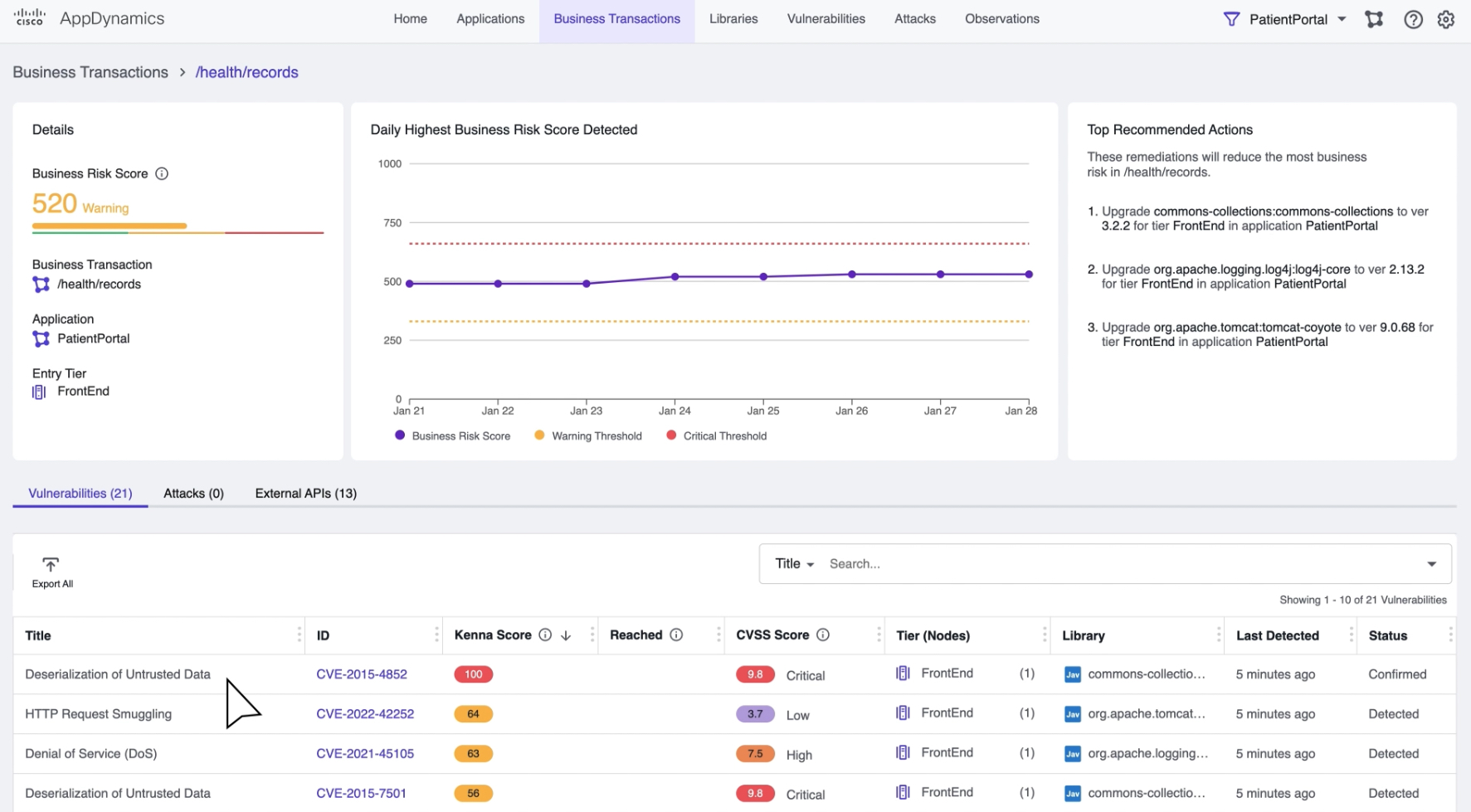
    Finally, Cisco is making available a Business Risk Observability offering to provide business risk scoring. Business Risk Observability combines capabilities of its Kenna Risk Meter tool—gained when Cisco acquired Kenna Security in 2021—with the ability to monitor business transactions through Cisco AppDynamics to provide better visibility into application security. In addition, Cisco has integrated its Panoptica application programming interface (API) management security tool and the Talos threat intelligence platform within the Business Risk Observability Platform.

    Carlos Pereira, a Cisco fellow and chief architect for strategy, incubation and applications at Cisco, said Cisco is moving to narrow the historic divide between application development and cybersecurity teams to enable organizations to adopt DevSecOps best practices and make it simpler to prioritize the remediation of vulnerabilities that are likely to have the most impact on the business.

    Like most providers of observability platforms, Cisco is betting that more applications will be instrumented as OpenTelemetry software continues to mature. Cisco is now the single largest contributor to this project, noted Pereira.

    OpenTelemetry will also play a critical role in improving application security as more applications become instrumented, he noted. In fact, a recent Cisco AppDynamics survey found more than three-quarters of respondents (76%) believed that DevSecOps is essential for organizations to effectively protect against a multi-stage security attack. However, only 43% reported their organization had started implementing DevSecOps workflows.

    Observability, of course, has always been a core DevOps tenet, but achieving and maintaining it is challenging. Most DevOps teams today aspire to maintain some level of continuous monitoring. However, as it becomes easier and less costly to instrument applications, interest is rising in observability platforms that make it simple to investigate anomalies indicative of an issue that could disrupt an application environment. Most of those observability platforms are infusing those platforms with machine learning algorithms to surface those anomalies as part of an effort to augment the capabilities of a DevOps team.

    Regardless of the approach to observability, many organizations will soon be trying to determine whether to rely on existing monitoring tools that make it possible to track pre-defined metrics. In some cases, there may still be a need for that legacy approach to managing IT. Still, in other instances, it may be possible to rationalize some of those platforms in favor of a more advanced approach that relies on a more advanced approach to achieving observability.

  • 5 Technologies Powering Cloud Optimization

    5 Technologies Powering Cloud Optimization

    Cloud optimization is the process of improving the performance, cost-effectiveness, and reliability of cloud computing resources and services. It involves identifying and addressing inefficiencies in cloud architecture, application design and resource utilization, as well as implementing best practices for security, scalability and disaster recovery. 

    The goal of cloud optimization is to maximize the benefits of cloud computing while minimizing the risks and costs associated with it. It is a multi-disciplinary process that may involve several key elements, such as:

    • Capacity planning: Evaluating the current and future resource requirements of your cloud environment and ensuring that the right amount of resources are available to meet your needs.
    • Resource utilization: Monitoring and managing the utilization of cloud resources to ensure that they are used efficiently and effectively.
    • Cost optimization: Minimizing the cost of cloud resources and services by identifying and addressing areas of inefficiency and waste, such as over-provisioning or underutilized resources.
    • Performance optimization: Improving the performance of cloud applications and services by optimizing network bandwidth, storage performance and database performance.
    • Security optimization: Enhancing the security of cloud resources and data by implementing best practices for access control, encryption and threat mitigation.
    • Scalability optimization: Making sure that your cloud environment can scale up or down as needed to meet changing resource demands.
    • Disaster recovery: Establishing a disaster recovery plan to ensure that your cloud environment can quickly recover from failures or outages.

    Why is Cloud Optimization Important?

    Optimization is important for several reasons, including:

    • Cost savings: By optimizing the use of cloud resources, organizations can reduce their cloud computing costs and ensure that they are only paying for what they actually need.
    • Improved performance: By optimizing cloud applications and services, organizations can improve the performance and responsiveness of their systems, leading to a better user experience and increased productivity.
    • Increased reliability: Optimization helps organizations to improve the reliability and availability of their cloud environment, reducing the risk of downtime and ensuring that their systems are always available when they are needed.
    • Better security: By implementing best practices for security, organizations can better protect their cloud resources and data, reducing the risk of data breaches and other security incidents.
    • Scalability: Cloud optimization enables organizations to scale their environment up or down as needed, ensuring that they always have the resources they need to support their growing business.
    • Improved agility: Organizations can be more agile and responsive to changing business needs, enabling them to quickly and effectively respond to new opportunities and challenges.

    5 Technologies Powering Cloud Optimization

    Cloud Cost Management

    Cloud cost management is a critical component of optimization that helps organizations to monitor and manage their cloud spend. The goal is to ensure that organizations are only paying for the cloud resources they actually need and that they are using those resources efficiently.

    Cloud cost management solutions (such as Azure Cost Management or AWS Trusted Advisor) provide detailed cost reports, usage analytics and cost optimization recommendations to help organizations understand their cloud spend and identify areas of inefficiency. For example, these solutions can:

    • Monitor and report on cloud resource usage: By monitoring the usage of resources, cloud cost management solutions can provide detailed cost reports that show how much an organization is spending on each resource, such as compute instances, storage and network traffic.
    • Automate cost optimization: Many cloud cost management solutions can automate cost optimization tasks, such as turning off unused resources or right-sizing instances to reduce waste.
    • Provide cost analysis and forecasting: These solutions can provide detailed cost analysis and forecasting to help organizations understand the impact of changes to their cloud environment and plan for future spending.

    Autoscaling

    Autoscaling is a technology that enables organizations to automatically scale their cloud resources up or down as needed to meet changing demands. The goal of autoscaling is to ensure that organizations always have the right amount of resources to support their workloads while minimizing costs and ensuring that their systems are always available when they are needed.

    Autoscaling works by monitoring the performance and usage of cloud resources, such as compute instances, storage and network traffic, and automatically adjusting the size of those resources to meet changing demand. For example, autoscaling can:

    • Add or remove instances as needed: If demand for a resource increases, autoscaling can automatically add more instances to meet that demand. If demand decreases, autoscaling can automatically remove instances to reduce waste.
    • Optimize resource utilization: Autoscaling can optimize the utilization of cloud resources by right-sizing instances to meet demand, ensuring that resources are not over-provisioned or underutilized.
    • Improve system availability: By automatically adding or removing resources as needed, autoscaling can ensure that systems are always available and responsive, reducing the risk of downtime and improving the user experience.

    API Gateway

    An API gateway is a server that acts as an intermediary between an application and one or more microservices. The API gateway is responsible for request routing, composition and protocol translation, which enables microservices to communicate with each other securely and efficiently.

    An API gateway can help with cloud optimization in several ways:

    • Load balancing: The API gateway can distribute incoming API requests to multiple microservices, improving the overall performance and reliability of the system. It can also provide features such as automatic failover and load balancing, which helps to ensure that the system remains available and responsive even in the face of high traffic volumes or other performance challenges.
    • Resource optimization: By acting as a single entry point for API requests, the API gateway can help to reduce the overall resource usage of the system. For example, it can cache frequently used data and serve it directly to clients without having to go back to the microservices, reducing the load on the underlying system.
    • Monitoring and management: API gateways provide a centralized management interface for the microservices, making it easier to monitor and manage the system as a whole. This includes features such as logging, monitoring and alerting, which can help to identify and resolve performance issues quickly and effectively.

    GitOps Platforms

    GitOps is a paradigm that helps automate application deployment and infrastructure provisioning. It typically involves using Git, an open source version control system, as a single source of truth for declarative infrastructure and applications. 

    GitOps aims to improve the developer experience by letting teams use their familiar software development tools to manage application and infrastructure changes.

    With GitOps, cloud optimization can be achieved by:

    • Automating the deployment process: GitOps automates the deployment process, reducing the risk of human error and speeding up the deployment process. This helps to ensure that resources are deployed consistently and correctly, improving the reliability and performance of the environment.
    • Managing cloud infrastructure as code: With GitOps, cloud infrastructure can be defined and managed as code, making version control and collaborating on configurations easier. This helps to optimize the use of resources and improve the overall efficiency of the cloud environment.
    • Improving collaboration and communication: GitOps enables teams to collaborate and communicate more effectively, reducing the risk of conflicts and delays. With Git, changes can be easily tracked, discussed and approved, improving the speed and quality of deployments.
    • Enforcing governance and compliance: GitOps provides a centralized and auditable record of all changes to the environment, making it easier to enforce governance and compliance requirements. This helps to improve the security and reliability of the cloud environment, reducing the risk of breaches and other security incidents.

    APM

    Cloud application performance management (cloud APM) is the practice of monitoring, analyzing and optimizing the performance of cloud-based applications. The goal is to ensure that these applications are available, responsive and performing optimally to meet the needs of users.

    These solutions provide a range of tools and capabilities for monitoring and optimizing cloud-based applications, including:

    • Performance monitoring: Cloud APM solutions monitor application performance in real-time, providing visibility into performance metrics such as response time, resource utilization and error rates.
    • Root cause analysis: These solutions can help identify the root cause of performance issues by providing detailed performance data and tracing information.
    • Capacity planning: Cloud APM solutions can provide detailed performance data and analytics to help organizations plan and optimize their application deployments.
    • Performance optimization: These solutions can provide recommendations for performance optimization, such as right-sizing cloud resources, reducing resource utilization and improving application design.
    • Continuous performance monitoring: These solutions can continuously monitor application performance, providing real-time visibility and alerting to help organizations quickly identify and resolve performance issues.

    Conclusion

    In conclusion, cloud optimization is critical for organizations looking to maximize the value and minimize the costs of their cloud deployments. By using technologies such as cloud cost management, autoscaling, API gateways, GitOps platforms and APM, organizations can improve availability, performance and efficiency while reducing costs and ensuring that they are always prepared to meet changing business needs. 

    These technologies provide the tools and capabilities necessary to monitor, analyze and optimize cloud-based applications, helping organizations to ensure that their deployments are always delivering the best possible value. By embracing optimization, organizations can stay ahead of the curve and ensure that their cloud deployments are always aligned with their business goals and objectives.

  • Blameless Integrates Incident Management Platform With Opsgenie

    Blameless Integrates Incident Management Platform With Opsgenie

    Blameless this week announced it has integrated its namesake incident management solution with the Opsgenie alerting platform from Atlassian.

    Aaron Lober, director of product marketing for Blameless, said the Blameless platform is now integrated with both Opsgenie and PagerDuty, the two most widely used platforms for managing alerts.

    Blameless provides an incident management platform that normalizes data collected from a wide range of DevOps tools and platforms to determine how best to respond to different incident classes. Armed with those insights, it then becomes possible to quickly assemble the best team to respond to an event, said Lober.

    That capability reduces stress because Blameless also surfaces recommendations for resolving incidents based on the data it has collected, he added.

    The Blameless platform is tailored to organizations that have hired site reliability engineers (SREs) to manage IT operations using DevOps best practices, noted Lober. The overarching goal is to eliminate rote processes that, over time, conspire to burn out incident management teams that often experience high turnover rates, he added.

    Opsgenie has been connected to the Blameless platform via the service catalog and alerting functions. Blameless users responding to or managing an incident can escalate issues to any teams defined within Opsgenie. The service catalog and alerting data generated throughout the life cycle of an incident is automatically captured and stored on the Blameless Incident Timeline. That capability makes it possible to identify appropriate service owners and the escalation protocol that was followed by that team. Blameless can also display the actual user name of each responder that has been notified.

    When accessing Blameless via Slack or Microsoft Teams, Opsgenie can automate both when an incident channel is created and pre-select relevant services that should be made available. Alerts can also be manually triggered using commands from the Blameless chatbot for those who prefer to trigger alerts from within Slack or Teams themselves.

    As IT environments become increasingly more complex, more organizations are making a concerted effort to apply DevOps best  practices to incident management. The goal is to reduce downtime and increase overall resiliency at a time when organizations are more dependent on software than ever. As part of that effort, IT teams should identify the repetitive processes that span multiple incidents and then move to automate as many as possible.

    In the longer term, it’s not clear what impact artificial intelligence (AI) will have on incident management. At some point, though, IT teams should expect their efforts to be augmented by machine learning algorithms capable of identifying issues before they balloon into a major crisis. However, there will always be some human intervention required to manage incidents for the foreseeable future, noted Lober.

    In the meantime, most IT teams should continue to expect the unexpected at a time when IT environments have never been more dynamic and change multiple times a day.

  • Automation Challenges Holding DevOps Back

    Automation Challenges Holding DevOps Back

    A survey of 500 IT and engineering leaders in the U.S. published today finds organizations build an average of 6.7 internal applications per year themselves in addition to investing in 7.7 separate platforms to build applications.

    Commissioned by Internal, a provider of platforms for building application development environments, the survey also found organizations are spending 40% of their time building and maintaining these internal tools and workflows. While more than three-quarters (76%) of respondents said that this work is necessary, it distracts from building applications that drive business revenue. A total of 82% said a lack of true flexibility and customization is the top reason so much time is spent on building and managing internal tools and workflows.

    A full 94% of respondents said they want a more collaborative platform that enables technical and non-technical users to build internal tools/workflows faster together. The survey also found 91% of respondents believe a platform that encompasses application development and workflow automation would save development time.

    Internal CEO Arisa Amano said one thing that holds IT teams back is that managing the platforms used to build applications requires too much programming expertise. Internal is making a case for a graphical approach to building application development environments so IT administrators can easily construct them using a drag-and-drop interface on behalf of an application development team. That approach makes it possible to allocate more programming resources to building applications, she said.

    More organizations than ever are revisiting how applications are built as the number of projects increases despite an uncertain global economy, noted Amano. Organizations of all sizes are reluctant to hire additional full-time engineers even as digital transformation initiatives demand a growing number of custom applications, she added. The only way to effectively address those conflicting goals is to adopt a platform that automates much of the workflow associated with building an application development environment, said Amano.

    It’s not clear how willing DevOps teams are to replace the platforms they use today to build those environments, but many organizations are still relying on bespoke platforms they built and continue to maintain. Many of those platforms are made up of a collection of tools that DevOps teams cobbled together over the years. However, many of the software engineers that initially built those integrations may have since moved on and the documentation left behind is likely to be scant, noted Amano.

    Most DevOps teams in 2023 will continue investing in higher automation levels to accelerate application development. The quandary they all face is whether to continue to invest in the platforms they have already or migrate to a platform that makes it simpler to build and maintain an application environment using automated workflows built and maintained by a vendor. Regardless of what they choose, it’s certain the days when organizations could afford to throw engineers at every integration challenge have come to an end.

  • Cisco AppDynamics Survey Surfaces DevSecOps Challenges

    Cisco AppDynamics Survey Surfaces DevSecOps Challenges

    A survey of 1,150 large enterprise IT professionals from the AppDynamics unit of Cisco suggested application security progress is being made slowly and steadily as organizations continue to embrace DevSecOps best practices.

    The survey finds that while more than three-quarters of respondents (76%) believe that DevSecOps is essential for organizations to effectively protect against a multi-staged security attack on the full application stack only 43% reported their organization has already started to implement DevSecOps workflows while another 46% said they are currently considering making the shift.

    More than three-quarters of respondents (78%) also said a lack of a shared vision between application development and security teams presents a challenge to application security over the next 12 months. More than half (55%) said they currently considered security to be more of an inhibitor of innovation than an enabler. Nevertheless, 81% admitted a lack of application security skills and resources is now an issue for their organization, with 79% acknowledging that securing the full application stack is now a priority for their organization.

    A full 92% admitted that the rush to rapidly innovate and respond to the changing needs of customers and users during the COVID-19 pandemic has come at the expense of robust application security. Well over half of respondents (58%) also noted their organization often ended up in ‘security limbo’ because they didn’t know what security issues to focus on and prioritize. A total of 88% acknowledged their organization could be doing more to secure the full stack of modern applications across the entire application life cycle.

    Not surprisingly, 93% said it’s important to be able to contextualize security so that they can correlate risk in relation to, for example, application performance, end user experience and business metrics. However, more than two-thirds (68%) reported that their current security solutions work well in silos but not together. A total of 85% stated that cultural changes to support the shift to a DevSecOps approach are important to improve application security.

    AppDynamics Executive CTO Gregg Ostrowski said it is apparent organizations are still wrestling with not just application security technologies but also people and process issues. The most critical issue is to knock down the silos that exist in organizations that often result in one team demonizing another, he added.

    Overall, application security is becoming more challenging as the attack surface expands. A full 89% of technologists reported that their organization experienced an expansion in its attack surfaces over the last two years, with almost half (46%) noting that this expansion is already increasing cybersecurity challenges. One of the primary drives of that expansion as been the rise of the internet-of-things (IoT) applications (59%), rapid adoption of cloud computing platforms (56%) and digital business transformation initiatives (51%).

    On the plus side, more than three-quarters of respondents (76%) said they believe artificial intelligence (AI) will play an increasingly important role in addressing application security challenges. The issue, of course, is how soon those advances might be made at a time when attacks against software supply chains are clearly on the rise.

  • Jellyfish Adds Tool to Visualize Software Development Workflows

    Jellyfish Adds Tool to Visualize Software Development Workflows

    Jellyfish today unveiled a tool that identifies bottlenecks in software engineering processes using data the company collects via Git repositories and project management software from Atlassian.

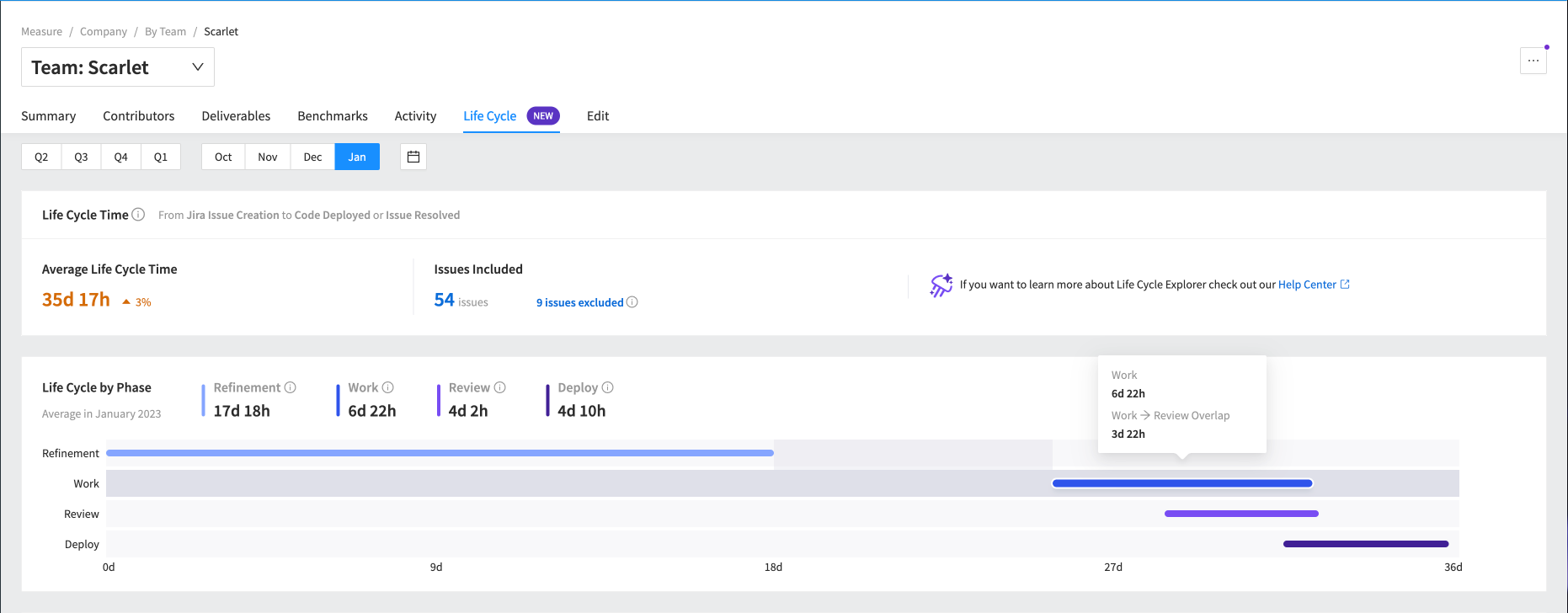
    Krishna Kannan, head of product for Jellyfish, said Life Cycle Explorer provides managers with a tool that makes it simpler to identify the root cause of a process breakdown.

    Life Cycle Explorer goes beyond providing simple top-level metrics to calculate the time consumed at each stage of a workflow for any given process and then visually map it to surface trends, noted Kannan.

    That makes it possible to identify gaps, see where work areas overlap—indicating parallel processes—and drill into how outlier events may be impacting the overall life cycle of a development project.

    The launch of Life Cycle Explorer comes at a time when there is more focus on the efficiency of DevOps teams than at any time in recent memory. During uncertain economic times, organizations of all sizes are looking to optimize DevOps workflows to ensure maximum efficiency because many organizations are hesitant to hire additional full-time engineers.

    The important thing to remember when analyzing DevOps workflows is there is no such thing as the optimal “Goldilocks” workflow that can be universally applied, noted Kannan. Instead, most DevOps leaders will discover one team excels at one segment of a DevOps workflow while others are more efficient elsewhere. Life Cycle Explorer makes it easier to identify those best practices in a way that makes them simpler to replicate when appropriate, said Kannan.

    Life Cycle Explorer follows the addition of a benchmarking tool and DevFinOps offering that addresses cost capitalization reporting for research and development. The core Jellyfish engineering management platform is designed to ingest data from the tools an organization already uses to build applications and then applies proprietary algorithms to create a comprehensive view of workflows across an organization. The challenge many organizations encounter today is they often lack visibility into workflows that have each been individually constructed by a diverse range of DevOps teams working on very different types of software projects.

    At the very least, DevOps teams need to establish a baseline that surfaces the current rate at which software development occurs. Once that baseline is established it then becomes possible to measure the impact changes to software engineering practices are having. Today many organizations make educated guesses about what changes are needed without really understanding the impact they might be having across the entire software development life cycle.

    Of course, it will be up to each organization to determine the degree to which they want to measure workflows. The Jellyfish platform makes it simpler to identify workflow issues, but there are also value stream management (VSM) platforms that track the impact software engineering workflows are having on specific business goals. Those VSM platforms are typically much more challenging to implement and maintain. The Jellyfish approach focuses more narrowly on improving the efficiency of DevOps teams.

    Regardless of approach, things that are not measured are not being managed. At a time when organizations are more dependent on software than ever, the need to manage software development life cycle as efficiently as possible has become a lot more important.