Category: DevOps Toolbox

  • BigPanda Extends AIOps Platform to Embrace Generative AI

    BigPanda Extends AIOps Platform to Embrace Generative AI

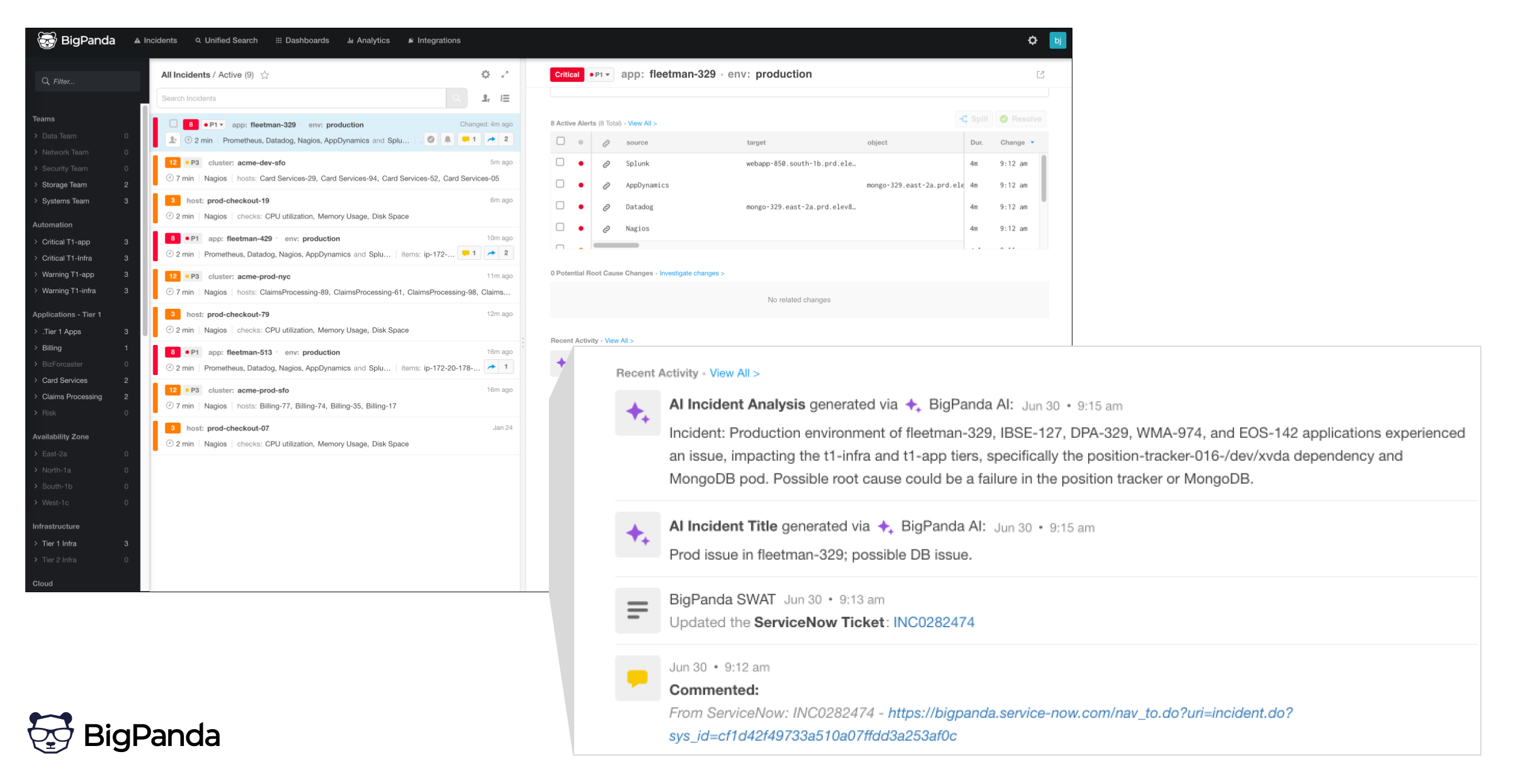
    BigPanda today added generative artificial intelligence (AI) capabilities to analyze incidents surfaced by its AI for IT operations (AIOps) platform.

    Blair Sibille, field CTO for BigPanda, said Generative AI for Automated Incident Analysis leverages generative AI platforms based on the general-purpose large language models (LLMs) created by OpenAI.

    The goal is to make it simpler for IT teams to discern the root cause of an issue by, for example, taking advantage of summaries of alerts enabled by generative AI to make it simpler for IT professionals of any skill level to understand what requires their most immediate attention, he added. Today, insights are lost in the sea of alerts that often inundate IT teams, Sibille noted.

    BigPanda has been at the forefront of applying machine learning algorithms to automate IT operations management. Now, the company is incorporating external general-purpose LLMs to further augment IT teams, said Sibille.

    As IT environments continue to be more complex, it’s becoming essentially impossible for IT teams to manage them at scale without relying more on automation. AI technologies take automation to another level, but they won’t eliminate the need for DevOps teams to manage IT environments, added Sibille.

    BigPanda claimed generative AI capabilities will make it possible to reduce the amount of time required to resolve tickets by seven minutes each, with an accuracy rate of 95% during beta testing. Over time, those capabilities not only reduce mean-time-to-resolution but also reduce the level of toil that often conspires to burn out DevOps teams, said Sibille.

    At the core of the BigPanda AIOps platform is a data lake capable of consuming data generated by multiple applications and systems. That data then provides the foundation on which machine learning algorithms are applied to surface insights.

    It’s not clear how much generative AI will automate DevOps workflows, but in effect, more IT teams will be able to take advantage of having the equivalent of a DevOps engineer that they can query any time an issue arises using natural language, noted Sibille.

    AI doesn’t mean that IT outages will be completely eliminated, but it does mean they will become a lot less stressful, he added.

    Naturally, there’s a lot of speculation concerning the impact AI will have on DevOps. Some contend it’s only a matter of time before the entire software engineering process is automated. As those advances are made, the cost of building applications will effectively drop to zero. Others argue that AI will simply augment DevOps teams in a way that makes it simpler to manage IT at scale using either the same number or possibly even fewer engineers.

    The one thing that is clear is that AI will soon be pervasive. DevOps teams should start evaluating today which tasks will be automated with an eye toward planning how DevOps roles will evolve as AI advances accelerate.

  • Roadie Adds Scorecard Tool to Backstage SaaS Platform

    Roadie Adds Scorecard Tool to Backstage SaaS Platform

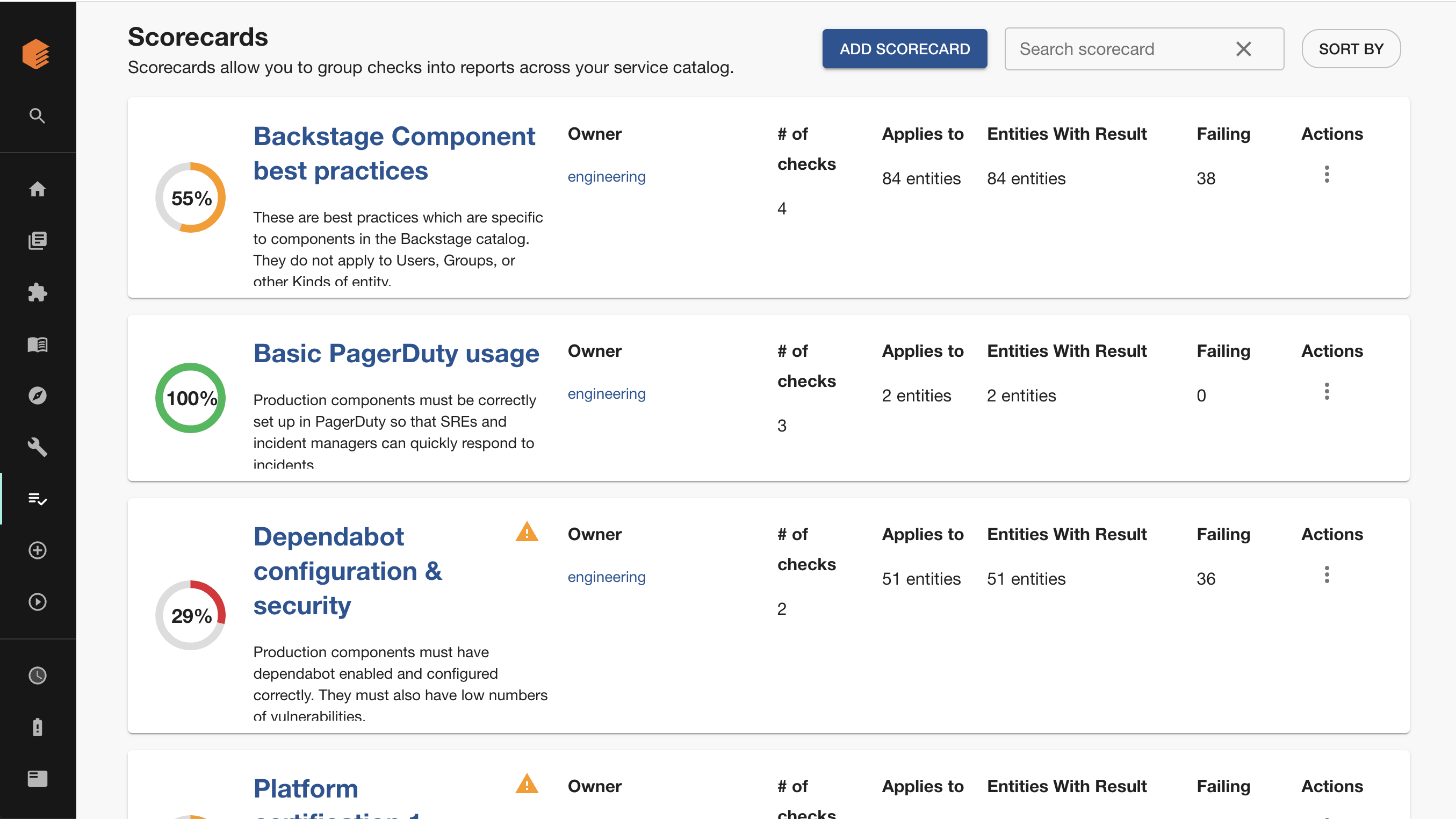
    Roadie today made generally available a tool that automatically tracks and reports how software development teams are performing against engineering standards defined by a DevOps team. The Tech Insights tool is an addition to Roadie’s implementation of the open source Backstage developer portal and is delivered via a software-as-a-service (SaaS) platform.

    Roadie CEO David Tuite said Tech Insights is a proprietary tool that Roadie developed as an extension to its platform. Tech Insights provides scorecards that track software assets in the Backstage catalog and ensure they are meeting predefined quality and compliance targets.

    Tech Insights comes with built-in, pre-defined data sources; alternatively, DevOps teams can define them using external application programming interfaces (APIs) or files in a repository. A rule known as a Check can then be created to validate whether a project complies with the engineering standards defined by the DevOps team. Each DevOps team can create an unlimited number of scorecards.

    In addition, teams can create prompts and notifications to warn engineers when they are about to make a change that will violate an engineering standard. DevOps teams can also employ gamification techniques to show teams how their performance compares to others.

    While Roadie is now adding its first proprietary tool to the platform, Tuite said the company remains committed to enabling organizations to migrate their instance of Backstage to another environment should they ever deem it necessary, he added.

    Originally developed by Spotify, Backstage makes it possible to create and manage a catalog of blueprints that developers can readily consume rather than requiring them to repeatedly build these capabilities themselves. The goal is to create scaffolds that developers can consistently reuse across multiple application development projects.

    Spotify has since donated Backstage to the Cloud Native Computing Foundation (CNCF). However, Backstage currently requires a significant amount of DevOps expertise to set up and maintain, an issue that Roadie is addressing by making it available as a SaaS platform that can be accessed by any application development team, said Tuite.

    The concept of a self-service portal through which developers can address their own needs may not be new, but as an open source project, Backstage is lowering the cost of improving overall developer productivity. At the same time, many organizations are now embracing platform engineering as a means of centralizing the management of DevOps.

    Ultimately, every minute developers spend on tasks other than writing code is one less minute they are spending writing the business logic that drives an application. Measuring developer productivity is, of course, an inexact science. No one knows for sure when inspiration might strike, but if developers are busy maintaining code that they created to provision infrastructure, it’s less likely they’ll be struck by a flash of brilliant insight that improves and application. The easier it is to spin up a development environment, the more likely that inspiration will one day turn into code that runs in an actual production environment.

  • Loft Labs Makes Tool for Creating Dev Environments Open Source

    Loft Labs Makes Tool for Creating Dev Environments Open Source

    Loft Labs has made available an open source software project that enables DevOps teams to programmatically create developer environments using a tool that runs entirely on a local client.

    Lukas Gentele, Loft Labs’ CEO, said DevPod provides an alternative to cloud-based approaches such as Codespaces from GitHub that lock organizations into a specific platform for building applications.

    Instead, DevPod can automatically spin up developer environments as code on any public cloud or on-premises IT environment that can run a devcontainer.json file, he added.

    In addition, DevPod will also automatically put developer environments to sleep when not being used to reduce costs, noted Gentele. Other capabilities include support for prebuilds, Git and Docker credential synchronization.

    DevPod was created by Loft Labs to streamline the development of a virtualization platform for Kubernetes clusters. The company is now making DevPod available as open source software that any DevOps team can use to manage developer environments as code more easily than complex server-side alternatives, said Gentele.

    It also makes it easier for developers to switch between cloud-hosted and local environments as needed seamlessly, he noted. That’s critical because it enables organizations to reduce dependencies on cloud computing environments for writing code by allowing developers to use their local machine whenever they prefer, noted Gentele.

    Despite the ubiquitous availability of cloud services, most developers continue to prefer to write code on a local machine. The challenge is that replicating a developer environment elsewhere to foster collaboration has been problematic. DevPod provides a means for developers to collaborate with each other and with software engineers without giving up the inherent flexibility a local development platform provides.

    At a time when organizations are more dependent on software than ever, there is much more focus on developer productivity. DevOps teams have historically tended to focus on DevOps Research and Assessment (DORA) metrics that focus more on deployment frequency and mean-time-to-recovery than they do on developer productivity.

    Of course, measuring developer productivity is an inexact science. An organization might once have tracked lines of code written to gauge productivity, but that is not especially good metric. In more recent times, metrics have been developed that, among other things, keep track of how much time developers spend actually coding versus maintaining their software development environment.

    The issue that most IT leaders will immediately encounter is that every minute developers spend on these tasks, however, is one less minute they spend writing the business logic that drives an application.

    Obviously, there’s no way developers are going to write business logic daily for eight hours straight; there are maintenance windows. However, application development is as much art as it is science. No one knows for sure when inspiration might strike, but if developers are busy maintaining code created to provision infrastructure, it’s less likely they’ll have a flash of brilliant insight that allows them to make an application better. The easier it is to spin up a development environment, the more likely it becomes that inspiration will one day turn into code that runs in an actual production environment.

  • Revolutionizing the Nine Pillars of SRE With AI-Engineered Tools

    Revolutionizing the Nine Pillars of SRE With AI-Engineered Tools

    In my blog Rapid Strategic SRE Assessments Accelerate IT Transformations published last year, I classified site reliability engineering (SRE) into nine pillars of SRE practices—a comprehensive framework that covers the full scope of SRE practices. This nine pillars SRE framework is consistent with the SRE blueprint published by the DevOps Institute. Each of these pillars represents a vital area of SRE implementation and, together, they ensure a holistic approach to aligning development and operations for effective collaboration, uneventful continuous deliveries and reliable, highly scalable, safe operations.

    The current generation of AI-engineered tools is now being applied to each of the SRE pillars and has the potential to significantly increase efficiency, reliability and scalability for all SRE practices.

    Just as SRE practices complement DevOps practices, these nine pillars of SRE complement the nine pillars of DevOps explained in my recent blog Revolutionizing the Nine Pillars of DevOps With AI-Engineered Tools.

    AI Applications for the Nine Pillars of SRE

    The following briefly explains how the current generation of AI-engineered large language model (LLM) tools are being applied or could be practically applied to improve each of the nine pillars of SRE.

    Culture: AI can help identify patterns and trends in system behavior that may not be immediately evident. This can assist in shifting the wisdom of production further to the left. Tools like Datadog’s Watchdog can be used to automatically detect and surface anomalies in your system behavior, for example.

    Toil Reduction and Automation: AI can help reduce toil by automating more complex tasks that were previously challenging to automate. Machine learning models can predict system behavior, enabling proactive responses. AI operations platforms like Moogsoft or BigPanda can automate incident management, from detection to remediation.

    SLAs/SLOs/SLIs and Error Budgets: AI can assist in refining SLAs, SLOs and SLIs by providing accurate predictions of system performance and identifying potential bottlenecks. Tools like Nobl9 can use machine learning to better predict and define SLOs based on historical performance data.

    Measurements and Observability: AI can help analyze vast amounts of data from monitoring and observability systems, identifying patterns and correlations that may be difficult for humans to detect. Tools like Dynatrace and New Relic use AI to analyze monitoring data, detect anomalies and correlate events.

    Anti-Fragility: AI can contribute to the development of more resilient systems by analyzing system behavior under stress and identifying vulnerabilities. The data gathered from chaos experiments using tools like Gremlin can be used in conjunction with machine learning models to predict system behavior.

    Work-Sharing and Incremental Technical Debt: AI can help analyze code and infrastructure changes to assess their impact on technical debt. Tools like DeepCode and SonarQube use AI to provide guidance on how to manage this debt incrementally.

    Deployments: AI can be used to optimize deployment strategies by predicting the impact of new releases. A tool like Harness can use machine learning to optimize deployment strategies and minimize risks.

    Performance Management of Apps and Infrastructure: AI can analyze application and infrastructure performance data to identify optimization opportunities and predict capacity requirements. Tools like Turbonomic leverage AI to optimize resource allocation in real-time.

    Incident Management: AI can assist with incident management by automating the detection and triage of incidents, helping to quickly identify the root cause. Tools like PagerDuty use AI to automate detection, triage and suggest potential remediation steps, leading to faster resolution times.

    Pitfalls and Challenges

    Applying AI to SRE is a complex process with certain challenges. Here are some potential pitfalls along with ways to address them:

    Lack of Quality Data: AI and machine learning models are only as good as the data they are trained on. Inadequate or poor quality data can lead to inaccurate predictions and insights.
    • Prioritize data hygiene and governance. Collect comprehensive and diverse data from your systems; ensure that it is well-structured and free of errors and store it in a way that’s easily accessible for training AI models.

    Over-reliance on Automation: While AI can greatly enhance automation, relying on it too heavily without human oversight can lead to missed signals or overcorrections in response to false positives.
    • Maintain a balance between automation and human oversight. Use AI to support decision-making, not replace it entirely. It’s important to have experienced SREs review AI outputs regularly to ensure they make sense and are beneficial.

    Underestimating the Need for AI Expertise: Implementing AI is not just about buying and deploying a tool. It requires a deep understanding of AI and machine learning principles, as well as the ability to interpret the results correctly.
    • Invest in training your team on AI and machine learning principles or consider hiring AI specialists. Having in-house AI expertise can help ensure that you’re using AI tools effectively and interpreting their outputs correctly.

    Ignoring the Importance of Integration: AI tools need to work seamlessly with your existing infrastructure and processes to be effective. A lack of integration can lead to data silos and inefficiencies.
    • When selecting AI tools, consider how easily they can be integrated into your existing infrastructure and workflows. Use APIs and other integration methods to ensure that your AI tools can access the data they need and that their insights are easily accessible to your SRE team.

    Neglecting Ethics and Privacy: AI tools often need access to sensitive data to operate effectively, which can raise ethical and privacy concerns.
    • Implement robust data privacy and security measures. Ensure that you’re following all relevant regulations and industry best practices for data privacy. Use anonymization and other data protection techniques to protect sensitive data.

    Summary

    Artificial intelligence is revolutionizing SRE practices by automating complex tasks, analyzing vast amounts of data and making proactive predictions. AI can reduce toil, enhance system understanding, and streamline incident management. It allows SREs to shift further left by integrating predictive insights into the development process, thereby enhancing the culture of proactive issue prevention. AI also aids in defining more precise service level objectives, error budgets, and optimizing deployment strategies based on predictive analytics. In the realm of incident management, AI aids in detecting, triaging, and mitigating incidents faster by identifying patterns and suggesting remediations. Overall, AI is fast becoming an essential tool for SREs, facilitating a shift from reactive problem-solving to proactive management, thereby increasing system reliability, performance, scalability and efficiency.

  • Threads: Twitter Killer or Ad-Infested Hellscape?

    Threads: Twitter Killer or Ad-Infested Hellscape?

    Welcome to The Long View—where we peruse the news of the week and strip it to the essentials. Let’s work out what really matters.

    This week: Meta launches its much-leaked Threads microblogging app. A spinoff from Instagram, it’s already reached 30 million signups at the time of writing—even before it’s available in the EU. But how is Meta’s DevOps team making it scale? (more…)

  • How AI Transforms DevOps Infrastructure

    How AI Transforms DevOps Infrastructure

    In my recent article Revolutionizing the Nine Pillars of DevOps with AI-Engineered Tools, I explained that the elastic infrastructure pillar involved automated provisioning and management of computing resources, often leveraging cloud-based solutions for scalability and resilience. This includes practices like infrastructure-as-code (IaC).

    In this article, I explain how AI can help manage cloud resources for DevOps by predicting future needs based on usage trends and automatically adjusting resources to optimize cost and performance.

    Here are some common DevOps use cases that IaC practices aim to address, along with potential AI tools that can assist in each scenario:

    Private and Public Cloud Agnosticism:
    • Use Case: Needing to deploy and manage infrastructure across multiple cloud providers or environments without vendor lock-in.
    • AI Tool Example: AI-powered cloud management platforms (e.g., Turbonomic, CloudHealth) can analyze resource utilization, performance and cost across various cloud providers to optimize workload placement.

    Reducing Infrastructure Configuration Bottlenecks:
    • Use Case: Avoiding manual and error-prone configuration processes that delay deployment and cause inconsistencies.
    • AI Tool Example: Intelligent configuration management tools (e.g., Puppet, Chef, Ansible) can automate the provisioning, configuration and management of infrastructure resources.

    Infrastructure Cost Optimization:
    • Use Case: Optimizing resource allocation and minimizing infrastructure costs.
    • AI Tool Example: AI-driven cost optimization platforms (e.g., ParkMyCloud, Cloudability) can analyze usage patterns, recommend resource resizing or right-sizing and suggest cost-saving opportunities.

    Infrastructure Sharing:
    • Use Case: Sharing infrastructure resources securely across multiple teams or projects.
    • AI Tool Example: AI-powered resource scheduling and sharing tools (e.g., Kubernetes with cluster autoscaling) can dynamically allocate and release resources based on demand and workload requirements.

    Infrastructure Quality:
    • Use Case: Ensuring consistency, reliability, and adherence to best practices in infrastructure deployments.
    • AI Tool Example: AI-based infrastructure validation tools (e.g., Terrascan, Checkov) can scan IaC templates, provide security and compliance checks and offer recommendations for improvement.

    Infrastructure Security:
    • Use Case: Integrating security controls and policies into the infrastructure deployment process.
    • AI Tool Example: AI-driven security tools (e.g., Aqua Security, Sysdig Secure) can analyze infrastructure configurations, detect vulnerabilities and enforce security policies during deployment.

    Dynamic Orchestration:
    • Use Case: Needing to dynamically manage and scale infrastructure resources based on workload demands.
    • AI Tool Example: AI-powered orchestration platforms (e.g., Kubernetes with horizontal pod autoscaling) can automatically scale resources up or down based on metrics such as CPU utilization or request latency.

    Integration and Control of Infrastructure with CICD Pipelines:
    • Use Case: Seamlessly integrating infrastructure provisioning and deployment with CI/CD pipelines.
    • AI Tool Example: AI-enabled CI/CD platforms (e.g., Jenkins with ML plugins, Harness) can leverage machine learning algorithms to optimize pipeline execution, provide intelligent recommendations and automate release processes.

    Monitoring Infrastructure Performance:
    • Use Case: Monitoring and ensuring the optimal performance of infrastructure resources.
    • AI Tool Example: AI-powered monitoring solutions (e.g., Dynatrace, Datadog) can leverage machine learning to detect anomalies, predict performance issues and provide actionable insights for infrastructure optimization.

    Rapid Restore of Infrastructure:
    • Use Case: Quickly recovering and restoring infrastructure in the event of failures or disasters.
    • AI Tool Example: AI-driven backup and recovery tools (e.g., Veeam, Rubrik) can automate backup processes, intelligently prioritize data restoration and leverage machine learning for predictive data recovery.

    Challenges With the Transformation to AI-Engineered Infrastructure

    An organization may face a number of challenges when transitioning to AI tools for infrastructure, as follows:

    Lack of Expertise and Skill Set:
    • Challenge: Organizations may lack the necessary expertise and skill set to implement and operate AI tools effectively.
    • Solution: Invest in training and upskilling programs for employees to acquire the required knowledge and skills. Partnering with external consultants or hiring experts in AI and infrastructure can also bridge the expertise gap.

    Data Availability and Quality:
    • Challenge: AI tools heavily rely on high-quality data for training and accurate decision-making, but organizations may face challenges in obtaining relevant data and ensuring its quality.
    • Solution: Implement robust data governance practices to ensure data availability, quality and consistency. Invest in data collection, storage and processing frameworks that support AI initiatives. Data cleansing and preprocessing techniques can be employed to improve data quality.

    Integration Complexity:
    • Challenge: Integrating AI tools into existing infrastructure and workflows can be complex, especially when dealing with legacy systems and heterogeneous environments.
    • Solution: Plan for seamless integration by conducting a thorough assessment of existing systems and infrastructure. Leverage APIs, automation frameworks and standardized protocols to enable smooth integration. Adopt modular and scalable architectures that facilitate the incorporation of AI components.

    Ethical and Legal Considerations:
    • Challenge: AI tools introduce ethical and legal considerations, including privacy, security, bias and regulatory compliance, which can pose challenges during infrastructure transformation.
    • Solution: Develop clear guidelines and policies around data privacy, security and ethical considerations. Perform rigorous testing and validation to detect and mitigate biases in AI models. Engage legal and compliance teams to ensure alignment with relevant regulations and standards.

    Change Management and Cultural Shift:
    • Challenge: The adoption of AI tools often requires a cultural shift within the organization, including changes in mindset, processes and collaboration between teams.
    • Solution: Develop a change management strategy to communicate the benefits of AI tools and address any concerns or resistance. Foster a culture of experimentation, learning and collaboration. Encourage cross-functional teams to work together and share knowledge. Provide ongoing support and training to ensure successful adoption and adaptation to the new tools and practices.

    Summary

    Incorporating AI into IaC practices for DevOps brings transformative benefits that drive efficiency, agility and scalability. By leveraging AI tools, organizations can optimize resource allocation, streamline deployments, enhance security and improve performance monitoring. Embracing AI for IaC empowers teams to automate and intelligently manage infrastructure, resulting in faster time-to-market, cost savings and increased productivity. Unlock the full potential of DevOps by embracing AI and revolutionize your infrastructure management with the power of intelligent automation.

    It’s important to note that challenges and solutions are to be expected when transforming to the use of AI, and the specific context and requirements of each organization may vary. Therefore, it’s advisable to assess the organization’s unique needs and constraints to tailor the solutions accordingly.

  • Reimagining CI/CD: AI-Engineered Continuous Integration

    Reimagining CI/CD: AI-Engineered Continuous Integration

    In my recent article Revolutionizing the Nine Pillars of DevOps with AI-Engineered Tools, I explained that the continuous integration (CI) Pillar is about developers frequently merging code changes into a central repository. After that, automated builds and tests are run, successful builds are containerized and release candidate artifacts are signed. The main objectives of CI are to detect problems early, reduce integration issues and provide high-quality, secure release candidates. In this article, I explain how AI can enhance each step in the CI phase of DevOps CI/CD pipelines.

    Code Branching: In DevOps, managing multiple branches can be challenging, especially with large teams. This can lead to merge conflicts, confusion about where code should be committed and difficulty tracking changes.

    • AI Solution: AI can help by automatically managing branches and offering recommendations on merging. AI-based systems can analyze code patterns and project management styles to suggest optimal branching strategies, minimizing conflicts and maintaining organization.
    • AI Tool Example: Microsoft’s IntelliCode offers AI assistance for software development which could potentially help manage branches by suggesting optimal strategies.

    Code Commits: Commits need to be made regularly to maintain the codebase, but they can introduce errors. Miscommunication and the lack of a unified commit policy can lead to problems.
    • AI Solution: AI can analyze commit histories to identify patterns and recommend best practices. Additionally, AI tools can provide real-time feedback on code changes, suggesting potential improvements before the code is committed.
    • AI Tool Example: Kite is a coding assistant that uses AI to help with code changes and improvements before the commit stage.

    Merges: The process of merging code changes can lead to merge conflicts, particularly in large, complex codebases.
    • AI Solution: AI tools can help predict potential merge conflicts and offer solutions before they occur. They can analyze code structures and change patterns to predict and prevent these conflicts.
    • AI Tool Examples: Tools like DeepCode or Sider use AI to review and analyze your code to help prevent merge conflicts.

    Static Scanning: This process can be time-consuming and complex with a high potential for false positives.
    • AI Solution: AI can improve static analysis tools by learning from past scans to improve accuracy, reduce false positives, and even suggest potential fixes for issues identified.
    • AI Tool Example: DeepCode is an AI tool that analyzes your code, learns from past scans and suggests fixes for issues identified.

    Builds: Build failures can occur due to a number of issues, including poor code quality, incompatible changes, and environment configuration issues.
    • AI Solution: AI can predict build failures by analyzing historical data and identifying patterns that lead to such failures. AI can also automate the build process and manage environment configurations to reduce human error.
    • AI Tool Example: CircleCI Insights uses machine learning to analyze and predict the success of builds, helping to mitigate build failures.

    Scanning for Quality Errors and Security Vulnerabilities: This process can be slow and yield false positives, and the sheer number of potential issues can be overwhelming to manage.
    • AI Solution: Machine learning can be trained on previous scans to recognize patterns, improving the speed and accuracy of scans. AI can also prioritize issues based on potential impact, helping teams focus their efforts.
    • AI Tool Example: ShiftLeft scans for vulnerabilities in the code and uses AI to prioritize the issues found.

    Unit Testing: Writing and maintaining unit tests can be time-consuming and it’s often difficult to achieve good coverage.
    • AI Solution: AI can assist in generating unit tests based on code analysis and historical data, ensuring good coverage and saving development time.
    • AI Tool Example: Diffblue Cover uses AI to automatically write unit tests, aiming to improve coverage and save developer time.

    Containerization: Misconfiguration of containers can lead to issues such as application failures, security vulnerabilities or inefficient resource usage.
    • AI Solution: AI can help solve this challenge by automating and optimizing the configuration process.
    • AI Tool Example: Magalix can analyze historical configuration data and current application requirements to suggest optimal configuration settings for a container. It can flag potential misconfigurations or inefficiencies and suggest improvements based on best practices learned from past data.

    Functional Integration Testing: These tests often require significant resources and time to write and maintain.
    • AI Solution: AI can generate functional integration tests based on system behavior analysis, reducing the time and effort required to maintain these tests.
    • AI Tool Example: The test.ai tool uses AI to generate and execute functional tests, reducing the need for manual test case creation.

    Determining Whether a Build is Suitable as a Release Candidate Artifact: Manual analysis of build quality can be slow and subjective.
    • AI Solution: AI can analyze build artifacts, test results and other data to predict the suitability of a build as a release candidate, reducing the time and subjectivity involved in this decision.
    • AI Tool Example: Google’s Cloud Build can be leveraged with machine learning to predict the success of builds.

    Digitally Signing Artifacts in an Artifact Repository: This process can be cumbersome and prone to human error.
    • AI Solution: AI can manage the process of digitally signing artifacts, ensuring that only validated, authorized code is signed and reducing the potential for human error.
    • AI Tool Example: While no specific AI tool exists for this task, automated DevOps tools such as JFrog Artifactory or Sonatype Nexus could be combined with AI technology to automate the signing process, ensuring that only validated, authorized code is signed.

    Challenges of CI Transformation to AI

    The transition from traditional continuous integration (CI) to AI-engineered CI presents several challenges:

    Integration with Existing Systems: When incorporating AI into an existing CI toolchain, ensuring seamless integration can be a challenge. Organizations need to verify that AI tools can work effectively with current systems and don’t disrupt existing workflows.

    Skillset and Understanding: Adopting AI requires a certain level of understanding of how AI works, including its strengths and weaknesses. Teams need to be trained on how to use AI tools effectively and interpret their outputs.

    Data Privacy and Security: AI tools often rely on analyzing large amounts of data, which can include sensitive or proprietary information. Organizations need to ensure that using these tools doesn’t compromise their data security and privacy.

    Cost: Implementing AI tools can be costly, both in terms of purchasing and deploying the tools and in the potential need for additional hardware resources. Organizations need to consider the return on investment (ROI) and determine if the benefits of using AI outweigh the costs.

    Tool Maturity: Many AI tools in the DevOps space are relatively new and still evolving. Organizations need to consider the maturity and stability of the tools they’re planning to use.

    Over-Reliance on AI: While AI can greatly enhance CI processes, over-reliance on AI without proper understanding can lead to misinterpretations and errors. It’s important to balance AI usage with human oversight and expertise.

    Benefits

    Transitioning to AI-engineered CI toolchains can have several significant benefits for organizations:

    Improved Efficiency: AI can automate various aspects of the CI process, such as code review, testing and environment configuration. This can greatly reduce the time taken for these tasks, speeding up the overall CI process and allowing teams to deliver software more quickly.
    Increased Quality: AI tools can perform in-depth code analysis and identify potential issues with a level of detail that might be missed by humans. This can lead to improved code quality, fewer bugs, and more stable software.
    Predictive Analytics: AI can analyze historical data to predict outcomes, such as the likelihood of a build failure. This can help teams proactively address issues, reducing the risk of failures and improving the reliability of the CI process.
    Improved Decision Making: AI can provide valuable insights based on data analysis, helping teams make more informed decisions. This can relate to things like identifying the most suitable release candidate or deciding when and how to scale resources.
    Consistency and Standardization: AI-driven CI can ensure consistent application of rules and standards, as there’s less reliance on individual developers’ judgment. This can lead to a more standardized, reliable development process.

    Summary

    Overall, AI has the potential to greatly improve the efficiency, accuracy and effectiveness of DevOps continuous integration practices. However, it’s also important to note that these solutions require careful management and oversight to ensure they’re working as intended and improving rather than hindering processes. Organizations should start with small, manageable projects to gain an understanding and experience with AI before scaling up. They should also invest in training and support to help their teams adapt to these new tools.

  • Tabnine Unveils Beta of Generative AI Automated Testing Tool

    Tabnine Unveils Beta of Generative AI Automated Testing Tool

    Tabnine this week made available in beta a tool that enables developers to use natural language to interact with the artificial intelligence (AI) models embedded within its test automation platform.

    Brandon Jung, vice president of ecosystems for Tabnine, said Tabnine Chat extends generative AI capabilities the company developed to make it simpler for developers to invoke its test automation platform from within their integrated development environment (IDE).

    In addition to making it possible to search a codebase more efficiently, that capability can also be used to explain how a piece of code functions, said Jung.

    Developers can also generate new code via a natural language interface using Tabnine Chat in the same way other generative AI tools do, he added.

    In addition to developing its own LLMs, Tabnine previously announced it will be integrating LLMs provided by Google as part of a strategy to mix and match LLMs regardless of where they are hosted.

    Unlike general-purpose LLMs, the ones used by Tabnine were trained using a narrower base of testing code that the company curated using tests made freely available on the internet. No customer data was used to create any of those tests, so developers do not need to worry their code may inadvertently be accessed by anyone else, noted Jung.

    In general, as AI makes test creation simpler, tests will be run more frequently, said Jung. Over time, those AI capabilities and more frequent tests should significantly improve the overall quality of applications running in production environments, he added.

    It’s now only a matter of time before generative AI is applied across the entire software development life cycle (SDLC). Testing, however, may be one area where it will have the earliest impact.

    In the meantime, the debate over the impact generative AI will have on DevOps continues. Some proponents contend most of the software engineering process is about to become automated, while others suggest there will always be a need for a human to be in the loop of any process automated using AI models. Much of the current level of toil associated with DevOps today will be reduced, but the need for software engineers to manage the overall process will remain, they contend.

    The one thing that is certain is that the pace at which applications are built and deployed is about to be greatly accelerated. Prior to rise of generative AI, testing processes were barely keeping pace, so as more code is created with the help of AI, the need for similar advances in testing will become acute.

    There is as much irrational exuberance about AI as there is fear and loathing, but DevOps teams that committed early on to ruthless automation will naturally be at the forefront of adoption. The immediate challenge is assessing what functions will be automated and the impact those changes will have on the way DevOps teams are currently structured. Ultimately, the goal is to eliminate as many of the bottlenecks that conspire to slow application development and deployment while simultaneously improving the quality of the application experience.

  • How AI Addresses DevOps Monitoring and Observability Challenges

    How AI Addresses DevOps Monitoring and Observability Challenges

    In my recent article Revolutionizing the Nine Pillars of DevOps with AI-Engineered Tools, I explained that the continuous monitoring pillar involves monitoring observable systems and application performance in real-time so that teams can detect and react to problems quickly, often before they impact users. It’s crucial for maintaining application health and informing future improvement efforts.

    In this article, I explain how AI can analyze logs and metrics to predict potential system failures or performance degradation, allowing for proactive maintenance and issue resolution.

    Continuous Monitoring and Observability Use Cases

    CI Anomaly Detection: AI can analyze historical data to detect anomalies during the continuous integration phase. Any unusual change can be flagged for review before it proceeds to the next phase. Tools like IBM Watson Anomaly Detection can help identify these anomalies by using AI to detect patterns and irregularities.

    Code Quality Assurance: AI can be used to analyze the code in the development stage to ensure its quality, which can help reduce bugs and vulnerabilities. Tools like DeepCode and Codota use AI to identify potential problems and suggest improvements based on a learned database of code and solutions.

    Test Case Optimization: AI can help optimize the selection of test cases in continuous integration (CI). Using historical test data, AI can identify which test cases are most likely to find new defects. Tools like Testim.io can help with this by using AI to prioritize testing based on risk and change impact.

    Predictive Analytics in CD: AI can analyze historical deployment data and predict potential issues during continuous delivery (CD). This can help preemptively solve problems, reducing downtime. Tools like Splunk use AI and machine learning to provide predictive analytics for operations data.

    Automated Rollbacks: In the case of continuous deployment, AI can be used to automatically roll back deployments that are causing issues. Tools like Harness use machine learning to understand typical application behavior, automatically reverting to the last stable state if anomalies are detected.

    Infrastructure Optimization: AI can help optimize the usage of resources in cloud environments. Tools like CAST.AI and Turbonomic use AI to continuously optimize your infrastructure, ensuring better performance while reducing cost.

    Incident Management: AI can help automate the incident management process, from detection to resolution. Tools like BigPanda and Moogsoft AIOps use AI to aggregate, correlate and analyze alerts from various sources, reducing noise and speeding up incident resolution.

    Log Analysis: AI can analyze logs and identify patterns that would be difficult for humans to spot. Tools like Logz.io use AI to provide cognitive insights into log data, providing a deeper understanding of the data.

    Security Threat Detection: AI can analyze patterns and detect security threats more effectively. Tools like Darktrace use machine learning to detect unusual behavior in real-time, thereby detecting potential threats before they cause damage.

    Network Monitoring: AI can predict network outages by analyzing traffic patterns. Tools like Kentik use AI to proactively identify potential network issues before they affect users.

    Challenges When Transforming Continuous Monitoring to use AI

    Here are some challenges organizations might face when transitioning existing CI/CD pipelines to incorporate AI into continuous monitoring and observability, along with possible solutions:

    Data Quality and Availability: The effectiveness of AI-engineered tools largely depends on the quality and quantity of the data they’re given. Insufficient or poor-quality data can result in inaccurate insights or predictions. Implement effective data governance and management practices to ensure data quality and accessibility. Data should be thoroughly cleaned and properly labeled to facilitate the training of AI models.

    Skills Gap: Adopting AI-engineered tools requires new skills that the existing IT team may not possess. There might be a lack of understanding of how to use these tools effectively. Provide comprehensive training to your DevOps team to bridge the skills gap. Also, consider hiring AI specialists or working with an experienced vendor to help implement and manage the AI tools.

    Resistance to Change: As with any significant transformation, resistance to change can be a substantial barrier. Employees may be concerned about job security or the perceived difficulty of adapting to new tools. Communicate clearly and transparently about the benefits of the AI transition, both at an organizational and individual level. Ensure staff that AI is there to assist them, not replace them. Organize workshops and training sessions to ease the transition.

    Integration with Existing Systems: AI tools need to integrate seamlessly with existing DevOps tools and workflows to ensure that they add value without disrupting operations. Choose AI tools that are compatible with your existing infrastructure or consider implementing integration middleware. Conduct a proof-of-concept (PoC) to ensure the new AI tools integrate smoothly.

    Cost of Implementation: Deploying AI tools can require a significant upfront investment, both for the tools themselves and for necessary infrastructure upgrades. Conduct a thorough cost-benefit analysis to understand the return on investment (ROI) that the AI tools can deliver. Consider starting with lower-cost or open source tools or use cloud-based AI services to reduce initial investment in infrastructure.

    Summary

    As the world of DevOps evolves, the integration of AI in monitoring and observability becomes increasingly important. Whether it’s during the phases of continuous integration, continuous delivery or continuous deployment, or for applications, infrastructure and pipelines, AI can provide exceptional benefits. From anomaly detection in CI, code quality assurance and test case optimization to predictive analytics in CD, AI can transform your operations, delivering rapid and more reliable results.

    However, transitioning to an AI-optimized DevOps environment is not without its challenges. Issues such as data quality, the skills gap, resistance to change, system integration and cost implications must be considered and addressed. But fear not, solutions are at hand. With effective data governance, comprehensive training, transparent communication, smart tool selection and thorough cost-benefit analysis, you can navigate these challenges and reap the rewards of AI integration in your DevOps journey. So, are you ready to embrace the future of AI-driven DevOps? There’s no time like the present to start exploring the possibilities.

  • Applitools Acquires Preflight to Further Apply AI to App Testing

    Applitools Acquires Preflight to Further Apply AI to App Testing

    Applitools this week revealed it has acquired Preflight, which provides a low-code automation platform infused with machine learning algorithms that makes it possible for developers to write their own tests.

    Applitools COO Moshe Milman said Preflight extends the company’s efforts to leverage artificial intelligence (AI) to shift more testing capabilities left toward application developers using its existing test automation platform. The Applitools platform is compatible with frameworks such as Selenium, Playwright and Cypress.

    One of the major challenges organizations encounter as they encourage developers to run more tests is that many of them don’t have the skills required to write them. Applitools’ AI capabilities reduce the cognitive load required to create and run tests, noted Milman.

    The goal isn’t so much to replace dedicated application testing teams but to enable developers to more easily test code as they build it, noted Milman. There will always be a need for dedicated testing teams to evaluate more complex use cases for applications, he added.

    The issue is, thanks to advances in DevOps automation, the pace of application development is outpacing the testing resources available, said Milman. IT teams need to invest in test automation to close what has become a quality gap because not enough code is being thoroughly tested, he noted.

    Test automation also serves to reduce the total cost of creating tests. That enables organizations to conduct more tests without slowing down application development, noted Milman.

    In the longer term, Applitools also plans to leverage large language models (LLMs) to provide generative AI capabilities alongside existing support for machine learning algorithms to further automate testing, noted Milman. Applitools is already making use of computer vision to automate app testing. Preflight adds a set of tools infused with AI to create tests.

    The reasons behind inadequate application testing aren’t entirely clear. Whether it’s because tests are too difficult to create or development teams simply run out of time because of scheduling delays, the impact is the same. Too often, developers convince themselves they will address any issues that might arise with the next update only to become distracted by other priorities. Regardless of the reason, however, there are more poorly-tested applications running in production environments than many DevOps teams would prefer. In fact, much of the technical debt IT organizations need to manage today can be traced back to inadequate testing.

    However, as testing tools become more automated, the overall quality of applications should improve and technical debt may become less of an issue. In the meantime, automated testing promises to improve overall developer productivity as it becomes simpler for developers to create code that has been, at the very least, vetted by algorithms before being added to a codebase. In effect, developers are running out of excuses for not testing applications before delivering them to unsuspecting end users.