Category: DevOps Toolbox

  • Four Causes of Technical Debt in DevOps

    Four Causes of Technical Debt in DevOps

    Ideally, DevOps should retain a lean footprint, but avoiding technical debt is easier said than done. As such, over half of IT leaders report technical debt is a big or critical problem. Without routinely addressing technical debt, DevOps teams can easily face inconsistencies during deployments. Versioning can get out of hand without consistent upgrades and aging legacy components can be a roadblock to development fluidity.

    Simply put, letting too much technical debt pile up isn’t all that great.

    I recently met with Kurt Andersen, SRE architect at Blameless, and Matt Davis, SRE advocate, to gather insights on the sources of technical debt in the field of DevOps. According to Davis, “Tech debt is something that you really want to keep chipping away at.” Below, we’ll highlight some common causes of technical debt and suggest ongoing practices to help tame it.

    1. UI-Based Deployment Patterns

    UIs are great for quickly configuring DevOps, but if your deploys aren’t codified, this reliance on UIs could come back to haunt you in the form of technical debt. A lot of the time, explained Davis, infrastructure teams have a tendency to just use the GUI of their given cloud provider to initiate deployments. Perhaps the team is wrapped up in feature velocity or a deadline to release.

    For example, you could use a UI to quickly create a database, but this is likely not a repeatable and robust process. Especially as an organization scales its cloud adoption and uses multiple clouds, you start to produce “snowflake” deployment patterns across teams, says Andersen. This could lead to inconsistencies around different deployment options per region.

    It’s not easy to catalog a configuration if it’s not written in code, and the more undocumented UI-based deployment patterns are used, the more silos of knowledge you create. “If not codified with Terraform, you have to document what you did—code gives you that documentation,” said Davis.

    Solution: Rely less on the GUI and codify your deployment patterns with infrastructure-as-code (IaC).

    2. No End-of-Service Life Cycle

    Development is typically more concerned with feature velocity than planning for service deprecation. Yet not envisioning the entire life cycle or setting an off-ramp from the start can produce more technical debt later on. “No one pays attention to planning for retirement, and at the end-of-life, services are hard to retire,” described Andersen.

    What you end up with are these “senile services” that aren’t doing that much but remain critical to the business’s operations. These services may be challenging to migrate. Or, they may be the product of unknown shadow or zombie APIs. For example, a marquee customer may depend upon a certain legacy endpoint, making the service difficult to evolve.

    Not planning for the end of the service lifecycle can hold up your development from more efficient ways to work. For example, if one “senile service” has never used a particular commit strategy before, it could stall agility when revamping the deployment pipelines, says Andersen. Thus, it’s best practice to set clear deprecation timelines and plan for the future.

    Solution: Plan the end-of-service life cycle from the upstart.

    3. Lengthy Dual-Track IT

    Another area that can produce technical debt in DevOps is dual-track IT. This is when engineering teams maintain one core stack in addition to an experimental structure and shift toward adopting the experimental structure over time. Development is constantly overseeing migrations to new technologies, yet they rarely plan for the coexistence of both stacks.

    While splitting an old and new stack into distinct units sounds like a temporary measure, some of these large transitions simply take longer than you think. For example, SoundCloud’s journey to refactor its monolith into microservices was an eight-year process.

    Solution: Realize dual-track IT might take longer than you think and plan accordingly.

    4. Intermittent Version Upgrades

    Third-party software is constantly upgrading to new versions. Especially if you’re integrating many open source dependencies into your stack, you’ll find the cadence of version upgrades to be quite fast. These upgrades are often imperative to plug new vulnerabilities as they emerge in the software supply chain.

    But upgrading versions and base images and having a patch management scheme that works from environment to environment requires a lot of work, Davis cautioned. Kubernetes version upgrades, for example, can take a lot of time. Yet, if your upgrades are not matching the pace of change, added Andersen, they can quickly pile up and leave you left behind with a mountain of work. “If you’re not upgrading monthly, you’re in danger.”

    Solution: Have a continual upgrade process in place.

    Technical Debt: Keep Paying, Cleaning, and Pruning

    Technical debt is something you need to grapple with before it gets out of control. But it’s not always apparent where it lives. Looking toward the future, automated tech debt scanning could help discover where technical debt is and provide remediation points as part of ongoing software stack auditing.

    You don’t want to get to the point where you accumulate and accumulate technical debt, only to burn it all to the ground in one disastrous fell swoop, said Davis. Similar to the way you slowly pay off a mortgage each month, technical debt is something you must continually keep an eye on and make reducing part of your team’s continuous workflow.

    Or, consider the old camping mantra of always leaving the campground cleaner than you found it. You pick up a little bit of extra trash and take it out with you, making the environment better for everyone. Or, consider how a gardener must prune the branches of a fruit tree to help it grow. Pick the analogy that works for you and see if you can apply it to continually reduce tech debt in your DevOps processes!

  • Datadog Extends Reach of Integrated DevOps Platform

    Datadog Extends Reach of Integrated DevOps Platform

    At its Dash 2022 conference, Datadog announced today it is extending the reach of its namesake cloud-delivered monitoring and observability platform to address continuous testing, application security and cost management.

    In addition, Datadog has made available in beta a Data Streams Monitoring tool that makes it simpler to identify upstream issues that are likely to impact DevOps workflows. Also in beta is a Dynamic Instrumentation tool that makes it possible to employ Datadog agent software to collect data on the fly from specific source code to investigate performance issues. Datadog is also making available in beta a Resource Catalog to make it easier to navigate cloud resources that IT teams are employing and has added a Datadog Workflows tool to create blueprints to for automating repeatable processes.

    Datadog is also expanding the reach of its Watchdog telemetry analysis service infused with machine learning algorithms to add beta support for containers. There is also now a beta of an Event Management tool that DevOps teams can employ to more easily investigate a stream of related alerts using the Watchdog service.

    The Datadog Continuous Testing service, now generally available, provides DevOps teams with a workbench for generating and maintaining tests that can be integrated within continuous integration (CI) workflows. Datadog has also added an Intelligent Test Runner tool, in beta, to enable DevOps teams to only run tests that need to run when a change is made by analyzing code execution paths to increase developer productivity.

    Renaud Boutet, senior vice president of product at Datadog, said the goal is to make it possible for DevOps teams to create and run tests from within the Datadog user interface in parallel using a set of no-code tools without having to employ scripts. The capability will make it possible to automatically generate tests using data collected by the Datadog platform as part of an infinite DevOps workflow loop, he added.

    At the same time, Datadog is making generally available a cloud security management service that combines its existing cloud security posture management (CSPM) service and the cloud workload security (CWS) service to provide an integrated cloud-native application platform (CNAP) at no additional cost. In addition, Datadog is making it possible to block access to application components that are under attack or might be attacked in real-time based on the known vulnerabilities detected using tools that are currently in beta.

    That approach reduces the total cost of cybersecurity by providing IT teams with a single service through which they can manage application security using a platform Datadog gained last year with the acquisition of Sqreen.

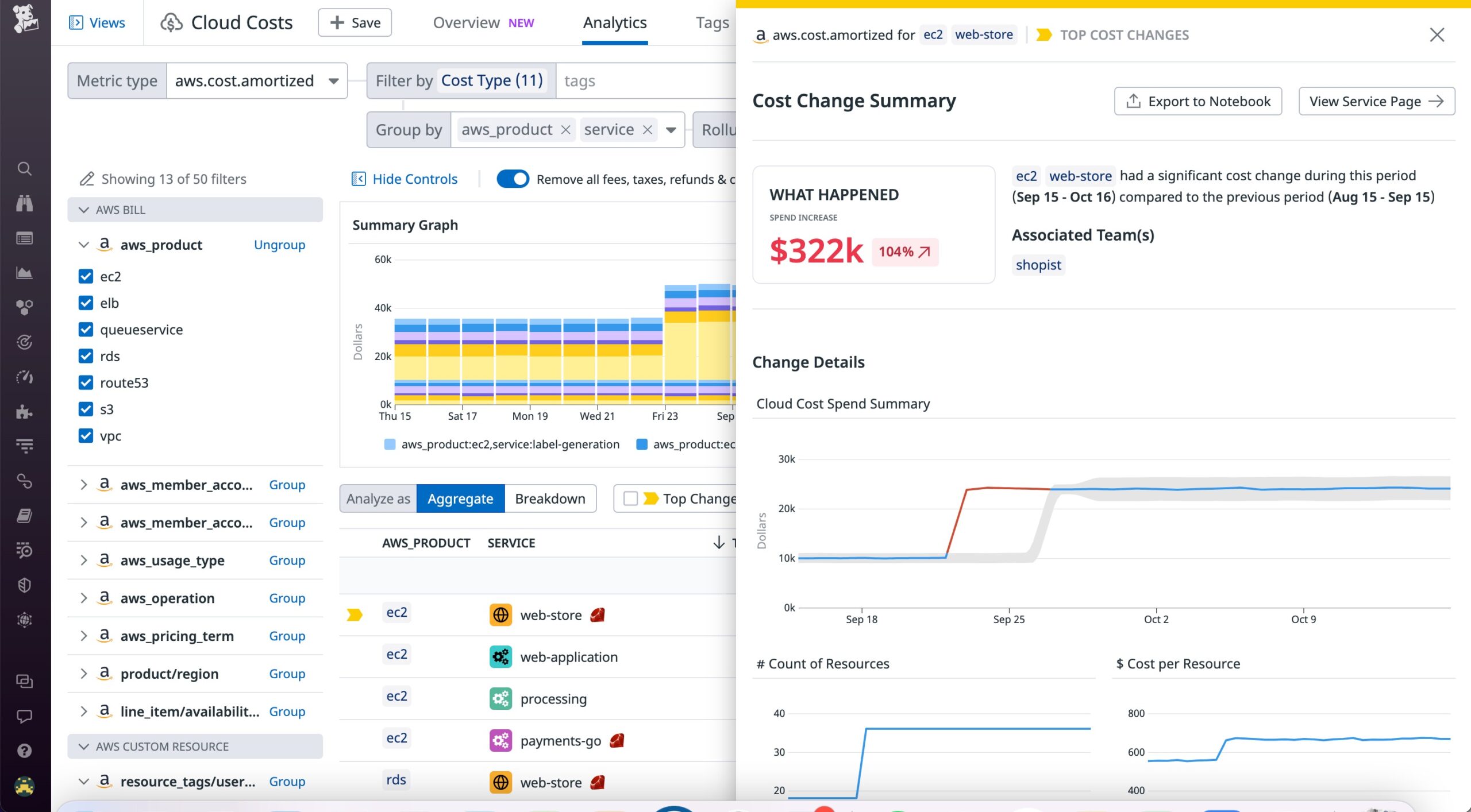
    Finally, Datadog is making generally available a cloud cost management tool that leverages its monitoring capabilities to enable organizations to automatically attribute spend to applications, services and individual teams. Changes to spending patterns that impact costs are surfaced alongside the same tools IT teams are already using to monitor their cloud computing environment. That unified visibility increases awareness of costs in a way that encourages DevOps teams to optimize the utilization of multiple classes of cloud resources.

    The services being added are extensions of a Datadog platform that employs a single set of agents it provides. The Datadog platform also supports the open source OpenTelemetry agent to deliver a wide range of services. That approach eliminates the need for IT teams to deploy multiple agents each time they add an additional monitoring, security, testing or cost management tool.

    Datadog has been making a case for an integrated platform that reduces the level of integration effort DevOps teams would otherwise need to expend when deploying separate point products to address monitoring, observability, security and cost management issues. That approach makes it easier for DevOps teams to collaborate and reduces the total cost of DevOps. In contrast, each time a DevOps teams adds a point product to address a specific issue, they need to deploy and maintain a separate set of agents.

    In the longer term, it’s not clear how problematic that agent issue will be once open source OpenTelemetry agent software is more widely employed. However, it may still be years before open source software provides the same capabilities that are available today using proprietary agent software.

    It may take some time before every application is as fully instrumented as it should be, but as monitoring and observability platforms continue to evolve, it is possible to more proactively manage application environments.

  • JFrog Adds Module to Better Secure Software Supply Chains

    JFrog Adds Module to Better Secure Software Supply Chains

    JFrog today added a JFrog Advanced Security module to its Artifactory repository that enables DevOps teams to scan both binaries and source code for vulnerabilities and misconfigurations.

    Stephen Chin, vice president of developer relations for JFrog, said that approach will enable DevOps team to ensure applications are secure before they are deployed in a production environment.

    In addition to discovering vulnerabilities, the JFrog Advanced Security module also detects exposed secrets such as passwords, access tokens and private keys, said Chin. Leveraging existing scanning capabilities provided via the JFrog Xray software composition analysis tool, it can also be used to inspect the file used to provision infrastructure-as-code, he added.

    Most importantly, it provides development teams with the context needed to determine which components of an application are using containers that encapsulate code that is actually exploitable, noted Chin.

    One of the major issues DevOps teams encounter today is that they are often presented with a long list of vulnerabilities by cybersecurity teams—many of which don’t meaningfully impact applications that are not exposed to the Internet. DevOps teams then need to manually report why any given vulnerability doesn’t need to be remediated. The JFrog Advanced Security module helps automate that process, said Chin.

    In general, JFrog continues to pursue a binary-first approach to securing software supply chains, said Chin. While it’s important to address vulnerabilities in source code whenever possible, it is application binaries running in a production environment that cybercriminals are going to exploit, he noted.

    Cybercriminals have, in effect, opened a new front in their efforts to compromise IT environments by injecting malware into software components before they are deployed in a production environment. The hope is that, once deployed in those environments, malware can be activated at some later date. As a result, DevOps teams are now being required to improve cybersecurity hygiene across their software development processes, said Chin.

    It’s not clear at what rate organizations are embracing DevSecOps best practices to achieve that goal, but in the wake of an executive order issued by the Biden administration that requires federal agencies to better secure their software supply chains, the expectation is that more enterprise IT organizations will follow suit. The challenge is finding a way to build and deploy more secure applications without negatively impacting the rate at which they are built and deployed. Earlier this year, JFrog launched the open source Pyrsia project that employs blockchain technology to ensure open source software packages are not compromised by vulnerabilities and malicious code.

    In the longer term, it’s only a matter of time before the historic divide that has existed between DevOps teams and cybersecurity professionals starts to narrow as applications become more secure. The biggest immediate challenge is that many of the applications deployed in production environments already have known vulnerabilities. In the months ahead, many DevOps teams will be asked to assess the severity of those vulnerabilities as part of ongoing efforts to improve application security. Those patching efforts will undoubtedly have a significant impact on the amount of time available to write the code needed to build new applications or update existing ones with new capabilities.

    One way or another, however, the amount of technical security debt that has been allowed to build over the last several decades needs to be addressed.

  • Dell Launches Project Frontier Initiative to Advance Edge Computing

    Dell Launches Project Frontier Initiative to Advance Edge Computing

    Dell Technologies this week launched Project Frontier initiative that promises to make deploying software at the edge simpler using integrated platforms that will be available in 2023.

    Announced at a Dell Technologies Summit event, Project Frontier will create an integrated edge computing platform for vertical industry segments such as manufacturing and retail.

    Dell CEO Michael Dell told conference attendees these platforms will help customers simplify, optimize and scale their edge applications in a secure way.

    The offerings can be centrally managed either by an internal IT operations team or via managed services that Dell provides to simplify onboarding and ensure zero-trust security. The overall goal is to reduce the number of instances that might require IT personnel in the field to configure and update them.

    According to a 2022 IDC survey, 42% of businesses say the most challenging aspect of edge deployments is putting together an entire edge solution. To address that challenge, Dell is also launching a Dell Edge Design Program through which it will collaborate with customers to further advance edge computing solutions.

    Through its Dell Validated Design program, the company is already building edge computing platforms for specific customers, but the goal now is to make it simpler to deploy edge computing platforms at scale.

    The number of application workloads being deployed on edge computing platforms is rising sharply as organizations seek to process and analyze data closer to the point where it is created and consumed. In fact, that shift is at the core of many digital business transformation initiatives that depend on edge computing platforms and devices running, for example, internet of things (IoT) applications to process data in near-real-time.

    A major issue—and one that remains largely unsolved, in many cases—is that organizations lack the ability to consistently deploy software on edge computing platforms. That results in a hodgepodge of homegrown tools deploying software on a wide range of edge computing platforms using manual processes that don’t scale well.

    It’s too early to say just how much software will ultimately be deployed on the edge, but there may come a day when there is more software at the edge than there is in the cloud. Of course, the real challenge will be unifying the management of DevOps processes, regardless of where any given piece of software might be deployed. In fact, Dell is betting that as edge computing continues to evolve, the line between edge computing and cloud computing will continue to blur until they are little more than natural extensions of each other.

    Dell, of course, is not the only IT vendor that views edge computing as the next trillion-dollar IT opportunity. There is already no shortage of options. The issue will be determining which IT vendor has the most robust edge computing ecosystem. In the meantime, DevOps teams would be well-advised to revisit DevOps workflows now with an eye toward making sure they can truly scale. After all, as edge computing platforms continue to proliferate, their ability to build, deploy, update and secure software is about to be put to the ultimate test.

  • Choosing the Right API Solution

    Choosing the Right API Solution

    There are more choices than ever when it comes to APIs–and that’s a good thing. But it also means you’ll need a strategic plan for choosing the right API solution.

    Two questions I’ve found can help guide that decision: 

    1. What problem are you trying to solve right now? 
    2. What functionality will you need in the next five to 10 years? 

    Once you’re clear on the answers, you can evaluate API solutions based on the following five criteria to choose the one best suited to your needs.

    Performance

    In a highly competitive global market, it’s not enough to have reliable uptime. Speed also matters–a lot. A site that loads in one second has a conversion rate three times higher than one that loads in five seconds.

    To accommodate current customer expectations for page speed, API response time should be no greater than 90 milliseconds. One way to blazing-fast API speeds is to take a client-side approach where data is delivered to an edge node of a CDN network instead of stored on a server somewhere in your data center.

    But let’s return for a minute to the first question I introduced above: What problem are you trying to solve? If you’re an online retailer, you want your site to load fast so your customers don’t click away and you want everything on it to be accurate–for example, if an item sells out while a customer is browsing, they shouldn’t be able to put it in their cart.

    Not every function requires the same level of speed. Product description content, for example, is mostly static, while inventory is not. So content delivered by your CMS’s API may not require the same speed as data from a transaction engine. 

    While high performance is important for every API you use, the actual performance benchmarks each one needs to meet vary based on function and on the end-user problem you’re solving.

    Documentation

    Thorough documentation is a must-have for any API solution you adopt. Without thorough documentation, your team will be forced to figure out how to use the API via trial and error supplemented with time-consuming support interactions. Strong documentation lets developers use APIs more effectively and, ultimately, ship products to market faster.

    But even among providers that offer thorough documentation, there are more and less helpful varieties. I’ve read plenty of documentation, for example, that is written with the assumption that the person reading it already understands how the API works. This makes it harder for newer developers to learn and understand the capabilities of an API.

    As you consider providers, look for those with documentation written for someone who is totally new to the API–which you and your team will almost certainly be. As a stylistic guide, look to documentation from Mozilla, MDM and W3 schools, which I think do an excellent job of communicating for non-experts.

    To gauge the helpfulness of a potential provider’s documentation, I recommend having your team read some of it and asking the partner team how often they update it. A best-case scenario is that they consider documentation an ongoing project that will never be complete.

    Security

    Security is pretty self-explanatory, so I won’t spend a ton of time on it here. Any API provider should offer robust security to ensure that the API cannot be used nefariously by bad actors or hacked to expose sensitive information. REST APIs almost always follow standards like 0Auth and TLS to maintain security. It’s worth looking at how the API you’re using describes its security practice.

    Flexibility and Extensibility

    Your team should have the freedom to create whatever they want with the APIs you use, meaning they shouldn’t be hampered by roadblocks in the API’s design. This freedom to create should exist in all aspects of the API: It should let your team create whatever customer experiences they can dream up, and it should let you manage back-end information in whatever way makes sense for your organization.

    In other words, an API solution should be well-defined but should not define everything you can do with it.

    Pricing Model

    The final piece to take into consideration is the API’s pricing model, by which I mean not only its actual cost but also the way the provider charges to use its service.

    For example, does it charge by order? By bandwidth? By number of records? Again, this comes back to the problem you’re trying to solve: If you have a lot of requests to make, for example, don’t choose a service that restricts requests per minute.

    And even if a pricing model works for your business today, will it work as you scale? This question brings me to my final thought.

    API Solutions Should Make it Easy to Grow and Evolve

    I started this piece with two key questions to guide the process of choosing API providers: What problem are you solving and where is your business going?

    If you’re exploring APIs as part of a replatforming project, there’s a good chance you chose a platform 10 years ago that could do everything–but that can’t keep up with evolving customer expectations or that restricts your team’s creativity today. The APIs you choose should let you meet current needs and make it easy to make changes–including swapping one API provider for another–as your needs evolve.

    In other words, when you choose the right API solutions, you should never need to do another replatform.

  • Microsoft Expands DevOps Portfolio in the Cloud

    Microsoft Expands DevOps Portfolio in the Cloud

    At the Ignite conference this week, Microsoft launched a slew of updates to its DevOps portfolio as part of an effort to make it simpler to build, manage and secure cloud applications.

    Microsoft is adding Azure Deployment Environments, available in preview, that enable developer teams to invoke a set of best practices to quickly spin up application infrastructure using project-based templates.

    Microsoft is also making generally available Visual Studio Image for Dev Box, a self-service environment for accessing workstations on the Microsoft Azure cloud. Those images make it simpler to access Visual Studio functions and complimentary tools. Microsoft has also made generally available the latest version of the Visual Studio 2022 application development platform.

    In addition, Microsoft has signed an agreement with Postman to collaborate on integration that promises to accelerate the development of application programming interfaces (APIs) starting with the ability to both import and export APIs from Azure API management into Postman.

    Microsoft is also making generally available a predictive tool that employs machine learning algorithms to automatically scale virtual machines on Azure. In addition, updates to the Azure Monitor Log service now make it possible to ingest logs at a fifth of current costs and archive them for up to seven years. ​​​​​​​Microsoft is also now providing tools to migrate from legacy log agents to the Azure Monitor Agent (AMA) and has added Java profiling with a Java Flight Recorder (JFR) tool that collects data from a Java virtual machine and Java applications.

    In terms of managing application environments, Microsoft has now extended the reach of Azure Automanage to now include servers managed via the company’s Arc management platform, in addition to virtual machines running on the Azure cloud. Other capabilities added to Azure Automange include enhanced backup settings and different auditing modes for the compute server baselines and the ability to specify custom Log Analytics Workspaces and Azure tags to identify resources based on settings.

    Microsoft is also previewing an enhanced Azure remote support service through which Microsoft personnel will collect logs and commands to help resolve issues.

    Finally, in terms of securing applications, a GitHub Advanced Security for Azure DevOps tool that, now available in private preview, promises to make it simpler to identify and fix exposed secrets and vulnerable open source dependencies across the software life cycle using a CodeQL code scanner.

    At the same time, Microsoft is making available Microsoft Defender for DevOps to better secure code created to configure clouds. In addition, it will also enable DevOps teams to better prioritize their remediation efforts across multi-pipeline DevOps environments spanning multiple clouds. Microsoft Defender for DevOps is available in preview and supports GitHub and Azure DevOps with future support for other DevOps platforms planned.

    Another security addition available in preview is Microsoft Defender Cloud Security Posture Management (CSPM), which promises to provide contextual risk-based information via attack path analysis surfaced using a cloud security graph service to identify the most exploitable cloud resources. Microsoft has also made generally available a multi-cloud security framework for Microsoft Defender for Cloud to help organizations adopt DevSecOps best practices.

    Microsoft is also previewing support for agentless scanning for Microsoft Defender for Servers and an expansion of Microsoft Defender for Containers that adds support for Amazon Web Services Elastic Container Registry.

    Microsoft CEO Satya Nadella told conference attendees that Microsoft is making a concerted effort to natively embed security capabilities within its platforms to reduce the total cost of security. Many of the tools DevOps teams rely on today don’t integrate well, which is challenging at a time when application environments are becoming more dynamic as more cloud-native applications are deployed.

    It’s too early to say how much better security will entice organizations to opt for one cloud platform versus another. But it is almost certain that cloud service providers will be expected to contribute to securing software supply chains.

  • Protecting CI/CD Pipelines to Secure the Software Supply Chain

    Protecting CI/CD Pipelines to Secure the Software Supply Chain

    Cloud-native applications have become increasingly complex. Composed of an infrastructure stack of mash-up code, hundreds of open source and commercial components, services and APIs, today’s software supply chain is fraught with security risks. At the same time, the ability to manage existing application requirements while building innovation and taking on new areas of responsibility like security is stretching DevOps teams beyond their capacity. The concern for the number of connected and exploitable weaknesses across the software supply chain are now requiring organizations to take a proactive approach to protect their continuous integration and continuous delivery (CI/CD) systems, as they have become a target through which attackers infiltrate multiple production systems. But meeting this requirement is no easy feat as it often requires organizations to choose between how much security to enforce in the build cycle while quantifying their risk to build and deploy quickly. 

    A recent survey revealed that nearly all (97%) of an organization’s assets—and security issues—are now in the cloud. And yet, only 29% of an organization’s assets are associated with cloud-specific policies. Addressing this gap requires organizations to have a proactive approach to protect their technology infrastructure, especially securing the artery of their software supply chain: The CI/CD pipeline. By embracing new security and compliance strategies within their governance approach, organizations can better protect their CI/CD pipeline and cloud applications. 

    There is a growing shift toward programmable infrastructure and infrastructure-as-code (IaC) practices to build out infrastructure and manage configuration files. But with this practice comes the increased risk of exposing application credentials, API keys, encryption keys and digital certificates. Tools supporting the CI/CD pipeline have now become the artery of cloud applications, and it’s becoming more challenging to store, transmit and audit data securely. In addition, when CI/CD tools interact with other systems in the DevOps environment, it increases the risk of exposure for configuration files. A compromise in the build system, for example, can be used to get access to production systems that can result in the exposure of sensitive information or the injection of malicious code, corrupting the entire CI/CD pipeline and thus the software supply chain. 

    A recent Unit 42 Cloud Threat report revealed that overly permissive credentials created added risk opportunities in the CI/CD pipeline. The study found that 63% of IaC templates contained misconfigurations and 91% of container images contained high or critical security vulnerabilities. To address this, organizations need to catch security problems in the build process before cloud workloads are provisioned. During the SolarWinds compromise, for instance, attackers used custom malware designed for the company’s build cycle to observe each step. The sophistication of the intrusion in this attack during the software build process is a key lesson for DevOps and DevSecOps professionals and revealed how security needs to be approached. 

    One way to address this is by being able to identify CI pipeline misconfigurations, which can improve security in the software supply chain. Because CI pipelines are configured in the code, the same policy-as-code approach can be used to identify IaC misconfigurations or open source vulnerabilities to surface CI/CD weaknesses. DevOps and developer teams can keep configurations accessible to just a small group who are building for production release. By establishing enforceable permissions to the pipeline, there is better control over who can commit code changes to the repositories, create containers and deploy code to different environments. 

    Strong chains of trust throughout the build cycle are not commonplace today. But as organizations look at ways to strengthen their risk posture by shifting left, security and DevOps teams can work toward proactively hardening pipelines with the right CI/CD tools and frameworks and push the industry toward a more secure software supply chain. 

  • How to Prevent Turnover in DevOps Teams

    How to Prevent Turnover in DevOps Teams

    Turnover is all too common in software engineering. The Bureau of Labor Statistics 2021 report found that the average software engineer turnover is 57.3%. It’s a programmer’s market, and these sought-after folks might jump ship for a higher salary, better work-life balance, different team dynamic or perhaps even for a company with a better ESG footprint. Yet, constant changeups in a development team can stifle progress when there’s pressure to meet new digital demands and rapidly deliver new features.

    IT skills shortages can impede innovation across the board. But turnover can be especially problematic in the field of DevOps, as the practice relies on collaboration between teams and a shared sense of operational standards. Here, a gap in shared knowledge can impair ongoing platform maintenance.

    I recently met with Nathan Sutter, global VP of engineering at CoderPad, to examine the core reasons behind engineering turnover and look at specific ways to prevent it in DevOps teams. In a nutshell, he advocated for reducing context switching, giving both engineering and product teams a seat at the table and not underestimating your teammates’ flexibility.

    Reduce Context Switching

    Engineers like having ownership and pride around what they’re creating—take that away, and it can lead to burnout and even an exit from the company. The more you context switch, describes Sutter, the less you focus on building a core project and the less attached you feel to the code or architecture you’re creating. “Engineers like to build cool stuff, ship it, and use it,” he said.

    Context switching may occur for a couple of reasons. First, it may just result from poor planning, in which case engineering time is wasted. Secondly, context switching might arise due to legitimate emergencies, such as incident response or necessary bug fixes. Furthermore, enterprises traditionally ship operational concerns to a production team, thus increasing the number of applications a developer oversees and decreasing their role in ongoing maintenance.

    Instead, Sutter is a proponent of allowing developers to own everything about an application end-to-end. Essentially, the DevOps or infrastructure team builds the scaffolding and the application teams own the rest, such as writing Terraform configurations, Docker containerization, monitoring and alerts, and on-call assistance. In other words, you operate what you build and own the component throughout its entire lifecycle. This practice has already been embraced by full-cycle developers at Netflix.

    Specifically, in DevOps, the on-call cycles can be challenging when you have so many things to own. “When you have 25 apps to look after, something is always going off,” said Sutter. “This is an “exhausting, thankless and horrific way to work.” This imbalance can affect the work-life balance and decrease your time to focus on upgrading core infrastructure.

    Don’t Separate Engineering and Product Teams

    Another setback that might manifest itself in turnover has to do with inefficiencies caused by siloed teams. For example, suppose a product team spends months outlining a complex software design in a black box. In that case, they will most likely encounter many issues once the schematics are finally sent to engineering teams. Without collaboration between the two groups earlier on, organizations can increase time-to-market for new features and encounter frustration between teams.

    Instead, Sutter believes product and engineering teams should counterbalance each other and collaborate more in the product design phase. Whereas product teams can “skate where the puck is going” and identify trends in the market, engineering teams figure out how to technically implement these designs and build a sequence of work that’s scalable for the long-term. Of course, the other side rings true, too—engineers can overplay their hand and plan minute details too far into the future, described Sutter. This underpins a need for ongoing collaboration where both sides have a voice at the table.

    Don’t Underestimate Flexibility

    Even though software engineers like to have a sense of ownership, we shouldn’t discourage flexibility—people easily become bored working on the same thing for years and years. There’s also the fallacy of sunk cost to keep in mind, which states that we tend to value things more because we’ve put more time and effort into them. Thus, providing flexibility to pivot when it makes sense can increase overall satisfaction and output.

    Accordingly, flexible management is also crucial to embrace pivots when they are necessary. For example, if a project is well underway but an engineer identifies a new solution that is more elegant, team leads should be open to recognizing and acting on changes. But to realize this sort of relationship, trust and openness must be bidirectional, said Sutter. If engineers can’t express their ideas or are afraid to tell their boss they’re wrong, these important conversations can’t happen.

    A flexible structure is also necessary to attract talent that prefers more modern work-life balance. As big tech companies with multimillion-dollar commercial leases now want workers to return to physical offices, small-to-medium companies now have an unprecedented upper hand to attract and retain talent if they embrace flexible remote-hybrid working options, added Sutter.

    What Matters Most?

    The majority of developers working on open source projects are open to changing jobs in 2022, according to the EDB Open Source Talent Survey. Job satisfaction is challenging to wrap your head around, and each engineer may be motivated by various reasons.

    But having assembled and led many software engineering teams over the years, Sutter recognized an interesting change in the attitudes of what matters most to software engineers in their day-to-day job. Pre-COVID, software engineers were definitely interested in higher compensation, he said. After that, it was building something they’re proud of, team camaraderie, the worth of a brand name and a positive work-life balance. Post-COVID, compensation and other benefits are still just as valid. Yet, hybrid flexibility is often table-stakes—some are even willing to take a pay cut to obtain these benefits. This underscores the high importance of flexibility in managing modern software engineering teams.

    Executives and engineering leads have their work cut out for them when it comes to obtaining and retaining top talent. Yet interestingly, many roadblocks are not so much technical problems but people and organizational problems. As we’ve covered, reducing context-switching and placing more ownership on singular products could increase satisfaction. One of the tenets of DevOps is also de-siloing teams to increase collaboration. Reducing toil could also go a long way toward increasing satisfaction. Whatever your chosen strategy, it’s always good to “display openness and understanding to hear people when they’re not happy,” said Sutter.

  • ServiceNow Acquires Era Software to Unify Observability

    ServiceNow Acquires Era Software to Unify Observability

    ServiceNow today announced it has agreed to acquire Era Software as part of an effort to add support for log data to the Lightstep observability platform the company acquired last year.

    Ben Sigelman, general manager for the Lightstep business unit at ServiceNow, said rather than reinventing the same log management capability that Era Software already has, it makes more sense to integrate that capability with the Lightstep platform that collects metrics and traces.

    The integration of those two platforms will then make it possible to unify observability rather than requiring DevOps teams to navigate two separate silos, he added.

    As observability continues to evolve and mature, the most immediate goal is to make it simpler to navigate the alert storm that inevitably ensues any time there is a disruption, said Sigelman. The alert storms generally occur after there has been a change made, but unraveling how exactly that change impacted an IT environment is challenging, he noted.

    An observability platform reduces the time and effort necessary to achieve that goal by surfacing a set of statistics that guide DevOps teams through that process, added Sigelman. The challenge, of course, has always been finding an efficient means of storing all the telemetry data that’s generated. In fact, as organizations start to deploy microservices-based cloud-native applications, many of them are starting to see the amount of telemetry data increase exponentially.

    Era Software uses an object storage system to index and analyze log data collected from cloud applications, Kubernetes and IT infrastructure platforms. The company has also made available in beta an Era Streams tool that reduces the volume of observability data collected without sacrificing fidelity by dynamically reconfiguring data pipelines in real-time.

    Once the acquisition is completed, log data analytics will then be shared with the IT service management (ITSM) tools that ServiceNow provides alongside the Lightstep observability platform. The goal is to make it easier to correlate those IT events with their potential impact on the business, said Sigelman.

    Era Software CEO Todd Persen said the long-term 10-year goal is to get to the point where issues are both automatically detected and remediated. In the meantime, the amount of context switching that IT teams encounter can be sharply reduced via a unified observability platform.

    There is, of course, no shortage of unified observability platforms these days. DevOps teams have also been relying on legacy monitoring tools that track specific metrics for years. The issue is that those legacy monitoring tools only track a narrow range of pre-determined metrics. As IT environments become more complex, the need to launch more open-ended queries to determine the root cause of IT disruption has become more pronounced.

    It may be some time before observability platforms are widely adopted, but the need for them is generally apparent to anyone managing a modern IT environment. Less clear is the degree to which observability platforms will remove the need for legacy monitoring tools; however, right now the focus should be on gaining as much visibility and transparency as possible into what are still opaque IT environments.

  • The Whats and Hows of APIs: A New Developer’s Guide 

    The Whats and Hows of APIs: A New Developer’s Guide 

    For those who are new developers, you may not know a lot about application programming interfaces (APIs). However, it is likely that you’ve used them before as a consumer or an end user, whether purchasing online, using business communication software to reach colleagues or sharing images from a monogram logo maker on social media platforms, for example. It makes knowing about them helpful, regardless of if you plan to make and use one yourself or want to understand how the tools you use work. 

    Although coding and developer tools can be daunting for the outside world, we’ll put APIs into a language that new developers (and even non-developers) can understand. In this guide, we’ll cover what APIs are and the different types that exist. You’ll also learn how they work and how you can use them. By the end, hopefully, you’ll be more comfortable with APIs and know how they impact you and your business.

    What Is an API?

    An application programming interface is a piece of coding used by developers to communicate between different devices, systems, or applications. It allows information to be passed on—allowing procedures to be followed across multiple platforms. Depending on the API, this could be transferring data, images, videos, text, files and other content, or allowing developers to connect through the use of backend-as-a-service (BaaS) to link their apps to the cloud. APIs are often used in a business context and for personal projects or other purposes. 

    Generally, APIs are concerned with the raw information and passing this on to another program rather than the appearance or visual side of these applications. Another set of coding is used instead to build the aesthetic and usability of the interface, while the API tends to be less visible to users. Nonetheless, they form an essential part of our technology stack today, allowing systems to integrate and become more agile, making applications easier for users to navigate.

    Image sourced from developers.facebook.com

    For example, when you refresh your omnichannel communications application, a request is sent to the API to check other linked programs for new messages on your social platforms or calls to your 800 numbers for business. These programs inform the API of new communications and send the appropriate data across. The API returns this data to the application you are using, enabling you to read the messages from here or notify you of no new calls.

    Types of API

    1. Private

    A private API is used internally within a team, created by developers who work for the company or organization. It can help make highly personalized APIs for the needs of your business and adapt the API as and when needed. Private APIs can’t be used or worked on by external developers, as it is purely for your in-house team. These APIs tend to focus on aiding your company’s productivity and project management across multiple applications.

    2. Partner

    Alternatively, partner APIs are used externally with companies that your business collaborates with. Often, this transfers information between businesses, such as within an affiliate scheme or for external postage of online orders. However, APIs can also share and update files such as your release of liability contract or emergency procedure templates. Developers from both companies can improve the API system to effectively share data between partners. 

    3. Open/Public

    Because they are not restricted to usage by specific businesses, open APIs (also known as public APIs) can be used by anyone. You may need a subscription to give you access to the API depending on how frequently you use it, although there are other APIs that are completely free to use. Once you’ve sorted out your access, any software developer can use the API to make changes and transfer information more easily between various software for several purposes. 

    Image sourced from mailchimp.com

    4. Composite

    By taking the responses of multiple programs and streamlining these onto one platform, composite APIs are essential for business and personal use. Or, vice versa, a composite API allows you to make requests of multiple platforms simultaneously. It is helpful for omnichannel management, tracking customer interactions, online faxing and purchases across various platforms. These tend to require little input from developers and are set up for anyone to use.  

    How to Use an API

    • Choose Your API

    As you may have gathered, APIs can be used for several purposes. When choosing your API, look for something relevant to the business that helps you complete the tasks you already do. The software and tools you use may have recommended APIs to try, or there may be APIs that similar businesses use. Do your research to ensure your API performs the right functions and works with your rephrasing tool, calendar software or other add-ons you use. 

    If you’re getting used to APIs, you may want to start with a free option. It means that if it doesn’t work as you hoped, you’ve not lost anything by trying. Many APIs have a free trial period or a free subscription tier with the basic functions, so you can get a feel for the API and decide if it works for your business. When you’re confident in your choice, you can invest in the other subscription tiers that tend to allow for additional users and added functionality.

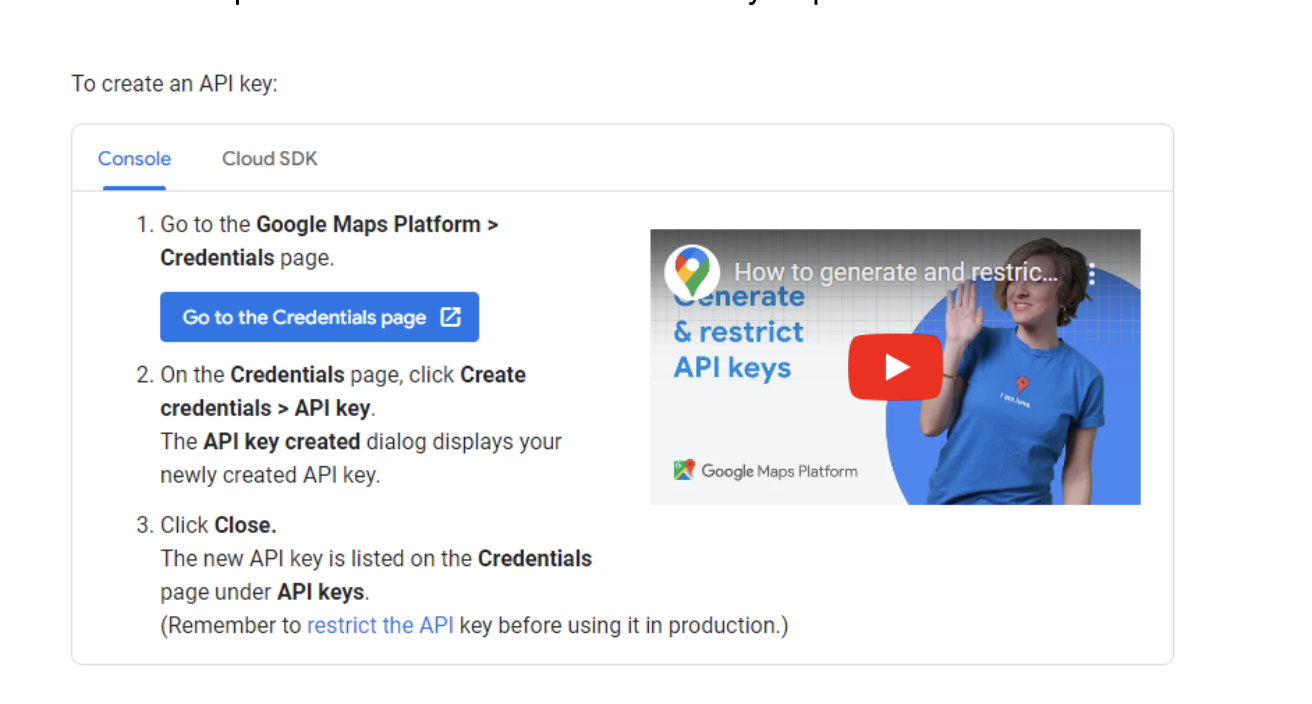
    • Find Your API Key

    An API key identifies you as the user, authenticating your actions using the API and tracking your usage. It is crucial to have, particularly with subscription-based APIs, as without it you may not be able to perform certain actions, or your users of the API may be limited. Even if your API of choice is free to use and publicly accessible, there still may be an API key to keep your information and preferences stored and linked between your platforms. 

    Image sourced from developers.google.com

    Your API key may be issued as you sign up for the service, so remember this and ensure those in your business who need it can access it. Otherwise, you may need to request or pay for an API key, although this should be clear when you sign up for your chosen API. To increase your API security and avoid your preferences being altered, keep your API key private and limit who has access to it. If your account is hacked, you may need to request a new API key. 

    • Read the Instructions

    It can be easy to overlook the documentation and instructions an API comes with, assuming you’ll get the gist through practicing and by actually using it. Although this may be true to an extent, you could be missing out on useful functions or not using the API as effectively as possible. Likewise, you could get yourself into a mess, not properly setting resource requests and limits, leading to more issues for your business when using the API in the future.

    Set aside time to read the instructions and documents for your API or divide the workload between your management team. You may discover it comes with setup instructions or useful tutorials you can use with the rest of your teams. As you introduce more people to the API, the instructions ensure everyone uses it in the same way. It prevents confusion for your teams and enables them to build their confidence with the API more quickly. 

    • Set Up Your Requests

    Depending on the API, there may be suggested requests for you to set up or you may have to create and code your own. Following the instructions from your API can help with this, allowing your in-house developers to reach their full potential within the API and informing you of the coding structure to use. Nonetheless, there are plenty of tutorials online covering how to set up your API requests without relying on coding expertise.   

    Image sourced from developer.paypal.com

    Just because a request is possible doesn’t mean it’s always relevant to your business. Consider why you’re using an API and what you want it to do once you’ve set up your requests. If you’re new to using APIs, start with a few basic requests and build on these as you gain confidence and experience, using CI/CD best practices to ensure it runs well. It allows you to become familiar with using each request and ensure it works in the way that you intended it.

    Are You Ready to Use APIs?

    As technology progresses and software is developed, having APIs in place is becoming more helpful. Being able to communicate between applications can streamline your virtual receptionist service, incoming video calls and outgoing messages, for example, as well as accelerate cloud-native application development. Having one place to make your requests and display information from multiple platforms gives you more control in managing your tasks.

    If you’re still new to APIs, you don’t have to start using them for everything immediately. Take your time learning to use them for specific functions, getting familiar with them, and enabling your teams to adjust to using them. From this foundation, add new APIs or requests as they’re needed, personalizing them to your business and the tasks you complete. Over time, you’ll gain confidence in using APIs and build a strong network of requests to run your business effectively.