Category: DevOps Toolbox

  • F5 NGINX Delivers Modern Management Platform

    F5 NGINX Delivers Modern Management Platform

    F5 NGINX has revamped an implementation of its management suite as part of an effort to make the platform both more accessible and simpler to use.

    Eric Braun, vice president of product management for F5 NGINX, said NGINX Management Suite 1.0 is based on a modular platform that makes it possible to dynamically scale instances of NGINX proxy software, application delivery services, application programming interface (API) management workflows and the company’s security offerings.

    That approach makes it possible to automate the deployment of F5 NGINX software without relying on manual processes that are prone to misconfiguration, Braun noted.

    The platform is based on a modern architecture that also makes it possible for administrators to enable development teams to self-service their own requirements within the limits of a set of policies defined via a portal, he added.

    The NGINX Management Suite replaces NGINX Controller, a more monolithic platform that is not based on an API-first approach to managing services, said Braun.

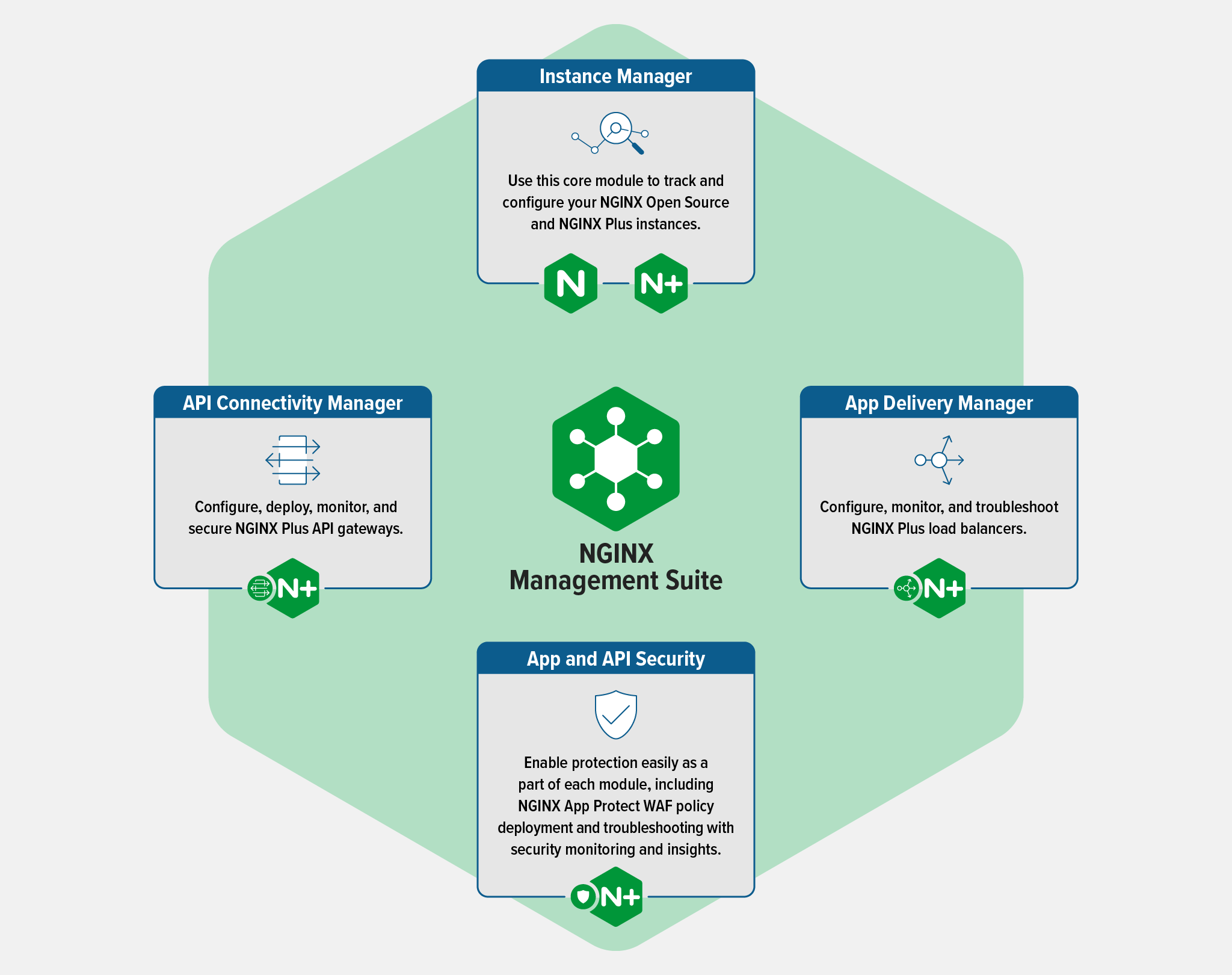
    The core modules of the NGINX Management Suite are an Instance Manager for the open source and commercial instances of the company’s proxy software, an API Connectivity Manager, App Delivery Manager and an App and API Security module. NGINX Management Suite will enable organizations to use NGINX App Protect Web Application Firewall (WAF) to protect applications and APIs while the App Delivery Manager module will be extended to enable configuring, securing, monitoring and troubleshooting of NGINX Plus when used as a load balancer.

    The revamp of the NGINX management plane is the latest in a series of efforts to modernize application and IT infrastructure management using a microservices-based platform that more easily scales as more resources are required. The more modular approach also gives IT teams more granular control over how various modules are accessed.

    It also makes it simpler for IT teams to deploy, for example, a service mesh or API gateway without having to add additional management platforms, noted Braun. That capability should significantly streamline the process of deploying those platforms because the need for a dedicated platform to manage them has been eliminated, he added.

    It’s not clear to what degree that latter capability will enable IT organizations to shift responsibility for managing various tasks further left toward application development teams. However, it is clear application development teams want to be able to self-service their own IT requirements and make services available without intervention from a centralized IT organization. In effect, IT organizations are trying to strike a balance between the benefits of centralization and the need to build and deploy applications faster within the context of a DevOps workflow.

    It may be a while before most IT organizations are able to consistently strike that balance. In the meantime, however, as IT management platforms continue to be modernized using APIs it should also become easier to integrate them. It will be up to each IT organization to then decide how many management platforms are going to be required, but at the very least, the various management silos that make up an IT environment today are finally starting to break down.

  • Free Dev Tools! But What’s the Catch?

    Free Dev Tools! But What’s the Catch?

    Software companies, especially young startups, are always in a development race – by definition, they are trying to maximize achievements and minimize their burn rate. That means development teams naturally face an internal tug-of-war. On one hand, they seek to use the newest dev tools that the market can offer, targeting their applications to become better (more secure, more efficient and compliant with the latest standards). On the other hand, they cannot spend money on such tools since they need to save every penny. With the current economic climate, many new investments are being delayed or, at minimum, double-checked. 

    To appeal to developers, many vendors and software development tool companies offer freemium programs. Some are driven by the spirit and the goodwill of open source and community; others are business-to-developer (B2D) companies relying on the product-led growth (PLG) mode. If developers see value in the free tools, they are more likely to become paying customers later on to get access to more features.

    Here, we’ll review the common parameters of popular free developer tools and distinguish their services between the free tier (aka the community tier), the entry-level paid tier and other paid program offerings. We’ll look at tools for observability, logging, vulnerability scanning, compliance, authentication and VPNs.

    1. Volume Threshold

    Logs are considered to be one of the three pillars of observability and are the bread and butter of troubleshooting and debugging. The more code lines you have in your product, the more loglines you collect, store and aggregate. Logs accumulation can quickly get out of hand and become very heavy on the budget. One logs aggregation vendor, Sumologic, provides a freemium offer that allows log collection up to one gigabyte per day. If you need more volume, you can move to their paid tier that allows for higher volumes or pay more for no limits at all.

    2. Transactions Threshold 

    Transactions and tests are probably the most imperative features of a freemium offer. It involves the core offering with a quantity limitation, giving you a chance to try the product through practical use, but you’ll probably have to move up quickly into the first paid tier. Snyk.io, for example, will help you scan your open source software for flaws alongside container vulnerabilities as early as code creation, with up to 200 open source tests and 100 container tests per month.

    3. Certified: Security and Compliance 

    It’s one thing to play with, say, a free AutoCAD seat that doesn’t involve sensitive data and another thing entirely to draft the next-generation design that must not leak to your competitors. Security and compliance certification is often included in the freemium tiers; more detailed reports and analysis of security and compliance are for the paying tiers only.

    4. Availability and SLA Support 

    Having a free tool is great–but if this tool is bound to a proprietary service, then you should probably demand these tools meet the same standards and SLAs that you are offering your customers. Observability platform Rookout offers 24/7 support and dedicated account managers and tools for enterprise customers in all tiers.

    5. Legal Aspects 

    One key aspect of free tiers is the legal aspect of using the tool. The dev tool may interact with sensitive data, not only in your own dev environment but also with your customers’ environments. Your customers may require your dev operations to meet specific criteria, making the free tier a potential legal issue. For example, if you use the free tier of JFrog to manage your supply chain, you won’t be able to use Artifactory to publish data to third parties; should you want to do that, you will have to move to one of the paid commercial programs.

    6. Usage Threshold

    Some free tools operate based on a usage model—you are entitled to a free tier until a certain amount of users or actions is reached. Auth0, for example, a user authentication solution (now part of Okta), provides their service free of charge for up to 7,000 users (generous!) but should you grow beyond that, you’ll need to graduate to a paid tier and be charged according to your monthly usage.

    7. Speed Threshold

    Some free and freemium offerings are tempered based on connectivity speed, bandwidth and even VPN. Today, you can even get a secure VPN for free, but only to a specific threshold. For example, ProtonVPN will provide you with a free VPN at a medium speed, if you move to the highest speed VPN, you’ll need to move to a paid tier.

    In most cases, the freemium tier will limit a dev tool’s usage according to one or a few main characteristics but will allow you to perform the basic actions and enjoy the essence of the tool. Some parameters may be trivial, like volume of tests, while others require developers and DevOps teams to carefully monitor usage. There’s a lot of value in free and freemium dev tools—but make sure you read the fine print.

  • Agile Sucks (Redux) | Plus: DevOps on Mars

    Agile Sucks (Redux) | Plus: DevOps on Mars

    Welcome to The Long View—where we peruse the news of the week and strip it to the essentials. Let’s work out what really matters.

    This week: Agile is bad, but “Wagile” is worse.
    Plus: This prod is even worse than yours. (more…)

  • Time-Series Database Basics

    Time-Series Database Basics

    There’s been a lot of buzz about time-series data for the past few years. No matter what you’re monitoring—financial data, server performance, social media activity or something else entirely—time-series data can give you valuable insights into trends and patterns.

    But what exactly is a time-series database, and why do you need one? This article will look closely at time-series databases and how they can help you make sense of your data.

    What is a Time-Series Database?

    A time-series database (TSDB) is a database management system optimized for storing and querying data that changes over time. Time-series data is often used in monitoring applications where it’s important to quickly retrieve information about a system’s current state and trends and patterns over time.

    In most definitions, time-series data, often referred to as time-stamped data, is a sequence of values indexed in time order. Time stamping refers to data collected at various times, where each value is time stamped. These data points are usually gathered from the same source and are used to measure progress over time.

    Important Notes:

    You can use relational or NoSQL databases to crunch time-series data, but purpose-built time-series databases are tailored to exploit the unique features of time-series data. This implies that time-series databases ingest at a faster rate, query more quickly and compress data more efficiently. Furthermore, time-series databases include special analytical capabilities and management features that are not found in most relational or NoSQL databases.

    Some Advantages

    This list is not exhaustive, but here are some of the advantages that you might get from using a time-series database:

    1.) Time-series databases can handle high-velocity data very well.

    2.) Time-series databases are purpose-built for storing time-series data, making them more efficient in storage and querying.

    3.) Time-series databases often have built-in analytics and management features designed specifically for time-series data.

    4.) Many time-series databases are open source, which means they’re free to use.

    Some Disadvantages

    There are also some disadvantages that you should be aware of before using a time-series database:

    1.) Time-series databases are often more complex to set up and manage than relational or NoSQL databases.

    2.) There are relatively few time-series databases to choose from, so you might not have as much flexibility in choosing a platform that meets your specific needs.

    3.) Time-series data can be very large, so you’ll need enough storage capacity to accommodate your data.

    What Are the Characteristics of Time-Series Data?

    There are several characteristics of time-series data that make it unique and require special handling. From a database standpoint, the most essential ones are as follows:

    1. Timestamp: Every data point has its timestamp. The timestamp is crucial for calculating or analyzing the information.
    2. Structure: Metrics from devices or monitoring are almost always structured, unlike those produced by Internet applications. They have predetermined data types and lengths, and the structure will not alter until the device’s firmware is updated.
    3. Stream-like: Data sources, such as audio or video programs generate data at a set or constant rate. These data streams are completely unrelated to one another.
    4. Stable flow: Time-series data traffic is constant over time, and it may be calculated and predicted if enough data sources are used within a certain sampling period.
    5. Immutability: The source of this data is a time-series data store. Each data point is created only once and never updated or corrected. Time-series data, like log data, is typically append-only.

    How Is Time-Series Data Used?

    Many of you may be wondering why time-series data is so important. The answer is that it allows us to track changes over time, which can be incredibly valuable for monitoring and troubleshooting purposes.

    For example, let’s say you’re a system administrator tasked with keeping an eye on server performance. By monitoring various metrics—such as CPU usage, memory usage and network traffic—you can quickly identify when a server is starting to experience issues.

    Time-series data can also be used for predictive purposes. For example, if you notice that CPU usage spikes at certain times of day, you can use that information to plan for future capacity needs.

    Of course, time-series data isn’t just limited to server performance. It can be used for any application where it’s important to track changes over time. This includes everything from weather and financial data to social media and website analytics.

    Let’s Get Specific

    Here’s what you should know about time-series data: It’s typically used to seek insights into operations, create alerts based on real-time analysis and forecast future trends.

    The following characteristics are found in time-series data applications:

    1. High write-read ratio: Twitter and LinkedIn are internet applications with single articles that millions of people read, but raw time-series data is primarily scanned and evaluated by apps and algorithms.
    2. Retention policy: In general, time-series data is not kept permanently. Organizations have a retention policy that specifies when and how their data is destroyed.
    3. Real-time analytics and computing: Time-series data must be calculated in real-time to identify out-of-the-ordinary activity and sound alarms based on the acquired information or aggregate findings.
    4. Query scope: Time-series data is generally requested over a period or a set of data sources, and filters are used to prevent all historical information from being requested. Furthermore, all or a portion of the data sources with a filter condition are always aggregated.
    5. Trends: Single data points are typically not significant in time-series data. The emphasis is on how data evolves, such as fluctuations in the previous hour or day.

    Popular time-series solutions like TDengine or InfluxDB, for example, create more efficient processing of time-series data and greater performance than general databases by taking advantage of these qualities.

    Do Time-Series Databases Need Specialized Databases?

    We live in a modern world where data is constantly being generated at an unprecedented rate. To keep up with the demand, businesses need to be able to store and process large amounts of data quickly and efficiently. This is where specialized time-series databases come in.

    Everything is online, including meters, automobiles, lifts, assembly lines and even bicycles. And these items are sending out a never-ending stream of numbers and events that IoT and the cloud have unleashed an explosion in time-series data generation.

    With this in mind, it’s not surprising that several specialized time-series databases have been created to deal with this type of data influx.

    Time-series data sets are enormous and pose a significant problem for general database management systems, such as relational and NoSQL databases. Non-specialized databases have trouble with the following elements of time-series data:

    1. Data ingestion rate: In many time-series data scenarios, millions of data points are generated every second and must be ingested in real-time. Relational databases are not built to handle this quantity of data, and while NoSQL databases may be scaled to do so, the amount of resources required soon becomes prohibitive.
    2. Query latency: It is often the case that a time-series system must scan a massive number of data points to get an aggregate result, which might lead to sluggish performance. For example, it would take days for a basic database to compute the average response time of all Amazon.com clicks, by which time the overall conclusion may be incorrect.
    3. Storage cost: Data generated by internet-connected devices and apps is nonstop 24/7, with a single day producing as much as a terabyte of data. Because relational and NoSQL databases cannot compress this data effectively, storage costs can quickly skyrocket.

    These problems are generally linked to efficiency in processing big data sets, although there are some places where general databases frequently do not meet even the fundamental demands of time-series applications:

    1. Data life cycle management: Time-series data is generally removed in bulk, not one data point at a time, as it ages out.
    2. Roll-up: In most cases, time-series data is collected and rolled up over a set period before being stored in the new table. Raw data and rolled-up data can have distinct life cycles and retention policies.
    3. Special analytic functions: Time-series applications need more specialized features than general databases, such as time-weighted average, moving average, cumulative sum, rate of change, elapsed time for a specific state and the delta between two consecutive data points.
    4. Interpolation: The database management system must be able to interpolate data based on the adjacent data points and rules to regularize data sets when applications or algorithms require.
    5. Continuous query: Therefore, if you hear a user or customer say they want to know when their data is updated, it’s reasonable to assume they want this functionality.
    6. Session and state windows: Aggregations and analytical procedures may be performed on a session or state window, not just time—for example, consider one that only calculates average power consumption when a machine is switched on.

    With general databases, developers must write custom code to implement features specific to their data set. Different data workloads require different database solutions; one size does not fit all. For time-series data, no matter the size of your data set, a purpose-built time-series database is the best tool for the job.

    Why Are Time-Series Databases Becoming Popular?

    Two years ago, time-series databases were the most popular database type in the business, owing to its expanding number of use cases. It is especially useful if you’re executing sophisticated transactions like advertising, e-commerce, supply chain management and so on.

    However, because of the rapid expansion of the IoT, they are becoming even more popular. As more devices become internet-connected and send data—time-series, of course—to the cloud, many industries are interested in purpose-built time-series databases.

    Time-series data is proving to be an important tool, not just for decision-making and optimization but also for industrial applications. Finally, IT infrastructure has been growing rapidly, with everything from servers, containers, network devices, apps, and microservices being monitored to create massive quantities of time-series data.

    Older time-series databases, on the other hand, are often closed systems employing antiquated structures that do not scale to handle the increasing amount of data. A million time-series data points used to seem like a lot, but now millions and even billions of data points are commonplace.

    Finally, integrating old (previous) time-series solutions with popular data analysis tools like artificial intelligence and machine learning platforms is difficult, if not impossible. These legacy systems cannot be transferred to the cloud without a lot of work and their licensing terms are no longer adequate for current apps.

    Final Thoughts

    The expanding market and the constraints of previous time-series databases are making room for a new generation. These new time-series databases are built from the ground up to take advantage of the cloud, big data and AI/ML technologies.

    If your business or application deals with time-series data, you need a purpose-built time-series database. The advantages of using such a database are too great to ignore, and the disadvantages of using an older, less capable database are becoming more and more apparent.

  • 5 Ways to Prevent an Outage

    5 Ways to Prevent an Outage

    In today’s always-on, ever-connected world, we all expect 100% availability.

    What gets in the way of this? The devil is in the details. Over time, everything breaks:  Disks, nodes, containers, networks, DNS servers and configuration issues can all lead to major outages.

    Amazon’s 13 minutes of downtime in August 2021 translated to almost $5 million in lost revenue and Amazon Web Services’ three outages in December of last year cost millions more. And it was widely reported that the October 2021 Facebook (including related products: Messenger, Instagram and WhatsApp) outage resulted in an estimated $100 million in lost revenue due to a network configuration error.

    There have been many outages of varying scope and duration—some attributed to technology breaking, others traced back to people making mistakes. In fact, a 2017 Amazon outage was attributed to “human error”–or more specifically, one employee’s typo. The employee intended to take a small number of servers offline to fix a billing system issue but the incorrect command led to several servers being affected and a major outage.

    So, what can your company do to reduce the risk, duration and impact of a potential outage? For one, companies can’t pretend that if they only try harder, they can prevent humans from making mistakes. Do you have dozens of people manually keying in hundreds of commands every day? If so, a mistake is inevitable. Companies should instead investigate how and why one small blunder in a command line could do widespread damage. Guardrails and redundancies should be in place to protect against and minimize these types of incidents.  

    As the enterprise continues its digital transformation toward a multi-cloud, hybrid and distributed world, here are five guidelines to consider—guidelines that can help you preempt and prevent your next big outage.

    1.  Always Consider Your Blast Radius

    Blast radius measures how one error, typo or malfunction can impact other parts of a system. 

    What is the chain of components or services that is impacted by one error? 

    What are the hidden dependencies? 

    How many customers would be affected and for how long?

    More is connected than you think; discover how it’s all related in advance to eliminate surprises.

    If too many systems in a network are mutually dependent and interconnected, the result is deadlock. In other words, when one breaks, the other also fails. We have seen this in past Facebook outages. A single erroneous command sparked a domino effect that shut down the backbone connecting all of Facebook’s data centers globally.

    How can you prevent this scenario? Plan for the worst possible scenario. When it comes to mission-critical systems, take an intentional approach to situation failover and backup. What if A, B and C all happen simultaneously? Also, think about your cost versus reliability trade-offs. Maybe you can’t afford two full sets of servers but can afford a full set of archived code. 

    2.   Smooth Out Rough Edges

    Consider that core infrastructure and code get used (and tested) a lot more than edge code/infrastructure. Basically, the core is hardened while edge infrastructure is more vulnerable. You should be more proactive at the edge around identifying vulnerabilities and doing explicit testing to counter this risk.

    The 2014 Google disk erase/satellite outage is a cautionary tale involving the edge. In Google’s case, the edge networks offered a key advantage: A better connection for the customer due to lower latency since data is accessed from a source closer to the user as opposed to the core network. Google had a CDN/edge network for TCP connection termination, caching for various apps, DNS regulation, etc. Teams needed to routinely upgrade a satellite rack and run decommission automation—and this automation failed part of the way through. Error message. They retried the decommission process again to debug the failure. The manual re-execution of the decommission automation meant thousands of satellite machines were decommissioned and, within minutes, the disks of all satellite machines globally were erased. The result: Customers experienced an increase in latency. Behind the scenes, it required two days of all-hands-on-deck to reinstall these machines. 

    3.   Think Escalator, Not Elevator

    A good system has both defense and depth. Considering that it takes three or four things to (really) go wrong, think about failure cascades. Bluntly put, limit dependencies. Measure the longest dependency failure path and mean-time-to-recovery (MTTR). When you do this, think escalator not elevator. What do I mean? Well, when an elevator fails, you are left with a shaft; an escalator that fails still works as a staircase.

    In 2016, severe weather in Sydney, Australia resulted in an AWS EC2/EBS outage. First, the utility provider suffered a loss of power at a regional substation. This failure resulted in a total loss of utility power to multiple AWS facilities. In one of the facilities, AWS power redundancy didn’t work as designed and power was lost to a significant number of instances in that availability zone. To make matters worse, the instances that lost power lost access to both their primary and secondary power as several power delivery lineups failed to transfer load to their generators. Also, a latent bug in AWS instance management software resulted in a slower-than-expected recovery of the remaining instances.

    The lesson? This correlated power delivery lineup failure illustrated that failures are not independent. You must design for the largest correlated failure in combination with the background noise of ongoing independent failure. Recovery code needs to be scale-tested against the largest expected failure. 

    4. Stay Ahead of Digital Certificate Rotations

    Don’t underestimate the importance of digital certificates—and their expiration dates. A few years ago, LinkedIn allowed one of its SSL certificates to expire and it knocked out LinkedIn sites in the U.S., UK and Canada. In 2017, Equifax missed a breach for 76 days because of an expired certificate. The average annual cost of unplanned outages due to certificate expirations is $11.1 million.

    For example, you could have a load balancer sitting in front of several servers. The load balancer could have an up-to-date certificate while the servers behind it are expiring. It is important to check for expiring servers in multiple ways. Ideally, you check the boxes in two ways: Ping the HTTP endpoints and also have scripts that check the certificate files themselves.

    Expired certificates (TLS for example) can lead to encryption and authentication risks as well as lost internet connectivity and larger outages involving websites and applications. To avoid this, you continuously check, renew and deploy certificates—and this can be achieved via automation. ​​Think about automatically rotating expiring certificates.  

    5.   Tackle Toil to Empower Your Teams

    What’s the biggest headache for site reliability engineers (SREs) and those who manage production operations? Toil. 

    We can define toil as manual, tedious tasks that engineers perform within production environments. Basically, toil wastes time and slows down operations. As a result, most SREs and engineering teams strive to minimize toil within their workflows.

    In production operations, you should work to limit toil. Make sure your team is regularly investing time in proactive work; the reactive work shouldn’t take most of their time. Toil reduction gives developers, DevOps engineers and SREs more time to focus on projects that create net-new value for the business (new application features). Google stated that it has an “advertised goal” of keeping toil “below 50% of each SRE’s time.” Basically, no engineer should spend more than half of their time on manual, repetitive work. But the ultimate goal should be to get toil as close to zero as possible. Automating incident remediation can help SREs spend less time on toil and less time on-call.

    Also, when you implement fixes—especially people and process fixes—ask yourself if this is a systemic fix or one that is relying on best intentions. Look for tools to safely empower your team (with guardrails). As you work to identify major vulnerabilities and dependencies (as discussed above), you should automate away the most common issues while planning for the “corner cases” (or the 1% of 1%) that may lead to major outages (a.k.a. the worst-case scenarios).

    As you consider these guidelines, make sure you focus on putting actual mechanisms in place—not one-off, “hopeful” directives. Do not rely on people to remember best practices from a training session—these are not mechanisms. Instead, design processes that can be systematically implemented. When you do a post-mortem, look for concrete programs you can put into place that will prevent the same mistake from happening again. Automation can help you achieve this level of confidence, management and quality control—and it may just keep you one step ahead of a potential future outage.

  • CloudNativeDay: WASM to Drive Next IT Epoch

    CloudNativeDay: WASM to Drive Next IT Epoch

    WebAssembly (WASM) is poised to drive the next era of development of cloud-native applications that can truly run anywhere.

    Liam Randall, CEO of Cosmonic, a provider of a platform for building and deploying WASM applications, told attendees at a virtual CloudNativeDay event that WASM will be at the core of a new IT epoch that will enable organizations to more quickly build highly portable applications that are not tied to any IT infrastructure platform and more secure.

    WASM, at its core, is a portable binary instruction format for building software that describes a memory-safe, sandboxed execution environment. The World Wide Web Consortium (W3C) drove the development of WASM as part of an effort to create a common format for browsers executing JavaScript code. Wasm is now being extended beyond browsers and JavaScript to enable developers to create a set of universal binaries that could work on any platform without modification.

    That approach replaces the current predominant method for building software that relies on the aggregation of software components that tend to lack distinct boundaries between them. One of the issues of that approach is that it becomes relatively simple for malware to infect all the components of an application.

    The Cloud Native Computing Foundation (CNCF) is now trying to advance the adoption of a Cosmonic’s WASM runtime that makes it possible to run WASM applications on any platform versus being constricted to building applications that can only run, for example, on Windows or Linux.

    That level of portability will prove crucial as more organizations look to drive application deployments on a wide range of edge computing platforms, noted Randall.

    It may be some time before WASM becomes the preferred artifact for building applications, but it’s clear the walls that have separated one IT platform from another are finally starting to crumble. Once applications become much more portable, the longstanding goal of writing an application once and then deploying it anywhere may finally be achieved. That’s not only critical in terms of overall application developer productivity, it has major implications in terms of streamlining the management of DevOps workflows as it becomes easier to both initially deploy applications and continuously update them.

    In the meantime, as organizations continue to review their application development practices to better secure software supply chains, it’s become clearer that legacy approaches to building applications are fundamentally flawed. Rather than attempting to reengineer processes to encourage developers to better secure applications, it may be more effective to change the way applications are built. After all, considering all the processes required to secure legacy approaches to application development, it may be cheaper and easier to adopt a new app development method.

    The challenge, of course, is, as always, taking that first initial step away from the inertia of legacy application development approaches.

  • IBM Unveils Simulation Tool for Attacking SCM Platforms

    IBM Unveils Simulation Tool for Attacking SCM Platforms

    At the Black Hat USA 2022 conference, IBM today revealed it is making available a toolkit for launching simulated attacks against source code management (SCM) platforms. The toolkit was launched as a proof-of-concept.

    Brett Hawkins, head of adversary simulation for the X-Force Red arm of IBM Security, said the SCMKit takes advantage of the REST application programming interface (API) functionality in most SCM platforms to launch various types of attack modules using validated SCM platform credentials. IBM also described a series of attack scenarios that the simulation tool can be used to launch.

    The SCMKit can currently launch simulated attacks against GitHub Enterprise, GitLab Enterprise and Bitbucket Server. The kit can support reconnaissance, privilege escalation and persistence attack module capabilities for creating personal access tokens or secure socket shell (SSH) keys. The SCMKit is based on a modular framework that makes it possible to add additional modules in the future, added Hawkins.

    IBM created the SCMKit to focus more attention on an attack vector that can be exploited to compromise a software supply chain, said Hawkins. In the wake of a series of high-profile security breaches, the Biden administration issued an executive order that required federal agencies to review the security of their software supply chains. While there is more awareness of the issue than ever, Hawkins noted there has not been nearly as much focus on identifying specific attack vectors against SCM platforms that cybercriminals are able to exploit.

    It’s not clear to what degree organizations are launching penetration tests against their preferred SCM platform as they work to secure software supply chains. However, it won’t be long before testing the security integrity of those platforms becomes more commonplace. In some instances, organizations will launch those tests themselves. In other cases, third-party IT services firms will be tasked with launching those tests.

    Of course, the challenge is that penetration testing techniques are also often used by cybercriminals to conduct reconnaissance. The SCMKit doesn’t uncover any new techniques, but it does provide cybercriminals with a guide for launching attacks against SCM platforms. As such, IT organizations should assume these types of attacks will increase in frequency in the months ahead.

    Regardless of the tool employed, it’s clear that cybercriminals have come to appreciate the fact that software supply chains are the soft underbelly of IT. Organizations today have typically focused most of their security efforts on production environments. However, malware inserted into, say, a software repository could easily find its way into multiple downstream applications. At some future date, the malware then reaches out to a command-and-control system that then enables cybercriminals to, for example, launch a ransomware attack or simply exfiltrate data. That malware could also move laterally across an application environment to wreak additional havoc.

    It may be a while before the full extent of the threat to application security is fully appreciated, but as more organizations embrace DevSecOps best practices to secure their software supply chain, it’s all but certain that penetration testing will become much more pervasive in DevOps environments.

  • Armory Extends Scope of Spinnaker CD Distribution

    Armory Extends Scope of Spinnaker CD Distribution

    Armory today updated both the self-hosted and managed editions of its distribution of the open source Spinnaker continuous delivery (CD) platform. The updates support concurrent pipelines and provide tighter integration with open source Terraform infrastructure-as-code (IaC) to better enforce policies.

    Previously, the two platforms were known as Armory Enterprise and Armory Enterprise Managed. They are now being rechristened; Armory Continuous Deployment Self-Hosted becomes Armory Continuous Deployment Managed in part to provide more differentiation from a CD cloud service the company rolled out last month that is not based on Spinnaker.

    Adam Frank, vice president of product for Armory, said other capabilities added to the platform include additional testing tools for contributions to the Spinnaker platform as well as enhanced plug-ins and remediation capabilities for Common Vulnerabilities and Exposures (CVEs) that might impact the Spinnaker platform.

    Despite launching a declarative CD-as-a-service platform that is not based on Spinnaker, Armory remains committed to supporting organizations that prefer to continue to rely on the open source platform, said Frank.

    The number of organizations that routinely make use of a dedicated CD platform is still relatively small. While organizations have been employing continuous integration (CI) within a CI/CD platform, making use of the CD element of those platforms has proven challenging. Each platform used to run applications has been unique, so automating delivery has been problematic. CI platforms, in some cases, have been extended using custom scripts to automate application delivery, but those efforts don’t typically scale across an extended enterprise. Many organizations that attempted to extend the open source Jenkins CI/CD platform, for example, are now looking to more loosely couple CI and CD processes to make DevOps workflows less brittle, noted Frank.

    Armory is making a case for a distinct CD platform at a time when more organizations are starting to build microservices-based applications on Kubernetes clusters that expose a standard set of application programming interfaces (APIs) regardless of what infrastructure they are deployed on. In many cases, those organizations now need to manage multiple pipelines in parallel as application environments become more complex rather than relying on a single pipeline, noted Frank.

    There’s no doubt that as the pace of application development continues to accelerate, the need to automate CD will become a more pressing issue. DevOps teams are releasing a larger number of smaller updates to applications and there’s also a need to be able to easily roll back those updates in case an unexpected issue is encountered, said Frank.

    It’s not clear yet how many organizations will be adopting dedicated CD platforms, but as application development continues to evolve many DevOps teams will, at the very least, be revisiting their existing processes. At the same time, there are also many organizations that are just beginning their DevOps journey. Most of those organizations are not committed to one CI/CD approach versus another.

    Regardless of approach, however, the expectation in the era of digital business transformation is organizations will be able to deliver software updates in a timely manner. The only way to achieve that goal, however, will be to have some type of CD capability that reliably operates at the scale required by organizations that need to operate like a true software company.

  • Continuous Delivery Advances Come at Cost of Testing

    Continuous Delivery Advances Come at Cost of Testing

    A survey of 820 application development professionals conducted by Applitools, a provider of an application testing platform, found well over a third of respondents (38%) working for organizations that now deploy daily changes to production environments.

    The challenge is that application testing is not able to keep pace with that rate of continuous deployment (CD). The survey found organizations are seeing test suites covering less than 50% of applications.

    Applitools COO Moshe Milman said a major reason test coverage is so low is that more than 40% of respondents said their continuous integration (CI) test suites can take more than an hour to run, which often resulted in tests either being postponed or possibly not run at all, he noted.

    Most organizations are also still relying on manual testing processes that can’t keep pace with the accelerated rate of application deployment and subsequent updates, added Milman. More than half of organizations (55%) automated less than half of their testing, according to the survey. More than two-thirds of respondents (67%) are embracing test automation to improve their test coverage, the survey found.

    In general, the percentage of organizations that are now employing CD processes to accelerate the pace at which applications are deployed is steadily increasing, said Milman. Manual testing processes, however, slow down the rate at which organizations deploy code. Many organizations routinely make trade-offs between application quality and a need to deploy code faster. Inevitably, there will be issues that can be traced back to decisions to not adequately test code prior to deployment, noted Milman.

    Overall, the survey found 90% of respondents building and deploying web applications, followed by 52% that were building and deploying mobile applications. Only 30% are building desktop applications. Testing of the applications, however, tends to vary widely. Nearly two-thirds of respondents (65%) said they tested applications on an end-to-end basis, with 55% testing integration followed by unit testing (53%) and application programming interface (API) testing (51%).

    However, only 26% tested application performance, followed by 13% that tested security and 12% that tested load, the survey found.

    Part of the issue, of course, is that it’s not always clear who is responsible for application testing. In theory, developers are accepting more responsibility for application testing as they take more responsibility for managing applications on an end-to-end basis. In practice, developers are often rushing to make application development deadlines. It’s not uncommon for developers to skip or limit testing in the name of productivity. Many of them have also embraced agile development methodologies that, at least theoretically, allow them to address any issues that might arise via the next application update.

    The issue that arises is that end users have become less tolerant of experimentation. If an application doesn’t initially work as expected, it’s exceedingly difficult to regain user confidence. Many will simply evaluate another similar application. The irony, of course, is that in the race to deliver code faster, application experience winds up being sacrificed because of the lack of time to properly test an application before deploying it.

  • CircleCI Integrates CI/CD Platform With GitLab

    CircleCI Integrates CI/CD Platform With GitLab

    CircleCI today announced it has integrated its continuous integration/continuous delivery (CI/CD) platform with a rival software-as-a-service (SaaS) offering from GitLab.

    DevOps teams can now, for example, trigger pipelines in CircleCI from GitLab forked merge requests in addition to merging requests and making commits for specific branches. Other capabilities include the ability to access testing capabilities on the CircleCI platform and integrate permissions to ensure security.

    CircleCI CEO Jim Rose said the company routinely integrates its CI/CD platform with other offerings because organizations typically have multiple teams using different version control platforms at different times. The goal is to give those teams access to capabilities and best practices regardless of which specific platform they are using.

    In general, Rose said organizations are trying to strike a balance between the standardization of DevOps platforms and the need to enable development teams to innovate by adding new tools. Standardization tends to create more opportunities to automate more tasks in ways that reduce costs. However, developers will eventually rebel against any effort to limit the choice of tools they use to improve productivity, noted Rose. Too many senior IT leaders are quick to assume that a plethora of tools is an indication of a problem rather than the result of ongoing experimentation, he added.

    In the wake of the global economic downturn, many organizations are also revisiting their existing DevOps workflows to try to increase overall efficiency by automating more tasks. Those organizations realize they can’t afford to continue throwing labor at manual DevOps tasks, Rose added.

    The challenge, of course, is that building and deploying modern software is becoming more complex. Organizations are embracing microservices to make applications more resilient as they realize how dependent they are on software. The issue is that as the number of microservices continues to expand, it becomes apparent that legacy manual processes will not scale, said Rose. As a result, the impetus to automate DevOps processes becomes that much greater, he added. Less clear is to what degree organizations that have already embraced DevOps platforms might be willing to swap out their current CI/CD platform to achieve that goal.

    In the meantime, more organizations are embracing DevOps to manage software development projects that drive a wide range of digital business transformation initiatives. The applications driving those processes typically need to be continuously updated as business requirements change. That becomes much easier to achieve when using processes optimized around continuous development and deployment.

    Regardless of which underlying CI/CD platform organizations choose, they should assume that, eventually, some level of integration between those platforms will be necessary. After all, in the event of an acquisition, for example, it’s not likely both companies will have standardized on the same DevOps platform. Given the amount of time required to migrate from one DevOps platform to another the amount of time required for interoperability is inevitably going to be measured in months if not years.