Tag: network

  • Languages and DevOps: Network

    Languages and DevOps: Network

    It is fun to discuss the changes in network operations over the last couple decades. We’ve come full circle, and, honestly, ended up in a better place. Network specialists were super command-line wizards who kept us going, with few GUIs in sight. Everyone thought the next iteration would be GUIs, so network operations could be accessible to more than a few command-line specialists. “Everyone” was mostly right; we did head in that direction. It was optional, and many network operations friends pointed out that you could still do more, faster with the command line. Before GUIs had the opportunity to catch up with command lines, though, automation came along. And then DevOps. And finally,* configuration-as-code. Pretty quickly, the ability to do everything through an individual product’s GUI was determined to be a weakness. Network operations personnel were dealing with more vendors to handle the networkification (it is too a word! I just made it up) of common development activities, like some aspects of security. And now, APIs and command lines rule the juncture of DevOps and networking.

    *Finally – so far, at least

    And that shows in languages. Shell scripting and Python run this show, with little competition from any other language. We could get into a massive discussion about whether shell scripting is programming, but we won’t, because at least in networking, it most definitely is considered to be programming.

    One time, when we were tracking down a problem that involved all of IT, I was sitting with the serious network geeks and marveling at their ability to make everything they wanted happen from the command line in an instant, and their ability to parse command output. I’m no slouch when it comes to networking, but they easily put me to shame. I got to chatting with a few of them, and the consensus was that they loved computing but hated programming. Networking made sense to them. This explains why networking DevOps people are continuing to use Shell scripting and adopting Python at the same time.

    Python and Shell

    Shell is a given in networking. There are a lot of extant Shell scripts for doing all sorts of things, and the need to automate to keep up with Agile makes shell scripting a logical choice.

    Python enters the picture because it is “common ground.” It is intuitive enough for most networking people to do what they need to get done, and known or knowable to most developers. When it comes to usage, Python has overtaken Shell; (don’t take my word for it, check out the excellent work of the NetDevOps survey on GitHub, or just glance at the graphic below, created by them) in fact, Shell and Python command so much of the network development space that you are probably better off just making sure you’ve got those down, and focusing your free time on other issues like completely different networking commands, or even skills for data center versus cloud. The ROI would be better.

    But Wait, There’s More

    The key operational changes recently have been around GitOps and reporting back into the DevOps toolchain. People no longer want your appliance or application to have a pretty GUI, they want it to report in to the tools that provide automation and a larger-picture GUI. Many vendors are there already, but many are not yet. That creates a need for tools – products, open source projects, or internally developed – to do that integration while waiting for the vendors to catch up. These, again, are well-served by Python, though other languages that can handle APIs are viable, too.

    We’re headed for a world where systems detect anomalies and react to rectify them, but we’re not there yet – not on a strategic scale, at least. And we probably won’t be for some time, as automating massive network changes is a scary proposition and will take time to use these systems for detection, monitoring what they could have done, before organizations are willing to let them “just do it.”

    Carry On

    Meanwhile, NetDevOps is getting folded into DevOps proper, and in many organizations, using infrastructure-as-code or GitOps, is being deployed and managed like any other part of the life cycle. So we are moving along. For my network peeps, your job will continue to change, but it certainly won’t go away. You’re essential to smooth-running systems, and while the network may become even more virtual, it will still be networking. And under that virtual network will be … a physical network. So keep kicking it, and carving a path from users to apps, while protecting those apps and ensuring they have adequate resources. Oh, and if I spin up another instance at midnight, you’ll hop on and make sure it’s got traffic directed to it, right? RIGHT?!

  • Building Amazing Apps, Part 1: Optimizing the Front End

    Building Amazing Apps, Part 1: Optimizing the Front End

    There are millions of apps available today, and it’s incredibly easy for any user to download and install any of them with just a few taps on a screen or click of a mouse. If you want to build and deliver an app that will amaze users, you need to be able to differentiate from the rest of the pack.

    Over the past 14 years, I’ve been working closely with the top companies delivering the most popular apps, helping them optimize their apps for speed and scale so users get a great experience. In this three-part series, we’ll explore the fundamental steps you must take to build and deliver your own amazing app at scale that will keep users coming back for more.

    We’ll break these steps down into three key areas:

    • Front end: Covers the parts of the app that end users interact with.
    • Back end: Looks at the required origin infrastructure to support the app, including databases, application, web servers and more.
    • Middle-mile: Explores the internet, where all the information needs to traverse back and forth between the front end and back end.

    Let’s explore the front end, and the five things you need to take into consideration to build and deliver a world-class front end for an amazing app.

    Beautiful User Interface

    People love beautiful things. That’s why they enjoy looking at the orange colors of a sunset or why they pay exorbitant amounts of money for a work of art. Building an aesthetically pleasing interface must be a top priority during the design phase. The first sign of a good user experience is an attractive design, and users are more likely to spend more time with the app if it is appealing to the eye.

    So where do you start when designing your app? Begin by reviewing the most popular apps on the app stores or the ones you use and enjoy the most and write down what design characteristics you like from each one. You should also follow industry best practices for app design such as:

    • Pay attention to graphic design.
    • Ensure you use curated images that look great.
    • Pick beautiful fonts with curved edges, e.g., Open Sans.
    • Manage white space effectively to display as much information as possible without having crowded text.
    • Ensure your UI is intuitive and simple to reduce the learning curve.
    • Avoid information overload through short and clear wording.
    • Maintain consistency within all the screens in the UI.
    • Select a distraction-free UI that avoids blinking text and excessive use of colors.
    • Follow standards (follow UI designs already in place).

    Accessibility

    At a fundamental level, it is a social responsibility to ensure your application can be used by people with impaired mobility, vision, hearing, cognition or language understanding. In some context, it is also a legal requirement.

    An excellent accessibility reference for developers is the Web Content Accessibility Guidelines (WCAG), which is sponsored by the World Wide Web Consortium (W3C). This reference includes accommodations for blindness and low vision, deafness and hearing loss, limited movement, speech disabilities, photosensitivity and more. For example, you should provide text alternatives for non-text content such as an image or a graph using the alt text HTML tag that accessibility software can use to describe what the image or the graph is. This is as simple as <img src=”smiley.jpg” alt=”Smiley face“>.

    Accessibility is too often forgotten or left to the later stages of app design. However, it is much more difficult to implement accessibility functions later on than if you plan for it upfront.

    Speed and Responsiveness

    User patience is shrinking and first impressions matter, so your app needs to start as quickly as possible. But it’s often easier said than done to get everything ready for user interaction within 1 second flat as certain operations, such as sending data to a server over a slow mobile network, can take a long time.

    So, given the challenges, how can you overcome them to provide a fast experience in your app?

    Start with performance-oriented design in mind, building the app logic in a way your users will perceive it as being fast at all times. You can, for example, implement caching and store the information presented to the user in the local cache. You can then use the cache to restore the last status almost instantaneously during startup while the app opens the network connection to the server and requests the data. Another characteristic of performance-oriented design is performance budget and code optimization. Performance budget means you set a performance baseline for a specific piece of code or functionality and put tools in place to ensure that baseline is not exceeded when releasing new code. Code optimization means trying new approaches to make the code run faster.

    Do this in the following cycle: optimize -> deploy -> measure.

    Repeat this cycle several times until your performance gains start to flatline. After this point, you can apply two concepts from the psychology world to make your app “feel faster” (aka “perceived performance” and “active waiting”).

    Perceived performance refers to how users perceive whether something is slow or fast, while active waiting refers to the fact that users perceive time as passing more quickly when they are engaged while they wait. So, when there is an operation where the user has to wait, you can incorporate some movement on the screen to draw the user’s attention—or, better yet, get them to interact with the app by providing a suggestion for optimizing their usage of the app or a curated quote. The chat app Slack does this pretty well.

    Network Awareness 

    Your app should keep track of network status, monitoring the available bandwidth and identifying when the network is not available at all. With this information, the app should adapt its behavior to improve the overall user experience. For example, let’s say the user is trying to send some data to the server while the network is not available. One solution is to switch the user to an offline mode, and let the user know they are offline and that the operation they are trying to do will be processed as soon as they are back online. At the same time, you could offer a cached version of the information, so the user can partially interact with the app.

    Network monitoring in your app should be planned carefully to avoid consuming too much power, which may impact the device’s battery life. For example, when the network is already active, you could send a few bytes to measure the latency to the server. You should avoid a constant network keep-alive, as actively maintaining the network even when there is no data to send or receive may impact the device’s energy resources.

    There are also intelligent edge solutions you can apply to your app that automatically adapt the compression of images depending on the network conditions. This means that the edge server can deliver a smaller version of the image for devices that have a slow network connection, without having to implement any logic on the app.

    Security

    Security is not an option, but a requirement that you should keep top of mind while building your application. The last thing you want is a security breach that compromises your users’ data or the integrity of your servers.

    For starters, ensure all your network connections are encrypted end to end and use secure protocols such as TLS v1.2 at the minimum or v1.3, which offer better security and a faster connection establishment. Ensure that your certificate offers strong ciphers that implement “perfect forward secrecy” (which makes it more difficult to be caught by man-in-the-middle attacks) and implement login techniques within the app that verify the user through secure techniques such as two-factor-authentication.

    You can also enhance your application security by implementing security measures at the edge such as automated bot protection. In this instance, machine learning technology in your edge servers can use device sensors such as the accelerometer to differentiate a real user from a bot that has stolen credentials and is trying to perform a malicious action.

    Coming up next in this three-part series: Everything you need to know about optimizing the back end.

    — Javier Garza

  • Imperative or Declarative? The question of DevOps in the network.

    Imperative or Declarative? The question of DevOps in the network.

    A significant amount of bandwidth is spent discussing automation and praising the value of APIs within the broader DevOps umbrella. These concepts are particularly important in the context of CI/CD and the evolution of application architectures toward decoupled, service-oriented systems. Automation is used for build and test, to drive the workflow that moves an app from disconnected sets of services to a working release candidate ready to breach the wall of production and be put into the hands of adoring fans impatient consumers.

    But in between the consumers and your app stands the production pipeline; a process-filled wasteland through which an app must travel so that the appropriate services required to deliver it can be provisioned, configured and put into place. It is this pipeline that will meet DevOps head on next, whether we call it DevOps or SDN or SDDC. It stands in the way of an increasingly critical “time to market” metric by which all of IT is being measured. Research shows that the production pipeline is a major pain point for IT; taking weeks or even months to traverse. The network is still in the way, and that must be addressed if C-level concerns about meeting increasing pressure to get apps to market are to be met.

    Applying DevOps principles to the infrastructure and network makes sense as it’s as much about optimizing processes (workflow) as it is writing scripts and it is the production pipeline process that would benefit. Automation and orchestration, of course, will help drive a more consistent, efficient, and repeatable production pipeline traversal. Identifying where inefficiencies (latency) lies in the process and eliminating it by establishing more efficient (and perhaps automated) handoffs using automation and orchestration systems can go a long way toward shortening the amount of time between hand off to production and delivery to consumers.

    APIs are our “go to” technology today for driving automation, orchestration, and integration with the frameworks and systems we rely on to scale operations. Most every infrastructure and network device today has an API and can be controlled via frameworks like Puppet and Chef as well as directly using .

    But most are imperative methods of control. It requires processes to be strictly defined through a sequence of API calls. Unlike simpler resources like virtual machines, one does not simply need “start, stop, or pause.” Configuration that was once (and still is, let’s be honest) accomplished via CLI (command line interfaces) using SSH is simply migrating to an API using HTTP instead.

    But otherwise, not much has changed. The same commands used on the CLI are now sent via an API. We’re still in an imperative mode and if we need to tweak or adjust the configuration, we need to tweak and adjust the script that drives the configuration.

    Compare that now with a different approach: a declarative approach. Using templates to describe what needs to be configured or accomplished (data) as opposed to how it needs to be accomplished (commands) makes a significant difference in not only the process but in the long-term technical debt acquired (or not acquired, as the case may be). APIs change; methods deprecate, versions matter. Treating application services (load balancing, caching, optimization and acceleration, security) as “code” (templates) instead of a series of API calls can dramatically change the velocity with which such services can be provisioned and configured. This has the added effect of reducing the amount of churn in the automation code which should reduce technical debt as well. Such methods are also more portable, enabling easier migration into cloud environments for applications that might be (or will be) moved into or around different environments.

    Ultimately, the question is whether or not you want to tie your processes – and the interfaces between workflow steps in that process – to many API calls or a standardized set of API calls that leverage declarative policies (templates) to provision and configure the services that make up the production pipeline.

  • PacketZoom Announces Mobile Speed as a Service, Enabling Mobile Apps to Access Cloud Content Up to 10X Faster

    PacketZoom Announces Mobile Speed as a Service, Enabling Mobile Apps to Access Cloud Content Up to 10X Faster

    First Round Capital, Baseline, Founders Collective and Tandem Capital Back Innovation Designed to Address Mobile Users’ ‘Need for Speed’

    San Mateo, CA – April 6, 2015 – PacketZoom, pioneering Mobile Speed as a Service (MSaaS), today announced a completely re-envisioned platform that addresses mobile app users ‘need for speed.’ The service, designed specifically for mobile app developers and today supporting millions of users, speeds up app content download time from the cloud by up to 10 times.  The PacketZoom service retires the 40-year-old TCP protocol, leveraging a new protocol that identifies the device as the address for data packets and easily accommodates for the intermittent nature of mobile connections in an intelligent, fault-tolerant way.  PacketZoom is designed to work particularly well in low-bandwidth networks or areas with spotty coverage.  To leverage the PacketZoom service, mobile app developers simply drag and drop the PacketZoom Speed SDK into their app, which immediately provides unprecedented speeds for downloading cloud content.

    Defying conventional technologies that at best deliver marginal performance improvements, PacketZoom comes to market with prominent investors such as First Round Capital, Baseline, Founders Collective and Tandem Capital, who provided the seed funding for PacketZoom and its proprietary protocol-based service.

    With this announcement, PacketZoom addresses the stark reality of mobile-user behavior:  more than two-thirds – 68 percent – abandon an app due to slow loading, according to Zogby Research, a custom research firm.  Digi-Capital Mobile Internet Investment Review 2015 Executive Summary provides further evidence of fickle and impatient mobile user behavior.

    “There are many mobile apps offering slow, clunky hotel booking services . We stay ahead by ensuring our iPhone app is very accurate and very quick – essential when people are booking time-sensitive last minute hotel deals,” said Harry Jones, co-founder & CPO, Top10, a site that specializes in finding top hotels based on destinations.  “Once we integrated PacketZoom into Top10, we significantly sped up data downloads for our one million users and increased click-through rates – helping convert more visitors to customers.”

    Innovating for Speed

    The underlying PacketZoom protocol eliminates legacy network techniques that have been critical to mobile-network operation but delay content delivery including DNS lookups, three-way TCP handshakes, slow starts, and aggressive back-off to reduce packet loss.  By eliminating the most challenging obstacles of legacy technology, PacketZoom enables delivery of mobile app content up to 10 times faster than otherwise possible.

    PacketZoom also handles connections differently than legacy protocols, which consider the device’s IP address as the destination for data packets.  By identifying the device itself, and not its IP address, PacketZoom easily accommodates for the intermittent nature of mobile connections in an intelligent, fault-tolerant manner, ensuring continuous connectivity as any mobile device moves across networks.  And because the PacketZoom protocol incorporates sophisticated “situational awareness,” it always knows a device’s location, tracks dead zones, and recognizes packet drops and other critical factors in real time.  All these capabilities are provided through the PacketZoom stack without any client or service side code changes.

    “We tried several solutions in the past but we were either  unimpressed or unsuccessful. We have 69M installs of four games worldwide and about 2 million monthly active users. As the demand for HD quality graphics grows in the mobile space, so do the sizes of our games and subsequently the need for us to stream content from the cloud. Streaming takes time and adds friction to the first load experience,” said Victor Rubba, CEO of Fluik Entertainment, a creator of games for mobile devices. “PacketZoom helps remove the friction and avoids compromising the quality of our games. Initial download times are now faster and the visual experience and quality of the graphics in our games improved as well. We see less players leaving before ever really experiencing the game. Sitting and waiting for content to finish loading now takes seconds and in this day and age, seconds is about as much patience as players can muster.”

    Easy-Install SDK Makes Mobile Speed as a Service a Snap for Apps

    App developers can quickly integrate PacketZoom’s Mobile Speed as a Service via an industry-first  drag-and-drop SDK, eliminating the need involved changes to the app. PacketZoom developed the SDK in response to challenges of native mobile app development.

    “With more than $32 billion in investment planned for mobile-first and mobile-only startups  in 2015, there is no doubt there is an exciting opportunity to solve the mobile performance problem,” said  Bill Trenchard, First Round Capital.  “PacketZoom has resisted the temptation of force-fitting legacy technologies by tweaking parameters to solve problems for which they weren’t designed. They have been tenacious about finding a solution that works for modern app developers. It’s easy to call a new approach a ‘radical departure’ from the norm, but that’s exactly what PacketZoom has done. They have literally rethought and reengineered mobile content delivery down to the underpinnings.”

    “Every mobile app developer knows that the fate of their app is based on the user experience which drives loyalty to their app,” said Chetan Ahuja, CEO of PacketZoom.  “Unfortunately, too many apps miss their chance at mass adoption because slow data downloads kill the user experience.  Our early traction with app developers like The ArtStack, Fluik Entertainment, Frenzoo, Proletariat, Top 10 and Voltage shows that this is a real problem for developers of all sizes, all around the world. As more companies move to take down websites and move their users to mobile apps, performance is more important than ever.”

    For more information, please visit: www.packetzoom.com

    About PacketZoom

    PacketZoom is changing the equation for mobile productivity, delivering the only Mobile Speed as a Service (MSaaS) platform that allows developers to speed downloads of mobile content from the cloud by up to ten times.  Built on a patent-pending protocol that makes existing protocols obsolete, the service enables developers to drag and drop the PacketZoom Speed SDK to their applications, reducing go-to-market times and eliminating the technical challenges that have hampered competing approaches to fostering productivity with mobile apps.  The company’s MSaaS platform has been adopted by companies such as ArtStack, Fluik Entertainment, Frenzoo, Top10,  and Voltage Entertainment USA.  PacketZoom is backed by investors including First Round Capital, Baseline, Founders Collective and Tandem Capital.  More information is available at www.packetzoom.com.

    ###

    Editorial Contact

    Suzie Linville

    Trainer Communications

    slinville@trainercomm.com

    415.800.5371

  • SDN has a lot to offer to DevOps

    SDN has a lot to offer to DevOps

    When discussing DevOps it’s natural to focus the attention on the one operations  team that focuses on application infrastructure. But when you start digging in to DevOps and its applicability to all four operations groups you’ll find that technological shifts in the network – like software-defined networks (SDN) – are just as important to the overall success of DevOps-related initiatives as the spread of software-defined operations going on across the application infrastructure.

    One of the intersections of network and app infrastructure operations is around speed. Not just speed of deployment of services supporting applications, which is critical, but also the resulting speed of the application itself. Application performance management (APM) is a less often mentioned concern of those looking at DevOps but it is one with which developers and app infrastructure operations alike are very interested in not just monitoring and measuring but improving.

    But here’s the thing: the relationship between the app infrastructure and the network are intertwined when it comes to application performance. Measuring and monitoring in the app infrastructure is all well and good, but it is impacted by network performance. And vice versa. Technically speaking, the app infrastructure folks are going to end up tweaking things like TCP; changing window sizes and timeouts in order to improve poorly performing apps. And they should, as TCP is highly tunable and one of the primary means of changing the performance behavior of an application.

    But tweaking TCP has an impact on network performance. TCP is a reliable transport protocol, meaning its particular about thinks like packet order and its very responsible about making sure each and every packet is received. When one isn’t, it resends it. And resends it. And resends it. Retransmit storms contribute to the congestion of the network, which in turn contributes to the need to retransmit, which in turn… well, I think you see the Catch-22 here. While the app infrastructure team is pointing fingers at network operations, the network operations team is pointing fingers at the app infrastructure team.

    Both are equally responsible for the problem.

    SDN promises, in part, to address the problems associated with speed. Both speed of service deployment (through operationalization) as well as speed of delivery, i.e. application performance. SDN will, ostensibly, provide the means to both recognize application specific performance requirements and adjust, as necessary, the delivery of application data through the network in order to meet those requirements. But what it also implies is the ability to provide visibility into the reason why new routes were necessary. There are plenty of reasons an application might initiate a retransmission storm and some of them are related to the application platform (TCP problems), others to the client or the Internet itself, and still others to the network. Being able to quickly identify what is causing a degradation in application performance gives everyone the ability to react and resolve the problem faster.

    That goes to MTTR (mean-time to resolution), a key DevOps-related metric.

    But for all that to happen, there has to be some collaboration (sharing) going on between network and app infrastructure operations. There has to be less finger pointing and more question asking going on between the two, and the sharing of collected performance data across the entire application delivery chain – from network to platform to the app itself. SDN provides a means through which such measurements can be obtained and shared with other systems – and teams. This ability is important. Puppet Labs 2014 State of DevOps Report named it a “top practice” correlated with MTTR, and CA’s latest report indicated 19% of organizations adopting DevOps have experienced “Improved quality and performance of our deployed applications.”

    Monitoring and measuring application performance is a key component of DevOps, and yet a significant portion of that performance is dependent on and related to the network. Which means app infrastructure operations can’t measure or address poor performance without understanding the network’s contribution to the whole.

    SDN “apps” can be one way in which app infrastructure and network operations can gain insight into how apps are performing and how the network is impacting that performance – for good or bad. Whether it’s simply having the data to share or providing an interface into the network to gather the data, SDN has the potential to enable greater collaboration across network and app infrastructure teams.

    That makes it an excellent player in the wider ecosystem of tools and frameworks that support the need for monitoring and measurement associated with DevOps initiatives.


  • Provisioning versus Configuration Example

    Provisioning versus Configuration Example

    A few weeks back I wrote about the difference between configuration and provisioning noting, primarily, that there are differences between the two tasks. It remains an important distinction to make because it’s really where the rubber meets the road (or the app meets the network) where it becomes important. As the infrastructure/network side of the house is where we’re concentrating our efforts to apply DevOps, it’s necessary to dig a bit deeper on this topic.

    So today we’ll examine  couple of concrete examples of the difference – and why it’s important.

    Your application is being deployed and it needs, wonder of wonders, a load balancer. Cause, elasticity. Scale. You know, cloudy type stuffs.

    So you grab that golden image and launch that virtual machine with Whatever Your Favorite Load Balancing Thing might be (HA Proxy, Nginx, F5, etc…). Voila! You’re ready to go, right?

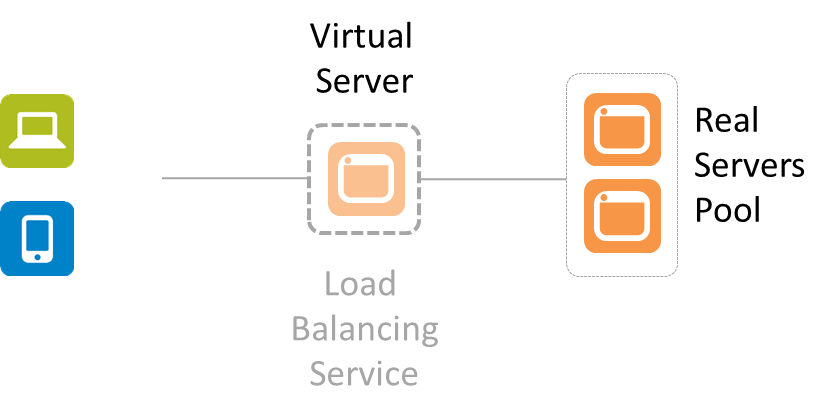
    Not by a long shot. You’ve provisioned a load balancing service, yes. But is it configured? Probably not. In addition to the basic networking needed (IP addresses, VLANs, etc…) there are also a whole bunch of very application specific things that must be configured. There’s no “golden” load balancing service that can be generically applied to your application. Period. At a minimum the virtual server (that represents your application to the rest of the world) needs two things: an IP address and a pool of app instances to select from.

    simplified-lb


    That means there’s some configuration that must occur after the provisioning. There’s no single LB image that will work for all applications, period. Even if all other settings are the same (LB algorithm, L7 app routing rules, TCP options, etc..) you still have to tell it which pool of real servers to select from and what IP address to use so clients can connect.

    This is true for pretty much all application services (infrastructure) that support an application deployment. Because there’s no single golden image that just “works” for everything and no way to use dynamic configuration options for everything (DHCP for IP addresses is one thing, but there’s no “dynamic load balancing algorithm selection” service out there yet) there remain a set of options that must be configured after provisioning occurs. Consider application security like a web app firewall (WAF). It has to be configured to protect a specific application. It has to learn the URIs and the data expected to be exchanged so it recognizes when some interaction is out of bounds and potentially dangerous. That’s unique to the application, and thus it requires some specific configuration after provisioning.

    It’s important to note this distinction lest we get caught up in believing that we can simply create a golden image of all our network infrastructure and services and put them into production with the touch of a button.

    This little reality also helps to understand why it doesn’t really matter whether the network service in question is launched on custom hardware or some server off the shelf. The bulk of the work when automating the deployment of network services is in the configuration, not the provisioning.

    While you can minimize the amount of post-provisioning configuration necessary, you can’t eliminate it entirely. That’s why API-enabled, programmable infrastructure is a critical piece of the larger DevOps picture. It is the API, programmable templates and similar capabilities that enable the configuration to be automated and orchestrated so as to not be the bottleneck in the deployment process.

  • Programmability in the Network: Stop a Bleeding Heart…

    Programmability in the Network: Stop a Bleeding Heart…

    heartbleedIt is not often the case that a security vulnerability can get the entire Internet talking. And not just the security community on the Internet, but everyone. End-users and IT alike are looking for answers and trying to mitigate Heartbleed. It has its own web site and logo. It’s that big of a deal.

    Many service providers have already patched their systems, but there are a whole lot of sites on the Internet and it’s estimated that a significant number of them are vulnerable.

    Netcraft notes that Heartbleed, based on OpenSSL, “affects around 17% of SSL web servers which use certificates issued by trusted certificate authorities.”  One of the most trusted sources of data regarding web server software in use today, Netcraft’s “most recent SSL Survey found that the heartbeat extension was enabled on 17.5% of SSL sites, accounting for around half a million certificates issued by trusted certificate authorities.”

    But it’s not just server software that may be vulnerable. Any device in the data path that terminates SSL and is based on OpenSSL could be vulnerable. Any “thing” that might use OpenSSL to enable secure communication and accepts connections could be vulnerable. In other words, hearts are bleeding all over the Internet right now, and it could take quite a while for the Internet in general to plug the holes.

    The hole itself is fairly simple – it takes advantage of the mishandling of what seems like an innocuous meta-protocol that runs atop TLS and DTLS that consists of two message types: HeartbeatRequest and HeartbeatResponse. It’s used to “ping” the other party in a secure connection to make sure the peer is alive. It can be used to offset idle times that might otherwise cause the connection to time out.

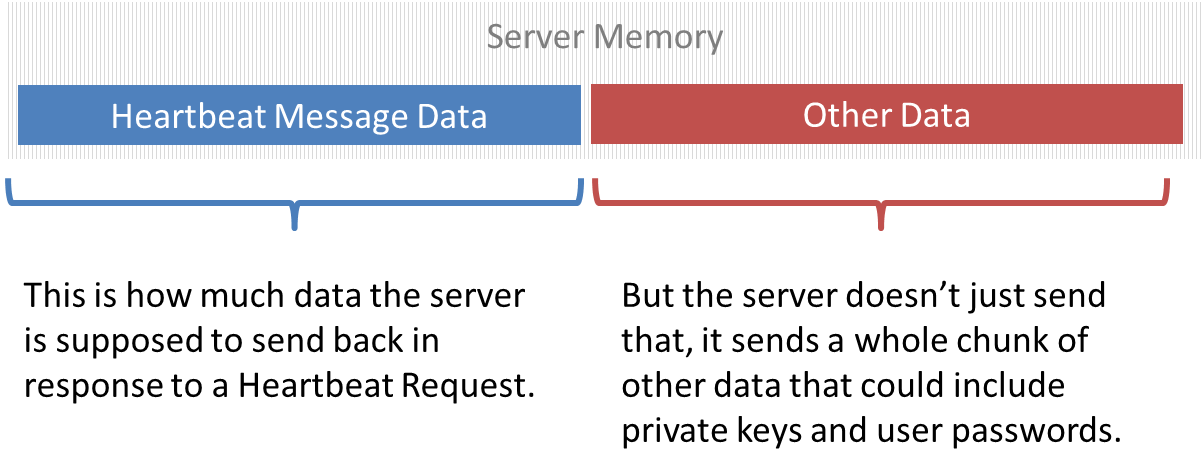
    It can also, thanks to a missing bounds check on the message structure, arbitrarily and completely silently grab 64 kilobytes of the server’s memory. That memory might include sensitive things like the private key used to encrypt communications or passwords or pieces of critical documents.

    heartbeat-memory

    Whatever might be in memory when the vulnerable software goes to grab it is leaving the building faster than Elvis – and without a trace. There’s no logs, no evidence of the theft, nothing. It’s clean and remotely executable by anyone on the Internet. That may explain the attention it’s currently getting.

    The answer to any vulnerability is ultimately to patch it. Depending on how many servers or systems are impacted, that could take some organizations days – assuming patches are available immediately. In the meantime, the heart is still bleeding and the only way to prevent more information from leaking is to shut off the hose.

    Except it’s not the only way.

    Programmability in the data path can mitigate this, now. Right now. Like in the next five minutes.

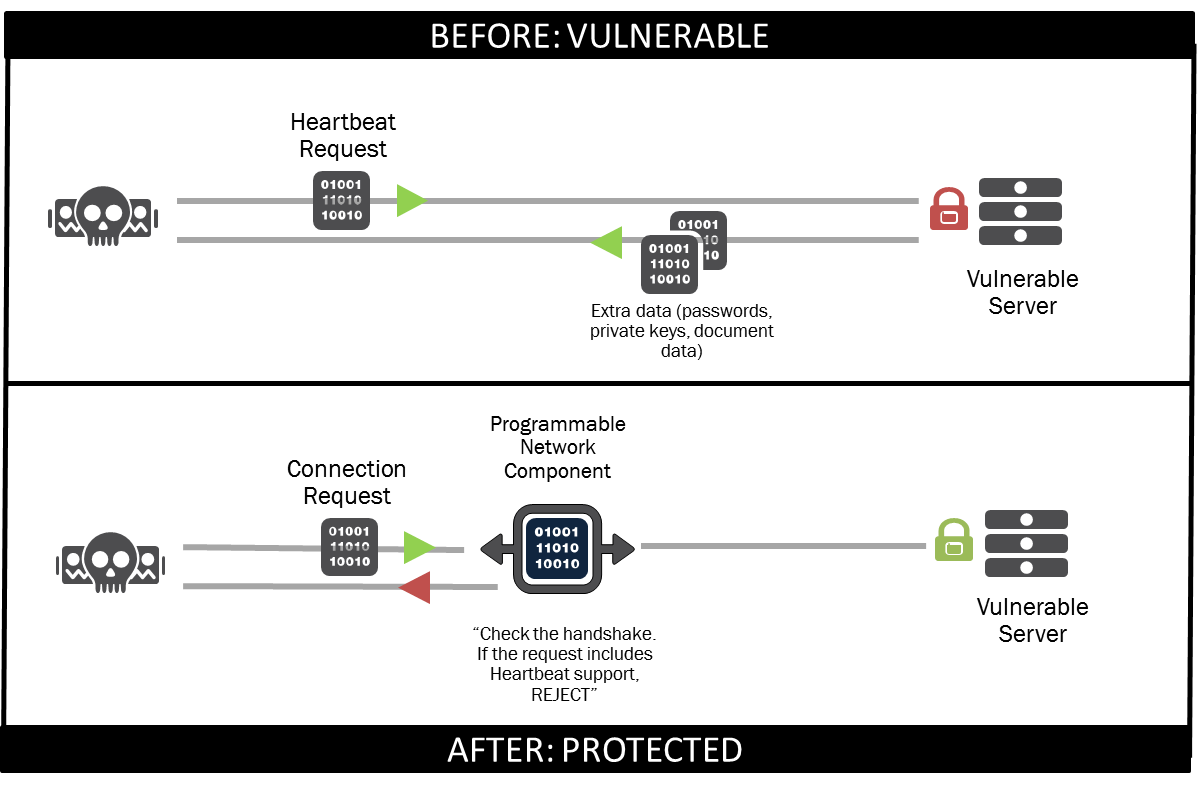
    Let’s review programmability in the network for a brief moment: you have, in the data path, a device. That device (or software) is capable of programmatically intercepting, inspecting, and transforming the data that’s traversing it. That means such a system can intercept a request to initiate SSL/TLS traffic, inspect it and, if it finds a request to include Heartbeat support it can reject the connection.

    before-after-heartbleed

    Interestingly, one of the primary motivators of early SDN architectures was the ability to support new or experimental protocols by inserting them into the data path in the network. While that’s a driver for academics, a more realistic driver for businesses is the ability to interact with protocols in flight and “fix” them – especially when the “fix” involves preventing the exploitation of a vulnerability.

    Programmability in the network enables this kind of rapid response to threats. Being able to deploy a solution very quickly to prevent further data leakage provides protection for both the organization and those who interact with its properties (employees, partners and customers). It also offers time for IT to patch and update all impacted systems without remaining vulnerable or taking the drastic step of going completely dark until the situation is resolved.

    By enabling a view of “infrastructure as code”, programmability not only enables a more software-oriented approach to deploying services, but also a software-oriented approach to quickly creating and deploying an appropriate response to emerging threats.

    A devops approach can facilitate this capability, and push protection into the network as code.


  • How to un-domesticate your network: DevOps!

    How to un-domesticate your network: DevOps!

    When I look at how compliance and regulations have affected network security over the years, I’m reminded of what dog breeder standards and regulations have done to dogs over the years. I’ll use this analogy to make the case that networks have become too domesticated to the point that they are not able to adapt and thrive when faced with their natural predators on the Internet. DevOps in my opinion is a way to undomesticate your network so that processes and technologies can deal with the threat in the most natural manner, striking the balance portrayed in complex ecosystems.

    cute2

    This entire thought process began when I was hanging out with my buddy Hugo. He is my one-year-old French Bulldog. We hang out a lot, and there are times when I think he telepathically helps me solve hard technical problems (but that is off topic). Anyway, if you know anything about French Bulldogs, you know they are mutants. They have been bred to the point where their breathing is compromised and they can overheat and die when it is too hot. They have common back and spinal diseases, and I can go on and on, but they essentially need humans at this point to keep them alive. I have to put a life vest on poor Hugo if we are near water because, while all dogs can swim, his head is so heavy that after a short while he will drown. Nonetheless, he is my sidekick in many ways, and we both lack vital characteristics of our ancestors who thrived in much more hostile environments.

    While I can go on and on talking about my buddy Hugo, the point I’m trying to make is that while standards like PCI help to raise the bar regarding online security measures, I have to stop and ask: security measures against whom? The level of innovation, change and adaptation that is taking place on the threat side of the equation is out pacing the rate at which security standards can be institutionalized and implemented. So your network may be cute and cuddly like my Hugo, and maybe even win a ribbon or two, but it would also not survive when faced with an advanced threat.

    When we trace the domesticated dog back tens of thousands of years, we arrive at the grey wolf. They traveled in packs, they faced threats on a daily basis, they thrived and adapted in a very hostile environment. DevOps takes us back to the time when the wolf finds its strength in the pack, and the pack finds it strength in the wolf when faced with conflict. Survival is very real and practical; there is no level of certification, checklists or deterministic process that must be followed. It is a delicate dance between attacker and defender, and like it or not, we are headed back in that direction.

    DevOps brings us the opportunity to constantly represent the changing threat in our everyday lives – such is the case with anything connected to the Internet. It is back to the wild, back to the days where a loss at the organism level meant evolution and resiliency at the species level. Our goals change from securing our networks to evolving our networks as this tempo of change raises the costs to the adversary. DevOps makes your network more expensive to attack!