Modern enterprise software architecture is growing increasingly complex. Organizations are jumping on the digital transformation bandwagon in growing numbers. They are striving to become more agile and continuously deliver new code, whether on-premises or to support cloud migration efforts. In the process, IT teams are amassing an ever-growing inventory of applications and databases, which generally includes a blend of custom code, open source and commercial applications.
“Spaghetti code” is what some call a tangled mess of a program—one that is difficult to follow, poorly documented and almost impossible for anyone but the original developer to troubleshoot or upgrade. Even today, when managers and developers take a more structured and disciplined approach to implementing code, the enterprise remains a patchwork of technology, a kind of spaghetti that can be difficult to understand and detangle.
Given these layers of complexities, it is imperative for organizations to be equipped with the right processes and tools to map out their IT assets. They need to understand how programs and databases interconnect and how a change in one can have implications across the network that imperil availability, performance or security and negatively impact employees and customers. Here are some best practices that enterprises looking for an easier digital transformation journey can follow.
Gleaning the Impact of Enterprise Software Changes
Implementing a software change or embracing a new application that has a puzzling code makeup has plenty of inherent challenges—not to mention potential long-term disruptions for multiple departments, functions and processes within an enterprise. Whether an organization is dealing with inherited applications from a merger or acquisition or simple system migrations, much depends on how it is coded. As a result, enterprises must familiarize themselves with the overall layout of the enterprise architecture, down to the code level. This comprehensive level of analysis aids organizations in identifying the full scope and impact of the desired changes or updates.
This is especially important for software teams who are operating on tight budgets and strict deadlines. Some important factors to consider in a comprehensive analysis include:
Identifying the impact of a change request on the software development project or on a business’s IT infrastructure.
Determining which software resources must be modified to implement the requested change.
Calculating the cost, time and effort needed to perform the change request.
Ensuring that the requested change complies with internal and external regulations.
Eliminating or minimizing any security risks associated with the change.
Decoding the Spaghetti With Automated Discovery and Code Mapping
A study by research firm Enterprise Management Associates (Next-Generation ITAM) found that the average IT organization uses 11 or more different inventory and discovery tools—some even more than 40. However, none deliver the full picture and they can often contradict each other. As a result, the average IT organization spends 15 hours every week manually resolving discrepancies among its various discovery tools. These hours translate to hefty costs.
Fortunately, new approaches to discovery blend static and dynamic analysis methods that can operate in real-time to decompose software dependencies down to the code level. These new tools provide significant improvements in discovery and mapping, eliminating the need for multiple, redundant tool use and wasteful manual deconflicting.
According to a recent Forrester survey, 56% of IT managers don’t have a complete view of dependencies between applications or between applications and infrastructure. However, today’s evolving business landscape dictates that technologies must evolve to keep up with an organization’s shifting needs. Software changes, when implemented strategically, can help businesses be more productive, efficient and profitable.
To ensure that software changes serve this purpose, IT project managers need to implement a solid software change assessment system. With the help of technology, checklists and processes, organizations can outline a path that yields efficiency. They can understand and decode that tangled mess of software called the modern enterprise tech stack.
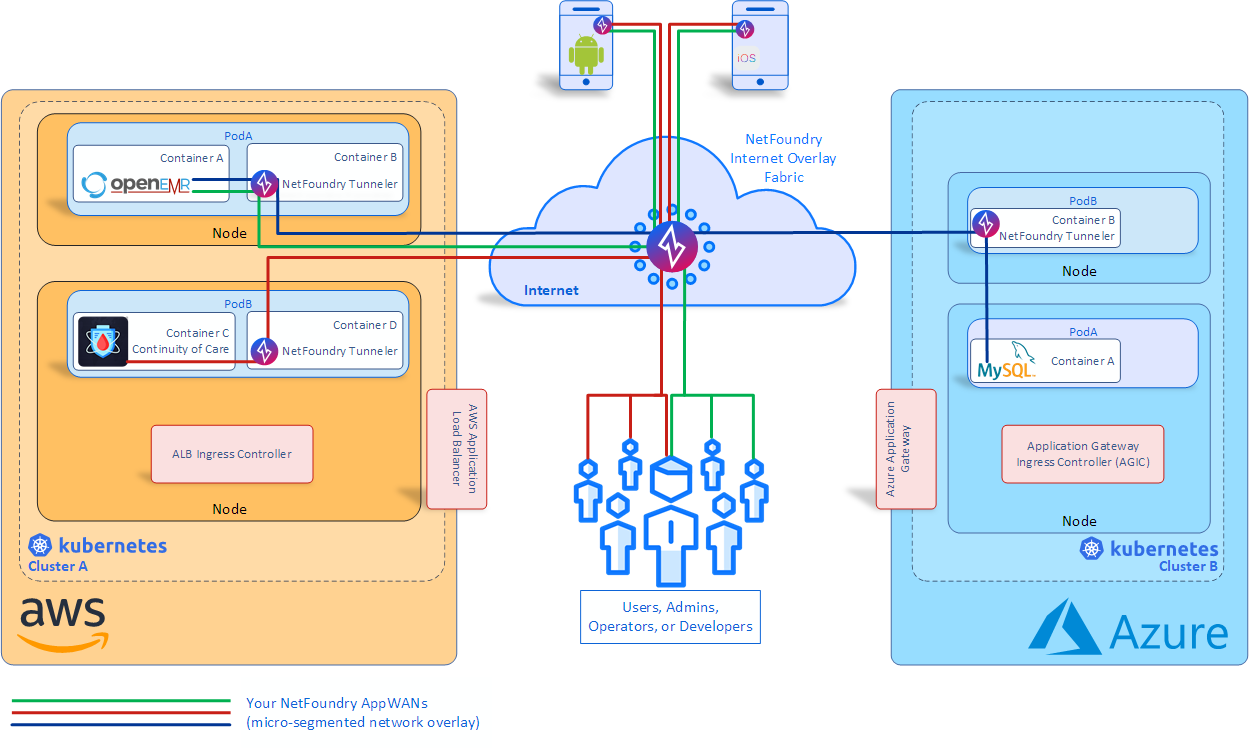
NetFoundry, at the recent KubeCon + CloudNativeCon 2019 conference, announced the general availability of a developer platform designed to make it easier for organizations to bake a zero trust networking framework within their applications.
Company CEO Galeal Zino said NetFoundry has created a network fabric overlay to manage and secure communications between endpoints and applications. Developers now can embed a programmable zero trust networking framework within their applications using a NetFoundry Developer Platform, which consists of software development kits, application programming interfaces (APIs) and connectors, said Zino. DevOps teams can either consume the entire NetFoundry Developer Platform or only the open source components that have been included.
At the same time, NetFoundry announced it has joined the Cloud Native Computing Foundation (CNCF) to advance the adoption of open source networking services for containerized applications.
Rather than having to become intimately familiar with networking protocols, Zino says NetFoundry provides a layer of abstraction using software to eliminate the need to rely on virtual private networks (VPNs) or network address translation (NAT) tools.
As the number of endpoints and applications they need to connect to have significantly increased, DevOps teams are finding they need to master each type of dedicated network established for endpoints ranging from mobile computing devices to internet of things (IoT). That endeavor can be cumbersome at best. NetFoundry is making the case for a programmable network overlay that allows endpoints to access applications over public internet connections securely.
As programmable overlays become more widely available, the rate at which network operations will be incorporated into best DevOps processes is likely to increase. Network managers will continue to set up the physical underlay that enables networking; however, how applications employ that underlay increasingly will be determined by invoking a programmable overlay. A programmable network overlay also provides the benefit of further separation of duties between DevOps teams and networking professionals in a way that doesn’t require networking teams to become deeply involved in every application development project.
That approach should reduce significantly the amount of time now required to deploy or update a distributed computing application. DevOps teams today may be able to push code into production faster than ever. However, configuring the networking services those applications require remains a set of manual tasks that have become a significant bottleneck to making IT teams more agile.
It remains to be seen to what degree programmable network overlays will provide something of a demilitarized zone (DMZ) between DevOps teams and networking professionals. Today most networking services are provided via either directly on top of networking infrastructure or using network overlays controlled by networking teams. But it still takes days to weeks for networking professionals to respond to requests for services from DevOps teams. It’s clear the way networking services are provisioned across the enterprise needs to change substantially.
At first glance, your IT infrastructure might seem like your house’s basement. It supports everything, but you don’t pay much attention to it or spend much time or energy trying to make it beautiful. Instead, you treat it as a generic component and lavish your attention on other parts of your IT landscape (or your house, as it were).
But the fact is that infrastructure is not so simple and generic. The way you design your infrastructure, as well as your ability to integrate it with the ever-changing set of tools that you need to keep workloads running efficiently, plays a critical role in defining overall business success.
To prove this point and encourage you to give your infrastructure some much-needed love, keep reading for an overview of why well-integrated infrastructure is so crucial, and why implementing an infrastructure that integrates seamlessly with the rest of your solution stack is an important best practice.
What Is Integrated Infrastructure?
By integrated infrastructure, we mean infrastructure that seamlessly connects with the entire ecosystem of tools you use to deploy and manage applications.
To put that into context, consider some examples of how infrastructure interfaces with tools:
Your CI/CD pipeline needs to be able to integrate effectively with the infrastructure that hosts CI servers, testing tools and build tools.
Release automation software must be able to deploy seamlessly to the infrastructure that will host live applications.
Monitoring and performance optimization tools need to work easily with whichever infrastructure hosts your workloads, since monitoring the underlying infrastructure is one critical component of application monitoring.
Security and access-control tools must be able to apply security policies and restrictions to host infrastructure to help keep applications secure.
The list could go on, but you get the idea: an integrated infrastructure is one that can easily interface with all of the tools you use to create, deploy, manage and secure the workloads you host on that infrastructure.
Agnostic Infrastructure Versus Integrated Infrastructure
You may be thinking, “It’s 2019, and most infrastructure is agnostic. My tools don’t care which cloud I use to host my workloads.”
You’d be right that most modern, cloud-native infrastructures are designed to be agnostic toward the tools that are used with it. Although there are certainly exceptions, the majority of infrastructure solutions available today—whether they are from a public cloud vendor, or local infrastructures built using standard operating systems and hypervisors—can be configured to work with pretty much any mainstream tool you throw at them.
But agnostic infrastructure is not the same as integrated infrastructure. An integrated infrastructure is one in which the connections between your tools and your infrastructure are not only possible to create, but happen seamlessly.
This difference is easiest to see if you compare public cloud vendors’ native tools with tools from third-party vendors that work with those clouds, but don’t always integrate seamlessly with them. For example, pretty much every modern APM tool can be configured to work with AWS. But setting them up takes time, and there is no guarantee they will always be compatible.
In contrast, there is CloudWatch, AWS’s native monitoring tool. It falls far short of being a complete APM solution, but it is seamlessly integrated with any AWS infrastructure. You don’t need to configure or install anything to use it, and it scales automatically with your AWS footprint.
Achieving Infrastructure Integration
My point here is not that you need to choose between a feature-limited native toolset and a third-party one that offers more features but does not integrate as well. Instead, you should strive to build an infrastructure and a toolset that offers the best of both worlds: rich features and tight integration.
The best way to do that is to take a toolset-first approach. By that, I mean identifying which tools you need and designing your infrastructure around them. That is preferable to the strategy that most organizations use by default, which is to choose an infrastructure (usually a cloud provider) and then figure out how to reconcile their toolset with it. Not only does this approach limit your choice and inflate your costs (because you may end up having to use native tools from your cloud vendor that are less cost-effective than third-party alternatives), but it also makes integration between your tools and your infrastructure more difficult.
Before you go and migrate all of your workloads to one public cloud or another, identify the various tools you depend on and evaluate how well each of them integrates with the clouds (or other infrastructure solutions) available to you. You may find that you should choose an infrastructure strategy built on multi-cloud or hybrid cloud to achieve better integration with your toolsets. This type of approach will make infrastructure architecture more complex, but it enables better infrastructure integration, which delivers more value in the long run.
Integrate for Today and the Future
Keep in mind, too, the tools you use today can, and probably will, change in the future. Thus, you want to ensure that your strategy enables tight infrastructure integration over the long term.
Here again, a multi-cloud or hybrid cloud strategy is probably the best approach for maximizing flexibility and integrability, although you’ll need to assess your specific needs by looking at your tools first, and then plan an infrastructure strategy that will accommodate them as they evolve and grow.
Conclusion
The bottom line is this: Although infrastructure might seem like a mundane and largely interchangeable part of your IT landscape, the extent to which it is well integrated with your tools can make or break the overall effectiveness of your IT strategy. Don’t choose infrastructure first and then shoehorn your tools to fit it. Instead, design your infrastructure architecture around the tools you need, and make sure it can continue to accommodate them as your strategy evolves.
This sponsored article was written on behalf of Eplexity.
Over the past 20 years, Salesforce has become the fastest growing enterprise software platform, and a market leader in sales, service, marketing, integration and custom application development among other areas. Although there are many reasons why a company might adopt or consider using Salesforce, the overriding value proposition is that it provides tons of capabilities out of the box, releases new capabilities at an ambitious pace and allows for virtually endless customization and innovation.
Unlike with traditional platforms, there’s no need to manage infrastructure for computing, data, network or security, and no need to invest in generic system administration that adds no value for the organization. Add to this the accessible and supportive community and learning culture based around Salesforce’s Trailhead, which enables rapid onboarding and skill development, and it’s easy to see the attraction of this platform.
Salesforce’s mantra throughout the 2000’s was “Clicks not Code,” and their logo was the “No Software” image which became embodied as SaaSy, Salesforce’s first mascot. You could be a declarative developer using clicks alone and build a data model, business process automation and user interface using drag-and-drop interfaces. This opened the door to an entire new job specialization: Salesforce admins and app builders—citizen developers who were empowered to directly customize the platform to meet their company’s needs.
As Salesforce grew, they recognized the need to enable custom coding on their platform and launched Apex Triggers, followed by Apex Classes and Visualforce in 2008. Admins continued to configure rich business capabilities, while low-code developers and professional developers were empowered to create customizations beyond the scope of what could be built declaratively. Initially, the code developed on Salesforce was rudimentary: a few hundred lines here and there to accommodate unusual calculations and data processing. But gradually, companies began to accumulate tens of thousands of lines of custom code, especially as legacy applications were migrated from other systems. Needless to say, the “No Software” motto no longer strictly applies.
In the decade since the launch of Apex, 150,000 companies have adopted Salesforce and moved a staggering number of legacy systems onto Salesforce—which now processes billions of transactions per day. Many of these transactions are part of the core CRM and customer service applications, but a huge number relate to custom applications, making Salesforce one of the largest Platform as a Service (PaaS) providers.
How is DevOps Different for Salesforce?
As mentioned before, Salesforce provides both SaaS (Software as a Service) and a PaaS (Platform as a Service). By contrast, much of the focus elsewhere in the DevOps world is in moving from on-premise infrastructure to using IaaS (Infrastructure as a Service). This diagram shows an illustration of the differences between these four modes, and how they represent progressive simplifications of what companies themselves have to manage.
Figure 1: On-premise systems require you to manage all of the resources yourself. IaaS, PaaS and SaaS delegate progressively.
Managing the Salesforce development lifecycle requires a unique skill set and approach compared to most other platforms. You can say the DevOps movement was jointly realized by both developers (working in traditional languages such as Java) and system admins or operators (working on traditional infrastructure such as servers and databases). There are thus a vast range of well-established tools and techniques in the DevOps world for developing and deploying code, and for managing and updating infrastructure. Unfortunately, almost none of them can directly be used for Salesforce.
To illustrate this, let’s look at how teams would manage infrastructure using AWS, or deploy an application onto Heroku (a PaaS product also owned by Salesforce). Every aspect of AWS infrastructure can be represented using JSON configuration. JSON can be used to define which AWS services are used, which data centers they are running in and how they’re configured. The AWS CLI (command-line interface) can be used in a continuous integration tool such as GitLab CI to automatically deploy updates to AWS infrastructure every time the JSON configuration changes.
Similarly, Heroku provides a platform to deploy custom application code (in Java, PHP, Ruby, etc.) and to specify which services (such as Postgres databases) are needed to support that application. The Heroku CLI can be used to automatically update the application whenever the codebase changes. Heroku also provides a tool called Pipelines that allows you to visualize and manage the entire development lifecycle without requiring a third party CI tool.
AWS’s infrastructure as code approach is a delight for sysadmins, since it allows them to track changes and automate updates. Similarly, Heroku removes the vast majority of the setup and dependencies that developers would need to deploy their applications. Heroku provides a true PaaS that is ready to receive custom-coded applications built in a traditional way: from the ground up.
Although we can say Salesforce’s Lightning Platform is a PaaS, it actually works extremely different from true PaaS systems such as Heroku. The Lightning Platform allows you to write custom server-side or client-side code, but that code can only run on Salesforce. Although it allows you to define custom database tables and fields, that schema cannot be loaded into any database other than Salesforce’s. These customizations are effectively just changes to the configuration of one Salesforce instance. It’s therefore more accurate to say every customization you can make to Salesforce is basically a Salesforce configuration change.
Salesforce is actually just a big application that happens to allow for infinite customization. But this means the tools used for managing other IaaS and PaaS products cannot be used to customize Salesforce. Fortunately however, the release of Salesforce DX means the techniques and principles used with other technologies can now be ported over to Salesforce. That is the focus of the book Mastering Salesforce DevOps that I’ve recently released.
DevOps in the Salesforce World
Moving from on-premises CRM software to Salesforce removes the need for servers and manual software upgrades. Consolidating customer support and online community management onto the CRM platform removes the need to integrate sales, support and community applications. Migrating legacy applications onto the Salesforce platform allows those applications to share data and processes with the rest of the business.
Because moving to the cloud dramatically simplifies many of the challenges in delivering IT functionality, many Salesforce customers have been able to innovate quickly without having DevOps practices in place. But even without the hassle of managing servers and building software from scratch, the inevitable growth of complexity eventually causes companies to struggle with issues such as organizations getting out of sync and delays in deploying functionality.
Salesforce solves so many IT headaches, it’s almost easy to overlook the fact that it’s created some new ones.
Salesforce has unleashed the ability for companies to focus on their core competencies, instead of struggling to provide basic IT services. Salesforce admins and developers are empowered to spend their time directly creating business value. But with multiple Salesforce admins and developers working at companies year after year, more and more Salesforce customers are finding themselves drowning in all of that business value.
If you have tens of thousands of components, each providing business value, but no systematic way of tracking, managing or deploying them, you now have a new form of business pain and chaos. Far too much of a good thing.
What is Salesforce DX?
Salesforce DX (Development eXperience) is an initiative begun by Salesforce in 2016 and launched publicly at Dreamforce 2017. The goal of the initiative is to re-envision the development experience on Salesforce with a focus on how to empower their development community with the tools and processes needed to develop safely and effectively.
Salesforce DX is a very broad initiative, including several main teams at Salesforce focused on environment management, custom coding, developer tooling, APIs and more. Although the Salesforce DX teams tackle very diverse needs, their main focus (at least initially) is to improve the developer tooling and development lifecycle.
The tools and capabilities included in Salesforce DX are made available for free to all Salesforce customers. In that sense, Salesforce DX is an important complement to Trailhead, Salesforce’s free, self-paced, gamified, interactive learning platform. Trailhead is also a major investment for the corporation. Together these are intended to support the growth of skilled Salesforce professionals and to make it easier for those workers to build and innovate on the platform. These multi-year strategic initiatives help ensure that talent shortages and worker inefficiency will not be the limiting factor on the company’s aggressive 30% annual growth.
Summary
Salesforce is an extremely powerful and versatile platform. But it’s unique in many ways and it hasn’t been easy for professional developers to adapt their tools and techniques to working on this platform.
Salesforce DX is a major strategic initiative to ensure that industry best practices such as DevOps and modular architecture are possible on the platform. But making something possible doesn’t mean the process is straightforward. It’s still early days for most teams working to enable DevOps for Salesforce. Fortunately, there is an enormous amount of research and experience that can be borrowed from the broader IT industry. Combining a flexible, powerful platform like Salesforce with the speed and reliability of DevOps processes can open up entirely new levels of efficiency and effectiveness for teams.
ServiceNow today announced it is extending the reach of its IT operations management platform to integrate with a variety of DevOps platforms.
Richard Hawes, director of product marketing for ServiceNow, said ServiceNow DevOps will provide IT operations teams relying on an ITIL-based framework accessed as a software-as-a-service (SaaS) application visibility into DevOps processes and events occurring in on-premises environments or public clouds.
At present, ServiceNow DevOps is available for financial services organizations based in the Northeast region of the United States and the UK. The service gradually will be rolled out to additional ServiceNow customers over the course of 2020. ServiceNow DevOps initially integrates with Jira Software, GitHub, BitBucket and Jenkins, with more integrations expected to be rolled out periodically.
Hawes said ServiceNow recognizes that IT organizations are building and deploying applications at rates that are faster than existing ITIL-based approaches can track. However, ITIL-based frameworks provide the highly structured set of processes around which the bulk of IT environments are managed. ServiceNow DevOps enables IT teams to automate change management tasks such as planning, development, testing, deployment and operations via a single dashboard surfacing a common set of metrics, he said. He added in many cases, those preset rules and policies will eliminate manual processes that often conspire to slow the rate at which applications can be deployed and updated within any IT environment, said Hawes.
No developers need to be involved in those processes because IT operations teams can set rules and policies, and developers will see their code running in production environments in a matter of minutes regardless of what tools they employ, said Hawes. That approach also will make it easier to scale DevOps across an enterprise IT organization at a time when adoption of DevOps is still uneven at best, he noted.
At the same time, that level of integration should also make it easier for IT teams to audit DevOps processes using a common framework to capture events such as when code is checked into a DevOps platform, he said. That capability is a critical requirement for any company trying to apply best DevOps processes with the context of a highly regulated industry such as financial services.
Hawes said the majority of organizations that have adopted ServiceNow to manage IT have also adopted a DevOps platform. Overall, Forrester Research reports 56% of global infrastructure decision-makers now report that their organizations are implementing, have implemented or are actively expanding their DevOps initiatives. ServiceNow doesn’t expect DevOps processes to supplant ITIL-based frameworks as much as it anticipates both approaches co-existing as they continue to evolve, he said.
With the release of the latest version of the ITIL framework, it’s apparent that the proponents of ITIL have come to recognize that IT needs to become more agile to meet the needs of digital business. The challenge they face is finding ways to enable IT teams to become more agile without sacrificing the gains in stability achieved over the course of the last two decades. With the launch of ServiceNow DevOps, the effort to find a middle ground between those two extremes can now begin in earnest.
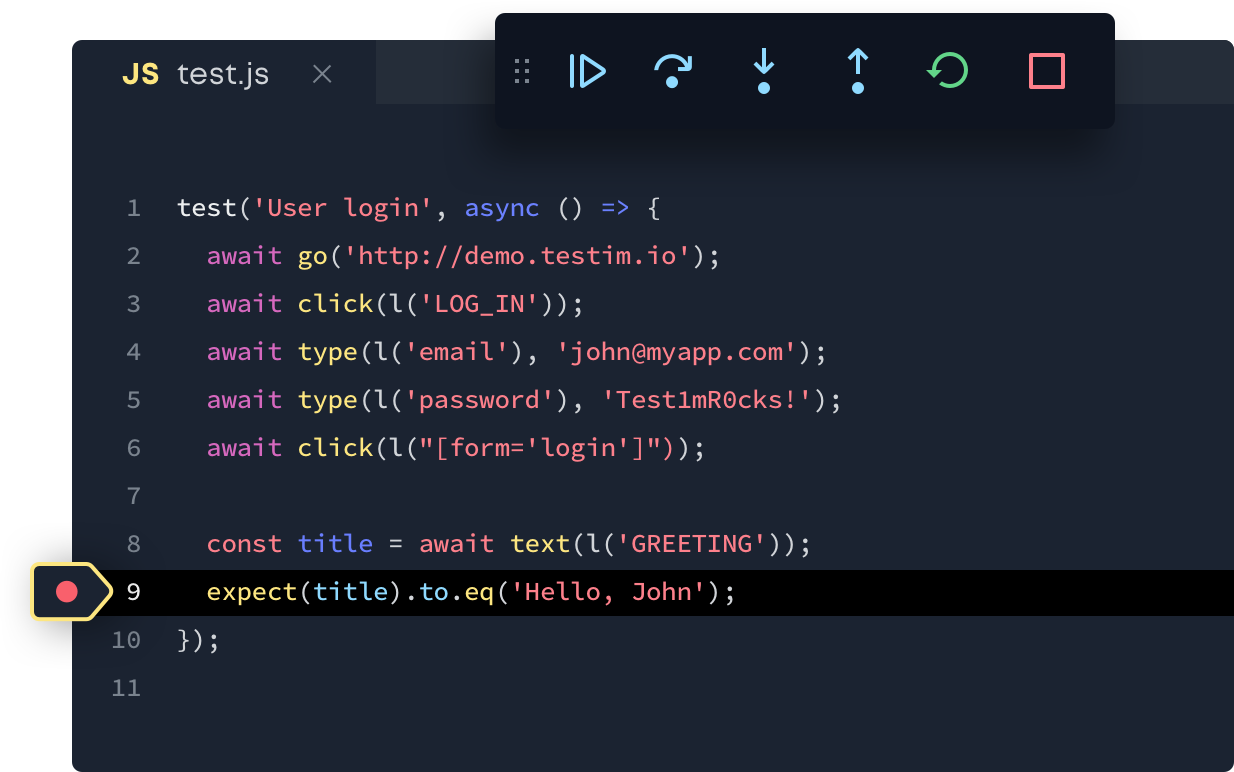
Testim this week launched a beta release of a software development kit (SDK) consisting for a set of JavaScript application programming interfaces (APIs) that will enable DevOps teams to build tests that leverage machine learning algorithms from within their integrated development environment (IDE).
Company CEO Oren Rubin said the Testim Development Kit makes it possible to call capabilities such as the ability to record user interface interactions via an application programming interface (API).
The Testim approach to applying artificial intelligence (AI) testing differs from rivals in that Testim allows DevOps teams to fully inspect how algorithms construct a test, he noted. DevOps teams can also customize those algorithms to fit their own requirements, which is critical when it comes time for DevOps to explain how tests were conducted as part of a compliance audit.
Testim will continue to provide access to its platform via a graphical user interface, but with the edition of the SDK, Rubin said his company expects to see an increase in the number of DevOps teams that will incorporate Testim within the context of continuous development/continuous deployment (CI/CD). Once that occurs, the number of tests those teams will be willing to run against software before it’s deployed in a production environment should also increase, especially as more developers leverage APIs to create their own tests, Rubin said. That doesn’t eliminate the need for another set of eyes to test an application, but it should reduce the number of common errors made before any piece of code is tested by someone else on the DevOps team.
One of the most time-consuming elements of any DevOps process is the time it takes to create tests for each application. The Testim platform employs machine learning algorithms to discover the entire application environment and then begin creating appropriate tests. As DevOps teams modify those tests, the Testim platform continues to learn how to build tests the way the DevOps team prefers.
The Testim platform doesn’t eliminate the need for testing expertise on the DevOps team, but it does enable organizations to scale their testing processes by augmenting whatever testing expertise they have on hand to reduce bottlenecks and improve overall software quality. Those algorithms also provide the added benefit of never taking a day off or quitting to take a more lucrative position elsewhere.
When it comes to AI, there is naturally a lot of fear and loathing. On the one hand, IT professionals become concerned AI will replace them. On the other hand, they are often disappointed when machine learning algorithms don’t instantly automate a process to their satisfaction. It takes a significant amount of time for algorithms to learn how any IT environment operates, with each update to that environment requiring those algorithms to discover new functions. At this juncture, it’s not a question of whether AI will play a role in DevOps processes, but rather to what degree. Given the repetitive nature of testing, Testim is betting application testing will prove to be an area that lends itself to AI sooner than later.
Embedded analytics are a powerful tool for adding value and stickiness to your desktop and mobile apps. Many app developers are providing these features as standard in their tools. But should independent software vendors (ISVs), systems integrators (SIs) or companies building internal apps build analytics tools in-house, or should they buy them from specialist providers?
There are many considerations to the buy or build dilemma. One reason many developers want to build in-house is the limitation of support services from embedded analytics vendors. Although most providers offer support services, these are not normally included in the price of the package, and are offered at an additional cost. However, in the majority of cases, such support services are in fact effectively a requirement to ensure the visualization is tailored to the use case and look and feel of the app.
A second consideration is cost. Standard price entry points for embedded analytics can start at $30K to $75K per year. However, behind the upfront pricing structure, there are often multiple levels of service, as well as limits on usage and number of applications the embedded analytics can be used in. This can make pricing far less predictable.
Creating analytics features in-house may be the best option when working on smaller projects with limited sets of requirements—especially if your development team has a relevant skill set and previous experience developing embedded analytics and data visualizations.
Lastly, one of the most convincing arguments for building in-house is that product managers remain fully in control over every aspect of their application, not just its functionality but the look and feel as well. By keeping all aspects of development in-house, product teams can control branding, user experience and functionality. The loss of this control is one of the main disadvantages of buying.
On the other hand, there are many benefits to buying rather than building. The main disadvantage of building in-house is that developers have to switch their focus away from working on the core product to create complex embedded analytics features. Buying saves time and money over training a development team that may lack previous embedded analytics experience and eliminates the need for training where internal resources are simply not available.
There is also a significant cost associated with building embedded analytics, which on average takes seven months to complete. The estimated average in-house cost can run as high as $350k (based on average U.S. salaries). This includes: four software developers for seven months, one QA professional for seven months, two UX/UI designers for six months and one data scientist for one month.
Your in-house team is generally responsible for supporting anything built in-house. With the buy option, support is provided by the third party via the cloud and ISVs will not have to allocate resources to fixing issues if and when they occur. As much as 90% of the cost of software during its lifetime is tied to keeping it up and running. Maintenance costs can be significant.
The time it takes to bring a product to market is another consideration. With average build-it-yourself times taking seven months or more, many product teams decide to buy a bolt-on analytics solution due to the need to release a product as quickly as possible. In a fiercely competitive SaaS market, and with CEOs demanding quick turnaround, buying a pre-built, off-the-shelf solution drastically reduces your time to market.
Making a final decision on whether to buy or build is a complex task. But in the end, ask yourself:
Can my team develop powerful analytics in-house or do I need a specialist? Building analytics tools can be a drain on time and internal resources, and the backend powering even a simple dashboard can be slow and expensive to build from scratch. Plus, you need the resources to maintain it.
How does the vendor’s pricing model stack up against my budget? You shouldn’t really be paying any more than what it would cost you to simply build the visualization in-house, so an affordable vendor is essential. However, too often, overly complex pricing structures from vendors result in unpredictable costs, making ROI hard to judge.
Has the company received awards for its work? Are they well established and respected in the community? Third-party review sites are helpful here.
How much do you trust the vendor? If you are collecting sensitive data, you want to be sure that the vendor isn’t also collecting that information covertly and selling it.
As more organizations realize just how important understanding their data is, embedded analytics have become the key to harnessing that power. Whether you decide to allocate internal resources or hire a vendor, including powerful embedded analytics and visualizations is virtually a must since it helps you differentiate your app and keep users engaged.
As a startup, an organization thrives by breaking rules, challenging the status quo and standing for all that is against the norm. The same rules don’t apply once the same organization grows, matures, becomes popular, gains a long list of clients and expands to a global footprint. With scale and growth comes the need for reliability, consistency, being able to deliver the same level of service to all customers and keeping promises made to customers. At this stage, application patterns become indispensable to an organization’s day-to-day functioning.
Support of the Application Now and Long-Term
Mid- to large-size organizations typically deal with numerous internal-only applications and external vendor applications. These applications are changed and updated regularly. To support the applications’ needs, and effectively manage them, organizations need a change management system in place.
A service such as AWS Config helps to audit AWS services that power applications so there’s increased visibility. It tracks changes made by users and applications, and presents a clear picture of how these changes impact AWS resources.
Enabling Shift-Left Without Additional Overhead
DevOps bring together Dev, QA and Ops into smaller, cross-functional teams. The goal is to break down silos between teams, facilitate collaboration and drive better results faster. Accordingly, shift-left is a tactic used to encourage QA and Ops teams to play a more pivotal role in the initial Dev stages of the pipeline.
The benefits are many. QA brings their experience of testing the application to its limits and informs about what’s feasible to implement. Ops chimes in with concerns and things to watch for once deployed. While shift-left is great from a team standpoint, it can meet with hurdles and can fail if communication patterns are random, and ownership of each step is not clearly defined.
Application patterns encourage systematizing this collaboration between teams. Patterns help to define the type of infrastructure to be used, their configuration and the kind of tools that fit in with the team’s requirements. Application patterns guide decisions and help to make the right choices, and sometimes compromises, at every step.
Supporting the Advancements in Open-Source Without Fear of Tool Attrition
There is an explosion of open source tools today. If DevOps teams are attracted to the next shiny new open source tool, they’ll soon find themselves overwhelmed with tools they don’t use and that slow them down.
Open source tools evolve quickly, and their popularity rises and falls with the times. One look at the open source monitoring space will show you that older tools such as Nagios and Zabbix are now becoming less relevant, and modern container-aware monitoring tools such as Prometheus are taking their place.
AWS supports the use of the top open source tools; for example, Elasticsearch. The AWS Elasticsearch service integrates seamlessly with Kibana for visualization and delivers the ELK stack without the maintenance.
Application patterns enable you to define a strategy for tool adoption. You may find the best open source tool in the world, but what’s the point if you can’t use it in your toolchain, or if it slows down the pace of operations? The popular DevOps mantra of people, processes and then tools holds true here.
Value Stream Management
Value stream mapping is about visualizing the flow of value from an organization to its customers. In simple words, it’s about taking stock of what you have to offer to customers and monitoring how your offerings change over time.
Value flows outward to customers, as well as internally between employees and systems. For example, in the context of DevOps, it helps to map the value of Ops to Dev and QA. As these teams are each other’s internal customers, knowing what the value stream is can help remove bottlenecks and drive greater efficiency.
Building a Team and Culture First
AWS is a great place to build team culture as it is expansive and includes services for pretty much anything you’ll ever need. You can find tools such as CodePipeline to quicken development pipelines, to make sure everyone on the team is informed of important changes using CloudWatch and SNS queues, and to automate common tasks with Lambda.
Rather than jumping feet first into AWS and then figuring out how it all works, it pays to first define application patterns and team culture that will govern the way you use AWS. Patterns and culture are closely related. If culture is about the people, application patterns are about the infrastructure and technology stack being used by people.
Conclusion
Whether you’re yet to move to AWS or are already on board but not getting the most out of it, application patterns help evolve the way you manage applications in AWS. Application patterns help scale applications over the long term, they enable shift-left for DevOps teams without the friction of overhead. Application patterns make it possible to adopt the right open source tools and find success with them. By using application patterns you can visualize the entire process and drive great efficiency, and finally, they support great team culture within DevOps teams.
DevOps teams that run their operations predominantly on AWS need not fly blind. Application patterns bring greater visibility, control, collaboration and ultimately value.
This sponsored article was written on behalf of Eplexity.
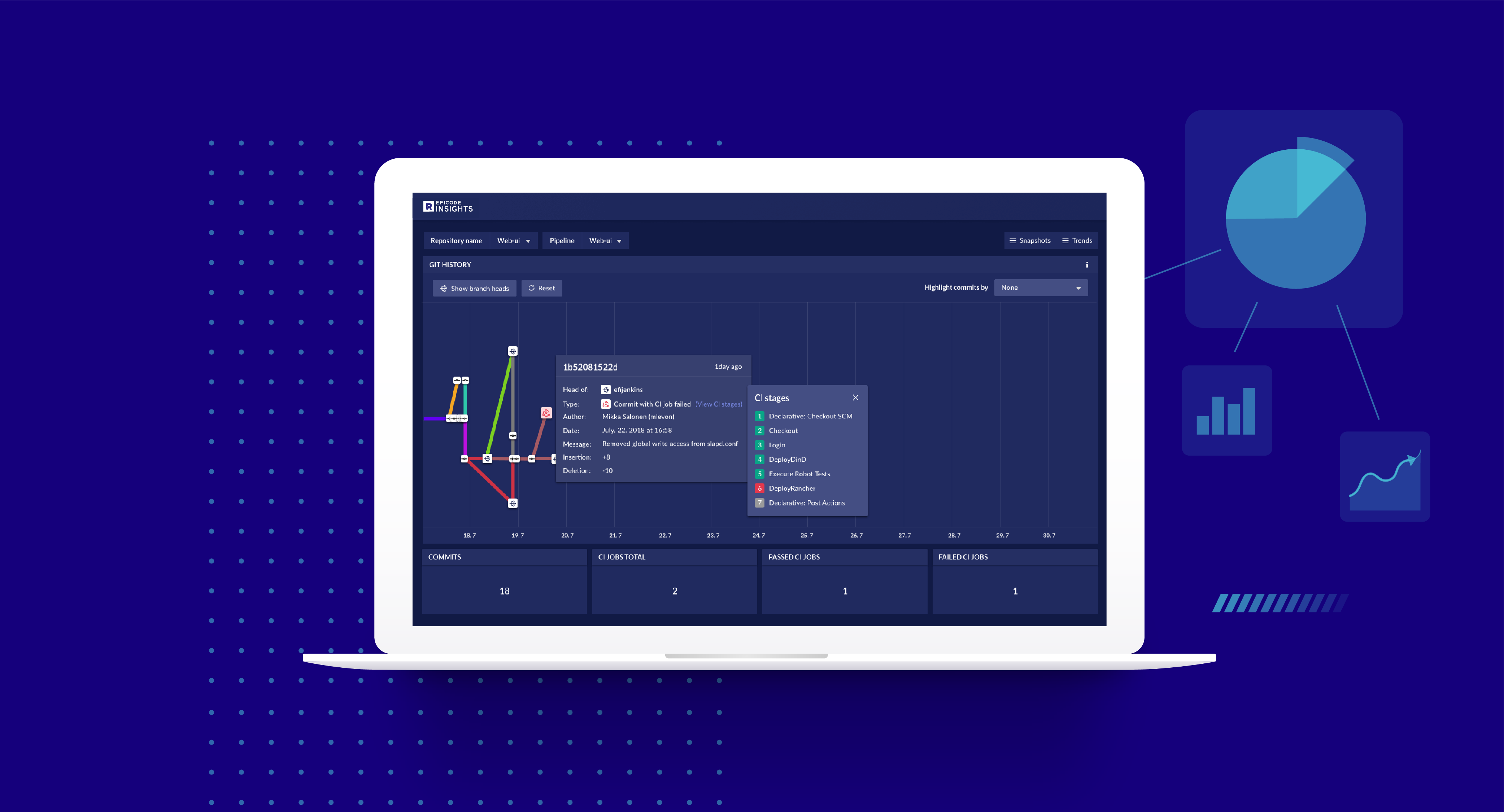
Eficode has added an analytics module to a DevOps platform it makes available as a managed service.
Tuomas Keränen, product manager for Eficode ROOT, said Eficode ROOT Insights provides different types of end users with access to an analytics module designed to make it easier to understand how changes to a software development project will impact delivery timetables. To make that capability more accessible throughout the organization, Eficode has created dashboards for specific types of end users such as project managers.
Eficode has crafted a DevOps platform from various tools and platforms to create a toolchain based on best practices it has defined that the company then manages on behalf of end customers. Organizations can choose to have that DevOps platform hosted on-premises or in a public cloud. That approach frees organizations to devote more time and resources to building applications versus managing the DevOps platforms, said Keränen. Eficode ROOT Insights is provided as a complement software-as-a-service (SaaS) application.
As DevOps continues to evolve, it’s apparent that an alternative approach that relies on external IT service providers to manage the underlying platforms is gaining traction. Many IT organizations simply don’t have the expertise required to build and maintain a DevOps platform. The trade-off is that the best practices are defined by the external service provider, which means the IT organization needs to bend its culture to align with those best practices.
Another factor that potentially will push organizations toward managed DevOps services is analytics. As the amount of data that needs to be collected to drive analytics applications steadily increases, it becomes apparent that DevOps analytics applications are going to be invoked more easily as SaaS applications. Once an IT organization moves down that path, it’s not too long before the case is made for using the analytics platform to also host the DevOps platform. In addition, as machine learning algorithms and other forms of artificial intelligence (AI) are applied to DevOps, the volume of data required to drive an AI model may require an organization to rely more on external service providers to provide that expertise.
It’s not at all clear how many organizations may prefer a managed service approach to DevOps. Many of the earlier adopters of DevOps have built custom workflows that are designed specifically to optimize their software development life cycle. However, the adoption of DevOps has been uneven at best. As managed DevOps services proliferate, the number of organizations that can effectively embrace DevOps should increase significantly.
Of course, managing the tension between internal and external IT service providers is nothing new. However, given the complexity of DevOps processes, relying on a managed service requires a level of collaboration that is not easy to achieve. Just as importantly, once an organization decides to partner with a provider of a managed DevOps service, unraveling that relationship later may prove to be all but impossible.
Tekton is an open source, cloud-native CI/CD pipelines engine. The project has its roots in the Knative project, where about a year ago it started under the name “Knative Pipeline,” with the aim of providing an extension to build Knative’s own “source to image” service. About eight months ago the project was reborn as Tekton and it moved out of the Knative space to its own GitHub organization and it joined the newly formed CD Foundation with a new mission: becoming the common denominator for CI/CD in the cloud-native space. But how is Tekton going to achieve its new aspirations?
For it to be successful, we wanted Tekton to be intuitive, reliable and easy to operate and maintain. This was discussed in the Tekton working group, and we thought it would be useful if we started using Tekton ourselves as part of our day-to-day jobs, using it to provide CI/CD services to the community.
Diving into Tekton
Tekton pipeline aims to provide a set of components used to create a full-fledged cloud-native CI/CD system on top of Kubernetes.
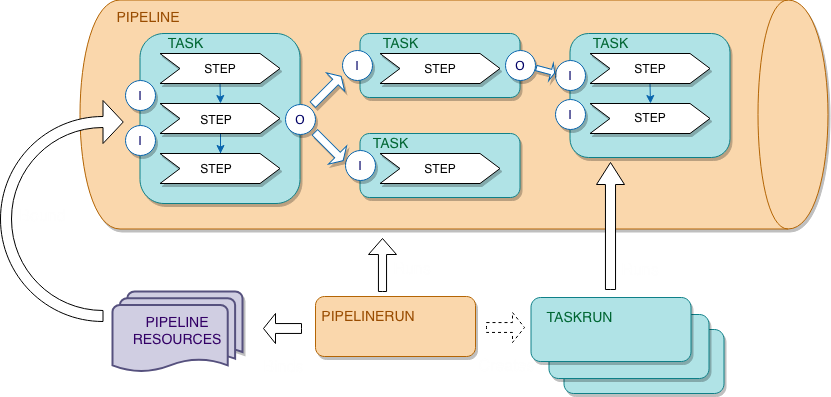
The core project of Tekton (tektoncd/pipeline) defines a set of Kubernetes custom resources (CRD) as standard constructs for creating CI/CD pipelines. The following is a brief introduction to these CRDs:
Task: A sequence of commands (steps) that are run in separate containers in a pod.
Pipeline: A collection of tasks executed in a defined order.
PipelineResource: Inputs (e.g. git repo) and outputs (e.g. image registry) to a pipeline.
TaskRun: Runtime representation of an execution of a task.
PipelineRun: Runtime representation of an execution of a pipeline.
Those pipeline building blocks can be reused, version controlled and curated in a catalog (tektoncd/catalog) that embeds best practices.
In addition, the Tekton community works on providing more components:
Tekton Triggers (tektoncd/triggers) to be able to act upon events (for example: GitHub webhooks, CloudEvents and more).
Tekton CLI (tektoncd/cli), which provides a command-line interface focused on the Tekton APIs and features (like getting the logs of your run, starting pipelines and more).
Tekton Dashboard (tektoncd/dashboard) which provides a simple dashboard (à-la-kube-dashboard) to view pipelines and logs from your browser.
Re-Plumbing Test Infrastructure
We designed Tekton to be intuitive, reliable and easy to operate and maintain. We started using Tekton ourselves as part of our day-to-day job, using it to provide CI/CD services to the community. But we didn’t start from a blank canvas.
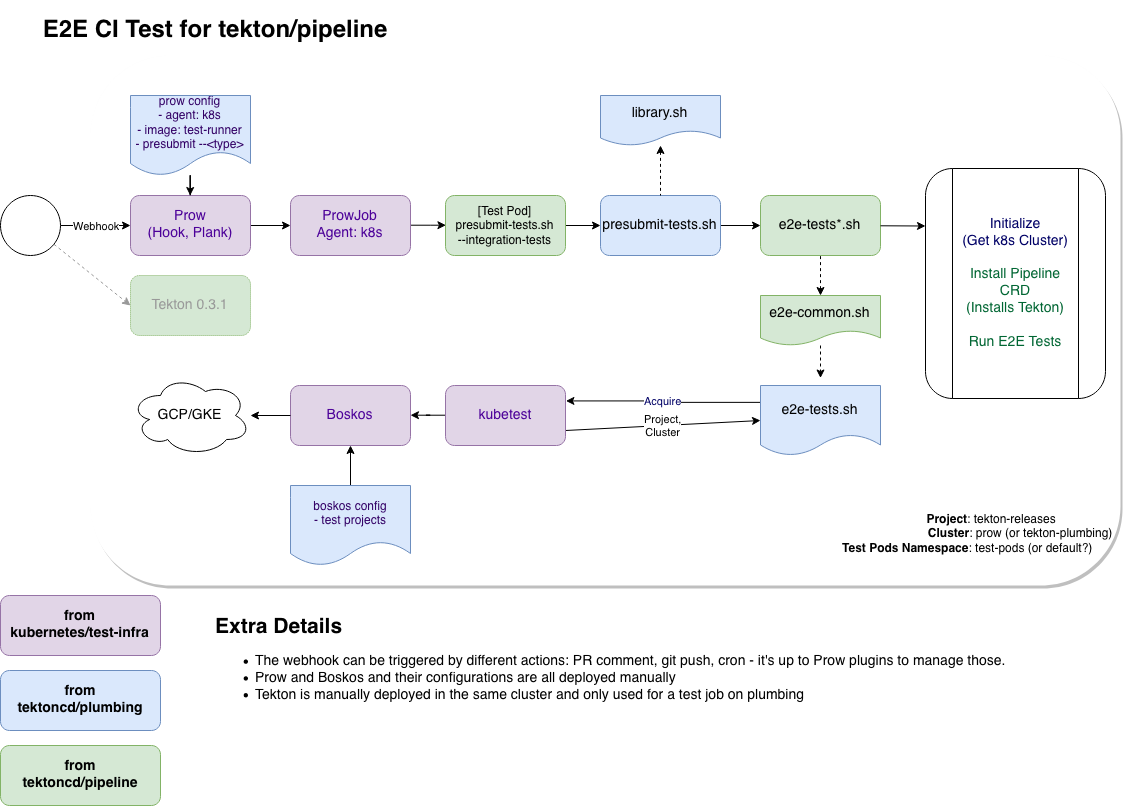
Tekton inherited a few features from the Knative ecosystem, including the CI setup. This was great as it allowed the project to relatively easily kick-start its CI using tools shared with several other projects in the Kubernetes ecosystem (including Kubernetes itself)–a combination of Prow, Tide, Boskos, a few tools from k8s.io/test-infra and several bash scripts contribute to tasks such as running E2E integration test.
Deployment of the various CI services is manual and the same is true about their configuration. Releases are crafted mostly manually. Since Tekton is made of several projects, we set up tektoncd/plumbing repository to host the shared CI/CD infrastructure: prow configuration, shared test scripts and tools, test docker images. Mario adventure started!
Mario’s Adventures
We started to work on what we are calling the Dogfooding project, which is basically using Tekton to build Tekton. And like a ball of wool and a cat, the more we thought about it, the more questions we had. How is Tekton going to integrate with the existing prow-based CI infrastructure? How are we going to test changes to the plumbing repo in isolation? How are we going to deploy the instance of Tekton used to run Tekton CI pipelines? How are we going to do all that with no disruption to our CI service?
Testing code continuously is essential infrastructure, even more so for cloud-native software, and re-plumbing all at once could leave us without running water. We decided to proceed with baby steps, reducing the area of impact as much as possible and starting our journey tackling the release automation work first.
Here is an excerpt of the work we did on this journey:
Run our releases using Tekton. That was the initial work, using Tekton to at least release itself, even if it gets triggered manually.
Integrating Tekton and Prow. Prow is able to create Tekton resources since April of this year (#11888 if you are curious), although it took a few iterations to be able to use it on our own CI.
Looking at solutions without using Prow at all. This one was (and still is) the trickiest:
We needed something that is able to react based on events (from GitHub), this is where the tektoncd/triggers project comes into place.
Prow comes with a UI and tooling to capture and store logs. This piece is missing from the Tetkon project as of today. We do have the tektoncd/dashboard project but it’s early days, there is no support for authentication yet.
Mario’s Adventures at KubeCon
Mario’s adventures will continue at KubeCon in San Diego. If you’re attending the conference and you’re curious to know more, come and listen to our talk, or watch it on the CNCF youtube channel after the conference.
This article was co-authored by Andrea Frittoli is a developer advocate at IBM and an open source enthusiast. He is a contributor to the Tekton project and he has contributed to OpenStack for several years. He’s a strong advocate for transparency in open source. Andrea has previously been a speaker at FOSSASIA, FOSS Backstage, OpenStack summits, Open Source Summits, Devoxx Days and various meetups.





 Hawes said ServiceNow recognizes that IT organizations are building and deploying applications at rates that are faster than existing ITIL-based approaches can track. However, ITIL-based frameworks provide the highly structured set of processes around which the bulk of IT environments are managed. ServiceNow DevOps enables IT teams to automate change management tasks such as planning, development, testing, deployment and operations via a single dashboard surfacing a common set of metrics, he said. He added in many cases, those preset rules and policies will eliminate manual processes that often conspire to slow the rate at which applications can be deployed and updated within any IT environment, said Hawes.
 Testim will continue to provide access to its platform via a graphical user interface, but with the edition of the SDK, Rubin said his company expects to see an increase in the number of DevOps teams that will incorporate Testim within the context of continuous development/continuous deployment (CI/CD). Once that occurs, the number of tests those teams will be willing to run against software before it’s deployed in a production environment should also increase, especially as more developers leverage APIs to create their own tests, Rubin said. That doesn’t eliminate the need for another set of eyes to test an application, but it should reduce the number of common errors made before any piece of code is tested by someone else on the DevOps team.