Category: DevOps Toolbox

  • NGINX Extends Microservices Ambitions

    NGINX Extends Microservices Ambitions

    NGINX has extended the reach and scope of a namesake application platform that the company is positioning as a bridge between legacy applications and emerging microservices architectures.

    The NGINX Application Platform now includes NGINX Unit 1.0, an open source application server designed to simplify microservices across multiple application types simultaneously using a single instance of a server. It supports Go, Perl, Python, PHP and Ruby, with additional support planned for Java and JavaScript support soon. Sidney Rabsatt, vice president of product management at NGINX, said NGINIX Unit 1.0 is different from other application servers in that it is configured via an application programming interface (API) and is 30 percent faster than existing app servers.

    NGINX in the second quarter plans to add new monitoring dashboards, alerting and management via NGINX Controller R1 offering that provides the capabilities of a service mesh for microservices without having to set up a separate dedicated framework. Service meshes are a critical capability because they provide a means to manage interdependent microservices at scale.

    Finally, NGINX Plus R15 for enterprise customers builds on new HTTP/2, gRPC and JavaScript features that have been added to the core open source NGINX platform to provide support for high-availability clustering and OpenID Connect capabilities. These capabilities extend the ability to deploy NGINX as a web server, load balancer, API gateway, Kubernetes Ingress controller and sidecar proxy, said Rabsatt.

    Rabsatt noted most IT organizations do not want to set up separate infrastructure for managing microservices. Managing legacy and microservices-based applications in DevOps environments will be a fact of life for years to come, he said, adding that based on the number of downloads of NGINX software being used on Kubernetes platforms running Docker containers, that message is already resonating.

    NGINX claims users have pulled a billion NGINX instances from the Docker Store, including more than a million pulls of the NGINX Kubernetes Ingress controller. According to the company, more than 3 million NGINX instances are deployed in production microservices environments across more than 250 customers. That’s critical for the company because some rivals have positioned service meshes as an existential threat to the NGINIX platform. Overall, NGINIX says there are more than 11 million instances of NGINX are downloaded each month, an average of four instances every second.

    Rabsatt said most developers have made it clear they don’t have the patience to wait for IT operations teams to stand up dedicated microservices infrastructures. Most IT operations teams still don’t have the skills required. NGINX provides the ability to deploy microservices at scale using a platform most developers already know how to programmatically invoke on their own, he said.

    At the same time, NGINX is also committed to making available best practices that DevOps teams can employ when trying to manage what amounts to a new type of hybrid computing environment spanning legacy applications and microservices, he added.

    It remains to be seen exactly where the divide between microservices and legacy applications will be laid down inside most organizations. Some will draw a proverbial line in the sand, while others will look to deconstruct existing applications into series of microservices. Regardless of the approach taken, all those existing legacy applications will not be disappearing anytime soon.

    — Mike Vizard

  • Can Videoconferencing Solve the DevOps Collaboration Conundrum?

    Can Videoconferencing Solve the DevOps Collaboration Conundrum?

    Every DevOps expert has their own definition of what DevOps really means, but a common thread running through each definition is that it is based on collaboration and evolution of a culture of sharing and communication between IT and operations. How that collaboration is achieved has evolved rapidly, and in today’s most successful digital transformation initiatives, video integration is playing a significant role in improving that teamwork.

    Success tactics in a DevOps initiative depends less on the specific tools and more on that theme of creative collaboration, yet many tools claiming a DevOps heritage actually do very little to facilitate that collaboration. Development platforms, for example, do achieve the goal of faster development, which is a goal of DevOps, but DevOps is less about the deliverable and more about the journey. Tools that facilitate better collaboration between teams, such as videoconferencing, lie at the heart of that DevOps journey.

    How businesses handle issues such as videoconferencing decides, to a large degree, how effective and successful they are in a globally connected marketplace and how well they achieve the twin goals of faster software delivery and a final product that meets the needs of the business. 

    Solving the Essential Development Struggle

    The fundamental development struggle is based on a constant battle between developers and line-of-business managers, who often have different goals and different perspectives on how to achieve those goals. Developers may not have a full grasp of the business goals of their projects, while the managers may fail to recognize the technical challenges being faced in delivering the final product.

    Agile, lean and Scrum development strategies do help to hold the development team accountable to the desired timeline of the business, but beyond these tactics, simply understanding the “big picture” of the project is what makes it work and avoids developers getting bogged down in less important details. How, though, does the development team facilitate this understanding?

    The obvious answer is collaboration, but how is that collaboration achieved? Emails? Nobody pays attention to them. Conference room meetings with whiteboards? People will pay attention half the time and then get bored. Team messaging tools? They do facilitate workflow and communication, but still often lack the real-time interaction necessary for getting a true understanding of the project’s requirements.

    Videoconferencing Integration Meets the DevOps Challenge

    New forms of collaboration have been a major catalyst for new development initiatives over the past year, with cloud-based systems have shown the greatest potential. Simple tools such as Office 365 or Google Docs allow users to share and co-edit documents, while Slack, Zoom and other communication tools allow for easy group communication. However, videoconferencing has been shown to have the greatest potential because of its real-time and highly visual nature, and its use has become much more practical with the ubiquity of 4G and high-quality cameras on smartphones and laptops.

    DevOps is as much about creating a culture of collaboration and sharing as it is about specific development tools and tactics. Videoconferencing facilitates the cultural aspect of DevOps, an especially important factor given that teams are often in different physical locations. Even when those functional teams are in the same building, it is common for those teams to operate in a silo. Creating an inclusive and interdepartmental DevOps team is always the starting point, but getting those teams to communicate requires a cultural change—and a little boost from videoconferencing and other collaboration tools.

    Integrating and Executing Videoconferencing in DevOps Environments

    When it comes to video conferencing in the workplace, businesses have to stop taking a laissez-faire approach to integration and execution. While they may assume it’s as simple as plugging in a solution and getting to work, it often requires much more technical competence and involvement from the appropriate parties. 

    For starters, the IT department needs to be involved in its deployment. There’s a lot to consider from a technical perspective before you can even begin to think about details related to specific software solutions and platforms.

    Cloud-based systems have made deployment of videoconferencing and other tools simple, and there is a growing tendency for departmental managers to source and deploy their own tools in a “shadow IT” approach. But since the goal is inter-departmental communication, in this case IT should play the central role in its deployment and execution.

    One of the issues organizations need to think about is how the integration of video technology will affect current processes. The goal of video is to make things more efficient, not to drag processes down.

    It’s also wise to consider how much videoconferencing will be used and whether it’s better to have multiple small-video equipped rooms or one larger, more expensive boardroom setup.

    While IT involvement is vital for successful implementation and execution, it’s not the only factor involved. Failing to involve outside sources can actually result in an incomplete setup.

    “IT departments are incredibly adept at managing network, servers, processes, and internal applications. They know their business and the needs associated with it,” noted videoconferencing provider IVCi in its blog. “However, in certain circumstances deploying videoconferencing can require an organization to act more like a service provider, rather than an IT department. IT departments are rarely experienced in video conferencing implementations and are forced to learn while doing.”

    This lack of experience has become increasingly evident over the past few years—something that The New York Times recently exposed in a story on the lack of security in many videoconferencing systems in major organizations.

    The article exposed a story in which a security chief assumed the role of “hacker” to find holes in his client’s network security. What he found was alarming. While companies spend millions on securing their networks, he was able to hack into multiple conference rooms relatively and control the cameras with relative ease.

    “Many systems are sold, installed and maintained without any level of access security, with auto-answer enabled by default,” the “hacker” HD Moore said. “It boils down to whether organizations are aware of the risk, and our research indicates that many, even well-heeled venture capital firms, were not aware and do not implement even the most basic of security measures.”

    It’s not just security, though. Many businesses simply don’t know how to use their video conferencing solutions. The IT department might understand how the system works, but individual users don’t even know how to start a video session. This results in cumbersome processes that reflect poorly on the business, especially when video is used in client-facing situations.

    It’s Time to Take Video Seriously

    While business leaders spend a lot of time talking about how to be successful with videoconferencing, in terms of knowing what to wear and how to interact with participants, very few take implementation, security and execution seriously. Until it’s given the priority it deserves, videoconferencing will lag in organizations.

    — Dan Blacharski

  • VMware Adds Analytics to Automate IT Operations Based on Intent

    VMware Adds Analytics to Automate IT Operations Based on Intent

    VMware is moving to make it easier for organizations to automate data centers and public cloud based on its core hypervisor technology by injecting advanced analytics into its VMware vRealize Suite, enabling them to manage IT environments based on intent rather than having to manually manage every process themselves.

    At the core of those update is the Capacity Analytics Engine, which is being added to version 6.7 of vRealize Operations. Mahesh Kumar, senior director of product marketing for cloud management at VMware, said the capacity analytics engine makes use of Autoregressive Integrated Moving Average (ARIMA) techniques to forecast future system events based on historical data points that identify a long-term trend of sudden spikes in usage. Armed with that data, vRealize Operations can now provide cost analytics that include advice on ways to adjust application size and reclaim idle resources on either a public cloud or inside a local data center. IT organizations can also run “what if” scenarios, Kumar said.

    On top of that capability, VMware is also now adding predictive analytics that enables IT organizations to define a set of intents such as workload balancing to reduce software license cost, prioritize one set of application to maintain a service level agreement (SLA) or make sure certain workloads only run on servers that have been shown to comply with a specific regulation or mandate. Tighter integration between vRealize Operations 6.7 and vRealize Automation 7.4 then can be continuously employed to automate DevOps processes in a closed-loop manner at higher levels of scale without having to add additional headcount, Kumar said.

    In addition, the latest version of VRealize Automation includes more than 120 free, curated blueprints and OVF (Open Virtualization Format) files out of the box. VMware has teamed with Bitnami to add 20 new blueprints and 100-plus new OVFs of applications and databases including GitLab, Hadoop, Jenkins and MongoDB to speed application development and deployment. VMware also updated the Custom Form Designer and added multitenancy capabilities.

    Finally, VMware vRealize Operations is sporting a new user interface and integrates with VMware Wavefront monitoring software.

    Longer term, Kumar said vRealize Operations will be where VMware applies machine learning algorithms to enable artificial intelligence (AI) models to automate the management of VMware environments.

    Collectively, Kumar said the VMware vRealize Suite moves IT organizations that have standardized on VMware in both their local data centers and in the public cloud much farther down the DevOps maturity curve. In effect, VMware vRealize Suite creates an “easy button” for managing complex VMware environments spanning multiple clouds, Kumar said.

    VMware is also betting that AI models will make it a lot easier for organizations to make a cultural adjustment as the management of compute, storage and networking becomes more unified. It’s not clear how long it will take for those machine learning algorithms to manifest themselves in VMware management software. But it’s clear most IT organizations running VMware soon will need to rethink who is responsible for running what inside an IT operations team.

    — Mike Vizard

  • Using Inspec to Validate Infrastructure

    Using Inspec to Validate Infrastructure

    So, here we were, at one of the bigger financial corporations in New Zealand, working on an elaborate infrastructure built on Docker containers. It had configurations, SSL certificates, DNS entries and all the other condiments required to spice up a tasty infrastructure curry. Though we were able to stand up our complete infrastructure environments from scratch using automated configuration management tools, we weren’t really sure if it was indeed working correctly, or rather the way it was supposed to. The question staring at us was, Is there a way we can declare the desired state of our infrastructure and then validate our infrastructure against it?

    Inspec to the Rescue

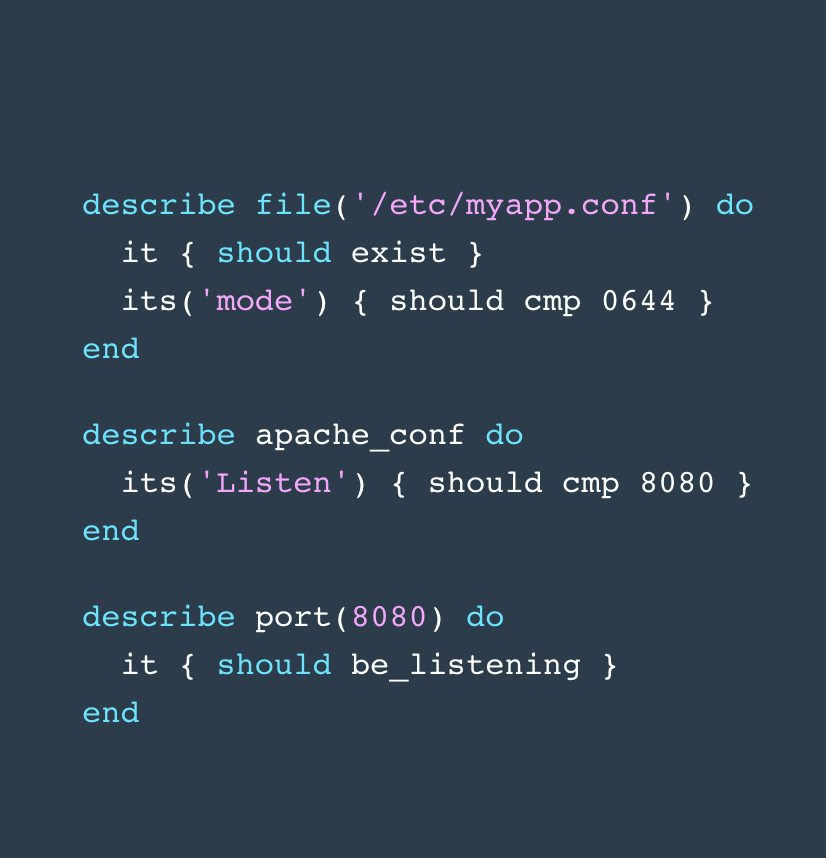
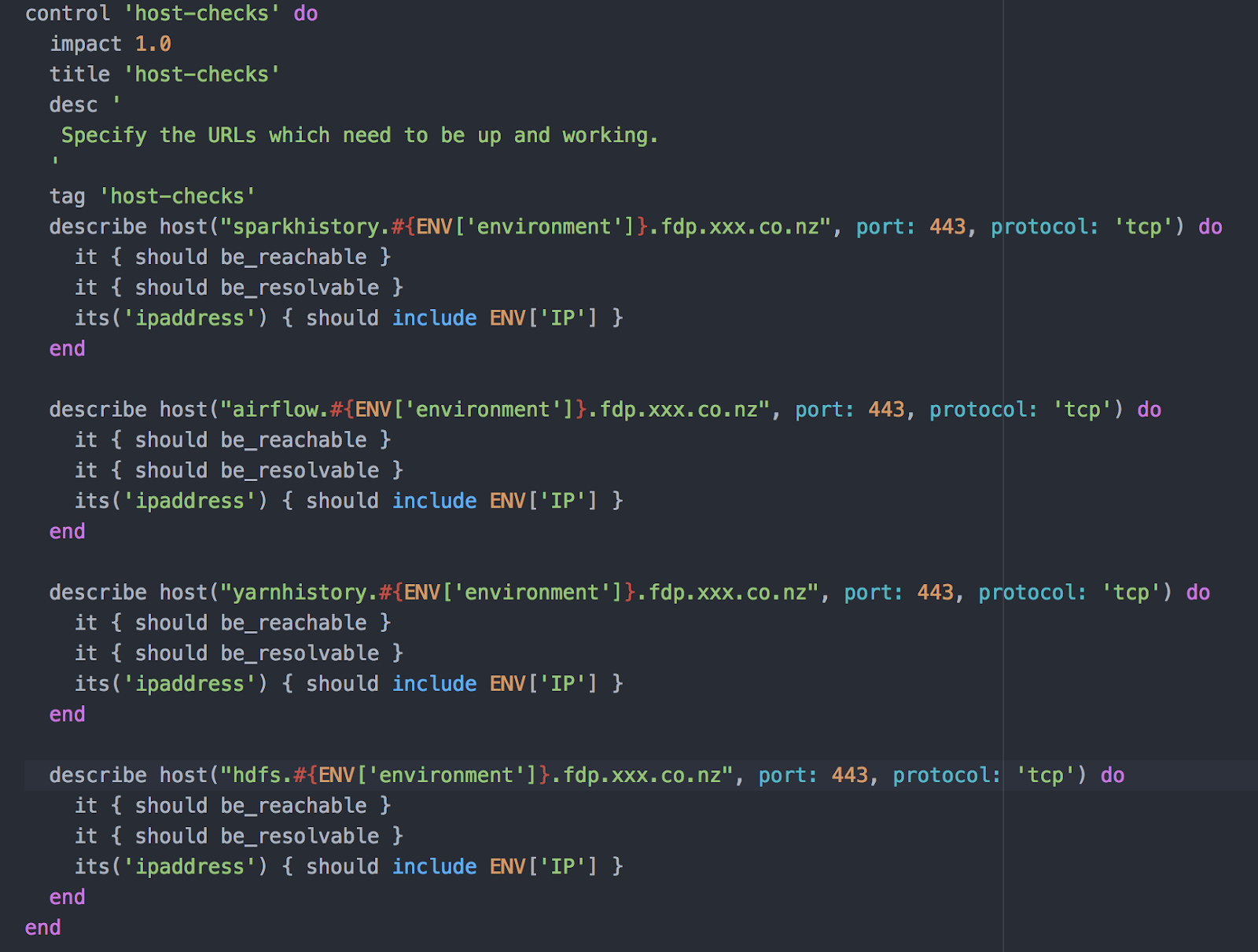
    The open source tool Inspec has been used with considerable success over the last few years to achieve security compliance for infrastructure. The syntax/constructs happens to be unbelievably simple. For instance, let’s consider the code snippet below. It doesn’t really require a lot of programming knowledge to make sense of it. Isn’t it?

    This made us wonder, what if we use Inspec to validate our infrastructure setup? What if we map our infrastructure configurations in an easy-to-read declarative syntax? What if this actually solves our problem?

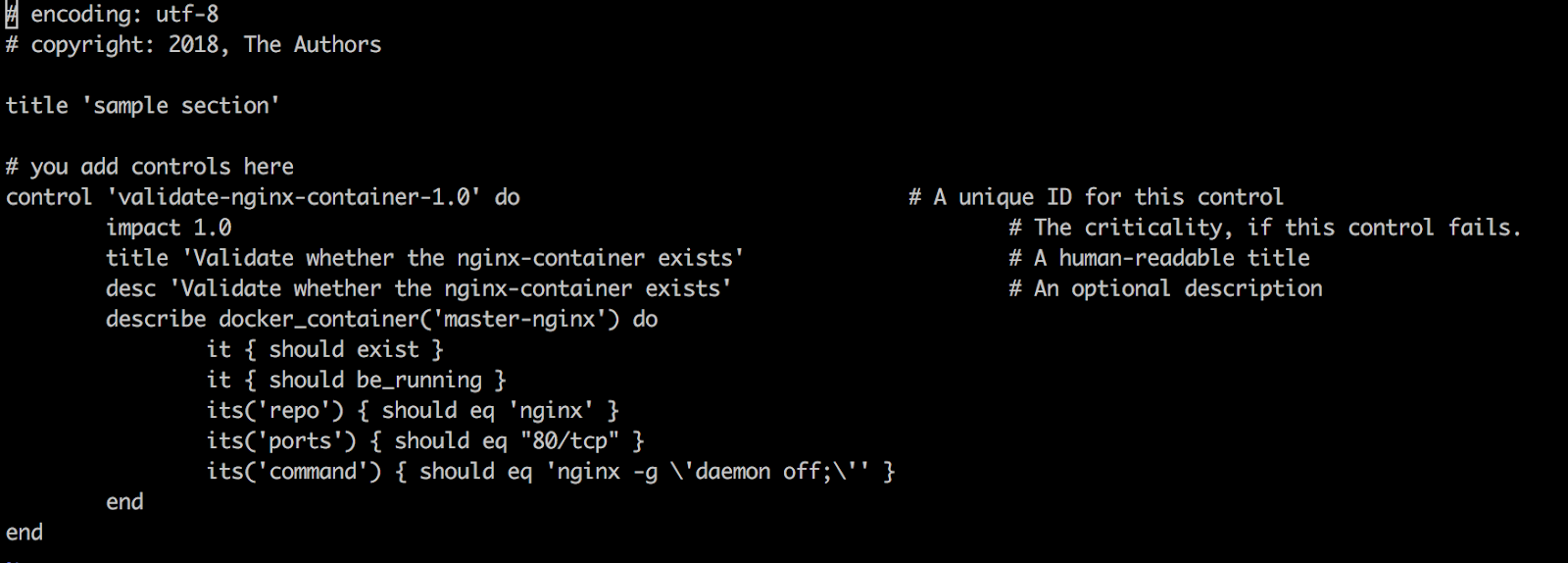
    In line with the best practices of DevOps, we started with a simple experiment; an experiment that could solve a tangible problem. We had a Docker host which was supposed to have a particular docker container running inside it, but it used to fail quite often, for some reason. We decided to write a test in Inspec to check whether this container was running on this host:

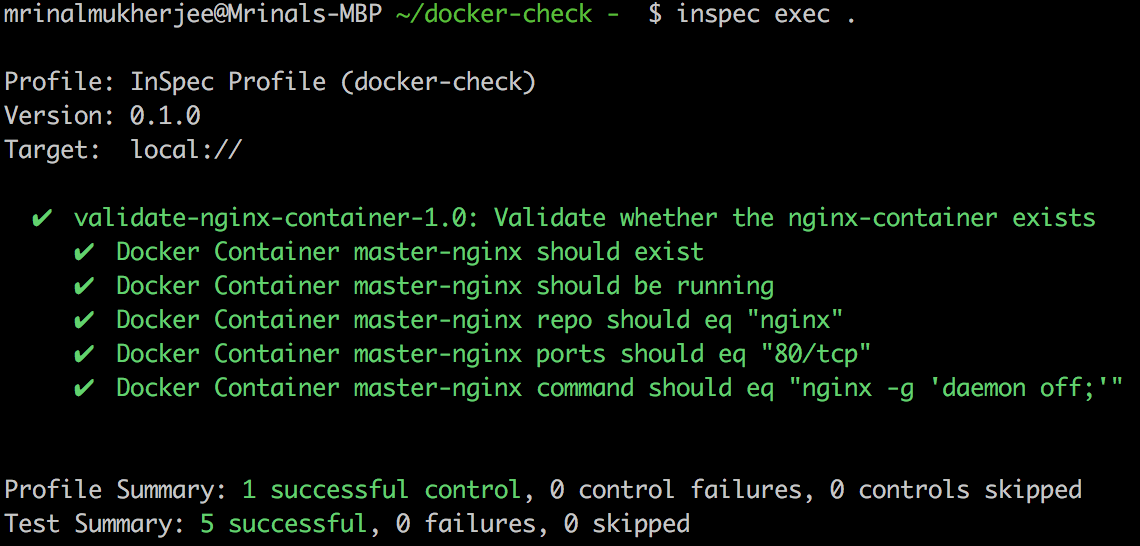
    … and tried executing the test.

    This was just what we wanted!

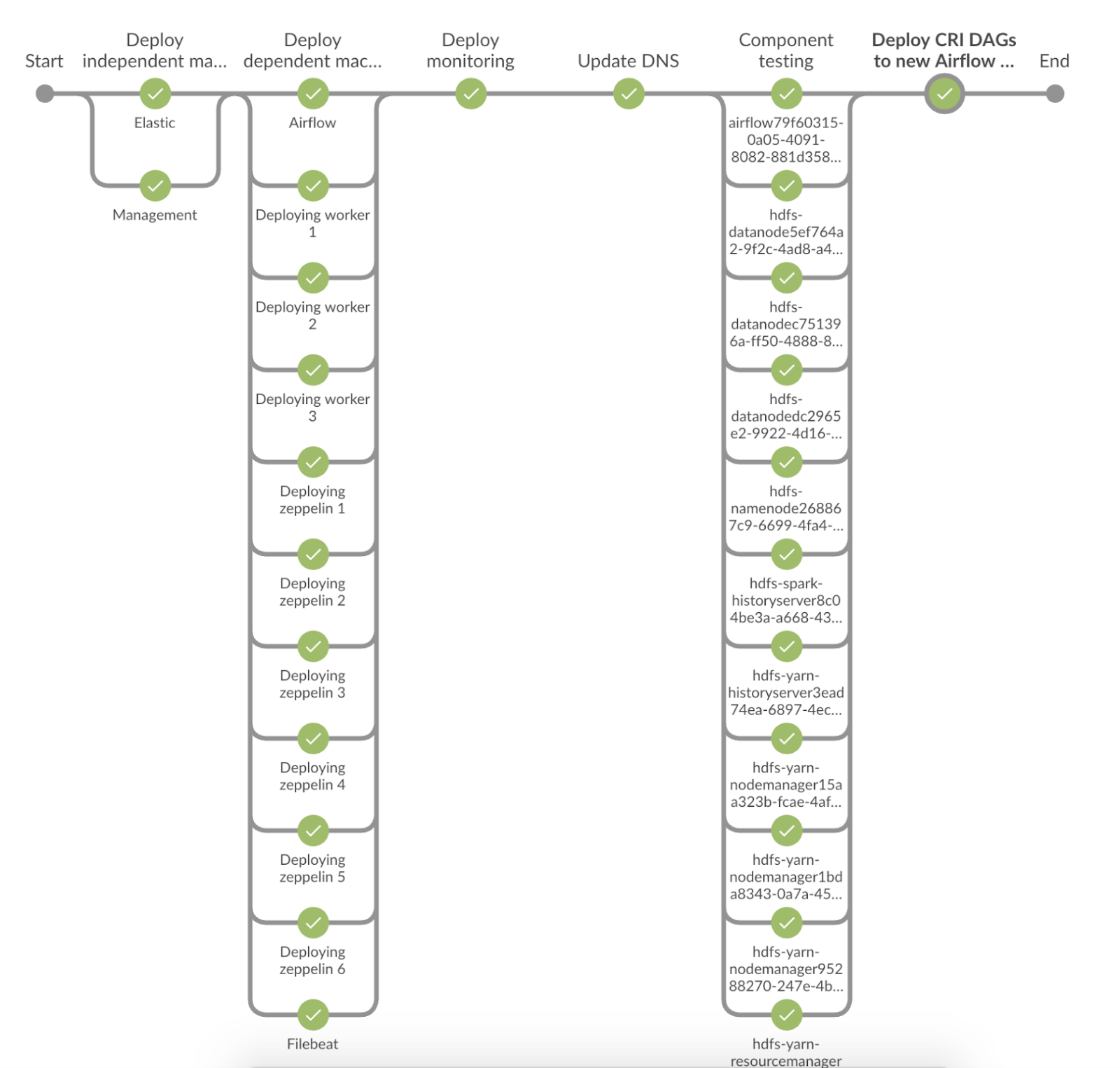
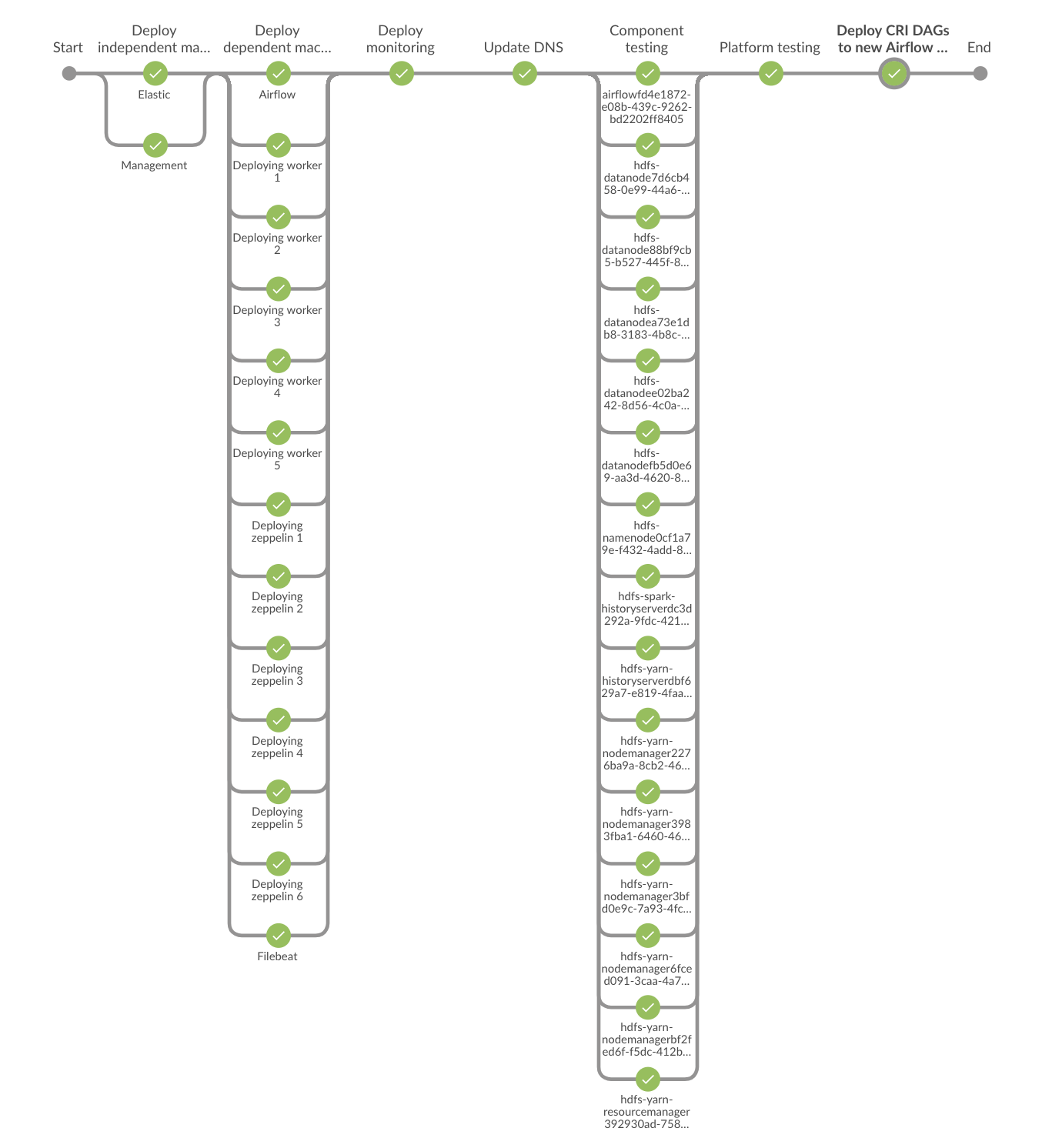
    Excited with this success, we started writing a battery of tests that validated each and every component of our infrastructure. Within a single day, we churned out 192 tests. The number of tests wasn’t as important as the scope and breadth of the test coverage. Once the tests were there, we plugged them on to our infrastructure pipeline (which was built using Jenkins) to ensure the components align with the desired state. We called them ‘component-readiness’ tests.

    So far so good.

    Now that our components match the desired state, are we still confident that our platform would work the way we intended? Perhaps we need some “platform readiness tests” as well. Can we use Inspec for that, too? The answer: Yes!

    Now that the platform readiness tests were ready, we extended our infrastructure pipeline to incorporate them as well.

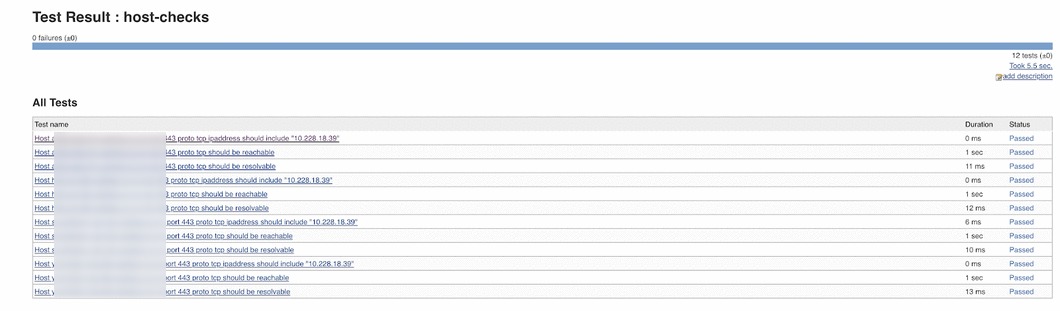
    Setting our component and platform readiness tests using Inspec had one more fantastic offering: live documentation for infrastructure. Inspec allows the audit results to be displayed in a variety of report formats, including JUnit, JSON, HTML and others. We used the JUnit report format and displayed them using the Jenkins JUnit Plugin. With this, we were able to have human-readable JUnit reports that doubled as live documentation for our infrastructure.

    Needless to say, this infrastructure testing with Inspec provided that (much needed) confidence on our setup and readiness. Our pipeline is designed in such a way that whenever any infrastructure component changes in our ecosystem, the pipeline is triggered which reconfigures and (if required) rebuilds the ecosystem. These Inspec tests are triggered with this infrastructure pipeline and validates the newly configured infrastructure setup. Thanks to this, we are never in a situation in which the client application running on this infrastructure complains or aborts because of incorrect configurations. Moreover, as described above, the living documentation helps document the expected configuration of the environment.

    So far, the Inspec implementation I have referred to is using the freely available Inspec tool and the Jenkins platform. Inspec can also be combined with Chef Compliance to produce more descriptive reports and charts. Chef Compliance also comes with out-of-the-box CIS profiles that can be used to jump start an Inspec implementation for security compliance and audits.

    Inspec is an easy tool to master with simple and intuitive constructs and one could get up and working quite easily. However, this simplicity has a downside. It’s very easy to speed ahead and gloss over the documentation while missing out on the best practices and tips/techniques to implement the solution in a better way. One way to master this is to have a crack at the newly released Auditing with Inspec certification, which provides the impetus to go through the documentation in detail while preparing for the certification. And, you also get to show off a shiny badge for your efforts!

    In Summary

    Infrastructure validation is quite an important step in any DevOps implementation. Apart from being very useful for security compliance testing, Inspec can be used to validate infrastructure using a simple and easy-to-understand declarative syntax. Moreover, it has a small footprint, a vibrant community looking after it and up-to-date and clear documentation. It definitely is a tool with the potential to provide quick and effective results.

    — Mrinal Mukherjee

  • Google Unveils Suite of APM Tools

    Google Unveils Suite of APM Tools

    Google today announced that it is making available application performance management (APM) tools based on the same technology it employs to manage its internal IT environment.

    Morgan McLean, a product manager at Google, said Stackdriver APM is based the open source StackDriver Trace and Debugger tools Google originally developed for its DevOps teams.

    The APM offering, available in beta, also includes Stackdriver Profiler, a tool Google developed to enable DevOps teams to explore how their code is running in a production environment.

    Google also said it has integrated Stackdriver Debugger with GitHub Enterprise and GitLab to extend the number of repositories developers can use to create mirrors of their code.

    DevOps teams will have the option of deploying Google APM tools either on-premises or on a public cloud.

    McLean noted that rather than throwing additional compute resources at a performance issue, Stackdriver Profile enables DevOps teams to discover and remediate issues and ultimately reduce costs. To minimize the impact of Stackdriver Profile on the performance of a production application, Google opted to employ statistical methods to create a profile of a piece of code. Specifically, Stackdriver Profiler collects data via lightweight sampling-based instrumentation that runs across every instance an application. Data showing CPU time, wall time, RAM used and contention, for example, is then displayed on a flame chart.

    At the core of the Google APM toolkit is a the Stackdriver Trace software the company developed to collect latency data about applications deployed in a distributed computing environment. McLean said that in the age of microservices it’s not feasible to managed modern distributed applications without any ability to instrument them. For many IT organizations, however, the cost of acquiring APM software or employing a cloud service has forced them to limit their use of APM technologies to only their most critical applications.

    Google is trying to remove cost as significant APM factor, which ultimately will result in the applications deployed on the Google Cloud Platform (GCP) becoming more robust and reliable. The Google APM tools can be applied to applications running on virtual machines and containers, as well as the Google AppEngine, a framework Google exposes on its cloud service to enable the development and hosting of applications. In effect, Google is making it easier for organizations to consume open source tools that IT operations previously would have had to stitch together on their own.

    Reliance on APM tools is at the heart of any DevOps process. But DevOps processes are not universally employed, largely because in addition to acquiring new tools, organizations must evolve their processes and culture. The debate many of them have comes down to an argument over whether they need to buy tools before they change those processes or change their processes to justify buying the tools. Most often, it’s the initiative of handful of developers that force the issue. It’s only once that team is successful that senior managers start to think about replicating the DevOps process employed by that team across the rest of the organization. Via Stackdriver APM, Google is clearly hoping to accelerate the rate at which those transition to DevOps occur.

    — Mike Vizard

  • Salesforce Details Integration Plan Post-MuleSoft Acquisition

    Salesforce Details Integration Plan Post-MuleSoft Acquisition

    Salesforce this week announced it will plunk down $6.5 billion to acquire MuleSoft, a provider of application integration software currently used by more than 1,200 organizations. Once the deal is complete, MuleSoft will continue to operate as a unit of Salesforce with current MuleSoft Greg Schott continuing as CEO.

    However, there will be two integration platforms once the merger is completed: MuleSoft will continue to offer its Anypoint platform that can be deployed on-premises or accessed as a service, while Salesforce plans to unfurl a separate Salesforce Integration Cloud based on the Anypoint platform.

    Schott said the merger will accelerate digital transformation projects that in many cases are hampered by developers writing custom point-to-point code at a cost of more than $400 billion a year. By relying on an integration platform, he said, organizations will be able to take advantage of an application network to unlock the value of data locked in legacy systems faster using a standard set of application programming interfaces (APIs) than they would if the two companies had simply decided to form a technology alliance.

    The reason for two separate integration platforms comes down to how different customers engage with MuleSoft and Salesforce, he said. The two companies have a roughly 60 percent customer overlap. That means a significant portion of the MuleSoft base is not integrating applications involving software-as-a-service (SaaS) applications from Salesforce. The Salesforce Integration Cloud will be targeted specifically at customers that are, for example, making use of Salesforce Lightning low-code application development tools to create applications that extend the core capabilities of the Salesforce application portfolio.

    In addition, MuleSoft provides a complementary capability to the Heroku platform-as-a-service (PaaS) environment that Salesforce already owns.

    Salesforce estimates moving into the application integration space will increase the size of its available market by more than $20 billion through 2022. But the company acknowledged that MuleSoft has as of late been operating at a minimal loss—its sales grew 58 percent last year to $297 million, but that’s a fraction of the total available market. Salesforce is betting that its sales staff combined with an ecosystem of partners will be able to drive the revenue MuleSoft currently generates higher by several orders of magnitude.

    However, competition across the application integration category is fierce. Not only is there no shortage of options, but many developers often prefer to write custom code than incur the cost of employing an integration platform. As digital business transformation projects accelerate, Salesforce is essentially arguing that the pace of integration required will make it impractical for developers to continue writing custom code. The rise of microservices also creates a requirement for integration at a level of scale that is difficult to keep pace with when employing custom code.

    The degree to which digital transformation coupled with microservices will transform application integration remains to be seen. But it is apparent that the need to integrate disparate sets of code using a structured set of DevOps processes has never been greater.

    — Mike Vizard

  • DevOps Chat: The State of Alerting & On-Call Survival for IT Ops, with OnPage CEO Judit Sharon

    DevOps Chat: The State of Alerting & On-Call Survival for IT Ops, with OnPage CEO Judit Sharon

    In this DevOps Chat we sit down with Judit Sharon, CEO of OnPage. OnPage has been providing alerting and incident management services primarily to the healthcare industry since before DevOps was called DevOps. As DevOps has exploded on the scene, the security and functionality built into OnPage was a perfect fit for IT Ops and DevOps teams. As a result, OnPage has expanded beyond its healthcare industry roots to become a very popular solution in the DevOps space.

    OnPage recently conducted a survey on the state of alerting in the IT Ops space. Judit gives us some insight into the findings, but you can download the full survey report at www.onpage.com/the-state-of-it-operations-ebook/.

    As usual, the streaming audio of our conversation is below, followed by the transcript of our chat. Enjoy!

    Alan Shimel: Hey, everyone, it’s Alan Shimel, and you’re listening to another episode of DevOps Chat. Today’s DevOps Chat is a really nice one that I think you’re going to enjoy. I have as my guest Judit Sharon, CEO and co-founder of OnPage. Judit, welcome to DevOps Chat.

    Judit Sharon: Thank you, Alan. Happy to join you.

    Shimel: Happy to have you here. So, Judit, let’s start off a little bit, as I mentioned, you were the founder and CEO of OnPage, but maybe some folks in our audience are not familiar with OnPage. Why don’t you give us a little bit of background on the company and how you came to start it?

    Sharon: Sure. So, OnPage is a SaaS based incident management platform hosted in a secure facility across the U.S., and in a nutshell, we—OnPage gives you visibility and feedback on incident status. You can track alerts, delivery, ticket status, and response, and it’s rock solid reliable. As one of our customers once said, it’s a must solution for those who need to elevate critical incidents.

    Shimel: Mm-hmm.

    Sharon: So, if I just go a little bit deeper, OnPage was built around the incident resolution life cycle to enable an organization to get the most out of their digital investment, ensuring that sensor and monitoring system have a reliable means to escalate urgent notification to the right person and immediately.

    So, you know, Alan, just a few years ago, when we wanted to come up with a product, all we needed to do is plan the product, develop, test it, and deploy it. That’s it. That was the end of it. Today, in the DevOps era, we also collect data. We use a special tool to collect data, to remove the noise. We calculate the data, we learn normal behavior, we predict anomaly, and we even attempt to correct it if possible writing a little script.

    So, we invest a lot in collecting this information, and as long as the process is working well, machine to machine communication is ideal. However, in the case of failure, disaster, or outage, when a technical person is needed, e-mail and SMS or even a phone call is not a sufficient means of notification, and OnPage is the best, most reliable solution to be used. And why? Because the technical person on call will get all the information right to their device, can start working on the incident immediately. If they’re not available, there are escalation rules that are pre-defined, and they can escalate it to the next person.

    Furthermore, in the event that the person did receive it and now they need help from a different person, from a different team—so, they don’t need to know who is on call in that team, all they need to do, they can forward the entire ticket, add some notes to it, and send it to the different organization. OnPage will send it to the right person on call and will escalate it within the next team.

    So, in one sentence, to summarize, OnPage automates the entire notification process to avoid human errors.

    Shimel: Yep. And Judit, I want to call out another not feature but characteristic in the history of OnPage. You know, we see so many companies that saw DevOps as a gold rush. You know, founders who say, “Wow, I want to start a company around DevOps,” and they build a tool for DevOps.

    Not the fact with OnPage. OnPage has actually been around for some time, and its mission dovetails nicely with DevOps but it’s not one of these Johnny-come-latelies trying to capitalize on how many people are searching Google for DevOps or something like that. Correct?

    Sharon: Right. So, we started about seven years ago. We started as incident notification, and actually, we started in health care. That’s why our solution is HIPAA-secure, something that is very unique about us.

    The other thing that we did, because we started in health care, was, we needed to alert until read. So, we are very unique in that, that we don’t just send you an alert, like send an SMS or an e-mail or send you just a push notification. We will alert consistently for eight hours to ensure that the message was delivered to the right person. And we have the audit trail, so now, accountability is a must. Now, we have the audit trail of who got it, when, how long it took to open the message.

    And another very nice feature other than the fact that we are HIPAA-compliant, so you know, we are secure, all the communication is secure at rest, and it’s encrypted in our database. We also save all the information for up to six years. So, other than the fact that we are HIPAA-compliant and other than the fact that we have the alert until read—we have other very nice features. Right now, there are a lot of companies, large companies mainly, that have a lot of systems and processes and sensors that sense just e-mail notification. And you will see from our study that we will talk about later, a lot of people are using e-mail notification for incident notification. And we just integrated those e-mails, and basically, you can leverage all the OnPage capabilities and elevate those messages if they’re important.

    Yeah, that’s what we do.

    Shimel: Sure, absolutely. And Judit, I wanted to kind of shift the conversation, if we will—if you will—to a larger topic, and that is sort of the state left alerting in the IT Ops world and the state of IT Ops. I know recently OnPage conducted a survey of IT Ops professionals. There’s been a few articles on staging-devopsy.kinsta.cloud about it by Aura Lee,  love of your company as well as download the full report.

    But for those of our listeners who maybe haven’t had a chance to go on the site and check out the report—and we’ll put links to it in our show notes—can you talk a little bit about that, give us a little insight, here?

    Sharon: Yes. So, the state of IT operations, we conducted a study where we surveyed about 96 different companies, and the nice thing about that survey, we got a few people from each organization. So, we see the response from different levels of leadership. So, 20 percent were SVP or C level, 22 percent were directors, 34 percent were managers, and 24 percent were individual contributors. So, you see a nice distribution among the different levels in the organization.

    And the findings were—I mean, first, what did we want to look at? We looked at how teams are notified in critical incidents, how many alerts the team received, who received the critical alerts, and how did they get handled?

    So, the findings were really interesting. As I told you before, we found that 80 percent of the respondents said that they get notified via e-mail. You know, e-mail—the same e-mail that you get as junk mail, the same e-mail that you get on a regular basis—80 percent of IT get their notifications via e-mail. Which means they need to be on top of e-mail all the time. They’re always on, they’re never off. And I don’t know if you remember Target, they had some cybersecurity?

    Shimel: Mm-hmm.

    Sharon: Apparently they did get alerts, right? They did get notified, but they got notified via e-mail. So, three days later, they found the e-mail that they got notified. So, what OnPage says is, “Yes, you have processes that are sending e-mails. You can always change those processes and maybe extensively change the processes.” But why don’t you elevate those e-mails so they find you in case of emergency rather than you sit there and always, always check your e-mail?

    Another interesting point that we found is that 40 percent of IT teams get more than 10 alerts per day; 20 percent get more than 20 alerts per day. So, couple that with the fact that two-thirds of the respondents saying that they sent alerts to the team—so now, you don’t send alerts to one person, every alert gets sent to the entire team because they don’t want to miss the alert, right? So, what OnPage does, they say, “Okay, you get a lot of alerts. Don’t send it to the entire team. Send it to an escalation team, so one person will get it, and then always change who is the first one in line so the burden gets distributed.” So, you don’t get as many alerts, and you don’t—like, basically, the workforce, right, and the quality of their life, you don’t diminish it completely.

    So, that was just a few very, very interesting facts that we found about that demographic that we surveyed.

    Shimel: Yep. You know, Judit, I’d like to make a comment, but more of a question to you and get your advice, because this is an issue we deal with here at staging-devopsy.kinsta.cloud, even. We have tried so hard to move off of e-mail as our primary communication, alerting, operational format. And we have tried. We’ve tried things like Slack and Chat and Google Chat and texting and I can’t tell you how many different tools we’ve given a try to. And yet, we keep coming back to e-mail.

    So, it doesn’t surprise me that many Ops people still rely on e-mail, with all the spam and all the noise to signal ratio problems there. What do you—for people listening out here in the same boat I am in—what’s your suggestion? What’s your advice?

    Sharon: Well, I think that e-mail is really good for audit trails, right? You want to know what happened, who said what. All the communication gets distributed to a distribution group—that’s fine.

    What we say is, when it’s critical, right—e-mails are okay for day-to-day communication. E-mail is okay, it’s actually for events or incidents that don’t need to be taken care of right away. So, those events that don’t need to be prioritized, they should go to e-mail. That’s absolutely true.

    What we say is, when there is an event that needs your attention immediately—and that’s another thing that I would like to go into are the costs, right? Those incidents that need to grab your attention immediately, those should be elevated. Those should find you rather than you always check your e-mail and always be on.

    Another interesting thing that we’ve found is, 12 percent said they are still using a pager.

    Shimel: Yeah?

    Sharon: And then we looked into those 12 percent, what vertical they come from, and we found that they come from the healthcare industry. Come to show you that the IT follows the technology implemented in the organization; they don’t kind of bring new technology for themselves. So, if the health care organization is using a pager, the IT organization of the same organization will use pager. Only with those who responded. We have a lot of customers, health care IT, that are using OnPage to elevate those messages.

    Another thing I want to get into is the cost, right? How much it costs. So, 99 percent of the organizations say that a single hour of down time costs them $100,000.00. So, every minute that we delay working on it and remedying the issue costs you about $1,670.00—every minute, right? You know, the counter is working, and we found that 62 percent of responders, it takes them 5 to 15 minutes to deliver an alert. Twelve percent said it’s more than 15 minutes to deliver an alert.

    So, here we see that just the delivery costs of the down time is between 8,000 and 25,000 per incident. Now, compare that to the cost of the solution. The cost of the solution is almost like a no-brainer. When we started the company and we pitched the idea, it was a quote—it’s a no-brainer. The cost is so miniscule in comparison to the cost of the lost time in delivering the alert to the right person and having the audit trail and having the reporting so you can afterwards go and even audit your team, make sure that everyone is accountable, that everyone is reliable.

    So, that was an interesting finding from this survey. Actually, we think it’s so interesting that we would like to run the survey in a different venue as well to try to get maybe a bigger audience, because this one was about 200 to 150 responders, but maybe if we can go on a larger scale and see if it’s working the same across all industries.

    Shimel: Sure. That would be fascinating. And I think—you know, it’s funny, I happen to be working on an e-book we’re writing on the state of DevOps in 2017, and I will tell you, there’s frankly not enough research being done and that’s available on these kinds of subjects, right? I mean, people are going more on kinda what their gut tells them on subjective rather than objective data.

    Sharon: Yeah.

    Shimel: And that’s always—you know, sometimes it works, but it’s always risky. So, I would encourage you to do that if you guys can, for sure.

    Sharon: Right. The other thing that we found that, you know, security became really, really important, like, this is top of mind for everyone. It used to be only health care, right, that cared about security and compliance, and now we go through one survey after another about our security policies from IT organizations, right? So, security becomes very, very important, and 40 percent of the responders said that encryption, even of alerts and messaging is very important for them. So, that’s another nice piece of information that we got from this survey.

    Shimel: Absolutely. Well, Judit, as I mentioned to you off mic when we were talking before recording today, the time goes really quick here. We’re already—we’re well past 15 minutes, so we’ll try to be respectful of our audience’s time, and maybe we can have you on for another chat to continue the discussion, maybe if you continue another leg of the survey.

    But thanks for being our guest on this DevOps Chat. I just wanted to end it, because I forgot to ask you in the beginning. For people who want to get more information about OnPage, where can they go?

    Sharon: So, of course, there is our website, www.OnPage.com. If you want a copy of this survey, it’s located at staging-devopsy.kinsta.cloud, and there is another location on our website, OnPage.com/DevOps-ebook. A little bit more complicated than staging-devopsy.kinsta.cloud, but we are going to publish another part of this survey, because we put the white papers in two sections, so part two is going to come up soon.

    Shimel: Great.

    Sharon: And I would love you guys all coming to look into what we do.

    Shimel: Okay! Judit Sharon, founder and CEO of OnPage, thank you for being our guest.

    Sharon: Thank you, Alan. Pleasure to be here.

    Shimel: Pleasure to have you here. Judit, we’ll see you soon.

    Sharon: Sure.

    Shimel: This is Alan Shimel for staging-devopsy.kinsta.cloud. Thanks for joining us. Hope to see you soon on another DevOps Chat, and have a great day, everyone.

    — Alan Shimel

  • Rundeck Gains Funding to Support Open Source IT Automation Framework

    Rundeck Gains Funding to Support Open Source IT Automation Framework

    Rundeck has emerged as a popular open source job scheduler and orchestration option for IT automation that enables IT teams to build runbooks that can be easily shared with others. The company behind it—Rundeck Inc.—has garnered $3 million in seed funding to provide enterprise-class support for instances in the form of the Rundeck Operations as a Service Platform.

    Company CEO Stephanie Fohn says the Rundeck framework has gained popularity because it provides an agentless approach to creating runbooks capable of spanning multiple platforms, tools and scripting languages. That approach doesn’t require that software be on each endpoint to be automated or that the IT operations team standardize on one set of tools and languages to start integrating various DevOps processes, said Fohn.

    In fact, the goal is to reduce resistance to DevOps in enterprise IT organizations by making it easier for IT professionals to employ their existing skills to create runbooks that can shared and executed by others, said Fohn.

    Rundeck Inc. claims there already are more than 40,000 IT professionals participating in the open source project, which is already being used by more than 100 commercial organizations.

    IT automation frameworks are not a new idea, but resistance to change traditionally has been high. Many IT professionals have been developing their own scripts for years, which they consider to be intellectual property they take with them from job to job. Frameworks that require them to learn new tools or languages are not readily adopted unless the organization they work for mandates them. But the number of IT organizations that have embraced IT automation frameworks as a percentage of the whole remains less than 30 percent.

    Fohn said commercial support provided by Rundeck Inc. should make more organizations more comfortable adopting an IT automation framework that extends the shell scripts many IT professionals have already developed.

    In the meantime, pressure on IT operations teams to manage IT infrastructure more adroitly at scale only continues to mount. Organizations are deploying and updating more applications at a faster rate than ever. Add to that a mix of emerging microservices technologies based on containers, and it’s apparent the complexity of the IT environment will only increase in the months and years ahead. Fohn said that means it’s almost a sure thing organizations will embrace IT automation and DevOps.

    Rundeck offers an alternative agentless approach to managing IT at scale with the benefits of being free and having a growing population of IT professionals that know how to employ it. The degree to which Rundeck can move beyond a grass-roots initiative to become a bona fide movement remains to be seen. But given the total percentage of organizations that have yet to embrace an IT automation framework, clearly there’s plenty of opportunity.

    — Mike Vizard

  • OpsRamp Looks to Fuel IT Operations Consolidation

    OpsRamp Looks to Fuel IT Operations Consolidation

    One of the biggest challenges associated with DevOps is cutting through all the various platforms and applications alerts to make sense of what’s occurring in an IT environment, much less manage it. In fact, there’s been a pressing need of consolidate management tools for IT operations for quite some time now.

    OpsRamp is now making just that case with the unfurling of Unified Service Intelligence, a set of integrated IT management applications that are all delivered using a software-as-a-service (SaaS) model that makes it possible to unify multiple dashboards.

    Deepak Jannu, director of marketing for OpsRamp, said that although there are more application programming interfaces (APIs) being exposed than ever, it’s still too difficult for IT operations teams to correlate data in a way that creates meaningful actionable intelligence. For the most part, IT operations teams are still swiveling between different consoles in the hopes that some insight will magically make itself apparent, he said.

    To make it easier to separate the signal from the noise, Unified Service Intelligence combines discovery and monitoring health dashboards with incident management capabilities in single application layered with hundreds of best-practice monitoring templates to simplify IT administration.

    Jannu noted many IT organizations struggle when transitioning to DevOps because they are confronted with a classic chicken-and-egg challenge. Most of them rely on legacy tools that are not integrated. Trying to modernize IT operations processes is simply too difficult without the right set of tools in place. The only way to make modern tools affordable for most organizations is to deliver them as a set of SaaS applications, he said.

    As IT organizations find themselves embracing multiple clouds as well as emerging technologies such as containers, Jannu noted it’s now only a matter of time before IT operations reaches a breaking point inside most organizations. It was difficult enough trying to navigate different dashboards for IT infrastructure and applications running on-premises. The cloud, in most cases, just adds another series of platforms to an already-inflexible mix of isolated processes, he said.

    Just as significantly, he added, an integrated platform also is key to cutting down IT operations fatigue. Most IT operations teams don’t discover critical issues early enough because it’s simply too difficult to understand what an “alert storm” being generated by disparate management tools signifies. After a while, the IT operations team becomes inured to all the alerts being generated.

    Longer term, Jannu said OpsRamp will be better positioned to apply machine and deep learning algorithms to automate IT management than the average IT organization would be by running tools locally on its own. OpsRamp already generates 3 billion records of events a day, all of which can be used to inform artificial intelligence (AI) tools that require access to massive amounts of data to effectively train models. Locally installed IT management tools will never generate the required volume of data required to train an AI model.

    It remains to be seen how fast the IT operations management space will consolidate. There are a lot of constituencies inside IT organizations that have a vested interest in one tool or another. That said, the writing on the wall heralding that consolidation already has been inscribed.

    — Mike Vizard

  • Application Discovery and the Value Proposition of IBM Z ADDI

    Application Discovery and the Value Proposition of IBM Z ADDI

    Discovering how an application works can be a difficult, expensive undertaking. That’s why architectures based on REST are so popular. The architectural style provides an easy-to-implement interface that allows consumers to use an application productively without having to understand anything at all about its internals. All a developer needs to know to work an application is how to interact with the resource represented by the given endpoint. What’s going on behind that endpoint is another matter.

    That’s the good news.

    The bad news is that when it’s time to make changes to the application’s internals, things can get difficult. Many times a well-defined interface is hiding a pile of spaghetti code. Sometimes a developer might be able to find an analysis tool that will help make sense of things. Or, maybe there’s documentation that explains it all. But, it’s not unusual for developers to have to bite the bullet and go through the source code and deployment scripts line by line to figure out how the application works. Such work incurs significant expense.
    Discovery: Understanding Dependencies in an Application

    Mainframe developers have been solving the problems of application discovery for years. IBM has been at the forefront of addressing application discovery with a comprehensive solution called Application Discovery and Delivery Intelligence (ADDI). ADDI allows a developer to inspect a IBM Z mainframe application and analyze its performance.

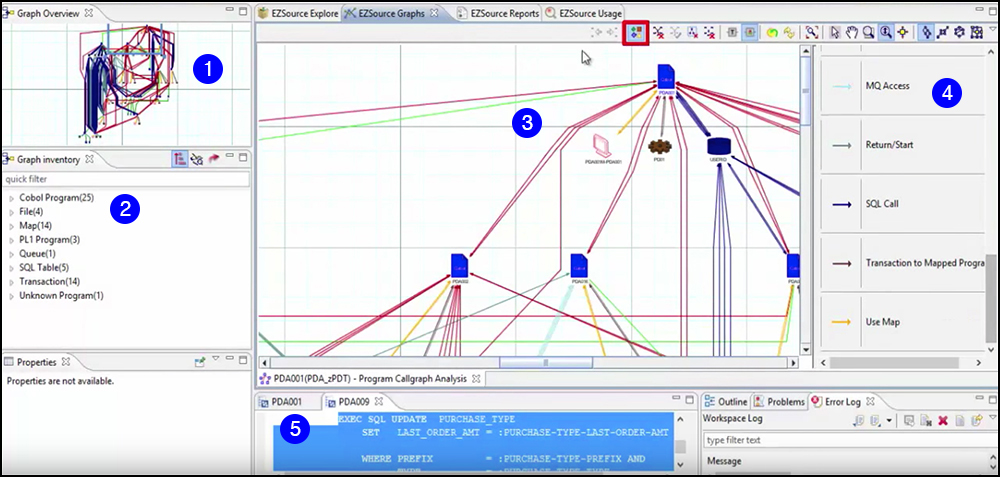
    Application discovery is accomplished using Application Discovery Intelligence (ADI), which is part of the ADDI toolset. Developers and system analysts use ADI, which integrates seamlessly into the Eclipse integrated development environment (IDE), to discover the assets used in an application and also to determine the dependencies between them once discovered.

    Figure 1 below shows an example of the ADI graphical interface. The IDE provides a high level overview of the application (1) as well as a listing of its components (2). Developers can drill down to look at details in a central viewing pane (3). The IDE provides a detailed listing of  a component’s connections and associations, such as subscriptions to message queues or SQL calls (4). Also, developers can view details about a particular assets, such as a SQL query (5).

    Figure 1: Application discovery intelligence describes components in an application and describes interactions between them
    Having immediate insight into the structure and operation of an application reduces the expense required to improve it. Developers save a lot of time not having to peruse code on a line-by-line basis. Yet, this is only part of the cost-saving. Understanding the composition of an application is an important first step. Understanding how an application performs is essential for implementing improvements. This is where delivery analysis comes in.

    Delivery: Providing Quality Service 24/7

    Ensuring quality service on a 24/7 requires that availability of up-to-date runtime information. A good performance monitoring tool provides the ability to to drill down to determine the cause of an issue. IBM Z provides such as array of tools. Remember, meeting service agreements to specification is and has been a critical activity in the mainframe computing culture. It’s part of a mature business process.

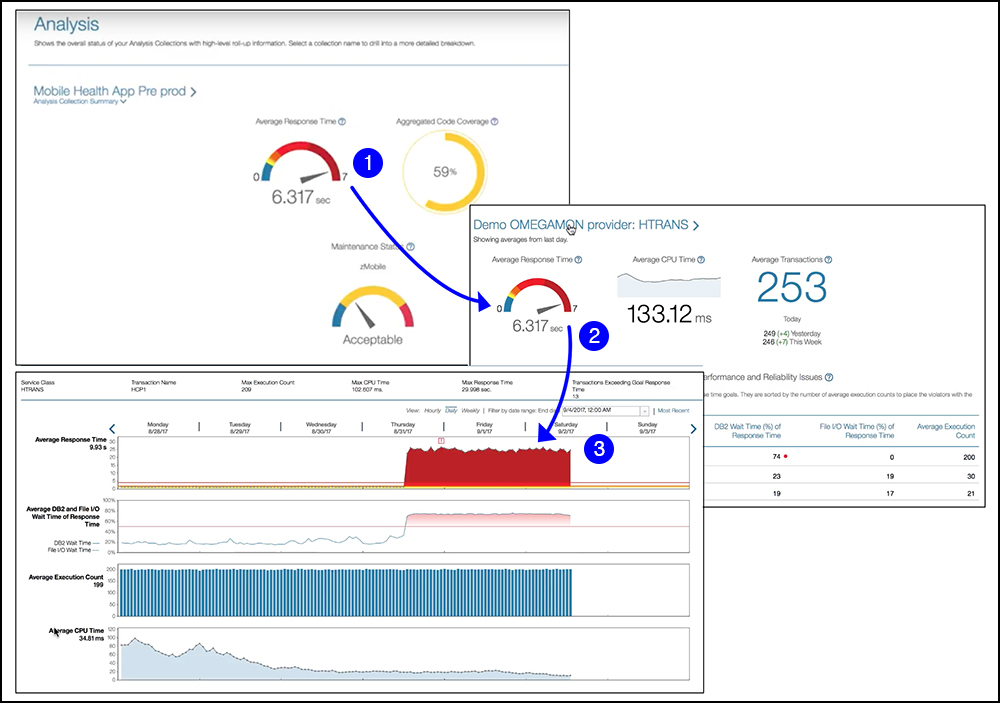
    IBM Z Application Delivery Intelligence provides mission-critical insights on a drill down basis. As shown below in Figure 2, IBM Z Application Delivery Intelligence Analysis reports a dangerous condition (1). Then, engineers can drill down to view associated metrics (2) and then even deeper, to view a timeline that shows environmental conditions such as response time from the database and CPU time consumption (3).

    Figure 2: IBM Z Application Delivery Intelligence provides drill-down reporting that allows engineers to identify root causes

    One of the drawbacks of architectures that aggregate heterogeneous systems is that relationships between components become opaque. For example, an application that uses a database service to store and retrieve data has no direct insight into the underlying query behavior of the database service. All that can be accurately reported is the request and response time to and from the service. However, when both application logic and data storage reside inside the same location, reporting details becomes easier. But still, drill-down correlation between systems is still difficult when components are in a common location, such as a virtual machine, yet isolated from one another due to strict encapsulation. Mainframe systems, however, do not have the problem because all components reside in a single location in which access to components is transparent. Thus, cross-component drill-down is easier to accomplish.

    Built to Scale in the Modern Cloud

    When it comes to computing at scale, mainframes were always meant to handle multiple users in a high-volume, transactional environment. Mainframe computing does not lend itself to the type of latency bottlenecks that come about when there are racks of commodity PCs operating with with varying degrees of reliability. The hurdle that mainframe computing had to overcome was making it so it could be accessed using standard web-based standards, most notably REST. IBM addresses the problem with z/OS Connect, a technology that allows IBM Z application functionality to be represented by a REST API. Once a REST layer is added onto an IBM Z system, it becomes just like another resource in the cloud computing ecosystem. And, an IBM Z mainframe computer is designed to be fault-tolerant and highly available. There are IBM Z systems in production that have run without interruption or downtime for decades.

    Making Discovery and Delivery Less Expensive

    Discovering how an application works and ensuring that applications in production meet performance expectations are two of the most important activities in today’s modern enterprise. Application Discovery and Delivery Intelligence provides the tools to meet these needs in the IBM Z cloud computing ecosystem. Using ADDI provides the insights necessary to ensure that service level agreements are met cost-effectively to the satisfaction of all. When it to making applications that matter in a world of web-based computing, ADDI provides an essential value that is difficult to match.

    — Bob Reselman