
Tag: developers

  • Feature Branching vs. Feature Flags: What’s the Right Tool for the Job?

    Feature Branching vs. Feature Flags: What’s the Right Tool for the Job?

    A dev team’s branch management strategy can have a significant impact on the rate at which it can release high-quality software. In this article we’ll explore the pros and cons of several different approaches for enabling multiple concurrent streams of dev work in the same codebase. We’ll see that two major factors—the cost of merge conflicts and the ability to release streams of work independently—are often in tension, but that Feature Flags provide a way to resolve that tension.

    Merge Conflicts

    New products start off as a small codebase, usually only being worked on by a handful of developers. This situation doesn’t call for much formal process. However, even when a team consists of just two devs, it’s still preferable to avoid working on the same files at the same time to avoid merge conflicts.

    Unfortunately, even when we’re trying to avoid stepping on each other’s toes, it’s still pretty common for work streams that seem unrelated to end up touching the same files. Sometimes it’s these unexpected merge conflicts that can cause the most pain—any iOS developer who’s been around the block a few times probably has acquired some scar tissue from an epic three-way XIB merge in their past. In this article we’ll explore some different ways to deal with the challenge of merge conflicts when multiple developers are working on the same codebase.

    Some people might argue that merge conflicts aren’t that big a deal these days and mostly are solved if you just use modern tools such as Git. This is unfortunately not true. Git certainly makes creating branches trivial, but it does not always make merging parallel changes within those branches trivial. It has some powerful features to automatically merge changes when possible. These automatic merge heuristics can feel almost magical at times, but they are not actually magical. If you make parallel changes that affect a large XML file—for example, a XIB or an IDE project file—Git likely will not be able to merge those without human assistance.

    Most importantly, Git cannot automatically resolve semantic conflicts. For example, imagine that in one branch Alice renames a method and in another branch Bob adds a new usage of that method. When those two branches are merged, Git will do nothing to help resolve the fact that Bob’s branch is calling a method using the old name. Bob’s code is calling a method that no longer exists. In fact, Git will not give Alice or Bob any clue that there is a conflict, since these semantic conflicts aren’t detectable by our current set of tools.

    We’ll only find semantic conflicts when we try to compile our merged codebase, and even then only a subset of them. If the codebase is in a dynamically typed language such as javascript, we might not find out until our users start reporting app crashes in production.

    Beyond the productivity hit of having to manually resolve these inevitable merge conflicts, the spectre of introducing a conflict can have a more pernicious, long-term effect on a codebase. A developer who sees an opportunity to incrementally improve the quality of the codebase is slightly disincentivized to do so if they sense that it could lead to a merge conflict.

    The calculus for whether the effort of making a small improvement is worth the investment gets shifted as the cost of that change becomes higher. This introduces a subtle drag working against the internal quality of a codebase over time. What’s more, the type of small but broad refactorings that can gradually improve a codebase—or stop it gradually degrading—are exactly the type of changes that often lead to a merge conflict. In my opinion, this is the true hidden cost of branch-based development—it disincentivizes the sort of “boy scout rule” improvements that can prevent areas of a codebase from gradually degrading into no-go zones.

    So, having established that merge conflicts are a Bad Thing, let’s look at how we might avoid them.

    Working Directly on Master

    A small team starting out on a new app might initially try to mitigate the risk of a big unexpected merge conflict by having all devs push frequently to a shared master branch—one of the central tenets of continuous integration. When everyone is frequently synchronizing their changes in a shared master branch, an unexpected merge conflict is revealed earlier and is easier to deal with.
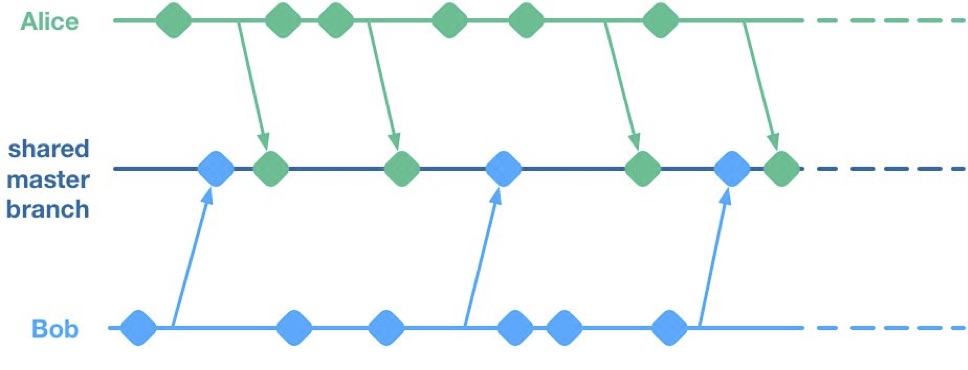
    Unfortunately, having multiple streams of work landing on a shared master branch comes with a big drawback: If any of the streams of work are not ready for release, then nothing on the shared branch can be released. Let’s see why using a hypothetical example.

    Alice and Bob are a two-dev team working on a mobile app. They have two streams of work in progress. Bob is working on a big overhaul of how user preferences work, while Alice is finishing off a critical new feature for the app which the big bosses have decreed must be pushed to the app store by the end of the week. This team is trying to avoid big merge conflicts by frequently pushing their code changes to a shared master branch as they go.

    On Thursday, Alice is wrapping up her changes and doing some testing. While giving the app a general run-through she notices that the user preferences section is crashing. She asks Bob if he knows why. Bob explains that he’s in the middle of overhauling that area of the code. It’s taken a little longer than he expected and it might be buggy for a while. Alice gives Bob a look. She explains to him that her feature has to get to the app store this week. Bob gulps. Over the course of two long days Bob and Alice are able to roll back Bob’s changes, some of which had gotten tangled up with changes that Alice had been making as part of her new feature. They manage to ship to the app store by Saturday, and a crisis is averted.

    We see here that because Alice and Bob were both committing to a shared branch, their independent streams of work became entangled. Alice could not release her changes without Bob’s and vice versa. This is the huge drawback of working on a shared branch—although we will discover later on that there are ways to mitigate this.

    Feature Branches

    To avoid this issue of coupled work streams, dev teams very often will move away from pushing in-progress code onto a shared branch. Some teams will opt to continue working on master on their local machines but only push to the team’s shared repo once the work is complete. Other teams will opt to use Feature Branches, maintaining separate streams of work on isolated branches and only merging them into master once they’re complete.

    As an aside, it’s interesting to note that when using a distributed source control system like Git, these two approaches are essentially equivalent; the only difference is whether the unmerged in-progress changes are visible in a remote feature branch or hidden on a dev’s local master. As such, I’ll talk about both variants as Feature Branching.
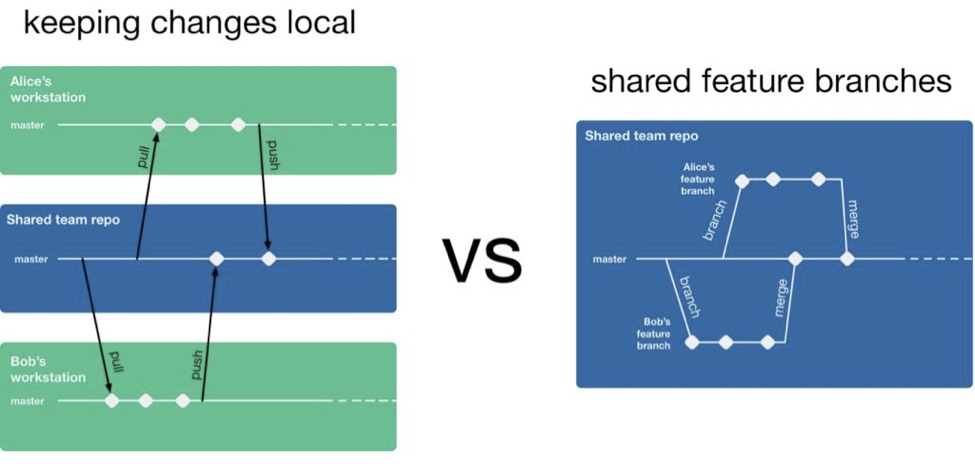
    So, if a team is using feature branching, then all their problems are solved, right? Unfortunately not. We’ve now re-introduced the risk of painful merges. Work that is being done on a feature branch is not integrated with other changes until it is merged to a shared master branch. Whenever two streams of work both touch the same files, either inadvertently or intentionally, there is a latent merge conflict which continues to grow in size until one of those stream’s branch lands on master. Some teams will try to mitigate this issue by frequently merging changes from master back into in-flight feature branches.
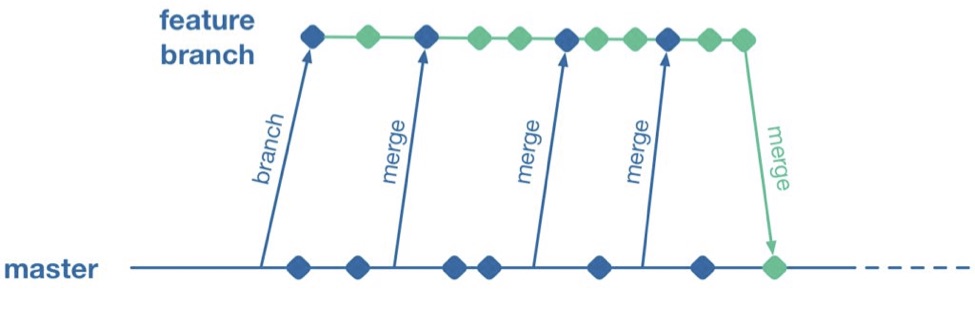
    However, this does not help when parallel changes are occurring on isolated branches. Alice’s branch will only see Bob’s changes when his feature branch lands on master. The latent merge conflict between these parallel changes is now waiting for Alice the next time she merges from master.
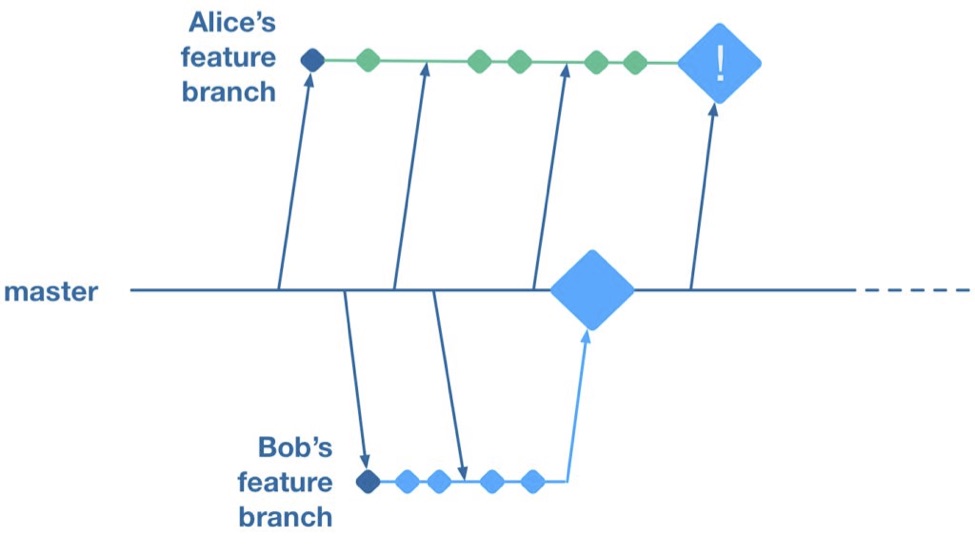
    (Thanks to Martin Fowler’s feature branch writeup for inspiring the above illustration)

    Some teams attempt to solve this problem by “cross-merging”—pulling work on one feature branch across into another feature branch to break down the size of latent merge conflicts between those branches.
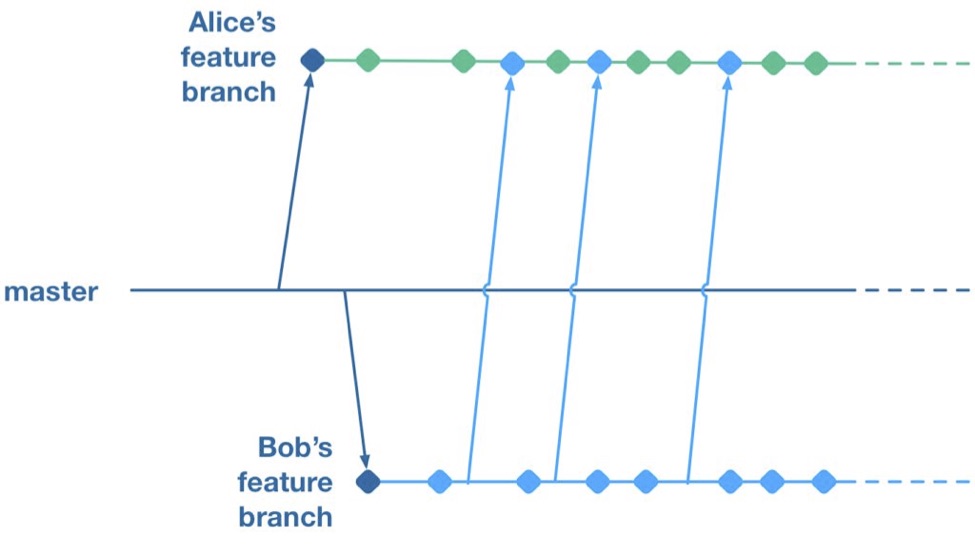
    However, as soon as you merge two feature branches together you’ve essentially created a shared branch of in-progress work, and are back to the same problem as teams who are pushing in-progress changes to a shared master: Code changes from both work streams are now intermingled. Your features are now coupled together and cannot be released independently.

    To summarize, feature branches allow teams to decouple streams of work such that they can be released independently. However, they introduce a risk of large merge conflicts when parallel feature branches contain large sets of changes. Remerging from master into feature branches only helps once parallel work has already landed, and cross-merging between branches couples features together in the same way as working on a shared master.

    Feature Flags

    What alternative does a team have if they want to avoid the merge conflict risks Feature Branches introduce? They could go back to frequently integrating changes on trunk, but we established that this has the major drawback that formerly independent streams of work are now coupled together and cannot be released independently. This is where a technique called feature flags (aka feature toggle, bits or flippers) can help.

    A feature flag is a way to isolate work-in-progress code by placing it behind a “flag” or “toggle.” The work-in-progress code will only be exercised if the flag is flipped on. Otherwise, it will sit within the codebase as “latent code.” Here’s a sketch of how a basic feature flag might be used:

    if( featureFlags.isOn(“my-new-feature”) ){
    showNewFeatureInUI();
    }

    Unless the my-new-feature flag has been configured as “on,” the new feature will not be exposed within the app’s UI. This means the app can be released even if the code implementing new feature is totally bug-ridden, as long as that feature’s flag is flipped off.

    By using feature flags, in-progress changes can be pushed into a shared branch without blocking release from that branch. If Bob is halfway through his feature and Alice wants to push a release of her feature, the team can do that by creating a release where Alice’s completed feature is flipped on while Bob’s half-finished feature is flipped off. We get the benefit of continuous integration of developer work streams (reduced risk from merge conflicts) while still keeping release of those work streams decoupled.

    This technique is not particularly new. It is part of a family of techniques sometimes referred to as trunk-based development (you can tell the technique is not new because the name uses trunk rather than the mastermoniker, which is more common today due to git’s predominance). Flickr, Etsy, Github and Facebook are some better-known proponents of the technique. Facebook’s use of feature flags is one of the key enablers for its famous ability to deploy facebook.com from a shared branch twice daily.

    Drawbacks of Feature Flags

    As with the other approaches discussed so far, feature flags have their share of drawbacks. They introduce a fair amount of noise into a codebase as we now need to explicitly implement some sort of branching logic for any incomplete feature. This noise can lead to some messy code over time unless care is taken to retire old feature flags once they are no longer necessary. Testers can take a while to get comfortable with feature-flagged apps—the idea of shipping unfinished, untested code to the app store takes a while to get used to. If the flags can be controlled remotely at run time, then teams need to understand that the new configuration of flags must be tested before being applied to apps deployed to end users.

    Finally, certain types of changes are particularly hard to protect via feature flags—broad but shallow changes that touch a lot of files can be a challenge. Happily, feature flagging is not an all-or-nothing approach; feature branches can still be used for a change that would be particularly fiddly to implement behind a flag.

    Succeeding with Feature Flags

    When a team starts to adopt feature flagging they will usually run afoul of some of the challenges discussed above, and eventually figure out ways to mitigate them. Here are some of those techniques for working successfully in a feature-flagged codebase.

    Expire Your Flags

    A lot of teams get a bit flag-happy when they first start using the approach. They tend to introduce a lot of flags, but not take the time to retire the flags once they not longer need to control whether a feature is on or off. Make sure to take the time to retire old flags—they introduce design drag in your codebase and confusion when managing flags. Some teams take quite aggressive approaches ensure old flags are expired, such as setting “timebombs” when they create a flag, or having it throw an exception if it’s still in use after a certain period of time. Other techniques include adding a flag removal task to the team’s backlog at the time the flag is created as a reminder.

    Flags Aren’t a Silver Bullet

    It doesn’t always make sense to use a feature flag for a new stream of work. Flags lend themselves best to a new feature or alternative feature where access to the feature can be controlled from a single point in the code—often by showing or hiding a button or changing what happens when you tap some part of the UI. Other types of work, such as internal refactoring, is hard to protect behind a flag. For that type of work, consider using a feature branch, ideally breaking the work down into smaller chunks that can be implemented incrementally in a series of branches rather than one long-lived branch. This will reduce the risk of a large merge conflict growing over time.

    Summary

    Feature flagging and feature branches are both ways to decouple parallel code changes and allow teams to release changes with less coordination overhead. Feature branches are easy to get started with, but can lead to painful merge conflicts. This risk of merge conflicts tends to disincentivize making incremental improvements to a codebase, and can lead to areas of the codebase becoming “no go” zones. Feature flags allow teams to practice true continuous integration and totally decouple code changes from feature release, at the cost of some complexity in implementing each flag.

    Feature flags are not a silver bullet and aren’t always the right choice, but it’s easy for a team to experiment with the approach. You can get started simply with a single hard-coded if/else statement, see how it goes and take it from there.

    About the Author / Pete Hodgson

    Pete Hodgson is a consultant to Rollout.io, a software engineer and an architect. His clients range from early-stage San Francisco startups to Fortune 50 enterprises, focused on enabling continuous delivery of software at a sustainable pace via practices like test automation, feature flags, trunk-based development and DevOps. Pete is a frequent podcast panelist, regular conference speaker in the US and Europe, and a contributing author.

  • Understanding the App Development Life Cycle

    Understanding the App Development Life Cycle

    More and more businesses nowadays are shifting to mobile. And that’s absolutely reasonable choice:

    • More than 50 percent of digital media consumption accounts for mobile apps;
    • Ninety percent of the time smartphone users spend on their mobiles goes to mobile apps;
    • A typical user has about 30 apps installed on his mobile and spends more than 35 hours a month using them;
    • Forty-two percent of the mobile purchases were completed from mobile apps;
    • Eighty-five percent of consumers prefer native mobile apps over a mobile website.

    When deciding on developing a mobile app, it’s important to picture the entire range of stages and procedures to go through.

    According to the mobile app projects approach by The App Solutions, here is the life cycle of a typical development project, no matter the complexity:

    1. Planning stage (project manager, marketer, and business analyst are involved) – carrying out the business analysis and crafting mobile strategy.
    2. Technical documentation (covered by the technical writer) – describing all tech requirements and details.
    3. Prototyping (usually made by a UX/UI designer) – creating the sketch, wireframes, prototype and final app skins upon approval.
    4. Development (performed by the developers) – front-end and back-end segments of coding.
    5. Quality Assurance (usually performed continuously after each agile sprint is completed; followed by bug fixing) – testing tech requirements, device compatibility, interface, security aspects, etc.
    6. Publishing & Maintenance (covered by DevOps) – publishing to the app store, updates releases, infrastructure, and entire app maintenance.

    Planning stage

    When creating a mobile app, it is crucial to take time to go through the necessary research and planning steps.

    Business analysis:

    • Idea evaluation – a preliminary stage, when experts investigate the idea, correct it, give their advice and create a rough logics for it.
    • Competition analysis – study of activities of other players in the market.
    • SWOT-analysis – evaluation of strengths and weaknesses of the product, insights into opportunities and other aspects.
    • ROI calculation – assessment of the future app market performance help realize the real value and adjust budget accordingly.
    • Requirements scope – summing up requirements for the future product at all levels.

    Mobile strategy:

    • Market research – this study shows the overall situation on the market to help adjust the concept of the product to current demand.
    • Defining user personas – understanding who is your target audience is crucial in crafting advertising approach.
    • Technologies & tools assessment – study of specific tools required for the industry and select a set of technologies to meet the objectives of the project.
    • Complex promotion strategy – a step-by-step action plan for acquisition and retaining users.

    Technical documentation:

    Also known as a technical specification or a software documentation, this paper is a complex manual of your product, outlining requirements, business logic and leading your specialists through all stages of the project:

    • Makes your software universally understandable.
    • Provides flexibility for future changes.
    • Adds value to your app by providing a clear manual.
    • Helps to keep control of your own product.
    • Allows reusing existing parts of the developed application.

    Prototyping:

    Prototyping is a process of defining a concept in visual terms and evaluating how the app might develop to correct a misconception.

    • Creating a sketch – the draft version of your app on paper that sets up the main logic, number of screens and the way they interact with each other.
    • Creating wireframes – provides the visualization of the draft structure.
    • Creating a clickable prototype – helps to find out and analyze all possible use cases, discover logical breaks and technical inconsistencies in the original idea.
    • Designing app skins – collecting all wireframes and put them together to get the final design.

    Code Development:

    This segment usually consists of two main parts:

    • Front-end development – client-side development, creating a presentation layer of the software for a direct user interaction with it.
    • Back-end development – a server/database part of development, connecting a front-end part of the mobile app with the data access layer.

    Quality Assurance:

    In the agile development, it’s usually a continuous process following every sprint of development:

    • Compatibility testing – running the app on different devices and screen sizes.
    • Interface testing – checking the navigation, menu and buttons performance.
    • Device compatibility testing – checking how the app looks and performs on various screen sizes.
    • Low-level resources testing – examination of the app in conditions of low battery, slow internet connection, etc.
    • Security testing – provides quality assurance of users data safety.
    • Beta testing – giving users access to the app to get feedback.

    Publishing & Maintenance:

    • Publishing of the app and following updated versions to a chosen app store.
    • Infrastructure support – either you have admin panel to post on or cloud service attached, you’ll need to make sure it functions fully.
    • App store optimization – helping your app move onto the tops of search lists and this way gain more users.

    Making the Most of Your App Development Project

    Here are a few tips for getting the most out of your own app development project:

    • Mind what’s trendy + study the market and your target audience. It is a crucial preliminary stage that will impact literally every side of the project and every decision to make.
    • Specify as particularly as possible the product you expect to see at the end of the project. Defining the smallest features and functions of the software at the planning and prototyping points of the project will help find areas to save money on the actual development.
    • Negotiate your idea with various development teams (study the profile of the app development company and find evidence for their credibility, debate the best price). Make sure they hear you and understand what you mean—simply put, that you’re on the same page.

    About the Author / Charlie Shabe

    Charlie Shabe is a professional Digital Marketing Strategist. He has over 20 years Digital Marketing experience in helping global organizations use the Internet to drive their online visibility and generate leads. In addition to his PR and online marketing experience, Charlie is an expert in writing. Connect with him on Facebook and Twitter.

  • Relevant Continuous Testing: The Primary Key to DevOps

    Relevant Continuous Testing: The Primary Key to DevOps

    My recent blog, “7 Pillars of DevOps,” identified seven essential best practices areas that make up successful DevOps and explained that the pillars are not silos, but rather foundations that need to be kept in balance. One of the pillars is continuous testing (CT).

    For well-balanced DevOps, CT performs tests that are fast enough to just fit within the time budget, yet thorough enough to cover the quality needed for deployment to production. Despite the need for balance, CT can be considered the true backbone of DevOps because testing is the one pillar that proves the validity of changes needed to operate and validate the correct operation of the other pillars from end to end across the pipeline.

    Compared to older testing strategies in which large software changes were tested as a complete product after “release to QA,” DevOps CT strategically tests changes incrementally over a series of DevOps stages. CT begins the moment a change is made in development and continues through all DevOps pipeline stages. Release readiness is judged on analysis of test results accumulated prior to deployment. With Blue-Green, A/B and Canary test strategies, some tests may continue into the live environment after deployment, and the results may influence future CT activities.

    Like continuous integration (CI), frequent, small, incremental testing has many merits. Quick feedback on problems enables a release consisting of many individual changes to be tested incrementally with confidence. The root cause of problems can be isolated much faster when the changes are tested incrementally. The problem is determining which tests are most relevant to run at each stage of a DevOps pipeline with content, with the risk of changes varying widely from one change to the next.

    Given that testing is a stochastic sampling process, there is no such thing as 100 percent testing in any absolute sense. Left unchecked, the content of tests will grow exponentially beyond the content of the product that is being tested. No number of test resources, even if elastic on-demand cloud infrastructures are used, will keep up with the growing demands to satisfy test requirements. The key is to create and choose tests that are most relevant to the changes that are being processed in the pipeline rather than attempting to run all tests with no regard to actual matter what the changes you wish to inspect. A strategy that chooses the most relevant tests at each stage in the pipeline is optimal.

    Several strategies for creating and selecting relevant tests are described below. These relevant test strategies may be used standalone for specific DevOps stages or a plurality of these relevant test strategies may be used end to end across the pipeline.

    1. Choose tests that focus on source code deficiencies. Metrics based on static analysis scans can determine which areas of source code have the highest number of defects. Test creation and selection algorithms can provide higher weight to tests written for those areas. This seems like a good idea; however, there are several limitations. Scan tools are limited to specific languages, may miss critical defects and do not have intelligence regarding the systemwide relevance of a specific defect.
    2. Create and choose tests for areas of the code with low test coverage. This also sounds like a good idea, but it is not. The most obvious reason is that tests probably are not available to select or the coverage would have been higher in the first place. Also, code coverage algorithms, especially at the system level, are limited to simple metrics such statement coverage, which is not a good indicator of system-level performance.
    3. Create and choose tests that match the artifacts of build changes including build dependencies. In this approach, tests are mapped to build changes and tests are selected that match the changes. This sounds logical, but unfortunately, a static mapping between test and build artifacts may not reflect system impacts of changes, as critical failures may occur due to interactions with modules outside the build dependency chain.
    4. Create and choose tests per risk analysis. This approach keeps a running record of code changes correlated to test results. Tests that tend to fail the most when a code module is changed are selected. This approach has several advantages over the other approaches. Test selection is not limited to implementation language or build dependency maps. Empirical experience correlates to risk better than code structures in the stochastic context of testing. The same algorithms can be applied to every stage in the pipeline. And the pipeline metrics can be adjusted dynamically for each pipeline stage run.

    The above CT practices indicate that relevant testing strategies reduces the time for CT execution and reduces the infrastructure cost for CT, without sacrificing quality delivered to production.

    Summary

    What do you think? Do you agree with the above relevant continuous testing practices? Are there others you recommend?

    While DevOps implemented with all seven pillars provides a strong foundation for long-term enterprise business improvements, it is important to understand DevOps is not an island. Enterprises implementing DevOps should be aware that DevOps interoperates with other IT systems and practices. Enterprises are well-advised to put in place governance policies that encourage the selection of tool-agnostic IT partners with solutions that best suit the needs of each unique enterprise and can integrate and evolve DevOps together with all their IT systems.

    — Marc Hornbeek

  • Automation: Achieving Faster Rollouts with Better Accuracy

    Automation: Achieving Faster Rollouts with Better Accuracy

    A changing landscape requires new processes

    At the recent Symposium/ITxpo, Gartner shared a list of technologies and trends that will be important for organizations to embrace and prepare for in 2017. These trends, which are listed in the report, “Top Strategic Predictions for 2017 and Beyond: Surviving the Storm Winds of Digital Disruption,” reinforce the breadth of technology that IT must support, roll out and engage with. This includes everything from the 100 million consumers who will shop using augmented reality to dealing with the roughly 21 billion endpoints expected to be in use in 2020.

    The report also demonstrates how fast technology changes directions. For example, Gartner predicts that in 2019, 20 percent of brands are expected to abandon their mobile apps. “Many brands are finding that the level of adoption, customer engagement and return on investment (ROI) delivered by their mobile applications are significantly less than the expectations that underpinned their app investment,” the report notes. However, this doesn’t mean less work. IT departments continuously have shift gears to support new processes, news apps and new technologies, such as the Internet of Things (IoT) and the massive amount of data that it produces.

    The dynamic needs of today’s businesses are driving organizations to increasingly adopt new technologies and applications that oftentimes don’t play nice with the existing set of infrastructure and legacy systems in place. So, while it’s clear that the technology landscape is changing, what isn’t so obvious is how IT and business decision makers should be adapting to an industry that is in constant motion.

    In-Steps DevOps

    To keep up, IT must implement agile methodologies that can adapt quickly to market changes. The DevOps mentality is making its way into many organizations and involves the development team creating, building and evolving products to ensure the organization is up to date, while the operations team confirms everything is running smoothly prior to a launch going live. This level of checks and balances isn’t just a nice to have, it’s a necessity—one mistake and the entire system can be brought down. Fostering a greater level of collaboration between development and operations makes it possible to efficiently and effectively build, test and correct new features and new products.

    While the shift to a more collaborative environment between the Dev and Ops teams can take time, using modern IT automation solutions can make this transition easier. Such solutions automate many of the routine—and even not so routine—elements of the application release process within DevOps. Many of the actions necessary to move from code to production—not to mention maintenance, testing and cleanup tasks—can be taken off the backs of developers and operations, saving them time so they can focus on higher-level projects and reduce manual errors.

    Finding the Balance Between Speed and Accuracy

    In 2012, Facebook announced it was increasing the speed at which it released code to twice a day, every day. As Chuck Rossi, director of Release Engineering at Facebook said, his team follows the advice “ship early and ship often.” Facebook continues to follow this model, and while the company certainly didn’t invent it, the model has caught on and is spreading among companies developing virtually every type of technology. The catch? It’s an incredibly time-intensive process and not every company has the resources necessary for a dedicated release team. Plus, a true shift to DevOps doesn’t happen overnight, especially since there is a ramp-up time for folks to get on board. For example, Phil Dibowitz, systems engineer at Facebook, told TechTarget that it “led its Chef team through a three-year process to rethink configuration management to scale on par with the web-scale company’s data centers.”  This took three years, he said, “not because of the technological change, but because of the structural change.”

    A slow transition to a new technology or new way of operating is a common occurrence because historically the production systems are cordoned off from development groups. While the Ops team has to ensure the rollout will meet certain standards, the Dev team wants to speed the process to begin the final rollout process as soon as possible. A happy medium exists, but if it isn’t found, things can go very wrong. Unfortunately, 2015 gave us two major examples of what can go wrong if products can’t speak to each other and rollouts are completed too early: Remember the New York Stock Exchange and United debacles?

    Breaking Constraints Through Automation

    This is where modern workload automation comes into play. Automation and solid change management allows IT to flexibly add on new technologies with automated processes for building, testing, upgrading and configuring IT—all while reducing the slack time between various steps. For instance, a workload automation solution should be able to trigger a build, deploy the build to the test environment, run the test suite and, assuming testing meets acceptable criteria, promote the build to production. If something does go wrong, necessary remediation can occur, and through monitoring and alerting capabilities, the required parties can be notified proactively.

    Additionally, automation solutions with pre-built integrations make it easier for disparate applications to communicate, creating an end-to-end approach to workflow creation and maintenance. As a result, IT organizations can minimize the risk of business disruptions and achieve a more fluid technology delivery to the business.

    Although it’s not a silver bullet that will solve all DevOps transition issues, automation does reduce manual intervention, which leads to fewer delays and errors and improves speed at which tasks are completed. However, beyond the technological aspects, there must be a clear understanding by both sides (the Dev and Ops group) on what their counterparts need—and this requires a high level of trust and coordination.

    While the specifics around the DevOps methodology certainly will change, automation will remain a critical piece of the process. With IT automaton, DevOps teams are able to refocus on critical IT business and operational processes, thereby reducing delays, decreasing errors and improving the speed at which tasks are completed. Ultimately, automation makes it possible to increase the speed of product releases and enable companies to stay ahead in the age of unpredictable customer preferences and ever-changing technological developments.

    About the Author / Mehul Amin

    Mehul Amin, a 21-year veteran of Advanced Systems Concepts Inc. (ASCI), previously held roles as product engineer and technical support manager and played an integral part in building the company’s workload automation solution, ActiveBatch. In his current role as director of Engineering, Mehul drives high-profile initiatives and leads both the Product Engineering and Release Engineering teams. Mehul received a master’s in computer science from the Stevens Institute of Technology.

  • Continuous Integration vs. Delivery vs. Deployment: What’s the Difference?

    Continuous Integration vs. Delivery vs. Deployment: What’s the Difference?

    “Continuous” is one of the most popular words in the DevOps lexicon. What does it really mean, and what is the difference between continuous delivery, continuous deployment and continuous integration? Keep reading for some perspective.

    Like many technological concepts, continuous integration, continuous delivery and continuous deployment are terms that DevOps teams tend to use without defining them precisely. For that reason, it’s worth taking a closer look at what each of these terms actually means.

    Continuous Integration

    Continuous integration can really mean one of two things, depending on the context.

    In the narrower sense, continuous integration refers to the work done by a continuous integration server, such as Jenkins or Bamboo. A continuous integration server automatically tests code written by individual developers to make sure it can be merged into the main code base. By automating this process, continuous integration servers help developers to write and test small chunks of code on an ongoing basis, which minimizes the risk that a code change could cause serious problems and force developers to revert their application to an earlier state.

    In a broader sense, continuous integration means the constant integration of changes to an application at all stages of the delivery chain. This includes but is not limited to the automated integration testing and code merging performed by an integration server. In this broader definition, continuous integration can include the integration of new design concepts to the delivery pipeline, for example. It also can involve other types of software testing beyond just automated integration tests.

    Continuous Delivery

    In most definitions, continuous delivery refers to the process of delivering software updates to users on a nearly constant basis. Continuous delivery is made possible by continuous integration and other optimizations at earlier stages of the development process. But the definition of continuous delivery gets a little cloudy when you start comparing it to continuous deployment.

    Continuous Deployment

    What’s the difference between continuous delivery and continuous deployment? For some DevOps teams, nothing. People tend to use these terms interchangeably. In fact, they are usually simply abbreviated as “CD,” leaving it up to the listener to decide what the speaker is actually talking about when he hears the term during a conversation about DevOps.

    Some developers draw a distinction between continuous delivery and continuous deployment, however. For example, Mirco Hering writes that continuous delivery requires that the DevOps team manually release updates to users. In contrast, the continuous deployment pipeline is fully automated; users get updates as soon as they are written and tested, with no manual intervention by developers.

    This distinction is a good way to think about the difference between the closely related concepts of continuous delivery and continuous deployment. It’s a distinction that will become increasingly important as technologies such as Docker make it easier to automate application deployment by allowing DevOps teams to drop new container images into production.

    What Does Continuous Mean, Anyway?

    It’s worth mentioning, too, that the word “continuous” is usually something of an exaggeration when used by DevOps folks. It implies that software changes roll down the pipeline in a totally constant, never-stopping fashion.

    That is an exaggeration. Integration, delivery and deployment are almost never completely continuous. In practice, a “continuously” integrated application is likely to be rebuilt and delivered something like every 24 hours, not every single time a code change reaches the end of the pipe.

    That rhythm is still a lot faster, and closer to continuous, than the “waterfall” delivery pipelines that were common before the introduction of DevOps. But it’s still important to understand that, even with all of the automation tools available today, software development is rarely completely continuous.

    — Chris Tozzi

  • Continuous Integration vs. Continuous Delivery: There’s an Important Difference

    Continuous Integration vs. Continuous Delivery: There’s an Important Difference

    If you read DevOps blogs today, it can be easy to assume that Continuous Integration (CI) and Continuous Delivery (CD) are synonymous terms. People often use them that way. But that’s a mistake.

    As an example of conflation of the terms CI and CD, take this page, which purports to be a “history of CI/CD tools.” The author does provide a truly excellent history of CI platforms.

    But CI tools are the only subject that the page discusses. It’s not a history of CI and CD. It’s just a history of CI platforms. To work the history of CD into the picture would require discussion of how software testing and delivery practices have changed over time, not just an overview of the history of CI software over the past several years.

    I don’t mean to knock the page. It’s a great read, and the mistake the author makes in treating CI and CD as synonymous is hardly rare. He or she is just repeating a common confusion. You see the same lack of distinction between CI and CD on Docker’s discussion of CI/CD, for instance.

    The Difference between CI and CD

    It’s unclear how this conflation of the two terms originated. But it’s easy enough to clear up.

    Simply put, CI is the process of integrating code into a mainline code base. In almost all scenarios today, CI is done using platforms designed specifically for the purpose. Implementing CI is, therefore, as simple as using the right tools.

    CD is more complicated. CD is about the processes that have to happen after code is integrated for app changes to be delivered to users. Those processes involving testing, staging and deploying code. There is no single type of tool that does all these things. These processes take different forms, depending on the culture of the team and the type of app it is creating.

    In actuality, then, CI and CD share little in common. Besides starting with the same word (“continuous”) and being different stages in modern software delivery pipelines, they don’t have much to do with one another.

    Why the Difference Matters

    Why is it important to steer clear of this confusion? The main reason is because, by conflating CI with CD, organizations can end up doing only the former but thinking they have implemented the latter.

    Setting up a CI server such as Jenkins or Bamboo to integrate code changes continuously does not mean you are doing CD. It just means you are using a CI server.

    To get to CD, you also have to organize your software testing, staging and deployment processes in a way that automates them as much as possible and makes them continuous. Doing so requires more than simply turning on a certain type of tool.

    How you actually do CD is fodder for a separate, much longer article (or you could just read the book about it). But recognizing that CI is not CD, and avoiding confusing formulations including CI/CD, is a start.

    — Chris Tozzi

  • Why Your Organization Needs DevOps

    Why Your Organization Needs DevOps

    The recently released fifth annual “State of DevOps Report” by Puppet has once again brought with it fresh insights into what drives high-performance teams. The report, which comes at a time when DevOps has ceased to be a buzzword, provides proof of why more and more businesses across the world are adopting DevOps to improve their organization’s performance, revenues and profitability. DevOps has truly come of age and this year’s “State of DevOps Report” clears any doubts fence-sitters may have about the effectiveness of the DevOps approach.

    The 2016 report reasserts that unparalleled IT and organizational performance is a result of a team effort spanning development and operations. The report also highlights the importance of improving the entire product life cycle—from initial product planning, to quality and security assurance, to customer feedback—to speed up delivery while improving quality, security and business outcomes. You can read the full report here.

    In today’s competitive business environment, DevOps has emerged as a vital solution that helps organizations meet ever-growing industry demands. The “2016 State of DevOps Report” helps us understand how the practices associated with DevOps affect IT performance and organizational performance. Let us examine the findings of the report to ascertain how DevOps can benefit your organization.

    Why Does Your Organization Need DevOps?

    The “2016 State of DevOps Report” makes it plain and simple that companies that incorporate DevOps practices get more done. According to the report, high-performing IT organizations deploy 200 times more frequently than low performers, with 2,555 times faster lead times. They have 24 times faster recovery times and three times lower change failure rates. High-performing IT teams spend 50 percent less time remediating security issues and they spend 22 percent less time on unplanned work and rework, the report states.

    Performance

    If we boil down the report findings into actual benefits of adopting DevOps, we could say that DevOps enables continuous software delivery with less complex problems to fix and faster resolution of problems. This essentially means that you can deploy faster and more effectively in more stable operating environments and add value rather than just fixing or maintaining.

    DevOps can revolutionize the performance levels of organizations and allow them to deploy at a rate never seen before. It has certainly enabled organizations such as Etsy, Netflix, Facebook, Amazon, Twitter and Google deploy hundreds and thousands of code per day while delivering world-class stability, reliability and security. You can find out how different organizations have implemented DevOps to their benefit in this YouTube video.

    Security

    Higher performance is not the only payoff in the DevOps culture. Organizations that adopt DevOps practices are known to have better information security. The “2016 State of DevOps Report” clearly states that organizations that integrate information security objectives into daily work spend 50 percent less time remediating security issues than low performers. This has a positive impact on IT performance and security outcomes.

    Any organization, irrespective of size, can employ DevOps to achieve high performance levels and meet business goals while cutting down on costs related to fixes and remediation security issues.

    How DevOps Transforms Teams

    Consider this scenario: In an organization that does not apply the DevOps methodology, the development team writes code and develops a product, which is then sent to the testing team that verifies if the code meets the requirements. The operations team steps in to run the product only after this process is complete. The DevOps philosophy was created to break the silos that teams operate in and effect better collaboration and performance.

    The culture shift DevOps brings about in organizations is substantial, and since culture is a key factor responsible for a company’s performance, application of the DevOps philosophy provides measurable and non-measurable results. A few of them are:

    Employee Engagement

    DevOps is neither a method nor a tool, it’s a culture! In organizations that observe the DevOps culture, the development and operations teams work outside silos, releasing products faster, thereby increasing operational efficiency. This is made possible by the operations team giving the developers constant feedback about the code and troubleshooting problems with the user experience in mind. This continuous learning and delivery practice allows cross-functional teams collaborate as one team with one goal, thus facilitating higher performance levels. The improved organizational culture and enhanced employee engagement can help organizations not only in retaining great talent but also in recruitment.

    Organizational Success

    The “2016 State of DevOps Report” effectively explores the relationship between employee engagement and organizational success and goes on to show that there is a strong correlation between these two factors. The report states that employees in high-performing organizations are more than twice as likely to recommend their organization to a friend as a great place to work.

    Organizations can greatly benefit from adopting the DevOps culture. The “2016 State of DevOps Report” shows that high-performing organizations are widening their lead against lower-performing organizations. This can be attributed to the increased productivity and creativity of highly engaged employees that helps them provide better experiences to customers.

    Organizations can achieve great business results by reinvesting the human time, creativity and energy saved by reducing rework and downtime through DevOps. Herein lies the ROI of DevOps—the competitive advantage that organizations get by investing in a philosophy that positively affects bottom-line results!

    About the Author/ Pallavi Poojary

    Pallavi Poojary1Pallavi Poojaryis a writer with Edureka, an online learning company with more than 250,000 learners spread across the globe. She writes on hot technologies and skills that are in demand today, including DevOps, Big Data and Project Management, to name a few. She is a believer in transformation of careers through learning

  • 7 Reasons to Move to Parallel Testing

    7 Reasons to Move to Parallel Testing

    While development operations are more scalable now than ever, there is one area that continues to constrain the ability of organizations to scale: functional testing.

    Most organizations still rely on sequential tests to deliver quality assurance. No matter how rapidly a business can produce great products, its ability to bring them to consumers quickly is limited by its dependency on a slow, tedious testing process that does not adapt well to changing development needs or ever-faster business processes.

    That, at least, is the way things traditionally have been. But today there’s a replacement for sequential testing: parallel testing, which lets you leverage the cloud and virtualization to perform more tests at faster speeds than your physical infrastructure or homegrown testing grid could support on its own.

    What is Parallel Testing?

    First, a definition: Parallel testing is the process of running multiple test cases on multiple combinations of operating systems and browsers at the same time. The process is automated, and it often runs on virtual machines. For the QA professional, no additional effort is required once the appropriate test scripts have been developed. All the testing solution needs is the test suite and a pool of resources.

    Granted, new does not always equal better. But it is hard to make an argument against parallel testing, especially if you leverage a robust testing cloud. Here are seven key advantages of parallel testing to consider over sequential testing:

    You Can Test for Wider Compatibility

    Because parallel testing is faster, it allows you to test for wider compatibility in the same amount of time. If you’re releasing a new app and want to test the user interface (UI) functionality, you don’t have to limit yourself to testing against only the most popular OS and browser combinations or mobile devices—you can test all the combinations that are important to your users.

    You Can Radically Reduce Testing Time

    Good software testing must be thorough and comprehensive. In a sequential testing environment, it can be (and usually is) a very time-consuming process. Parallel testing can divide invested time (roughly) by the number of test machines being used in parallel, so that overall testing time is a fraction of that required for sequential testing.

    For example, if you are running 10 concurrent tests, you can reduce your testing time by a factor of about 10. This can cut days or even weeks from delivery time. This reduction in testing time also allows you to make more efficient use of your engineering team. They are freed from a set of necessary but time-eating and repetitive tasks, allowing them to concentrate on more forward-looking and innovative projects.

    Parallel Testing Optimizes Continuous Integration and Delivery

    Modern development best practices such as continuous integration and delivery require frequent and rapid functional tests. The execution of pre-scripted tests on a web or mobile app saves considerable time, plus having test data accessible in detailed reports is valuable to development teams who can use this information to quickly identify issues. Parallel testing in the cloud allows you to execute test suites continually as developers submit and integrate code changes throughout the day.

    The Cost per Each of Your Tests is Less

    Because parallel testing is automated and and can run at high concurrency in the cloud, the cost per test is considerably less. Leasing test time on a cloud testing service generally will be much less expensive than building and maintaining your own test infrastructure.

    Even the common practice of using development hand-me-down computers as test machines has its costs and practical limits. For example, as used systems age, they require more maintenance and they become less capable of duplicating real-world deployment conditions. Cloud-based testing grids mean environments have high availability, and they are up-to-date, making parallel tests the better option.

    It Supports Testing Science

    Parallel testing enables teams to focus on making tests repeatable, measurable and accurate. By simply testing faster, you can test more, and testing more produces more actionable data to find bugs and also improve test cases. Automated parallel testing delivers strong data on test results with key indicators of where tests can be improved. The net result is a test process that is more scientific.

    You Can Still Perform Sequential Tests, If and When Needed

    Parallel testing simply offers a different framework for testing, which can easily accommodate most or all of your existing test regime. This means that transitioning from sequential to parallel testing does not force you to sacrifice test targets, strategic testing goals or test quality.

    If anything, moving to parallel testing increases the range and depth of your test program, allowing you to better meet your test goals and it improves the quality of your testing. When you make the move to parallel testing, you are not abandoning traditional software testing. You are simply applying modern development practices and technology to it.

    You Do Not Need to Make the Switch to Parallel Testing All at Once

    The great thing about parallel testing is that you can transition to it in steps, starting with the tests that are most easily converted to parallel, then adapting some or all of the remaining tests after your team has had time to adjust to the parallel testing environment. Once you have started to use parallel testing and have integrated it into your development process, it is easy to expand the quantity and scope of parallel tests as the need arises.

    Conclusion: A Faster Test Run is a Penny Earned

    The faster you run a test, and the more tests you run, the more frequent the releases and the more defects you can find. The math is simple. Parallel testing in the cloud decreases the cost of maintaining test infrastructure, the cost of lengthy testing cycles, the cost of delayed releases and, finally, the branding cost of unhappy customers due to poor application quality.
    Even without changing the way you test, a shift to a parallel testing environment will provide an immediate speed enhancement—which means every test that still runs serially is a cost that can be avoided. And every test run in parallel is an opportunity to test your application better and faster at the same time.

    About the Author / Lubos Parobek

    Lubos ParobekAt Sauce Labs, Lubos Parobek leads strategy and development of Sauce Labs’ web and mobile application testing platform as VP of product. His previous experience includes leadership positions at organizations including Dell KACE, Sybase iAnywhere, AvantGo and 3Com. Parobek holds a Masters in Business Administration from the University of California, Berkeley.


  • Q&A: CNCF on Instilling a DevOps Culture, Part 1

    Q&A: CNCF on Instilling a DevOps Culture, Part 1

    The Cloud Native Computing Foundation (CNCF) is a non-profit comprised of some 49 industry participants that have come together to drive development and adoption of cloud-native applications and services. The CNCF is uniting such giants as Google, IBM, Intel and Cisco Systems to distill a collection of container technologies that end-user companies deem praiseworthy to reach its goal.

    The CNCF intends its membership to represent end users (the CNCF website lists one end user, Goldman Sachs), cloud and container technologies, online and IT services, and academic institutions.

    On behalf of the CNCF, Craig McLuckie, its Governing Board chair, and Brian Grant, its Technical Oversight Committee representative, weigh in on leading the DevOps transformation and instilling a DevOps culture in this two-part Q&A.

    staging-devopsy.kinsta.cloud: How is the CNCF specifically involved in leading the DevOps transformation by instilling the DevOps culture, in the industry or in member companies, for example?

    McLuckie: We believe that at the heart of the DevOps culture is the need to reduce the friction and, indeed, the barriers between teams that build an application and the teams that run an application. Developers learn to think about an application as a living service that evolves continuously and rapidly to meet the evolving business needs. Operations is there to deliver the tools and environment needed for them to successfully drive their application.

    staging-devopsy.kinsta.cloud: Why do developers need an environment that is safe to change? What kind of change? Safe how?

    McLuckie: Safe change has many potential meanings: The first kind of “safe” is about creating deterministic behavior in operations. Does the system handle a change correctly every time? If I make a change to two systems, will they have the same state? How about to 1,000 systems? It’s important to focus on creating strong determinism by removing the moving parts in a production deployment.

    The second kind of “safe” is about being able to validate that a change is good—not just in pre-production environments, but in the actual production environment—with a simple and deterministic rollback. It is important to make it trivial to replicate environments, and offer a way to run a simple experiment in production (e.g. route 1 percent of my traffic to this new version) with the option to deterministically roll forward or backward without effort.

    A third kind of “safe” is about being able to ensure that every change is deliberate. One of the problems we often see in production systems is “configuration drift” that isn’t driven through any kind of formal process. This should be addressed by creating a strongly declarative toolset that makes every change deliberate and trackable.

    staging-devopsy.kinsta.cloud: How do you recommend providing these things that developers need? How do you help provide them?

    McLuckie: There are multiple issues like data, security governance and applications that need to be addressed. Additionally, companies want to deliver apps with high velocity. How do you solve all of this? A vendor-neutral organization that can harmonize emerging technologies is important for facilitating cloud-native. Given the large number of players in the marketplace with competing approaches, having an open source way to solve this is also important.

    Grant: Cloud-native infrastructure enables self-service and “hands-off” operation, including provisioning, deployment, scaling, healing, discovery, monitoring and more, with relatively little marginal effort for specific applications. By supporting open source projects such as Kubernetes and Prometheus that provide such functionality, the CNCF hopes to democratize high-velocity application delivery, which was previously achievable mainly by web-scale companies.

    staging-devopsy.kinsta.cloud: How does this align with instilling a DevOps culture?

    Grant: In a DevOps culture, operators are both partners and customers of the developers. Developers take responsibility for meeting operational requirements: security, reliability, availability, scalability, efficiency, actionable monitoring and logging output, necessary configurability, compatibility with the production environment, etc. Cloud-native infrastructure provides mechanisms developers and operators need to facilitate and capitalize on those capabilities.

    Stay tuned for part two of the CNCF interview.

  • ‘DevOps is a Lifestyle, Not a Title’

    ‘DevOps is a Lifestyle, Not a Title’

    “DevOps is a lifestyle, not a title.” This is a quote from Ron Melanson, of Amazon, and I hope he won’t mind me sharing it here. It struck a chord with me, and this blog explains why.

    I have spoken about DevOps on a few occasions. Some audiences are not from a development background, so I explain the “why” of DevOps to them to help set context.

    Chances are you are past the “why” stage and into the “how” stage. Even so, it is always useful to think about the “why” part, or even to revisit it—it is important to make sure you really are getting what you want from the DevOps journey.

    In my DevOps presentations I vary between the transactional aspects of the “why” and the emotive aspects of the “why.” The transactional aspects are what the tooling can help with, and so that matters to a degree. However, since emotions influence us the most, especially from a lifestyle perspective, it is the emotional aspects that I want to focus on here.

    The picture below captures, for me, the essence of why people care about DevOps: they want to be happy at work, and to sleep soundly at night. If you are not where you want to be with respect to those things, then you need to change the way you lead your life.

    The DevOps lifestyle is a virtuous cycle
    The DevOps lifestyle is a virtuous cycle

    I highlight the “change the way you lead your life” aspect to illustrate contrasts among the differing approaches to DevOps that I have witnessed.

    Now that DevOps has grabbed the popular imagination, it is quite common to see job advertisements for people to be part of a DevOps team.

    One ex-colleague of mine, hired to lead a DevOps team, expressed some concern about whether that notion actually made sense. He saw his team off in a corner focused on tooling and processes, i.e. the transactional, while everyone else in the organization seemed to be doing what they always did.

    When his team suggested a change to a process, or tried to explain how a tool could be adopted, they often were at a disadvantage. The people in development and operations, whose working practices would be affected, had not actually bought into the whole idea in practice, and/or simply did not have the bandwidth to think about it.

    Consequently, with little or no time to pay attention to what the DevOps team were doing, there was no engagement from the people for whose supposed benefit the DevOps team was laboring. Thus, there was no driver for changes in behavior. They were all missing the emotive “why” part.

    The challenge my colleague faced is common. Hiring someone to do DevOps does allow you to focus on getting people with the skills and experience for the transactional and technical aspects of DevOps. That is necessary, but it is far from sufficient.

    If the benefits are to accrue to the people working in development and operations—and, indeed, the wider company and business they serve—then it is those people who have to own the idea, top to bottom.

    Owning the idea means rethinking what you are doing, and why—in other words, changing your lifestyle. At least at work, anyway.